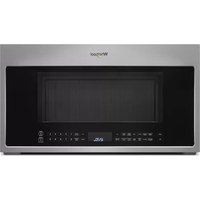
YWMH78519LZ - Microwave WHIRLPOOL - Free user manual and instructions
Find the device manual for free YWMH78519LZ WHIRLPOOL in PDF.


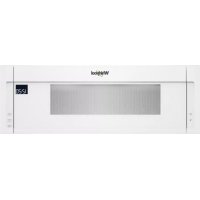
| Product Type | Microwave/Convection Oven Combined with Range Hood |
| Brand | Whirlpool |
| Model | YWMH78519LZ |
| Product Dimensions (H x W x D) | 29 1/4 in (76.0 cm) x 17 1/2 in (43.5 cm) + 3/16 in (0.5 cm) x 16 1/4 in (41.3 cm) up to 1/2 in (43.2 cm) depending on door |
| Electrical Requirements | 120 V, 60 Hz, AC only, 15 or 20 A, fuse or circuit breaker protected |
| Maximum Power | Not specified in the manual, estimated ~1000 W (typical) |
| Oven Capacity | Not specified in the manual, estimated ~1.9 cu ft (typical) |
| Load Support Capacity | 150 lb (68 kg) including the oven and its contents as well as the upper cabinet |
| Venting Modes | Recirculation (default), discharge through the wall or through the roof |
| Recommended Duct Type | Rectangular duct 3 1/4 in x 10 in or round 6 in diameter, rigid metal |
| Provided Filters | Aluminum grease filters (and possibly charcoal filters depending on model) |
| Lighting | Built-in (not specified, but typical for hood) |
| Safety | Child safety lock (not explicit in the excerpt, but likely) |
| Installation | Over an electric or gas range 36 in (91.4 cm) or less |
| Required Clearance | 30 in (76.2 cm) min. between cooktop and microwave; 66 in (167.6 cm) from floor; cabinet depth 12-14 in (30.5-35.6 cm) |
| Available Spare Parts | Mounting plate, damper, template, screw set |
| Optional Accessories | Filler panel kits (white, black, biscuit, stainless steel, almond) |
| Estimated Lifespan | Not specified, typically 10-15 years |
| Sound Level | Not specified |
| Country of Manufacture | Not specified (Whirlpool is an American brand) |
Frequently Asked Questions - YWMH78519LZ WHIRLPOOL
User questions about YWMH78519LZ WHIRLPOOL
0 question about this device. Answer the ones you know or ask your own.
Ask a new question about this device
Download the instructions for your Microwave in PDF format for free! Find your manual YWMH78519LZ - WHIRLPOOL and take your electronic device back in hand. On this page are published all the documents necessary for the use of your device. YWMH78519LZ by WHIRLPOOL.
USER MANUAL YWMH78519LZ WHIRLPOOL
This product is suitable for use above electric or gas cooking products up to and including 36" (91.4 cm) wide. See the "Installation Requirements" section for further notes.
These installation instructions cover different models. The appearance of your particular model may differ slightly from the illustration in these installation instructions.
INSTRUCTIONS D'INSTALLATION DE L'ENSEMBLE FOUR À MICRO-ONDES/HOTTE
Location Requirements ....3
Product Dimensions ....3
Electrical Requirements 4
INSTALLATION INSTRUCTIONS ....5
Remove Mounting Plate 5
Rotate Blower Motor 5
Locate Wall Stud(s) 8
Mark Rear Wall 9
Drill Holes in Rear Wall 10
Attach Mounting Plate to Wall ....10
Prepare Upper Cabinet ....11
Install Damper Assembly (for wall venting only) ....11
Install the Microwave Oven 12
Complete Installation ....13
VENTING DESIGN SPECIFICATIONS ....14
ASSISTANCE....15
Replacement Parts 15
Accessories....15
SÉCURITÉ DE L'ENSEMBLE FOUR À MICRO-ONDES/HOTTE....16
EXIGENCES D'INSTALLATION ....16
Your safety and the safety of others are very important.
We have provided many important safety messages in this manual and on your appliance. Always read and obey all safety messages.

This is the safety alert symbol.
This symbol alerts you to potential hazards that can kill or hurt you and others.
All safety messages will follow the safety alert symbol and either the word "DANGER" or "WARNING."
These words mean:
DANGER
You can be killed or seriously injured if you don't immediately follow instructions.
WARNING
You can be killed or seriously injured if you don't follow instructions.
All safety messages will tell you what the potential hazard is, tell you how to reduce the chance of injury, and tell you what can happen if the instructions are not followed.
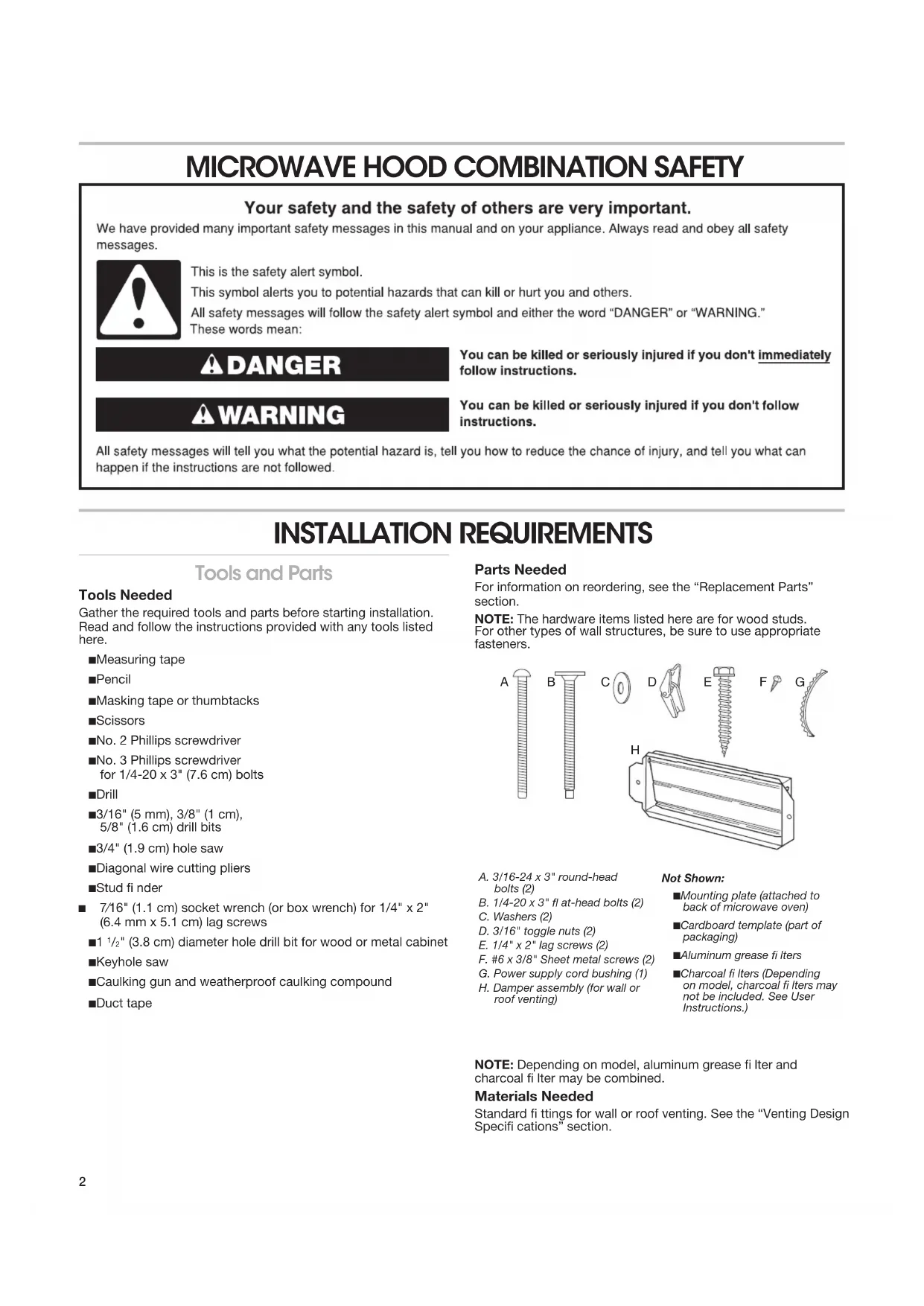
INSTALLATION REQUIREMENTS
Tools and Parts
Tools Needed
Gather the required tools and parts before starting installation. Read and follow the instructions provided with any tools listed here.
■Measuring tape
Pencil
■Masking tape or thumbtacks
■Scissors
■No. 2 Phillips screwdriver
■No. 3 Phillips screwdriver for 1/4-20 x 3" (7.6 cm) bolts
Drill
■3/16" (5 mm), 3/8" (1 cm), 5/8" (1.6 cm) drill bits
■3/4" (1.9 cm) hole saw
■Diagonal wire cutting pliers
■Stud fi nder
■ 7/16" (1.1 cm) socket wrench (or box wrench) for 1/4" x 2" (6.4 mm x 5.1 cm) lag screws
■1 12 " (3.8 cm) diameter hole drill bit for wood or metal cabinet
■Keyhole saw
■Caulking gun and weatherproof caulking compound
■Duct tape
Parts Needed
For information on reordering, see the "Replacement Parts" section.
NOTE: The hardware items listed here are for wood studs. For other types of wall structures, be sure to use appropriate fasteners.
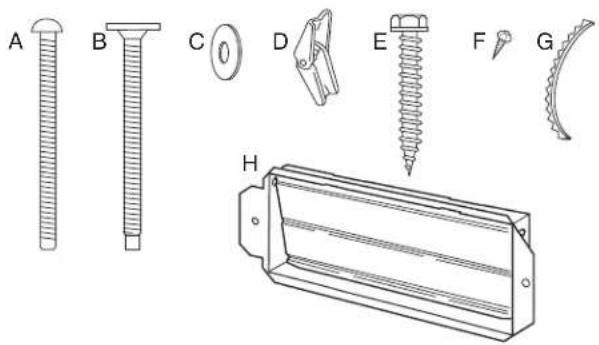
natural_image
Technical line drawings of various mechanical components and parts (no text or symbols)A. 3/16-24 x 3" round-head bolts (2)
B. 1/4-20 x 3" fl at-head bolts (2)
C. Washers (2)
D. 3/16" toggle nuts (2)
E. 1/4" x 2" lag screws (2)
F. #6 x 3/8" Sheet metal screws (2)
G. Power supply cord bushing (1)
H. Damper assembly (for wall or roof venting)
Not Shown:
■Mounting plate (attached to back of microwave oven)
■Cardboard template (part of packaging)
■Aluminum grease fi Iters
■Charcoal fi Iters (Depending on model, charcoal fi Iters may not be included. See User Instructions.)
NOTE: Depending on model, aluminum grease fi Iter and charcoal fi Iter may be combined.
Materials Needed
Standard fi ttings for wall or roof venting. See the "Venting Design Specifi cations" section.
Separate Cardboard Template
The wall template and upper cabinet template is embedded in the backside of the carton box. They are used as a rear wall template and upper cabinet template.
- Cut along the dotted line to separate the cardboard template from the backside of the carton box.
- Set the cardboard template to the side and refer to it during the "Mark Rear Wall" and "Prepare Upper Cabinet" parts of installation.
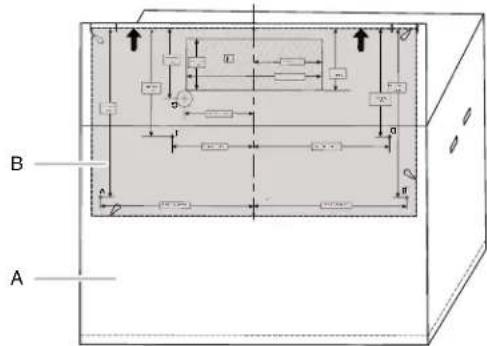
A. Backside of the carton box
B. Cardboard template (including Rear Wall template and Upper Cabinet template)
Location Requirements
Check the opening where the microwave oven will be installed. The location must provide:
■Minimum installation dimensions. See the "Installation Dimensions" illustration.
■Minimum one 2" x 4" (5.1 x 10.2 cm) wood wall stud and minimum 3/8" (1 cm) thickness drywall or plaster/lath within cabinet opening.
■Support for weight of 150 lbs (68 kg) which includes microwave oven and items placed inside the microwave oven and upper cabinet.
■Grounded electrical outlet inside upper cabinet. See the "Electrical Requirements" section.
NOTES:
■If installing the microwave oven near a left sidewall, make sure there is at least 6" (15.2 cm) of clearance between the wall and the microwave oven so that the door can open fully.
■Some models have a pocket handle. If installing the microwave near a right side wall, make sure there is at least 3" (7.6 cm) of clearance between wall and microwave oven so you can grab the handle integrated inside the door.
■Some cabinet and building materials are not designed to withstand the heat produced by the microwave oven for cooking. Check with your builder or cabinet supplier to make sure that the materials used will not discolor, delaminate, or sustain other damages.
Special Requirements
For Wall Venting Installation Only:
■Cutout must be free of any obstructions so that the vent fit properly and the damper blade opens freely and fully.
For Roof Venting Installation Only:
If you are using a rectangular-to-round transition piece, the 3" (7.6 cm) clearance needs to exist above the microwave oven so that the damper blade can open freely and fully. See "Rectangular to Round Transition" illustration in the "Venting Design Specifications" section.
Installation Dimensions
NOTE: The grounded 3 prong outlet must be inside the upper cabinet. See the "Electrical Requirements" section.
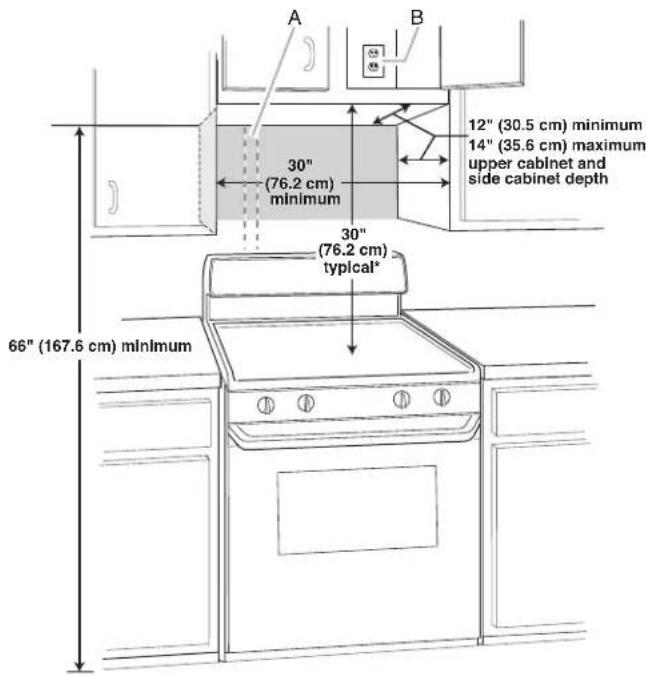
A. 2" x 4" (5.1 x 10.2 cm) wall stud
B. Grounded 3 prong outlet
*30" (76.2 cm) is typical for 66" (167.6 cm) installation height. Exact dimensions may vary depending on type of range/cooktop below.
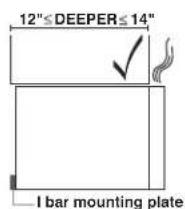
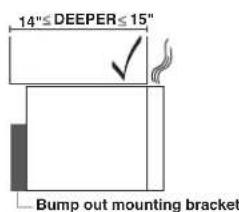
NOTE: To ensure good performance, do not obstruct top vent airfl ow. If cabinets are deeper than 14" (35.6 cm) but no more than 15" (38.1 cm), use the bump out mounting kit replacing the I bar mounting plate from the wall. The bump out mounting kit (part # W11185746) is not provided but can be purchased from Whirlpool.
Product Dimensions
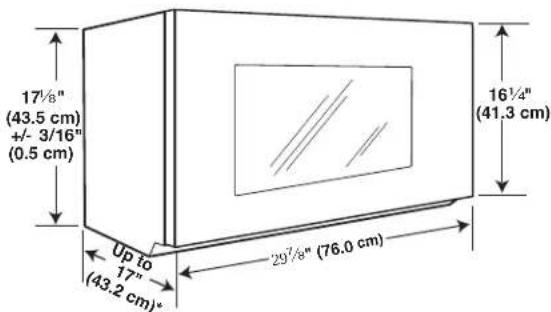
*Overall depth of product will vary slightly depending on door design.
WARNING

Electrical Shock Hazard
Plug into a grounded 3 prong outlet.
Do not remove ground prong.
Do not use an adapter.
Do not use an extension cord.
Failure to follow these instructions can result in death, fire, or electrical shock.
Observe all governing codes and ordinances.
Required:
■A 120 V, 60 Hz, AC only, 15 or 20 A electrical supply with a fuse or circuit breaker
Recommended:
■A time-delay fuse or time-delay circuit breaker
■A separate circuit serving only this microwave oven
GROUNDING INSTRUCTIONS
■ For all cord connected appliances:
The microwave oven must be grounded. In the event of an electrical short circuit, grounding reduces the risk of electric shock by providing an escape wire for the electric current. The microwave oven is equipped with a cord having a grounding wire with a grounding plug. The plug must be plugged into an outlet that is properly installed and grounded.
WARNING: Improper use of the grounding plug can result in a risk of electric shock. Consult a qualified electrician or serviceman if the grounding instructions are not completely understood, or if doubt exists as to whether the microwave oven is properly grounded.
Do not use an extension cord. If the power supply cord is too short, have a qualified electrician or serviceman install an outlet near the microwave oven.
SAVE THESE INSTRUCTIONS
INSTALLATION INSTRUCTIONS
Remove Mounting Plate
Depending on your model, the mounting plate may be in the foam packaging, or it may be attached to the back of the microwave oven.
NOTE: To avoid possible damage, cover the work surface.
-
Remove any remaining contents from the microwave oven cavity.
-
If the mounting plate is attached to the back of the microwave oven, remove it and set it aside.
-
Tape the microwave oven door closed so that the door does not swing open while the microwave oven is being handled.
NOTE: To avoid damage to the microwave oven, do not grip or use the door or door handle while the microwave oven is being handled.
Rotate Blower Motor
The microwave oven is set for recirculation installation. For wall or roof venting, changes must be made to the venting system.
NOTE: Skip this section if you are using recirculation installation. Keep the damper assembly in case the venting method is changed, or the microwave oven is reinstalled in another location where wall or roof venting may be used.
Wall Venting Installation Only
- Remove screws attaching damper plate to back of microwave oven, set the screws aside.
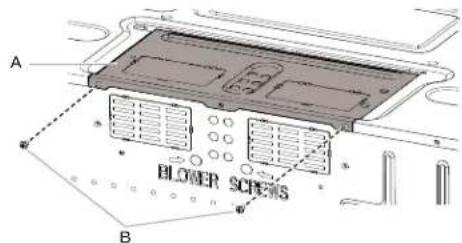
A. Damper plate
B. Screws
- Turn and hold the damper plate vertically as shown.
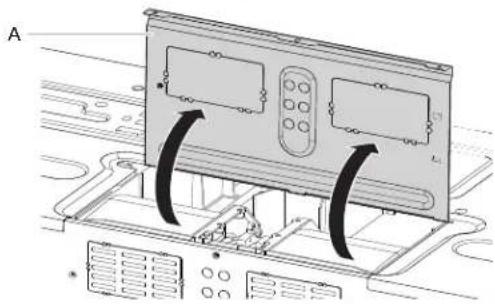
natural_image
Diagram of a computer monitor with two panels and ventilation slots, showing internal wiring (no text or symbols)A. Damper plate
- Remove two blower screws attaching blower motor to the microwave oven, and set aside.
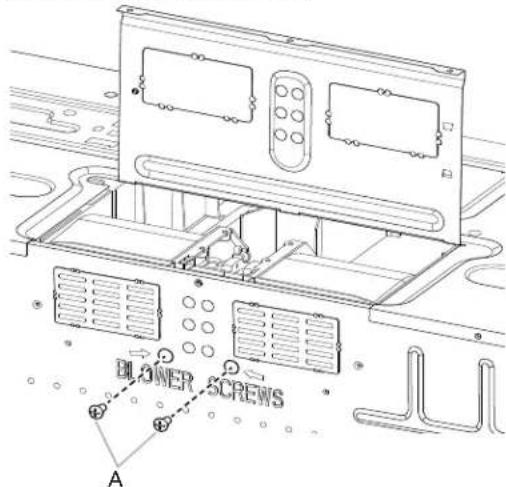
A. Blower screws (in recessed holes)
- Disconnect the blower motor wire from the connector.
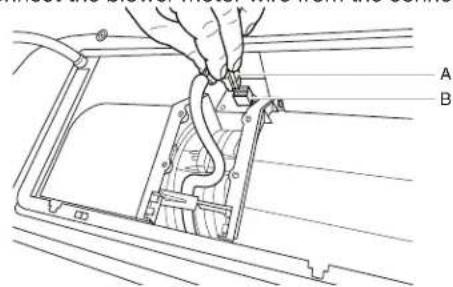
A. Blower motor wire
B. Connector
- Lift blower motor out of microwave oven, and set aside.
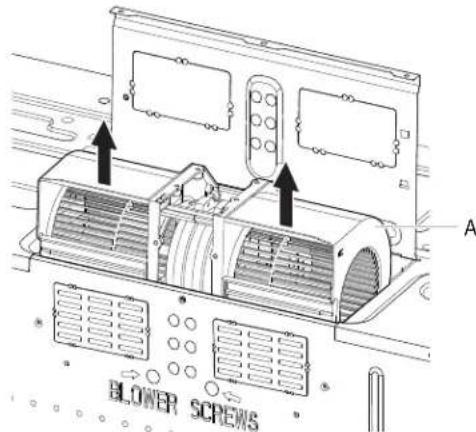
A. Blower Motor
- Using diagonal wire cutting pliers, gently snip out the rectangular damper vent covers at the perforations.
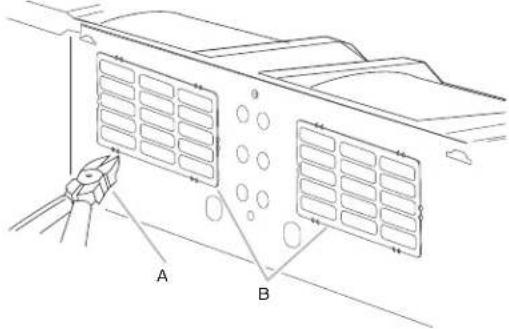
A. Diagonal wire cutting pliers
B. Rectangular damper vent cover
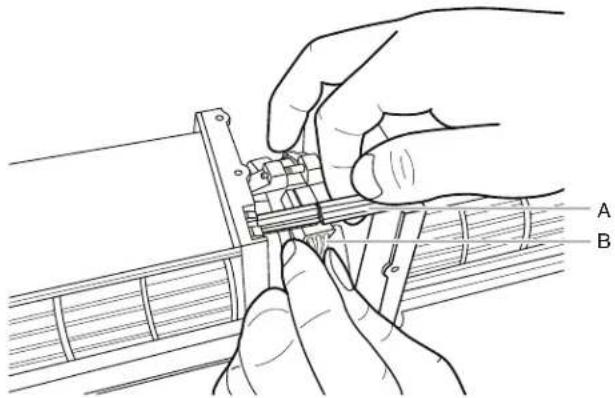
- Hold the blower motor wire, put the wire through the blower motor bridge.
natural_image
Line drawing of hands assembling or adjusting a mechanical component (no text or symbols visible)A. Blower motor bridge
B. Blower motor wire
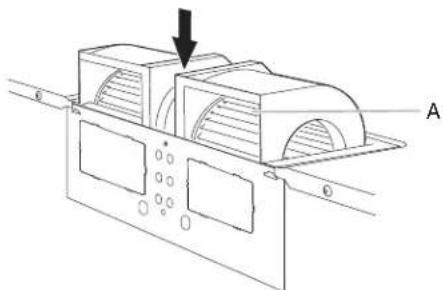
- Lower blower motor back into the microwave oven. Exhaust ports face the back of the microwave oven.
natural_image
Technical line drawing of a mechanical component with labeled section A (no text or symbols on the diagram itself)A. Exhaust Port
- Reconnect the blower motor wire into the connector.
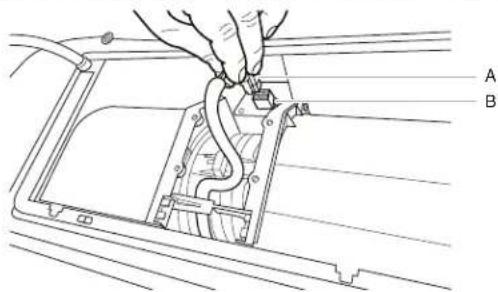
A. Blower motor wire
B. Connector
- Reattach the two blower screws into the recessed holes in the back of the microwave.
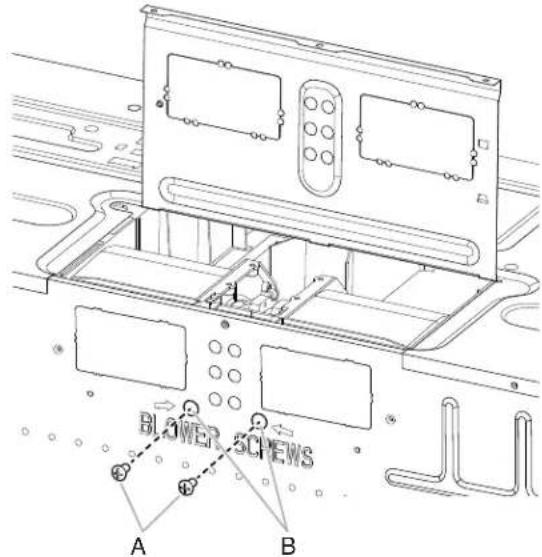
A. Screws
B. Recessed holes
- Check to make sure the two screws are secured properly in the blower motor screw holes, so that the motor cannot move.
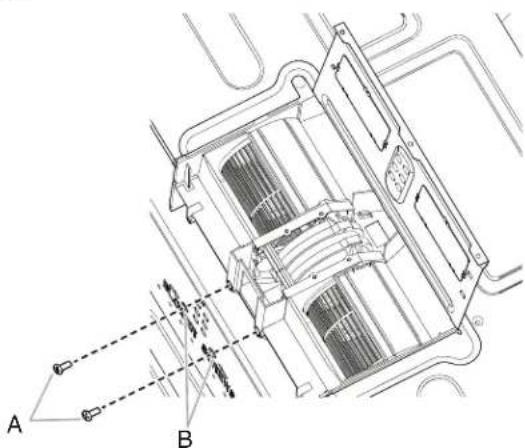
natural_image
Technical line drawing of a mechanical or electrical component with labeled points A and B, showing internal structure and connections (no readable text or symbols)A. Screws
B. Blower motor screw holes
- Return the damper plate to its original horizontal position.
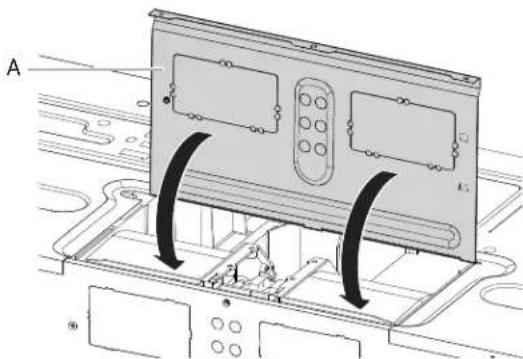
A. Damper plate
- Secure damper plate with two screws removed in Step 1.
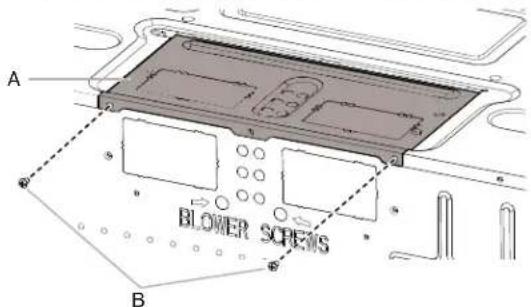
A. Damper plate
B. Screws
Roof Venting Installation Only
- Repeat Step 1 from "Wall Venting Installation Only."
- Repeat Step 2 from "Wall Venting Installation Only."
- Repeat Step 3 from "Wall Venting Installation Only."
- Repeat Step 4 from "Wall Venting Installation Only."
- Repeat Step 5 from "Wall Venting Installation Only."
- Using diagonal wire cutting pliers, gently snip out the rectangular vent covers on the damper plate at the perforations.
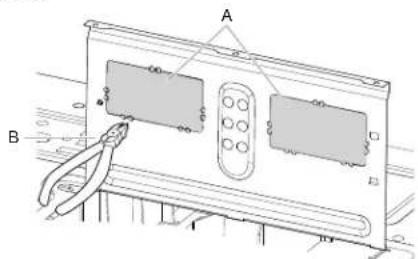
A. Rectangular vent covers
B. Diagonal wire cutting pliers
- Lower blower motor back into microwave oven. Exhaust ports face the top of microwave oven.
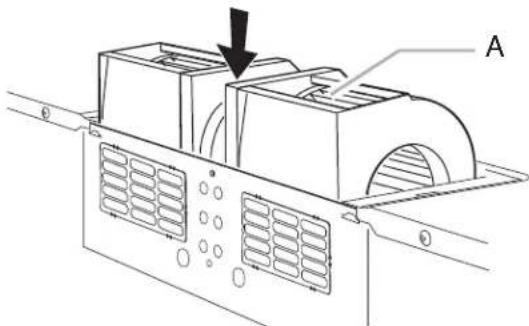
A. Exhaust port
IMPORTANT: If blower motor is not positioned with fl at side facing the back of the microwave oven (as shown), performance will be poor.
- Reconnect the blower motor wire into the connector.
- Reattach the two blower screws into the recessed holes in the back of the microwave.
- Check to make sure the two screws are secured properly in the blower motor screw holes, so that the motor cannot move.
- Return the damper plate to its original horizontal position.
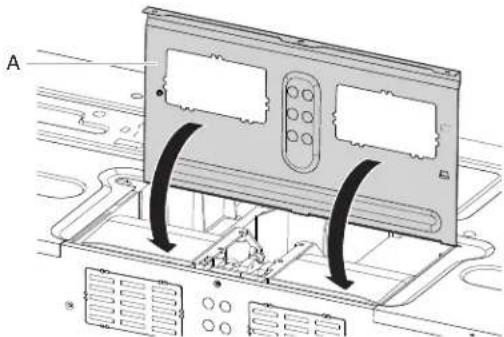
natural_image
Diagram of a computer monitor with ventilation grilles and control panel, showing no text or symbolsA. Damper plate
- Secure damper plate with two screws removed in Step 1.
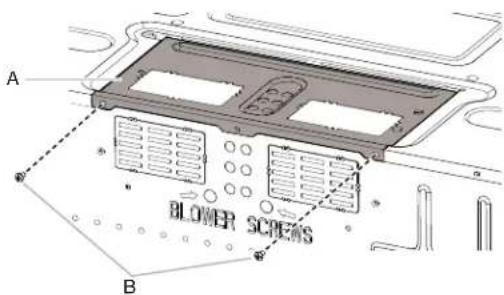
A. Damper plate
B. Screws
Locate Wall Stud(s)
NOTE: If no wall studs exist within the cabinet opening, do not install the microwave oven.
See illustrations in "Possible Wall Stud Configurations."
- Using a stud fi nder, locate the edges of the wall stud(s) within the opening.
- Mark the center of each stud, and draw a plumb line down each stud center. See illustrations in "Possible Wall Stud Configurations."
Possible Wall Stud Confi gurations
These depictions show examples of preferred installation configurations with the mounting plate.
No Wall Studs at End Holes
Figure 1
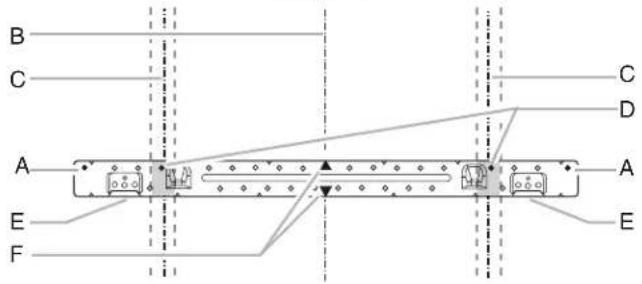
No Wall Studs at End Holes
Figure 2
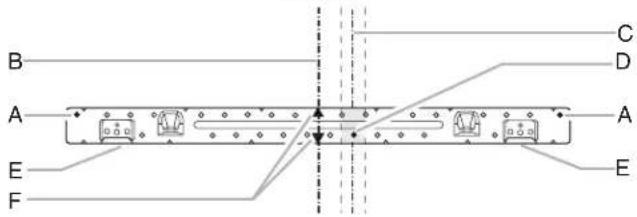
NOTE: If wall stud is within 6" (15.2 cm) of the vertical centerline (see the "Mark Rear Wall" section), only recirculation or roof venting installation can be done.
Wall Stud at End Hole
Figure 3
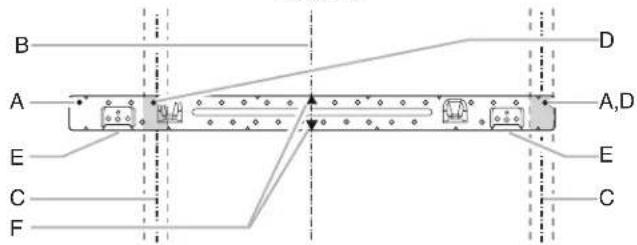
Wall Studs at End Holes
Figure 4
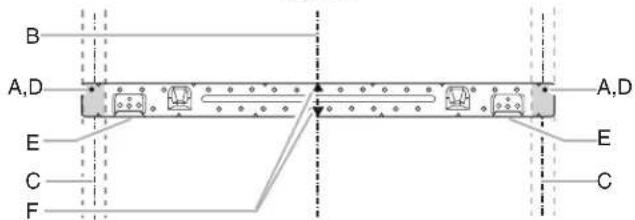
A. End holes (on mounting plate)
B. Cabinet opening vertical centerline
C. Wall stud centerlines
D. Holes for lag screws
E. Support tabs
F. Mounting plate center markers
Mark Rear Wall
The microwave oven must be installed on a minimum of one wall stud, preferably two, using a minimum of one lag screw, preferably two.
- Using measuring tape, find and clearly mark the vertical centerline of the opening.
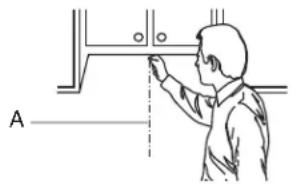
A. Centerline
- Align the center markers on the cardboard template, to the centerline on the wall, making sure it is level, and that the top of the cardboard template is butted up against the bottom edge of the upper cabinet.
NOTES:
■If the front edge of the upper cabinet is lower than the back edge, lower the cardboard template so that its top is level with the front edge of the cabinet.
■If the cardboard template is damaged or unusable, measure and mark the wall with the dimensions described in Step 4.
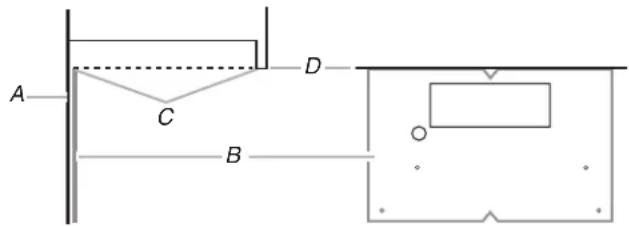
A. Rear wall
B. Cardboard template
C. Top of cardboard template must align with front edge of cabinet.
D. Front edge of upper cabinet
-
Holding the cardboard template in place, mark both holes in the lower corners and draw a horizontal line across the bottom edge of the cardboard template. These represent the mounting plate's end holes and bottom edge.
-
Remove the cardboard template and check the markings:
Upper cabinet bottom
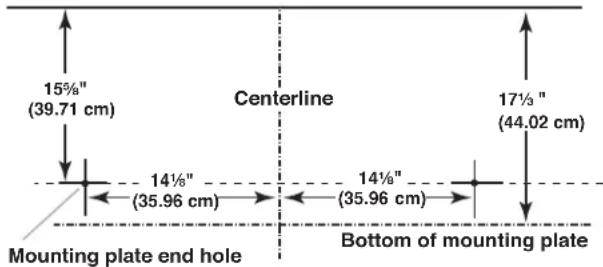
■The bottom edge line must be 17 13 " (44.02 cm) from the bottom of the upper cabinet and must be level.
■The end holes must be 15 58 " (39.71 cm) from the bottom edge of the upper cabinet and must be on a level line with each other. They must each be 14 18 " (35.96 cm) from the centerline.
5. With the support tabs facing forward (see illustrations in the "Locate Wall Stud(s)" section), align the mounting plate center markers to the centerline on the wall, making sure its bottom edge is aligned to the horizontal line drawn in Step 3 and that the end holes are properly marked. Make sure the mounting plate is level.
-
Holding the mounting plate in place, find the wall stud centerline(s) drawn in Step 2 of "Locate Wall Stud(s)" and mark at least one, preferably two hole(s) through the mounting plate, closest to the wall stud centerline(s). See figures 1, 2, and/or 3 in "Possible Wall Stud Configurations" in the "Locate Wall Stud(s)" section. The blackened holes in the shaded areas are ideal hole locations.
-
Set the mounting plate aside.
Wall Venting Installation Only
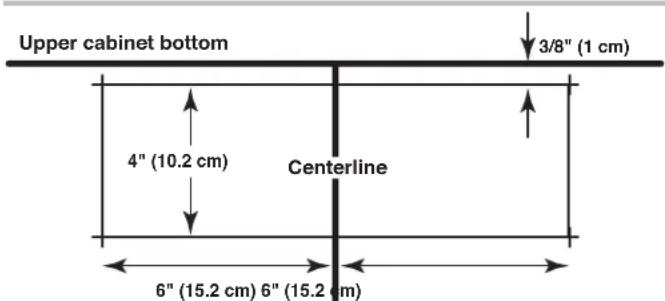
- Mark the centerline 3/8" (1 cm) down from the bottom edge of the upper cabinet.
- Using measuring tape, measure out 6" (15.2 cm) on both sides of the centerline, and mark.
- Measure down 4" (10.2 cm) from the mark made in Step 8 and mark.
- Using a straightedge, draw the two horizontal, level lines through the marks made in steps 8 and 10.
- Draw the two vertical plumb lines down from the marks made in Step 9 to complete the 12" x 4" (30.5 x 10.2 cm) rectangle. This is the venting cutout area.
- Cut a 3/4" (1.9 cm) hole in one corner of the cutout area.
- Using a keyhole saw, cut out the venting cutout area.
Drill Holes in Rear Wall
In addition to being installed on at least one wall stud, the mounting plate must attach to the wall at both end holes. If the end holes are not over wall studs, use two 3/16-24 x 3" round-head bolts with toggle nuts; if one end hole is over a wall stud, use one lag screw and one 3/16-24 x 3" round-head bolt with toggle nut; or if both end holes are over wall studs, use two lag screws. Following are three installation confi gurations.
Installation for No Wall Studs at End Holes (Figures 1 and 2)
- Drill 5/8" (1.6 cm) holes through the wall at both end holes marked in Step 3 of the "Mark Rear Wall."
- Drill 3/16" (5 mm) hole(s) into the wall stud(s) at the hole(s) marked in Step 6 of the "Mark Rear Wall." Refer to figures 1 and 2 in "Possible Wall Stud Configurations" in the "Locate Wall Stud(s)" section.
Installation for Wall Stud at One End Hole (Figure 3)
- Drill a 3/16" (5 mm) hole into the wall stud at the end hole marked in Step 3 of the "Mark Rear Wall."
- If installing on a second wall stud, drill a 3/16" (5 mm) hole into the wall stud at the other hole marked in Step 6 of the "Mark Rear Wall." Refer to Figure 3 in "Possible Wall Stud Configurations" in the "Locate all Stud(s)" section.
- Drill a 5/8" (1.6 cm) hole through the wall at the other end hole.
Installation for Wall Studs at Both End Holes (Figure 4)
- Drill 3/16" (5 mm) holes into the studs at the end holes marked in Step 3 of the "Mark Rear Wall."
Attach Mounting Plate to Wall
NOTE: Secure the mounting plate to the wall at both end holes drilled into the wall studs and/or drywall using either 3/16-24 x 3" round-head bolts and toggle nuts or 1/4 x 2" lag screws.
Refer to illustrations in “Possible Wall Stud Configurations” in the “Locate Wall Stud(s)” section.
No Wall Studs at End Holes (Figures 1 and 2)
NOTE: The mounting plate must be secured to the wall on at least one wall stud as well as at both ends.
- With the support tabs of the mounting plate facing forward, insert 3/16-24 x 3" round-head bolts through both end holes of mounting plate.
- Start toggle nuts on bolts from the back of the mounting plate. Leave enough space for the toggle nuts to go through the wall and to open.
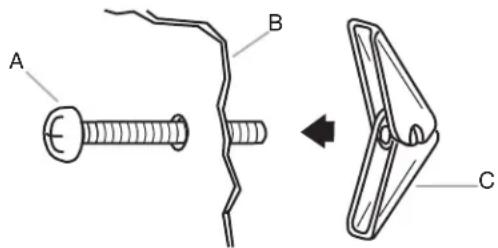
A. 3/16-24 x 3" round-head bolt
B. Mounting plate
C. Spring toggle nut
-
Position mounting plate on the wall.
-
Push the two bolts with toggle nuts through the drywall, and fi nger tighten the bolts to make sure toggle nuts have opened against drywall.
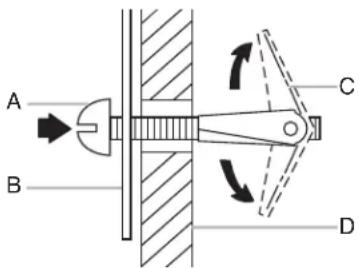
A. 3/16-24 x 3" round-head bolt
B. Mounting plate
C. Spring toggle nut
D. Drywall
- Insert lag screw(s) into the hole(s) drilled into wall stud(s) in Step 2 of "Installation for No Wall Studs at End Holes" in the "Drill Holes in Rear Wall" section.
- Check alignment of mounting plate, making sure it is level.
- Securely tighten all lag screws and bolts.
Wall Stud at One End Hole (Figure 3)
- With the support tabs of the mounting plate facing forward, insert a 3/16-24 x 3" round-head bolt through the end hole that fi ts over the 5/8" (1.6 cm) hole drilled in Step 3 of "Installation for Wall Stud at One End Hole" in the "Drill Holes in Rear Wall" section.
- Start a toggle nut on the bolt from the back of the mounting plate. Leave enough space for the toggle nut to go through the wall and to open.
- Position mounting plate on the wall.
- Push the bolt with toggle nut through the drywall, and finger tighten the bolt to make sure toggle nut has opened against drywall.
- Insert a lag screw into the remaining end hole.
- If installing on a second wall stud, insert a lag screw into the other hole drilled in Step 2 of "Installation for Wall Stud at One End Hole" in the "Drill Holes in Rear Wall" section.
- Check alignment of mounting plate, making sure it is level.
- Securely tighten the lag screw(s) and bolt.
Wall Studs at Both End Holes (Figure 4)
- Position mounting plate on the wall.
- Insert lag screws into both end holes.
- Check alignment of mounting plate, making sure it is level.
- Securely tighten the lag screws.
Prepare Upper Cabinet
- Disconnect power to outlet.
- Remove all contents from upper cabinet.
- Place cardboard template against the bottom of the upper cabinet, make sure the template centerline aligns with the vertical centerline on the rear wall.
The "rear wall" arrows must be against the rear wall so that the holes cut into the upper cabinet align with the holes in the top of the microwave oven.
NOTE:
If the wall behind the microwave oven (as installed) has a partial wall covering (for example, tile backsplash), be sure the "Rear Wall" arrows align to the thickest part of the rear wall (for example, the thickness of the tiles rather than the drywall).
- Make sure the 10" (25.4 cm) dimension from the rear wall to points "D" and "E" on the template is maintained.
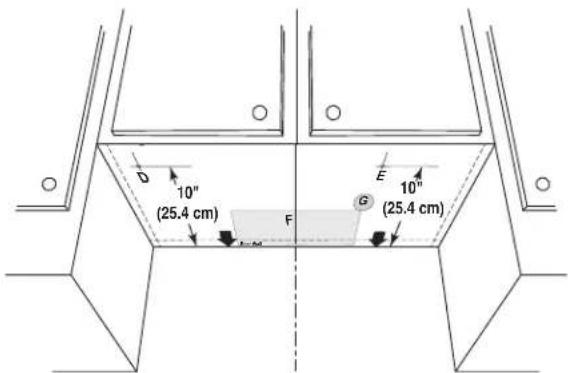
- Cut the 1 12 " (3.8 cm) diameter hole at the circular shaded area "G" on the template. This hole is for the power supply cord.
NOTE: If upper cabinet is metal, the supply cord bushing needs to be installed around the supply cord hole as shown.
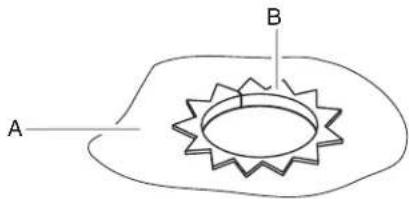
A. Metal cabinet
B. Power supply cord bushing
- Drill 3/8" (1 cm) holes at points "D" and "E" on the template. These are for two 1/4-20 x 3" bolts and washers used to secure the microwave oven to the upper cabinet.
For Roof Venting Installation Only:
- Cut 3/4" (1.9 cm) hole at one corner of the shaded rectangular area "F" on Cardboard Template.
- Using a keyhole saw, cut out the rectangular area.
Install Damper Assembly (for wall venting only)
- Check that damper blade moves freely and opens fully.
- Position the damper assembly on the back of the microwave oven so that the damper blade hinge is at the top, and the damper blade opens away from the microwave oven.
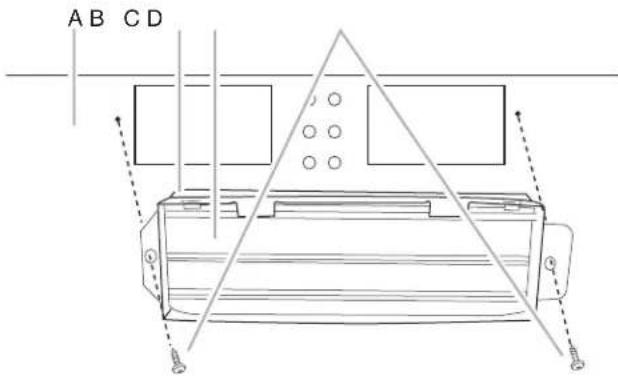
A. Back of microwave oven
B. Damper assembly
C. Damper blade
D. #6 x 3/8" Sheet metal screws
- Secure damper assembly with two #6 x 3/8" sheet metal screws.
Install the Microwave Oven
WARNING
Excessive Weight Hazard
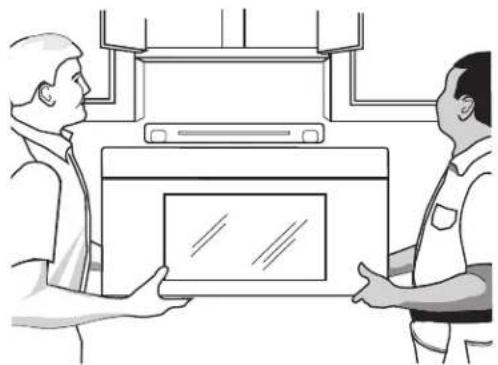
Use two or more people to move and install microwave oven.
Failure to do so can result in back or other injury.
IMPORTANT: The control side of the microwave oven is the heavy side. Handle the microwave oven gently.
- Remove the two packing spacers from the top of the vent grille before using the microwave oven.
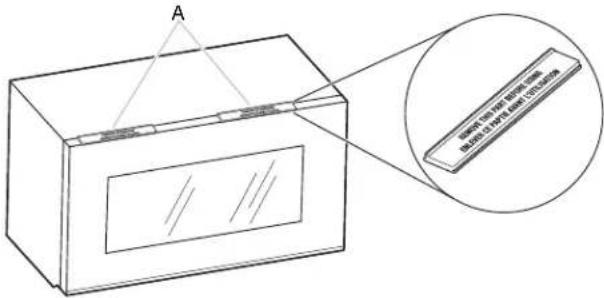
A. Packing spacers (2)
NOTE: Depending on your model, it may not have packing spacers. If it does not have packing spacers, begin with step 2.
-
Place a washer on each 1/4-20 x 3" fl at-head bolt and place inside upper cabinet near the 3/8" (1 cm) holes.
-
Make sure the microwave oven door is closed and taped shut.
natural_image
Illustration of two men exchanging a device in an indoor setting (no text or symbols visible)- Using two or more people, lift microwave oven and hang it on support tabs at the bottom of mounting plate.
NOTE: To avoid damage to the microwave oven, do not grip or use the door or door handle while the microwave oven is being handled.
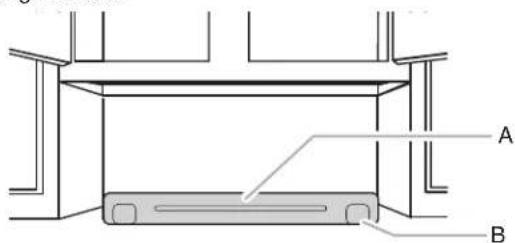
A. Mounting plate
B. Support tabs
- With front of microwave oven still tilted, thread power supply cord through the power supply cord hole in the bottom of the upper cabinet.
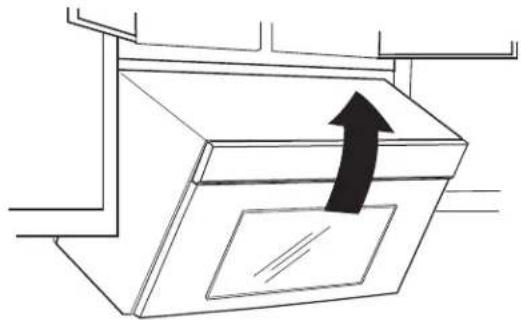
natural_image
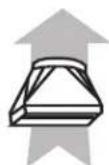
Simple line drawing of a ceiling-mounted air vent with an upward arrow indicating airflow direction (no text or symbols)- Rotate microwave oven up toward upper cabinet.
NOTE: If venting through the wall, make sure the damper assembly fi ts easily into the vent in the wall cutout.
- Push microwave oven against mounting plate and hold in place.
NOTE: If microwave oven does not need to be adjusted, skip steps 7 through 9.
-
If adjustment is required, rotate microwave oven downward. Using two or more people, lift microwave oven off of mounting plate, and set aside on a covered surface.
-
Loosen mounting plate screws. Adjust mounting plate and retighten screws.
-
Repeat steps 3 through 6.
-
With the microwave oven centered, and with at least one person holding it in place, insert bolts through upper cabinet into microwave oven. Tighten bolts until there is no gap between upper cabinet and microwave oven.
NOTES:
■Some upper cabinets may require bolts longer or shorter than 3" (7.6 cm). Longer or shorter bolts are available at most hardware stores.
■Overtightening bolts may warp the top of the microwave oven. To avoid warping, wood fler blocks (installer to provide) may be added. The blocks must be the same thickness as the space between the upper cabinet bottom and the microwave oven.
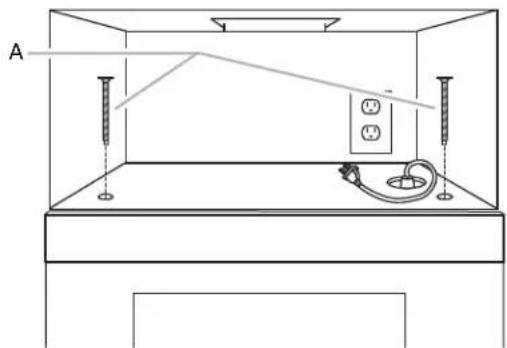
natural_image
Technical line drawing of a room interior with fixtures and a wall-mounted device (no text or symbols)A. Bolts
NOTE: Avoid damage to the mounting nut, screw the bolts into the mounting nut holes around 15-20 mm by hand fi rst, make sure the bolts thread in properly. Then tighten with tools.
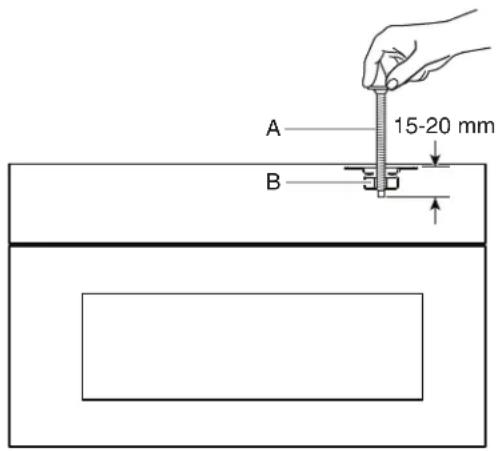
A. Bolt
B. Mounting Nut
For Roof Venting Installation Only
- Insert damper assembly through the cabinet cutout so that the long tab of the damper assembly slides under the raised tabs of the damper plate. Then secure with #6 x 3/8" sheet metal screw.
NOTE: The screw cannot be installed if the damper assembly is not positioned as shown.
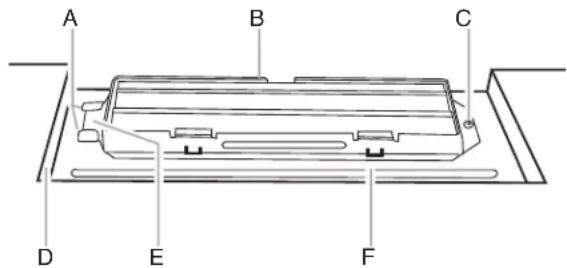
A. Raised tabs
B. Damper assembly
C. #6 x 3/8" Sheet metal screw
D. Upper cabinet cutout
E. Long tab
F. Damper plate
- Connect vent to damper assembly.
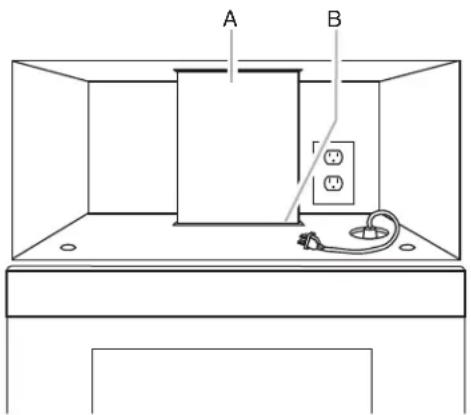
A. Vent
B. Damper assembly (under vent)
Complete Installation
- Install fi Iters. Refer to the User Instructions for fi Iter placement.
WARNING

Electrical Shock Hazard
Plug into a grounded 3 prong outlet.
Do not remove ground prong.
Do not use an adapter.
Do not use an extension cord.
Failure to follow these instructions can result in death, fire, or electrical shock.
- Plug microwave oven into grounded 3 prong outlet.
- Reconnect power.
- Check the operation of microwave oven by placing 1 cup (250 mL) of water on the turntable and programming a cook time of 1 minute at 100% power. Test vent fan and exhaust by operating the vent fan.
- If the microwave oven does not operate:
■Check that a household fuse has not blown, or that a circuit breaker has not tripped. Replace the fuse or reset the circuit breaker. If the problem continues, call an electrician.
■Check that the power supply cord is plugged into a grounded 3 prong outlet.
■See the User Instructions for troubleshooting information.
The installation is now complete.
Save Installation Instructions for future use.
VENTING DESIGN SPECIFICATIONS
This section is intended for architectural designer and builder/contractor reference only.
NOTES:
■Vent materials needed for installation are not provided with microwave hood combination.
■We do not recommend using a fl exible metal vent.
■To avoid possible product damage, be sure to vent air outside, unless using recirculation installation. Do not vent exhaust air into concealed spaces, such as spaces within walls or ceilings, attics, crawl spaces or garages.
For optimal venting installation, we recommend:
■Using roof or wall caps that have backdraft dampers.
■Using a rigid metal vent.
■Using the most direct route by minimizing the length of the vent and number of elbows to provide efficient performance.
■Using uniformly sized vents.
■Using duct tape to seal all joints in the vent system.
■Using caulking compound to seal exterior wall or roof opening around cap.
■Not installing two elbows together, for optimal hood performance.
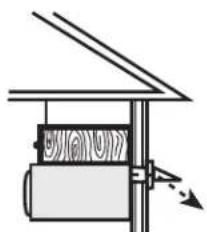
If venting through the wall, be sure that there is proper clearance within the wall for the damper to open fully.
If venting through the roof, and rectangular-to-round transition is used, be sure there are at least 3" (7.6 cm) of clearance between the top of the microwave oven and the transition piece. See "Rectangular-to-Round Transition" illustration.
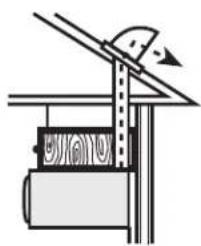
natural_image
Simple line drawing of a mechanical setup with a lever and base (no text or symbols)Roof venting
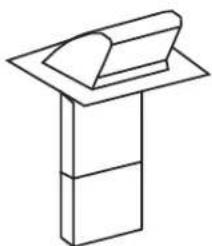
natural_image
Simple line drawing of a book placed on a stand (no text or symbols)Roof cap
natural_image
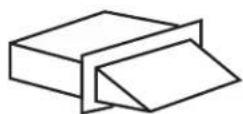
Simple line drawing of a mechanical device with no text or symbolsWall venting Wall cap
Rectangular-to-Round Transition
NOTE: The minimum 3" (7.6 cm) clearance must exist between the top of the microwave oven and the rectangular-to-round transition piece so that the damper can open freely and fully.
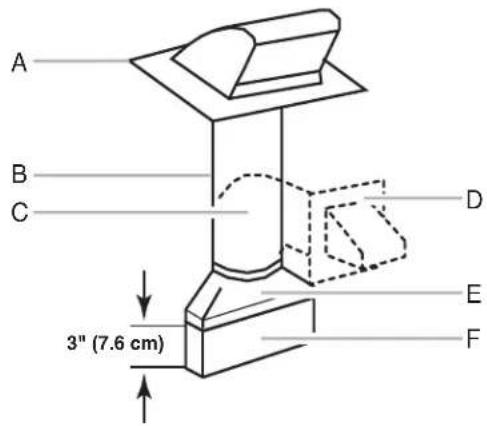
A. Roof cap
B. 6" (15.2 cm) minimum diameter round vent
C. Elbow (for wall venting only)
D. Wall cap
E. 3^1/4 " x 10" to 6" (8.3 x 25.4 cm to 15.2 cm)
rectangular-to-round transition piece
F. Vent extension piece, at least 3" (7.6 cm) high
Recommended Standard Fittings
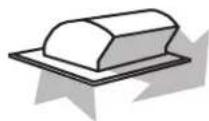
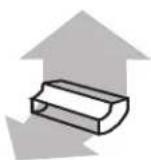
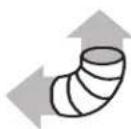
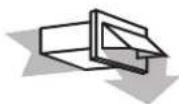
The following length equivalents are for use when fi guring vent length. See the examples in "Recommended Vent Length."
A
B
C
D
E
F
G
A. Rectangular-to-round transition piece: 3^1/4 x 10" to 6" = 5 ft (8.3 x 25.4 cm to 15.2 cm = 1.5 m)
B. Roof cap: 3 ^1/4 " x 10" = 24 ft (8.3 x 25.4 cm = 7.3 m)
C. 90^ elbow: 314 " x 10" = 25 ft (8.3 x 25.4 cm = 7.6 m)
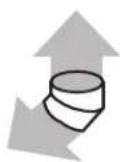
D. 90° elbow: 6" = 10 ft (15.2 cm = 3 m)
E. Wall cap: 314 " x 10" = 40 ft (8.3 x 25.4 cm = 12.2 m)
F. 45° elbow: 6" = 5 ft (15.2 cm = 1.5 m)
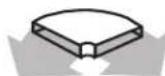
G. 90° fl at elbow: 3/4" x 10" = 10 ft (8.3 x 25.4 cm = 3 m)
Recommended Vent Length
A 3 ^1/4 " x 10" (8.3 x 25.4 cm) rectangular or 6" (15.2 cm) round vent should be used.
The total length of the vent system including straight vent, elbow(s), transitions and wall or roof caps must not exceed the equivalent of 140 ft (42.7 m) for either type of vent. See the “Recommended Standard Fittings” section for equivalent lengths.
For best performance, use no more than three 90° elbows.
To calculate the length of the system you need, add the equivalent lengths of each vent piece used in the system. See the following examples:
3^1/4 x 10" (8.3 x 25.4 cm) vent system = 73 ft (22.2 m) total
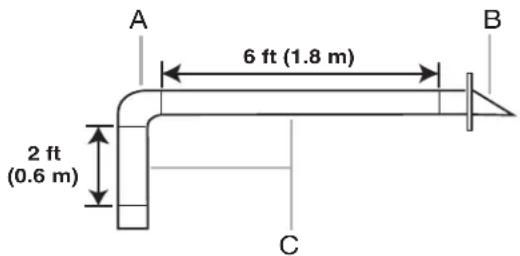
A. One 3^1/4 " x 10" (8.3 x 25.4 cm) 90° elbow = 25 ft (7.6 m)
B. One wall cap = 40 ft (12.2 m)
C. 2 ft (0.6 m) + 6 ft (1.8 m) straight = 8 ft (2.4 m)
6" (15.2 cm) vent system = 73 ft (22.2 m) total
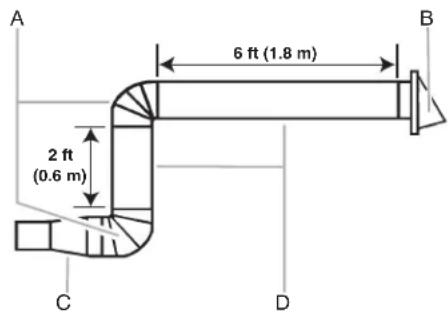
A. Two 90° elbows = 20 ft (6.1 m)
B. One wall cap = 40 ft (12.2 m)
C. One rectangular-to-round transition piece = 5 ft (1.5 m)
D. 2 ft (0.6 m) + 6 ft (1.8 m) straight = 8 ft (2.4 m)
If the existing vent is round, a rectangular to round transition piece must be used. In addition, a rectangular 3" (7.6 cm) extension vent between the damper assembly and rectangular to round transition piece must be installed to keep the damper from sticking.
ASSISTANCE
Call your authorized dealer or service center. When you call, you will need the microwave oven model number and serial number. Both numbers can be found on the model and serial number plate, which is located behind the microwave oven door on the front frame of the microwave oven.
If you need additional assistance, call us at our toll-free number or visit our website listed in the User Guide.
Replacement Parts
If any of the installation hardware needs to be replaced, call us at our toll-free number listed in the User Guide.
Following is a list of available replacement parts. You will need your model and serial numbers located on the front facing of the microwave oven opening, behind the door.
■Damper Assembly
■Mounting Plate
■Upper Cabinet Template
■Mounting Screw Kit (includes parts A-G in "Parts Supplied" in the "Tools and Parts" section)
Accessories
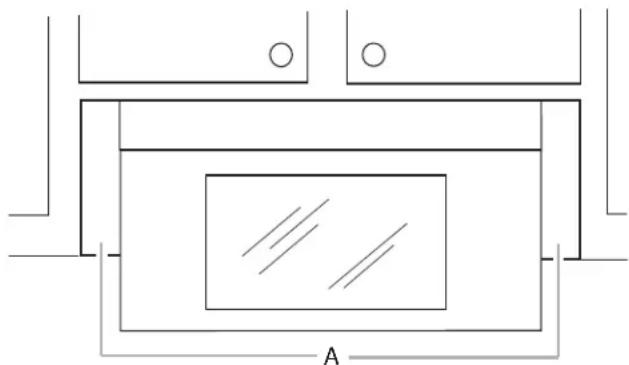
Filler Panel Kits are available from your dealer to use when installing this microwave oven in a 36" (91.4 cm) or 42" (106.7 cm) wide opening. The filler panels come in pairs. Each panel is 3" (7.6 cm) wide.
natural_image
Pure architectural floor plan lines without any text, numbers, or symbolsA. Filler panels
Filler Panel Kits: 8171336 White
8171337 Black
8171338 Biscuit
8171339 Stainless Steel
99403 Almond
See your authorized dealer or service center for details.
SÉCURITÉ DE L'ENSEMBLE FOUR À MICRO-ONDES/HOTTE
natural_image
Technical line drawings of various mechanical components and parts (no text or symbols)natural_image
Diagram of a computer monitor with two panels and control buttons, showing internal wiring (no text or symbols)A. Plaque de support du clapet
natural_image
Technical line drawing of a mechanical assembly with labeled component A (no text or symbols beyond label)natural_image
Technical line drawing of a mechanical component with labeled section A (no text or symbols beyond label)REMARQUE :
natural_image
Illustration of two people exchanging a device in an indoor setting (no text or symbols visible)natural_image
Simple line drawing of a ceiling-mounted cabinet with an upward arrow indicating airflow or movement (no text or symbols)natural_image
Line drawing of a room interior with fixtures and a wall-mounted electrical outlet (no text or symbols)natural_image
Pure mechanical diagram showing a lever and gear assembly without any text, numbers, or symbolsnatural_image
Simple line drawing of a rectangular object with a curved top and three horizontal sections (no text or symbols)natural_image
Simple line drawing of a mechanical device with a cylindrical component and an arrow indicating motion (no text or symbols)natural_image
Pure architectural floor plan lines without any text, numbers, or symbols
- INSTRUCTIONS D'INSTALLATION DE L'ENSEMBLE FOUR À MICRO-ONDES/HOTTE
- INSTALLATION INSTRUCTIONS ....5
- VENTING DESIGN SPECIFICATIONS ....14
- ASSISTANCE....15
- SÉCURITÉ DE L'ENSEMBLE FOUR À MICRO-ONDES/HOTTE....16
- EXIGENCES D'INSTALLATION ....16
- Your safety and the safety of others are very important.
- DANGER
- WARNING
- INSTALLATION REQUIREMENTS
- Tools and Parts
- Tools Needed
- Parts Needed
- Not Shown:
- Materials Needed
- Separate Cardboard Template
- Location Requirements
- NOTES:
- Special Requirements
- For Wall Venting Installation Only:
- For Roof Venting Installation Only:
- Installation Dimensions
- Product Dimensions
- Electrical Shock Hazard
- Required:
- Recommended:
- GROUNDING INSTRUCTIONS
- ■ For all cord connected appliances:
- SAVE THESE INSTRUCTIONS
- INSTALLATION INSTRUCTIONS
- Remove Mounting Plate
- Rotate Blower Motor
- Wall Venting Installation Only
- Roof Venting Installation Only
- Locate Wall Stud(s)
- Possible Wall Stud Confi gurations
- Mark Rear Wall
- Drill Holes in Rear Wall
- Installation for No Wall Studs at End Holes (Figures 1 and 2)
- Installation for Wall Stud at One End Hole (Figure 3)
- Installation for Wall Studs at Both End Holes (Figure 4)
- Attach Mounting Plate to Wall
- No Wall Studs at End Holes (Figures 1 and 2)
- Wall Stud at One End Hole (Figure 3)
- Wall Studs at Both End Holes (Figure 4)
- Prepare Upper Cabinet
- NOTE:
- Install Damper Assembly (for wall venting only)
- Install the Microwave Oven
- Excessive Weight Hazard
- For Roof Venting Installation Only
- Complete Installation
- VENTING DESIGN SPECIFICATIONS
- For optimal venting installation, we recommend:
- Rectangular-to-Round Transition
- Recommended Standard Fittings
- Recommended Vent Length
- ASSISTANCE
- Replacement Parts
- Accessories
- SÉCURITÉ DE L'ENSEMBLE FOUR À MICRO-ONDES/HOTTE
- REMARQUE :
Brand : WHIRLPOOL
Model : YWMH78519LZ
Category : Microwave