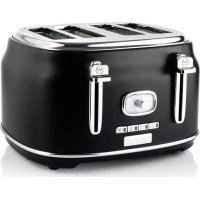
WKTTB809BK - Toaster WESTINGHOUSE - Free user manual and instructions
Find the device manual for free WKTTB809BK WESTINGHOUSE in PDF.


| Product Type | 4-Slice Toaster |
| Brand | Westinghouse |
| Model | WKTTB809BK |
| Color | Black |
| Capacity | 4 slices |
| Rated Power | 1450-1750 W |
| Supply Voltage | 220-240 V ~ 50/60 Hz |
| Browning Levels | 6 adjustable levels |
| Special Functions | Cancel, Bagel, Reheat, Defrost |
| Bun Warmer | Yes, removable |
| Crumb Tray | Removable for easy cleaning |
| Exterior Material | Heat-resistant plastic and stainless steel |
| Safety Devices | Automatic shut-off, overheat protection |
| Maintenance | Regular cleaning of crumb tray, wipe exterior |
| Usage | Household use only |
| Cord Length | Approximately 0.8 m |
Frequently Asked Questions - WKTTB809BK WESTINGHOUSE
User questions about WKTTB809BK WESTINGHOUSE
0 question about this device. Answer the ones you know or ask your own.
Ask a new question about this device
Download the instructions for your Toaster in PDF format for free! Find your manual WKTTB809BK - WESTINGHOUSE and take your electronic device back in hand. On this page are published all the documents necessary for the use of your device. WKTTB809BK by WESTINGHOUSE.
USER MANUAL WKTTB809BK WESTINGHOUSE
natural_image
Modern kitchen toaster with dual grates and a side panel (no visible text or symbols)4 SLICE TOASTER
WKTTB809RD / WKTTB809BK / WKTTB809WH
EN Instructions P.3
DE Anweisungen P.8
FR Instructions P.15
PLEASE READ ALL INSTRUCTIONS CAREFULLY BEFORE USE AND KEEP FOR FUTURE REFERENCE.
Follow basic safety precautions, including:
- Read these instructions before use and keep them in a safe place. If you pass the toaster on to a third party, make sure that you provide these instructions.
Remove all packaging and keep it until you are satisfied that the toaster is working. - Always follow basic safety precautions when using the appliance.
- Do not place the toaster in water or use it in a bathroom or near water. Do not use the toaster outdoors.
- The toaster should only be used by or under the supervision of a responsible adult.
- Position the toaster upright on a firm, level and heat-resistant surface near a power socket and out of the reach of children.
- Do not use the toaster near or below curtains or other combustible materials. Monitor the toaster during use, as overcooked bread can cause a fire.
- The area around the toasting slot will get hot during use - do not touch!
- Route the mains lead so that it does not overhang and can't be caught accidentally.
- Do not cover the toasting slot during toasting or while the toaster is hot.
- If bread gets jammed, unplug the toaster, let it cool down, and then carefully remove the bread. Do not use any sharp objects, as these may damage the elements.
- Do not toast buttered items or make toasted sandwiches in the toaster.
- Do not use torn, curled, or misshapen slices, as these may jam the toaster.
- Unplug after use and let the toaster cool down before cleaning and storing.
- Clean the crumbs out of your toaster frequently to avoid a buildup of crumbs. This is unhygienic and could cause a fire hazard.
- Only use the toaster when the crumb tray is closed.
- Keep the toaster and mains lead away from hotplates, hobs and burners.
- Only use the toaster to toast bread products.
- Do not use the toaster if it is damaged or malfunctions. If the mains lead is damaged, the toaster must be returned in order to prevent safety hazards.
- When using the bun warmer, make sure you put the rolls or other baked goods on the metal parts of the bun warmer. Do not place them on the bun warmer handles.
- The bun warmer will become very hot during and after use. Do not touch the metal parts when removing baked goods.
- Toasting slots
- Browning control knob
- CANCEL button (with indicator)
- BAGEL button (with indicator)
-
REHEAT button (with indicator)
-
DEFROST button (with indicator)
- Crumb tray
- Loading handles
- Bun warmer
- Bun warmer handles
NOTE: All images shown are for illustrative purposes only and may not be an exact representation of the product model.
BEFORE FIRST USE
- Remove all packaging from the appliance.
- Unpack all parts and check for damage that may have occurred during transport. If any parts are damaged or missing, do not use the appliance and return it to your retail outlet immediately.
- Clean the appliance before first use (see 'CLEANING AND CARE').
- Set the browning control knob (2) to the maximum level and push the loading handles (8) down without bread to burn off any dust which may have accumulated on the heating elements. The appliance may omit an odour. This is normal. Make sure the room is well ventilated.
EN
OPERATING INSTRUCTIONS
MAKING TOAST
- Make sure the toaster is placed upright on a firm, level, heat resistant and non-combustible surface.
- Connect the toaster to the power supply.
- Turn the browning control knob (2) to adjust the browning level (level 1 to level 6) of the toast. A higher browning level produces darker toast.
Note:
- The toasting colour for one slice tends to be darker than double slices at the same browning level.
-
The toasting colour tends to be darker for bread toasted earlier compared to bread toasted later.
-
Place the bread (maximum 4 slices) into the toasting slots (1). For optimal browning results, the thickness of the bread should be 10 mm.
Note: The thickness of the bread should not exceed 20 mm.
- Push the loading handles (8) down. The CANCEL button indicator (3) under the browning control knob (2) will turn on. The toaster will start heating up.
Note: The toaster must be connected to the power supply before the loading handles can be pushed and locked down.
- When toasting is complete, the toast will pop up and the toaster will turn off automatically.
Note: You can press the CANCEL button (3) to stop toasting at any time. Do not lift the loading handles (8) to cancel toasting.
USING THE FUNCTION BUTTONS
CANCEL button (3): Press to stop heating. The toast will pop up. The toaster will then turn off automatically.
BAGEL button (4): For toasting bagels or thinner bread rolls.
Push the loading handles (8) down until they latch in place; the CANCEL button indicator (3) will light up. Then, press the BAGEL button (4). Both the CANCEL button indicator (3) and the BAGEL button indicator (4) will light up at the same time. The indicators will switch off when the CANCEL button (3) is pressed or when the loading handles (8) pop up again.
REHEAT button (5): For reheating plain or unbuttered toasts.
Push the loading handles (8) down until they latch in place; the CANCEL button indicator (3) will light up. Then, press the REHEAT button (5). Both the CANCEL button indicator (3) and the REHEAT button indicator (5) will light up at the same time. The indicators will switch off when the CANCEL button (3) is pressed or when the loading handles (8) pop up again.
DEFORST button (6): For toasting frozen bread. The toasting time will be adjusted automatically therefore the browning level with this function will be the same as unfrozen bread.
Push the loading handles (8) down until they latch in place; the CANCEL button indicator (3) will light up. Then, press the DEFROST button (6). Both the CANCEL button indicator (3) and the DEFROST button indicator (6) will light up at the same time. Turn the browning level knob (2) to set your preferred browning level. The indicators will switch off when the CANCEL button (3) is pressed or when the loading handles (8) pop up again.
EN
Tips
- The defrost process adds extra time to the normal toasting process. It defrosts the bread first before toasting.
- When toasting more than 1 slice of bread, make sure the slices are of a similar size, thickness and freshness.
- Old bread will be less moist than fresh bread, and may make your toast crispier.
- Old, thin and sweet bread (e.g. tea cakes and fruit loaf) takes less time to toast, so a lower browning level should be used.
USING THE BUN WARMER FOR WARMING ROLLS OR OTHER BAKED GOODS
- Make sure the toaster is unplugged and completely cooled down before using the bun warmer.
- Hold the two bun warmer handles (10), then lift the bun warmer (9) up until it clicks into place.
- Connect the toaster to the power supply.
- Turn the browning control knob (2) to adjust the browning level (level 1 to level 6) of the rolls or baked goods.
- Place the rolls or baked goods on the bun warmer.
- Push the loading handles (8) down. The CANCEL button indicator (3) under the browning control knob (2) will light up while the rolls or baked goods will start to heat up.
-
When the selected browning level is reached, the toaster will turn off automatically.
-
Remove the rolls or baked goods from the bun warmer.
Note:
- You can press the CANCEL button (3) to stop toasting at any time.
- Make sure you toast the rolls or baked goods on both sides for even browning results.
CLEANING AND CARE
- CAUTION: Always unplug the appliance from the wall socket and let it cool down before cleaning.
- Wipe the outside of the appliance with a soft damp cloth.
- Do not let anything enter the toasting slots (1), as this may damage the appliance.
- Do not immerse the appliance in water or other liquids or allow moisture to come into contact with the parts.
- Never use solvents, chemical or abrasive cleaning agents, wire brushes, sharp objects or scouring pads to clean the product.
- Unplug the toaster and let the appliance cool down completely. Remove bread crumbs from the crumb tray (7) after use. Wipe it with a damp cloth, let them dry, and then slide them back into the toaster. Regular cleaning of the crumb tray (7) is required as accumulation of crumbs may pose a fire hazard.
- Unplug the toaster and let it cool down completely before detaching the bun warmer (9) for cleaning. Wipe it with a damp cloth and let it dry before placing it back on the toaster.
- Remove bread crumbs from the crumb tray (7) after use. Wipe the crumb tray with a damp cloth. Let it dry and slide it back into the toaster. Regular cleaning of the crumb tray (7) is required as accumulation of crumbs may pose a fire hazard.
EN
STORAGE
If you do not intend to use the appliance for an extended period, store it carefully.
- Unplug the appliance.
- Store the appliance in a cool and dry place.
- KEEP OUT OF REACH OF CHILDREN.
DISPOSAL

This marking indicates that this product should not be disposed with other household wastes throughout the EU. To prevent possible harm to the environment or human health from uncontrolled waste disposal, recycle it responsibly to promote the sustainable reuse of material resources. To return your and device, please use the return and collection systems or contact the retailer where the product was purchased. They can take this product for environmental recycling.
SPECIFICATIONS
| Model Power Supply Rated Power | ||
| WKTTB809RDWKTTB809BKWKTTB809WH | 220-240V~, 50-60Hz 14 | 50-1750W |
INFORMATION AND SERVICE
If you have questions or concerns about your product, please visit our website: www.westinghousehomeware.com, or contact our overseas offices/agents. In line with our policy of continuous product development, we reserve the right to change product, packaging and documentation specifications without prior notice.


EN
4-SCHEIBEN-TOASTER
INFORMACJE DODATKOWE I OBSŁUGA KLIENTA
GR
TOCTEP HA 4 TOCTA
W, WESTINGHOUSE, and INNOVATION YOU CAN BE SURE OF are trademarks of Westinghouse Electric Corporation, a USA company. Used under license by Westinghouse Homeware (HK) Co. All Rights Reserved.
WKTTB809RD / WKTTB809BK / WKTTB809WH • 03 /20
- SLICE TOASTER
- WKTTB809RD / WKTTB809BK / WKTTB809WH
- BEFORE FIRST USE
- OPERATING INSTRUCTIONS
- MAKING TOAST
- USING THE FUNCTION BUTTONS
- Tips
- USING THE BUN WARMER FOR WARMING ROLLS OR OTHER BAKED GOODS
- CLEANING AND CARE
- STORAGE
- DISPOSAL
- INFORMATION AND SERVICE
- 4-SCHEIBEN-TOASTER
- INFORMACJE DODATKOWE I OBSŁUGA KLIENTA
- TOCTEP HA 4 TOCTA
Brand : WESTINGHOUSE
Model : WKTTB809BK
Category : Toaster