BRS150B PRO - Binoculars BRESSER - Free user manual and instructions
Find the device manual for free BRS150B PRO BRESSER in PDF.


| Product type | Binoculars |
| Brand | BRESSER |
| Model | BRS150B PRO |
| Focus | Central via focus wheel |
| Diopter compensation | Yes, via eyepiece diopter ring |
| Eyecups | Foldable for eyeglass wearers |
| Interpupillary distance adjustment | By folding on central hinge |
| Recommended use | Terrestrial observation (do not look at the sun) |
| Lens cleaning | Soft lint-free cloth (microfiber), glasses cleaner for stubborn stains |
| Safety precautions | Never point at the sun (risk of blindness); keep out of reach of children; do not disassemble; avoid high temperatures |
| Storage | Protected from dust and moisture; let rest at room temperature after use in humid conditions |
| Warranty | 2 years from purchase; extension possible via online registration |
| Included accessories | Strap (loop provided), foldable eyecups |
| Spare parts and repairability | No spare parts available; in case of defect, contact specialized dealer |
| Customer service (France / Belgium) | BRESSER Iberia SLU, phone +34 91 67972 69, email servicio.iberia@bresser.de |
| Private use | Respect privacy, do not observe into apartments |
| Weight | Approx. 800 g (estimated) |
| Dimensions | Approx. 180 x 130 x 60 mm (estimated) |
Frequently Asked Questions - BRS150B PRO BRESSER
User questions about BRS150B PRO BRESSER
0 question about this device. Answer the ones you know or ask your own.
Ask a new question about this device
Download the instructions for your Binoculars in PDF format for free! Find your manual BRS150B PRO - BRESSER and take your electronic device back in hand. On this page are published all the documents necessary for the use of your device. BRS150B PRO by BRESSER.
USER MANUAL BRS150B PRO BRESSER
natural_image
Pure technical line drawing of a mechanical component or bracket (no text or symbols)Type: Roof

natural_image
Simple shield icon with a checkmark inside, no text or symbols presentSERVICE AND WARRANTY:
www.bresser.de/warranty_terms

BINOCULARS GUIDE:
natural_image
Simple speech bubble icon with three dots inside, no text or symbols presentBINOCULARS FAQ:
www.bresser.de/faq
EN Operating instructions....10
FR Mode d'emploi 14
NL Handleiding 18
natural_image
Symbol of no protection, showing sun above eye and diagonal line (no text or numbers)(EN) WARNING: Never use this device to look directly at the sun or in the direct proximity of the sun. Doing so may result in a risk of blindness.
flowchart
graph TD
    A["Eye Stimulation"] --> B{Surgical Rejection}
    B --> C["Internal Structure"]
    C --> D["Rejection of Vascular"]
    D --> E["Feedback Loop"]
    E --> F["Final Structural"]

- Risk of blindness – Never use this device to look directly at the sun or in the direct proximity of the sun. Doing so may result in a risk of blindness.
- Choking hazard – Children should only use the device under adult supervision. Keep packaging material, like plastic bags and rubber bands, out of the reach of children, as these materials pose a choking hazard.
- Risk of fire — Do not place the device, particularly the lenses, in direct sunlight. The concentration of light could cause a fire.
- Do not disassemble the device. In the event of a defect, please contact your dealer. The dealer will contact the Service Centre and can send the device in to be repaired, if necessary.
- Do not expose the device to high temperatures.
- The device is intended only for private use. Please heed the privacy of other people. Do not use this device to look into apartments, for example.
Parts overview
- Central focusing wheel
- Eyepiece lens
- Objective lens
- Centre axle
- Optical tube
- Dioptre adjustment
- Rubber eyecups
- Eyelet for carrying strap
Eye distance
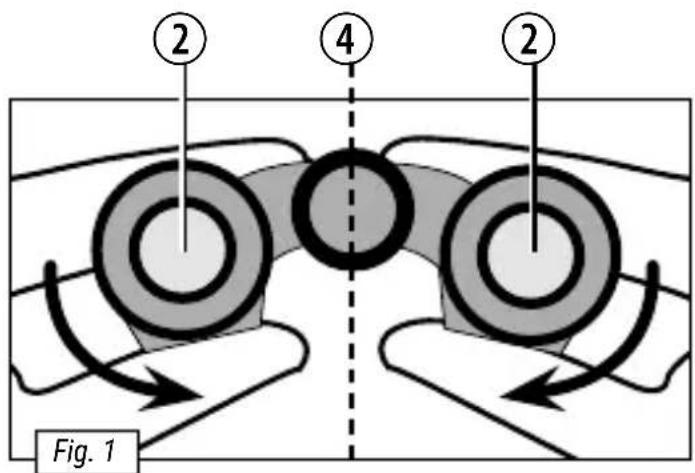
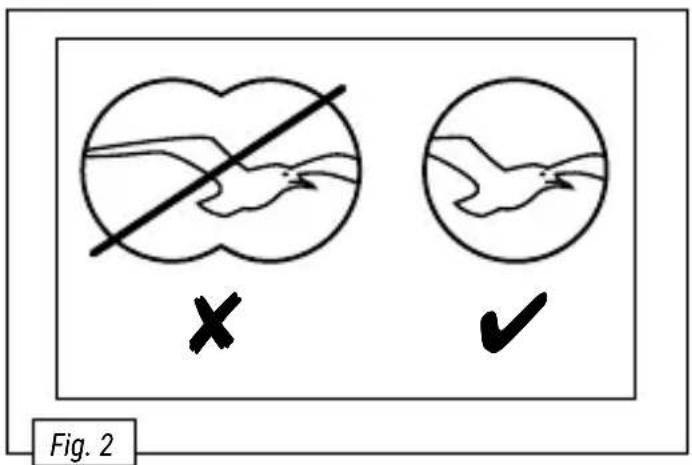
The distance between one's eyes varies from person to person, so it is essential that you adjust your binoculars before you use them. Take the binoculars in both hands (Fig. 1) and hold them to your eyes. Fold them so that you see a single circle when looking through them with both eyes (Fig. 2).
Adjusting the focus
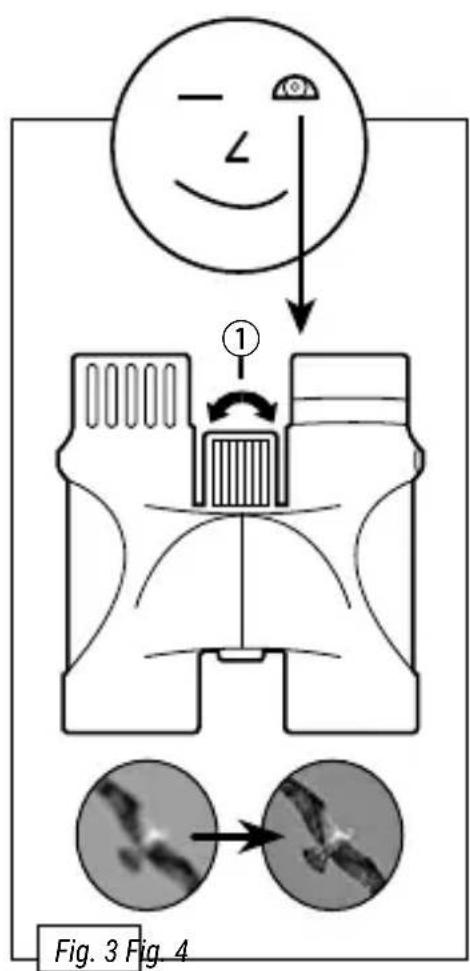
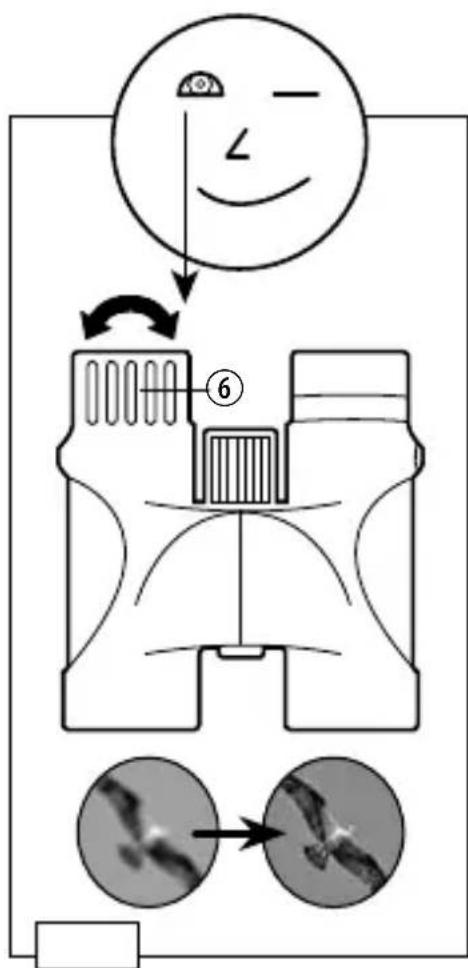
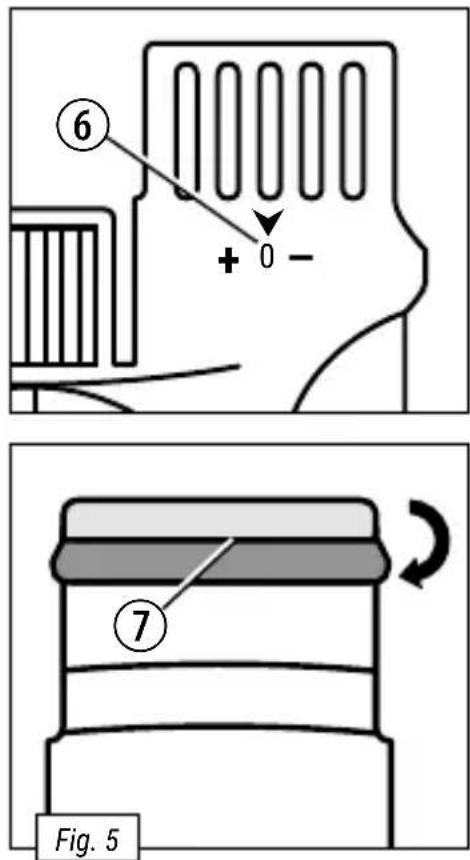
Find an object over ten metres away. Close your right eye, or hold a finger over it. Turn the focusing wheel (Fig. 3) to focus correctly for your left eye. Then repeat the process with your other eye using the dioptre adjustment (Fig. 4, 6). Once you have both focused correctly, you'll be able to see any object in focus with both eyes.
If you wear glasses
The eyepieces on the lenses fold (7). Fold them back if you wear glasses to see in focus (Fig. 5).
Notes on cleaning
- Clean the eyepieces and lenses only with a soft, lint-free cloth like a microfibre cloth. To avoid scratching the lenses, use only gentle pressure with the cleaning cloth.
- To remove more stubborn dirt, moisten the cleaning cloth with an eyeglass-cleaning solution and wipe the lenses gently.
- Protect the device from dust and moisture. After use, particularly in high humidity, let the device acclimatize for a short period of time, so that the residual moisture can dissipate before storing.

DISPOSAL
- Dispose of the packaging materials properly, according to their type, such as paper or cardboard. Contact your local waste-disposal service or environmental authority for information on the proper disposal.
Warranty and warranty term extension
The regular guarantee period is 2 years and begins on the day of purchase. To benefit from an extended voluntary guarantee period as stated on the gift box, registration on our website is required. You can consult the full guarantee terms as well as information on extending the guarantee period and details of our services at: www.bresser.de/warranty_terms.
Unit 1 Starborough Farm
Starborough Road, Nr Marsh Green
Edenbridge, Kent TN8 5RB
Great Britain
E-Mail: info@folux.nl
Telefoon*: +31 (0) 528 23 24 76
Folux B.V.
Smirnoffstraat 8
7903 AX Hoogeveen
Nederlands
FR BE
E-Mail: sav@bresser.fr
Téléphone*: 00 800 6343 7000
(appel non surtaxé)
BRESSER France SARL
*Number charged at local rates in the UK (the amount you will be charged per phone call will depend on the tariff of your phone provider); calls from abroad will involve higher costs.
Errors and technical changes reserved.

Brand : BRESSER
Model : BRS150B PRO
Category : Binoculars