Logic3 Ferrari S100 - Earplug

Ferrari S100 - Earplug Logic3 - Free user manual and instructions

Find the device manual for free Ferrari S100 Logic3 in PDF.

📄 31 pages English EN Download 💬 AI Question 10 questions ⚙️ Specs
Notice Logic3 Ferrari S100 - page 2
Pick your language and provide your email: we'll send you a specifically translated version.
Product Type In-ear headphones (earbuds)
Brand Logic3
Model Ferrari S100 (1-button remote) / S100i (3-button remote)
Compatibility iPod (nano 4/5/6, classic 120/160 GB, touch 2/3/4, shuffle 3), iPhone (3/3GS, 4/4S), iPad (1/2/new iPad), BlackBerry, Windows and Android smartphones (1-button remote)
Main Functions Play/Pause, Volume +/-, Next/Previous track, Fast forward/rewind, Phone call (depending on model)
Remote Control Model S100: 1-button remote (play/pause); Model S100i: 3-button remote (play/pause, volume +/-, track and call control)
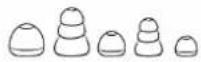
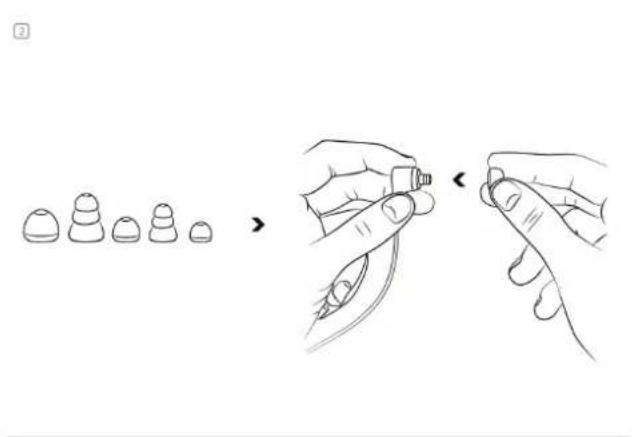
Ear tips Multiple sizes and shapes of rubber ear tips included for optimal fit
Sound Isolation Yes, thanks to adapted tips reducing outside noise
Weight Approx. 10 g (estimate)
Power None (passive earphones)
Cleaning Clean only with a dry cloth
Safety Do not use near water, lower volume before connection, do not insert too deeply, keep out of reach of children under 3 years old
Included Accessories Replacement ear tips of different sizes, user manual
Product Registration Recommended on http://www.Ferrari-by-Logic3.com/register
Warranty Check conditions on the manufacturer's website

Frequently Asked Questions - Ferrari S100 Logic3

How to use the remote to play or pause music?
Press the Play/Pause button once to start or stop playback.
How to choose the right size of ear tips?
Try the different sizes provided. A good fit ensures better sound isolation and optimal comfort. The tip should completely block the ear without being too deep.
Are these earphones compatible with my Android smartphone?
Yes, the 1-button remote is supported by most BlackBerry, Windows, and Android smartphones.
How to clean the Ferrari S100 earphones?
Use a dry cloth to clean the earphones. Do not use water or liquid products.
What to do if an ear tip is damaged?
Contact Logic3 customer service at support@Ferrari-by-Logic3.com or by phone at +44 (0) 1923 471 010 to get replacement parts.
Can I use these earphones in the rain or near water?
No, to avoid any risk of electrocution or damage, do not use this product near water or in a humid environment.
How to make a phone call with the remote?
On the S100i model, press the call answer button to pick up or hang up. A built-in microphone allows you to speak.
How to skip to the next track?
Press the Play/Pause button twice to skip to the next track.
Why should I register my product?
Online registration at http://www.Ferrari-by-Logic3.com/register allows better after-sales service and faster support.
The sound quality is poor, what should I do?
Check that you are using the correct size of ear tips for optimal isolation. Make sure your device volume is not too low and that the earphones are properly inserted.

User questions about Ferrari S100 Logic3

0 question about this device. Answer the ones you know or ask your own.

Ask a new question about this device

The email remains private: it is only used to notify you if someone responds to your question.

No questions yet. Be the first to ask one.

Download the instructions for your Earplug in PDF format for free! Find your manual Ferrari S100 - Logic3 and take your electronic device back in hand. On this page are published all the documents necessary for the use of your device. Ferrari S100 by Logic3.

USER MANUAL Ferrari S100 Logic3

natural_image Line drawing of a stylized object resembling a key or emblem with a shield and animal silhouette (no text or symbols)

THE SCUDERIAL FERRARI COLLECTION

Thank you for purchasing the Ferrari by Logic3 Scuderia S100i/S100 Earphones. As with all Ferrari by Logic3 products it has been built to the highest manufacturing standards and tested throughout its development, to ensure you get the best possible product.

Please read through and familiarize yourself with this manual before you use the Ferrari by Logic3 Scuderia S100i/S100 Earphones.

PRODUCT REGISTRATION:

For your benefit, Logic3 recommends that You register Your Product online to record Your Product serial number and date of purchase, as this information will allow us to better serve Your needs. Please visit http://www.ferrari-by-logic3.com/register

COMPATIBILITY

*3 button remote works with:

Made for

Logic3 Ferrari S100 - COMPATIBILITY - 1

iPod 📁 iPhone 📄 iPad

  • The remote is supported only by iPod nano (4 ^th / 5 ^th / 6 ^th generation), iPod classic (120GB/160GB), iPod touch (2 ^nd /3 ^rd /4 ^th generation) and iPod shuffle (3rd generation), iPhone, iPhone3 / 3GS, 4 / 4S, iPad / iPad 2 / new iPad
    • Audio is supported by all iPod models.
  • Requires software version 1.0.3 for iPod nano (4th generation), 2.0.4 for iPod classic (120GB), and 2.2 or later for iPod touch (2nd generation)

• 1 button remote works with:

Logic3 Ferrari S100 - COMPATIBILITY - 2

Logic3 Ferrari S100 - COMPATIBILITY - 3

Logic3 Ferrari S100 - COMPATIBILITY - 4

• The remote is supported by most Blackberry, Windows and Android smart phones.

CONTENTS

Check the packaging for the items shown below.

Please retain the packing materials, as this will provide the safest way to transport this product.

If any part of the product appears to be damaged, do not attempt to use it. Please contact Ferrari by Logic3 immediately via e-mail: support@ferrari-by-logic3.com or via telephone: +44 (0) 1923 471 010
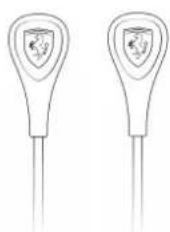
Logic3 Ferrari S100 - CONTENTS - 1

natural_image Two identical stylized medical or laboratory devices with shield-shaped caps, no text or symbols visible

Scuderia S100i/S100

Logic3 Ferrari S100 - CONTENTS - 2

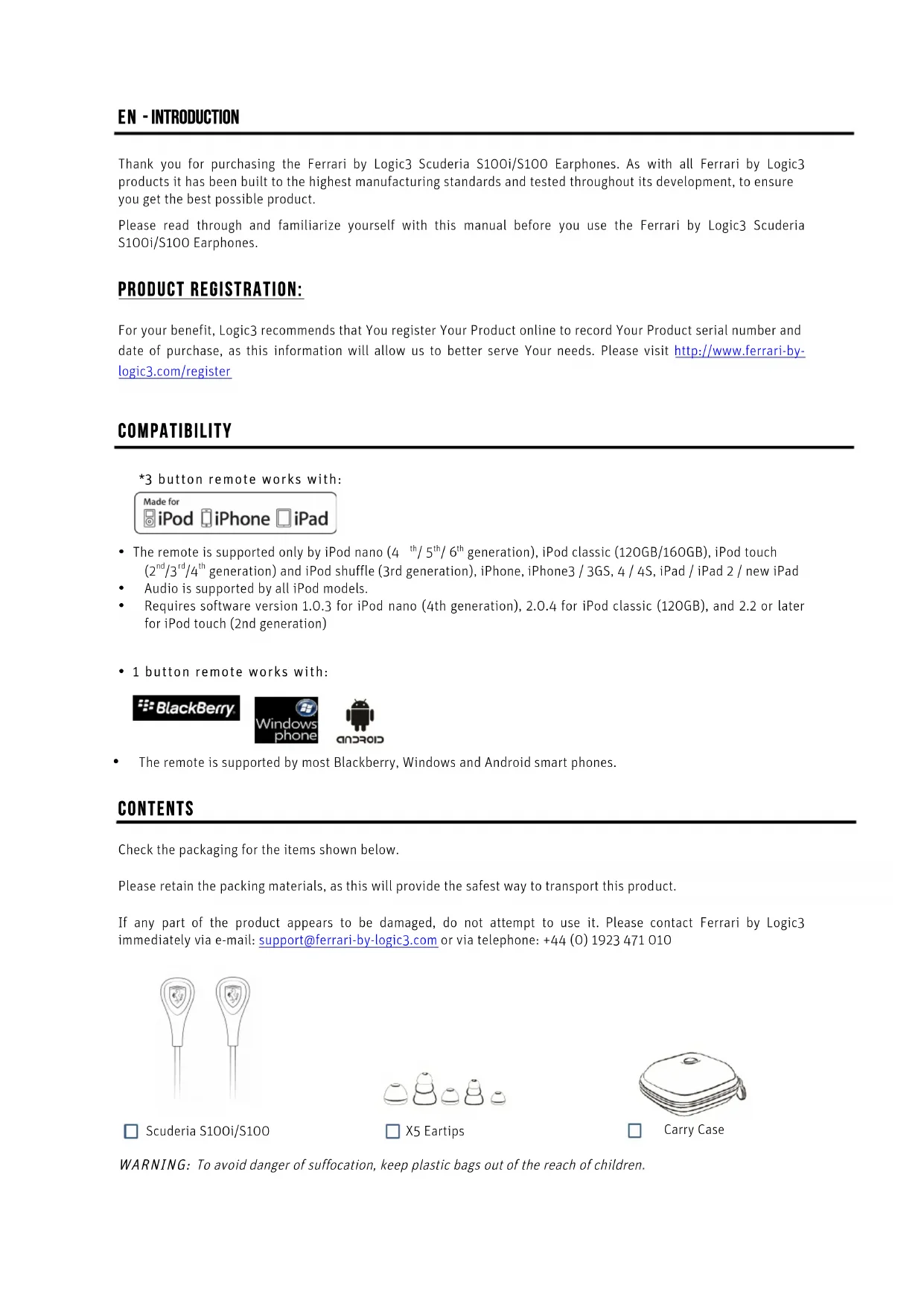
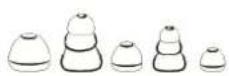
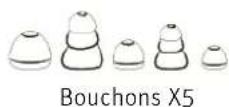
□ X5 Eartips

Logic3 Ferrari S100 - CONTENTS - 3

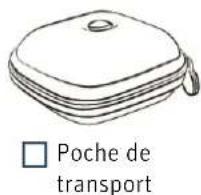
Carry Case

WARNING: To avoid danger of suffocation, keep plastic bags out of the reach of children.

Set up of S100

1
Logic3 Ferrari S100 - Set up of S100 - 1

natural_image Illustration of two hands holding a small electronic component, showing a change from left to right (no text or symbols present)

2
Logic3 Ferrari S100 - Set up of S100 - 2

natural_image Illustration showing a hand holding a small object with a pen, alongside two separate diagrams of a device or tool (no text or symbols present)

3
Logic3 Ferrari S100 - Set up of S100 - 3

natural_image Line drawings of hands using a device to interact with a screen (no text or symbols present)

9
Logic3 Ferrari S100 - Set up of S100 - 4

natural_image Line drawings of ear ear components including a hand holding an earbell, a close-up of the ear with a plug, and a separate ear with a plug inserted into the ear (no text or symbols)

Important Logic3 Performance and safety tips listen responsibly

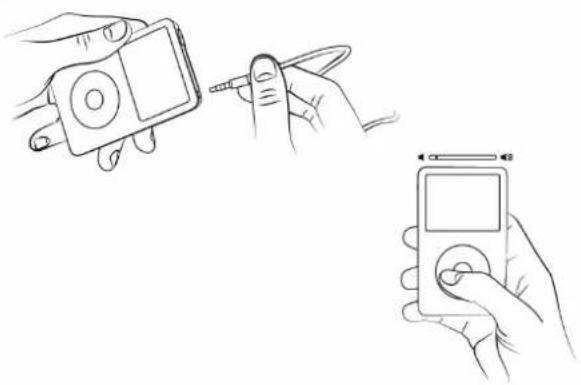
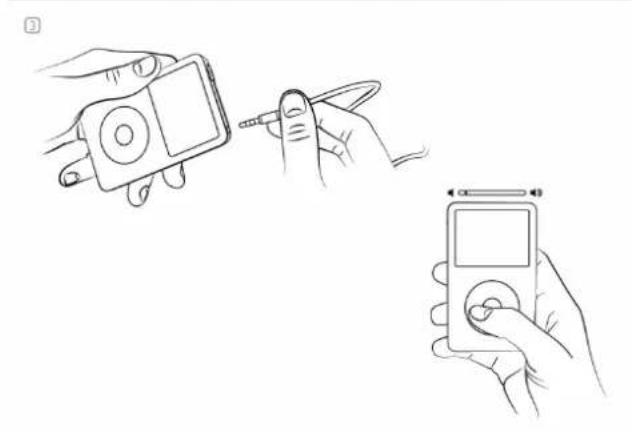
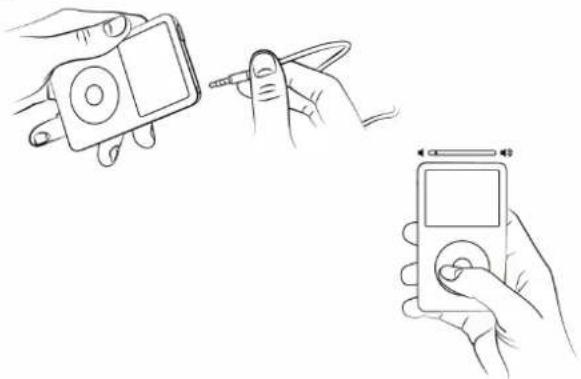
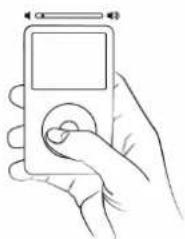
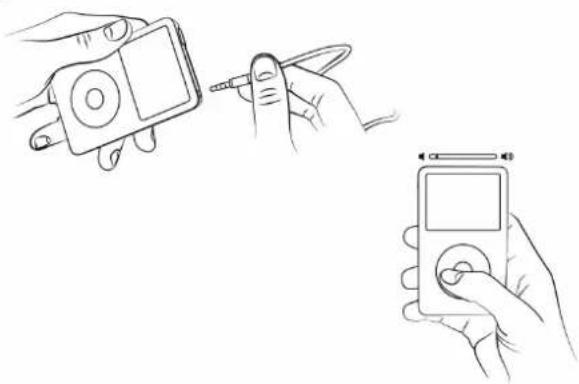
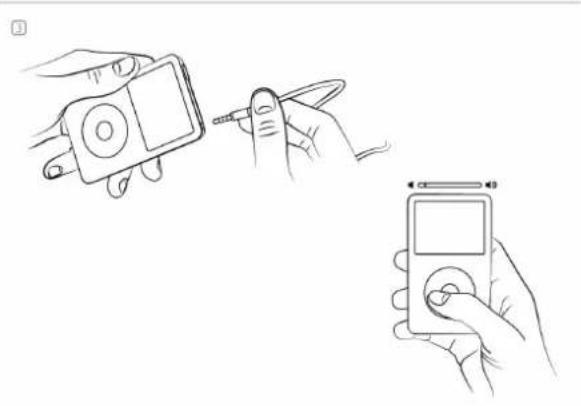
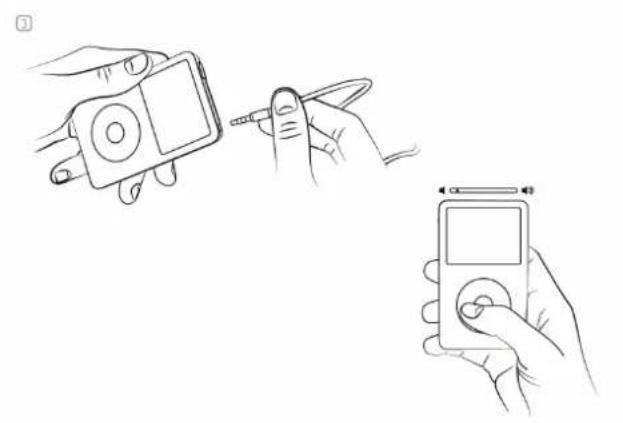
To avoid hearing damage, make sure that the volume on your music player is turned down before connecting your earphones. After placing earphones in your ears, gradually turn up the volume until you reach a comfortable listening level.

Get the most out of your equipment and enjoy great audio performance even at safe levels. Our earphones will allow you to hear more details at lower volume levels than ever before.

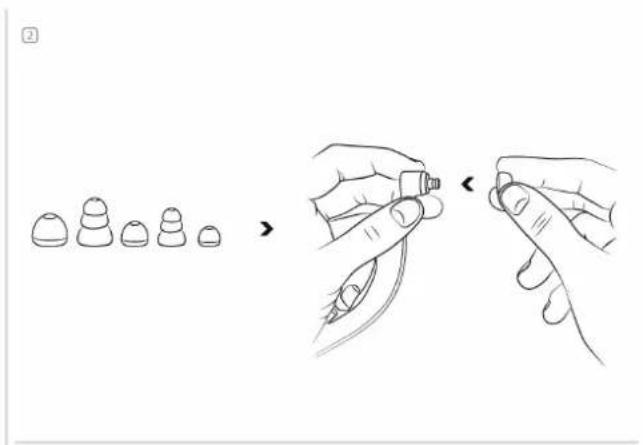
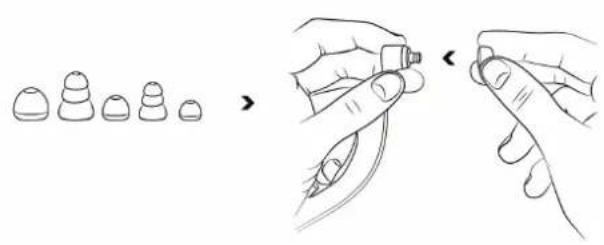
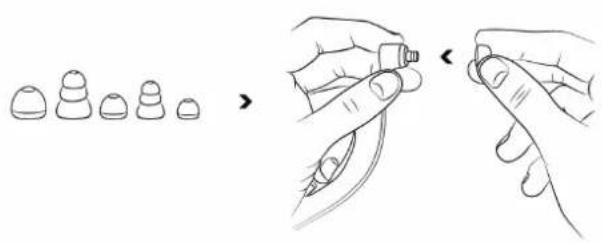
Ear tip selection

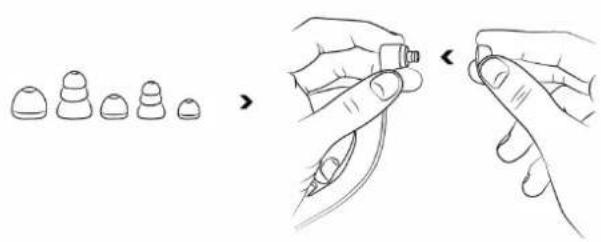
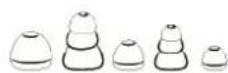
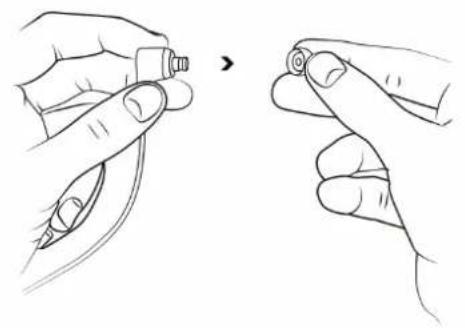
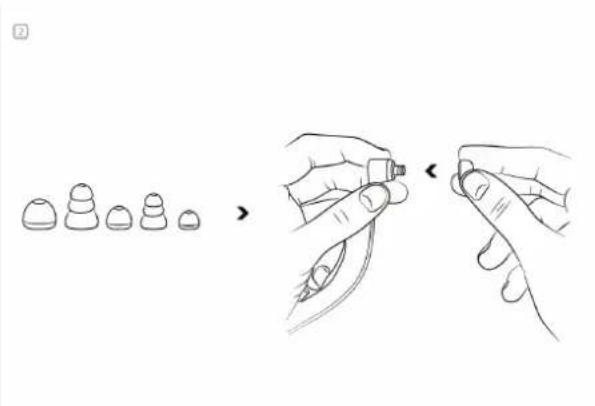
The tips on the ends of your Scuderia S100i/S100 make the difference between good sound and great sound. With the right fit, you'll get better isolation from unwanted outside noise, increased bass response, better tonal balance and the earphones will stay in your ears better. Of course, the right fit will also feel more comfortable. We supply several sizes and designs of ear tips. Getting the perfect fit with the correct tip is a matter of experimentation.

Listen

Turn down the volume on your music player before inserting Scuderia S100 earphones.

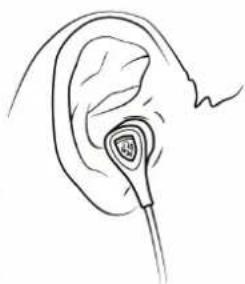
IMPORTANT: Left and Right Earphone: Having the correct earphone side in the correct ear does affect the listening experience.

Note the "L" and "R" markings on the side of each earphone. "L" is for the left ear, "R" is for the right ear.

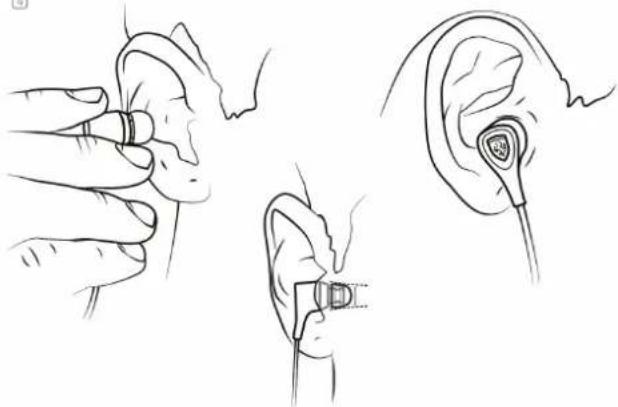
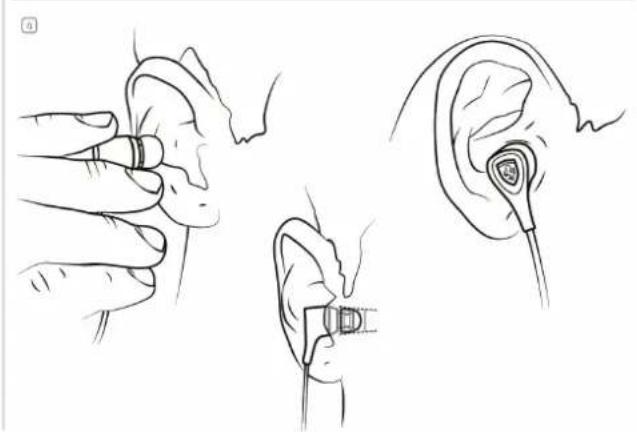
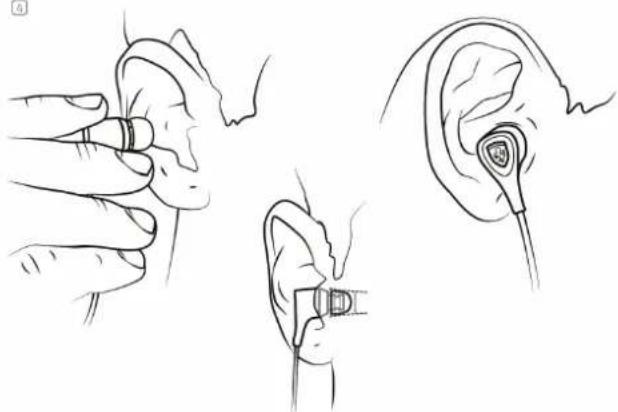
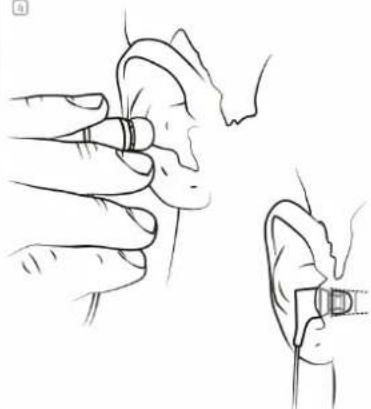
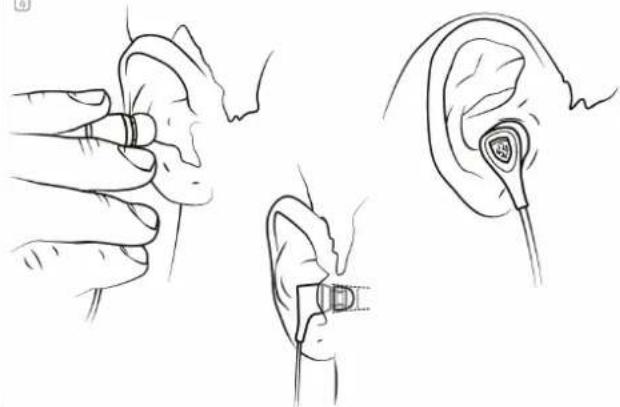
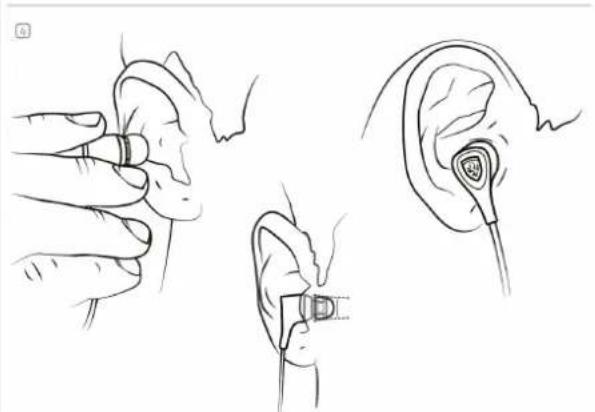
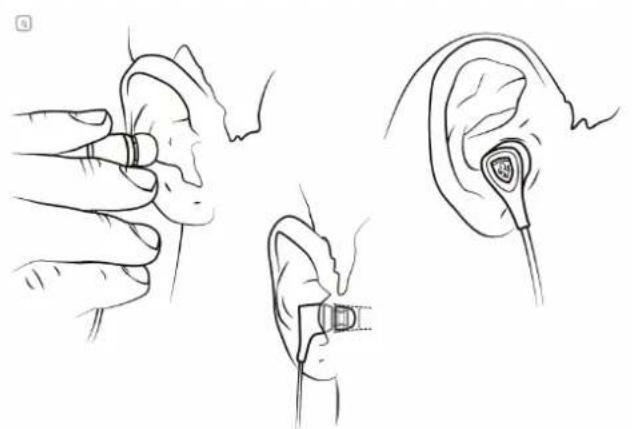
Proper insertion and removal of ear tips

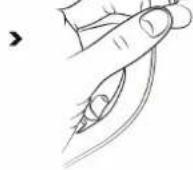
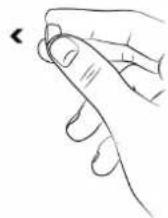
  1. You may wish to lightly moisten your ear tips for easier insertion.
  2. Using your right hand, grasp the right earphone.
  3. With your left hand, pull up and back on your right ear to straighten your ear canal.
  4. Carefully insert your right earphone, rubber ear tip first, so that it seals completely and comfortably in your ear.
    DO NOT insert the ear tip so deeply that your ear canal feels completely "plugged."
  5. Repeat this procedure for your left ear.
  6. When you've finished your listening session, remove your in-ear earphones slowly with a twisting motion to gradually break the seal.

REMOTES

Using the 1 Button remote

CommandAction
Play/PausePress the Play/Pause Button once

\*3 Button Remote (Applicable to S100i)

Scuderia S100i has a built-in 3 button remote feature for use with music phones and newer iPod. The 3 button remote has a call answer button and microphone so you can easily switch between listening to music and talking on your phone. It also features music and video playback control for iPod, iPhone and iPad.

Logic3 Ferrari S100 - \*3 Button Remote (Applicable to S100i) - 1

flowchart
graph TD
    A["Device"] --> B["+"]
    A --> C["+"]
    A --> D["x1"]
    A --> E["x2"]
    A --> F["x1"]
    A --> G["x3"]
    A --> H["-"]

USING THE 3 BUTTON CONTROLS (APPLICABLE TO S100I)

CommandAction
Play/PausePress the Play/Pause Button once
Volume ControlsPress the Volume Up (+) or Volume Down (-)
Next TrackDouble Press the Play/Pause Button
Previous TrackTriple Press the Play/Pause Button within 10 seconds of the track starting. To restart the current track, Triple Press the Play/Pause Button after 10 seconds
Search Fast ForwardDouble Press and Hold the Play/Pause Button
Search RewindTriple Press and Hold the Play/Pause Button
*Hear song Title/ArtistPress and Hold the Play/Pause Button
*Hear playlist menuPress the Play/Pause Button until you hear a beep; release the button to hear the playlist menu. When you hear the then name of the playlist you want, press the Play/Pause button to select it. To move quickly through the playlist menu press + or – (when you are in the playlist menu)
*Exit Playlist menuPress and Hold the Play/Pause Button

* Applicable to iPod 3G Shuffle

SAFETY INFORMATION

  1. Read these instructions – for all components before using this product.
  2. Keep these instructions – for future reference.
  3. Heed all warnings – on the product and in the owner's guide.
  4. Follow all instructions.
  5. Do not use this apparatus near water or moisture – Do not use this product near a bathtub, washbowl, kitchen sink, laundry tub, in a wet basement, near a swimming pool or anywhere else that water is present.
  6. Clean only with a dry cloth. Unplug this product from the wall outlet before cleaning.
  7. Only use attachments/accessories specified by the manufacturer.
  8. Make no modifications to the product or accessories. Unauthorized alterations may compromise safety, regulatory compliance, and system performance, and will void the warranty.
  9. Unplug this apparatus when unused for long periods of time.
  10. Do not place any naked flame sources, such as lighted candles, on or near the apparatus.
  11. Contains small parts that may be a choking hazard. Not suitable for children under age 3.
  12. To prevent risk of fire or electric shock, avoid overloading wall outlets and using extension cords.
  13. Do not let objects or liquids enter the product – as they may touch dangerous voltage points or short-out parts that could result in a fire or electric shock.
text_image Scuderia S100i/S100

Logic3 Ferrari S100 - SAFETY INFORMATION - 1

Logic3 Ferrari S100 - SAFETY INFORMATION - 2

text_image □ Poche de transport

Logic3 Ferrari S100 - SAFETY INFORMATION - 3

natural_image Line drawing showing two hands holding a small object, one pointing at the other (no text or symbols)

Logic3 Ferrari S100 - SAFETY INFORMATION - 4

natural_image Illustration showing a sequence of small objects transforming into a tool, with no text or symbols present.

Logic3 Ferrari S100 - SAFETY INFORMATION - 5

natural_image Line drawings showing hands using a device to interact with a music player (no text or symbols present)

Logic3 Ferrari S100 - SAFETY INFORMATION - 6

natural_image Line drawings of ear ear components including a hand holding an earbell, ear with a sensor device, and ear with a medical device (no text or symbols)
text_image Diagram illustrating the wireless signal transmission system with labeled components including microphone, phone, and audio signals.

UTILISATION DE LA TÉLÉCOMMANDE À 3 BOUTONS (COMPATIBLE AVEC LE MODÈLE S100I)

natural_image Illustration of two hands holding a small object, one pointing at the end of the finger (no text or symbols present)


Logic3 Ferrari S100 - UTILISATION DE LA TÉLÉCOMMANDE À 3 BOUTONS (COMPATIBLE AVEC LE MODÈLE S100I) - 1

natural_image Illustration showing a hand holding a small object to press down a tool, with two separate diagrams illustrating different states of the process (no text or symbols present)


Logic3 Ferrari S100 - UTILISATION DE LA TÉLÉCOMMANDE À 3 BOUTONS (COMPATIBLE AVEC LE MODÈLE S100I) - 2

natural_image Line drawings showing hands using a device to interact with a screen (no text or symbols present)

4
Logic3 Ferrari S100 - UTILISATION DE LA TÉLÉCOMMANDE À 3 BOUTONS (COMPATIBLE AVEC LE MODÈLE S100I) - 3

natural_image Line drawings of ear ear components including a finger, earbell, and ear with a clip (no text or symbols)
text_image Diagram illustrating the connection between a device and multiple audio/video signals, with labeled components like x1, x2, x3 and speaker icons.
natural_image Illustration of two hands holding a small object, showing a change in tip position (no text or symbols present)

2

Logic3 Ferrari S100 - UTILISATION DE LA TÉLÉCOMMANDE À 3 BOUTONS (COMPATIBLE AVEC LE MODÈLE S100I) - 4

Logic3 Ferrari S100 - UTILISATION DE LA TÉLÉCOMMANDE À 3 BOUTONS (COMPATIBLE AVEC LE MODÈLE S100I) - 5

Logic3 Ferrari S100 - UTILISATION DE LA TÉLÉCOMMANDE À 3 BOUTONS (COMPATIBLE AVEC LE MODÈLE S100I) - 6

1
Logic3 Ferrari S100 - UTILISATION DE LA TÉLÉCOMMANDE À 3 BOUTONS (COMPATIBLE AVEC LE MODÈLE S100I) - 7

natural_image Line drawing of hands holding a device with a pen inserted (no text or symbols)

Logic3 Ferrari S100 - UTILISATION DE LA TÉLÉCOMMANDE À 3 BOUTONS (COMPATIBLE AVEC LE MODÈLE S100I) - 8

natural_image Line drawing of a hand holding a handheld electronic device with a screen and scroll (no text or symbols)


Logic3 Ferrari S100 - UTILISATION DE LA TÉLÉCOMMANDE À 3 BOUTONS (COMPATIBLE AVEC LE MODÈLE S100I) - 9

natural_image Line drawing showing ear anatomy with hands performing a finger insertion (no text or symbols)

Logic3 Ferrari S100 - UTILISATION DE LA TÉLÉCOMMANDE À 3 BOUTONS (COMPATIBLE AVEC LE MODÈLE S100I) - 10

natural_image Line drawing of an ear with a medical device inserted, showing ear structure and needle placement (no text or symbols)
text_image Diagram illustrating the wireless signal transmission between a device and multiple input signals labeled x1, x2, x3, and x4.

UTILIZZO DEL CONTROLLO A TRE PULSANTI (UTILIZZABILE CON S100I)

natural_image Illustration of two hands holding a small object, one pointing at a circular detail (no text or symbols)


Logic3 Ferrari S100 - UTILIZZO DEL CONTROLLO A TRE PULSANTI (UTILIZZABILE CON S100I) - 1

text_image Diagram illustrating a procedure for inserting or removing a small object, with steps shown in sequence.

3
Logic3 Ferrari S100 - UTILIZZO DEL CONTROLLO A TRE PULSANTI (UTILIZZABILE CON S100I) - 2

natural_image Line drawings of hands holding a device and a handheld device (no text or symbols)

6
Logic3 Ferrari S100 - UTILIZZO DEL CONTROLLO A TRE PULSANTI (UTILIZZABILE CON S100I) - 3

natural_image Line drawings of ear ear components including a hand holding an earbell and a close-up of the ear with a stethoscope (no text or symbols)
text_image Diagram illustrating the connection between a device and multiple audio/video signals, with labeled icons for each component.

USO DE LOS MANDOS A DISTANCIA DE 3 BOTONES (APPLICABLE AL MODELO S100I)

* Aplicable a iPod 3G Shuffle
natural_image Line drawing showing two hands holding a small electronic component, no text or symbols present

Logic3 Ferrari S100 - UTILIZZO DEL CONTROLLO A TRE PULSANTI (UTILIZZABILE CON S100I) - 4

natural_image Line drawing showing a hand holding a small object to press another, with two separate diagrams illustrating the process (no text or symbols)

Logic3 Ferrari S100 - UTILIZZO DEL CONTROLLO A TRE PULSANTI (UTILIZZABILE CON S100I) - 5

natural_image Line drawings of hands using a device to interact with a screen (no text or symbols present)

Logic3 Ferrari S100 - UTILIZZO DEL CONTROLLO A TRE PULSANTI (UTILIZZABILE CON S100I) - 6

natural_image Line drawings of ear ear components including a hand holding an earbell, ear with a device, and ear with a shield-like device (no text or symbols)
text_image Diagram illustrating the use of a device to interact with multiple audio and communication devices, labeled x1, x2, x3.

Logic3 Ferrari S100 - UTILIZZO DEL CONTROLLO A TRE PULSANTI (UTILIZZABILE CON S100I) - 7

natural_image Two identical line drawings of a stylized object with a shield-like outline, no text or symbols present.

Logic3 Ferrari S100 - UTILIZZO DEL CONTROLLO A TRE PULSANTI (UTILIZZABILE CON S100I) - 8

Logic3 Ferrari S100 - UTILIZZO DEL CONTROLLO A TRE PULSANTI (UTILIZZABILE CON S100I) - 9

natural_image Line drawing showing two hands holding a small object, one pointing at the other (no text or symbols)

Logic3 Ferrari S100 - UTILIZZO DEL CONTROLLO A TRE PULSANTI (UTILIZZABILE CON S100I) - 10

natural_image Illustration showing a sequence of small objects transforming into a hand holding a small object, with no text or symbols present.

Logic3 Ferrari S100 - UTILIZZO DEL CONTROLLO A TRE PULSANTI (UTILIZZABILE CON S100I) - 11

natural_image Line drawings showing two hands using a device to interact, one holding a microphone and the other holding a digital device (no text or symbols present)

Logic3 Ferrari S100 - UTILIZZO DEL CONTROLLO A TRE PULSANTI (UTILIZZABILE CON S100I) - 12

natural_image Line drawings of ear ear components including a finger, ear connector, and ear socket (no text or symbols)
text_image Diagram illustrating the use of a device with labeled icons for phone, audio, and sound waves.

Logic3 Ferrari S100 - UTILIZZO DEL CONTROLLO A TRE PULSANTI (UTILIZZABILE CON S100I) - 13

natural_image Simple red arrows pointing in various directions on a white background (no text or symbols)

HET GEBRUIK VAN DE 3-KNOPS AFSTANDSBEDIENINGEN (VAN TOEPASSING OP S100I)

natural_image Symbol of a trash bin with a diagonal line indicating no waste or restriction (no text or symbols present)

Logic3 Ferrari S100 - UTILIZZO DEL CONTROLLO A TRE PULSANTI (UTILIZZABILE CON S100I) - 14

natural_image Simple black-and-white icon of a sun with a diagonal line crossing through it (no text or symbols)

Logic3 Ferrari S100 - UTILIZZO DEL CONTROLLO A TRE PULSANTI (UTILIZZABILE CON S100I) - 15

natural_image Black and white icon of a fire with a diagonal line crossing through it, symbolizing fire resistance or hazard (no text present)

Logic3 Ferrari S100 - UTILIZZO DEL CONTROLLO A TRE PULSANTI (UTILIZZABILE CON S100I) - 16

natural_image Black silhouette of a cloud with raindrops and a diagonal line crossing it (no text or symbols)

Logic3 Ferrari S100 - UTILIZZO DEL CONTROLLO A TRE PULSANTI (UTILIZZABILE CON S100I) - 17

natural_image Black and white icon of a faucet with a diagonal line crossing a water droplet (no text or symbols)

Logic3 Ferrari S100 - UTILIZZO DEL CONTROLLO A TRE PULSANTI (UTILIZZABILE CON S100I) - 18

natural_image Black and white icon depicting a toothbrush crossed with a toothbrush next to a spray bottle (no text or symbols)

Logic3 Ferrari S100 - UTILIZZO DEL CONTROLLO A TRE PULSANTI (UTILIZZABILE CON S100I) - 19

natural_image Abstract black-and-white graphic with diagonal lines and cloud-like shapes (no text or symbols)

Logic3 Ferrari S100 - UTILIZZO DEL CONTROLLO A TRE PULSANTI (UTILIZZABILE CON S100I) - 20

natural_image Symbolic illustration of water droplets with a plus sign, no text or numbers present

Logic3 plc, Rhodes Way, Watford, WD24 4YW, UK

Logic3 plc & Logic3 International Ltd. of Watford UK are the owners of the Logic3 registered trademark. Logic3 own registered and unregistered design rights and copyright subsisting in various products within its range.

FERRARI, the PRANCING HORSE device, all associated logos and distinctive designs are trademarks of Ferrari S.p.A. The body designs of the Ferrari cars are protected as Ferrari property under design, trademark and trade dress regulations.

All other trademarks, copyrights and trade names are registered properties of their respective owners. Logic3 are continually updating their products in the interest of improving the quality and design. Copyright in this manual is owned by Logic3 International Ltd. Rhodes Way.

Manual assistant
Powered by Anthropic
Waiting for your message
Product information

Brand : Logic3

Model : Ferrari S100

Category : Earplug