Power Protect 10kW - Generator BRIGGS & STRATTON - Free user manual and instructions
Find the device manual for free Power Protect 10kW BRIGGS & STRATTON in PDF.


| Product Type | Single-phase air-cooled standby generator |
| Brand | Briggs & Stratton |
| Model | Power Protect 10 kW |
| Rated Power | 10 kW (41.7 A at 240 V) |
| Output Voltage | 120/240 V AC |
| Frequency | 60 Hz |
| Phase | Single-phase |
| Engine | 35 ci (570 cc), 2 cylinders |
| Fuel | Natural gas (NG) or propane (LP) |
| Net Weight | 149 kg (330 lb) |
| Base Dimensions | 813 x 737 mm (32 x 29 in) |
| Main Breaker | 50 A |
| Starting Battery | 12 V DC, 540 CCA (standard), 800 CCA (cold) |
| Engine Oil | 5W30 fully synthetic, capacity 1.24-1.33 L |
| Spark Plug Gap | 0.51 mm (0.020 in) |
| Noise Level | 72.3 dB(A) at 7 m (23 ft) |
| Operating Temperature Range | -28.8 °C to 40 °C (-20 °F to 104 °F) |
| Key Features | Automatic start, weekly exercise cycle, optional wireless monitor |
| Safety | Low oil pressure shutdown, high temperature, overspeed; backfeed protection |
| Regular Maintenance | Oil and filter change (100 h), air filter, spark plugs, valve clearance (100 h) |
| Common Replacement Parts | Air filter, oil filter, spark plugs, battery, 15 A fuse |
| Serviceability | Network of authorized dealers; installation and user manual included |
| Warranty | See warranty booklet provided with the unit |
Frequently Asked Questions - Power Protect 10kW BRIGGS & STRATTON
User questions about Power Protect 10kW BRIGGS & STRATTON
0 question about this device. Answer the ones you know or ask your own.
Ask a new question about this device
Download the instructions for your Generator in PDF format for free! Find your manual Power Protect 10kW - BRIGGS & STRATTON and take your electronic device back in hand. On this page are published all the documents necessary for the use of your device. Power Protect 10kW by BRIGGS & STRATTON.
USER MANUAL Power Protect 10kW BRIGGS & STRATTON
Installation and Operation Manual
10kW
Single Phase Air-Cooled Standby Generator System
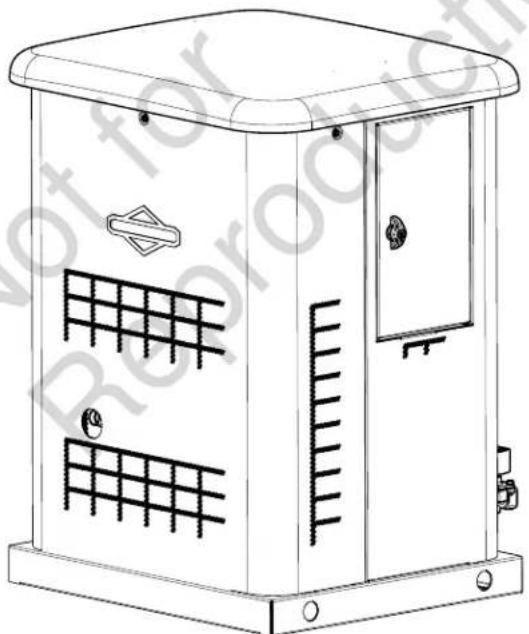
natural_image
Line drawing of a utility box with grid patterns and ventilation slots (no text or symbols)


This generator is rated in accordance with UL (Underwriters Laboratories) 2200 (stationary engine generator assemblies) and CSA (Canadian Standards Association) standard C22.2 No. 100-4 (motors and generators).
Thank you for purchasing this quality-built Briggs & Stratton® home generator. We are pleased that you've placed your confidence in the Briggs & Stratton brand. When operated and maintained according to the instructions in the operator's manual, your home generator will provide many years of dependable service.
This manual contains safety information to make you aware of the hazards and risks associated with residential generator systems and how to avoid them. This generator system is designed and intended only for use as an optional home standby system that provides an alternate source of electric power and to serve loads such as heating, refrigeration systems, and communication systems that, when stopped during any power outage, could cause discomfort or inconvenience. Save these original instructions for future reference.
This generator system requires professional installation before use. The installer should follow the instructions completely.
Where to Find Us
You never have to look far to find support and service for your generator. Consult your Yellow Pages. There are many Briggs & Stratton authorized service dealers worldwide who provide quality service. You can also contact Briggs & Stratton Customer Service by phone at 800-732-2989 between 8:00 AM and 5:00 PM CT., or click on Find a Dealer at BRIGGSandSTRATTON.COM, which provides a list of authorized dealers.
For Future Reference
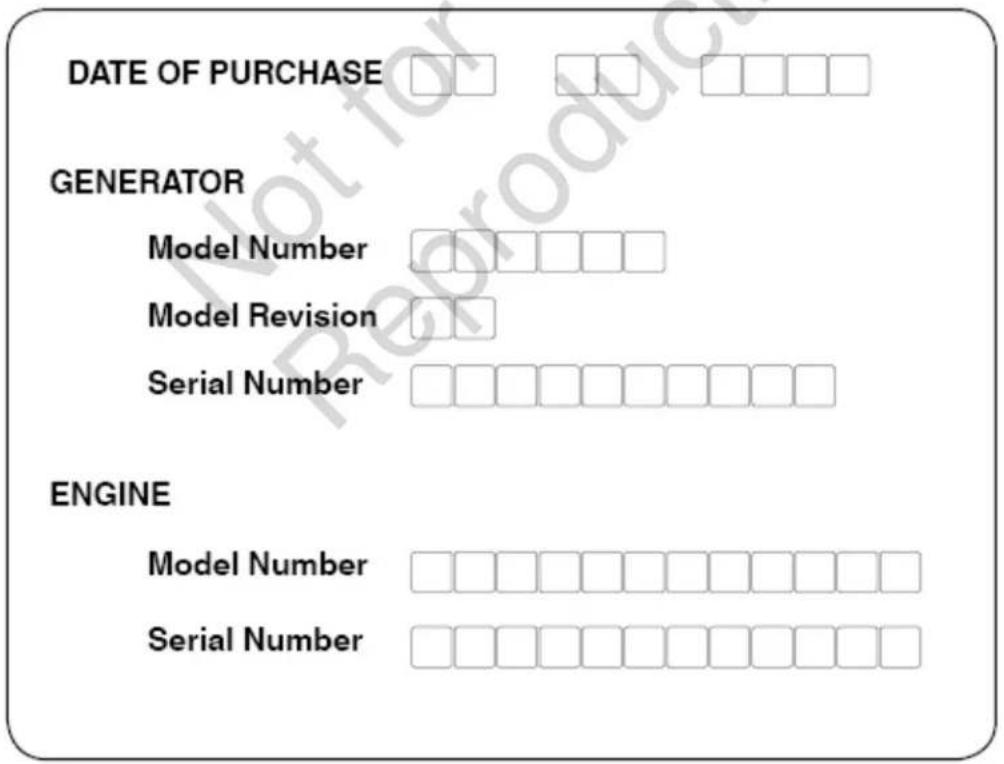
Please fill out the information below and keep with your receipt to assist in unit identification for future purchase issues.
⚠ WARNING This product can expose you to chemicals including used engine oil, which is known to the State of California to cause cancer, and carbon monoxide, which is known to the State of California to cause birth defects or other reproductive harm. For more information go to www.P65Warnings.ca.gov.
Table Of Contents
Safety Rules 5
Important Safety Instructions 5
Safety Symbols and Meanings.... 5
Installation 8
Home Owner Responsibilities 8
Installing Dealer/Contractor Responsibilities.... 8
Cold Weather Kit 9
Unpacking Precautions....9
Delivery Inspection 9
Shipment Contents 9
Generator Placement 10
Placement of Standby Generator to 11
REDUCE THE RISK OF CARBON MONOXIDE POISONING ... 11
REDUCE THE RISK OF FIRE 13
Other Location Requirements.... 14
Standard NFPA 37 Requirements and Testing 14
Electrical and Fuel Inlet Locations 15
Lifting the Generator 16
Concrete Anchoring of Unit.... 16
Access Panels 17
The Gaseous Fuel System 19
Fuel Factors 20
Fuel Consumption 22
System Connectors.... 23
Communication Connections 24
Generator AC Connection System.... 24
Grounding the Generator 25
Power Connections from Generator to Transfer Switch ..... 25
System Control Board 26
Menu 27
General Set Up Screen.... 28
Control Panel Prompts 29
Advanced Settings Screen 30
Service Code Detection System 31
Final Installation Considerations.... 31
Initial Start-up (No Load).... 32
Operation Set Up (Installer) 33
Automatic Operation Sequence 33
Setting Exercise Timer 33
Wireless Monitor (Optional) 34
Schematic / Wiring Diagrams....39
Schematic Diagram - 10kW 39
Wiring Diagram - 10 kW 40
Operator's Section....42
Controls....42
Access Panels 43
Operation 45
Important Owner's Considerations.... 45
Automatic Operation 46
Setting Exercise Timer 46
Table Of Contents (Continued)
Maintenance 47
Servicing the System. 47
Service Code Detection System 47
Maintenance Schedule 49
Generator Maintenance 49
Battery 50
Engine Maintenance 51
Fuel System Inspection and Maintenance.... 55
Service Spark Plugs 56
Clean Air Cooling System and Oil Cooler Fins 56
When Calling for Assistance.... 56
Storage.... 56
Troubleshooting 57
Wireless Monitor Troubleshooting....58
Specifications....59
Safety Rules
Important Safety Instructions
SAVE THESE INSTRUCTIONS - This manual contains important instructions that should be followed during installation and maintenance of the generator and batteries.

Explosion

Fire

Electrical Shock

Toxic Fumes

Rotating Parts

Hot Surface


Lift Hazard

Chemical BurnAuto Start

Read Manual

Wear Eye Protection
Safety Symbols and Meanings
The safety alert symbol indicates a potential personal injury hazard. A signal word (DANGER, WARNING, or CAUTION) is used with the alert symbol to designate a degree or level of hazard seriousness. A safety symbol may be used to represent the type of hazard. The signal word NOTICE is used to address practices not related to personal injury.
⚠️ DANGER indicates a hazard which, if not avoided, will result in death or serious injury.
⚠ WARNING indicates a hazard which, if not avoided, could result in death or serious injury.
⚠️ CAUTION indicates a hazard which, if not avoided, could result in minor or moderate injury.
NOTICE addresses practices not related to personal injury.
The manufacturer cannot possibly anticipate every possible circumstance that might involve a hazard. The warnings in this manual, and the tags and decals affixed to the unit are, therefore, not all-inclusive. If you use a procedure, work method or operating technique that the manufacturer does not specifically recommend, you must satisfy yourself that it is safe for you and others. You must also make sure that the procedure, work method or operating technique that you choose does not render the generator system unsafe.

WARNING Running engine gives off carbon monoxide, an odorless, colorless, poison gas.

Breathing carbon monoxide could result in death, serious injury, headache, fatigue, dizziness, vomiting, ion, seizures, nausea or fainting.
- Operate this product ONLY outdoors in an area that will not accumulate deadly exhaust gas.
- Keep exhaust gas away from any windows, doors, ventilation intakes, soffit vents, crawl spaces, open garage doors or other openings that can allow exhaust gas to enter inside or be drawn into a potentially occupied building or structure.
- Carbon monoxide detector(s) MUST be installed and maintained indoors according to the manufacturer's instructions/recommendations. Smoke alarms cannot detect carbon monoxide gas.
WARNING
Storage batteries give off explosive hydrogen


gas during recharging.
Slightest spark will ignite hydrogen and
cause explosion, resulting in death or serious injury.
Battery electrolyte fluid contains acid and is extremely caustic.
Contact with battery contents could cause severe chemical burns.
A battery's high short circuit current could result in serious injury.
- DO NOT dispose of battery in a fire. Recycle battery.
- DO NOT allow any open flame, spark, heat, or lit cigarette during and for several minutes after charging a battery.
• DO NOT open or mutilate the battery. - Wear protective goggles, rubber apron, rubber boots and rubber gloves.
- Remove watches, rings, or other metal objects.
- Use tools having insulated handles.
WARNING
Propane and Natural Gas are extremely


flammable and explosive, which could cause burns, fire or explosion resulting in death or serious injury.
• Install the fuel supply system according to NFPA 37 and other applicable fuel-gas codes.
- Before placing the generator into service, the fuel system lines must be properly purged and leak tested.
• After the generator is installed, you should inspect the fuel system periodically.
• NO leakage is permitted.
- DO NOT operate engine if smell of fuel is present or other explosive conditions exist.
- DO NOT smoke around the generator. Wipe up any oil spills immediately. Ensure that no combustible materials are left in the generator compartment. Keep the area near the generator clean and free of debris.
!
WARNING Generator produces hazardous voltage.
Failure to properly ground generator could result in electrocution.
Failure to isolate generator from utility power could result in death or serious injury to electric utility workers due to backfeed of electrical energy.
- When using generator for backup power, notify utility company.
- DO NOT touch bare wires or bare receptacles.
- DO NOT use generator with electrical cords which are worn, frayed, bare or otherwise damaged.
- DO NOT handle generator or electrical cords while standing in water, while barefoot, or while hands or feet are wet.
- If you must work around a unit while it is operating, stand on an insulated dry surface to reduce the risk of a shock hazard.
- DO NOT allow unqualified persons or children to operate or service generator.
- In case of an accident caused by electrical shock, immediately shut down the source of electrical power and contact the local authorities. Avoid direct contact with the victim.
- Despite the safe design of the residential generator, operating this equipment imprudently, neglecting its maintenance or being careless could cause possible injury or death.
- Remain alert at all times while working on this equipment. Never work on the equipment when you are physically or mentally fatigued.
- Before performing any maintenance on the generator, disconnect the battery cable indicated by a NEGATIVE, NEG or (-) first. When finished, reconnect that cable last.
- After your system is installed, the generator may crank and start without warning any time there is a power failure. To prevent possible injury, always set the generator's system switch to OFF, remove the service disconnect from the disconnect box AND remove the 15 Amp fuse BEFORE working on the equipment.
WARNING
Unintentional sparking could cause fire or electric shock resulting in death or serious injury.

WHEN ADJUSTING OR MAKING REPAIRS TO YOUR GENERATOR
- Disconnect the spark plug wire from the spark plug and place the wire where it cannot contact spark plug.
WHEN TESTING FOR ENGINE SPARK
- Use approved spark plug tester.
- DO NOT check for spark with spark plug removed.

Exhaust heat/gases could ignite combustibles or structures resulting in death or serious injury. Contact with muffler area could cause burns resulting in serious injury.
- DO NOT touch hot parts and AVOID hot exhaust gases.
- Allow equipment to cool before touching.
- Exhaust outlet side of weatherproof enclosure must have at least 5 ft (1.5 m) minimum clearance from any structure, shrubs, trees or any kind of vegetation.
- Standby generator weatherproof enclosure must be at least 5 ft from windows, doors, any wall opening, shrubs or vegetation over 12 inches (30.48 cm) in height.
- Standby generator weatherproof enclosure must have a minimum of 5 ft (1.5 m) overhead clearance from any structure, overhang or trees.
- DO NOT place weatherproof enclosure under a deck or other type of structure that may confine airflow.
- USE ONLY flexible steel fuel line provided. Connect provided fuel line to generator, DO NOT use with or substitute any other flexible fuel line.
- Smoke detector(s) MUST be installed and maintained indoors according to the manufacturer's instructions/recommendations. Carbon monoxide alarms cannot detect smoke.
- Keep at least minimum distances shown in Generator Placement to insure for proper generator cooling and maintenance clearances.
- It is a violation of California Public Resource Code, Section 4442, to use or operate the engine on any forest-covered, brush-covered, or grass-covered land unless the exhaust system is equipped with a spark arrester, as defined in Section 4442, maintained in effective working order. Other states or federal jurisdictions may have similar laws. Contact the original equipment manufacturer, retailer, or dealer to obtain a spark arrester designed for the exhaust system installed on this engine.
- Replacement parts must be the same and installed in the same position as the original parts.

Starter and other rotating parts could entangle

hands, hair, clothing, or accessories resulting in serious injury.
- NEVER operate generator without protective housings, covers, or guards in place.
- DO NOT wear loose clothing, jewelry or anything that could be caught in the starter or other rotating parts.
- Tie up long hair and remove jewelry.
- Before servicing, remove 15 Amp fuse from control panel and disconnect Negative (NEG or -) battery cable.

CAUTION Installing the 15 Amp fuse could cause the engine to start at any time without warning resulting in minor or moderate injury.
- Observe that the 15 Amp fuse has been removed from the control panel for shipping.
- DO NOT install this fuse until all plumbing and wiring has been completed and inspected.

CAUTION Excessively high operating speeds could result minor injury.
Excessively low speeds impose a heavy load on generator.
- DO NOT tamper with governed speed. Generator supplies correct rated frequency and voltage when running at governed speed.
- DO NOT modify generator in any way.
NOTICE Improper treatment of generator could damage it and shorten its life.
- Use generator only for intended uses.
- If you have questions about intended use, contact your authorized dealer.
- Operate generator only on level surfaces.
- Adequate, unobstructed flow of cooling and ventilating air is critical for correct generator operation.
- The access panels/door must be installed whenever the unit is running.
- DO NOT expose generator to excessive moisture, dust, dirt, or corrosive vapors.
- Remain alert at all times while working on this equipment. Never work on the equipment when you are physically or mentally fatigued.
- DO NOT start engine with air cleaner or air cleaner cover removed.
- DO NOT insert any objects through cooling slots.
- DO NOT use the generator or any of its parts as a step. Stepping on the unit could cause stress and break parts. This may result in dangerous operating conditions from leaking exhaust gases, fuel leakage, oil leakage, etc.
- If connected devices overheat, turn them off and disconnect them from generator.
- Shut off generator if:
- electrical output is lost;
- equipment sparks, smokes, or emits flames;
- unit vibrates excessively.
- unit makes unusual noises.
Installation
This product is only for use as an optional generator system which provides an alternate source of electric power and to serve loads such as heating, refrigeration systems, and communication systems that, when stopped during any power outage, could cause discomfort or inconvenience.
NOTICE This product does NOT qualify for either an emergency standby or legally required standby system as defined by NFPA 70 (NEC).
- Emergency generator systems are intended to automatically supply illumination, power, or both, to designated areas and equipment in the event of failure of the normal supply. Emergency systems may also provide power for such functions as ventilation where essential to maintain life, where current interruption of the normal supply would produce serious life safety or health hazards.
- Legally Required standby generator systems are intended to automatically supply power to selected loads in the event of failure of the normal source which could create hazards or hamper rescue or firefighting operations.
Home Owner Responsibilities
- Read and follow the instructions given in the operator's manual.
- Follow a regular schedule in maintaining, caring for and using your home generator, as specified in the operator's manual.
Every effort has been made to ensure that information in this manual is accurate and current. However, we reserve the right to change, alter, or otherwise improve the product and this document at any time without prior notice.
Only current licensed electrical and plumbing professionals should attempt home generator system installations. Installations must strictly comply with all applicable codes, industry standards, laws and regulations.
- Carbon monoxide detector(s) MUST be installed and maintained indoors according to the manufacturer's instructions/recommendations. Smoke alarms cannot detect carbon monoxide gas.
- Smoke detector(s) MUST be installed and maintained indoors according to the manufacturer's instructions/recommendations. Carbon monoxide alarms cannot detect smoke.
Installing Dealer/Contractor Responsibilities
- Read and observe the safety rules.
- Install only an UL listed transfer switch that is compatible with the generator.
-
Read and follow the instructions given in this installation and start-up manual.
-
Installation must strictly comply with all applicable codes, industry standards, laws, and regulations.
- Allow sufficient room on all sides of the generator for maintenance and servicing.
Cold Weather Kit
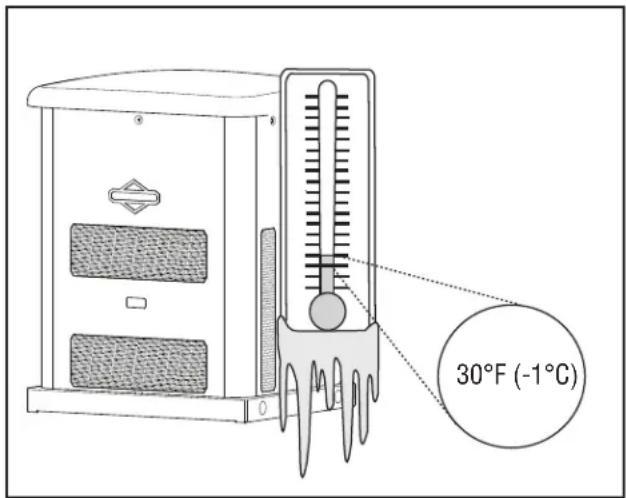
If operating the generator below 30^ F ( -1^ C), it is HIGHLY RECOMMENDED that a Model 6404 Cold Weather Kit be installed on the 10kW units.
These items are available at your local servicing dealer.
For cold weather areas (below 0^ F ( -18^ C)) it is also recommended that a BCI, Size 24, wet lead-acid battery be used of 800 CCA minimum.
If you need more information on this matter, please call 800 732-2989, between 8:00 AM and 5:00 PM CT.
Unpacking Precautions
Avoid damage from dropping, bumping, collision, etc. Store and unpack carton with the proper side up, as noted on the shipping carton.
Delivery Inspection
After removing the carton, carefully inspect the generator for any damage that may have occurred during shipment.
If loss or damage is noted at time of delivery, have the person(s) making delivery note all damage on the freight bill and affix his signature under the consignor's memo of loss or damage. If loss or damage is noted after delivery, separate the damaged materials and contact the carrier for claim procedures. Parts damaged in shipping are not warranted.
Shipment Contents
The home generator system is supplied with:
• Oil (5W30 Full Synthetic)
- Flexible steel fuel line
• Installation/Operation manual
• Product and emissions warranty booklet
- Spare access keys
- Spare 15 Amp ATO-type fuse
- Battery Tie Down Strap
- Tamper proof plug
Optional Equipment (Sold Seperately)
- Wireless Monitor
Not included:
• Carbon monoxide detector(s)
- Smoke detector(s)
- Starting battery
- Connecting wire and conduit
• Fuel supply valves/plumbing
- Crane, lifting straps, chains or cables
- Two 60" lengths of 3/4" nominal minimum scheduled 40 steel pipe (NOT conduit)
- Torque screwdriver, 5 to 50 inch-pound range
• Voltage/frequency meter
- Two (2) AA batteries for remote wireless monitor
Generator Placement
Before installing the generator, consult with the homeowner and convey the following requirements, which must be satisfied before the installation is complete.
There are two equally important safety concerns in regards to carbon monoxide poisoning and fire. There are also several general location guidelines that must all be met before the installation is considered complete.

WARNING Running engine gives off carbon monoxide, an odorless, colorless, poison gas.

Breathing carbon monoxide could result in death, serious injury, headache, fatigue, dizziness, vomiting, confusion, s, nausea or fainting.
- Operate this product ONLY outdoors in an area that will not accumulate deadly exhaust gas.
- Keep exhaust gas away from any windows, doors, ventilation intakes, soffit vents, crawl spaces, open garage doors or other openings that can allow exhaust gas to enter inside or be drawn into a potentially occupied building or structure.
- Carbon monoxide detector(s) MUST be installed and maintained indoors according to the manufacturer's instructions/recommendations. Smoke alarms cannot detect carbon monoxide gas.
Exhaust Side of the Generator
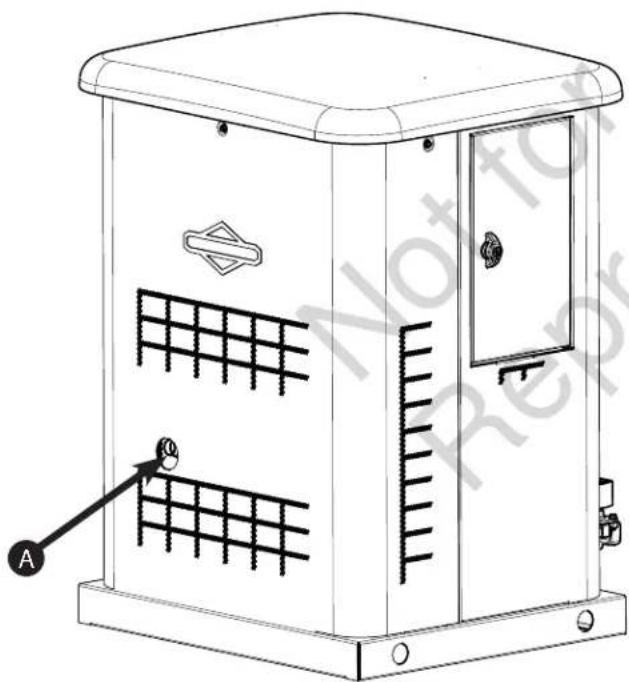

Exhaust outlet side of weatherproof enclosure.
REDUCE THE RISK OF CARBON MONOXIDE POISONING
In high concentrations, carbon monoxide (CO) can be fatal in minutes. However, the effects of lower concentrations can also be lethal. This gas poses serious dangers to humans and their animals because no one can smell, see, or taste it. Symptoms of exposure to CO include:
- Watery, itchy eyes
- Throbbing temples
- Inability to think coherently
- Ringing in the ears
- Headache
• Incoherent or slurred speech - Flushed appearance
- Inattentiveness
- Loss of physical coordination
• Tightness across the chest - Drowsiness
- Nausea
- Dizziness
• Vomiting - Fatigue
- Collapse
- Convulsions
If you (or someone nearby) suffers from any of the above symptoms, immediately seek fresh air and call for emergency medical help for possible carbon monoxide poisoning. If your carbon monoxide alarm sounds while using this product, immediately seek fresh air (even if you experience none of the previously mentioned symptoms).
Potential CO Entry Points
Operation Guidelines:
Note: Operate this product only outdoors and in an area that will not allow this deadly exhaust gas to collect.
Never operate this product inside homes, garages, basements, crawl spaces, sheds, under a deck, or other partially enclosed areas and understand that using fans and opening doors in these areas may not provide adequate ventilation. Carbon monoxide can quickly accumulate in these forbidden spaces and can remain in the air for several hours after this product has shut off.
Installation Guidelines:
Follow all illustrations in this manual when placing an enclosure.
Carbon Monoxide Detectors
Note: Installing functioning CO alarms indoors is the only way to recognize CO gas. Common smoke alarms do not detect CO gas and will not alert occupants of its presence.
A CO detector is an electronic device that detects hazardous levels of CO. When a buildup of CO occurs, the detector will alert the occupants by sounding an alarm and by flashing a visual indicator light.
By law many states require a home to have a functioning carbon monoxide (CO) detector. You must install and maintain carbon monoxide detector(s) indoors according to the manufacturer's instructions and recommendations.
Contact the local building inspection division for any relevant requirements regarding the use of CO detectors. See National Fire Alarm and Signaling Code (NFPA) 72 Code and Section R315 in the International Residential Code (ICC) for additional details.
Always point the generator's engine exhaust away from occupied areas. Never expose your neighbors' homes to the engine exhaust flowing from your standby generator during the installation process.
Never place the standby generator in any area where leaves or debris can accumulate.
Generator exhaust can enter through windows, doors, and other openings of a structure. Understand that exhaust and CO can seep into a structure through the smallest openings.
Protecting the Structure
Check the structure to ensure that the sealing and caulking remains adequate enough to prevent air from leaking in or out. Examine the structure for voids, cracks, or openings surrounding windows, doors, soffits, pipes, and vents, as these areas can permit exhaust gas and CO to enter the structure.
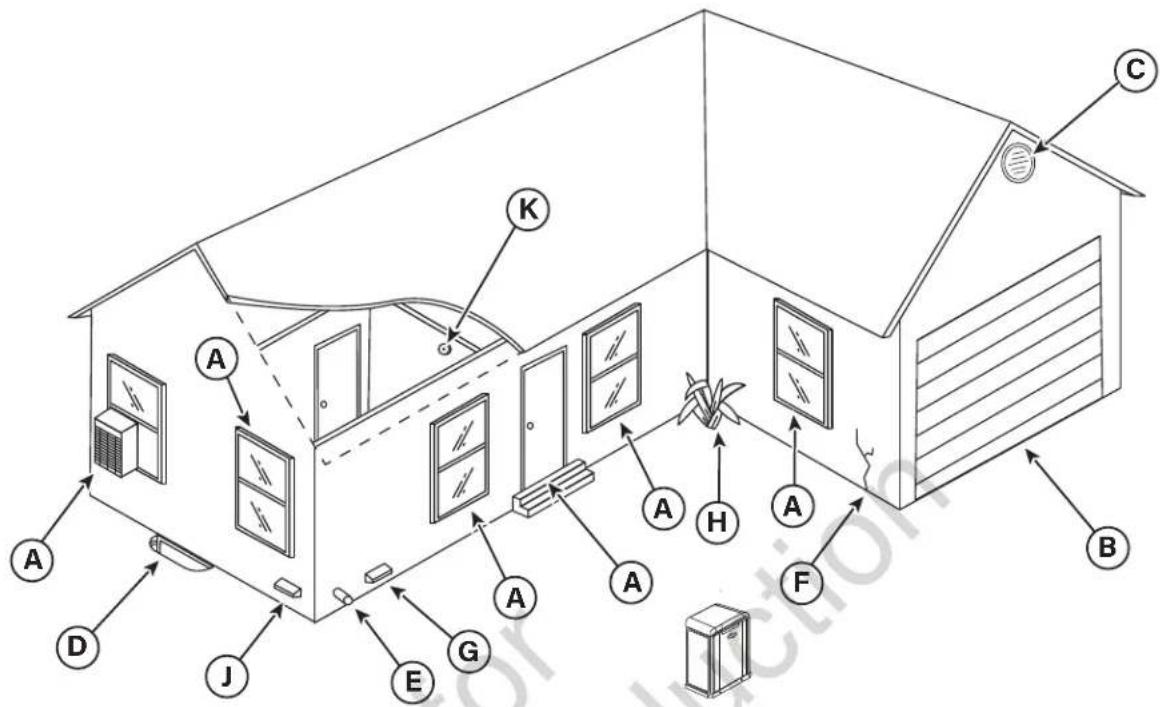
The following table includes some examples of potential entry points for CO gas.
| LOCATION | ENTRY POINT EXPLANATION | |
| A | Windows and doors | Openings that are part of a structure's architecture can permit fresh air and CO into the structure, especially when open. |
| B Garage door | An open or improperly unsealed garage door can allow CO to flow into a garage. | |
| C Attic vent | Generator exhaust can enter through attic vents and the vents for soffits, crawl spaces, and ridges or roofs. | |
| D | Basement windows | Basement windows or hatches that permit ventilation to or from the structure's lower level also allow CO gas to enter the structure. |
| E | Furnace intake or exhaust vent | Air intakes and furnace exhaust pipes are common entry points for CO gas. |
| F Wall cracks | Any cracks in a structure's walls, including the foundation and mortar, and any gaps around windows, doors, and pipes can let CO in. | |
| G Dryer vent | Sometimes the exhaust vent for the clothes dryer lets CO gas into the structure. | |
| H | Airflow restrictions | Areas featuring structural corners and heavy vegetation restrict the airflow and collect exhaust gas. |
| J | Makeup air system | Note: Keep all mechanical and gravity outdoor air intake openings for HVAC supply air systems 10 ft (3,0488 m) horizontally from the generator's enclosure. Refer to section 401 in the ICC Mechanical Code for details on requirements. |
| K | Carbon monoxide detector(s) | Note: Installing functioning CO alarms indoors is the only way to recognize CO gas. Common smoke alarms do not detect CO gas and will not alert occupants of its presence. |
REDUCING THE RISK OF FIRE
To help prevent fires, the generator must be installed a safe distance from all combustible materials. The unit's engine, alternator, and exhaust system components can become very hot during operation. Reduce the likelihood of a fire by keeping the unit properly ventilated, properly maintained, free of fuel leaks, and away from combustible materials. Also, flammable debris may collect within or outside the generator enclosure and may possibly ignite, causing a fire.
Federal and international standards describe the minimum safe clearances around and above the generator's enclosure.
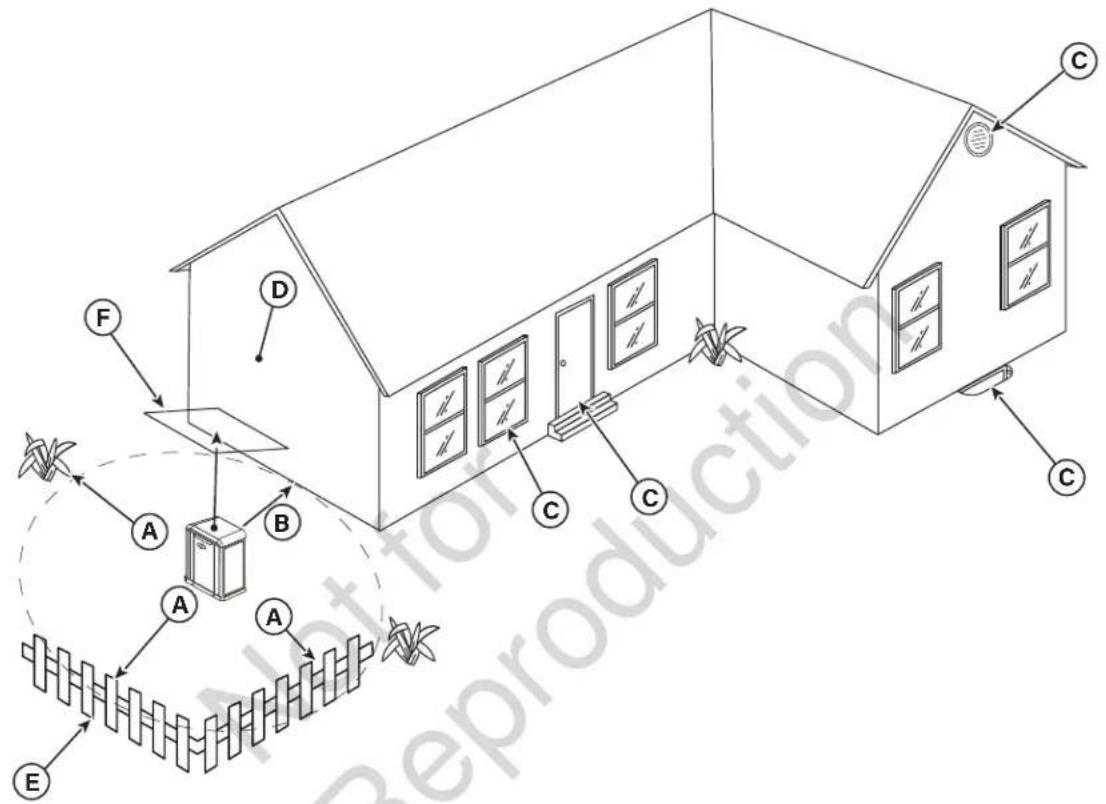
Distance Requirements
An owner must maintain minimum clearances around the generator enclosure. These clearances exist primarily for fire prevention, but they also ensure adequate space for maintenance tasks, such as removing the unit's front and end panels.
flowchart
graph TD
    A["Air Input"] --> B["Block 1"]
    B --> C["Block 2"]
    C --> D["Block 3"]
    D --> E["Reparts"]
    E --> F["Air Outflow"]
    F --> G["Reparts"]
    G --> H["Reparts"]
    H --> I["Reparts"]
    I --> J["Air Outflow"]
    J --> K["Reparts"]
    K --> L["Reparts"]
    L --> M["Air Outflow"]
    M --> N["Reparts"]
    N --> O["Air Outflow"]
    O --> P["Air Outflow"]
    P --> Q["Air Outflow"]
    Q --> R["Air Outflow"]
    R --> S["Air Outflow"]
    S --> T["Air Outflow"]
    T --> U["Air Outflow"]
    U --> V["Air Outflow"]
    V --> W["Air Outflow"]
    W --> X["Air Outflow"]
    X --> Y["Air Outflow"]
    Y --> Z["Air Outflow"]
| LOCATION ITEM EXPLANATION | ||
| A Front and end clearance | Maintain a 3 ft (.91 m) minimum clearance from the front and ends of the generator. Keep shrubs, bushes, plants, and trees this same minimum distance from the unit and never use vegetation to conceal the unit. | |
| B Rear clearance | Since fuel and electrical connections occur here, keep 18 inches (45.70 cm) minimum clearance per independent testing laboratory, unless state codes tell you otherwise. | |
| C | Windows, vents, and openings | Keep all operable windows, doors, vents, window wells, or openings in the wall away from the point of the generator. See Protecting the Structure section in this manual. |
| D Existing wall | Keep the generator at least 18 inches (457 mm) away from existing walls. | |
| E Removable fence | Keep removable fences at least 3 ft (.91 m) away from the front of the generator. Removable fences include visual surrounds, fence panels, and temporary barriers without footings. | |
| F Overhead clearance | Maintain a 5 ft (1.52 m) minimum clearance from all structures, overhangs, and projections on a wall. | |
| G (not shown) | Maintenance and servicing | Allow adequate space to perform routine maintenance, such as servicing the engine and replacing the battery. Never use shrubs, bushes, trees, or plants to conceal the generator. |
Other Location Requirements
- Place the standby generator in a prepared location that is flat and has provisions for water drainage.
- Install the standby generator in a location where sump pump discharge, rain gutter down spouts, roof run-off, landscape irrigation, or water sprinklers will not flood the unit or spray the enclosure and enter any air inlet or outlet openings.
• Install the standby generator where it will not affect or obstruct any services (including covered, concealed and underground), such as telephone, electric, fuel (natural gas / LPG vapor), irrigation, air conditioning, cable, septic, sewer, well and so forth.
- Install the standby generator where leaves, grass, snow, etc will not obstruct air inlet and outlet openings. If prevailing winds will cause blowing or drifting, you may need to construct a windbreak to protect the unit.
National Fire Protection Association (NFPA) Standard NFPA 37 Requirements and Testing
Requirements:
NFPA 37 2010, section 4. 1. 4, Engines Located Outdoors. Engines, and their weatherproof housings if provided, that are installed outdoors shall be located at least 1.5m (5 ft) from openings in walls and at least 1.5 m (5 ft) from structures having combustible walls. A minimum separation shall not be required where either of the following conditions exist:
- The adjacent wall of the structure has a fire resistance rating of at least 1 hour.
- The weatherproof enclosure is constructed of noncombustible materials and it has been demonstrated that a fire within the enclosure will not ignite combustible materials outside the enclosure. *
Annex A Explanatory Material
A.4.1.4 (2) Means of demonstrating compliance are by means of full-scale fire tests or by calculation procedures, such as those given in NFPA 555, Guide on Methods for Evaluating Potential for Room Flashover.
To comply with condition 2, the weatherproof enclosure has been constructed completely of non-combustible materials and full-scale fire tests have been conducted to demonstrate that a fire within the enclosure will not ignite combustible materials outside the enclosure.
Electrical and Fuel Inlet Locations
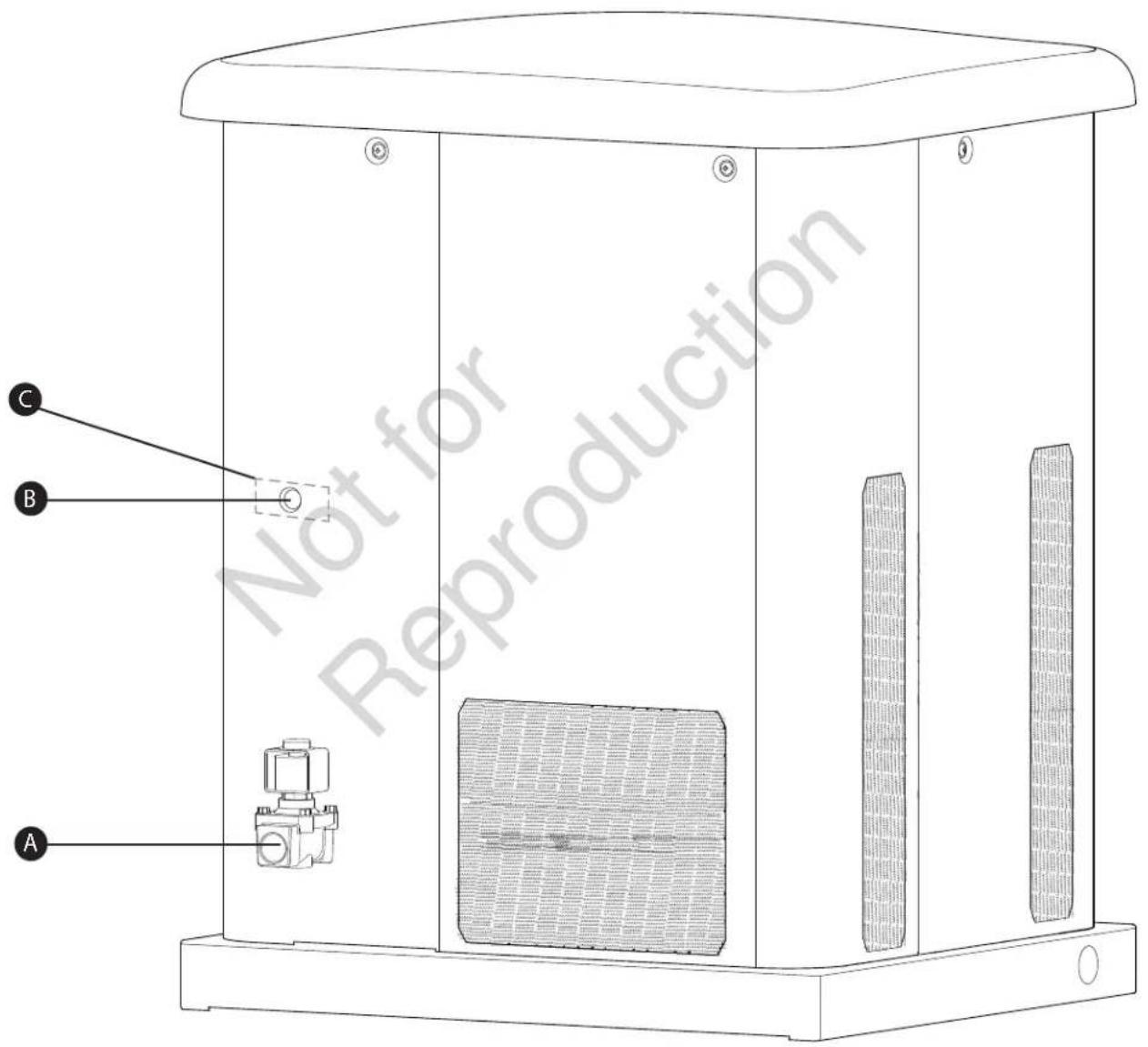
The 3/4 inch N.P.T. fuel inlet connector (A) and electrical inlet location (B) is shown below.
A 12 inch knock-out is provided for the electrical inlet. This inlet may be enlarged or supplemented to accommodate a maximum conduit size of 112 inches. Ensure that the installed conduit(s) enter the unit in the zone (C) shown in the drawing such that they properly enter the electrical box and do not interfere with the fully opened roof.
The home generator is supplied with a base that, unless mandated by local code, does not require a concrete slab.
Lifting the Generator
The generator weighs more than 330 pounds (150 kg). Proper tools, equipment and qualified personnel should be used in all phases of handling and moving the generator.

WARNING


Hazardous Voltage - Contact with power lines could cause electric shock or burn, resulting in death or serious injury.
Lifting Hazard / Heavy Object - Could result in
serious injury.
- If lifting or hoisting equipment is used, DO NOT contact any power lines.
• DO NOT lift or move generator without assistance. - Use lifting pipes as described in Lifting the Generator.
- DO NOT lift unit by roof as damage to generator will occur.
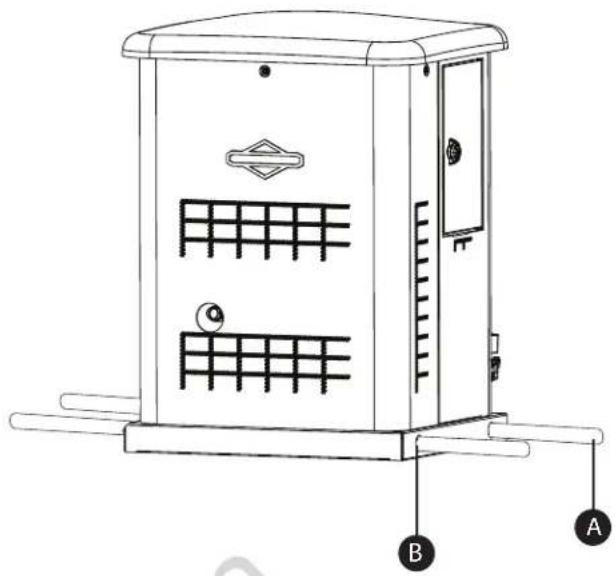
Two 60" lengths of 3/4" nominal minimum scheduled 40 steel pipe (A), supplied by the installer, are required to lift the generator manually. Insert pipes through the lifting holes (B) located near the unit's base.
You may also lift the unit using a "hook and hoist" method attached to the lifting pipes, provided that you use a spreader bar to ensure that the chains or cables DO NOT touch the generator's roof.
Concrete Anchoring of Unit
In areas determined to be hurricane prone, it is recommended to anchor the standby generator to concrete. The concrete slab should be at least 3" (76mm) thick and 6" (152mm) longer and wider than the unit [32" (813mm) x 29" (737mm)]. Use 1/4" (6mm) diameter (minimum) by 3" (76mm) long (minimum) masonry anchor bolts to retain the unit. There are three 7/16" hole locations (C) in the base of the generator in which to anchor the unit.
NOTICE Unless mandated by local or state code, a concrete slab is not required.
natural_image
Line drawing of a portable electrical cabinet with labeled components A and B (no text or symbols on the cabinet itself)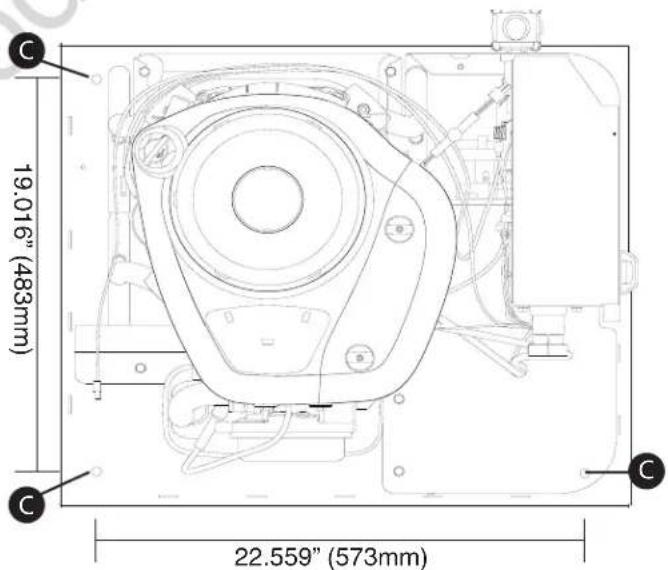
Access Panels
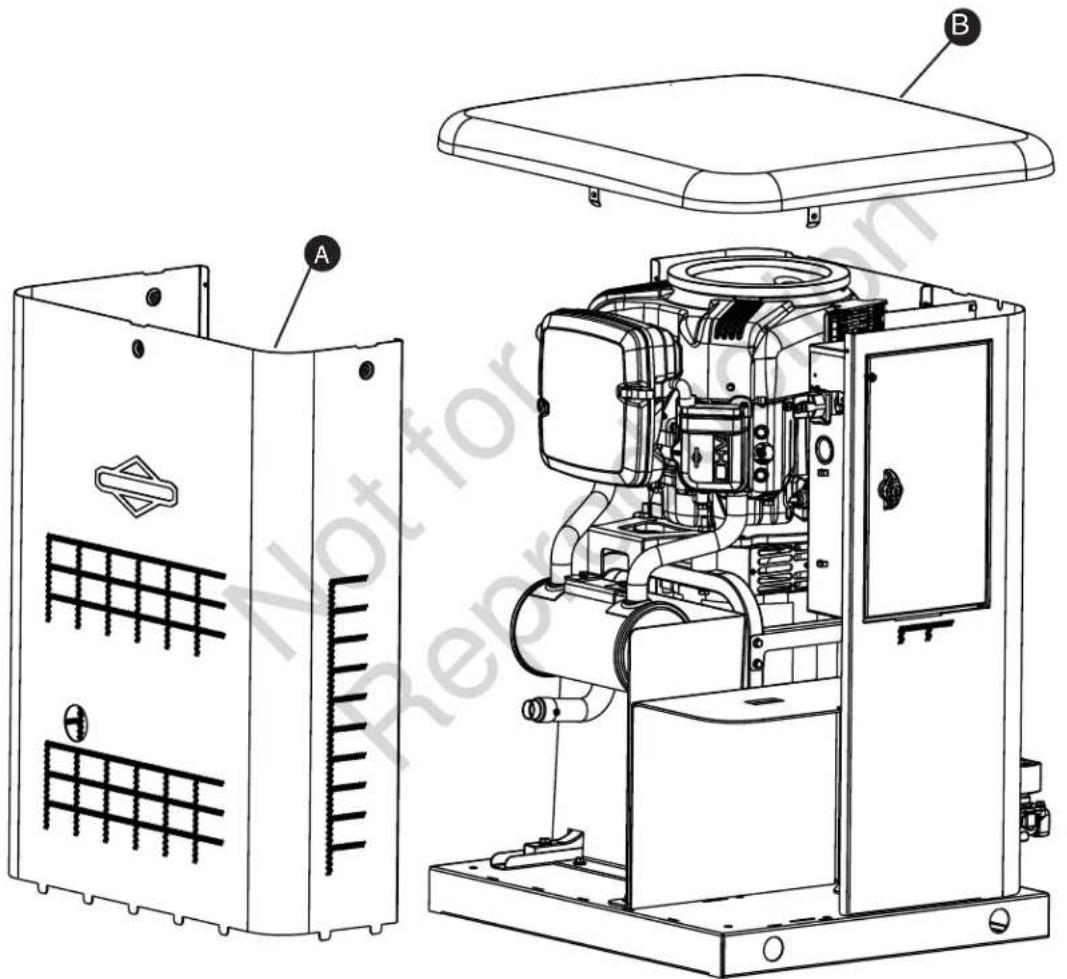
The generator is equipped with an enclosure that has several access panels, as shown.
Front Panel (A) and roof (B) are used to access:
- Battery Compartment
• Engine Oil Drain Hose - Engine Oil Filter
• Engine Valve Cover - Spark Plugs
Each generator is shipped with a set of identical keys.
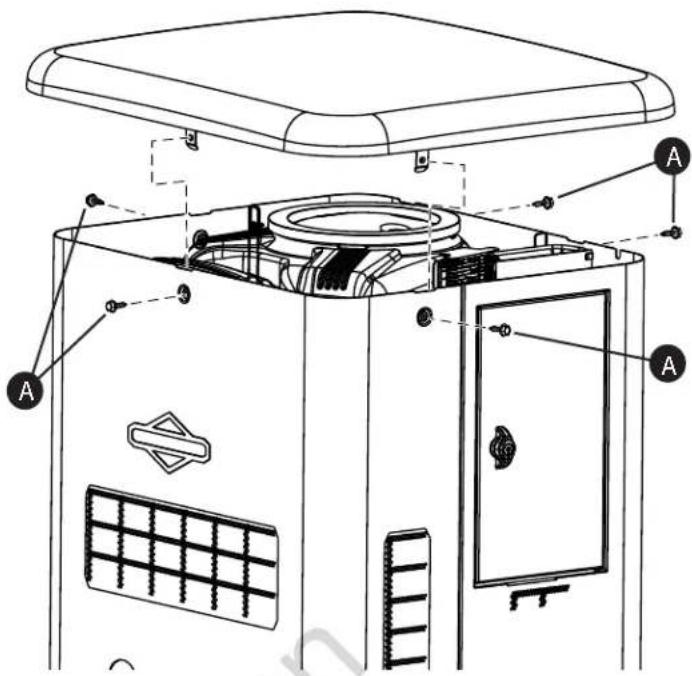
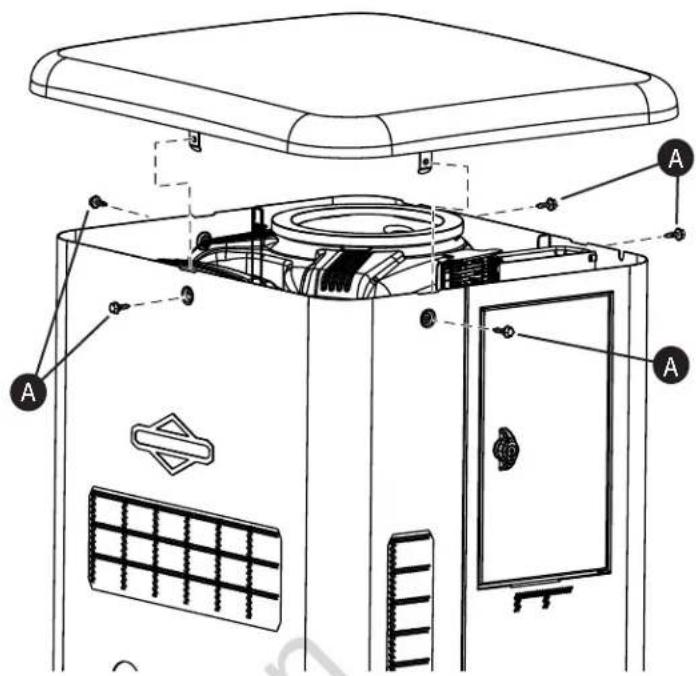
To remove roof:
- Remove the five screws (A) that secure the roof to the unit.
- Carefully lift and remove roof from unit.
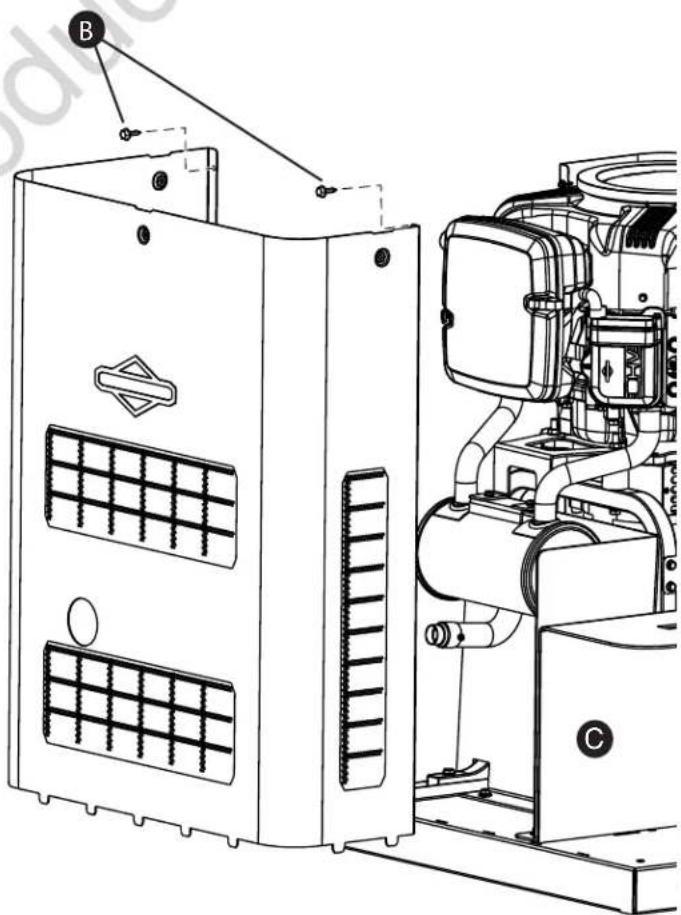
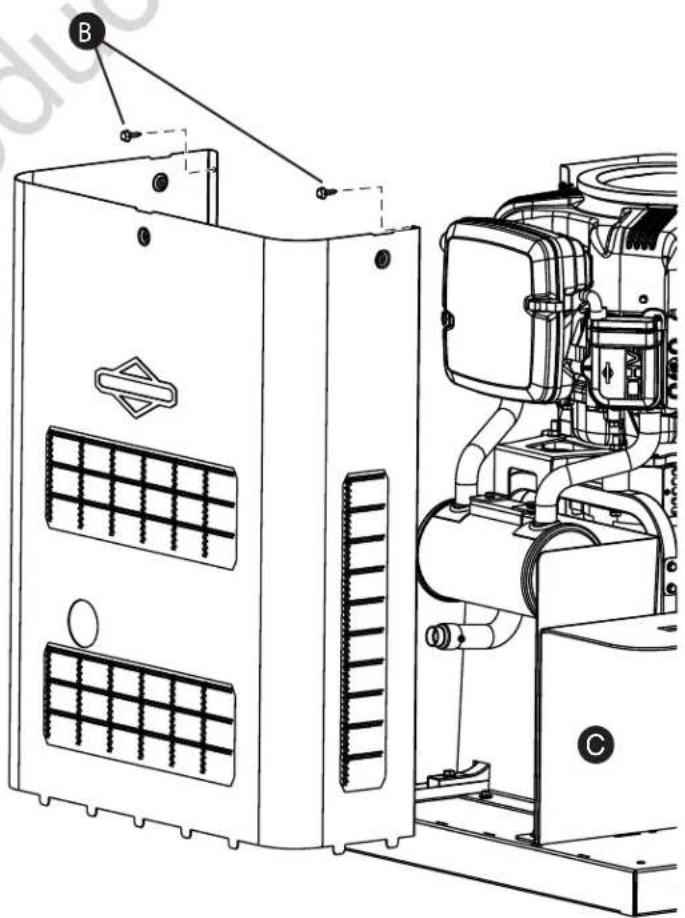
To remove front panel:
- Remove the two screws (B) that secure the panel to the unit.
- Lift and flex panel outward and off base. Use caution not to damage the battery box (C).
To secure front panel:
- Place panel in unit.
- Secure the panel with two screws.
The Gaseous Fuel System
The information below is provided to assist gaseous fuel system technicians in planning installations. In no way should this information be interpreted to override applicable fuel gas codes. Consult with your local fuel supplier or Fire Marshall if questions or problems arise.

WARNING


Propane and Natural Gas are extremely flammable and explosive, which could cause burns, fire or explosion resulting in death or serious injury.
- LP gas is heavier than air and will settle in low areas.
• Natural gas is lighter than air and will collect in high areas. - The slightest spark could ignite these fuels and cause an explosion.
• DO NOT light a cigarette or smoke.
TO THE INSTALLER: Consult with the generator owner(s) and convey any technical considerations that might affect their installation plans before applying these general guidelines.
The following general rules apply to gaseous fuel system piping:

WARNING
Propane and Natural Gas are extremely flammable and explosive, which could cause burns, fire or explosion resulting in death or serious injury.


- Before placing the generator into service, the fuel system lines must be properly purged and leak tested.
- No leakage is permitted.
NOTICE The supplied flexible steel fuel line is not to be installed underground or in contact with the ground.
- The entiflexible steel fuel line must be visible for periodic inspection and must not be concealed within nor contact nor run through any wall, floor, or partition.
- The piping should be of a material that conforms to federal and local codes, rigidly mounted and protected against vibration.
- Piping should be protected from physical damage where it passes through flower beds, shrub beds, and other cultivated areas where damage could occur.
NOTICE The illustration is representative of a typical installation. Your installation may differ.
• Install the flexible steel fuel line (B) (supplied) between the generator fuel inlet port (A) and rigid piping to prevent thermal expansion, contraction, or any standby movement from causing excessive stress on the piping material.
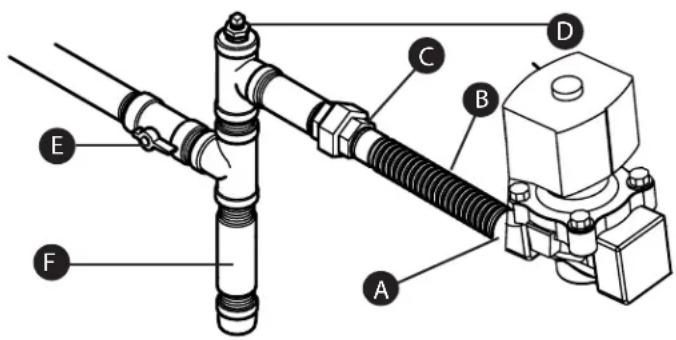
- A union (C) or flanged connection shall be provided downstream to permit removal of standby.
- A manometer port should be provided (D). A digital manometer, P/N 19495, is available at your Briggs & Stratton service center. When the initial test runs are completed, the manometer is removed and the port is plugged. The manometer port permits temporary installation of a manometer to ensure that the engine receives the correct fuel pressure to operate efficiently throughout its operating range.
- Where the formation of hydrates or ice is known to occur, piping should be protected against freezing. The termination of hard piping should include a sediment trap (F) where condensate is not likely to freeze.
- A minimum of one accessible, approved manual shutoff valve (E) shall be installed in the fuel supply line within 6 ft. (180 cm) of the home generator.
- A manual fuel shut-off valve should be installed in the interior of the building.
- Where local conditions include earthquake, tornado, unstable ground, or flood hazards, special consideration shall be given to increase strength and flexibility of piping supports and connections.
- Piping must be of the correct size to maintain the required supply pressures and volume flow under varying generator load conditions with all gas appliances connected to the fuel system turned on and operating.
- Use a pipe sealant or joint compound approved for use with NG/LPG on all threaded fittings to reduce the possibility of leakage.
- Installed piping must be properly purged and leak tested, in accordance with applicable codes and standards.
Fuel Factors
An important consideration affecting the entire installation is the type of fuel used by your generator. The system was factory tested and adjusted using natural gas, but can be converted to use LP vapor. For proper engine function, factors that are inherent to each of these fuels, your location and the duration of possible utility interruptions are important considerations in the following fuel guidelines:
- Use clean, dry fuel, free of moisture or any particulate material. Using fuels outside the following recommended values may cause performance problems.
- In engines set up to run on propane (LP), commercial grade HD5 propane with a minimum fuel energy of 2500 BTUs/ft3 with maximum propylene content of 5% and butane and heavier gas content of 2.5% and minimum propane content of 90% is required.
Natural gas rating will depend on specific fuel but typical derates are between 10 to 20% off the LP gas rating.
Natural gas or LP engines are certified to operate on natural or liquid propane gas. The emissions control system for this engine is EM (Engine Modifications).

WARNING
Propane and Natural Gas are extremely flammable and explosive, which could cause burns, fire or explosion resulting in death or serious injury.
- The residential generator is equipped with an automatic safety gas "fuel shut-off" valve.
- DO NOT operate the equipment if the "fuel shut-off" valve is missing or inoperative.
Fuel Pressure
Both LP vapor and natural gas fuel supply pressure at the generator's fuel inlet port should be between the following levels at full load with all gas appliances turned on and operating.
• NG is 3.5-7" W.C.
• LP is 11-14" W.C.
Ensure that all gas line shutoff valves are OPEN and that adequate fuel pressure is available whenever automatic operation is desired.
Power Loss
Air density is less at high altitudes, resulting in less available engine power. Specifically, engine power will decrease 3.5% for each 1,000 feet (300 m) above sea level and 1% for each 10^ F ( 5.6^ C) above 77^ F ( 25^ C). Generators located in these conditions must have their transfer switch adjusted appropriately for this power decrease. See Automatic Transfer Switch manual on how to adjust for the power decrease.
Fuel Pipe Sizing
There are numerous on-line or otherwise-published references for fuel pipe sizing. For example, NFPA 54 - National Fuel Gas Code, 2006 (Item #: 320-6031-06) is a common resource.
The installer should consider the specific gravity of gas and compensate for a nominal amount of restriction from bends, fittings, etc. If an unusual number of fittings, bends, or other restrictions are used, refer to federal and local codes for guidance.
Fuel Conversion
The engine of your home generator system is factory Calibrated and set to operate on natural gas (NG). It may also be operated on liquefied petroleum (LP) vapor.
To configure 10 kW units with factory installed fuel harness for LP use:
- Press control panel "OFF" button.
- Remove 15 Amp fuse from control panel.
- Remove Roof.
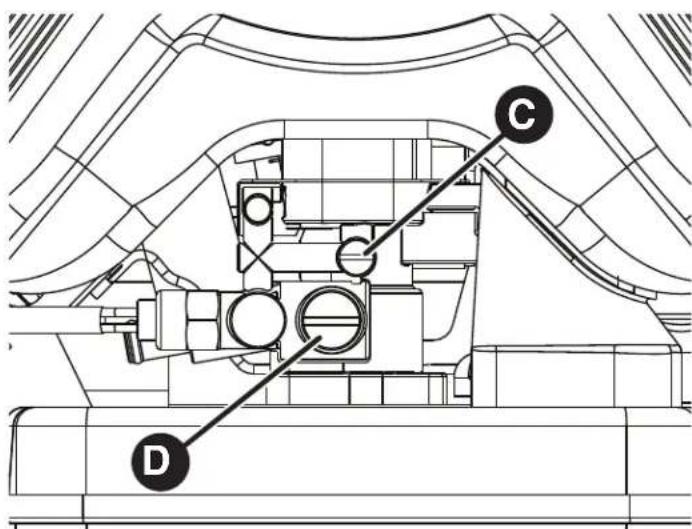
- Using a slotted screwdriver turn both (C) and (D) screws clockwise until it is snug (Over tightening can damage mixer port)
-
Using screwdriver turn screw (C) counter clockwise 2 and 12 turns.
-
Leave screw (D) seated.
-
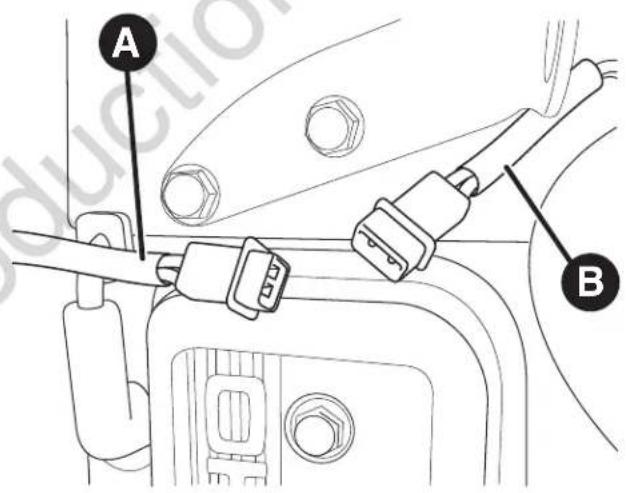
Connect the fuel harness (A) to the engine solenoid (B) by joining the two-pin electrical connectors.
-
Reinstall 15 Amp fuse in control panel.
-
Press control panel "AUTO" button.
-
Reinstall Roof and Close access panels.
• NOTE: NG Settings from factory:
- Screw C: 4 - 4.5 turns
- Screw D: 1.5 - 2 turn
The system is now ready to operate automatically using LP vapor fuel.
To configure 10 kW units without factory installed fuel harness for LP use:
- Press control panel "OFF" button.
- Remove 15 Amp fuse from control panel.
- Remove Roof.
- Using a slotted screwdriver turn both (C) and (D) screws clockwise until it is snug (Over tightening can damage mixer port)
- Using screwdriver turn screw (C) counter clockwise 2 and 12 turns.
- Leave screw (D) seated.
- Reinstall 15 Amp fuse in control panel.
- Press control panel "AUTO" button.
- Reinstall Roof and Close access panels.
Fuel Consumption
Estimated fuel supply requirements at half and full load for natural gas and LP vapor fuels are shown here.
LP Vapor (Propane)
| 10 kW | ||
| Full Load | Cu Ft/Hr 65.6 | |
| Gal/Hr (liquid) | 1.82 | |
| BTU/Hr 164000 | ||
| 1/2 Load | Cu Ft/Hr 42.8 | |
| Gal/Hr (liquid) | 1.18 | |
| BTU/Hr 107000 | ||
| Exercise | Cu Ft/Hr 23.6 | |
| Gal/Hr (liquid) | 0.65 | |
| BTU/Hr 59000 | ||
| Recommended Energy Content of Fuel: | Natural Gas | Propane (LP Vapor) |
| Heating Value: | ||
| BTU per gallon liquid (gross*) | N/A | 91,547 |
| BTU per Cubic feet (vapor) | 1,000 | 2,500 |
Natural Gas
| 10 kW | ||
| Full Load | Cu Ft/ Hr 1 | 69 |
| BTU / Hr 1 | 69000 | |
| 1/2 Load | Cu Ft/ Hr 1 | 11 |
| BTU / Hr 1 | 11000 | |
| Exercise | Cu Ft/ Hr 6 | 0 |
| BTU / Hr 6 | 0000 |
System Connectors
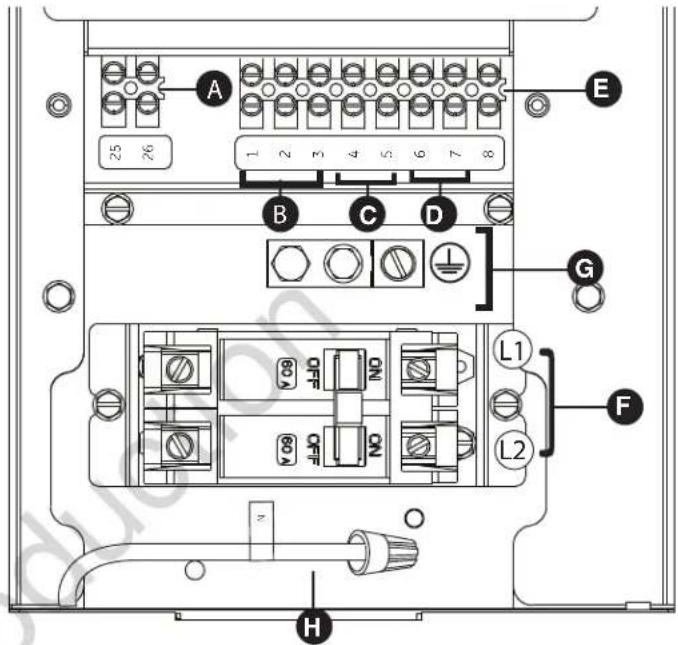
Low Voltage connections to signal fault contacts, transfer switch communication and auxiliary 12VDC power are made via a field connection terminal block in control board area. Compare this illustration with your generator to familiarize yourself with the location of these connections.
A - Two Pin Terminal Block — Used to connect utility 240 VAC from fuse block in ATS to the control board. Connect only one wire per terminal, Use #14 [2.5mm ^2 ] AWG minimum 300 volt wire.
B - Fault Contacts — Use 1 (N.O.), 2 (COM) and 3 (N.C.) to hook up a siren, light, etc. to alert you in case of a fault. Contacts reverse state (1 [N.O.] goes to 3 [N.C.] and vice versa) upon a fault condition.
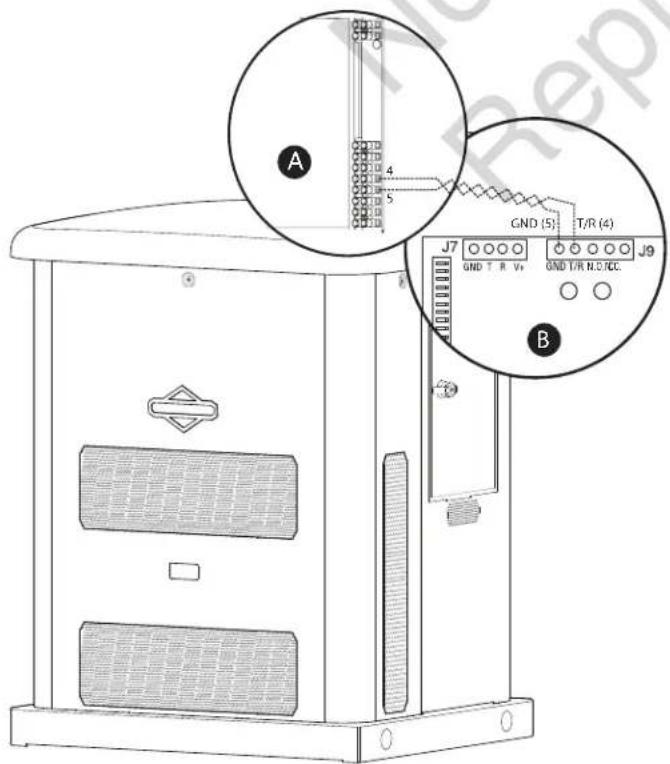
C - Transfer Switch Communication (4 [TxRx] and 5 [TxRx GND]) — Connect to transfer switch control board for communication interface using 18AWG [1mm^2] twisted pair wire.
D - 6 (+LED) and 7 (GND) Connection — Not required for wireless monitor included with unit. Available for optional hardwired remote system status panel accessory, #6154.
E - Eight Pin Terminal Block — Used to connect signal wires to the control board. Connect only one wire per terminal.
F - Power Connection (Line 1 and Line 2) — Power connection to transfer switch.
G - Ground Connection — Connect to transfer switch ground wire.
H - Neutral Connection — Connect to transfer switch neutral wire
- For power output connection (Line 1, Line 2, Neutral, and Ground), refer to the following table:
| ≥300V, 75°C | 10 kW |
| 6 AWG [13 mm2] min. Cu/Al |
* Reference NEC 2014 table 310.15 • Use National Electric Code for correction factors and wire size calculations.
- For transfer switch communication use #18 AWG [1mm ^2 ] twisted pair conductors, no greater than 200 ft in length, 300 volt wire.
- When connecting to the terminal block, fasten only one wire to each connector screw.
- Torque terminal block screws to 4.4 in-lb [0.49 Newton meter].
- Torque circuit breaker connections to 45 in-lb [5 Newton meter].
* Metric system rounded for simplicity
NOTICE Neutral wire (H) must be connected to the transfer switch Neutral wire.
DO NOT connect neutral and ground together within the generator.
Communication Connections
Connect the applicable communication leads to the automatic transfer switch as shown in the table below.
| Pin Number | Description Wire Type | Connect To Notes | ||
| 1 Normally Open | 18 AWG [1 mm2] twisted pair conductors no longer than 61 m, 300V, 90°C copper wire | For Optional Alarm | ||
| 2 Common | 18 AWG [1 mm2] twisted pair conductors no longer than 61 m, 300V, 90°C copper wire | For Optional Alarm | ||
| 3 Normally Closed | 18 AWG [1 mm2] twisted pair conductors no longer than 61 m, 300V, 90°C copper wire | For Optional Alarm | ||
| 4 | Transfer Switch Communication | 18 AWG [1 mm2] twisted pair conductors no longer than 61 m, 300V, 90°C copper wire | 4 (T/R) on transfer switch board | Must Connect |
| 5 | Transfer Switch Communication Ground | 18 AWG [1 mm2] twisted pair conductors no longer than 61 m, 300V, 90°C copper wire | 5 (GND) Ground on transfer switch board | Must Connect |
| 6 +LED | 18 AWG [1 mm2] twisted pair conductors no longer than 61 m, 300V, 90°C copper wire | Red wire on fault indicator plate | For Optional Fault Indication | |
| 7 Ground | 18 AWG [1 mm2] twisted pair conductors no longer than 61 m, 300V, 90°C copper wire | Black wire on fault indicator plate | For Optional Fault Indication Ground | |
| 8 Not Used N/A N/A N/A | ||||
| 25 | Utility | 14 AWG [2.5 mm2] minimum 300v wire | Transfer Switch Utility | Must Connect |
| 26 | Utility | 14 AWG [2.5 mm2] minimum 300v wire | Transfer Switch Utility | Must Connect |
* Metric system rounded for simplicity
Generator AC Connection System
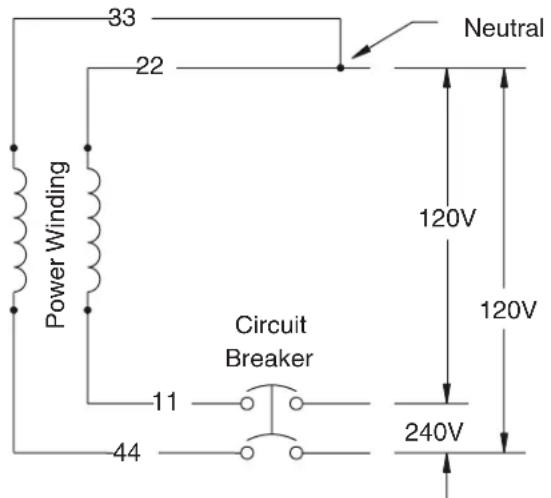
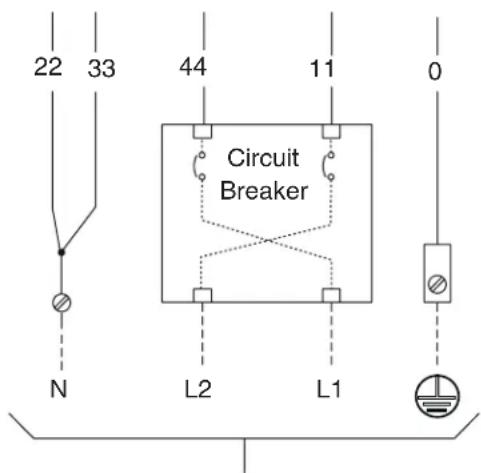
A single-phase, three-wire AC connection system is used in the home generator. The stator assembly consists of a pair of stationary windings with two leads brought out of each winding. The junction of leads 22 and 33 forms the neutral lead, as shown schematically and as a wiring diagram. A complete schematic and wiring diagram can be found later in this manual.
NOTICE Neutral is not bonded to ground at generator.
NOTICE Generator must be used with only an UL listed transfer switch that is compatible with the generator.
Grounding the Generator
The home generator must be installed as part of a system that includes a listed transfer switch, with neutral to ground bonding at the transfer switch in accordance with installation instructions. Unless mandated by local code, additional grounding to earth at the generator is not required. Any
grounding at generator must use metal piercing lock washers (or equal), UL listed terminals installed per terminal supplier's instructions, and comply with national electrical codes and local requirements.
Power Connections from Generator to Transfer Switch
Utility Circuit Connection
"240V Utility" leads must be routed in conduit. The "240V Utility" leads deliver power to the generator's circuit board, optional battery warmer and optional oil warmer. This power also charges the battery. When power on these leads is lost, the generator will start.
Generator Power Connection
For 10 kW Units: Using installer supplied minimum 300V, wires and the table located on page 25, connect generator power output Line 1, Line 2, neutral, and ground to the corresponding Line 1, Line 2, neutral and ground in the transfer switch.
*Use National Electric Code for correction factors and wire size calculations.
Transfer Switch Communication
Using installer supplied #18 AWG [1 mm ^2 ] twisted pair conductors, no greater than 200 ft in length, connect 4 and 5 from the generator terminal block (A) to T/R (4)and GND (5) on the transfer switch control board (B).
Using installer-supplied minimum 300V, 14 [2.5 mm²] AWG wire, connect each control circuit terminal in the generator (25 and 26) to the fuse block in the automatic transfer switch.
Reference illustration and chart on pages 24 and 25 for further information.
When making connections, obey wire type and torque specifications printed on the circuit breaker and neutral/ground connectors.
System Control Board
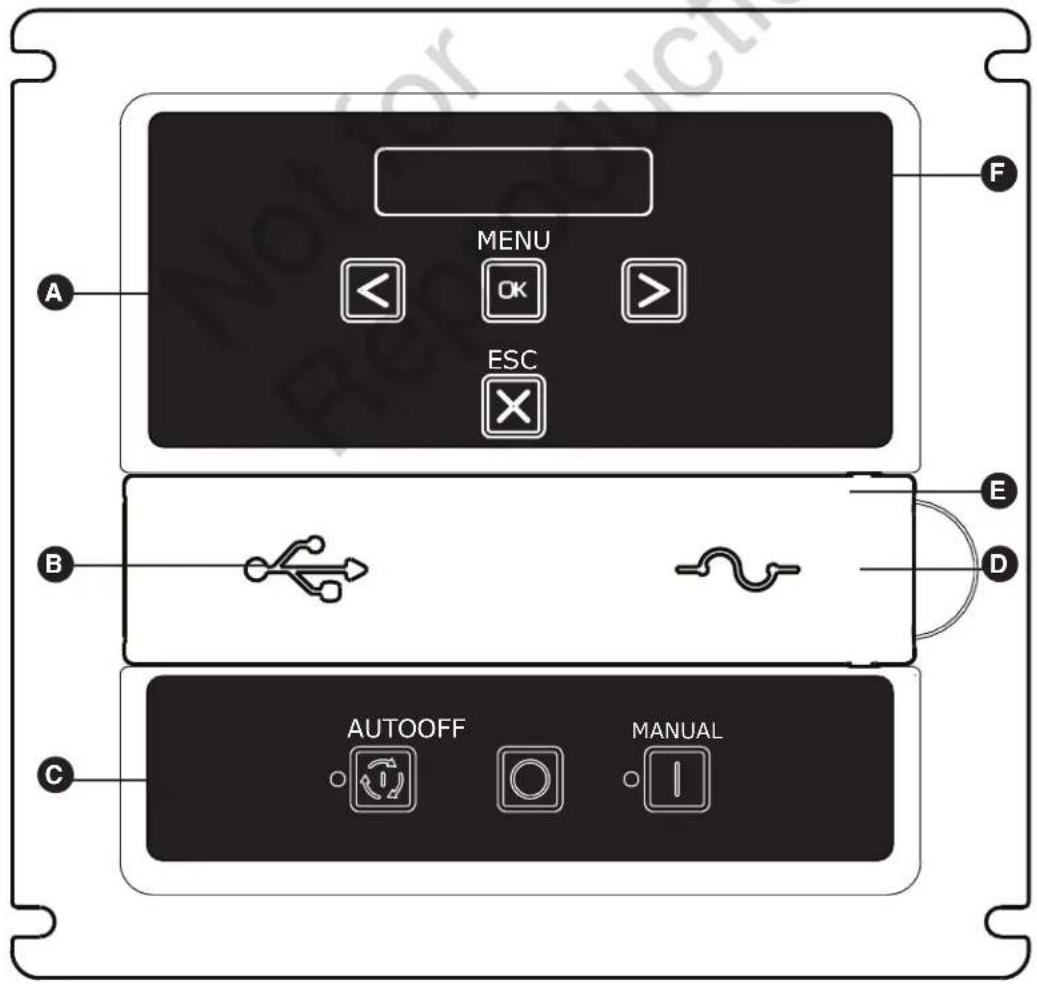
The generator control board, located inside the generator, under the roof, is shown below. Brief descriptions of the controls used during installation are:
A - Menu/Programming Navigation Buttons — See Menu section for details
B - Mini USB Port — Authorized Dealer Service Use Only
C - Generator Operation Control Buttons —
- "AUTO" Normal operating position. Press and hold button to put unit into Automatic mode. If an utility power outage is sensed, the system will start the generator. When utility power is restored, auto lets the engine stabilize internal temperatures, shuts off the generator, and waits for the next utility outage.
- "OFF" Turns off running generator, prevents unit from starting, and resets any detected faults.
OFF must be pressed and held for more than 5 seconds in order to reset service codes.
- "MANUAL" Used to manually start the generator.
* - "AUTO" LED — LED will light when unit is placed into Auto mode. LED will blink if exercise cycle is not set or set to OFF.
D - 15 Amp Fuse — Protects the home generator DC control circuits. If the fuse has 'blown' (melted open) or was removed, the engine cannot crank or start. Replace the fuse using only an identical ATO 15A fuse. One spare fuse is supplied with the unit.
E - Cover — This protective cover must be opened to access the fuse and the USB port.
F - Digital Display — Displays generator mode, menu options, service codes, and service engine indicators
More information may be found in Controls in the operator's manual.
Menu
The following chart shows the icons for the buttons that control the system control panel.
 | MENU | ENTER THE MENU (VIEW SETTINGS) PRESS TO CONFIRM SELECTION WHEN PROGRAMMING. |
 | ESCAPE (EXIT) RETURN | TO LAST MENU ITEM |
 | RIGHT ARROW | TOGGLE THROUGH MENU OPTIONS SETTING SYSTEM PARAMETERS |
 | LEFT ARROW | TOGGLE THROUGH MENU OPTIONS SETTING SYSTEM PARAMETERS |
 | MANUAL MODE | USED TO MANUALLY START THE GENERATOR. PRESS AND HOLD BUTTON TO START THE GENERATOR. |
 | OFF | TURNS OFF RUNNING GENERATOR, PREVENTS UNIT FROM STARTING, AND RESETS ANY DETECTED FAULTS. |
 | AUTOMATIC MODE | NORMAL OPERATING POSITION. PRESS AND HOLD BUTTON TO PUT UNIT INTO AUTOMATIC MODE. IF A UTILITY POWER OUTAGE IS SENSED, THE SYSTEM WILL START THE GENERATOR. WHEN UTILITY POWER IS RESTORED, AUTO LETS THE ENGINE STABILIZE INTERNAL TEMPERATURES, SHUTS OFF THE GENERATOR, AND WAITS FOR THE NEXT UTILITY POWER OUTAGE. |
The following chart describes key sequences for accessing different programming modes;
 | GENERAL SET-UP | PRESS AND HOLD [ARROW LEFT AND ARROW RIGHT] UNTIL “GENERAL SET-UP” IS DISPLAYED TO ENTER THE PROGRAM MODE. |
   | ADVANCED SETTINGS | PRESS AND HOLD [ARROW LEFT, ARROW RIGHT AND ESC] UNTIL “ADVANCED SETTINGS” IS DISPLAYED OR PRESS AND HOLD EITHER [ARROW LEFT, ARROW RIGHT OR ESC] BUTTON UNTIL “++1++” IS DISPLAYED ON THE DIGITAL DISPLAY. NEXT PRESS AND HOLD A DIFFERENT KEY [ARROW LEFT, ARROW RIGHT OR ESC] BUTTON UNTIL “++2++” IS DISPLAYED. FINALLY, PRESS AND HOLD THE REMAINING BUTTON NOT SELECTED [ARROW LEFT, ARROW RIGHT OR ESC] UNTIL “ADVANCED SETTINGS” IS DISPLAYED. |
  | WIRELESS LINK MODE | PRESS AND HOLD [MENU AND ESC] FOR THREE SECONDS TO ENTER THE WIRELESS LINKING MODE. (ONLY APPLICABLE ON SOME MODELS). |
General Set Up Screen
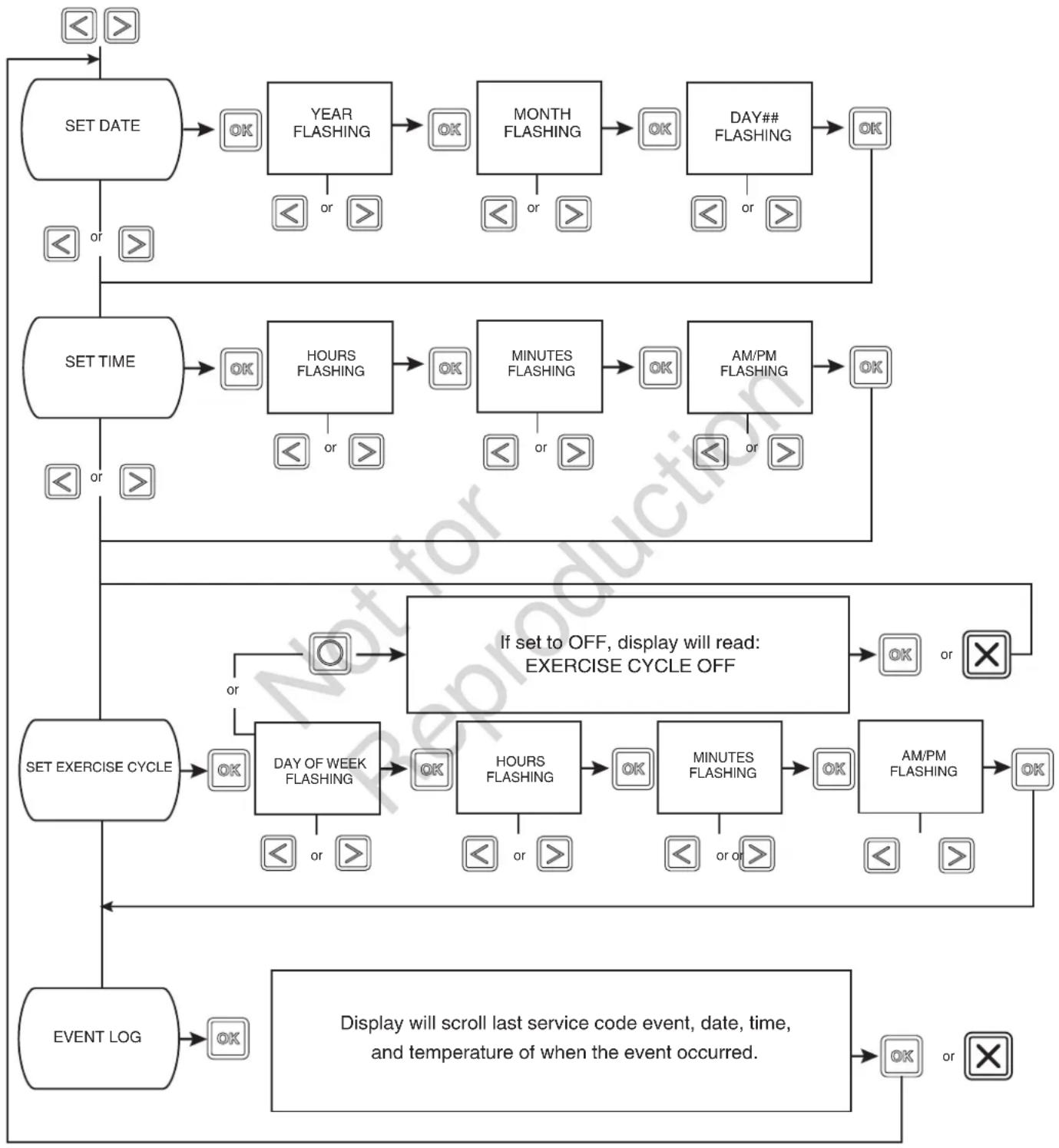
For general set up, press and hold the left arrow and right arrow for 3 seconds. Follow the prompts as outlined below.
flowchart
graph TD
    A["SET DATE"] --> B["OK"]
    B --> C["YEAR FLASHING"]
    C --> D["OK"]
    D --> E["MONTH FLASHING"]
    E --> F["OK"]
    F --> G["DAY## FLASHING"]
    G --> H["OK"]
    H --> I["SET TIME"]
    I --> J["OK"]
    J --> K["HOURS FLASHING"]
    K --> L["OK"]
    L --> M["MINUTES FLASHING"]
    M --> N["OK"]
    N --> O["AM/PM FLASHING"]
    O --> P["OK"]
    P --> Q["SET EXERCISE CYCLE"]
    Q --> R["OK"]
    R --> S["DAY OF WEEK FLASHING"]
    S --> T["OK"]
    T --> U["HOURS FLASHING"]
    U --> V["OK"]
    V --> W["MINUTES FLASHING"]
    W --> X["OK"]
    X --> Y["AM/PM FLASHING"]
    Y --> Z["OK"]
    Z --> AA["EVENT LOG"]
    AA --> AB["OK"]
    AB --> AC["Display will scroll last service code event, date, time, and temperature of when the event occurred."]
    subgraph SET Time
        I
        J
        K
        L
        M
        N
        O
        P
        Q
        R
        S
        T
        U
        V
        W
        X
        Y
        Z
    end
IF NO BUTTONS ARE PRESSED FOR 30 SECONDS DURING PROGRAMMING, THE CONTROL PANEL WILL AUTOMATICALLY EXIT THE PROGRAM MODE.
Control Panel Prompts
Automatic Mode
In Automatic Mode, the display screen will display via scrolling text:
- GENERATOR READY - if the unit is in standby and utility power is present.
- GENERATOR ON - if the unit is running and utility power is not present.
- SERVICE CODE - if a system fault has been detected.
General System Parameters
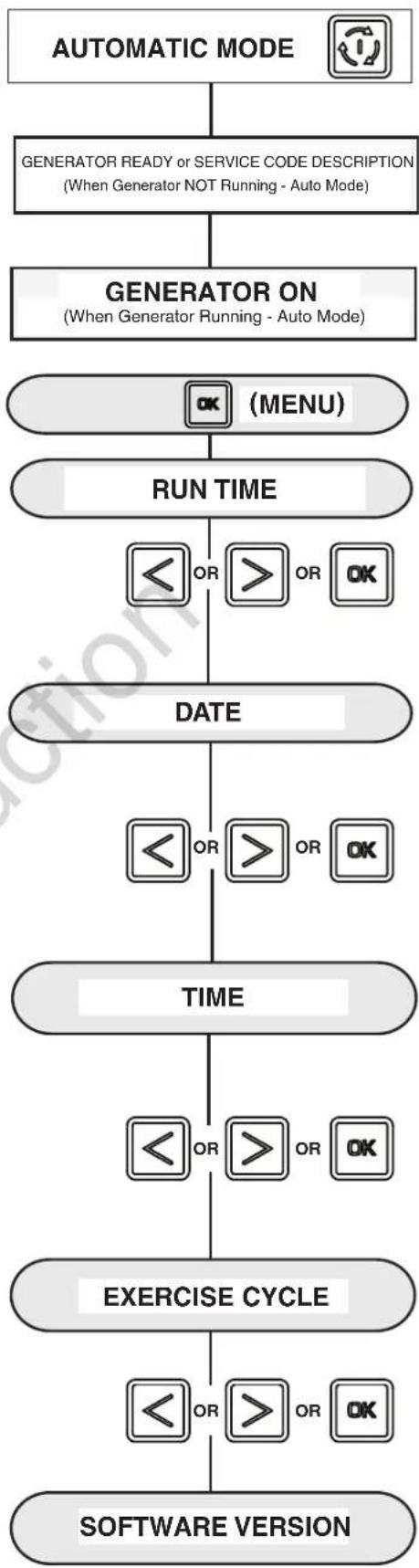
To view general system parameters, press the MENU button.
The following will scroll across the digital display and then move to the next item:
- Run time
- Date
- Time
• Exercise Cycle date and start time - Software Version
The user can press the LEFT ARROW or RIGHT ARROW at any time to move to the next item.
The user can press ESCAPE to go back to GENERATOR READY.
If no user inputs are made for 40 seconds after all the items have been displayed, the control board digital scrolling display will reset to previous scrolling display.
flowchart
graph TD
    A["AUTOMATIC MODE"] --> B["GENERATOR READY or SERVICE CODE DESCRIPTION\n(When Generator NOT Running - Auto Mode)"]
    B --> C["GENERATOR ON\n(When Generator Running - Auto Mode)"]
    C --> D["OK (MENU)"]
    D --> E["RUN TIME"]
    E --> F["OR OR OK"]
    F --> G["DATE"]
    G --> H["OR OR OK"]
    H --> I["TIME"]
    I --> J["OR OR OK"]
    J --> K["EXERCISE CYCLE"]
    K --> L["OR OR OK"]
    L --> M["SOFTWARE VERSION"]
Advanced Settings Screen
Advanced setting parameters are preset at the factory for a typical installation. To view Advanced Settings items and/or to change items, follow the instructions listed below.
NOTICE Advanced settings are critical to the operation of the unit. Careful consideration should be taken when working in the Advanced Settings menu. Exercise caution when selecting and verifying parameters for the generator and region where the generator is being operated. Confirm all settings before operating the generator for the first time.
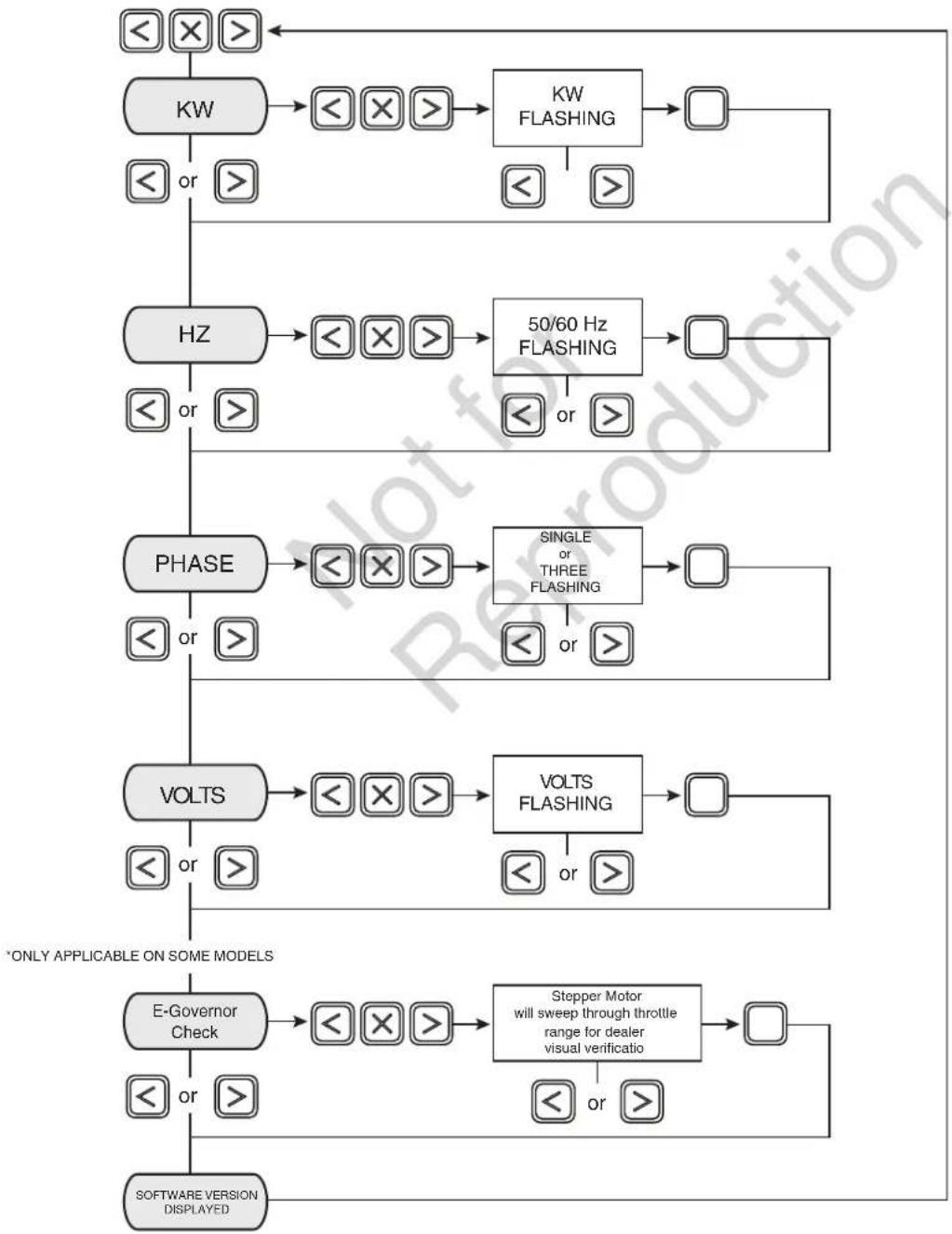
For advanced menu items, press and hold the left arrow, right arrow, and escape key ⏻ for 3 seconds or see pg. 29 for additional key sequence. Follow the prompts as outlined below.
NOTICE In the Advanced Setting menu, a three button access code (left arrow, right arrow, and escape key must be pressed once to enter the menu and again to change any setting. After each confirmation of a setting, the selection will display solid for 2 seconds before moving to the next program item.
flowchart
graph TD
    A["<<×>>"] --> B["KW"]
    B --> C["<<×>>"]
    C --> D["KW FLASHING"]
    D --> E["<<"]
    E --> F[">"]
    F --> G["HZ"]
    G --> H["<<×>>"]
    H --> I["50/60 Hz FLASHING"]
    I --> J["<<"]
    J --> K[">"]
    K --> L["PHASE"]
    L --> M["<<×>>"]
    M --> N["SINGLE or THREE FLASHING"]
    N --> O["<<"]
    O --> P[">"]
    P --> Q["VOLTS"]
    Q --> R["<<×>>"]
    R --> S["VOLTS FLASHING"]
    S --> T["<<"]
    T --> U[">"]
    U --> V["*ONLY APPLICABLE ON SOME MODELS"]
    V --> W["E-Governor Check"]
    W --> X["<<×>>"]
    X --> Y["Stepper Motor will sweep through throttle range for dealer visual verification"]
    Y --> Z["<<"]
    Z --> AA[">"]
    AA --> AB["SOFTWARE VERSION DISPLAYED"]
Service Code Detection System
The generator may have to run for long periods of time with no operator present. For that reason, the system is equipped with sensors that automatically shut down the generator in the event of potentially damaging conditions, such as low oil pressure, high temperature, over speed, and other conditions.
Final Installation Considerations
Engine Oil
NOTICE Any attempt to crank or start the engine before it has been properly serviced with the recommended oil will result in possible equipment failure and service codes.
- Refer to Maintenance in the operator's manual for oil fill information.
- Damage to equipment resulting from failure to follow this instruction will void engine and generator warranty.
Battery
The installer must supply and install a rechargeable 12 volt starting battery. The starting battery MUST conform to the specifications shown in this chart.
| Battery Specifications | ||
| Specifications Standard | Cold Start(less than 32°) | |
| Volts | 12 Volt DC 12 Volt DC | |
| Amps (MIN) | 540 CCA (cold cranking amps) | 800 CCA (cold cranking amps) |
| Construction | Wet lead acid Wet lead acid | |
| Terminal Type | Top post type battery Top post type battery | |
| Dimensions(MAX): | BCI size 26or BCI size 51 | BCI size 24 |
Install the battery as described in Servicing the Battery in the Maintenance section of the operator's manual. Always make sure the NEGATIVE cable is connected last and that the red POSITIVE terminal insulator is fully in place.
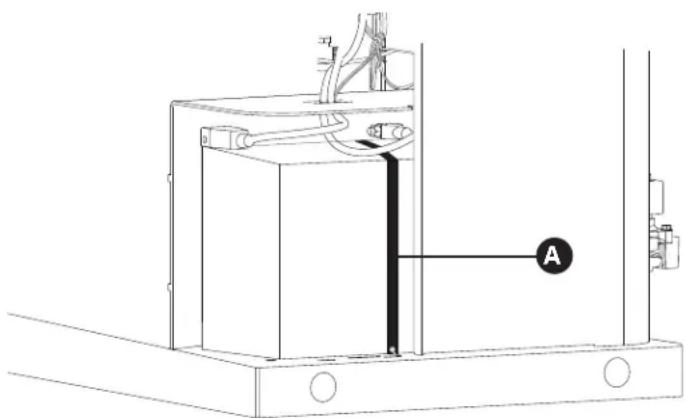
Use the supplied tie-down strap (A) to secure the battery to the unit. Each end of the strap should be attached to the existing tabs in the base of the unit.
Refer to Service Code Detection System in the operator's manual for more detailed information.
This engine is shipped from the factory pre-run and filled with full synthetic oil (API SJ/CF 5W-30). This allows for system operation in a wide range of temperature and climate conditions. Before starting the engine, check oil level as described in Maintenance of the Operator's Manual.
The use of synthetic oil does not alter the required oil change intervals described in the Operator's Manual.
For operation of temperatures below 30^ F ( -1^ C), the use of fully synthetic oil (minimum API SJ) of viscosity 5W30 is required.

WARNING
Storage batteries give off explosive hydrogen gas during recharging.


Slightest spark will ignite hydrogen
and cause explosion, resulting in death or serious injury.
Battery electrolyte fluid contains acid and is extremely caustic. Contact with battery contents could cause severe chemical burns.
A battery's high short circuit current could result in serious injury.
- DO NOT dispose of battery in a fire. Recycle battery.
- DO NOT allow any open flame, spark, heat, or lit cigarette during and for several minutes after charging a battery.
- DO NOT open or mutilate the battery.
- Wear protective goggles, rubber apron, rubber boots and rubber gloves.
- Remove watches, rings, or other metal objects.
- Use tools having insulated handles.
natural_image
Technical line drawing of a mechanical assembly with labeled component A (no text or symbols beyond label)Initial Start-up (No Load)
The unit has been set-up for NG operation at the factory. Fuel conversion, if needed, must be completed prior to performing these steps. See Fuel Conversion.
Before operating the home generator or placing it into service, inspect the entire installation carefully. Then begin testing the system without any electrical loads connected, as follows:
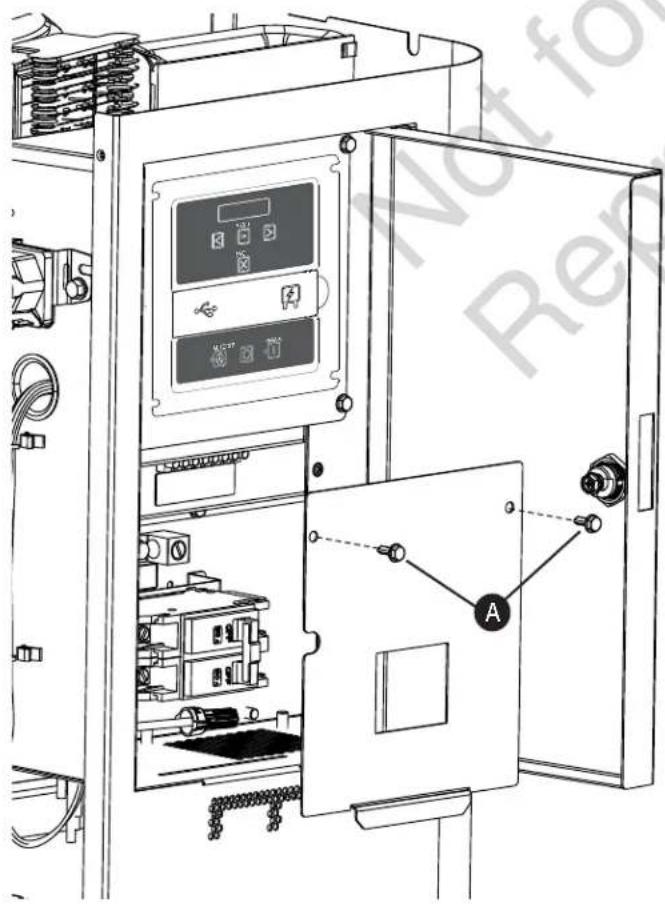
- Remove two screws (A) that secure circuit breaker cover to expose unit's circuit breaker.
- Connect an accurate frequency meter to line side of generator's main circuit breaker.
- Set generator's main circuit breaker to ON (closed) position.
- Install 15 Amp fuse in control board.
- Press and hold MANUAL button on control board for 3 seconds. Engine will start.
When the generator is started for the very first time, it will require that air in the gaseous fuel lines be purged. This may cause the engine to run roughly for a few minutes.
- Listen for unusual noises, vibration or other indications of abnormal operation. Check for oil leaks while engine runs.
- Let engine warm up for about 5 minutes to allow internal temperatures to stabilize.
- Check generator output at load side of circuit breaker. Voltage should be 239 - 262 Volts, frequency should be 62.0 - 62.5 Hz.
- Check generator output between one generator connection lug and neutral lug, then between other generator connection lug and neutral lug. In both cases, voltage reading should be between 112 and 125 Volts.
- Push and hold OFF BUTTON on control board until engine stops.
- Reinstall control box cover.
CAUTION Installing the 15A fuse could cause the engine to start at any time without warning resulting in minor or moderate injury.
- Observe that the 15 Amp fuse has been removed from the control panel for shipping.
- DO NOT install this fuse until all plumbing and wiring has been completed and inspected.
Operation Set Up (Installer)
Automatic Operation Sequence
The generator's control board constantly monitors utility voltage. Should utility voltage drop below a preset level, the control board will signal the engine to crank and start.
When utility voltage is restored above a preset voltage level, the engine is signaled to shut down.
The actual system operation is not adjustable and is sequenced by sensors and timers on the control board, as follows:
Utility Voltage Dropout Sensor
- This sensor monitors utility source voltage.
- If utility source voltage drops below about 70 percent of the nominal supply voltage, the sensor energizes a 3 second timer. The timer is used to ‘sense’ brown-outs.
- Once the timer has expired, the engine will crank and start.
Setting Exercise Timer
The generator is equipped with an exercise timer. During the exercise period, the unit runs for approximately 20 minutes and then shuts down. Electrical load transfer DOES NOT occur during the exercise cycle (unless an utility power outage occurs).
The generator will only enter the exercise cycle if the unit is in the AUTO mode and this exact procedure is followed.
To set the exercise timer:
NOTICE The generator is set with a default exercise cycle setting of Tuesday at 2:00 P.M, Central Time. To change the cycle setting, proceed to the following steps:
- Choose the day and time you want your generator to exercise.
- Press and hold the left arrow and right arrow simultaneously for 3 seconds to enter the General Set-Up program mode. See General Set-Up flow chart in Menu Section.
- Verify and/or set the time and date on the unit.
- Go to the SET EXERCISE prompt and hit the "OK" button.
Utility Voltage Pickup Sensor
This sensor monitors utility power voltage. When utility voltage is restored above 80 percent of the nominal source voltage, a time delay starts timing and the engine will go to engine cool-down.
Engine Cool-down Timer
When utility power is sensed and the load transfers to the utility source, the engine will go into a cool down period as described below:
- If the generator has run for MORE than 5 minutes, once the utility transfer occurs, the engine will continue to run for about 1 minute before shutting down.
- If the generator has run for LESS than 5 minutes, once the utility transfer occurs, the engine will continue to run until 5 minutes has elapsed before shutting down.
NOTICE Items will flash until they are selected.
SELECT DAY: Use the left or right arrow to toggle through the days of the week, Once the day is selected, hit the "OK" button.
SELECT HOUR: Use the left or right arrow to toggle through between 1 and 12. Choose the hour of day you want the generator to exercise then hit the "OK" button.
SELECT MINUTE: Use the left of right arrow to toggle between :00 and :59. Choose the minute of the day you want the generator to exercise then hit the "OK" button.
SELECT AM/PM: Use the left of right arrow to toggle between AM and PM. Once chosen, hit the "OK" button.
NOTICE During the weekly exercise cycle, the generator will run for 20 minutes, but it will not supply power to the home. During the exercise cycle, the in-home monitor will continue blinking the GENERATOR READY green LED.
If you want to change the day and time the unit exercises, simply perform the procedure again.
To turn off the generator exercise cycle, go to the OFF selection within the day of the week menu and press OK. The display will then scroll: EXERCISE CYCLE OFF.
Wireless Monitor (Optional)
The generator is supplied with a battery-powered, wireless monitor.
The monitor communicates wirelessly with the generator control panel. The monitor may be placed in a suitable location in the home. The system has a line-of-sight range of about 200 feet, but this distance will decrease if the signal has to pass through walls or other objects.
The wireless monitor communicates with the generator, every 10 minutes and will display the status via LED lights on the front of the monitor.
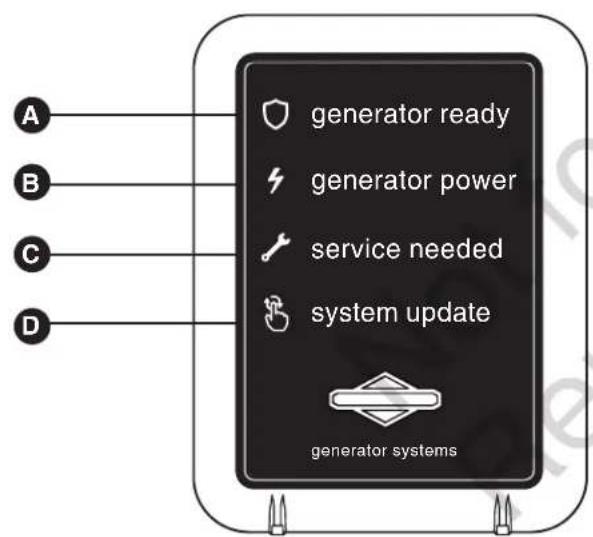
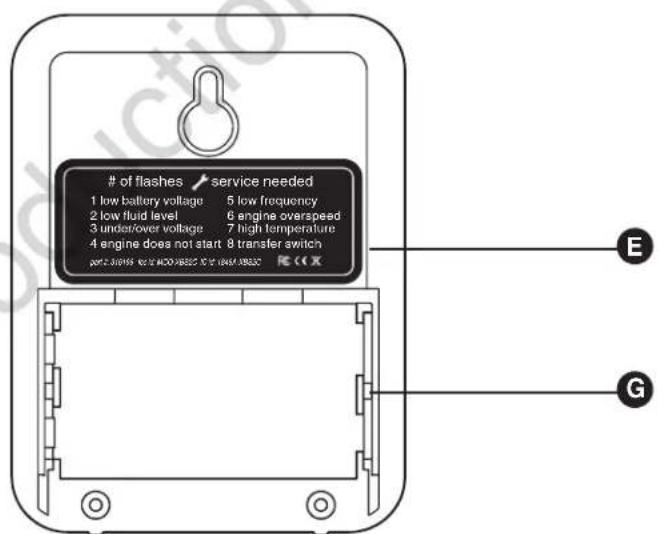
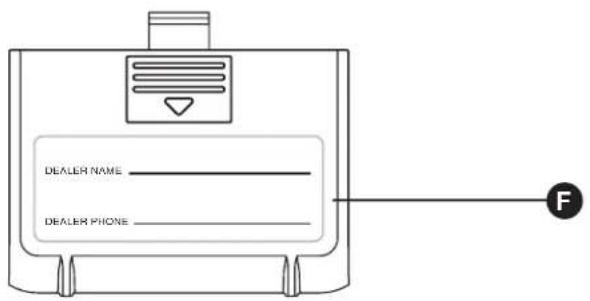
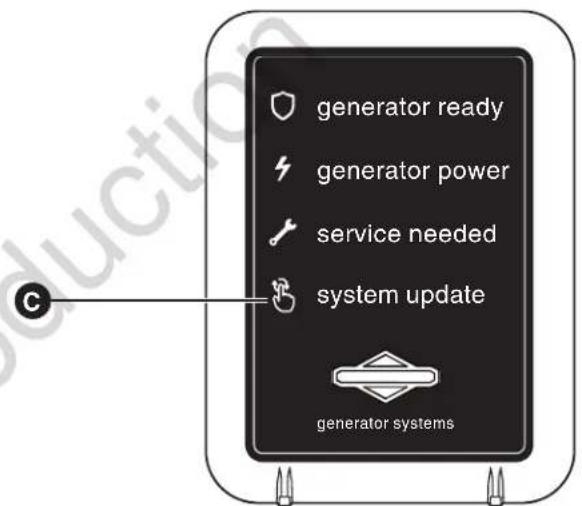
Compare the illustration below with your monitor to familiarize yourself with these important components.
- Generator Ready (A) - Green LED
- Generator Power (B) - Green LED
• Service Needed (C) - Red LED - System Update (D) - Press for current system update with generator.
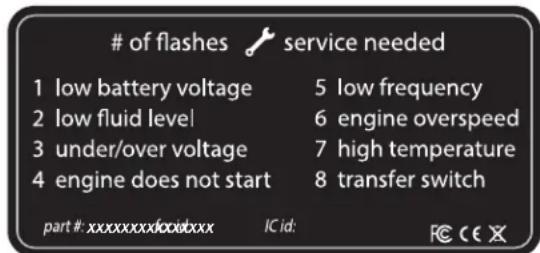
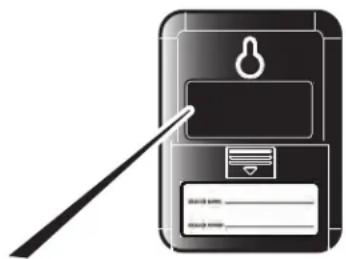
- Service code descriptions (E) - Name and number of flashes are listed on the backside of the wireless monitor.
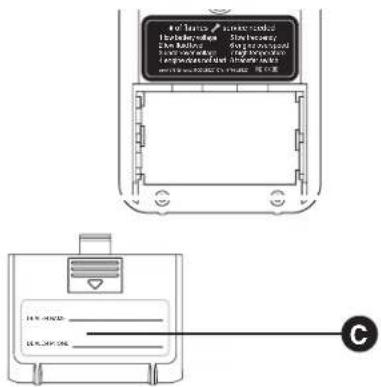
- Battery Access Cover (F) - Record the dealer name and phone number on the label provided. Once opened, two AA batteries are installed in the compartment (G)..
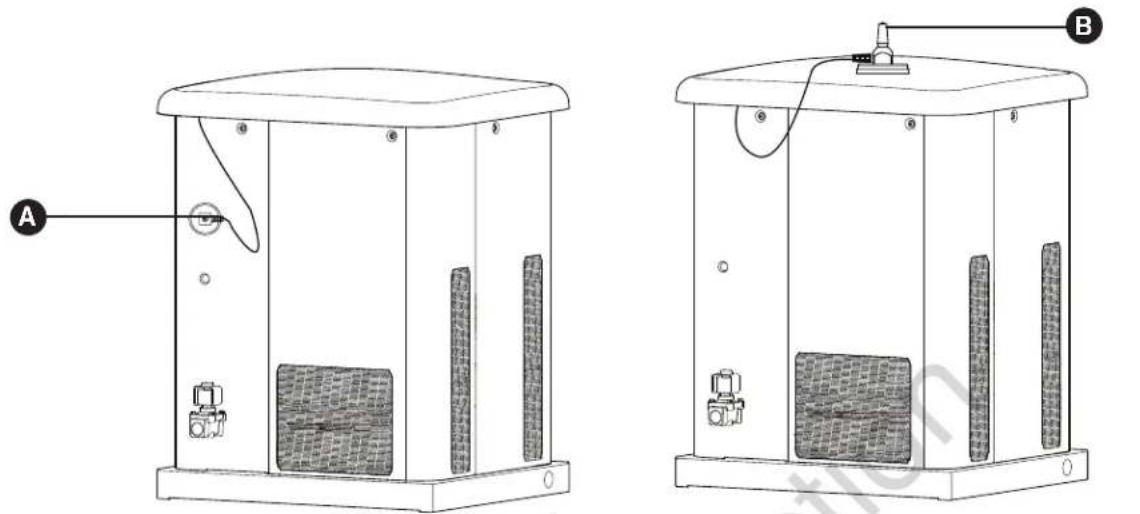
Antenna Placement
The wireless monitor includes an antenna that was installed at the factory.
Before shipping, the magnetic-backed antenna was moved to the side of the generator to prevent damage (A).
Before starting the wireless monitor, mount the antenna on the top of the unit (B).
Wireless Monitor Operation
- Remove battery access cover (C) on back of monitor and install 2 AA batteries. (Observe correct battery polarity which is embossed in the bottom of the battery compartment). Replace battery access cover.
- The wireless monitor does not have an on/off switch. When batteries are installed correctly, the GENERATOR READY green LED light will flash once every 7 seconds indicating the status of the generator.
NOTICE The wireless monitor was linked to the generator at the factory. Communication will begin upon the installation of the batteries and the generator being placed in AUTO mode. You may need to press System Update one time.
NOTICE If communication does not begin upon placing the generator in AUTO, installing batteries, and pressing System Update, the monitor may need to be re-linked. To link, follow Steps 3 through 6.
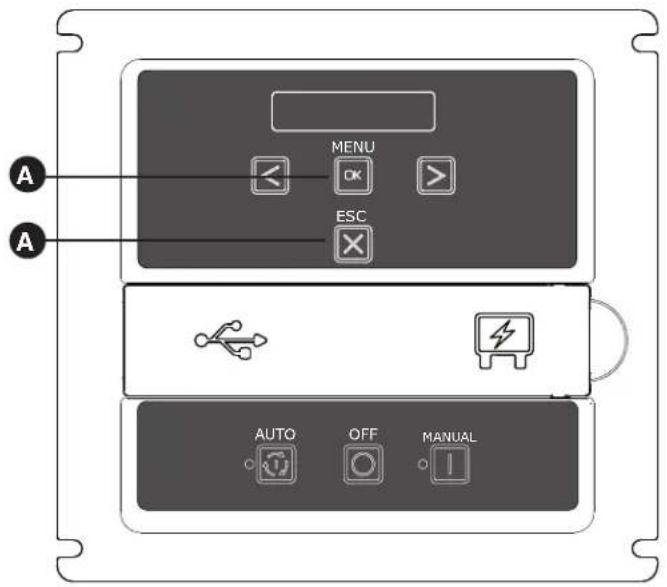
- Locate the MENU AND ESCAPE buttons on the control panel (A). Press and hold for 3 seconds to enter the linking mode.
-
"LINKING MODE" will scroll across the generator control panel.
-
Locate and hold the SYSTEM UPDATE button (B) on the wireless monitor for 5 seconds. All 3 LEDs will flash until the monitor links to the generator. Once it links, the monitor will display the current state. The monitor will try to link for 1 minute. (This step can only be completed when the generator is in Linking Mode).
- Once the link has been confirmed, press the OK button on the generator control panel to exit or the control board will turn off linking after 5 minutes. The generator will now communicate with the wireless monitor.
NOTICE It may take up to 1 minute for the monitor to begin displaying the generator status correctly.
Standard Operation:
Wireless Monitor Status LED's
- The wireless monitor receives data from the generator every 10 minutes and displays the generator status through 3 LED's.
- Pressing the SYSTEM UPDATE button will provide current generator status by flashing the status LED's. When pressed, all 3 LEDs will flash until the generator status is received.
NOTICE Generator control panel must be in AUTO mode or no communication with monitor will occur.
- In order to conserve power and to extend battery life, the LED's are not lit continuously; instead they are briefly flashed as indicated below.
NOTICE During the weekly exercise cycle, the generator will run for 20 minutes, but it will not supply power to the home. During the exercise cycle, the monitor will continue blinking the GENERATOR READY green LED.
- GENERATOR READY - When active, the green LED will flash once every 7 seconds. The green LED indicates that the generator is in AUTO mode and that it is ready to run in the event of a loss of utility power.
- GENERATOR POWER - When active, the green LED will flash every 7 seconds. The green LED indicates that the generator is supplying power.
- SERVICE NEEDED - When active, the red LED will flash in a sequence that corresponds to the service code. For example, when Low Frequency scrolls across the control board, the red LED will flash 5 times with a 3 second pause between series of blinks until it is reset or the condition is corrected. Contact the nearest authorized service dealer if the problem can not be fixed.
NOTICE Service conditions will only be displayed on the basic monitor when the control board is placed in AUTO mode.
Installation Inspection
Before placing the generator system into service, inspect the entire installation carefully, utilizing the Installation Checklist that comes separately inside the literature pack that is included this manual.
This completes the installation and start-up instructions. The operator's manual provides full details on Operation, Maintenance and Troubleshooting for this generator system.
Other:
LED Lighting Codes
- No status LEDs illuminated - Generator in OFF mode or check and replace batteries.
Wireless communication lost issues can typically be resolved by moving the wireless monitor closer, within the home, to the standby generator. See Optional Router Accessory Kit
- Batteries Inserted - the shield LED will light for 5 seconds.
- Linking Error or Not Linked - Each LED will light then turn off in one direction, then the other direction until a successful link is completed.
- During the weekly exercise cycle, the generator will run for 20 minutes, but it will not supply power to the home. During the exercise cycle, the monitor will continue blinking the green shield LED.
Service Code Descriptions - name and number of flashes are listed on the back side of the wireless monitor.
natural_image
Illustration of a stylized phone with a keyhole and card, no text or symbols present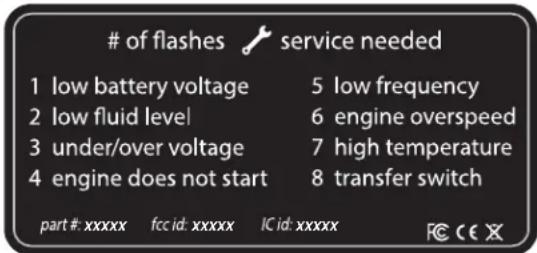
None of the service needed codes are cleared at the wireless monitor. All alerts must be cleared at the generator control panel.
Schematic / Wiring Diagrams
Schematic Diagram - 10kW
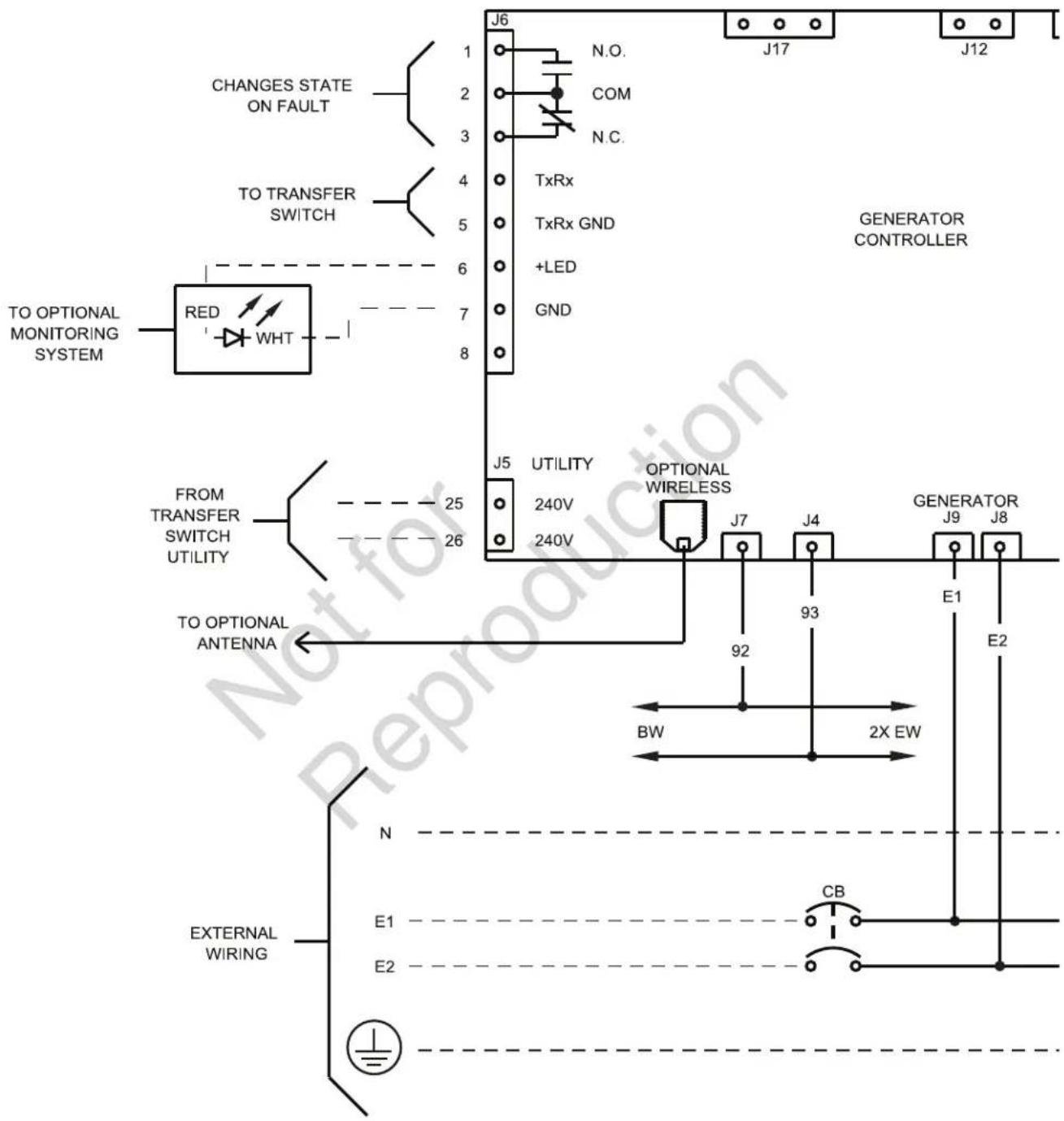
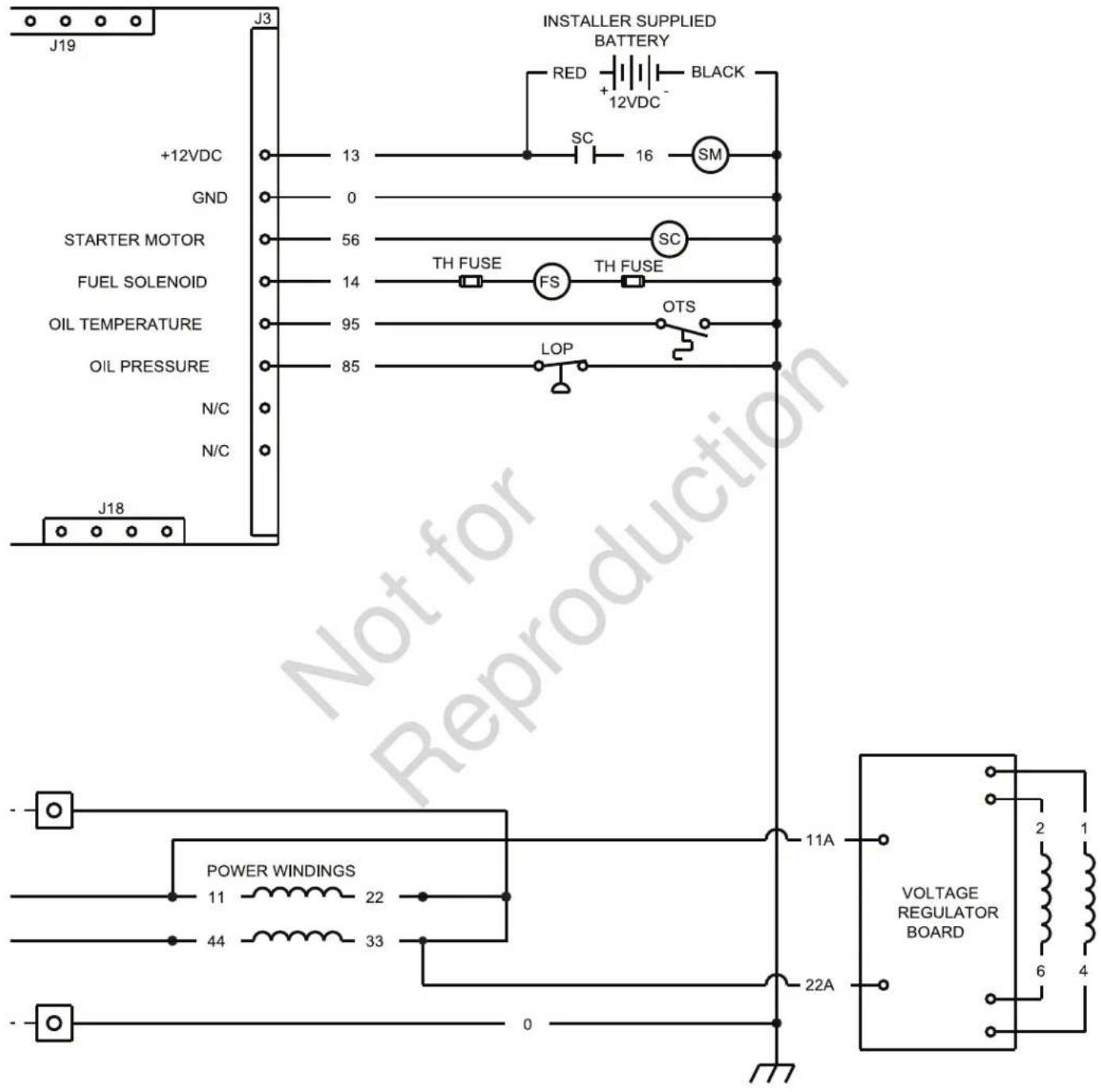
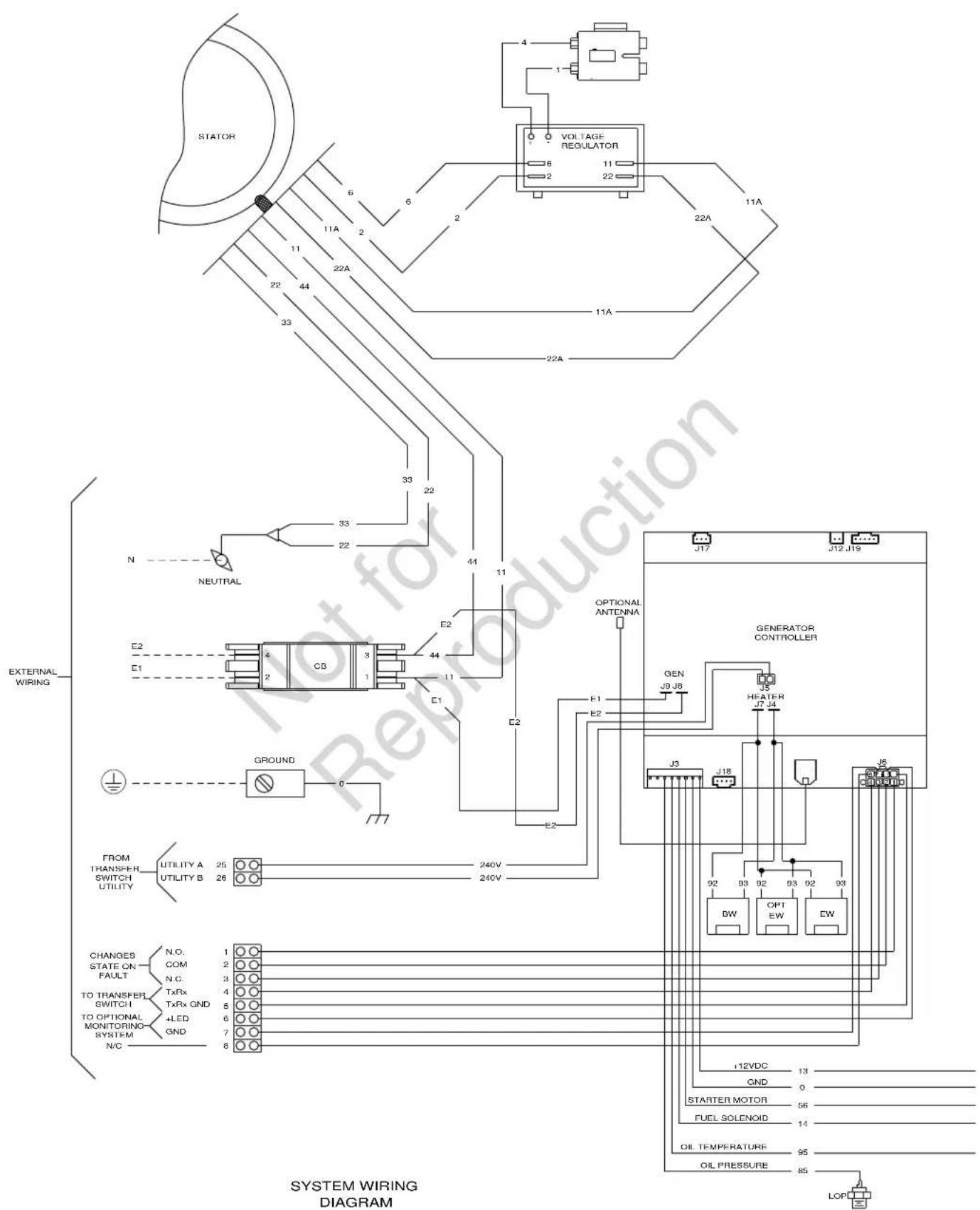
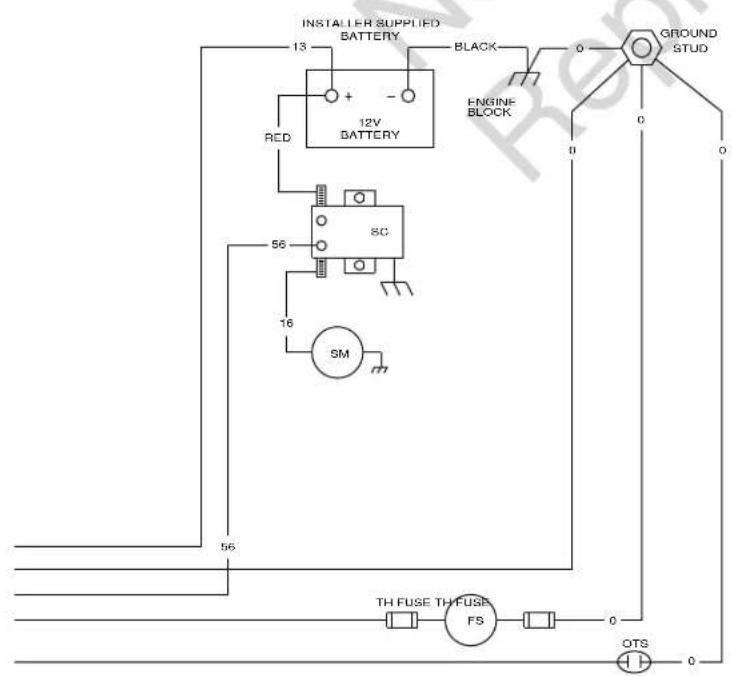
LEGEND:
BW PLUG FOR OPTIONAL BATTERY WARMER
CB - CIRCUIT BREAKER
COM-COMMON
EW - PLUS FOR OPTIONAL ENGINE OIL WARMER
FS - FUEL SOLENOID
GND - GROUND
LOP - LOW OIL PRESSURE SWITCH (CLOSES ON LOW PRESSURE)
N.C. - NORMALLY CLOSED
N/C - NOT CONNECTED
N.O. - NORMALLY OPEN
OTS - OIL TEMPERATURE SWITCH
SM - STARTER MOTOR
SR - STARTER RELAY
SS - STARTER SOLENOID
TH FUSE - THERMAL FUS
FSS-FUEL SELECT SOLENOID.
TH FUSE - THERMAL FUSE
+LED - POSITIVE SIDE OF DIAGNOSTIC LED
2、关联交易概述
---- EXTERNAL WIRING
*NOT
REMOVE 15AMP FUSE BEFORE SERVICING.
Operator's Section
Controls
10kW Generator

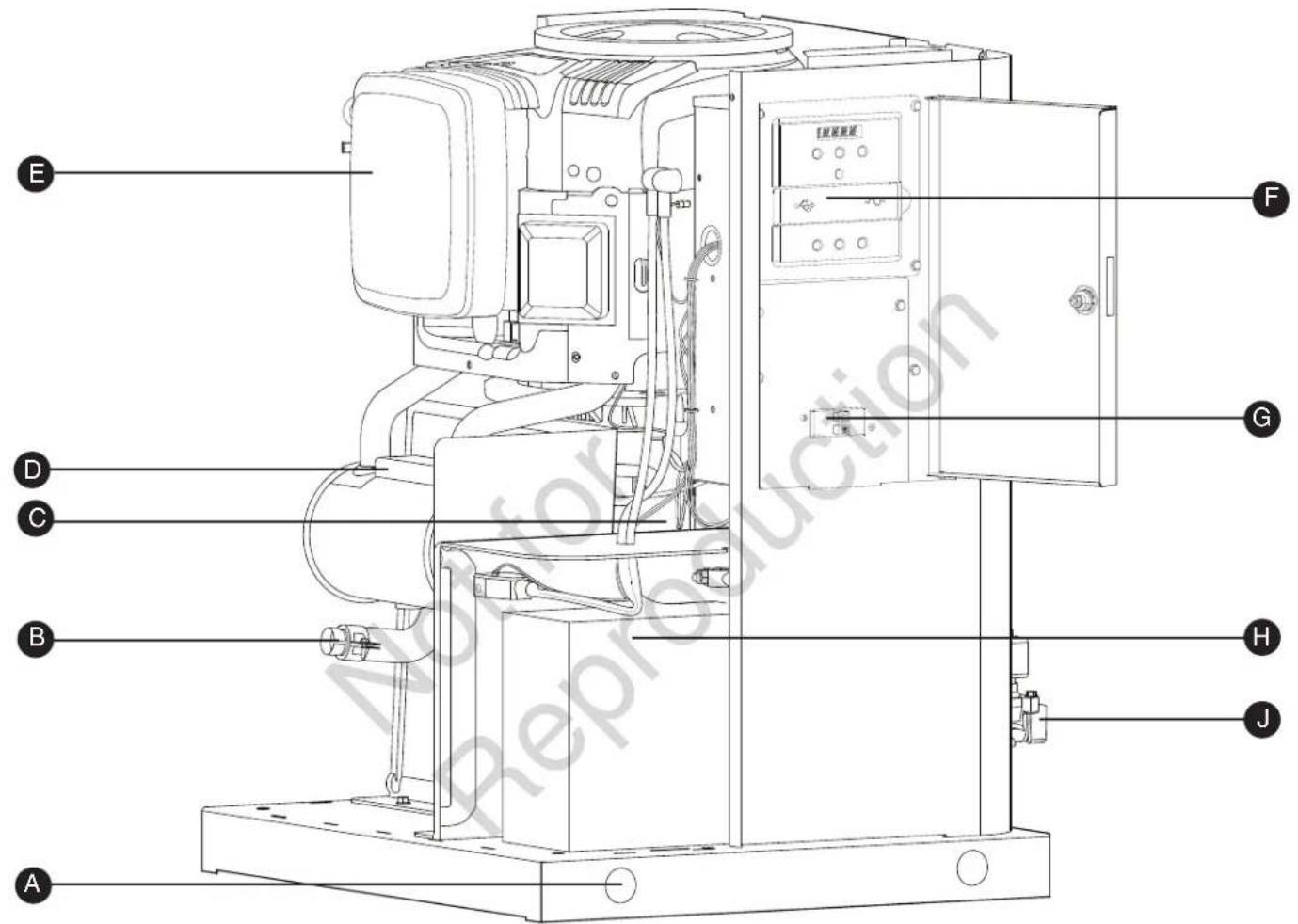
Generator is shown with roof and access covers removed for clarity.
A - Lifting Holes — Provided at each corner for lifting generator.
B - Exhaust Port — High-performance muffler lowers engine noise to comply with most residential codes.
C- Alternator — An electrical machine that generates an alternating current.
D- Muffler — A device to reduce engine noise.
E - Air Cleaner — Uses a dry type filter element and foam precleaner to protect engine by filtering dust and debris out of intake air.
F - Control Panel — Used for various test, operation and maintenance functions. See System Control Panel.
- Circuit Breaker — Protects the system from shorts and other over-current conditions.
- Battery — (installer supplied) — 12 Volt DC, sealed battery provides power to start the engine.
J - Fuel Inlet Port — Attach appropriate fuel supply to generator here.
Access Panels
The generator is equipped with an enclosure that has several access panels, as shown.
Front Panel (A) and roof(B) are used to access:
- Battery Compartment
• Engine Oil Drain Hose - Engine Oil Filter
- Engine Valve Cover
- Spark Plugs
Each generator is shipped with a set of identical keys.
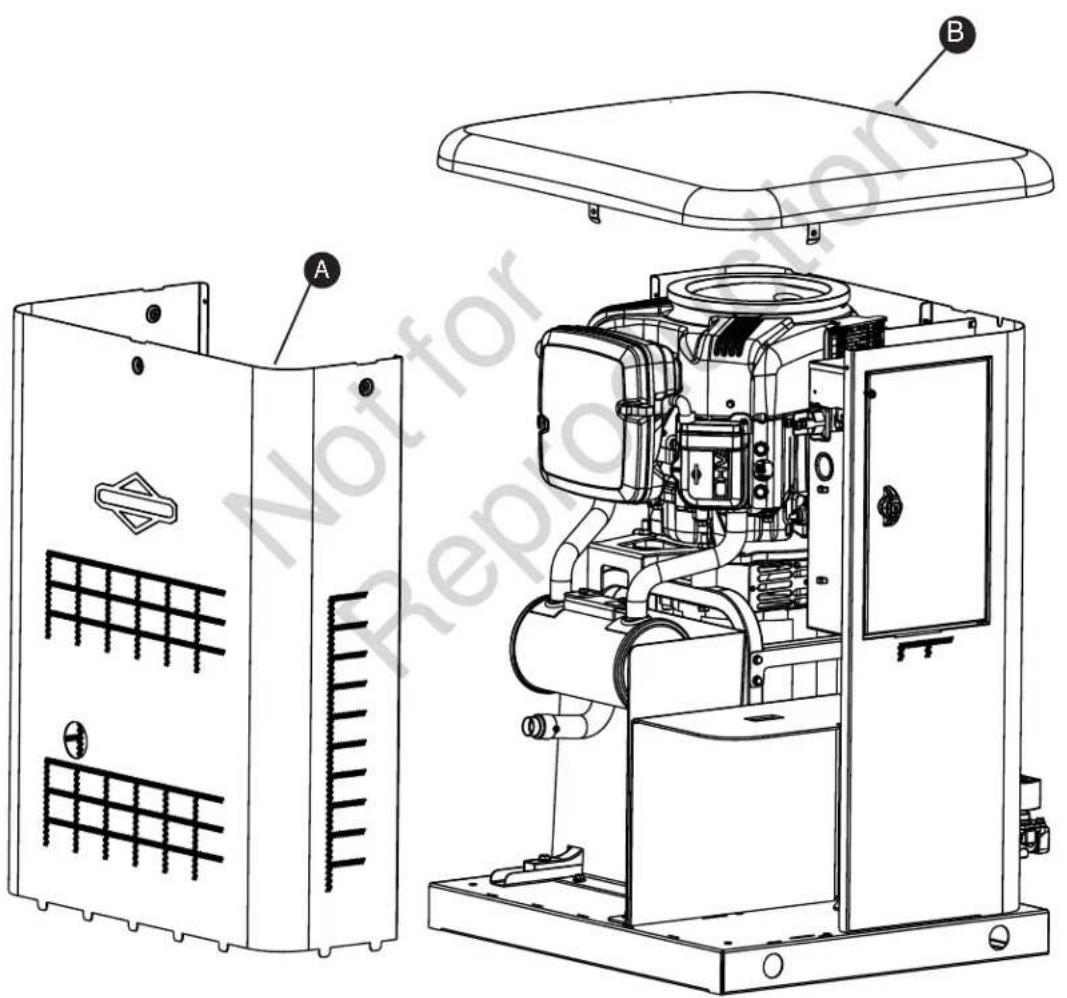
To remove roof:
- Remove the five screws (A) that secure the roof to the unit.
- Carefully lift and remove roof from unit.
To remove front panel:
- Remove the two screws (B) that secure the panel to the unit.
- Lift and flex panel outward and off base. Use caution not to damage the battery box (C).
To secure front panel:
- Place panel in unit.
- Secure the panel with two screws.
Operation
Important Owner's Considerations
Engine Oil
The engine is shipped from the factory pre-run and filled with full synthetic oil (API SJ/CF 5W-30). This allows for system operation in a wide range of temperature and climate conditions. Before starting the engine, check oil level as described in Maintenance.
NOTICE Any attempt to crank or start the engine before it has been properly serviced with the recommended oil will result in equipment failure.
- Damage to equipment resulting from failure to follow this instruction will void engine and generator warranty.
Battery
⚠ WARNING Battery posts, terminals and related accessories contain lead and lead compounds, chemicals known to the State of California to cause cancer and reproductive harm. Wash hands after handling.
The installer must supply a rechargeable 12 volt DC starting battery. See Battery in Final Installation Considerations in the installation manual.
With the battery installed, all wiring to transfer switch and home generator completed, utility power supplied to the automatic transfer switch, and the unit in AUTO mode, the battery receives a trickle charge while the engine is not running. The trickle charge cannot be used to recharge a battery that is completely discharged.
NOTICE A battery booster should never be used to quick charge a low battery.
15 Amp Fuse
The generator's 15 Amp fuse is critical to correct system operation. The 15 Amp fuse was removed at the factory. Your installer will ensure the fuse is properly installed upon completion of the installation.
Automatic Operation
The generator's control board constantly monitors utility voltage. Should utility voltage drop below a preset level, the control board will signal the engine to crank and start.
When utility voltage is restored above a preset voltage level, the engine is signaled to shut down.
The actual system operation is not adjustable and is sequenced by sensors and timers on the control board, as follows:
Utility Voltage Dropout Sensor
- This sensor monitors utility source voltage.
- If utility source voltage drops below about 70 percent of the nominal supply voltage, the sensor energizes a 3 second timer. The timer is used to ‘sense’ brown-outs.
- Once the timer has expired, the engine will crank and start.
Setting Exercise Timer
The generator is equipped with an exercise timer. During the exercise period, the unit runs for approximately 20 minutes and then shuts down. Electrical load transfer DOES NOT occur during the exercise cycle (unless an utility power outage occurs).
The generator will only enter the exercise cycle if the unit is in the AUTO mode and this exact procedure is followed.
To set the exercise timer:
NOTICE The generator is set with a deservice code exercise cycle setting of Tuesday at 2:00 P.M, Central Time. To change the cycle setting, proceed to the following steps:
- Choose the day and time you want your generator to exercise.
- Press and hold the left arrow and right arrow simultaneously for three seconds to enter the General Set-Up program mode. See General Set-Up flow chart in Menu Section.
- Verify and/or set the time and date on the unit.
- Go to the SET EXERCISE prompt and hit the "OK" button.
NOTICE Items will flash until they are selected.
Utility Voltage Pickup Sensor
This sensor monitors utility voltage. When utility voltage is restored above 80 percent of the nominal source voltage, a time delay starts timing and the engine will go to engine cooldown.
Engine Cool-down Timer
When utility power is sensed and the load transfers back to the utility source, the engine will go into a cool down period as described below:
- If the generator has run for MORE than 5 minutes, once the utility transfer occurs, the engine will continue to run for about 1 minute before shutting down.
- If the generator has run for LESS than 5 minutes, once the utility transfer occurs, the engine will continue to run until 5 minutes has elapsed before shutting down.
SELECT DAY: Use the left or right arrow to toggle through the days of the week, Once the day is selected, hit the "OK" button.
SELECT HOUR: Use the left or right arrow to toggle through between 1 and 12. Choose the hour of day you want the generator to exercise then hit the "OK" button.
SELECT MINUTE: Use the left of right arrow to toggle between :00 and :59. Choose the minute of the day you want the generator to exercise then hit the "OK" button.
SELECT AM/PM: Use the left of right arrow to toggle between AM and PM. Once chosen, hit the "OK" button.
NOTICE During the weekly exercise cycle, the generator will run for 20 minutes, but it will not supply power to the home. During the exercise cycle, the in-home monitor will continue blinking the GENERATOR READY green LED.
If you want to change the day and time the unit exercises, simply perform the procedure again.
To turn off the generator exercise cycle, go to the OFF selection within the day of the week menu and press OK. The display will then scroll: EXERCISE CYCLE OFF.
Maintenance
Servicing the System
Before performing any generator maintenance, always perform the following steps:
- Set generator's circuit breaker to its OFF position.
- Press and hold the control board OFF button.
-
Remove 15 Amp fuse from control board.
-
Utility voltage is present at generator control board. Disconnect power before servicing control board by removing the fuses from the transfer switch.
- After all servicing has been completed, replace fuses in transfer switch, replace 15 Amp fuse in control board, set circuit breaker ON and press and hold control board AUTO button.
Service Code Detection System
The generator may have to run for long periods of time with no operator present. For that reason, the system is equipped with sensors that automatically shut down the generator in the event of potentially damaging conditions, such as low oil pressure, high temperature, over speed, and other conditions.
The generator's control board shows service code descriptions scrolling across the digital display. The service code descriptions are listed below:
- Low Battery Voltage
- Low Oil Pressure
- Under Voltage
• Over Voltage
• Engine Does Not Start - Low Frequency
- Engine Overspeed
• High Oil Temperature
• No Wireless Communication - Battery Charge Circuit
- Transfer Switch Service code
Reset Service code Detection System
The operator must reset the service code detection system each time it activates. To do so, press the control board OFF button for 5 seconds. Once the display turns off, leave it off for at least 30 seconds. Remedy the service code condition, then return the home generator to service by pressing and holding the control board AUTO button and installing the 15 Amp fuse (if removed).
Low Battery Voltage
This service code is indicated by Low Battery Voltage scrolling across the digital display and a single flash on the wireless monitor. This condition occurs if the battery voltage drops below the preset value. Causes for this problem may be a service code battery or battery charge circuit. See Battery Charge Circuit,
Remove the 15 Amp fuse and disconnect the battery from the generator. Test the battery voltage. If voltage meets specifications, take the battery to a local battery store for analysis. Or contact your local service center for assistance.
Reinstall the battery (replace if necessary - see Battery in Final Installation Considerations in the installation manual). Then reset the service code detection system, as described earlier.
Low Oil Pressure
This service code is indicated by Low Oil Pressure scrolling across the digital display and two flashes on the wireless monitor. The unit is equipped with an oil pressure switch that uses normally closed contacts held open by engine oil pressure during operation. Should oil pressure drop below the 8 psi range, switch contacts close and the engine will shut down.
To remedy the low oil pressure condition, add the recommended oil to the FULL mark on the dipstick.
If the low oil pressure condition still exists, the engine will start, then shut down again. The service code will appear. In this case, contact an authorized dealer.
Under Voltage
This service code is indicated by Under Voltage scrolling across the digital display and three flashes on the wireless monitor. This condition is caused by a restriction in the fuel flow, the electronic governing system not functioning properly, a broken or disconnected signal lead, a failed alternator winding, the control board circuit breaker is open, or the generator is overloaded.
To remedy the problem, contact your installer or an authorized dealer.
Over Voltage
This service code is indicated by Over Voltage scrolling across the digital display and three flashes on the wireless monitor. This feature protects devices connected to the transfer switch by shutting the generator down if the generator output voltage happens to increase above the preset limit.
This condition is most likely caused by a failed voltage regulator, alternator excitation circuit or a load imbalance. To remedy the problem, contact your installer or an authorized dealer.
Engine Does Not Start
This service code is indicated by Engine Does Not Start scrolling across the digital display and four flashes on the wireless monitor. This feature prevents the generator from damaging itself if it continually attempts to start in spite of another problem, such as no fuel supply. Each time the system is directed to start, the unit will crank for 10 seconds, pause for 10 seconds, and repeat. If the system does not begin producing electricity after approximately 2 minutes, the unit will stop cranking.
The most likely cause of this problem is no fuel supply or incorrect fuel selector setting. See Fuel Selection Switch in the installation manual. Check the internal and external fuel shut off valves to ensure they are fully open. Other causes could be failed spark plug(s), a loose electronic governor connection, a failed engine ignition, or the engine air filter is clogged. You may need to contact your installer for assistance if you can't remedy these problems.
Low Frequency
This service code is indicated by Low Frequency scrolling across the digital display and five flashes on the wireless monitor. This feature protects devices connected to the transfer switch by shutting the generator down if the engine runs slower than 55 Hz for three seconds. This condition is caused by a failed engine component, electronic governor system, or by excessive loads on the generator. To resolve the problem, contact your installer or an authorized dealer.
Engine Overspeed
This service code is indicated by Engine Overspeed scrolling across the digital display and six flashes on the wireless monitor. This condition can be caused by a problem within the electronic governor system.
To resolve the problem, contact your installer or an authorized dealer.
High Oil Temperature
This service code is indicated by High Oil Temperature scrolling across the digital display and seven flashes on the wireless monitor. The contacts of the temperature switch are normally open. If the engine temperature exceeds a predetermined temperature, the service code is detected and the engine shuts down.
Common causes for this condition include running the unit with an access doors removed, obstructed air inlet or exhaust port, or debris in the engine compartment or running unit with roof open.
To resolve the problem, let the engine cool down and remove any accumulated debris and obstructions. Ensure that the access doors are installed and the roof is closed whenever the unit is running. If problem persists, contact your installer or an authorized dealer.
Transfer Switch Service code
This service code is indicated by Transfer Switch Service code scrolling across the digital display (if transfer switch is equipped with service code detection) and eight flashes on the wireless monitor.
The most likely cause of this service code is a blown fuse in the transfer switch. To remedy the problem, contact your installer or an authorized dealer.
No Wireless Communication
This service code is indicated by No Monitor Communication scrolling across the digital display. The SERVICE NEEDED red LED on the wireless monitor will flash 20 fast pulses, pause 5 seconds, and repeat if there is a loss in communication between the wireless monitor and the generator.
To resolve the problem, move the wireless monitor closer to generator. Re-link if necessary.
Battery Charge Circuit
This service code is indicated by Battery Charge Circuit scrolling across the digital display. The most likely cause is an electrical problem with the control panel. To remedy the problem, contact your installer or an authorized dealer.
Maintenance Schedule
Follow the hourly or calendar intervals of operation, whichever occurs first.
First 5 Hours
Change Engine Oil
Every 8 Hours or Daily
Clean Debris
Check Engine Oil Level
Every 100 Hours or Annually
Change Air Filter
Change Engine Oil and Filter
Replace Spark Plugs
Check Valve Clearance
Check Circuit Breaker Torques
Annually
Clean Oil Cooler Fins
Regular maintenance will improve the performance and extend the life of the generator. See any authorized dealer for service.
Emissions Control
Maintenance, replacement, or repair of the emissions control devices and systems may be performed by any non-road engine repair establishment or individual. However, to obtain "no charge" emissions control service, the work must be performed by a factory authorized dealer. See the Emissions Warranty.
Generator Maintenance
The generator's warranty does not cover items that have been subjected to operator abuse or negligence. To receive full value from the warranty, the operator must maintain the generator as instructed in this manual.
Some adjustments will need to be made periodically to properly maintain your generator.
All service and adjustments should be made at least once each season. Follow the requirements in the Maintenance Schedule chart.
Generator maintenance consists of keeping the unit clean. Operate the unit in an environment where it will not be exposed to excessive dust, dirt, moisture or any corrosive vapors. Cooling air louvers on the enclosure must not become clogged with snow, leaves, or any other foreign material. To prevent generator damage caused by overheating, keep the enclosure cooling inlets and outlets clean and unobstructed at all times.
Check the cleanliness of the unit frequently and clean when dust, dirt, oil, moisture or other foreign substances are visible on its exterior/interior surface. Inspect the air inlet and outlet openings inside and outside the enclosure to ensure air flow is not blocked.
DO NOT use direct spray from a garden hose to clean generator. Water can enter the engine and generator and cause problems.
NOTICE Improper treatment of generator could damage it and shorten its life.
- DO NOT expose generator to excessive moisture, dust, dirt, or corrosive vapors.
- DO NOT insert any objects through cooling slots.
Clean the generator as follows:
- Press and hold the control board OFF button.
- Remove 15 Amp fuse from control board.
-
Clean generator as desired.
-
Use a damp cloth to wipe exterior surfaces clean.
- Use a soft, bristle brush to loosen caked on dirt, etc.
- Use a vacuum cleaner to pick up loose dirt and debris.
-
Use low pressure air (not to exceed 25 psi) to blow away dirt. Inspect cooling air slots and openings on the generator. These openings must be kept clean and unobstructed.
-
Reinstall 15 Amp fuse in control board.
-
Press and hold the control board AUTO button.
Battery
Servicing of the battery is to be performed or supervised by personnel knowledgeable of the battery and the required precautions. Keep unauthorized personnel away from battery.
Servicing the Battery
If it is necessary to service the battery, proceed as follows:
- Press and hold the control board OFF button.
- Remove 15 Amp fuse from control panel.
- Service or replace battery as required. See Battery in Final Installation Considerations in the installation manual for specific battery needed.
- Connect red battery cable to battery positive terminal (indicated by POSITIVE, POS, or (+)).
Charging the Battery
If it is necessary to charge the battery, proceed as follows:
- Press and hold the control board OFF button.
- Remove 15 Amp fuse from control board.
- Disconnect negative battery cable from negative battery terminal (indicated by NEGATIVE, NEG, or (-)).
NOTICE Failure to disconnect negative battery cable could result in equipment failure.
- DO NOT attempt to jump start the generator.
- Damage to equipment resulting from failure to follow this instruction will void engine and generator warranty.
WARNING
Storage batteries give off explosive hydrogen


gas during recharging.
Slightest spark will ignite hydrogen and
cause explosion, resulting in death or serious injury. Battery electrolyte fluid contains acid and is extremely caustic. Contact with battery contents could cause severe chemical burns.
A battery's high short circuit current could result in serious injury.
- DO NOT dispose of battery in a fire. Recycle battery.
- DO NOT allow any open flame, spark, heat, or lit cigarette during and for several minutes after charging a battery.
- DO NOT open or mutilate the battery.
- Wear protective goggles, rubber apron, rubber boots and rubber gloves.
- Remove watches, rings, or other metal objects.
- Use tools having insulated handles.
⚠ WARNING Battery posts, terminals and related accessories contain lead and lead compounds, chemicals known to the State of California to cause cancer and reproductive harm. Wash hands after handling.
- Connect black negative battery cable to negative battery terminal (indicated by NEGATIVE, NEG, or (-).
- Ensure hardware on both positive and negative battery terminals is secure.
- Reinstall 15 Amp fuse in control panel.
- Press and hold the control board AUTO button.

DON'T POLLUTE. CONSERVE RESOURCES, RETURN USED BATTERY TO RECYCLING COLLECTION CENTER.
4. Charge battery with battery charger at 2 Amps until battery holds 12 Volts. DO NOT exceed 13.7 volts when charging.
NOTICE DO NOT use a battery booster to quick charge a low battery.
-
Connect negative battery cable to negative battery terminal (indicated by NEGATIVE, NEG, or (-)).
-
Ensure hardware on both positive and negative battery terminals is secure.
-
Reinstall 15 Amp fuse in control board.
-
Press and hold the control board AUTO button.

CAUTION With the system switch set to AUTO, the engine could crank and start at any time without warning, resulting in minor or moderate injury.
- To prevent possible injury that could be caused by such sudden starts, always set the system switch to OFF if performing maintenance on the system.
- Remove the 15 Amp fuse before working on or around the generator or transfer switch.
Engine Maintenance
WARNING
Unintentional sparking could cause fire or electric shock resulting in death or serious injury.

WHEN ADJUSTING OR MAKING REPAIRS TO YOUR GENERATOR
- Disconnect the spark plug wire from the spark plug and place the wire where it cannot contact spark plug.
WHEN TESTING FOR ENGINE SPARK
- Use approved spark plug tester.
- DO NOT check for spark with spark plug removed.
When all engine servicing is complete, replace 15 Amp fuse in control board and reset exercise timer.
Adjust Valve Lash
The valve lash must be checked every 100 hours of operation. Measure valve clearance with the engine cold.
To adjust the valve lash, proceed as follows:
- Press and hold the control board OFF button.
- Remove 15 Amp fuse from control board.
- Remove spark plug(s) to ease manual rotation of engine crankshaft.
- Turn crankshaft counterclockwise until the piston is at Top Dead Center on the compression stroke.
-
Insert a narrow screwdriver or rod into spark plug hole as a gauge, then slowly turn crankshaft counterclockwise until the piston has moved down the bore by 1/4".
-
For the Model 35 Engine:
-
Use a feeler gauge (A) to measure the valve clearance.
- Adjust the clearance by loosening the lock nut (B) then turn the adjusting screw (C) to obtain the following measurement:
Intake: 0.005 in. (0.013 mm)
Exhaust: 0.008 in. (0.020 mm)
- Once the clearance is properly set, hold the adjusting screw while torquing the lock nut to 70 in/lbs. (8 Nm).
- Repeat for the other valve, if applicable.
When all servicing is complete, replace 15 Amp fuse in control board and reset exercise timer.
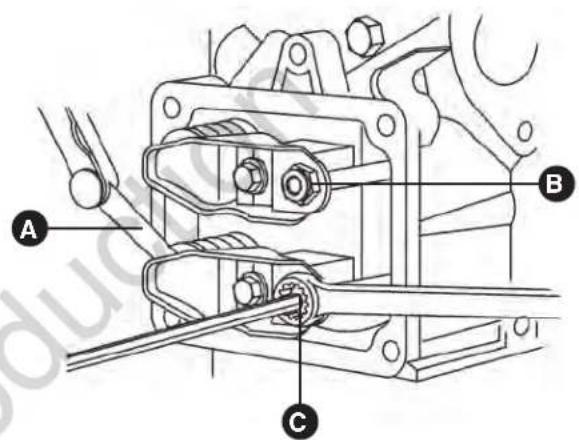
Model 35 Engine
This page was intentionally left blank
The engine is filled with full synthetic oil (API SJ/CF 5W-30). This allows for system operation in the widest range of temperature and climate conditions.
We recommend the use of Briggs & Stratton Warranty Certified oils for best performance. Other high-quality detergent oils are acceptable if classified for service SJ or higher. DO NOT use special additives.
NOTICE An acceptable oil at all temperatures includes full synthetic oil that:
• Meets International Lubricant Specification Advisory Committee (ILSAC) GF-2 standards
- Carries the API certification mark
- Features an API service symbol with "SJ/CF energy conserving" or higher
- TEST
Using full synthetic oil does not alter the required oil change intervals described in the Operation section.

Changing Engine Oil and Oil Filter
Open roof and remove front panel to access the oil filter and to add engine oil.
Checking/Adding Engine Oil
- Open roof to access dipstick and oil fill area.
- Clean the oil fill area of any debris.
- Remove the dipstick and wipe with a clean cloth.
- Fully insert dipstick into oil fill.
- Remove dipstick and check oil level. Verify oil is at Full mark on dipstick.
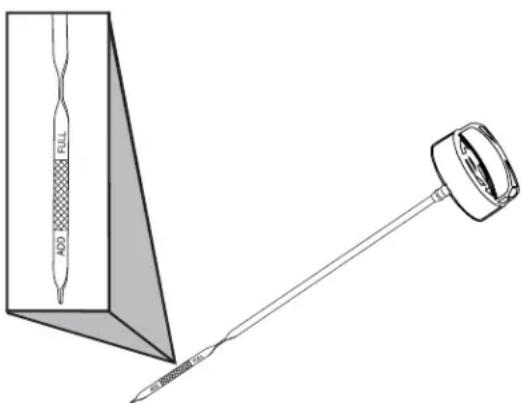
- If needed, slowly pour recommended oil into oil fill opening. DO NOT overfill. After adding oil, wait one minute and recheck oil level.
NOTICE Overfilling with oil could cause the engine to not start, or hard starting.
- DO NOT overfill.
- If over the FULL mark on dipstick, drain oil to reduce oil level to FULL mark on dipstick.
- Replace oil dipstick.
- Close roof and secure.
Changing Engine Oil and Oil Filter
⚠️ CAUTION Avoid prolonged or repeated skin contact with used motor oil.
- Used motor oil has been shown to cause skin cancer in certain laboratory animals.
• Thoroughly wash exposed areas with soap and water.

KEEP OUT OF REACH OF CHILDREN. DON'T POLLUTE. CONSERVE RESOURCES. RETURN USED OIL TO COLLECTION CENTERS.
NOTICE Any attempt to crank or start the engine before it has been properly serviced with the recommended oil will result in equipment failure.
- DO NOT attempt to crank or start the engine before it has been properly serviced with the recommended oil. This may result in an engine failure.
- Damage to equipment resulting from failure to follow this instruction will void engine and generator warranty.
Change the oil while the engine is still warm from running, as follows:
- Press and hold the control board OFF button.
- Remove 15 Amp fuse from control board.
- Place oil drain hose into an approved container.
- Remove brass fitting from end of drain hose and drain oil into an approved container.
- When oil has drained, replace brass fitting on hose.
- Place oil absorbing towels under oil filter.
- Remove oil filter and dispose of properly.
- Before installing a new oil filter, lightly lubricate the oil filter gasket with fresh, clean oil.
- Install the oil filter by hand until the gasket contacts the oil filter adapter, then tighten the oil filter 1/2 to 3/4 turn.
- Add oil.
- Remove container from under oil filter and clean up any spilled oil.
- Start and run engine. As engine warms up, check for oil leaks.
- Stop engine, wait for oil to settle, check oil level and add if necessary.
Service Air Cleaner
Your engine will not run properly and may be damaged if you run it with a dirty air cleaner. Clean or replace more often if operating under dusty or dirty conditions.
To service the air cleaner, follow these steps:
- Press and hold the control board OFF button.
- Remove 15 Amp fuse from control board.
- Remove the knobs and the cover.
- Remove air filter.
- To loosen debris, gently tap air cleaner on a hard surface. If air cleaner is excessively dirty, replace with a new air cleaner.
- Install the air filter.
- Install the cover and secure with knobs.
When all servicing is complete, replace 15 Amp fuse in control board and reset exercise timer.
NOTICE Replacement parts must be the same and installed in the same position as the original parts.
Fuel System Inspection and Maintenance
Natural Gas / Propane Fuel System
The fuel system installed on this industrial engine has been designed to various standards to ensure performance and reliability. To ensure compliance to these standards, follow the recommended maintenance schedule contained in this section.
Pressure Regulator Maintenance and Inspection
If the regulator fails to operate or develops a leak, it should be repaired or replaced with the OEM recommended replacement parts.
Venturi / Throttle Control Device Maintenance and Inspection
NOTICE The venturi and throttle body components have been specifically designed and calibrated to meet the fuel system requirements of the engine.
NOTICE A dirty air cleaner may significantly alter the venturi performance.
When inspecting the venturi and throttle body, check for the following items:
- Leaks at all fittings.
- Ensure the venturi and throttle body are securely mounted.
Exhaust System Maintenance and Inspection
When inspecting the exhaust system, check for the following items:
- Inspect exhaust manifold at the cylinder head for leaks and that all retaining bolts and shields (if used) are in place.
- Inspect manifold to exhaust pipe fasteners to ensure they are tight and that there are not exhaust leaks. Repair as necessary.
Engine Exterior
Periodically inspect the engine exterior for contamination and potential damage from dirt, leaves, rodents, spider webs, insects, etc. and remove.
NOTICE The fuel system components have been specifically designed and calibrated to meet the fuel system requirements of the engine. If a fuel system component fails to operate or develops a leak, it should be repaired or replaced with the OEM recommended replacement parts.
When inspecting the regulator, check for the following items:
- Check for any fuel leaks at the inlet and outlet fittings.
- Check for any fuel leaks in the regulator body.
- Check to ensure the regulator is securely mounted and the mounting bolts are tight.
-
Check the regulator for external damage.
-
Inspect air cleaner element according to the recommended maintenance schedule found in this section.
- Check fuel lines for cracking, splitting, or chaffing, Replace if any of these conditions exist.
- Check for leaks at the throttle body and intake manifold.
- Inspect exhaust pipe connection for leaks. Repair as necessary.
Service Spark Plugs
Changing the spark plugs will help your engine to start easier and run better.
- Press and hold the control board OFF button.
- Remove 15 Amp fuse from control board.
- Clean area around spark plugs.
- Remove and inspect spark plugs.
- Check electrode gap with wire feeler gauge and reset spark plug gap to recommended gap if necessary (see Specifications).
- Replace spark plugs if electrodes are pitted, burned or porcelain is cracked. Use the recommended replacement spark plugs. See Specifications.
- Install spark plugs and tighten to 180 in/lbs (20 Nm).
When all servicing is complete, replace 15 Amp fuse in control board and reset exercise timer.
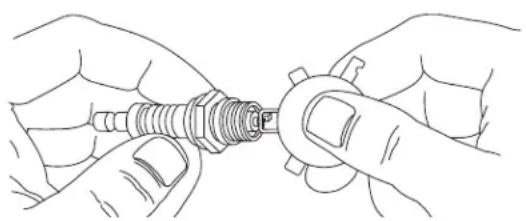
natural_image
Line drawing of two hands holding a mechanical component (no text or symbols)Clean Air Cooling System and Oil Cooler Fins
Over time debris may accumulate in cylinder cooling fins and cannot be observed without partial engine disassembly. Unobstructed air flow is critical for correct generator operation. For this reason, we recommend you have an authorized service dealer clean the cooling system per recommended intervals (see Maintenance Schedule in the Maintenance section). Equally important is to keep top of engine free from debris. Make sure the oil cooler fins are free of dirt and debris. Also see Cleaning.
When Calling for Assistance
You must have the following information at hand if it is necessary to contact a local service center regarding service or repair of this unit:
- Obtain the unit Model Number and Serial Number from the unit ID label. Refer to the information recorded on the inside front cover of the this manual.
- Obtain the engine identification numbers from the engine label. See Controls for location of the label or refer to the information recorded on the inside front cover of the installation manual.
Storage
The home generator system is designed for long term service as a backup generator. There is no need to take any storage precautions. However, if it becomes necessary to take the system out of service for an extended period, call Technical Services at 800 732-2989, between 8:00 AM and 5:00 PM CT for specific recommendations.
Troubleshooting
| Problem Cause Correction | ||
| Eng ine is running, but no AC output is available. | 1. Circuit breaker open or defective.2. Service code in generator control board.3. Poor wiring connections or defective transfer switch. | 1. Reset or replace circuit breaker.2. Contact local service facility.3. Check and repair or contact local service facility. |
| Eng ine runs well at no-load but “bogs down” when loads are connected. | 1. Generator is overloaded.2. Short circuit in a connected load.3. Shorted generator circuit.4. Fuel pressure or mixture is incorrect.5. Kinked fuel line between regulator and engine.6. Clogged air filter. | 1. Remove one or more loads.2. Disconnect shorted electrical load.3. Contact local service facility.4. See Gaseous Fuel System in the installation manual.5. Remove kink. Replace if necessary.6. Remove clog. Replace if necessary. |
| Eng ine will not start; or starts and runs rough. | 1. 15 Amp fuse missing or blown.2. Thermal fuse(s) blown.3. Fuel supply turned off or depleted.4. Incorrect fuel selection.5. Failed battery.6. Clogged air filter. | 1. Install (new) 15 Amp fuse. See System Control Board2. Replace thermal fuse(s).3. Open fuel valve(s); check propane tank.4. Check fuel selector switch and set to proper setting. (If applicable)5. Replace battery.6. Clean or replace air filter. |
| Engine shuts down during operation. | 1. Fuel supply turned off or depleted.2. Control board digital display shows a service code. | 1. Check fuel valves, fill propane tank.2. Refer to Service code Detection System. |
| Loss of power on circuits. | 1. Generator circuit breaker is open.2. Transfer switch problems. | 1. Reset circuit breaker.2. See transfer switch manual. |
| Unit will not exercise. | 1. Control board not set to AUTO.2. Exercise timer not set or set to OFF.3. Unit date and time not set.4. Failed battery.5. 15 Amp fuse missing or blown. | 1. Press AUTO button on control board.2. Set exercise timer.3. Set unit date and time.4. Replace battery.5. Install (new) 15 Amp fuse. See System Control Board. |
| Excessive Vibration | 1. Loose mechanical fastener. | 1. Check and repair or contact local service facility. |
| Odor of fuel | 1. Fuel leak. 1. Turn off manual shutoff fuel valve. | Contact local service facility. |
| Utility power returns, unit does not stop | 1. Blown fuses in transfer switch.2. 5 minute minimum runtime not lapsed.3. Poor wire connection or defective controllers. | 1. Install (new) fuses.2. Wait 5 minutes.3. Check, repair or contact local service facility. |
Wireless Monitor Troubleshooting
| Problem Cause Correction | ||
| Monitor not flashing status LED's | 1. Batteries inserted incorrectly2. Low battery power3. Conditions too bright to see flashes4. Communication from generator is within 10 minute update sequence5. Immersed in liquid6. Monitor not linked. | 1. Verify correct battery orientation2. Replace batteries3. Move monitor to a less lit area4. Press “System Update” button5. Allow to dry for 24 hours, replace batteries. If problem persists order Wireless Monitor (part number 316196GS)6. Follow linking procedure. |
| Linking error | 1. Generator control board not in “Linking Mode”2. Monitor “System Update” button not pressed for 5 seconds during generator control board “Linking Mode” | 1. On generator control board press and hold the MENU and ESCAPE buttons for 3 seconds until “Linking Mode” scrolls across screen. Press and hold “System Update” button on Monitor for 5 seconds.2. Press and hold “System Update” button on Monitor for 5 seconds. |
| Wireless communication lost | 1. Monitor is too far from generator2. Building materials are blocking wireless signal (i.e. - steel studs, aluminum siding, radiant barrier foil insulation) | 1. Move monitor closer to generator2. Order Symphony Wireless router (model 6220) to increase signal strength |
| Service Needed red LED flashing | 1. Generator system needs service2. Wireless communication lost3. Linking error | 1. Refer to Service code Detection System in manual2. See Correction section for “Wireless communication lost” in Troubleshooting Guide3. See Correction section for “Linking error” in Troubleshooting Guide |
Specifications
Generator Specifications
10 kW
Rated Maximum Load Current (at 25°C/77°F, LP):
at 240 Volts....41.7 Amps
Rated AC Voltage 120/240 Volts
Phase .... Single phase
Rated Frequency 60 Hertz
Generator Breaker 50 Amp
Normal Operating Range -20°F (-28.8°C) to 104°F (40°C)
Output Sound Level 72.3 dB(A) at 23 ft. (7 m) at normal load
Shipping Weight....330 lb (149 kg)
Engine Specifications
Displacement....35 ci. (570 cc)
Bore 2.83 in. (71.9 mm)
Stroke 2.76 in. (70.1 mm)
Spark Plug Gap 0.020 in. (0.51 mm)
Spark Plug Torque 180 lb-in. (20 Nm)
Armature Air Gap.....0.005 - 0.008 in. (0.13 - 0.20 mm)
Intake Valve Clearance 0.004 - 0.006 in. (0.10 - 0.15 mm)
Exhaust Valve Clearance 0.006 - 0.008 in. (0.15 - 0.20 mm)
Oil Type....5W30 Full Synthetic
Oil Capacity (including oil filter)..42 - 45 oz. (1.24 - 1.33 L)
This generator is rated in accordance with UL (Underwriters Laboratories) 2200 (stationary engine generator assemblies) and CSA (Canadian Standards Association) standard C22.2 No. 100-4 (motors and generators).


natural_image
Line drawing of an electrical enclosure with grid patterns and a door (no text or symbols)


natural_image
Line drawing of a portable electrical cabinet with labeled components A and B (no text or symbols on the cabinet itself)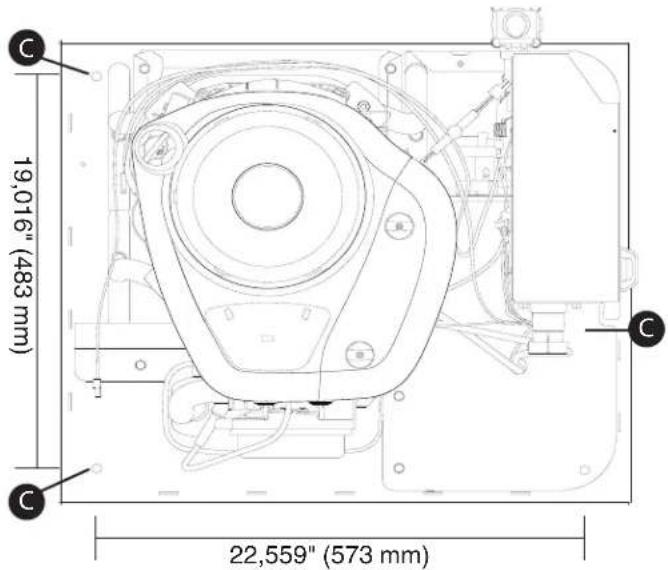
Tableros de acceso
Sistema de combustible gaseoso
Consumo de combustible
natural_image
Technical line drawing of a mechanical or electrical component with labeled point A (no text or symbols beyond label)Arranque inicial (sin carga)
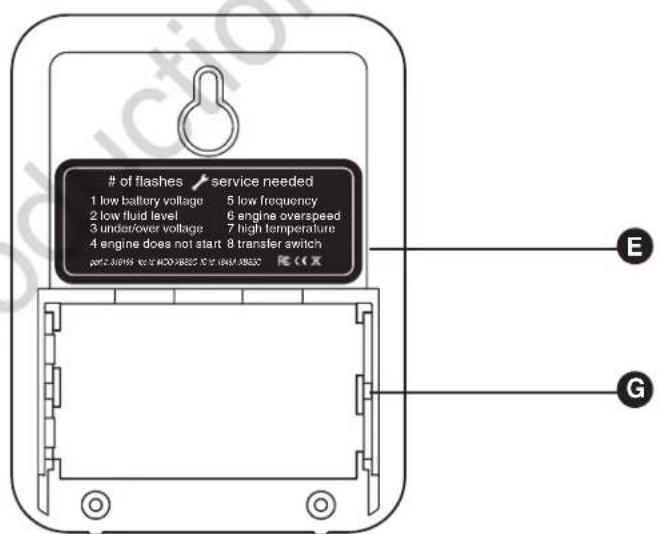
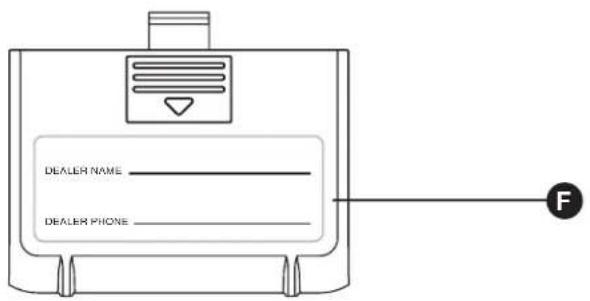
natural_image
Technical line drawing of a mechanical enclosure with labeled component A (no text or symbols beyond label)
natural_image
Technical line drawing of a portable industrial machine with control panel and wiring (no text or symbols)Operación estándar:
natural_image
Illustration of a mobile phone with a stylus and a card, no text or symbols present# of flashes
1 low battery voltage
2 low fluid level
3 under/over voltage
4 engine does not start
part #: xxxxxxxxfooxbxx
IC id:
service needed
5 low frequency
6 engine overspeed
7 high temperature
8 transfer switch
FCCEX
Operación
natural_image
Technical line drawing of a mechanical component with a pointed tool and a rectangular block (no text or symbols)natural_image
Line drawing of two hands holding a mechanical component (no text or symbols)natural_image
Line drawing of a utility box with grid patterns and door (no text or symbols)


© Briggs & Stratton.
natural_image
Line drawing of a portable electrical cabinet with labeled components A and B (no text or symbols on the cabinet itself)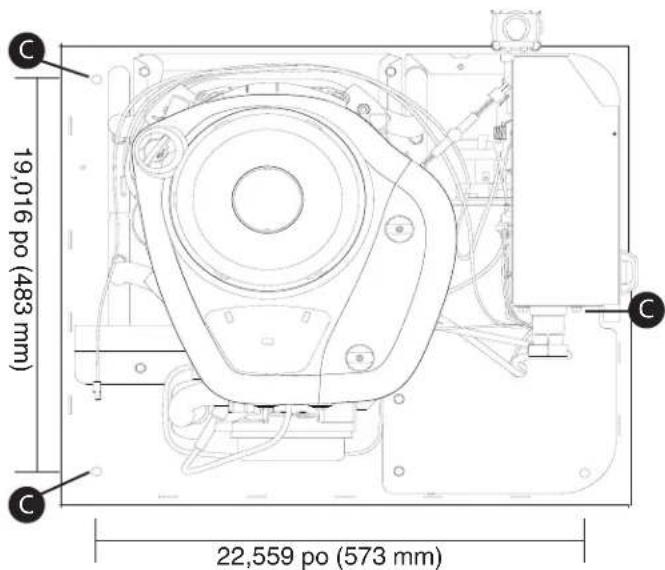
Panneaux d'accès
natural_image
Technical line drawing of a mechanical assembly with labeled component A (no text or symbols beyond label)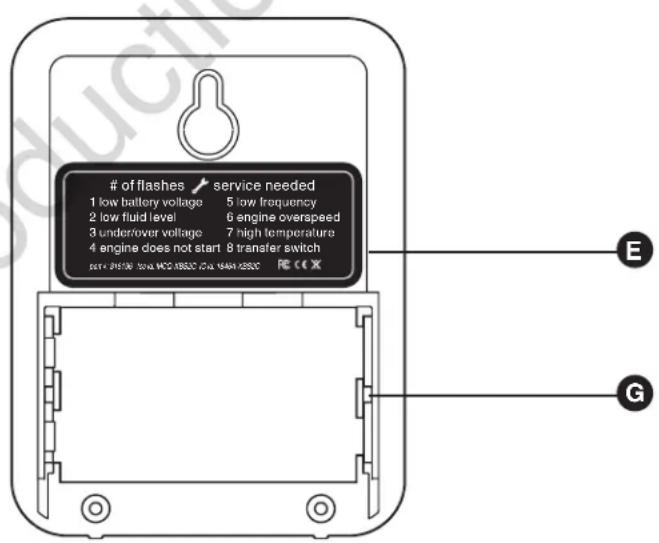
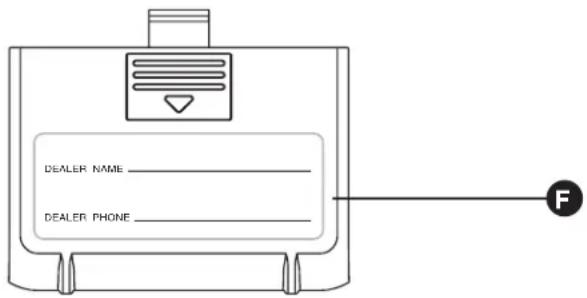
natural_image
Technical line drawing of a mechanical device with labeled components (no text or symbols)natural_image
Illustration of a mobile phone with a stylus and card, no text or symbols present