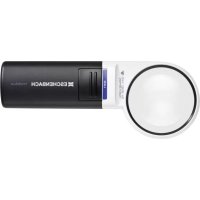
Powerlux - Electronic magnifier Eschenbach - Free user manual and instructions
Find the device manual for free Powerlux Eschenbach in PDF.


| Product type | Electronic magnifier |
| Brand | Eschenbach |
| Model | Powerlux |
| Magnification | 5x |
| Refractive power | 20 dpt |
| Lens diameter | 58 mm |
| Lens material | PXM® with cera-tec® hard coating |
| Illumination | 2 high-power SMD LEDs |
| Luminous intensity | Approximately 4000 lx |
| LED safety class | LED class 1 (EN 60825-1:2002) |
| Power supply | 3 AA batteries (1.5 V) |
| Battery life (auto-off) | Approximately 30 minutes |
| Main functions | Magnification, adjustable LED lighting by button, auto-off |
| Care and cleaning | Clean lens with a soft lint-free cloth; clean housing with damp cloth |
| Safety | Never look at the sun or a light source; avoid magnifying effect in sunlight |
| Spare parts and repairability | AA batteries available; lens not user-replaceable |
| General information | Made in Germany |
| Warranty | Legal warranty for manufacturing defects; receipt required |
| Disposal | Do not dispose of with household waste; follow WEEE directive |
Frequently Asked Questions - Powerlux Eschenbach
User questions about Powerlux Eschenbach
0 question about this device. Answer the ones you know or ask your own.
Ask a new question about this device
Download the instructions for your Electronic magnifier in PDF format for free! Find your manual Powerlux - Eschenbach and take your electronic device back in hand. On this page are published all the documents necessary for the use of your device. Powerlux by Eschenbach.
USER MANUAL Powerlux Eschenbach
text_image
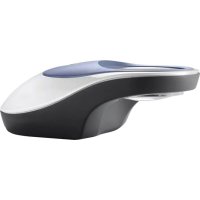
Diagram of a computer mouse with labeled parts including internal components and external casingDeutsch 3
English 6
Français 9
Italiano 12
Español.... 15
Nederlands...... 18
Dansk 21
Svenska 24
Norsk 27
Suomi 30
Polski 33
Česky 36
日本語.... 39
Deutsch
You have purchased a quality product from the Eschenbach company that was “Made in Germany” using state-of-the-art manufacturing processes. We congratulate you on your decision.
The lens of high-quality, unbreakable PXM ^® material is protected with a cera-tec ^® hard coating. Scratch-resistance is an important
aspect of the quality and useful life of the lens.

Safety Instructions
Danger of glare and injury! Never look directly into the sun or other bright light sources using optical devices! Never look directly into the light source.
Danger of fire! Lenses in optical devices can cause significant damage by focusing light to generate heat if handled or stored improperly. Be careful never to leave optical lenses lying in direct sunlight!
Protect your magnifying light from impacts, moisture and excess heat. Never lay your magnifying light on a radiator or in direct sunlight.
Inform other persons, particularly children, of these dangers.
The device components
① Lens
② Lighting switch
③ Battery compartment
④ Battery compartment cover
Setting Up
- Remove the device from the packaging.
- Open the battery compartment ③ on the rear panel of the device. For this press on the area with the two small bars and slide the battery compartment cover ④ away from the device.
- According to the positioning diagram in the battery compartment ③ place 3 x 1.5 V Batteries, Type Mignon, size AA, into the compartment ③.
- Close the battery compartment ③.
using powerlux
- move powerlux with the lens ① over the text that is to be magnified.
- Powerlux has two SMD high performance LEDs for even illuminating of the reading area. To switch on the built-in LED lighting please press the button ②.
After approx. 30 minutes the lighting switches off automatically. If, after this time, you want to continue using the lighting press the button ② again to switch the lighting back on. - After approx. 30 minutes the lighting switches off automatically. As a result of this, unnecessary depletion of the batteries will be avoided if you forget to switch powerlux off after use. If you use powerlux for less than 30 minutes you can switch the lighting off by pressing the button ②.
Care Instructions
Clean the housing with a moist cloth. Clean the lens ① with a soft, lint-free cloth (e.g. glasses cleaning cloth). In case of heavy soiling (e.g. fingerprints), clean the lens ① carefully with a damp cloth.
Do not use any soap solutions that contain softening agents, alcohol-based solvents or abrasive cleansers! These could destroy the lens ①.
Technical Data
Optics: ▶
• Refractive power: 20 dpt
- Magnification: 5x
- Diameter: 58 mm
Illumination: ▶
- approx. 4000 lx
LED class 1 EN 60825-1:2002 ▶
Warranty
Within the framework of the applicable statutory provisions, we provide a warranty for the functioning of the product described in this manual with regard to faults arising in connection with manufacturing errors or material errors. In event of damage due to improper handling, including damage from a fall or impact, no warranty claim exists. Warranty claims are only accepted upon presentation of the sale receipt!
Disposal
When the device reaches the end of its useful life, do not dispose of it with normal household waste. This product is subject to European directive 2002/96/EC.

Dispose of the product or parts of the product through a certified disposal agency or your municipal disposal agency.
Observe the currently applicable regulations. In case of doubt, contact your disposal agency. Dispose of all packaging materials in an environmentally friendly manner.