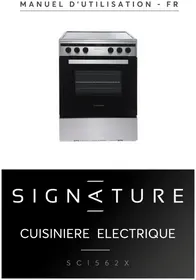
SCI562X - Other kitchen appliances SIGNATURE - Free user manual and instructions
Find the device manual for free SCI562X SIGNATURE in PDF.


| Product type | Mixed cooker (induction hob + electric oven) |
| Brand | SIGNATURE |
| Model | SCI562X |
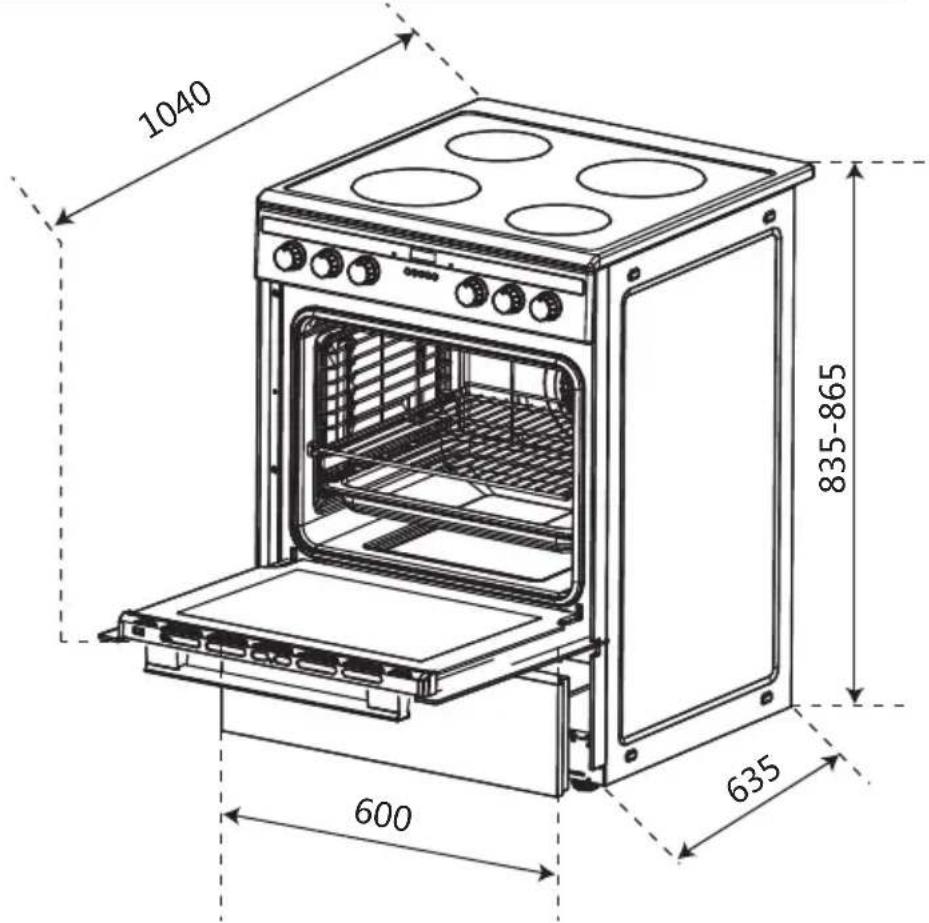
| Dimensions (H x W x D) | 835-865 mm x 600 mm x 635 mm |
| Weight (approx.) | 55 kg |
| Power supply | 220-240 V ~ / 380-415 V 3N ~, 50-60 Hz |
| Maximum total power | Approx. 11 kW (hob 7 kW + oven 4.05 kW) |
| Number of induction zones | 4 (2 x 1500 W Ø160 mm, 2 x 2000 W Ø180 mm) |
| Induction power levels | 9 |
| Oven volume | 70 L |
| Oven energy class | A |
| Energy consumption (fan-forced) | 0.72 kWh/cycle |
| Energy consumption (conventional) | 0.78 kWh/cycle |
| Oven heating elements power | Top: 2950 W (950+2000), Bottom: 1100 W, Lamp: 25 W |
| Oven functions | Lighting, defrosting, double grill with fan, double grill, rotisserie, fan-assisted convection, conventional cooking, bottom heat, ECO mode |
| Electronic programmer | Timer, semi-automatic cooking, automatic cooking |
| Maximum oven temperature | 250 °C |
| Safety | Overheat protection, small object and non-magnetic utensil detection, delayed automatic shut-off, anti-tilt bracket |
| Induction hob maintenance | Clean with a scraper for glass-ceramic and special product |
| Oven maintenance | Clean with soapy water, door can be disassembled |
| Lamp replacement | Halogen bulb G9 (25-40 W/230 V) |
| Included accessories | Metal grid, drip tray (baking tray) |
| Power cable | H05RR-F, H05RN-F or H07RN-F (section depending on installation) |
Frequently Asked Questions - SCI562X SIGNATURE
User questions about SCI562X SIGNATURE
0 question about this device. Answer the ones you know or ask your own.
Ask a new question about this device
Download the instructions for your Other kitchen appliances in PDF format for free! Find your manual SCI562X - SIGNATURE and take your electronic device back in hand. On this page are published all the documents necessary for the use of your device. SCI562X by SIGNATURE.
USER MANUAL SCI562X SIGNATURE
natural_image
Exterior view of a stainless steel oven with open door and control knobs (no visible text or symbols)SIGNATURE
DIMENSIONS DU PRODUIT....12
DESCRIPTION DU PRODUIT....13
UTILISATION DU FOUR....14
UTILISATION DE LA PLAQUE....19
CONSEILS DE SECURITE ET ENTRETIEN.... 22
CONSEILS ET ASTUCES....23
DEPANNAGE....27

natural_image
Symbolic icon of a person walking with arrows indicating cycle (no text or numbers)Contraintes anti-basculement
3- DIMENSIONS DU PRODUIT
radar
| Category | Value | |---|---| | Cuisson | 50 | | Grill | 200 | | Outer Ring | 100 | | Inner Ring | 150 | The label 'uveau.' is displayed in the top-left corner. The '°C' indicates temperature in degrees Celsius.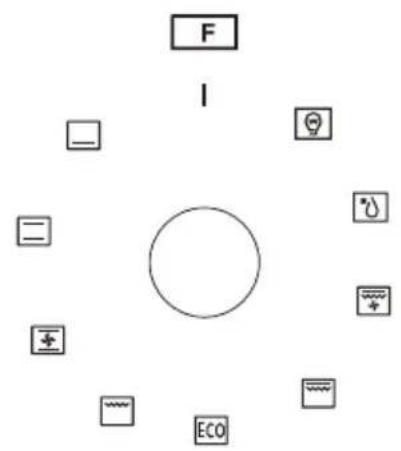
natural_image
Simple circular diagram with concentric arcs and dots, no text or symbols presentnatural_image
Simple diagram showing a 8-inch 10-inch 8-inch 10-inch 8-inch solar panel and a circular light bulb with an arrow indicating rotation (no text or symbols)natural_image
Illustration of five different cooking pots with upward arrows indicating heating or cooking process (no text or symbols)Faux Faux Faux Faux Vrai
Economie d'énergie
natural_image
Illustration of hands holding a rectangular object with an 15° angle marked, showing rotational motion (no text or symbols)Avertissement:
natural_image
Technical line drawing of a mechanical assembly with no visible text or symbols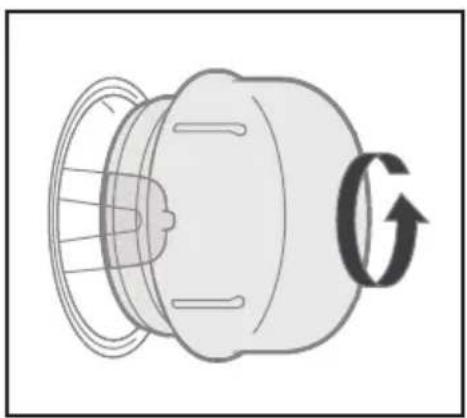
natural_image
Diagram of a mechanical component with internal structure and directional arrow (no text or symbols).DEPANNAGE
natural_image
Symbol of a trash bin crossed with no text or numbers, representing waste sorting or disposal (no text present)natural_image
Exterior view of a stainless steel kitchen oven with control knobs and open door (no visible text or symbols)SIGNATURE
ELECTRIC COOKER
SCI562X
CONTENT
IMPORTANT SAFETY WARNINGS....31
INSTALLATION....36
PRODUCT DIMENSIONS....41
INTRODUCTION OF THE PRODUCT......42
USING THE OVEN....43
USING THE HOB......47
SAFETY REMINDING AND MAINTENANCE.... 50
FAILURE DISPLAY AND INSPECTION.... 51
TOUBLE SHOOTING....54
1-Important Safety Warnings
THESE WARNINGS ARE PROVIDED IN THE INTEREST OF SAFETY, PLEASE READ THEM CAREFULLY BEFORE INSTALLING OR USING THE APPLIANCE
-
Before using the appliance, read the instructions in this owner's manual carefully, since you should find all the instructions you require to ensure safe installation, use and maintenance. Always keep this owner's manual close to hand since you may need to refer to it in the future.
-
After removing the packaging, check that the appliance is not damaged. If you have any doubt, do not use the appliance. Contact your nearest Service Centre of the store where you buy the appliance. Never leave the packaging components plastic bags, foamed polystyrene, nails, etc.) within the reach of children since they are a source of potential danger.
-
The appliance must be installed only by a qualified person in compliance with the instructions provided. The manufacturer declines all responsibility for improper installation which may harm persons and animals and damage property.
-
This appliance can be used by children aged from 8 years and above and persons with reduced physical, sensory or mental capabilities or lack of experience and knowledge if they have been given supervision or instruction concerning use of the appliance in a safe way and understand the hazards involved. Children shall not play with the appliance. Cleaning and user maintenance shall not be made by children without supervision.
-
The electrical safety of this appliance can only be guaranteed if the cooker is correctly and efficiently earthed, in compliance with current regulations on electrical safety. Always ensure that the earthing is efficient if you have any doubts call in a qualified electrician to check the system. The manufacturer declines all responsibility for damage resulting from a system which has not been earthed.
-
Check that the electrical capacity of the system and sockets will support the maximum power of the hob, as indicated on the rating label. If you have any doubts call in a qualified technician.
-
When the cooker is first used an odor may be emitted, this will cease after a period of use. When first using the cooker ensure that the room is well ventilated e.g., open a window or use an extractor fan and that persons who may be sensitive to the odor avoid any fumes. It is suggested that any pets be removed from the room until the smell has ceased. When the oven is first switched on, it may give off an unpleasant smell. This is due to the bonding agent used for the insulating panels within the oven. This is completely normal, if it does occur, you merely have wait for the smell to clear before putting food into the oven.
-
Ensure that the appliance is switched off before maintenance by switching off the main switches and turning all knobs to OFF position.
-
The openings and slots used for ventilation and dispersion of heat on the rear and below the control panel must never be covered.
-
This appliance must be used for the purpose for which it was expressly designed. Any other use is considered to be improper and consequently dangerous. The manufacturer declines all responsibility for damage resulting from improper and irresponsible use.
-
A number of fundamental rules must be followed when using electrical appliances. The following are of particular importance do not touch the appliance you're your hands or feet are wet do not use the appliance bare footed. Never allow the Mains Cable to be stretched, pulled or damaged if the Cooker is moved for cleaning etc. Do not use the cooker if the Mains Cable is damaged, consult a qualified electrician. Do not allow the cooker to be used unsupervised by children or persons unfamiliar with it.
-
Always switch off the electrical supply to the cooker and allow it to cool down before carrying out any cleaning operations etc.
-
Danger of fire: do not store items on the cooker surfaces.
-
To avoid accidental spillage do not use cookware with uneven or deformed bottoms on the burners or on the electric plates.
-
Special care should be taken when using chip pans etc. in order to avoid splashing or spillage of hot oil. They should not be used unattended since over heated oil may boil over and could also ignite.
-
Parts of this appliance, cooking surfaces, retain heat for considerable periods after switching off. Care should, therefore, be taken when touching these areas before they have completely cooled down.
-
Never use flammable liquids such as alcohol or gasoline, etc. near the appliance when it is in use.
- When using small electrical appliances near the hob, keep the supply cord away from the hot parts.
- Make sure the knobs are in its “OFF” position when the appliance is not in use. Also make all potentially dangerous parts of the appliance, safe, above all for children who could play with the appliance.
- WARNING: The appliance and its accessible parts become hot during use. Care should be taken to avoid touching heating elements. Children less than 8 years of age shall be kept away unless continuously supervised.
- If you use the power code for single phase, the minimum cross-sectional area is 4mm^2 (3G 4.0mm^2 ). For three phases, the cross-sectional area is 2.5 mm^2 (5G 2.5mm^2 ) or 4mm^2(4G 4.0mm^2) . The power code type should be H05RR-F, H05RN-F, H07RN-F.
- Do not use harsh abrasive cleaner or sharp metal scrapers to clean the oven door glass since they can scratch the surface, which may result in shattering of the glass.
- Any spillage should be removed from the lid before opening and the hob surface should be allowed to cool before closing the lid.
-
Use only hob guards designed by the manufacture of the cooking appliance or indicated by the manufacturer of the appliance in the instructions for use as suitable or hob guards incorporated in the appliance. The use of inappropriate guards can cause accidents.
-
You must grill with closed door.
- Keep the appliance and its supply cord out of reach of children aged less than 8 years.
- If the supply cord is damaged, it must be replaced by a special cord or assembly available from the manufacturer or its service agent.
- WARNING: Unattended cooking on a hob with fat or oil can be dangerous and may result in fire. Never try to extinguish a fire with water, but switch off the appliance and then cover flame e.g. with a lid or a fire blanket.
- CAUTION: The cooking process has to be supervised. A short term cooking process has to be supervised continuously.
- During use the appliance becomes hot. Care should be taken to avoid touching heating elements
- A steam cleaner is not to be used for cleaning.
- WARNING: Ensure that the appliance is switched off before replacing the lamp to avoid the possibility of electric shock.
- Regarding the details for installation, connection to the power supply, cleaning, please refer to below paragraph from this manual.
3 .Regarding the details for installation of the racks, bulb replacement, please refer to below paragraph from this manual. - WARNING: If the surface is cracked, switch off the appliance to avoid the possibility of electric shock.
Safety when cleaning:
For cleaning, the appliance must be switched off and allowed to cool down.
■ Never use steam cleaners for cleaning the cooking hobs and oven cavity.
■ Never use harsh, abrasive cleaners or sharp metal scrapers to clean the oven door glass since they can scratch the surface, which may result shattering of the glass.
Note: Every care is taken to ensure the safety of the customer. Glass can break. Be very careful when cleaning the glass as not to scratch it. Do not knock or hit the glass with the accessories.
2- Installation
The following instructions should be read by a qualified technician to ensure that the appliance is installed, regulated and technically serviced correctly in compliance with current regulations.
Important: disconnect the cooker from the electricity when making any adjustment, maintenance operation, etc.
Positioning
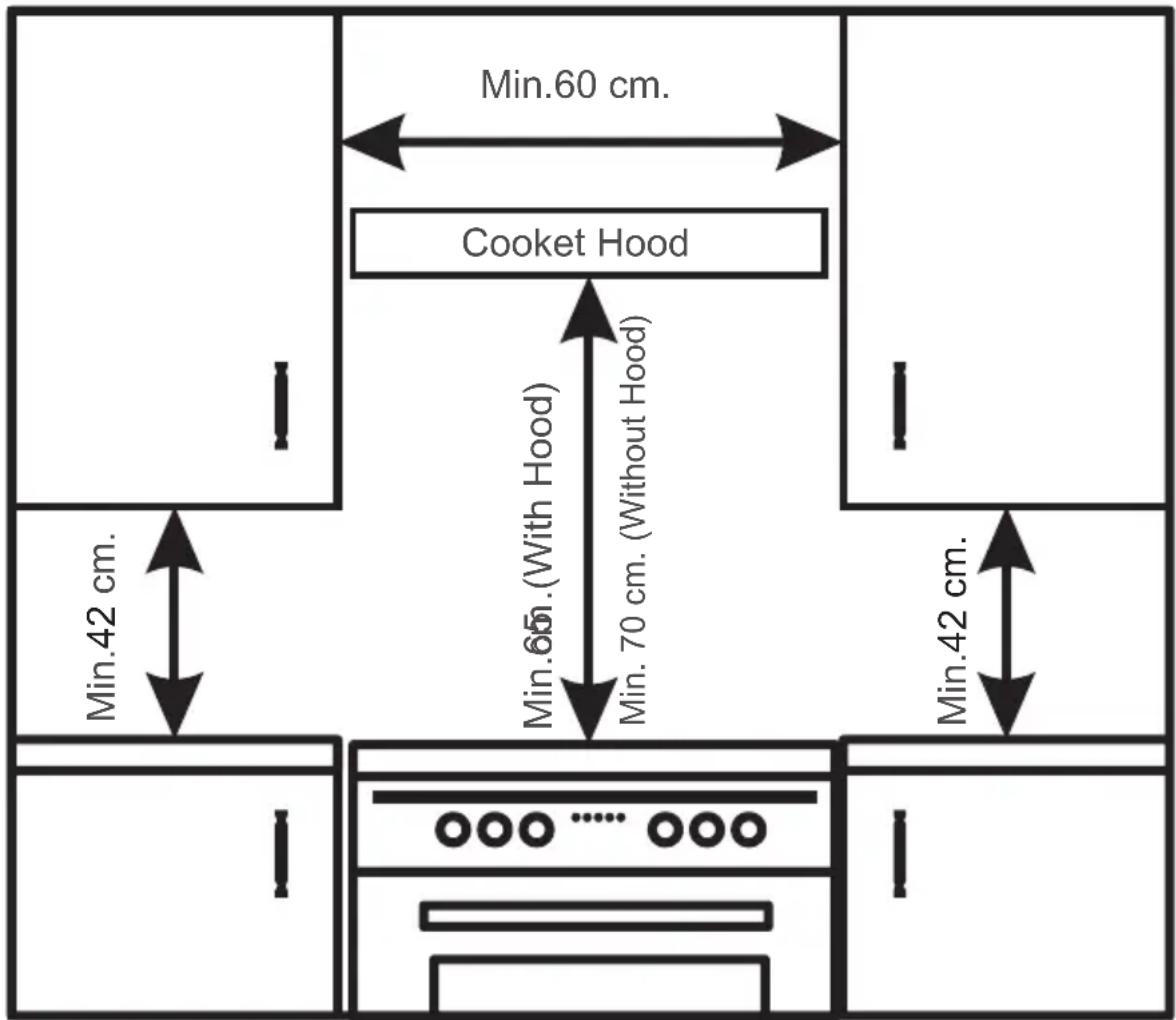
The appliance can be installed next to furniture units which are no taller than the top of the cooker hob. For proper installation of the cooker, the following precautions must be taken:
a) Kitchen cabinets installed next to the cooker that are taller than the top of the hob must be situated at least 20 cm from the edge of the hob.
b) Hoods must be installed according to the requirements in the installation manual for the hoods themselves and in any case at a minimum distance of 65 cm.
c) Place the wall cabinets adjacent to the hood at a minimum height of 42 cm from the hob (see figure).
d) Should the cooker be installed beneath a wall cabinet, the latter should be situated at least 70 cm (centimeters) away from the hob, as shown in the figure.
e) The cut-out for the cooker cabinet should have the dimensions indicated in the figure below.
Safety reminding
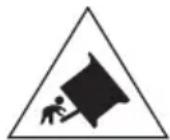
Caution, possibility of tilting
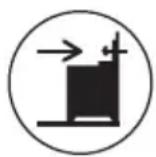
Anti-tip restraints
WARNING: In order to prevent tipping of the appliance, this stabilising means must be installed.
Refer to instructions for installation.
Install Anti-tilt Bracket
Warning: In order to prevent tipping of the cooker, the anti-tilt bracket must be installed with cooker. To install Anti-tilt bracket, use screwdriver to mount the anti-tilt bracket (1) with screws (2) to the ground, as shows in Figure 3.
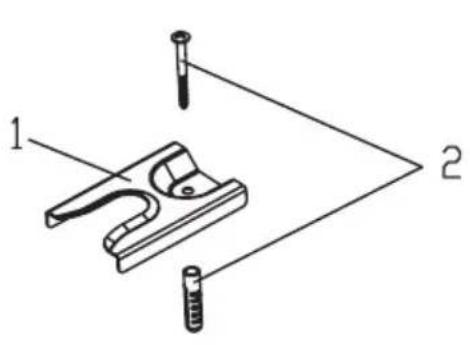
Figure 2 Figure 3
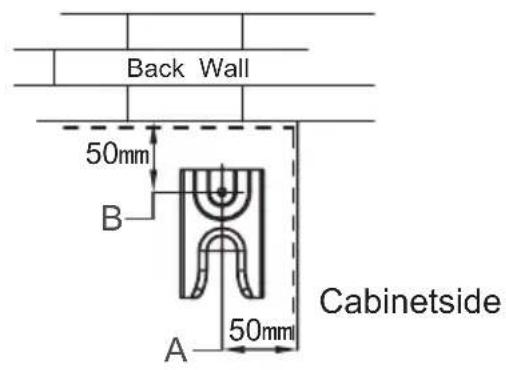
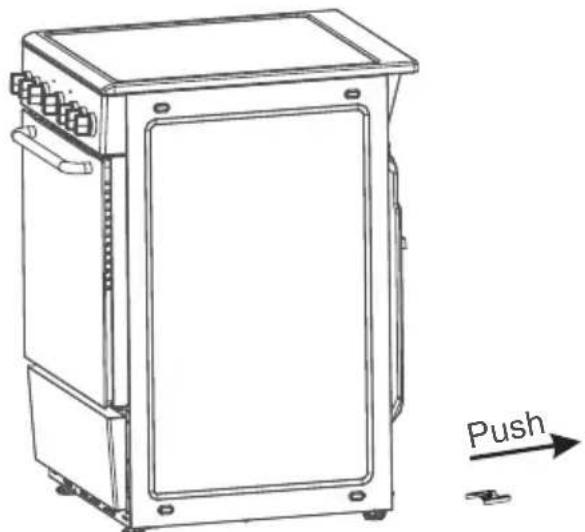
After fix anti-tilt bracket, push the electric cooker inside cabinet as show in Figure 4. For correct installation, the rear and right foot of cooker would be clipped by the anti-tilt bracket.
natural_image
Technical line drawing of a rectangular industrial device with mounting holes and a labeled push arrow (no text or symbols on the device itself)Figure 4
Remark:
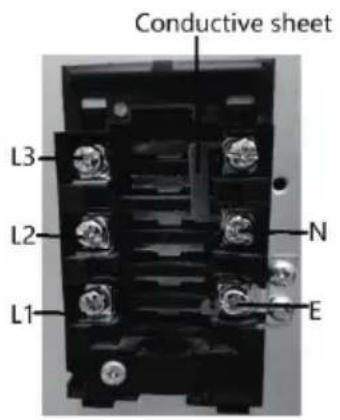
The appliance is supplied by a set of terminals for permanently fixed wiring or fitted with supply cord. The 3 alternative connection ways are as below:
1, 220-240V\~: power cord requirements: wire diameter 3G 4.0mm² at least; cord type:
H05RR-F, H05RN-F, H07RN-F. The conductive sheet connection method as below:
2, 380V-415V 2N\~: power cord requirements: wire diameter 4G 4.0mm² at least; cord type: H05RR-F, H05RN-F, H07RN-F. The conductive sheet connection method as below:
3, 380-415V 3N\~: power cord requirements: wire diameter 5G 2.5 ~mm^2 at least; cord type: H05RR-F, H05RN-F, H07RN-F. The conductive sheet connection method as below:
| voltage | wiring | cable type |
| 220-240V~ | 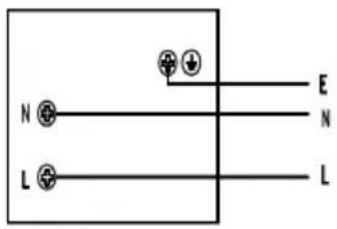 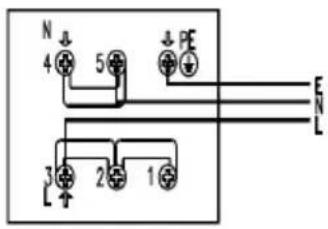 | 3G4.0mm^2 H05RR-F H05RN-F H07RN-F |
| 380-415V 2N~ | 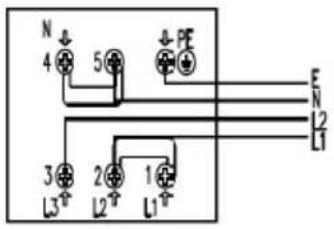 | 4G4.0mm^2 H05RR-F H05RN-F H07RN-F |
| 380-415V 3N~ | 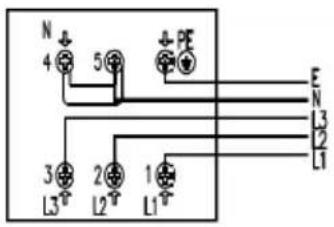 | 5G2.5mm^2 H05RR-F H05RN-F H07RN-F |
| L,L1,L2,L3 = Phase , N = Neutral, PE,E =Earth | ||
Important: The power cable must be positioned so that no point reaches a temperature above 50^ C.
3-Product Dimensions
Product dimensions:
Height: 835 - 865mm
Width: 600 mm
Depth: 635 mm
Product specifications:
| Supplier's name | BUT |
| Supplier's model identifier | SCI562X |
| Energy efficiency index(EEIcavity) per cavity | 85.7 |
| Energy class | A |
| Energy consumption per cycle in forced air mode | 0.72 kWh |
| Energy consumption per cycle in conventional mode | 0.78 kWh |
| Number of cavity | 1 |
| The heat source per cavity Electricity | |
| Volume of each cavity | 70L |
| Top element | 950 +2000 |
| Bottom element | 1100 |
| Lamp* | 25 |
| Solid hotplate 160mm(RR, LF) 1500W*2 | |
| Solid hotplate 180mm(RR, LF) 2000W*2 | |
| Voltage and Frequency: | 220-240V~/380-415V 3N~,50-60Hz |
4-Introduction of the Product
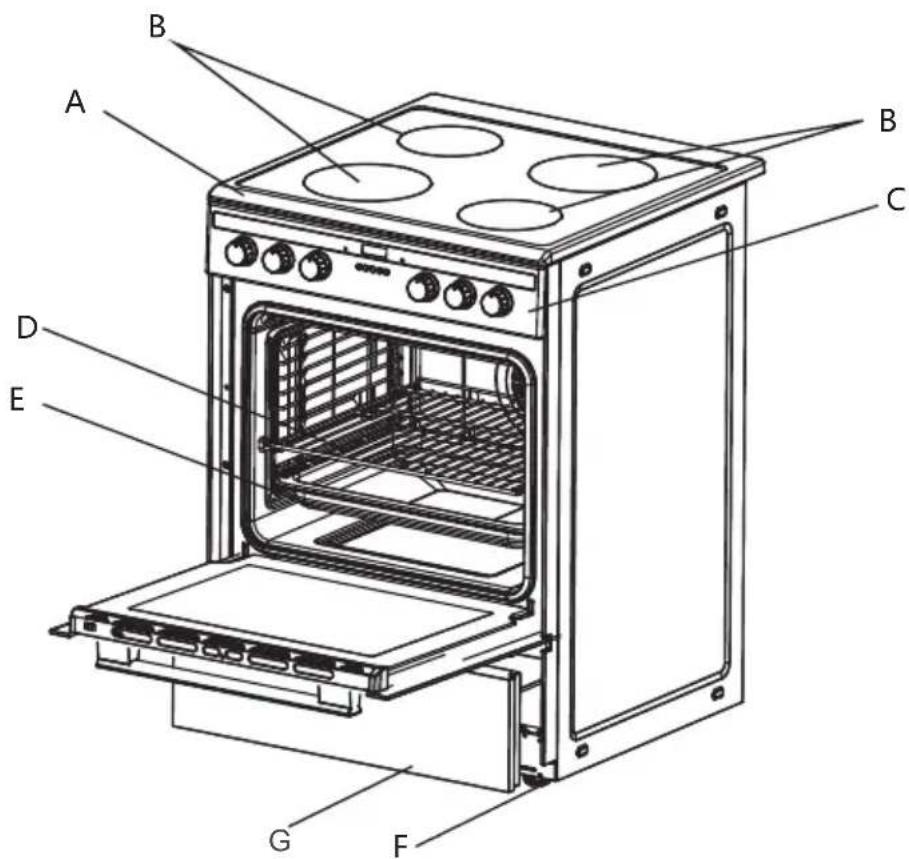
A. Cooktop
B. Induction Hotplates
C. Control Panel
D. Wire Grid
E. Drip Pan or Baking Tray
F. Adjustable Feet
DrawerG.
Common accessories
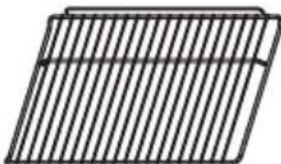 | 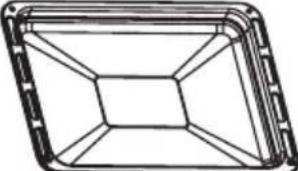 |
| Wire Grid | Drip Pan or Baking Tray |
Control Panel
Model: SCI562X
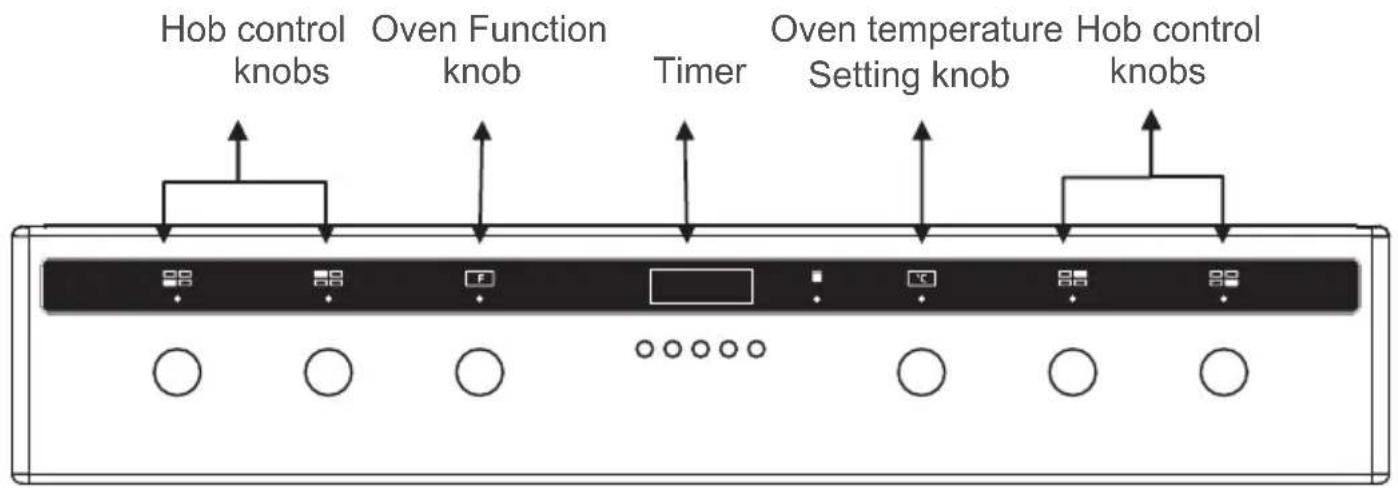
5. Using the oven
Oven controls - the function and temperature controls
To use an oven function, first select the function with the left hand dial and then set the temperature of the function with the right hand dial. The indicator light will illuminate. When the temperature inside your oven reaches the temperature you set, the thermostat will cut off the heating element and the indicator light will go off. When the temperature falls below the set temperature, the heating element will again be turned on and the indicator light will illuminate again.
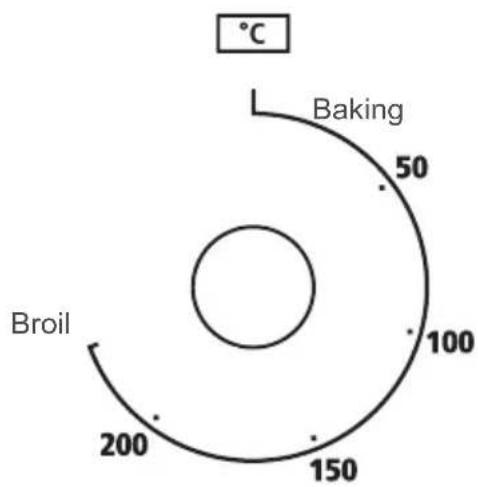
radar
| Temperature (°C) | Label | | :--- | :--- | | 50 | Baking | | 100 | | | 150 | | | 200 | Broil |
| Symbol | Function description |
 | Oven Lamp: which enables the user to observe the progress of cooking without opening the door, except ECO function. |
 | Deforst: The circulation of air at room temperature enables quicker thawing of frozen food, (without the use of any heat). It's a gentle but quick way to speed up the defrosting time and thawing of ready-made dishes and cream filled produce etc. |
 | Double grilling: The inner grill element and top element are workin.The temperature can be set within the range of 180-240°C.The default temperature is 210°CThis is optional function that can be work with rotisserie motor. |
 | Double grill: The radiant heating element and the top heating element are working.The temperature can be set within the range of 180-240°C.The default temperature is 210°C.This is optional function that can be work with rotisserie motor. |
 | Radiant grilling: The inner grill element switches on and off to maintain temperature.The temperature can be set within the range of 180-240°C.The default temperature is 210°CThis is optional function that can be work with rotisserie motor. |
 | Convention with fan: Combination of the fan and both heating element provides more even heat penetration,saving up to30-40% of energy. Dishes are lightly browned on the outside and still moist on the inside. Note:This function is suitable for grilling or roasting big pieces of meat at a higher temperature. The temperature can be set within the range of 50-250°C.The default temperature is 220°C. |
 | Conventional cooking: The top and bottom work together to provide convectional cooking.The temperature can be set within the range of 50-250°C. The default temperature is 220°C.This is optional function that can be work with rotisserie motor. |
 | Bottom heat: A concealed element in the bottom of the oven provides a more concentrative heat to the base of food without browning. This is ideal for slow cooking dishes such as casseroles, stews, pastries and pizzas where a crispy base is desired.The temperature can be set within the range of 60-120°C. The default temperature is 60°C. |
 | For energy-saved cooking. Cooking the selected ingredients in a gentle manner, and the heat comes from the top and the bottom. |
Recipes for ECO mode
| Recipes Temperature ( ) Level Time (min) | Pre-heat | |||
| Potato Cheese Gratin | 180 1 90-100 No | |||
| Cheese Cake | 160 1 100-150 No | |||
| Meatloaf 190 | 1 110-130 No | |||
Instructions for use
When you first use your oven, odors may come from the insulation materials and the heating elements. For this reason, before using your oven for the first time, switch on the oven while empty, at its maximum temperature for 45 minutes.
- Select the oven function you require. Select the temperature you require.
- Before placing food in the oven you may need to pre-heat the oven for 10 minutes.
- The red temperature indicator light goes off when the chosen temperature is reached.
- To switch the oven off, turn the function control dial to the off position '0'.
Note: Under no circumstances should the oven be lined with aluminum foil, do not place dishes or baking trays directly or onto the oven base as overheating and damage may occur.
Electronic programmer (on some models only)

LIST OF FUNCTIONS

Timer key

End of cooking key

Cooking duration key

Value decrease key

Value increase key
Setting the time
On the first use, or after a power failure, 000 will be flashing on the appliance's display. Press the × and ⚪ keys together, and at the same time press the value adjustment keys — or + : this will increase or decrease the setting by one minute for each pressure.
Manual cooking: Press the ✗ and ∥ keys together and activate the required function and temperature and oven will work continuously. To switch off the oven, return all knobs to the 0 setting.
Before each programmer setting, activate the required function and temperature.
Semi-automatic cooking
Semi-automatic cooking is the function which allows a cooking operation to be started and then ended after a specific length of time set by the user.
Press the Key and the display will light up showing the figures; and the symbols A will flash, then use the keys or to set the cooking duration.
5 seconds after setting the cooking duration, the count of the programmed cooking duration will start and the display will show the current time together with land A (to indicate that a programmed cooking operation has been set).
Automatic cooking
This function switches the oven on and off entirely automatically.
Press the key and the display will light up showing the figures; and the symbols A will flash, then use the value modification keys to set the cooking duration.
Press the key and the display will show the sum of the current time plus the cooking duration: then use the value modification keys or to adjust the end of cooking time.
5 seconds after setting the end of cooking time, the programmed count will start and the display will show the current time together with the symbol A. Subtract the cooking duration from the end of cooking time and the remainder will be the time that the oven starts to work with the symbol 📄.
After making the setting, press the Key to view the remaining cooking time; press the Key to view the cooking end time.
End of cooking
At the end of cooking the oven will switch off automatically and simultaneously a buzzer will start to sound. After the buzzer has bee n deactivated, the display will return to show the current time.
Timer
The programmer can also be used as an ordinary timer.
Press the key and the display will show the figures; and the symbol will flash, press
the value modification keys ☐ or ☐ seconds after setting the time of timer the count will start and the display will show the current time and the symbol 🔍

After the setting, to display the time left press the key. In timer mode, the oven operation will not be cut out at the end of the set time.
Adjusting the buzzer volume
The buzzer volume can be varied (3 settings) while it is inoper ation by pressing ☐
Stopping the buzzer
The buzzer stops automatically after about seven minutes. It can be deactivated manually by pressing keys" 🔊 "" ✕ " or" 🎯 " .
Canceling the programmer setting
Having programmed a semi-automatic or automatic cooking operation, this programming can be cancelled by pressing the keys ☐ and ☑ together.
The programmer will interpret the cancellation of the program as terminating the cooking operation.
Modifying the set data
The set cooking data can be modified at any time. Pressing the function key and then pressing the keys ☐ or ☒ change the value.
Canceling cooking
To switch off the appliance, return all knobs to the 0 setting or press the keys 🎨 and ✕ together.
6. Using the hob
Instructions for use
The induction hob caters for all kind of cooking, with its electromagnetic cookingzones, and its micro-computerised controls and multi-functions, making it the ideal choice for today's family.
Manufactured with specially imported materials, the induction hob is extremely user-friendly, durable and safe.
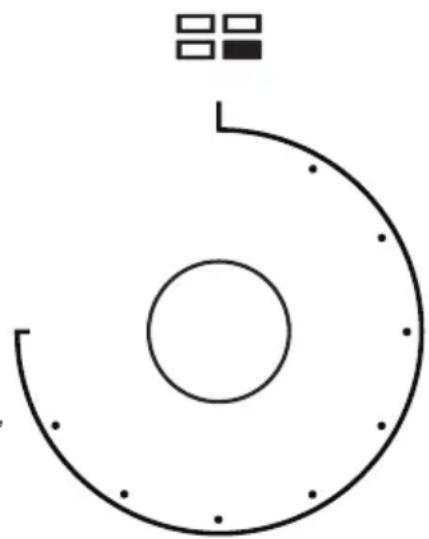
Your hob has four elements. Each knob has a symbol above it, which indicates which element it controls.
The hob is designed for operating at 9 different levels.
natural_image
Simple circular diagram with concentric arcs and dots, no text or symbols presentWorking Principle
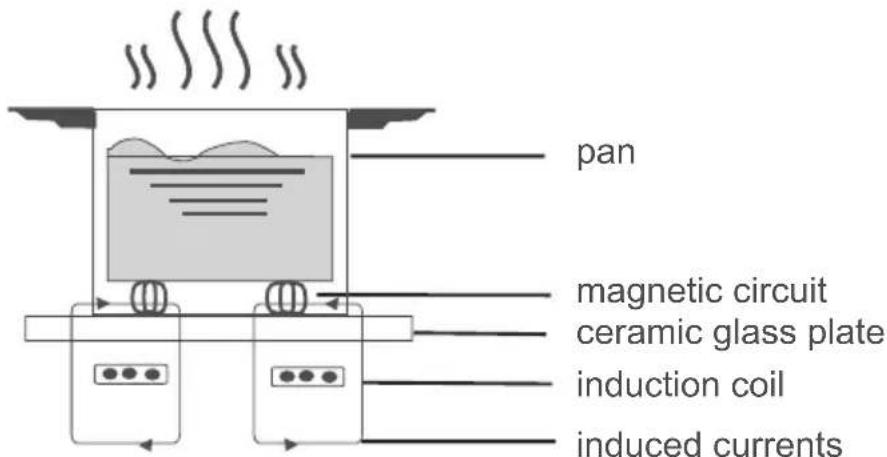
The induction hob comprises a coil, a hotplate made of ferromagnetic material and a control system. Electrical current generates a powerful magnetic field through the coil. This procures a large number of vortices which in turn generate heat which is then transmitted through the cookingzone to the cooking vessel.
Safety
The hob was specially designed for domestic use.
Protection from over-heating
A sensor monitors the temperature in the cooking zones. When the temperature exceeds a safe level, the cooking zone is automatically switched off.
Detection of small or non-magnetic items
When an unsuitable size or non-magnetic pan (e.g. aluminium), or some other small item (e.g. knife, fork, key) has been left on the hob, the hob automatically go on to standby in 1 minute. The fan will keep cooking down the induction hob for a further 1 minute.
Auto shutdown
Auto shutdown is a safety protection function for your induction hob. It shutdown automatically whenever you forget to turn off a cooking zone. The default working times for various power levels are shown in the below table:
| Power level | The heating zone shut down automatically after |
| 1~3 | 8 hours |
| 4~6 | 4 hours| |
| 7~9 | 2 hours |
Warning: Anyone who has been fitted with a heart pacemaker should consult a doctor before using the induction hotplate.
Diagram of induction hob
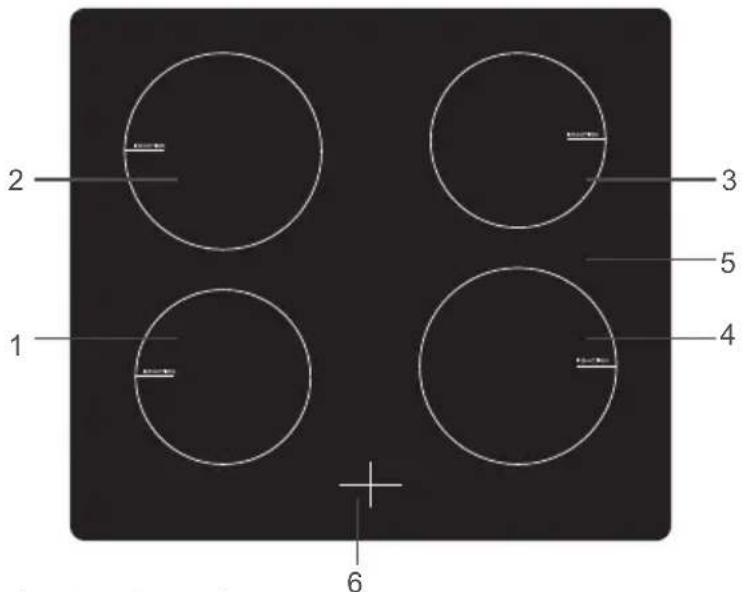
- 15 00 W zone
- 20 00 W zone
- 15 00 W zone
- 20 00 W zone
- Glass plate
- Display
Instructions for use
Preparation before using:
When the power is switched on, the buzzer will sound once and all the indicators will come on for one second and then go out. The hob is now in standby mode.
Place the pan in the centre of the cooking zone.
Operating instructions
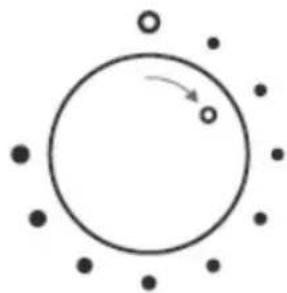
- First turn the knob to the "OFF" position, then select the power level by turning the knob for the relevant induction zone.
natural_image
Simple diagram showing a circle with surrounding dots and an arrow indicating rotation (no text or symbols)If you turn the knob to the "OFF" position, the power setting returns to "0". The maximum power of cooking zones is as follows:
| Heating zone | 1 2 3 4 | |||
| Maximum power | 1500W 2000W 1500W 2000W | |||
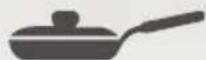
Iron oil frying pan

Stainless steel pot Iron pan
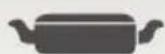


Enamel stainless steel kettle

Enamel cooking utensil

Iron plate
You may have a number of different cooking vessels
- This induction hob can identify a variety of cookingvessels, which you can test by one of the following methods:
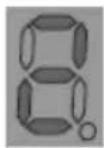
Place the vessel on the cooking zone. If the corresponding cooking zone displays a power level, then the vessel is suitable. If "U" flashes, then the vessel is not suitable for use with the induction hob.
Hold a magnet to the vessel. If the magnet is attracted to the vessel, it is suitable for use with the induction hob.
NB: The base of the vessel must contain magnetic material. It must have a flat bottom with a diameter of more than 12cm.
7. Safety Reminding and maintenance
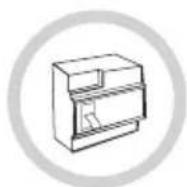
A dedicated power protection air switch must be used.
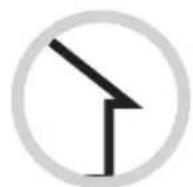
For indoor use only.
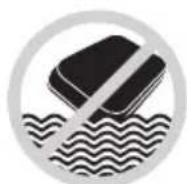
Never wash the induction hob directly with water.
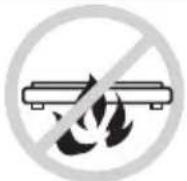
Do not store detergents or flammable materials beneath the hob.
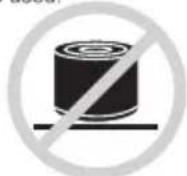
Always open sealed containers, such as cans, before heating them, otherwise they may explode.
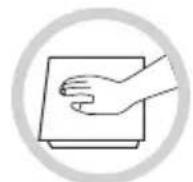
When a cooking zone has been on for a long time the surface remains hot for some time afterwards - so do not touch the ceramic surface.

From time to time check that nothing (e.g. glass, paper, etc.) is obstructing the air intake beneath the induction hob.
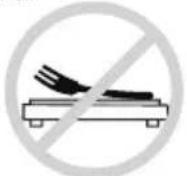
Do not leave metallic objects, such as knives, forks, spoons and lids on the hob as they may get hot.

Never use the induction hob near another appliance which generates a high temperature, such as a gas cooker or a paraffin heater.
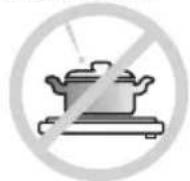
Never have the induction hotplate to work without food inside, otherwise its operational performance may be affected and danger may happen.

If the surface of the hob is cracked, switch off the appliance to avoid any possibility of electric shocks.
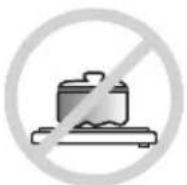
Do not place rough or uneven vessels on the hob, as they may damage the ceramic surface.
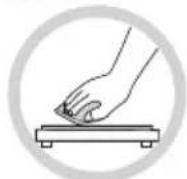
Clean the induction hob regularly to stop foreign objects from getting into the fan and preventing the appliance from working properly.
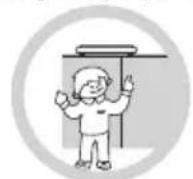
Keep children or infirm persons away from the appliance. Never let them use it unsupervised.

If the power cable is damaged it should be replaced by our service agent or by another suitably qualified person.
This appliance is not intended for use by persons (including children) with reduced physical, sensory or mental capabilities, or lack of experience and knowledge, unless they have been given supervision or instruction concerning use of the appliance by a person responsible for their safety.
Children should be supervised to ensure that they do not play with the appliance.
The surface of the induction hob may be easily cleaned in the following way:
| Type of contamination | Method of cleaning Cleaning | materials |
| Light Immerse in hot water and wipe dry | Cleaning sponge | |
| Rings and lime scale | Apply white vinegar to the area, wipe with a soft cloth or use a commercially available product | Special adhesive for ceramic glass |
| Sweetmeat,melted aluminium or plastics | Use a special scraper for ceramic glass to remove residue (a silicon product is best) | Special adhesive for ceramic glass |
NB: Disconnect the power supply before cleaning.
8. Failure display and inspection
If any abnormality occurs, the induction hob will automatically go into protective mode and display one of the following codes:
| Fault Possible cause | Solutions | |
| F3-F8 | Temperature sensor failure | Contact the supplier |
| F9-FE | Temperature sensor of the IGBT failure. | Contact the supplier |
| E1/E2 | Abnormal voltage in power supply | Check if power supply is normal.Power on after the power supply is normal. |
| E3/E4 | Abnormal temperature | Check the pan. |
| E5/E6 | Poor heat radiation in cooking zone | Restart when cooking zone cools down. |
The above table shows how to assess and check common faults. Do not dismantle the appliance yourself, otherwise you may damage the induction hob.
Hints and tips
Baking tips
- Always place baking tins in the centre of the wire shelf.
- Make sure you use bakeware that is oven proof.
- Do not place bakeware too close to the rear or sides of the oven walls.
- You can influence the degree of browning by changing the temperature setting.
- If a cake collapses after removing it from the oven:
- Use less liquid on your next attempt.
- Consider using a longer baking time or use a slightly lower temperature setting.
Cookware
Hobs
Use heavy gauge, flat, smooth bottomed pans that are the same diameter as the element. This will provide good contact with the glass and help reduce cooking times.
Cookware with a stainless steel saucepan base will give you the best results.

Hints and tips
Energy Saving
- During use of electrical cookers, it is required to use saucepans having flat bases.
- Choose a cookware of proper size.
- Using a lid will reduce cooking times.
- Minimize the amount of liquid or fat to reduce cooking times.
- When liquid starts boiling, reduce the temperature setting.
- Oven door should not be opened often during cooking.
Cleaning tips (Disconnect the appliance from the power supply.)
- Wait until the oven has cooled before removing the wire shelves, wash them separately in warm soapy water and dry thoroughly.
- Wash the interior of the oven with hot soapy water and wipe down with a damp cloth.
- Leave the door open until the interior has dried, before replacing the wire shelves.
- Clean the oven after each use, especially after roasting or grilling, this will prevent spilt or splattered food debris burning and becoming difficult to remove.
- Do not use abrasive pads to clean the interior of the oven as this may remove the enamel, which will affect the efficiency of your oven.
- Do Not use harsh, abrasive cleaners or sharp metal scrapers to clean the oven door glass since they can scratch the surface, which may result shattering of the glass.
Cleaning the outside of the oven (Disconnect the appliance from the power supply.)
- You should regularly wipe over the control panel, oven door and oven sides using a soft cloth and mild liquid detergent as spilt liquids may damage the enamel.
- Wash enameled or chrome plated parts of the oven with warm soapy water or with non-abrasive detergents.
- Never use abrasive pads to clean enameled, chromed or stainless steel surfaces.
- When using commercially available stainless steel cleaning products, avoid cleaning any lettering or symbols, as they can become damaged.
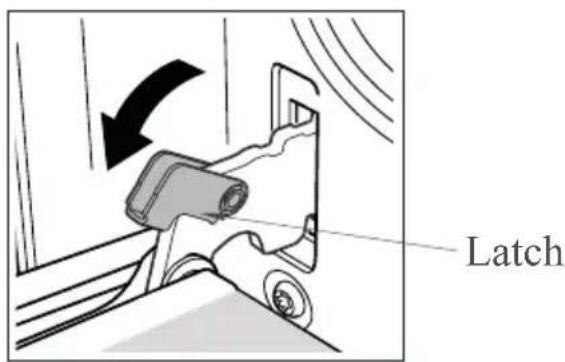
Removing the door for easier cleaning
We recommend you have someone to assist you during removal of the door.
- Open the door completely.
- The door hinge has a small latch. Lift the latch on both hinges.
- Lift the door slightly as if closing, and then with both hands supporting the door, pull it away from the oven.
- To replace the door, hold the door in an open position and insert the latches on both hinges back into place. Open and close the door to make sure that it has been fitted correctly.

Hints and tips
Warning:
To avoid possible electric shock, disconnect the power supply before replacing the lamp. Only use 25-40W/230 V type 80°C, halogen lamps.
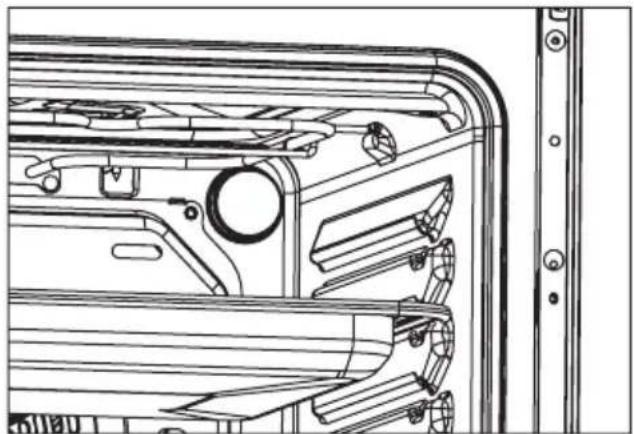
Replacing the oven light
- Switch off and disconnect the power from the oven. Ensure that the internal parts are cool before touching internal parts.
- Remove the lamp cover by turning it counter-clockwise (note, it may be stiff) and replace halogen lamp with a new one.
- Re-fit the cover.
- If in any doubt, consult a qualified electrician for help.
natural_image
Technical line drawing of a mechanical assembly with no visible text or symbols
natural_image
Diagram of a mechanical component with internal blades and a labeled arrow (G), no text or symbols present.9. Trouble Shooting
If a malfunction occurs, it often is due to a minor fault. Please read the follow instructions before calling the after-sales service:
| Problem Possible Cause Please Check | ||
| The oven does not work | Blown Fuse | Please check the fuse box that the fuse is in working order |
| Incorrect setting | Please check all controls have been turned to the desired location | |
| Some hob zones are not heating | Installation | Please check that the appliances terminal box has been correctly installed (see installation instructions) |
natural_image
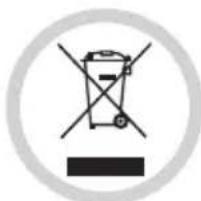
Symbol of a trash bin crossed with no visible text or labelsDISPOSAL: Do not dispose this product as unsorted municipal waste. Collection of such waste separately for special treatment is necessary.
This appliance is labelled in compliance with European directive 2012/19/EU for Waste Electrical and Electronic Equipment (WEEE).
By ensuring that this appliance is disposed of correctly, you will help prevent any possible damage to the environment and to human health, which might otherwise be caused if it were disposed of in the wrong way.
The symbol on the product indicates that it may not be treated as normal household waste. It should be taken to a collection point for the recycling of electrical and electronic goods.
This appliance requires specialist waste disposal. For further information regarding the treatment, recovery and recycling of this product please contact your local council, your household waste disposal service, or the shop where you purchased it.
For more detailed information about treatment, recovery and recycling of this product, please contact your local city office, your household waste disposal service or the shop where you purchased the product.
We decline liability for any damage or accident derived from any use of this product which is not in conformity with the instructions contained in this booklet.

- SIGNATURE
- DIMENSIONS DU PRODUIT....12
- DESCRIPTION DU PRODUIT....13
- UTILISATION DU FOUR....14
- UTILISATION DE LA PLAQUE....19
- CONSEILS DE SECURITE ET ENTRETIEN.... 22
- CONSEILS ET ASTUCES....23
- DEPANNAGE....27
- 3- DIMENSIONS DU PRODUIT
- Economie d'énergie
- Avertissement:
- .DEPANNAGE
- ELECTRIC COOKER
- CONTENT
- IMPORTANT SAFETY WARNINGS....31
- INSTALLATION....36
- PRODUCT DIMENSIONS....41
- INTRODUCTION OF THE PRODUCT......42
- USING THE OVEN....43
- USING THE HOB......47
- SAFETY REMINDING AND MAINTENANCE.... 50
- FAILURE DISPLAY AND INSPECTION.... 51
- TOUBLE SHOOTING....54
- 1-Important Safety Warnings
- THESE WARNINGS ARE PROVIDED IN THE INTEREST OF SAFETY, PLEASE READ THEM CAREFULLY BEFORE INSTALLING OR USING THE APPLIANCE
- Safety when cleaning:
- 2- Installation
- Positioning
- Safety reminding
- Install Anti-tilt Bracket
- Remark:
- 3-Product Dimensions
- 4-Introduction of the Product
- Control Panel
- Using the oven
- Oven controls - the function and temperature controls
- Instructions for use
- Electronic programmer (on some models only)
- LIST OF FUNCTIONS
- Setting the time
- Semi-automatic cooking
- Automatic cooking
- End of cooking
- Using the hob
- Working Principle
- Safety
- Detection of small or non-magnetic items
- Auto shutdown
- Operating instructions
- Safety Reminding and maintenance
- Failure display and inspection
- Hints and tips
- Baking tips
- Cookware
- Hobs
- Energy Saving
- Cleaning tips (Disconnect the appliance from the power supply.)
- Cleaning the outside of the oven (Disconnect the appliance from the power supply.)
- Removing the door for easier cleaning
- Warning:
- Replacing the oven light
- Trouble Shooting
Brand : SIGNATURE
Model : SCI562X
Category : Other kitchen appliances