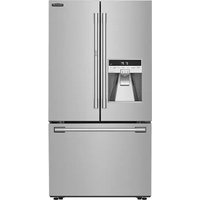
SFC249VCE - Refrigerator SIGNATURE - Free user manual and instructions
Find the device manual for free SFC249VCE SIGNATURE in PDF.


Pick your language and provide your email: we'll send you a specifically translated version.
| Product Type | Refrigerator |
| Brand | SIGNATURE |
| Model | SFC249VCE |
| Total Capacity | 249 liters (estimated) |
| Fridge Volume | 180 liters (estimated) |
| Freezer Volume | 69 liters (estimated) |
| Energy Class | E (estimated) |
| Annual Consumption | 250 kWh (estimated) |
| Dimensions (H x W x D) | 1800 x 600 x 650 mm (estimated) |
| Net Weight | 70 kg (estimated) |
| Power Supply | 220-240 V, 50 Hz |
| Power | 100 W (estimated) |
| Noise Level | 42 dB (estimated) |
| Main Functions | Refrigeration, freezing, LED lighting, mechanical thermostat, glass shelves, door bins, vegetable drawer |
| Number of Shelves | 3 (estimated) |
| Number of Door Bins | 4 (estimated) |
| Defrost | Automatic for fridge, manual for freezer |
| Safety | Reversible door, adjustable feet |
| Maintenance and Cleaning | Clean with a damp cloth, regular defrosting of freezer |
| Spare Parts and Repairability | Spare parts available on request |
Frequently Asked Questions - SFC249VCE SIGNATURE
How to adjust the refrigerator temperature?
Turn the thermostat knob inside the refrigerator. Position 1 is the least cold, maximum position is the coldest. For optimal preservation, set between 3 and 4.
Why is my refrigerator making noise?
Normal noises come from the compressor and the circulation of refrigerant gas. A hum or click is normal. If the noise is abnormal, check that the appliance is level and the rear tubes are not vibrating.
How to clean the inside of the refrigerator?
Unplug the appliance, remove shelves and door bins. Clean with a soft cloth soaked in warm water and mild detergent. Rinse and dry thoroughly before restarting.
How to change the door opening direction?
Unscrew the door hinges, remove the door, reverse the hinges on the other side and reassemble the door. Refer to the diagram in the manual for precise steps. Use a suitable screwdriver.
What to do if the alarm light comes on?
A red or orange light may indicate a temperature that is too high. Check that the door is properly closed, rear ventilation is not blocked, and the thermostat is set correctly. If the light persists, contact customer service.
How to defrost the freezer?
Unplug the appliance and remove all food. Leave the freezer door open to let the ice melt. Place a towel to absorb water. Never scrape ice with a sharp object. Once defrosted, clean and plug back in.
What is the capacity of my refrigerator?
The total capacity is approximately 249 liters, including about 180 liters for the refrigerator and 69 liters for the freezer. These values are indicated on the energy label.
How to replace the light bulb?
Unplug the appliance. Remove the light bulb cover by prying it with a screwdriver. Unscrew the defective bulb and replace it with a bulb of the same type (usually E14 max 15W). Replace the cover and plug back in.
Where to find spare parts?
Spare parts are available from customer service of the SIGNATURE brand or from authorized dealers. You can also order online by specifying the model SFC249VCE.
What is the climate class of the appliance?
The climate class is usually N-ST (ambient temperature from 16°C to 38°C). Check the label inside the appliance to confirm the exact class.
User questions about SFC249VCE SIGNATURE
0 question about this device. Answer the ones you know or ask your own.
Ask a new question about this device
No questions yet. Be the first to ask one.
Download the instructions for your Refrigerator in PDF format for free! Find your manual SFC249VCE - SIGNATURE and take your electronic device back in hand. On this page are published all the documents necessary for the use of your device. SFC249VCE by SIGNATURE.
USER MANUAL SFC249VCE SIGNATURE
Manual assistant
Powered by Anthropic
Waiting for your message
Product information
Brand : SIGNATURE
Model : SFC249VCE
Category : Refrigerator