
Super Bronco 42E XP - Tractor TROY-BILT - Free user manual and instructions
Find the device manual for free Super Bronco 42E XP TROY-BILT in PDF.



| Brand | Troy-Bilt |
| Model | Super Bronco 42E XP |
| Category | Tractor |
| Product Type | Lithium-ion Battery Tractor |
| Cutting Width | 107 cm (42") |
| Cutting Height | Adjustable, 12 positions |
| Battery | Lithium-ion, rechargeable |
| Charging Time | Approximately 4 hours |
| Charging Voltage | 120 V AC |
| Towing Capacity | Max 113 kg (250 lb) |
| Parking Brake | Yes, lever |
| Headlights | Yes, dashboard control |
| USB Ports | 2 ports 2.1 A (on select models) |
| Cruise Control | Yes |
| Reverse Mowing Mode | Yes, with dedicated button |
| Max Slope Incline | 15° (25%) |
| Number of Blades | 2 |
| Cutting Deck | Removable, clean after each use |
| Maintenance | Clean after use, lubricate axles and pivot points |
| Safety | Locking system, blades stop if seat is unoccupied |
| Spare Parts | Use original Troy-Bilt parts |
| Repairability | Some electrical components require an authorized service center |
Frequently Asked Questions - Super Bronco 42E XP TROY-BILT
User questions about Super Bronco 42E XP TROY-BILT
0 question about this device. Answer the ones you know or ask your own.
Ask a new question about this device
Download the instructions for your Tractor in PDF format for free! Find your manual Super Bronco 42E XP - TROY-BILT and take your electronic device back in hand. On this page are published all the documents necessary for the use of your device. Super Bronco 42E XP by TROY-BILT.
USER MANUAL Super Bronco 42E XP TROY-BILT
Battery-Powered Lithium-Ion Tractor
English Page 1
Spanish (Espanol) Page 27
French (Francais) Page 54
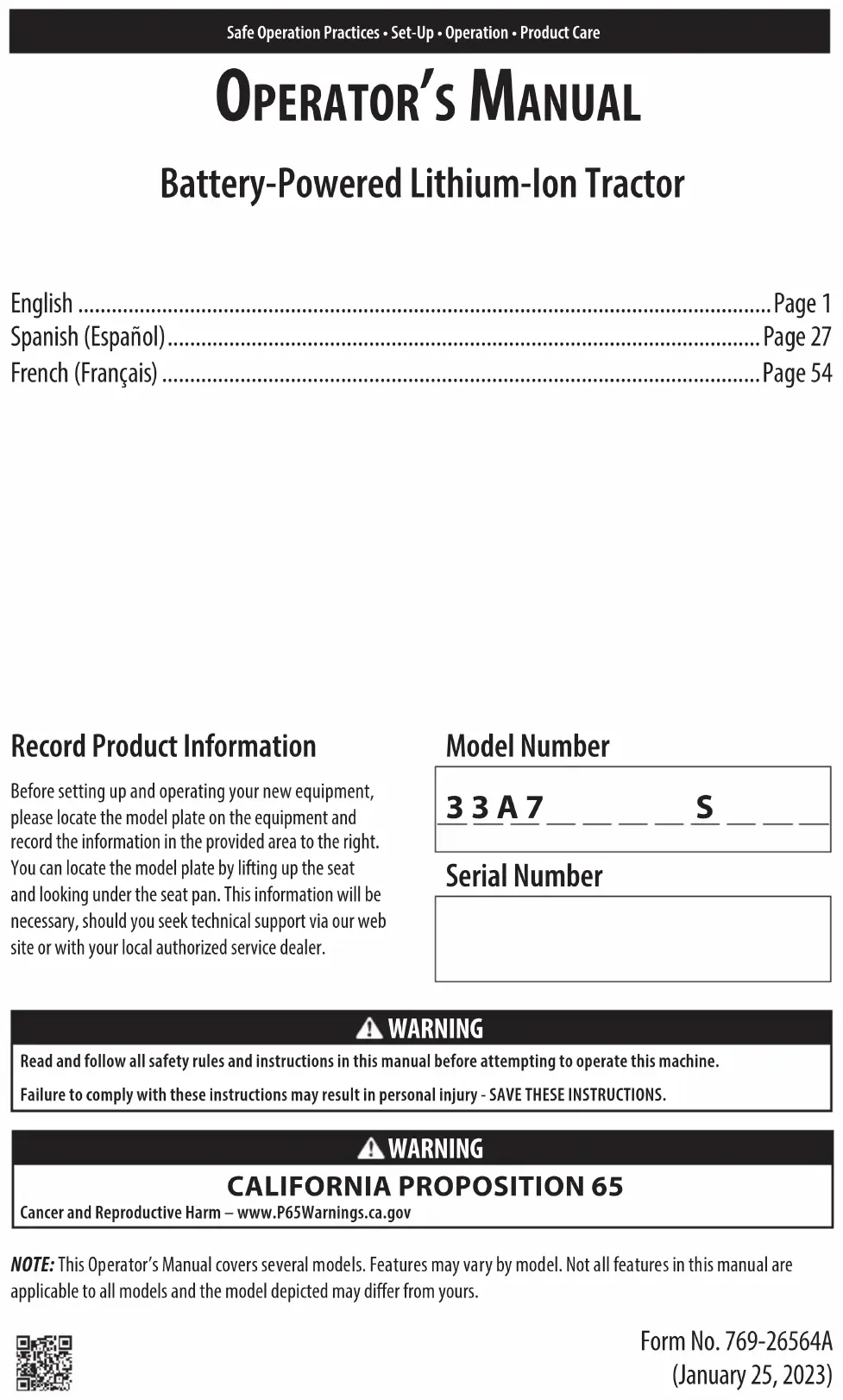
Record Product Information
Before setting up and operating your new equipment, please locate the model plate on the equipment and record the information in the provided area to the right. You can locate the model plate by lifting up the seat and looking under the seat pan. This information will be necessary, should you seek technical support via our web site or with your local authorized service dealer.
Model Number
33A7 S
Serial Number
WARNING
Read and follow all safety rules and instructions in this manual before attempting to operate this machine.
Failure to comply with these instructions may result in personal injury - SAVE THESE INSTRUCTIONS.
WARNING
CALIFORNIA PROPOSITION 65
Cancer and Reproductive Harm - www.P65Warnings.ca.gov
NOTE: This Operator's Manual covers several models. Features may vary by model. Not all features in this manual are applicable to all models and the model depicted may differ from yours.
SAFE OPERATION PRACTICES
WARNING

This symbol points out important safety instructions which, if not followed, could endanger the personal safety and/or property of yourself and others. Read and follow all instructions in this manual before attempting to operate this machine. Failure to comply with these instructions may result in personal injury. When you see this symbol, HEED ITS WARNING!
DANGER
This machine was built to be operated according to the safe operation practices in this manual. As with any type of power equipment, carelessness or error on the part of the operator can result in serious injury. This machine is capable of amputating hands and feet and throwing objects. Failure to observe the following safety instructions could result in serious injury or death.
Lithium-lon Battery System
Servicing requires extreme care and knowledge of the system and must be performed only by a qualified service technician. For repair or service take the tractor to your nearest authorized service dealer. Always use original equipment manufacturer's (OEM) replacement parts when servicing.
GENERAL OPERATION
- Read, understand, and follow all instructions on the tractor and in the manual(s) before attempting to assemble and operate. Keep this manual in a safe place for future and regular reference and for ordering replacement parts.
- Be familiar with all controls and their proper operation. Know how to stop the tractor and disengage them quickly.
- Never allow children under 14 years of age to operate this tractor. Children 14 and over should read and understand the instructions and safe operation practices in this manual and on the tractor and should be trained and supervised by an adult.
- Never allow adults to operate this tractor without proper instruction.
- If situations occur which are not covered in this manual, use care and good judgment. Contact your customer service representative for assistance.
- According to the U.S. Consumer Products Safety Commission (CPSC) and the U.S. Environmental Protection Agency (EPA), this product has an estimated useful life of seven (7) years, under ordinary use conditions. At the end of its useful life, have the product inspected annually to ensure all mechanical, electrical and safety systems are operating properly, safely, and are not worn excessively. Failure to do so may result in accident, injury, or death.
-
Thoroughly inspect the area where the tractor is to be used. Remove all stones, sticks, wire, bones, toys, and other foreign objects which could be picked up and thrown by the blade(s). Thrown objects can cause serious personal injury.
-
To help avoid blade contact or a thrown object injury, keep helpers at least 75 feet (23 meters) from the tractor while it is in operation. Keep bystanders, children, and pets inside during operation. Stop tractor if anyone enters the area.
- Be aware of the tractor discharge direction and do not point it at anyone.
- Always wear safety glasses or safety goggles during operation and while performing an adjustment or repair to protect your eyes. Thrown objects which ricochet can cause serious injury to the eyes.
- Wear sturdy, rough-soled work shoes and close-fitting slacks and shirts. Loose fitting clothes, jewelry, and long hair can be caught in movable parts. Never operate this tractor in bare feet or sandals.
- Do not charge or operate the tractor in the rain or wet conditions.
- Use only accessories and attachments approved for this tractor by the tractor manufacturer. Read, understand, and follow all instructions provided with the approved accessory or attachment.
OPERATING
- Data indicates that operators, age 65 years and above, are involved in a large percentage of tractor-related injuries. These operators should evaluate their ability to operate the tractor safely enough to protect themselves and others from serious injury.
- Set the parking brake before attempting to start the tractor.
- Plan your mowing pattern to avoid discharge of material toward roads, sidewalks, bystanders, and the like. Also, avoid discharging material against a wall or obstruction which may cause discharged material to ricochet back toward the operator.
SAFE OPERATION PRACTICES
- In case of a system fault or a complete loss of battery power, the tractor on a hill can freewheel. Depress the brake pedal to maintain control and stop the tractor. Restart the tractor. If the system fault problem persists, contact your authorized service dealer.
- Do not put hands or feet near rotating parts or under the cutting deck. Contact with the blade(s) can amputate hands and feet.
- Watch for holes, ruts, bumps, rocks, or other hidden objects. Uneven terrain could overturn the tractor. Tall grass can hide obstacles.
- Check overhead clearances carefully before driving under low hanging tree branches, wires, door openings, etc., where the operator may be struck or pulled from the tractor, which could result in serious injury.
- Never leave a running tractor unattended. Always turn off blade(s), set the parking brake, press Start/Stop button, and remove key before dismounting.
- Turn off blade(s), set parking brake, press Start/Stop button and wait until the blade(s) come to a complete stop before removing grass catcher, emptying grass, unclogging chute, removing any grass or debris, or making any adjustments.
- Your tractor is designed to cut normal residential grass of a height no more than 10 inches (25.4 cm). Do not attempt to mow through unusually tall, dry grass (e.g., pasture) or piles of dry leaves. Dry grass or leaves may contact hot surfaces and/or build up on the tractor deck presenting a potential fire hazard.
- Turn off blade(s) before traveling in reverse. Back up slowly. Always look down and behind before and while backing to avoid a back-over accident.
- Never carry passengers.
- Stay at least 10 feet (3 meters) from drop-offs, ditches, embankments, or the edge of water. The tractor could suddenly turn over if a wheel is over the edge of a cliff, ditch, or if an edge caves in.
- A missing or damaged chute deflector, mulch plug, or entire grass catcher can cause blade contact or thrown object injuries.
- Do not operate the tractor without the chute deflector, mulch plug, or entire grass catcher in its proper place.
- Use extra care with grass catchers or other attachments. These can change the stability of the tractor. Always follow the attachment manufacturer's instructions.
- Stop the blade(s) when crossing gravel drives, walks, or roads and while not cutting grass.
- Watch for traffic when operating near or crossing roadways. This tractor is not intended for use on any public roadway.
-
Mow only in daylight or good artificial light.
-
Do not operate the tractor while under the influence of alcohol or drugs.
- Slow down before turning. Operate the tractor smoothly. Avoid erratic operation and excessive speed.
- Motors may become hot and can cause serious burn injuries. Do not touch. Allow the tractor to cool for five minutes before attempting any service.
- Do not turn off tractor and freewheel downhill. Overspeeding may cause the operator to lose control of the tractor resulting in serious injury or death.
CHILDREN
- Tragic accidents can occur if the operator is not alert to the presence of children. Children are often attracted to the tractor and the mowing activity. They do not understand the dangers. Never assume that children will remain where you last saw them.
- Keep bystanders, children, and pets inside during operation under the watchful care of a responsible adult other than the operator. Stop tractor if anyone enters the area.
- Never carry children, even with the blade(s) shut off. They may fall off or interfere with safe tractor operation, causing serious injury or death.
- Children who have been given rides in the past could suddenly appear in the mowing area for another ride and be run over or backed over by the tractor, causing serious injury or death.
- Be alert and turn tractor off if a child or bystander enters the area.
- To avoid back-over accidents, always look behind and down for small children.
- Use extreme care when approaching blind corners, doorways, shrubs, trees, or other objects that may block your vision of a child who may run into the path of the tractor.
- Never allow children under 14 years of age to operate this tractor. Children 14 and over should read and understand the instructions and safe operation practices in this manual and on the tractor and should be trained and supervised by an adult.
- Do not allow any child to joy ride on the tractor. The tractor is not a toy or a go-cart. Warn children that the tractor can be dangerous and they must stay away from it at all times.
- Keep children away from a hot or running tractor. They can suffer burns from hot motors.
- Remove key when tractor is unattended to prevent unauthorized operation. Make certain the key is inaccessible to small children.
SAFE OPERATION PRACTICES
SLOPE OPERATION
- Slopes are a major factor related to loss of control and tip-over accidents which can result in severe injury or death. All slopes require extra caution. If you cannot back up the slope or if you feel uneasy on it, do not mow it.
- For your safety, measure any slope before using the tractor on the sloped area. Use a slope measuring device in addition to the slope gauge included as part of this manual to measure slopes before operating this tractor on a sloped or hilly area. Smart phone applications can also be utilized to measure slopes. If the slope is greater than 15° (25%) as shown on the slope gauge or a slope measuring device, do not operate this tractor on that area or serious injury could result.
- Do not mow on slopes greater than 15° (25%) .
- Do not mow across slopes, only mow up and down slopes that are less than 15° (25%) . Use low speeds and avoid sudden turns.
- Do not mow on wet grass. Reduced traction could cause sliding or a loss of control.
- Do not operate tractor under any conditions where traction, steering, or stability is in question. Tires could slide even if the wheels are stopped.
- Avoid starting and stopping on slopes. Avoid making sudden changes in speed or direction. Make turns slowly and gradually.
- Use extra care while operating tractor with grass catcher or other attachment(s). They can affect the stability of the tractor. Do not use grass catcher on slopes greater than 10° (17%) .
- Do not try to stabilize the tractor by putting your foot on the ground.
- Keep all movement on slopes slow and gradual. Do not make sudden changes in speed or direction. Rapid acceleration could cause the front of the tractor to lift and rapidly roll over backwards, which could cause serious injury or death.
- Do not turn off tractor and freewheel downhill. Overspeeding may cause the operator to lose control of the tractor resulting in serious injury or death.
SLOPE GAUGE (BACK COVER)
WARNING
Slopes are a major factor related to slip and fall accidents which can result in severe injury or death. All slopes require extra caution. If you feel uneasy on the slope, do not mow it. Do not mow on slopes greater than 15° (25%) . Do not mow across slopes, only mow up and down slopes.
USE THE SLOPE GAUGE ON THE BACK COVER AS SHOWN TO DETERMINE IF A SLOPE IS TOO STEEP FOR SAFE OPERATION!
To check the slope, proceed as follows:
- Open manual to the back cover and fold along the dashed line.
- Locate a vertical object on or behind the slope (e.g., a pole, building, fence, tree, etc.).
- Align either side of the slope gauge with the object.
- Adjust gauge up or down until the left corner touches the slope.
- If there is a gap below the gauge, the slope is too steep for safe operation.
HAULING
- Use properly secured full width ramps for loading and unloading tractor for transport.
- Use extra care when loading or unloading the tractor into a trailer or truck. This tractor should not be driven up or down ramp(s), because the tractor could tip over, causing serious personal injury. The tractor must be pushed manually on ramp(s) to load or unload properly.
- Raise the deck to the highest position for loading clearance.
- Do not tow this tractor, damage to the drive motors can occur.
TOWING
- Do not tow a load that exceeds 250 lbs (113 kg) rolling weight and never exceed 50 lbs (22 kg) tongue weight.
- Do not attach towed equipment except at the hitch point of the tractor.
- Never allow children or others in or on towed equipment.
- Do not tow on slopes greater than 5° (9%) . On slopes, the weight of towed equipment may cause loss of traction, loss of control, and/or the ability to stop.
- Always use extra caution when towing with a tractor capable of making tight turns (e.g. tight-turn tractor). Make wide turns to avoid jack-knifing.
- Travel slowly and allow extra distance to stop.
SERVICE
- Keep tractor in good working order. Do not use the tractor until worn or damaged parts are replaced.
- Tractor blade(s) are sharp. Wrap the blade or wear gloves, and use extra caution when servicing them.
- Remove the key and store the tractor indoors when not in use. Allow the tractor to cool at least five minutes before charging or storing.
- Before cleaning, repairing, or inspecting, make certain the blade(s) and all moving parts have stopped. Turn off tractor and remove the key.
SAFE OPERATION PRACTICES
- Check to make sure the blades come to a complete stop in not more than five seconds after disengaging the blade disengagement control per the interval in the Maintenance Schedule. Measure the stopping time with a stop watch. If the blades do not stop completely in less than five seconds, your tractor should be serviced professionally by an authorized dealer.
- Check the safety interlock system per the interval in the Maintenance Schedule for proper function, as described later in this manual. If the safety interlock system does not function properly, have your tractor serviced immediately by an authorized dealer.
- Never tamper with the safety interlock system or other safety devices. Check their proper operation regularly.
- Check the blade(s) mounting bolt torque in accordance to the Maintenance Schedule in this manual. Also, visually inspect blade(s) for damage (e.g., excessive wear, bent, cracked). Replace the blade(s) with the original equipment manufacturer's (O.E.M.) blade(s) only.
- Use of service parts which do not meet the original equipment specifications may lead to improper performance and compromise safety.
- Keep all nuts, bolts, and screws tight to be sure the equipment is in safe working condition. Review the Maintenance Schedule chart in this manual for service interval information.
- After striking a foreign object, stop the tractor, push the Start/Stop button, and remove the key. Thoroughly inspect the tractor for any damage. Repair the damage before operating.
- To reduce fire hazard, keep the motor(s) free of grass, leaves, and debris build-up. Follow the Post-Operation Tractor Care instructions in the Product Care section.
- Check brake operation frequently as it is subjected to wear during normal operation. Adjust and service as required.
- Never attempt to make adjustments or repairs to the tractor without removing the key.
- Maintain or replace safety and instruction labels, as necessary.
GENERAL ELECTRIC SAFETY
- Do not expose the tractor to rain or wet conditions.
- Do not service the tractor or handle electrical components with wet hands.
- Do not operate the tractor in the rain, in wet conditions, or on wet surfaces.
- To reduce the risk of electric shock, avoid body contact with grounded conductors, such as metal pipes or wire fences.
-
Do not operate the tractor in explosive atmospheres, such as in the presence of flammable liquids, gases, or dust.
-
For protection against risk of injury or electric shock, do not replace blown fuses. Your tractor should be serviced professionally by an authorized dealer.
- Never douse or spray the tractor with water. Avoid getting any liquid in the motors and electrical connections. Clean the tractor after each use. Refer to Product Care. Do not use solvents or strong detergents.
BATTERY CHARGER SAFETY
WARNING
Only use an OEM battery charger to charge the batteries in this tractor. Do NOT attempt to charge any other batteries with the battery charger specific to this tractor. Other types of batteries may burst, causing fire, personal injury, or property damage.
- Recharge only with the charger specified by the manufacturer. A charger that is suitable for one type of battery may create a risk of fire when used with another battery.
- Do not use the charger in the rain, wet locations, or in the presence of flammable liquids or gases.
- A nameplate on the charger indicates the voltage used. Never connect the charger to an AC voltage that differs from this voltage.
- An extension cord should not be used unless absolutely necessary. Use of an improper extension cord could result in a risk of fire, electric shock, or electrocution.
- Do not use multiple extension cords.
- Make sure the extension cord is heavy enough to carry the current drawn by the charger. An undersized extension cord will cause a drop in line voltage, resulting in a loss of power and overheating. If in doubt, use the next heavier gauge cord.
| MINIMUM WIRE SIZE FOR EXTENSION CORDS FOR 120 VOLT APPLIANCES USING 0-6 AMPS | ||||
| Cord Length (ft.) | 25 | 50 | 100 | 150 |
| Wire Size (AWG) 18 16 | 16 14 | |||
| mm² | 0.82 | 1.31 | 1.31 | 2.08 |
- Make sure the cords are in good condition. Inspect the battery charger power cord and extension cord periodically. Look closely for deterioration, cuts, or cracks in the insulation. If either cord is damaged in any manner while plugged in, disconnect the cord from both the outlet and the charger. Do not use a damaged cord. Damaged cords should be repaired or replaced.
- Do not abuse cords. Never pull or carry the charger by a cord. Keep cords away from heat, oil, water, sharp edges, and moving objects. Always grasp the plug when disconnecting a cord.
SAFE OPERATION PRACTICES
- Never modify a plug, cord, or outlet in any way.
- Ground Fault Circuit Interruption (GFCI) protection should be provided on the circuit(s) or outlet(s) to be used with this charger. For an extra measure of safety, use receptacle (outlet) with built-in GFCI protection.
- Do not place the battery charger where cords might be stepped on, tripped over, or subjected to damage.
- Keep the battery charger and cords in a cool and dry area.
- Keep the battery charger and cords away from all liquids.
- Do not allow small metal items or material such as steel wool, aluminum foil, or other foreign particles into the charger port.
- Do not probe the charger with conductive material. There is a risk of electric shock.
- Do not cover the battery charger. The battery charger may overheat.
- Do not allow the battery or battery charger to overheat. If they are warm, allow them to cool down. Only charge batteries in temperatures between 40° and 104° F (4.5° and 40°C)
BATTERY SAFETY
- Do not expose the battery to fire or to temperatures over 140° F (60°C) . Doing so could cause an explosion.
- Handle battery with care. Do not short the battery with conductive materials, such as rings, bracelets, keys, etc. Shorting the battery may cause personal injury, damage to the battery, or a fire.
- Do not attempt to charge a cracked or damaged battery.
- Do not use or charge a wet battery or a battery that shows any evidence of corrosion.
-
Do not use a damaged or modified battery. Doing so could result in a fire, explosion, or personal injury.
-
Do not dispose of the battery in a fire. The cell may explode. Contact your local authorized service dealer for proper battery recycling.
- Exercise care in handling batteries in order not to short the battery with conductive materials such as rings, brackets, and keys. The battery or conductor may be hot and cause burns.
WARNING
- The battery may present a risk of fire or chemical burn if misused. Do not disassemble, overheat, or incinerate the battery.
- Leakage from the battery may occur under extreme usage, charging, or temperature conditions or if the battery is damaged, crushed, or punctured. This leakage indicates a failure of the battery and the battery should be properly disposed of by an authorized service dealer.
If the battery leakage gets on your skin or eyes, follow these steps:
- Immediately wash the skin, flush the eyes with cool water for at least 20 minutes, and seek immediate medical attention.
- Contents of open battery cells may cause respiratory irritation. Provide fresh air. If symptoms persist, seek medical attention.
- Ventilate the room and vacate the area if smoke and gases are present. Gas and smoke in a confined area will present a potential health risk.
- If the leakage gets on your clothing or shoes, remove, isolate, and wash the contaminated clothing thoroughly.
SAFE OPERATION PRACTICES
SAFETY SYMBOLS
This table depicts and describes safety symbols that may appear on this product. Read, understand, and follow all instructions on the tractor before attempting to assemble and operate.
| Symbol Description | |
| OPESymbol.com | WARNING - READ OPERATOR'S MANUAL - Read, understand, and follow all the safety rules and instructions in the manual(s) and on the tractor before attempting to operate this tractor. Failure to comply with this information may result in personal injury or death. Keep this manual in a safe location for future and regular reference. Using a Smart Phone, scan the QR code symbol to learn more information concerning the warnings contained on this tractor. You can also go to www.OPSsymbol.com for more information. |
| WARNING - AVOID THROWN OBJECTS INJURY -Keep helpers at least 75 feet (23 meters) from machine during operation. Remove all stones, sticks, wire, bones, toys, and other foreign objects which could be picked up and thrown by the blade(s). Do not operate the tractor without the discharge cover or entire grass catcher in its proper place. | |
| WARNING - AVOID CHILD BACKOVER/RUNOVER/BLADE INJURY - To avoid back-over accidents, always look behind and down for small children. Never carry children, even with the blade(s) shut off. Keep bystanders, children, and pets inside during operation under the watchful care of a responsible adult other than the operator. Stop tractor if anyone enters the area. | |
| >15°(25%) | WARNING - AVOID TIP-OVER/ROLL-OVER INJURY - Do not operate machine on a slope greater than 15° (25%). Do not mow across slopes, only mow up and down slopes that are less than 15° (25%). Use low speeds and avoid sudden turns on slopes. Stay at least 10 feet (3 meters) from drop-offs, ditches, embankments, or the edge of water. |
| >10ft (3m) | WARNING - AVOID AMPUTATION INJURY - Do not put hands or feet near rotating parts or under the cutting deck. Contact with the blade(s) can amputate hands and feet. Be sure blade(s) and power are off before placing hands or feet near blade(s). |
| WARNING - REMOVE KEY - Before beginning any work on this machine, remove the ignition key and observe all information contained in these instructions. |
SAFE OPERATION PRACTICES
| Symbol Description | |
| DANGER - SLOPE OPERATION - Do not operate this tractor where it could tip or slip. Avoid sudden turns. Use low speed. | |
| DANGER - DO NOT SERVICE - Many components on this tractor should only be serviced by an authorized service dealer. Read this Operator's Manual before attempting to service this tractor. | |
| WARNING - ELECTRIC SHOCK - Do not charge tractor in rain or wet locations. Do not operate tractor in rain. | |
| WARNING - STORE TRACTOR INDOORS - Store tractor indoors at all times when not in use. |
WARNING
Your Responsibility—Restrict the use of this power machine to persons who read, understand, and follow the warnings and instructions in this manual and on the machine - SAVE THESE INSTRUCTIONS!
SET-UP
NOTE: All references in this manual to the left or right side and front or back of the tractor are from the operating position only. Exceptions, if any, will be specified.
NOTE: Some components may come already assembled. If they are already assembled, skip ahead to the next step.
PREPARATION
Before beginning installation, remove all the contents from the crate and all the hardware from the pack to make sure everything is present.
Contents of Crate
- Tractor
- Steering Wheel
- Battery Charger
- Seat Assembly
- Hood Topper (If equipped)
Operator's Manual - Front Bumper (If equipped)
Battery Charger Manual - Dash Cap (If equipped)
- Hardware Bag
Recommended Tools for Assembly
- 5/16 inch wrench and/or socket
- 7/16 inch wrench and/or socket
- 1/2 inch wrench and/or socket
- 5/8 inch wrench and/or socket
- Phillips screwdriver
- Standard screwdriver
Manually Moving the Tractor
CAUTION
Never tow your tractor. Towing the tractor with the rear wheels on the ground may cause severe damage to the drive motors.
The tractor can be moved as long as the parking brake is not set. The tractor can be pushed slowly.
Install Operator's Seat Assembly (If necessary)
To install the seat proceed as follows:
NOTE: The seat is shipped with the seat switch and seat pan attached.
- Cut any straps securing the seat assembly to the tractor. Remove any packing material.
NOTE: Be careful not to cut the wiring harness connecting the seat and the seat switch.
- Remove the two shoulder bolts (a) and flange lock nuts (b) in the seat pan (Figure 1).
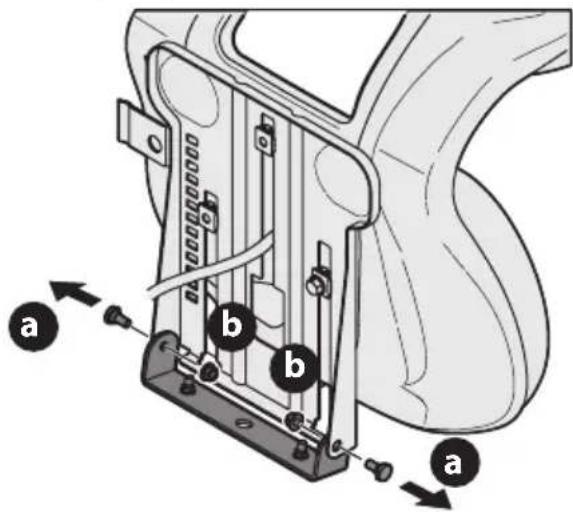
Figure 1
- Rotate the seat into position and slide a Phillips screwdriver through one of the seat-securing holes and seat bracket for alignment.
- With the previously removed shoulder bolts (a) and flange lock nuts (b) secure one side of the seat and seat bracket. While supporting the seat, remove the Phillips screwdriver and secure the other side of the seat. Be careful not to crimp or damage the wire harness while installing the seat (Figure 2). Torque to 84-103 in-lbs (9-12 N-m).
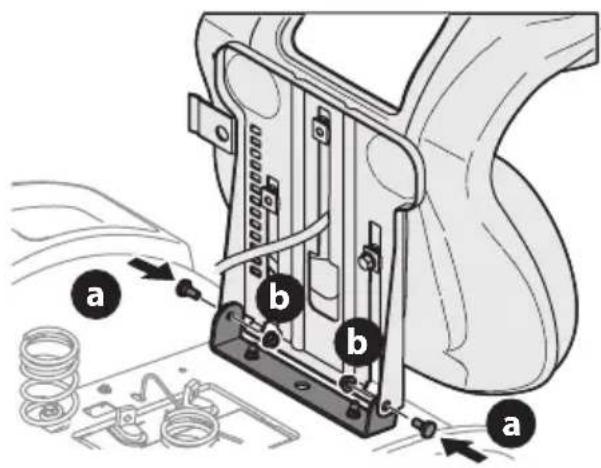
Figure 2
SET-UP
- Using the harness clip attached to the harness, secure the excess wire to the fender by snapping the harness clips in place as shown in Figure 3.
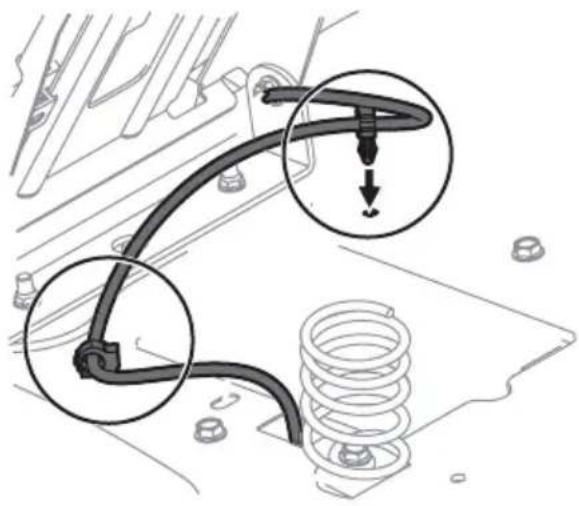
Figure 3
Lower Deck Discharge Chute Deflector

WARNING
Never operate the tractor deck without the chute deflector installed and in the down position.
- Check the tractor deck for a shipping brace that may be holding the chute deflector upward for shipment. If the brace is present, it must be removed before operating the tractor. Holding the chute deflector fully upward, remove the shipping brace. Lower the chute deflector and discard the shipping brace (Figure 4).
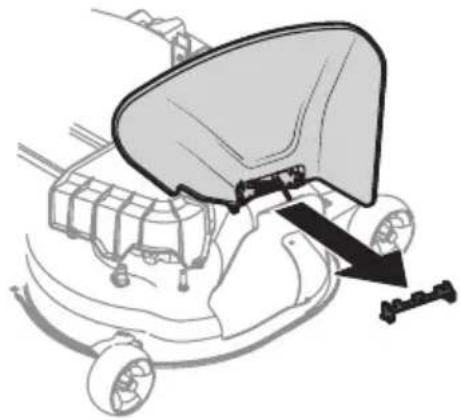
Figure 4
Installing the Snap-On Hood Topper (If necessary)
- To install the snap-on hood topper (a), line up the holes on the hood topper (a) with the tabs (b) in the hood frame (Figure 5).
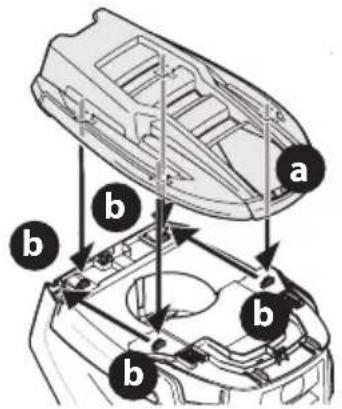
Figure 5
- Insert the tabs (b) into the hood topper and pull back to lock into place (Figure 5).
- Once the hood topper is in place, the two locking tabs near the rear of the hood need to be pushed upward to lock the hood topper in place (Figure 6).
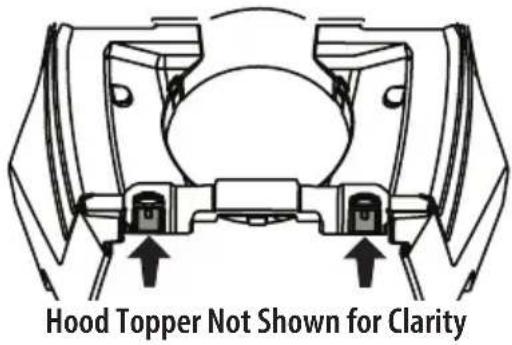
Figure 6
Installing the Dash Cap (If necessary)
- To install the dash cap (a), line up the tabs (b) on the dash cap (a) with the holes in the upper dash (Figure 7).
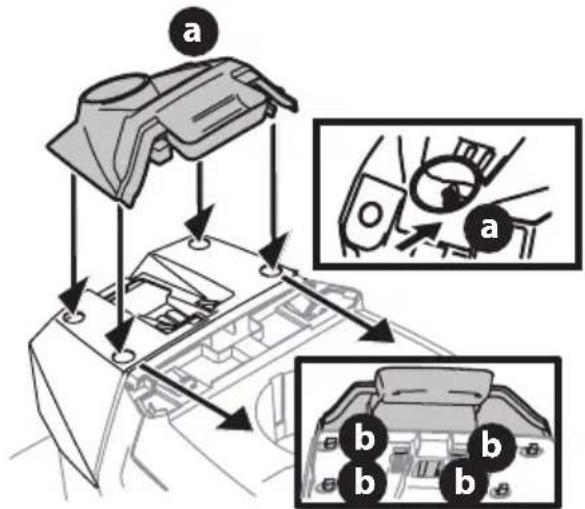
Figure 7
- Slide the tabs (b) into the holes in the upper dash and push forward on the dash cap (a) to lock into place (Figure 7).
NOTE: Be sure to press on the lower part of the dash cap (a) facing the operator position to ensure the lower tabs on the dash cap are in place (Figure 7).
Installing the Steering Wheel (If necessary)
The hardware for attaching the steering wheel has been packed within the steering wheel, beneath the steering wheel cap. Carefully remove the cover by inserting a small flat screwdriver into one of the three snap locations, while slowly prying up on the steering wheel cap to remove the hardware.
IMPORTANT! Do not use impact tools to install or remove the steering wheel. Doing so can over-torque and damage the fastener.
- With the wheels of the tractor pointing straight forward, align the steering wheel (a) by using the center-line (b) on the front of the steering wheel (a) pointing straight ahead and the flat section (c) of the steering wheel (a) facing toward the seat, place the steering wheel (a) over the steering shaft (d) (Figure 8).
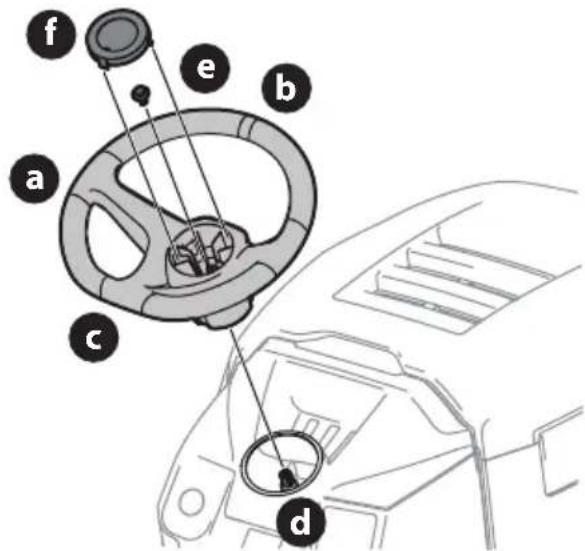
Figure 8
- Secure the steering wheel (a) with the hex bolt (e) from under the steering wheel cap (f) and torque to 18-22 ft-lbs (24-30 N-m) (Figure 8).
- Place the steering wheel cap (f) over the center of the steering wheel (a) and push downward until it "clicks" into place (Figure 8).
NOTE: The hex bolt (e) securing the steering wheel (a) has thread locker applied to it, so if it is removed, it is recommended that the hex bolt (e) be replaced or thread lock re-applied (Figure 8).
Installing the Front Bumper (If necessary)

WARNING
Before performing any preparation procedures, always disengage the PTO, set the parking brake, and remove the key to prevent unintended starting. Place the tractor on a firm and level surface before beginning installation or removal procedures.

WARNING
If the tractor has been recently run, metal surfaces will be hot and can cause burns to the skin. To avoid personal injury, allow the tractor to cool before beginning any installation or removal procedures.
The hardware for attaching the front bumper is shipped installed into the bumper.
- Remove the four hex screws (a) from the bumper (b) (Figure 9).
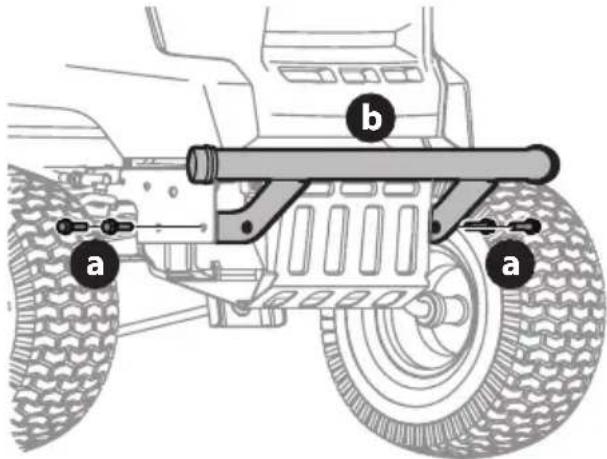
Figure 9
- Position the bumper brackets to the inside of the tractor's frame and secure it in place with the four hex screws (a). Torque to 332-405 in-lbs (38-46 N-m) (Figure 9).
Adjusting the Seat
To adjust the position of the seat:
- Lift the seat adjustment lever up.
- Slide the seat forward or rearward to the desired position.
- Release the adjustment lever. Make sure seat is locked into position before operating the tractor (Figure 10).
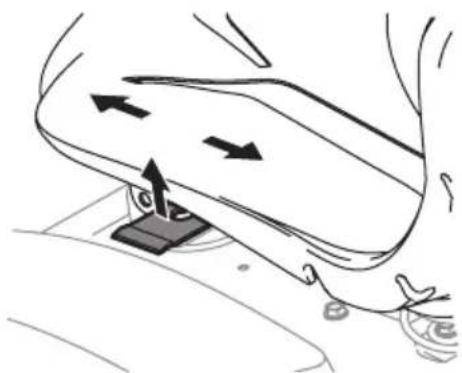

Figure 10
WARNING
Before operating the tractor, make sure the seat is engaged in the seat-stop. Engage the parking brake. Stand behind the tractor and pull back on the seat until it clicks into place.
Checking Tire Pressure
See the tire sidewall for the proper inflation pressure. Proper inflation pressure should be maintained at all times.
NOTE: The tires on your tractor may be over-inflated for shipping purposes. If necessary, reduce the tire pressure before operating the tractor.
Setting the Deck Wheels (If equipped)
NOTE: The deck wheels are an anti-scalp feature of the deck and are not designed to support the weight of the cutting deck.
Move the tractor to a firm and level surface, preferably pavement, and proceed as follows:
- Check the tire pressure, make sure the pressure is correct per the inflation pressure listed on the sidewall.
- Make sure the deck is level, both front-to-back and side-to-side. See Adjusting the Deck in the Product Care section for deck leveling information and instructions.
- Select the height position of the cutting deck by placing the deck lift lever in the normally desired mowing height setting.
- Check the wheels for contact or excessive clearance with the surface below. The deck wheels should have between 1/4 inch and 1/2 inch (6.4-12.7 mm) clearance above the ground. Proceed as follows to adjust the wheels:
a. Raise the deck lift handle to its highest setting.
b. Remove the deck wheels (a) by removing the flange lock nuts (b) and shoulder bolts (c) that secure them to the deck. (Figure 11).
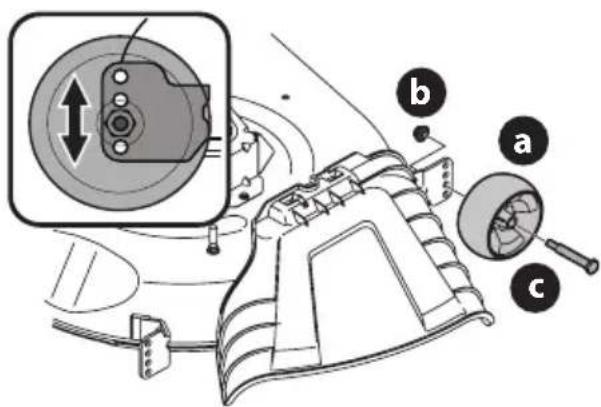
Figure 11
c. Place the deck lift lever in the desired mowing height setting.
d. Reinsert the shoulder bolt (with each deck wheel) into the index hole that leaves approximately 1/2 inch (12.7mm) between the bottom of the wheel and the pavement. Tighten the flange lock nut and shoulder bolt to 25-30 ft-lbs (34-41 N-m).
NOTE: Refer to Adjusting the Deck in the Product Care section of this manual for more detailed instructions regarding various deck adjustments.
Charging the Battery

WARNING
- California Proposition 65: Cancer and reproductive harm - www.P65Warnings.ca.gov.
- The battery contains corrosive fluid and toxic material — HANDLE WITH CARE. Keep away from children. Do not puncture, disassemble, mutilate, or incinerate. Explosive gases could be vented during charging or discharging. Charge in a well ventilated area, away from sources of ignition.
- Recharge only with the charger provided with this tractor. A charger that is not suitable for this tractor may damage the batteries or create the risk of fire.
- Do not charge or operate the tractor in the rain or in wet conditions.
Refer to the manual packed with your battery charger (T56XXX Series) for further information and instructions on charging the battery. The charging port on the tractor is located on the left side of the dash.
To charge the battery:
- Lift the charging port cover (a) (Figure 12).
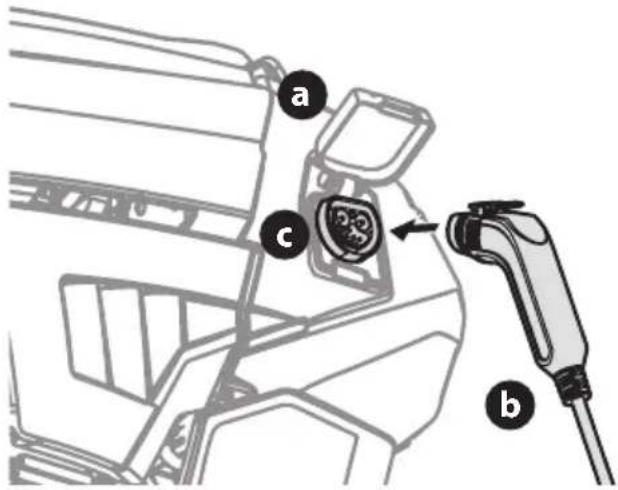
Figure 12
- Insert the charging cord (b) into the charging port (c) (Figure 12).
- Plug charger power cord into wall receptacle (outlet).
NOTE: It will take approximately 4 hours to fully charge the battery.
NOTE: The battery icon on the Vehicle Control Module (VCM) will blink continuously when charging and the LCD display will display percentage of charge. The battery is completely charged when the battery icon is solid and the LCD displays 100% .
NOTE: When the charging cord is plugged into the tractor and not yet plugged into the wall, the battery icon will illuminate continuously until the cord is plugged into the wall.
SET-UP
If at any time your charger displays a fault while charging your battery, follow these procedures:
- Power off the tractor.
- Unplug the charging cord from the tractor.
- Unplug the charger power cord from the power source.
- Plug the charger power cord back into the power source.
- Plug the charging cord back into the tractor.
- If the fault persists contact qualified service personnel.
NOTE: Rechargeable batteries degrade with time and use. The battery may eventually need to be replaced. To have the battery replaced, contact your authorized service dealer.
NOTE: Using an old or faulty battery could cause a system fault that results in loss of power.
Battery Charging Tips
- The battery should be fully charged before initial use.
- The battery should be fully charged after each use. Storing the battery in a discharged state could reduce performance.
- The battery will turn off automatically after a complete charge.
- It will take approximately 4 hours to fully charge the battery. Leaving the battery connected to the charger for more than 4 hours will not damage the battery.
- The battery does not develop a memory and does not need to be fully discharged before recharging.
- Always disconnect battery charger (or extension cord, if used) from the electrical receptacle (outlet) first, then disconnect the charging cord from the charging port.
- Never charge a frozen battery.
- It is recommended that the tractor be charged once every month during off-season storage.
OPERATION
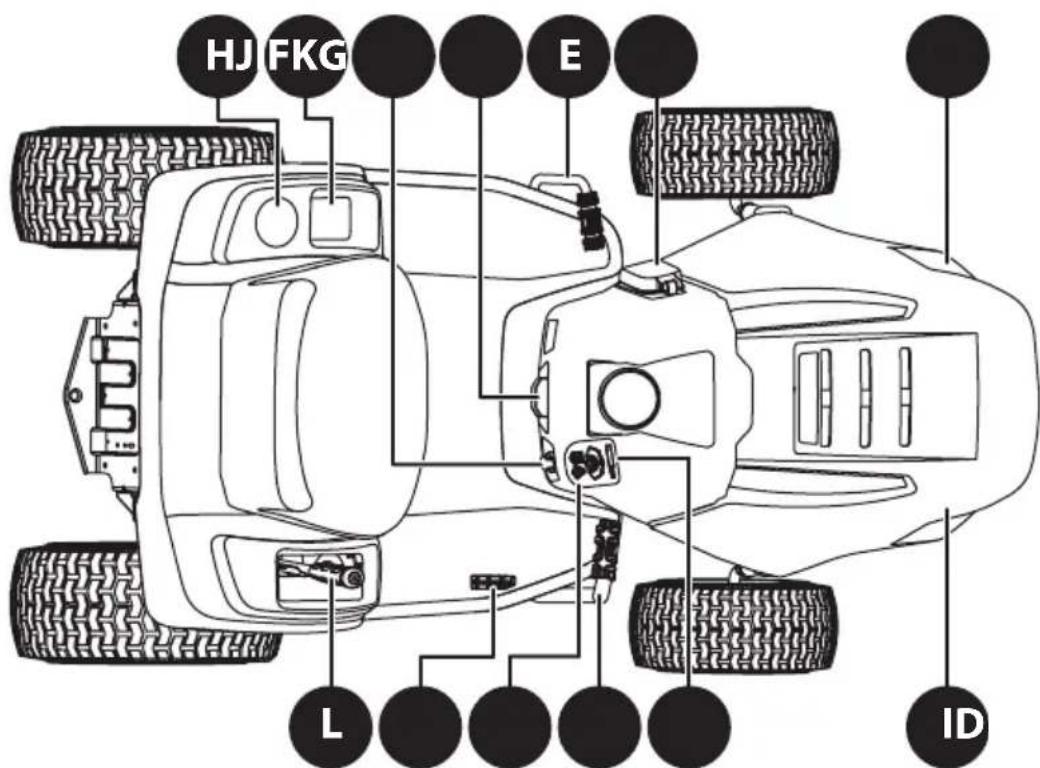
Figure 13
NOTE: All references in this manual to the left or right side and front or back of the tractor are from the operating position only. Exceptions, if any, will be specified.
A.VEHICLE CONTROL MODULE (VCM)
WARNING
Never leave a running tractor unattended. Always disengage PTO, set parking brake, stop tractor, and remove the key to prevent unintended starting.
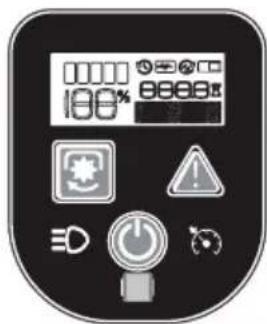
The vehicle control module (VCM) is located on the right side of the dash.
The VCM is the location of several control buttons for your tractor. The VCM includes the START/ STOP button, PTO (blades ON/OFF) button, REVERSE CAUTION MODE (RCM) button, Headlight button, Cruise Control button, LCD Screen and the Battery Level Indicator.
CAUTION
Prior to operating the tractor, refer to both Safety Interlock System and Starting the Tractor in the Operation section of this manual for detailed instructions regarding the VCM and operating the tractor in REVERSE CAUTION MODE.
Start/Stop Button

Located on the VCM, the START/STOP button is used to start and stop the tractor. While active, the START/STOP button indicator ring is illuminated blue.
PTO (Blades ON/OFF) Button

Located on the VCM, the PTO button is used to operate the blades. To engage the cutting deck (blades ON), press and hold the PTO button for one
second. The yellow indicator light around the PTO button is ON. Pressing the PTO button again will disengage the cutting deck (Blades OFF). The yellow indicator light around the PTO button is OFF.
Reverse Caution Mode (RCM) Button

Located on the VCM, the RCM button allows the tractor to be operated in reverse with the blade(s) engaged (ON). To activate the RCM, press and hold
the RCM button down for three seconds. When activated, the red indicator light around the RCM button is illuminated. To deactivate the RCM, press the RCM button again. When the RCM is not activated, the red indicator light is not illuminated. Refer to Reverse Caution Mode (RCM) for more information on operating the tractor in the REVERSE CAUTION MODE.
NOTE: Mowing in reverse is not recommended.

WARNING
Use extreme caution while operating the tractor in the REVERSE CAUTION MODE. Always look down and behind before and while backing. Do not operate the tractor when children or others are around. Stop the tractor immediately if someone enters the area.
Headlight Button

Located on the VCM the headlight button is used to turn the headlights on or off.
Cruise Control Button

Located on the VCM, pressing the cruise control button while the tractor is in motion allows the tractor to remain at a constant ground speed without applying
pressure to the forward drive pedal, the LCD Screen displays "CRUISE ON" when the cruise control is activated. The cruise control can be disengaged by pressing either the cruise control button, the brake pedal or the forward drive pedal.
NOTE: Cruise control will not engage at the tractor's fastest ground speed. If the operator should attempt to do so, the tractor will automatically decelerate to the fastest optimal mowing ground speed.
NOTE: Cruise control will not engage in reverse.
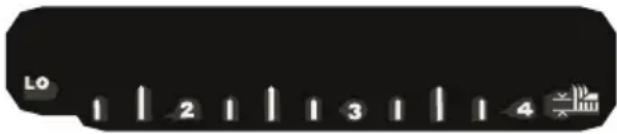
LCD Screen and Battery Level Indicator
Located on the VCM, the LCD display and battery level indicator are used to provide instructions, warnings and information about your tractor systems and the battery level of your tractor.
B. KEY SWITCH
The key switch is located at the bottom of the VCM and powers the VCM when the key is fully inserted. The tractor cannot be started unless the key is fully inserted and the START/STOP button is depressed. Removing the key turns the tractor off (Figure 14).
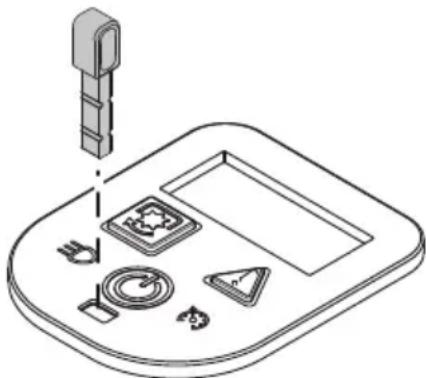
Figure 14
C. FORWARD DRIVE PEDAL
The forward drive pedal is located on the right side of the tractor, along the running board. Press the forward drive pedal forward to allow the tractor to travel forward. Ground speed is also controlled with the forward drive pedal. The further forward the pedal is depressed, the faster the tractor will travel. The pedal will return to its original/neutral position when it is not pressed.
D. REVERSE DRIVE PEDAL
The reverse drive pedal is located on the right side of the tractor along the running board. Ground speed is also controlled with the reverse drive pedal. The further downward the pedal is depressed, the faster the tractor will travel. The pedal will return to its original/neutral position when it is not depressed.
E. BRAKE PEDAL
The brake pedal is located on the left side of the tractor, along the running board. The brake pedal can be used for stopping the tractor or setting the parking brake.
NOTE: The brake pedal must be fully depressed to start the tractor. Refer to the Safety Interlock System section of this manual for more information.
F. PARK BRAKE LEVER

Located in the center of the tractor's dash panel below the steering wheel, the park brake
lever is used to engage the parking brake. Refer to the Engaging the Parking Brake section of this manual for detailed instructions regarding the parking brake.
G. STORAGE TRAY
The storage tray is located to the left of the operator's seat.
H.CUP HOLDER
The cup holder is located to the left of the operator's seat.
I. HEADLIGHT
The headlights will turn ON whenever the key is ON and the headlight button is pressed. To turn the headlights OFF, press the headlight button again.
J. CHARGING PORT
The charging port is located on the left side of the dash. To access the charging port, lift up on the charging port cover.
K. USB CHARGING PORTS (IF EQUIPPED)

If equipped, a pair of USB power sources are located on the right side of the dash. The two USB ports are both rated 2.1A. The ports can be
used to charge your phone or power up other USB devices.
WARNING
Do not have any devices plugged into your USB charging port when starting the tractor. Doing so may cause damage to your device.
L. DECK LIFT LEVER
The deck lift lever is located in the right rear fender and is used to raise and lower the deck. Pull the lever to the left out of the index notch and push downward to lower the deck, or pull upward to raise the deck. When the desired height is attained, move the lever to the right until fully engaged in the index notch.
SEAT ADJUSTMENT LEVER (NOT SHOWN)
The seat adjustment lever is located below the left side of the seat. The lever allows the seat to move both forward and backward. Refer to the Set-Up section for instructions on adjusting the seat position.
OPERATION
Safety Interlock System

WARNING
Do not operate the tractor if the safety interlock system is malfunctioning. This system was designed for your safety and protection.
This tractor is equipped with a safety interlock system for the protection of the operator. If the interlock system should ever malfunction, do not operate the tractor. Contact an authorized service dealer.
- The safety interlock system prevents the operator from turning the tractor ON unless the operator is in the seat with the parking brake engaged or brake pedal fully depressed and the drive pedal in the neutral position.
- The tractor will not operate with the charger cord plugged into the charging port and/or the charging port cover open or removed.
- The tractor will automatically shut off the blade(s) and drive motors if the operator leaves the seat.
NOTE: To restart the tractor, follow the proper starting procedures as instructed below in the Starting the Tractor section.
Engaging the Parking Brake
To engage the parking brake:
- Fully depress the brake pedal and hold it down with your foot.
- Depress the parking brake lever.
- Release the brake pedal to allow the parking brake to engage.
To release the parking brake:
- Depress the brake pedal and the parking brake will release.
Setting the Cutting Height
Select the height position of the cutting deck by placing the deck lift lever in any of the twelve (12) different cutting height notches on the right side of the rear fender. To use the deck lift lever, move the lever to the left, then place it in the notch best suited for your application.

WARNING
Keep hands and feet away from the discharge opening of the cutting deck.
Refer to the Product Care section of this manual for more detailed instructions regarding deck adjustment.
Starting the Tractor
- Unplug the charging cord (if necessary).
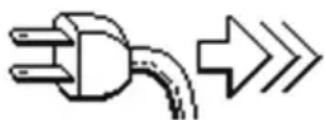
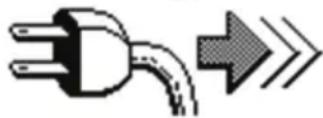
If the cord is still plugged in a reminder will display on the VCM when the key switch is ins
- Sit in the operator's seat. Fully insert the key into the key switch.
- Fully depress the brake pedal or set the parking brake.
- Press the START/STOP button down until you hear two beeps.
NOTE: The VCM and drive motors are now activated and the tractor is ready to be operated.
Stopping the Tractor

WARNING
If you strike a foreign object, stop the tractor and remove the key. Thoroughly inspect the tractor for any damage.
Repair the damage before restarting and operating.
- If the cutting deck is engaged (blades ON), press the PTO button to disengage the blades (blades OFF) and engage the parking brake.
- Press the START/STOP button (you will hear one beep).
- Remove the key to prevent unauthorized use by children or others.
OPERATION
Driving the Tractor

WARNING
- Avoid sudden starts, excessive speed, and sudden stops.
- Do not leave the seat of the tractor without first pressing the PTO button to turn off the blade(s) and engaging the parking brake. If leaving the tractor unattended, remove the key.
-
Always look down and behind before and while backing up to avoid a back-over accident.
-
Disengage the parking brake.
- To travel FORWARD, slowly depress the forward drive pedal until the desired speed is reached.
- To travel in REVERSE, slowly depress the reverse drive pedal until the desired speed is reached.
- The tractor is brought to a stop by releasing the forward or reverse drive pedal and depressing the brake pedal.

WARNING
Before leaving the operator's position for any reason, disengage the blade(s), engage the parking brake, and remove the key.
Reverse Caution Mode (RCM)
The REVERSE CAUTION MODE button allows the tractor to be operated in reverse with the blade(s) (PTO) engaged.
NOTE: Mowing in reverse is not recommended.

WARNING
Use extreme caution while operating the tractor in the REVERSE CAUTION MODE. Always look down and behind before and while backing. Do not operate the tractor when children or others are around. Stop the tractor immediately if someone enters the area.
To use the REVERSE CAUTION MODE:
NOTE: The operator MUST be seated in the seat.
- Start the tractor as previously instructed.
- Press and hold the RCM button down for three seconds until the red indicator light illuminates. The red indicator will remain on as long as the REVERSE CAUTION MODE is on.
-
Once activated (indicator light ON), the tractor can be driven in reverse with the cutting blade(s) (PTO) engaged.
-
Always look down and behind before and while backing to make sure no children or others are around. After resuming forward motion, press the RCM button to return to normal mowing operation.
The REVERSE CAUTION MODE will remain activated until:
a. The RCM button is pressed again to turn off the mode (red indicator turns off).
b. The operator leaves the seat.
c. The START/STOP button is pressed.
Operating the PTO
To operate the PTO (Blades ON/OFF) proceed as follows:
Press the PTO button for one second. When activated, the yellow indicator light around the PTO button is ON (Blades ON). Press the PTO button again for one second, yellow indicator light is OFF (Blades OFF).
Mowing

WARNING
- To help avoid blade contact or a thrown object injury, keep bystanders, helpers, children, and pets at least 75 feet (23 meters) from the tractor while it is in operation. Keep bystanders, children, and pets inside during operation. Stop tractor if anyone enters the area.
- Plan your mowing pattern to avoid discharge of materials toward roads, sidewalks, bystanders, and the like. Also, avoid discharging material against a wall or obstruction which may cause discharged material to ricochet back toward the operator.
The following information will be helpful when using the cutting deck with your tractor:
- Do not mow or drive at high ground speed, especially if a mulch kit or grass collector is installed.
- For best results it is recommended that the first two laps be cut clockwise with the discharge facing towards the center of your lawn. After the first two laps, reverse the direction to discharge to the outside for the balance of cutting. This will give a better appearance to the lawn.
- Do not cut the grass too short. Short grass invites weed growth and yellows quickly in dry weather.
- Under heavier conditions it may be necessary to go back over the cut area a second time to get a clean cut.
- Do not attempt to mow heavy brush and weeds and grass taller than 10 inch (25.4 cm). Your tractor is designed to mow lawns, not clear brush.
PRODUCT CARE
MAINTENANCE SCHEDULE

WARNING
Before inspecting, cleaning, or servicing the tractor, power off the tractor and remove the key.
Follow the maintenance schedule given below. This chart describes service guidelines only. Contact an authorized service dealer to schedule a service.
| Prior to Use | After First 5 Hours (S01) | Every 5 Hours (S02) | Every 10 Hours (S03) | Every 25 Hours (S04) | Every 50 Hours (S05) | Every 100 Hours (S06) | Prior to Storing | |
| Clean Top & Underside of Deck | ✓ | ✓ | ||||||
| Check/Clean Around Fuses, Wiring & Wiring Harnesses | ✓ | ✓ | ||||||
| Check/Clean Around Transmission & Axle | ✓ | ✓ | ||||||
| Clean Tractor | ✓ | |||||||
| Lube Front Axles, Rims & Deck Wheels | ✓ | ✓ | ||||||
| Lube Pedal Pivot Points, Parking Brake & Lift Linkage | ✓ | ✓ | ||||||
| Check Tire Pressure/Inflate to Sidewall Specification | ✓ | ✓ | ||||||
| Check Deck Level/Pitch/ Adjust as Needed | ✓ | ✓ | ||||||
| Check Blade(s)/Sharpen or Replace as Needed | ✓ | ✓ | ✓ | |||||
| Charge Battery | ✓ | ✓ | ||||||
| Check Safety Interlock System | ✓ | |||||||
| Check Tractor Blade Stop Time | ✓ | |||||||
| Check Blade Mount Bolt Torque (Tighten to 450-600 in-lbs (51-68 N-m)) | ✓ | ✓ | ✓ | |||||
| Sharpen Blades | ✓ | |||||||
| Check That All Hardware is in Place & Secure | ✓ | ✓ |
IMPORTANT! Bring the battery charger when arriving at your authorized service dealer for any scheduled service.

DANGER
- The electrical components on this tractor are not serviceable. Please contact an authorized service dealer for any service needs.
- Have your tractor serviced by qualified service personnel using only identical replacement parts. This will ensure that the safety of the tractor is maintained.
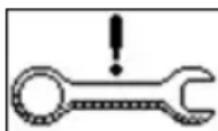
NOTE: At relevant service intervals on start-up, service minders will be displayed on the
S02
VCM. To clear service minders press the cruise control button. (S02) shown for example.
PRODUCT CARE
After each operation of the tractor, the following procedures should be implemented to extend the life of your tractor and ensure safe operating conditions.

DANGER
Failure to follow these recommendations may result in serious injury to yourself or others and may cause damage to the tractor.
Cleaning the Underside of the Deck

WARNING
To prevent serious injury, do not use water to clean the tractor, battery, or battery charger. Do not use strong detergents. Household cleaners that contain aromatic oils such as pine and lemon, and solvents such as kerosene, can damage plastic.
The underside of the tractor deck should be cleaned after each use as grass clippings, leaves, dirt and other debris will accumulate. This accumulation of grass clippings, etc., is undesirable as it will promote rust and corrosion.
- Remove any buildup of grass, leaves and debris on or around the deck motors and underside of the tractor (DO NOT USE WATER). Wipe the tractor clean with a dry cloth.
IMPORTANT! Do not use a pressure washer or garden hose to clean your tractor. These may cause damage to electric components or the electric motor. The use of water will result in shortened life and reduce serviceability.
Cleaning the Tractor

WARNING
If the tractor has been recently run, metal surfaces will be hot and can cause burns to the skin. Let the tractor cool for at least five minutes. Exercise caution to avoid burns.
Your tractor should be cleaned after each use and under certain conditions, i.e. dry conditions and/or mulching situations, additional cleaning may be necessary.
One of the best ways to keep your tractor running efficiently and to reduce fire risk is to regularly remove debris buildup from the tractor. Follow the recommendations below and contact your authorized dealer with any questions.
- Allow the tractor to cool in an open area before cleaning.
- Do not use water on any part of the tractor. Doing so can cause damage to the tractor's electrical components and motors. The use of compressed air and/or leaf blower or a brush, damp sponge or rag will help keep the tractor clean.
- Clean around fuses and wiring harnesses.
- Clean the top of the tractor deck (Figure 15).
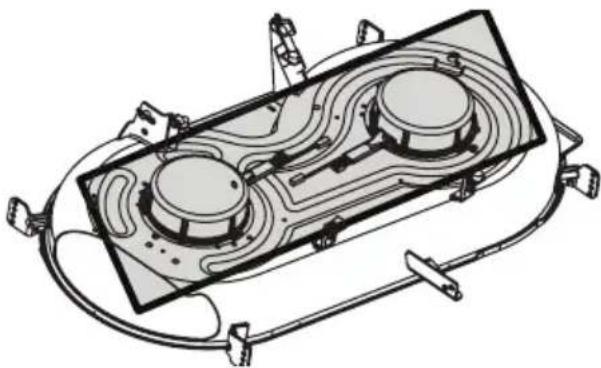
Figure 15
- Clean around and near the transmission and axle (Figure 16).
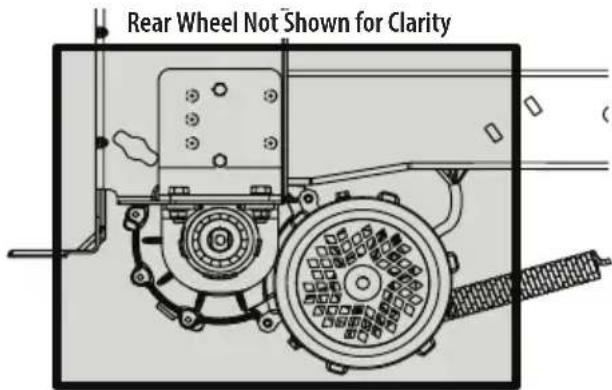
Figure 16
- Debris can accumulate anywhere on the tractor, especially on horizontal surfaces. Additional cleaning may be necessary when mowing in dry conditions or when mulching.
- Excess lubrication can become collection sites for debris. Immediate repair and cleaning up excess lubrication can help reduce fire hazards.
- In addition to cleaning the tractor before operating and storing, do not attempt to mow unusually tall grass (10 inches (25.4cm) or higher), dry grass (e.g., pasture) or piles of dry leaves. Dry grass or leaves may build up on the tractor deck presenting a potential fire hazard.
Lubrication

DANGER
Bearing failures and overheating can result in fire. Always follow the instructions in this manual regarding lubrication locations and intervals. Contact your authorized dealer with any questions about the lubrication locations and intervals or any unusual noises coming from any areas a bearing may be located.

WARNING
Before lubricating, repairing, or inspecting, always disengage the PTO, set the parking brake, and remove key to prevent unintended starting.
PRODUCT CARE
FRONT WHEELS
Each of the front wheel axles and rims is equipped with at least one grease fitting. See Figure 17 for the location of the grease fitting on the axles and Figure 18 for locations of the grease fitting(s) on the rims (if equipped). Lubricate with a No.2 multi-purpose grease applied with a grease gun after every 25 hours of operation.
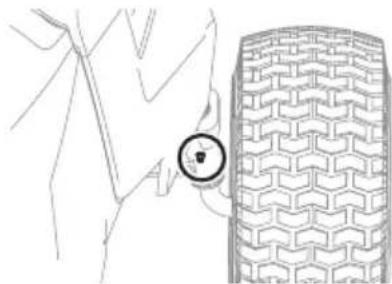
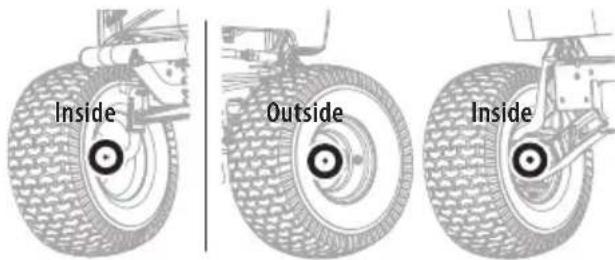
Figure 17
Figure 18
PIVOT POINTS & LINKAGE
Lubricate all the pivot points on the drive system, parking brake and lift linkage every 10 hours with light oil.
NOTE: It is not necessary to grease the steering pinion/sector gear interface. Doing so will allow dirt to accumulate and can affect steering performance.
ADJUSTMENTS

WARNING
Before making adjustments, always disengage the PTO, set the parking brake, and remove the key to prevent unintended starting. Protect your hands by using heavy gloves when handling the blades.
NOTE: Check the tractor's tire pressure before performing any deck leveling adjustments. Refer to Checking Tire Pressure in the Set-Up section for information regarding tire pressure.
Adjusting the Deck
LEVELING THE DECK (FRONT-TO-REAR)
The front of the deck is supported by a stabilizer bar that can be adjusted to level the deck from front to rear. The front of the deck should be between 1/4 inch (6.4 mm) and 3/8 inch (9.5 mm) lower than the rear of the deck. Adjust if necessary as follows:
-
Park the tractor on a firm, level surface, place the deck lift lever in the middle position and rotate the blade nearest the discharge chute so that it is parallel with the tractor.
-
Measure the distance from the front of the blade tip to the ground and the rear of the blade tip to the ground. The front of the blade should be between 1/4 inch (6.4 mm) and 3/8 inch (9.5 mm) less than the rear of blade.
- Determine the approximate distance necessary for proper adjustment and proceed, if necessary.
- To raise the front of the deck, loosen the outer nut then tighten (thread inward) the nut against the front hanger bracket (Figure 19). When proper adjustment is achieved, re-tighten the outer nut to 25-30 ft-lbs (34-41 N-m).
- To lower the front of the deck, loosen the outer nut then loosen (thread outward) the nut, away from the front hanger bracket (Figure 19). When proper adjustment is achieved, re-tighten the outer nut.
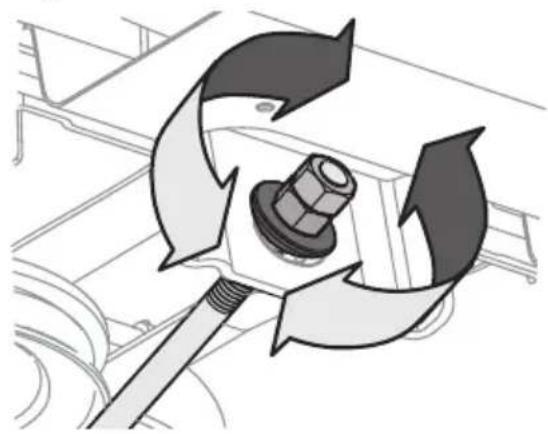
Figure 19
LEVELING THE DECK (SIDE-TO-SIDE)
If the deck appears to be mowing unevenly, a side-to-side adjustment can be performed. Adjust if necessary as follows:
- With the tractor parked on a firm, level surface, place the deck lift lever in the middle position and rotate both blades so they are perpendicular with the tractor.
- Measure the distance from the outside of the left blade tip to the ground and the distance from the outside of the right blade tip to the ground. Both measurements taken should be equal. If they are not, proceed to the next step.
- Under the rear fenders, inside the wheels, there is a lift adjustment rod for each side of the deck (Figure 20).
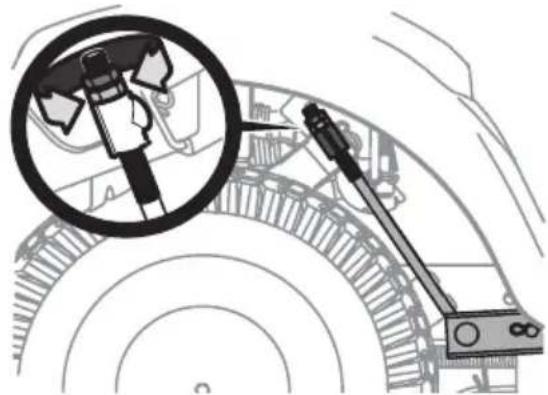
Figure 20
- Minor side-to-side adjustments should be made using primarily the left adjustment rod.
- To raise the left side of the deck, loosen the upper nut on the end of the lift rod, then turn the lower nut clockwise. When the proper adjustment is achieved, tighten the upper nut to secure in place. To lower the left side of the deck, loosen the upper nut on the end of the lift rod, then turn the lower nut counter-clockwise. When the proper adjustment is achieved, tighten the upper nut to 25-30 ft-lbs (34-41 N-m) to secure in place.
- The deck is properly leveled when both blade tip measurements taken earlier are equal.
Adjusting the Deck Height
The height of the deck can be adjusted to ensure that the setting on your deck lift lever is accurate. To adjust the deck height proceed as follows:
- Park the tractor on a firm, level surface, place the deck lift lever in the highest position (4 inches (10cm) ) and rotate the blade nearest the discharge chute so that it is perpendicular with the tractor.
- Measure the distance from the outside of the left blade tip to the ground and the distance from the outside of the right blade tip to the ground. Both measurements taken should be 4 inches (10cm) . If they are not, proceed to the next step.
- Using the right and left lift rods, raise or lower the necessary side of the deck until both sides are measured at 4 inches (10 cm) from the pavement.
Adjusting the Deck Wheels (If equipped)

WARNING
Keep hands and feet away from the discharge opening of the cutting deck.
NOTE: The deck wheels are an anti-scalp feature of the deck and are not designed to support the weight of the deck.
The deck wheels should be approximately 1/4-1/2 inch (6.4-12.7 mm) above the ground when the deck is set in the desired height setting. To adjust the deck wheels see the Set-Up section for instructions.
Seat Adjustment
Refer to the Set-Up section of this manual for seat adjustment instructions.

WARNING
Before operating the tractor, make sure the seat is engaged in the seat-stop. Engage the parking brake. Stand behind the tractor and pull back on the seat until it clicks into place.
Parking Brake Adjustment
If the tractor does not come to a complete stop when the brake pedal is completely depressed, or if the tractor's rear wheels can roll with the parking brake applied, the brake is in need of adjustment. See your authorized service dealer to have the brake adjusted.
Neutral Adjustment
If the tractor creeps forward or rearward when neither the forward nor reverse pedal is depressed, contact your local authorized dealer to have the neutral setting properly adjusted.
Front Wheel Alignment
If your tractor pulls to one side or is out of alignment, a wheel alignment might be necessary. Ensure each tire is properly inflated per the inflation pressure indicated on the tire sidewall. If the problem persists, the front axle tie rods may be out of alignment. Take your tractor to an authorized service dealer to have the front wheels properly aligned.
SERVICE
Deck Removal
To remove the deck, proceed as follows:
- Power off the tractor, remove the key from the key switch, and engage the parking brake.
- Lower the deck by moving the deck lift lever into the lowest (#1) position on the right fender.
- Disconnect the deck motor(s) from the adapters on the underside of the tractor. Rotate the connectors 1/4-turn counter-clockwise and pull down (Figure 21).
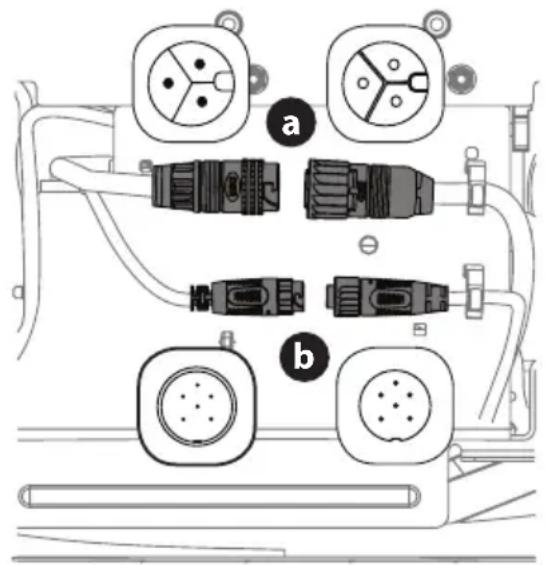
Figure 21
PRODUCT CARE
- Looking at the deck from the left side of the tractor, locate the bow-tie pin on the rear left side of the deck (Figure 22).
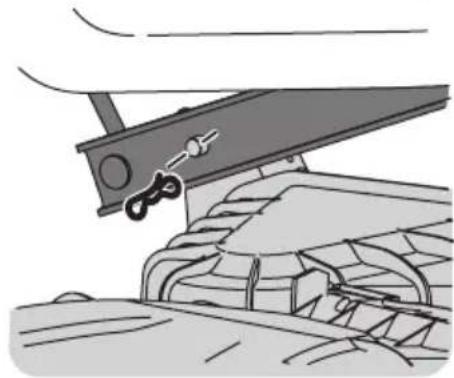
Figure 22
- Remove the pin and slide the deck pin out of the deck lift arm (Figure 22).
- Repeat the above steps on the tractor's right side.
- Pull the bow-tie pin out of the front deck lift rod securing it to the deck (Figure 23). Slide the deck lift rod out of the front hanger bracket.
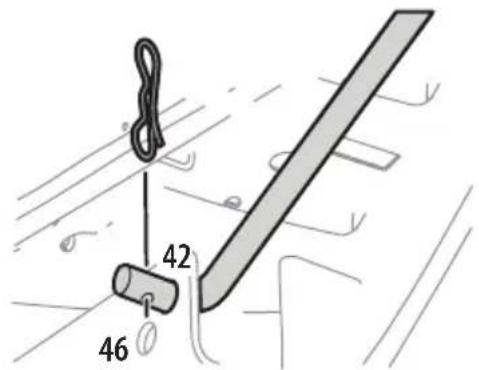
Figure 23
- Move the deck lift lever into the top notch to raise the deck lift up and out of the way.
CAUTION
There is a certain amount of spring tension due to the weight of the deck. When removing the lift linkage from the deck the tension of the springs will go from the deck to the deck lift handle and snap back.
- Gently slide the deck out from underneath the tractor.
Deck Installation
To install the deck, reverse the Deck Removal instructions.
Blade(s)
WARNING
- Power off the tractor and remove the key before removing the cutting blade(s) for sharpening or replacement. Protect your hands by using heavy gloves when grasping the blade.
Periodically inspect the blade and/or deck motor casting for cracks or damage, especially after you have struck a foreign object. Do not operate the tractor until damaged components are replaced.
CAUTION
If the cutting edge of the blade has previously been sharpened, or if any metal separation is present, replace the blades with new ones.
Sharpening or Replacing the Blades
- Remove the deck from beneath the tractor, (refer to Deck Removal earlier in this section) then gently flip the deck over to expose its underside.
- Place a block of wood between the deck housing baffle and the cutting blade to act as a stabilizer (Figure 24).
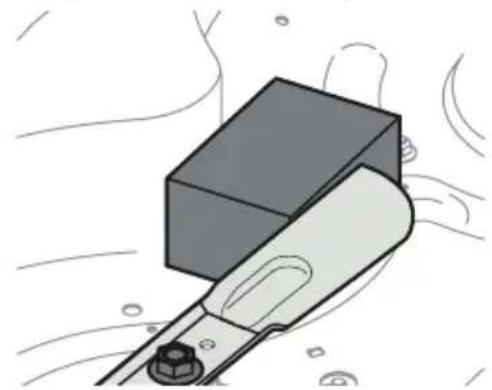
Figure 24
- Remove the hex screw (a) and the blade bell support (b) which holds the blade (c) and the blade adapter (d) to the deck motor (Figure 25).
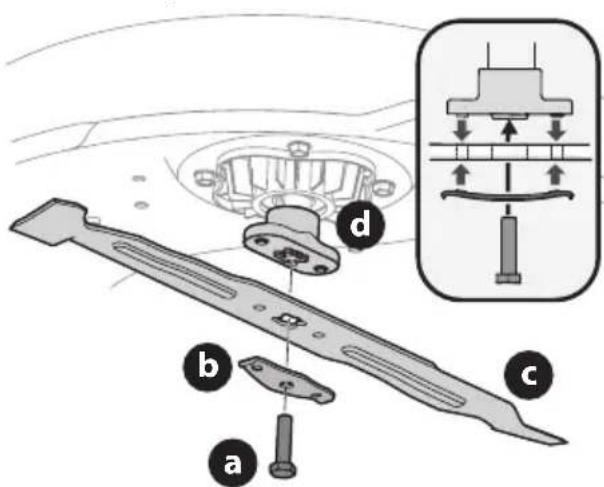
Figure 25
PRODUCT CARE
- Remove blade (c) and adapter (d) from the deck motor spindle (Figure 25 on page 22).
- To properly sharpen the cutting blade, remove equal amounts of metal from both ends of the blade along the cutting edges, parallel to the trailing edge, at a 25° to 30° angle. Always grind each cutting blade edge equally to maintain proper blade balance (Figure 26).
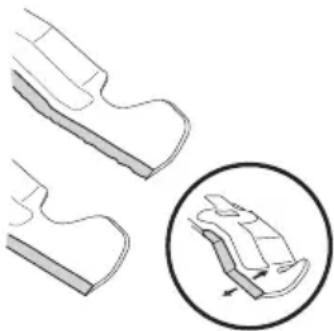
Figure 26
- Test the blade's balance using a blade balancer. Grind metal from the heavy side until it balances evenly.

WARNING
A poorly balanced blade will cause excessive vibration, may damage the tractor, and/or result in personal injury.
NOTE: When replacing the blade, be sure to install the blade with the side of the blade marked "Grass-side", "Bottom" or with a part number stamped in it facing the ground when the tractor is in the operating position.
7. Reinstall blade when properly sharpened. Torque to 450-600 in-lbs (51-68 N-m).
OFF-SEASON STORAGE
Storing the Tractor
- Allow the tractor to cool in an open area before storing.
- Do not park the tractor near any flammable materials (wood, cloth or chemicals) or any open flames or other potential source of ignition (furnace, water heater or any other type of heater).
- Remove all combustible materials from the tractor before storing. Empty cargo boxes, grass catchers or containers.
Removing the Tractor from Storage
- Fully charge the battery and inflate the tires to the recommended pressures.
- Drive the tractor without a load to make certain all the tractor systems are functioning properly.
Battery Storage
- The battery should be stored with a full charge.
NOTE: It will take approximately 4 hours to fully charge the battery. Leaving the battery connected to the charger for more than 4 hours will not damage the battery.
- The best storage place is one that is cool and dry, away from direct sunlight and excess heat or cold.
- For long storage, it is recommended to store a fully charged machine in a cool dry place with the charger disconnected and the key removed for optimal results.
- Battery should not be kept in a discharged state. Permanent damage to the battery can occur.
- Fully recharge the battery before returning to service.
BATTERY SERVICING AND DISPOSAL

WARNING
- The battery may present a risk of fire or chemical burn if misused. Do not disassemble, overheat, or incinerate the battery.
- Leakage from the battery may occur under extreme usage, charging, or temperature conditions or if the battery is damaged, crushed, or punctured. This leakage indicates a failure of the battery and the battery should be properly disposed of by an authorized service dealer.

WARNING
- The following toxic and corrosive material is used in this battery: LITHIUM-ION, a toxic material.
- Do not use broken or cracked batteries, even if there is no leakage. Replace damaged or worn-out batteries with new batteries. DO NOT ATTEMPT TO REPAIR BATTERIES! Repair attempts may result in severe personal injury, due to explosion or electrical shock.
To avoid personal injury and damage to the environment:
- Contact your local authorized service dealer for proper battery servicing and recycling.
- Do not attempt to remove or destroy any of the battery components. Do not open or mutilate the battery. If a leak develops, released electrolytes are corrosive and toxic. Do not get the solution in your eyes or on your skin, and do not swallow it.
- Do not dispose of the battery in the regular household trash.
- Do not dispose of the battery in a fire. The cell may explode.
- Do not dispose of the battery where it will become part of any waste landfill or municipal solid waste stream.
PRODUCT CARE
TROUBLESHOOTING
WARNING
Before inspecting, cleaning, or servicing the tractor, power off the tractor and remove the key.
This section addresses minor service issues. To locate the nearest authorized service center consult the separate supplement sheet for contact information.
| Problem Cause Remedy | ||
| Excessive vibration 1. Blade | loose or unbalanced.2. Cutting blade damaged, unbalanced or bent. | 1. Tighten cutting blade and deck spindle.2. Replace the blade. |
| Uneven cut 1. Deck not properly leveled.2. Cutting blade dull or damaged.3. Uneven tire pressure. | 1. Perform front-to-rear deck adjustment.2. Sharpen or replace cutting blade.3. Check and correct tire pressure in all four tires. | |
| Tractor will not mulch grass | 1. Wet grass.2. Excessively high grass.3. Dull blade. | 1. Do not mulch when grass is wet.2. Mow once at a high cutting height, then mow again at desired height or make a narrower cutting swath.3. Sharpen or replace blade. |
| Tractor stopped or will not start | 1. Electrical system fault. | 1. Shut off and restart tractor. If problem persists, contact an authorized service dealer. |
| Blades do not rotate/blades stopped | 1. Overload.2. Low battery. | 1. Allow deck motor(s) to cool/raise deck height.2. Return home, plug into charger. |
| Blade(s) stopped when traveling in reverse | 1. Blade(s) stopped. | 1. Restart blade(s) (PTO). Make sure REVERSE CAUTION MODE is activated. |
| Reduced speed | 1. Low battery.2. Overload. | 1. Charge battery as instructed in the Battery Charger Manual.2. Raise deck. |
PRODUCT CARE
GENERAL LCD SCREEN MESSAGES
| Message Description | |
| !→ | Battery Temperature Low: Move the tractor to a warm location and allow the battery to warm. If problem persists contact qualified service personnel. |
| High Battery Temp !→ High Deck/Drive Motor Temp !→ | High Temperature: Power off, let the tractor cool and restart tractor. If problem persists contact qualified service personnel. |
| DO→ | Unplug Cord/Close Charge Port Door: Prior to powering on and operating the tractor cord must be unplugged and charge port door closed securely. |
| Cruise Control ON: Cruise control is set when icon is displayed. | |
| Cut Deck Overload: The deck and drive shut off. Power off the tractor, clean under the deck as instructed in the Post-Operation Tractor Care section and restart the tractor. Raise the deck and/or cut at a slower pace. If problem persists contact qualified service personnel. | |
PRODUCT CARE
FAULTS
Faults are displayed as four digit codes with the first number (after "E") relating to the affected subsystem. These faults may shut off the deck and drive or the entire tractor. If these occur, power off the tractor and allow it to cool, then restart the tractor. If faults persist, contact qualified service personnel. A troubleshooting guide for the fault codes is available on the website.
| Code Description | |
| E1--- | All VCM related faults |
| E2--- | Left Deck Motor Faults/Single Deck Motor Faults |
| E3--- | Right Deck Motor Faults (If equipped) |
| E4--- | Center Deck Motor Faults (If equipped) |
| E5--- | Left Drive Motor Faults/Single Drive Motor Faults |
| E6--- | Right Drive Motor Faults (If equipped) |
| E7--- | Battery Faults |
| E8--- | Battery Faults |
| E9--- | Battery Faults |
MANUAL DEL OPERADOR
Espagnol (Spanish) Page 27
Francais... Page 54





- BATTERY-POWERED LITHIUM-ION TRACTOR
- RECORD PRODUCT INFORMATION
- MODEL NUMBER
- SERIAL NUMBER
- WARNING
- CALIFORNIA PROPOSITION 65
- SAFE OPERATION PRACTICES
- DANGER
- LITHIUM-LON BATTERY SYSTEM
- GENERAL OPERATION
- OPERATING
- CHILDREN
- SLOPE OPERATION
- SLOPE GAUGE (BACK COVER)
- HAULING
- TOWING
- SERVICE
- GENERAL ELECTRIC SAFETY
- BATTERY CHARGER SAFETY
- BATTERY SAFETY
- SAFETY SYMBOLS
- SET-UP
- PREPARATION
- CONTENTS OF CRATE
- RECOMMENDED TOOLS FOR ASSEMBLY
- MANUALLY MOVING THE TRACTOR
- CAUTION
- INSTALL OPERATOR'S SEAT ASSEMBLY (IF NECESSARY)
- LOWER DECK DISCHARGE CHUTE DEFLECTOR
- INSTALLING THE SNAP-ON HOOD TOPPER (IF NECESSARY)
- INSTALLING THE DASH CAP (IF NECESSARY)
- INSTALLING THE STEERING WHEEL (IF NECESSARY)
- INSTALLING THE FRONT BUMPER (IF NECESSARY)
- ADJUSTING THE SEAT
- CHECKING TIRE PRESSURE
- SETTING THE DECK WHEELS (IF EQUIPPED)
- CHARGING THE BATTERY
- BATTERY CHARGING TIPS
- OPERATION
- A.VEHICLE CONTROL MODULE (VCM)
- START/STOP BUTTON
- PTO (BLADES ON/OFF) BUTTON
- REVERSE CAUTION MODE (RCM) BUTTON
- HEADLIGHT BUTTON
- CRUISE CONTROL BUTTON
- LCD SCREEN AND BATTERY LEVEL INDICATOR
- KEY SWITCH
- FORWARD DRIVE PEDAL
- REVERSE DRIVE PEDAL
- BRAKE PEDAL
- PARK BRAKE LEVER
- STORAGE TRAY
- H.CUP HOLDER
- HEADLIGHT
- CHARGING PORT
- USB CHARGING PORTS (IF EQUIPPED)
- DECK LIFT LEVER
- SEAT ADJUSTMENT LEVER (NOT SHOWN)
- SAFETY INTERLOCK SYSTEM
- ENGAGING THE PARKING BRAKE
- SETTING THE CUTTING HEIGHT
- STARTING THE TRACTOR
- STOPPING THE TRACTOR
- DRIVING THE TRACTOR
- REVERSE CAUTION MODE (RCM)
- OPERATING THE PTO
- MOWING
- PRODUCT CARE
- MAINTENANCE SCHEDULE
- CLEANING THE UNDERSIDE OF THE DECK
- CLEANING THE TRACTOR
- LUBRICATION
- FRONT WHEELS
- PIVOT POINTS & LINKAGE
- ADJUSTMENTS
- ADJUSTING THE DECK
- LEVELING THE DECK (FRONT-TO-REAR)
- LEVELING THE DECK (SIDE-TO-SIDE)
- ADJUSTING THE DECK HEIGHT
- ADJUSTING THE DECK WHEELS (IF EQUIPPED)
- SEAT ADJUSTMENT
- PARKING BRAKE ADJUSTMENT
- NEUTRAL ADJUSTMENT
- FRONT WHEEL ALIGNMENT
- DECK REMOVAL
- DECK INSTALLATION
- BLADE(S)
- SHARPENING OR REPLACING THE BLADES
- OFF-SEASON STORAGE
- STORING THE TRACTOR
- REMOVING THE TRACTOR FROM STORAGE
- BATTERY STORAGE
- BATTERY SERVICING AND DISPOSAL
- TROUBLESHOOTING
- FAULTS
- MANUAL DEL OPERADOR
Brand : TROY-BILT
Model : Super Bronco 42E XP
Category : Tractor