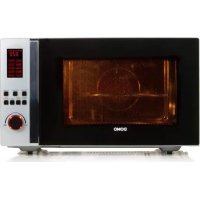
DO24201C - Microwave DOMO - Free user manual and instructions
Find the device manual for free DO24201C DOMO in PDF.



| Product type | Microwave with grill and convection |
| Brand | DOMO |
| Model | DO24201C |
| Oven volume | 42 L |
| Microwave power | 1000 W |
| Rated input power | 1550 W |
| Power supply | 230 V ~ 50 Hz |
| Turntable diameter | 34.5 cm |
| External dimensions (L × D × H) | 55.3 × 55.0 × 32.7 cm |
| Main functions | Microwave, grill, convection, combination, defrost (weight/time), auto menu (10 programs), multi-stage cooking, kitchen timer |
| Microwave power levels | 10 levels (P100 to P10) |
| Convection temperature range | 140 °C to 230 °C |
| Control type | Electronic with rotary knob and buttons |
| Display | Digital LED |
| Child lock | Yes (lock by long press STOP/CLEAR) |
| Turntable material | Glass |
| Included accessories | Glass turntable, turntable support, grill rack |
| Cleaning and maintenance | Clean the interior with a damp cloth after each use; do not use steam cleaner or corrosive products |
| Warranty | 2 years (parts and labor); accessories and wear parts 6 months |
| Customer service | +32 14 21 71 91 / info@linea2000.be (Mon-Thu 8:30-17:00, Fri 8:30-16:30) |
| Country of origin | Not specified (Belgian brand) |
| Weight | Approximately 16 kg (estimated) |
Frequently Asked Questions - DO24201C DOMO
User questions about DO24201C DOMO
0 question about this device. Answer the ones you know or ask your own.
Ask a new question about this device
Download the instructions for your Microwave in PDF format for free! Find your manual DO24201C - DOMO and take your electronic device back in hand. On this page are published all the documents necessary for the use of your device. DO24201C by DOMO.
USER MANUAL DO24201C DOMO
natural_image
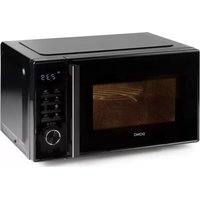
Black and silver Doho microwave oven with digital display and control buttons (no visible text or symbols on body)DO24201C
| Handleiding Combi microgolfoven | |
| Mode d'emploi Four à micro-ondes combiné | |
| Gebrauchsanleitung Kombi Mikrowelle | |
| Instruction booklet Combi microwave oven | |
| Manual de instrucciones Microondas combi | |
| Istruzioni per l'uso Forno a microonde combinato | |
| Návod k použití Kombinovaná mikrovlnná trouba s horkovzduchem a grilem | |
| Návod na použitie Kombinovaná mikrovlnná rúra s teplovzduchom a grilom |
natural_image
Two black-and-white icons: a warning triangle with an exclamation mark and an open book with stacked pages (no text or symbols)⚠PRODUCTSPECIFIEKE WAARSCHUWINGEN
natural_image
Diagram showing a rotating disc with a circular arrow indicating rotation direction (no text or symbols)INSTALLATIE VAN DE OVEN
TABEL
| Menu Gewicht (g) Display Vermogen | |||
| Pizza(A1) | 200 200 | C-4 | |
| 300 300 | |||
| 400 400 | |||
| Aardappelen(A2) | 1 (+/- 230g) 1 | 100% Microgolf | |
| 2 (+/- 460g) 2 | |||
| 3 (+/- 690g) 3 | |||
| Vlees(A3) | 150 150 | 100% Microgolf | |
| 300 300 | |||
| 450 450 | |||
| 600 600 | |||
| Vis(A4) | 150 150 | 80% Microgolf | |
| 250 250 | |||
| 350 350 | |||
| 450 450 | |||
| 600 600 | |||
| Groenten (A5) | 150 150 | 100% Microgolf | |
| 350 350 | |||
| 500 500 | |||
| Drank (A6) | 1 (240 ml) 1 | 100% Microgolf | |
| 2 (480 ml) 2 | |||
| 3 (720 ml) 3 | |||
| Pasta (A7) | 50 (met 450ml water) | 50 | 80% Microgolf |
| 100 (met 800 ml water) | 100 | ||
| 150 (met 1200 ml water) | 150 | ||
| Popcorn (A8) | 50 50 100% Microgolf | ||
| 100 100 | |||
| Cake (Ag) | 475 475 Verwarm voor op 180°C | ||
| Kip (A10) | 750 750 100% Microgolf/ | Convectie op 200°C | |
| 1000 1000 | |||
| 1200 1200 | |||
SNEL KOKEN
PROBLEEM EN OPLOSSING
natural_image
Recycling symbol icon with three chasing arrows forming a triangle (no text or labels)⚠ AVERTISSEMENTS SPÉCIFIQUES AU PRODUIT
AVANT LA PREMIÈRE UTILISATION
MISE EN PLACE DU PLATEAU TOURNANT
natural_image
Diagram showing a rotating disk with a circular arrow indicating rotation direction (no text or symbols)INSTALLATION DU FOUR
TABLEAU
natural_image
Recycling symbol icon with three chasing arrows forming a triangle (no text or labels)natural_image
Diagram showing a rotating disk with a circular arrow indicating rotation direction (no text or symbols)natural_image
Recycling symbol icon with three chasing arrows forming a triangle (no text or labels)All of our products are always submitted to a strict quality control before they are sold to you.
Should you nevertheless experience problems with your device, we sincerely regret this.
In that case, we kindly request you to contact our customer service.
Our staff will gladly assist you.

+32 14 21 71 91

info@linea2000.be
Monday – Thursday: 8.30 – 12.00 and 13.00 – 17.00
Friday: 8.30 - 12.00 and 13.00 - 16.30
This appliance has a two year warranty period. During this period the manufacturer is responsible for any failures that are the direct result of construction failure. When these failures occur the appliance will be repaired or replaced if necessary. The warranty will not be valid when the damage to the appliance is caused by wrong use, not following the instructions or repairs executed by a third party. The guarantee is issued with the original till receipt. All parts, which are subject to wear, are excluded from the warranty. If your device breaks down within the 2-year warranty period, you can return the device together with your receipt to the shop where you purchased it.
The guarantee on accessories and components that are liable to wear-and-tear is only 6 months.
The guarantee and responsibility of the supplier and manufacturer lapse automatically in the following cases:
- If the instructions in this manual have not been followed.
· In case of incorrect connection, e.g. electrical voltage that is too high.
· In case of incorrect, rough or abnormal use.
· In case of insufficient or incorrect maintenance.
· In case of repairs or alterations to the device by the consumer or non-authorised third parties. - If the customer used parts or accessories that are not recommended or provided by the supplier / manufacturer.
SAFETY INSTRUCTIONS
When using electrical appliances, basic safety precautions should always be taken, including the following:
- Read all instructions carefully. Keep this manual for future reference.
- Make sure all packaging materials and promotional stickers have been removed before using the appliance for the first time. Make sure children cannot play with the packaging materials.
- This appliance is intended to be used in household and similar applications such as:
· staff kitchen areas in shops, offices and other working environments;
· farm houses;
- by clients in hotels, motels and other residential type environments;
- bed and breakfast type environments.
- Children should be supervised to ensure that they do not play with the appliance.
- This appliance can be used by children aged from 16 years and above and persons with reduced physical, sensory or mental capabilities or lack of experience and knowledge if they have been given supervision or instruction concerning use of the appliance in a safe way and understand the hazards involved.
· Children shall not play with the appliance.
- Cleaning and user maintenance shall not be made by children unless they are older than 16 or supervised.
- Keep the appliance and its cord out of reach of children younger than 16 years.
- All repairs should be carried out by the manufacturer or its aftersales service.
- Any injury or damage caused by failure to comply with these rules are at your own risk. Neither the manufacturer, importer, or the supplier may be held liable.
⚠️ELECTRICAL WARNINGS
- In order to avoid a hazard this appliance must not be supplied through an external switching device, such as a timer or a separate remote control, or connected to a circuit that is regularly switched on and off by the utility.
- The appliance must be disconnected from its power source when not in use, during service and when replacing parts. Allow to cool before putting on or taking off parts, and before cleaning the appliance. To disconnect, turn controls to “OFF” or “o” position, then remove the plug from the wall. Never pull the cord or appliance to remove the plug from the socket.
- Before use, check carefully that the electric tension and frequency of the power net at your home match the indications on the rating label of the appliance.
- The appliance must be plugged into an appropriate outlet that is installed and grounded in accordance with local installation regulations.
- Do not let the power supply cord hang over the edge of a counter, or touch hot surfaces.
- Keep the power cord away from hot parts and don't cover the appliance.
- Unwrap the cord completely to prevent overheating of the cord. Do not allow the power cord supply to run underneath or around the unit.
- The appliance may not be used with an extension lead or a multiple socket.
- Do not operate this appliance with a damaged cord or plug or in the event the appliance malfunctions or has been damaged in any manner. Return the appliance to the DOMO Service Department or its service agent for examination, repair, or electrical or mechanical adjustment. Do not try to repair the appliance yourself.
⚠️INSTALLATION
· Do not place near flammable materials, gases or explosives.
· Do not use or store this appliance outdoors.
· Always use the appliance on a steady, dry and level surface.
- Never place this appliance near a gas stove or electrical stove or in a place where it may come into contact with a warm appliance.
⚠ USE
· Do not use this appliance for other than intended use.
- Only use the appliance for domestic use. The manufacturer cannot be held responsible for accidents that result from improper use of the appliance or not following the instructions described in this manual.
· Never leave the appliance unattended while it is functioning.
· Do not operate the appliance with wet hands.
- The use of accessories that are not recommended or sold by the manufacturer can cause fire, electrical shock or injuries.
Only use the utensils delivered with the appliance.
⚠ CLEANING AND MAINTENANCE
- To protect against electrical shock or burns, do not immerse unit, cord, or plug in water or other liquid.
- Failure to maintain this appliance in a clean condition could adversely affect the life of the appliance and possibly result in a hazardous situation.
The appliance can become hot during use. Keep the power cord away from hot parts and don't cover the appliance.
To reduce the risk of fire, electric shock, injury or exposure to excessive microwave oven energy when using your appliance, follow basic precautions, including the following:
- Warning: Liquids and other foods must not be heated in sealed containers since they can explode.
- WARNING: It is hazardous for anyone other than a competent person to carry out maintenance or repairs involving the removal of a cover that protects from exposure to microwave energy.
- Warning: Only allow children to use the oven without supervision when adequate instructions have been given so that the child is able to use the oven in a safe way and understands the hazards of improper use.
- Only use utensils suitable for use in microwave ovens.
- The oven should be cleaned regularly and any food remainders should be removed.
- When heating food in plastic or paper containers, keep an eye on the oven due to the possibility of ignition.
- If smoke is observed, switch off or unplug the appliance and keep the door closed in order to stifle any flames.
· Do not overcook food.
- Do not use the oven cavity for storage purposes. Do not store items, such as bread, cookies, etc. inside the oven.
- Remove wire twist-ties and metal handles from paper or plastic containers/bags before placing them in the oven.
- Install or locate this oven only in accordance with the installation instructions provided.
- Eggs in the shell and whole hard-boiled eggs should not be heated in microwave ovens since they may explode, even after microwave heating has ended.
- Use this appliance only for its intended uses as described in this manual. Do not use corrosive chemicals or vapors in this appliance. This oven is especially designed to heat. It is not designed for industrial or laboratory use.
- Do not use this oven near water, in a wet basement or near a swimming pool.
- The oven can become hot during use. Keep the cord away from hot parts and surfaces and do not cover the oven.
- Failure to maintain the oven in a clean condition could lead to damaging of the appliance and could possibly result in a hazardous situation.
- The content of feeding bottles and baby food jars always needs to be stirred or shaken. The temperature needs to be checked before consumption, in order to avoid burns.
- Microwave heating of beverages can result in delayed eruptive boiling, therefore take care when handling the container.
- Children should be supervised to ensure that they do not play with the appliance.
· This appliance should not be placed into a cupboard.
· Do not use a steam cleaner to clean the appliance. - Do not use abrasive cleaners or sharp metal scrapers to clean the oven door glass, since they can scratch the surface, which may result in shattering of the glass.
· During use the appliance becomes hot. Do not touch any heating elements inside the oven. - The door or the outer surface of the appliance may get hot when the appliance is operating.
- The microwave oven is designed to heat food and beverages. Drying food or clothes and heating heat pads, slippers, sponges, damp cloths and the like can lead to risks of injury, ignition or fire.
PRECAUTIONS TO AVOID POSSIBLE EXPOSURE TO EXCESSIVE MICROWAVE ENERGY
- Do not attempt to operate this oven with the door open since this can result in harmful exposure to microwave energy. It is important not to break or tamper with the safety interlocks.
- Do not place any object between the oven front face and the door or allow soil or cleaner residue to accumulate on sealing surfaces.
WARNING: If the door or door seals are damaged, the oven must not be operated until it has been repaired by a competent person.
- If the appliance is not maintained properly, the appliance could be damaged, which may affect the lifespan of the apparatus and may lead to a dangerous situation.
TO REDUCE THE RISK OF INJURY
- Caution: touching some of the internal components may cause serious personal injury or death.
· Do not disassemble this appliance.
- Improper use of the appliance and the grounding can result in electric shock. Do not turn on the appliance until it is properly installed and grounded.
- This appliance must be grounded. In the event of an electrical short circuit, grounding reduces the risk of electric shock by providing an escape wire for the electric current. This appliance is equipped with a cord having a grounding wire with a grounding plug. The plug must be plugged into an outlet that is properly installed and grounded. Consult a qualified electrician or serviceman if the grounding instructions are not completely understood or if doubt exists as to whether the appliance is properly grounded.
· A short power-supply cord is provided to reduce the risk of becoming entangled in or tripping over a longer cord.
WHAT MATERIALS CAN BE USED IN THE MICROWAVE OVEN?
In the list below you can find which materials can and can not be used in the microwave oven. If in doubt, or if you can not find the material in the list below, you can test the utensil in question, following the procedure below:
- Fill a microwave-safe container with 1 cup of cold water (250 ml) along with the utensil. Cook on maximum power for 1 minute.
- Carefully feel the utensil. If the empty utensil is warm, do not use it for microwave cooking.
· CAUTION: Do not exceed the 1 minute cooking time.
Materials that can be used in the microwave oven
- Dinnerware: microwave-safe only. Do not use cracked or chipped dishes.
- Glass jars: always remove the lid. Use only to heat up food until it is just about warm. Most glass jars are not heat-resistant and may break.
- Glassware: heat-resistant oven glass ware only. Make sure there is no metallic elements or parts. Do not use cracked or chipped dishes.
- Oven cooking bags: follow manufacturer's instructions. Do not close with metal tie. Make slits to allow steam to escape.
- Plastic: microwave-safe only. Follow the manufacturer's instructions. Should be labeled „microwave safe“. Some plastic containers soften, as the food inside gets hot. “Boiling bags” and tightly closed plastic bags should be slit, pierced or vented.
- Plastic wrap: microwave-safe only. Use to cover food during cooking to retain moisture. Do not allow plastic wrap to touch food.
- Thermometers: microwave-safe only.
Materials to be avoided in the microwave oven
- Aluminum tray: may cause arcing. Transfer food into a microwave-safe dish.
- Food carton with metal handle: may cause arcing. Transfer food into a microwave-safe dish.
- Metal or metal-trimmed utensils: metal shields the food from microwave energy. Metal trim may cause arcing.
- Metal twist ties: may cause arcing and could cause a fire in the oven.
· Paper bags: may cause a fire in the oven. - Plastic foam: plastic foam may melt or contaminate the liquid inside when exposed to high temperature.
- Wood: wood will dry out when used in the microwave oven and may split or crack.
SAVE THESE INSTRUCTIONS FOR FUTURE REFERENCE
SPECIFICATIONS
| MODEL | DO24201C |
| RATED VOLTAGE | 230 V~ 50 Hz |
| NOMINAL INPUT POWER OF MICROWAVE OVEN | 1550 W |
| NOMINAL OUTPUT POWER OF MICROWAVE OVEN | 1000 W |
| OVEN CAPACITY | 42 l |
| DURNTABLE DIAMETER | 34,5 cm |
| EXTERNAL DIMENSIONS (LXWXH) | B 55,3 x D 55,0 x H 32,7 cm |
PARTS
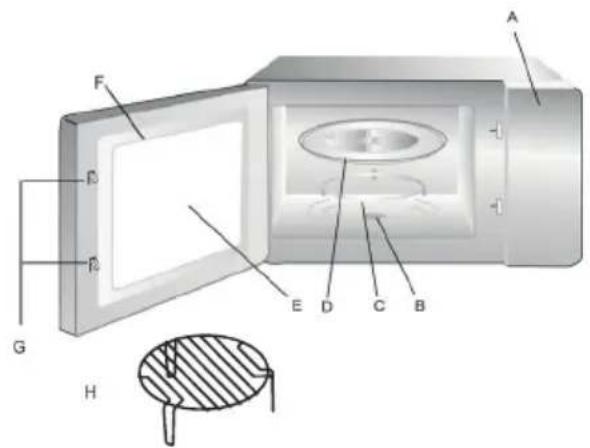
A. Control panel
B. Turntable drive
C. Turntable ring
D. Glass turntable
E. Viewing window
F. Door
G. Safety lock
H. Grill rack (only for grill and convection, to be placed onto
the glass turntable)
BEFORE THE FIRST USE
INSTALLING THE TURNTABLE
-
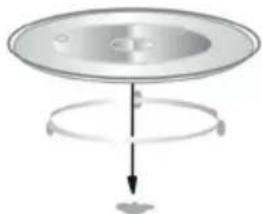
The turntable and ring should always be used during cooking. Place the turntable ring in the centre of the microwave oven.
-
Place the turntable on the ring ensuring that the centre of the turntable fits properly into the turntable drive.
-
Never install the turntable upside down. Always ensure the turntable can turn freely.
-
Food and containers should always be placed on the glass turntable for cooking.
-
If the glass turntable or the ring is cracked, contact your service centre.
natural_image
Diagram showing a rotating disk with a circular arrow indicating rotation direction (no text or symbols)INSTALLING THE OVEN
Remove all packaging materials and accessories. Check the oven for any damage such as dents and ensure the door closes properly. Do not use the oven if any damage is found. Remove the plastic film surrounding the appliance. This film prevents scratches during manufacture and transport.
However, do not remove the light brown mica protection on the inside of your oven.
-
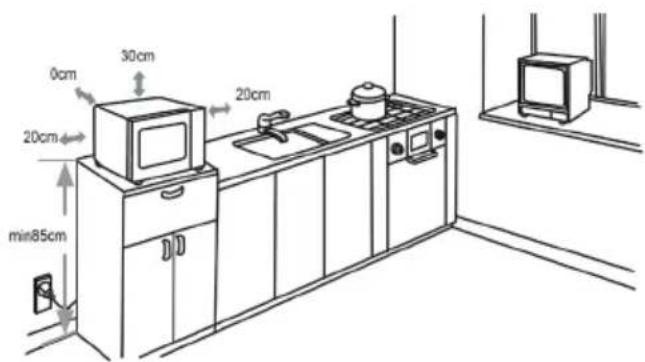
Choose a location to install your microwave oven where there is plenty of open space to allow air movement to and from the appliance. The minimum height for installing the oven is 85cm. Place the back of the oven against the wall. A minimum space of 30cm above the appliance should be left open. Between the oven and other walls, a minimum space of 20cm should be left open.
-
Never remove the feet on the bottom of the microwave oven.
-
A blocked air inlet or outlet may result in damage to the oven.
-
Place the oven as far away from radio and TV as possible, to avoid interference.
-
Insert the microwave oven plug into the socket. Ensure the voltage in your home corresponds to the voltage indicated on your oven.
Warning: Do not install the oven above a stove or other heat-producing device.
- The accessible portion of the oven may become warm during use.
USE
SETTING THE CLOCK
When you plug the oven into the socket, the display shows 0:00 and one beep is heard.
- Press the CLOCK/KITCHEN TIMER button. The display shows oo:oo and the hour indicator flashes.
· Turn the knob to adjust the hour. - Press the CLOCK/KITCHEN TIMER button again and the minute indicator flashes.
· Turn the knob to adjust the minutes. - Confirm the set time by pressing the CLOCK/KITCHEN TIMER button again.
Pressing the STOP/CLEAR button will cancel the setting of the time. If you want to adjust the time later on, press CLOCK/KITCHEN TIMER once and use the rotary knob to set the hour and minutes. Press CLOCK/KITCHEN TIMER each time to confirm.

MICROWAVE
- Press the MICROWAVE button once and the display indicates: P100.
- You can adjust the power incrementally by pressing MICROWAVE or turning the knob. You can select between P100, P80, P50, P30 or P10. The numbers are the percentages of the total power.
- To confirm, press the START/+30SEC./CONFIRM button.
· Turn the knob to adjust the cooking time from between 5 sec. and 95 min. - Press the START/+30SEC./CONFIRM button to start cooking.
Power summary
| Press/turn Once | Twice Three times | Four times Five times | |||
| Display | P100 | P80 | P50 | P30 | P10 |
| Power | 100% | 80% | 50% | 30% | 10% |
The time intervals for setting the cooking time are as follows:
Between: Interval:
0-1 min. 5 sec.
1-5 min. 10 sec.
5-10 min. 30 sec.
10-30 min. 1 min.
30-95 min. 5 min.

GRILL
- Press the GRILL/COMBI button once and G-1 appears on the display.
- To confirm, press the START/+30SEC./CONFIRM button.
· Turn the knob to adjust the cooking time from between 5 sec. and 95 min. - Press the START/+30SEC./CONFIRM button to start grilling.
When half of the grilling time has expired, the oven will beep twice to indicate the food should be turned over. You can ignore this signal and continue grilling. It is better to turn the food over, close the door again and press the START/+30SEC./CONFIRM to continue.
COMBINATION
- Press the GRILL/COMBI button once and G-1 appears on the display.
- Press GRILL/COMBI or turn the knob to change the selection. For combination cooking you can choose between: C-1, C-2, C-3 or C-4.
| Display Microwave Grill | Convection | ||
| C-1 • • | |||
| C-2 • • | |||
| C-3 • • | |||
| C-4 • • • |
- To confirm, press the START/+30SEC./CONFIRM button.
- Turn the knob to adjust the cooking/grilling time from between 5 sec. and 95 min.
- Press the START/+30SEC./CONFIRM button to start cooking/grilling.

CONVECTION / WARM AIR WITH PRE-HEATING
Convection cooking allows you to use your oven as a traditional oven without microwave energy. It is recommended to pre-heat the oven to the desired temperature before placing the food in the oven.
- Press the CONVECTION button once and the display will flash 140^ C.
- Press CONVECTION or turn the knob to set the desired temperature. The temperature can be adjusted from 140^ C to 230^ C in intervals of 10^ C.
- Press the START/+30SEC./CONFIRM button to confirm the temperature.
-
Press the START/+30SEC./CONFIRM button to start pre-heating. When the desired temperature has been reached, two beeps will sound to remind you to place the food in the oven. The pre-heated temperature will flash on the display.
-
Place the food in the oven and close the door. Turn the knob to adjust the cooking time from between 5 sec. and 95 min.
-
Press the START/+30SEC./CONFIRM button to start cooking. You can not adjust the cooking time until the specified pre-heating temperature has been reached. When the desired pre-heating temperature has been reached, the door must be opened to enter the cooking time. If this does not occur within 5 minutes, the oven will beep five times and stop pre-heating and go into stand-by mode.

CONVECTION / WARM AIR WITHOUT PRE-HEATING
- Press the CONVECTION button once and the display will flash 140^ C.
- Press CONVECTION or turn the knob to set the desired temperature. The temperature can be adjusted from 140^ C to 230^ C in intervals of 10^ C.
- Press the START/+30SEC./CONFIRM button to confirm the temperature.
- Turn the knob to adjust the cooking time from between 5 sec. and 95 min.
- Press the START/+30SEC./CONFIRM button to start convection cooking.
KITCHEN TIMER
- Press the CLOCK/KITCHEN TIMER button twice and the display indicates: oo:oo.
- Turn the knob to set the timer to a maximum of 95 minutes.
- Press the START/+30SEC./CONFIRM button to confirm the setting.
- When the time has expired, the clock display will switch off and the oven will beep five times. The display will then show the current time.
The kitchen timer will continue to count down even if you open the door.
You can not, however, enter any other program when the kitchen timer is operating.

DEFROST BY WEIGHT
- Press the W.T./TIME DEFROST button once and d-1 will be shown on the display.
- Turn the knob to set the desired weight of the food to be defrosted. You can select from 100 till 2000 grams.
- Press the START/+30SEC./CONFIRM button to start defrosting. You can pause defrosting at any time by pressing the STOP/CLEAR button. To continue defrosting, simply press the START/+30SEC./CONFIRM button. If, however, you press the STOP/CLEAR button twice, the oven will go into stand-by mode.
- When half of the defrosting time has expired, the oven will beep twice to remind you to turn the food over. After turning the food over, close the door again and press the START/+30SEC./CONFIRM button to continue defrosting. If you ignore the beep, your oven will automatically continue to defrost, however the food may not be fully defrosted.

DEFROST BY TIME
- Pressing the W.T./TIME DEFROST button twice causes d-2 to appear on the display.
· Turn the knob to adjust the desired defrosting time. -
Press the START/+30SEC./CONFIRM button to start defrosting. You can pause defrosting at any time by pressing the STOP/CLEAR button. To continue defrosting, simply press the START/+30SEC./CONFIRM button. If, however, you press the STOP/CLEAR button twice, the oven will go into stand-by mode.
-
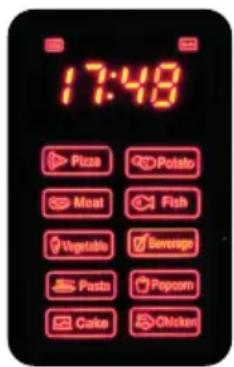
Before pressing any menu button, turn the knob to the right. This selects the auto menu options. You can select from 10 pre-set function (A1-A10). The display indicates the type of food corresponding to each function (see photo).
- Press the START/+30SEC./CONFIRM button to confirm your selection.
· Turn the knob to enter the weight (g). - Press the START/+30SEC./CONFIRM button to start the oven.
e.g. Cake (Ag). When Cake is selected from the automatic menu, the oven will first pre-heat to 180^ C. When the oven has reached the correct temperature, it will beep two times to remind you to place the cake in the oven. Press the START/+30SEC./CONFIRM button to start baking.
TABLE
| Menu Weight (g) Display Power | |||
| Pizza(A1) | 200 200 | C-4 | |
| 300 300 | |||
| 400 400 | |||
| Potatoes(A2) | 1 (+/- 230g) 1 | 100% microwave | |
| 2 (+/- 460g) 2 | |||
| 3 (+/- 690g) 3 | |||
| Meat(A3) | 150 150 | 100% microwave | |
| 300 300 | |||
| 450 450 | |||
| 600 600 | |||
| Fish(A4) | 150 150 | 80% microwave | |
| 250 250 | |||
| 350 350 | |||
| 450 450 | |||
| 600 600 | |||
| Vegetables(A5) | 150 150 | 100% microwave | |
| 350 350 | |||
| 500 500 | |||
| Beverages(A6) | 1 (240 ml) 1 | 100% microwave | |
| 2 (480 ml) 2 | |||
| 3 (720 ml) 3 | |||
| Pasta(A7) | 50 (with 450 ml water) | 50 | 80% microwave |
| 100 (with 800 ml water) 100 | |||
| 150 (with 1200 ml water) 150 | |||
| Popcorn (A8) | 50 50 100% microwave | |
| 100 100 | ||
| Cake (Ag) | 475 475 Preheat at 180°C | |
| Chicken (A10) | 750 750 100% microwave/ | |
| 1000 1000 | ||
| 1200 1200 | ||
QUICK COOKING
Press the START/+30SEC./CONFIRM button before pressing any other button to use your microwave oven for 30 seconds at 100% power. Repeatedly pressing the button will increase cooking each time by 30 seconds, up to a maximum of 95 minutes.
Pressing the START/+30SEC./CONFIRM button when grill, convection or combination is selected will also increase the cooking time at full power by 30 seconds. This button has no effect only when defrosting or when the auto menu has been selected.
Quick microwave cooking
Turn the knob left to immediately set the cooking time and press the START/+30SEC./CONFIRM button to cook at 100% microwave power.
COOKING IN STAGES
You can set your oven so that it cooks in 2 stages. If you want to defrost and then cook, of course you have to set the defrost function first. You will hear a signal when the first stage has finished and the next stage begins. Only auto programs and preheating can not be set as a stage.
For example: If you want to defrost food for 5 minutes and then cook at 80% microwave power for 7 minutes, then follow these steps:
- Press W.T./TIME DEFROST twice. The display will say d-2.
- Turn the knob to set the time to 5 minutes.
- Press MICROWAVE once. Turn the knob to set the power to 80% (P80).
- Press START/+30SEC./CONFIRM to confirm.
- Turn the knob to set 7 minutes.
- Press START/+30SEC/CONFIRM to start the process.

LOCKING/CHILD LOCK
Press and hold the STOP/CLEAR button for 3 seconds. A long beep is heard and the display shows a key.
To unlock the oven, press and hold the STOP/CLEAR button again for 3 seconds.
You again hear a long beep and the key symbol disappears from the display.
NOTES
- When the oven operates at low power, the oven light will illuminate less brightly.
- It is normal that condensation can accumulate on the oven door.
-
Press CLOCK/KITCHEN TIMER during cooking to display the time for 2-3 seconds.
-
Press MICROWAVE, GRILL/COMBI or CONVECTION during cooking to display the set power for 2-3 seconds.
- Press START/+30SEC./CONFIRM to continue cooking after the door has been opened.
- After setting a program for cooking, press START/+30SEC./CONFIRM within 5 minutes. Otherwise the time will be displayed and the setting will be cancelled.
CLEANING AND MAINTENANCE
· Always make sure you remove the plug from the socket before cleaning the appliance.
- Clean the inside of the appliance after every use with a slightly damp cloth.
· Clean the parts like the grill, the glass turntable,... in warm water with a mild detergent.
· The door, the lock and the control panel can be cleaned with a slightly damp cloth when dirty.
- Do not use a steam cleaner to clean the appliance.
- Do not use aggressive cleaning agents or sharp objects to clean the glass of the door; this could damage the glass and cause it to crack.
Cleaning tip: fill a microwave-proof container with 300 ml water and the juice from half a lemon. Place it in the centre of the turntable and run the microwave at 100% power for 10 minutes. Then wipe the inside clean with a soft, dry cloth.
PROBLEM AND SOLUTION
| PROBLEM SOLUTION | |
| The turntable no longer rotates. · The food or container sticks out too far over the edge of the turntable. Make sure nothing protrudes beyond the turntable. · Make sure the turntable drive and ring are positioned and set correctly. · Check that there is nothing under the turntable that will prevent it from rotating. | |
| The control panel no longer works. The child lock may be on. You can activate or deactivate this by pressing the stop or clear button for a few seconds. | |
| None of the appliance's functions work. Check that the appliance door is closed correctly. | |
| The microwave function does not work, but all other functions do. | It is best to take your appliance into an authorised dealer to let them check it. |
| The housing of the appliance becomes too hot during operation. | Ensure that there is sufficient ventilation space around the appliance as described in the 'oven installation' section. |
| Sparks are visible inside the appliance. Make sure the | there are no metal objects in the appliance while using the microwave function. Also, the microwave function cannot be used for plates with a metal edge or metal fasteners, staples, or the like. |
| Smoke comes out of the appliance when grilling. | ·When using the appliance for the first time, it is normal for some smoke to come from the heating element, but this should disappear with subsequent use.·Food residue has been left on the grill element. Clean the element as described in the ‘Cleaning and maintenance’ section. |
| There is a plastic smell coming from the appliance. | Only use containers in the appliance that are suitable for use in a microwave oven. |
ENVIRONMENTAL GUIDELINES
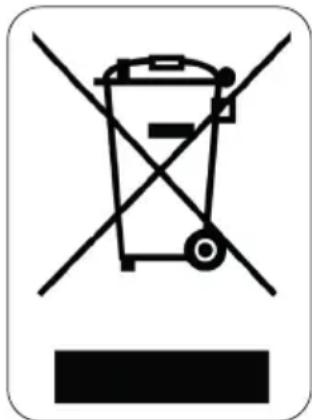
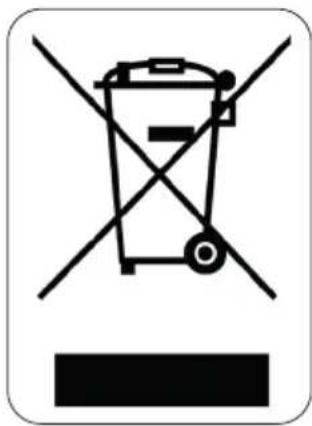
This symbol on the product or on its packaging indicates that this product may not be treated as household waste. Instead it must be brought to the applicable collection point for recycling of electrical and electronic equipment. By ensuring this product is disposed of correctly, you will help prevent potential negative consequences for the environment and human health, which could otherwise be caused by inappropriate waste handling of this product. For more detailed information about recycling of this product, please contact your local city office, your household waste disposal service or the shop where you purchased the product.
natural_image
Recycling symbol icon with three chasing arrows forming a triangle (no text or labels)The packaging is recyclable. Please treat the packaging ecologically.
GARANTIA
natural_image
Diagram showing a circular object with a downward arrow and a small leaf below, no text or symbols present.TABLA
| Menú Peso (g) Indicación Potencia | |||
| Pizza (A1) 200 200 | C-4 | ||
| 300 300 | |||
| 400 400 | |||
| Patatas (A2) 1 (+/- 230g) | 1 100% Microondas | ||
| 2 (+/- 460g) 2 | |||
| 3 (+/- 690g) 3 | |||
| Carne (A3) 150 150 | 100% Microondas | ||
| 300 300 | |||
| 450 450 | |||
| 600 600 | |||
| Pescado (A4) 150 150 | 80% Microondas | ||
| 250 | 250 | ||
| 350 | 350 | ||
| 450 450 | |||
| 600 600 | |||
| Verduras (A5) | 150 150 100% Microondas | ||
| 350 | 350 | ||
| 500 500 | |||
| Bebidas (A6) | 1 (240 ml) | 1 100% Microondas | |
| 2 (480 ml) | 2 | ||
| 3 (720 ml) | 3 | ||
| Pasta (A7) | 50 (con 450 ml de agua) | 50 | 80% Microondas |
| 100 (con 800 ml agua) | 100 | ||
| 150 (con 1200 ml agua) | 150 | ||
| Palomitas de maíz (A8) | 50 | 50 | 100% Microondas |
| 100 100 | |||
| Pastel (A8) | 475 | 475 | Precalentar a 180°C |
| Pollo (A10) | 750 | 750 100% Microondas/ | Convección a 200°C |
| 1000 | 1000 | ||
| 1200 | 1200 | ||
COCINA RÁPIDA
natural_image
Recycling symbol icon with three chasing arrows forming a triangle (no text or labels)PRIMA DELL'USO
natural_image
Diagram showing a rotating disk with a circular arrow indicating rotation direction (no text or symbols)natural_image
Recycling symbol icon with three chasing arrows inside a rounded square (no text or labels)natural_image
Diagram showing a rotating disk with a circular arrow indicating rotation direction (no text or symbols)INSTALACE TROUBY
OHLED NA ŽÍVOTNÍ PROSTŘEDÍ
natural_image
Recycling symbol icon with three chasing arrows forming a triangle (no text or labels)PRED PRVÝM POUŽITÍM
INŠTALÁCIA OTOČNÝ ČASTÍ
natural_image
Diagram showing a rotating disk with a circular arrow indicating rotation direction (no text or symbols)INŠTALÁCIA RÚRY
| Zelenina (A5) | 150 150 | 100% Mikrovlny | |
| 350 350 | |||
| 500 500 | |||
| Nápoje (A6) | 1 (240 ml) 1 | 100% Mikrovlny | |
| 2 (480 ml) 2 | |||
| 3 (720 ml) 3 | |||
| Cestoviny (A7) | 50 (So 450 ml vody) 50 | 80% Mikrovlny | |
| 100 (So 800 ml vody) 100 | |||
| 150 (So 1200 ml vody) | 150 | ||
| Popcorn (A8) | 50 50 100% Mikrovlny | ||
| 100 100 | |||
| Koláč (Ag) | 475 475 Predhriatie na 180 °C | ||
| Kurča (A10) | 750 750 100% Mikrovlny/ | Horúci vzduch 200°C | |
| 1000 1000 | |||
| 1200 1200 | |||
RÝCHLY OHREV
natural_image
Recycling symbol icon with three chasing arrows forming a triangle (no text or labels)natural_image
Two cylindrical white objects with transparent caps, possibly milk or similar beverage (no text or symbols visible)
natural_image
Three product photos: square tiles, a clear glass coffee maker, and a rectangular container (no text or symbols visible)of scan hier:
ou scannez ici:
oder hier scannen:
or scan here:
- DO24201C
- ⚠PRODUCTSPECIFIEKE WAARSCHUWINGEN
- INSTALLATIE VAN DE OVEN
- SNEL KOKEN
- PROBLEEM EN OPLOSSING
- ⚠ AVERTISSEMENTS SPÉCIFIQUES AU PRODUIT
- AVANT LA PREMIÈRE UTILISATION
- MISE EN PLACE DU PLATEAU TOURNANT
- INSTALLATION DU FOUR
- SAFETY INSTRUCTIONS
- ⚠️ELECTRICAL WARNINGS
- ⚠️INSTALLATION
- ⚠ USE
- ⚠ CLEANING AND MAINTENANCE
- PRECAUTIONS TO AVOID POSSIBLE EXPOSURE TO EXCESSIVE MICROWAVE ENERGY
- TO REDUCE THE RISK OF INJURY
- WHAT MATERIALS CAN BE USED IN THE MICROWAVE OVEN?
- Materials that can be used in the microwave oven
- Materials to be avoided in the microwave oven
- SPECIFICATIONS
- PARTS
- BEFORE THE FIRST USE
- INSTALLING THE TURNTABLE
- INSTALLING THE OVEN
- USE
- SETTING THE CLOCK
- MICROWAVE
- GRILL
- COMBINATION
- CONVECTION / WARM AIR WITH PRE-HEATING
- CONVECTION / WARM AIR WITHOUT PRE-HEATING
- KITCHEN TIMER
- DEFROST BY WEIGHT
- DEFROST BY TIME
- QUICK COOKING
- Quick microwave cooking
- COOKING IN STAGES
- LOCKING/CHILD LOCK
- NOTES
- CLEANING AND MAINTENANCE
- ENVIRONMENTAL GUIDELINES
- GARANTIA
- COCINA RÁPIDA
- PRIMA DELL'USO
- INSTALACE TROUBY
- OHLED NA ŽÍVOTNÍ PROSTŘEDÍ
- PRED PRVÝM POUŽITÍM
- INŠTALÁCIA OTOČNÝ ČASTÍ
- INŠTALÁCIA RÚRY
- RÝCHLY OHREV
Brand : DOMO
Model : DO24201C
Category : Microwave