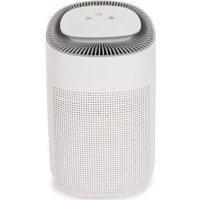
AIRP002 - Climate control Perel - Free user manual and instructions
Find the device manual for free AIRP002 Perel in PDF.


User questions about AIRP002 Perel
0 question about this device. Answer the ones you know or ask your own.
Ask a new question about this device
Download the instructions for your Climate control in PDF format for free! Find your manual AIRP002 - Perel and take your electronic device back in hand. On this page are published all the documents necessary for the use of your device. AIRP002 by Perel.
USER MANUAL AIRP002 Perel
natural_image
White portable electronic device with ventilation grille and coiled cable (no visible text or symbols)USER MANUAL 3
HANDLEIDING 8
MODE D'EMPLOI 13
MANUAL DEL USUARIO 18
To all residents of the European Union
Important environmental information about this product
This symbol on the device or the package indicates that disposal of the device after its lifecycle could harm the environment. Do not dispose of the unit (or batteries) as unsorted municipal waste; it should be taken to a specialized company for recycling. This device should be returned to your distributor or to a local recycling service. Respect the local environmental rules.
If in doubt, contact your local waste disposal authorities.
Thank you for choosing Perel! Please read the manual thoroughly before bringing this device into service. If the device was damaged in transit, do not install or use it and contact your dealer.
2. Safety Instructions

Read and understand this manual and all safety signs before using this appliance.
Class 2 appliance.
- This device can be used by children aged from 8 years and above, and persons with reduced physical, sensory or mental capabilities or lack of experience and knowledge if they have been given supervision or instruction concerning the use of the device in a safe way and understand the hazards involved. Children shall not play with the device. Cleaning and user maintenance shall not be made by children without supervision.
- If the supply cord is damaged, it must be replaced by the manufacturer, its service agent or similarly qualified persons in order to avoid a hazard.
- Do not obstruct any ventilation holes, air inlets or outlets.
- Do not disassemble the appliance. There are no user-serviceable parts.
• To avoid eye damage, do not look directly into the UV LEDs.
• This appliance is for household use only. - Never clean the tank with abrasive or corrosive materials.
- Make sure that the available voltage does not exceed the voltage stated in the specifications of this manual.
- Disconnect the appliance from the mains to clean it or when it is not in use. Handle the power cord by the plug only. Avoid touching the power cord with wet hands.
- Never leave the appliance unattended when plugged in.
- Keep the appliance away from heat sources such as radiators. Operate only on a dry and level surface.
- Do not immerse the appliance.
3. General Guidelines
- Refer to the Velleman ^® Service and Quality Warranty on the last pages of this manual.
- All modifications of the device are forbidden for safety reasons. Damage caused by user modifications to the device is not covered by the warranty.
- Only use the device for its intended purpose. Using the device in an unauthorised way will void the warranty.
- Damage caused by disregard of certain guidelines in this manual is not covered by the warranty and the dealer will not accept responsibility for any ensuing defects or problems.
- Nor Velleman nv nor its dealers can be held responsible for any damage (extraordinary, incidental or indirect) – of any nature (financial, physical...) arising from the possession, use or failure of this product.
- Keep this manual for future reference.
4. Overview
Refer to the illustrations on page 2 of this manual.
General
| 1 | air outlet |
| 2 | sensor |
| 3 | handle |
| 4 | control panel |
| 5 | air inlet |
Control Panel
| 6 | sleep/filter replacement |
| 7 | fan speed |
| 8 | on-off |
| 9 | Wi-Fi |
| 10 | air quality |
| 11 | UV-C |
5. Operation
5.1 Before Using the Appliance
- Install the appliance on a non-slippery and flat surface.
- Make sure the appliance is unplugged from the mains.
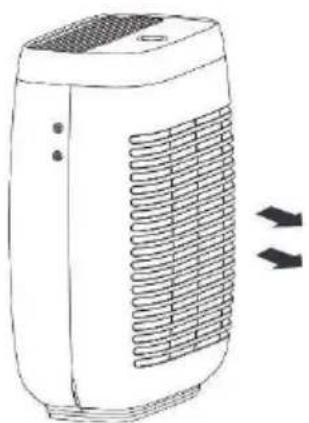
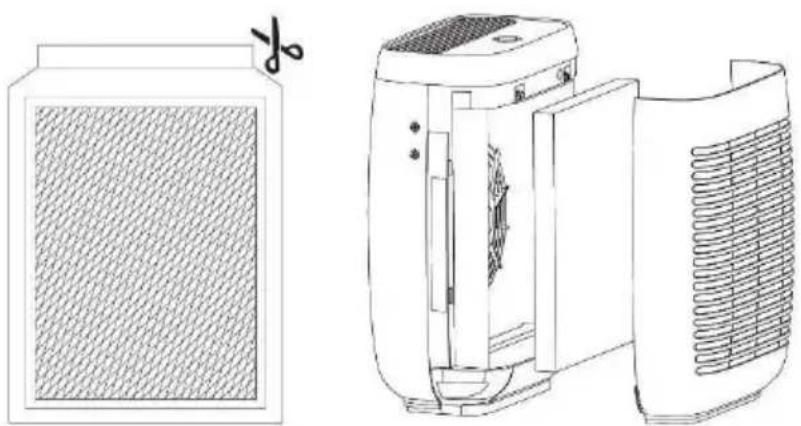
- Carefully pull the rear cover and remove it. Remove the (old) filter and check if it is clean.
natural_image
Illustration of a portable air conditioner unit with heat exchanger and cooling fins (no text or symbols)AIRP002
- Remove the new filter from its packaging or take the clean filter and insert it in the filter compartment.
natural_image
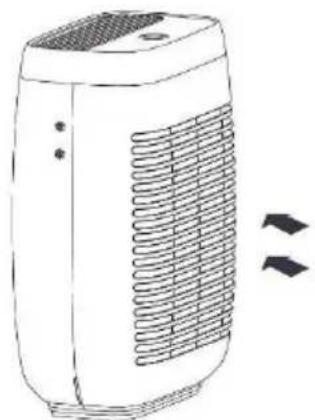
Technical line drawings of a portable air conditioner unit with a side panel and a close-up view showing internal components (no text or symbols)- Re-install the rear cover on the appliance.
natural_image
Line drawing of a portable air conditioner unit with cooling fins and ventilation slots (no text or symbols)REMARKS
- Ensure the filter is correctly installed before switching on the appliance.
- Only replace the filter with a similar filter.
-
When the filter life expires, the filter replacement indicator will blink blue.
-
Connect the appliance to the mains and switch on the appliance. Press and hold the filter replacement button to reset.
5.2 Use
On-Off Switch/Fan Speed Selector/Wi-Fi
On-Off Switch
Press this button once to switch on the appliance. The appliance will enter the auto mode and automatically determine the fan speed according to the air quality.
Fan Speed
Press this button two, three or four times to select the low, medium or high fan speed.
The fan speed indicator lights up accordingly.
Press this button a fifth time to switch off the appliance.

AIRP002

Wi-Fi
Install the Tuya app. Hold the on-off switch pressed to connect to the Wi-Fi (the Wi-Fi indicator should blink indicating the appliance is in configuration mode). Operate according to the instructions on your mobile device.
After configuration with the Tuya app is completed, you can control your appliance remotely, and check the operating status and air quality data through the app.

Sleep Function
Press this button once to switch on the sleep mode. The sleep mode operates quietly by using the lowest possible fan speed.
After activating the sleep mode, all indicators except the sleep indicator will be switched off. Press any button to re-activate the indicators, and press the sleep button to exit the sleep and enter the auto mode.

UV-C Function
Press this button to activate/de-activate the UV-C function. UV-C light acts as a germicide. An air purifier employing this technology will benefit people with allergies, asthma and weakened immune systems, providing them with added protection against germs.
Control the function using the Tuya app. The UV-C function will pause for 1 hour after 2 hours of continuous work. It will then work for 30 minutes and pause for 1 hour.
After Use
-
Switch off the appliance and unplug from the mains.
-
Keep the inside of the appliance dry. To prevent moisture build-up, dry with a clean cloth.
6. Care and Maintenance
Before starting any cleaning or maintenance activities:
-
Unplug the appliance from the mains.
-
Let the appliance cool down.
Cleaning
- To avoid scratching the appliance, do not use abrasive/caustic cleaning solutions or scrubbing pads. Dampen a clean towel lightly with soap and water to clean the control panel, then dry gently with a soft cloth or paper towel. To avoid damaging the electronic components, do not allow liquid to seep into the appliance.
- Wipe the interior of the appliance clean with a soft cloth dampened with a soap and water solution.
- Never clean the filter with a vacuum cleaner or wash it directly.
Storing
- Store the appliance and its accessories in its original package in a clean and dry area.
7. Troubleshooting
| Problem | Cause | Possible solution |
| The appliance does not work. | The appliance is not connected to the mains. | Connect the appliance correctly to the mains. |
| The appliance is not switched on. | Press the on-off button once. | |
| Significantly reduced airflow. | The filter packaging has not been removed. | Remove the filter packaging before use. |
| Low fan speed. | Select a higher fan speed with the speed button. | |
| Dirty filter. | Replace the filter. | |
| Not enough clearance around the appliance. | Ensure at least 0.5 m of clearance around the appliance. | |
| Poor purification quality. | The room is too large. | Only use the appliance in rooms smaller than 8 m^2 . |
| Blocked air inlet or outlet. | Remove all objects blocking the air inlet or outlet. | |
| The filter is not properly installed. | Make sure the filter is properly installed. | |
| The reset button lights after filter replacement. | The appliance has not been reset. | Press and hold the reset button for 5 seconds to reset the appliance. |
8. Technical Specifications
power supply 220-240 V\~, 50 Hz
power consumption 60 W
wireless frequency 2.412-2.484 GHz
max. RF power transmitted.... 63 mW
maximum room size 70 m²
filter type ...... pre-filter + EPA12 (carbon filter)
air purifier capacity....350 m³/h
material ...... HIPS
colour ....white
dimensions 445 x 350 x 220 mm
weight 5800 g
cord length....1.8 m
Use this device with original accessories only. Velleman nv cannot be held responsible in the event of damage or injury resulting from (incorrect) use of this device. For more info concerning this product and the latest version of this manual, please visit our website www.velleman.eu. The information in this manual is subject to change without prior notice.
© COPYRIGHT NOTICE
The copyright to this manual is owned by Velleman nv. All worldwide rights reserved. No part of this manual may be copied, reproduced, translated or reduced to any electronic medium or otherwise without the prior written consent of the copyright holder.
HANDLEIDING
1. Inleiding
natural_image
Illustration of a portable air conditioner unit with cooling fins and ventilation slots (no text or symbols)AIRP002
natural_image
Technical line drawings of a jar and a portable air purifier device (no text or symbols)natural_image
Line drawing of a portable air conditioner unit with cooling fins and ventilation slots (no text or symbols)OPMERKINGEN
natural_image
Line drawing of a portable air conditioner unit with cooling fins and ventilation slots (no text or symbols)natural_image
Technical line drawings of a portable air conditioner unit with a side panel and a close-up view showing internal components (no text or symbols)natural_image
Line drawing of a portable air conditioner unit with cooling fins and ventilation slots (no text or symbols)REMARQUES
natural_image
Illustration of a portable air purifier with heat exchanger and cooling unit (no text or symbols)AIRP002
natural_image
Technical line drawings of a jar and a portable air purifier device (no text or symbols)natural_image
Line drawing of a portable air conditioner unit with cooling fins and ventilation slots (no text or symbols)OBSERVACIONES
natural_image
Line drawing of a portable air conditioner unit with cooling fins and ventilation slots (no text or symbols)natural_image
Technical line drawings of a portable air purifier with a lid and side panel, showing internal components and blade structure (no text or symbols)natural_image
Illustration of a portable air conditioner unit with cooling fins and ventilation slots (no text or symbols)Bemerkungen
natural_image
Line drawing of a portable air conditioner unit with heat exchanger and cooling fins (no text or symbols)AIRP002
natural_image
Technical line drawing of a portable air purifier with a lid and side panel, showing internal components and blade structure (no text or symbols)natural_image
Line drawing of a portable air conditioner unit with cooling fins and ventilation slots (no text or symbols)UWAGI
natural_image
Illustration of a portable air purifier with heat exchanger and cooling unit (no text or symbols)AIRP002
natural_image
Technical line drawings of a portable air conditioner unit with a side panel and a close-up view showing internal components (no text or symbols)natural_image
Line drawing of a portable air conditioner unit with cooling fins and ventilation slots (no text or symbols)OBSERVAÇÕES
Velleman® Service and Quality Warranty
Since its foundation in 1972, Velleman® acquired extensive experience in the electronics world and currently distributes its products in over 85 countries.
All our products fulfil strict quality requirements and legal stipulations in the EU. In order to ensure the quality, our products regularly go through an extra quality check, both by an internal quality department and by specialized external organisations. If, all precautionary measures notwithstanding, problems should occur, please make appeal to our warranty (see guarantee conditions).
General Warranty Conditions Concerning Consumer Products (for EU):
- All consumer products are subject to a 24-month warranty on production flaws and defective material as from the original date of purchase.
- Velleman® can decide to replace an article with an equivalent article, or to refund the retail value totally or partially when the complaint is valid and a free repair or replacement of the article is impossible, or if the expenses are out of proportion.
You will be delivered a replacing article or a refund at the value of 100% of the purchase price in case of a flaw occurred in the first year after the date of purchase and delivery, or a replacing article at 50% of the purchase price or a refund at the value of 50% of the retail value in case of a flaw occurred in the second year after the date of purchase and delivery.
- Not covered by warranty:
- all direct or indirect damage caused after delivery to the article (e.g. by oxidation, shocks, falls, dust, dirt, humidity...), and by the article, as well as its contents (e.g. data loss), compensation for loss of profits;
- consumable goods, parts or accessories that are subject to an aging process during normal use, such as batteries (rechargeable, non-rechargeable, built-in or replaceable), lamps, rubber parts, drive belts... (unlimited list);
- flaws resulting from fire, water damage, lightning, accident, natural disaster, etc....;
- flaws caused deliberately, negligently or resulting from improper handling, negligent maintenance, abusive use or use contrary to the manufacturer's instructions;
- damage caused by a commercial, professional or collective use of the article (the warranty validity will be reduced to six (6) months when the article is used professionally);
- damage resulting from an inappropriate packing and shipping of the article;
- all damage caused by modification, repair or alteration performed by a third party without written permission by Velleman®.
- Articles to be repaired must be delivered to your Velleman® dealer, solidly packed (preferably in the original packaging), and be completed with the original receipt of purchase and a clear flaw description.
- Hint: In order to save on cost and time, please reread the manual and check if the flaw is caused by obvious causes prior to presenting the article for repair. Note that returning a non-defective article can also involve handling costs.
• Repairs occurring after warranty expiration are subject to shipping costs.
- The above conditions are without prejudice to all commercial warranties.
The above enumeration is subject to modification according to the article (see article's manual).