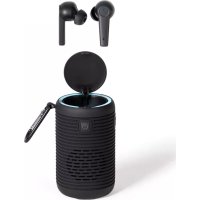
TES254 - Headphones LIVOO - Free user manual and instructions
Find the device manual for free TES254 LIVOO in PDF.



| Product Type | 2-in-1 Bluetooth audio headset (earphones + speaker) |
| Brand | Livoo |
| Model | TES254 |
| Bluetooth Version | V5.0 |
| Operating Frequency | 2402-2480 MHz |
| Battery Capacity (earphones) | 40 mAh each |
| Battery Capacity (speaker) | 800 mAh |
| Playback Time (earphones) | 4-5 hours |
| Playback Time (speaker) | 6-8 hours |
| Standby Time (earphones) | 150 hours |
| Standby Time (speaker) | 300 hours |
| Microphone Sensitivity | -42 dB ± 3 dB |
| Signal-to-Noise Ratio | 92 dB ± 3 dB |
| Speaker Impedance | 16 Ω |
| Speaker Diameter | 10 mm |
| Charging Input | DC 5V, 1A |
| Charging Connector | USB-C |
| Included Accessories | 2 pairs of ear tips, carabiner, USB-C cable |
| Main Functions | Touch controls (volume, call, track, voice assistant), transparency/ANC mode, noise reduction |
| Cleaning and Maintenance | Clean charging contacts and ear tips with alcohol-soaked cotton weekly |
| Reset | Press each earpiece 6 times to reset to factory settings |
| Safety | Do not expose to water, flames, temperatures >40°C; use a 5V adapter only |
| Standards | ROHS, RED |
Frequently Asked Questions - TES254 LIVOO
User questions about TES254 LIVOO
0 question about this device. Answer the ones you know or ask your own.
Ask a new question about this device
Download the instructions for your Headphones in PDF format for free! Find your manual TES254 - LIVOO and take your electronic device back in hand. On this page are published all the documents necessary for the use of your device. TES254 by LIVOO.
USER MANUAL TES254 LIVOO
natural_image
Black wireless earbuds with charging case and speaker, no visible text or symbolsLivoo
VersÈëÕô:ôv.â.0ôôôôô

Figure 1

natural_image
Two cylindrical containers with internal structures, labeled 1 and 2, shown from different angles (no text or symbols on the containers themselves)
Figure 3

natural_image
Two hand-drawn diagrams showing a device with circular components and a pointer, labeled Figure 4 (no text or symbols on the devices themselves)
natural_image
Symbol of a trash bin crossed with no text or labels, accompanied by a black rectangular block below (no readable text or symbols)Thank you for choosing a Livoo device!
ñëurôüÊeÕÖer,ôyëurôüarüeßue,ôaÕÕôyëurôùeaÖpùëÕesôareôÕëtôãustõëüäeßts,ôtùeyôareôexteÕsÉëÕsôëÄöy aÊÊëwÊÕðôôyëuôôtëôôòetôôßÊëserôôtëôôyëurôôÄrÈeÕösôôaÕÕôôÃaÇÊÊy,ôôtëôõûrÊÕôôôtüeÇôôtëòetüer,ôôtë experÈeÕßes.ô±Èvëë'sôaÊÇôÊsôtëôûeÉpôyëuôÊÈveôyëurôÊÊÄeôtëôtüeÔuÊEst,ômùateverówÈsûesôyëuôùaveóti tûeôyear.ôóÊÖterôraßÊette,ôsuÇÇerôüarüeßue.ôOrûtüeôëtûerôwayôaréuÔÖ.ôèt'sôupôtëôyëu.ôΩaõeôaÖvaÔtaò tùÈsôÄreeÕëÇôÄërôÄeeÊôöëëÕçÇëÇeÕtsôeveryôÔay.ô
Ωùat'sòwùyòwe'reôßëÕstaÕtÊyôÊÕÕevatÊÕôôaÕÕÕßreatÊÕôôßÉeverôÖevÈßesôÄuÊÊöëÄôzest,ôüutoÇëstÕëÄôaÊ FÊÕÕõeurõeÕtÈreôßëÊÎeßtÈëÕõëÕõeuròweüsÈteôwww.ÊÈvëë.eÔ.õõ
Livoo, your daily companion till social networks

@±Èvëëô

@ÊÈvëëöëÄÄÈrô

@±Èvëiô
ôafety Instructions
PÊease,ôtaõeôtÊÇeôtëôreaÖöweÊÊôtüeôÊÕstrußtÉëÕôsùeetõüeÄëreôtüeôÄÈrstôuseôaÕÕõõeepôtüeÇôÄërôaôÄi
AôÇÈsuseôëÄôtûeôappÊÈaÕßeôßaÕõÖaÇaòeôÈtôëròurtôtûeôuser.ÔAssureôtûatôyëuôuseôtûeôappÊÈaÕßeôÄë ÄërôwùÊßüôÊtôÈsôÖesÊòÕeÖ.ôóeôreÄuseôaÕyôrespëÓsÊüÊÊtÉesôasôÄërôtûeôÖaÇaòesôüyôaÕõÊÕßérreßtõus ÇaÕÊpuÊatÊëÕ.ô
â. -eepôtùÈsôÖevÈßeôawayôÄrëÇôaÕyôwater,ôÊÈquÈÖöërôwetôareas.ôΩùÈsôÖevÈßeôsùa expëseÔôôtëôOrÈppÉÔòöërôospÊasùÈÔôôôaÕÕtùatôÕëôõëüäeßtsôôÄÈÊÎeÕôôwÈtùôôî vases,ôsùaÊÎôüeôpÊaßeÕöëÕûtûeôapparatus.ô
- UseôÊÕôÖryôÊëßatÈëÕsôëÕÉy.ôô
ê. -eepôtùÈsôÖevÈßeôawayôÄrëÇôÕaõeÖôÄÊaÇesôsußùôasôßaÕÖÊes.ô
-
ΩùÈsôÖevÈßeôsùëuÊÖûeôëÕEyôëperateÕôÄrëÇôtùeôtypeôëÄôpëwerôsèurßeôÊÕÖÈßat tùeôÇarôÊõòôÊaüeÊ.ô
-
DëôÕëtôpÊaßeôtûeôÖevÈßeôÊÕôÕÈreßtôsuÕÊÈòùtôërôùeat.õ-eepôawayôÄrëÇôteÇpera ëverô40°C.õ
-
MaõeõsureõtüeõÖevÈßeõûasôpÊeÕtyöëÄöveÕtÈÊatÈëÕ.õ
-
DëôÕëtôpressôtüeõüuttëÕsôtëëõûarÕôasôÈtôßëuÊÕÕaÇaòeôtüeõÖevÈße.õõ
-
DëôÕëtõuseõßüeÇÈßaÊsõëÕõtùÈsõÖevÈße.õõ
-
ÀeverôtryôtëôrepaÈrûtùÈsôÖevÈßeöyëurseÊÄûüeßauseôÈtôßëuÊÖôÊeaÖôtëõeÊelßtrÈßôsù ÈtôtëôaÕâapprëveÕâteßùÕÊßÈaÕ.ôô
â0. èÄôtüeôUSBôßaüÊeôÈsôÖaÇaòeÖ,ôÈtôÇustôüeôrepÊaßeÕûyôtüeôÇaÕuÄaßturer,ôÈtsć aòeÕtôërôsÈÇÈEarÊyôquaÊÈÄÈeÕpersëÕsôÈÕërÖerôtëôavëÈÕûazarÖ.ô
ââ. óARÀèÀG:ôôôôFërôîtûeôôpurpësesôôëÄôôßùaròÊÕò,ôôëÕÉyôôuseôîtûeôôÕEtaßùaŭÎe prëvÊÕeÕ.ô
â2. èÄöyëuôwaÕtôtëôuseôyëurôÖevÈßeôwÈtùôaÕôaÖaptër(ÕëtôsuppÊÈeÖ)ôÈõsteaÕõëÄô ëÕÊyôuseÕôaÖaptërôwÈtùôpëwerôsuppÊyô5V.ô
- When the unit is not in use, make sure it is correctly turned off and stored in a cool dry place.
- Do not insert foreign objects into the device.
- The appliance shall not be used by children.
- Avoid dropping it as harsh impacts could damage the device.
Technical ôpecifications
| Bluetooth earphones | Bluetooth speaker |
| Input Battery: 3.7V DC - 800mAh | Input: 5V 1 A |
| Rechargeable Battery: 40mAh | Rechargeable Battery: 800mAh |
| Bluetooth Version: V5.0 | Bluetooth Version: V5.0 |
| Frequency: 2402MHz-2480MHz | Frequency: 2402MHz-2480MHz |
| Play Bluetooth music time: 4-5Hrs | Play Bluetooth music time: 6-8Hrs |
| Standby time: 150 Hours | Standby time: 300 Hours |
| Microphone sensitivity: -42db ± 3db | Microphone sensitivity: -42db ± 3db |
| Signal to noise ratio: 92db ± 3db | Signal to noise ratio: 92db ± 3db |
| Speaker impedance: 16Ω | Speaker impedance: 16Ω |
| Speaker driver: 10mm | Speaker driver: 10mm |
ärawing of the device
üfigure 1
| 1 | 2 Earphones |
| 2 | Bluetooth speaker |
| 3 | 2 pairs of ear tips |
| 4 | 1 Carabiner |
| 5 | 1 USB C charging cable |
ōperation Instruction
Charging operation
Fully charge the appliance before use.
Insert the cable USB C plug into the dedicated slot on the device. Connect the cable USB plug to another device able to load your device. Respect carefully the maximal loading tension mentioned on the device (5V) to not damage the device.
The speaker is charged synchronously when it is turned on.
The light of the speaker will turn white when charging. When the battery is full, the light turn off.
çote: charge the device at least once per 3 months when not in use for a long time. ðtherwise the battery may be damaged.
Turning on turning off (üigure 2É
Turn on:
Open the cover and the earphones will power on automatically(1).
Turn off:
Place the earphones in the charging compartment, close the cover(2).
The earphones will turn off automatically after disconnected for more than 6 minutes.
Wearing the earphones (üigure 5É:
èÕeÕtÈÄyôtùeôÊeÄtôaÕÕrÈòùtõearpùëÕes.ô
èÕeÕtËÄyôtûeôÊeÄtôaÕÕrÈòùtõearpÈeßes.ôRëtateôtûeõearpÈeßeôtëõuestôÄÈtôyërourõear.ô
Button function
| ±eÄtõearpüëõ | RÈòùtõearpüëÕõ |
| PauseçpÉayçaÖswerõßaÊE:õpressõëÕeõtÈÇeõëtûeõÊeÄtõearpüëÕeõ | ÓauseçpÉayçaÖswerõßaÊE:õpressõëÕeõtÈÇeõëÕtûeõrÈòùtõearpüëÕeõ |
| PrevÈusôsëÕòçreäeßtõßaÊÊçùaÕòôup:õpressõtÈÇesõëÕûtüeõÊeÄtõearpüëÕeõõ | PrëõÈusôsëÕòçreäeßtõßaÊÊçùaÕòôup:õpressøtwëôtÈÇesõëčtûeõrÈòùtõearpüëÕeõ |
| 5ecrease2the2volumepressõtûreeõtÈÇesõëÕotûeõÊeÄtõearpüëÕeõõ | èÕßreaseõtûeõvëÊuÇe:õpressõtûreeõtÈÇesõëÕtûeõrÈòùtõearpüëÕeõõ |
| SÈrÈ:õëÕeõpressõëÄöêõseßëÕÖs.õõ | ΩraÕspareÕßyçAÀCçõÕërÇaÊoÇëÕe:õëÕeõpressõëÄöëõseßëÕÖs.õ |
Ô
Connexion Óluetooth ( üigure 3É.
OurÕôBÊuetëtùôëÄÄôwùeÕôyëuzreôÕëtôusÈÕòôÈt.õõ
ΩùeôearpùëÕesôautëÇatÈßaÊÎyôpaÈrôtëõeaßùôëtùerôaÄterôëpeÕûtüeôspeaõer.ô
ΟÕeôëÄôtùeôËÕÖÈßatërsôwÊÊÊôÄÉasùōtëõüÊueôÊÈòùt.ôΩùeôëtüerõëÕeôÊÈòùtôupõüÊueôÄërõëÕeôseßëÕÕöaČ
AßtÈvateôtùeôBÊuetëttùôsettÉÕòsôëÕÿyëurôÇëüÊEêpùëÕeôaÕÕôsearßùôÄërôΩES254.ô
Ól Bluetooth speaker operation instructions:
Cleaning and storage
Keep Clean of the Earbuds
Clean the charge contacts weekly with an alcohol pad for reliable charge.
Clean the mesh weekly with an alcohol pad to optimize sound performance
çote: The Ólueoth word mark is owned by the Ólueoth ôlö.
UE äECÀáÃáTIõç ôü CõçüõÃàITY
We are,
DELΩA
BP61071
67452 Mundolsheim - France
Declare under our own responsibility that the article :
- Description: Bluetooth® 2 in 1 earphone speaker
- Reference: TES254
to which this declaration applies, is in conformity with the applicable EU harmonization legislation :
| äIÄECTIVEõ çõÄàEõ or ðäECIüICáTIõçõ | |
| ROHS 2011/65/EU | Ωhe object of the declaration described above is in conformity with Directive 2011/65/EU of the European Parliament and of the Council of 8 June 2011 on the restriction of the use of certain hazardous substances in electrical and electronic equipment.EU 2011/65/EU et EU 2015/863 |
| (RED) 2014/53/EU | EN 50663:2017. EN IEC 62368-1:2020 + AII:2020. EΩSI EN 301 489-1 V2.2.3 (2019). EΩSI EN 301 489-17 V3.2.4 (2020). EΩSI EN 300 328 V2.2.2 (2019). |
Mundolsheim, 03/10/2022
Signature:
David Bousquet, CEO


Correct disposal of the unit (Electrical and Electronic EquipmentÉ.
(Applicable in the European Union and the rest of Europe that have adopted separate collection systems countries). The European Directive 2012/19/EU on Waste Electrical and Electronic Equipment (WEEE), requires that old household electrical appliances must not be disposed of in the normal household waste stream. Old appliances must be collected separately in order to optimize the recovery and recycling of the materials they contain and reduce the impact on human health and the environment. The symbol of the crossed out dustbin is marked on all devices to remind the obligations of separate collection. Consumers should contact their local authority or retailer for information concerning the correct disposal of their device.
- Photo non contractual
- Ωhe manufacturer reserves the right to make changes without notice
- Note: Ωhe Bluetooth word mark is owned by the Bluetooth SIG.
natural_image
Symbol of a trash bin crossed with no text or labels, accompanied by a black rectangular block below (no readable text or symbols)natural_image
Symbol of a trash bin crossed with no text or labels, accompanied by a black rectangular block below (no readable text or symbols)
- Thank you for choosing a Livoo device!
- Livoo, your daily companion till social networks
- ôafety Instructions
- ärawing of the device
- ōperation Instruction
- Charging operation
- Turning on turning off (üigure 2É
- Turn on:
- Turn off:
- Wearing the earphones (üigure 5É:
- Connexion Óluetooth ( üigure 3É.
- Ól Bluetooth speaker operation instructions:
- Cleaning and storage
- Keep Clean of the Earbuds
- UE äECÀáÃáTIõç ôü CõçüõÃàITY
- Correct disposal of the unit (Electrical and Electronic EquipmentÉ.
Brand : LIVOO
Model : TES254
Category : Headphones