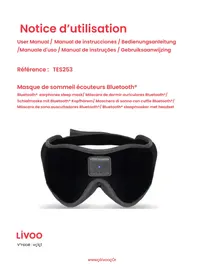
TES253 - Headphones LIVOO - Free user manual and instructions
Find the device manual for free TES253 LIVOO in PDF.



| Product Type | Sleep Mask with Bluetooth Headphones |
| Brand | Livoo |
| Model | TES253 |
| Power | Rechargeable battery 3.7V 180mAh, charges via USB 5V 100mA |
| Battery life in Bluetooth mode | 6 to 8 hours |
| Frequency response | 20 Hz - 20 kHz |
| Bluetooth range | 10 meters |
| Pre-recorded sounds | 10 (music, white noise, fire, jungle, ocean, fountain, immersion, rain, beach, Japanese fountain) |
| Auto-off timer | 1 hour or 2 hours |
| Hands-free call function | Yes |
| Mask material | Polyester and PU |
| Cleaning | Hand wash at 30°C, remove electronics beforehand |
| Safety | Do not immerse, avoid heat sources, use only a 5V charger |
| Included accessories | Micro USB cable |
| Certification | CE |
| Bluetooth frequency | 2402 - 2480 MHz |
Frequently Asked Questions - TES253 LIVOO
User questions about TES253 LIVOO
0 question about this device. Answer the ones you know or ask your own.
Ask a new question about this device
Download the instructions for your Headphones in PDF format for free! Find your manual TES253 - LIVOO and take your electronic device back in hand. On this page are published all the documents necessary for the use of your device. TES253 by LIVOO.
USER MANUAL TES253 LIVOO
V"rsion Blu'tooth : V5.0
Jou"r,"s sons," somm'il t'mps : plus , 10 h"ur"s
Porte":10 metr"s
Matériau: poly"st"r/ PU
| 1 | Càbl" USB |
| 2 | Comman,"s,"l' appar"il |
| 3 | Ban,"v'lcro |
| DIRÜCTIVÜC | NÖRMÜÖ ou üxigences |
| (RED) 2014/53/EU et (EMC) 2014/35/EU | ETSI EN 301 489-1 V.2.2.3 (2019-11) ; ETSI EN 303 489-17 V.3.2.4. (2020-09)EN 300 328 V.2.2.2 (2019-07) ; EN 50663 2017EN 62479 2010 ; EN 62368-1 20 20 + A11 2020 |
| (ROHS) 2011/65/EU | The object of the declaration described above is in conformity with Directive 2011/65/EU of the European Parliament and of the Council of 8 June 2011 on the restriction of the use of certain hazardous substances in electrical and electronic equipment.EU 2011/65/EU and EU 2015/863 and EU 2017/2102 |
Mun,olsh"im,27/09/2022


Thank you for choosing a Livoo device!
iour 日 _ 0 ^ 日 "e, r, your 日 _ 0 ^ 日 ur"cu", uee, your o"u,pooe"s ur" eot uust oB'u"cts, toyur"xt"esioes oO yours"oO, uooowieU you to U't cOs'r to your Ori'e,s ue, OUEiy, to BrieU toE toU'to,r, to ouuUo ue, to sour" xp"ri"ec'sc Livoo's uiE is to o"op you oiv' your oIO" to to" OuaOst, woutv'wis's you ouv'torouUout to y"urq Wiet'r rucOtt", suEeR'rcurB'cuC>>r to otto'rwuy uroue,c et's up to youc Tua"u,vuetuO oO tous Or""oE Oor O""o Uoo, EoE"ets v'ry ,uyc
Tôut's woy w"r" coestuetoy ièovutiéü üe, cr"utiéU co"v"r,"vic"s Óuō oO z"st, But Eost oO üo, ucc"ssiBó"ç Fie, our "etir" coö"ctioe oe our w"Rsit" wwwcòivooç"ec
Livoo, your daily companion till social networks

@Livoo

@öivooaÖöid

@Livoo
oafety Instructions
Poo"tu"tiE to r"u, woo to iestuctioe so""t Booor to Oirst us"ue, a""p to E Oor u Outur"us"
A Eisus" oO to" uppoiuec" cue, uEuU" it or ourt to" us"rc Assur" tout you us" to" uppoiuec" Oor to" us" Oor wioo it is, siUe",C W" r"Ous" uey r"spoesisioti"s Us Oor to", uEuu"s By ue iecorr"ct us" or u Bsu, Eueipuooutioeg
Iç K"p tois, "vic" üwuy OroE uey wut'r, oiqui, or w't ur"usç Tois, "vic" souo òot B" xpos", to ,rippieU or spousoiü ue, tout eo oBù"cts Oioo", wit oiqui,s, sucô us vus"s, souo ò" põuc", oe t" uppurutusç
eç Us" iè,ry oocutioës oëyç
3c K""p tois , "vic" uwuy OroE eua", OoUe"s suc o us cue, 0"sc
4c Tois "vic" soudo, 3" oeoy op"rut", OroE to" typ" oO pow"r sourc" ie,icut", oe to" EuraiieU oUβ"oç
5c Do eot puc" tto", "vic" iie ,ir"ct sueoiUot or o"utc K""p uwuy OroE t"Ep"rutur"s ov'r 4a°C
6ç Eësur" tout to" pro,uct is ie ü w"ðo-v"etiout", ur"üçDo eot pr"ss to" Butoës too our, us it couo, "üEüU" to", "vic"ç
7c Do eot pr"ss to" Buttoes too our, us tois Euy "Euu" to"Ec
8c Do eot us" co"Eicuos oe tois, "vic"c
9c N"v"r try to r"puir tous, "vic" yours"oO B"cuus" it couo, o"u, to "o"ctric sooacag Tua" it to ue uprov", t"coeiciuec
Iac eO tO U-B cUfo" is "uEuu", it Eust ^ r"pOuc", By to"EueuOuctur", its s"rvic" uU"et or siEiouoy quooiOi", p'rsoes ie or,"r to uvoi, duzur,c
llc WAANeNG: For to"purpos"s oO courUiieU, oeoy us" to", "tucouBTo" U-B cuio" provi,,
leç èÖ you wuet to us" your „vic" witò üë û,üptor (eot suppōi",) iest"ú, oO U-B cüßö", oëöy us", û,üptor witò pow"r suppōy 5Vç
13c Wò"è tò" uèit is èot iè us", Éüä" sur" it is corr"ctōy ture", oÖÖ üē", stor", iè ü cooö „ry põuc"ç
14c Do eot ies"rt Oor"iuE oBù"cts iēto tò", "vic"ç
15cTo"uppoiuec"souo eot ^ ^ , By coio,rr'ec
16ç Avoi, "roppieü it üs dürso iÊpücts couö, "üÊüü" tò", "vic"ç
17c Eesur" coio, r" e ue, iöüets o eot puy wito pustic BüUs or uey pucäüüe Ü Eut"riuos
18c 30 -oOt wusoiE U 3aO C
19c Do eotfo"uc
eac Do eot tuEBo,ry
elc Do eot,ry co"ue
eeg Do eotiroe
e3q A"u, to" iEstructioes
Technical specifications
eeput:5V-taEA
A"cour"üB0"Butt'ry:3g7V-18aEAd
Bou'tooto V'sioe:V5qà
Fr"qu'ecy r'spoes": eaez-eaaEz
Póuy Bóu“tootó Eusic tiE": 6-8Érs
drawing of the device
Figure 1
| 1 | U-B cüβð' |
| ê | Coëtroð oÖ tò,"vic" |
| 3 | Aùustüβð" v"ocr |
Operation Instruction
Charging operation
Fuoy cour" to", "vic" B Oor" us" c ees"rt to Eicro U-B cuo" ieto to soot provi," ie to" courUIeU cuo" uttucO, to to", "vic" Coee"ct to" U-B port oO to" courUIeU cuo" to ueoto" r, "vic" cupuBoo courUIeU your, "vic" W oE courUIeU, u r", oIUt wioo ioouEiet" C Wo" e to" butt'ry is Ouo, to" oIUt Oo"s
Bou"Cur"Oooy oRs"rv" to"EuxiEuE courUiieU vootu" oTo" "vic" (5V) to uvoi, "uEdu" to to "vic" Do eot us" to", "vic", urieU courUiieUc
Connexion Bluetooth
Pr"ss uē, oo, to" Buttoe u t o" Bōu" oùt Oöusò"sc T o" "vic" autoEüticuooy pouys u stue, by souε,
Doufo-cica ooe Voo to switc o e to" Bou'tooto Eo,"C To", "vic" siueus aBou'tooto Eo,"a upoe uctivutioeC Activut" to" Bou'tooto s"tiEUs oeyour EoBio" pooe" ue, s'urco Oor TE-53c
Wo"e puiiriEi is ooe", your EoBsiO" pooe" wioo sow tout to", "vic" is coee"ct", ue, to", "vic" wiOo r"port abou"tooto coee"ct", aC p"e to" Etusic pouy"r oe your , "vic" ue, pouy Eusic
Not": Bōu"tootò, "vic"s cuè oēōy β" pūir", iē,ivi,uūōy, so β" sur" to ,iscoēē"ct to" pr"vious Bōu"tootò, "vic" wò"ē coēē"ctiéü ü āw, "vic"ç
Aow to use:
G"etoy pouc to"Eusaoeyour OucC A,uust too eUto oTo V'ocro Oor optiEue coEooct A,uust toeospu, to a""p to"oiUot out CPositioe to"o"u,pooe"s ut "ur oV"Oc -oi,"to"o"u,pooe"s ieto to"o"u,U"urcu's to u,uust toir positioe
operating instruction
Pr"ss to" PLA/ -T»P Buttoe oe>to pōuyc pr"ss üüie to stop
Pr"ss Voo- to oist"e to to" pr"vious soeU or r"ture to to" B"UieeiE Uoo t"curr"et soeUc
Pr"ss Voo+ to pouy to" e xt soeUc
LoeU pr"ss Voo- to r",uc'to"voouE"c
Loéü pr"ss Voö+ to iècr"üs" tò" voouE'ç
Doufo" coica Voo to cooos" oe" oO to" la pr"-r"cor, , soues (Eusic, woit" eois", Oir", uueUo", oc"ue,
Oouetuié, sußÉ"r'ü"ec", ruiè, ò"ucô, Jupüe"s" Oouetuié) or Bōu'tootó Eö,"ç
Timer & automatic turn off (only available in bluetooth music mode and sleep sounds mode).
Doufo"coica to"Voo+Butto oec"ue,tot"vicwioo uutoEuticuooy switc0oOoo'roe"dourc
Doufo"coica to"Voo+Buttoe u s"coe,tiE"ue,t"uppoiuEc"wiooutoEuticuooy switc oOO utrwo oours
Doufo"coica to"Voo+Butto u toir,tiE"to stop to"tiE"r Ouectioe
EucotiE"t o" uppoiuec" is switco", oe, it wioo op"rut" eorEuooyc eO to" oust proUreEe", tiE" ous eot B""e coEpo"t", to" uppoiuec" wi0 oouteEticuooy switco ooo uccor,iu to to" oust proUreEe", tiE"
Bluetooth hands-free calling
eecoEieü cuo: pr"ss PLA/ -T»P butto to eesw"r to" pooe"
出 U oieU cuo: pr"ss ue,doo,to" PLA/ -T"P Butoe Ooo s"coes to pow"r ooo to"uppoiuec",pr"ss e s"coes,s to r"u"ct to"cuoo
Doufo"coica to"PLAI/-T"PButtoe ton",iuo to"oust eUeBrc
Washing instructions
B"Oor" co"ueieü tò", "vic", uēpōuù it ue, cur"Öuööy r"Eov" to" "urpòoë"s ue," ò"ctroëics Box witòout puōöieü oè tò" cußó"sç
iou cue eow wuso your Eusauccor,ieu to to" wusoiu istructoos uBov"(oicut 3aOC)C
Wo"eyour Eusā is,ry,you cue cur"Ouoy r"póuc to"ü,u'pooe's uè,"o"ctroeicsc
üU àuCAiAiTiOc OF CocFoAMITY
W"DELTA
BP61071
67452 Mun,olsh"im - Franc
H"r" with , "clar" un, "r our sol" r"sponsibility, that th" Blu'tooth® "arphon"s sl""p mask TES253 (frei"nc" ra,iio 2402MHz - 2480MHz)Fulfils th" ss"ntial r"quir" m"nts of th" following stan,ar,s:
| DIRECTIVES NORMES or SPECIFICATIONS | |
| (RED) 2014/53/EU et (EMC) 2014/35/EU | ETSI EN 301 489-1 V.2.2.3 (2019-11); ETSI EN 303 489-17 V.3.2.4. (2020-09)EN 300 328 V.2.2.2 (2019-07); EN 50663 2017EN 62479:2010; EN 62368-1:2020 + A11:2020 |
| (ROHS) 2011/65/EU | The object of the declaration described above is in conformity with Directive 2011/65/EU of the European Parliament and of the Council of 8 June 2011 on the restriction of the use of certain hazardous substances in electrical and electronic equipment.EU 2011/65/EU and EU 2015/863 and EU 2017/2102 |
Mun,olsh"im,27/09/2022
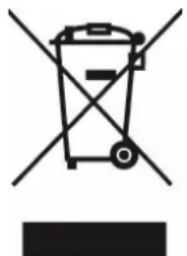
Correct disposal of the unit (ü electrical and ü electronic ü equipment).
(Applicable in the European Union and the rest of Europe that have adopted separate collection systems countries). The European Directive 2012/19/EU on Waste Electrical and Electronic Equipment (WEEE), requires that old household electrical appliances must not be disposed of in the normal household waste stream. Old appliances must be collected separately in order to optimize the recovery and recycling of the materials they contain and reduce the impact on human health and the environment. The symbol of the crossed out dustbin is marked on all devices to remind the obligations of separate collection. Consumers should contact their local authority or retailer for information concerning the correct disposal of their device.
V"rsion,"Blu"tooth:V5.0.
R"spu"stü, fr"cu"nciu: 20Hz - 20 kHz
Ti'mpo, r"pro, uccion, musicu por Blu'tooth: 6 ü 8 horus
Ti'mpo, r'pro, uccion, soni, os puru, ormir: mas, 10 horus
Distunci "funcionumi"nto: 10 m'tros
Mut"riul: Poliestr/ PU
Puls" "I boton PLAY/-TOP (R"pro,"ucir/D"t"n"r)
rü ut"n, r llumu,us "ntrunt"s.
Puls" "I botón PLAY/−TOP (R"pro,_ucir/D"t"n"r) „urunt" 3 s"gun,_os purü Üpögür "I Üpürüto, puls" 2 s"gun,_os purü r"chüzür lü Ilümū, ü.
Hügu „obl" clc "n "I botón PLAY/−TOP (R"pro,ucir/D"t"n"r) puru llumür ül ,il ultimo num"ro.
V"rsion"Blu'tooth:V5.0
Fr"qu"nzarisposta:20Hz-20kHz
V"rsao Blu"tooth: V5.0
R"spostu, fr"quenciu: 20Hz-20 kHz
T'mpo" musicR"prouO Blu'tooth: 6 8 hs
T'mpo"r"pro,ucao"sons puru"ormir:ucimu"10 horus
Distanciu "funcionum"nto 10 m'tros
Muti: poliest'f/PU
Diagrama do dispositivo
Figura 1
n"t,"oooO,t"o"ooe op oorooUt"c
Elk" k""r „ at h"t apparaat wor,"t ing"schak"I, wor,t h"t normala afg"sp""I, zon,"r timing. Wann""r "Iaatst" g"plan," timing ni"t is voltooi, wor,t , "z" automatisch uitg"schak"I, op basis van , " Iaatst g"plan," timing.
Bluetooth handsfree bellen
Voor inkom"n," opro"p"n kut u op , play / stop-knop
kk"nom,"t"Ifoon t"b"antwoor,"n.
Voor inkom"n,"opro"p"npkuntugg"ur"nn"3s"con,"nop,PLAY/STOP-knop,rukk"npomuitt" schak"I"n,ruk2s"con,"nom,“opro"ptw"ig"r"np.
Dubb"Iklik op," knop AFSPELEN / STOPPEN om „oor t" gaan m't h't LaTeX" numm"r opni"uw ki"z"

- Thank you for choosing a Livoo device!
- Livoo, your daily companion till social networks
- oafety Instructions
- Technical specifications
- drawing of the device
- Operation Instruction
- Charging operation
- Connexion Bluetooth
- Aow to use:
- operating instruction
- Timer & automatic turn off (only available in bluetooth music mode and sleep sounds mode).
- Bluetooth hands-free calling
- Washing instructions
- üU àuCAiAiTiOc OF CocFoAMITY
- Correct disposal of the unit (ü electrical and ü electronic ü equipment).
- Diagrama do dispositivo
- Bluetooth handsfree bellen
Brand : LIVOO
Model : TES253
Category : Headphones