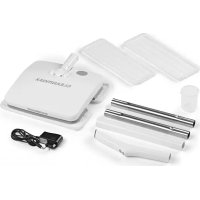
00476 - Steam mop Cleanmaxx - Free user manual and instructions
Find the device manual for free 00476 Cleanmaxx in PDF.


| Product type | Steam mop |
| Brand | Cleanmaxx |
| Model | 00476 / D260 |
| Power supply | Li-Ion battery 11.1 V, 2000 mAh (3 built-in cells) |
| Power | 35 W (max.) |
| Charging time | Approx. 6 to 8 hours (first charge), 6 hours (subsequent charges) |
| Runtime | Approx. 50 minutes (fully charged) |
| Water tank capacity | 100 ml max |
| Compatible floor types | Smooth floors: parquet, tile, laminate, etc. |
| Cleaning method | Vibration + water vaporization |
| Included accessories | 2 cloths, measuring cup, power adapter |
| Cloth maintenance | Machine washable at 60 °C (do not tumble dry) |
| Protection class (power adapter) | II |
| Usage | Domestic, indoor and outdoor (no rain or humidity) |
| Assembly | Telescopic handle in three parts, snap-fit locking |
| Starting | Tilting the handle backward to activate, switch on handle |
| Auto shut-off | No, manual stop via switch and tilting handle |
| After-sales service | DS Produkte GmbH, Am Heisterbusch 1, 19258 Gallin, Germany |
Frequently Asked Questions - 00476 Cleanmaxx
User questions about 00476 Cleanmaxx
0 question about this device. Answer the ones you know or ask your own.
Ask a new question about this device
Download the instructions for your Steam mop in PDF format for free! Find your manual 00476 - Cleanmaxx and take your electronic device back in hand. On this page are published all the documents necessary for the use of your device. 00476 by Cleanmaxx.
USER MANUAL 00476 Cleanmaxx
natural_image
White mobile cleaning brush with extended handle and base, isolated on white background (no text or symbols)00476
DE
Gebrauchsanleitung
ab Seite 3
EN
Instruction manual
starting on page 12
FR
Mode d'emploi
www.service-shopping.de
natural_image
Close-up of hands handling a white sheet of paper or paper on a flat surface (no text or symbols visible)natural_image
Person cleaning a white plastic sheet with a cloth (no text or symbols visible)Safety Instructions 13
Items Supplied and Device Overview 16
Before Initial Use 16
Charging Up the Battery 17
Assembly 17
Attaching / Detaching Cleaning Cloths 17
Filling the Water Reservoir 18
Use 18
Cleaning and Storage 19
Technical Data 19
Troubleshooting 20
Disposal 20
Explanation of the Symbols




Danger symbols: These symbols indicate risks of injury (e.g. from electricity or fire). Read through the associated safety instructions carefully and follow them.
Supplementary information
Protection class II
Only use indoors!
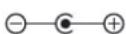
Polarity of the coaxial connector (mains adapter)
Symbol for direct current
Energy efficiency class VI
Read operating instructions before use!
Explanation of the Signal Words
DANGER
warns of serious injuries and danger to life
WARNING
warns of possible
serious injuries and danger to life
CAUTION
warns of slight to moderate injuries
NOTICE
warns of damage to property
Dear Customer,
We are delighted that you have chosen this battery-operated vibrating mop.
Before using the device for the first time, please read the instructions carefully and keep them for future reference. If the device is given to someone else, these instructions should also be handed over with it. They form an integral part of the device.
The manufacturer and importer do not accept any liability if the information in these instructions is not complied with.
Please Note: The illustrations used in these instructions may differ from the actual device.
If you have any questions about the device and about spare parts/accessories, contact the customer service department via our website:
www.service-shopping.de
Intended Use
- This device is suitable for dry and damp cleaning of different types of surfaces (floors, stairs etc.).
- It can be used both indoors and outdoors.
- This device is not suitable for mopping up: – highly flammable or combustible liquids, – glowing or burning ash.
- The device is for personal domestic use only and is not intended for commercial applications.
- The device should only be used as described in these instructions. Any other use is deemed to be improper.
- The following are excluded from the warranty: all defects caused by improper handling, damage or unauthorised attempts at repair. This also applies to normal wear and tear.
Safety Instructions
This device may be used by children aged 8 and over and by people with reduced physical, sensory or mental abilities or a lack of experience and/or knowledge if they are supervised or have received instruction on how to use the device safely and understand the dangers resulting from this.
■ Children must not play with the device.
- Cleaning and user maintenance may not be carried out by children without supervision.
Children younger than 8 years of age and animals must be kept away from the device and the mains cable! Improper use can lead to injuries and electric shock.
- The device must always be disconnected from the mains power when it is left unattended and before assembling, disassembling or cleaning the device.
■ Use the battery only with the mains adapter supplied with it. Do not charge any other devices with the mains adapter supplied.
- Never immerse the device, mains cable or mains adapter in water or other liquids and ensure that they cannot fall into water or become wet.
- Do not take the device apart! Do not make any modifications to the device! If the device, the mains adapter or the battery are damaged, they must be replaced by the manufacturer, customer service department or a similarly qualified person (e.g. specialist workshop) in order to avoid any hazards.

DANGER – Danger of Electric Shock from Water!
■ Use and store only in closed rooms.
- Should the device fall into water, switch off the power supply immediately. Do not attempt to pull the device out of the water while it is still connected to the mains power!
- Never touch the device, mains cable or mains adapter with wet hands when these components are connected to the mains power.
If the device is used outdoors, make sure that it is not exposed to any rain or moisture.

WARNING – Danger of Electric Shock from Damage and Inappropriate Use!
- Only connect the mains adapter to a socket with safety contacts that is properly installed and matches the technical data of the device. The socket must also be readily accessible after connection so that the connection to the mains can quickly be isolated.
- Only use suitable extension cables whose technical data is the same as that of the device.
■ Remove the mains adapter from the plug socket if a fault occurs during operation or before a thunderstorm. - The device must be switched off when the mains adapter is pulled out or inserted into the plug socket. Always pull the mains adapter and never the mains cable to disconnect the device from the mains power.
- Do not use the device when it is still connected to the mains adapter or the power source.

WARNING – Danger of Injury!
- Danger of suffocation! Keep children and animals away from the packaging material.
- Danger of strangulation! Make sure that the mains cable is always kept out of the reach of small children and animals.
- Danger of burns from battery acid! If the battery leaks, avoid physical contact with the battery acid. Wear protective gloves if necessary. If you touch battery acid, rinse the affected area with abundant fresh water immediately and contact a doctor as soon as possible.
- Danger of tripping! Make sure that the connected mains cable does not present a trip hazard.
■ Do not use the device if it is damaged.
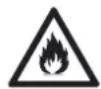
WARNING – Danger of Fire!
- Do not use or charge the device in rooms containing easily ignitable substances or poisonous and explosive fumes.
- Do not operate the device on hot surfaces or close to a naked flame.
- Do not cover the device during operation or charging in order to prevent it from catching fire.
In the event of a fire: Do not extinguish with water! Smother the flames with a fire blanket or a suitable fire extinguisher.
NOTICE – Risk of Damage to Material and Property from Rechargeable Batteries
- The battery must not be taken apart, thrown into a fire, immersed in liquids or short-circuited.
NOTICE – Risk of Damage to Material and Property
■ Make sure that the mains cable is not squashed, bent or laid over sharp edges and does not come into contact with hot surfaces. Do not wrap the mains cable around the device (danger of the cable breaking).
The device should only be used if it has been completely and correctly assembled!
- The cleaning cloths must have dried fully after cleaning before they can be put back onto the device.
- Protect the device from: heat, naked flames, sub-zero temperatures, strong temperature fluctuations, collisions.
■ Use only original spare parts from the manufacturer.
Items Supplied and Device Overview
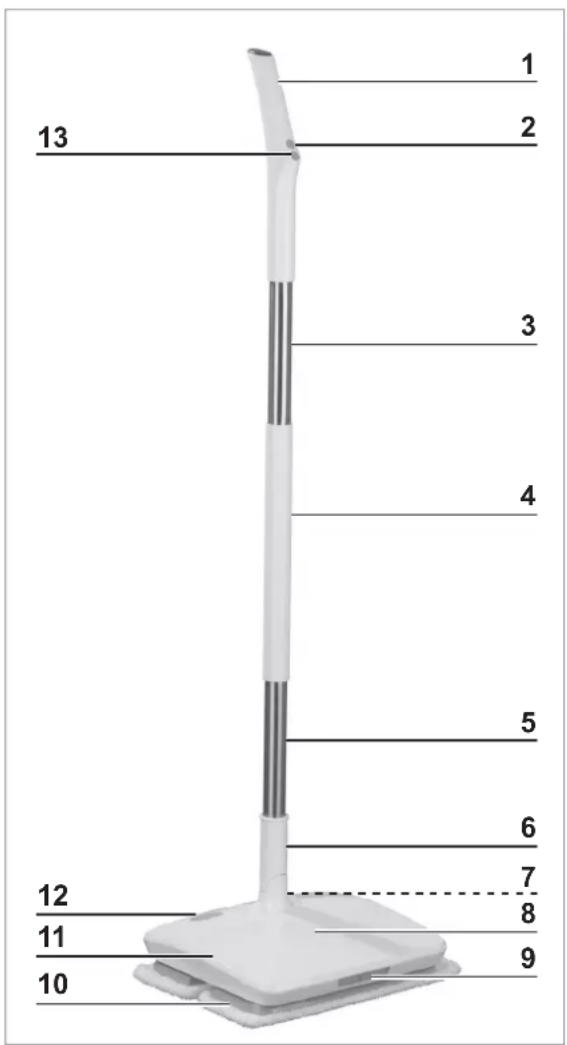
1 Handle
2 Spray trigger
3 Aluminium tube part
4 Plastic tube part
5 Aluminium tube part
6 Stem mount with release mechanism (activate / deactivate the device)
7 Charging socket (on the back of the main unit)
8 Battery status display (100 / 65 / 30%)
9 LED light and spray nozzle
10 Cleaning feet with cleaning cloths
11 Main unit with water reservoir
12 Water reservoir cap
13 On / Off switch
Not shown:
- Measuring cup
- Mains adapter
- Battery (fitted in the main unit)
Before Initial Use

PLEASE NOTE!
■ Never remove the rating plate and any possible warnings!
- Check the items supplied for completeness and transport damage. If you find any damage to the components, do not use them (!), but contact our customer service department immediately.
- Before using the device, remove all packaging materials and any labels that may be on the device and are used for protection during transportation or for advertising.
Charging Up the Battery
PLEASE NOTE!
- Risk of short-circuits! Do not insert any conducting objects (e.g. screwdrivers or similar items) into the charging socket.
-
Pull the mains adapter out of the plug socket if it is not going to be used for a lengthy period of time.
It is essential that you charge up the battery fully before you first use the device in order to achieve the maximum charging capacity. The first charge will last for 6–8 hours. -
Flip up the stem mount (6) on the main unit (11). It must be upright so that the device is deactivated and cannot be switched on accidentally.
- Open the catch for the charging socket (7) on the main unit and connect the mains adapter to the charging socket.
- Connect the mains adapter to a properly installed, easily accessible plug socket. The battery status display (8) flashes ( · 30%, ·· 65%, ... 100% charge).
- Allow the battery of the device to charge up for approx. 6 – 8 hours on the first charge and then for approx. 6 hours. The battery status display stops flashing when the battery is fully charged.
- Disconnect the mains adapter from the mains power and then from the device.
- Close the catch for the charging socket again.
Assembly
- Flip up the stem mount (6) on the main unit (11). It must be upright so that the device is deactivated and cannot be switched on accidentally.
- Insert the tube parts (3 - 5) into one another as follows: Aluminium tube part → plastic tube part → aluminium tube part. You must hear each part engage in the other.
- Plug the handle (1) on top of the last aluminium tube part. It must click audibly into place.
- Plug the stem with the handle into the stem mount on the main unit. It must click audibly into place.
- To remove the stem, the handle or the individual tube parts, press the corresponding release buttons in each case and pull out the respective part.
Attaching / Detaching Cleaning Cloths
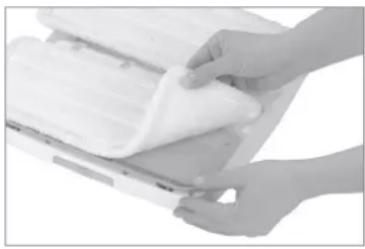
- Flip up the stem mount (6) on the main unit (11). It must be upright so that the device is deactivated and cannot be switched on accidentally.
- Hold the main unit upside down.
natural_image
Close-up of hands handling a white plastic sheet on a flat surface (no text or symbols visible)- Attach one cleaning cloth in each case to a cleaning foot (10) using the Velcro fastener.
- To detach the cleaning cloths, simply pull them off the cleaning feet.
Filling the Water Reservoir

PLEASE NOTE!
- When the water reservoir is filled, the main unit must not be tilted, turned upside down or laid or placed on its side. Water could escape!
- Flip the stem with the handle (1) and the stem mount (6) on the main unit (11) upwards. It must be upright so that the device is deactivated and cannot be switched on accidentally.
natural_image
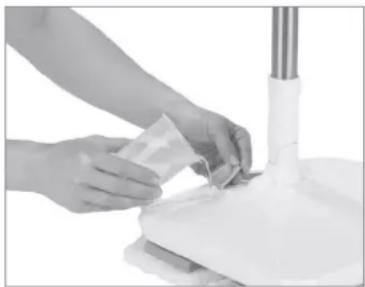
Person cleaning a white surface with a cloth (no text or symbols visible)- Open the water reservoir cap (12) on the main unit.
- Fill the water reservoir with water using the measuring cup (max. 100 ml).
- Securely close the water reservoir cap again.
Use

Switch the device off after each surface has been cleaned as this will considerably increase the operating time on each battery charge.
- Tilt the stem with the handle (1) back a little in order to trigger the release mechanism in the stem mount (6) and activate the device. The lamp (9) switches on and the battery status display (8) lights up.
- Press the On / Off switch (13) on the handle to switch on the device. The two cleaning feet (10) start to vibrate.
- Guide the device over the surface which is to be cleaned or polished.
- If necessary, press the spray trigger (2) on the handle to make the floor damp with the aid of the spray nozzle (9).
- To switch off the device, press the On / Off switch on the handle again.
- Tilt the stem with the handle upwards in order to trigger the release mechanism in the stem mount and activate the device. You must feel the stem engage. The lamp switches off and the battery status display goes out.
- Clean the cleaning cloths after use (see the "Cleaning and Storage" chapter).
Cleaning and Storage
PLEASE NOTE!
■ Make sure that the device is switched off and deactivated before cleaning it!
- Never immerse the device, the mains adapter or the mains cable in water or other liquids.
During cleaning make sure that no liquid gets into the main unit or the handle.
- Do not use any sharp or abrasive cleaning agents to clean the housing. They could damage the surfaces.

The cleaning cloths may lose some of their colour over time. This is normal and does not have any adverse effect on function. However, if one of the cleaning cloths is damaged or worn, it must be replaced.
- If there is still water in the water reservoir, empty it by opening the water reservoir cap (12) and emptying the device over a sink or similar outlet.
- Clean the device with a damp, soft cloth if necessary. Then dry it with a soft cloth.
- Pull the cleaning cloths off the cleaning feet (10) and clean them. Follow the washing instructions!

60°C normal wash cycle Do not bleach

Do not dry in a tumble dryer Do not iron

Do not dry-clean Wash separately or with the same colours.
- Check the mains adapter and the mains cable regularly for any damage.
- Charge up the battery after each use (see the "Charging Up the Battery" chapter).
- Store the device and the accessories in a dry place that is protected from sunlight and is not accessible to children and animals.
Technical Data
Device
Model number: D260
Article number: 00476
Voltage supply: 11.1 V (3 x Li-ion battery, 2000 mAh)
Power: 35 W (max.)
Battery
Charging time: approx. 6 - 8 hours
Operating time: approx. 50 minutes (with fully charged battery)
Mains adapter
Model number: MKS-1261000SEUD
Input: 100–240 V \~ 50/60 Hz, 0.3A
Output: 12.6 V DC, 1000 mA
Protection class: II


Troubleshooting
If the device does not work properly, check whether you are able to rectify the problem yourself. If the problem cannot be solved with the steps that are listed, contact the customer service department.

Do not attempt to repair a defective electrical device yourself!
| Problem Possible cause Fix | ||
| The battery is not charging up. The battery status display does not light up when the device is connected to the mains power. | The mains adapter is not inserted correctly in the plug socket. | Plug in the mains adapter. |
| The barrel connector is not plugged in the charging sock-et (7) of the device correctly. | Correct the connection between the charging socket and barrel connector. | |
| The socket is defective. Try another plug socket. | ||
| No mains voltage is present. | Check the fuse of the mains connection. | |
| The device cannot be switched on. | The battery of the device is too weak. | Charge up the battery. |
| Has the release mechanism in the stem mount (6) been triggered? | Activate the device by tilting the stem or the stem mount backwards. | |
| The device is not working properly. | Is the floor unsuitable for the device? | The device only works on smooth floors such as par-quet, laminate, tiles etc. |
| The battery is no longer in working order. | Contact the customer service department. | |
Disposal
The packaging material is recyclable. Dispose of the packaging in an environmentally friendly manner and take it to a recycling centre.

Dispose of the article with the battery inserted at a recycling centre for used electrical and electronic devices, and not in the household waste (!). For more information, contact your local authorities.
Customer Service / Importer:
DS Produkte GmbH
Am Heisterbusch 1
19258 Gallin, Germany
Tel.: +49 38851 314650 (Calls to German landlines are subject to charges. The cost varies depending on the service provider.)
Contenu
www.service-shopping.de
www.service-shopping.de
Doelmatig gebruik
WAARSCHUWING – Verwondingsgevaar!
WAARSCHUWING – Brandgevaar!
natural_image
Close-up of hands handling a white fabric or paper sheet (no visible text or symbols)natural_image
Person cleaning a whiteboard with a plastic sheet, no visible text or symbols


- Explanation of the Symbols
- Explanation of the Signal Words
- DANGER
- WARNING
- CAUTION
- NOTICE
- Intended Use
- Safety Instructions
- DANGER – Danger of Electric Shock from Water!
- WARNING – Danger of Electric Shock from Damage and Inappropriate Use!
- WARNING – Danger of Injury!
- WARNING – Danger of Fire!
- NOTICE – Risk of Damage to Material and Property from Rechargeable Batteries
- NOTICE – Risk of Damage to Material and Property
- Items Supplied and Device Overview
- Not shown:
- Before Initial Use
- PLEASE NOTE!
- Charging Up the Battery
- Assembly
- Attaching / Detaching Cleaning Cloths
- Filling the Water Reservoir
- Use
- Cleaning and Storage
- Technical Data
- Troubleshooting
- Disposal
- Customer Service / Importer:
- Contenu
- Doelmatig gebruik
- WAARSCHUWING – Verwondingsgevaar!
- WAARSCHUWING – Brandgevaar!
Brand : Cleanmaxx
Model : 00476
Category : Steam mop