
LUV350P - Vacuum Cleaner LG - Free user manual and instructions
Find the device manual for free LUV350P LG in PDF.



| Brand | LG |
| Model | LUV350P |
| Vacuum type | Canister with bag |
| Power supply | Mains (120 V, 60 Hz) |
| Power | 1200 W (estimated) |
| Tank capacity | Approximately 2 L |
| Power cord | Standard length (approx. 8 m) |
| Main filter | Washable HEPA filter |
| Secondary filter | Washable foam filter |
| Agitator | Motorized brush with overload protection |
| Included accessories | Dusting brush, crevice tool, turbo tool for pet hair, upholstery tool |
| Special features | Thermal protection, motor overload protection, dust level indicator |
| Noise level | Approximately 75 dB (estimated) |
| Tank maintenance | Easy emptying via bottom plate |
| Filter maintenance | Wash with water, air dry |
| Warranty | 5 years |
| Available spare parts | HEPA filter (ADQ73353501), foam filter (ADV74067001), agitator belt (MAS62064002) |
| Usage | Residential, indoor |
| Country of origin | Korea (LG) |
Frequently Asked Questions - LUV350P LG
User questions about LUV350P LG
0 question about this device. Answer the ones you know or ask your own.
Ask a new question about this device
Download the instructions for your Vacuum Cleaner in PDF format for free! Find your manual LUV350P - LG and take your electronic device back in hand. On this page are published all the documents necessary for the use of your device. LUV350P by LG.
USER MANUAL LUV350P LG
Please read this owner's manual thoroughly before operating and keep it handy for reference at all times.
LuV350P*
TABLE OF CONTENTS
3 VACUUM CLEANER WARRANTY
4 IMPORTANT SAFETY INFORMATION
6 PARTS AND FEATURES
7 ASSEMBLY
7 Unpacking the Vacuum Cleaner
7 Assembly Parts
7 Attaching the Wand
8 Attaching the Hose
8 Accessory Storage
8 Cord Storage
9 OPERATION
9 Wand Release Operation
9 Body Release Operation
10 Accessories
10 Accessory Use Chart
11 Using the Wand
11 Installing Attachments
11 Tips and Tricks
12 Using the Pet Hair Turbine Tool
12 Stairways and Landings
12 Using the Wand
12 Agitator Motor Overload Protection
12 Thermal Overload Protection
13 CARE & CLEANING
13 Storing the Vacuum Cleaner
13 Dust Tank Components
14 Emptying the Dust Tank
14 Cleaning the Dust Tank
15 Cleaning the Foam Filter
15 Cleaning the HEPA Filter
16 Pet Hair Turbine Tool
16 Agitator Maintenance
16 Replacing the Agitator Belt
17 Removing Clogs
18 Cleaning the Exterior of the Vacuum Cleaner
19 TROUBLESHOOTING
WARRANTY (USA)
LG Electronics Inc. will repair or replace your product, at LG's option, if it proves to be defective in material or workmanship under personal household use, during the warranty period set forth below, effective from the date of original consumer purchase of the product. This limited warranty is good only to the original purchaser of the product and effective only when used in U.S.A. and Canada.
| WARRANTY PERIOD HOW SERVICE IS HANDLED | |
| Five YearFrom the date of the original purchase | Any part of the vacuum cleaner which fails due to a defect in materials or workmanship. During this full five-year warranty, LG will also provide, free of charge, all labor and shop service to replace the defective part. |
THIS WARRANTY IS IN LIEU OF ANY OTHER WARRANTIES, EXPRESS OR IMPLIED, INCLUDING WITHOUT LIMITATION, ANY WARRANTY OF MERCHANTABILITY OR FITNESS FOR A PARTICULAR PURPOSE. TO THE EXTENT ANY IMPLIED WARRANTY IS REQUIRED BY LAW, IT IS LIMITED IN DURATION TO THE EXPRESS WARRANTY PERIOD ABOVE. LG WILL NOT BE LIABLE FOR ANY CONSEQUENTIAL, INDIRECT, OR INCIDENTAL DAMAGES OF ANY KIND, INCLUDING LOST REVENUES OR PROFITS, IN CONNECTION WITH THE PRODUCT. SOME STATES DO NOT ALLOW LIMITATION ON HOW LONG AN IMPLIED WARRANTY LASTS OR THE EXCLUSION OF INCIDENTAL OR CONSEQUENTIAL DAMAGES, SO THE ABOVE LIMITATIONS OR EXCLUSIONS MAY NOT APPLY TO YOU.
THIS WARRANTY COVERS ONLY DEFECTS IN MATERIAL AND WORKMANSHIP. LGE WILL NOT PAY FOR:
- Expendable items that can wear out, including but not limited to filters, and belts.
- A service technician to instruct the user in correct product assembly, operation or maintenance.
- A service technician to clean or maintain this product.
- Damage to or failure of this product if it is not assembled, operated or maintained according to all instructions supplied with this product.
- Damage to or failure of this product resulting from accident, abuse, misuse or use for other than its intended purpose.
- Damage to or failure of this product caused by the use of detergents, cleaners, chemicals or utensils other than those recommended in all instructions supplied with this product.
- Damage to or failure of parts or systems resulting from unauthorized modifications made to this product.
This warranty is extended to the original purchaser for products purchased for home use within the U.S.A. In Alaska, the warranty excludes the cost of shipping or service calls to your home.
Some states do not allow the exclusion or limitation of incidental or consequential damages, so this exclusion or limitation may not apply to you. This warranty gives you specific legal rights, and you may also have other rights which vary from state to state. To know what your legal rights are, consult your local or state consumer affairs or your state's Attorney General.
CUSTOMER ASSISTANCE INFORMATION:
| To Prove Warranty Coverage Retain your Sales Receipt to prove date of purchase.A copy of your Sales Receipt must be submitted at the time warranty service is provided. | |
| To Obtain Nearest Authorized Service Center or Sales Dealer, or to Obtain Product, Customer, or Service Assistance | Call 1-800-243-0000 (24 hours - 365 days a year) and choose the appropriate prompt from the menu; or visit our website at http://www.lg.com(In Canada Call 1-888-542-2623, website http://www.lg.com) |
IMPORTANT SAFETY INSTRUCTIONS
READ ALL INSTRUCTIONS BEFORE USE - SAVE THESE INSTRUCTIONS
Read and follow all instructions before using your vacuum cleaner to prevent the risk of fire, electric shock, personal injury, or damage when using the vacuum cleaner. This guide does not cover all possible conditions that may occur. Always contact your service agent or manufacturer regarding problems that you do not understand.

This is the safety alert symbol. This symbol alerts you to potential hazards that can result in property damage and / or serious bodily harm or death.
All safety messages will follow the safety alert symbol and either the word WARNING or CAUTION.

WARNING
Indicates a hazardous situation which, if not avoided, could result in death or serious injury.

CAUTION
Indicates a hazardous situation which, if not avoided, may result in minor or moderate injury.

WARNING
- Disconnect electrical supply before servicing or cleaning the vacuum cleaner or when the vacuum cleaner is not in use. Failure to do so could result in electrical shock or personal injury.
- Do not use the vacuum cleaner to pick up anything that is burning or smoking such as cigarettes, or hot ashes. Doing so could result in death, fire or electrical shock.
- Do not vacuum flammable or explosive substances such as gasoline, benzene, thinners, propane (liquids or gases). The fumes from these substances can create a fire hazard or explosion. Doing so could result in death or personal injury.
- Do not handle the plug or vacuum cleaner with wet hands. Doing so could result in death or electrical shock.
- Do not unplug the vacuum cleaner by pulling on the cord. Doing so could result in product damage or electrical shock. To unplug, grasp the plug, not the cord.
- Keep hair, loose clothing, fingers, and all parts of the body away from openings and moving parts. Failure to do so could result in electrical shock or personal injury.
- Do not pull or carry the vacuum cleaner by its cord, use the cord as a handle, close a door on the cord or pull the cord around sharp edges or corners.
- Do not run the vacuum cleaner over the cord. Keep the cord away from heated surfaces. Failure to do so could result in electrical shock, personal injury, fire, or product damage.
- The vacuum cleaner is not a toy and should not be operated by children. Pay close attention when operating the vacuum cleaner near children. Personal injury or product damage could result.
- Do not use the vacuum cleaner if the power cord or plug is damaged or faulty. Personal injury or product damage could result. In these cases, contact LG Electronics Service Agent to avoid hazard.
-
Do not use vacuum cleaner if it has been under water. Personal injury or product damage could result. In these cases, contact LG Electronics Service Agent to avoid hazard.
-
Do not continue to vacuum if any parts appear missing or damaged. Personal injury or product damage could result. In these cases, contact LG Electronics Service Agent to avoid hazard.
- Do not use an extension cord with this vacuum cleaner. Fire hazard or product damage could result.
- Use proper voltage. Using improper voltage may result in damage to the motor and possible injury to the user. Proper voltage is listed on the bottom of the vacuum cleaner.
- Turn off all controls before unplugging. Failure to do so could result in electrical shock or personal injury.
- Do not change the plug in any way. Failure to follow this warning could result in electrical shock, personal injury, product damage or death. If plug does not fit, contact a qualified electrician to install the proper outlet.
- Repairs to electrical appliances may only be performed by qualified service engineers. Improper repairs may lead to serious hazards for the user.
- Do not put fingers near the gear. Failure to follow this warning could result in personal injury.
- Do not use out doors or on wet surfaces. Failure to follow this warning could result in electrical shock or personal injury.
- Do not put anything between the vacuum cleaner body and agitator head space. Personal injury or product damage could result.
- This product contains chemicals known to the State of California to cause cancer and birth defects or other reproductive harm. Wash hands after handling.
• Use extra care when cleaning on stairs. - Do not leave the appliance when it is plugged in. Unplug from the outlet when not in use and before servicing.

CAUTION
- Do not insert objects into vacuum openings. Failure to follow this instruction could result in product damage.
- Do not use the vacuum cleaner if any of the openings are blocked. Keep vacuum openings free of dust, lint, hair and anything that may reduce air flow. Failure to follow instruction could result in product damage.
- Do not use the vacuum cleaner without the tank and / or filters properly installed. Failure to follow instruction could result in product damage.
- Always clean the dust tank and filters after vacuuming carpet cleaners or fresheners, powders and fine dust. These products can clog the filters, reduce airflow and / or cause damage to the vacuum. Failure to clean the dust tank and filters could cause permanent damage to the vacuum.
- Do not use the vacuum cleaner to pick up sharp or hard objects such as small toys, pins, paper clips, etc. They may damage the vacuum or dust tank.
- Store the vacuum cleaner indoors. Put the vacuum cleaner away after use to prevent tripping over it.
- The vacuum cleaner should not be operated by young children. Failure to follow this instruction could result in personal injury or product damage.
-
Only use parts produced or recommended by Qualified Service Technicians. Failure to do so could result in product damage.
-
Follow all instructions in the owner's manual. Only use LG recommended or approved attachments and accessories. Failure to do so could result in product damage.
- Never place the vacuum cleaner at the top of stairs. Failure to follow instruction could result in personal injury or product damage.
- Make sure the filters (exhaust filter and motor safety filter) are completely dry before placing in the vacuum. Failure to do so could result in product damage.
- Do not dry the filters in an oven or microwave. Failure follow instruction could result in a fire hazard.
- Do not dry the filters in a clothes dryer. Failure to follow instruction could result in a fire hazard.
- Do not dry the filters near an open flame. Failure to follow instruction could result in a fire hazard.
• Always turn the vacuum cleaner off before connecting or disconnecting the hose. Personal injury or product damage could result.
• The vacuum cleaner is only intended for household use. - You are responsible for proper assembly and use of your vacuum cleaner.
Thermal Protector:
This vacuum cleaner has a special thermostat that protects the vacuum cleaner in case of motor overheating. If the vacuum cleaner suddenly shuts off, turn off the switch and unplug the vacuum cleaner.
Check the vacuum cleaner for possible source of overheating such as a full dust tank, a blocked hose or clogged filter. If these conditions are found, fix them and wait at least 30 minutes before attempting to use the vacuum cleaner. After 30 minutes, plug the vacuum cleaner back in and turn on the switch. If the vacuum cleaner still does not run, contact a qualified electrician.
It is important to know your vacuum cleaner parts and features to assure its proper and safe use. Review these before using your vacuum cleaner.
Common Replacement Parts
| HEPA Filter ADQ73353501 | ||
| Foam Filter ADV74067001 | Filter Frame ADV74067001 | |
| Foam Filter MDJ61980604 | ||
| Agitator Belt MAS62064002 | ||
To order these parts call:
1-800-243-0000 (U.S.A.)
1-888-542-2623 (Canada)
Accessory Tools
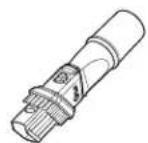
Dusting brush & Crevice tool
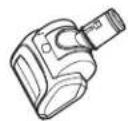
Pet hair turbine tool
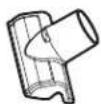
Upholstery tool
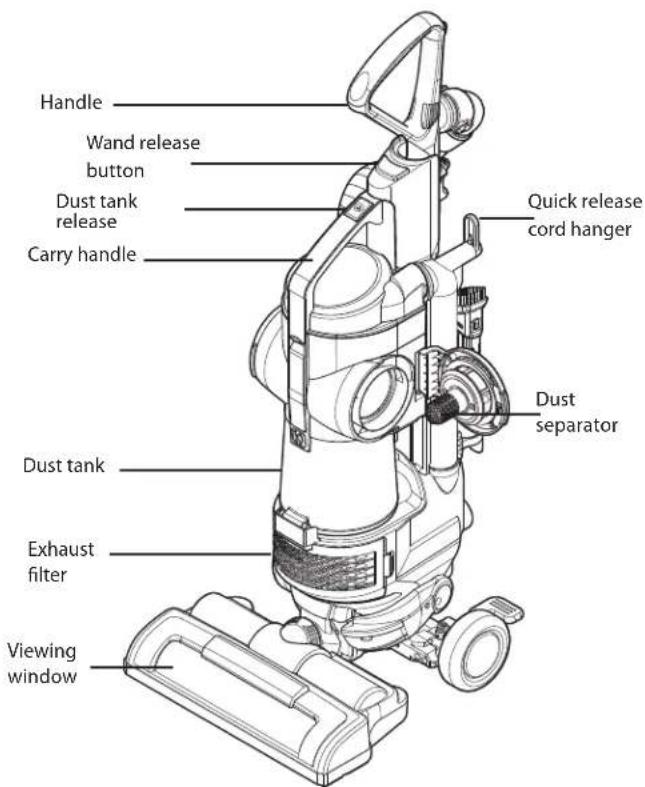
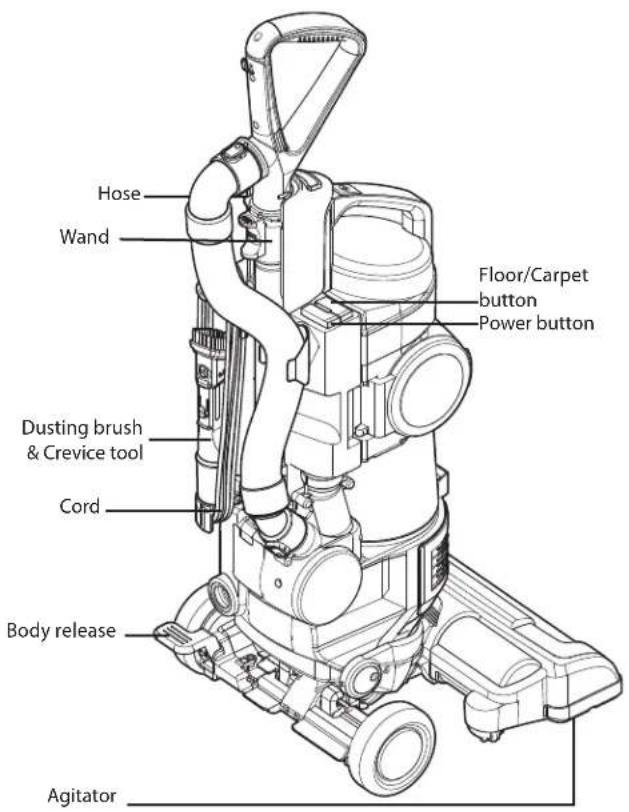
ASSEMBLY
To reduce the risk shipping damage, your vacuum cleaner is shipped partially assembled.
Unpacking the Vacuum Cleaner
Carefully unpack the vacuum cleaner and make sure that you have all parts before discarding of any packaging.
Remove any tape, cardboard inserts and protective film before assembly.
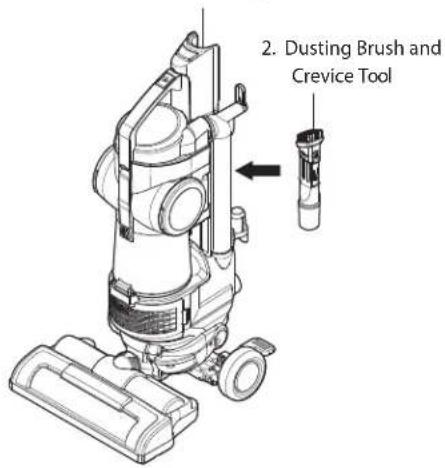
Items that are packed in the box:
- Vacuum Cleaner Body
- Dusting Brush & Crevice Tool
- Handle and Wand
- Hose
- Pet Hair Turbine Tool
- Additional Foam Filter
- Upholstery Tool
Assembly Parts
- Vacuum Cleaner Body
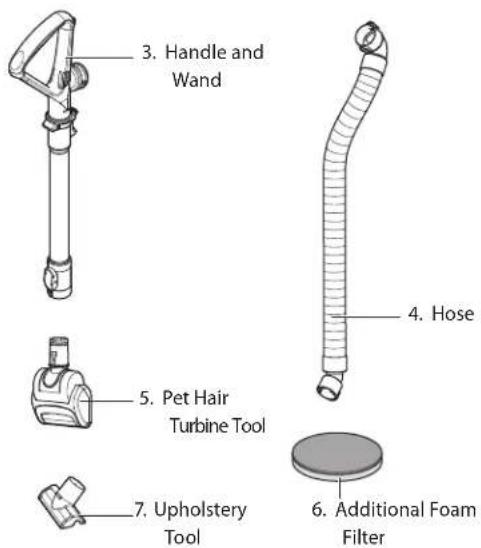
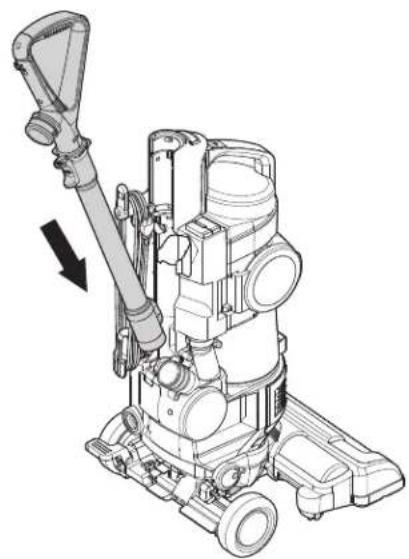
Attaching the Wand
- Insert the wand onto the wand-locator knob.
- Snap the wand into the body.
natural_image
Technical line drawing of a mechanical device with a lever and directional arrow (no text or symbols)Attaching the Hose
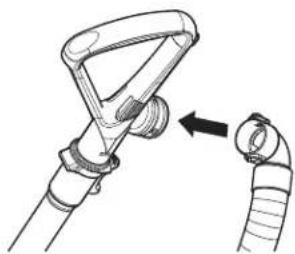
- Attached the top side of the hose to the handle. The top side of the hose can be recognized by the two holes.
natural_image
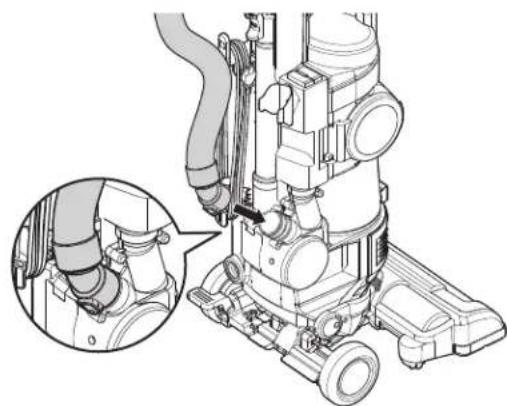
Diagram of a mechanical device with a handle and cable, showing a close-up of the cable being inserted (no text or symbols present)- Insert the bottom side of the hose to the main body. The bottom side of the hose can be recognized by the two release clips.
natural_image
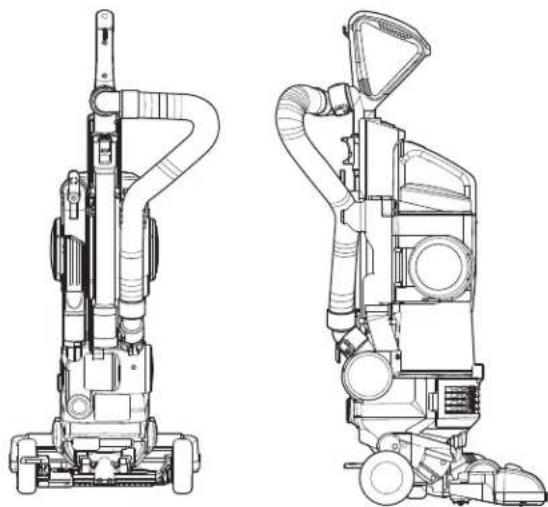
Technical illustration of a mechanical device with a magnified inset showing internal components (no text or symbols)- Clip the hose into its holder on the back side of the vacuum.
natural_image
Technical line drawings of two different vacuum cleaner units (no text or symbols present)
WARNING
Personal injury and Product Damage Hazard! DO NOT use outlets above counters. Not following this warning could result in damage to the surrounding items.
Accessory Storage
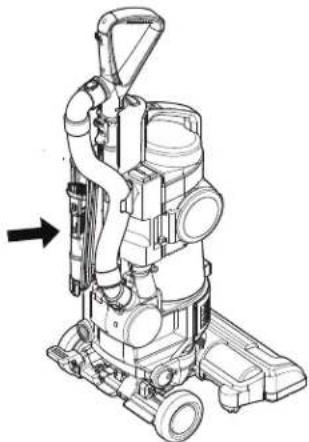
Your vacuum cleaner features convenient on-board storage for the dusting brush & crevice tool.
- Insert the dusting brush & crevice tool onto the main body
natural_image
Technical line drawing of a vacuum cleaner with internal components and a directional arrow (no text or symbols)Cord Storage
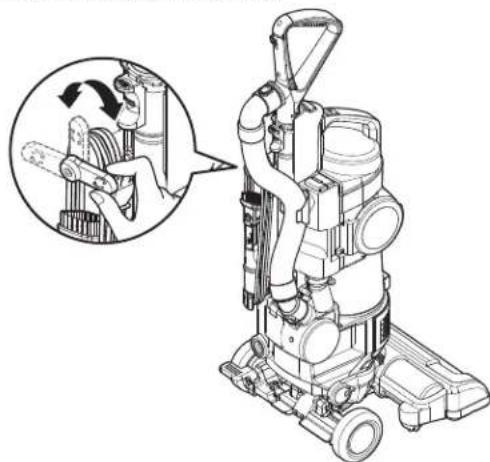
To store the cord:
-
Make sure the cord hanger is in the UP position.
-
Wrap the cord around the cord hanger and hook into place. Clip the plug onto the cord.
NOTE: To reduce the risk of electric shock, this vacuum cleaner has a polarized plug; one blade is wider than the other. This plug will fit in a polarized outlet only one way. If the plug does not fit fully in the outlet, reverse the plug. If it still does not fit, contact a qualified electrician to install the proper outlet. Do not change the plug in any way.
To release the cord:
- Rotate the upper cord holder to the DOWN position.
- Unclip the plug and extend the cord.
natural_image
Line drawing of a vacuum cleaner with a magnified inset showing internal components (no text or symbols)
WARNING
Personal injury Hazard!
Do not set the vacuum cleaner on stairs; always keep it on the floor.
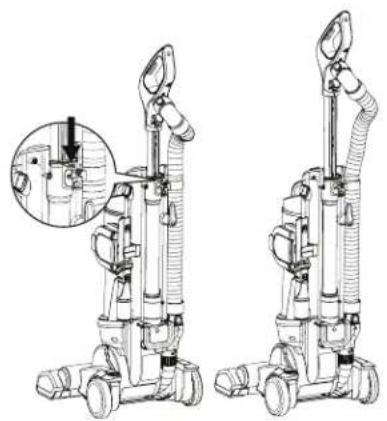
Wand Extension
Press the extension button on the wanc and extend the wanc handle.
natural_image
Line drawing of two different vacuum cleaner units with internal tubing and a magnified inset showing a close-up detail (no text or symbols)Control Operation
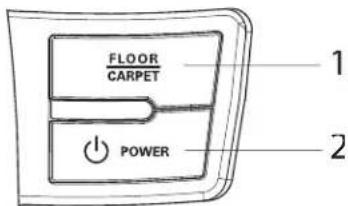
1. Floor/Carpet
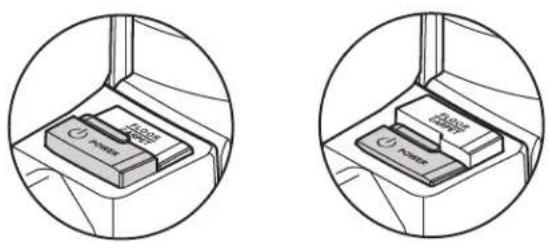
Press this button to turn the agitator ON (carpet) or OFF (floor) The Floor/Carpe button also resets the agitator motor.
2. Power:
Turns the vacuum on and off.
Note: The agitator will not stir when the vacuum is in the upright position.
Body Release Operation
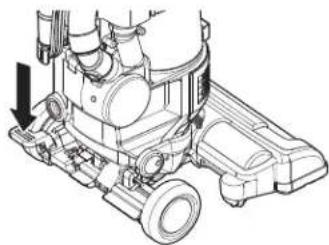
To begin vacuuming, press the pedal on the left side of the vacuum and pull the handle down
Note: When the vacuum is in the upright position the agitator will not run
natural_image
Technical line drawing of a mechanical assembly with no visible text or symbols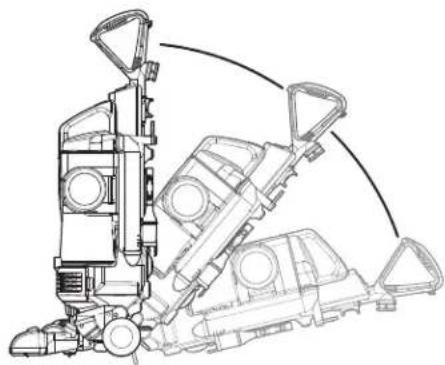
natural_image
Technical line drawing of a mechanical assembly with no visible text or symbols
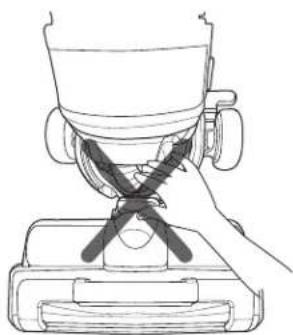
WARNING
▶ Do not place anything in the space between the body and agitator head.
Persona injury or product damage could result.
natural_image
Line drawing of a hand using a tool to press or install a cup (no text or symbols present)Accessories
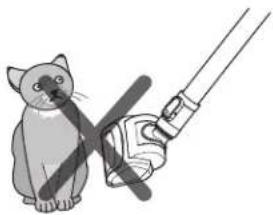
Pet Hair Turbine Tool
This air-turbine powered brush is designed for removing per hair lint, etc. from fabrics and carpets.
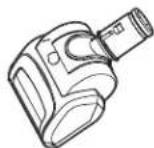
Do NOT use on pets.
natural_image
Illustration of a cat holding a pen and a hand holding a tool, no text or symbols presentDusting Brush
Use the dusting brush to clean furniture, walls, etc.

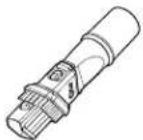
Crevice Tool
The crevice tool can be used for tight corners, between cushions and other hard to reach places.
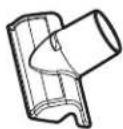
Upholstery Tool
Use the upholstery tool to clean fabric on furniture.
Accessory Use Chart
| Accessory | CLEANING AREA | |||||||
| Between Cushions | Upholstered Surfaces* | Furniture and Hard Surfaces* | Drapes* | Stairs/ Cushions | Carpeted Floors/Rugs | Walls | ||
Pet Hair Turbine tool 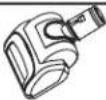 | ||||||||
Dusting Brush 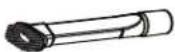 | ||||||||
Crevice Tool 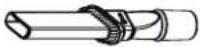 | ||||||||
Upholstery Tool  | ||||||||
* Always make sure attachments are clean before using on fabrics.
Using the Wand

CAUTION
Never pull the vacuum cleaner by the hose.
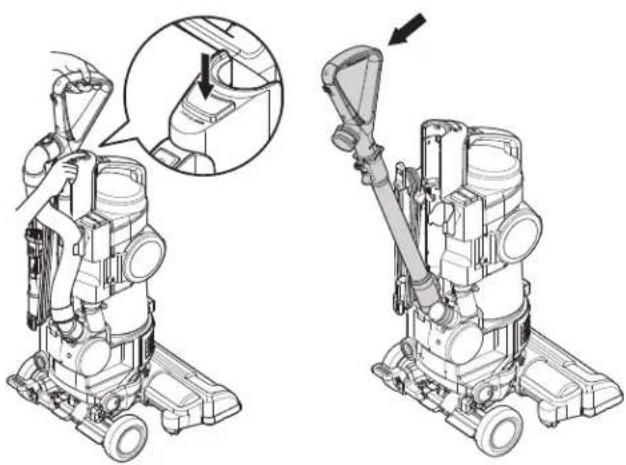
Release the wand and handle:
- Make sure that the vacuum cleaner is locked in the upright position on a flat, stable surface.
- Press the wand release button on the body and tilt the wand handle.
- Lift the wand up and out.
natural_image
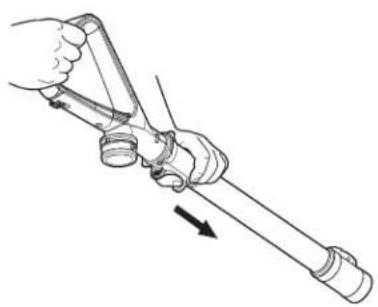
Technical illustration of a vacuum cleaner with a hand operating the valve, showing two views (top and side) without any text or symbols.- Press the wand extension button on the wand and pull the wand down.
natural_image
Line drawing of a hand holding a tool with a directional arrow indicating motion (no text or symbols)Installing Attachments
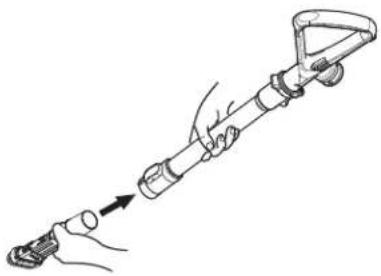
Crevice Tool:
Slide the crevice tool into the end of the wand.
natural_image
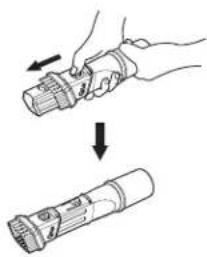
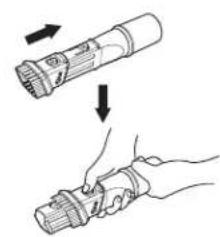
Line drawing of a hand holding a handheld device with an arrow indicating motion (no text or symbols)Dusting Brush:
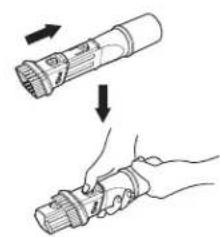
Press the brush release button on the crevice tool and slide the brush forward.
natural_image
Illustration of a hand holding a flashlight with an arrow indicating motion (no text or symbols)Dusting brush
natural_image
Illustration of a flashlight being held, showing the blade being twisted and the handle being inserted (no text or symbols present)Crevice tool
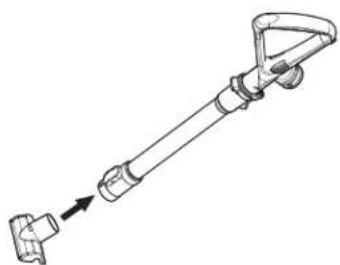
Upholstery Tool:
Slide the upholstery tool into the end of the wand.
natural_image
Technical line drawing of a mechanical device with a lever and handle (no text or symbols)Tips and Tricks
Carpet Edges and Corners:
For tight corners, carpet edges and along base boards, use the dusting brush. For especially hard to reach areas, use the crevice tool.
Using the Pet Hair Turbine Tool
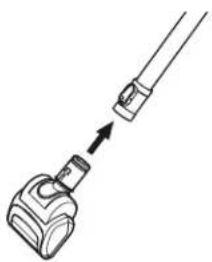
The Pet Hair Turbine Tool features a turbine-powered agitator to provide extra cleaning power on carpets and fabrics. It is great for cleaning stairs, cushions and vehicle upholstery.
natural_image
Diagram of a mechanical clamp or connector with an arrow indicating direction (no text or symbols)When using the pet hair turbine tool, check the brush area frequently for buildup of hair, fibers, lint and other debris.
Excessive buildup can reduce performance and could damage the pet hair turbine tool. See the Care and Cleaning section for cleaning instructions.
Stairways and Landings
Use the dusting brush or pet hair turbine tool on stairs and landings. Make sure that the vacuum cleaner is placed so that it cannot tip or fall.
Agitator Motor Overload Protection
The agitator has a built-in protection against motor damage should the agitator jam. If the agitator slows down or stops, the agitator overload protector shuts off the agitator and suction motor.
To correct problem: Turn off and unplug the vacuum cleaner. Remove the obstruction and turn on the vacuum cleaner by pressing the Power button, and then press the Floor/Carpet button.
natural_image
Two circular diagrams showing a device placed on a surface, with no visible text or symbols.Thermal Overload Protection
This vacuum cleaner has a thermal overload protector that automatically activates to protect the vacuum cleaner from overheating. If a clog disturbs the normal flow of air to the motor, the thermal protector turns the motor off automatically to allow the motor to cool in order to prevent possible damage to the vacuum cleaner.
To correct the problem: Turn the vacuum cleaner off and unplug the power cord. Check for and remove clogs, if necessary. Also check and clean any dirty filters.
Wait approximately 30 minutes and then plug the vacuum cleaner in and turn it back on to see if the motor protector has reset. The thermal protector system will not reset until the vacuum cleaner has completely cooled down.
Always follow all safety precautions when cleaning and servicing the vacuum cleaner.
Storing the Vacuum Cleaner
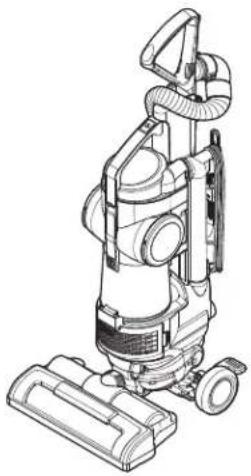
When not in use, wrap the cord around the cord hanger as shown. The hose can be wrapped around the handle/wand if the wand is being stored un-extended. Store the dusting brush/crevice tool in its proper place on the left of the vacuum cleaner.

WARNING
• Electrical shock and personal injury hazard.
- Take care when wrapping the cord. Wrapping the cord too tightly puts stress on the cord and can cause cord damage. Do not crisscross when wrapping the cord. A damaged cord could cause an electrical shock hazard, personal injury or damage.
natural_image
Line drawing of a vacuum cleaner with attached hoses and base (no text or symbols)Dust Tank Components
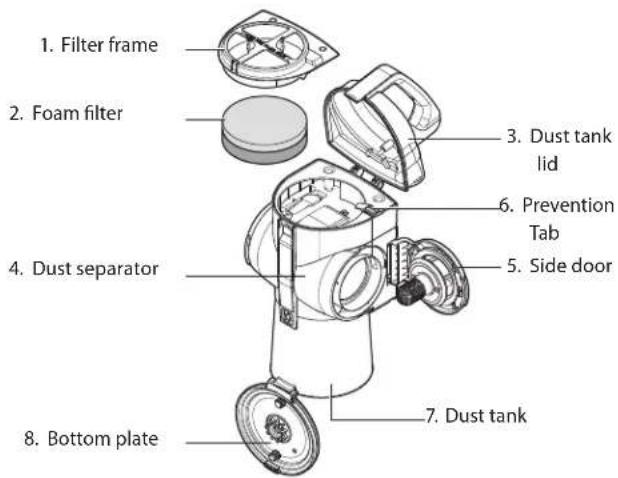
The dust tank consists of several key components. Always make sure that all parts are properly reinstalled after emptying the dust tank.
NEVER operate the vacuum cleaner without all filters in place.
NEVER operate the vacuum cleaner with wet filters or components.
Key components:
- Filter frame and foam filter: Captures medium to fine particles. It consists of Filter frame & Foam filter. These are washable.
2. Foam filter
- Dust tank lid: Open to access the foam filter.
- Dust separator: Separates dust from air coming in.
- Side door: Open to remove dirt from the dust separator.
- Prevention tab: Prevents the lid from closing without a foam filter installed.
- Dust tank: Where dirt is collected.
- Bottom plate: Open to empty the dust tank.
Emptying the Dust Tank

WARNING
• Electrical shock and personal injury hazard.
- Always unplug the power cord from the electrical outlet before servicing or performing maintenance on the vacuum :leaner. Failure to do so could result in electrical shock or personal injury.
For maximum performance, always empty the dust tank when the dirt level reaches the VMAX line.
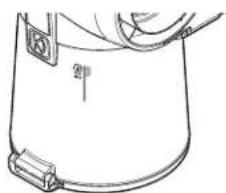
natural_image
Line drawing of a container with a side arm and a handle, no text or symbols presentTO REMOVE THE DUST TANK: Press the dust tank 'lease, tilt the dust tank back, then lift it out of the vacuum cleaner.
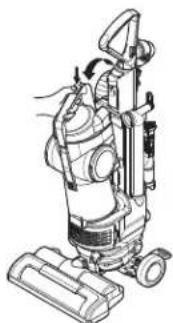
natural_image
Line drawing of a vacuum cleaner with attached components (no text or symbols)TO EMPTY DUST TANK: Press the dirt release and open the bottom plate, as shown.
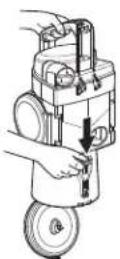
TO REINSTALL THE DUST TANK: Place the dust tank n the holder, and tilt forward until it clicks into place. Make sure that the dust tank is properly seated.
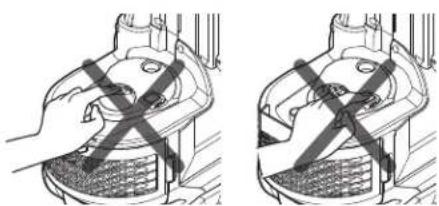
natural_image
Two-panel illustration showing a hand pressing a component with a cross mark, no text or symbols present.Do not touch the inner year and button
Cleaning the Dust Tank
For optimal performance, clean the dust tank regularly.
To Clean the Dust Tank:
- Remove the dust tank from the vacuum cleaner.
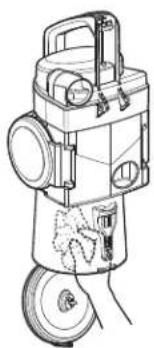
- Press the emptying dirt release and open the bottom plate.
- Wipe out the dust tank with a soft cloth or paper towel.
natural_image
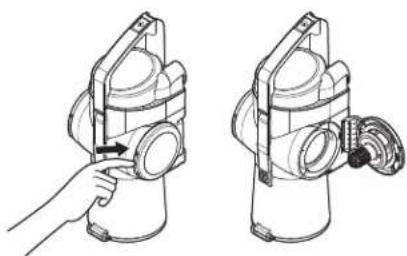
Technical line drawing of a mechanical device with no visible text or symbols- Release the latch on the sidedoor on both the right and left sides.
natural_image
Illustration of a hand holding a cylindrical device with a handle, next to a separate view of a mechanical component (no text or symbols present)- Remove any hair, fibers or other debris from the dust separator. Do not remove the zones attached to the side door for cleaning.
NEVER operate the vacuum cleaner with wet filters or com-ponents.
Cleaning the Foam Filter

CAUTION
- A wet filter can cause permanent damage to the vacuum cleaner.
- Be sure filters are completely dry before reinstalling.
For optimal performance, check the filters every month and clean when necessary. Don't close the dusk tank lid without the foam filter.
To clean the foam filter:
-
Remove the dusk tank from the vacuum cleaner.
-
Lift up on the dust tank lid release and open the lid.
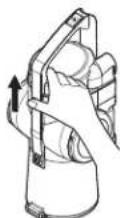
- Lift out the foam filter.
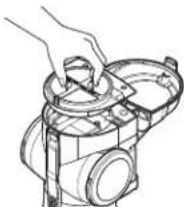
- Separate the foam filter from the filter frame.
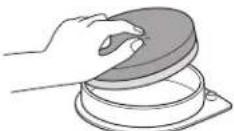
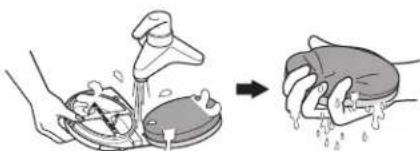
- Shake out any excess dirt or debris and rinse the foam filter and filter frame with clean water. Squeeze out water from the foam filter.
natural_image
Illustration showing a hand washing a shower with water, and a hand holding a bag with liquid (no text or symbols)- Dry completely away from sunlight.
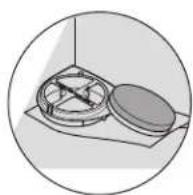
NEVER operate the vacuum cleaner with wet filters or components.
If you notice a loss of suction and cleaning the foam filter does not help, you may need to replace the foam filter. You can purchase additional foam filters from LG by calling 1-800-243-0000 (U.S.A.), 1-888-542-2623 (Canada) and asking for parts on page 6.
Cleaning the HEPA Filter
To Clean the HEPA Filter:
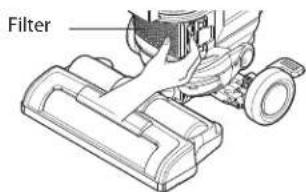
- Remove the exhaust filter cover.
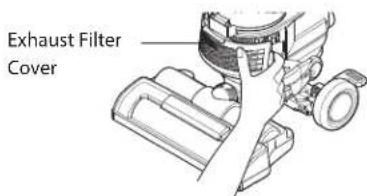
- Remove the filter from the body.
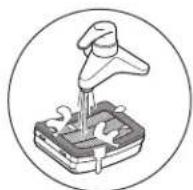
- Wash the filter thoroughly in flowing water.
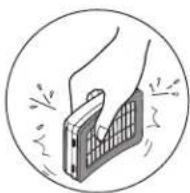
- Remove moisture.
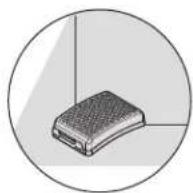
- Dry completely away from sunlight.
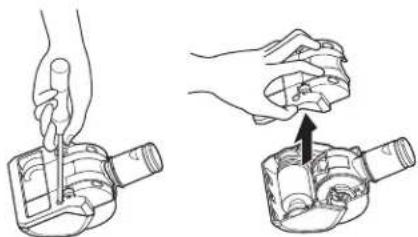
Pet Hair Turbine Tool
To clean the pet hair turbine tool:
- Remove the four screws on the bottom of the pet hair turbine tool.
- Lift off the cover.
- Remove any debris.
To reassemble:
-
Carefully press the cover onto the tabs until they snap into place.
-
Insert and tighten the screws that were removed in step 1. Do NOT overtighten the screws.
natural_image
Illustration of two hands performing a manual task on a device, showing hand positioning and assembly (no text or symbols)Do Not use the pet hair turbine tool on animals.

WARNING
• Electrical shock and personal injury hazard.
• Always unplug the power cord from the electrical outlet before servicing.
- Failure to do so could result in electrical shock or personal injury.
Agitator Maintenance
Frequently check the agitator brush area for hair, string and line buildup.
Remove the Agitator Brush Cover:
- Unplug the vacuum cleaner. Press the left foot pedal to release the head. Lower the handle until the vacuum cleaner is lying flat on the floor.
- Turn the vacuum cleaner so that the agitator is facing up.
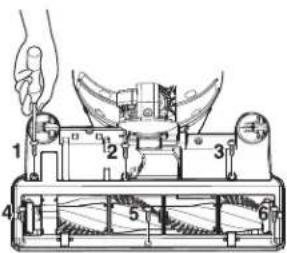
- Set the head on a cloth or a smooth surface. Remove the six screws on the bottom of the head and remove the cover.
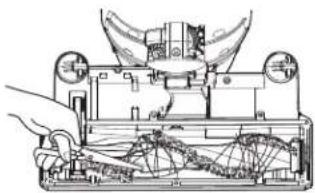
- Carefully remove any accumulated string, hair, etc. from the agitator and the agitator area.
natural_image
Technical line drawing of a mechanical device with hands operating it (no visible text or symbols)To reinstall the cover, reverse the steps above.

WARNING
• Electrical shock and personal injury hazard.
• Always unplug the power cord from the electrical outlet before servicing. Failure to do so could result in electrical shock or personal injury.
Replacing the Agitator Belt
If the belt breaks, follow the steps below to replace the agitator belt.
To Replace the Belt:
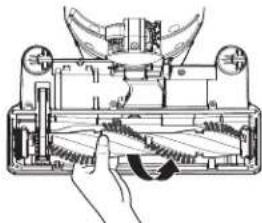
- Remove the agitator brush cover.
- Lift the agitator straight out.
natural_image
Technical line drawing of a mechanical device with hands operating it (no text or symbols present)- Unhook the old belt from the drive pulley. Make sure no pieces of the broken belt are trapped in the agitator or drive pulley area.
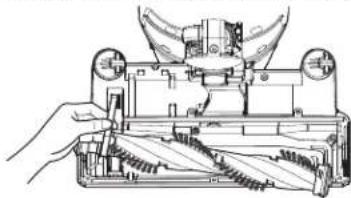
natural_image
Technical line drawing of a mechanical device with hands operating it (no text or symbols visible)- Hook the new belt over the drive pulley of the agitator motor.
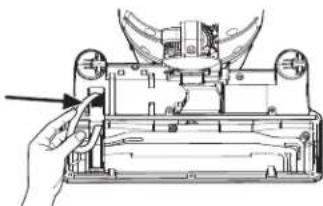
natural_image
Technical line drawing of a mechanical assembly with a hand operating a tool (no text or symbols present)- Fit the agitator through the belt, making sure the belt is aligned with the pulley section of the agitator.
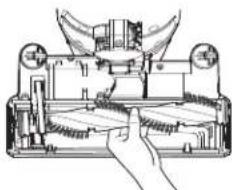
natural_image
Technical line drawing of a mechanical device with hands operating it (no text or symbols present)- Lower the agitator into place, making sure that the oval shaped tabs fit into the indents on the head.
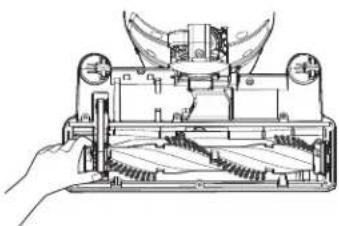
natural_image
Technical line drawing of a mechanical device with a hand operating it (no text or symbols present)- Reinstall the agitator brush cover as described above.
For a replacement belt, order LG service center belt part #MAS62064002.
Removing Clogs

WARNING
• Electrical shock and personal injury hazard.
• Always unplug the power cord from the electrical outlet before servicing.
- Failure to do so could result in electrical shock or personal injury.
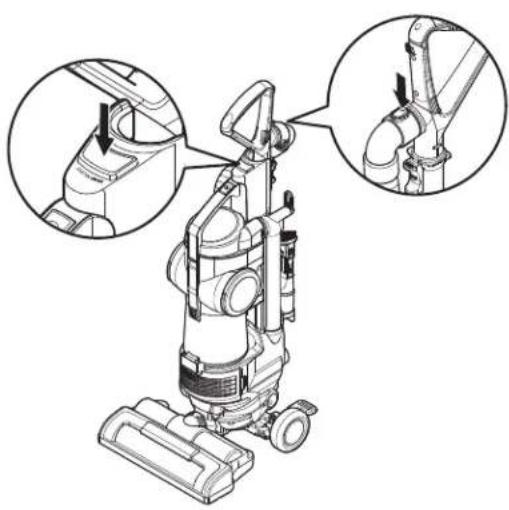
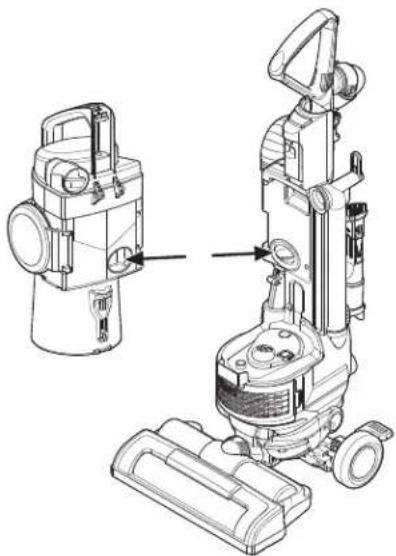
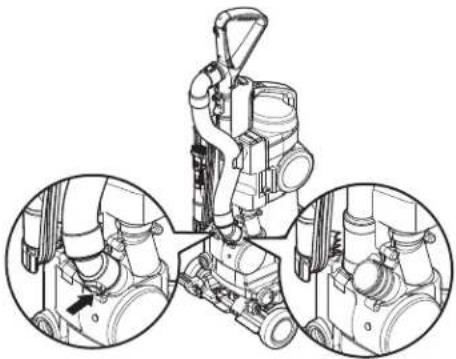
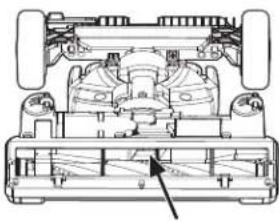
If you notice a loss in suction, first check the filters as described on page 13. If the filters are clean, there may be a clog. The arrows show areas where clogs are most likely to occur.
To Check for Clogs:
- Check the hose where it connects to the handle by pressing the two release buttons on the top end of the hose.
natural_image
Line drawing of a vacuum cleaner with three close-up views of the component (no text or symbols)- Remove the dust tank and check the dust tank inlet and body inlet where it connects to the vacuum cleaner body.
natural_image
Technical line drawing of a vacuum cleaner with attached device and mounting bracket (no text or symbols)- Check the hose where it connects to the back of the body by pressing the release buttons on the bottom end of the hose.
natural_image
Technical line drawing of a mechanical assembly with three circular insets showing close-ups of components (no text or symbols)- Turn the vacuum cleaner over and check the agitator inlet.
natural_image
Technical line drawing of a vehicle chassis with internal components and structural details (no text or symbols)- To check more thoroughly, remove the screw on the port.
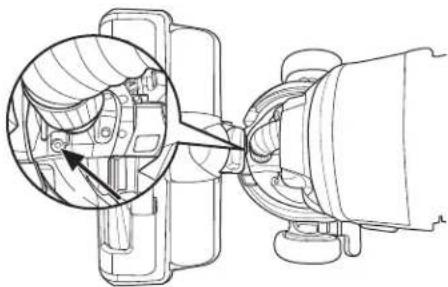
natural_image
Technical line drawing of a mechanical assembly with a circular component inserted into a housing (no text or symbols)
WARNING
• Electrical shock and personal injury hazard.
• Always unplug the power cord from the electrical outlet before servicing. Failure to do so could result in electrical shock or personal injury.
Cleaning the Exterior of the Vacuum Cleaner
Wipe the exterior of the vacuum cleaner with a clean, soft cloth that has been dipped in water and wrung dry.
DO NOT allow water to enter any openings in the vacuum cleaner.
DO NOT clean tools in dishwasher or clothes washer. Wash tools in warm soapy water, rinse and allow to air dry completely.
DO NOT use tools if they are wet.
Review this section to find do-it-yourself solutions for minor performance problems. Any service or repair needed, other than as described in this owner's manual, should be performed through your local LGE service center.

WARNING
• Electrical shock and personal injury hazard.
- Always unplug the power cord from the electrical outlet before servicing. Failure to do so could result in electrical shock or personal injury.
| Problem Possible Causes Solutions | ||
| Vacuum cleaner will not run. | Vacuum unplugged at wall outlet.Agitator motor overload protection.Thermal protector activated. | Make sure cord is plugged into a functioning outlet.Unplug the vacuum cleaner and check the agitator for obstructions and reset the unit.Allow the vacuum cleaner to cool down. |
| Poor dirt pickup. | Full or clogged dust tank.Dust tank improperly installed.Clogged hose, wand or head.Belt broken/not installed properly.Agitator motor overload protection activated.Hole in hose.Worn agitator. | Empty dust tank and clean filters.Make sure all dust tank components and filters are installed correctly.Check for clogs.Check belt and replace if needed.Unplug the vacuum cleaner and check the agitator for obstructions. Press the reset button.Inspect hose carefully. Replace if needed.Contact service. |
| Agitator does not turn | Switch is off (unit is in floor mode).Cleaner is in upright position.Agitator motor overload protection is tripped (brush is jammed).Belt is broken. | Turn on agitator power switch.Press the body release and tilt until back.Unplug the vacuum cleaner and check the agitator for obstructions and reset the unit.Replace belt. |
| Dust escapes the dust tank. | Dust tank improperly installed.The dust tank lid is not closed.The bottom plate is not latched. | Make sure all dust tank components and filters are installed correctly.Check the dust tank lid.Make sure the bottom plate is closed and latched. |
| Agitator on pet hair turbine tool will not run when attached. | Dirty agitator or agitator supports.Obstruction in turbine air path.Low suction from vacuum cleaner. | Clean the inside of the pet hair turbine tool.Clean the inside of the pet hair turbine tool.Check for clogs. |
| Accessory has no suction when using with the handle. | Main wand still connected to body base. | Remove wand. |
| Dust tank feels loose when lifting by the carry handle. | This is normal. | The vacuum is designed like this to prevent the tank from separating |
MANUAL DEL PROPIETARIO
ASPIRADORA
natural_image
Technical line drawing of a mechanical device with a lever and base mount (no text or symbols)natural_image
Diagram of a medical or laboratory device with a handle and connector, showing a magnified view of the cable (no text or symbols present)natural_image
Technical line drawing of a mechanical device with a magnified inset showing internal components (no text or symbols)natural_image
Technical line drawings of two different vacuum cleaner designs (no text or symbols)
ADVERTENCIA
natural_image
Technical line drawing of a vacuum cleaner with directional arrows indicating motion (no text or symbols)Guardado del cable
natural_image
Line drawing of a vacuum cleaner with a magnified inset showing internal components (no text or symbols)
ADVERTENCIA
natural_image
Technical line drawing of two vacuum cleaner units with attached pipes and a close-up inset showing internal components (no text or symbols)1. Piso/Alfombra
natural_image
Technical line drawing of a mechanical assembly with no visible text or symbols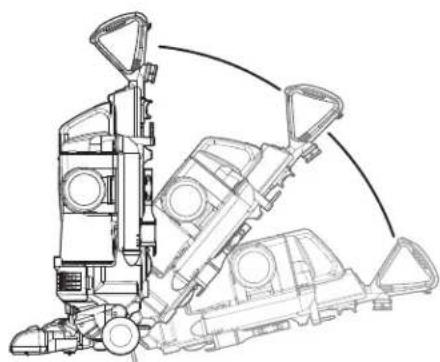
natural_image
Technical line drawing of a mechanical assembly with no visible text or symbols
ADVERTENCIA
natural_image
Line drawing of a hand using a tool to press or install a cup (no text or symbols present)Accesorios
natural_image
Illustration of a cat holding a pen and a hand holding a tool, no text or symbols presentCepillo para polvo
natural_image
Technical illustration of a vacuum cleaner with a close-up view of the component being adjusted (no text or symbols present)natural_image
Line drawing of a hand holding a mechanical tool with a directional arrow indicating motion (no text or symbols)natural_image
Illustration of a hand holding a small mechanical device with an arrow indicating motion (no text or symbols)Cepillo para polvo:
natural_image
Illustration of a hand holding a flashlight with an arrow indicating left-hand rule (no text or symbols present)Cepillo para polvo
natural_image
Illustration of a hand holding a flashlight with two arrows indicating motion (no text or symbols)Accesorio rinconero
natural_image
Technical line drawing of a mechanical lever assembly (no text or symbols)Consejos y trucos
natural_image
Two circular diagrams showing a battery stack with 'Power' labels, placed on a surface (no text or symbols beyond labels)natural_image
Line drawing of a vacuum cleaner with attached pump and fan (no text or symbols)natural_image
Simple line drawing of a container with a handle and a cable, no text or symbols presentnatural_image
Line drawing of a vacuum cleaner with attached equipment (no text or symbols)natural_image
Two diagrams showing a hand using a cross symbol to mark a process, with no text or labels present.natural_image
Line drawing of a mechanical device with handle and wheels (no text or symbols)natural_image
Illustration of a hand using a device to lift a cylindrical component, showing two different states (no text or symbols present)natural_image
Illustration showing a hand washing clothes from a sink while another hand swashes down with liquid (no text or symbols)natural_image
Illustration of two hands performing a manual task on a device, showing hand positioning and assembly (no text or symbols)natural_image
Technical line drawing of a mechanical assembly with hands operating a component (no visible text or symbols)natural_image
Technical line drawing of a mechanical device with hands operating it (no text or symbols present)natural_image
Technical line drawing of a mechanical device with hands operating it (no text or symbols visible)natural_image
Technical line drawing of a mechanical device with a hand operating the base (no text or symbols visible)natural_image
Technical line drawing of a mechanical device with hands operating it (no text or symbols visible)natural_image
Technical line drawing of a mechanical device with hands operating it (no text or symbols present)natural_image
Line drawing of a vacuum cleaner with three views of the component (no text or symbols present)natural_image
Technical line drawing of a vacuum cleaner with attached device and mounting bracket (no text or symbols)natural_image
Technical line drawing of a mechanical assembly with three circular insets showing close-ups of components (no text or labels)natural_image
Technical line drawing of a mechanical assembly with no visible text or symbolsnatural_image
Technical line drawing of a mechanical assembly with no visible text or symbols
ADVERTENCIA
natural_image
Technical line drawing of a mechanical device with a lever and base mount (no text or symbols)Fixation du boyau
natural_image
Diagram of a mechanical device with a handle and cable, showing a close-up of the cable (no text or symbols present)natural_image
Technical illustration of a vacuum cleaner assembly with a close-up inset showing internal components (no text or symbols)natural_image
Technical line drawings of two different vacuum cleaner designs (no text or symbols)
AVERTISSEMENT
natural_image
Technical line drawing of a mechanical device with no visible text or symbolsRangement de cordon
natural_image
Technical line drawing of a vacuum cleaner with a magnified inset showing internal components (no text or symbols)
AVERTISSEMENT
Danger de blessure corporelle!
natural_image
Line drawing of two different vacuum cleaner units with internal components and a magnified inset showing a close-up detail (no text or symbols)1. Plancher/moquette
natural_image
Technical line drawing of a mechanical assembly with no visible text or symbols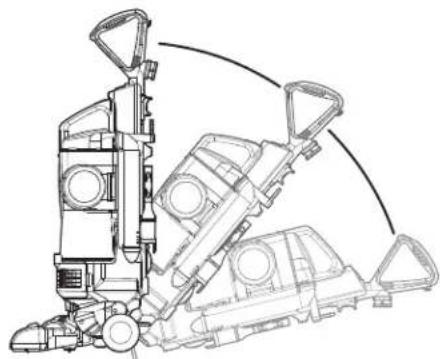
natural_image
Technical line drawing of a mechanical assembly with no visible text or symbols
AVERTISSEMENT
natural_image
Line drawing of a hand using a tool to press or install a cup (no text or symbols present)Accessoires
natural_image
Illustration of a cat holding a pen and a hand holding a tool, no text or symbols presentnatural_image
Technical illustration of a vacuum cleaner with a close-up view of the component being assembled (no text or symbols present)natural_image
Illustration of a hand holding a mechanical tool with a directional arrow indicating motion (no text or symbols)Installation des accessoires
Long suceur :
natural_image
Line drawing of a hand holding a mechanical device with an arrow indicating motion (no text or symbols)natural_image
Illustration of a hand holding a flashlight with an arrow indicating left-hand rule (no text or symbols present)natural_image
Illustration of a hand holding a flashlight with two arrows indicating motion (no text or symbols)Long suceur
natural_image
Technical line drawing of a mechanical device with a lever and handle (no text or symbols)Conseils et trucs
natural_image
Diagram of a device being inserted into a cable (no text or symbols present)natural_image
Two circular diagrams showing a device with a battery and a switch, no text or symbols present.Protection en cas de surcharge thermique
natural_image
Line drawing of a vacuum cleaner with attached pump and clamped components (no text or symbols)natural_image
Line drawing of a mechanical component with a curved base and attached rod (no text or symbols)natural_image
Line drawing of a vacuum cleaner with attached equipment (no text or symbols)natural_image
Two identical diagrams showing a hand holding a container with a cross mark, no text or symbols present.natural_image
Line drawing of a mechanical device with wheels and components (no text or symbols)natural_image
Illustration of two hand positions of a portable device with a handle, showing internal components and a close-up view (no text or symbols)natural_image
Illustration showing a hand washing a plate with water droplets, no text or symbols presentnatural_image
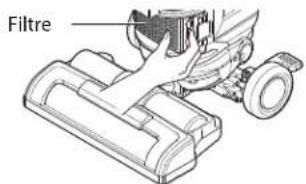
Technical line drawing of a mechanical device with no visible text or symbols- Retirez le filtre du corps.
natural_image
Illustration of two hands performing a manual tool manipulation or assembly process (no text or symbols present)natural_image
Technical line drawing of a mechanical assembly with no visible text or symbolsnatural_image
Technical line drawing of a mechanical device with hands operating it (no text or symbols present)natural_image
Technical line drawing of a mechanical device with hands operating it (no text or symbols visible)natural_image
Technical line drawing of a mechanical device with a hand operating a tool (no text or symbols visible)natural_image
Technical line drawing of a mechanical device with internal components and a hand holding the handle (no text or symbols)natural_image
Technical line drawing of a mechanical device with no visible text or symbolsnatural_image
Line drawing of a vacuum cleaner with three views of the component (no text or symbols present)natural_image
Technical line drawing of a vacuum cleaner with two views (front and side), no text or symbols presentnatural_image
Technical line drawing of a mechanical assembly with three circular insets showing close-ups of components (no text or labels)natural_image
Technical line drawing of a mechanical assembly with no visible text or symbolsnatural_image
Technical line drawing of a mechanical assembly with a magnified inset showing internal components (no text or symbols)For inquires or comments, visit www.lg.com or call;
1-800-243-0000
USA, Consumer User
1-888-865-3026
USA, Commercial User
1-888-542-2623
CANADA
Register your product Online!
www.lg.com