
WX801L.1 - Saw WORX - Free user manual and instructions
Find the device manual for free WX801L.1 WORX in PDF.


| Product type | Mini cordless cut-off tool/grinder |
| Brand | Worx |
| Model | WX801L.1 |
| Rated voltage | 20V max (18V nominal) |
| No load speed | 19,500 rpm |
| Disc diameter | 76 mm (3 in) |
| Disc arbor | 9.5 mm (3/8 in) |
| Metal cutting disc thickness | 1.2 - 1.6 mm |
| Abrasive cutting disc thickness | 1.6 mm |
| Grinding disc thickness | 4 mm |
| Spindle thread | M6 |
| Weight (without battery) | 1.1 kg |
| Battery type | Lithium-ion (Li-ion) |
| Charger included | Yes, model WA3742 |
| Battery included | Yes, model WA3520 |
| Disc guard | Yes, adjustable for grinding and cutting |
| Switch | On/Off with lock |
| Spindle lock | Yes |
| Intended use | Cutting, rough grinding and brushing of metal and stone |
| Safety | Eye, ear and dust mask protection recommended |
| Maintenance | Clean with a dry cloth; do not use water or chemicals |
| Repairability | Consult a WORX authorized repairer |
Frequently Asked Questions - WX801L.1 WORX
User questions about WX801L.1 WORX
0 question about this device. Answer the ones you know or ask your own.
Ask a new question about this device
Download the instructions for your Saw in PDF format for free! Find your manual WX801L.1 - WORX and take your electronic device back in hand. On this page are published all the documents necessary for the use of your device. WX801L.1 by WORX.
USER MANUAL WX801L.1 WORX
natural_image
Completely dark image with no visible content, text, or symbols.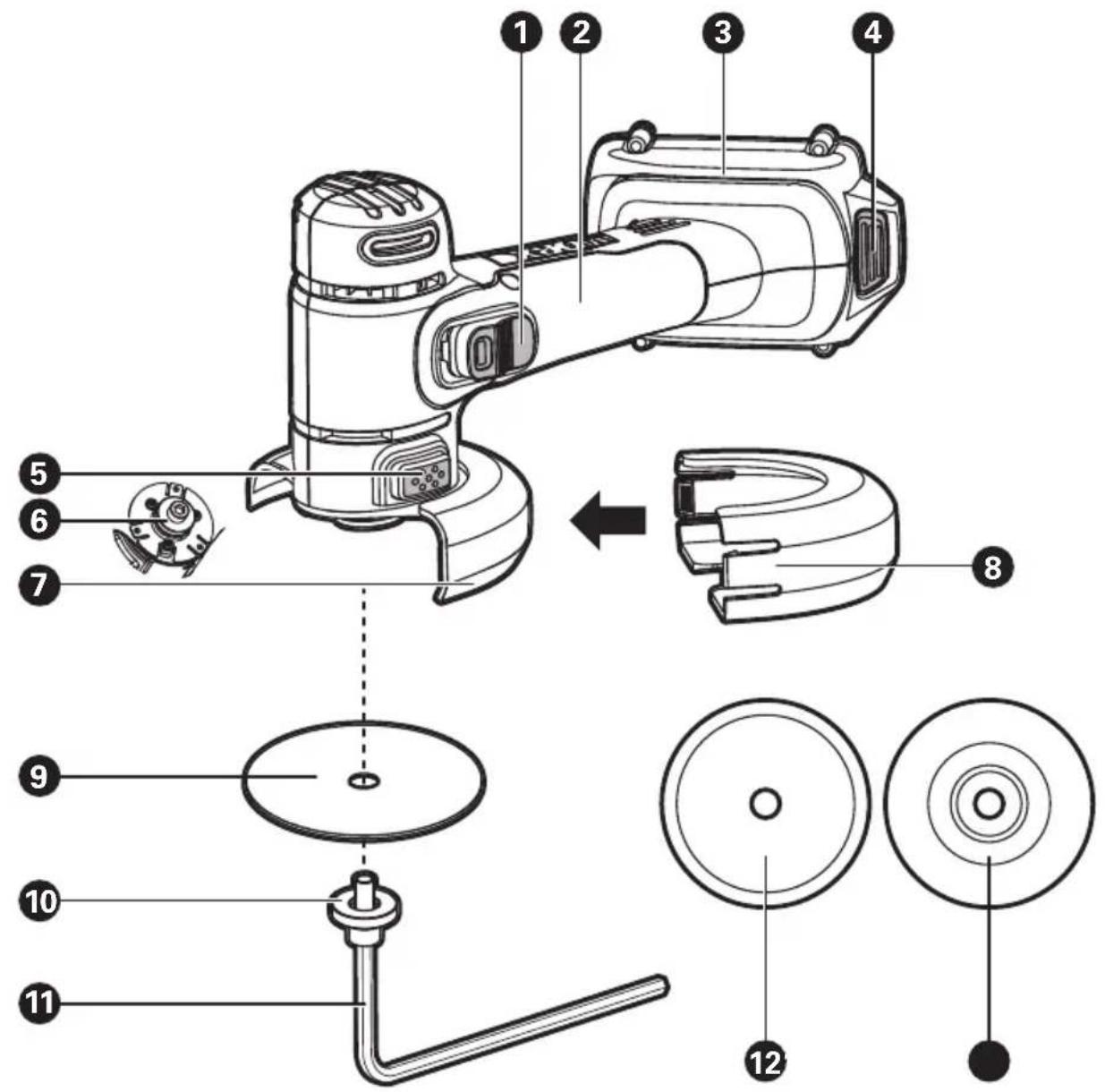
text_image
Technical diagram of a hand-operated device with numbered parts and exploded view, including internal components like fan, dial, and bulb.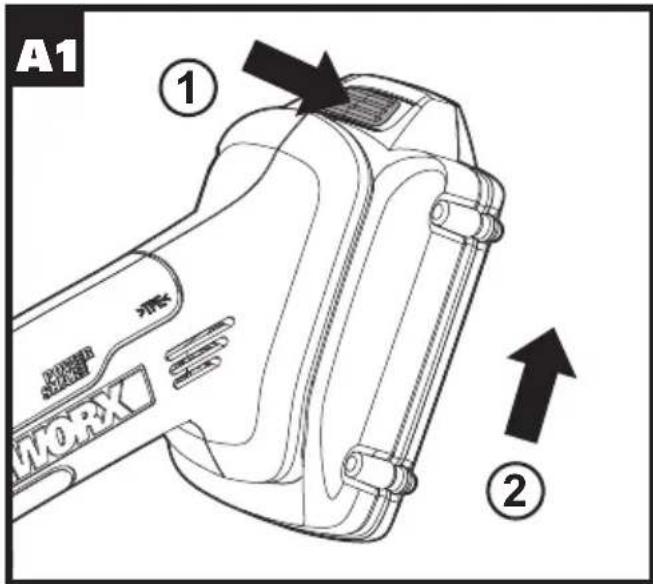
text_image
A1 ① MORX ②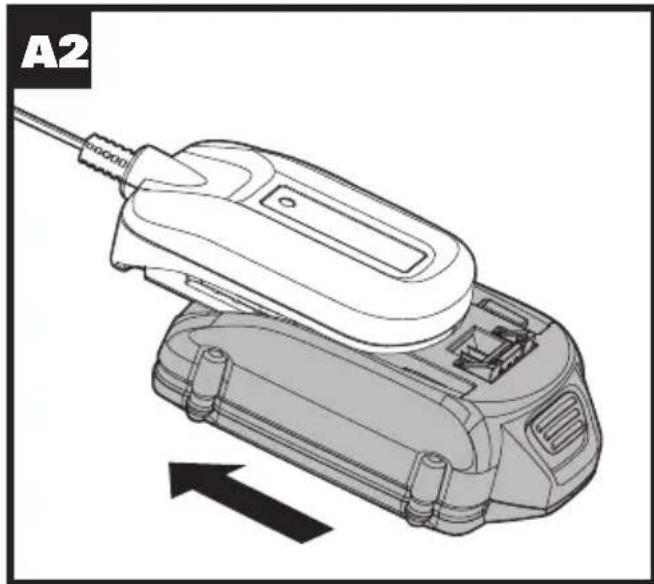
natural_image
Technical illustration of a handheld electronic device with a cable and housing, showing internal components and an arrow indicating motion (no text or symbols)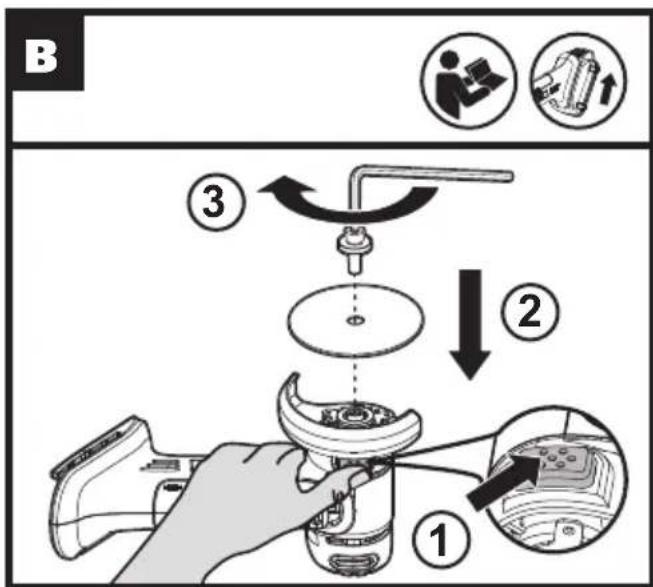
text_image
B ① ② ③
text_image
C ① ②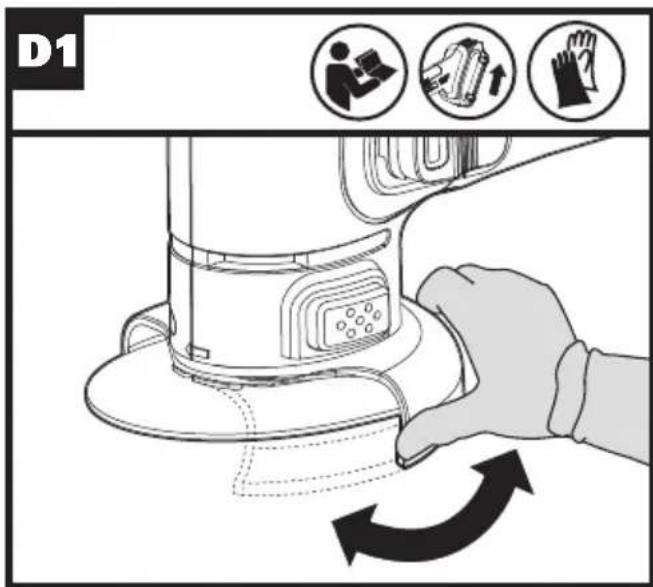
text_image
D1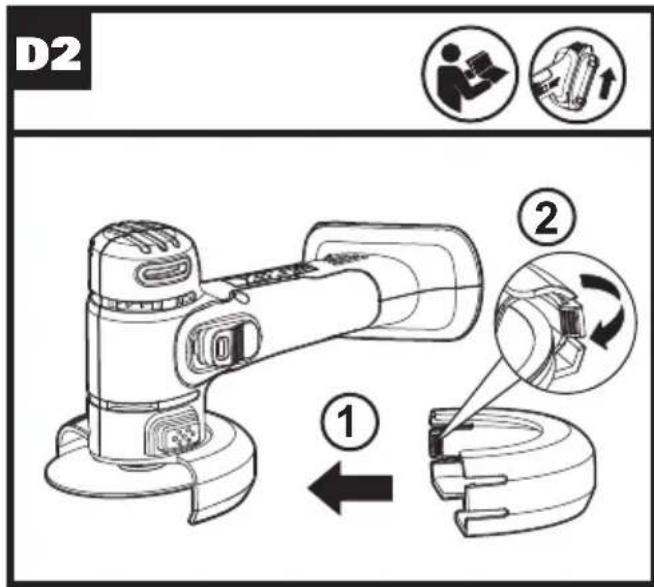
text_image
D2 ① ②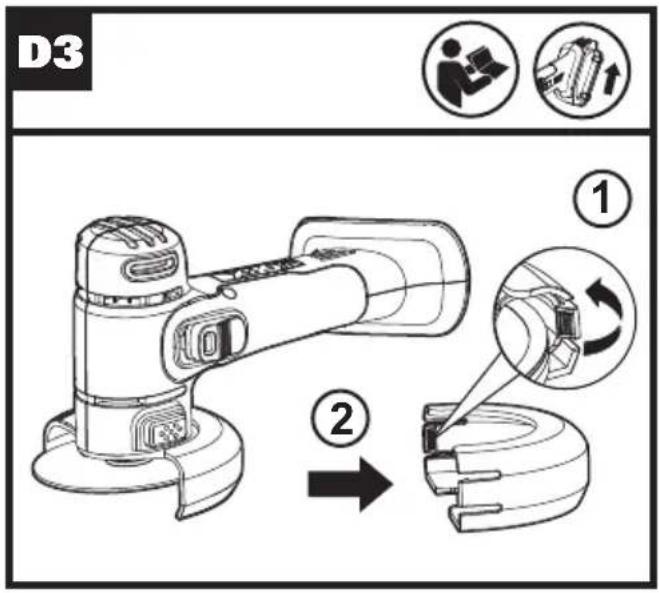
text_image
D3 ① ②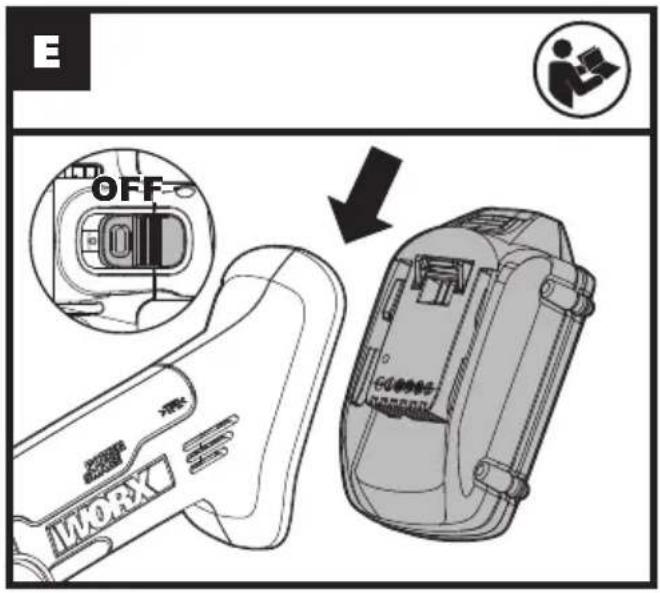
text_image
E OFF INWORK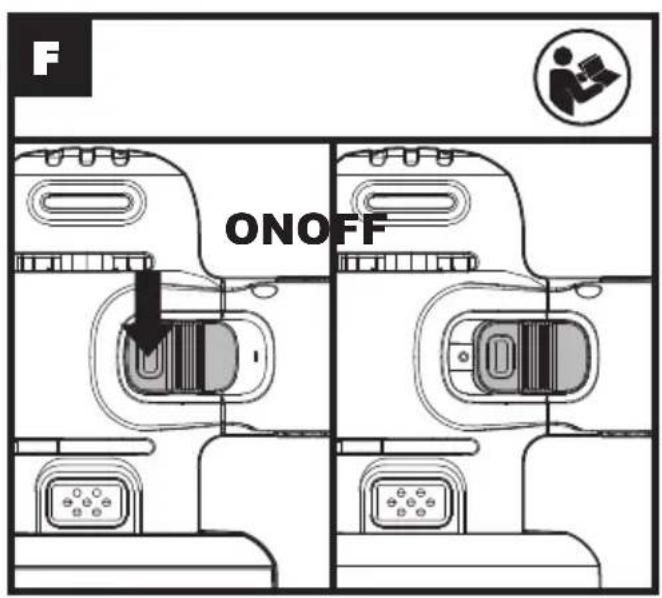
text_image
F ONOFF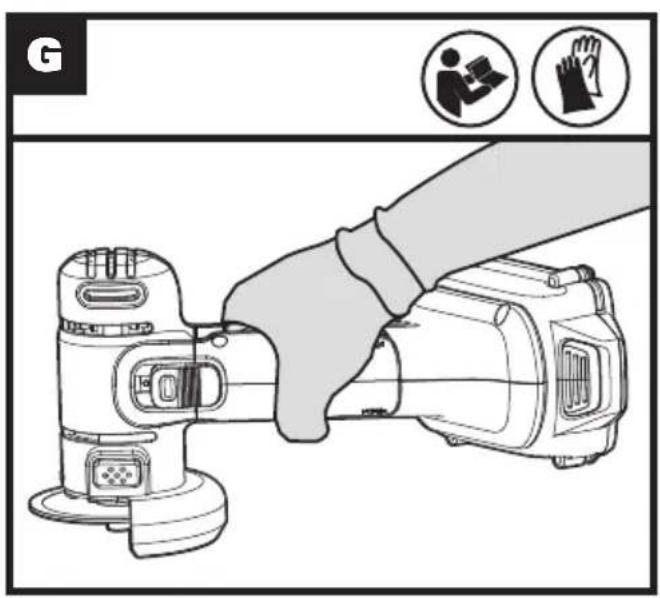
text_image
G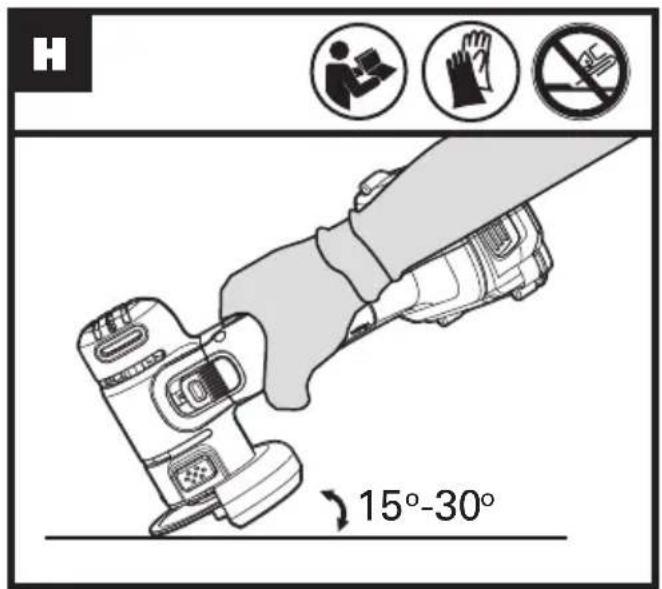
text_image
H 15°-30°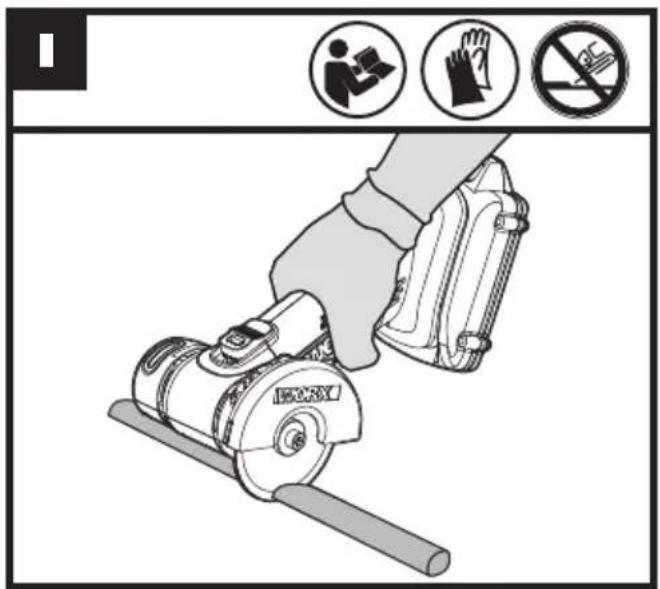
text_image
Diagram showing a hand using a power saw to stop the phone, with icons for device use and prohibition signs.PRODUCT SAFETY
WARNING: Some dust created by power sanding, sawing, grinding, drilling and other construction activities contains chemicals known to the state of California to cause cancer, birth defects or other reproductive harm. Some examples of these chemicals are:
- Lead from lead-based paints;
• Crystalline silica from bricks and cement and other masonry products; - Arsenic and chromium from chemically-treated lumber.
Your risk from these exposures varies, depending on how often you do this type of work. To reduce your exposure to these chemical: work in a well ventilated area, and work with approved safety equipment, such as those dust masks that are specially designed to filter out microscopic particles.
WARNING: This product can expose you to chemicals including lead and Di (2-ethylhexyl) phthalate (DEHP) which are known to the State of California to cause cancer and birth defects or other reproductive harm. For more information go to www.P65Warnings.ca.gov.
GENERAL POWER TOOL SAFETY WARNINGS
WARNING: Read all safety warnings and instructions. Failure to follow the warnings and instructions may result in electric shock, fire and/or serious injury.
Save all warnings and instructions for future reference.
The term "power tool" in the warnings refers to your mains-operated (corded) power tool or battery-operated (cordless) power tool.
1. WORK AREA SAFETY
a) Keep work area clean and well lit.
Cluttered or dark areas invite accidents.
b) Do not operate power tools in explosive atmospheres, such as in the presence of flammable liquids,
gases or dust. Power tools create sparks which may ignite the dust or fumes.
c) Keep children and bystanders away while operating a power tool.
Distractions can cause you to lose control.
2. ELECTRICAL SAFETY
a) Power tool plugs must match the outlet. Never modify the plug in any way. Do not use any adapter plugs with earthed (grounded) power tools. Unmodified plugs and matching outlets will reduce risk of electric shock.
b) Avoid body contact with earthed or grounded surfaces, such as pipes, radiators, ranges and refrigerators.
There is an increased risk of electric shock if your body is earthed or grounded.
c) Do not expose power tools to rain or wet conditions. Water entering a power tool will increase the risk of electric shock.
d) Do not abuse the cord. Never use the cord for carrying, pulling or unplugging the power tool. Keep cord away from heat, oil, sharp edges or moving parts. Damaged or entangled cords increase the risk of electric shock.
e) When operating a power tool outdoors, use an extension cord suitable for outdoor use. Use of a cord suitable for outdoor use reduces the risk of electric shock.
f) If operating a power tool in a damp location is unavoidable, use a residual current device (RCD) protected supply. Use of an RCD reduces the risk of electric shock.
3) PERSONAL SAFETY
a) Stay alert, watch what you are doing and use common sense when operating a power tool. Do not use a power tool while you are tired or under the influence of drugs, alcohol or medication. A moment of inattention while operating power tools may result in serious personal injury.
b) Use personal protective equipment. Always wear eye protection.
Protective equipment such as dust mask, non-skid safety shoes, hard hat, or
hearing protection used for appropriate conditions will reduce personal injuries.
c) Prevent unintentional starting. Ensure the switch is in the off-position before connecting to power source and/or battery pack, picking up or carrying the tool. Carrying power tools with your finger on the switch or energising power tools that have the switch on invites accidents.
d) Remove any adjusting key or wrench before turning the power tool on. A wrench or a key left attached to a rotating part of the power tool may result in personal injury.
e) Do not overreach. Keep proper footing and balance at all times. This enables better control of the power tool in unexpected situations.
f) Dress properly. Do not wear loose clothing or jewellery. Keep your hair and clothing away from moving parts. Loose clothes, jewellery or long hair can be caught in moving parts.
g) If devices are provided for the connection of dust extraction and collection facilities, ensure these are connected and properly used. Use of dust collection can reduce dust-related hazards.
4) Power tool use and care
a) Do not force the power tool. Use the correct power tool for your application. The correct power tool will do the job better and safer at the rate for which it was designed.
b) Do not use the power tool if the switch does not turn it on and off.
Any power tool that cannot be controlled with the switch is dangerous and must be repaired.
c) Disconnect the plug from the power source and/or remove the battery pack, if detachable, from the power tool before making any adjustments, changing accessories, or storing power tools. Such preventive safety measures reduce the risk of starting the power tool accidentally.
d) Store idle power tools out of the reach of children and do not allow persons unfamiliar with the power tool or these instructions to operate the power tool. Power tools are dangerous in the hands of untrained users.
e) Maintain power tools and accessories. Check for misalignment or binding of moving parts, breakage of parts and any other condition that may affect the power tool's operation. If damaged, have the power tool repaired before use. Many accidents are caused by poorly maintained power tools.
f) Keep cutting tools sharp and clean.
Properly maintained cutting tools with sharp cutting edges are less likely to bind and are easier to control.
g) Use the power tool, accessories and tool bits etc. in accordance with these instructions, taking into account the working conditions and the work to be performed. Use of the power tool for operations different from those intended could result in a hazardous situation.
5) Battery tool use and care
a) Recharge only with the charger specified by the manufacturer. A charger that is suitable for one type of battery pack may create a risk of fire when used with another battery pack.
b) Use power tools only with specifically designated battery packs. Use of any other battery packs may create a risk of injury and fire.
c) When battery pack is not in use, keep it away from other metal objects, like paper clips, coins, keys, nails, screws or other small metal objects, that can make a connection from one terminal to another. Shorting the battery terminals together may cause burns or a fire.
d) Under abusive conditions, liquid may be ejected from the battery; avoid contact. If contact accidentally occurs, flush with water. If liquid contacts eyes, additionally seek medical help. Liquid ejected from the battery may cause irritation or burns.
6) Service
a) Have your power tool serviced by a qualified repair person using only identical replacement parts. This will ensure that the safety of the power tool is maintained.
SAFETY INSTRUCTIONS FOR ALL OPERATIONS
Safety Warnings Common for Grinding, Abrasive Cutting-Off Operations:
a) This power tool is intended to function as a grinder, cut-off tool. Read all safety warnings, instructions, illustrations and specifications provided with this power tool. Failure to follow all instructions listed below may result in electric shock, fire and/or serious injury.
b) Operations such as sanding, wire brushing, polishing are not recommended to be performed with this power tool. Operations for which the power tool was not designed may create a hazard and cause personal injury.
c) Do not use accessories which are not specifically designed and recommended by the tool manufacturer. Just because the accessory can be attached to your power tool, it does not assure safe operation.
d) The rated speed of the accessory must be at least equal to the maximum speed marked on the power tool. Accessories running faster than their RATED SPEED can break and fly apart.
e) The outside diameter and the thickness of your accessory must be within the capacity rating of your power tool. Incorrectly sized accessories cannot be adequately guarded or controlled.
f) Threaded mounting of accessories must match the GRINDER spindle thread. For accessories mounted by FLANGES, the arbour hole of the accessory must fit the locating diameter of the FLANGE. Accessories that do not match the mounting hardware of the power tool will run out of balance, vibrate excessively and may cause loss of control.
g) Do not use a damaged accessory. Before each use inspect the accessory such as abrasive wheels for chips and cracks, backing pad for cracks, tear or excess wear, wire brush for loose or cracked wires. If power tool or accessory is dropped, inspect for damage or install an undamaged accessory.
After inspecting and installing an accessory, position yourself and bystanders away from the plane of the rotating accessory and run the power tool at maximum no-load speed for one minute. Damaged accessories will normally break apart during this test time.
h) Wear personal protective equipment. Depending on application, use face shield, safety goggles or safety glasses. As appropriate, wear dust mask, hearing protectors, gloves and workshop apron capable of stopping small abrasive or workpiece fragments. The eye protection must be capable of stopping flying debris generated by various operations. The dust mask or respirator must be capable of filtrating particles generated by your operation. Prolonged exposure to high intensity noise may cause hearing loss.
i) Keep bystanders a safe distance away from work area. Anyone entering the work area must wear personal protective equipment.
Fragments of workpiece or of a broken accessory may fly away and cause injury beyond immediate area of operation.
j) Hold the power tool by insulated gripping surfaces only, when performing an operation where the cutting accessory may contact hidden wiring. Cutting accessory contacting a "live" wire may make exposed metal parts of the power tool "live" and could give the operator an electric shock.
k) Never lay the power tool down until the accessory has come to a complete stop. The spinning accessory may grab the surface and pull the power tool out of your control.
I) Do not run the power tool while carrying it at your side. Accidental contact with the spinning accessory could snag your clothing, pulling the accessory into your body.
m) Regularly clean the power tool's air vents. The motor's fan will draw the dust inside the housing and excessive accumulation of powdered metal may cause electrical hazards.
n) Do not operate the power tool near flammable materials. Sparks could ignite these materials.
o) Do not use accessories that require liquid coolants. Using water or other liquid coolants may result in electrocution or shock.
FURTHER SAFETY INSTRUCTIONS FOR ALL OPERATIONS
KICKBACK AND RELATED WARNINGS
Kickback is a sudden reaction to a pinched or snagged rotating wheel, backing pad, brush or any other accessory. Pinching or snagging causes rapid stalling of the rotating accessory which in turn causes the uncontrolled power tool to be forced in the direction opposite of the accessory's rotation at the point of the binding.
For example, if an abrasive wheel is snagged or pinched by the workpiece, the edge of the wheel that is entering into the pinch point can dig into the surface of the material causing the wheel to climb out or kick out. The wheel may either jump toward or away from the operator, depending on direction of the wheel's movement at the point of pinching. Abrasive wheels may also break under these conditions. Kickback is the result of power tool misuse and/or incorrect operating procedures or conditions and can be avoided by taking proper precautions as given below.
a) Maintain a firm grip on the power tool and position your body and arm to allow you to resist kickback forces. Always use auxiliary handle, if provided, for maximum control over kickback or torque reaction during start-up. The operator can control torque reactions or kickback forces, if proper precautions are taken.
b) Never place your hand near the rotating accessory. Accessory may kickback over your hand.
c) Do not position your body in the area where power tool will move if kickback occurs. Kickback will propel the tool in direction opposite to the wheel's movement at the point of snagging.
d) Use special care when working corners, sharp edges etc. Avoid bouncing and snagging the accessory. Corners, sharp edges or bouncing have a tendency to snag the
rotating accessory and cause loss of control or kickback.
e) Do not attach a saw chain woodcarving blade or toothed saw blade. Such blades create frequent kickback and loss of control.
ADDITIONAL SAFETY INSTRUCTIONS FOR GRINDING AND CUTTING-OFF OPERATIONS
Safety Warnings Specific for Grinding and Abrasive Cutting-Off Operations:
a) Use only wheel types that are recommended for your power tool and the specific guard designed for the selected wheel. Wheels for which the power tool was not designed cannot be adequately guarded and are unsafe.
b) The grinding surface of centre depressed wheels must be mounted below the plane of the guard lip. An improperly mounted wheel that projects through the plane of the guard lip cannot be adequately protected.
c) The guard must be securely attached to the power tool and positioned for maximum safety, so the least amount of wheel is exposed towards the operator. The guard helps to protect the operator from broken wheel fragments, accidental contact with wheel and sparks that could ignite clothing.
d) Wheels must be used only for recommended applications. For example: do not grind with the side of cut-off wheel. Abrasive cut-off wheels are intended for peripheral grinding, side forces applied to these wheels may cause them to shatter.
e) Always use undamaged wheel flanges that are of correct size and shape for your selected wheel.
Proper wheel flanges support the wheel thus reducing the possibility of wheel breakage. flanges for cut-off wheels may be different from grinding wheel flanges.
f) Do not use worn down wheels from larger power tools. Wheel intended for larger power tool is not suitable for the higher speed of a smaller tool and may burst.
ADDITIONAL SAFETY INSTRUCTIONS FOR CUTTING-OFF OPERATIONS
Additional Safety Warnings Specific for Abrasive Cutting-Off Operations:
a) Do not "jam" the cut-off wheel or apply excessive pressure. Do not attempt to make an excessive depth of cut. Overstressing the wheel increases the loading and susceptibility to twisting or binding of the wheel in the cut and the possibility of kickback or wheel breakage.
b) Do not position your body in line with and behind the rotating wheel. When the wheel, at the point of operation, is moving away from your body, the possible kickback may propel the spinning wheel and the power tool directly at you.
c) When wheel is binding or when interrupting a cut for any reason, switch off the power tool and hold the power tool motionless until the wheel comes to a complete stop. Never attempt to remove the cut-off wheel from the cut while the wheel is in motion otherwise kickback may occur. Investigate and take corrective action to eliminate the cause of wheel binding.
d) Do not restart the cutting operation in the workpiece. Let the wheel reach full speed and carefully reenter the cut. The wheel may bind, walk up or kickback if the power tool is restarted in the workpiece.
e) Support panels or any oversized workpiece to minimize the risk of wheel pinching and kickback. Large workpieces tend to sag under their own weight. Supports must be placed under the workpiece near the line of cut and near the edge of the workpiece on both sides of the wheel.
f) Use extra caution when making a "pocket cut" into existing walls or other blind areas. The protruding wheel may cut gas or water pipes, electrical wiring or objects that can cause kickback.
SAFETY WARNINGS FOR BATTERY PACK
a) Do not dismantle, open or shred battery pack.
b) Do not expose battery pack to heat or fire. Avoid storage in direct sunlight.
c) Do not short-circuit a battery pack. Do not store battery packs haphazardly in a box or drawer where they may short-circuit each other or be short-circuited by other metal objects. When battery pack is not in use, keep it away from other metal objects, like paper clips, coins, keys, nails, screws or other small metal objects, that can make a connection from one terminal to another. Shorting the battery terminals together may cause burns or fire.
d) Do not remove battery pack from its original packaging until required for use.
e) Do not subject battery pack to mechanical shock.
f) In the event of battery leaking, do not allow the liquid to come in contact with the skin or eyes. If contact has been made, wash the affected area with copious amounts of water and seek medical advice.
g) Observe the plus (+) and minus (-) marks on the battery back and equipment and ensure correct use.
h) Do not use any battery pack which is not designed for use with the equipment.
i) Keep battery pack out of the reach of children.
j) Seek medical advice immediately if a cell or battery has been swallowed.
k) Always purchase the battery pack recommended by the device manufacturer for the equipment.
I) Keep battery pack clean and dry.
m) Wipe the battery pack terminals with a clean dry cloth if they become dirty.
n) Battery pack need to be charged before use. Always use the correct charger and refer to the manufacturer's instructions or equipment manual for proper charging instructions.
o) Do not leave battery pack on prolonged charge when not in use.
p) After extended periods of storage, it may be necessary to charge and discharge the battery pack several times to obtain maximum performance.
q) Battery pack gives its best performance when it is operated at normal room temperature (20 °C ± 5 °C)/ (68 °F ± 9 °F).
r) When disposing of battery packs, keep battery packs of different electrochemical systems separate from each other.
s) Recharge only with the charger specified by WORX. Do not use any charger other than that specifically provided for use with the equipment. A charger that is suitable for one type of battery pack may create a risk of fire when used with another battery pack.
t) Retain the original product literature for future reference.
u) Use only the battery pack in the application for which it was intended.
v) Remove the battery pack from the equipment when not in use.
w) Dispose of properly.
SYMBOLS
| To reduce the risk of injury, user must read instruction manual | |
| Wear ear protection | |
| Wear eye protection | |
| Wear dust mask | |
| Warning |
| Wear protective gloves. | |
| Not permitted for face grinding with abrasive cutting off wheels | |
| Make sure the battery is removed prior to changing accessories. | |
| Li-lon | Li-lon battery, battery must be recycled |
| Do not burn | |
| Do not expose to rain or water |

call②recycle®
POSITEC Inc. has established a partnership with the RBRC Corporation to recycle any Positec batteries with the RBRC-call2recycle seal. For environmental protection, please do not discard batteries in the trash. After the batteries' life cycle is ended, then please call 1-800-822-8837 for a free service that will properly dispose of the battery.
COMPONENT LIST
| 1. ON / OFF SWITCH |
| 2. HAND GRIP AREA |
| 3. BATTERY PACK * |
| 4. BATTERY PACK RELEASE BUTTON* |
| 5. SPINDLE LOCK BUTTON |
| 6. SPINDLE |
| 7. WHEEL GUARD FOR GRINDING |
| 8. WHEEL GUARD FOR CUTTING |
| 9. METAL CUTTING DISC |
| 10. CLAMPING BOLT WITH WASHER |
| 11. HEX KEY |
| 12. ABRASIVE CUTTING DISC |
| 13. GRINDING DISC |
*Not all the accessories illustrated or described are included in standard delivery.
TECHNICAL DATA
Type WX801L WX801L.9 (80 - designation of machinery, representative of Mini Cutter)
| WX801L WX801L.9 | ||
| Rated voltage | 20V --- Max** | |
| Rated speed | 19500rpm | |
| Spindle thread | M6 | |
| Thickness of metal cutting disc | 3/64"~1/16" | |
| Thickness of abrasive cutting disc | 1/16" | |
| Thickness of grinding disc | 5/32" | |
| Disc size 3 | " | |
| Disc bore 3/8 | " | |
| Machine weight 2.4lbs | 1.5lbs | |
**Voltage measured without workload. Initial battery voltage reaches maximum of 20 volts. Nominal voltage is 18 volts.
ACCESSORIES
| WX801L | WX801L.9 | |
| Metal cutting discs 2 2 | ||
| Abrasive cutting disc | 1 | 1 |
| Grinding disc 1 1 | ||
| Hex key | 1 1 | |
| Charger (WA3742) | 1 | / |
| Battery Pack (WA3520) | 1 | / |
Only use the appropriate accessories intended for this tool. Accessory information can be found on the product packaging, at a WORX dealer or on our website at www.worx.com
OPERATING INSTRUCTIONS

NOTE: Before using the tool, read the instruction book carefully.
INTENDED USE:
The machine is intended for cutting, roughing and brushing metal and stone materials without using water. For cutting metal, a special protection guard for cutting (accessory) must be used.
ASSEMBLY AND OPERATION
| ACTION | FIGURE |
| BEFORE OPERATION | |
| Removing the Battery Pack | See Fig. A1 |
| Charging the Battery Pack | See Fig. A2 |
| ASSEMBLY | |
| Lock the spindle and assembling metal cutting disc/abrasive cutting disc / grinding discNOTE: Press and hold the spindle lock button to lock the spindle.NOTE: Make sure that the metal cutting disc/abrasive cutting disc /grinding disc is assembled firmly.WARNING! Before any work on the machine itself, remove the battery pack. | See Fig. B |
| Lock the spindle and removing metal cutting disc/abrasive cutting disc / grinding disc | See Fig. C |
| Adjusting Wheel Guard for grinding/cuttingNote: Remove the battery pack before making any changes to the tool. For work with grinding or cutting discs, the protection guard must be mounted. Use the correct type of disc for your application. If the power tool is intended to perform any cut-off operations, a guard specific for this operation must be installed. | See Fig.D1,D2,D3 |
| Installing the Battery PackWARNING: Before inserting the battery pack, make sure that the ON/OFF Switch is in OFF position.WARNING: When replacing the battery pack, do not insert the battery pack until the metal cutting disc/ abrasive cutting disc / grinding disc comes to a complete stop! | See Fig. E |
| OPERATION | |
| Using On/Off SwitchNote: Depress the On/Off switch forward to lock-on button. Your switch is now locked on for continuous use. | See Fig. F |
| Hand grip areas | See Fig. G |
| Rough GrindingWARNING! Never use a cutting disc for rough grinding applications. This can cause bodily damaged by using the tool for wrong applications. | See Fig. H |
| Cutting See Fig. I |
WORKING WITH THE MINI CUTTER
- Always start at no load to achieve maximum speed then start working.
- Do not force the disc to work faster, reducing the Disc's moving speed means longer working time.
- Always work with a 15-30 angle between disc and workpiece when grinding. Larger angles will cut ridges into the workpiece and affect the surface finish. Move the tool across and back and forth over the workpiece.
- When using a cutting disc never change the cutting angle otherwise you will stall the disc and mini cutter motor or break the disc. When cutting, only cut in the opposite direction to the disc rotation. If you cut in the same direction as the disc rotation the disc may push itself out of the cut slot.
- When cutting very hard material best results can be achieved with a abrasive cutting disc.
- When using a abrasive cutting disc it will become very hot. If this happens you will see a full ring of sparks around the rotating disc. Stop cutting and allow to cool at no load speed for 2-3 minutes.
- Always ensure the workpiece is firmly held or clamped to prevent movement.
MAINTENANCE
Remove the battery before carrying out any adjustment, servicing or maintenance.
There are no user serviceable parts in your power tool. Never use water or chemical cleaners to clean your power tool. Wipe clean with a dry cloth. Always store your power tool in a dry place. Keep the motor ventilation slots clean. Keep all working controls free of dust. Occasionally you may see sparks through the ventilation slots. This is normal and will not damage your power tool. Store the accessories in a dry place.
TROUBLESHOOTING
Although your new mini cutter is really very simple to operate, if you do experience problems, please check the following:
- If your grinder wheel wobbles or vibrates, check that outer flange is tight; check that the wheel is correctly located on the flange plate.
- If there is any evidence that the wheel is damaged do not use as the damaged wheel may disintegrate, remove it and replace with a new wheel. Dispose of old wheels sensibly.
- If working on aluminum or a similar soft alloy, the wheel will soon become clogged and will not grind effectively.
- When overloaded, the motor comes to a stop.
Relieve the load on the machine immediately and allow cooling for approx. 30 seconds at the highest no-load speed. - When using as intended for the power tool cannot be subject to overload. When the load is too high or the allowable battery temperature of 75^ C ( 167^ F) is exceeded, the electronic control switches off the power tool until the temperature is in the optimum temperature range again.
- If machine is blocked, please turn it off and turn it on again after 1\~2 seconds.
SÉCURITÉ DU PRODUIT
you've got the power
www.worx.com
Copyright © 2019, Positec. All Rights Reserved.