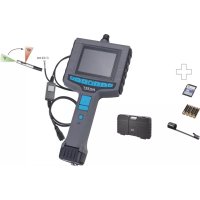
4812104S - Video camera Hazet - Free user manual and instructions
Find the device manual for free 4812104S Hazet in PDF.

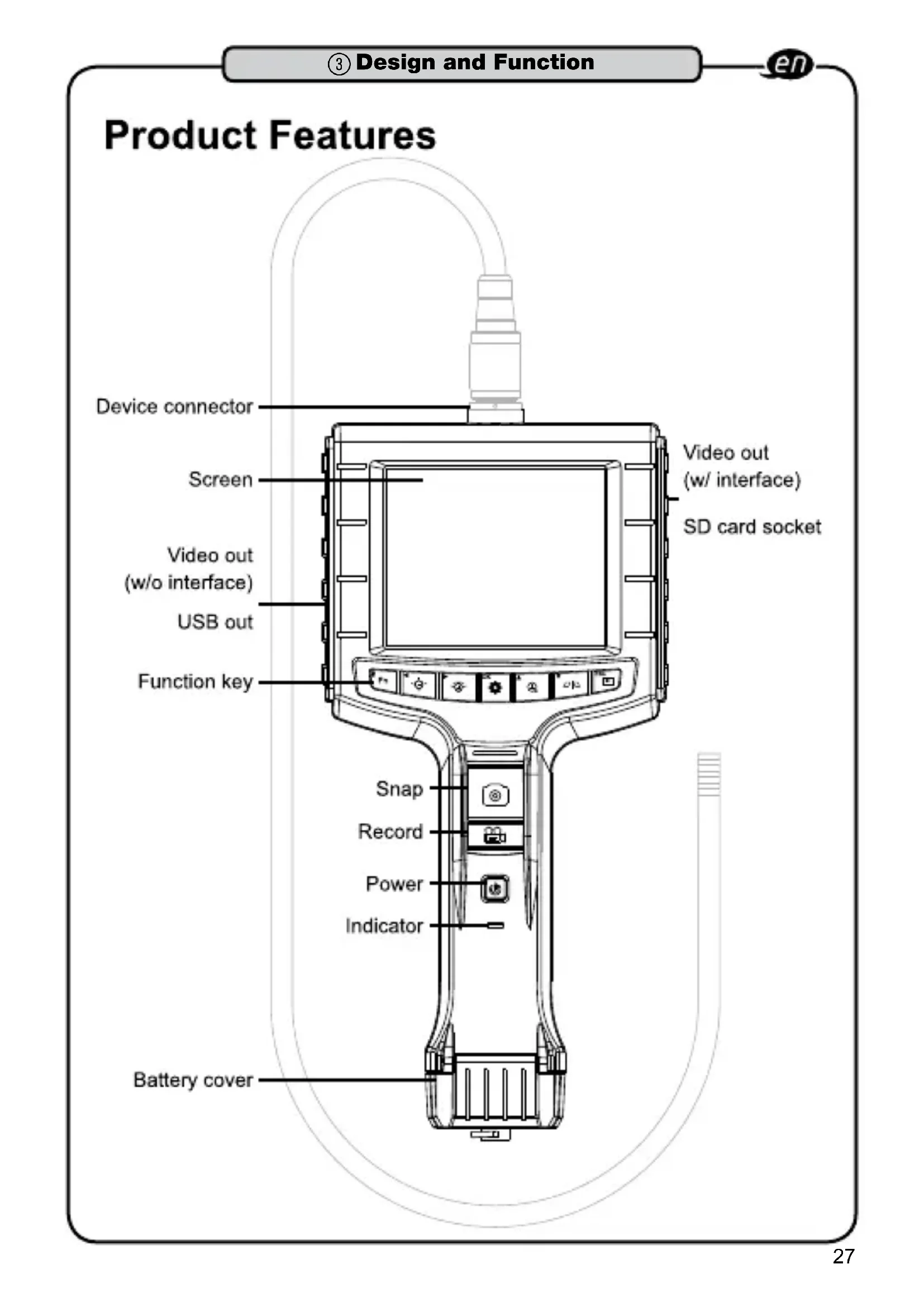


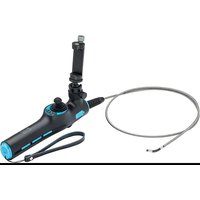
| Product type | Video endoscope |
| Brand | Hazet |
| Model | 4812104S |
| Dimensions (main unit) | 275 mm x 123 mm x 55 mm |
| Weight (without batteries) | 370 g |
| Power supply | 4 AA batteries (alkaline or Ni-MH) |
| Battery life | Approx. 4 hours |
| Screen | 3.5" TFT LCD QVGA |
| Screen resolution | 320 x 240 |
| Photo resolution | 640 x 480 (JPEG) |
| Video resolution | 640 x 480 at 30 fps (MPEG4) |
| Recording media | SD card up to 32 GB |
| Video formats | NTSC and PAL |
| Available languages | English, French, German, Italian, Spanish, Portuguese, Dutch, Danish, Polish, Russian, Bulgarian, Turkish, Swedish, Finnish, Norwegian, Romanian, Greek, Estonian, Lithuanian, Latvian, Hungarian, Czech, Slovak, Slovenian, Traditional Chinese, Simplified Chinese, Japanese |
| Operating temperature | 0 °C to +60 °C |
| Storage temperature | −20 °C to +60 °C |
| Main functions | Real-time viewing, photos, videos, digital zoom (2x), image mirror, brightness/contrast adjustment, Preview, Browse, Menu modes |
| Maintenance | Clean the lens with a cotton swab and naphtha; store in the storage case; do not bend the probe more than 180° |
| Safety | Do not look into light sources; do not use in explosive environments; do not immerse the probe in flammable liquids; do not open or disassemble the device |
| Spare parts and repairability | Use only original spare parts; repairs must be carried out by a specialist; any modification voids the warranty |
Frequently Asked Questions - 4812104S Hazet
User questions about 4812104S Hazet
0 question about this device. Answer the ones you know or ask your own.
Ask a new question about this device
Download the instructions for your Video camera in PDF format for free! Find your manual 4812104S - Hazet and take your electronic device back in hand. On this page are published all the documents necessary for the use of your device. 4812104S by Hazet.
USER MANUAL 4812104S Hazet
HIGHEST TECHNOLOGY IN TOOL MANUFACTURE SINCE 1868
TECHNOLOGIE DE POINTE DANS LA FABRICATION D'OUTILLAGE DEPUIS 1868
4812- 10/4 S
4812-10

Bedienungsanleitung
Tragbares Video-Endoskop
User Manual
PORTABLEVIDEOBORESCOPE
Video-endoscope portable

③ Design and Function 26. 37
Scope of delivery 26
Product Features 27
First Time Use 28
System Mode 29
Multifunction Key Screen
System Menu 31 Operating Guide 33
USB Video 34 Specification 35
Cautions for Use 36.37

① Pourvoire information 38. 38
Pourvoiresecurite 39. 42
Please take care that the user of this endoscope carefully reads these operating instructions and understands all information given in there before the first use.
- These operating instructions contain important advices that are necessary for a safe and trouble-free operation of your HAZET Video Endoscope.
- For effective use of the endoscope as intended, it is essential that all safety and other information in these operating instructions is adhered to.
- For this reason, always keep these operating instructions together with your HAZET Video Endoscope.
- This endoscope has been designed exclusively for particular applications. HAZET emphasizes that any modification of this tool and/or an application that does not correspond to its intended application is strictly forbidden.
- HAZET will not be liable for any injuries to persons or damages to property that are due to an improper application or misuse of this endoscope respectively due to the disregard of the safety instructions.
- Furthermore, the general safety regulations and regulations for the prevention of accidents being valid for the application area of this device have to be observed, too.
2. Explanation of Symbols
ATTENTION: Please pay attention to these symbols!
Read the Operating Instructions!

The operator is obliged to observe the operating instructions and has to instruct all users of the tool according to the information given in this manual.
NOTICE!

This symbol marks indications which help you to use the device.
CAUTION!

This symbol marks important specifications, dangerous conditions, safety risks and safety advices.
ATTENTION!

This symbol marks indications whose disregard results in damage, malfunction and/or functional failure of the device.

1. Operator's Liability
The video endoscope was developed and fabricated according to the technical norms and standards that have been valid at that time.
and is considered to be operationally reliable. Nevertheless, the video endoscope can present a danger when it is not used as intended or in an inappropriate way by non-qualified personnel. Please take care that any person using the video endoscope or carrying out maintenance work carefully reads these operating instructions and understands all information given in there prior to its first use.
- Keep the operating instructions always together with the video endoscope.
- Any modification of the video endoscope is strictly forbidden.
- All indications concerning setting values and setting ranges must be observed.

2. Appropriate Use
Operational safety can only be guaranteed, if the tool is used as intended and in compliance with the indications given in the oper
ating instructions. Apart from the safety advices given in these operating instructions, the general safety regulations, regulations for the prevention of accidents and regulations for environmental protection being valid for the application area of this endoscope have also to be observed and respected.
Endoscopes have to be used, inspected and maintained always in compliance with the respective local, state, national or federal regulations.
- The video endoscope must only be used if it is technically faultless and operationally reliable.
- This video endoscope has been designed for the damage diagnosis and documentation by video and for photos. In areas with restricted access, e.g. for gear damage, wear marks, wear of the axles, cylinder wall / piston head, valves, hollow spaces, hollow shanks, sliding-roof, cavities and brake linings.

Do not look at light sources! Do not bend the insert probe!

This endoscope must not be used for medical purposes.
- The video endoscope probe is water-proof and is suitable for short time use in water, oil and petrol. The console is not water-proof.
- Never use the video endoscope to temperatures outside the range of 0 °C to +60 °C; only within this temperature range the perfect functioning is guaranteed.
- Do not expose the video endoscope to shocks or impacts.
- The perfect functioning of the video endoscope can only be guaranteed when original spare parts are used.
- It is recommended to store the video endoscope in its storage box in order to prevent damage or soiling.
- Do not insert the tube into any flammable gas or liquid.
- Do not remove the SD card during capturing photos or videos. This can cause lost of the image or video.
- Video recording requires an SD card with fast writing speed. We recommend 80x or above.
- The improper use of the Video-Endoscope or the disregard of the security advices may cause serious injuries or death.
- Any deviation from the intended use and/or any misapplication of the appliance are not allowed and will be considered as improper use.
- Any claims against the fabricant and/or its authorized agents because of damage caused by improper use of the appliance are excluded.
- Any personal injury or material losses caused by improper use are the sole responsibility of the operator and user.

Do not look at light sources! Do not bend the insert probe!

Dangers emanating from the tool
Before each use, check the HAZET Video-Endoscope for full operability. Do not use the Video-Endoscope if the operability cannot be ensured or if damage is detected. If the Video-Endoscope is used, although its full operability cannot be ensured, you risk severe injuries to persons and damage to property.
Electrical energy can cause serious injuries. In order to avoid electrical shock, injuries or fire, the following safety instructions have to be observed and respected:
- Please make sure that the connection cable and the housing are not damaged. Tools that have been dropped or that are damaged, must be checked by qualified personnel before restarting operation.
- Do not use tools whose on/off-switch is defective. Tools that cannot be switched on or off with their on/off switch are dangerous and have to be repaired.
- When laying the power supply lead, please make sure that it does not come into contact with hot or sharp parts and that it cannot be damaged in any other way. The lead is to be laid in such a way that it does not constitute a risk of stumbling.
- The Video-Endoscope must not be exposed to water or other liquids. Dangerous voltage discharge may occur.
- The Video-Endoscope must not be disassembled. Inappropriate assembly can lead to a reduction of the functionality, to fire, to electrical shocks and/or to injury.
- Service and repair work should be carried out by qualified technical personnel only. In order to ensure the working reliability in the long term, always use original spare parts.
- Do not remove any safety devices and/or housing parts.
- Only use the Video-Endoscope within the prescribed places, and governed under the current regulations relating to the working environment and to electrical systems.
- For safety reasons all modifications of the HAZET Video-Endoscope are strictly forbidden. Any modification of the Video-Endoscope will lead to the exclusion of liability.

Keep children away from power tools. Unattended tools may be used by non-authorized persons and could injure them or other persons.
- Do not use the Video-Endoscope in explosive atmosphere. The Video-Endoscope can produce sparks that may ignite combustible materials. Never operate power tools in proximity to combustible substances like petrol, naphtha, detergents etc. Work in well-cleaned and well-ventilated areas only. Keep combustible materials out of the work area.
4. Spare Parts
Only use the manufacturer's original spare parts.
- Unsuitable or defective spare parts may cause damage, malfunction or the endoscope's total failure.
- When using spare parts that are not approved, all warranty and service claims as well as all claims for compensation and liability against the manufacturer or its agents, distributors and sales representatives will be void.
5. Disposal
- For disposal, clean device and disassemble according to regulations for environmental protection and for work safety. Components can be recycled.
Electric devices must not be disposed of in the domestic waste, but at special collecting points.


- Electronic waste, electronic components, lubricants and other additives are subject to the regulations of hazardous waste and may only be disposed of by certified specialist companies.
The reduction of the pollution as well as the protection of the environment are the central points of our activities.
HAZET - environmental protection is of fundamental importance for us.

Do not look at light sources! Do not bend the insert probe!
Scope of delivery:

4812-10/4S
SD Card
Video Borescope
Magnet Adapter
Probe 4812-16

4812-10
Video Borescope
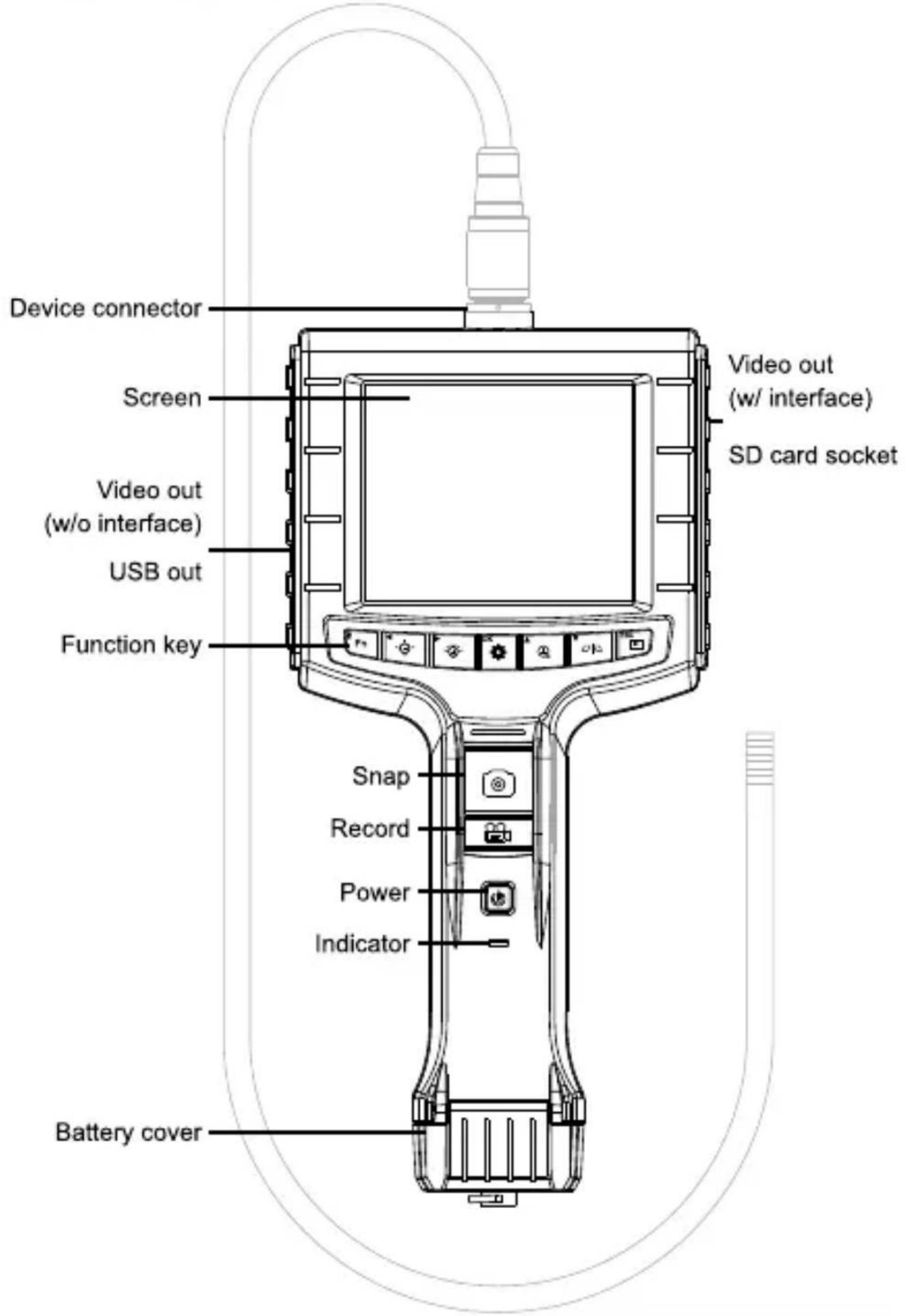
Product Features
First Time Use
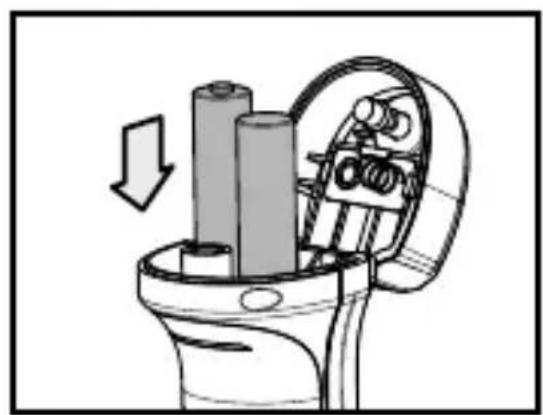
Step 1: Turn the thumb screw loose counterclockwise, then open the battery cover.


Step 2: Place battery in correctly, put the battery cover back on, and then tighten up the thumbscrew.

Step 3: Insert probe onto the device connector and tighten it up clockwise.


Step 4: Raise up the rubber sheet, and insert SD memory card correctly.


Step 5: Hold down the device switch until the screen displays.
Step 6: After the device turns ON, aim the probe front end at an area to be snapped or recorded. Press down the snap or record button to make the image into an image or video file.


System Mode
This device offers 3 easy-to-operate modes: "Preview", "Browse" and "Menu".
-Preview: Once the device turns ON, "Preview" mode is activated. Images received by the device are shown on the screen real-time. Under the "Preview" mode, the user may retrieve pictures or record.
-Browse: Under "Browse" mode, the user may view pictures and video and conduct basic file management.
-Menu: Under "Menu" mode, the user may change device settings. Note: Under the "Menu" mode, the system will return to the Preview"mode if no actions are made.
Multifunction Key
| Key | Preview Browse Menu | ||
| Fn | Enable special func-tion | Delete file N/A | |
| + | Increase brightness Right | N/A | |
| - | Decrease brightness Left | N/A | |
| OK | Enter “Menu” mode | Execute confirm inst-ruction | Execute confirm inst-ruction |
| + | Zoom-in Up Up | ||
| - | Mirror Down Down | ||
| ESC | Enter “Browse” mode | Return to “Preview” mode | Return to “Preview” mode |
| Retrieve image N/A N/A | |||
| Record dynamic image | N/A N/A |
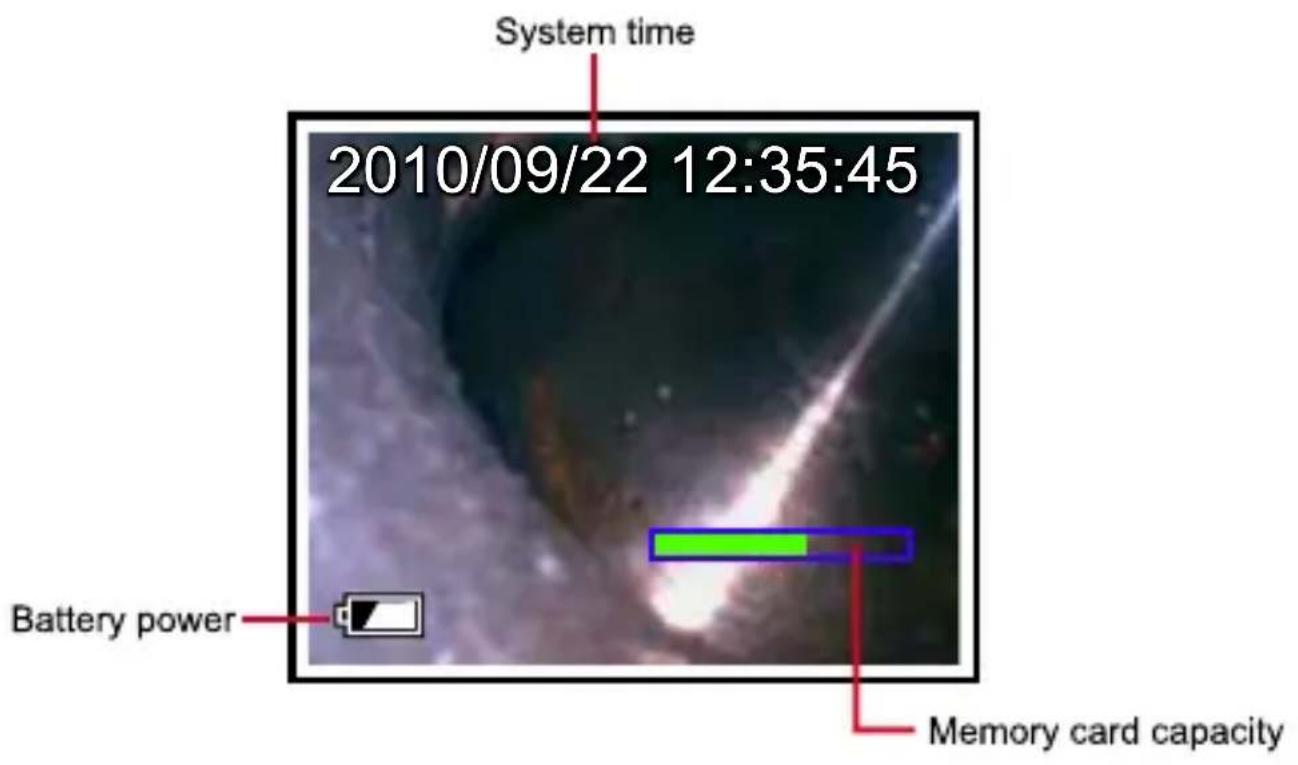
Screen
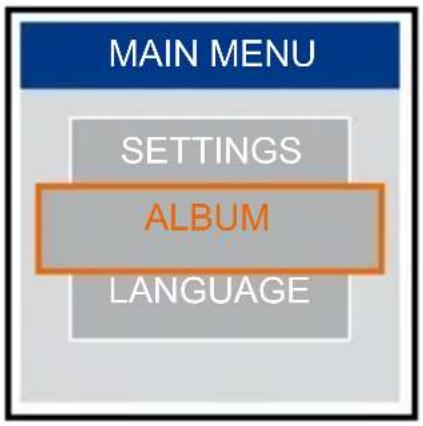
System menu
Step 1: Press to enter the Menu mode.
Step 2: Press the button or to choose the item you need.
Step 3: Press OK to enter it.
Instructions which can be executed on the menu are listed as follows:
Album
The user may manage images or films in the memory through this function.
Step 1: Press or or or to choose any image or film you need.
Step 2: Press OK to enlarge the image.
Step 3: Press to delete it.
Step 4: To confirm a deletion, press or press ESC to cancel it.

Language
The user may choose any language he or she needs in this option.
Date / Time
The user may set system time through this instruction.
-Format: Set sequence of day, month, year.
-Display: Set if time is to be shown on Preview mode.
-Setting: Set the device's time.
Step 1: Press or button to choose day, month or year to be changed.
Step 2: Press the button or to adjust figures.
TV System
Set video format, NTSC or PAL.
SETTINGS
2010/09/22 12:35:45
2010
SD Card Status
Use this instruction to view the SD card's status.
-Delete all files
Delete pictures produced by the device.
-Format SD card
Delete all files in the memory card.
-SD card status
Show available capacity in the SD card.

Settings
-Auto Power Off
Use this function to setting auto power off in 3 mins or 5 mins, then you can disable the auto power off function by selecting "0".
-Recording timer
Use this function to setting time of each film. It will not stop if you didn't press record button or till the memory is full.
Operating Guide
Operating Guide Fn

Brightness and Contrast: User may use this function to bring Image brightness and contrast.
Zoom-in & Mirror
-Zoom-in: Press to enlarge the image 2 times, and press it again to the default image setting.
* Default image

* enlarged 2X
-Mirror: Press to mirror the image, and press it again to the default image setting.

*Default image

*Activated
USB Video
Enable Function
Step 1: Connect main system to PC by usb plug, then screen will display and .
Step 2: Press the button or to select O
Step 3: Press OK to enable it.

Note: Selet SD into card reader mode.
Specification
| Main System | |
| System Dimension 275mm x123mm x 55mm | |
| System Weight 370g (w/o battery) | |
| Display 3.5" TFT LCD QVGA | |
| Display Resolution 320X240 | |
| Power AA x 4 (Alkaline or Ni-HM) | |
| Battery life 4hours | |
| Recording Medium SD CARD (Support to 32G) | |
| Video Out Format NTSC & PAL | |
| Interface AV out | |
| File Format MPEG4, JPEG | |
| Video Resolution 640x480,30FPS | |
| Image Resolution 640X480 | |
| Exposure Automatic | |
| White Balance Fix | |
| Language English, French, German, Italian, Spanish, Portuguese, Dutch, Danish, Polish, Russian, Bulgarian, Turkish, Swedish, Finnish, Norwegian, Romanian, Greek, Estonian, Lithuanian, Latvian, Hungarian, Czech, Slovak, Slovenian, Traditional Chinese, Simplified Chinese, Japanese | |
| Working Temperature | 0°C~60 °C |
| Storage Temperature | -20°C~60 °C |
Cautions for Use
- To avoid danger, do not put the insert tube into any flammable liquid or gas.
- The insert tube contains a series of small wires that control the optics and electronics of the camera tip. To ensure long-term reliability, do not bend the insert tube more than 180 degrees, and always bend the insert tube in as large an arc as possible during usage and storage.
- Camera lens cleaning: The user may clean the camera lens with a cotton swab and small amount of cleaning naphtha.
-Do not remove the SD card when capturing photos or video. This can cause a loss of the image or video and may damage the SD card. -
Video recording requires an SD card with fast writing speed. We recommend 80X (or above) writing speed SD cards for better video quality.
-This product is designed for industrial use only. Do not use the system for human or any other biological inspection.
-Do not insert the insert tube into any flammable gas or liquid (such as a fuel tank) to avoid danger.
-Do not use this product in a fuel tank or other dangerous environment such as a gasoline or alcohol storage tank.
-Do not use any corrosive liquid for cleaning, such as alcohol. -
Do not try to disassemble the device.
It may result in an electric shock and may damage the device.
-Please use only recommended components or accessories. Unapproved accessories and components may cause damage.
-Do not use this product in a medical facility or on an airplane, as the wireless signal may interfere with other critical equipment nearby.
-Avoid direct exposure to sunlight for long period of time. Store the system in a cool, dry and well-ventilated place.



- Bedienungsanleitung
- Tragbares Video-Endoskop
- PORTABLEVIDEOBORESCOPE
- Explanation of Symbols
- ATTENTION!
- Operator's Liability
- Appropriate Use
- This endoscope must not be used for medical purposes.
- Do not look at light sources! Do not bend the insert probe!
- Dangers emanating from the tool
- Spare Parts
- Disposal
- Scope of delivery:
- First Time Use
- System Mode
- Multifunction Key
- Screen
- System menu
- Album
- Language
- Date / Time
- TV System
- SETTINGS
- SD Card Status
- -Delete all files
- -Format SD card
- -SD card status
- -Auto Power Off
- -Recording timer
- Operating Guide
- Operating Guide Fn
- Zoom-in & Mirror
- USB Video
- Enable Function
- Cautions for Use
Brand : Hazet
Model : 4812104S
Category : Video camera