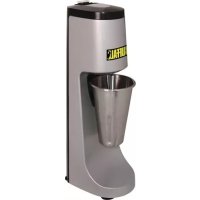
CD561 - Food Processor BUFFALO - Free user manual and instructions
Find the device manual for free CD561 BUFFALO in PDF.



| Product type | Food processor - Simple beverage mixer |
| Brand | Buffalo |
| Model | CD561 |
| Dimensions (H x W x D) | 500 x 158 x 208 mm |
| Weight | 6.5 kg |
| Power supply | 230 V ~ 50 Hz |
| Power | 400 W |
| Current | 1.8 A |
| Jug capacity | 0.95 L |
| Jug material | Glass or plastic (not specified) |
| Speeds | 2 speeds (I: low, II: high) + stop (0) |
| Operation | Beverage mixing |
| Included accessories | Jug, 2 additional stirrers, instruction manual |
| Control type | Rotary knob on top |
| Safety | Safety lock (only works if jug is correctly placed) |
| Maintenance | Clean the bowl and stirrer with warm soapy water; wipe the exterior with a damp cloth |
| Cleaning | Do not immerse, do not use pressure washer, no abrasive products |
| Installation | Flat and stable surface |
| Electrical connection | Grounding mandatory (green/yellow earth wire) |
| Standards | CE, compliance with European directives |
| Repairability | Repairs by qualified technician only; cord replacement by Buffalo agent |
| Warranty | Manufacturer warranty (conditions not detailed) |
| Intended use | Professional or domestic use (not specified) |
| Ambient temperature | Not specified |
Frequently Asked Questions - CD561 BUFFALO
User questions about CD561 BUFFALO
0 question about this device. Answer the ones you know or ask your own.
Ask a new question about this device
Download the instructions for your Food Processor in PDF format for free! Find your manual CD561 - BUFFALO and take your electronic device back in hand. On this page are published all the documents necessary for the use of your device. CD561 by BUFFALO.
USER MANUAL CD561 BUFFALO
Position on a flat, stable surface
A service agent/qualified technician should carry out installation and any repairs if required. Do not remove and components or service panels on this product
Consult Local and National standards to comply with the following:
Health and safety at work legislation
BS EN Codes of practice
Fire Precautions
IEE wiring regulations
Building regulations
DO NOT use jet/pressure washers to clean the appliance
DO NOT immerse the appliance in water
DO NOT use the appliance outside
- DO NOT attempt to mix items that this machine is not designed for. This can damage the machine.
DO NOT bypass the safety interlocks - DO NOT place hands near the rotating attachments when in use. This can result in injury.
- Never leave the appliance unattended when in use
- Always switch off and disconnect the power supply to the unit before cleaning
This appliance must only be used in accordance with these instructions and by persons competent to do so. - Keep all packaging away from children. Dispos of the packaging in accordance with the regulations of local authorities
- If the power cord is damaged, it must be replaced by a BUFFALO agent or a recommended qualified technician in order to avoid a hazard
- This appliance is not intended for use by persons (including children) with reduced physical, sensory or mental capabilities, or lack of experience or knowledge, unless they have been given supervision or instruction concerning the use of the appliance by a person responsible for their safety
Children should be supervised to ensure that they do not play with the appliance
Product Description
CD561 - BUFFALO Single Spindle Drinks Mixer
Pack Contents
BUFFALO Single Spindle Drinks Mixer Mixing Jug 2 x Spare Agitators Instruction manual
BUFFALO prides itself on quality and service, ensuring that at the time of packaging the contents are supplied fully functional and free of damage. Should you find any damage as a result of transit, please contact your BUFFALO dealer immediately.
Installation
Position mixer on level and stable surface
Layout of Controls
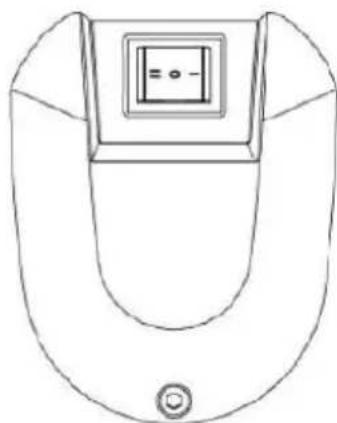
0 = Off I = LowSpeed II = HighSpeed
Operation
Place the drink ingredients into the mixing jug, ensuring that the maximum fill line is not exceeded.1. Select desired speed setting using the switch located at the top of the mixer 2. Position mixing jug into holder3.
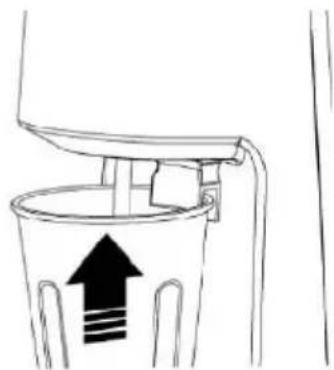
If switch is set to position I or Position II mixer will start automatically. If switch set to position 0 4. select either speed I or II to start mixing.

Note: Mixer will not work unless mixing jug is correctly located in holder and switch is set to position I or II
When drink has been completely mixed, mixer can be stopped by either setting switch to position 0 or 5. by removing cup from the holder
Replacing the agitator
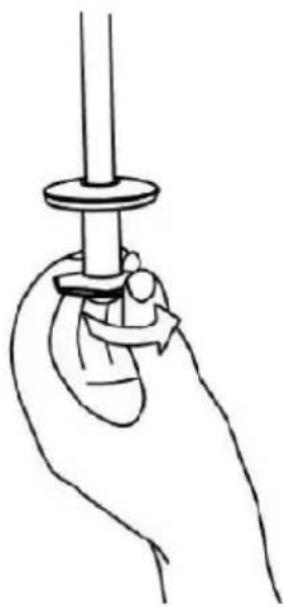
Turn off the mixer and disconnect from the power supply.1.
To remove agitator unscrew counter clockwise.2.
To replace agitator screw clockwise.3.
Cleaning, Care & Maintenance
Always turn off the mixer and disconnect from the power supply before cleaning
Use warm soapy water to clean the bowl, and agitator. Do not use abrasive cleaning chemicals as these can leave harmful residues
Clean the exterior of the appliance with a damp cloth
Dry all parts thoroughly after cleaning
Do not use jet/pressure washers to clean the appliance
Clean the appliance regularly
Trouble Shooting
| Trouble Cause Solution | ||
| The machine does not start No power supply to mixer1. The mixing jug is not correctly located 2. in the jug holder The switch is in position "0"3. | Check the main switch, the plug and 1. the wire. Correctly position the jug.2. Press the switch into position I or II3. | |
Technical Specifications
| Model | Voltage | Power | Current | Dimensions h x w x d mm | Weight | Jug Volume |
| CD561 | 230V 50hz | 400w | 1.8a | 500 x 158 x 208 | 6.5kg | 0.95L |
Electrical Wiring
This appliance is supplied with a 3 pin, BS1363 plug and lead, with a 3 amp fuse as standard
The plug is to be connected to a suitable mains socket
The appliance is wired as follows:
Live wire (coloured brown) to terminal marked L
Neutral wire (coloured blue) to terminal marked N
Earth wire (coloured green/yellow) to terminal marked E
This appliance must be earthed, using a dedicated earthing circuit
If in doubt, consult a qualified electrician
Electrical isolation points must be kept clear of any obstructions. In the event of any emergency disconnection being required they must be readily accessible
Disposal
EU regulations require refrigeration product to be disposed of by specialist companies who remove or recycle all gasses, metal and plastic components
Consult your local waste collection authority regarding disposal of your appliance. Local authorities are not obliged to dispose of commercial refrigeration equipment but may be able to offer advice on how to dispose of the equipment locally
Alternatively, call the BUFFALO helpline for details of national disposal companies within the EU
The WEEE logo on this product or its documentation indicates that the product must not be disposed of as household waste. The help prevent possible harm to human health and/or the environment, the product must be disposed of in an approved and environmentally safe recycling process. For further information on how to dispose of this product correctly, contact the product supplier, or the local authority responsible for waste disposal in your area
Compliance
BUFFALO parts have undergone strict product testing in order to comply with regulatory standards and specifications set by international, independent and federal authorities. BUFFALO products have been approved to carry the following symbol:
CE
Veiligheidstips
Regulamentos IEE relativos as lagoes electrolyicas
DECLARATION OF CONFORMITY
- Conformiteitsverklaring - Déclaration de conformité - Konformitätserklung - Dichiarazione di conformità - Declaración de conformidad - Declaração de conformidade
Equipment Type • Ultrustingstype • Type d'équipement • Gerätotyp • Tipo di apparecchiatura • Tipo de equipo • Tipo de equipamento:
Model · Modèle · Modell · Modelo · Modelo:
LVD Directive 2006/95/EC EMC Directive 2004/108/EC
EN 60335-1:2002 +A11 +A12 +A13
EN 60335-2-64:2002
EN 55014-1:2006
EN 61000-3-2:206
EN 61000-3-3:2008
Buffalo
Fourth Way, Avonmouth, Bristol, BS1 8TB United Kingd
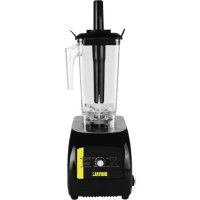
Brand : BUFFALO
Model : CD561
Category : Food Processor