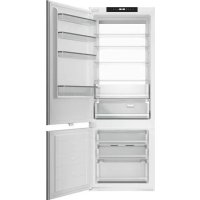
USER MANUAL REF704BBNPTC BERTAZZONI
| EN | INSTALLATION MANUALUSER AND MAINTENANCE MANUALREFRIGERATOR REF...BBNPTC SERIES | 3 |
| IT | MANUALE D'INSTALLAZIONEMANUALE D'USO E MANUTENZIONEFRIGORIFERO RIF...SERIE BBNPTC | 27 |
| FR | MANUEL D'INSTALLATIONMANUEL D'UTILISATION ET D'ENTRETIENRÉFRIGÉRATEUR RÉF... SÉRIE BBNPTC | 51 |
| NL | INSTALLATIEHANDLEIDINGGEBRUIKS- EN ONDERHOUDSHANDLEIDINGKOELKAST REF...BBNPTC SERIE | 75 |
| SV | INSTALLATIONSHANDBOKBRUKS- OCH UNDERHÅLLSHANDBOKKYLSKÅP REF...BBNPTC SERIEN | 99 |
FROM THE DESK OF OUR PRESIDENT
Dear new owner of a Bertazzoni appliance,
I want to thank you for choosing one of our beautiful products for your home.
My family started manufacturing kitchen appliances in Italy in 1882, building a reputation for quality of engineering and passion for good food.
Today, our products stand out because of their unique blend of authentic Italian design and superior appliance technology. It is our mission to make products that function perfectly and bring joy to their owners.
By making beautiful products we respond to our customers' flair for good design. By making them versatile and easy-to-use, cooking with Bertazzoni becomes a real pleasure.
This manual will help you learn to use and care for your Bertazzoni appliance in the safest and most effective way, so that it can give you the highest satisfaction for years to come.
Enjoy!
Paolo Bertazzoni
President

USER MANUAL VALIDITY
The following manual is valid for all the product codes mentioned below:
• REF603BBNPTC
• REF604BBNPTC
• REF704BBNPTC
• REF603BBNPTC-S
• REF604BBNPTC-S
• REF704BBNPTC-S
IMPORTANT SAFETY AND ENVIRONMENTAL INFORMATION 7
SAFETY INFORMATION 7
SCRAPPING OLD APPLIANCES 8
CONFORMITY 8
ENERGY SAVING 8
BEFORE FIRST USE 8
USER AND MAINTENANCE 9
USE 9
USING THE FRIDGE 9
USING THE FREEZER 9
FRESCO ZONE DRAWER 9
STORAGE 10
CONTROL PANEL 11
CARE AND MAINTENANCE 13
LED LIGHT REPLACEMENT INSTRUCTIONS 13
CARE AND CLEANING 13
DEFROSTING 13
TROUBLESHOOTING 13
INSTALLATION 15
INSTALLATION INSTRUCTIONS 15
PREPARING FOR INSTALLATION 15
VENTILATION 15
INSTALLATION INSTRUCTIONS (SLIDING HINGE) 19
MOUNTING THE CABINET DOOR(S) 20
INSTALLATION INSTRUCTION (DOOR ON DOOR HINGE) 21
REVERSING THE APPLIANCE DOORS 23
ENSURING THE DOOR SEALS CORRECTLY 24
CARE AND SERVICE 25
CARE & SERVICE 25
Thank you for purchasing this product.
In order to get the most out of your refrigerator, please find this instruction manual carefully before use. Keep all documentation for use at a later date or for future owners. This product is intended solely for residential use or similar applications, such as:

The staff kitchen areas of shops, offices and other working environments; on farms, by guests at hotels, motels, bed and breakfasts (B&Bs) and other residential-type environments.

It may be used for catering services and similar applications, provided it is not used to store products for retail sale.

This appliance must be used only for purposes of food storage; any other use is considered hazardous and the
WARNING
Do not use electrical appliances inside the unit's food storage compartments unless these are of a type recommended by the manufacturer.
WARNING
When positioning the appliance, make sure that the power cord does not become trapped or damaged.
WARNING
Do not place multi-outlet power strips or portable power supplies at the rear of the appliance.
manufacturer will not be held liable in the event of suchDo not store explosive substances, such as aerosol cans use. Also, it is recommended that you take note of the with a flammable propellant, inside this appliance. warranty conditions.
WARNING
Risk of fire / Flammable materials
This appliance is not intended for use by persons (including children) with reduced physical, sensory or mental capabilities or lack of experience and knowledge unless they are supervised or have been given instruction concerning the use of the appliance by a person responsible for their safety.
Children should be supervised to ensure that they do not play with the appliance.
This appliance is intended to be used in residential and other similar applications, such as:
- staff kitchen areas in shops, offices and other working environments;
- in farm houses and by guests at hotels, motels and otl residential type environments;
• bed and breakfast type environments;
• catering and similar non-retail applications.
Please comply with local regulations when disposing of the appliance, due to its flammable refrigerant and insulation-blowing gas.
If the power cord is damaged, it must be. If the LED lamp is damaged, it must be replaced by the replaced by the manufacturer, its service agent manufacturer, its service agent or a similarly qualified or a similarly qualified person in order to ensuperson in order to ensure against hazards. against hazards.

WARNING
Keep ventilation openings in the enclosure or built-in structure where the appliance is housed free of obstructions.

WARNING
To prevent hazards associated with appliance instability, the appliance must be anchored according to the instructions.

WARNING
Do not use mechanical devices or other means to accelerate the defrosting process unless they are recommended by the manufacturer.


WARNING
Do not damage the refrigerant circuit.

This appliance is marked according to European Directive 2012/19/EU on Waste Electrical and Electronic Equipment (WEEE).
WEEE contains both basic components (which can be re-used) and polluting substances (which can have negative impacts on the environment). It is important that WEEE undergo specific treatments in order to remove and properly dispose of all pollutants and recover and recycle all re-usable materials.
Individuals can play an important role in ensuring that WEEE does not become an environmental problem; it is essential to follow some basic rules:
- WEEE should not be treated as household waste;
- WEEE should be disposed of at the appropriate collection points managed by the municipality or by registered companies. In many countries, for large WEEE, at-home pick-up may be available.
In many countries, when you buy a new appliance, the old one may be returned to the retailer, who is obliged to collect it free of charge on a one-to-one basis, as long as the equipment is of an equivalent type and has the same functions as the equipment being supplied.
By placing the € mark on this product, we are confirming compliance with all relevant European safety, health and environmental requirements which are applicable to this product by law.
For optimal energy saving, we recommend the following:
• Install the appliance away from heat sources, out of direct sunlight and in a well-ventilated room.
- Avoid putting hot food into the refrigerator, which would raise the internal temperature, thus causing the compressor to run continuously.
- Do not overfill the compartments, as this prevents air from circulating properly.
- If ice should form, defrost the appliance in order to facilitate the transfer of cold.
- In the event of an electrical power failure, it is advisable to keep the refrigerator door closed.
- Open the appliance doors as infrequently and for the briefest amounts of time possible.
- Do not adjust the settings to extremely cold temperatures.
- Remove any dust that accumulates on the back of the appliance
You must allow the fridge to settle for at least four hours prior to switching the power on.
It is recommended that you clean the interior of the appliance prior to first use using a solution of bicarbonate soda and warm water, then thoroughly dry the interior. The fridge may have an odour to it at first use. This will disappear as the appliance cools.

NOTE
The appliance will start operating at 5^ C for the fridge and -18^ C for the freezer and work continuously until it comes down to the correct temperatures. If the appliance is switched off, you should allow five minutes before switching it on again in order to prevent unnecessary damage to the compressor. Never store inflammable or explosive items, strong corrosive acids or alkalis in the appliance. This fridge cools your food by making the inside back of the cavity cold. It is normal for frost to build up on this surface; it then dissipates and drains through a small drain at the bottom, where it evaporates harmlessly. The presence of frost at the back does not mean that the fridge is malfunctioning.
USING THE FRIDGE
- Never put liquids into the refrigerator uncovered
- Never put hot foods into the refrigerator. Warm food should be allowed to cool to room temperature before being put into the refrigerator.
- Nothing should rest against the rear wall of the refrigerator, as this will cause the formation of frost, which will be difficult to remove, and possible condensation problems.
• Make sure food is clean and that any excess water is wiped off before putting it into the fridge.
- Wrap or cover food before putting it into the fridge. This will help impede the loss of moisture, keep food fresh and prevent unpleasant odours.
- Sort foods prior to storing. Any foods to be used soon should be stored at the front of the shelves. This will help to prevent deterioration, which could occur when the door is kept open for long periods of time.
- Do not overfill the fridge. There should be sufficient space between foods to allow cool air to circulate.
- Thawing frozen foods in the fridge compartment will help to keep the temperature low and save energy.
- Never store raw meats on shelves above cooked meats or produce. This will help to prevent juices from raw meat from contaminating other foodstuffs.
USING THE FREEZER
- The freezer compartments are designed to store frozen food only.
- Never put hot or warm foods into the freezer; allow them to cool fully before putting them into the freezer.
- When storing frozen food, follow the instructions on the food packaging. If no information is provided, foods should not be stored for longer than three months after the purchase date.
- Store food in small packages (ideally less than 1 kg). This reduces freezing time and improves the quality of the food after thawing.
- Wrap food before putting it into the freezer. To stop the wrapping from sticking together, ensure it is dry.
- Label food before freezing, with information including type of food and dates of storage and expiration.
- Once food is thawed, it must not be refrozen. In order to prevent wastage, only defrost as much food as is required.
- Bottled or canned drinks should not be stored in the freezer compartments, as they could explode.
- The maximum amount of fresh food that can be frozen within a 24-hour period is 2.6 kg.
- Do not attempt to freeze more than the maximum amount.
FRESCO ZONE DRAWER
- The temperature inside the Fresco drawer can be regulated within a range of between +3°C and -3°C. Th is the ideal drawer for storing meat and fish.
STORAGE
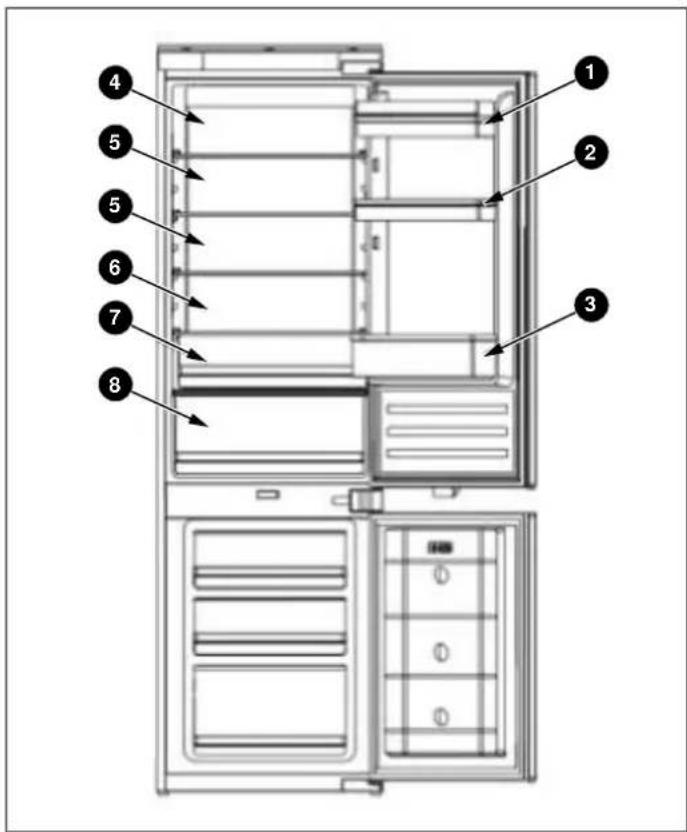
Fig. 1
The fridge section is for short-term food storage. Although low temperatures can be maintained, it is not recommended to store food for extended periods.
The temperature can vary between the different sections a the cold air circulates within the fridge. For this reason, foods should be stored in different sections according to type.
1) Butter, cheeses, etc.
2) Food in jars and bottles
3) Beverages, e.g. milk
4) Cooked food
5) Yoghurt, preserves, etc.
6) 75 cl bottles, ready-made meals, etc.
7) Fruit and vegetables
8) Fresh meat and fish / Fruit and vegetables
The fridge shelves can be moved within the refrigerator compartment depending on storage requirements. To move a shelf, lift up the rear section and then pull it outwards.
To replace, slide the shelf back into the slot and then lov the rear section.
The most energy-saving configuration requires the drawers, door bins and shelves to be installed in the appliance; please see the pictures above.
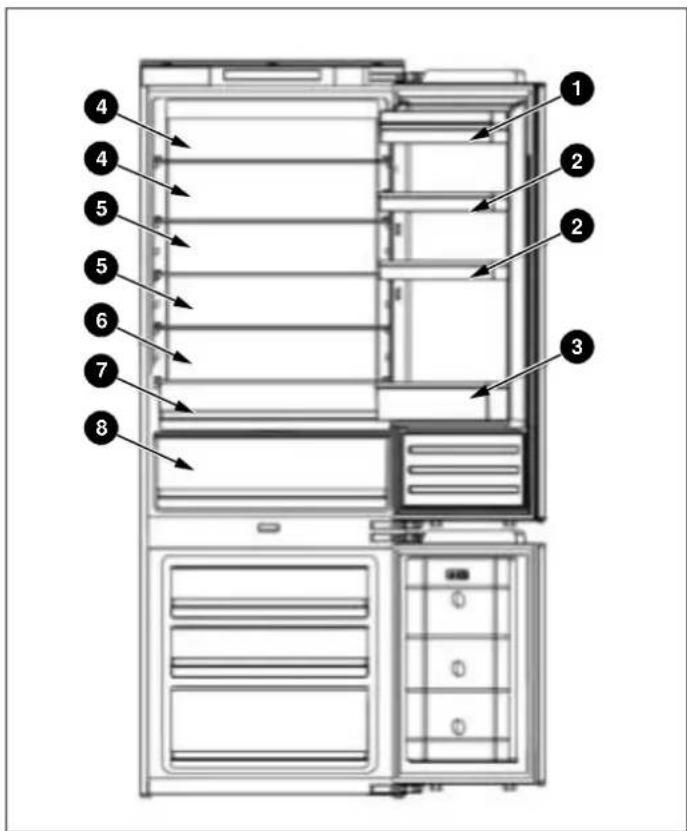
Fig. 2
CONTROL PANEL

natural_image
Row of eight icons including shopping cart, umbrella, refrigerator, water drop, sprout, and power button on black background (no text or symbols)
Fig. 3
1) When the appliance is switched on for the first time, 10) No Frost models are equipped with a manual defrosting will be operating at the following settings: 5°C for the fridge, 0°C for the Fresco and -18°C for the freezer. If you wish to adjust the temperature or functions manually, use the appropriate button to perform the desired function. Press and hold buttons for 5 seconds to switch on the manual defrosting function to clean the freezer evaporator. The freezer temperature symbol
use the appropriate button to perform the desired operation. The temperature range for the Fresco is from remains steadily lit. Press and hold buttons + for -3°C to 3°C.
3 seconds to switch off the manual defrosting function.
The freezer temperature symbol goes dark.
om remains steadily lit. Press and hold buttons + for 3 seconds to switch off the manual defrosting function. The freezer temperature symbol goes dark.
2) Fridge temperature adjustment: Press that button on the left-hand side of the control panel to adjust the temperature within a range of between 2^ C and 8^ C.
3) Freezer temperature adjustment: Press the button on the right-hand side of the control panel to adjust the temperature within a range of between -15°C and -25°C.
4) Fresco drawer temperature adjustment: The button controls temperature. By pressing on this button, you can adjust the temperature within a range of between -3°C and +3°C. This function can be turned on/off by pressing and holding the button for three seconds (OFF is displayed).
5) Super Cool: Press the button; the button lights up and the fast cooling function is turned on. The fridge automatically begins running at a temperature setting 2^ C and continues for 24 hours, after which it returns its normal setting and the symbol is no longer lit.
6) Holiday Mode: Press the button; the button lights the holiday function is turned on and the whole appliance automatically begins running at the following settings: fridge at 17°C and freezer at -18°C.
7) Eco Mode: Press the button on the control panel; the Eco function is turned on and the button lights up. The fridge compartment runs at a setting of 5°C and the freezer compartment runs at a setting of -18°C. The Fresco works at a setting of 3°C.
8) Super Freeze: Press the button; the button lights up and the freezer begins to run the fast freezing function, with a temperature setting of -25^ C. After 24 hours, the fast freezing function quits automatically.
9) Press and hold the power button for 3 seconds to switch off your appliance. The button lights up and the power is shut off. The interior lamps switch off and the compressor stops operating. Press and hold the button for 3 seconds to switch on your appliance. The symbol lights up and power is restored.
11) Fault Display: This appliance has a "Fault Display & Alarm" function. Once the sensors detect a fault, alerts are shown on the temperature display; the appliance sticools, but a professional service engineer should be called in to check it.
F2 - Fresco sensor
• F3 – Fridge compartment sensor
• F4 – Freezer compartment sensor
• F5 – Defrosting sensor
• 2E – Freezer fan/motor fault
- CE– Communication fault between main board and display panel
The above Faults are only shown on the display; there is no audible alarm signal.
Maximum freezer temperature exceeded alarm: If, after the freezer reaches the set temperature, the temperature rises to above -1°C, the alarm will sound, accompanied by simultaneous flashing of the freezer temperature display. Press any button to cancel the audible alarm. The flashing will continue until the temperature falls below -1°C.

NOTE
The main board is located in the compressor compartment.
POSITION
5^ C / -18^ C
CONDITIONS
Summer or ambient temperature
between 25-35°C
5^ C / -18^ C
Spring, autumn or ambient temperature
between 15-25°C
POSITION CONDITIONS
| 5°C / -18°C | Winter or ambient temperature |
| between 5-15°C |
Super Freezing function Super Freeze
Super Cooling function Super Cool
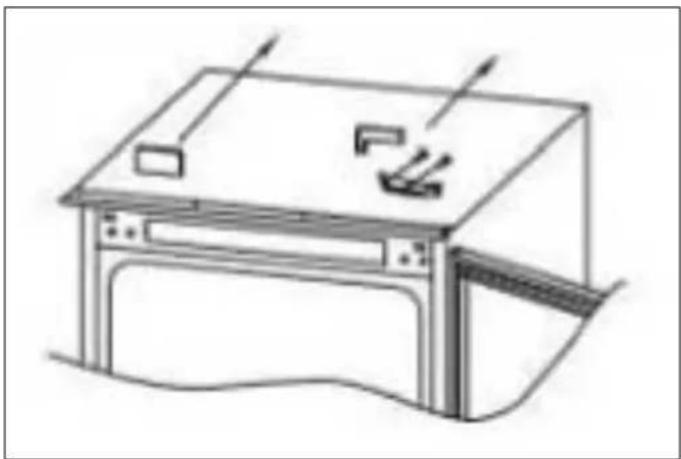
LED LIGHT REPLACEMENT INSTRUCTIONS

NOTE
The LED light is intended to be non-replaceable by the user; it needs to be replaced by a service professional.
Lighting parameters: 12V / 10W
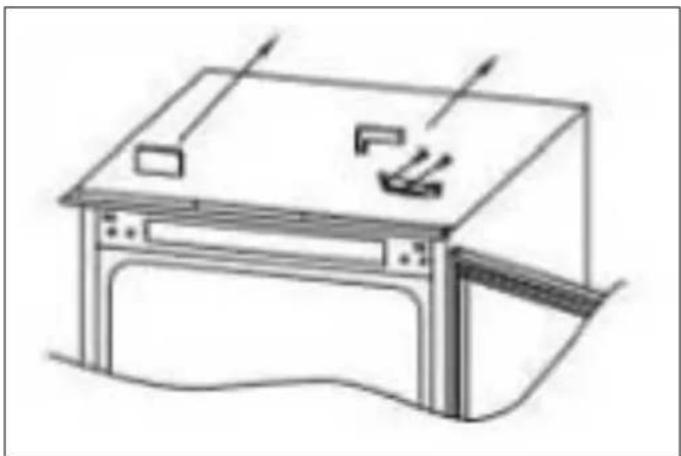
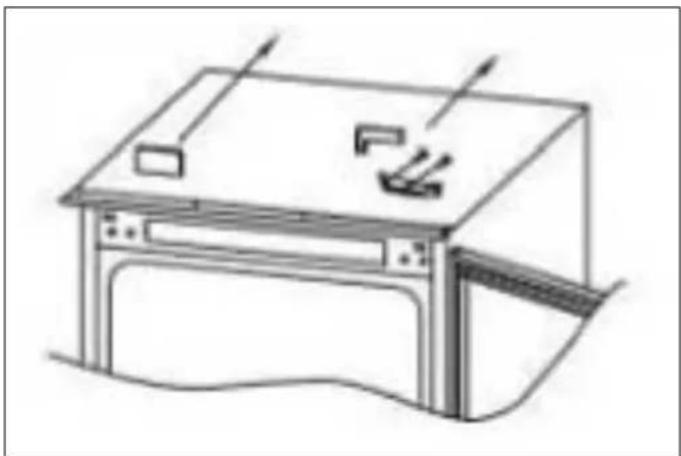
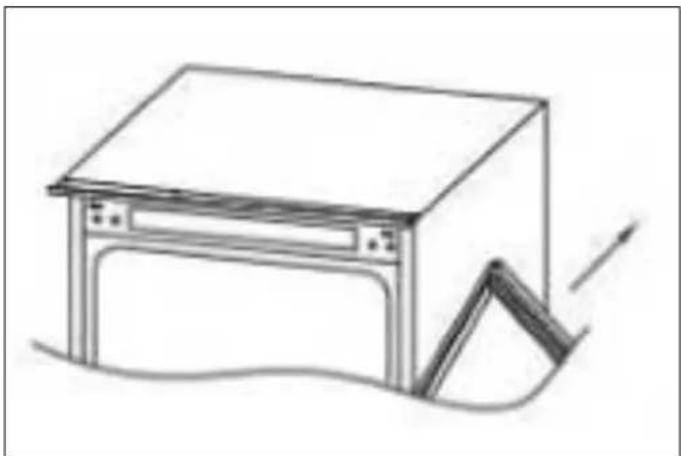
1) Unplug the power plug.
2) Remove the aluminium alloy trim strip on the top of LED surface light source, then remove the left and mounting screws.
Steps 1 and 2 are shown below.
3) Install the new LED light board.
4) Finally, replace the aluminium alloy trim strip.

Fig. 4
CARE AND CLEANING
Always disconnect the appliance from the mains power before performing any cleaning or maintenance.
The fridge and freezer sections should be cleaned using a solution of bicarbonate of soda and lukewarm water. Do n use abrasive products or detergents. After washing, rinse and dry thoroughly.
Clean the shelves and door bins separately by hand with mild solution of washing-up liquid and water. Do not put them in the dishwasher.
If the appliance is not going to be used for an extended period of time, unplug and clean the appliance. The doors should be left slightly ajar to prevent the formation of the midew and unpleasant odours.
DEFROSTING
The product has a No Frost system, which is designed to prevent heavy build-up of ice. Under normal conditions of use, there should be no need to regularly defrost the freezer system.

NOTE
If you are regularly finding a heavy build-up of ice or puddles of water in the freezer section, then it is likely that the door is not sealing properly. This could be due to a defective door seal or an incorrectly fitted or overly heavy cabinet door panel. For more information, see the troubleshooting section about ice.
TROUBLESHOOTING
If you have any problems with your appliance, you should check this troubleshooting section prior to calling Customer Care.
If the appliance is not working, check that:
The appliance is receiving electrical power.
- The fuses in the home are intact and the fuse in the has not blown.
The fridge has not been turned off.
- The electrical outlet is functioning properly. To check this, plug another electrical appliance into it to see if the outlet is faulty.
If the appliance is working, but not very well, check that:
• The appliance is not overloaded.
The thermostat is set to an appropriate temperature.
The doors are closing properly.
The cooling system on the back of the appliance is cle and free of dust and is not touching the rear wall.
- There is enough ventilation around the side and rear walls.
If the appliance is noisy, check that:
• The appliance is level and stable.
- The side and rear walls are clear and there is nothing resting against the appliance.

NOTE
The coolant gas in the refrigerator may make a slight bubbling or gurgling noise, even when the compressor is not running.
If the appliance is beeping, check that:
- The doors are closed. An alarm will sound after a door has been open for 60 seconds.
If ice has formed on the back wall of the fridge:
- It is normal for some ice droplets to form on the back wall of the fridge. This does not constitute a fault with the appliance.
- Ensure that no items inside the fridge are in contact with the back wall.
- Check that there is some resistance when opening the appliance door. If it opens at the slightest touch, it may mean that the door seal needs to be replaced.
- Check the door seal for any kinks, debris or damage. If you notice any, and are unable to resolve the issue yourself, contact Customer Care so that the seal can be replaced.
- This can be due to the cabinet door(s) not being properly fitted. If you are at all unsure, ask your installer to check the cabinet doors.
If excessive ice has formed in the freezer:
- Check that there is some resistance when opening the appliance door. If it opens at the slightest touch, it may mean that the door seal needs to be replaced.
- Check the door seal for any kinks, debris or damage. If you notice any, and are unable to resolve the issue yourself, contact Customer Care so that the seal can be replaced.
- This can be due to the cabinet door(s) not being properly fitted. If you are at all unsure, ask your installer to check the cabinet doors.
If one or more of the LED units inside the appliance is not working:
- Contact Customer Care to arrange a service visit.
PREPARING FOR INSTALLATION
This appliance must not be installed close to heat sources, e. g. heating elements or cookers, or in a damp location.
Seek the help of one or two other individuals when installing this appliance. This appliance may have sharp edges. Wear PPE appropriate to the task and the environment.
- Use the height-adjustable feet at the front of the appliance to ensure that the appliance is level.
- The cooling system on the back of the appliance must not touch the rear wall. The larger the gap, the better.
- The appliance must be installed with adequate ventilation. Ensure that there is clearance above the appliance to allow air to escape and that there is space between the rear of the appliance and the wall.
VENTILATION
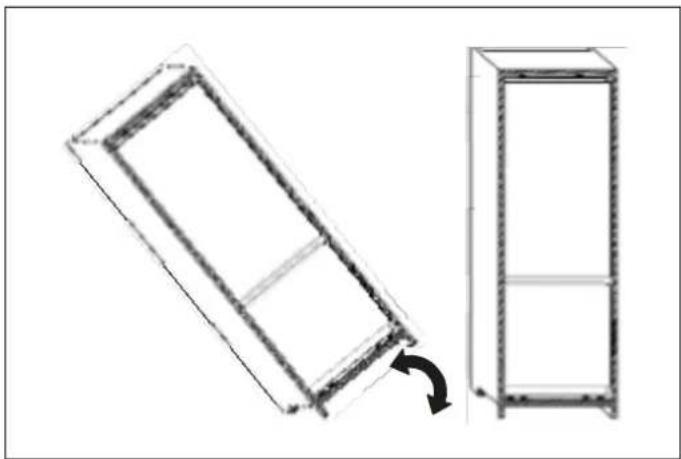
The main consideration when installing any refrigeration unit into a fitted kitchen is ventilation. The heat removed from the cooling compartment needs to be dissipated into the air around the appliance. Incorrect ventilation can lead to premature compressor failure, excessive power consumption and total system failure, and it may invalidate the warranty provided with the appliance.
natural_image
Technical line drawing of two rectangular metal cabinets with a rotation arrow indicating assembly (no text or symbols)
Fig. 5
For appliances intended to be installed inside a tall housing cabinet, the following requirements must be met:
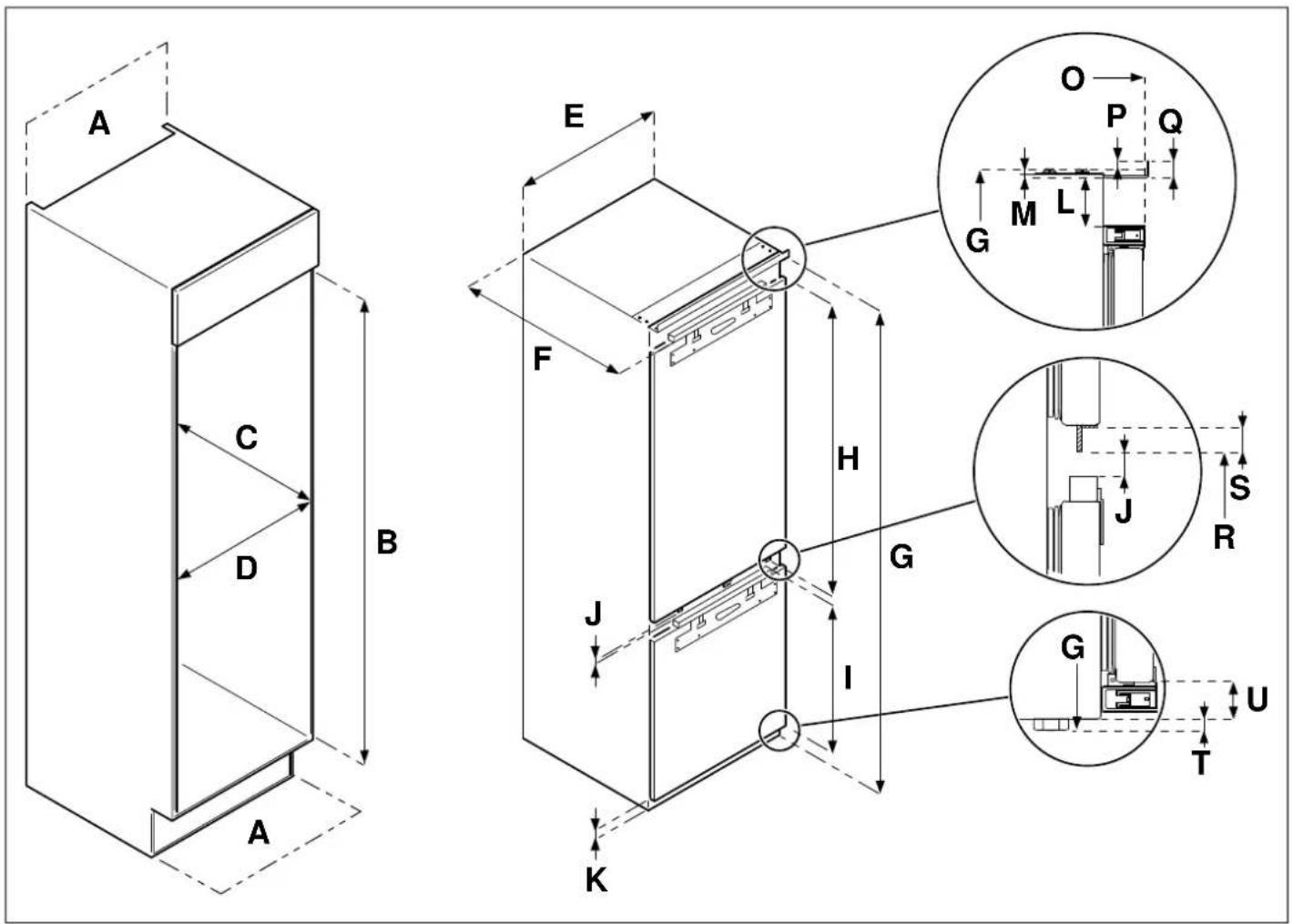
Fig. 6
| PRODUCT CODE | A | B | C | D | E | F | G | H | I |
| REF603BBNPTC | min 200 cm2 | 1778 - 1781 | min 560 | min 562 | 540 | 550 | 1776 | 1017 | 661 |
| REF604BBNPTC | 1939 - 1942 | 1937 | 1167 |
| PRODUCT CODE | J | K | L | M | | | O | P | Q | R | S | T | U |
| REF603BBNPTC | 14 | 37 | 51 | 7 | 550 | 9 | 15 | 698 | 20 | 8 | 29 | |
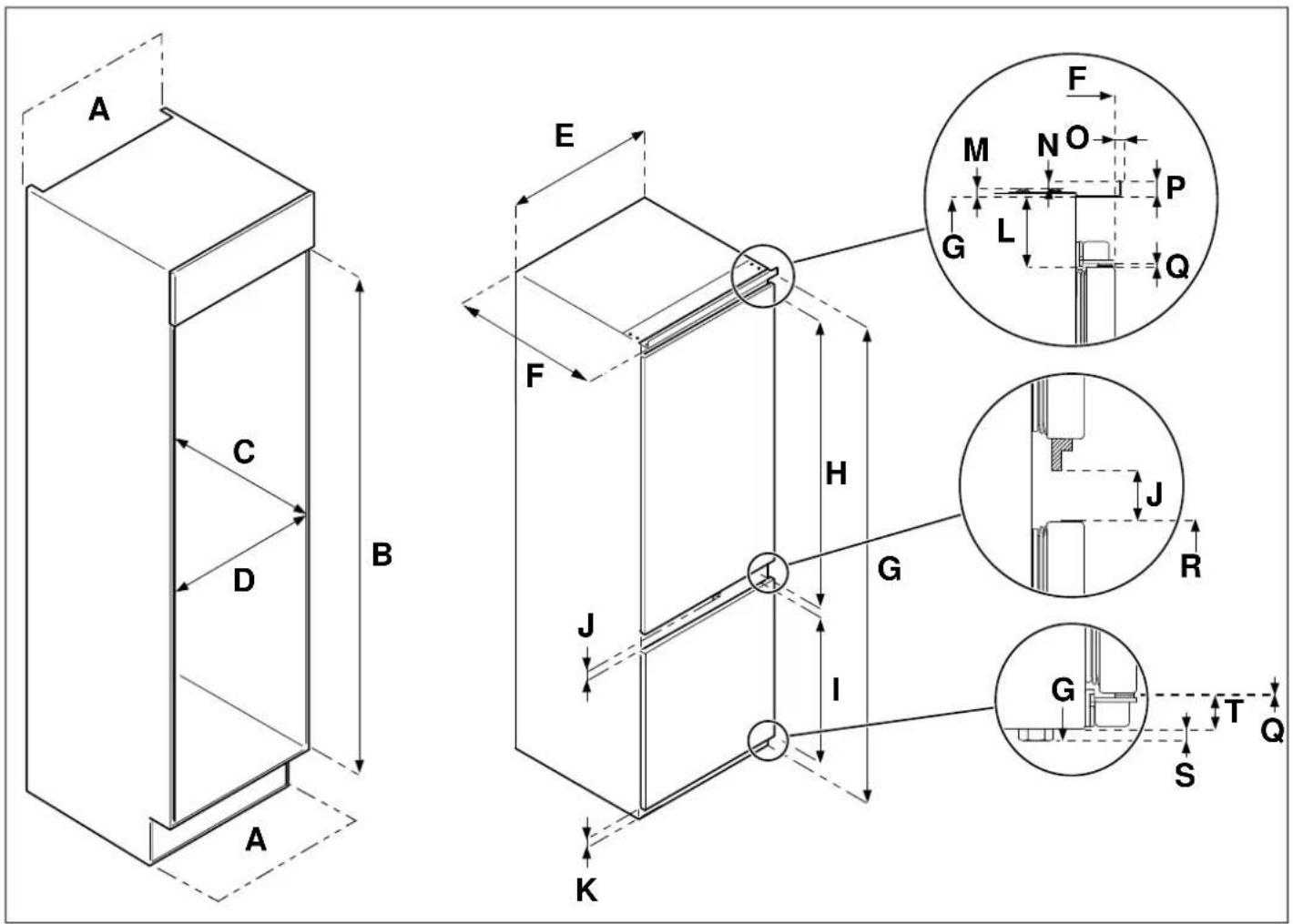
Fig. 7
| PRODUCT CODE | A | B | C | D E F | | G | H | I |
| REF603BBNPTC-S | min 200 cm^2 | 1778 - 1781 | min 560 | min 560 540 | 550 | 1776 | 1005 | 640 |
| REF604BBNPTC-S | 1939 - | 1937 | 1166 |
| REF704BBNPTC-S | min 712 690 | 1942 |
| PRODUCT CODE | J | K | L | M | N | | | O | P | Q | R | S | T |
| REF603BBNPTC-S | | | | | | | | | | | | | |
| REF604BBNPTC-S | 41 | 33 | 50 | 7 | 9 | 6 | 15 | 1.2 | 673 | 8 | 25 | | |
| REF704BBNPTC-S | | | | | | | | | | | | | |
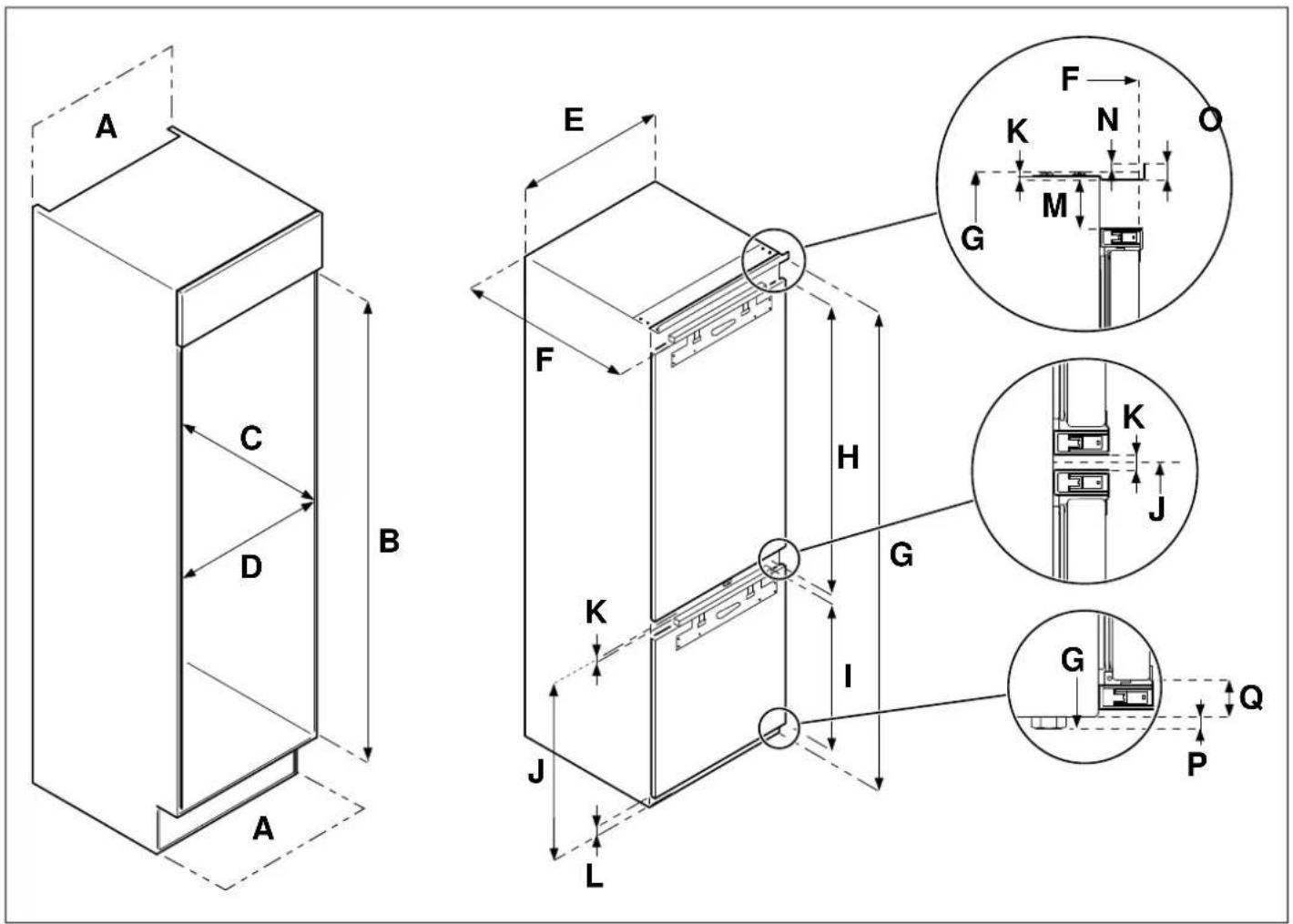
Fig. 8
| PRODUCT CODE | A | B | C | D E F | G | H | I |
| REF704BBNPTC | min 200 cm2 | 1939 - 1942 | min 560 | min 712 | 690 | 550 | 1937 | 1232.5 | 661 | | |
| PRODUCT CODE | J K L M N | O | P | Q |
| REF704BBNPTC | 701 | 7 | 36.5 | 42 | 9 | 15 | 8 | 28.5 |
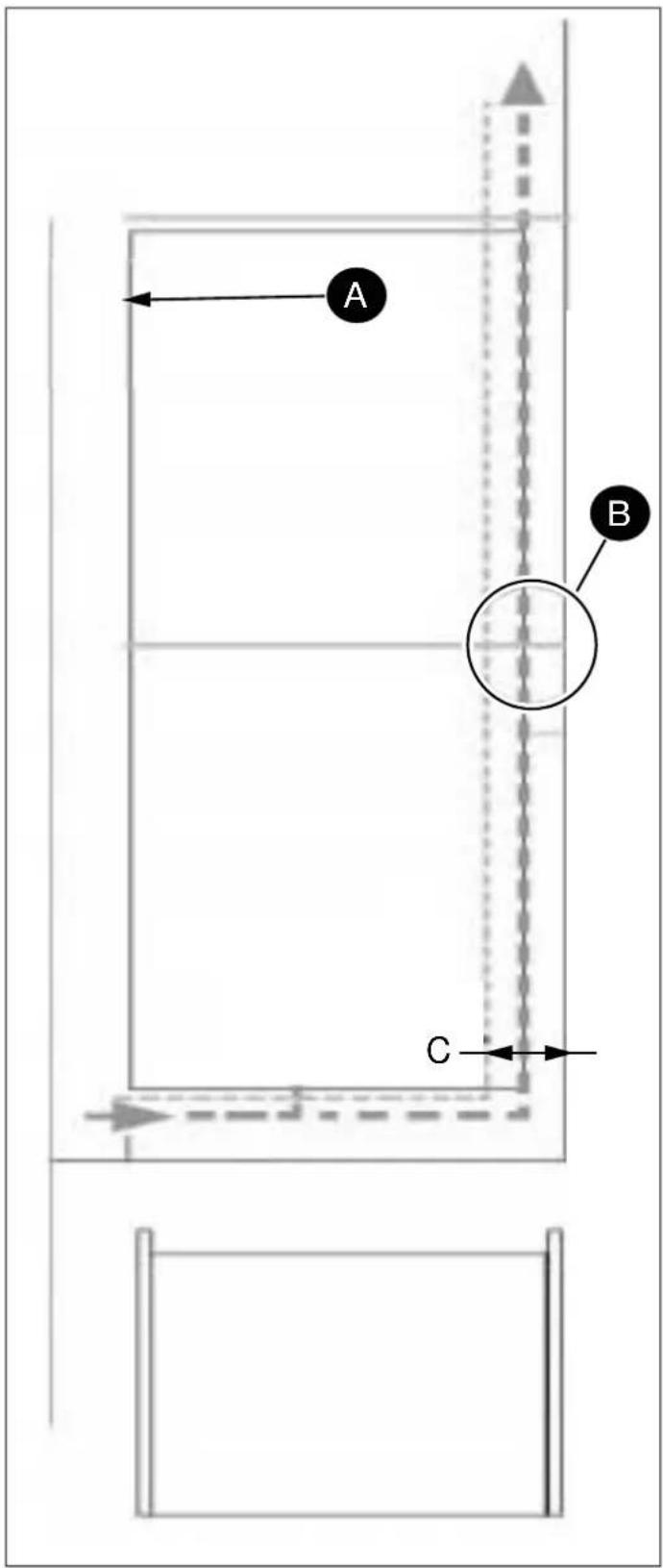
Fig. 9
• A Refrigerator outline
B Recommended size of vent opening: 500 x 30 mm
C min. 30 mm
There should be an air intake somewhere inside the cabinet to allow air into flow freely in. In this example, a base vent is shown underneath the refrigerator.
A cut-out should be made in the base beneath the fridge/freezer and this finished neatly around the air vent grille.
Alternatively, a thin section of the base can be removed t allow air into the unit (the recommended size is 600 mm 10 mm).
The top of the cabinet needs to be vented into the room.
If the cabinet does not allow air to flow freely into the ro then a base vent or other means of ventilation needs to provided to ensure a natural flow of air.
There should be space at the rear of the cabinet to allow cool air to be drawn over the condenser.
Recommended: 500 x 35 mm
The clearance at the rear of the appliance is clearly show. In order for the appliance to operate properly, it is important that the top of the housing cabinet not be blocked off. A channel depth of 40-50 mm is normal for most units.
A ventilation hole is required in the base of the cabinet; it allows for air to be drawn over the compressor and for h exchange.
As a rule, the more air can get in and out, the better more efficiently the product operates.
INSTALLATION INSTRUCTIONS (SLIDING HINGE)
With the help of one or two other individuals, move the appliance into the cabinet. There are two metal plates at the base of the appliance. Fit the supplied white spacers to these plates; when finished, snap off the inverted "T" section.
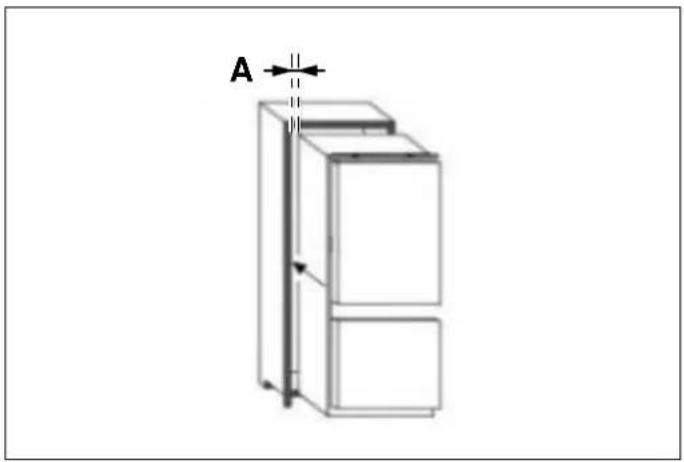
1) Insert the appliance into the cabinet, placing it on the side with respect to the hinges, making sure to leave a 3-5 mm gap.
natural_image
Line drawing of a refrigerator with a double door and side panel, labeled 'A' (no text or symbols on the diagram itself)
Fig. 10
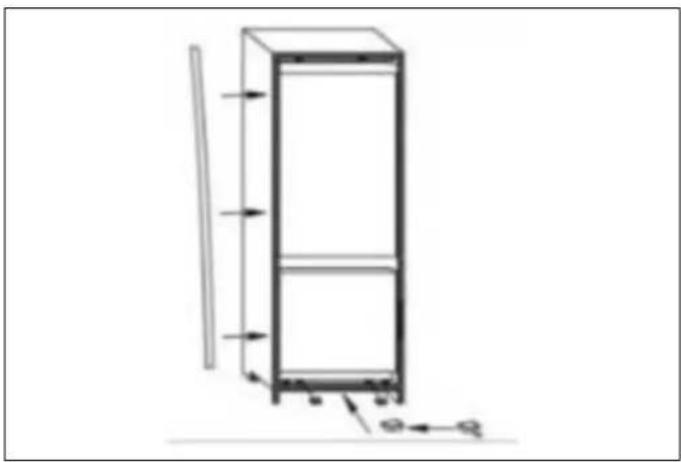
4) Fit the seal onto the appliance, cutting off any excess necessary. Mount the plastic covers on the bottom parts
natural_image
Technical line drawing of a vertical cabinet with directional arrows indicating movement (no text or symbols)
Fig. 13
A 3-5 mm
2) After checking the alignment of the appliance door and the cabinet door, mount the plastic covers from the 5) accessories bag.
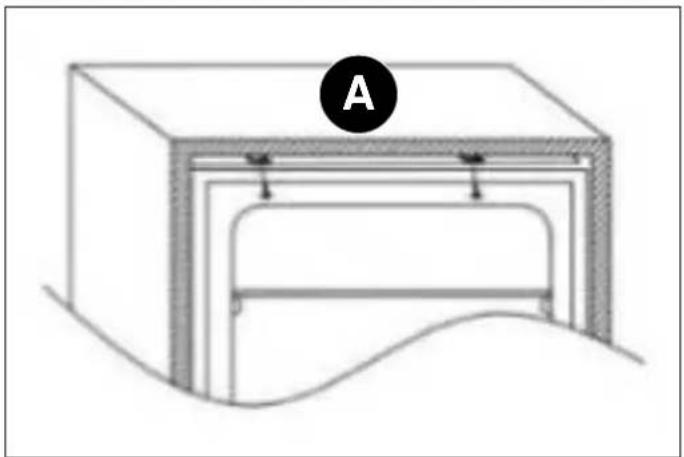
natural_image
Diagram of a mechanical or architectural component with labeled section A, showing internal layers and a curved base (no text or symbols beyond label)
Fig. 11
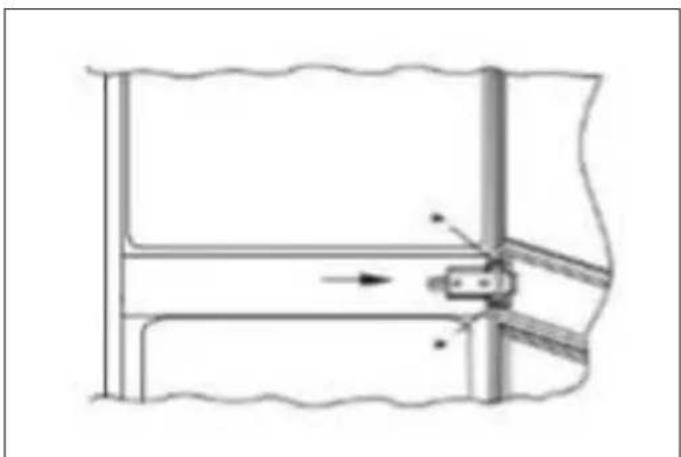
5) Use a crosshead screwdriver to loosen the connecting pin underneath the right middle hinge and adjust it to screw onto the right cabinet wall.

natural_image
Pure mechanical diagram showing a lever mechanism with no text or symbols
Fig. 14
A top
3) Tighten the screws for the appliance's lower part.
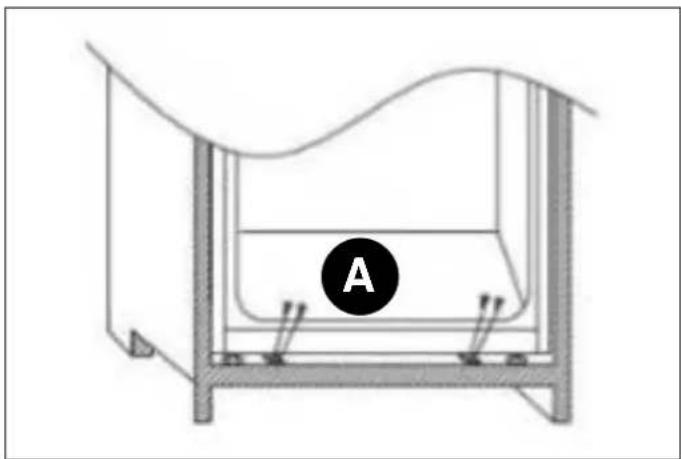
natural_image
Technical diagram of a mechanical or structural assembly with labeled component A (no text or symbols beyond label)
Fig. 12
MOUNTING THE CABINET DOOR(S)
1) Ensure that there is a gap of 3 to 4 mm between the non-hinged side of the fridge and the cabinet wall.
2) Locate the slider in the bracket and mount the slider of the cabinet door, 20 to 22 mm from the long edge of cabinet door, as shown in the following image, ensuring that the slider is positioned centrally and horizontally within the bracket. Tighten securely by hand.
A bottom

Fig. 15

Fig. 18
A 20 mm
3) Fill the gap on the non-hinged side with the gasket/sealing strip provided.
Leave the remaining portions of the spacer covers in place over the metal plates.
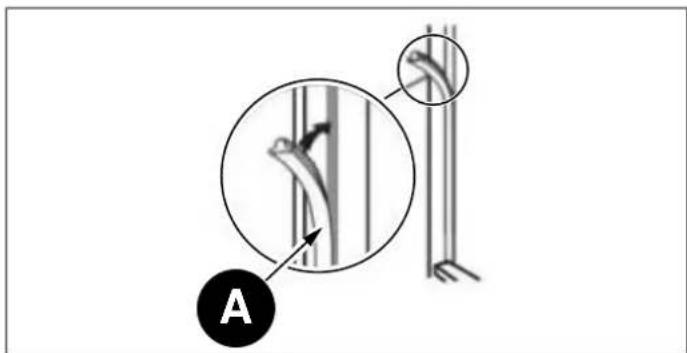
Fig. 16

IMPORTANT
After completing the installation, check that the appliance is secure within the cabinet and that the door(s) close and open properly. If there is no resistance from the door seals when opening the door(s), then it is probable that the appliance and/or cabinet door(s) are not fitted properly.
INSTALLATION INSTRUCTION (DOOR ON DOOR HINGE)
A Seal
4) The finished look for the door sliders should be similar to those shown in the following image, which shows 2 sliders in place.
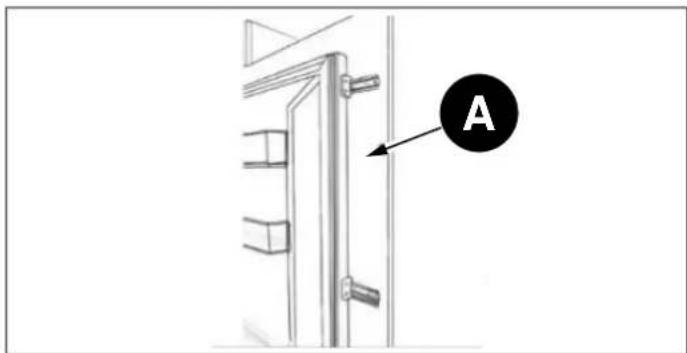
Fig. 17
A Cabinet door
Ensure the appliance doors open, close and seal properly.
Once complete, and if you are happy with the fit of the appliance in the cabinet, bend and snap off the parts of the white spacers marked "S", as shown by the dotted outline.
| TOLLS AND PARTS |
 | Spacer for hinge A |
 | Spacer for hinge B |
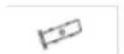 | Hinge cover |
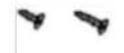 | Crosshead screws3.9 x 12, T203.9 x 16, T20 |
 | Spanner |
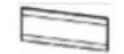 | Left cover for control-pane spacer |
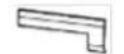 | Right cover for control-panel spacer |
 | Decorative strip |
1) Push the appliance into the wooden cabinet; it is better to approach the cabinet's left side first.

NOTE
When mounting the hinge on the cabinet, use a spacer.

NOTE
The appliance must be plugged in before installation.
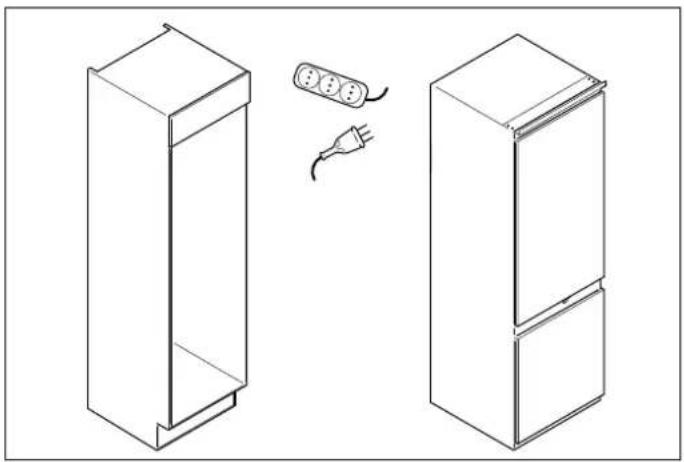
natural_image
Line drawing of two refrigerators with a plug, shown from front and side views (no text or symbols)
Fig. 19
2) Adjust the position of appliance, then screw the top bottom of the appliance into the cabinet.

NOTE
Please remove the tails from the white spacers after mounting the cover for the bottom part.
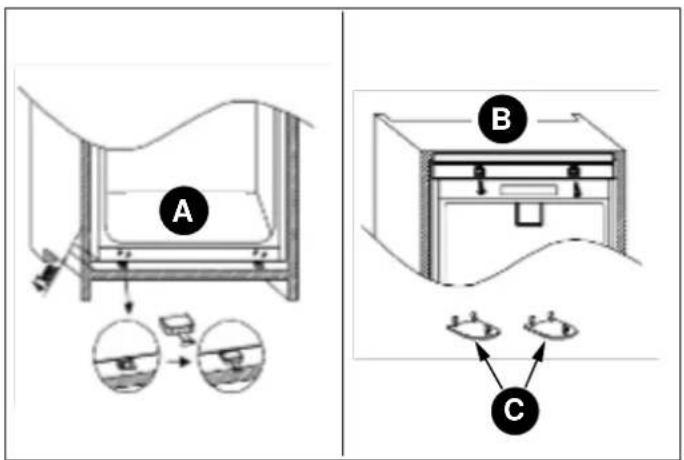
Fig. 20
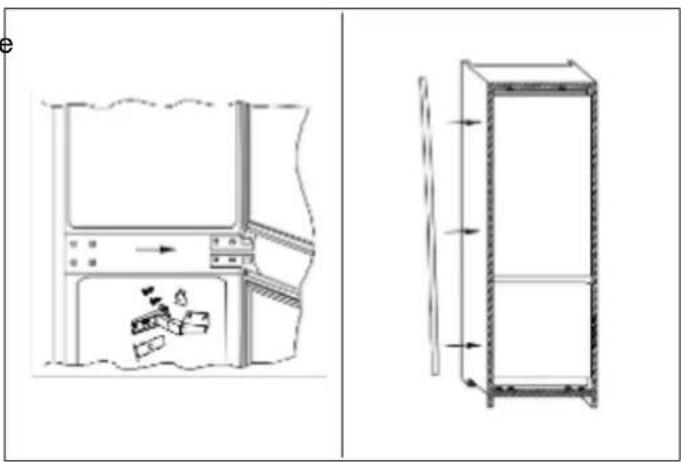
Fig. 21
4) Measure the dimensions of A and B.
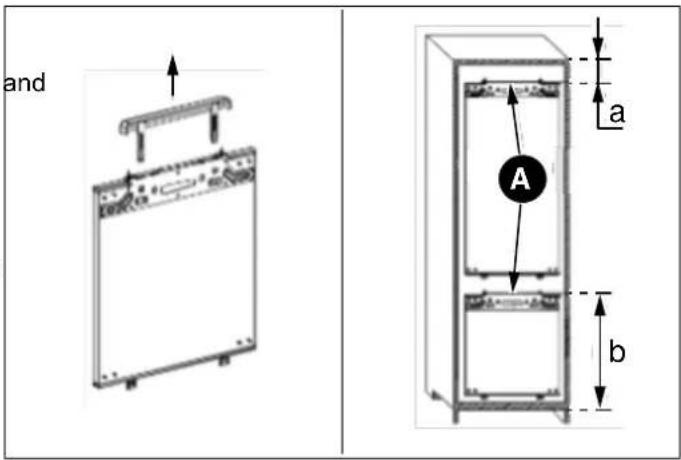
Fig. 22
A Junction panel
Disassemble the junction panel before measuring.
5) Mount the junction panel onto the cabinet door.
A bottom
B top
C Upper hinge cover
3) Screw the hinge onto the cabinet; attach the decorative strip on the product's left side.

Fig. 23
natural_image
Line drawing of a mechanical device with no visible text or symbols
Fig. 25
The junction panel needs to be mounted in the middle 2f Remove the upper door. the cabinet door.
6) Mount the appliance door on cabinet door.

flowchart
graph TD
    A["Top Left Panel"] --> B["Device C"]
    B --> C["Left Panel"]
    C --> D["Right Panel"]
    D --> E["Bottom Panel"]
    E --> F["Left Panel"]
    F --> G["Right Panel"]
    G --> H["Bottom Panel"]
    style A fill:#f9f,stroke:#333
    style H fill:#bbf,stroke:#333
Fig. 24

natural_image
Simple line drawing of a rectangular frame with a curved base and an arrow indicating direction (no text or symbols)
Fig. 26
3) Remove the middle hinge and its connecting pin underneath.
C Mounting base
REVERSING THE APPLIANCE DOORS
We recommend you seek the help of another individual to support the doors while you perform this operation.
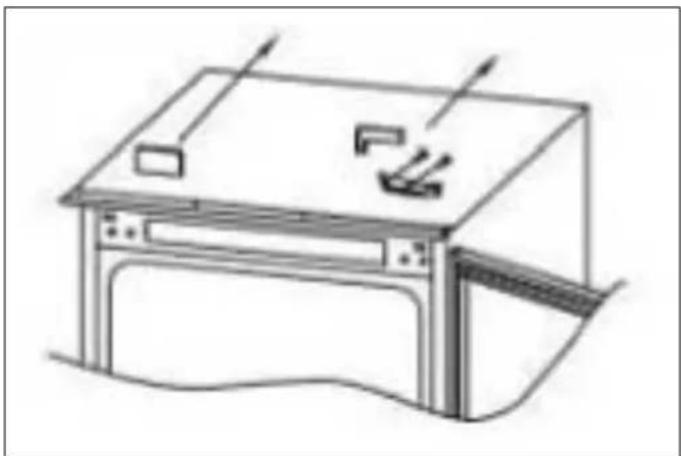
1) Remove the upper right hinge cover and hinge using a screwdriver.
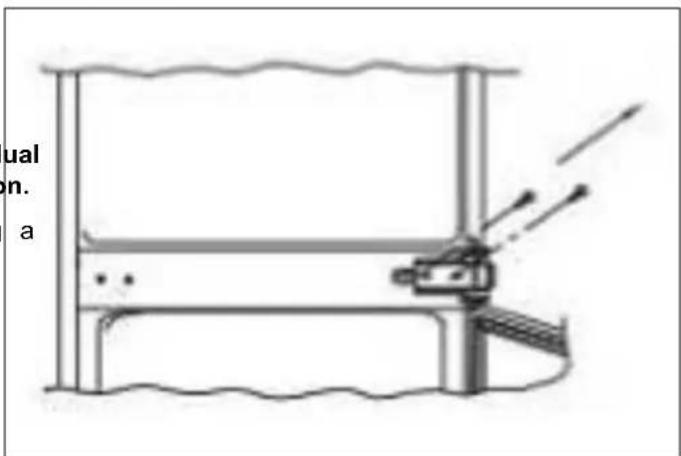
Fig. 27
4) Remove the bottom door.

natural_image
Simple line drawing of a boat hull and triangular structure with an arrow, no text or symbols present
Fig. 28
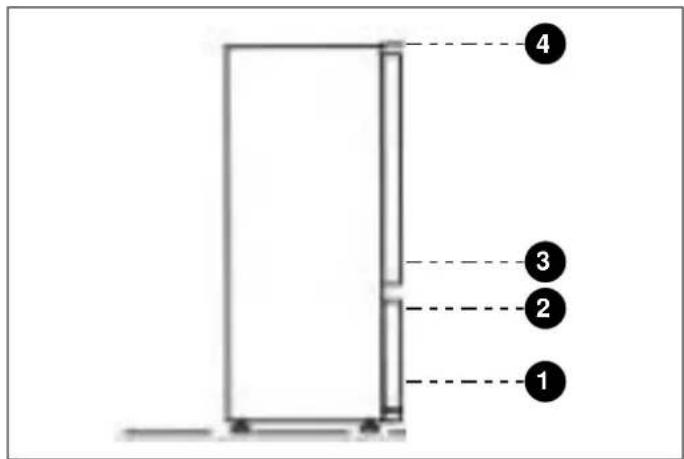
Fig. 31
5) Remove the bottom right hinge and left plastic plugs, ENSURING THE DOOR SEALS CORRECTLY and remount them on the opposite sides.
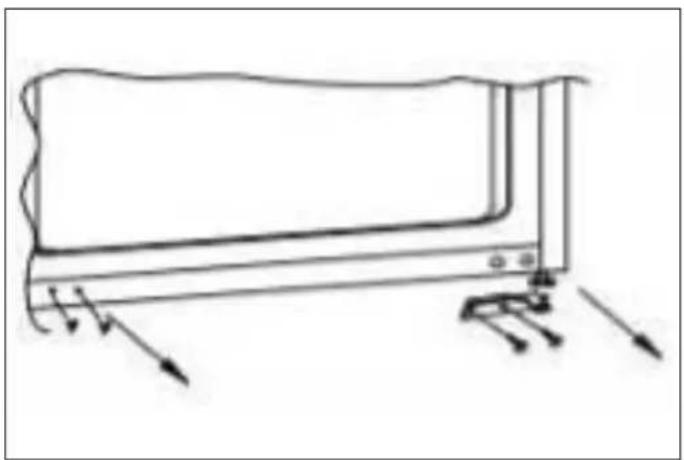
natural_image
Simple line drawing of a device with arrows indicating force or motion (no text or symbols)
Fig. 29
It is normal for the seal to be compressed after the door been reversed. With the door closed, use a hair dryer to expand the seal and fill the gap between the door and the body of the appliance. Take care not to hold the hair dry too close to the appliance, which could damage the seal.
A distance of approximately 10 cm should be suitable. When completed, allow the seal and door to cool before touching them. Once done, the seal should remain in position.
6) Mount the right upper hinge on the bottom left corner and install the cover.

natural_image
Line drawing of a computer monitor with a stand and directional arrows indicating motion (no text or symbols)
Fig. 30
7) Remount the doors and hinges, working from bottom to top (from 1-4).
This manual will answer most of your questions about the product's features. Should you require further information or technical assistance, please contact your dealer or visit our website:
- in Italy
https://it.bertazzoni.com/altro/assistenza-e-manutenzione
- in the UK
https://uk.bertazzoni.com/more/care-service
- in France
https://fr.bertazzoni.com/customer-care
- in Spain
https://universal.bertazzoni.com/more/care-service
• in the Netherlands
https://nl.bertazzoni.com/zorg-en-service
- in Sweden
https://se.bertazzoni.com/more/care-service
- in Denmark
https://dk.bertazzoni.com/more/care-service

IMPORTANT
Before calling, write down the model type and serial number, which can be found on the rating plate, along with any messages that may have appeared on the display.
The rating plate is located inside the appliance, on the side of the compartment, close to the shelves.
Before calling, please make sure to have the following information ready:
- Date of purchase,
- Name of dealer where the product was purchased.
DALLA SCRIVANIA DEL PRESIDENTE
Gentile Cliente,
Fig. 1
Fig. 2
PANNELLO DI CONTROLLO

natural_image
Row of eight icons including shopping cart, umbrella, refrigerator, water drop, sprout, eco, gear shift, and power button on black background (no text or symbols)
Fig. 3
Fig. 4
CURA E PULIZIA
natural_image
Technical line drawing of two rectangular metal cabinets with one cabinet showing a rotation arrow (no text or symbols)
Fig. 5
Fig. 6
| CODICE PRODOTTO | A | B | C | D | E | F | G | H | I |
| REF603BBNPTC | min 200 cm2 | 1778 - 1781 | min 560 | min 562 | 540 | 550 | 1776 | 1017 | 661 |
| REF604BBNPTC | 1939 - 1942 | 1937 | 1167 |
| CODICE PRODOTTO | J K L M | O | P | Q | R | S | T | U |
| REF603BBNPTC | 14 | 37 | 51 | 7 | 550 | 9 | 15 | 698 | 20 | 8 | 29 |
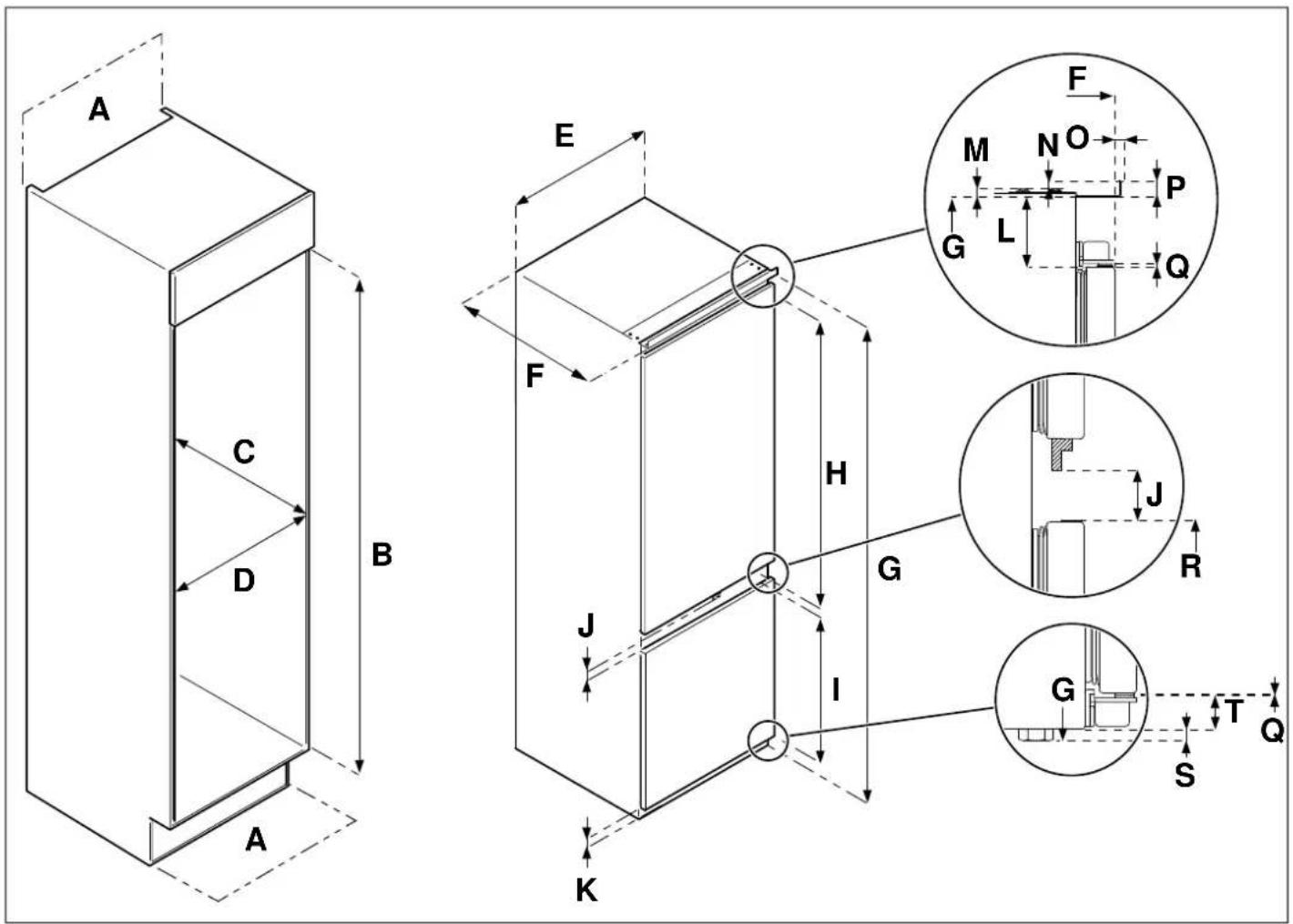
Fig. 7
| CODICE PRODOTTO | A | B | C | D E F | | G | H | I |
| REF603BBNPTC-S | min 200 cm^2 | 1778 - 1781 | min 560 | min 560 540 | 550 | 1776 | 1005 | 640 |
| REF604BBNPTC-S | 1939 - | 1937 | 1166 |
| REF704BBNPTC-S | min 712 690 | 1942 |
| CODICE PRODOTTO | J | K | L | M | N | | | O | P | Q | R | S | T |
| REF603BBNPTC-S | | | | | | | | | | | | | |
| REF604BBNPTC-S | 41 | 33 | 50 | 7 | 9 | 6 | 15 | 1.2 | 673 | 8 | 25 | | |
| REF704BBNPTC-S | | | | | | | | | | | | | |
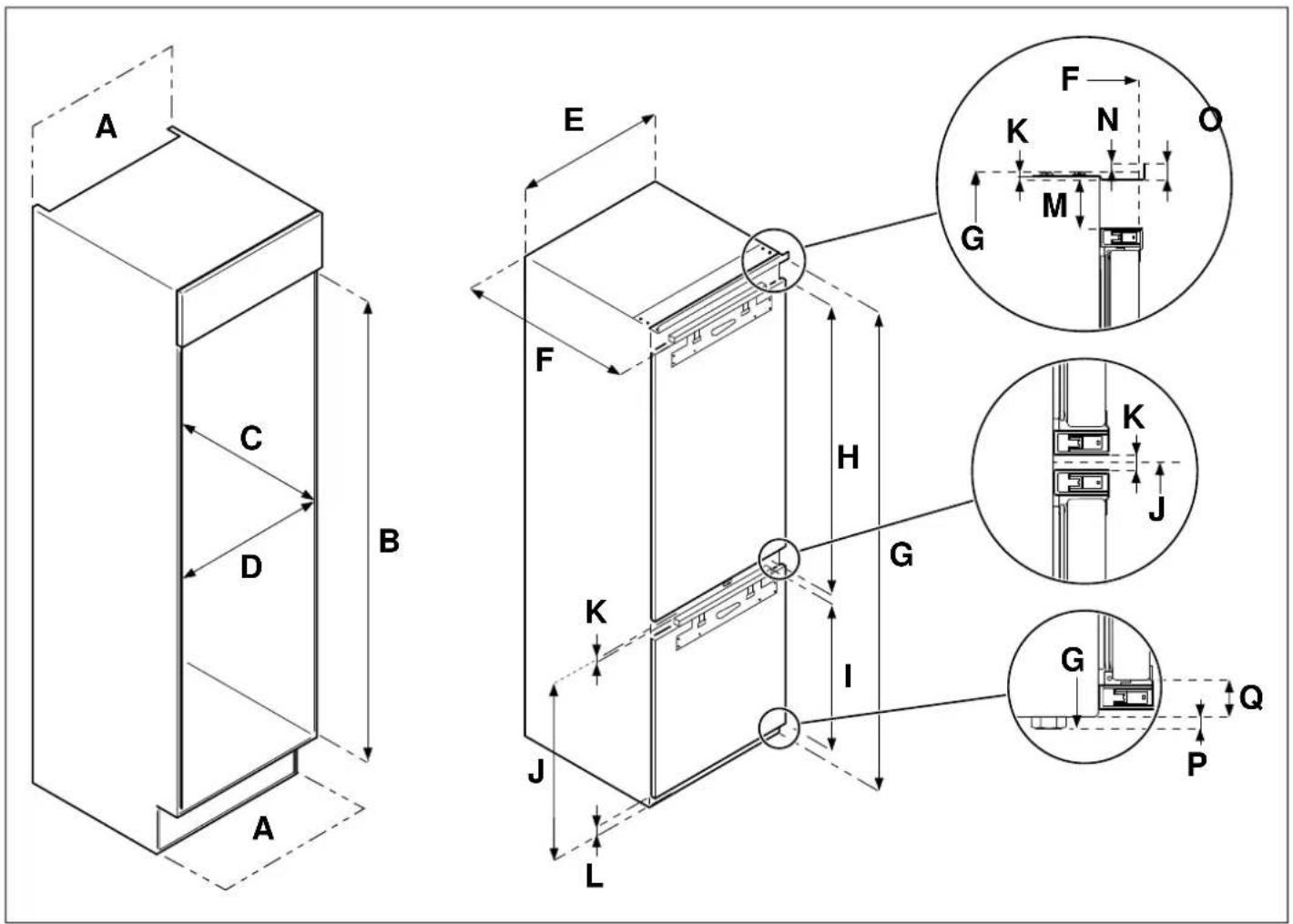
Fig. 8
| CODICE PRODOTTO | A | B | C | D E F | | | G | H | I |
| REF704BBNPTC | min 200 cm2 | 1939 - 1942 | min 560 | min 712 | 690 | 550 | 1937 | 1232.5 | 661 |
| CODICE PRODOTTO | J K L M N | O | P | Q |
| REF704BBNPTC | 701 | 7 | 36.5 | 42 | 9 | 15 | 8 | 28.5 | |

Fig. 9
natural_image
Line drawing of a refrigerator with a vertical height measurement labeled 'A' (no text or symbols on the refrigerator itself)
Fig. 10
natural_image
Technical line drawing of a vertical shelf or cabinet with directional arrows indicating movement (no text or symbols)
Fig. 13
A 3-5 mm
natural_image
Diagram of a mechanical or architectural component with layered structure and labeled section A (no text or symbols beyond label)
Fig. 11
natural_image
Pure technical diagram of a mechanical assembly without any text, numbers, or symbols
Fig. 14
• A parte superiore
natural_image
Technical diagram of a mechanical or structural assembly with labeled component A (no text or symbols beyond label)
Fig. 12
MONTAGGIO DELLE PORTE DEL MODULO
Fig. 15
A 20 mm
Fig. 18
natural_image
Line drawing of two refrigerators with a plug, one open and one closed, showing internal compartments (no text or symbols)
Fig. 19
Fig. 20
natural_image
Diagram showing a refrigerator interior with a handbag and directional arrows, alongside its exterior view (no text or symbols)
Fig. 21
Fig. 23
natural_image
Line drawing of a mechanical device with no visible text or symbols
Fig. 25
flowchart
graph TD
    A["Top Left Panel"] --> B["Left Panel"]
    B --> C["C"]
    C --> D["Right Panel"]
    D --> E["Left Panel"]
    E --> F["Right Panel"]
    F --> G["Left Panel"]
    G --> H["Right Panel"]
    H --> I["Left Panel"]
    I --> J["Right Panel"]
    J --> K["Left Panel"]
    K --> L["Right Panel"]
    L --> M["Left Panel"]
    M --> N["Right Panel"]
    N --> O["Left Panel"]
    O --> P["Right Panel"]
    P --> Q["Left Panel"]
    Q --> R["Right Panel"]
    R --> S["Left Panel"]
Fig. 24

natural_image
Simple line drawing of a cabinet or storage unit with an arrow indicating motion (no text or symbols)
Fig. 26
natural_image
Technical line drawing of a mechanical assembly with no visible text or symbols
Fig. 27
natural_image
Simple line drawing of a boat hull and triangular structure with an arrow, no text or symbols present
Fig. 28

Fig. 31
natural_image
Simple line drawing of a rectangular device with arrows indicating force or movement (no text or symbols)
Fig. 29
ASSICURARSI CHE LE PORTE CHIUDANO ERMETICAMENTE
natural_image
Line drawing of a computer monitor with a stand and directional arrows indicating motion (no text or symbols)
Fig. 30
Fig. 1
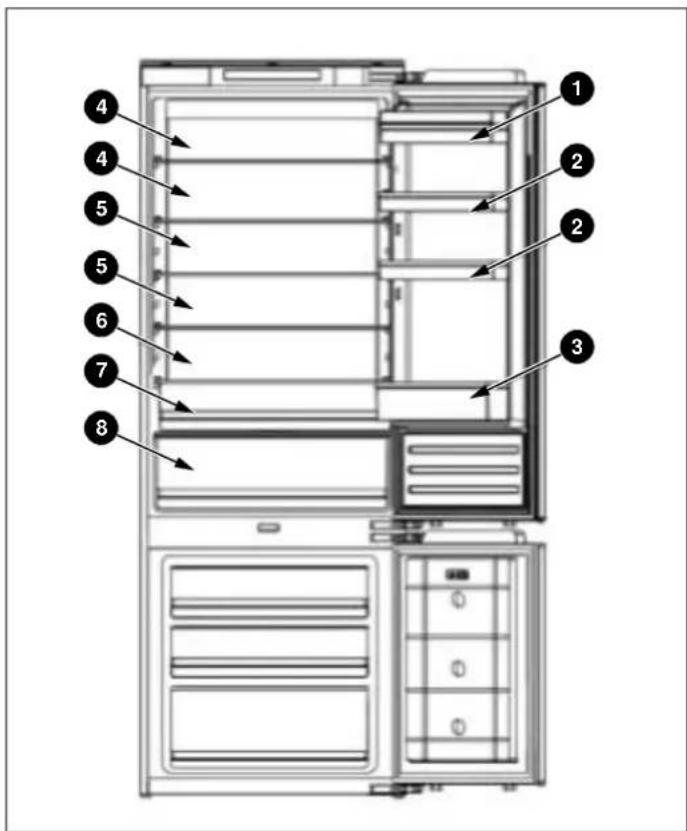
Fig. 2
natural_image
Row of eight icons including shopping cart, umbrella, refrigerator, water drop, sprout, and power button on black background (no text or symbols)
Fig. 3
Fig. 4
natural_image
Technical line drawing of two rectangular metal cabinets with a rotation arrow indicating assembly (no text or symbols)
Fig. 5
Fig. 6
| CODE PRODUIT | A | B | C | D E F | G | H | I |
| REF603BBNPTC | 200 cm2min. | 1778 - 1781 | 560 min | 562 min | 540 | 550 | 1776 1017 |
| REF604BBNPTC | 1939 - 1942 | 1937 1167 |
| CODE PRODUIT | J K L M | O | P | Q | R | S | T | U |
| REF603BBNPTC | 14 | 37 | 51 | 7 | 550 | 9 | 15 | 698 | 20 | 8 | 29 |
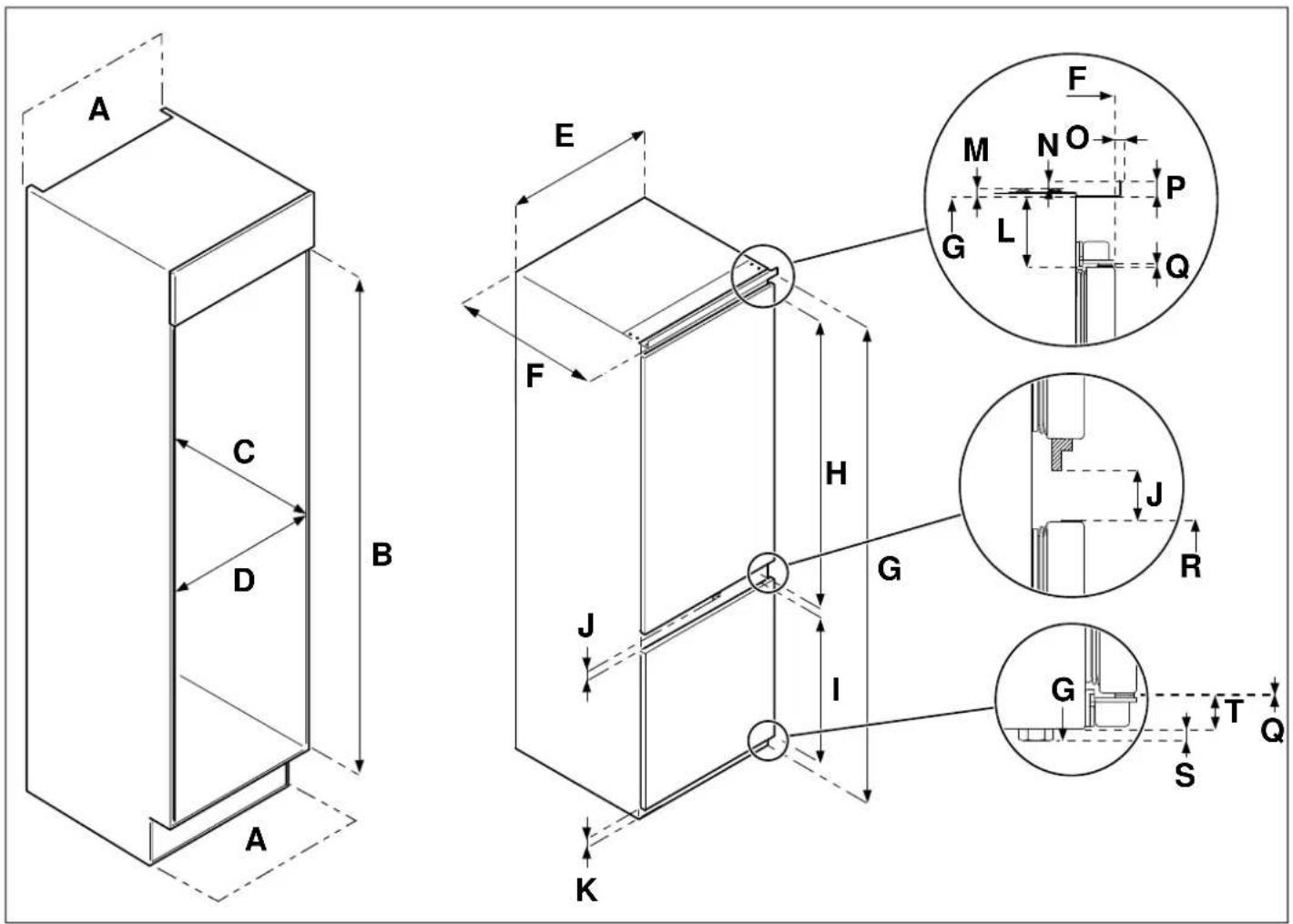
Fig. 7
| CODE PRODUIT | A | B | C | D E F | | G | H | I |
| REF603BBNPTC-S | 200 cm2min. | 1778 - 1781 | 560 min | 560 min 540 | 550 | 1776 | 1005 | 640 |
| REF604BBNPTC-S | 1939 - | 1937 | 1166 |
| REF704BBNPTC-S | 712 min | 690 1942 |
| CODE PRODUIT | J | K | L | M | N | | | | O | P | Q | R | S | T |
| REF603BBNPTC-S | | | | | | | | | | | | | | |
| REF604BBNPTC-S | 41 | | 33 | 50 | 7 | 9 | 6 | 15 | | | 1,2 | 673 | 8 | 25 |
| REF704BBNPTC-S | | | | | | | | | | | | | | |
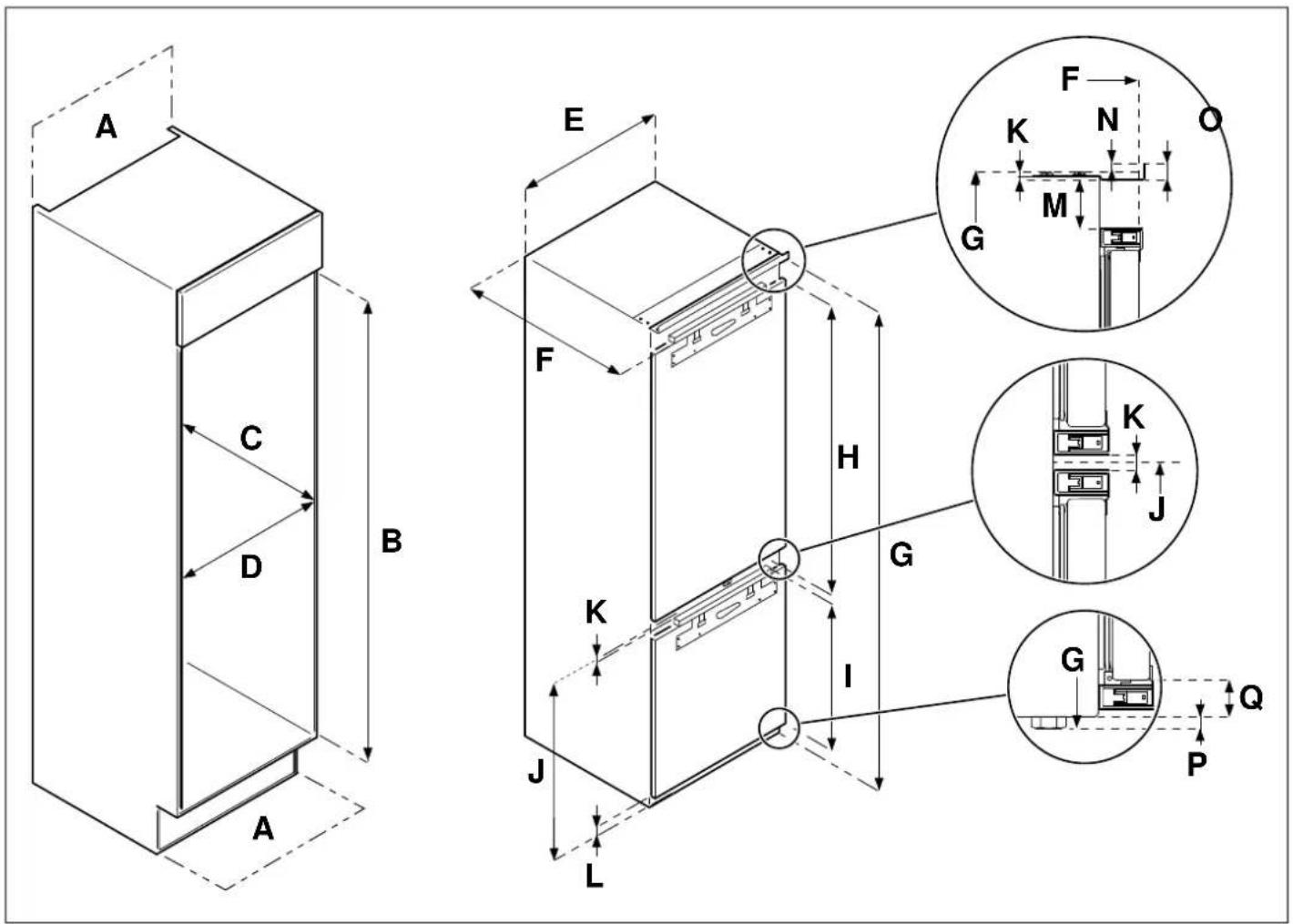
Fig. 8
| CODE PRODUIT | A | B | C | D E F | G | H | I |
| REF704BBNPTC | 200 cm2min. | 1939 - 1942 | 560 min | 712 min | 690 550 1937 | 1232,5 | 661 |
| CODE PRODUIT | J K L M N | O | P | Q |
| REF704BBNPTC | 701 7 | | 36,5 | 42 9 15 8 | | | 28,5 |

Fig. 9
natural_image
Diagram of a refrigerator with labeled section A, showing front and side views (no text or symbols beyond label)
Fig. 10
natural_image
Technical line drawing of a vertical panel with directional arrows indicating movement or force (no text or symbols)
Fig. 13
A 3-5 mm
natural_image
Diagram of a mechanical or architectural component with labeled section A, showing internal layers and a curved base (no text or symbols beyond label)
Fig. 11
natural_image
Pure technical diagram of a mechanical assembly without any text, numbers, or symbols
Fig. 14
natural_image
Technical diagram of a mechanical or structural assembly with labeled component A (no text or symbols beyond label)
Fig. 12
MONTAGE DE LA OU DES PORTES DE L'ARMOIRE
Fig. 15
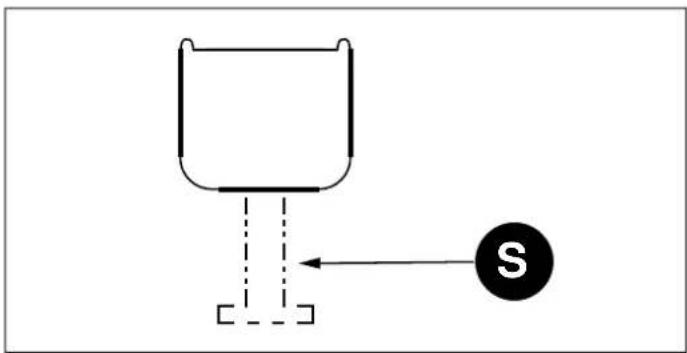
Fig. 18
A 20 mm
natural_image
Line drawing of two refrigerators with a plug, one open and one closed, shown in isometric view (no text or symbols)
Fig. 19
Fig. 20
Fig. 21
Fig. 23
natural_image
Line drawing of a mechanical device with a top panel and side arm, no text or symbols present
Fig. 25
flowchart
graph TD
    A["Top Left Panel"] --> B["Left Panel"]
    B --> C["C"]
    C --> D["Right Panel"]
    D --> E["Left Panel"]
    E --> F["Right Panel"]
    F --> G["Left Panel"]
    G --> H["Right Panel"]
    H --> I["Left Panel"]
    I --> J["Right Panel"]
    J --> K["Left Panel"]
    K --> L["Right Panel"]
    L --> M["Left Panel"]
    M --> N["Right Panel"]
    N --> O["Left Panel"]
    O --> P["Right Panel"]
    P --> Q["Left Panel"]
    Q --> R["Right Panel"]
    R --> S["Left Panel"]
Fig. 24

natural_image
Simple line drawing of a rectangular structure with a curved base and an arrow indicating direction (no text or symbols)
Fig. 26
natural_image
Diagram of a mechanical or structural assembly with a vertical frame and a lever mechanism, no text or symbols present.
Fig. 27
natural_image
Simple line drawing of a boat hull and a triangular structure with an arrow, no text or symbols present.
Fig. 28
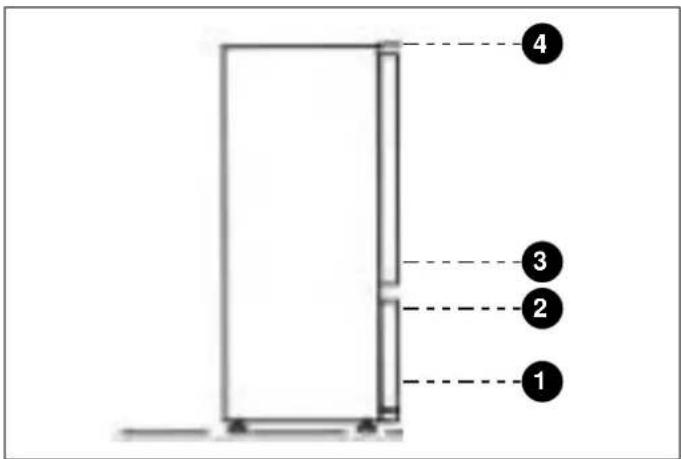
Fig. 31
natural_image
Line drawing of a rectangular electronic device with mounting feet and directional arrows indicating force or movement (no text or symbols)
Fig. 29
natural_image
Line drawing of a computer monitor with directional arrows indicating movement or navigation (no text or symbols)
Fig. 30
Fig. 1
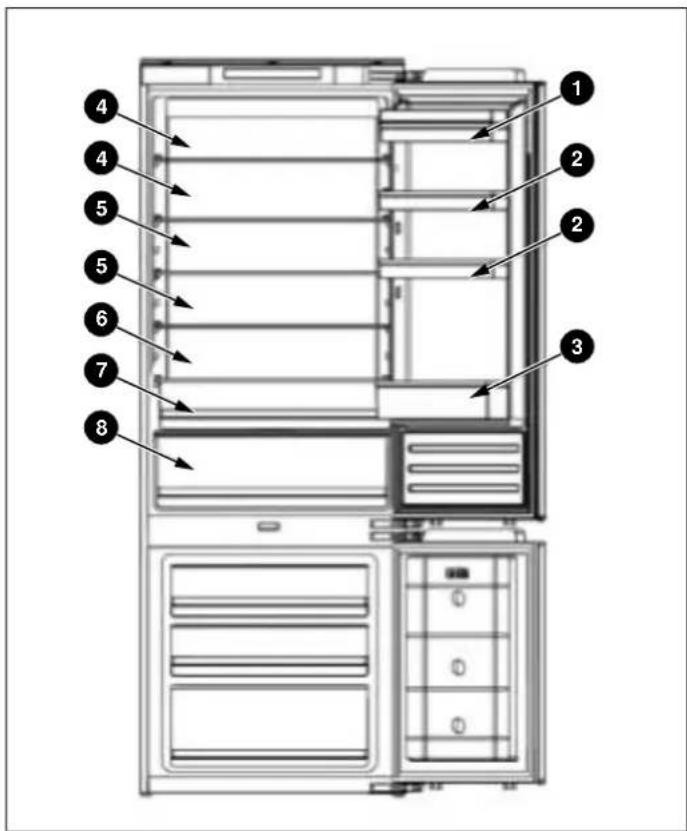
Fig. 2
natural_image
Row of eight icons including shopping cart, umbrella, refrigerator, water drop, sprout, eco, gear shift, and power button on black background (no text or symbols)
Fig. 3
Fig. 4
natural_image
Technical line drawing of two rectangular metal cabinets with a rotation arrow indicating assembly (no text or symbols)
Fig. 5
Fig. 6
| PRODUCTCODE | A | B | C | D E F | | G | H | I |
| REF603BBNPTC | min 200 cm^2 | 1778 - 1781 | min.560 | min.562 | 540 550 | 1776 | 1017 | 661 |
| REF604BBNPTC | 1939 - 1942 | 1937 | 1167 |
| PRODUCTCODE | J | K | L | M | | | | | | O | | P | Q | R | S | T | U |
| REF603BBNPTC | 14 | | | 37 | 51 | 7 | 550 | 9 | 15 | 698 | 20 | 8 | 29 | | | | |
| REF604BBNPTC | | | | | | | | | | | | | | | | | |
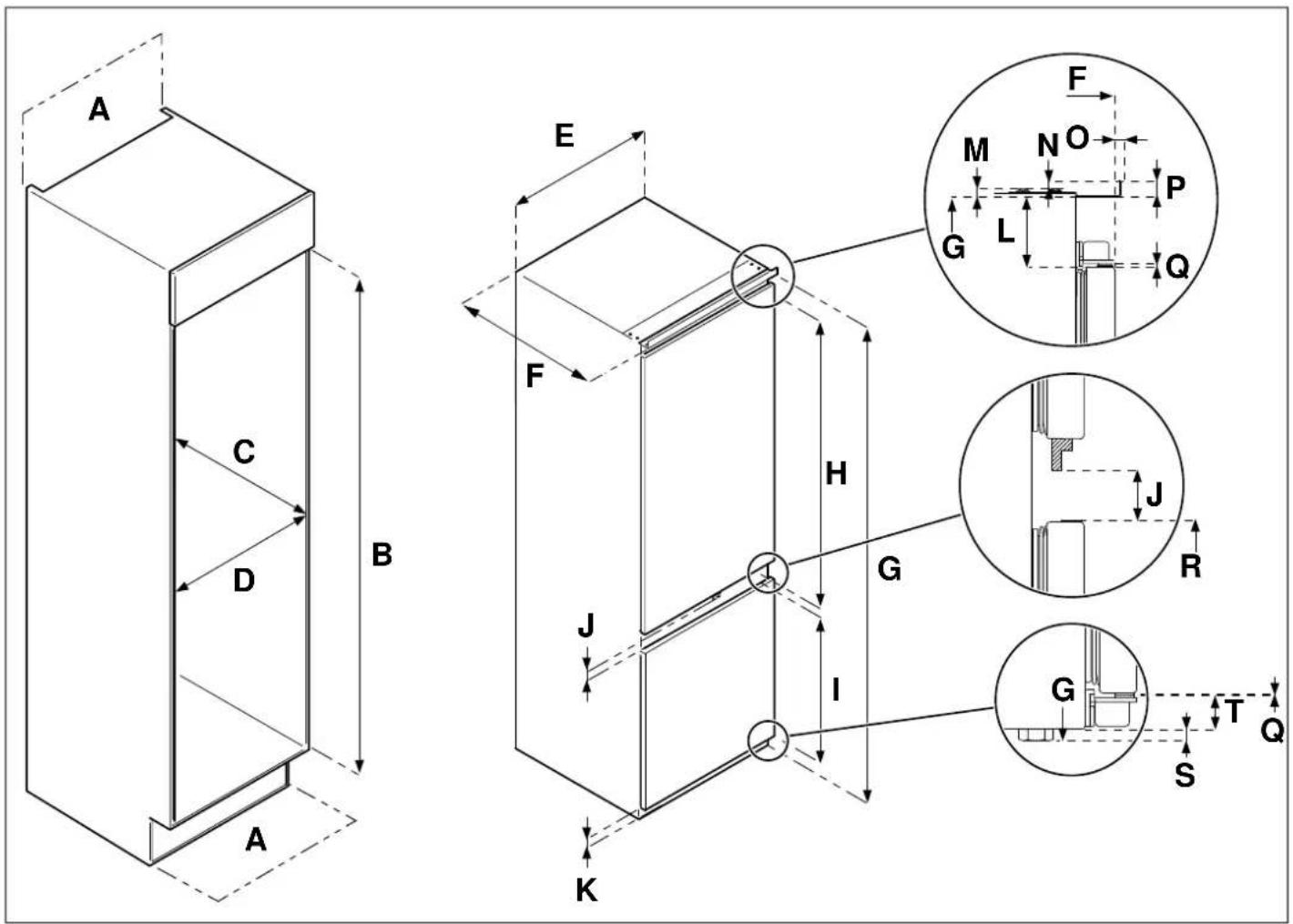
Fig. 7
| PRODUCTCODE | A | B | C | D E F | G | H | I | |
| REF603BBNPTC-S | | 1778 - 1781 | | min. 560 | 540 | | 1776 | 1005 | | |
| REF604BBNPTC-S | min 200 cm^2 | 1939 - 1942 | min. 560 | 550 | | | 640 | |
| REF704BBNPTC-S | | | | min. 712 | 690 | | 1937 | 1166 | | |
| |
| PRODUCTCODE | J K L M N | O | P | Q | R | S | T |
| REF603BBNPTC-S | | | | | | | | | | |
| 41 | 33 | 50 | 7 | 9 | 6 | 15 | 1,2 | 673 | 8 |
| REF704BBNPTC-S | | | | | | | | | | |
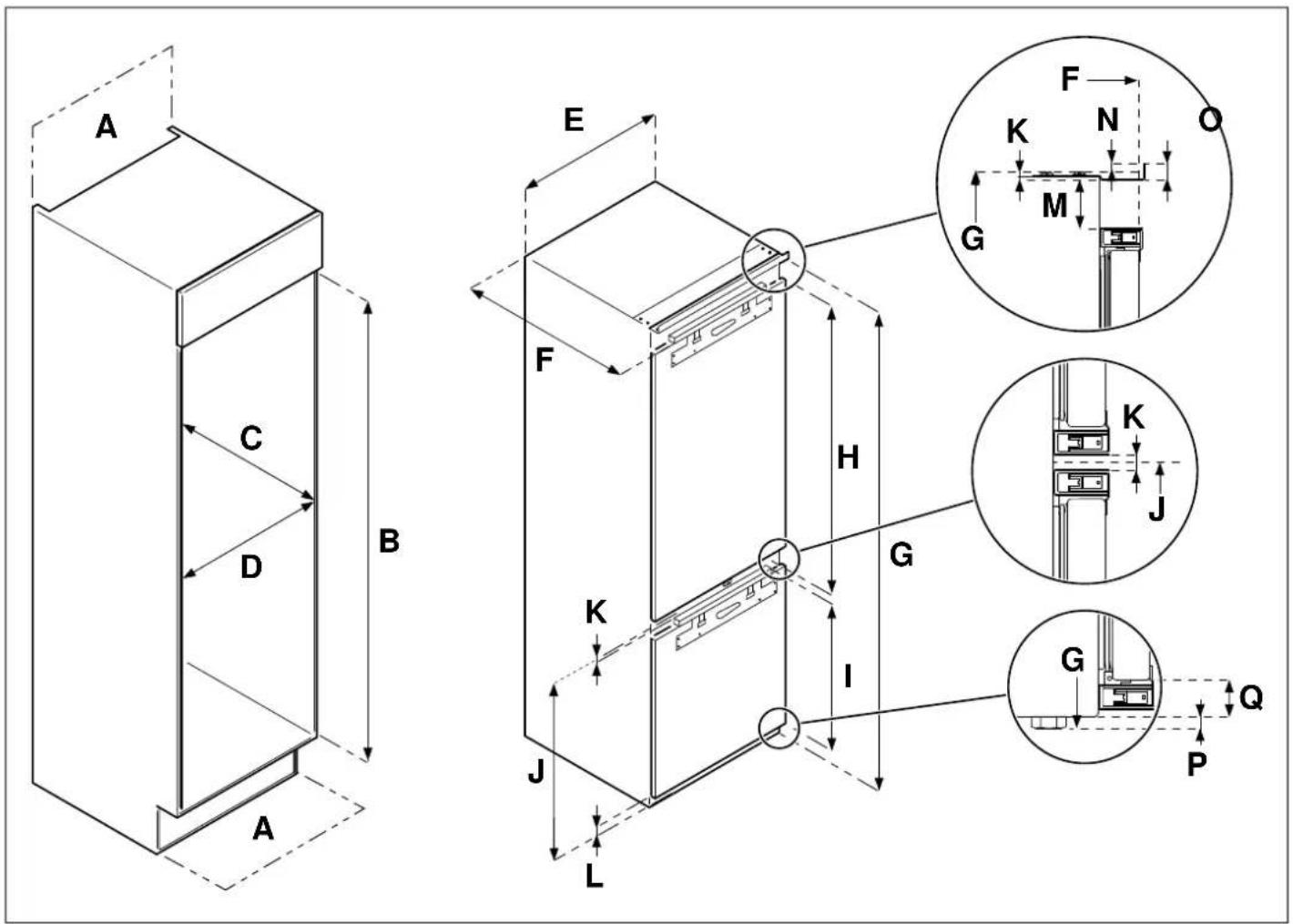
Fig. 8
| PRODUCTCODE | A | B | C | D E F | | | | G | H | I |
| REF704BBNPTC | min 200 cm2 | 1939 - 1942 | min. 560 | min. 712 | 690 | 550 | 1937 | | 1232,5 | 661 |
| PRODUCTCODE | J K L M N | O | P | Q |
| REF704BBNPTC | 701 | 7 | 36,5 | 42 | 9 | 15 | 8 | | | 28,5 |
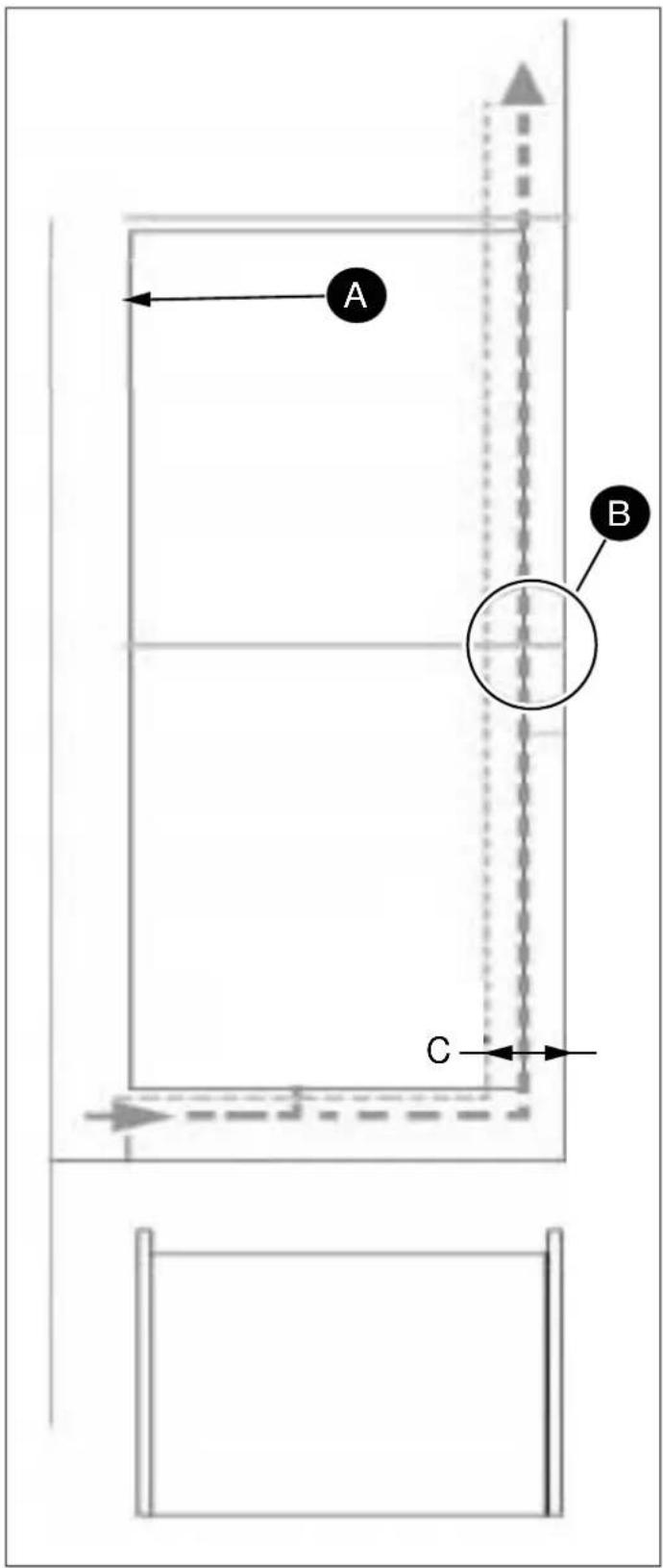
Fig. 9
natural_image
Line drawing of a refrigerator with a vertical height measurement labeled 'A' (no text or symbols on the refrigerator itself)
Fig. 10
A 3-5 mm
natural_image
Diagram of a mechanical or architectural component with layered structure and labeled section A (no text or symbols beyond label)
Fig. 11
A boven
natural_image
Diagram of a laboratory apparatus with a curved top and base, labeled 'A' in the center (no text or symbols beyond label)
Fig. 12
A beneden
natural_image
Technical line drawing of a vertical structure with arrows indicating direction, no text or symbols present
Fig. 13
natural_image
Pure mechanical diagram showing a lever mechanism with no text or symbols
Fig. 14
DE KASTDEUR(EN) MONTEREN
Fig. 15
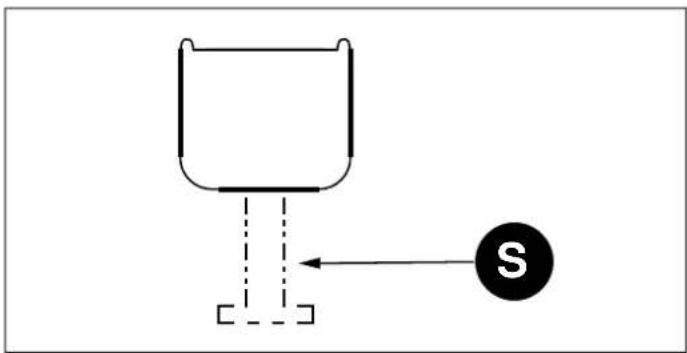
Fig. 18
A 20 mm
natural_image
Line drawing of two refrigerators with a plug, shown from different angles (no text or symbols)
Fig. 19
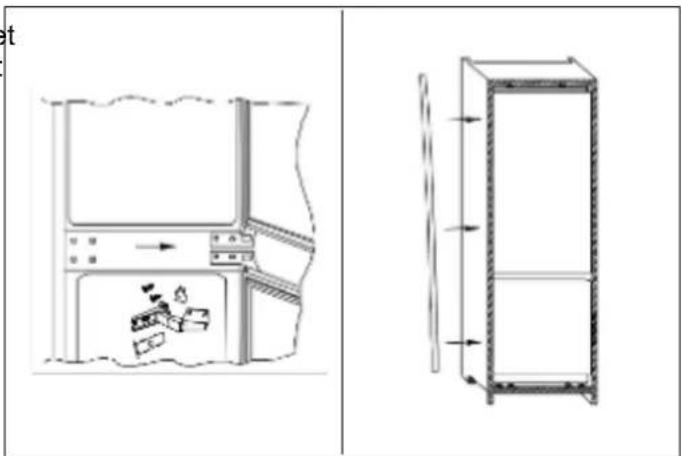
Fig. 21
Fig. 20
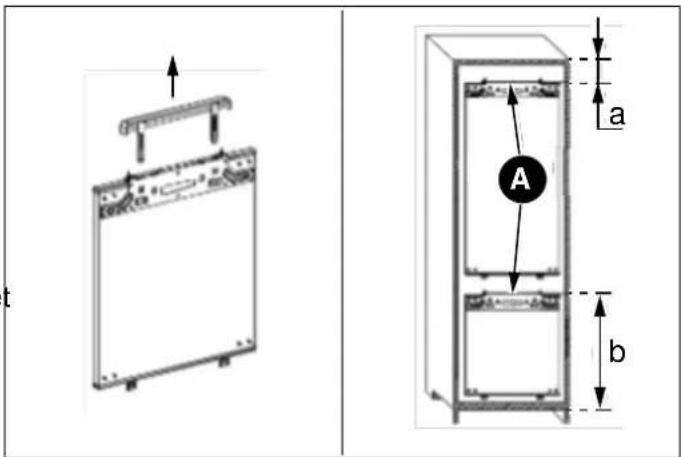
Fig. 22
Fig. 23
natural_image
Line drawing of a mechanical device with no visible text or symbols
Fig. 25
flowchart
graph TD
    A["Top Left Panel"] --> B["Device C"]
    B --> C["Left Panel"]
    C --> D["Right Panel"]
    D --> E["Bottom Panel"]
    E --> F["Left Panel"]
    F --> G["Right Panel"]
    G --> H["Bottom Panel"]
    style A fill:#f9f,stroke:#333
    style H fill:#bbf,stroke:#333
Fig. 24
natural_image
Simple line drawing of a cabinet or storage unit with an arrow indicating motion (no text or symbols)
Fig. 26
natural_image
Simple line drawing of a boat hull and triangular structure with an arrow, no text or symbols present
Fig. 28
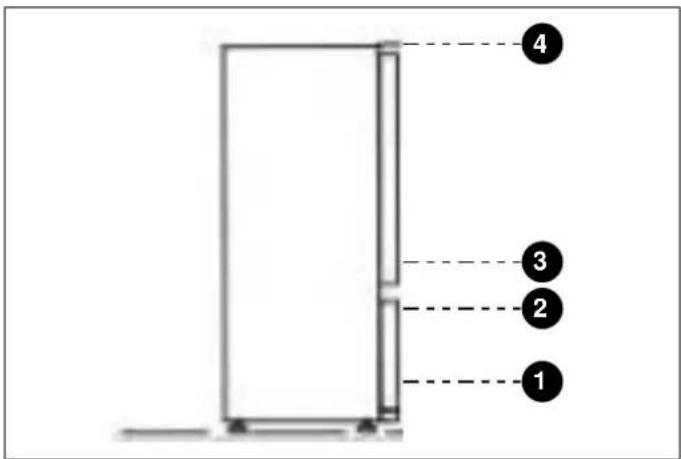
Fig. 31
natural_image
Line drawing of a device with arrows indicating motion or force, no text or symbols present
Fig. 29
CONTROLEER OF DE DEUR GOED AFSLUIT
natural_image
Line drawing of a computer monitor with base mount and control panel, showing no text or symbols
Fig. 30
Fig. 1
Fig. 2
KONTROLLPANEL

natural_image
Row of eight icons including shopping cart, umbrella, refrigerator, water drop, sprout, eco, gear shift, and power button on black background (no text or symbols)
Fig. 3
Fig. 4
SKÖTSEL OCH RENGÖRING
natural_image
Technical line drawing of two rectangular metal cabinets with a rotation arrow indicating assembly (no text or symbols)
Fig. 5
Fig. 6
| PRODUKTKOD | A | B | C | D | E | F | G | H | I |
| REF603BBNPTC | min 200 cm2 | 1778 - 1781 | min 560 | min 562 | 540 | 550 | 1776 | 1017 | 661 |
| REF604BBNPTC | 1939 - 1942 | 1937 | 1167 |
| PRODUKTKOD | J | K | L | M | | | | | O | P | Q | R | S | T | U |
| REF603BBNPTC | 14 | | 37 | 51 | 7 | 550 | 9 | 15 | 698 | 20 | 8 | 29 | | | |
| REF604BBNPTC |
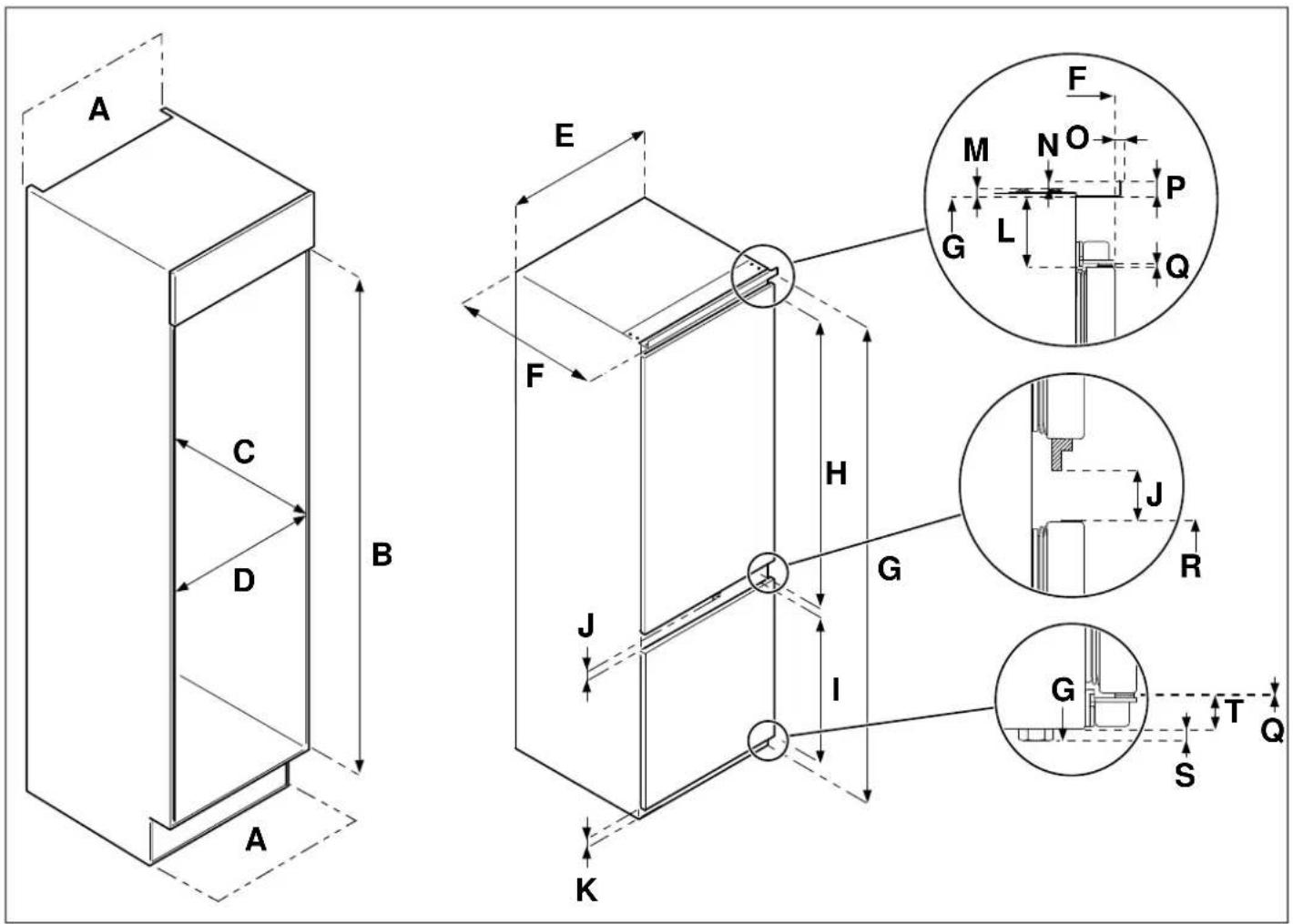
Fig. 7
| PRODUKTKOD | A | B | C | D E F | | G | H | I |
| REF603BBNPTC-S | min 200 cm2 | 1778 - 1781 | min 560 | min 560 540 | 550 | 1776 | 1005 | 640 |
| REF604BBNPTC-S | 1939 - | 1937 | 1166 |
| REF704BBNPTC-S | min 712 | 690 1942 |
| PRODUKTKOD | J | K | L | M | N | O | P | Q | R | S | T | |
| REF603BBNPTC-S | | | | | | | | | | | | |
| REF604BBNPTC-S | 41 | 33 | 50 | 7 | 9 | 6 | 15 | | 1,2 | 673 | 8 | 25 |
| REF704BBNPTC-S | | | | | | | | | | | | |
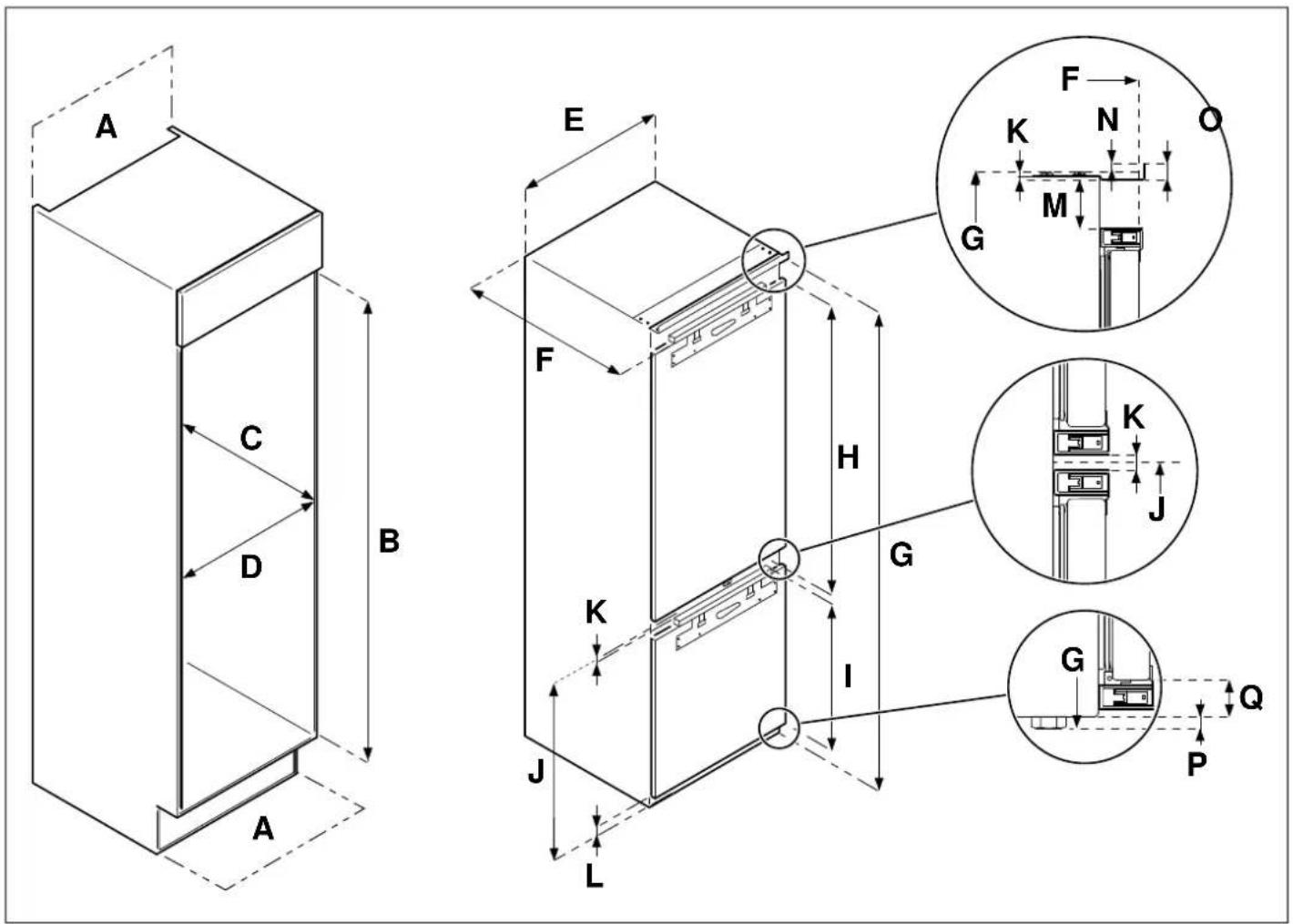
Fig. 8
| PRODUKTKOD | A | B | C | D | E | F | G | H | I |
| REF704BBNPTC | min 200 cm2 | 1939 - 1942 | min 560 | min 712 | 690 | 550 1937 | | 1232,5 | 661 |
| PRODUKTKOD | J K L M N | O | P | Q |
| REF704BBNPTC | 701 7 | | 36,5 | 42 | 9 | 15 8 | | | 28,5 |

Fig. 9
• A Kylskåpets silhuett
B Rekommenderad storlek på luftventilen: 500 x 30 mm
C min. 30 mm
natural_image
Line drawing of a refrigerator with a double door and side panel, labeled 'A' (no text or symbols on the diagram itself)
Fig. 10
natural_image
Technical line drawing of a vertical cabinet with directional arrows indicating motion (no text or symbols)
Fig. 13
A 3-5 mm
natural_image
Diagram of a mechanical or architectural component with labeled section A, showing internal layers and a curved base (no text or symbols beyond label)
Fig. 11
natural_image
Pure technical diagram of a mechanical assembly without any text, numbers, or symbols
Fig. 14
• A översida
natural_image
Diagram of a mechanical or structural assembly with labeled component A, showing internal components and supports (no text or symbols beyond label)
Fig. 12
ATT MONTERA HÖGSKÅPETS DÖRR (-AR)
Fig. 15
A 20 mm
Fig. 18
natural_image
Line drawing of two refrigerator units with a plug, one open and one closed, showing exterior and front views (no text or symbols)
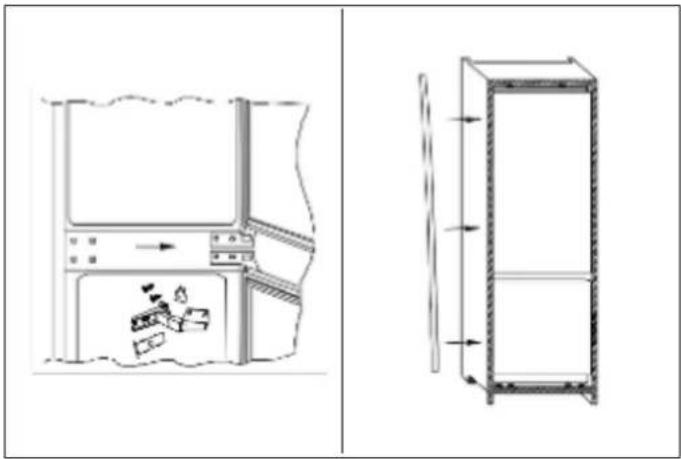
Fig. 21
Fig. 19

Fig. 22
A Kopplingspanel
Demontera kopplingspanelen innan du mäter.
Fig. 23

natural_image
Line drawing of a mechanical device with no visible text or symbols
Fig. 25
flowchart
graph TD
    A["Top Left Panel"] --> B["Device C"]
    B --> C["Left Panel"]
    C --> D["Right Panel"]
    D --> E["Bottom Panel"]
    E --> F["Left Panel"]
    F --> G["Right Panel"]
    G --> H["Bottom Panel"]
    style A fill:#f9f,stroke:#333
    style H fill:#bbf,stroke:#333
Fig. 24
natural_image
Simple line drawing of a cabinet or enclosure with an arrow indicating motion (no text or symbols)
Fig. 26
natural_image
Simple line drawing of a boat hull and a triangular structure with an arrow, no text or symbols present.
Fig. 28
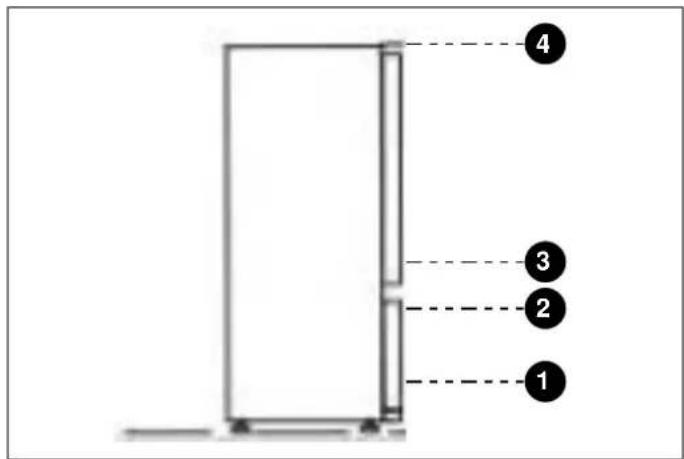
Fig. 31
natural_image
Simple line drawing of a rectangular device with arrows indicating force or motion (no text or symbols)
natural_image
Line drawing of a computer monitor with directional arrows indicating movement or navigation (no text or symbols)
Fig. 30