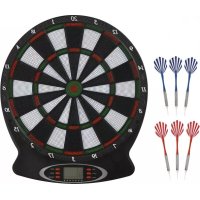
09636 - Toys Maxxmee - Free user manual and instructions
Find the device manual for free 09636 Maxxmee in PDF.



| Product type | Electronic dartboard |
| Brand | Maxxmee |
| Model | 09636 / WJ100 |
| Power supply | 4.5 V DC via 3 AA batteries (1.5 V each) |
| Batteries included | No |
| Number of games | 18 |
| Game variations | 159 |
| Number of players | 1 to 8 |
| Recommended playing distance | Approximately 2.73 m |
| Mounting height | 1.73 m from floor to center of target |
| Delivery contents | 1 target, 6 flights (3 red, 3 blue), 6 barrels, 6 shafts, 12 tips, 3 screws, 1 instruction manual |
| Display | LED screen with score, player, game indicators, etc. |
| Sound effects | Yes (tones for different actions) |
| Material | Plastic, metal (dart tips) |
| Usage | Indoors only, domestic use |
| Safety | Not suitable for children under 3 years (choking hazard due to small parts). Contains batteries, keep out of reach. |
| Cleaning | Damp cloth, no harsh chemicals |
| Storage | Dry and clean place, out of reach of children and animals |
Frequently Asked Questions - 09636 Maxxmee
User questions about 09636 Maxxmee
0 question about this device. Answer the ones you know or ask your own.
Ask a new question about this device
Download the instructions for your Toys in PDF format for free! Find your manual 09636 - Maxxmee and take your electronic device back in hand. On this page are published all the documents necessary for the use of your device. 09636 by Maxxmee.
USER MANUAL 09636 Maxxmee
MAXXMEE Extra for you
Dartscheibe
09636
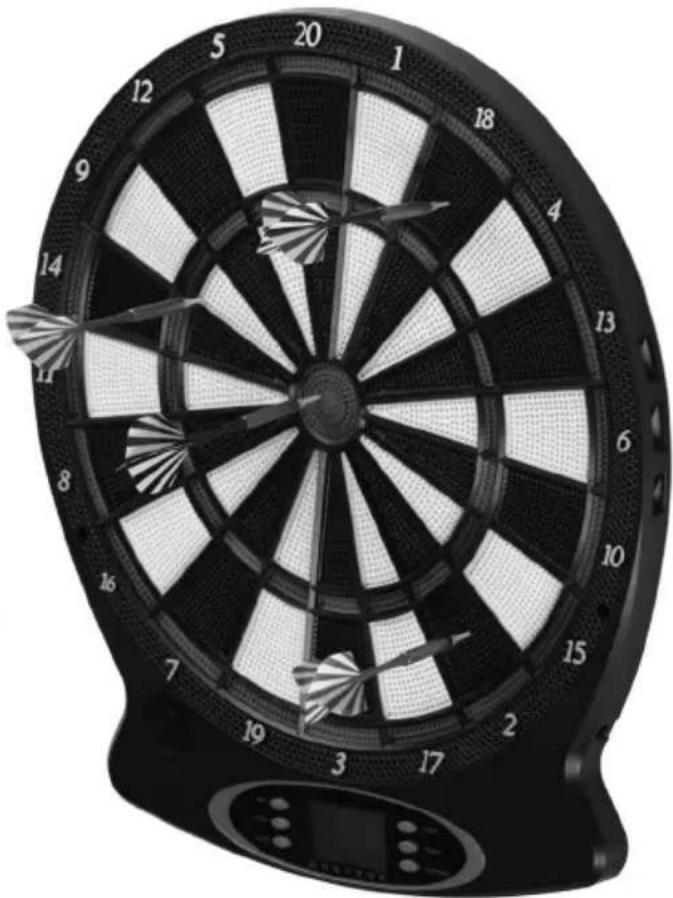

Gebrauchsanleitung

Mode d'emploi

Operating instructions

G04 – Round Clock-Double
G05 – Round Clock-Triple
G08 – Cut Throat Cricket
Assembling the Darts 18
Use 19
Functions 19
Games 20
Cleaning and Storage 25
Troubleshooting 25
Disposal 26
Technical Data 26
ITEMS SUPPLIED
1 x dartboard
6 x flight (3 x red; 3 x blue)
6 x barrel
6 x shaft
12 x tip
3 x screws
1 x operating instructions
Check the items supplied for completeness and the components for transport damage. If you find any damage, do not use the product but contact our customer service department.
Remove any possible films, stickers or transport protection from the product.
Never remove the rating plate and any possible warnings!

Three 1.5 V batteries, AA are required to use the product. These are not supplied with the product.
EN
Dear Customer,
We are delighted that you have chosen our MAXXMEE dartboard.
The classic game to play at home is robust and will give you many hours of fun playing with your friends. Simply hang it up – battery operation makes it easy to use without a plug socket – and start playing! 18 different games and 159 variants are possible.
If you have any questions about the product and about spare parts/accessories, contact the customer service department via our website: www.dspro.de/kundenservice
We hope you have a lot of fun with your MAXXMEE dartboard.
Information About the Operating Instructions
Before using the product for the first time, please read through these operating instructions carefully and keep them for future reference and other users. They form an integral part of the product. The manufacturer and importer do not accept any liability if the information in these operating instructions is not complied with.
SYMBOLS

Danger symbols: These symbols indicate possible dangers. Read the associated safety notices carefully and follow them.


Supplementary information

Read operating instructions before use!

Symbol for direct current
Control panel buttons are shown as follows: POWER
Display indications are shown as follows: SEL
Key numbers are shown as follows: (A)
SIGNAL WORDS
Signal words indicate hazards if the associated notices are not followed.
WARNING – medium risk, may result in serious injury or death
CAUTION – low risk, may result in minor or moderate injury
NOTICE – may result in risk of damage to material
INTENDED USE
- The product is an electronic dartboard that is suitable for games involving 1 – 8 players.
■ Only ever use the product indoors.
■ The product is for personal use only and is not intended for commercial applications.
■ Use the product only for the specified purpose and as described in the operating instructions. Any other use is deemed to be improper.
■ The warranty does not cover faults caused by incorrect handling, damage or attempted repairs. The same applies to normal wear and tear.
SAFETY NOTICES

WARNING – Danger of Injury
- Keep children and animals away from the packaging material. There is a danger of suffocation.
The product is not a toy! Do not leave children and animals unsupervised with the product. There is a danger of injury from incorrect use.
- Do not make any modifications to the product. It may only be taken apart and / or repaired by the manufacturer, customer service department or a similarly qualified person (e.g. specialist workshop) in order to avoid any hazards.
■ Batteries can be deadly if swallowed. The batteries and the product should
be kept out of the reach of children and animals. If a battery is swallowed, seek medical assistance immediately. There is a danger of burns from battery acid!
If a battery leaks, do not allow your skin, eyes and mucous membranes to come into contact with the battery acid. If you touch battery acid, rinse the affected areas with abundant clear water straight away and seek medical assistance immediately. There is a danger of burns from battery acid.
NOTICE – Risk of Damage to Material and Property
■ Use only the battery type specified in the technical data.
■ Always replace all batteries together. Do not use batteries of different types or brands, or batteries with different capacities. Pay attention to the correct polarity (+ / -) when replacing batteries.
■ Take the batteries out of the product when they are dead or if you will not be using the product for a prolonged period. This will prevent any damage caused by leaks.
■ Protect the product from: impacts, direct sunlight, sub-zero temperatures, wet conditions and persistent moisture.
■ Do not lay or place any heavy objects on the product.
■ Do not use any additional accessories which are not recommended by the
EN
manufacturer in order to guarantee that there is no interference that may prevent the product from working and to avoid possible damage.
INSERTING / REPLACING BATTERIES
Before inserting the batteries, check whether the contacts in the product and on the battery are clean, and clean them if necessary.
- Remove the screw on the battery compartment cover using a suitable screwdriver.
- Take off the battery compartment cover.
- Insert three 1.5 V batteries, AA into the battery compartment. Pay attention to the polarity (+ / -)!
- Place the battery compartment cover back on and tighten the screw so that it is hand-tight.
Replace the batteries if the power starts to wane.
WALL MOUNTING
Please Note!
■ Use suitable fixings to hang up the product. If you are unsure whether the fixings supplied are suitable for the wall, seek advice from a specialist retailer.
■ Attach the product in a secure place on a dry surface.
■ Before drilling, ensure that there are no pipes or cables behind the intended drilling point.
Hang up the dartboard on the hanging lug with at least one screw.
For a secure fixing, screw two more screws into the recesses which are provided for them and the wall behind.

The dartboard should be attached at a height of approx. 1.73 metres (from the floor up to the bullseye).
ASSEMBLING THE DARTS
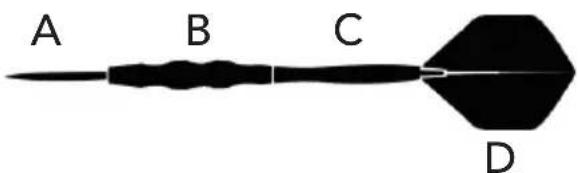
- Place a tip (A) into each barrel (B).
- Securely screw a shaft (C) in each barrel.
- Unfold the flights (D) and place a flight into the tip of each shaft. Make sure that a blade fits into each recess.
USE
- To switch on the product, press the POWER button on the control panel. A melody plays and the display switches on.
- Use the control panel to select the game you want, the number of players and the setting you want (see the "Functions" and "Games" chapters).
- Start the game by pressing the START/NEXT button.
- Stand at a distance of approx. 2.73 metres between the wall and your feet.
• Each player has three throws per round. - Then retrieve the darts from the dartboard and press the START/NEXT button. It is now the next player's turn.

If the dartboard is not used for longer than 30 minutes, it switches off automatically.
FUNCTIONS
Control Panel
- GAME – Game selection (G01 – G018), exit game and back to start
- OPTION – Select game variants
- PLAYER – Select number of players (1 – 8)
Preset: 2
- POWER – Switch dartboard on / off
- DOUBLE – Can only be used for G02 (see the "Games" chapter)
- START/NEXT – Start game Switch player

The START/NEXT button must always be pressed to switch to the next player.
Display
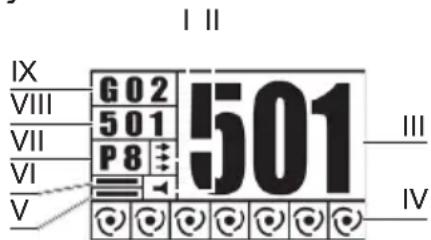
I Number of open throws (darts)
II Speaker on
III Number of points
IV Number of hits for games G06-G08 shown in 🍒 Ⓤ
V Double-out
VI Double-in
VII Number of players (1 - 8)
VIII Game option (see the "Games" chapter)
IX Game number (G01 - G18)
Points Rule
The points score from the inside to the outside for each segment of the board:
| Bullseye (inner) | 50 |
| Bullseye (outer) | 25 |
| Single (black-white) | Depending on segment single points score |
| Triple (red-green) | Depending on segment triple points score |
EN
| Single (black-white) | Depending on segment single points score |
| Double (red-green) | Depending on segment double points score |
Sounds
"Laser" A segment has been hit, with extra indication for double and triple segments
"Double" Double segment has been hit
"Triple" Triple segment has been hit
"Score" The player has scored points (G07, G08)
"Close" Scoring possible (G07, G08)
"Open" Scoring no longer possible (G07, G08)
"Too High" Points have been de- ducted
"Winner" First winner found
"Bullseye" Bullseye has been hit
"Next Player" Next player's turn
"Yes" Target segment has been hit
"Sorry" Target segment has been missed
"Wins the match" Player has won the game
GAMES
The product features 18 different games and 159 settings.
G01 - Count-Up
- The points are counted up for each player until one of them has reached the specified points score.
Target points score: 100, 200, 300, ..., 900 can be chosen
G02 - Count-Down
- The points are deducted from the starting score for each player until one of them has reached zero points.
Starting points score: 101, 201, 301, ..., 901 can be chosen
Variants
The 3 different variants can be selected by pressing the DOUBLE button on the control panel.
double in – The game can only be started when a double segment is hit double out – The game can only be ended when a double segment is hit double in/out – The game can only be started and ended when a double segment is hit

Bust – When the player's points score is 1 or less than zero or the points score 0 has been reached without hitting a double segment, the player cannot score points in this round. The points total of the previous round is retained.
G03 - Round Clock
- The player has to hit the single segment which is shown on the display.
- When the displayed segment is hit, the next one is shown (1, 2, 3 ... 19, 20), up to the selected target.
- The first player who then hits the target segment which was initially selected wins the game.
Target: 5, 10, 15, 20
G04 – Round Clock-Double
- The player has to hit the double segment which is shown on the display.
- When the displayed double segment is hit, the next one is shown (1, 2, 3 ... 19, 20), up to the selected target.
- The first player who then hits the target segment which was initially selected wins the game.
Target: 5, 10, 15, 20, shown with a 2 or 20 before the points score
G05 – Round Clock-Triple
- The player has to hit the triple segment which is shown on the display.
- When the displayed triple segment is hit, the next one is shown (1, 2, 3 ... 19, 20), up to the selected target.
- The first player who then hits the target segment which was initially selected wins the game.
Target: 5, 10, 15, 20, shown with a 3 or 30 before the points score
G06 – Simple Cricket
- Only darts which hit the segments 15, 16, 17, 18, 19, 20, bullseye count as hits
- Single segment - counts as 1 hit
- Double segment - counts as 2 hits
- Triple segment - counts as 3 hits
- The player who is the first to hit all segments three times wins the game.
• Each hit in a segment is shown on the display as (.)
Variants
000 – There is no order with the hits 020 – First you have to hit the 20 three times and then the 19, 18, 17, 16, 15 and bullseye in order 025 – First you have to hit the bullseye three times and then the 15, 16, 17, 18, 19 and 20 in order
G07 – Score Cricket
- The same rules apply as in G06.
- The variants are displayed as E00, E20, E25.
- The opportunity to score exists whenever you have hit a segment three times. You will hear "Open". Once all players have hit the segment three times, the opportunity no longer exists. You will hear "Close".
- The player who has achieved the most points at the end of the game wins the game.
EN
G08 – Cut Throat Cricket
• The same rules apply as in G07.
- The variants are displayed as C00, C20, C25.
- The opportunity to score exists whenever you have hit a segment three times. You will hear "Open". Once all players have hit the segment three times, the opportunity no longer exists. You will hear "Close".
- The points which are achieved are credited to the account of all other players.
- The player who has achieved the fewest points at the end of the game wins the game.
G09 - Golf
- The player must hit the segments 1 – 18 in order.
- The aim of the game is to achieve the lowest points score:
- Hit in triple segment – 1 point
- Hit in double segment – 2 points
- Hit in single segment – 3 points
- Target missed – 5 points
- Only the last throw is counted in each case.
• After each throw, you can decide whether to pass the game on to the next player or try again.
- At the start of the game, a points score which when reached results in the player being eliminated is also selected (10 – 90 in increments of 10).
- The winner of the game is either the last player who is left in the game, or the player with the lowest points score once all 18 segments have been hit one after the other.
G10 – Bingo
- Only hits in five different segments which are displayed one after the other count as hits.
- Single segment – counts as 1 hit
- Double segment – counts as 2 hits
- Triple segment – counts as 3 hits
- The player who is the first to hit all segments in the correct order three times wins the game.
Variants
132 – You have to hit the following segments in order: 15, 4, 8, 14, 3
141 – You have to hit the following segments in order: 17, 13, 9, 7, 1
168 – You have to hit the following segments in order: 20, 16, 12, 6, 2
189 – You have to hit the following segments in order: 19, 10, 18, 5, 11
G11 – Big Little-Simple
- At the start of the game, you choose the lives for each player. You can choose from: 3, 5, 7, 9, 11, 13, 15, 17, 19, 21.
-
When a player has no more lives remaining, they are eliminated from the game.
-
The first player must hit the target which is randomly selected by the product.
- If the player hits it with their first or second throw, they can select the target for the next player with their third throw. Otherwise the product selects a random target.
- If the specified target is not hit with any of the three throws, the player loses a life.
- It does not matter whether the segment is hit in the single, double or triple.
- If only one player with a life remains in the game, this player has won the game.
G12 – Big Little-Hard
- The same rules apply as in G11.
- The lives of the players are displayed with an H before the number.
- With this variant, it DOES matter whether the segment is hit in the single, double or triple.
G13 - Killer
• Game for more than two players
- At the start of the game, you choose the lives for each player. You can choose from: 3, 5, 7, 9, 11, 13, 15, 17, 19, 21.
- Choose target segment:
- After starting, SEL (Select) is shown on the display. The first player throws once and thus selects their target segment.
EN
-
Press the START/NEXT button so that the next player can select their target segment with a throw. Once all players have selected their target segment, the game starts.
-
Once a player has hit their target segment (whether a single, double or triple), they become the "Killer" in the game. This means they can minimise the lives of fellow players by hitting their target segments.
- If a player hits their target segment again, they lose the position of "Killer" and lose a life.
- If only one player with a life remains in the game, this player has won the game.
G14 – Killer-Double
• The same rules apply as in G13.
- Selected lives are shown with 2 or 20 in front of the lives number (203, ... 220).
- The player must hit their target segment in the double to become the "Killer" in the game.
G15 – Killer-Triple
- The same rules apply as in G13.
- Selected lives are shown with 3 or 30 in front of the lives number (303, ... 320).
- The player must hit their target segment in the triple to become the "Killer" in the game.
EN
G16 - Shoot out
- At the start of the game, you choose the lives for each player. You can choose from: 3, 5, 7, 9, 11, 13, 15, 17, 19, 21.
- The lives of the players are displayed with an H before the number.
- The player has to hit the target (whether single, double or triple) which is randomly selected by the product within 10 seconds. After 10 seconds, it is no longer valid and is assessed to be "not hit".
- Any hit target reduces the player's lives by 1.
- The player who is the first to have 0 lives wins the game.
G17 – Legs over
• Game for more than two players
- At the start of the game, you choose the lives for each player. You can choose from: 3, 5, 7, 9, 11, 13, 15, 17, 19, 21.
- At the start, the product specifies a random target and the first player has to try to achieve a higher target.
- If this player does not manage to be higher than the specified target, they lose a life.
- The following player must try to achieve a higher points score than the previous player with three throws. If they do not manage to do so, they lose a life.
- If only one player with a life remains in the game, this player has won the game.
G18 – Legs under
• Game for more than two players
- At the start of the game, you choose the lives for each player. You can choose from: 3, 5, 7, 9, 11, 13, 15, 17, 19, 21.
- The lives of the players are displayed with a U before the number.
- At the start, the product specifies a random target and the first player has to try to hit a lower target (with 3 throws).
- If the player misses the dartboard with all three throws, they lose a life.
- If this player does not manage to be lower than the specified target, they lose a life.
- If the player achieves a higher points score than the one specified, they lose a life.
- If only one player with a life remains in the game, this player has won the game.
CLEANING AND STORAGE
Please Note!
- Do not use any sharp or abrasive cleaning agents to clean the product. These may damage the surfaces.
- Wipe down the product with a damp cloth if necessary.
- The darts can be stored in the product when they are not being used. To do this, place one dart in each of the recesses on the sides of the product.
- Store the product and the accessories in a clean, dry place that is out of the reach of children and animals.
TROUBLESHOOTING
If the product does not work properly, check whether you are able to rectify the problem yourself. If the problem cannot be solved with the steps below, contact the customer service department.

Do not attempt to repair an electrical product yourself!
The product does not work, the display does not switch on / no beep is heard.
The batteries are too weak or empty.
▶ Replace the batteries.
EN
The product does not count any points / hits.
The game was not started.
▶ Press the START/NEXT button to start the game.
A segment or a button are tilted.
▶ Move all segments back and forth gently with your fingers, carefully remove a dart which is stuck and carefully release the buttons from any tilt.

In the case of a tilt, all previous scores may be erased in some circumstances. You can only continue playing normally once the tilt has been released.
The display flickers or switches off in between times.
Electromagnetic interference disrupts the electronics of the product. This may be caused for example by a storm, thunderstorm, direct proximity to an electric motor or a microwave etc.
▶ Remove the batteries from the product for a few seconds, reinsert them and restart the product.
▶ If possible, remove the interference.
DISPOSAL

Dispose of the packaging material in an environmentally friendly manner so that it can be recycled.

Batteries should be removed before disposing of the product and disposed of separately from the product at suitable collection points.
This product is governed by the European Directive 2012/19/EU on waste electrical and electronic equipment (WEEE). Do not dispose of this product as normal domestic waste, but rather in an environmentally friendly manner via an officially approved waste disposal company.
TECHNICAL DATA
Article number: 09636
Model number: WJ100
Power supply: 4.5 V DC (3 x 1.5 V battery, AA)
ID of operating instructions: Z 09636 M DS V1 0920 uh

All rights reserved.
SOMMAIRE
Composition 27
Symboles 28
MISE EN PLACE / REMPLACEMENT DES PILES
G04 – Round Clock-Double
G05 – Round Clock-Triple
G08 – Cut Throat Cricket
WAARSCHUWING – Verwon- dingsgevaar
G04 – Round Clock-Double
G05 – Round Clock-Triple
G08 – Cut Throat Cricket
MAXXMEE Extra for you
DE KUNDENSERVICE IMPORTEUR
* Calls to German landlines are subject to your provider's charges.
FR SERVICE APRÈS-VENTE IMPORTATEUR
- MAXXMEE EXTRA FOR YOU
- DARTSCHEIBE
- G04 – ROUND CLOCK-DOUBLE
- G05 – ROUND CLOCK-TRIPLE
- G08 – CUT THROAT CRICKET
- ITEMS SUPPLIED
- EN
- DEAR CUSTOMER
- INFORMATION ABOUT THE OPERATING INSTRUCTIONS
- SYMBOLS
- SIGNAL WORDS
- INTENDED USE
- SAFETY NOTICES
- WARNING – DANGER OF INJURY
- NOTICE – RISK OF DAMAGE TO MATERIAL AND PROPERTY
- INSERTING / REPLACING BATTERIES
- WALL MOUNTING
- PLEASE NOTE
- ASSEMBLING THE DARTS
- USE
- FUNCTIONS
- CONTROL PANEL
- DISPLAY
- POINTS RULE
- SOUNDS
- GAMES
- G01 - COUNT-UP
- G02 - COUNT-DOWN
- VARIANTS
- G03 - ROUND CLOCK
- G06 – SIMPLE CRICKET
- G07 – SCORE CRICKET
- G09 - GOLF
- G10 – BINGO
- G11 – BIG LITTLE-SIMPLE
- G12 – BIG LITTLE-HARD
- G13 - KILLER
- G14 – KILLER-DOUBLE
- G15 – KILLER-TRIPLE
- G16 - SHOOT OUT
- G17 – LEGS OVER
- G18 – LEGS UNDER
- CLEANING AND STORAGE
- TROUBLESHOOTING
- DO NOT ATTEMPT TO REPAIR AN ELECTRICAL PRODUCT YOURSELF
- THE PRODUCT DOES NOT COUNT ANY POINTS / HITS
- THE DISPLAY FLICKERS OR SWITCHES OFF IN BETWEEN TIMES
- DISPOSAL
- TECHNICAL DATA
- SOMMAIRE
- MISE EN PLACE / REMPLACEMENT DES PILES
- WAARSCHUWING – VERWON- DINGSGEVAAR
- DE KUNDENSERVICE IMPORTEUR
- FR SERVICE APRÈS-VENTE IMPORTATEUR
Brand : Maxxmee
Model : 09636
Category : Toys