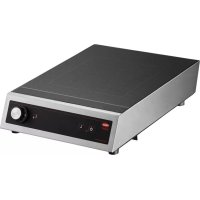
Rapide Cuisine IRNGBXC114 - Cooker Hatco - Free user manual and instructions
Find the device manual for free Rapide Cuisine IRNGBXC114 Hatco in PDF.

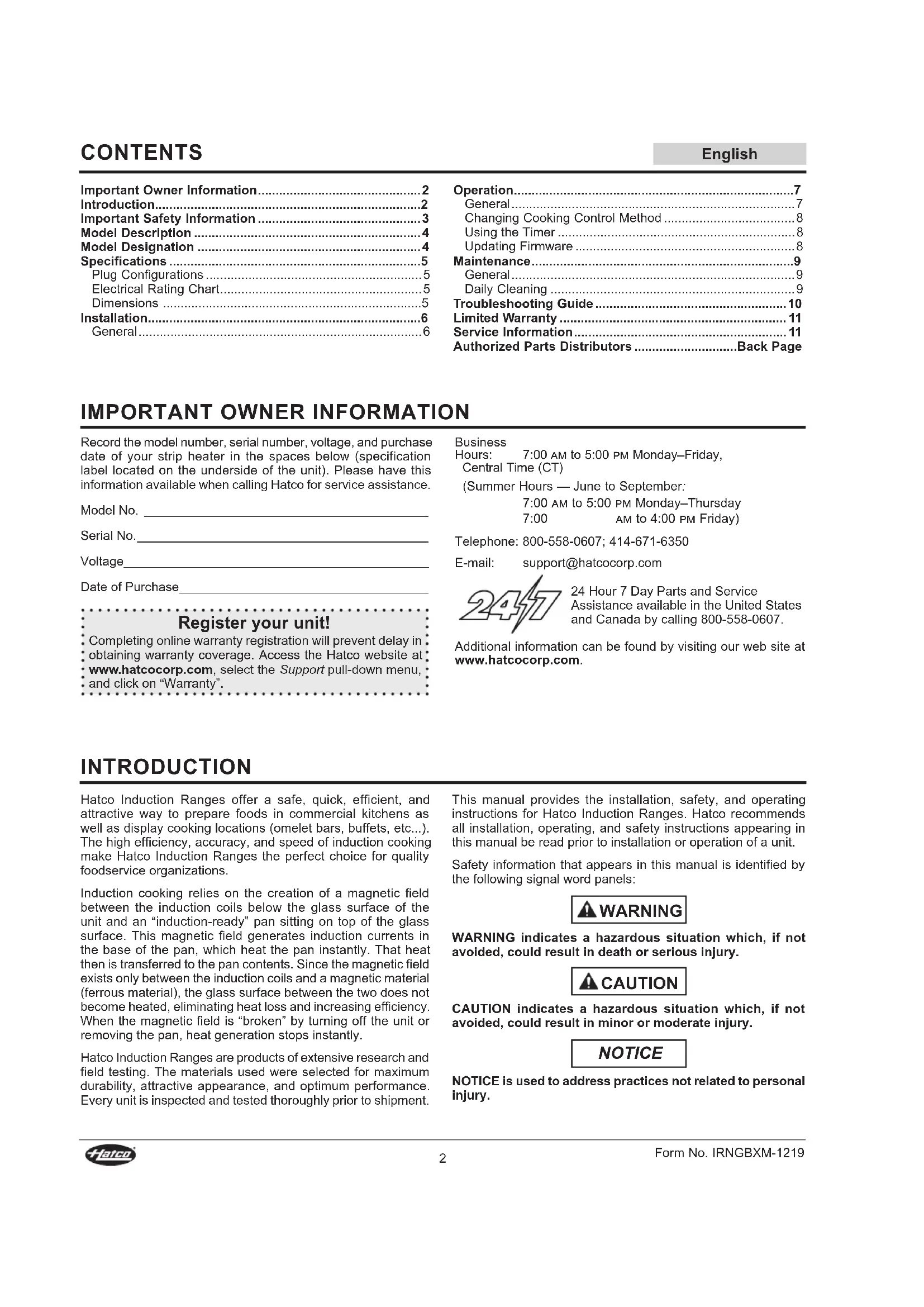

| Product Type | Portable Countertop Induction Cooktop |
| Brand | Hatco |
| Model | Rapide Cuisine IRNGBXC114 |
| Dimensions (W × D × H) | 327 mm × 447 mm × 100 mm |
| Net Weight | 7 kg (15 lb) |
| Supply Voltage | 120 V |
| Rated Power | 1440 W (12 A) or 1800 W (15 A) depending on version |
| Plug Configuration | NEMA 5-15P (model 14) or NEMA 5-20P (Canada model 18) |
| Cooking Surface | Ceramic glass, single zone 319 × 386 mm |
| Cooking Control | Power (1–100%) or temperature (°F/°C) with rotary knob |
| Built-in Timer | Yes, with LED display and automatic shut-off |
| Firmware Update | Via USB port (USB flash drive) |
| Safety | Overheat sensor, small metal object detection, no pan shut-off, cross-flow ventilation |
| Compatible Cookware | Magnetic materials (cast iron, enameled steel, stainless steel, iron-based aluminum), flat bottom Ø 102–300 mm |
| Usage | Professional use only |
| Ambient Operating Temperature | 21 °C to 51 °C (70 °F to 124 °F) |
| Minimum Distance from Walls | 5 cm (2 in) |
| Maintenance | Daily cleaning of ceramic glass with non-abrasive products; weekly cleaning of knob shaft |
| Warranty | 2 years parts and labor (induction ranges) |
| Repairability | Repair by qualified personnel only, genuine Hatco parts |
Frequently Asked Questions - Rapide Cuisine IRNGBXC114 Hatco
User questions about Rapide Cuisine IRNGBXC114 Hatco
0 question about this device. Answer the ones you know or ask your own.
Ask a new question about this device
Download the instructions for your Cooker in PDF format for free! Find your manual Rapide Cuisine IRNGBXC114 - Hatco and take your electronic device back in hand. On this page are published all the documents necessary for the use of your device. Rapide Cuisine IRNGBXC114 by Hatco.
USER MANUAL Rapide Cuisine IRNGBXC114 Hatco
Register Online! (see page 2)
ecoization
Boxer™
WARNING
Do not operate this equipment unless you have read and understood the contents of this manual! Failure to follow the instructions contained in this manual may result in serious injury or death. This manual contains important safety information concerning the maintenance, use, and operation of this product. If you're unable to understand the contents of this manual, please bring it to the attention of your supervisor. Keep this manual in a safe location for future reference.
English = p 2
ADVERTENCIA
Important Owner Information....2
Introduction....2
Important Safety Information....3
Model Description 4
Model Designation 4
Specifications ....5
Plug Configurations 5
Electrical Rating Chart....5
Dimensions 5
Installation....6
General....6
Operation....7
General 7
Changing Cooking Control Method 8
Using the Timer 8
Updating Firmware 8
Maintenance....9
General....9
Daily Cleaning 9
Troubleshooting Guide....10
Limited Warranty 11
Service Information....11
Authorized Parts Distributors ....Back Page
IMPORTANT OWNER INFORMATION
Record the model number, serial number, voltage, and purchase date of your strip heater in the spaces below (specification label located on the underside of the unit). Please have this information available when calling Hatco for service assistance.
Model No. ____
Serial No.
Voltage
Date of Purchase
Register your unit!
: Completing online warranty registration will prevent delay in obtaining warranty coverage. Access the Hatco website at www.hatcocorp.com, select the Support pull-down menu, and click on "Warranty".
Business
Hours: 7:00 AM to 5:00 PM Monday–Friday,
Central Time (CT)
(Summer Hours — June to September:
7:00 AM to 5:00 PM Monday–Thursday
7:00 AM to 4:00 PM Friday)
Telephone: 800-558-0607; 414-671-6350
E-mail: support@hatcocorp.com
24 Hour 7 Day Parts and Service
Assistance available in the United States
and Canada by calling 800-558-0607.
Additional information can be found by visiting our web site at www.hatcocorp.com.
INTRODUCTION
Hatco Induction Ranges offer a safe, quick, efficient, and attractive way to prepare foods in commercial kitchens as well as display cooking locations (omelet bars, buffets, etc...). The high efficiency, accuracy, and speed of induction cooking make Hatco Induction Ranges the perfect choice for quality foodservice organizations.
Induction cooking relies on the creation of a magnetic field between the induction coils below the glass surface of the unit and an "induction-ready" pan sitting on top of the glass surface. This magnetic field generates induction currents in the base of the pan, which heat the pan instantly. That heat then is transferred to the pan contents. Since the magnetic field exists only between the induction coils and a magnetic material (ferrous material), the glass surface between the two does not become heated, eliminating heat loss and increasing efficiency. When the magnetic field is "broken" by turning off the unit or removing the pan, heat generation stops instantly.
Hatco Induction Ranges are products of extensive research and field testing. The materials used were selected for maximum durability, attractive appearance, and optimum performance. Every unit is inspected and tested thoroughly prior to shipment.
This manual provides the installation, safety, and operating instructions for Hatco Induction Ranges. Hatco recommends all installation, operating, and safety instructions appearing in this manual be read prior to installation or operation of a unit.
Safety information that appears in this manual is identified by the following signal word panels:
WARNING indicates a hazardous situation which, if not avoided, could result in death or serious injury.

CAUTION indicates a hazardous situation which, if not avoided, could result in minor or moderate injury.
NOTICE
NOTICE is used to address practices not related to personal injury.

Read the following important safety information before using this equipment to avoid serious injury or death and to avoid damage to equipment or property.
WARNING
ELECTRIC SHOCK HAZARD:
- Plug unit into a properly grounded electrical receptacle of the correct voltage, size, and plug configuration. If plug and receptacle do not match, contact a qualified electrician to determine and install proper voltage and size electrical receptacle.
- Turn OFF power switch, unplug power cord, and allow unit to cool before performing any cleaning, adjustments, or maintenance.
- DO NOT submerge or saturate with water. Do not allow liquids to spill into unit. Unit is not waterproof. Do not operate if unit has been submerged or saturated with water.
- Unit is not weatherproof. Locate unit indoors where ambient air temperature is a minimum of 70°F (21°C) and a maximum of 124°F (51°C).
- Do not steam clean or use excessive water on the unit.
- This unit is not "jet-proof" construction. Do not use jet-clean spray to clean this unit.
- Do not clean unit when it is energized or hot.
- Do not pull unit by power cord.
- Discontinue use if power cord is frayed or worn.
- Do not attempt to repair or replace a damaged power cord. Cord must be replaced by an Authorized Hatco Service Agent or a person with similar qualifications.
- This unit must be serviced by qualified personnel only. Service by unqualified personnel may lead to electric shock or burn.
- Use only Genuine Hatco Replacement Parts when service is required. Failure to use Genuine Hatco Replacement Parts will void all warranties and may subject operators of the equipment to hazardous electrical voltage, resulting in electrical shock or burn. Genuine Hatco Replacement Parts are specified to operate safely in the environments in which they are used. Some after-market or generic replacement parts do not have the characteristics that will allow them to operate safely in Hatco equipment.
EXPLOSION HAZARD: Do not heat unopened containers of food on unit. Sealed, heated containers may burst open.
ELECTROMAGNETIC INTERFERENCE HAZARD: This unit generates close-range electromagnetic fields. It has been designed to meet the applicable standards for non-interference with other electronic devices. Make sure other electronic devices in the vicinity, including pacemakers and other active implants, have been designed to meet their corresponding applicable standards. As a precaution, do not operate unit or come within 12" (305 mm) of unit with a pacemaker or other active implant.
This unit is not intended for use by children or persons with reduced physical, sensory, or mental capabilities. Ensure proper supervision of children and keep them away from unit.
WARNING
FIRE HAZARD:
- Locate countertop unit a minimum of 2" (51 mm) from combustible walls and materials. If safe distances are not maintained, discoloration or combustion could occur.
- Do not obstruct air ventilation openings on sides and bottom of unit. Unit combustion or malfunction may occur.
- Do not place unit near or underneath curtains or other combustible materials. Items near or above unit could catch fire causing injury and/or damage to unit.
Make sure all operators have been instructed on the safe and proper use of the unit.
This unit has no "user-serviceable" parts. If service is required on this unit, contact an Authorized Hatco Service Agent or contact the Hatco Service Department at 800-558-0607 or 414-671-6350.
CAUTION
BURN HAZARD:
- Do not leave metal objects or utensils on or near induction range. They may become hot.
- Use caution when wearing rings, watches, or other ferrous objects around induction range. They may become hot.
- Some exterior surfaces on unit will get hot. Use caution when touching these areas.
Do not block or restrict air flow to air intake or exhaust openings on bottom of unit.
Do not store anything on top of unit.
Locate unit at proper counter height in an area that is convenient for use. Location should be level to prevent unit or its contents from falling accidentally and strong enough to support weight of unit and contents.
NOTICE
Plug unit into a dedicated circuit. Do not use multiple appliances on same circuit.
Never use aluminum foil on induction range. Aluminum foil will melt and damage unit.
Do not place objects with magnetic properties (credit cards, cassette tapes, etc...) on or near unit during operation.
Use only wipes, pads, and cleaners designed specifically for cleaning ceramic glass surfaces.
Use non-abrasive cleaners and cloths only. Abrasive cleaners and cloths could scratch finish of unit, marring its appearance and making it susceptible to soil accumulation.
Do not locate unit in area with excessive air movement around unit. Avoid areas that may be subject to active air movements or currents (i.e., near exhaust fans/hoods, air conditioning ducts, and exterior doors).
This unit is intended for commercial use only—NOT for household use.
All Models
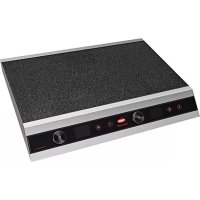
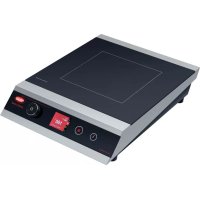
Boxer Induction Ranges are portable, countertop induction ranges equipped with a single induction coil underneath a ceramic glass cooking surface. Controls include a Power Button, a Timer Button, a Timer LED display, a Power/Temperature Button, a Power/Temperature LED Display, and a Control Knob. All Boxer Induction Ranges include an attached 71" (1800 mm) power cord with plug.
NOTE: Refer to "Pan Specifications" in the OPERATION section of this manual for details on "induction-ready" pans, pans not suitable for induction cooking, and pan sizes.
Hatco Induction Ranges have several safeguards built into each unit that ensure protection to the unit as well as the operators.
- A cross-flow fan ventilation system ensures that the electronic circuits in the unit do no overheat. Temperature sensors monitor the electronic circuits and will signal the unit to shut down if the circuits get too hot.
- A temperature sensor in the cooking zone monitors the zone temperature. This sensor detects overheating in the cooking zone due to an empty pan.
- Electronic circuitry in the cooking zone detects when a small, ferrous object (such as a fork, spoon, or ring) is placed on the unit, and the unit will not operate.
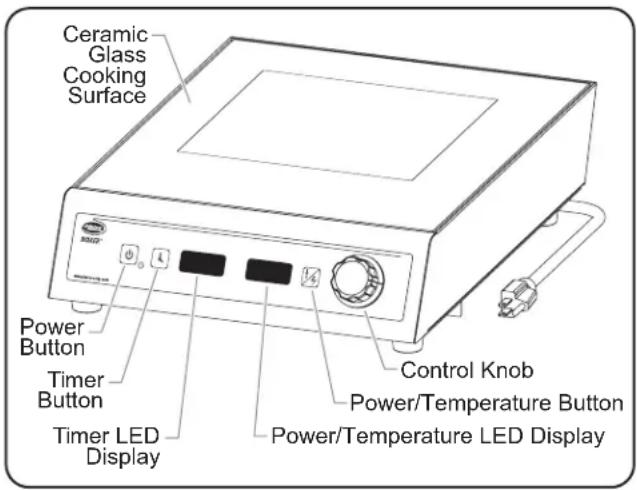
Boxer Induction Range
NOTE: For the latest firmware updates, cooking tips, and more, go to the Hatco Induction Range website: www.hatcocorp.com/rapide_cuisine
MODEL DESIGNATION
![graph TD A["IRNG-BXC1-xx"] --> B["Induction Range"] A --> C["Boxer"] A --> D["Countertop"] A --> E["Unit Wattage 14 = 1440 W\n18 = 1800 W"] A --> F["Single Coil"]](/content/2026/04/619157/images/a714be19058c8c09d252df3a67aecd270ae19e8d38efc6000cbd737d2bdd6bcd.jpg)
Plug Configurations
Units are supplied from the factory with an electrical cord and plug installed. Plugs are supplied according to the application.
WARNING
ELECTRIC SHOCK HAZARD: Plug unit into a properly grounded electrical receptacle of the correct voltage, size, and plug configuration. If plug and receptacle do not match, contact a qualified electrician to determine and install proper voltage and size electrical receptacle.
NOTE: The specification label is located on the bottom of the unit. See label for serial number and verification of unit electrical information.
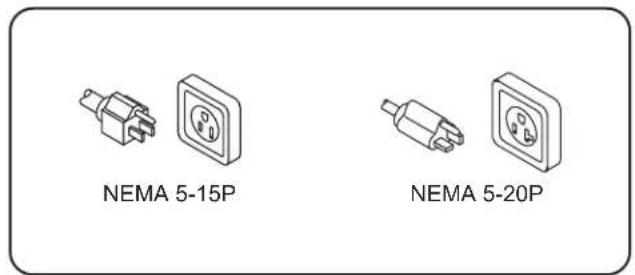
Plug Configurations
NOTE: Receptacle not supplied by Hatco. All units must be connected to a dedicated circuit.
Electrical Rating Chart
| Model Voltage | Watts | Amps Plug | Configuration Shipping Weight | ||
| IRNG-BXC1-14 | 120 | 1440 | 12 NEMA 5-15P 15 lbs. (7 kg) | ||
| IRNG-BXC1-18 | 120 | 1800 | 15 NEMA 5-15P* 15 lbs. (7 kg) |
* NEMA 5-20P for Canada.
NOTE: Shipping weight includes packaging.
Dimensions
| Model Width | (A) Depth (B) | Height (C) | Footprint Width (D) | Footprint Depth (E) | Cooking Surface Width (F) | Cooking Surface Depth (G) | |
| IRNG-PC1-14 | 12-7/8" (327 mm) | 17-5/8" (447 mm) | 3-15/16" (100 mm) | 12-1/4" (310 mm) | 13-15/16" (354 mm) | 12-9/16" (319 mm) | 15-3/16" (386 mm) |
| IRNG-PC1-18 | 12-7/8" (327 mm) | 17-5/8" (447 mm) | 3-15/16" (100 mm) | 12-1/4" (310 mm) | 13-15/16" (354 mm) | 12-9/16" (319 mm) | 15-3/16" (366 mm) |
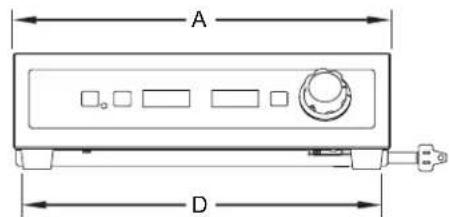
Front View
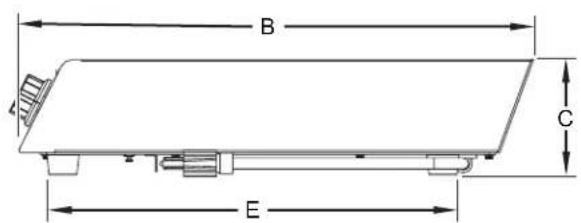
Side View

Top View
General
Induction Ranges are shipped completely assembled and ready for use. Care should be taken when unpacking the shipping carton to avoid damage to the unit and components enclosed.
WARNING
ELECTRIC SHOCK HAZARD: Unit is not weatherproof. Locate unit indoors where ambient air temperature is a minimum of 70° F ( 21° C) and a maximum of 124° F ( 51° C).
FIRE HAZARD:
- Locate countertop unit a minimum of 2" (51 mm) from combustible walls and materials. If safe distances are not maintained, discoloration or combustion could occur.
- Do not obstruct air ventilation openings on sides and bottom of unit. Unit combustion or malfunction may occur.
- Do not place unit near or underneath curtains or other combustible materials. Items near or above unit could catch fire causing injury and/or damage to unit.
CAUTION
Do not block or restrict air flow to air intake or exhaust openings on bottom of unit.
Locate unit at proper counter height in an area that is convenient for use. Location should be level to prevent unit or its contents from falling accidentally and strong enough to support weight of unit and contents.
- Remove the unit from the carton.
- Remove tape and protective packaging from all surfaces of the unit.
NOTE: To prevent delay in obtaining warranty coverage, complete online warranty registration. See IMPORTANT OWNER INFORMATION for details.
-
Place the unit in the desired location. Make sure the location:
-
is level and at the proper counter height.
- is strong enough to support the unit and its contents.
- provides a minimum of 2" (51 mm) clearance from combustible materials.
- is large enough for all four feet of the unit to be positioned securely on the countertop.
NOTE: Avoid areas that may be subject to active air movements or currents (i.e., near exhaust fans/hoods, air conditioning ducts, and exterior doors).
General
Use the following information and procedures to operate Boxer Induction Ranges. NOTICE: Do not move a countertop unit during operation.
WARNING
Read all safety messages in the IMPORTANT SAFETY INFORMATION section before operating this equipment.
CAUTION
BURN HAZARD:
- Do not leave metal objects or utensils on or near induction range. They may become hot.
- Use caution when wearing rings, watches, or other ferrous objects around induction range. They may become hot.
- Some exterior surfaces on unit will get hot. Use caution when touching these areas.
Pan Specifications
Pans used with an Induction Range must meet the following specifications:
• Made of material with magnetic properties (ferrous material)
- Enameled Steel Pans
- Cast Iron Pans
- Stainless Steel Pans
- Aluminum Pans w/ferrous base
- Proper size (measurements given are the pan bottom diameter)
- Minimum = 4" (102 mm), Maximum = 11-3/4" (300 mm)
- Flat bottom
The following pans cannot be used with an Induction Range:
- Glass Pans
• Aluminum Pans without a ferrous base - Earthenware Pans
- Ceramic Pans
- Copper Pans
NOTE: The Induction Range automatically detects if a pan is induction-ready. If a pan is placed on the unit during operation that is not induction-ready, the setting in the Power/Temperature display will flash, and the unit will not operate.
Startup
- Before turning on the unit each day, clean the glass cooking surface using an appropriate cleaning wipe, damp paper towel, or a damp cloth. CAUTION! Wipe up all spills and splashes immediately. Make sure unit is dry before using. Do not allow liquid to run into air inlet filter on bottom of unit.
NOTE: The unit can be turned off at any time by pressing the ⏻ button.
NOTE: The cooling fan in the unit will not start until the unit gets hot. Once the fan turns on, it will run until the unit cools.
- Plug the unit into a properly grounded electrical receptacle of the correct voltage, size, and plug configuration. See the SPECIFICATIONS section for details.
-
Place an induction-ready pan on the unit. The Induction Range will not operate without a pan centered inside the cooking zone pattern on the glass cooking surface.
-
Press the button to turn on the unit.
- The Power/Temperature LED display will illuminate to show the current setting. The Induction Range is now operating in Power Control. See "Changing Cooking Control Method" for information on cooking in Tempera

Power Control
NOTE: After initial startup, the unit will start up at the same setting from when it was last shut down.
NOTE: The setting in the Power/Temperature display will flash when a pan is not being heated or when no pan is on the glass cooking surface. The setting will remain solid when a compatible pan is on the cooking surface and being heated.
-
Turn the Control Knob to adjust the Power setting to the desired percentage between 1% and 100%.
-
Turn the Control Knob clockwise to increase the setting. Turn the Control Knob counterclockwise to decrease the setting.
- Most cooking in Power Control will be done at a setting of 50% or less. Start with a lower setting because the unit gets hot quickly. Make adjustments as necessary.
NOTE: Heat generation will stop automatically whenever a pan is removed from the glass cooking surface.
Shutdown
- Press the button to turn off the unit.
NOTE: Heat generation will stop automatically whenever a pan is removed from the glass cooking surface.
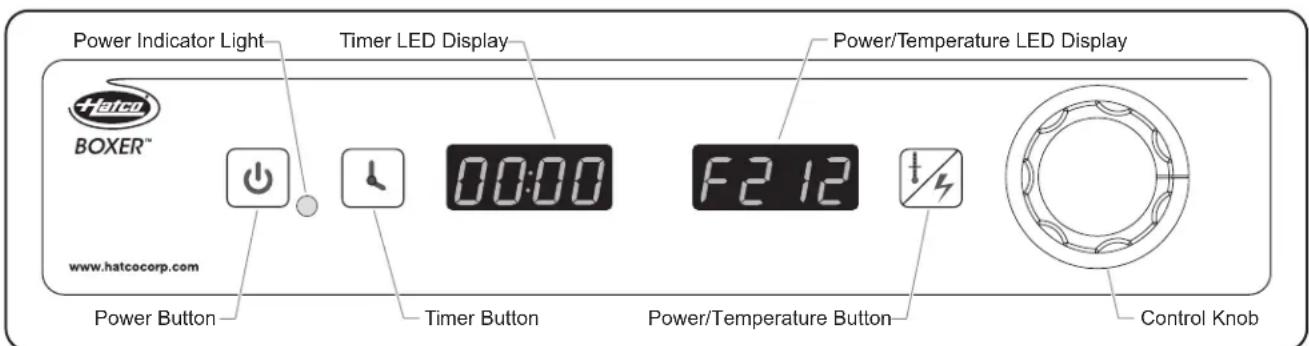
Boxer Induction Range Control Panel
Changing Cooking Control Method
Two cooking control methods are available on the Induction Range: Power Control and Temperature Control (Fahrenheit or Celsius). To change control methods:
- Press the Button on the control panel to toggle through the cooking control methods. The screens appear in the order shown below.

Power Control
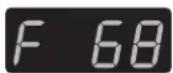
°F Temperature Control
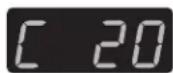
°C Temperature Control
- Turn the Control Knob to adjust the setting on the desired screen.
- Turn the Control Knob clockwise to increase the setting. Turn the Control Knob counterclockwise to decrease the setting.
NOTE: Settings in Power Control do not correspond to the temperature setting in Temperature Control.
General Setting Information
Hatco recommends adjusting the Power or Temperature settings up or down while cooking to find the best setting for a particular pan, amount of food, and heating desired. Once a good setting has been determined, use this setting in the future for cooking similar batches of the same size, in the same pan.
Power Control Information
Power Control supplies a continuous amount of heat to the pan, similar to the operation of a gas or electric burner. The Power setting is based on the amount of heat wanted in the pan. Observe the cooking of the food in the pan and make adjustments to the Power setting as necessary.
Temperature Control Information
Temperature Control regulates power to the pan on and off to maintain the Temperature setting selected (Fahrenheit [°F] or Celsius [°C]). Power is controlled automatically by the internal computer. The temperature setting is approximate. The actual temperature of the food in the pan will depend on the type and size of the pan as well as the type and amount of food that is in the pan.
NOTE: A setting in °F Temperature Control is converted to the corresponding setting when changing to °C Temperature Control.
Using the Timer
A timer is available on the Induction Range.
- Place an induction-ready pan on the unit.
- Press the button to turn on the unit.
- Press the Button to toggle to the desired cooking control method.
- Press the button on the control panel.
- The Timer LED display will illuminate and show four zeros.
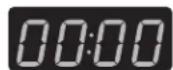
Timer LED Display
- Turn the Control Knob to the desired timer setting.
- When the time on the Timer LED display begins counting down, turn the Control Knob to set the desired power/temperature setting.
- When the timer reaches zero, the Timer LED display flashes "donE", The Power/Temperature display goes blank, and heat generation stops.
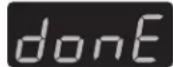
Timer LED Display
- Press the button to rest the timer to zero.
- Repeat steps 3–7 to continue timed cooking.
Updating Firmware
Use the following procedure to upload firmware updates to the Induction Range from an external USB drive.
NOTE: For the latest firmware updates, cooking tips, and more, go to the Hatco Induction Range website: www.hatcocorp.com/rapide_cuisine
-
Press the button to turn on the unit.
-
Press and hold both the and buttons until "UI", "cb", or "UEr" appears on the Power/Temperature LED display.

Power/Temperature
LED Display
-
Insert the USB drive into the USB port.
-
The USB port is on the under-side of the unit, near the front.
- Depending on the type of update, turn the Control Knob to show either "UI" or "cb" on the Power/Temperature LED display, then push the Control Knob to select and start the update.
- A number indicating the percentage complete will show on the Power/Temperature LED display indicating the update is in progress.

Power/Temperature
LED Display
- When the update is complete, the displays will show "success", and the unit will shut down.
- If the update was not successful, "fail" will show on the Power/Temperature LED display. Perform the above procedure again. If "fail" continues to show, contact Hatco for assistance.
NOTE: If no USB drive is present, the displays will show the error message "no USb".
General
Hatco Induction Ranges are designed for maximum durability and performance with minimum maintenance.
WARNING
ELECTRIC SHOCK HAZARD:
- Turn OFF power switch, unplug power cord, and allow unit to cool before performing any cleaning, adjustments, or maintenance.
- DO NOT submerge or saturate with water. Do not allow liquids to spill into unit. Unit is not waterproof. Do not operate if unit has been submerged or saturated with water.
- Do not steam clean or use excessive water on the unit.
- This unit is not "jet-proof" construction. Do not use jet-clean spray to clean this unit.
- Do not clean unit when it is energized or hot.
- Discontinue use if power cord is frayed or worn.
- Do not attempt to repair or replace a damaged power cord. Cord must be replaced by an Authorized Hatco Service Agent or a person with similar qualifications.
- This unit must be serviced by qualified personnel only. Service by unqualified personnel may lead to electric shock or burn.
- Use only Genuine Hatco Replacement Parts when service is required. Failure to use Genuine Hatco Replacement Parts will void all warranties and may subject operators of the equipment to hazardous electrical voltage, resulting in electrical shock or burn. Genuine Hatco Replacement Parts are specified to operate safely in the environments in which they are used. Some after-market or generic replacement parts do not have the characteristics that will allow them to operate safely in Hatco equipment.
This unit has no "user-serviceable" parts. If service is required on this unit, contact an Authorized Hatco Service Agent or contact the Hatco Service Department at 800-558-0607 or 414-671-6350.
CAUTION
Use only wipes, pads, and cleaners designed specifically for cleaning ceramic glass surfaces.
Wipe up all spills and splashes immediately. Make sure unit is dry before using. Do not allow liquid to run into air inlet filter on bottom of unit.
Daily Cleaning
To maintain performance and preserve the finish of the Induction Range, clean the unit daily. Make sure to use only wipes, pads, and cleaners designed specifically for cleaning ceramic glass surfaces.
- Turn off and unplug the unit. Allow the unit to cool.
- Remove and wash all food pans.
- Clean the glass surface using an appropriate cleaning wipe, damp paper towel, or damp cloth.
- For tough stains and metal marks, use a drop of ceramic glass cleaner and paper towel.
- For water and scale marks, use a few drops of white vinegar and paper towel.
NOTICE
Use non-abrasive cleaners and cloths only. Abrasive cleaners and cloths could scratch finish of unit, marring its appearance and making it susceptible to soil accumulation.
- Clean the metal surfaces using a clean, soft cloth and mild detergent.
- Wipe dry all metal surfaces using a dry, clean, soft cloth.
IMPORTANT NOTE
The Control Knob shaft requires cleaning at least once every week. To clean: Pull the Control Knob straight off the shaft, wipe all dirt and grease from the shaft, then re-install the Control Knob on the shaft.
WARNING
This unit must be serviced by qualified personnel only. Service by unqualified personnel may lead to electric shock or burn.
WARNING
ELECTRIC SHOCK HAZARD: Turn OFF power switch, unplug power cord, and allow unit to cool before performing any cleaning, adjustments, or maintenance.
| Symptom Probable | Cause Corrective Action | |
| Unit does not turn on. | No power to unit. | Make sure power cord is plugged into an appropriate receptacle (see SPECIFICATIONS section). Check circuit breaker and reset as necessary. Check for damage to power cord. Check electrical receptacle. |
| Electronic controls defective. Contact A | Authorized Service Agent or Hatco for assistance. | |
| The setting in the Power/Temperature display is flashing, and the unit will not heat. | Pan being used is not induction-ready. | Use an induction-ready pan (see “Pan Specifications” in the OPERATION section of this manual). |
Troubleshooting Questions?
If you continue to have problems resolving an issue, please contact the nearest Authorized Hatco Service Agency or Hatco for assistance. To locate the nearest Service Agency, log onto the Hatco website at www.hatcocorp.com, select the Support pull-down menu, and click on "Find A Service Agent"; or contact the Hatco Parts and Service Team at:
Telephone: 800-558-0607 or 414-671-6350
e-mail: support@hatcocorp.com
1. PRODUCT WARRANTY
Hatco warrants the products that it manufactures (the "Products") to be free from defects in materials and workmanship, under normal use and service, for a period of one (1) year from the date of purchase when installed and maintained in accordance with Hatco's written instructions or 18 months from the date of shipment from Hatco. Buyer must establish the Product's purchase date by registering the Product with Hatco or by other means satisfactory to Hatco in its sole discretion.
Hatco warrants the following Product components to be free from defects in materials and workmanship from the date of purchase (subject to the foregoing conditions) for the period(s) of time and on the conditions listed below:
a) One (1) Year Parts and Labor PLUS One (1) Additional Year Parts-Only Warranty:
Conveyor Toaster Elements (metal sheathed)
Drawer Warmer Elements (metal sheathed)
Drawer Warmer Drawer Rollers and Slides
Strip Heater Elements (metal sheathed)
Display Warmer Elements (metal sheathed air heating)
Holding Cabinet Elements (metal sheathed air heating)
Heated Well Elements — HW and HWB Series (metal sheathed)
b) Two (2) Year Parts and Labor Warranty:
Induction Ranges
Induction Warmers
c) One (1) Year Parts and Labor PLUS Four (4) Years Parts-Only Warranty:
3CS and FR Tanks
d) One (1) Year Parts and Labor PLUS Nine (9) Years Parts-Only Warranty on:
Electric Booster Heater Tanks
Gas Booster Heater Tanks
e) Ninety (90) Day Parts-Only Warranty:
Replacement Parts
THE FOREGOING WARRANTIES ARE EXCLUSIVE AND IN LIEU OF ANY OTHER WARRANTY, EXPRESSED OR IMPLIED, INCLUDING BUT NOT LIMITED TO ANY IMPLIED WARRANTY OF MERCHANTABILITY OR FITNESS FOR A PARTICULAR PURPOSE OR PATENT OR OTHER INTELLECTUAL PROPERTY RIGHT INFRINGEMENT. Without limiting the generality of the foregoing, SUCH WARRANTIES DO NOT COVER: Coated incandescent light bulbs, fluorescent lights, heat lamp bulbs, coated halogen light bulbs, halogen heat lamp bulbs, xenon light bulbs, LED light tubes, glass components, and fuses; Product failure in booster tank, fin tube heat exchanger, or other water heating equipment caused by liming, sediment buildup, chemical attack, or freezing; or Product misuse, tampering or misapplication, improper installation, or application of improper voltage.
2. LIMITATION OF REMEDIES AND DAMAGES
Hatco's liability and Buyer's exclusive remedy hereunder will be limited solely, at Hatco's option, to repair or replacement using new or refurbished parts or Product by Hatco or a Hatco-authorized service agency (other than where Buyer is located outside of the United States, Canada, United Kingdom, or Australia, in which case Hatco's liability and Buyer's exclusive remedy hereunder will be limited solely to replacement of part under warranty) with respect to any claim made within the applicable warranty period referred to above. Hatco reserves the right to accept or reject any such claim in whole or in part. In the context of this Limited Warranty, "refurbished" means a part or Product that has been returned to its original specifications by Hatco or a Hatco-authorized service agency. Hatco will not accept the return of any Product without prior written approval from Hatco, and all such approved returns shall be made at Buyer's sole expense. HATCO WILL NOT BE LIABLE, UNDER ANY CIRCUMSTANCES, FOR CONSEQUENTIAL OR INCIDENTAL DAMAGES, INCLUDING BUT NOT LIMITED TO LABOR COSTS OR LOST PROFITS RESULTING FROM THE USE OF OR INABILITY TO USE THE PRODUCTS OR FROM THE PRODUCTS BEING INCORPORATED IN OR BECOMING A COMPONENT OF ANY OTHER PRODUCT OR GOODS.
SERVICE INFORMATION
United States and Canada
The warranty on Hatco Induction Ranges is for two (2) years from date of purchase or 30 months from date of shipping from Hatco, whichever occurs first.
Warranty Problems
If you experience a problem with an Induction Range during the warranty period, contact the Hatco Parts and Service Team at:
Telephone: 800-558-0607 or 414-671-6350
E-mail: partsandservice@hatcocorp.com
When contacting Hatco for warranty service, please supply the following information:
- Model of unit
- Serial number (located on the bottom of the unit)
• Specific problem with the unit - Date of purchase
- Name of business
- Shipping address
- Contact name and phone number
Non-Warranty Problems
If you experience a non-warranty problem that requires assistance, please contact the nearest Authorized Hatco Service Agency.
To locate the nearest Service Agency, log onto our website at www.hatcocorp.com, select the Support pull-down menu, and click on "Find A Service Agent"; or contact the Hatco Parts and Service Team by phone/e-mail.
1. GARANTIE DU PRODUIT
Byassee Equipment Co.
Phoenix 602-252-0402
CALIFORNIA
Industrial Electric
Commercial Parts & Service, Inc.
Huntington Beach 714-379-7100
Chapman Appl. Service
San Diego 619-298-7106
P & D Appliance
Commercial Parts & Service, Inc.
S. San Francisco 650-635-1900
COLORADO
Hawkins Commercial Appliance
Englewood 303-781-5548
FLORIDA
Whaley Foodservice Repair
Jacksonville 904-725-7800
Whaley Foodservice Repair
Orlando 407-757-0851
B.G.S.I./Heritage
Pompano Beach 954-971-0456
Comm. Appliance Service
Tampa 813-663-0313
GEORGIA
Heritage Service Group
Norcross 866-388-9837
HAWAII
Burney's Comm. Service, Inc.
Honolulu 808-848-1466
Food Equip Parts & Service
Honolulu 808-847-4871
ILLINOIS
Parts Town
Addison 708-865-7278
Eichenauer Elec. Service
Decatur 217-429-4229
Midwest Elec. Appl. Service
Elmhurst 630-279-8000
Cone's Repair Service
Moline 309-797-5323
IOWA
Goodwin Tucker Group
Des Moines 515-262-9308
KENTUCKY
Tech 24
Lexington 859-254-8854
Tech 24
Louisville 502-451-5411
LOUISIANA
Chandlers Parts & Service
Baton Rouge 225-272-6620
MARYLAND
Electric Motor Service
Baltimore 410-467-8080
MASSACHUSETTS
Ace Service Co., Inc.
Needham 781-449-4220
MICHIGAN
Bildons Appliance Service
Detroit 248-478-3320
Commercial Kitchen Service
Bay City 989-893-4561
Midwest Food Equip. Service
Grandville 616-261-2000
MISSOURI
General Parts
Kansas City 816-421-5400
Commercial Kitchen Services
St. Louis 314-890-0700
Kaemmerlen Parts & Service
St. Louis 314-535-2222
NEBRASKA
Anderson Electric
Omaha 402-341-1414
NEVADA
Burney's Commercial
Las Vegas 702-736-0006
Hi. Tech Commercial Service
N. Las Vegas 702-649-4616
NEW JERSEY
Jay Hill Repair
Fairfield 973-575-9145
Service Plus
Flanders 973-691-6300
NEW YORK
Alpro Service Co.
Maspeth 718-386-2515
Duffy's - AIS
Buffalo 716-884-7425
3Wire
Plattsburgh 800-634-5005
Duffy's - AIS
Sauquoit 800-836-1014
J.B. Brady, Inc.
Syracuse 315-422-9271
NORTH CAROLINA
Authorized Appliance
Charlotte 704-377-4501
OHIO
Akron/Canton Comm. Svc. Inc.
Akron 330-753-6634
Tech 24
Cincinnati 513-772-6600
Commercial Parts and Service
Columbus 614-221-0057
Electrical Appl. Repair Service
Brooklyn Heights 216-459-8700
E. A. Wichman Co.
Toledo 419-385-9121
OKLAHOMA
Hagar Rest. Service, Inc.
Oklahoma City 405-235-2184
OREGON
General Parts Group
Portland 503-624-0890
PENNSYLVANIA
Elmer Schultz Services
Philadelphia 215-627-5401
FAST Comm. Appl. Service
Philadelphia 215-288-4800
AIS Commercial Parts and Service
Pittsburgh 412-809-0244
K & D Service Co.
Harrisburg 717-236-9039
Electric Repair Co.
Reading 610-376-5444
RHODE ISLAND
Marshall Electric Co.
Providence 401-331-1163
SOUTH CAROLINA
Whaley Foodservice Repair
Lexington 803-996-9900
TENNESSEE
Camp Electric
Memphis 901-527-7543
TEXAS
Armstrong Repair Service
Houston 713-666-7100
Cooking Equipment Specialist
Mesquite 972-686-6666
Commercial Kitchen Repair Co.
San Antonio 210-735-2811
UTAH
La Monica's Rest. Equip. Service
Murray 801-263-3221
VIRGINIA
Daubers
Norfolk 757-855-4097
Daubers
Springfield 703-866-3600
WASHINGTON
3Wire
Seattle 800-207-3146
WISCONSIN
A.S.C., Inc.
Madison 608-246-3160
A.S.C., Inc.
Milwaukee 414-543-6460
CANADA
ALBERTA
Key Food Equipment Service
Edmonton 780-438-1690
BRITISH COLUMBIA
Key Food Equipment Service
Vancouver 604-433-4484
Key Food Equipment Service
Victoria 250-920-4888
MANITOBA
Air Rite, Inc.
Winnipeg 204-895-2300
NEW BRUNSWICK
EMR Services, Ltd.
Moncton 506-855-4228
ONTARIO
R.G. Henderson Ltd.
Toronto 416-422-5580
Choquette - CKS, Inc.
Ottawa 613-739-8458
QUÉBEC
Choquette - CKS, Inc.
Montreal 514-722-2000
Choquette - CKS, Inc.
Québec City 418-681-3944
UNITED KINGDOM
Marren Group
Northants +44(0)1933 665313
HATCO CORPORATION
P.O. Box 340500
Milwaukee, WI 53234-0500 U.S.A.
800-558-0607 414-671-6350
support@hatcocorp.com
www.hatcocorp.com
Register your unit online!
See IMPORTANT OWNER INFORMATION
section for details.
- BOXER™
- WARNING
- ADVERTENCIA
- IMPORTANT OWNER INFORMATION
- REGISTER YOUR UNIT
- INTRODUCTION
- ELECTRIC SHOCK HAZARD
- FIRE HAZARD
- CAUTION
- BURN HAZARD
- NOTICE
- ALL MODELS
- MODEL DESIGNATION
- PLUG CONFIGURATIONS
- GENERAL
- PAN SPECIFICATIONS
- STARTUP
- SHUTDOWN
- CHANGING COOKING CONTROL METHOD
- GENERAL SETTING INFORMATION
- POWER CONTROL INFORMATION
- TEMPERATURE CONTROL INFORMATION
- USING THE TIMER
- UPDATING FIRMWARE
- DAILY CLEANING
- IMPORTANT NOTE
- TROUBLESHOOTING QUESTIONS
- PRODUCT WARRANTY
- ONE (1) YEAR PARTS AND LABOR PLUS ONE (1) ADDITIONAL YEAR PARTS-ONLY WARRANTY
- TWO (2) YEAR PARTS AND LABOR WARRANTY
- ONE (1) YEAR PARTS AND LABOR PLUS FOUR (4) YEARS PARTS-ONLY WARRANTY
- ONE (1) YEAR PARTS AND LABOR PLUS NINE (9) YEARS PARTS-ONLY WARRANTY ON
- NINETY (90) DAY PARTS-ONLY WARRANTY
- LIMITATION OF REMEDIES AND DAMAGES
- SERVICE INFORMATION
- UNITED STATES AND CANADA
- WARRANTY PROBLEMS
- TELEPHONE: 800-558-0607 OR 414-671-6350
- E-MAIL: PARTSANDSERVICE@HATCOCORP.COM
- NON-WARRANTY PROBLEMS
- GARANTIE DU PRODUIT
- CALIFORNIA
- COLORADO
- FLORIDA
- GEORGIA
- HAWAII
- ILLINOIS
- IOWA
- KENTUCKY
- LOUISIANA
- MARYLAND
- MASSACHUSETTS
- MICHIGAN
- MISSOURI
- NEBRASKA
- NEVADA
- NEW JERSEY
- NEW YORK
- NORTH CAROLINA
- OHIO
- OKLAHOMA
- OREGON
- PENNSYLVANIA
- RHODE ISLAND
- SOUTH CAROLINA
- TENNESSEE
- TEXAS
- UTAH
- VIRGINIA
- WASHINGTON
- WISCONSIN
- CANADA
- ALBERTA
- BRITISH COLUMBIA
- MANITOBA
- NEW BRUNSWICK
- ONTARIO
- QUÉBEC
- UNITED KINGDOM
Brand : Hatco
Model : Rapide Cuisine IRNGBXC114
Category : Cooker