
F4005 - Shaver REMINGTON - Free user manual and instructions
Find the device manual for free F4005 REMINGTON in PDF.


| Brand | Remington |
| Model | F4005 |
| Product type | Electric shaver |
| Usage | Face, stubble, trimming |
| Power source | Rechargeable Li-ion battery, 100-240 V AC adapter |
| Runtime | Up to 45 minutes |
| Charging time | 4 hours |
| Charge indicator | LED indicators (charging, fully charged, low battery) |
| Water resistance | Usable in the shower or bath, washable under water |
| Shaving head | Pivoting, with lockable feature |
| Cutting system | Replaceable foils and blades |
| Integrated trimmer | Pop-up trimmer for edges and details |
| Stubble accessory | Guard for stubble look |
| Maintenance | Rinse the head under clean water after each use; do not use a brush on the foils |
| Lubrication | Oil the trimmer teeth every 6 months (sewing machine oil) |
| Blade and foil replacement | Every 6 months for optimal performance |
| Spare parts | Available on the Remington website |
| Battery | Not user-replaceable; can be removed for disposal by a professional |
| Recycling | Do not dispose of with household waste; take to a collection point |
| Safety | Do not use if the cord is damaged; unplug before water cleaning; not for commercial use |
Frequently Asked Questions - F4005 REMINGTON
User questions about F4005 REMINGTON
0 question about this device. Answer the ones you know or ask your own.
Ask a new question about this device
Download the instructions for your Shaver in PDF format for free! Find your manual F4005 - REMINGTON and take your electronic device back in hand. On this page are published all the documents necessary for the use of your device. F4005 by REMINGTON.
USER MANUAL F4005 REMINGTON
Official Electrical Styling Partner of Manchester United

natural_image
Black Remington electric shaver with brand logo and gear mechanism (no text or symbols on body)Style Series Foil Shaver F4005
text_image
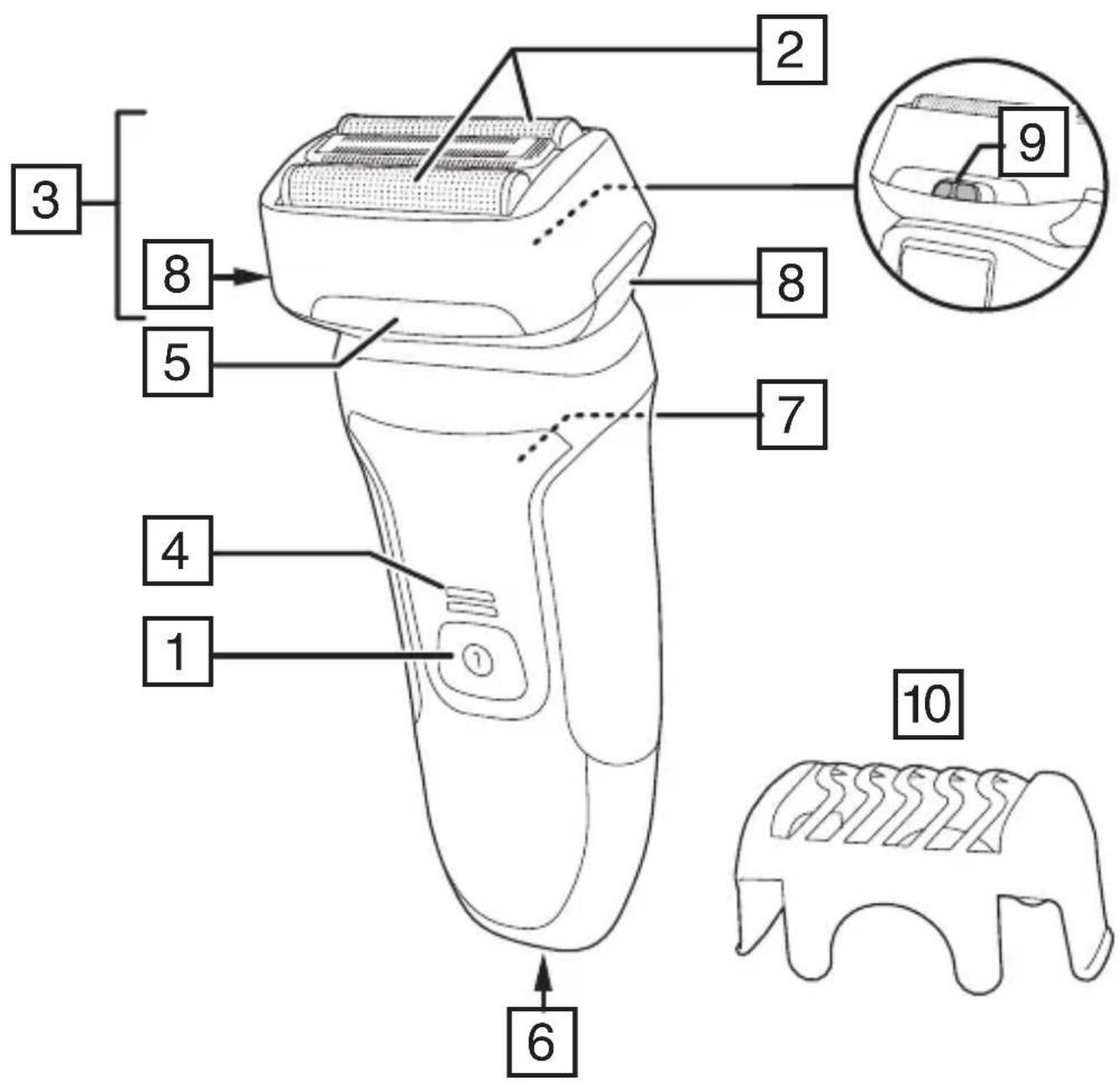
3 8 5 4 1 2 2 8 7 9 10 6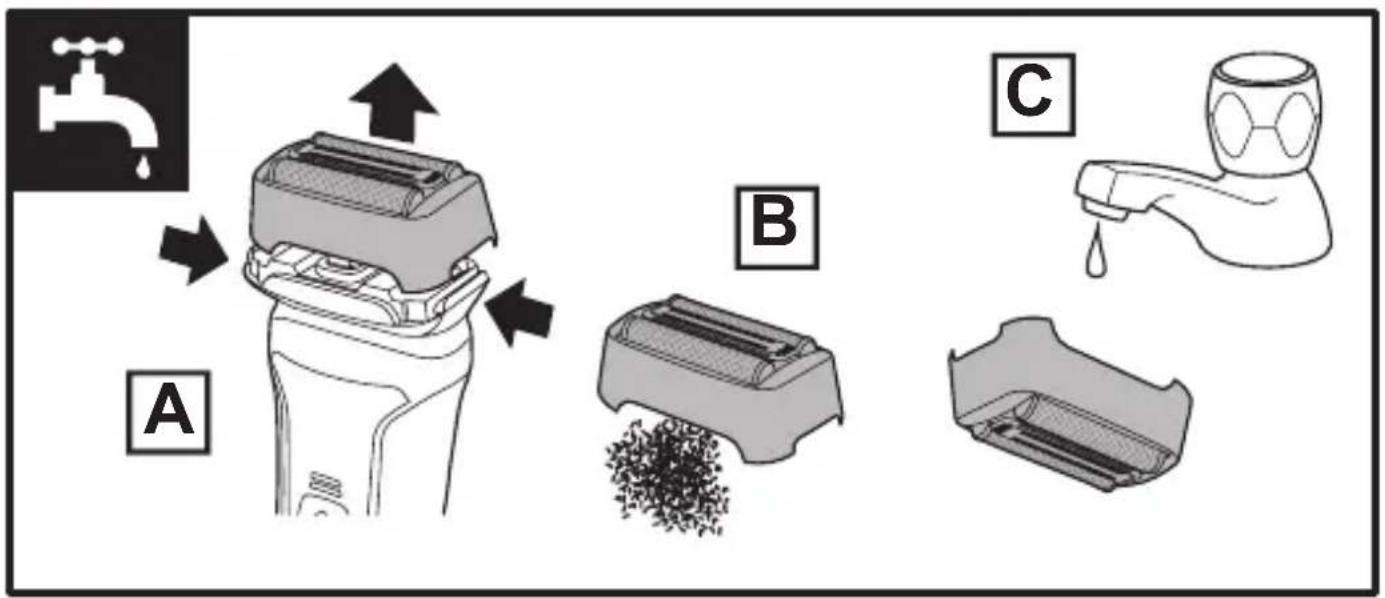
text_image
A B CThank you for buying your new Remington® product. Please read these instructions carefully and keep them safe. Remove all packaging before use.

IMPORTANT SAFEGUARDS
- This appliance can be used by children aged from 8 years and above and persons with reduced physical, sensory or mental capabilities or lack of experience and knowledge if they have been supervised/instructed and understand the hazards involved. Children shall not play with the appliance. Cleaning and user maintenance shall not be done by children unless they are older than 8 and supervised. Keep the appliance and cable out of reach of children under 8 years.
- The adaptor contains a transformer. Do not cut off the adaptor to replace it with another plug, as this causes a hazardous situation.

Suitable for use in a bath or shower.
- WARNING: Detach the device from the charging adapter before cleaning it in water.
- Do not use the product with a damaged cord.
- WARNING: For recharging the battery, only use the charger supplied with the appliance - type reference PA-0505K.
• Always replace a damaged adaptor with one of the original type. - The battery in this device is not replaceable.
- Do not use the appliance if it is damaged or malfunctions.
- This appliance should never be left unattended when plugged into a power outlet, except when charging.
- Keep the power plug and cord away from heated surfaces.
- Do not plug or unplug the appliance with wet hands.
- Do not twist or kink the cable, or wrap it round the appliance.
- This appliance is not intended for commercial or salon use.
PARTS
-
On/off switch
-
Foil screens
-
Cutter assembly
-
Charging indicator lights
-
Hairpocket
-
Power port
-
Pop-up trimmer
-
Head release buttons
-
Head lock button
-
Stubble head gaurd
Not shown:
- Adaptor
- Cleaning brush
- Face towel
GETTING STARTED
CHARGING YOUR SHAVER
- Ensure the product is switched off.
- Connect the shaver to the adapter and then to the mains.
CHARGING INDICATOR LIGHTS
| Charge Level Lights | |
| Charging | The lights will come on one after the other then go off in a repeating pattern. |
| Fully Charged Both lights | will come on for 5 minutes then go out. |
| Low charge/charging required | The bottom light will flash rapidly. |
| Battery capacity 50% or higher | Both lights will come on. |
| Battery capacity 50% or lower | The bottom light will come on. |
- Run time from fully charged is up to 45 minutes.
- Charge time from empty is 4 hours.
- Note: To preserve the life of your batteries, let them run out every 6 months then fully charge.
INSTRUCTIONS FOR USE
It is recommended that you use your new shaver daily for up to four weeks to allow time for your beard and skin to become accustomed to the new shaving system.
SHAVING
- Switch the shaver on by pressing the on/off switch.
- Stretch the skin with your free hand so the hairs stand upright.
- Hold the shaving head so that the foils touch your face.
- Use short, linear strokes.
TRIMMING
- Push the trimmer release button up to activate the trimmer.
- Hold the trimmer at a right angle to your skin.
- To retract the trimmer, slide the trimmer release button down and push the back of the trimmer head downwards until it locks into place.
STUBBLE LOOK
Fit the stubble head guard to your shaver for a 3-day stubble look.
HEAD LOCK
Normally, the head pivots freely but its movement can be restricted by sliding the head lock button to the locked 🔒 position.
TIPS FOR BEST RESULTS
- Always hold the shaver at right angles to the skin so that all foils are touching the skin with equal pressure.
- Use moderate to slow stroking movements. The use of short linear motions in stubborn areas may obtain a closer shave, especially along the neck and chin line.
- DO NOT press hard against the skin in order to avoid damage to the foil heads.
CARE FOR YOUR SHAVER
Care for your appliance to ensure a long lasting performance. We recommend you clean your appliance after each use.
The easiest and most hygienic way to clean the appliance is by rinsing the appliance head after use with warm water.
- Press the head release buttons and and pull the head upwards (FIG A).
- Tap out the excess hair shavings and rinse the foils under running water (Fig B, C).
- Do not clean the shaving foil with a brush.
- Replace the head assembly by placing the assembly on top of the hair pocket, press down and click into place.
- Lubricate the teeth of the trimmer every six months with a drop of sewing machine oil.

REPLACING THE FOILS AND CUTTERS
To ensure continued high quality performance from your shaver, we recommend the foils and cutters are replaced every six months.
SIGNS THAT YOUR FOILS AND CUTTERS NEED REPLACING.
- Irritation: as foils get worn, you may experience skin irritation.
- Pulling: as the cutters wear, your shave may not feel as close and you may feel the cutter pulling your hair.
- Wear through: you may notice that the cutters have worn through the foils.
TO REPLACE THE FOIL:
- Press the head release buttons and and pull the head upwards (FIG A).
- Fit the new foil assembly over the hair pocket and press down to click into place.
REPLACING THE CUTTERS
- Grasp the cutter between your thumb and forefinger and pull upwards.
- Snap the new cutter into the oscillator tip. Note: DO NOT press on the cutter ends as this may cause damage.
- Foil head replacements can be found on the Remington website.
BATTERY REMOVAL
We strongly recommend that a professional removes the rechargeable battery. Parts of the shaver case, and tools have sharp edges and may cause injury if not handled correctly.
- The rechargeable battery must be removed from the appliance before it is scrapped.
-
Disconnect the charging adapter before removing the battery.
-
Turn the shaver on and discharge all remaining power.
- Pry off the two decorative side panels.
- Unscrew one screw from the bottom of the shaver and remove the bottom panel.
- Remove the foil assembly and unscrew the 4 screws underneath it.
- Remove the two E-rings one on each side of the head then lift off the upper head assembly.
- Unscrew the 2 screws below the upper head assembly then lift the rest of the head off the body.
- Pry off the upper decorative panel to expose 2 screws. Remove the screws.
- Remove the front panel to expose 4 screws. Remove the 4 screws then remove the back housing.
- Lift out the battery and printed circuit board assembly.
- Disconnect he battery from the circuit board.
• The battery is to be disposed of safely.
ADAPTER SPECIFICATIONS
| Manufacturer address and registration number | Spectrum Brands (UK) Limited, Regent Mill, Fir Street, Failsworth, Manchester M35 0HSCompany number: 02394603 |
| Adapter model number PA-0505K | |
| Input voltage 100 - 240 V~ | |
| Input AC Frequency 50/60Hz | |
| Output voltage | 5.0 V --- |
| Output current 0.5 A | |
| Output power 2.5 W | |
| Average active efficiency ≥73.16% | |
| Efficiency at 10% - | |
| No load power consumption ≤0.1W |
RECYCLING
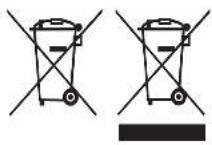
To avoid environmental and health problems due to hazardous substances, appliances and rechargeable and non-rechargeable batteries marked with one of these symbols must not be disposed of with unsorted municipal waste. Always dispose of electrical and electronic products and, where applicable, rechargeable and non-rechargeable batteries, at an appropriate official recycling/collection point.
UW APPARAAT VERZORGEN
REEMPLACER UNE GRILLE
REPLACEMENT DES LAMES
EN IYI SONUÇLAR IÇIN IPUÇLARI
ΕΜΦΑΝΙΣΗ ΉΕΝΙΑ 3 ΗΜΕΡΩΝ
natural_image
Solid gray rectangular shape with no text, symbols, or discernible features
natural_image
Solid gray rectangular shape with no text, symbols, or discernible featuresRef. No. F4005
Type No. F09A
Remington ^® is a Registered Trade Mark of Spectrum Brands, Inc., or one of its subsidiaries
Russell Hobbs Deutschland GmbH, Am Unisyspark 1, 65843 Sulzbach, Germany remington-europe.com