AVTW5006 - Headphones Avenzo - Free user manual and instructions
Find the device manual for free AVTW5006 Avenzo in PDF.


| Brand | Avenzo |
| Model | AVTW5006 |
| Product Type | Bluetooth True Wireless Earbuds with Power Bank |
| Connection Technology | Bluetooth True Wireless |
| Main Functions | Play/Pause, volume control, track change, hands-free calls, voice assistant |
| Microphone | Built-in |
| Voice Assistant | Google Assistant and Siri |
| Controls | Multifunction buttons on each earbud |
| Power | Rechargeable battery via micro USB port (Power Bank) |
| Earbud Charging | Via contact pins in the Power Bank |
| LED Indicators | On earbuds (charging) and on Power Bank (battery percentage) |
| Compatibility | Bluetooth smartphones (Android and iOS) |
| Safety | High volume dangerous, small parts (choking hazard), do not disassemble, avoid extreme temperatures |
| Cleaning | With a soft cloth, no chemicals |
| Box Contents | Left and right earbuds, Power Bank, micro USB cable, silicone ear tips |
| Certification | CE |
Frequently Asked Questions - AVTW5006 Avenzo
User questions about AVTW5006 Avenzo
0 question about this device. Answer the ones you know or ask your own.
Ask a new question about this device
Download the instructions for your Headphones in PDF format for free! Find your manual AVTW5006 - Avenzo and take your electronic device back in hand. On this page are published all the documents necessary for the use of your device. AVTW5006 by Avenzo.
USER MANUAL AVTW5006 Avenzo
natural_image
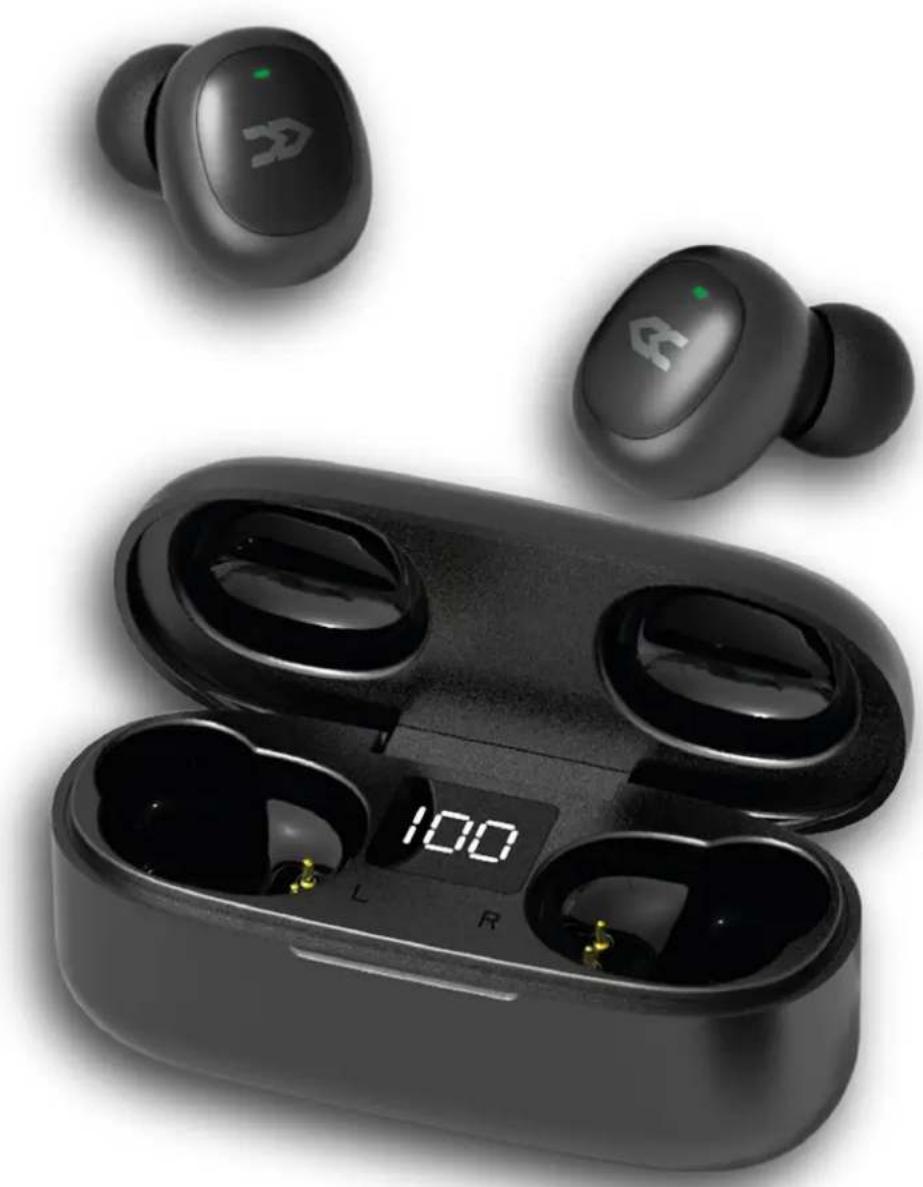
Black wireless earbuds with charging case and digital display showing '100' (no text or symbols on devices)natural_image
Technical line drawing of a mechanical component with a numbered label (8) pointing to a feature, no readable text or symbols present.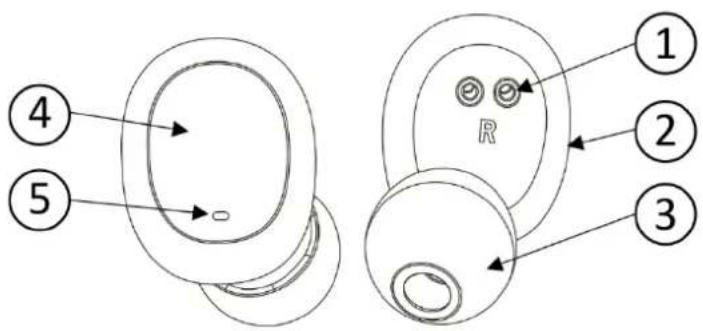
flowchart
graph LR
    A["Power On Pairing ... Connected"] --> B["(L)"]
    C["Power On Pairing ... Connected"] --> D["(R)"]
natural_image
Line drawing of a portable electronic device with two front panels and a digital display (no text or symbols)
natural_image
Black wireless earbuds with charging case and digital display showing '100' (no text or symbols on devices)Manual de usuario
AV-TW5006
Auriculares Bluetooth True Wireless con Power Bank
Estimado cliente:
natural_image
Technical line drawing of a mechanical component with a numbered label (8) pointing to a feature, no readable text or symbols present.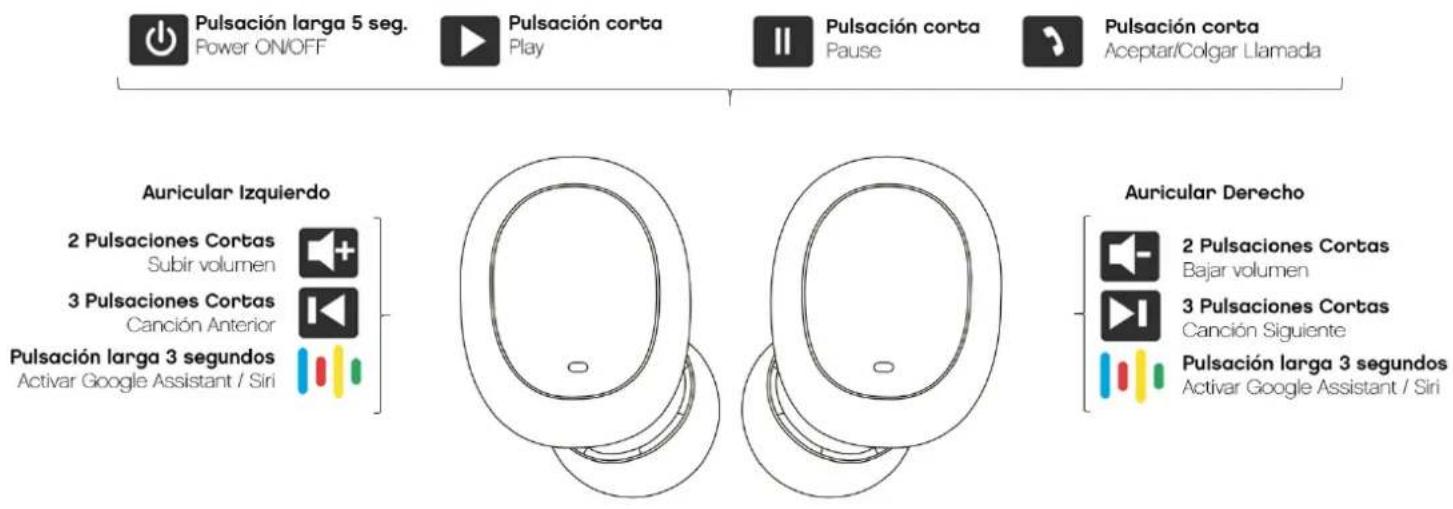
flowchart
graph LR
    A["Power On Pairing ... Connected"] --> B["(L)"]
    C["Power On Pairing ... Connected"] --> D["(R)"]
natural_image
Line drawing of a portable electronic device with two circular buttons and a digital display (no text or symbols)
natural_image
Black wireless earbuds with charging case displaying '100' and digital clock (no text or symbols on devices)User Manual
AV-TW5006
True Wireless Bluetooth Earphones with Power Bank
Dear Customer:
Thank you for purchasing our Bluetooth earphones AV-TW5006. Before using this device, please read the user manual carefully in order to operate it normally.
Safety instructions
The use at high volume for an extended period of time may damage your hearing.
Don't let children play with the device. (Small parts may cause choking hazard).
Don't clean the earphones with strong chemicals, cleaner, detergent etc.
Don't place the earphones in high temp places, high temperature will shorten the device usage life, damage battery and the plastic case. Don't store the earphone in low temp place, when earphone temp arise to normal temp, humidity will be present into the inner parts of the earphone and it will damage the internal components.
Disassemble and modify the earphone is not allowed and will void the warranty.
If it's not used for a long time, before using it, please charge the earphone.
General Instructions
You have in your hands a bluetooth true wireless earphones set. Thanks to its technology, one of the earphones will connect with your smartphone and will be also connected wirelessly with the second earphone.
Product Overview
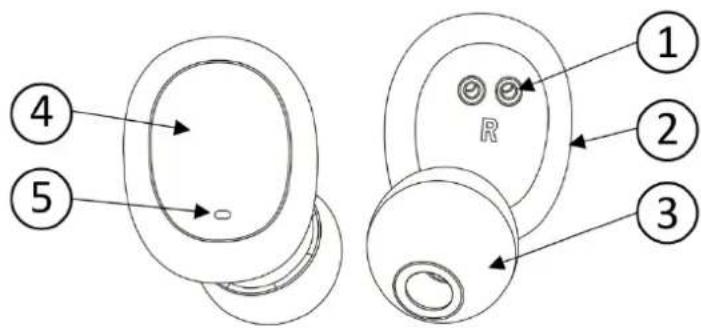
- Charging tips
- Microphone
- Silicone Rubber Earbuds
- Multifunction touch buttons
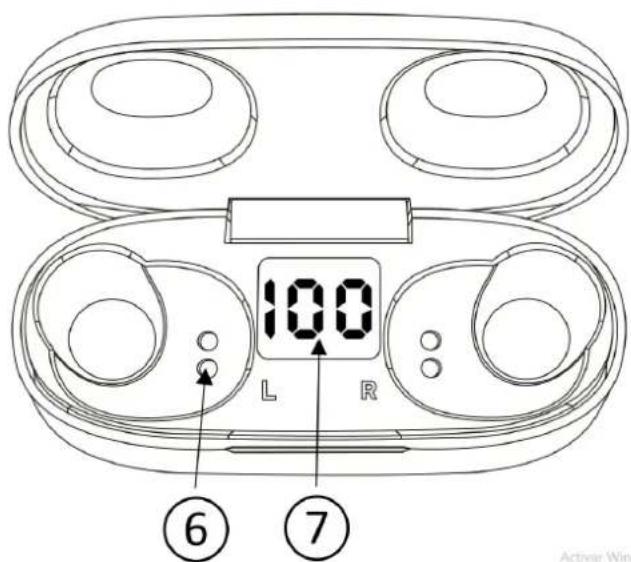
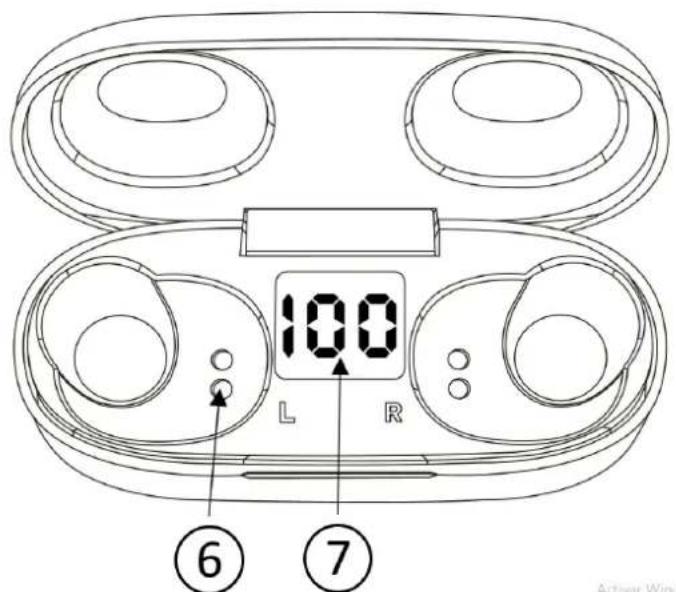
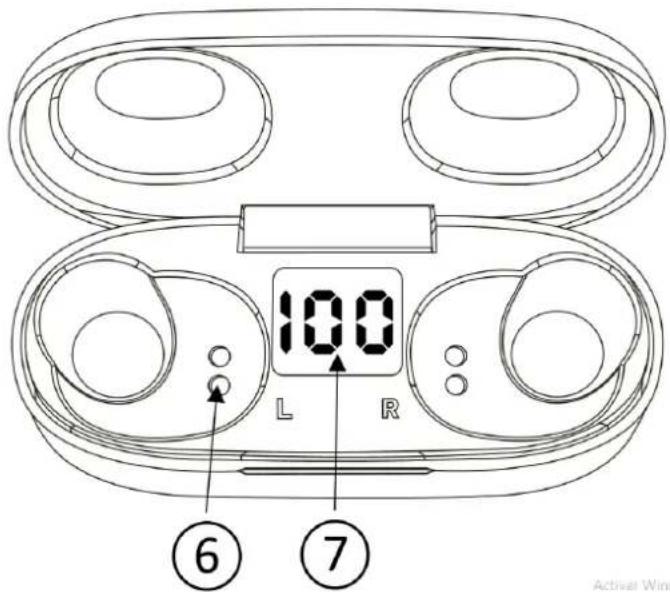
- LED indicators
- Charging pins
- Power bank battery indicator
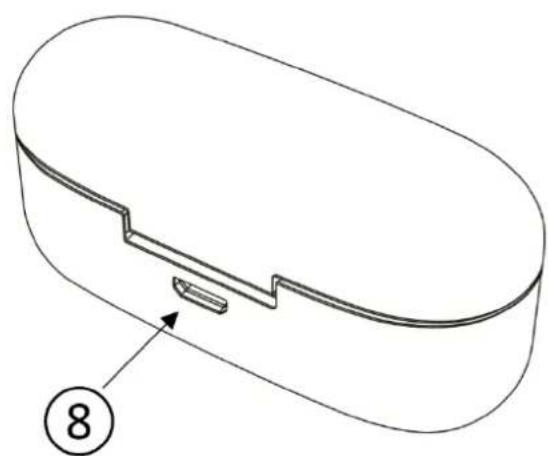
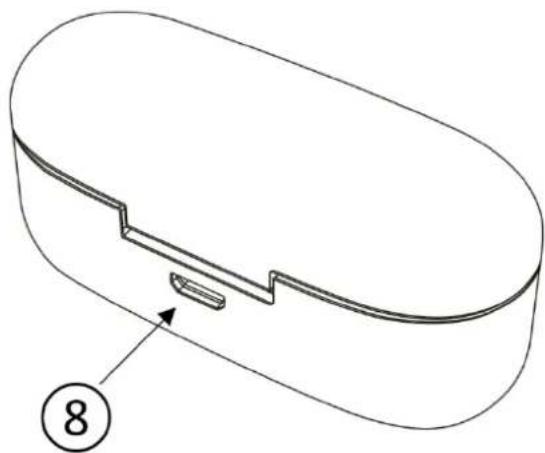
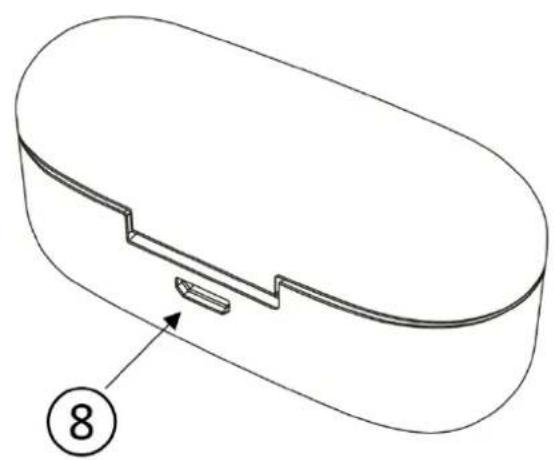
- Micro USB charging port
natural_image
Technical line drawing of a mechanical component with a numbered label (8) pointing to a feature, no text or symbols present.Activat Wind
Power On, Pairing and Power Off
To turn on or off the earphones you must follow this procedure:
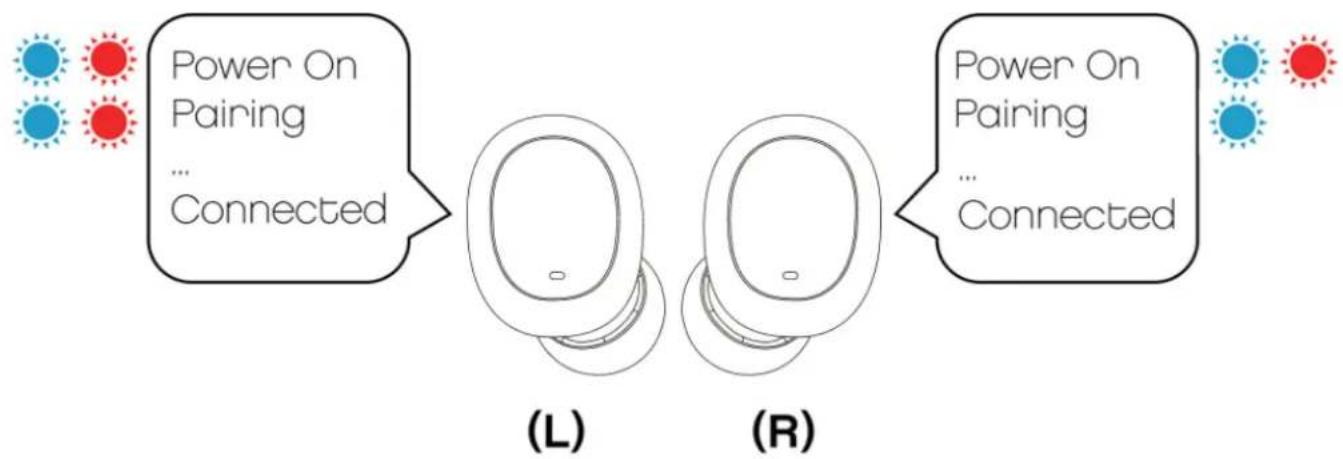
Power On: To turn on the earphones, First remove the left earphone (L) and then the right earphone (R).
flowchart
graph LR
    A["Power On Pairing ... Connected"] --> B["(L)"]
    C["Power On Pairing ... Connected"] --> D["(R)"]
Both will blink blue and red, synchronize with each other, and enter pairing mode, and we will hear "Pairing" on both earphones.
If we have already synchronized them with the mobile, the earphones will connect directly with the smartphone.
Pairing
The First time we use the device, we will have to pair it with our smartphone. This procedure will have to be repeated every time you want to connect the earphones to a new device. To turn on the headphones, we follow the procedure previously explained in the manual. The earphones will Flash blue and red, and then connect to each other. The right earphone will Flash blue and red, and you will hear the word Pairing. The left earphone will Flash blue.
From your smartphone, look in the list of Bluetooth devices for the "Avenzo AV-TW5006" and connect.
When the earphones are paired with your mobile, they will blink blue, and you will hear Connected.
Once connected to your smartphone, you will not have to repeat the process again.
Power off: to turn off the earphones, insert them into the Power Bank. They will automatically turn off and start charging their battery.
Accept or reject incoming calls with Bluetooth earphones
We can receive calls while using the Avenzo AV-TW5006 earphones. IP we are listening to music and someone calls us, the music will stop, and we will hear the ring tone.
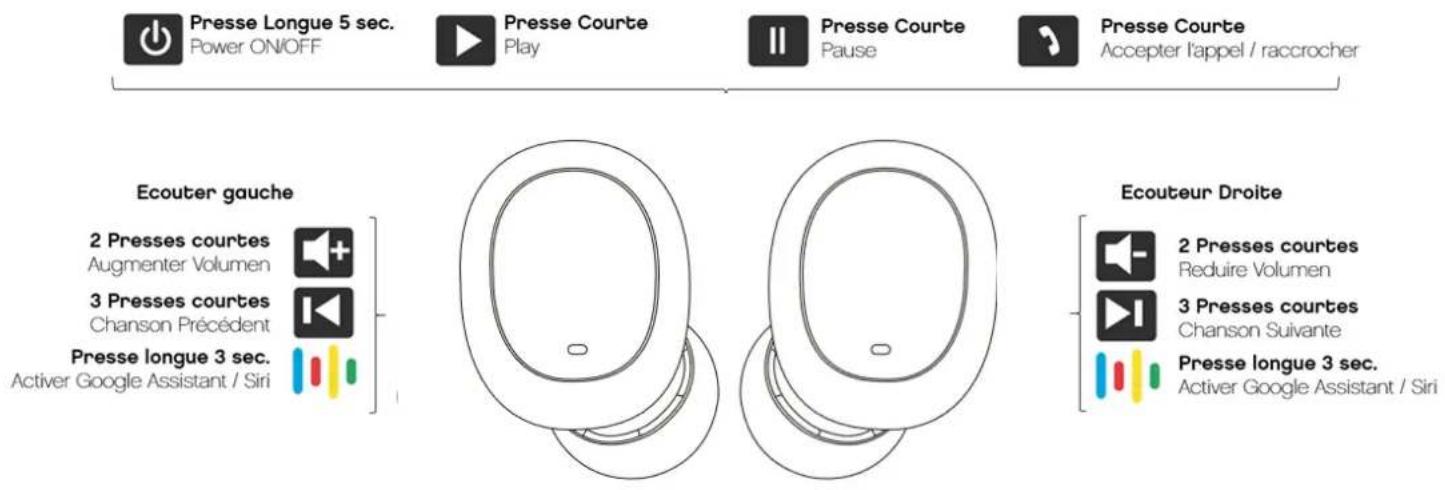
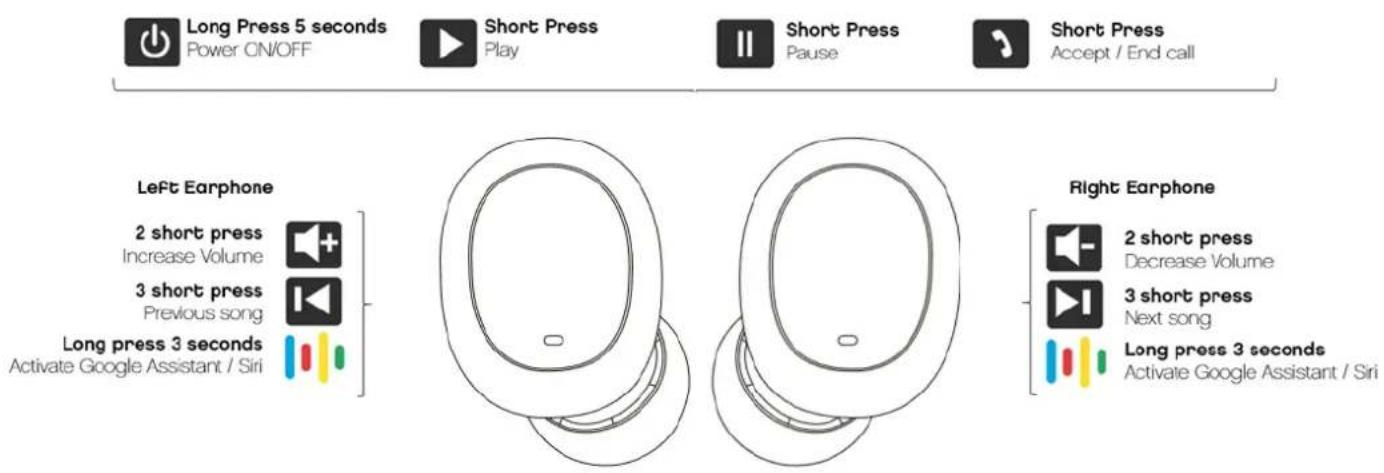
To accept the call, press the button 4 on any of the earphones. You can talk regularly, using the built-in microphone in the earphones. To end the call press twice the button 4 of any of the earphones.
To reject a call, press the button 4 on any of the headphones during 1.5 seconds.
Playing Music
To start playback, press the button 4. If you press again, you will leave the music in Pause. You can move to the next song by pressing the right ear button 3 times
We can go back to the beginning of the current song or move to the previous song, making 3 clicks on the left earphone.
Volume control
You can control the volume of the earphones independently of the volume of your smartphone.
To lower the volume, press twice the left earphone button. To increase the volume, press twice the right earphone.
Voice assistant
The Avenzo AV-TW5006 headphones have the Voice Assistant Function. You can activate it by pressing the multifunction button for 5 seconds and then releasing it. You will hear a short sound, and then you will hear Voice Dial, after which you can give the order you want to the microphone of your headphones. By activating the Voice Assistant, you can give orders to your smartphone, manage music, request information, etc ... Check the websites of Google and Apple For more information.
This Function is only available on compatible Android smartphones, and on Apple devices with the Siri service available. Avenzo is not responsible for possible problems with the use of this third-party service.
Turning the earphones on and off manually
You can turn the earphones on and off manually, without inserting or removing them from the Power Bank.
To turn them on, press both buttons for 5 seconds. You will hear Power On. You must remove the fingers from the buttons now. The earphones will pair with each other
automatically, and synchronize with your smartphone, if you already connected them at any moment.
To turn them off, press the button for 8 seconds and both earphones will turn off. You will hear Power Off.
Use of Power Bank:
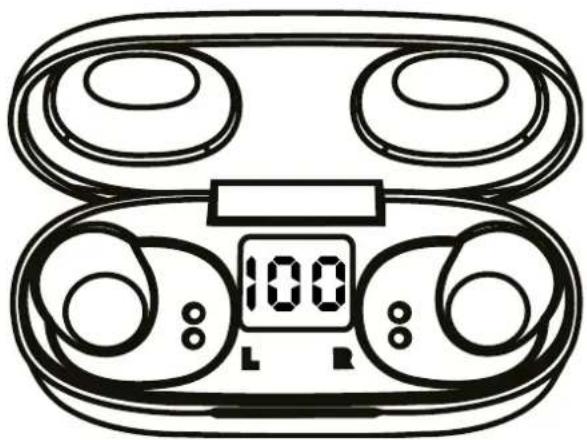
The power bank of the AV-TW5006 has an internal battery to recharge the earphones. To recharge the earphones, you must insert them correctly into the power bank, matching the charging pins of the earphones and the power bank.
You must close the power bank cover, to ensure the correct connection of the charging pins.
When the earphones are charging, they will turn off and disconnect from your smartphone. The red lights on the earphones will light, indicating that the charge is in progress.
When an earphone is fully charged, its light will turn on in blue, and then turn off.
When both earphones are charged, the light on both will turn off, and the power bank LED light will turn off.
The LED indicator shows the percentage of battery remaining in the power bank. Please charge it when it reaches 20% with the supplied micro USB cable.
To charge the power bank, connect the supplied cable to a USB charger or other power source.
When the power bank is charging, the numbers will flash and when the charge is complete, the percentage will reach 100%.
natural_image
Line drawing of a portable electronic device with two enclosures and a digital display (no text or symbols)
IP in the Future you need at any time to discard this product, please note that electrical products should not be thrown away with regular garbage. Please place this product in the recycling bins or go to designated recycling areas. Check with your local authority or the retailer which is the best recycling process.

Avenzo Global Tech S.L. certifies that this product complies with the essential requirements and whichever other applicable or required CE regulation. The complete copy of the Declaration of Conformity for this product can be obtained through our website www.avenzo.biz
avenzo »
natural_image
Black wireless earbuds with charging case and digital display showing 100% frequency (no text or symbols on devices)Manual do Utilizador
AV-TW5006
Auriculares Bluetooth True Wireless com Power Bank
Caro(a) Cliente:
natural_image
Technical line drawing of a mechanical component with a numbered label (8) pointing to a feature, no readable text or symbols present.
Imprensa longa 5 seg.
Power ON/OFF

Imprensa curta
Play

Imprensa curta
Pause

Imprensa curta
natural_image
Simple line drawing of a circular object with a small rectangular hole at the top (no text or symbols)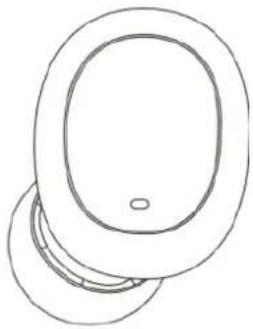
natural_image
Simple line drawing of a pair of circular objects with a central hole (no text or symbols)Direito

2 Imprensas curtas
Reduzir Volume

3 Imprensas curtas
Música Próxima

Imprensa longa 3 seg.
Ativar Google Assistant / Siri
flowchart
graph LR
    A["Power On Pairing ... Connected"] --> B["(L)"]
    C["Power On Pairing ... Connected"] --> D["(R)"]
natural_image
Line drawing of a portable electronic device with two front panels and a digital display (no text or symbols)