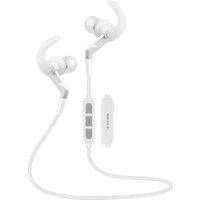
AV632BC - Headphones Avenzo - Free user manual and instructions
Find the device manual for free AV632BC Avenzo in PDF.


Pick your language and provide your email: we'll send you a specifically translated version.
| Product Type | Wireless Bluetooth Headphones |
| Brand | Avenzo |
| Model | AV632BC |
| Connectivity | Bluetooth 5.0 |
| Driver Size | 40 mm |
| Frequency Response | 20 Hz - 20 kHz |
| Impedance | 32 Ω |
| Battery Life | Up to 20 hours |
| Charging Time | 2.5 hours |
| Charging Port | Micro USB |
| Weight | 180 g |
| Foldable Design | Yes |
| Built-in Microphone | Yes |
| Controls | On-ear volume, track, and call control |
| Compatibility | Smartphones, tablets, laptops (Bluetooth enabled) |
| Color Options | Black |
| Package Contents | Headphones, Micro USB cable, User manual |
| Operating Range | 10 meters (33 feet) |
| Standby Time | 150 hours |
Frequently Asked Questions - AV632BC Avenzo
How do I pair the AV632BC headphones with my device?
Turn on the headphones by pressing and holding the power button until the LED flashes blue and red. Enable Bluetooth on your device and select AV632BC from the list. If prompted, enter 0000 as the PIN.
What is the battery life of the Avenzo AV632BC?
The headphones offer up to 20 hours of playback time on a full charge. Charging time is approximately 2.5 hours.
How do I charge the headphones?
Connect the included Micro USB cable to the charging port on the headphones and plug the other end into a USB wall charger or computer. The LED will turn red during charging and turn off when fully charged.
Can I use the headphones while charging?
No, it is recommended not to use the headphones while charging to avoid damage to the battery.
How do I clean the headphones?
Wipe the ear pads and headband with a soft, dry cloth. Do not use liquids or abrasive cleaners. Remove the ear cushions gently if needed and clean them separately.
Can I connect to two devices at the same time?
No, the AV632BC supports connection to only one device at a time. To connect to a different device, disconnect from the current one first.
What does the LED indicator mean?
Flashing blue and red: pairing mode. Flashing blue: connected. Red solid: charging. Off: fully charged or powered off.
How do I reset the headphones?
To reset, press and hold the power button and volume up button together for about 5 seconds until the LED flashes quickly. This clears the pairing list.
Are the headphones foldable?
Yes, the Avenzo AV632BC features a foldable design for easy storage and portability.
What should I do if the sound is distorted?
First, ensure the headphones are within range (10 meters) and fully charged. Try disconnecting and re-pairing. If distortion persists, reset the headphones as described above.
User questions about AV632BC Avenzo
0 question about this device. Answer the ones you know or ask your own.
Ask a new question about this device
No questions yet. Be the first to ask one.
Download the instructions for your Headphones in PDF format for free! Find your manual AV632BC - Avenzo and take your electronic device back in hand. On this page are published all the documents necessary for the use of your device. AV632BC by Avenzo.
USER MANUAL AV632BC Avenzo
natural_image
Black outdoor earbuds with black straps and a cord, shown against a white background (no text or symbols visible)Manual de usuario
AV632
Auriculares Bluetooth
Estimado cliente:
Table of contents
Click a title to access it
Manual assistant
Powered by Anthropic
Waiting for your message
Product information
Brand : Avenzo
Model : AV632BC
Category : Headphones