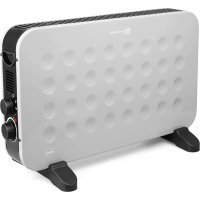
Convi HC210 - Heating Eldom - Free user manual and instructions
Find the device manual for free Convi HC210 Eldom in PDF.



| Brand | Eldom |
| Model | Convi HC210 |
| Category | Convection heating |
| Appliance type | Convection heater with fan |
| Rated power | 1.9 kW (1900 W) |
| Minimum power | 1.2 kW (1250 W) |
| Maximum continuous power | 1.9 kW (2000 W with turbo) |
| Supply voltage | 220-240 V ~ 50-60 Hz |
| Power levels | 4: 1250 W, 2000 W, 1250 W + Turbo, 2000 W + Turbo |
| Thermostat | Mechanical adjustment from MIN to MAX |
| Indicator light | Indicates appliance operation |
| Thermal protection | Automatic shutdown in case of overheating |
| Control type | Room temperature control with mechanical thermostat |
| Mounting | Removable screw-in feet, use in vertical position only |
| Recommended use | Residential and office spaces, well insulated |
| Maintenance and cleaning | Clean the exterior with a damp cloth after unplugging and complete cooling. Do not immerse. Do not use detergents or solvents. |
| Safety | Do not cover, do not use near flammable materials, do not use in a bathroom, keep out of reach of children, unplug after use, check for damage before use. |
| Warranty | Private domestic use only. Inappropriate use voids the warranty. |
| Weight | Approximately 4.5 kg (estimate) |
| Dimensions (approx.) | Height 50 cm, Width 40 cm, Depth 20 cm |
Frequently Asked Questions - Convi HC210 Eldom
User questions about Convi HC210 Eldom
0 question about this device. Answer the ones you know or ask your own.
Ask a new question about this device
Download the instructions for your Heating in PDF format for free! Find your manual Convi HC210 - Eldom and take your electronic device back in hand. On this page are published all the documents necessary for the use of your device. Convi HC210 by Eldom.
USER MANUAL Convi HC210 Eldom
_
| _
一
1
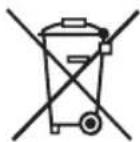
/EN/ The disposal of used electrical and electronic equipment (applies to European Union countries and other European countries with separate waste-collection systems).
This symbol on the product or its packaging indicates that it should not be classified as household waste. It should be handed over to an appropriate company dealing with the collection and recycling of electrical and electronic equipment. The correct disposal of the product will prevent potential negative consequences for the environment and human health resulting from hazardous substances present in the product. Electrical devices must be handed over to restrict their re-use and further treatment. If the device contains batte ries, remove them, and hand them over to a storage point separately. DO NOT THROW EQUIPMENT INTO THE MUNICIPAL WASTE BIN. Material recycling helps to preserve natural resources. For detailed information on how to recycle this product, please contact your local authority, the recycling company, or the shop where you bought it.
Read thoroughly this manual before the first use of the unit.
Failure to comply with the following safety and safety instructions may result in electric shock, fire and/or serious injury.
Keep all warnings and security notices so you can use them in the future.
- The heater is not designed for use in bathrooms, washrooms or other damp areas. Set the heater on so that the unit in water tank (bath, ...) or the like may fall.
- The device should be connected to the power supply grid compatible with current parameters stated on the enclosure.
- Always disconnect the device from the power supply before cleaning and maintenance, in case of abnormal operation and after its use.
- Always disconnect the device from the power supply pulling the plug, and not the power supply cord.
- The device must not be immersed in water or sprinkled.
- Do not operate the device close to flammable objects like furniture, bedclothes, paper, clothing, curtains, carpets, etc. and materials that may be deformed.
- Do not use in rooms of increased risk of gas explosion and where flammable solvents, enamels or adhesives are used.
- The noise after turning on / off of the unit is normal.
- Do not use in open air.
- The unit must be installed, operated, and stored in a room bigger than 5 m2
- Keep a safe distance from 1 m around the device a.
-
Use only in a vertical position.
-
Do not touch the device with wet or moist hands or feet.
- Handle the device only by the handle.
- Do not allow children or animals access the device. During the operation of the device, temperature of the surface of the heater may be quite high.
- Do not cover the device with clothing and other textiles when in use.
- Do not use the device to dry clothing.
- Do not run the power supply cord above the heater and exhaust openings of warm air.
- This equipment may be used by children of at least 8 years old and by persons with reduced physical and mental capacity and persons with no experience and knowledge of the equipment if the supervision or instruction is provided for use of the equipment in a safe way, so that the related hazards are understandable. children should not play with the equipment. children without supervision should not clean and maintain the equipment.
- Keep the device and cable away from children.
- The device must not be left operating without supervision.
- When the device is not used, disconnect it from the power supply source.
- Leave the device to cool down before putting it into storage.
- Check regularly whether the power supply cord and the whole device are not damaged. The device must not be switched on if any damages are detected.
- Never use the unit when the power cord is damaged or when the device was dropped or damaged in any way.
- The device is filled with the exact amount of special oil.
- If any oil is leaking, contact the service point.
- The device may only be opened and repaired by a specialist.
- Only an authorised service point can repair the equipment. The list of the service points is provided in the annex
and in the website www.eldom.eu Any modernisations or using of non-original spare parts or elements of the device is forbidden and threatens safety of its use.
- Eldom Sp. z o.o. shall not be responsible for any damages resulting from improper use of the device.

WARNING: The free air outlet must not be affected. Therefore, the upper and grilles of the unit may not quite yet be partially covered for safety reasons.
THIS PRODUCT IS ONLY SUITABLE FOR WELL INSULATED SPACES OR OCCASIONAL USE.
WARNING: Plastic bag can be dangerous, to avoid danger of suffocation keep this bag away from babies and children.
GENERAL DESCRIPTION
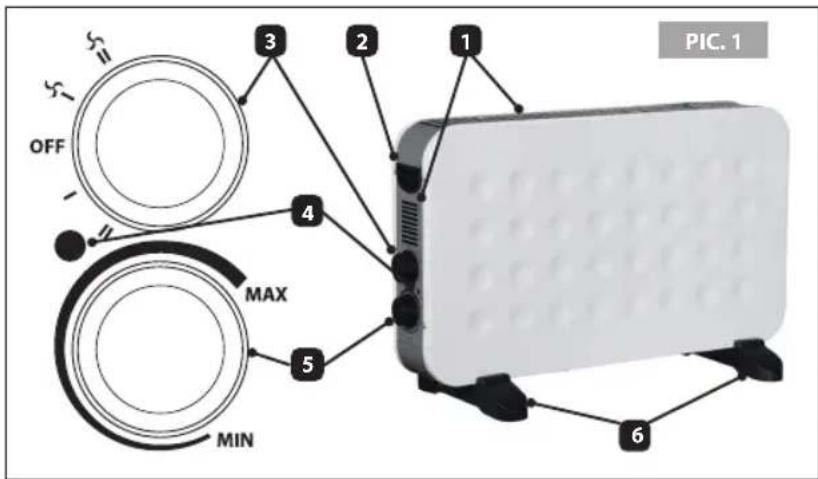
- Ventilation openings
- Handle
- Supply switch (operation mode)
- Indicator light power
- Thermostat
- Feet
TECHNICAL DETAILS
Rated power: 1800-2000W
Mains supply:
220-240V \~ 50-60Hz
INTENDED USE
Convector with blower for heating individual rooms (offices, living rooms, etc.). The device is easily portable and therefore ideal for the transitional heating. The natural convection is intensified by the blower switchable as needed. He stands firmly on stable feet. At the temperature selector the desired room temperature is continuously adjustable.
USING THE DEVICE
- After unpacking the device, make sure if it was not damaged during the transport. In case of any doubts, refrain from its use until contacting a service point.
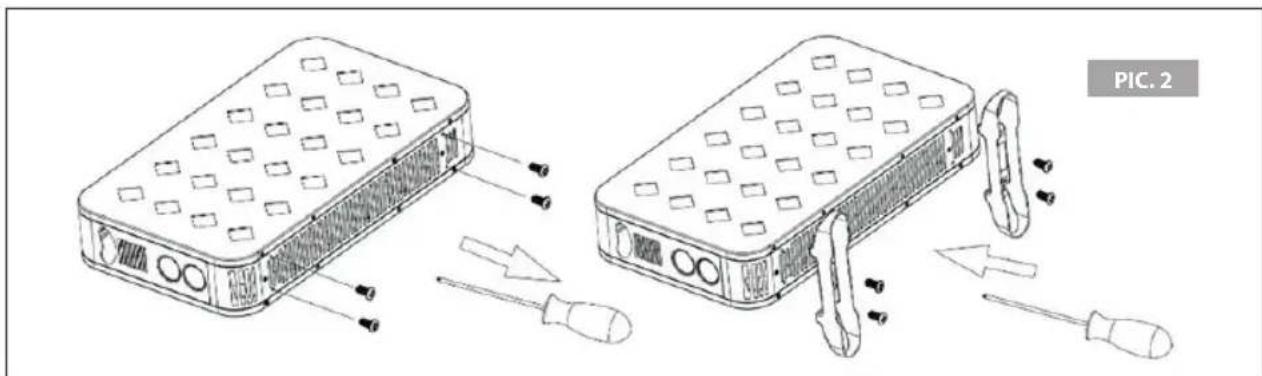
• Install the feet (6) - pic. 2. - Place the unit on a flat, stable and heat-resistant floor, min. 2 m away from furniture and flammable objects.
- Set the thermostat (5) in the "MIN" position.
- Connect the device to the power supply source of the parameters compliant with those stated in the user guide.
• Using the switch (3) select the heating power:
- " for 1250W + TURBO
- " W" for 2000W+ TURBO
- "I" for 1250W
- "II" for 2000W
- The device will start when temperature is selected with the thermostat knob (5). The maximum operating temperature is set when the thermostat button (5) is set to "MAX" and the heating level "ⅤⅡ" is selected.
• Operation of the device is signalled with the indicating lamp (4). - During operation of the device, do not cover the heater with clothing or other textiles.
- Do not cover ventilation openings.
- The device has a thermal safeguard cutting off the power supply when it is overheated. In this case, set the thermostat knob in the "MIN" position, disconnect the device from the power supply and eliminate the cause of overheating. Leave the device to cool down before switching the device on again.
INSTALLATION
- Carefully place the device with its feet upwards (soft surface is best used to avoid damaging of the protection coat).
- Install the feet - pic. 2.
- Turn the heater back to the proper vertical position.
CLEANING AND MAINTENANCE
- Disconnect the device from the power supply before cleaning.
• The device must not be immersed in water. - Do not use cleaning agents and products that are strong or destructive to the surface.
- Wipe the enclosure with damp cloth.
PROTECTION OF THE ENVIRONMENT
• The device is made of materials that may be subjected to further processing or recycling.
- It should be handed over to the relevant point dealing with collection and recycling of electrical and electronic devices.
GUARANTEE
• The device is intended for private household use.
- It may not be used for professional applications.
- The guarantee shall become void if the device is operated improperly.
| Table | Model identifier for electric local space heaters | |||
| Model number: | HC210 | |||
| Item | Symbol | Value | Unit | |
| Heat output | ||||
| Nominal heat output | Pnom | 1,9 | kW | |
| Minimum heatoutput (indicative) | Pmin | 1,2 | kW | |
| Maximum continuous heat output | Pmax,c | 1,9 | kW | |
| Auxiliary electricity consumption | ||||
| At nominal heatoutput | elmax | 0 | kW | |
| At minimum heatoutput | elmin | 0 | kW | |
| In standby mode | elSB | 0 | kW | |
| Type of heat input, for electric storage local space heaters only (single select) | ||||
| manual heat charge control, with integrated thermostat | □ Yes □ No | |||
| manual heat charge control with room and/or outdoor temperature feedback | □ Yes □ No | |||
| electronic heat charge control with room and/or outdoor temperature feedback | □ Yes □ No | |||
| fan assisted heat output | □ Yes □ No | |||
| Type of heat output/room temperature control (single select) | ||||
| single stage heat output and no room temperature control | □ Yes □ No | |||
| Two or more manual stages, no room temperature control | □ Yes □ No | |||
| with mechanic thermostat room temperature control | □ Yes □ No | |||
| with electronic room temperature control | □ Yes □ No | |||
| electronic room temperature control plus day timer | □ Yes □ No | |||
| electronic room temperature control plus week timer | □ Yes □ No | |||
| Other control options (multiple selections possible) | ||||
| room temperature control, with presence detection | □ Yes □ No | |||
| room temperature control, with open window detection | □ Yes □ No | |||
| with distance control option | □ Yes □ No | |||
| with adaptive start control | □ Yes □ No | |||
| with working time limitation | □ Yes □ No | |||
| with black bulb sensor | □ Yes □ No | |||
| Contact details | Eldom Sp. z o.o. Pawła Chromika 5a, 40-238 Katowice, POLAND tel: +48 32 2553340 , fax: +48 32 2530412 | |||
LIMPIEZA Y MANTENIMIENTO
UTILISATION DE L'APPAREIL
ATTENTION
USO DEL DISPOSITIVO
ATTENZIONE


- THIS PRODUCT IS ONLY SUITABLE FOR WELL INSULATED SPACES OR OCCASIONAL USE
- GENERAL DESCRIPTION
- TECHNICAL DETAILS
- INTENDED USE
- USING THE DEVICE
- INSTALLATION
- CLEANING AND MAINTENANCE
- PROTECTION OF THE ENVIRONMENT
- GUARANTEE
- LIMPIEZA Y MANTENIMIENTO
- UTILISATION DE L'APPAREIL
- ATTENTION
- USO DEL DISPOSITIVO
- ATTENZIONE
Brand : Eldom
Model : Convi HC210
Category : Heating