AMMB25E3SGVB XTYPE - Oven AMICA - Free user manual and instructions
Find the device manual for free AMMB25E3SGVB XTYPE AMICA in PDF.



| Product type | Combination microwave oven |
| Brand | Amica |
| Model | AMMB25E3SGVB XTYPE |
| Oven capacity | 25 liters |
| Power supply | 230 V / 50 Hz |
| Microwave power | 900 W |
| Grill power | 1000 W |
| Operating frequency | 2450 MHz |
| Noise level | 63 dB(A) |
| Dimensions (HxWxD) | 388 x 595 x 388 mm |
| Net weight | 17.6 kg |
| Turntable diameter | 315 mm |
| Main functions | Microwave, Grill, Combination cooking, Defrost by weight and by time, Automatic menu (pizza, meat, vegetables, pasta, potatoes, fish, beverage, popcorn), Quick cooking, Timer |
| Automatic programs | 8 programs (pizza, meat, vegetables, pasta, potatoes, fish, beverage, popcorn) |
| Display screen | Digital display with 24-hour clock |
| Microwave power levels | 5 levels: P100, P80, P50, P30, P10 |
| Child safety | Start lock (long press on button 3 seconds) |
| Safety system | Door safety lock, automatic stop upon opening |
| Maintenance and cleaning | Interior cleaning with damp cloth; odor removal: half lemon + 300 ml water, microwave 100% for 10 min |
| Spare parts and repairability | Repairs only by qualified service (manufacturer or approved); turntable and rotating trolley available |
| General information | Appliance intended for domestic use; possible built-in (cabinet width 60 cm); do not install above a heat source |
Frequently Asked Questions - AMMB25E3SGVB XTYPE AMICA
User questions about AMMB25E3SGVB XTYPE AMICA
0 question about this device. Answer the ones you know or ask your own.
Ask a new question about this device
Download the instructions for your Oven in PDF format for free! Find your manual AMMB25E3SGVB XTYPE - AMICA and take your electronic device back in hand. On this page are published all the documents necessary for the use of your device. AMMB25E3SGVB XTYPE by AMICA.
USER MANUAL AMMB25E3SGVB XTYPE AMICA
natural_image
Symbol of a trash bin crossed out by two diagonal lines (no text or labels)natural_image
Line drawing of an electrical outlet plug with two leads (no text or symbols)natural_image
Warning symbol of steam inside a triangle (no text or numbers)P
natural_image
3D rendered image of a smooth, rounded object with a circular top and base (no text or symbols)USUWANIE USTEREK
Your Amica appliance is exceptionally easy to use and extremely efficient. Before being packaged and leaving the manufacturer, the appliance was thoroughly checked with regard to safety and functionality.
Before using the appliance, please read these Operating Instructions carefully
Symbols appearing in these instructions have the following meaning:

Important information concerning proper operation of the appliance and your personal safety.

Risks resulting from improper operation of the appliance. Activities that must be performed by a qualified technician.

Tips on how to use the appliance.

Information on how to protect the environment.

This indicates actions that must not be performed by the user.
CONTENTS
SPECIFICATION 20
PRECAUTIONS 21
SAFETY INSTRUCTIONS FOR USE 22
DISPOSING/SCRAPPING OF USED EQUIPMENT 26
INSTALLING THE PROTECTIVE CIRCUIT 27
COOKWARE 28
INSTALLING THE APPLIANCE 31
OPERATION 32
TROUBLESHOOTING 36
CLEANING 36
WARRANTY AND AFTER-SALE SERVICES 37
SPECIFICATION
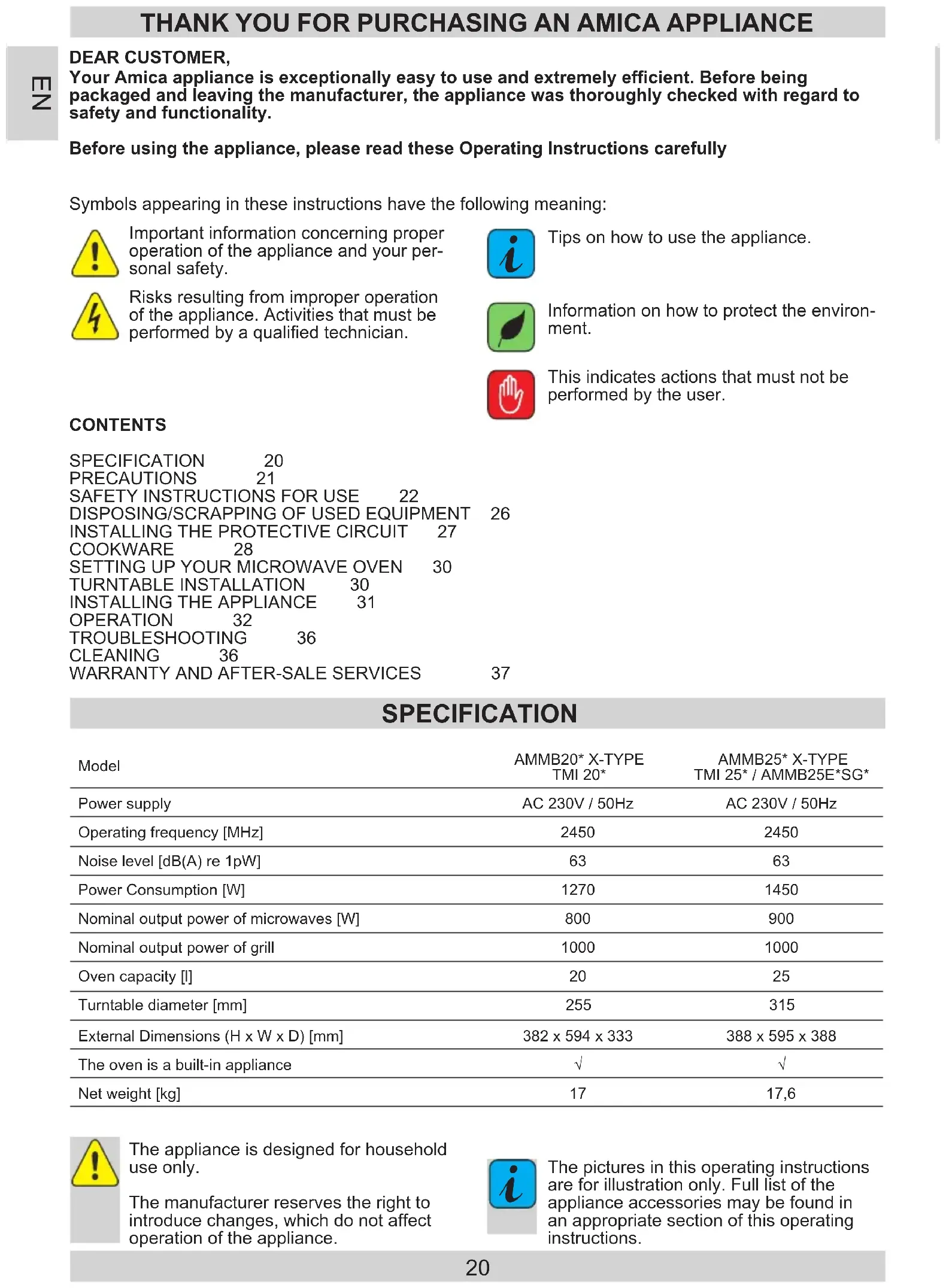
| Model | AMMB20* X-TYPE TMI 20* | AMMB25* X-TYPE TMI 25* / AMMB25E*SG* |
| Power supply | AC 230V / 50Hz | AC 230V / 50Hz |
| Operating frequency [MHz] | 2450 | 2450 |
| Noise level [dB(A) re 1pW] | 63 | 63 |
| Power Consumption [W] | 1270 | 1450 |
| Nominal output power of microwaves [W] | 800 | 900 |
| Nominal output power of grill | 1000 | 1000 |
| Oven capacity [l] | 20 | 25 |
| Turntable diameter [mm] | 255 | 315 |
| External Dimensions (H x W x D) [mm] | 382 x 594 x 333 | 388 x 595 x 388 |
| The oven is a built-in appliance | √ | √ |
| Net weight [kg] | 17 | 17,6 |

The appliance is designed for household use only.
The manufacturer reserves the right to introduce changes, which do not affect operation of the appliance.

The pictures in this operating instructions are for illustration only. Full list of the appliance accessories may be found in an appropriate section of this operating instructions.

TO AVOID POSSIBLE OVER-EXPOSURE TO MICRO- WAVE ENERGY

Do not attempt to operate the oven with the door open, because it may cause harmful exposure to microwave energy. Do not disable the safety interlocks, or attempt to circumvent them.

Do not place anything between the front surface of the oven and the door or allow dirt or detergent residue to gather on sealing surfaces.

Do not operate the oven if it is damaged. It is particularly important that the oven door is properly closed and that there is no damage to:
1 door (dents, cracks)
2 hinges and locks (broken, cracked or loose)
3 door seals and sealing surfaces

Any adjustments, maintenance or repairs should only be entrusted to the manufacturer's properly qualified service personnel. In particular, the work associated with removing the cover that protects the user against microwave radiation.

Keep the appliance and its power cord away from children under 8 years old.

Microwave oven should not be placed in a cabinet*

WARNING: The appliance and its accessible parts become hot during use. Avoid contact with hot parts. Children under the age of 8, should be kept away from the appliance, unless supervised by an adult person; Do not clean the appliance with steam

Surfaces of the cabinet may become hot when the oven is operating;
READ CAREFULLY AND KEEP FOR FUTURE REFERENCE
To reduce the risk of fire, injury to people or exposure to excessive microwave energy when using the appliance, please observe the following basic safety rules:
Read the Operating Instructions before using the appli-
ance.
Close supervision is needed to reduce the risk of fire inside the oven chamber.
Use this appliance only for its intended purpose as described in the manual. Do not use corrosive chemicals in the appliance. Oven is specifically designed for heating or cooking food. It is not intended for industrial or laboratory use.
WARNING: When the appliance is used in a combined mode, children can use the microwave oven only under adult supervision due to the high temperatures generated;
WARNING: Liquids and other foodstuffs may not be heated in sealed containers as the containers could explode;
WARNING: This appliance can be used by children aged 8 years and older or by persons with physical, mental or sensory handicaps, or by those who are inexperienced or unfamiliar with the appliance, provided they are supervised or have been instructed how to safely use the appliance and are familiar with risks associated with the use of the appliance. Ensure that children do not play with the appliance. Cleaning and maintenance of the appliance should not be performed by children unless they are 8 years or older and are supervised by a competent person.
Use only cookware that is suitable for use in microwave ovens;
When heating food in plastic or paper containers, pay special attention to the microwave oven as containers may ignite;


If you see smoke or fire, turn off the appliance or unplug it from power and keep the door closed until the flames are smothered;
Microwave heating of beverages can cause delayed boiling, therefore care should be taken when handling the container;

Cleaning instructions for door seals and adjacent parts may be found in an appropriate section of this operating instructions.

The oven must be cleaned regularly. Remove any deposits of food and leftovers

Neglecting to keep the oven clean can damage the surface, which may adversely affect the durability of the appliance and cause dangerous situations

Important! If the power cord is damaged, it should be replaced by the manufacturer or specialist repair centre or a qualified person in order to avoid danger.

Before using the oven, test heat the grill heater (smoke can be given off through ventilation grid):
- switch on the ventilation in the room or open a window, - set the oven to heat the grill heater only for about 3 minutes without heating food.
Oven must be placed on flat a surface.

Turntable and rotating trolley unit should be in the oven during cooking. Carefully put cooked food on the turntable, and handle it carefully to avoid any breakage.

Improper use of the browning plate may cause cracking of the turntable due to the high temperature.

Only use bags for cooking in microwave ovens, which are correct size.

Microwave oven has several in-built circuit breakers to prevent emission of radiation, while the door is open.

Do not tamper with these circuit breakers.

Do not operate the oven when empty. Operating the oven without food or dish with very low water content may result in fire, carbonization, arcing and damage to the internal chamber shell.

Do not cook food directly on the turntable. Excessive local heating of turntable may cause its rupture.

Do not heat baby bottles or baby food in the microwave. Uneven heating may occur and cause physical injury.

Do not use narrow-necked containers such as bottles for syrups.

Do not fry in deep fat in the microwave.

Do not do home canning in a microwave oven because not always the entire contents of pot reaches boiling point.

Do not use microwave oven for commercial purposes.

This appliance is intended for use at home or in facilities, such as*: kitchen for employees; in shops, offices and other working environments, use by the customers of hotels, motels and other residential facilities, in rural residential buildings, in the accommodation facilities*; In order to avoid delayed boiling of hot liquids and beverages and the risk of burns, stir the liquid before placing the container in the oven and again in the middle of cooking time. Then leave the container in the oven for a short time and stir again before removing from oven chamber.

Do not forget that there is a dish in the microwave oven to avoid burning due to excessive cooking.

When the appliance is used in a combined mode, children can use the microwave oven only under adult supervision the high temperatures generated;

This appliance is not intended for use by persons (including children) with physical, mental or sensory handicaps, or by persons inexperienced or unfamiliar with the appliance, unless under supervision or in accordance with the instructions as communicated to them by persons responsible for their safety. Children shall not play with the appliance.
Do not overcook dishes


Do not use the oven for storage. Do not store flammable objects inside the microwave oven, such as bread, cookies, paper products, etc. If lightning hits the power line, the oven may switch on automatically.

Remove the wire clamps and metal fixtures from containers / paper or plastic bags before placing them in the oven.

Microwave oven must be grounded. Only connect to a wall socket with the proper protective conductor. See "Installing the protective circuit."

Some products, such as whole eggs (boiled or fresh), water, oil or grease, sealed containers and closed glass jars may explode and therefore should not be heated in the oven.

Operating the microwave oven should be done with adult supervision at all times. Do not allow children to play with the appliance or have access to the controls.

Do not operate the oven when its terminal strip or plug is damaged, it is not working properly, or if it has been damaged or dropped.

Do not cover or block the air vents on the oven.

text_image
Vertical sequence of hand and warning symbols with red, yellow, and blue labelsDo not store or use the oven outdoors.
Do not use the microwave oven near water, near the kitchen sink, in a damp room or near a swimming pool. Do not immerse the power cord or plug in water.
Keep cord away from heated surfaces.
Do not allow the connection cord hanging over the edge of a table or counter. The appliance must be used with mounted decorative frame*
The inner cavity surface is hot after use of the microwave oven.
Regularly check the oven and its power cord for damage. If there is any damage, do not use the oven
DISPOSING/SCRAPPING OF USED EQUIPMENT

DISPOSAL OF OLD APPLIANCE
natural_image
Symbol of a trash bin crossed with no text or numbers, representing environmental restriction (no text present)In accordance with European Directive 2012/19/EU and local legislation regarding used electrical and electronic goods, this appliance is marked with the symbol of the crossed-out waste container. This marking indicates that the appliance must not be disposed of together with other household waste after it has been used.
The user is obliged to hand it over to waste collection centre collecting used electrical and electronic goods. The collectors, including local collection points, shops and local authority departments provide recycling schemes.
Proper handling of used electrical and electronic goods helps avoid environmental and health hazards resulting from the presence of dangerous components and the inappropriate storage and processing of such goods.

UNPACKING

During transportation, protective packaging was used to protect the appliance against any damage. After unpacking, please dispose of all elements of packaging in a way that will not cause damage to the environment.
All materials used for packaging the
appliance are environmentally friendly; they are 100% recyclable and are marked with the appropriate symbol.
Important! During unpacking, keep the packaging material (polyethylene bags, polystyrene pieces, etc.) out of reach of children.
INSTALLING THE PROTECTIVE CIRCUIT
DANGER
Danger of electric shock when touched, some internal components may cause serious injury or death. Do not disassemble this appliance.
WARNING
Electric shock hazard. Improper use of earthing can cause electric shock. Do not insert the plug into the socket before the appliance is properly installed and grounded.

natural_image
Line drawing of a plug with two leads (no text or symbols)This appliance must be grounded. In the event of a short-circuit, earthing reduces the risk of electric shock. The appliance is equipped with earthing wire with an appropriate plug. The plug should be inserted into a properly installed and grounded outlet.
If you do not completely understand earthing instruction or you are unsure whether the appliance is properly grounded, please contact a qualified
electrician or service technician.
If you must use an extension cord, use only a three-wire extension with an earthing connector.
The manufacturer shall not be liable for damage or injury resulting from connecting the microwave oven to a power source without a protective circuit or with a malfunctioning protection circuit.
A short power cord is provided to reduce the risk resulting from becoming entangled or tripping over a long cord.
If you use the extension cord:
- Extension cord must be capable of withstanding nominal current required by the appliance.
- Extension cord must be 3-wire with earthing,
- Extension cord should be so arranged as not to be hung by the table top where it could be pulled by children, or caught inadvertently.
WARNING

Risk of injury. Tightly closed containers may explode. Closed containers must be opened and plastic bags pierced before cooking.
Materials that can be used and materials to be avoided in the microwave oven.
The use of some non-metallic cookware may not be safe in the microwave oven. If in doubt, you can check the cookware following this procedure.
Checking the cookware:
1 Fill the microwave-safe cookware with 1 cup of cold water (250 ml), and do the same with the test cookware.
2 Operate the oven with the maximum power for 1 minute.
3 Carefully touch the test cookware. If the test cookware is hot, do not use it in the microwave oven.
4 Do not exceed 1 minute cooking time.
Materials that cannot be used in a microwave oven
| Type of cookware Comments | |
| Aluminium tray | May cause an electric arc. Transfer food to microwave-safe cookware. |
| Cardboard box with metal handle | May cause an electric arc. Transfer food to microwave-safe cookware. |
| Metal or cookware with metal frame | Metal shields the food from microwave energy.Metal frame can cause an electric arc. |
| Metal closure - tightened May cause an | electric arc and fire in the oven. |
| Paper bags May cause a fire in the oven. | |
| Plastic foam | Plastic foam may melt or contaminate the liquid in it when exposed to high temperatures. |
| Wood | Wood dries out when it is heated in the microwave oven and can crack or break. |
Materials that can be used in a microwave oven
| Type of cookware Comments | |
| Aluminium foil Only as shielding. | Small and smooth pieces can be used for the coating of thin pieces of meat or poultry, to prevent excessive cooking. Arc discharge may occur if the foil is too close to the oven walls. Film must be at least at a distance of 2.5 cm from the oven walls. |
| Browning plate Observe the manufacturer's instructions. The bottom of the browning plate must be at least 5 mm above the turntable. Improper use may cause cracking of the turntable. | |
| Dinner dishes Suitable for microwave ovens only. Observe the manufacturer's instructions.Do not use cracked or chipped cookware. | |
| Glass jars Always remove the lid. | Use only for heating food to a suitable temperature. Most glass jars are not heat resistant and may explode. |
| Glassware Use only heat-resistant glassware in the microwave oven. Make sure that there are no metal frames. Do not use cracked or chipped cookware. | |
COOKWARE
| Bags for microwave cooking Observe the manufacturer's instructions. Do not seal with metal clamps. |
| Paper plates and cups Cut through to allow the steam to escape. Use only for short cooking / heating. Do not leave the oven unattended while cooking. |
| Paper towels Use to cover food to be heated to absorb fat.Use only for short cooking under constant surveillance. |
| Parchment paper Use as a cover to prevent splashing or as a container for evaporation. |
| Plastics Suitable for microwave ovens only. Should be labelled "for use in microwave ovens." Some plastic containers soften when the content is warmed up. Bags for microwave cooking and sealed plastic bags must be pierced or incised, or vented according to the directions on the package. |
| Plastic packaging Suitable for microwave ovens only. Use to cover food during cooking in order to maintain moisture. Do not let plastic packing touch the food. |
| Thermometers Suitable for microwave ovens only. (Temperature probes for meat and sugar). |
| Wax paper Used as a covering to prevent splashing and to keep moisture. |
| Cookware material Microwave | Barbecue grill | Combi Mode | |
| Heat-resistant glass YES YES YES | |||
| Regular glass NO NO NO | |||
| Heat-resistant ceramics | YES | NO | NO |
| Microwave-safe plastic utensils | YES | NO | NO |
| Kitchen paper | YES | NO | NO |
| Metal container | NO | YES | NO |
| Metal rack (provided for the oven)* | NO | YES | NO |
| Aluminium foil and foil containers | NO | YES | NO |
* Available on selected models
Microwave oven accessories
Remove all packaging, both inside and outside the oven, before using the oven. The oven comes with the following accessories:
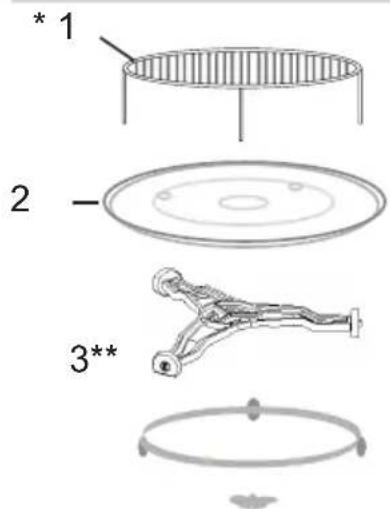
Turntable 1
Rotating trolley 1
Operating Instructions 1
Grilling rack 1*
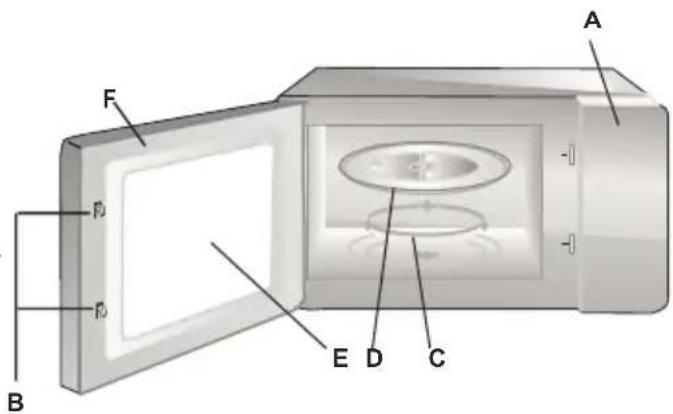
A) Control Panel
B) System security lock - disconnects power to the oven when the door is opened during operation.
C) Rotating trolley
D) Turntable
E) Door inner protecting shield
F) Door
text_image
A F B E D CTURNTABLE INSTALLATION
text_image
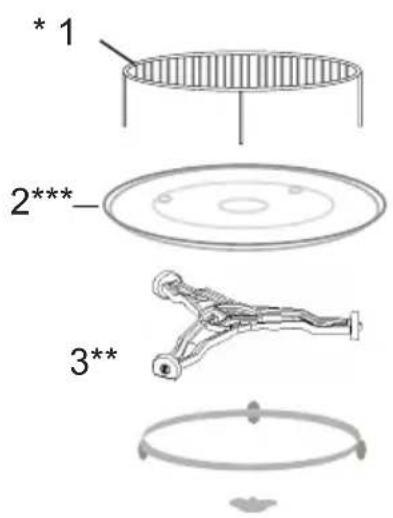
* 1 2*** 3**1 Never compress or place the turntable upside down.
2 When cooking, always use turntable and rotating trolley.
3 For cooking or heating always put the food on the turntable.
4 If the turntable breaks, please contact the nearest authorized service centre.
Individual fittings:
- Grilling rack
- Turntable
- Rotating trolley
* Available on selected models Note: The grilling rack supplied with the appliance should only be used when the appliance is set to "GRILL". Place the rack on the turntable.
** Trolley is available in two versions, depending on the model. These are not interchangeable.
*** Turnable existing according to the model. In this case, put food on Your own plate and put into the microwave oven.
- Remove all packaging materials and components.
- Check the oven for damage such as dents or door misalignment or breakage.
- Remove any protective film from the surface of the cabinet.
- Do not install the oven if it is damaged.

Do not remove the light brown mica cover bolted into the recess in order to shield the microwave magnetron.
Installing
- The appliance is designed for household use only.
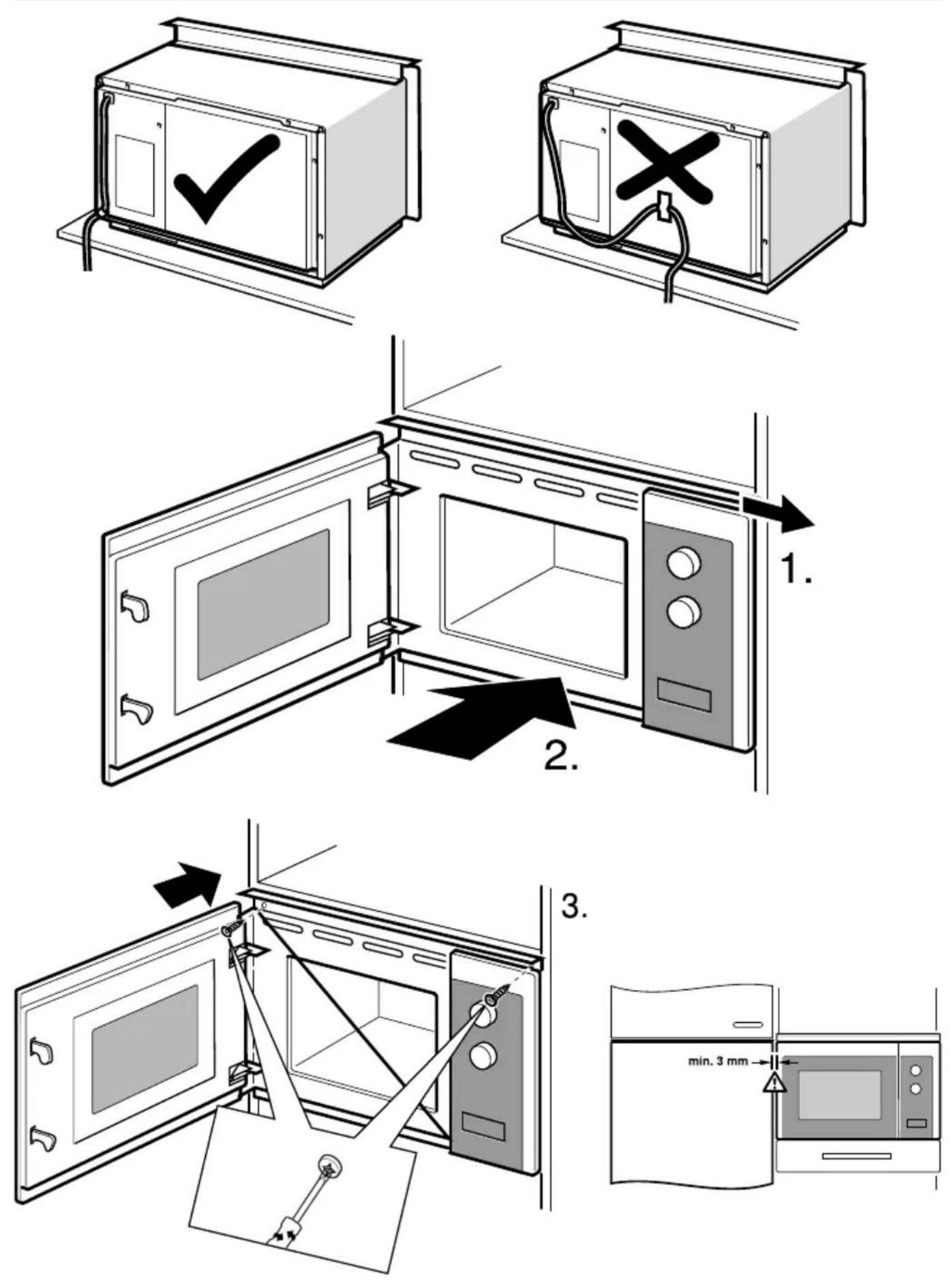
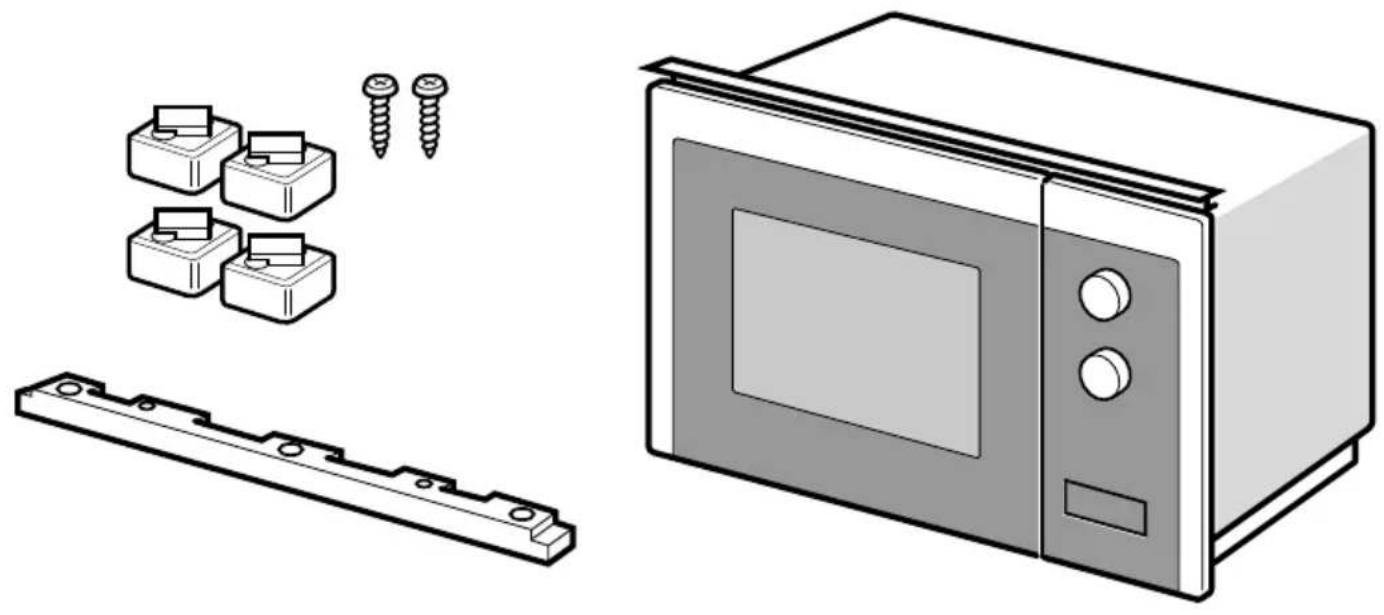
- The appliance can be used only after fitting in kitchen furniture.
- For fitting instructions, please refer to "Installation guide"*.
- Microwave oven should be installed in a cabinet with a width of 60 cm and a height of 85 cm from the kitchen floor*.
Do not remove the legs located in the bottom of the appliance*.
Blocking the inlet and outlet openings may damage the microwave oven.
Place the oven as far away from radio and television as possible. Operating microwave oven may cause interference to radio and television reception.
- Insert the oven power plug into a standard household wall socket.
Make sure beforehand whether voltage and frequency are the same as on the oven's rating plate.
WARNING: Do not install the oven on the gas hob or other heat producing appliance. In the event of such installation, the oven may be damaged and void the warranty.
Accessible surfaces may become hot during operation.
natural_image
Warning symbol with steam inside a triangle (no text or numbers)OPERATION
田Z
1. Clock Setting
When the microwave oven is electrified, the oven will display "0:00", buzzer will ring once. The oven will enter to waiting state.
1) Press twice, the hour figures will flash;
2) Press for to adjust the hour figures, the input time should be within 0--23.
3) Press ☒ to confirm, the minute figures will flash.
4) Press for to adjust the minute figures, the input time should be within 0--59.
5) Press ☒ to finish clock setting. “:” will flash. The current time will display.
Note: If the clock is not set, it would not function when powered.
2. Microwave Cooking
1) Press the key once, and "P100" will display.
2) Press repeatedly or press or to-select the microwave power. "P100", "P80", "P50", "P30", "P10" will display in order.
3) Press ▷ to confirm setting.
4) Press for to adjust the cooking time. (The maximum cooking time is 95 min).
5) Press ▷ to start cooking.
NOTE: the step quantities for the adjustment time of the coding switch are as follow: 0-1min : 5 seconds
1-5min : 10 seconds
5-10min : 30 seconds
10-30min : 1 minute
30-95min : 5 minutes
Microwave Power Chart
| Microwave Power High Med. | High Med. | Low | ||
| Display P100 P80P50P30 P10 |
3. Grill or Combi.
Cooking
- Press once, the screen will display "G", and press repeatedly or press or to choose the power you want, and "G", "C-1" or "C-2" will display.
- Press to confirm the power. Press or to set cooking time. (The maximum cooking time is 95 minutes)
- Press again to start cooking.
Example: If you want to use 55% microwave power and 45% grill power (C-1) to cook for 10 minutes, you can operate the oven as the following steps.
1) Press once, the screen displays "G".
2) Continue to press until the screen displays "C-1".
3) Press ▷ to confirm.
4) Press for to adjust the cooking time until the oven displays "10:00".
5) Press ▷ to start cooking.
Combination Power
| Program Display Microwave power | Grill power | |
| Grill G 0% 100% | ||
| Combi.1 C-1 55% 45% | ||
| Combi.2 C-236% 64% |
Note: If half the grill time passes, the oven sounds twice, and this is normal. In order to have a better effect of grilling food, you should turn the food over, close the door, and then press ▷to continue cooking. If no operation, the oven will continue working.
4. Defrost By Weight
1) Press once, the screen will display "dEF1".
2) Press for to select the food weight. The range of weight is 100-2000g.
3) Press ▷key to start defrosting.
5. Defrost By Time
1) Press * once, the screen will display "dEF2".
2) Press for to select the cooking time. The maximum time is 95 minutes.
3) Press ▷key to start defrosting.
Note: If half the defrost time passes, the oven sounds twice, and this is normal. In order to have a better effect of defrosting, you should turn the food over, close the door, and then press ▷oven will continue working.
6. Multi-Stage Cooking
Can be set max two stages. If one stages is defrosting, it should be put in the first stage automatically. The buzzer will ring once after each stage and the next stage will begin.
Note: Auto menu and speedy cooking cannot be set as one of the multi-stage.
Example: if you want to defrost the food for 5 minutes, then to cook with 80% microwave power for 7 minutes. The steps are as following:
1) Press once, the screen will display "dEF2".
2) Press for to adjust the defrost time of 5 minutes;
3) Press once, the screen will display "P100".
4) Press repeatedly to choose microwave power till "P80" displays;
5) Press ▷ to confirm.
5) Press +or to adjust the cooking time of 7 minutes;
7) Press ▷ to start cooking.
7. Kitchen Timer
1) Press ☒once, the screen will display "00:00".
2) Press for to enter the correct timer. (The maximum cooking time is 95 min.)
3) Press ▷ to confirm setting.
4) When the kitchen time is reached, the buzzer will ring 5 times.
If the clock has been set(24-hour system), the screen will display the current time.
Note: The kitchen Time is different from 24-hour system. Kitchen Timer is a timer.
OPERATION
8. Auto Menu
1) In waiting state, press +repeatedly to choose the menu.
2) Press ▷ to confirm the menu you choose.
3) Press for to choose the food weight.
4) Press ▷ to start cooking.
Auto-menu chart
| Menu Weight Power | ||
| Pizza | 200 g | C-2 |
| 400 g | ||
| Meat | 250 g | Micro - 100%350 g |
| 450 g | ||
| Vegetable | 200 g | Micro - 100%300 g |
| 400 g | ||
| Pasta | 50g(with 450g cold water) | Micro - 80% |
| 100g(with 800g cold water) | ||
| Potato | 200 g | Micro - 100%400 g |
| 600 g | ||
| Fish | 250 g | Micro - 80%350 g |
| 450 g | ||
| Beverage | 1cup (about 120ml) | Micro - 100%2cups (about |
| 3cups (about 360ml) | ||
| Popcorn | 50 g | Micro - 100% |
| 100 g | ||
9. Speedy Cooking
1) In waiting state, press ▷key to cook with 100% power level for 30 seconds. Each press on the same key can increase 30 seconds. The maximum cooking time is 95 minutes.
2) During the microwave, grill, combination cooking and the defrost by time process, press ▷ to increase the cooking time.
3) Under the states of auto menu and defrost by weight, cooking time cannot be increased by pressing ▷
4) In waiting state, press –to choose the cooking time. After adjusting the cooking time,
press ▷ to start microwave cooking with 100% power lever.
OPERATION
10. Lock Function for Children
Lock: In waiting state, press || for 3 seconds to enter the children-lock state and the current time will display if the time has been set, otherwise, the screen will display ||. Lock quitting: In locked state, press || for 3 seconds, the lock is released.
11. Inquiring Function
1) In cooking states of microwave or grill and combination. Press for, the current power will be displayed for 3 seconds.
2) If the clock has been set, during cooking state, press ☒ to check the current time. It will be displayed for 3 seconds.
12. Specification
1) If the door is opened in the process of cooking, close the door and then press ▷ to continue cooking.
2) Once the cooking programme has been set, ▷ is not pressed in 1 minute. The current time will be displayed. The setting will be cancelled.
3) The buzzer sounds once by efficient press, inefficient press will be no response.
13. Opening the oven door\* press button, the oven door will open.
Note: Emergency opening of the door if no power*: Use suction handle added into the accessory bag. Stick it on the doors and pull it.
*only appliances with a sensor for door opening
natural_image
Simple 3D-rendered gray sphere with a circular base, no text or symbols presentTROUBLESHOOTING
三
| Microwave oven interferes with the TV reception | Television and radio reception may be disrupted when the microwave oven is operating. The same applies to small household appliances such as a blender, vacuum cleaner and electric fan. This is normal. |
| Dimmed oven lighting. | When cooking with low microwave power, oven light may be dimmer. This is normal. |
| Condensation forms on the door, hot air comes out through vents. | When cooking, steam can be released from food. Most of the steam escapes through the vents. However some steam can collect in the form of condensation on cooler parts, such as oven door. This is normal. |
| Fault Possible cause How to | correct | |
| Oven does not start. | Power cord unplugged or not plugged properly into the socket | Pull the plug and put it back in after 10 seconds. |
| Blown fuse or tripped circuit breaker. | Replace the fuse or turn on the circuit breaker (any repairs by Amica service only) | |
| Problem with the power outlet | Check the outlet by plugging in other appliance. | |
| The oven does not heat. The door is not closed properly. Close the door fully. | ||
| Turntable makes noise when oven operates | Rotating ring or bottom of the oven dirty. | See "Microwave oven maintenance" |
CLEANING
Before cleaning, make sure the oven is disconnected from the power source.
(a) After use, clean the inside of the microwave oven with a damp cloth.
b) Clean the accessories in the normal way in soapy water.
c) Dirty door frame, seal and adjacent elements should be cleaned gently with a damp cloth. When cleaning the surface of the oven door, use only mild soap or detergent applied with a sponge or soft cloth.
When cleaning glass door, do not use any abrasive cleaners or sharp metal washers, as this may cause scratches on the surface and damage the glass.
In order to clean the inner cavity: put half a lemon in a bowl, add 300 ml of water and turn on the microwave oven at 100% power for 10 minutes.
After cleaning, disconnect the microwave oven from the power and wipe the inside with a soft, dry cloth.
Warranty
Warranty service as stated on the warranty card
The manufacturer shall not be held liable for any damage caused by improper use of the product.
Manufacturer's Declaration
The manufacturer hereby declares that this product meets the requirements of the following European directives:
• Low Voltage Directive 2014/35/EC
• Electromagnetic Compatibility (EMC) Directive 2014/30/EC
• ErP Directive 2009/125/EC
• Directive RoHS 2011/65/EC
and has thus been marked with the C6 symbol and been issued with a declaration of compliance made available to market regulators.
VÁŽENÍ ZÁKAZNÍCI!
text_image
Vertical sequence of warning symbols including hand, warning sign, yellow warning triangle, yellow exclamation mark, and blue lowercase 'i'natural_image
Simple line drawing of a trash bin with crossed lines indicating no waste or prohibition (no text or symbols)natural_image
Line drawing of a plug with two terminals and a side socket (no text or symbols)natural_image
Warning symbol with steam inside a triangle (no text or numbers)1. Nastavení hodin
natural_image
Simple 3D-rendered gray sphere with a circular base, no text or symbols presentODSTRAŇOVÁNÍ PORUCH
CN
text_image
Vertical sequence of warning symbols including hand, warning sign, and warning triangle with exclamation marknatural_image
Symbol of a trash bin crossed with a diagonal line, no text or numbers presentnatural_image
Line drawing of a plug with two leads and a socket (no text or symbols)natural_image
Warning symbol with steam inside a triangle (no text or numbers)1. Nastavenie hodín
natural_image
Simple 3D-rendered gray sphere with a rounded base, no text or symbols presentODSTRAŇOVANIE PORÚCH
GARANTIE, NACHVERKAUF-SERVICE 91
TECHNISCHE DATEN
natural_image
Symbol of a trash bin crossed with no text or labelsnatural_image
Line drawing of a plug with two leads (no text or symbols)natural_image
Simple 3D-rendered gray sphere with a rounded base, no text or symbols presentnatural_image
Symbol of a trash bin crossed with no text or numbers, representing waste sorting or disposal (no text present)natural_image
Line drawing of a plug with two leads and a socket (no text or symbols)natural_image
Warning symbol with steam inside a triangle (no text or numbers)natural_image
Simple 3D-rendered gray sphere with a rounded base, no text or symbols presenttext_image
Four warning symbols: red hand, yellow warning triangle, yellow exclamation mark, and blue square with letter 'i'natural_image
Symbol of a trash bin crossed with a diagonal line, no text or numbers presentnatural_image
Line drawing of a plug with two leads and a socket (no text or symbols)INSTALLATIE DRAAIPLATEAU
text_image
* 1 2 3**natural_image
Simple 3D-rendered gray pushpin or button with a rounded base (no text or symbols)text_image
Vertical sequence of warning symbols including hand, hand gesture, warning triangle, and letter 'i'natural_image
Symbol of a trash bin crossed with a diagonal line and a horizontal bar below (no text or labels)natural_image
Line drawing of a plug with two leads and a socket (no text or symbols)natural_image
Warning symbol with steam inside a triangle (no text or numbers)natural_image
Simple 3D-rendered gray sphere with a flat base, no text or symbols presentHIBAELHÁRÍTÁS
natural_image
Line drawing of a plug with two leads and a socket (no text or symbols)Uređaj uzemljiti. U slučaju kratkog spoja uzemljenje smanjuje opasnost od strujnog udara, jer odvodi električnu energiju. Uređaj je opremljen kabelom sa uzemljenjem i odgovarajućim utikačem. Utikač uključiti u pravilno montiranu i uzemljenu utičnicu.
U slučaju kad ne razumemo instrukciju za uzemljenje ili ako nismo sigurni da li je uređaj pravilno uzemljen, obratiti se kvalifikovanom
električaru ili servisnom tehničaru.
Ako je neophodna upotreba produžnog kabela, koristiti isključivo takav koji posjeduje utičnicu sa uzemljenjem.
natural_image
Warning symbol of steam inside a triangle (no text or numbers)1. Podešavanje sata
Posle uključivanja rerne u električnu mrežu na displeju se pojavljuje „00:00” i jednom se oglasava zvučni signal. Rerna prelazi u stanje pripravnosti.
1) Dvaput pritisnuti .Počinju da trepere brojevi sati;
2) Za podešavanje sata u rasponu 0-23, pritisnuti ili . + -
3) Za potvrdu pritisnuti . Počinju da trepere brojevi minuta;
Za podešavanje minuta u rasponu 0-59, pritisnuti ili .+ -
5) Za završetak podešavanja sata pritisnuti . Počinje da treperi „:”. Na displeju je prikazan aktuelni sat.
natural_image
Simple 3D-rendered gray sphere with a circular base, no text or symbols presentUKLANJANJE KVAROVA
S
| Pri korištenju mikrotalasne peći televizor može da ima smetnje. | Radio i televizijski prijemnici mogu da imaju smetnje kad radi mikrotalasna peć. Slično kao i kod druge električne opreme kao mikser, usisivač i električni ventilator. To je normalna pojava |
| Peć slabo svetli | Prilikom kuvanja na niskoj snazi mikrotalasa svetlo peći može da bude slabije. To je normalno. |
| Para se skuplja na vratima, vrući vazduh izlazi kroz otvore za ventilaciju | Tokom kuvanja jela moguće je pojavljivanje pare. Njen veći deo izlazi kroz otvore za ventilaciju. Manja količina može da se skupi na hladnim mestima kao što su vrata peći. To je normalno. |
| Kvar Mogući uzrok Uklanjanje | ||
| Peć se ne uključuje. | Priključni kabel nije pravilno uključen u utičnicu | Izvući utikač i opet ga uključiti posle 10 sekundi. |
| Pregoreni osigurač ili se aktivirao sigurnosni prekidač. | Promeniti osigurač ili uključiti prekidač (popravlja isključivo Servis) | |
| Problem sa utičnicom | Proveriti utičnicu pomoću ostalih električnih uređaja. | |
| Peć ne grije. Vrata nisu | pravilno zatvorena. Dobro zatvoriti | vrata. |
| Stakleni okretni podložak je bučan tokom rada mikrotalasne peći. | Zaprljani sklop okretnog prstena i dno peći. | Vidi "Održavanje mikrotalasne peći" |
ČIŠĆENJE
text_image
45 5 ±2 0 ±1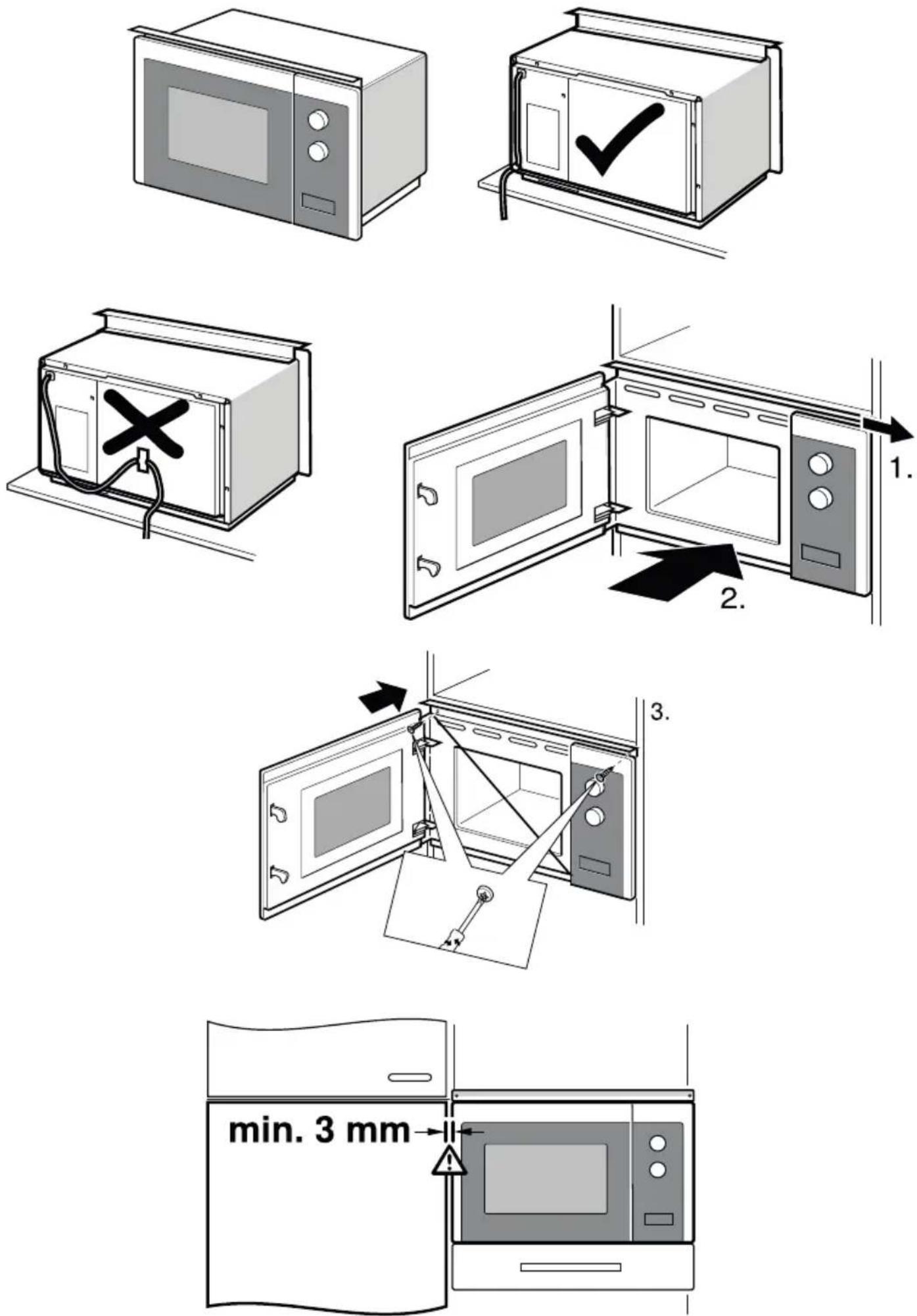
natural_image
Illustration of a microwave oven, its exterior panel, and two screw-shaped components (no text or symbols)
text_image
600 560⁺⁸ 18 min. 300 362⁺³ 18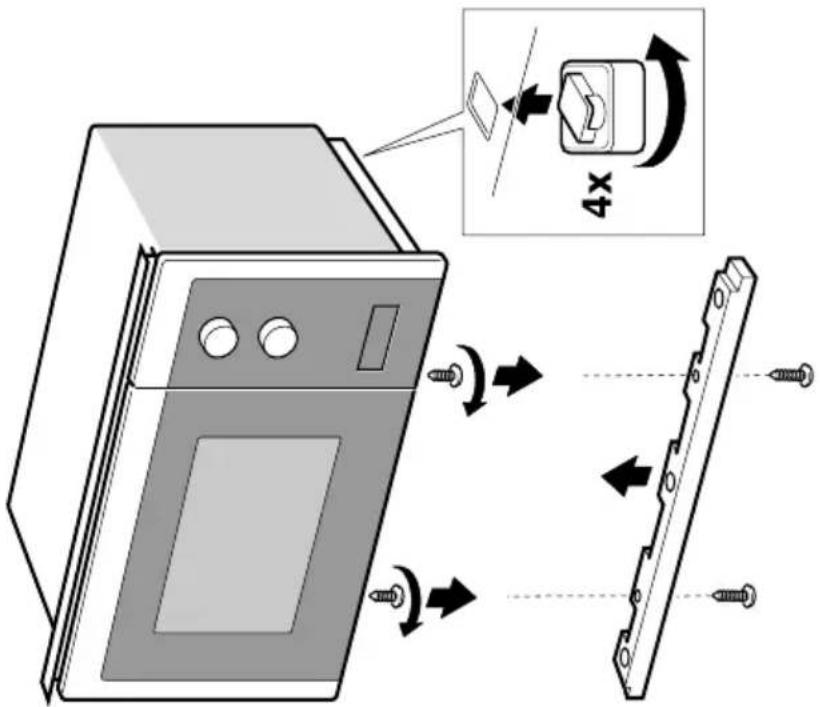
text_image
Diagram illustrating a 4x magnification process of a device's internal structure, showing pin alignment and assembly steps.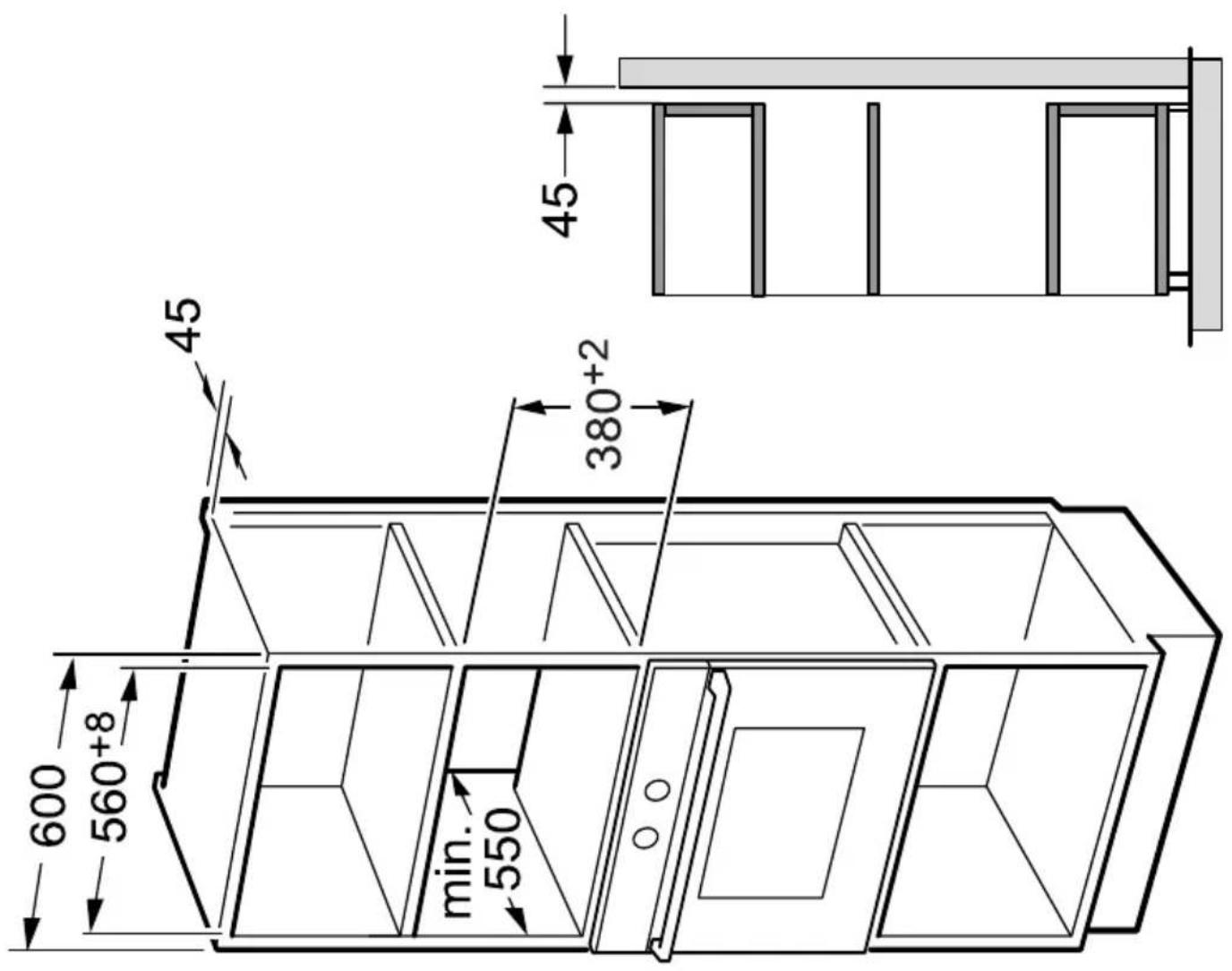
text_image
45 45 380+2 600 560+8 min. 550