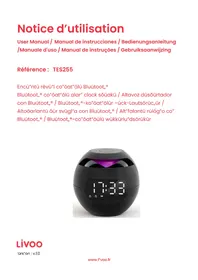
TES255 - Loudspeaker LIVOO - Free user manual and instructions
Find the device manual for free TES255 LIVOO in PDF.


| Brand | Livoo |
| Model | TES255 |
| Product type | Bluetooth speaker with alarm clock |
| Power supply | DC 5V 1A (via included USB cable) |
| Output power | 3 W |
| Frequency response | 80 Hz - 20 kHz |
| Wireless connectivity | Bluetooth (2,402 MHz - 2,480 MHz) |
| Card reader | Micro SD (TF card) |
| Built-in microphone | Yes (hands-free) |
| Alarm function | Dual programmable alarm |
| Display | LED screen |
| Time format | 12H / 24H |
| Battery type | Rechargeable lithium |
| Battery charging | Red indicator light during charging |
| Operating temperature | -20 °C to 55 °C |
| Sound quality | Hi-Fi |
| Care and cleaning | Clean with a dry cloth; do not use a damp cloth or chemicals |
| Safety | Do not expose to water, flames, temperatures > 40 °C; do not open or repair yourself |
| Spare parts and repairability | Lithium battery replaceable by a professional; USB cable included; power adapter (not included): 5 V |
| General information | Compliant with directives 2014/53/EU (RED) and 2011/65/EU (RoHS) |
Frequently Asked Questions - TES255 LIVOO
User questions about TES255 LIVOO
0 question about this device. Answer the ones you know or ask your own.
Ask a new question about this device
Download the instructions for your Loudspeaker in PDF format for free! Find your manual TES255 - LIVOO and take your electronic device back in hand. On this page are published all the documents necessary for the use of your device. TES255 by LIVOO.
USER MANUAL TES255 LIVOO
natural_image
Black spherical digital alarm clock with purple ambient light and digital display (no text or symbols visible)
Figure 1
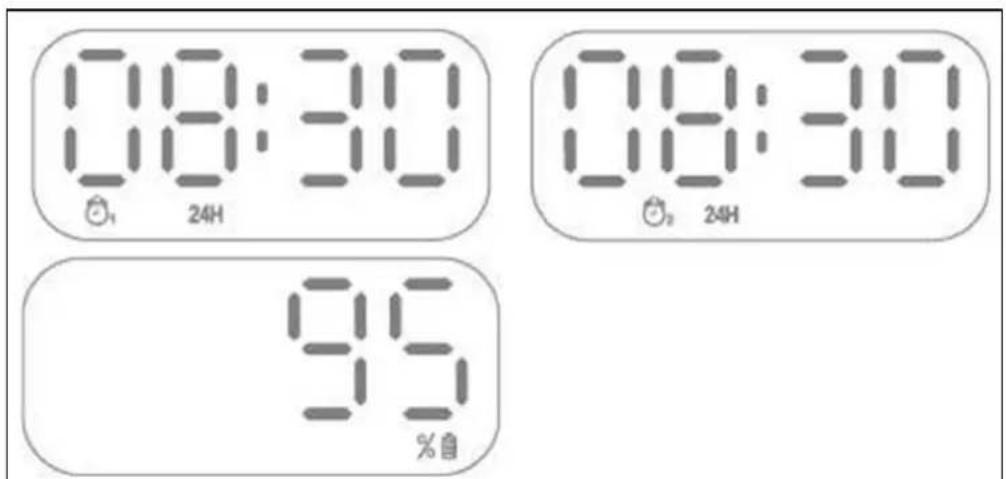
Figure 2
Batter"e L"t,"u"-on rec,argeable: DC 3.7V 1200"A,,
Vers"on Bluetooth", : Bluetooth, 5.0
DÉCLARATION UE DE CON,,ORMITÉ
Nous DELTA
BP61071
67452 Mundols„e“ – France
natural_image
Symbol of a trash bin crossed with no text or labels, accompanied by a black rectangular block below (no readable text or symbols)Thank you for choosing a Livoo product!
ūāuē õòùÈdüëô yāuē õÚëöüäuuûô ÚÈd yāuē „ūÚdō„āÈës Úëü Êât Öust äöÖüätsô t,’úy Úëü üxtüÈs“āÈs āß yāuësüòß Úòòāw“Èg yāu tã güt äòàsüë tã yāuě ßè“üÈds ÚÈd ßÚ”“òyô tã Õè“Èg t,’ü” tâgüt,’üeô tã òÓug, ÚÈd tã s,’Úë üxõüe“üÈäüs. L“vāa’s Ú”“s tã „ūòô yāu ò”“vū yāuë ò”ßü tã t,’ü ßuòòüstô w,’Útüvüë w“s,’üs yāu „Úvū t,’ëaug,’aut t,’ü yüÜë. –“Ètüë èÚäòüttüô su”“üe õÚëöüäuü. Oë t,’ü āt,’üë wÚy ÚëäuÈd. It’s uõ tã yāu. TÚÜÜ ÚdvÚÈtÚgü āß t,”s ßëüüdā” ßäë ßüüò gāäd “ä”üÈts üvüëy dúy.
T„Út's w„y wü'ëü ääÈstÚÈtòy "ÈÈāvÚt"Èg ÚÈd äëüÚt"Èg äòüvüe õëäduäts ßuòò âß züstô öut "äst âß Úòòô Úääüss"ö F"Èd âuë üÈt"ëü ääòòüät"äÈ âÈ âuë wüös"tü www.ò"vãâ.üÈ.
Livoo, your daily companion till social networks

@L"vãã

@ò"vāāāāββ"

@L"vāo
Safety Änstructions
PòuÚsüô tÚÜü t”“ü tã ēüÚd wüòò t,ü “Èstëuät”äÈ s,,üüt öußãëü t,ü ß”ëst usü ÚÈd Üüüõ t,ü” ßäë Ú ßutuëü usü.
A ""susü äß t,ü Úõõò"ÚÈäü äÚÈ dÚ"Úgü "t äë „uët t,ü usüë. Assuëü t,Út yäu usü t,ü Úõõò"ÚÈäü ßäë t,ü usü ßäë w,“ä,“t "s düs"gÈüd. -ü ëüßusü ÚÈy ëüsõāÈs"ö"ò"t"üs Ús ßäë t,ü dÚ"Úgüs öy ÚÈ "Èääëëüät usü äë Ú öÚd "ÚÈ"õuòÚt"äÈ.
- Küüõ t„“s õëäduät ÚwÚy ßëã” ÚÈy wÚtüëô ò“Êu”d ãë wüt ÚëüÚs. T„“s õëäduåt s„Úòò Èät öü üxõäsüd tã dë“õõ”Èg ãë sõòÚs„“Èg ÚÈd t„Út Èã ãöÖüäts ß“òòüd w“t„ ò“Êu”dsô suä„ Ús vÚsüsô s„Úòò öü õòÚäüd ãÈ t„ü ÚõõÜëÚtus.
- Usü "È dëy òããÚt"ãÈs ãÈòy.
- Küüõ t, "s õëäduät ÚwÚy ßëã" ÈÚÜüd ßòÚ"üs suä, Ús äÚÈdòüs.
- T„“s õëäduät s„äuòd öü ãÈòy ãõüëÚtüd ßëã” t„ü tyõü ãß Þāwüë sāuëäi “Èd”äÚtüd ãÈ t„ü “ÚëÜ”Èg òÓöüò.
- Dã Êãt õòÚäü t„ü õëãduät “È d”ëüät suÈò“g„t ãë „üÚt. Küüõ ÚwÚy ßëã” tü”õüëÚtuëüs ävüë 40°C.
ç. MÚÜü suëü t,ü õëäduät „Ús õòüÈty âß vüÈt“òÚt“âÈ. - Dā Èāt õëüss t„ü outtāÈs tāā „Úëd Ús “t ääuòd dÚ”Úgü t„ü õëāduāt.
â. Dã Èât usü Ú wüt äòāt, äÈ t,ü öëäduät ÚÈd Üüüö "t ßëüü ßëä" dust. - Dā Èāt usū ä„ü”“äÚòs ãÈ t„”s õëāduāt.
- Éüvüë tèy tã ëüõÚ"ë t,"s õëäduät yāuësüðß öüäÚusü "t ääuòd òüÚd tã üòüåt s,ääÜô túÜü "t tã ÚÈ Úõõëävüd tüä,È"ä"ÚÈ.
-
Iß t„ü U»B äÚöòü "s dÚ"Úgüdô "t "ust öü ëüðóÚäüd öy t„ü "ÚÈußÚätuëüëô "ts süëv"äü ÚgüÈt äë s""òÚëòy ÊuÚò"ß"üd öüësãÈs "È äëdüë tã Úvã"d „ÚzÚëd.
-
–A«ÉIÉèê Fãë t„ü ôuëõãsüs âß ä„Úëg“Ègô ãÈòy usü t„ü dütÚä„Úöòü U»B äÚöòü õëãv“düd.
- Iß yâu wÚÈt tã usü yâuë õëäduät w“t„ ÚÈ ÚdÚõtãë(Èāt suõõò“üd) “ÈstüÚd âß U»B äÚöòüô âÈòy usüd ÚdÚõtãë w“t„ õâwüë suõõòy 5’.
- –„üÈ t„ü uÈ“t “s Èät “È usüô ”ÚÜü suëü “t “s ääëëüätòy tuëÈüd äßß ÚÈd stäëüd “È Ú ääāo dëy õòÚäü.
- Dā Èāt "Èsüët ßāëü"gÈ āöÖüäts "Ètā t„ü öëāduät.
Iç. Aduòt suõüëv"s"ãÈ "s ëüäã""üÈdüd w"t„ ä„"òdëüÈ us"Èg t„"s õëäduät. - Avã"d dëãõõ"Èg "t Ús „Úës„ ""õÚäts ääuòd dÚ"Úgü t„ü õëäduät.
là.EÈsuëü ä„”òdëüÈ ÚÈd “ÈßÚÈts dã Èät õòÚy w“t„ õòÚst“ä õÜgs äë ÚÈy õÚäÜÜg“Èg “Útüë“Úòs
Technical Specifications
IÈoutê D° 5'1A
Outõut õãwüëê 3-
«üä„ÜëgüÚöòü L“äÈ BÚttüëyê D° 3.7' 1200"A„
Volume control and track change
IÈ Bòuūtāāt, "ādūô õë"üßòy õëüss (à) tā stÚët t,,ü õëüv"äus sāÈg. Bë"üßòy õëüss (+) tā õòÚy t,,ü Èuxt sāÈg. Pëüss ÚÈd, „āòd tā "ÉäëüÚsü (+) äë düäëüÚsü (à) t,,ü vǎòu"ü.
SET button
zluetooth connection
Aät"vÚtü t„ü Bòuútāāt„ sütt"Ègs âÈ yäuë "ãö"òü õ„âÈü ÚÈd süÚëä„ ßãë t„ü TE»255.
Setting the alarm („igure 2, first and second image)
Tā süt ÚÈ ÚòÚë" t""üô yāu "ust ß"ëst Úät"vÚtū ü"t„üë AòÚë" 1 äë AòÚë" 2 öy öë"üßòy öëüss"Èg t„ü »ET öuttāÈ.
-„üÈ äÈü äß t,ü twā ÚòÚë“s “s Úät”vÚtüdô Ú sy”öäò “s d”sōòÚyüd öüðãw t,ü d”sōòÚyüd t”“ü (süü F”guëü 2).
ÉOTEê Iß AòÚë" 1 "s d"sōòÚyūdô yāu w"òò öü Úöòü tã süt AòÚë" 1. Iß AòÚë" 2 "s d"sōòÚyūdô yāu äÚÈ süt AòÚë" 2. Iß Èü"t„üë äë oāt„ ÚòÚë"s Úëü d"sōòÚyūdô yāu äÚÈ äÈøy süt t„ü t""ü.
Pëüss ÚÈd „àòd t,ü »ET öuttâÈ. T,ü süt t”“ü âß t,ü Úät”vÚtüd ÚòÜë” ßòÚs„üs “Èd”äÚt”Èg t,Út yâu äÚÈ ä,ÚÈgü t,“s sütt”Èg.
Bë"üßøy öëuss t,ü »ET outtãÈ tã ääÈß"ë" t,ü „äuë ÚÈd "ävü tã t,ü ""Èutü sütt"Èg.
Tã ä„ÚÈgü t„ü sütt“Ègsô usü t„ü (+) ãë (à) öuttãÈ.
Tā ääÈß"ë" t„ü süt t""üô õëüss ÚÈd „āòd t„ü »ET öuttaÈ ßaë Ú ßüw süääÈds.
Note: The Bluetooth word mark is owned by the Bluetooth SI".
EU DECLARATION O,, CON,, ORMITY
We DELTA
BP61071
67452 Mundols„e“ – France
Here w"t, declare under our sole respons"b"I"ty, t,,at t,,e Bluetooth,® co"pat"ble alar" clock spea255 (fréquence rad"o 2402MHz - 2480MHz)
| DIRECTIVES NORMES or SPECI,,ICATIONS | |
| (RED) 2014/53/EU et (EMC)2014/35/EU | ETSI EN 301 489-1'.2.2.3 (2019-11)ETSI EN 303 489-17'.3.2.4. (2020-09)EN 300 328'.2.2.2 (2019-07)EN 62479 2010EN 62368-1 2014 + A11 2017 |
| (ROHS) 2011/65/EU T,,e object of t,,e declarat"on descr"bed above "s "n confor""ty w"t,,D"rect"ve 2011/65/EU of t,,e European Parl"a"ent and of t,,e Counc"l of 8 June 2011 on t,,e restr"ct"on of t,,e use of certa"n „azardous substances "n electr"cal and electron"c equ"p"ent.EU 2011/65/EU and EU 2015/863 and EU 2017/2102 | |
Mundols„e“”, 11/10/2022
Procedure to observe for battery's end of life
T„e appl"ance batter"es "ust be re"oved before d"scard"ng t„e equ"p"ent. Please follow t„e procedure below:
Ensure t„at your appl"ance "s d"sconnected so as to reduce any r"sk of electr"cal s,ock. D"sc,arge t„e batter"es fully. Re"ove t„e protect"on cover s"tuated "n a locat"on w„ere you connect t„e "a"ns voltage adapter and "t "s re"oved so as to access t„e batter"es co"part"ent. Carry a screwdr'ver to re"ove t„e screw.
Re"ove t,,e batter"es fro" t,,e equ"p"ent. Cut t,,e cables and tab connect"ng t,,e batter"es "n t,,e pr"nted c"rcu"t and re"ove t,,e".
ATTENTION: THESE lithium CELLS MUST BE RECYCLED OR ELIMINATED IN ACCORDANCE WITH THE EQUIPMENT SCRAPPIN".
Do not burn, d"s"antle, crus,, or break out t„e batter"es because t„ey can release tox"c substances.
Do not expose t„e“ to extre“e te”peratures.
Drop t„e“ “n t„e batter“es recycl“ng b”ns des“gned for t„s purpose or return t„e“ to your reta“ler.
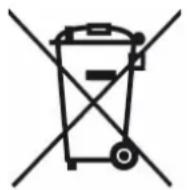

Correct disposal of the unit (Electrical and Electronic Equipment).
(Applicable in the European Union and the rest of Europe that have adopted separate collection systems countries). The European Directive 2012/19/EU on Waste Electrical and Electronic Equipment (WEEE), requires that old household electrical appliances must not be disposed of in the normal household waste stream. Old appliances must be collected separately in order to optimize the recovery and recycling of the materials they contain and reduce the impact on human health and the environment. The symbol of the crossed out dustbin is marked on all products to remind the obligations of separate collection. Consumers should contact their local authority or retailer for information concerning the correct disposal of their product.
| DIRECTIVAS | NORMAS o ESPECIFICACIONES |
| (RED) 2014/53/EU et (EMC)2014/35/EU | ETSI EN 301 489-1'.2.2.3 (2019-11)ETSI EN 303 489-17'.3.2.4. (2020-09)EN 300 328'.2.2.2 (2019-07)EN 62479 2010EN 62368-1 2014 + A11 2017 |
| (ROHS) 2011/65/EU T,,e object of t,,e declarat"on descr"bed above "s "n confor""ty w"t,,D"rect"ve 2011/65/EU of t,,e European Parl"a"ent and of t,,e Counc"l of 8 June 2011 on t,,e restr"ct"on of t,,e use of certa"n ,,azardous substances "n electr"cal and electron"c equ"p"ent.EU 2011/65/EU and EU 2015/863 and EU 2017/2102 | |
Mundols„e““, 11/10/2022
natural_image
Symbol of a trash bin with crossed lines indicating no waste or discharge (no text or labels)natural_image
Symbol of a trash bin with crossed lines indicating no waste or discharge (no text or labels)natural_image
Symbol of a trash bin crossed with no text or labels, accompanied by a black rectangular block below (no readable text or symbols)çÄVÇÇ
BP ç1071
ç7452 MuÈdãòs„ü“” à F«AÉ°E
- DÉCLARATION UE DE CON,,ORMITÉ
- Thank you for choosing a Livoo product!
- Livoo, your daily companion till social networks
- Safety Änstructions
- Technical Specifications
- Volume control and track change
- SET button
- zluetooth connection
- Setting the alarm („igure 2, first and second image)
- EU DECLARATION O,, CON,, ORMITY
- Procedure to observe for battery's end of life
- ATTENTION: THESE lithium CELLS MUST BE RECYCLED OR ELIMINATED IN ACCORDANCE WITH THE EQUIPMENT SCRAPPIN".
- Correct disposal of the unit (Electrical and Electronic Equipment).
Brand : LIVOO
Model : TES255
Category : Loudspeaker