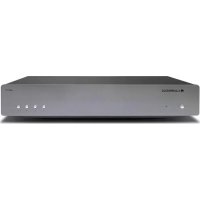
AXN10 - Hi-fi system CAMBRIDGE - Free user manual and instructions
Find the device manual for free AXN10 CAMBRIDGE in PDF.


| Product type | Network player / hi-fi system |
| Brand | Cambridge |
| Model | AXN10 |
| Power supply | Mains, regional power cable supplied |
| Standby power consumption | 0.5 W (Eco mode) |
| Network connectivity | Wi-Fi, Ethernet |
| Bluetooth | Yes, with aptX support |
| USB input | USB-A for storage devices (FAT32/NTFS) |
| Built-in streaming services | Spotify Connect, TIDAL Connect, Qobuz, Deezer |
| Wireless streaming | AirPlay 2, Chromecast built-in |
| Internet radio | Yes, with up to 99 presets |
| Supported audio formats | ALAC, WAV, FLAC, AIFF, DSD (up to x512), WMA, MP3, AAC, HE AAC, OGG Vorbis |
| Control app | StreamMagic (iOS/Android) |
| Firmware update | Automatic via network (network standby) |
| Factory reset | By button or via app |
| Included accessories | User manual, quick start guide, regional power cable |
| Maintenance and cleaning | Clean with a soft dry cloth. Do not use solvents. |
| Safety instructions | Do not expose to water, do not open the device, unplug before cleaning. |
| Spare parts and repairability | Contact an authorized service center for any repairs. No retail spare parts available. |
| General information | Bluetooth trademark, Qualcomm aptX, Stream Magic. Manufacturer: Audio Partnership Plc. |
Frequently Asked Questions - AXN10 CAMBRIDGE
User questions about AXN10 CAMBRIDGE
0 question about this device. Answer the ones you know or ask your own.
Ask a new question about this device
Download the instructions for your Hi-fi system in PDF format for free! Find your manual AXN10 - CAMBRIDGE and take your electronic device back in hand. On this page are published all the documents necessary for the use of your device. AXN10 by CAMBRIDGE.
USER MANUAL AXN10 CAMBRIDGE
natural_image
Simple line drawing of a rectangular object with four circular holes and a curved base (no text or symbols)Sommaire
AXN10 3
Introduction 4
Rear panel connections 8
Getting connected 9
Application StreamMagic - Réglages 11
Google Home / Chromecast built-in 12
Radio Internet 13
Airplay 14
Technical Specifications 22
Troubleshooting 24
Frequently Asked Questions (FAQ) 25
AXN10
natural_image
Simple line drawing of a rectangular object with four small circles on its top and a curved base (no text or symbols)Manuel D'utilisation
Introduction
© Copyright Cambridge Audio Ltd
Lecteur AXN101.
WiFi/BT Antenna (x2)2.
Rear panel connections
- Line output.
Fixed level analogue output used to provide a signal to an integrated amplifier, pre-amp or recording device.
-
S/P DIF coaxial digital output.
-
TOSLINK digital output.
-
WiFi and Bluetooth antenna
Ensure both antennas are connected securely before use.
- Service port.
For servicing use only.
Connecting any other device here may result in damage.
- USB Socket
Connection for a USB flash drives.
The USB port is not intended for connection to Apple mobile devices, no functionality, charging or otherwise, is supported.
- Ethernet
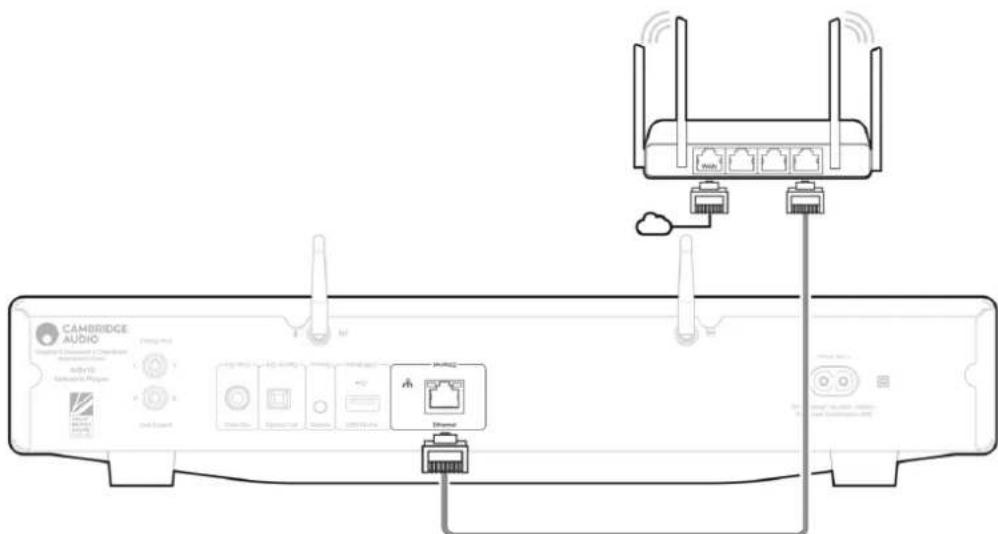
Use to connect the AXN10 directly to a router.
-
WiFi antenna
-
AC Power Socket
Once you have completed all connections to the amplifier, plug the AC power cable into an appropriate mains socket then switch on.
Getting connected
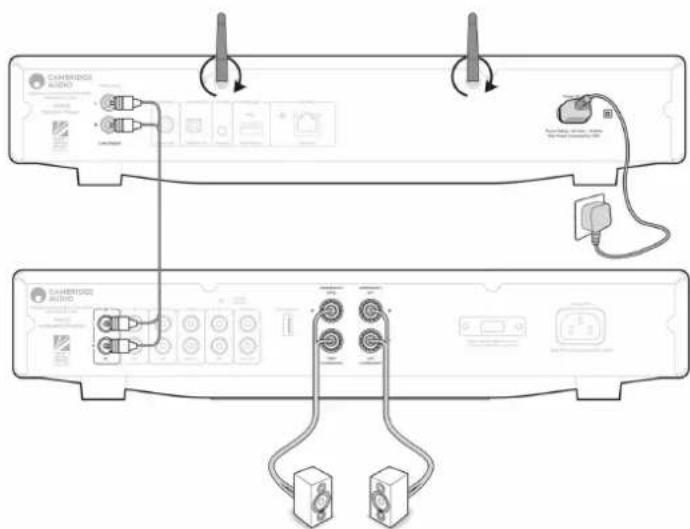
The diagram below shows the basic connection of your AXN10 to an AXA35.
Connecting to WiFi
Important Note: It is vitally important that your AXN10 remains connected to a Wi-Fi network as often as possible. This will ensure that the unit is regularly updated to meet essential security protocols, third party compatibility and the latest software requirements.
Failure to maintain your device with regular firmware updates as provided by Cambridge Audio will void the product warranty and is likely to cause major issues to the unit in time. Please ensure that your unit is updated to the most current firmware version. Information on the latest firmware version for the AXN10 can be found here.
Note: The AXN10 is not compatible with captive portal networks. The AXN10 can connect to 2.4GHz/5GHz WiFi networks
Application StreamMagic - Réglages

Configuration
Google Home / Chromecast built-in

TIDAL (via StreamMagic)
Qobuz (via Chromecast)
Qobuz (via StreamMagic)
Deezer (via Chromecast)
Deezer (via StreamMagic)\*
Technical Specifications
Ethernet, USB host (mass storage), Wi-Fi, Bluetooth
Outputs
Line out (unbalanced), Digital out (Coax and Optical)
DAC
ESS Sabre ES9033Q
Frequency response
20Hz - 70kHz +0/-1dB
THD+N 0dBFS, 1khz, 20k BW
<0.001%
S/N Ratio (20k BW)
110dB
RCA output level
2Vrms +/-10%
RCA output Impedance
500Ohm
Ethernet
IEEE 802.3 10 Base-T or 100 Base-T
Wi-Fi
Wi-Fi 5 dual band 2.4/5GHz
WPA2/WPA2-PSK
Bluetooth
5.0 A2DP/AVRCP supporting SBC and AAC
Compatibility
UPnP, Local USB media, Chromecast built-in, Spotify connect, Tidal, Qobuz, RoonReady, Airplay2, Amazon Music
Audio formats
ALAC, WAV, FLAC, AIFF, DSD (x512), WMA, MP3, AAC, HE AAC, AAC+, OGG Vorbis, HLS/DASH, .m3u, .pls playlists
USB File system support
FAT32, NTFS, ext3/4, ExFAT
Hi-res support
Up to 768KHz 32bit PCM, up to DSD512
Mains Voltage
100-240V \~50/60Hz
Max Power consumption
20W
Standby power consumption
<0.5W
Dimensions (H x W x D)
75 x 430 x 305mm
Weight
3.5kg
Troubleshooting
If you have trouble connecting the AXN10 to your network, these steps may help to resolve the problem:
- Ensure that both of the supplied Wi-Fi antennas are securely connected.
- Confirm that a connected computer can access the Internet (i.e. can browse the web) using the same network.
- If you have an encrypted Wi-Fi network, check that you have entered the correct key or passphrase. Remember that text-format keys are case-sensitive.
If your AXN10 can connect to the network successfully but is unable to play particular Internet Radio stations, it may be due to one of the following causes:
- The station is not broadcasting at this time of the day (remember it may be located in a different time zone).
- The station has reached the maximum allowed number of simultaneous listeners.
- The station is not broadcasting anymore.
- The Internet connection between the server (often located in a different country) and you is too slow.
If you have trouble connecting the StreamMagic app to the AXN10, these steps may help to resolve the problem:
- Ensure that both of the supplied Wi-Fi antennas are securely connected.
- Ensure that your mobile device and the AXN10 are connected to the same network.
- Ensure that you have allowed the StreamMagic app to have access to devices on your network, via your mobile devices' app settings.
- Check whether any VPN or Anti-Virus app downloaded on to your mobile device may be preventing the StreamMagic app from 'seeing' the AXN.
If you have problems with UPnP playback check the following:
- Ensure your chosen UPnP server software is capable of serving the file type you are trying to access. Some servers do not serve FLAC for instance.
- The AXN can only play non DRM files. Files that have DRM controls cannot be played by the AXN. Some servers may be able to authorise and de-crypt Microsoft PlaysForSure before then serving the content to the AXN, but this operation is not guaranteed as it is purely a function of the server.
- If attempting to play 24-bit WAV or FLAC content a wired Ethernet connection is normally required for reliable operation due to bandwidth considerations.
- Check that the AXN is capable of playing back the file type you are trying to access.
If you have problems with USB Media playback check the following:
- Check that the AXN is capable of playing back the file type you are trying to access.
- For USB Media, the AXN can only play non DRM files. Files that have DRM controls cannot be played.
- Check that your device does not require more than 1A if it is powered from the USB socket itself.
- Check your device format is supported by the AXN.
- The way you organise your USB media affects how efficiently the AXN can browse the content. A good practice is to create folders for Artists within which you should have subfolders for each Album which then contain the tracks for that Album. Libraries with thousands of tracks in one folder will progressively slow down the AXN's media browsing.
There is no power:
- Ensure the AC power cord is connected securely.
- Ensure the plug is fully inserted into the wall socket and is switched on.
- Check fuse in the mains plug or adaptor.
Frequently Asked Questions (FAQ)
Can the AXN10 support MQA content?
Although the AXN can receive MQA encoded content, it is not possible for the device to playback full MQA files via TIDAL Connect, because the AXN does not have an MQA decoder built in to unfold the MQA files.
There are no plans to integrate MQA support into the AXN, as this would require a hardware modification to install a Full MQA Decoder.
How do I set up my AXN10 with a DacMagic 200M for MQA passthrough?
Although the AXN can receive MQA encoded content, it is not possible for the device to playback full MQA files via TIDAL Connect, because the AXN does not have an MQA decoder built in to unfold the MQA files.
It is, however, possible to bypass the DAC in the AXN, and have the MQA file processed by an external DAC that supports MQA, such as the DacMagic 200M. This will allow the full unfold of the MQA file to take place in the DacMagic 200M, and you will still be able to control and queue your MQA files via the AXN.
Please follow the below instructions on how to how to set this up:
- Connect either of the Digital Outputs (SP/DIF Coaxial or Toslink Optical) of the AXN to the corresponding DacMagic 200M Digital Input (D1 or D2).
- Connect the Balanced or Unbalanced Output of DacMagic 200M to your amplifier.
- Select the relevant D1/D2 Input on your DacMagic 200M.
- Open the TIDAL app 'Settings' on your smartphone or tablet, and confirm that the streaming quality is set to 'Master'.
- Select the AXN within the TIDAL Connect menu as your output device.
- Processing of the MQA files will now be passed through to the DacMagic 200M, and MQA playback should be indicated on the DacMagic 200M by the relevant LED light.
Can I use more than one of the AXN10's outputs at once?
If you wish to connect the AXN to one single device, you can use any output, digital or analogue, that you wish.
If, however, you would like to connect the AXN to more than one device at a time, you can connect up to three devices and play simultaneously, as all outputs remain active at all times.
Please note, however, that as the AXN does not contain a volume control, you will need to ensure that the devices connected to the player have their own volume control.
How do I stop the AXN10 from powering down when not in use?
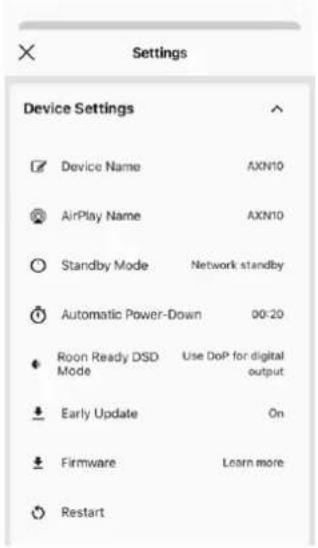
The AXN will automatically switch to standby mode after 20 minutes of inactivity. This Automatic Power-Down (APD) feature can be disabled, by navigating to the device settings within the StreamMagic app.
You can either disable this feature, or edit the length of time it takes for APD to be triggered, by selecting 'Automatic Power-Down'.

Can I play files from a connected USB HD when the AXN10 is not connected to a network?
This is not possible as the use of the StreamMagic app is required to be able to play local files from a connected USB HD.
Please note that it is strongly recommended that the AXN is connected to a network at all times.
What is the Service port on the back of the AXN10 for?
The service port on the back of the AXN is intended for servicing use only by Cambridge Audio authorised service centres and dealers. Please do not connect any devices to the service port, as this may result in damage to the unit.
Do I need to connect both Antennas for the AXN10 to work?
Yes, if you are connecting your AXN to your network wirelessly, you will need to connect both of the supplied antennas to enable full Wi-Fi functionality and the strongest possible wireless network connection.
Bluetooth functionality will also only be possible when one of the antennas is connected to the port with the Bluetooth symbol.
Does the AXN10 have pre-amp or volume control?
The AXN does not have a 'pre-amp' mode and it is not possible to control the volume of the unit, as it outputs a fixed volume level. You will need to control the volume of the AXN via your connected amplifier or DAC.
Does the AXN10 have a remote control?
The AXN does not have a remote control. The unit can be controlled and the settings can be adjusted via the StreamMagic app.
- Sommaire
- AXN10
- Manuel D'utilisation
- Introduction
- Rear panel connections
- Getting connected
- Connecting to WiFi
- Application StreamMagic - Réglages
- Configuration
- Google Home / Chromecast built-in
- TIDAL (via StreamMagic)
- Qobuz (via Chromecast)
- Qobuz (via StreamMagic)
- Deezer (via Chromecast)
- Deezer (via StreamMagic)\*
- Technical Specifications
- Outputs
- DAC
- Frequency response
- THD+N 0dBFS, 1khz, 20k BW
- S/N Ratio (20k BW)
- RCA output level
- RCA output Impedance
- Ethernet
- Wi-Fi
- Bluetooth
- Compatibility
- Audio formats
- USB File system support
- Hi-res support
- Mains Voltage
- Max Power consumption
- Standby power consumption
- Dimensions (H x W x D)
- Weight
- Troubleshooting
- There is no power:
- Frequently Asked Questions (FAQ)
- Can the AXN10 support MQA content?
- How do I set up my AXN10 with a DacMagic 200M for MQA passthrough?
- Can I use more than one of the AXN10's outputs at once?
- How do I stop the AXN10 from powering down when not in use?
- What is the Service port on the back of the AXN10 for?
- Do I need to connect both Antennas for the AXN10 to work?
- Does the AXN10 have pre-amp or volume control?
- Does the AXN10 have a remote control?
Brand : CAMBRIDGE
Model : AXN10
Category : Hi-fi system