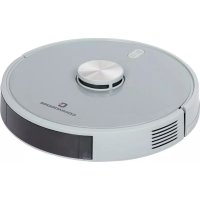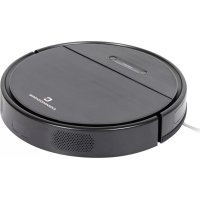
CVR 100 - Vacuum Cleaner Commodore - Free user manual and instructions
Find the device manual for free CVR 100 Commodore in PDF.


User questions about CVR 100 Commodore
0 question about this device. Answer the ones you know or ask your own.
Ask a new question about this device
Download the instructions for your Vacuum Cleaner in PDF format for free! Find your manual CVR 100 - Commodore and take your electronic device back in hand. On this page are published all the documents necessary for the use of your device. CVR 100 by Commodore.
USER MANUAL CVR 100 Commodore
natural_image
Top-down view of a black circular robotic vacuum cleaner (no visible text or symbols)text_image
Technical diagram of a mechanical assembly with numbered components for identificationnatural_image
Diagram of a robotic vacuum cleaner with a handle and internal components, showing airflow direction (no text or symbols)natural_image
Line drawing of a device casing with a label and handle (no readable text or symbols)natural_image
Technical line drawing of a robotic vacuum cleaner with internal components and wiring (no text or symbols)Inbetriebnahme
natural_image
Technical line drawing of a mechanical component with a flanged top and curved base (no text or symbols)natural_image
Technical line drawing of a circular robotic vacuum cleaner with an exploded view showing internal components (no text or symbols)
ACHTUNG!

natural_image
Technical line drawing of a mechanical bracket with two circular components and an arrow indicating direction (no text or symbols)natural_image
Line drawing of a minimalist living room interior with sofa, coffee table, and wall (no text or symbols)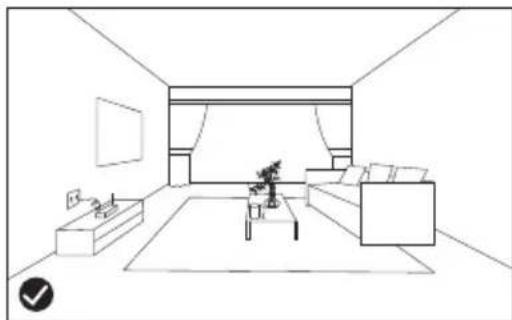
natural_image
Line drawing of a modern living room with sofa, coffee table, and wall (no text or symbols)natural_image
Line drawing of a wooden railing with railings and a circular diagram showing a wheel (no text or symbols)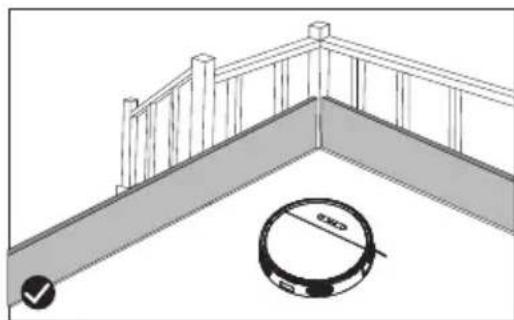
natural_image
Architectural diagram showing a railing and a circular object with diameter标注 (no text or symbols)
HINWEIS!

natural_image
Illustration of a remote control device next to a simple electrical circuit diagram (no text or symbols)Rückkehr
text_image
Diagram showing a remote control device connected to a device with a home control panel and indicator lights.
HINWEIS!

natural_image
Cross-sectional diagram of a mechanical assembly inside a circular housing (no text or labels)text_image
Anti-Fall-Sensorennatural_image
Diagram of a robotic vacuum cleaner with a handle and internal components, showing airflow direction (no text or symbols)natural_image
Technical line drawing showing two stages of a mechanical device: opening a box and pouring liquid into a cup (no text or symbols present)natural_image
Technical line drawing showing two views of a device with internal components, no text or symbols presentnatural_image
Diagram of a robotic vacuum cleaner with a handle and internal components, showing no text or symbols.natural_image
Technical line drawing of a mechanical assembly with no visible text or symbolsnatural_image
Technical line drawing of a mechanical assembly with no visible text or symbolsnatural_image
Diagram showing two steps of a printer or scanner device: opening a sheet and inserting into a container with liquid (no text or symbols present)natural_image
Line drawing of a device casing with a label and handle (no readable text or symbols)natural_image
Technical line drawing of a mechanical device with no visible text or symbols
WARNUNG!

natural_image
Technical line drawing of a mechanical device with internal components and mounting holes (no text or symbols)text_image
Diagram showing two crossed bins with no text or symbols, possibly indicating waste sorting or classification rules.CVR 100 Robot Vacuum Cleaner
EN
Operating Manual

natural_image
Top-down view of a black circular robotic vacuum cleaner (no visible text or symbols)Technical specifications..42
Introduction...43
Explanation of symbols ...43
Intended use..44.
Important safety information...45
Parts description...49
Startup 54
Cleaning modes..62
Using the battery...65
Cleaning, maintenance and storage...67
Troubleshooting...73.
Warranty 75
Disposal instructions....78
Declaration of conformity/certificates....78
Notes....79
Technical specifications
| CVR 100 Robot Vacuum Cleaner | |
| Power: | 40 Watts |
| Battery: | 14.8 V 2.6 Ah lithium ion |
| Operating duration: | max. 120 minutes* |
| Charging time: | about 4 hours |
| Maximum suction: | 2.6 kPa |
| Weight: | 3.23 kg |
| Product size: | 35 x 7.8 cm |
| Charging station / power supply | |
| Manufacturer: | Debom Technology Co., LtdNo.502, Building6, 8 Dongzhou Road, Chashan Town, 523000 Dongguan City, Guangdong province, China |
| Model: | DBS012A-2000600G |
| Supply voltage: | 100-240 V |
| Output voltage: | 20 V |
| Output current: | 0.6 A |
| Output power: | 12 W |
| Average operational efficiency: | 82.9% |
| Efficiency at low load (10 %): | 73.26% |
| Power consumption at zero load: | 0.1 W |
| Remote control: | |
| Batteries: | 2 x 1.5 V AAA (not included) |
*Guide values, depending on the operating mode, temperature and ground conditions
Introduction
Thank you for purchasing the CVR 100 Robot Vacuum Cleaner! Please read the operating manual carefully before using the Robot Vacuum Cleaner and ensure that it is used properly and in accordance with the instructions.
Retain this instruction manual for future reference. Only give the Robot Vacuum Cleaner to third parties along with the operating manual.
The manufacturer reserves the right to make changes to the product.
The operating manual and illustrations within it may differ depending on the model.
We hope you enjoy using the CVR 100 Robot Vacuum Cleaner!
Explanation of symbols

WARNING!

Contains important information to avoid injuries.

CAUTION!

Contains important information to prevent damage to the product.

NOTE!

Highlights important information and notices in the operating instructions.
Intended use
- The Robot Vacuum Cleaner is exclusively designed for vacuuming dust, dirt, crumbs, etc. The Robot Vacuum Cleaner is not suitable for absorbing liquids, very heavy dirt, glass splinters, flammable substances, or hot ash.
- The Robot Vacuum Cleaner is designed for use on hard floors (e.g., solid floor coverings). Its performance is severely limited when used on soft substrates (e.g., high-pile carpets).
- The Robot Vacuum Cleaner has a mopping function for use on suitable, smooth floor coverings.
- The Robot Vacuum Cleaner is exclusively intended for private use in dry interiors and is not suitable for commercial use.
- Only use the Robot Vacuum Cleaner as described in this operating manual.
- Any other use is considered improper and may result in damage to property or even injury to people.
- The Robot Vacuum Cleaner is not a toy for children.
- The manufacturer or distributor accepts no liability for damage caused by unintended or improper use.

WARNING!

- Please strictly comply with the safety regulations stated in the manual. The producer or distributor cannot be held liable for any injury to persons, material damage, accidents or legal disputes resulting from the violation of the safety regulations. The liability is always limited to the purchase value of the Robot Vacuum Cleaner.
- Only connect the Robot Vacuum Cleaner or the charging station if the mains voltage of the socket matches the information on the type plate of the mains adapter.
- Only connect the mains adapter to an easily accessible socket, so that you can quickly disconnect the Robot Vacuum Cleaner or charging station from the mains in the event of a fault.
- Only use the included AC adapter to charge the battery in the Robot Vacuum Cleaner. If the cable or power adapter is damaged, the power adapter must be disposed of and replaced with a power adapter of the same type.
- Do not operate the Robot Vacuum Cleaner if it or the charging station shows visible damage or if the mains adapter cable or mains adapter is defective.
- Do not use the Robot Vacuum Cleaner outdoors.
- The suction robot, charging station, mains adapter and mains adapter cable must not be immersed in water or other liquids.
- Do not use the Robot Vacuum Cleaner on damp floors or in places where there is a risk of the Robot Vacuum Cleaner coming into contact with water or immersing in water, e.g., in the vicinity of swimming pools.

WARNING!

- Never touch the Robot Vacuum Cleaner, charging station, mains adapter and mains adapter cable with wet hands.
- Never unplug the AC adapter from the wall outlet using the AC adapter cable; always use the AC adapter.
- Keep the Robot Vacuum Cleaner, the power adapter and the power adapter cable away from open fire and hot surfaces.
Do not use the Robot Vacuum Cleaner near a burning chimney, for example. - Do not bend the power adapter cable and do not place it over sharp edges.
- If you are not using the Robot Vacuum Cleaner or want to clean it, or if a malfunction occurs, always switch off the Robot Vacuum Cleaner and unplug the mains adapter from the socket.
- Only open the housing of the Robot Vacuum Cleaner as described in this operating manual. Repairs may only be carried out by a specialist workshop authorised by KSR. Liability and warranty claims are excluded if repairs are carried out independently or by improper connection or incorrect operation.
- This Robot Vacuum Cleaner can be used by children aged 8 years and above and by persons with reduced physical, sensory, or mental capabilities, or lack of experience and knowledge if they are supervised or have been instructed in the safe use of the Robot Vacuum Cleaner and understand the hazards involved.

WARNING!

- Children are not allowed to play with Robot Vacuum Cleaner.
- Cleaning and maintenance may be carried out by children over 8 years of age under supervision.
- Keep children under the age of 8 away from the Robot Vacuum Cleaner, the charging station, mains adapter and mains adapter cable.
- Do not use the Robot Vacuum Cleaner in a room where a child is alone. The child could get hurt.
- Do not let children play with the packaging film. They can get caught in it and suffocate while playing.
- Keep a distance to the rotating brushes of the Robot Vacuum Cleaner. Always turn it off before lifting or transporting it.
- Only operate the Robot Vacuum Cleaner with the dust container and filter inserted.
- Do not stand or sit on the Robot Vacuum Cleaner.
- Keep pets away from the Robot Vacuum Cleaner and do not let them sit or stand on the robot vacuum cleaner.
- Do not place any objects on the Robot Vacuum Cleaner.
- Do not use the Robot Vacuum Cleaner in places where there is an obvious "danger of falling", e.g., next to stairs, on large tables, etc.
- Make sure that the Robot Vacuum Cleaner cannot get caught in hanging cords or curtains.
- Do not let the robot run over mains, loudspeakers or other cables.

WARNING!

- Do not use the Robot Vacuum Cleaner to vacuum substances such as lime, cement dust, glowing ash, toner dust or very fine sand, as this could clog the filter pores.
- Do not use the Robot Vacuum Cleaner on high pile carpets or carpets with carpet fringes.
- Switch off the Robot Vacuum Cleaner immediately if it is obviously behaving incorrectly, unusual odours occur, or a dangerous situation arises.
- Do not use the Robot Vacuum Cleaner if the suction opening is blocked. Eliminate the cause (e.g., hair, dust, etc.) to ensure a smooth flow of air through the suction opening.
-
The Robot Vacuum Cleaner should only be used or stored under the following conditions:
-
At 10-40°C room temperature
- Relative humidity of no more than 80%
- No aggressive air pollution
Parts description
Robot Vacuum Cleaner
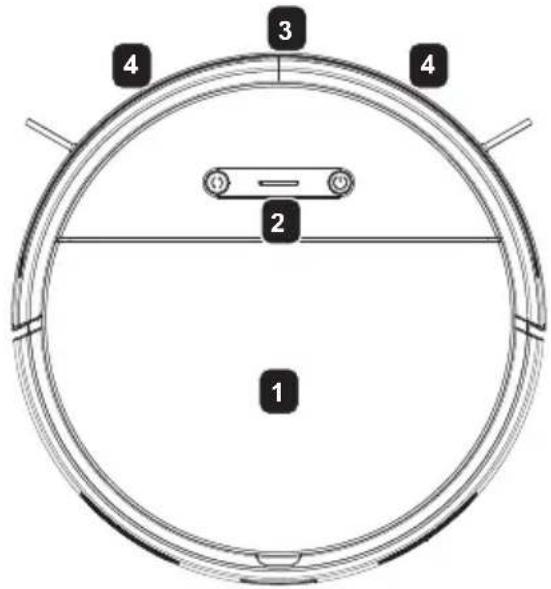
text_image
1 2 3 4 4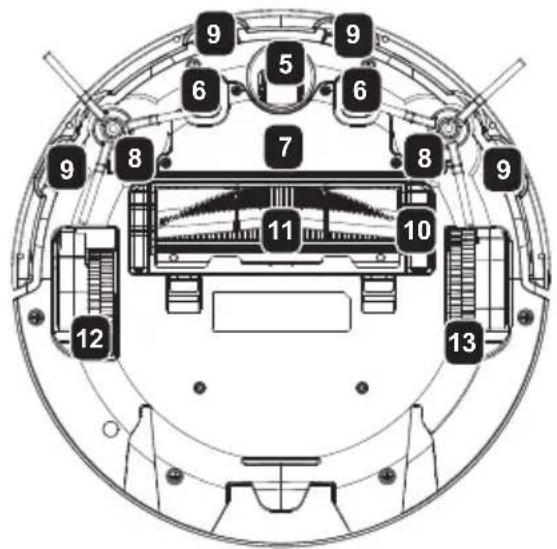
text_image
Technical diagram of a mechanical device with numbered components for identification1 Robot housing
2 Control elements
3 Infrared sensor
4 Distance sensor
5 Front wheel
6 Charging contact
7 Battery
8 Side brush
9 Anti-fall sensor
10 Brush cover
11 Combination brush
12 Left wheel
13 Right wheel
Dust collector
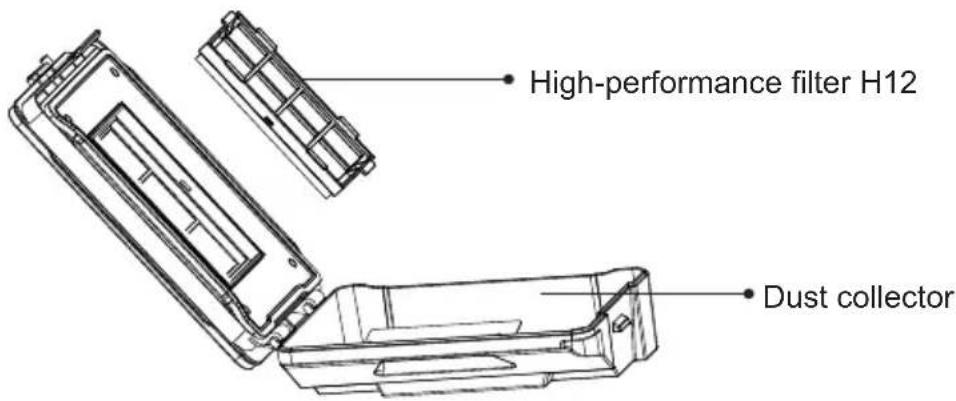
text_image
High-performance filter H12 Dust collectorParts description
Water tank with dust container
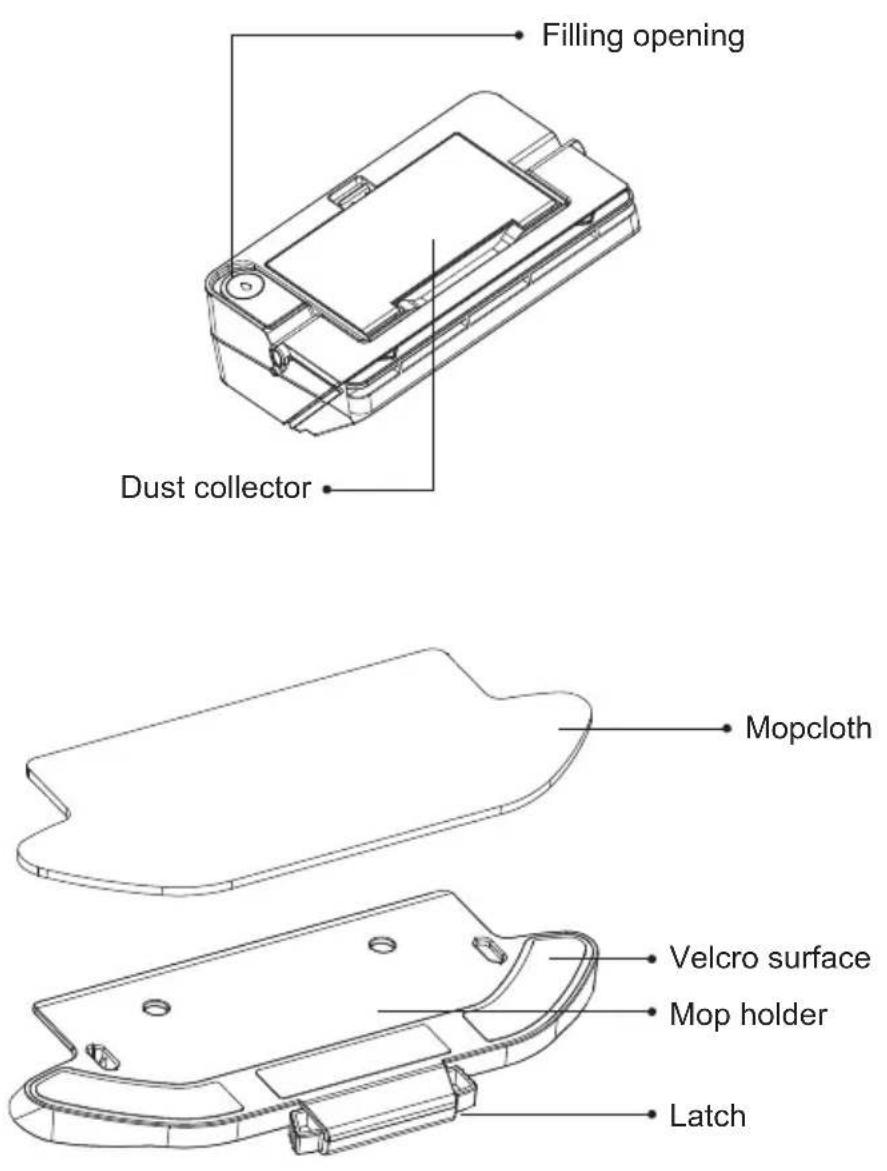
Parts description
Charging station
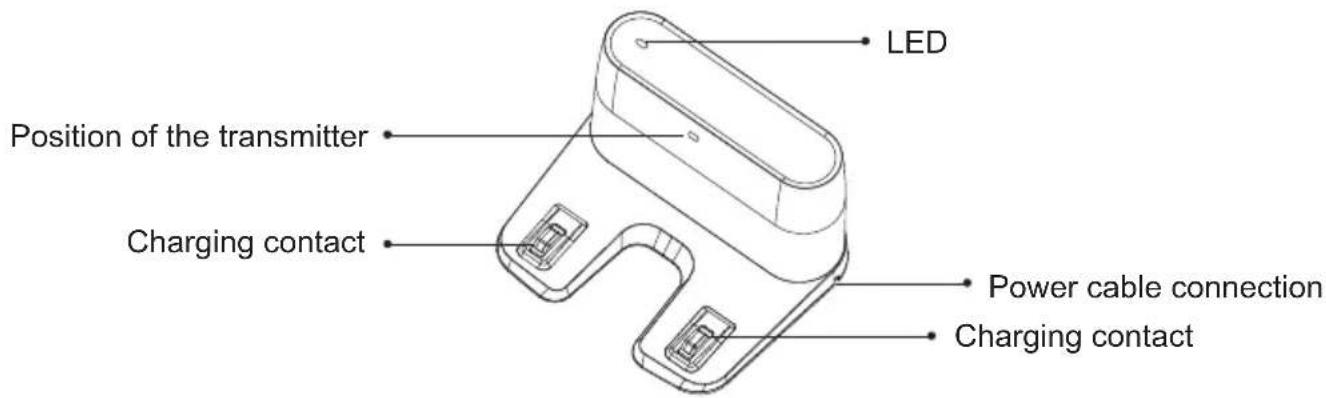
text_image
LED Position of the transmitter Charging contact Power cable connection Charging contactRemote control
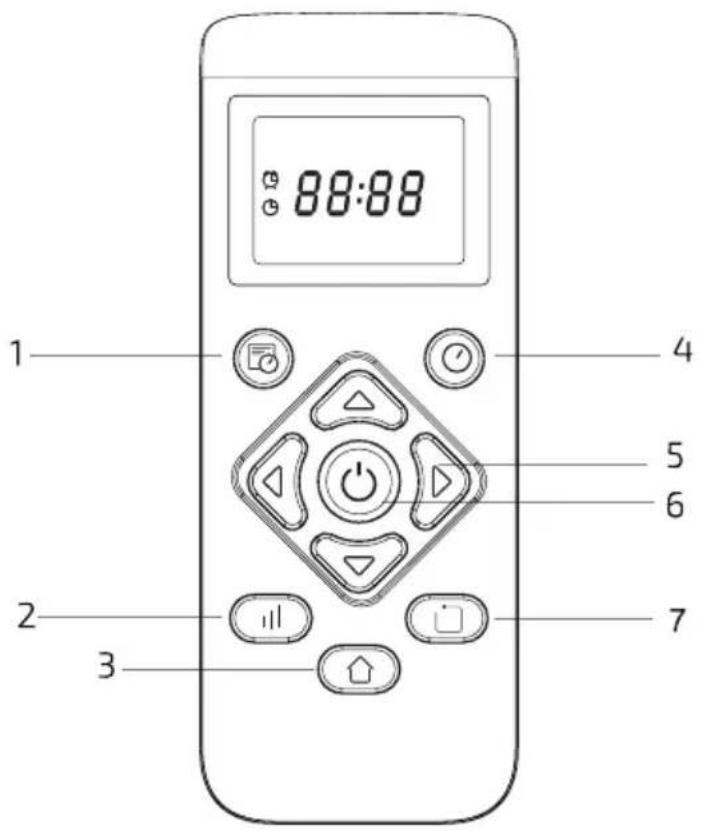
text_image
88:88 1 4 5 6 2 7 3- Scheduled time
- Power level (Eco / Normal / Turbo)
- Return button
- Time
- Manual control
- Start/Pause
- Edge mode
Startup
Install the dust container or the water tank with the integrated dust container.
• Install the dust container:
Insert the dust container into the Robot Vacuum Cleaner.
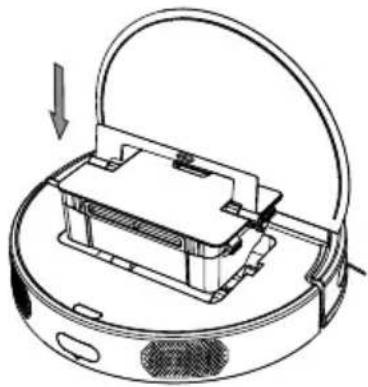
natural_image
Diagram of a robotic vacuum cleaner with a handle and internal components, showing airflow direction (no text or symbols)• Install the water tank:
-
Open the filling opening and fill the water tank with cold tap water.
-
Close the filling opening.
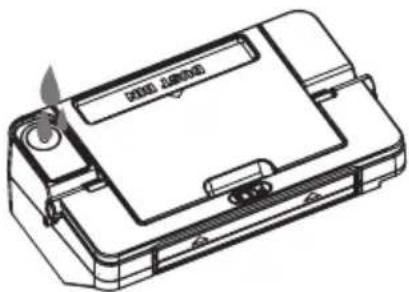
natural_image
Line drawing of a device casing with a label and flame, no readable text or symbols present- Insert the water tank into the Robot Vacuum Cleaner.
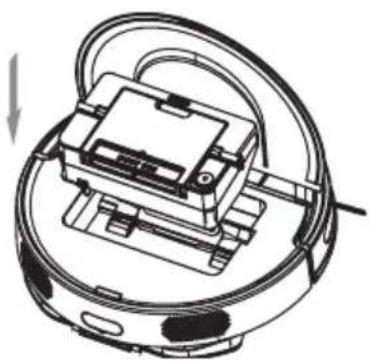
natural_image
Technical line drawing of a robotic vacuum cleaner with internal components and wiring (no text or symbols)Startup
- Attach the mopcloth to the mop holder.
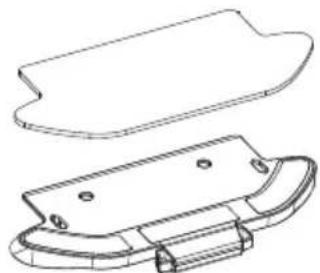
natural_image
Technical line drawing of a mechanical component with a flanged top and curved base (no text or symbols)- Slide the mop holder in the direction indicated on the underside of the Robot Vacuum Cleaner until it clicks into place.
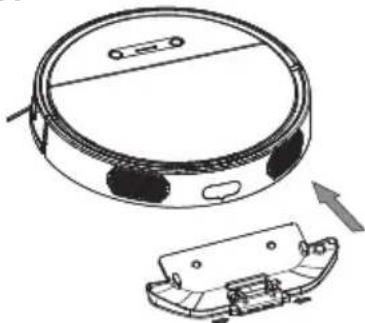
natural_image
Technical line drawing of a circular robotic vacuum cleaner with an attached plastic housing (no text or symbols)
CAUTION!

- Keep the outside of the water tank dry and do not immerse it in water or other liquids.
- If the floor is heavily soiled, we recommend vacuuming be forehand and then combined cleaning with the water tank.
- Remove the water tank and always remove the mop holder before charging the Robot Vacuum Cleaner.
- Do not use the mopping function on carpets.
- Never leave the Robot Vacuum Cleaner unattended with the water tank inserted.
- When in mopping mode, always keep the Robot Vacuum Cleaner moving to avoid water residue on the floor.
Startup
Charging the battery
The Robot Vacuum Cleaner must be fully charged before using it for the first time:
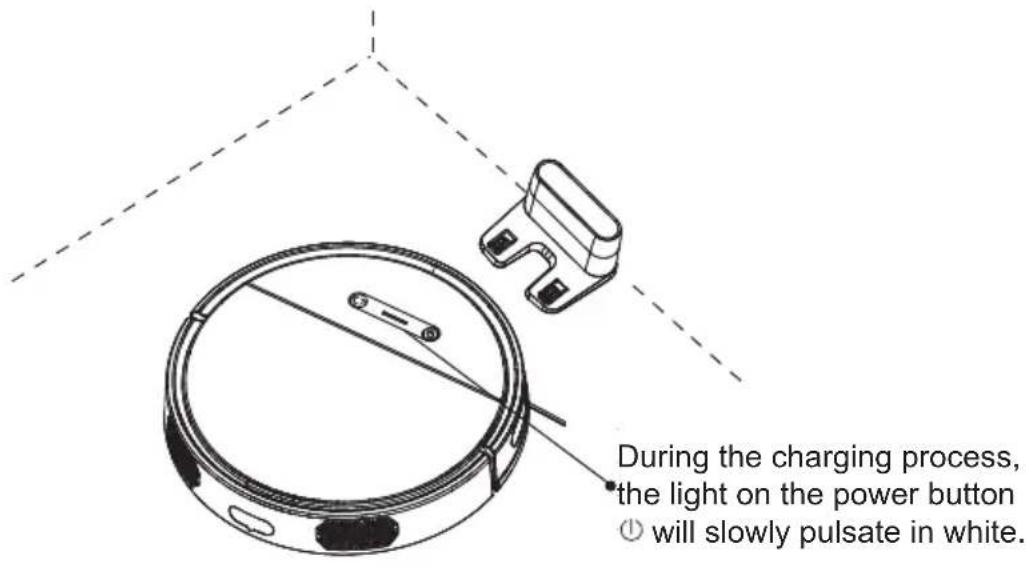
- Place the charging station against a wall.
- Remove all obstacles 0.5 ~m to the side and 1.5 ~m in front of the charging station.
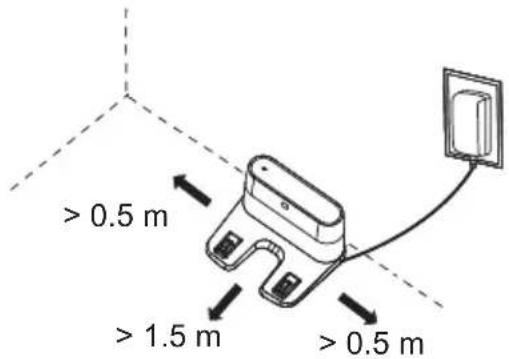
text_image
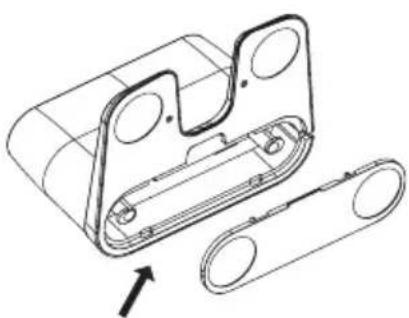
> 0.5 m > 1.5 m > 0.5 m- Connect the cable of the power adapter to the charging station. Stow any excess cable in the compartment on the underside of the charging station.
natural_image
Technical line drawing of a mechanical component with two circular features and a separate roller chain, no text or symbols present.- Connect the power adapter to a suitable wall socket (100-240 V \~ 50-60 Hz). The LED on the charging station will light up.
Startup
- Press the power button for approx. 3 seconds.
- Place the Robot Vacuum Cleaner in front of the charging station.
- Press the return button: the Robot Vacuum Cleaner will automatically move to the charging station.
text_image
During the charging process, the light on the power button ① will slowly pulsate in white.
text_image
i NOTE! i- You can also place the Robot Vacuum Cleaner directly on the charging station after switching it on.
Startup
Status display
You can see the current status of the Robot Vacuum Cleaner by pressing the power button ⏻:
| The button will light up white | The Robot Vacuum Cleaner in operation / ready / paused |
| The button will slowly pulsa-te white | The battery is loading |
| The button flashes white The network configuration mode is active | |
| The button is slowly pulsa-ting red | The firmware is updating |
| The button is slowly pulsa-ting white | The Robot Vacuum Cleaner is starting |
| The button flashes red Fault | |
Preparing the remote control
You will need 2 x 1.5 V AAA batteries (not included) to operate the remote control.
- Open and remove the battery compartment cover on the back of the remote control.
- Place 2 x 1.5 V AAA batteries in the battery compartment. Ensure the polarity is correct.
- Replace the battery compartment cover.
If the remote control will not be used for a long time, remove the batteries.
Startup
Setting the time
- Point the remote control at the switched-on Robot Vacuum Cleaner.
- Hold down the ⏻ button on the remote control for about 2 seconds until the hour display flashes.
- Use the buttons △ and ▽ to select the current time. Use the buttons ◀ and ▶ to switch between minutes and hours.
- Use the ⏻ button to save the stored time.

NOTE!

- The Robot Vacuum Cleaner will confirm that the time has been saved with an acoustic signal.
- Proceed as follows to connect the remote control to the Robot Vacuum Cleaner:
- Press the ☐ button for about 5 seconds.
- While the connection is being established, the remote control will display "8888".
- The time will be displayed again as soon as the connection has been established.
- If the connection attempt is unsuccessful for 30 seconds, the display will continue to show “8888”.
- Ensure that the Robot Vacuum Cleaner is switched on before you try to pair it with the remote control.
Startup
Install the app on your smartphone
- Scan the QR code with your smartphone to go to the Commodore homepage.

- You will find the download links for Google Playstore and Apple Appstore at “commodore-home.com”.
-
In addition to the standard remote control options, the app will also give you access to the following features:
-
Location-independent control of the Robot Vacuum Cleaner and the scheduled time
- Choice of all cleaning modes (including spot mode) and adjustment of the suction power
• Regulation of water consumption - Change/deactivate the pre-programmed idle period

NOTE!

- The Robot Vacuum Cleaner supports 2.4-GHz WiFi net - works.
- You can find detailed operating instructions for the app on the homepage.
Startup
Set the scheduled time
- Point the remote control at the switched on Robot Vacuum Cleaner (main switch in position "I").
- Hold down the 📋 button on the remote control for about 2 seconds until the hour display flashes.
- Use the buttons △ and ▽ to select the current time. Use the buttons ◀ and ▶ to switch between minutes and hours.
- Press the ⏻ button to save the stored time.
The Robot Vacuum Cleaner will now start automatically at the stored scheduled time if it is switched on.

text_image
i NOTE! i- The Robot Vacuum Cleaner will confirm that a scheduled time has been saved with an acoustic signal.
- To delete the scheduled time, select "00:00" as the start time. Then switch off the Robot Vacuum Cleaner for 1 minute.
- The scheduled time can be entered either via the remote control or app. Please note that a new entry replaces the previously stored planned time.
Startup

CAUTION!

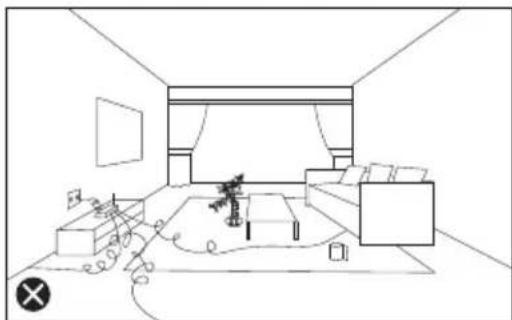
- Before startup, remove obstacles, like power cables and small objects, from the vacuum area. If possible, position small furniture so that the Robot Vacuu Cleaner will not get stuck.
natural_image
Line drawing of a minimalist living room interior with sofa, coffee table, and wall (no text or symbols)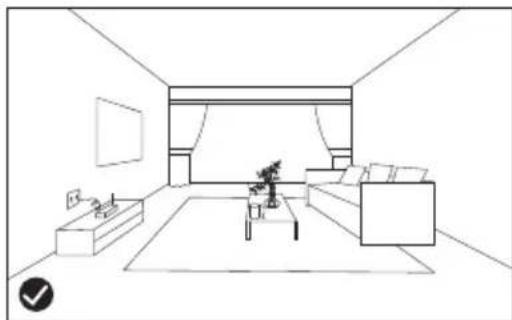
natural_image
Line drawing of a modern living room with sofa, coffee table, and wall (no text or symbols)- Not suitable for high-pile carpets. Before startup, fold carpet edges that have fringes under the carpet.
- The Robot Vacuum Cleaner needs a free space of at least 10 cm in order to vacuum under furniture.
- Make sure that no people or animals are in the Robot Vacu - um Cleaner's work area.
Startup

CAUTION!

- Check whether the Robot Vacuum Cleaner can detect areas involving risk of falling (e.g., stairs) and, if necessary, secure the area with a barrier made of cardboard or wood.
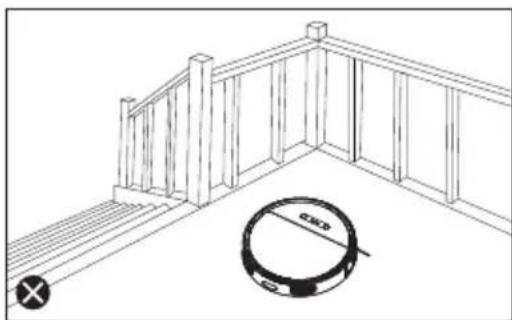
natural_image
Line drawing of a wooden deck railing with a circular inset showing a circular hole labeled 'GND' (no text or symbols beyond basic geometry)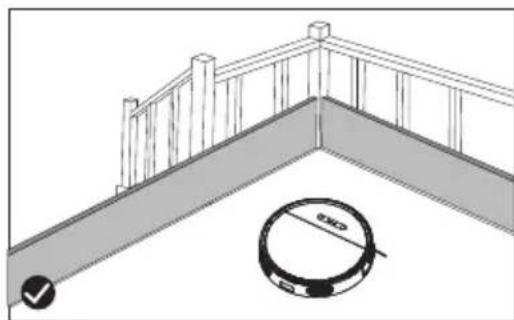
natural_image
Architectural diagram showing a balcony railing and a circular robotic room with a checkmark (no text or symbols)
text_image
i NOTE! i- Use the Robot Vacuum Cleaner daily for the best results.
Cleaning modes
Automatic cleaning
Press the power button ⏻ on the Robot Vacuum Cleaner or the remote control to activate the "automatic cleaning" mode. In this mode, the Robot Vacuum Cleaner will plan its cleaning route independently and remember which areas have already been cleaned and which have not.
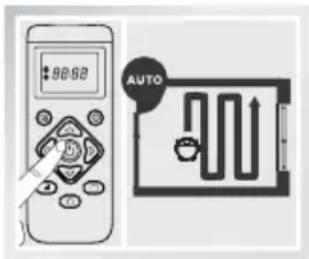
text_image
98:52 AUTO
NOTE!

- If the robot is controlled manually with the direction buttons in this mode, it will then re-plan the route. Doing that means areas that have already been cleaned can be included again. For efficient cleaning, this mode should not be interrupted by manual control commands.
- When the battery level is low, the Robot Vacuum Cleaner will automatically return to the charging station.
• Always use the automatic cleaning mode to clean carpets.
Cleaning modes
Edge mode
Press the ☐ button on the remote control to activate "Edge mode". The Robot Vacuum Cleaner will clean along walls and around furniture or similar obstacles.
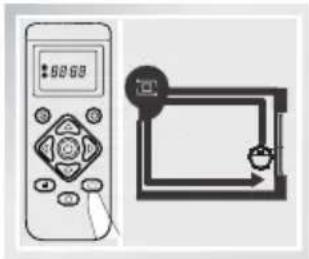
natural_image
Illustration of a remote control device next to a digital display and a rectangular device with arrows (no text or symbols)Return
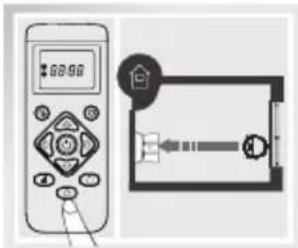
If you press the ⏻ button on the remote control or the () button on the Robot Vacuum Cleaner, it will return to the charging station by the shortest possible route.
text_image
Diagram showing a remote control device connected to a device with a labeled component and directional arrows| i | NOTE! | i |
- You can choose between the suction power levels with the "||" button:
- ECO (minimum suction power)
- Normal (normal suction power)
- Turbo (maximum suction power)
- Additional vacuum modes are available if the Robot Vacuum Cleaner is controlled via the app. You can find information in the operating instructions for the app on the "commodore-home.com" homepage
Cleaning modes
Standby mode
If you press the power button Ⓐ on the Robot Vacuum Cleaner or remote control during operation, it will switch to standby mode. Use this function, for example, to empty the dust container or to refill the water tank. Press the power button Ⓐ again to resume operation.
Sleep mode
If the Robot Vacuum Cleaner receives no input for about 5 minutes in standby mode, it will switch to sleep mode.
Press the Ⓐ button on the Robot Vacuum Cleaner or remote control to end sleep mode.

NOTE!

- The Robot Vacuum Cleaner will switch itself off after about 12 hours in sleep mode.
- Press the power button ⏻ for about 3 seconds to switch the Robot Vacuum Cleaner on or off.
- Pre-programmed rest time: In the period from 10:00 p.m. to 7:00 a.m., it is not possible to put the Robot Vacuum Cleaner into operation or to save a scheduled time. This function can be deactivated using the app. You can find information in the operating instructions for the app on the "commodore-home.com" homepage
Using the battery

WARNING!

- Charge the battery every 2 months for at least 1 hour, even if the Robot Vacuum Cleaner has not been in use, otherwise it will lose capacity.
- Regular charging protects the battery from total discharge.
- Never heat the battery or throw it into an open fire.
- Never dispose of battery cells in household waste.
- Never get moisture on the battery contacts.
- The optimal operating temperature for the battery is between 10^ C and 30^ C . Above and below this temperature, the power output will deteriorate, resulting in a reduced range.
- The battery may only be charged using the supplied power adapter. Ensure the correct voltage supply (100-240 V / 50-60 Hz).
- The battery must not be charged if the charging cable is damaged. Please contact the dealer for help.
- A battery's service life and performance depends on its age, care and how often it has been used.
- For an optimal service life, charge and store the battery in a dry and clean environment, preferably at 7-15°C room temperature.
- The Robot Vacuum Cleaner and the power adapter must not be covered during the charging process.
- Depending on the charging status, lithium batteries have a freezing point of about -20^ to -25^ . If a battery cell freezes, it will be irretrievably destroyed and the whole battery will need to be replaced.
Using the battery

WARNING!

- A lithium ion battery loses capacity at low temperatures, just like conventional batteries.
- Compared to other battery models, lithium-ion batteries experience very little self-discharge and have a very low memory effect, but they must be charged periodically.
- Please note that a over-discharged battery is irreparably destroyed and must to be replaced for a fee. The battery should also never be completely discharged during operation.
Cleaning, maintenance and storage
- Before cleaning, maintenance and/or storage, switch off the Robot Vacuum Cleaner (press the power button ⏻ for about 3 seconds to switch the robot vacuum on or off) and pull the power adapter out of the socket.
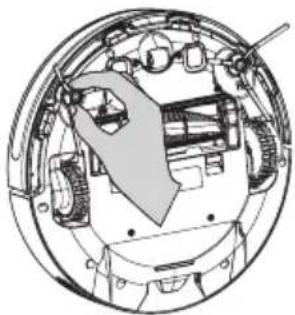
- Remove and clean the side brushes regularly:
natural_image
Cross-sectional diagram of a mechanical assembly inside a circular housing (no text or labels)Remove hair and debris.
- If the side brush is damaged, it must be replaced.
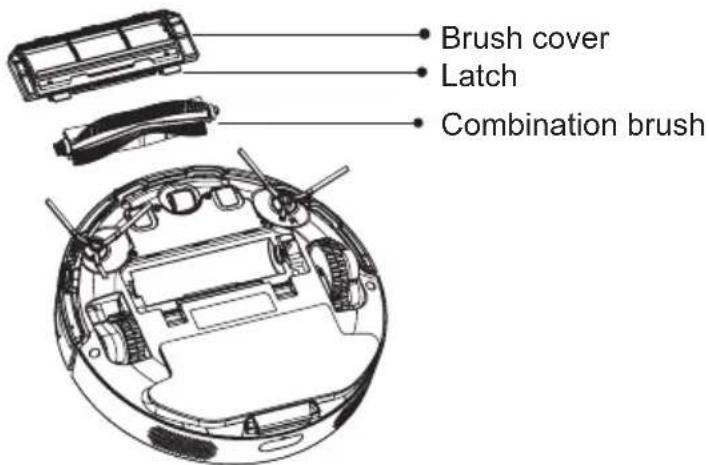
- Remove and clean the combination brush regularly:
text_image
Brush cover Latch Combination brush- Press in the latch and remove the brush cover.
- Remove and clean the combination brush.
- Put the combination brush back in.
- Replace the brush cover. The latch on the Robot Vacuum Cleaner must click into place
Cleaning, maintenance and storage
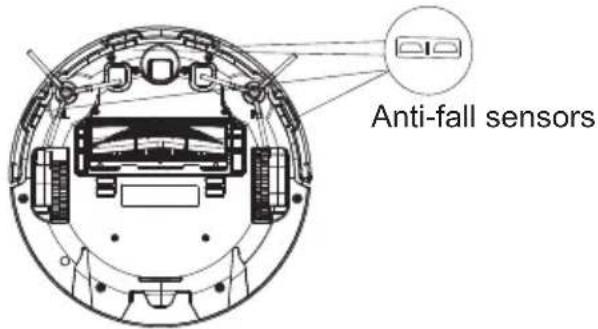
- Clean the housing, the bumper, the charging contacts and the anti-fall sensors with a lint-free, soft, dry cloth. Also clean the charging contacts on the charging station.
text_image
Anti-fall sensors- Regularly empty and clean the dust container and the high-performance H12 filter:
- Open the latch and remove the dust container.
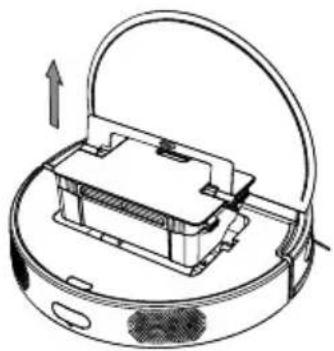
natural_image
Diagram of a robotic vacuum cleaner with a handle and internal components, showing airflow direction (no text or symbols)- Open the dust container cover.
- Clean the dust container.
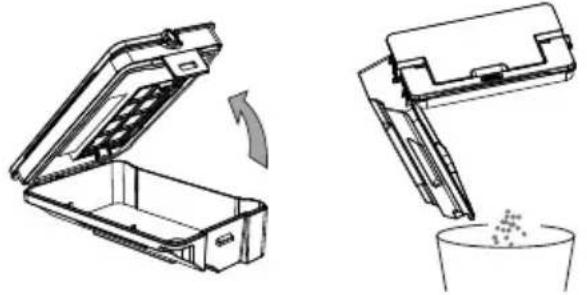
natural_image
Technical line drawing showing two views of a mechanical device with an open lid and a container filled with granules (no text or symbols)Cleaning, maintenance and storage
- Clean the dust container and the high-performance H12 filter with the cleaning brush.
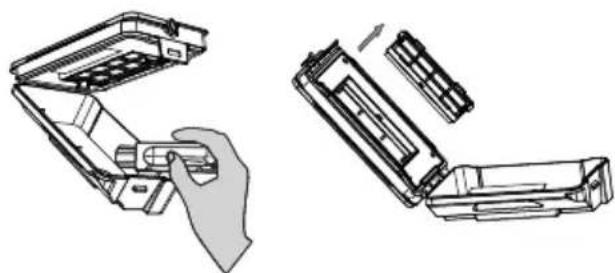
natural_image
Technical line drawing showing two views of a device with a hand holding a component (no text or symbols present)- Put the dust container back into the Robot Vacuum Cleaner.
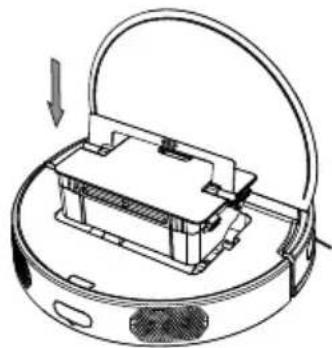
natural_image
Diagram of a robotic vacuum cleaner with a handle and internal components, showing no text or symbols.Cleaning, maintenance and storage
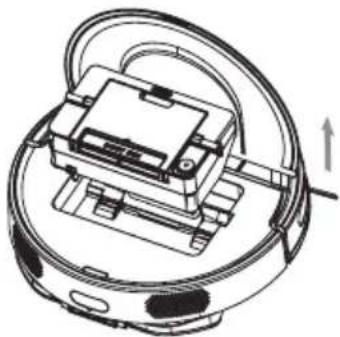
- Regularly empty and clean the dust container that is integrated in the water tank:
- Open the latch and remove the water tank.
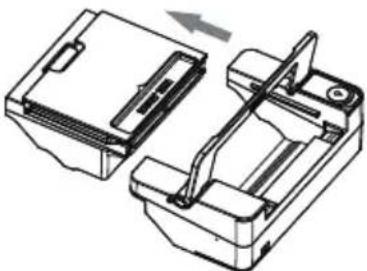
natural_image
Technical line drawing of a mechanical device with no visible text or symbols- Remove the dust container from the water tank.
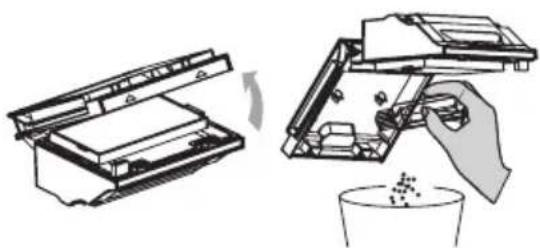
natural_image
Technical line drawing of a mechanical assembly with no visible text or symbols- Open the dust container. Empty the dust container and clean it with the cleaning brush. Then put it back in the water tank.
natural_image
Diagram showing two steps of a printer or printer device: opening and inserting into a container with a hand holding the lid (no text or symbols present)Cleaning, maintenance and storage
- Open the filling opening and fill the water tank with cold tap water.
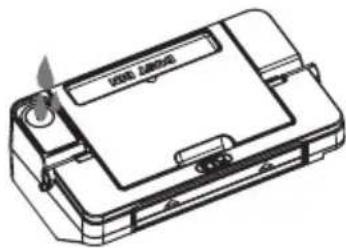
natural_image
Line drawing of a device casing with a label and handle (no readable text or symbols)- Close the filling opening.
- Insert the water tank into the Robot Vacuum Cleaner again.
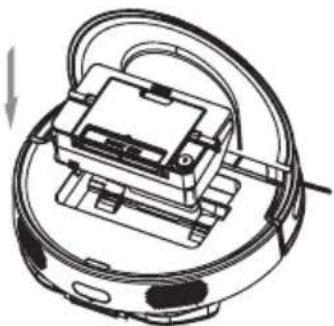
natural_image
Technical line drawing of a mechanical device with no visible text or symbols
WARNING!

- Only clean the high-performance filter dry!
- If the floor is heavily soiled, we recommend vacuuming be - forehand and then combined cleaning with the water tank.
Cleaning, maintenance and storage
- Carefully pull the front wheel out of the housing of the Robot Vacuum Cleaner to remove hair and other debris. Then put the front wheel back on.
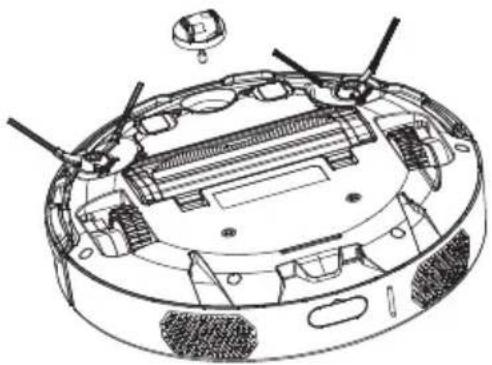
natural_image
Technical line drawing of a mechanical device with internal components and mounting holes (no text or symbols)- Clean the mopcloth, mop holder and the water tank with cold tap water.
Allow to dry completely.
- If the Robot Vacuum Cleaner will not be used for a long period of time, store it with the charging station and the power adapter in the original packaging in a dry, warm place out of the reach of children until you are ready to use it again.

CAUTION!

- The mopcloth is not suitable for washing machines and tumble dryers.
- Do not iron the mopcloth.
Troubleshooting
If the Robot Vacuum Cleaner detects a problem, the power button ⏻ will flash red.
- Clean the anti-fall sensors and the distance sensors with a lint-free, soft, dry cloth and remove any foreign objects.
- Move the Robot Vacuum Cleaner to a different location and restart it.
- Check the connection between the power adapter and the charging station.
- Check and clean the charging contacts of the Robot Vacuum Cleaner and the charging station.
- If the Robot Vacuum Cleaner repeatedly collides with the same obstacle, the bumper may be jammed. Check the bumper for dirt. Remove any foreign objects that may be present.
- If the runtime is shortened, the battery may not be fully charged. Completely charge the Robot Vacuum Cleaner.
- If the suction strength drops noticeably, the high-perfor - mance H12 filter may be very dirty. Clean the filter or replace it with a new one.
- If the dust container loses dirt, it may be too full and need to be emptied.
Troubleshooting
- There may be several causes for the Robot Vacuum Cleaner not starting at the scheduled time:
- The scheduled time was not saved or deleted (e.g., when changing the battery in the remote control). Select the scheduled time again and save it as described on page 19.
- The Robot Vacuum Cleaner is switched off. Switch on the Robot Vacuum Cleaner.
- The battery needs to be charged. Make sure that the Robot Vacuum Cleaner returns to the charging station after each use. That will ensure that the battery is always charged.
- The Robot Vacuum Cleaner cannot move. Move the Robot Vacuum Cleaner to a different location and restart it.
If the solutions above do not work, switch off the Robot Vacuum Cleaner for about 5 minutes. This will reset the Robot Vacuum Cleaner.
If the Robot Vacuum Cleaner does not work after resetting, please contact the dealer.
Warranty
Please read the operating manual carefully before use in order to familiarise yourself with how to use the Robot Vacuum Cleaner.
KSR Group GmbH grants a separate warranty if the following conditions are met. The statutory warranty provisions and the claims arising from the Product Liability Act remain unaffected by this. Any claims of the purchaser to supplementary rectification and compensation in the event of defects shall also remain unaffected if the corresponding conditions are met.
The warranty applies to the CVR 100 Robot Vacuum Cleaner and is for 24 months from the date of purchase (based on the date of the receipt).
The battery has a warranty of 6 months from the date of purchase.
The warranty covers material, design and manufacturing defects, provided that the defect was already present upon delivery and the product was handled by the purchaser in an appropriate and intended manner. Wearing parts and materials used for servicing work are excluded from the warranty. The warranty includes either free repair, replacement of the defective part or parts, or replacement of the entire product with an equivalent product. The choice of remedy resides with KSR Group GmbH.
Warranty
If a malfunction/defect occurs, the dealer must be informed immediately, and the problem that has occurred must be described to them in detail. If the problem cannot be solved in this way, the thoroughly cleaned product, including all accessories, must be packaged for safe transport and returned in accordance with the dealer's instructions.
The following information and documents must be attached to the package:
- Surname, first name and address (also to be stated on the outside of the package)
- Item no. and serial no. (can be found on the underside of the foot board)
- Purchase date
- Original receipt
- Informative description of the fault
- In case of damage during transport: Name of the parcel service and parcel number
It is strongly recommended to use the original packaging to ensure safe transport. If you use any other packaging, ensure that it is properly protected against the typical risks of shipping and has appropriate protective devices. Mere cardboard packaging with paper padding is not sufficient. KSR Group GmbH accepts no liability for damage caused by improper packaging, and the warranty will become void.
Warranty
The warranty does not apply in the following cases:
• in the event of use other than the intended use
- in the event of improper operation, care and/or maintenance or storage (e.g., damage caused by moisture or excessive temperatures, neglected products, etc.)
- in the event of repairs, repair attempts and modifications of any kind or in the event of use of third-party spare parts and accessories, etc., which have been carried out by anyone other than KSR Group GmbH or companies authorised by KSR Group GmbH
- in the event of improper transport packaging and/or improper transport
- in the event of improper mechanical influences on the product or parts of the product
- in the case of any events which are not due to the processing and manufacture of the product (e.g., a fall, impact, damage due to external influences, fire, earthquake, flood damage, lightning, etc.)
- unless original proof of purchase is presented
- when used for private purposes, especially for commercial use
If KSR Group GmbH incurs costs for sending back/returning a product, although neither a warranty case nor a right to return exists, these must be borne by the purchaser.
Disposal instructions
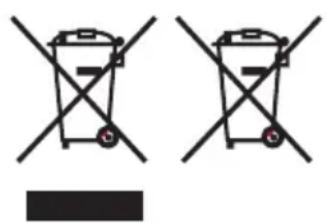
natural_image
Two identical diagrams of waste sorting bins with diagonal lines crossing each other, no text or symbols present.Old appliances may not be disposed of with household waste! If the Robot Vacuum Cleaner can no longer be used, all consumers are required by law to bring the old device to a separate waste collection point, for example in their community or district, and not in the household waste. This ensures that the old appliances are properly recycled and that negative effects on the environment are avoided. It is for this reason that electrical appliances are marked with this symbol.
Please take defective batteries or ones that are no longer usable to your local collection point. Look for the symbol on the battery.

Dispose of the packaging according to type.
Dispose of paper and cardboard as waste paper, and film as recyclables.
Declaration of conformity/certificates

This product complies with the European directives.
Notes
Distributor/issuer:
KSR Group GmbH
natural_image
Top-down view of a black circular robotic vacuum cleaner with visible sensor and control buttons (no text or symbols on body)MODE D'EMPLOI ORIGINAL
Sommaire
text_image
Technical diagram of a mechanical assembly with numbered components for identificationnatural_image
Diagram of a robotic vacuum cleaner with a handle and internal components, showing no text or symbols.natural_image
Line drawing of a device casing with a label and a flame symbol (no readable text or symbols)natural_image
Technical line drawing of a robotic vacuum cleaner with attached circuit board (no text or symbols)Mise en service
natural_image
Technical line drawing of a mechanical component with a flanged top and curved base (no text or symbols)natural_image
Technical line drawing of a circular robotic vacuum cleaner with an exploded view showing internal components (no text or symbols)
ATTENTION!

natural_image
Technical line drawing of a mechanical bracket with two circular components and an arrow indicating direction (no text or symbols)natural_image
Line drawing of a cozy living room with sofa, coffee table, and wall (no text or symbols)
natural_image
Line drawing of a modern living room interior with sofa, coffee table, and wall (no text or symbols)natural_image
Line drawing of a wooden deck railing with a circular inset showing a circular hole labeled 'GND' (no text or symbols beyond basic geometry)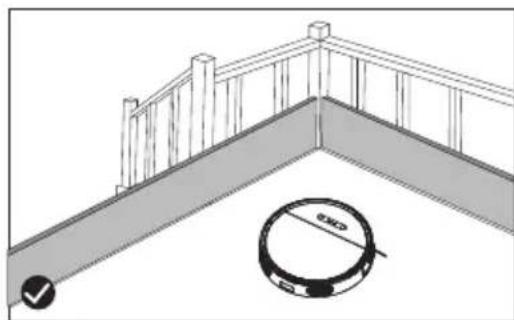
natural_image
Architectural diagram showing a railing and a circular object with 'OK' and '✓' indicators (no text or symbols)
REMARQUE!

natural_image
Illustration of a remote control device next to a digital display and a rectangular device with a scroll (no text or symbols)Retour
text_image
Diagram showing a remote control device connected to a device with a labeled component and directional arrows
REMARQUE!

natural_image
Cross-sectional diagram of a mechanical device showing internal components and structural elements (no text or labels)natural_image
Diagram of a robotic vacuum cleaner with a handle and internal components, showing airflow direction (no text or symbols)natural_image
Technical line drawing showing two stages of a mechanical device: opening a box and pouring liquid into a cup (no text or symbols present)natural_image
Technical line drawing showing two views of a device with internal components, no text or symbols presentnatural_image
Diagram of a robotic vacuum cleaner with a handle and internal components, showing no text or symbolsnatural_image
Technical line drawing of a mechanical device with no visible text or symbolsnatural_image
Technical line drawing of a mechanical assembly with two views (top and side), no visible text or symbolsnatural_image
Diagram showing two steps of a printer or printer device: opening and inserting into a container with a hand holding the lid (no text or symbols present)natural_image
Line drawing of a device casing with a label and handle (no readable text or symbols)natural_image
Diagram of a robotic device with attached wiring and a central component (no text or symbols)
ATTENTION!

natural_image
Technical line drawing of a mechanical device with internal components and mounting holes (no text or symbols)natural_image
Two identical diagrams of a trash bin with crossed x-bracing and a black rectangular block below (no text or symbols)natural_image
Top-down view of a black circular robotic vacuum cleaner with visible sensor and control buttons (no text or symbols on body)MANUALE D'USO ORIGINALE
Contenuto
Dati tecnici...122
Introduzione...123
text_image
Technical diagram of a mechanical device with numbered components for identificationnatural_image
Diagram of a robotic vacuum cleaner with internal components and airflow direction arrow (no text or symbols)natural_image
Line drawing of a device casing with a label and handle (no readable text or symbols)natural_image
Technical line drawing of a mechanical device with no visible text or symbolsMessa in funzione
natural_image
Technical line drawing of a mechanical component with a flanged top and curved base (no text or symbols)natural_image
Technical line drawing of a circular device with internal components and an exploded view showing internal structure (no text or symbols)
ATTENZIONE!

natural_image
Technical line drawing of a mechanical bracket with two circular components and an arrow indicating assembly or motion (no text or symbols)natural_image
Line drawing of a minimalist living room layout with sofa, coffee table, lamp, and wall (no text or symbols)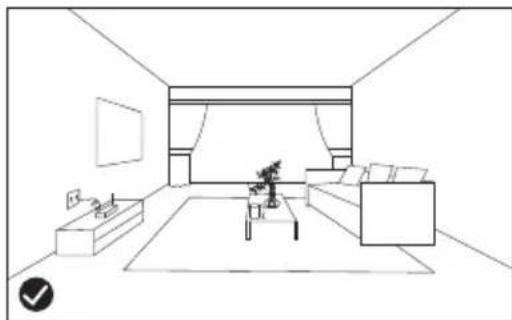
natural_image
Line drawing of a modern living room interior with sofa, coffee table, and wall (no text or symbols)natural_image
Line drawing of a wooden deck railing with a circular inset showing a circular hole labeled 'GND' (no text or symbols beyond basic geometry)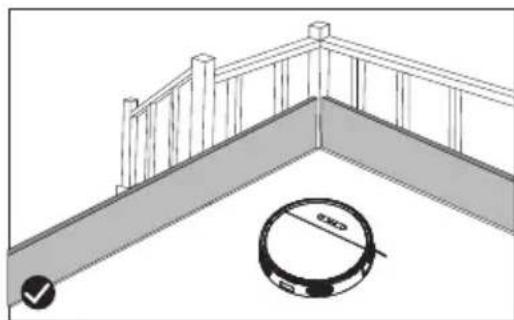
natural_image
Architectural diagram showing a railing and a circular object with 'OK' and '✓' indicators (no text or symbols)
NOTA!

natural_image
Illustration of a remote control device next to a digital display and a rectangular device with a scroll (no text or symbols)Ritorno
text_image
Diagram showing a remote control device connected to a device with a labeled component and directional arrows
NOTA!

natural_image
Cross-sectional diagram of a mechanical assembly inside a circular housing (no text or labels)natural_image
Diagram of a robotic vacuum cleaner with a handle and internal components, showing airflow direction (no text or symbols)natural_image
Technical line drawing showing two views of a mechanical device with an open lid and a container filled with granules (no text or symbols)natural_image
Technical line drawing showing two views of a device with internal components, no text or symbols presentnatural_image
Diagram of a robotic vacuum cleaner with a handle and internal components, showing no text or symbolsnatural_image
Technical line drawing of a mechanical device with no visible text or symbolsnatural_image
Technical line drawing of a mechanical assembly with two views (top and side), no visible text or symbolsnatural_image
Diagram showing two steps of a printer or printer device: opening and inserting into a container, with a hand holding the lid and spilling out (no text or symbols present)natural_image
Line drawing of a device casing with a label and handle (no readable text or symbols)natural_image
Diagram of a robotic device with attached wiring and a central component (no text or symbols)
AVVERTENZA!