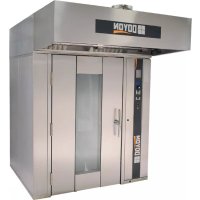
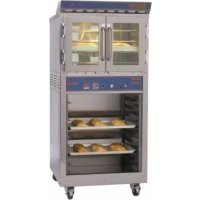
SRO2E - Oven Doyon - Free user manual and instructions
Find the device manual for free SRO2E Doyon in PDF.


| Product type | Professional bakery and pastry oven |
| Brand | Doyon |
| Model | SRO2E |
| Category | Oven |
| Cooking system | "Jet Air" convection with steam injection |
| Program capacity | 99 recipes, up to 8 steps per recipe |
| Operating modes | Manual and Programmable |
| Functions | Timer, fan delay, fan speed (STD/HIGH), pulsed and single steam, automatic cooling, rotating cart (option) |
| Display | Digital screen with navigation |
| Power supply | According to nameplate (variable voltage and amperage) |
| Steam connection | Water inlet 1/2 NPT, gravity drain |
| Ventilation | Integrated hood, 10 in. connection (SRO2E) for exhaust |
| Material | Stainless steel construction |
| Cleaning | Dirt Buster III foaming cleaner, silicone protector, Brasso for windows |
| Maintenance | Water softener recommended, Y-strainer to clean regularly |
| Safety | Door switch, overheat protection, automatic shutdown in case of failure |
| Warranty | 1 year parts and labor (FOB Linière, Canada) |
| After-sales service | Contact Doyon Equipment Inc. or a qualified technician |
Frequently Asked Questions - SRO2E Doyon
User questions about SRO2E Doyon
0 question about this device. Answer the ones you know or ask your own.
Ask a new question about this device
Download the instructions for your Oven in PDF format for free! Find your manual SRO2E - Doyon and take your electronic device back in hand. On this page are published all the documents necessary for the use of your device. SRO2E by Doyon.
USER MANUAL SRO2E Doyon

Intertek
SRO1E - SRO2E
Product / Produit:
IMPORTANT SAFETY INSTRUCTIONS
SAVE THESE INSTRUCTIONS
DANGER
TO REDUCE THE RISK OF FIRE OR ELECTRIC SHOCK
CAREFULLY FOLLOW THESE INSTRUCTIONS
TABLE OF CONTENTS
Distances to respect
Installation
Drain instruction ____
Ebake Programmable control - Operating modes ____
Manual mode ____
Programmed cooking mode ____
Troubleshooting ____
Oven maintenance and cleaning ____
Bake chart ____
INSTALLATION ____
IMPORTANT INSTRUCTIONS DE SÉCURITÉ
CONSERVEZ CE MANUEL D'INSTRUCTIONS
DANGER
AFIN DE RÉDUIRE LES RISQUES D'INCENDIE OU D'ÉLECTROCUTION
SUIVRE CES INSTRUCTIONS AVEC SOIN
TABLE DES MATIÈRES
The manufacturer suggests to read this manual carefully.
This equipment is manufactured with first quality material by experienced technicians. Proper installation and maintenance will guarantee a reliable service for years to come.
A nameplate fixed to the front or right side of the oven specifies the model number, serial number, voltage and amperage.
Drawings and replacement parts numbers are included in this manual. The electrical diagram is affixed in the control panel at the back of the oven.
ATTENTION
DOYON is not responsible for damages to the property or the equipment caused by personnel who is not certified by known organisations. The customer is responsible for finding qualified technicians in electricity and plumbing for the installation of the oven.
CONSTRUCTION
You just bought the most advanced oven in the world, "DOYON" technology at it's best. This oven is manufactured using the highest quality components and material.
The oven gives a perfect uniform baking with its unique Jet Air convection system. The DOYON oven is designed with parts that are easy to find.
SHIPPING
For your safety, this equipment has been verified by qualified technicians and carefully crated before shipment. The freight company assumes full responsibility concerning the delivery in good condition of the equipment in accepting to transport it.
IMPORTANT
RECEPTION OF THE MERCHANDISE
Take care to verify that the received equipment is not damaged before signing the delivery receipt. If a damage or a lost part is noticed, write it clearly on the receipt. If it is noticed after the carrier has left, contact immediately the freight company in order that they do their inspection.
We do not assume the responsibility for damages or losses that may occur during transportation.
INTRODUCTION
RÉCEPTION DE LA MARCHANDISE
DO NOT STORE OR USE GASOLINE OR OTHER FLAMMABLE VAPORS AND LIQUIDS IN THE VICINITY OF THIS OR ANY APPLIANCE.
INSTALLATION AND SERVICE
WARNING
IMPROPER INSTALLATION, ADJUSTMENT, ALTERATION, SERVICE OR MAINTENANCE CAN CAUSE PROPERTY DAMAGE, INJURY OR DEATH. READ THE INSTALLATION, OPERATING AND MAINTENANCE INSTRUCTIONS THOROUGHLY BEFORE INSTALLING OR SERVICING THIS EQUIPMENT.
Installation and service must be done by specialised technicians. Contact a certified electrician and plumber for set up.
The oven must be connected to the utility and electrically grounded in conformity to the effective local regulations. If these are not established, the oven must be connected according to the Canadian Electrical Code (CSA-C22.1-XX) or National Electrical Code (NFPA 70-XX). Refer to last edition year for XX. Installation must also allow proper access for service (24 inches each side and back).
The ovens must be installed with proper ventilation:
- The Eyebrow hood supplied with the oven. The (10"diameter for SRO2E) and (8"diameter for SRO1E) connection collar requires a minimum of 900 CFM at 0.6inW.C. Pressure drop through hood. Customer to supply duct and ventilator fan per local code. Airflow proving switch is factory installed and integrated with heating system operation. Oven provided relay with max. 10.0 amp 1/2H.P. @ 120V output for fan operation. Ventilator fan is required. Consult local authorities to determine whether Type 1 (grease) or Type 2 (vapor) duct will be required.
Make sure that provision for adequate air supply is provided for the operation of the oven. The ovens must be installed with a proper ventilation according with the local building code.
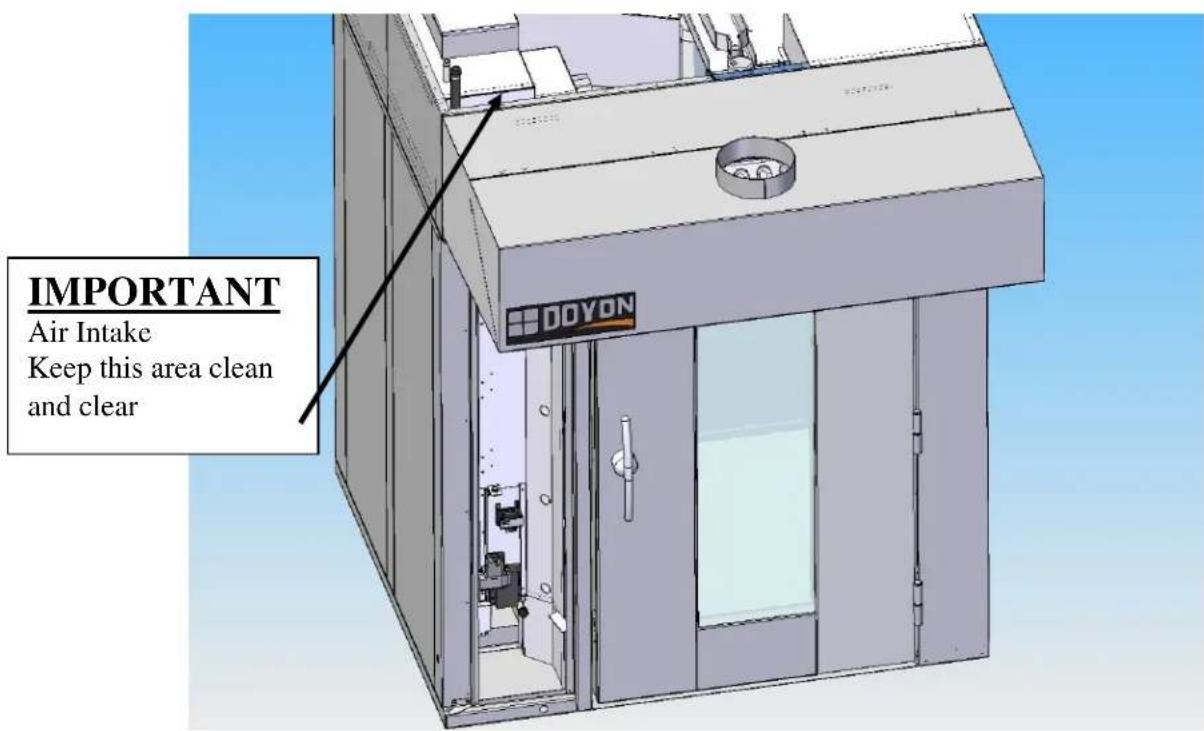
DISTANCES TO RESPECT
A) Back and sides of the oven: 0 inch.
B) Top of the oven: a clearance of 24 inches to the ceiling must exist to permit adequate venting of the exhaust pipe and hot parts and to give a proper access to a technician.
C) Floor: CAUTION - To reduce risk of fire, the appliance is to be mounted on floors of non-combustible construction with non-combustible flooring and surface finish and with no combustible material against the underside thereof, or on no combustible slabs or arches no combustible material against underside. Such construction shall in all cases extend not less than 12 inches beyond the equipment on all sides.
POWER FAILURE
No attempt should be made to operate the appliance during power failure.
The heating system and the regulator are all designed to be failed safe. There is no special action to take in case of electrical power failure.
If the main switch in ON when the power comes back, the oven will remain OFF and the oven control will be energised. It is nevertheless recommended to turn OFF the main switch to protect the electronic components.
AVERTISSEMENT LORS DE L'INSTALLATION
PANNE ÉLECTRIQUE
LORS D'UNE PANNE ÉLECTRIQUE, FERMER L'INTERRUPTEUR DU FOUR POUR PROTÉGER LES COMPOSANTES ÉLECTRONIQUES.
POUR VOTRE SÉCURITÉ
NE PAS EMMAGASINER OU UTILISER D'ESSENCE OU AUTRES VAPEURS ET LIQUIDES INFLAMMABLES À PROXIMITÉ DE CET ÉQUIPEMENT OU DE TOUT AUTRE APPAREIL.
INSTALLATION ET SERVICE
AVERTISSEMENT
UNE INSTALLATION, UN AJUSTEMENT, UNE ALTÉRATION, UN SERVICE OU UN ENTRETIEN NON CONFORME AUX NORMES PEUT CAUSER DES DOMMAGES À LA PROPRIÉTÉ, DES BLESSURES OU LA MORT. LIRE ATTENTIVEMENT LES DIRECTIVES D'INSTALLATION, D'OPÉRATION ET D'ENTRETIEN AVANT DE FAIRE L'INSTALLATION OU L'ENTRETIEN DE L'ÉQUIPEMENT.
Take off the packaging material with care. Take off all the material used for packing and accessories. Seal the unit on the floor with silicone. Verify every adjustments and correct it if necessary. Install the hood covering the top front of the oven.
Each unit is set up to be used with the type of electrical supply specified on the nameplate fixed on the oven.
1. To the electrician
Electrical supply installation must be in accordance with the electrical rating on the nameplate.
WARNING
The electrician must make sure that the supply cable does not come in contact with the oven top which becomes hot.
2. To the plumber
This equipment is to be installed to comply with the applicable federal, state or local plumbing codes.
Connect the water supply pipe to the oven using good quality sealing compound. Take care that combustible water pipes do not come in contact with hot parts on the top of the oven. Connect the steam system (1/2 NPT) to the cold water distribution network. Minimum Water Flow required is 4.5 USGPM (0.29 l/sec).@ 30psi
WARNING
Do not adjust the needle valves, it has been done at the factory.
DRAIN INSTRUCTION
Drain need to be connected for steam system fonction.
At the left front and rear of the oven there is a gravity drain connection. When the oven leaves the factory these drain are closed with 2 caps at each pipe output. choose the one fit with oyour installation setup of the oven.
If you need to use this drain remove the caps.
IMPORTANT: For the outside drain it is very important that the drain is directed towards the floor and should reach the floor drain.
The drain must also vented and be conformed to the local code.
INSTALLATION
EN GÉNÉRAL
The Doyon Ebake controller has two operation modes Manual and Programmable.
MANUAL: to use all functions without using a recipe program.
PROGRAMMABLE : to use with a recipe program.
Program capacity
☐ Program #1 is always used as the default Manual Cooking mode setting (single stage).
☐ Programs #2 to #99 can have up to 8 stages each recipe.
OVEN START UP
Turn on the main power switch. The controller will power up and display:
☐ OFF, PRESS POWER KEY TO START.
Press the red POWER key, the oven will go ON. The display will read PREHEAT and the oven will heat to reach the MANUAL preset temperature. Then, the oven will display READY and the alarm will beep 5 times. This will mean that the oven is at the desired temperature.
To turn the oven OFF, press the red POWER key and hold it for 3 seconds. The oven will run on COOL DOWN mode until it reaches 250° F and then, it will automatically turn OFF. At this moment, the display will show : OFF, PRESS POWER KEY TO START.
DOOR SWITCH
□ If the door is opened :
○ Display scrolls recipe NAME and DOOR OPEN.
○ All functions are turned OFF (unless in Cool Down mode, then the fan remains on).
○ All timers pause until the door is closed.
MANUAL MODE
This mode is used to work in a single stage.
Use navigation key until MANUAL is highlighted, press the dial to confirm OK
COOL DOWN FUNCTION
For fast cool down, press on the COOL DOWN ▼, the fan will remain ON while the door is open.
Note : if the oven reaches 200°F, it will turn OFF automatically. Display will show : OFF, PRESS POWER KEY TO START.
TEMPERATURE FUNCTION
To change the temperature set point, press on a display will show actual temperature set point. Use navigation key to select the desired temperature set point and press to confirm and exit the setting mode. Also, note that the new set point will automatically be saved after exiting if OK is not pressed after changing the setting. If the dial is not pressed or turned within 3 seconds, the last set temperature will be saved.
TIMER FUNCTION
To change the time setting, press on 📄. Display will show time setting. Use navigation key to select the desired timer setting and press OK to confirm and exit setting. If the dial is not pressed or turned within 3 seconds, the last set time will be saved.
Press on timer START/STOP key to start the timer countdown. At the end of the countdown, display will show BAKE DONE. If needed, you can add 1 minute by pressing the ADD TIME key. It will automatically add 1 minute without changing the original time setting. If more then one minutes is needed use navigation key to desired add time and press. When the countdown is finished, the display will show BAKE DONE.
Also, at any time during the countdown, the time can be paused by pressing on the TIMER START/STOP key or cancelled by pressing and holding the START/STOP key for 3 seconds.
When the door is open, the timer pauses and the display indicates DOOR OPEN until the door is closed.
☐ If the remaining time is less than 60 minutes, it will be displayed as MM:SS
☐ If the remaining time is 60 minutes or more, it will be displayed as HH:MM
Note : Timer in MANUAL mode is only a reminder.
FAN OFF DELAY FUNCTION
By pressing on the FAN OFF DELAY key, the fan remains OFF for a period of time before starting working in normal fan mode. After pressing FAN OFF DELAY key, the display will show NONE. Use navigation key to select HIGH (3 minutes) or LOW (1 minutes) fan off delay and press OK. If the OK is not pressed within 3 seconds, the last set FAN OFF DELAY will be saved.
To cancel fan off delay, press the FAN OFF DELAY key, use navigation key to select NONE and press. Note: during FAN OFF DELAY the oven heating system is not functional. A higher set point temperature preheat is recommended if use more then 3 minutes FAN OFF DELAY.
SROXE Nav Key 11-2014.doc 11/14
FAN SPEED
You can change the fan speed. There are 2 different fan speed setting available STD & HIGH available. Default speed is STD. To select a different fan speed then STD press on the FAN SPEED key, use navigation key to select desire fan speed and press OK
This function will change the fan speed of the fan, creating a different air flow.
STEAM FUNCTION
Steam output can be turned ON only if oven temperature is (250°F /121°C).
- Pressing SHOT STEAM key: A single steam injection will inject for duration of preset time. The display will toggles the recipe name and the steam. following the steam injection you will have automatically a FAN OFF DELAY for the period of steam after steam period, the vent system will automatically evacuate steam out of the oven and go on normal baking cycle.
□ Note: When pressing the SHOT STEAM key, it will force the fan OFF.
- Pressing PULSE STEAM key : It will create continuous steam injections. If pressed again, it will cancel the pulse steam function. When active, the display scrolls recipe name and pulse steam.
☐ Note: When pressing the PULSE STEAM key, the fan will stay ON to create continuous moisture during the baking cycle.
VENT KEY FUNCTION
During Manual mode Only at any time vent can be open or close by pressing the vent key.
□ Note: When the SHOT STEAM sequence the vent will operate automatically.
RACK KEY FUNCTION
Rack is always rotated when oven is powered, when door are opening the rack will automatically index with the door opening and drop down to load or unload the rack. If desired Rack can be stop and index during baking by pressing the RACK key.
To restart the rack press again on the RACK key or after opening the door and closed back the rack will start rotating in normal mode.
PROGRAMMED COOKING MODE
This mode is used to work with 1 to 8 stages recipe programs.
To select a programmed recipe, use navigation key until name or number of product is highlighted. Press OK to select product program. The oven will preheat to the programmed temperature. Display will show READY and the alarm will beep 5 times when the oven is at the desired temperature.
Press on START/STOP key to start the programmed recipe. The timer will countdown. At the end of the recipe, display will show BAKE DONE. If needed, you can add time pressing the BAKE MORE TIME key. It will automatically add 1 minute without changing the original time setting. If more then one minutes is needed after pressing the BAKE MORE TIME key, use navigation key to set desire time and press OK When the countdown is finished, the display will show BAKE DONE. Press on START/STOP key to stop the recipe.
Also, at any time during the countdown, the recipe can be paused by pressing on the START/STOP timer key or canceled by pressing and holding the key for 3 seconds.
When the door is open, the timer pauses Rack will index and drop down to floor, the display shows DOOR OPEN until the door is closed.
To see current stage information during baking process, press on the TIMER key. It will display recipe name, stage number, stage status and time reminder.
Note : During a programmed recipe, the keys SHOT & PULSE STEAM, FAN OFF DELAY are not functional. All those functions need to be set in the recipe program.
RACK FUNCTION
Rack is always rotated when oven is powered, when door are opening the rack will automatically index with the door opening and drop down to load or unload the rack. If desired Rack can be stop and index during baking by pressing the RACK key.
To restart the rack press again on the RACK key or after opening the door and closed back the rack will start rotating in normal mode.
Cook Program Structure
Each recipe name can have maximum of 15 character. Up to 10 characters will show a fixe recipe name on the display. If more then 10, the recipe name will scroll on the display and when timer is activate the recipe name will be fixe and show only the 10 first characters.
Each recipe can have preheat temps, cook stage, cook & hold function. Each stage has the following programmable parameters:
Time: the time duration of the current stage.
Oven temperature: the oven set point for current stage.
Steam: shot or pulse steam injected into the oven chamber.
Fan off delay: 0 to 3 minutes can be programmed after the shot steam injection.
Fan off delay: duration of the fan OFF
Fan speed: SRO2=STD/HIGH or SRO1=STD/LOW
Entering the Programming mode
Press the PROGRAM KEY. If the control is protected by a password. The display reads ENTER CODE. Use the navigation key to enter the 4 digits code. Select the number and press to go to the next number. After the last number confirmation, you will enter program mode.
Programming a product recipe
Note : the control can hold up to 99 recipes. Each recipe can have up to 8 stages.
Use navigation key to select the desired recipe and press. OK
To edit a new or existing name:
Use navigation key to the edit name or option name and press. -EDIT NAME: Use navigation key to select each letter and press to step to the next letter. -OPTION NAME: Select one of the library listed product name. After product name is edited, you will enter to the following recipe programming mode.
1-PREHEAT
If no preheat needed: Use the dial to step on next programming function.
If preheat needed: Use navigation key to select preheat and press. Use the dial to select YES and press. Use navigation key to set the desire preheat temperature and press to exit and save preheat function.
2-STAGE PROGRAMMING
Use navigation key to select the product stage 1 and press. Display will show the following programming process.
a) Set stage timer: Use navigation key to select desired current stage cooking time and press. b) Set temperature: Use navigation key to set the current stage temperature and press. c) Steam: If no steam is needed, press to skip steam function and go to FAN speed.
If steam is needed, rotate the dial to select YES and press. Use the dial to select SHOT or PULSE and press. If SHOT is selected, rotate the dial to select LOW(+/- 1/2 us gallon/ 2 liter) or HIGH(+/- 1 Usgallon/4 liter) steam and press.
If a steam SHOT delay is needed, rotate the dial to set the fan off delay and press. If pulse is selected, rotate the dial to select STD(steam every 2 minutes), HI(steam every 1 minute) or MED(steam every 1.5 minutes) pulse and press.
d) Fan delay: If no fan delay is needed, press OK of the dial to skip to fan cycle. If fan delay is needed, rotate the dial to select LOW (1 minutes) or HIGH (3 minutes) and press OK. If a fan off delay is needed, press OK to step to fan cycle.
e) Fan Speed: If fan speed STD is ok, press. If HIGH fan speed, is desired, Use navigation key to select HIGH and press.
You have now completed 1 stage program. If another stage is needed, select stage 2 and follow same process as stage 1. If a 2nd stage is not needed, use navigation key to exit and the recipe will be registered.
MODE D'OPÉRATION DU CONTRÔLE PROGRAMMABLE EBAKE
ANSWERS TO MOST FREQUENT QUESTIONS
Always cut off the main power before replacing any parts. Take care of water and electric wire supply system when pulling the oven.
WARNING: Always disconnect the power supply to the appliance before cleaning, doing preventive maintenance or servicing.
WARNING: Contact the factory, the factory representative or a local service company to perform maintenance and repair.
Convection blower, vent motor and rack lift/rotating system are on the top of the oven. These components are sealed and don't require lubrication.
Electric Control parts, water manual shut off valve are behind the control panel door.
BEFORE CALLING FOR SERVICE ANSWERS TO MOST FREQUENT QUESTIONS
| Questions Solutions | |
| The oven temperature drops when loading and needs a certain amount of time before it stabilizes. | This is normal. The opening of the door produces an important loss of heat. The rack loaded with cold pastries need a large amount of heat to get back to its original temperature. The same thing happens with domestic ovens. You will realize that your new SRO oven can provide an excellent baking quality for any kind of products you want to bake. |
| The oven does not turn on. | Check the breakers of the building.Check the breaker on the front panel.Check if the door is tightly closed.Inside the control compartment, check if the breaker of the convection blower is ON |
| The oven does not produce heat. | Make sure the thermostat is adjusted to a temperature high enough to turn on the heat.Check that the heating contactor breaker are ON.1. If the Hood Vent Blower is not on Check its power supply.2. If the oven blower is not on Check the breaker behind the control door.If it does not start up again, contact our company or a certified technician. |
| Uneven baking. | Verify that hot air diffuser and convection air intake is not block. Do not use foil on the grills.Verify the temperatur e of the oven by using an oven thermometer and make sure that it is even with the thermostat setting.Verified the airflow output adjustment. |
| If steam device of the oven does not work properly. | Check if the water supply valve (of the building) is open.Verify if water manual shut off valve located behind the control panel is open.Steam injection is not permitted if actualoven temperature is below 250FThe oven must be idling at temperature over 350F for at least 15 minutes to get a good amount of steamVerify if “Y” filter is clean (First, turn the water manual shut off valve OFF and bleed the line by having the appliance injecting water.)Check the solenoid valve. |
| If display show CONTROLCOMPARTMENT OVER TEMPERERROR | Check if control compartment cooling fan work.Check if cooling fan inlet is clean.Turn off or disconnect appliance from power supply and have service by a qualified technician. |
| If CAVITY PROBE ERRORDISPLAY and the oven turn OFF | check cavity probe connectionReplace the cavity probecall for service |
DÉPANNAGE
AVANT D'APPELER LE DÉPARTEMENT DE SERVICE
- It is recommended to use a WATER SOFTENER SYSTEM and to clean or replace it regularly to avoid accumulation of minerals inside the unit.
| Questions Solutions | |
| Clean the inside of the oven with water and soap. | We recommend and sell: Dirt Buster III: Action foam cleaner CHEMCO Part number: NEB201 |
| After cleaning the inside of the oven, apply a silicone base oven protector. It avoids food from sticking to the metal. | We recommend and sell: 316 Silicone base protector and lubricant for oven Dow Corning Part number: EXS400 |
| Clean the oven windows with products like Brasso or equivalents. They are copper cleaners but good for this use | We recommend and sell: Wright's: Cream copper cleaner J.A. Wright & Co. Part number: EXC300 |
| Clean the oven exterior with a stainless steel cleaner. | We recommend and sell: Stainless steel cleaner SANY or CURTIS (comestible) Part number: NES201 |
ENTRETIEN ET NETTOYAGE DU FOUR
ENTRETIEN DE L'UNITÉ
BAKERY OVENS (Table as reference only)
| Menu item | Bake Time Minutes | Bake Temp °F | Bake Temp °C |
| Bagels (16 per pan) 15 400 204 | |||
| Dinner rolls (16 per pan) 15-18 350 177 | |||
| Sub rolls 12" (10 per pan) 15-18 350 177 | |||
| French Baguette (5 per pan) 20-25 350 177 | |||
| Croissants (15 per pan) 12-15 350 177 | |||
| 9" Pies (6 per shelf) 30-35 375 190 | |||
| Muffins (15 per pan) 18-22 325 163 | |||
| Muffins (24 per pan) 18-22 325 163 | |||
| Cakes 9" (6 per shelf) 18-22 350 177 | |||
| Quiches 9" (6 per shelf) 30-35 350 177 | |||
| Cookies (frozen) (18 per pan) 8-10 300 149 | |||
| Danish (15 per pan) 12-15 350 177 | |||
| Biscuits (fresh) (15 per pan) | 8-10 | 350 177 | |
| Bread (4 strapped pan) | 30-35 375 | 190 | |
| Cinnamon rolls (8/half pans) | 15-18 325 | 163 | |
| Brownies (16.5 oz box) | 12 350 | 177 |
TABLEAU DE CUISSON
(Continental United States Of America And Canada Only)
Doyon Equipment Inc. guarantees to the original purchaser only that its product are free of defects in material and workmanship, under normal use.
This warranty does not cover any light bulbs, thermostat calibration or defects due to or resulting from handling, abuse, misuse, nor shall it extend to any unit from which the serial number has been removed or altered, or modifications made by unauthorised service personnel or damage by flood, fire or other acts of God. Nor will this warranty apply as regards to the immersion element damaged by hard water.
The extent of the manufacturer's obligation under this warranty shall be limited to the replacement or repair of defective parts within the warranty period. The decision of the acceptance of the warranty will be made by Doyon Equipment service department, which decision will be final.
The purchaser is responsible for having the equipment properly installed, operated under normal conditions with proper supervision and to perform periodic preventive maintenance.
If any parts are proven defective during the period of one year from date of purchase, Doyon Equipment Inc. hereby guarantees to replace, without charge, F.O.B. Linière, Quebec, Canada, such part or parts.
Doyon Equipment Inc will pay the reasonable labour charges in connection with the replacement parts occurring within one year from purchase date. Travel over 50 miles, holiday or overtime charges are not covered. After one year from purchase date, all labour and transportation charges in connection with replacement parts will be the purchaser's responsibility.
Doyon Equipment Inc. does hereby exclude and shall not be liable to purchaser for any consequential or incidental damages including, but not limited to, damages to property, damages for loss of use, loss of time, loss of profits or income, resulting from any breach or warranty.
In no case, shall this warranty apply outside Canada and continental United States unless the purchaser has a written agreement from Doyon Equipment Inc.
GARANTIE LIMITÉE


- IMPORTANT SAFETY INSTRUCTIONS
- SAVE THESE INSTRUCTIONS
- DANGER
- TO REDUCE THE RISK OF FIRE OR ELECTRIC SHOCK
- CAREFULLY FOLLOW THESE INSTRUCTIONS
- TABLE OF CONTENTS
- IMPORTANT INSTRUCTIONS DE SÉCURITÉ
- CONSERVEZ CE MANUEL D'INSTRUCTIONS
- AFIN DE RÉDUIRE LES RISQUES D'INCENDIE OU D'ÉLECTROCUTION
- SUIVRE CES INSTRUCTIONS AVEC SOIN
- TABLE DES MATIÈRES
- ATTENTION
- CONSTRUCTION
- SHIPPING
- IMPORTANT
- RECEPTION OF THE MERCHANDISE
- INTRODUCTION
- RÉCEPTION DE LA MARCHANDISE
- INSTALLATION AND SERVICE
- WARNING
- THE OVENS MUST BE INSTALLED WITH PROPER VENTILATION
- DISTANCES TO RESPECT
- POWER FAILURE
- AVERTISSEMENT LORS DE L'INSTALLATION
- PANNE ÉLECTRIQUE
- POUR VOTRE SÉCURITÉ
- INSTALLATION ET SERVICE
- AVERTISSEMENT
- TO THE ELECTRICIAN
- TO THE PLUMBER
- DRAIN INSTRUCTION
- INSTALLATION
- EN GÉNÉRAL
- PROGRAM CAPACITY
- OVEN START UP
- DOOR SWITCH
- MANUAL MODE
- COOL DOWN FUNCTION
- TEMPERATURE FUNCTION
- TIMER FUNCTION
- FAN OFF DELAY FUNCTION
- FAN SPEED
- STEAM FUNCTION
- VENT KEY FUNCTION
- RACK KEY FUNCTION
- PROGRAMMED COOKING MODE
- RACK IS ALWAYS ROTATED WHEN OVEN IS POWERED, WHEN DOOR ARE OPENING THE RACK WILL AUTOMATICALLY INDEX WITH THE DOOR OPENING AND DROP DOWN TO LOAD OR UNLOAD THE RACK. IF DESIRED RACK CAN BE STOP AND INDEX DURING BAKING BY PRESSING THE RACK KEY
- TO RESTART THE RACK PRESS AGAIN ON THE RACK KEY OR AFTER OPENING THE DOOR AND CLOSED BACK THE RACK WILL START ROTATING IN NORMAL MODE
- COOK PROGRAM STRUCTURE
- ENTERING THE PROGRAMMING MODE
- PROGRAMMING A PRODUCT RECIPE
- TO EDIT A NEW OR EXISTING NAME
- 1-PREHEAT
- 2-STAGE PROGRAMMING
- MODE D'OPÉRATION DU CONTRÔLE PROGRAMMABLE EBAKE
- ANSWERS TO MOST FREQUENT QUESTIONS
- DÉPANNAGE
- AVANT D'APPELER LE DÉPARTEMENT DE SERVICE
- ENTRETIEN ET NETTOYAGE DU FOUR
- ENTRETIEN DE L'UNITÉ
- TABLEAU DE CUISSON
- (CONTINENTAL UNITED STATES OF AMERICA AND CANADA ONLY)
- GARANTIE LIMITÉE
Brand : Doyon
Model : SRO2E
Category : Oven