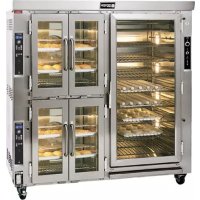
JAOP14G - Oven Doyon - Free user manual and instructions
Find the device manual for free JAOP14G Doyon in PDF.


| Product type | Gas convection oven |
| Brand | Doyon |
| Model | JAOP14G |
| Power supply | 120/208-240V 1PH |
| Fuel | Natural gas or propane (65,000 BTU per section) |
| Maximum temperature | 260 °C (500 °F) |
| Oven capacity | 14 racks 24" x 29" |
| Proofer capacity | 10 racks 26" x 35" |
| Cooking functions | Convection, proofing, steam injection (single and pulsed), programmable timer |
| Control type | Electronic ECM-1 or ECM-2 (depending on version) with digital display |
| Programming | Up to 99 recipes, up to 10 steps per recipe |
| Fan speed | High/low selector |
| Safety | Overheat alarm, circuit breaker, draft cut-off, manual gas valve |
| Safety clearances | Back and sides: 1 inch; top: 12 inches; floor: 4 inches |
| Maintenance | Daily cleaning of interior and windows, annual descaling of steam circuit |
| Recommended products | Foaming cleaner Dirt Buster III, silicone protectant EXS400, glass cleaner EXC300 |
| Spare parts | Complete list provided in the manual, including racks, doors, thermostats, timers |
| Warranty | 1 year parts and labor (excluding travel) for original purchaser |
Frequently Asked Questions - JAOP14G Doyon
User questions about JAOP14G Doyon
0 question about this device. Answer the ones you know or ask your own.
Ask a new question about this device
Download the instructions for your Oven in PDF format for free! Find your manual JAOP14G - Doyon and take your electronic device back in hand. On this page are published all the documents necessary for the use of your device. JAOP14G by Doyon.
USER MANUAL JAOP14G Doyon
natural_image
Exterior view of a modern industrial oven or processing unit with dual doors and control panel (no visible text or symbols)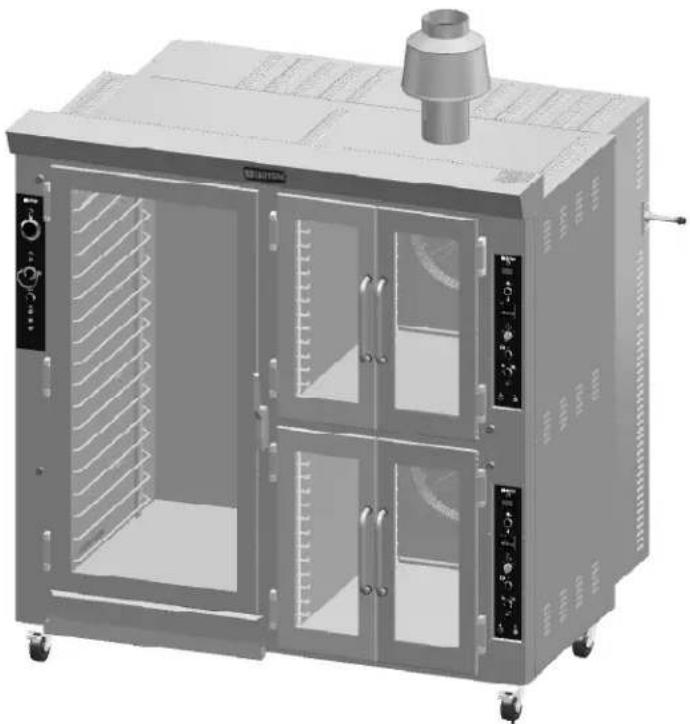
natural_image
3D rendering of a modern industrial oven with internal ductwork and control panel (no visible text or symbols)JA14G - JAOP14G - JA28G
Product / Produit:
IMPORTANT SAFETY INSTRUCTIONS
SAVE THESE INSTRUCTIONS
DANGER
TO REDUCE THE RISK OF FIRE OR ELECTRIC SHOCK
CAREFULLY FOLLOW THESE INSTRUCTIONS
TABLE OF CONTENTS
Installation warnings A-3
Distances to respect A-4
Installation A-7
Operation of the oven A-11
Instructions for oven A-13
Operation of the proofer A-15
Power failure A-15
ECM-1 Programmable control - Operating modes A-17
Manual mode A-19
Program mode A-20
ECM-2 Programmable control - Operating modes A-31
Troubleshooting A-33
Oven maintenance and cleaning A-37
COMPONENT PARTS B-1
JAOP14G – Front view B-1
JAOP14G - Right side view B-3
JAOP14G – Left side view B-5
JAOP14G - Back view B-7
CONTROL PANELS C-1
120/208-240V 1PH with Zelio double C-1
120/208-240V 1PH without Zelio double C-2
BURNER ADJUSTEMENTS D-1
Natural gas D-1
Propane gas D-2
CAUTION
In case of strong gas odours, shut off the gas input valve and contact a specialised gas technician
IMPORTANT INSTRUCTIONS DE SÉCURITÉ CONSERVEZ CE MANUEL D'INSTRUCTIONS
DANGER
AFIN DE RÉDUIRE LES RISQUES D'INCENDIE OU D'ÉLECTROCUTION SUIVRE CES INSTRUCTIONS AVEC SOIN
TABLE DES MATIÈRES
DESCRIPTION A-2
Introduction A-2
Construction A-2
Expédition A-2
The manufacturer suggests to read this manual carefully.
This Jet Air oven is manufactured with first quality material by experienced technicians. Proper installation and maintenance will guarantee a reliable service for years to come.
A nameplate fixed to the front or right side of the oven specifies the model number, type of combustible, BTU rating, operating pressures, serial number, voltage and amperage.
Drawings and replacement parts numbers are included in this manual. The electrical diagram is affixed in the control panel at the back of the oven.
ATTENTION
DOYON is not responsible for damages to the property or the equipment caused by personnel who is not certified by known organisations. The customer is responsible for finding qualified technicians in gas, electricity and plumbing for the installation of the oven.
CONSTRUCTION
You just bought the most advanced gas fired oven in the world, "DOYON" technology at its best. This gas fired oven is manufactured using the highest quality components and material.
The oven gives a perfect uniform baking with its unique Jet Air convection system. The DOYON oven is designed with parts that are easy to find.
SHIPPING
For your safety, this equipment has been verified by qualified technicians and carefully crated before shipment. The freight company assumes full responsibility concerning the delivery in good condition of the equipment in accepting to transport it.
IMPORTANT
RECEPTION OF THE MERCHANDISE
Take care to verify that the received equipment is not damaged before signing the delivery receipt. If a damage or a lost part is noticed, write it clearly on the receipt. If it is noticed after the carrier has left, contact immediately the freight company in order that they do their inspection.
We do not assume the responsibility for damages or losses that may occur during transportation.
INTRODUCTION
RÉCEPTION DE LA MARCHANDISE
The DOYON gas fired ovens are designed to be used with the gas specified on the descriptive nameplate. Refer to National Fuel Gas Code, ANSI-Z223.1 and CAN/CGA.B149. Refer to last edition year for XX. Copies of these are available at:
American Gas Association, 1515 Wilson Boulevard, Arlington, Virginia, 22209.
Canadian Gas Association, 55 rue Scarsdale, Don Mills, Ontario, Canada, M3B 2R3.
POWER FAILURE WARNING
WHEN YOU HAVE A POWER FAILURE, SHUT OFF THE OVEN POWER SWITCH TO PROTECT THE ELECTRONIC COMPONENTS WHEN THE POWER COMES BACK.
FOR YOUR SAFETY
DO NOT STORE OR USE GASOLINE OR OTHER FLAMMABLE VAPORS AND LIQUIDS IN THE VICINITY OF THIS OR ANY APPLIANCE.
INSTALLATION AND SERVICE
WARNING
IMPROPER INSTALLATION, ADJUSTMENT, ALTERATION, SERVICE OR MAINTENANCE CAN CAUSE PROPERTY DAMAGE, INJURY OR DEATH. READ THE INSTALLATION, OPERATING AND MAINTENANCE INSTRUCTIONS THOROUGHLY BEFORE INSTALLING OR SERVICING THIS EQUIPMENT.
Installation and service must be done by specialised technicians. Contact a certified gas technician, electrician and plumber for set up.
The oven must be connected to the utility and electrically grounded in conformity to the effective local regulations. If these are not established, the oven must be connected according to the Canadian Electrical Code (CSA-C22.1-XX) or National Electrical Code (NFPA 70-XX). Refer to last edition year for XX. Installation must also allow proper access for service (24 inches each side and back).
The ovens must be installed with proper ventilation like:
• Under a vent hood
- Or an exhaust pipe connected directly to the oven chimney flue using the draft hood provided with the oven.
A type B gas vent approved for use with gas appliances must be utilised.
Make sure that provision for adequate air supply is provided for the operation of the oven.
CAUTION
Make sure that the adjustments mentioned in the "Installation" section are correctly done prior to firing the oven or converting to a new gas.
DISTANCES TO RESPECT
A) Back and sides of the oven: 1 inch.
B) Top of the oven: a clearance of 12 inches to the ceiling must exist to permit adequate venting of the exhaust pipe and hot parts and to give proper access to a technician. The draft hood must have a clearance of 2 inches minimum all around.
C) Floor: 4 inches minimum.
D) Sides of the oven: do not install other than easily removable equipment for service and maintenance (not closer than 1 inch).
E) It is recommended to have a certain length of water pipe, electric cable and gas pipe between oven and wall to help gain access for service.
AVERTISSEMENT LORS DE L'INSTALLATION
American Gas Association, 1515 Wilson Boulevard, Arlington, Virginia, 22209.
Association Canadienne du Gaz, 55 rue Scarsdale, Don Mills, Ontario, Canada, M3B 2R3.
PANNE ÉLECTRIQUE
LORS D'UNE PANNE ÉLECTRIQUE, FERMER L'INTERRUPTEUR DU FOUR POUR PROTÉGER LES COMPOSANTES ÉLECTRONIQUES.
POUR VOTRE SÉCURITÉ
NE PAS EMMAGASINER OU UTILISER D'ESSENCE OU AUTRES VAPEURS ET LIQUIDES INFLAMMABLES À PROXIMITÉ DE CET ÉQUIPEMENT OU DE TOUT AUTRE APPAREIL.
INSTALLATION ET SERVICE
AVERTISSEMENT
UNE INSTALLATION, UN AJUSTEMENT, UNE ALTÉRATION, UN SERVICE OU UN ENTRETIEN NON CONFORME AUX NORMES PEUT CAUSER DES DOMMAGES À LA PROPRIÉTÉ, DES BLESSURES OU LA MORT. LIRE ATTENTIVEMENT LES DIRECTIVES D'INSTALLATION, D'OPÉRATION ET D'ENTRETIEN AVANT DE FAIRE L'INSTALLATION OU L'ENTRETIEN DE L'ÉQUIPEMENT.
Take off the packaging material with care. Take off all the material used for packing and accessories. Install the draft hood on the chimney of the oven.
Each unit is set up to be used with the type of gas and electrical supply specified on the nameplate fixed on the oven.
The installation must be conform with National fuel gas code ANSI Z223.1-XX and CAN/CGA-B149-XX, Gas installation Code and local Codes where applicable. Refer to last edition year for XX.
The oven's combustion system consists of a very safe gas burner certified in accordance to the American Gas Association Standard in USA and with the Canadian Gas Association in Canada.
1. To the certified gas technician
The burner installed on DOYON gas fired ovens is set up and adjusted at the plant for a first class operation. It is nevertheless necessary to verify on site the pressure at the burner input. The following table indicates the pressures that must be set up to remain conform to the AGA standards or CGA.
| GAS TYPE | ALTITUDE (FT) | INPUT (BTU) EACH OVEN SECTION | REGULATOR INPUT PRESSURE (Water column inches) | BURNER INPUT PRESSURE (Water column inches) | BURNER ORIFICE SIZE (DMS) |
| Propane | 0-2000 | 65,000 | 11.0 | 7.0 | 39 |
| Propane | 2000-4500 | 65,000 | 11.0 | 7.0 | 39 |
| Natural | 0-2000 65,000 | 7.0 3.3 26 | |||
| Natural | 2000-4500 65,000 | 7.0 3.3 26 |
The burner used is adjusted for use with the gas indicated on the nameplate. It is nevertheless possible to convert the burner to another gas by doing the modifications indicated in the CONVERSION PROCEDURE provided with the oven. These modifications must be done carefully and completely under the company's instruction to remain conform to A.G.A. or C.G.A standards. Refer to Doyon Equipment to get the right CONVERSION KIT.
The installation must be made with a connector that meets with the standard for connectors movable gas appliances ANSI Z21.69-XX and a Quick-disconnect device that complies with the standard for Quick-disconnect devices for use with gas fuel ANSI Z21.41-XX and addenda Z21.41a-XX and Z21.41b-XX. Refer to last edition year for XX. It must also be installed with restraining device (chain comes with the oven) to guard against transmission of strain to the gas supply and connectors. The pipe fittings compound must be certified for gas.
The customer must install a manual shut off valve at the end of the gas supply pipe near the burner which is approved by the American Gas Association Standard in the United States and with the Canadian Gas Association in Canada.
Exhaust: A draft hood is provided with the unit and it must be used when the chimney is directly connected to a gas vent pipe. The exhaust pipe must be certified for use of gases.
Clean the air contained in the gas supply pipe at the installation to insure a successful firing on the first try. The gas pipe sealing compound tightness must be verified using a solution of water and soap prior to firing the unit.
WARNING
Make sure not to obstruct the overpressure opening on the gas regulator.
NOTE: If there's any modification done to the system or change of the type of gas used, make sure that the regulator pressure of the burner is adjusted as recommended in this manual.
2. To the electrician
Electrical supply installation must be in accordance with the electrical rating on the nameplate.
WARNING
The electrician must make sure that the supply cable does not come in contact with the oven top which becomes hot.
3. To the plumber
This equipment is to be installed to comply with the applicable federal, state or local plumbing codes.
Connect the steam system (1/4 NPT) to the cold water distribution network.
We highly recommend a water softener to eliminate minerals in the water. We suggest you to use CUNO # CFS6135 (Doyon part number PLF240).
WARNING
Do not adjust the needle valves, it has been done at the factory.
INSTALLATION
EN GÉNÉRAL
- Turn the switch to the "1" position.
•The light inside the oven must light up.
- Adjust the thermostat at the desired setting (see THERMOSTAT INSTRUCTIONS below).
N.B. The red light must be "ON" (If not, press the breaker on the front).
- Heat the unit until you reach the baking temperature.
When the desired temperature is reached, the red light goes out and turns green.
If the light is still "ON" and the oven does not produce heat, call for service.
-
Load the oven as fast as possible to avoid letting out too much heat.
-
Set the timer to the desired value and start it. (See page A-13.)
NOTE: The timer does not shut the oven off at the end of its cycle. It simply activates the buzzer.
- Wait until the product is ready. Do not open the doors until the product is done.
VERY IMPORTANT
This oven has an overheat warning alarm to protect the electrical components against overheating. If the red pilot light (OVERHEAT WARNING) is lit and you hear a buzzer, see Troubleshooting.
THERMOSTAT INSTRUCTIONS
To obtain a very good thermal stability, we use a digitaltemperature controller with thermocouple. The Omron E5CS thermostat controls the heat of every element at the SP (set point).
The temperature of the oven is always shown on the display of the thermostat and an arrow indicates if the temperature is over or below the SP. When the green light is lit, it indicates that the temperature is at the SP ± 1% .
To adjust the SP (set point) value, you just have to press the key on the left and use the up and down keys to set the temperature. Press the left key to return to run mode.
OPÉRATION DU FOUR
To open the doors: Open one of the doors up to 2" and wait 2 seconds to let the fan reduce its spinning before opening them completely.
To close the doors: Close the first door completely and the second door down to 2" and wait 2 seconds before closing completely and then hold the door closed for 2 seconds.
P.S. Open the doors as little as possible. This will affect the baking.
COOKING TIMER
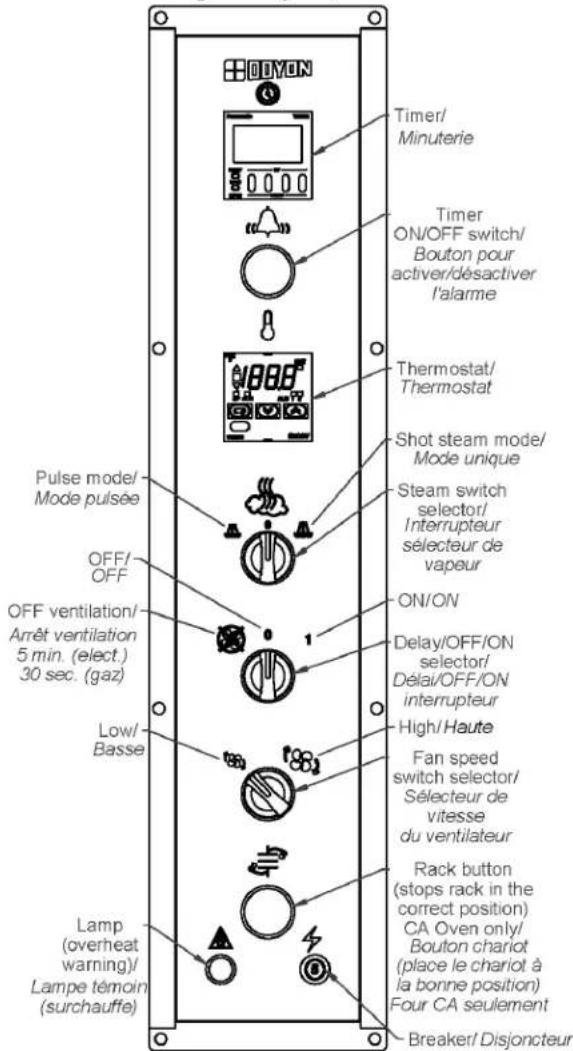
Set the baking time required with the small push button on the timer. The green display is the setting time and the red display is the countdown time (Ex: 25 minutes = set 2500 on green display).
After setting: Push the ⚙️ button, then when the time expires, the buzzer will ring.
Push the button again to stop the buzzer.
If you want to restart the time in the middle of the countdown, press on the yellow RST button on the timer.
P.S. The timer is simply a reminder for the approximate duration of the baking time.
STEAM SWITCH SELECTOR
Two steam mode are available: Shot or Pulse steam.
Shot steam mode

This mode will inject one preset time shot of steam when selected, it is recommended to be use at the beginning of the baking.
Pulse mode

This mode will pulse steam to keep moisture in the baking chamber during the baking time when selected. This is recommended for product who needs to be cooked or baked with humidity.
DELAY SWITCH SELECTOR
The oven can work without ventilation for a period of 5 min. (electric oven) or 30 sec. (gas oven)
when the fan delay is selected
FAN SPEED SWITCH SELECTOR
The oven fan can work in LOW ^[1] or HIGH ^[2] speed mode. With the fan speed selector switch you can select the fan velocity according to your product.
INSTRUCTIONS POUR FOUR
OUVERTURE ET FERMETURE DES PORTES
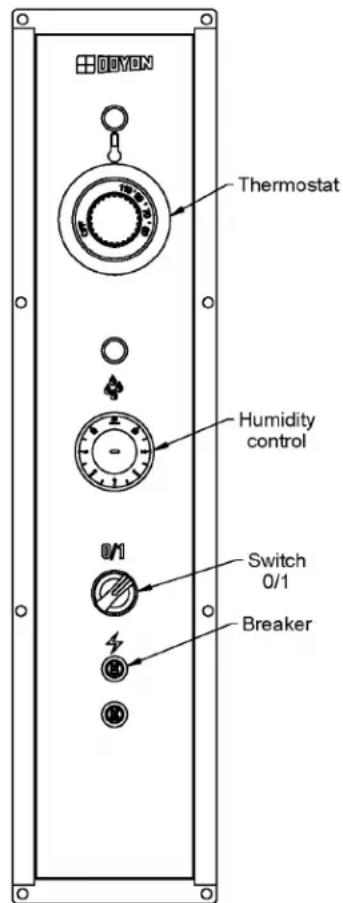
- Switch "ON" (1).
- Set the thermostat control at 100^ F.
- Set the humidity control at approximately:
3 for JAOP-3 & JAOP-6
4 or 5 for JAOP-10
5 for JAOP-14
- If there is too much fog and water drips from the glass doors, adjust humidity control to a lower number.
- When the temperature is stabilised, put the products in the proofer. (Leave them inside until they are ready to bake.)
- IMPORTANT: When proofing cycle is completed, turn the humidity switch to "OFF" and let the motor blower and air heat element run for 10-15 minutes to let dry the proofer. Then, turn the main switch "OFF" (0) and leave the door ajar to prevent moulding.
text_image
DDYON Thermostat Humidity control 0/1 Switch 0/1 BreakerWhen the proofer is not in operation, open the doors to let out the humidity and to prevent mould.
P.S. The doors should not be opened unnecessarily to conserve the heat and humidity in the proofer.
Every day cleaning of the water pan under the proofer's doors should be exercised.
POWER FAILURE
When the power comes back, the proofer will start automatically. Then it's recommended to turn OFF the unit to avoid it starting without supervision.
OPÉRATION DE L'ÉTUVE
The Doyon ECM-1 controller has two operation modes Manual and Programmable.
MANUAL: to use all functions without using recipe program.
PROGRAMMABLE: to use with recipe cook program.
Program capacity
☐ Programs #1 to #99 can have up to 10 steps each (low-level programmable).
☐ Program #0 is always used as the default Manual Cook mode setting (single-step).
OFF MODE This is the default mode when the controller powers up.
Display/LED
□Display shows OFF.
□All other LEDs are off, except the
← Start key LED.
Press on (start) when the oven is ON, the oven will run on preheat mode at the manual mode set point (except if you select a cook program referred in How to Select a Cook Program or the Manual Mode section).
To switch the oven OFF Press the RED stop button and hold it for 3 seconds. The oven will run on cool down mode until it reaches 250^ F and then switch OFF.
To change the temperature set point or timer setting press and hold for 3 sec. on ⚠ or ⚡. When ▶ appears on the left side of the display, press on ▲ / ▼ (up / down) to select the desired temperature set point or timer setting. The new set point or time setting will be automatically saved after 3 seconds.
Display/LED
□ Display scrolls current cook program name (by default MANUAL if no program yet selected).
□2nd line shows actual oven temperature.
□Heat and Fan, LED follows output state.
□Ready LED blinks.
□Stop LED is on.
When probe temperature reaches set point, the unit beeps 5 seconds, the ready LED stays on and the oven goes into COOK MODE.
When the oven is ON, a 3 second long press of red Stop key will go to Cool Down mode if the oven temperature is over 250^ F / 120^ C before going to OFF mode. If the temperature is bellow 250^ F / 120^ C, the oven goes directly to the OFF mode.
DOOR SWITCH
□If door is opened:
○Display scrolls DOOR OPEN.
○All outputs are turned off (unless in Cool Down mode, then fan remains on).
○All timers pause until the door is closed.
☐ When the door is closed, a short delay must expire before all accessories resume normal operation.
How to select a cook program or the Manual Mode
To select a recipe program, enter the recipe number with the numeric keypad and press (Start) or use the Next or Previous arrow to jump from one to an other program without having to confirm with the (Start) key.
When the recipe is selected, it will be active in the preheat mode until the set point in the first step is reached. The LED of the red Stop key will light. The recipe will start only when the LED of the key (Start) is lit.
To go back to the Manual Mode, press on the 🔔 key and then on the ← (Start) key or use the Next or Previous arrow ◀▶ to jump from one to an other program without having to confirm with the key ←(Start).
| N° | CODE | DESCRIPTION FRANÇAISE | ENGLISH DESCRIPTION | QTY |
| 1 | ET204 | MEMBRANE ECM-1 FOUR JA ET CA | LEXAN OVEN ECM-1 | 1 |
| 2 | ELT539 | CONTROLE PROGRAMMABLE VERTICAL ECM-1 | VERTICAL PROGRAMMABLE CONTROL ECM-1 | 1 |
| 3 | ELI402 | SÉLECTEUR 2 POS. NOIR | BLACK SELECTOR 2 POS. | 2 |
| 4 | ELI408 | BASE SANS CONTACT | MOUNTING BASE ONLY | 1 |
| 5 | ELI409 | BLOC CONTACT NC | CONTACT BLOCK NC | 1 |
| 6 | ELI406 | BASE AVEC 1NO | BASE WITH 1NO | 1 |
| 7 | ELT539-K1 | PRISE ETHERNET ASSEMBLÉE | ETHERNET JACK ASSEMBLY | 1 |
| 8 | ELB096 | DISJONCTEUR 5A | 5A BREAKER | 1 |
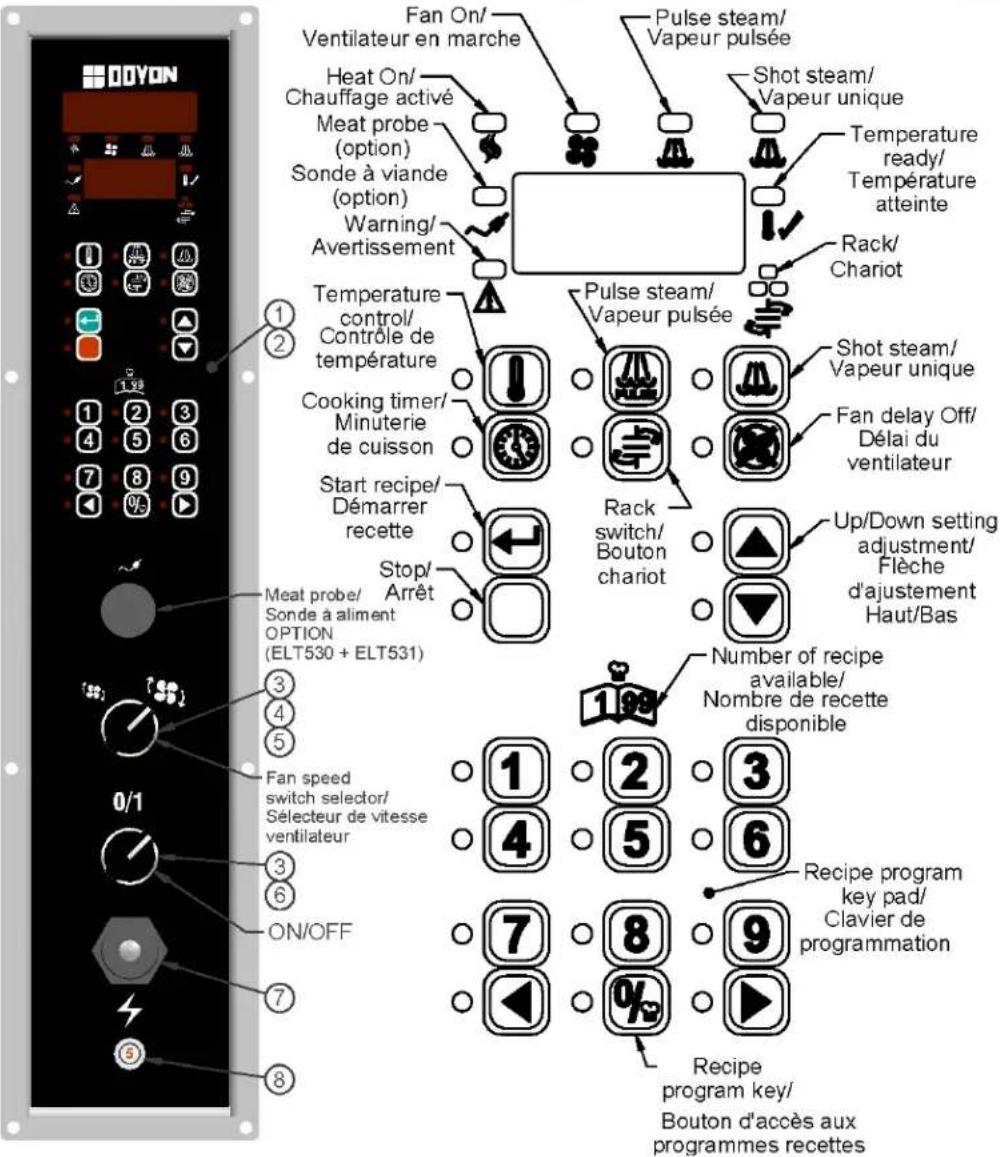
This mode is used to work one step program.
Press on (Start) when the oven is ON, the oven will run on preheat mode at the manual mode set point (by exception if you select a cook program referred in the PROGRAM MODE section).
TEMPERATURE FUNCTION
To change the temperature set point, press and hold for 3 sec. on ⚠️. When ▶ appears on the left side of the display, press on ▲ / ▼ (Up / Down) to select the desired temperature set point. The new set point will be automatically saved after 3 seconds.
TIMER FUNCTION
To change the time setting, press and hold for 3 sec. on 📄 When ▶ appears on the left side of the display, press on ▲ / ▼ (Up / Down) to select the desired time setting. The new time setting will be automatically saved after 3 seconds.
□If time is less than 60 minutes, it will be displayed as MM.SS □If time is 60 minutes or more, it will be displayed as HH:MM
FAN DELAY FUNCTION
☐ The fan is always in function, but you can delay the fan for 5 min. (electric oven) or 30 sec. (gas oven) by pressing the Delay key. After this delay, the fan will run normally. By pressing a second time on the key before the end of the delay, the fan will remain in function.
STEAM GENERATION FUNCTION
□ Steam output can be turned on only if oven's temperature >= steam threshold (300^ / 149^) .
☐ Steam output can be turned on only if fan is on PULSE or ON.
○Pulse Steam ____ will turn on and off the steam output continuously if pressed again.
○ Shot steam 📄: steam output is turned on for duration of preset time.
□Note: Steam and Pulse-Steam in Manual Mode will force Fan On.
FUNCTION CHARIOT

This function is available only with ovens using a rotating rack. This function allows to start and stop the rack.
Food Probe in Manual Mode
When activated, the food probe temperature can only be used in mode MONITOR ONLY. This will indicate the internal food temperature, not the cooking. To control cooking, use the Programming mode.
PROGRAM MODE
This mode is used to program a Cook Recipe.
Cook Program structure
A cook program consists of a name as well as a number of steps. The name is pre-programmed into the unit (each name can have up to 30 characters). Each step has the following programmable parameters:
Oven temperature: the oven set point for this step.
Food temperature: the food temperature at which this step will end.
Time: the time duration for the current step.
Steam: the time steam is injected into the oven at the beginning of the step.
Fan: fan mode.
Aux.: on or off during step (only programmable via PC).
Rack: on or off during step.
Step End: user action needed at the end of step.
Programming
LED/Display
□1 ^st line displays currently selected parameter's value.
□2 ^nd line displays current step.
Keys
☐ To program or modify a recipe program, select the recipe name first, press and hold for 3 seconds on the Program key. This will give you access to the recipe program. If no change is made in the recipe during more than 5 seconds, the controller will exit the recipe program mode by itself and go back to standby mode.
□All parameters can be programmed in any order within a step.
To program or modify a recipe, follow these steps :
☐ Use the parameter keys (Temperature, Time, Steam, Pulse-Steam, Fan, Rack, or Step End) to display and change its value.
o Temperature key is used twice to program 2 parameters: Oven Set Point and Food Temperature.
□Use the Up / Down keys to change the current parameter.
□ Use the Previous / Next keys to change the current step number.
□If Step End key is set to LAST, it is considered to be the last step of the program even though more steps may follow in the program.
□ After last step is programmed, hold the Program key for 3 seconds to exit programming mode.
Valid programming ranges
Temperature
□50-500°F / 10-260°C
Food Temperature
☐125-225°F / 51-107°C, must be enabled in Low-level programming to be used.
Time
□Time is programmed in HH:MM.SS
☐ Time can be programmed at any value between 00:00 minimum and 12:00 maximum.
☐Default is 00:00 for all steps / programs.
A-21
Steam
□1 ^st parameter can be: OFF, ON, PULSE.
○If OFF, steam remains off for duration of step.
○If ON, steam remains on for duration of step.
○If PULSE, pulsed steam is enabled for duration of step.
☐Default is OFF for all steps / programs (no steam).
Pulse-Steam
□Steam parameter (see above) must be set to PULSE.
□ Pressing Pulse-Steam allows programming TON 0.02 seconds by default.
□Pressing Pulse-Steam a 2 ^nd time allows programming TOFF 0.30 seconds by default.
☐Default is OFF for all steps / programs (no steam).
Fan
□1 ^st parameter can be: OFF, ON, PULSE.
○If OFF, fan remains off for duration of step.
○If ON, fan remains on for duration of step.
○If PULSE, pulse fan is enabled (pulse mode for duration of step).
■Pressing Fan a 2 ^nd time allows programming TON 02.30 minutes by default.
■Pressing Fan a 3 ^rd time allows programming TOFF from 0.25 seconds by default.
☐Default is PULSE for all steps/programs.
Rack
(Functional only with oven models with rotating racks).
□Rack must be enabled in low-level programming to be useable.
☐ This can be ON or OFF for each step.
□ Default is ON for all steps / programs, if enabled in low-level programming.
Step End
☐ Step End defines what happens with the end of a Cook Program Step (Stop key is used to program Step End parameter).
○ AUTO: nothing happens, automatically move on to the next step (buzzer output remains off).
o WARN: move on automatically to the next step, but turn on buzzer output for 5 seconds.
- MANUAL: activates buzzer output until user manually presses Start key to enable next step.
○LAST: activate buzzer output until user manually presses Stop key to end the recipe.
☐Default is AUTO for all steps / programs.
Food Probe in Programming Mode
☐ Food temperature can be programmed to the following settings OFF ON MONITOR.
- ON: using food temperature's programming set point to end the current step at that temperature.
○OFF: default for all steps / programs.
○MONITOR: to ignore food probe temperature, but still display the information if requested.
COOK MODE When a Cook Program is used, if the timer is inactive, the oven is considered idle (but it still maintains the set point). In Manual Mode, the timer is used only as a reminder, this mode can cook without using the timer.
Display/LED
□The 1st line display depends on which view is selected:
○Time View
■Current time left in step is displayed, except in the last step, where hold time is displayed.
○Temperature View
■Cavity temperature.
○Default View:
■ Current program name is displayed, except in last step, where PRODUCT READY is displayed.
☐2nd line shows current step number if oven is active.
□Heat, Fan, Steam LED follows output state.
Keys
☐ Note: Any changes to the various oven parameters in this mode will not be stored, but will simply take effect in the current step. This allows “tweaking” recipes from time to time due to product variations or other factors. For changes to be stored, program mode must be used.
☐ Press Temperature key to toggle the current view between Default, Cavity Probe and Food Probe.
□Press Time key:
- Recipe active: toggles between default and remaining step time.
- Last Step: toggles between the default and holding time.
☐ 3-second long press of Temperature key to change set point (using Up/Down keys).
- If enabled, a second press of the Temperature key will display the food probe setting.
□ 3-second long press of Time key to change timer's value (using Up/Down keys).
☐ Press Start key to start timer countdown (and rack rotation, if enabled).
□3-second long press of Next key to skip to next step.
☐ 3-second long press of Previous key to go back to previous step.
□Press Stop key to cancel countdown and return to idle.
□3-second long press of Stop key to go into Cool Down mode.
☐ In Manual Mode only, Fan, Rack, Steam and Auto-Steam keys can be used to toggle their respective output states.
☐ Auto-Steam key will start/stop the auto-steam according to Low-level Steam Override TON and TOFF parameters.
☐If oven is idle, a 5-second long press of the 📋 Program key will enable Program Mode for the currently selected Cook Program (or Manual Program).
☐ When last step timer expires, the unit beeps 5 times and displays PRODUCT READY. Pressing Stop red key will clear the message and resume idle.
SYSTEM DIAGNOSTICS
Cavity Probe Alarm
☐ Occurs when units detects a defective cavity or food temperature probe.
☐ Unit goes into Off mode with error message CAVITY PROBE ERROR or FOOD PROBE ERROR.
Accessory Failure
□Occurs when input signal is no longer received.
☐Unit goes into Off mode with error message:
○Accessory failure input # generates ACCESSORY 1 FAILURE.
- Accessory failure input # generates OVERHEAT FAILURE over heat alarm in control compartment (check cooling fan and filter).
LANGUAGE DISPLAY
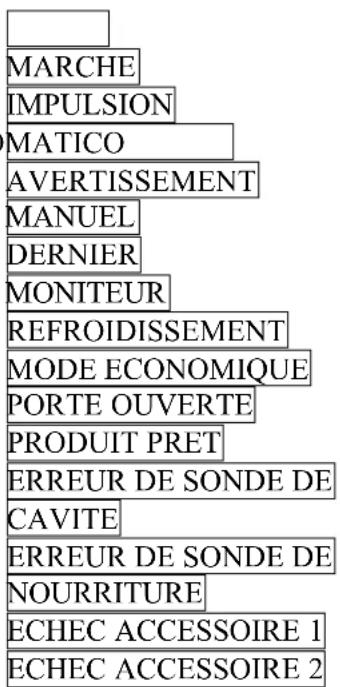
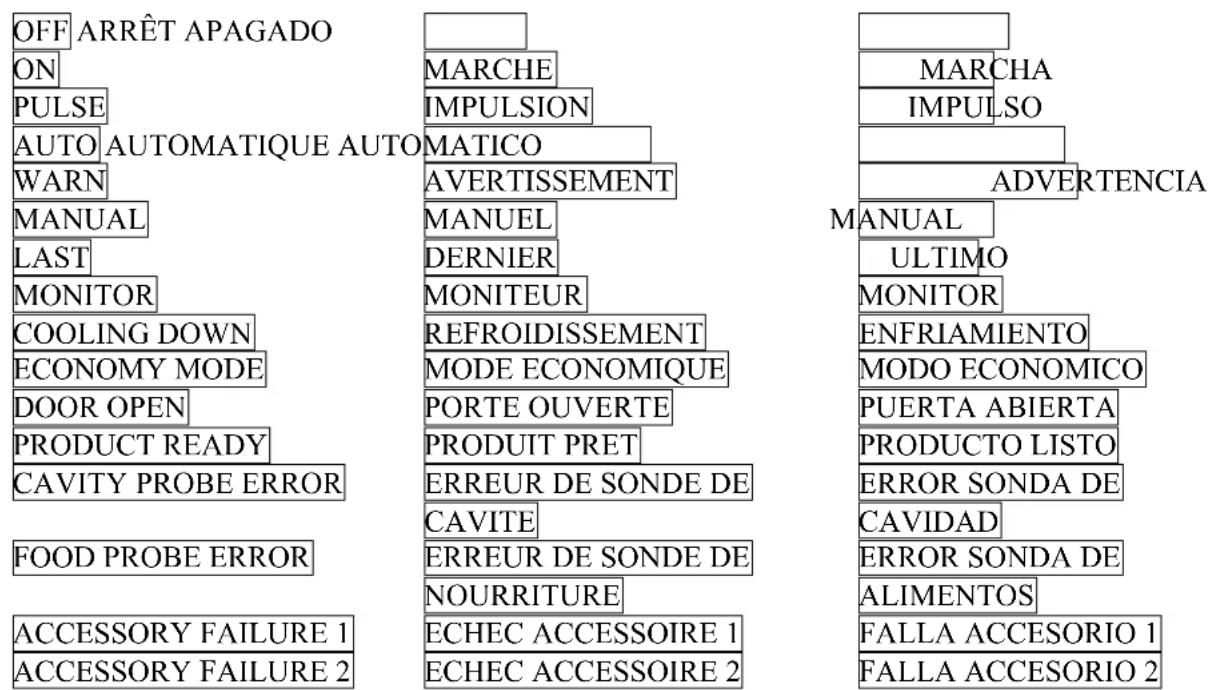
Three languages are available. To change the language display, the controller must be at OFF mode.
Press and hold the key for 5 seconds and use
▲ / ▼ keys to select the language.
□ENGLISH, FRANCAIS, ESPANOL
Only the following message will be changed, you can only change the recipe name by using a PC.
□English French Spanish
OFF ARRÊT APAGADO
ON
PULSE
AUTO AUTOMATIQUE AUTO
WARN
MANUAL
LAST
MONITOR
COOLING DOWN
ECONOMY MODE
DOOR OPEN
PRODUCT READY
CAVITY PROBE ERROR
FOOD PROBE ERROR
ACCESSORY FAILURE 1
ACCESSORY FAILURE 2
text_image
MARCHE IMPULSION MATICO AVERTISSEMENT MANUEL DERNIER MONITEUR REFROIDISSEMENT MODE ECONOMIQUE PORTE OUVERTE PRODUIT PRET ERREUR DE SONDE DE CAVITE ERREUR DE SONDE DE NOURRITURE ECHEC ACCESSOIRE 1 ECHEC ACCESSOIRE 2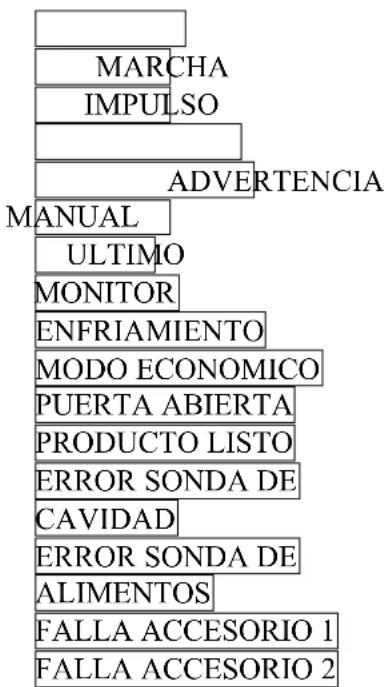
text_image
MARCHA IMPULSO ADVERTENCIA MANUAL ULTIMO MONITOR ENFRIAMIENTO MODO ECONOMICO PUERTA ABIERTA PRODUCTO LISTO ERROR SONDA DE CAVIDAD ERROR SONDA DE ALIMENTOS FALLA ACCESORIO 1 FALLA ACCESORIO 2CONTRÔLE PROGRAMMABLE ECM-1 - MODES D'OPÉRATION
□English French Spanish
text_image
OFF ARRÊT APAGADO ON PULSE AUTO AUTOMATIQUE AUTO WARN MANUAL LAST MONITOR COOLING DOWN ECONOMY MODE DOOR OPEN PRODUCT READY CAVITY PROBE ERROR FOOD PROBE ERROR ACCESSORY FAILURE 1 ACCESSORY FAILURE 2 MARCHE IMPULSION MATICO AVERTISSEMENT MANUEL DERNIER MONITEUR REFROIDISSEMENT MODE ECONOMIQUE PORTE OUVERTE PRODUIT PRET ERREUR DE SONDE DE CAVITE ERREUR DE SONDE DE NOURRITURE ECHEC ACCESSOIRE 1 ECHEC ACCESSOIRE 2 MARCHA IMPULSO ADVERTENCIA MANUAL ULTIMO MONITOR ENFRIAMIENTO MODO ECONOMICO PUERTA ABIERTA PRODUCTO LISTO ERROR SONDA DE CAVIDAD ERROR SONDA DE ALIMENTOS FALLA ACCESORIO 1 FALLA ACCESORIO 2ECM-2 PROGRAMMABLE CONTROL - OPERATING MODES
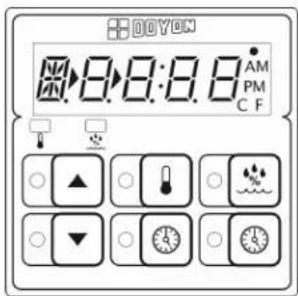
- Turn the main switch "ON" (1).
- The light inside the proofer will turn ON and the digital control will indicate a code. Then, "PREH" will flash.
- "PREH" will be displayed on the control until it reaches the set temperature.
- To check and modify:
text_image
DOYON 8:8:8.8 AM PM C FTemperature settings : Press and hold down for 2 seconds the temperature key and adjust with the UP and DOWN arrows. Then, press
temperature key to save data or " red without saving.

to exit
Humidity settings : Press and hold down for 2 seconds the humidity key and adjust with the UP and DOWN arrows. Then, press humidity
key to save data or "red

o exit without saving.
- When the control reaches the set parameters, "PREH" will disappear and the timer display will appear.
To start the timer, press "green", the timer will stop blinking and start countdown. At the end of the countdown an alarm will go off and "READY" will appear on the display. Press "red" to stop the alarm.
- When proofing cycle is completed, turn "OFF" (0) the switch.
When the proofer is not in operation, open the doors to let out the humidity and to prevent mould.
P.S. The doors should not be opened unnecessarily to conserve the heat and humidity in the proofer. Every day cleaning of the water pan under the proofer's doors should be exercised.
text_image
Diagram of an electrical control panel with labeled components and indicator lights| N° | CODE | FRANÇAIS | ENGLISH | QTY |
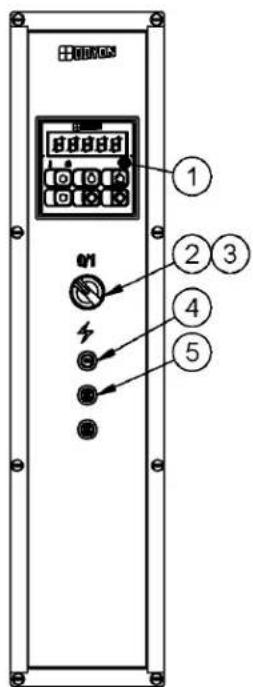
| 1 | ELT540 | CONTRÔLE ÉLECTRONIQUE POUR ÉTUVE | ELECTRONIC CONTROL FOR PROOFER | 1 |
| 2 | ELI402 | SÉLECTEUR 2 POS. NOIR | BLACK SELECTOR 2 POS. | 1 |
| 3 | ELI406 | BASE AVEC 1NO | BASE WITH 1NO | 1 |
| 4 | ELB096 | DISJONCTEUR 5A | 5A BREAKER | 1 |
| 5 | ELB097 | DISJONCTEUR 20A | 20A BREAKER | 2 |
CONTRÔLE PROGRAMMABLE ECM-2 - MODES D'OPÉRATION
ANSWERS TO MOST FREQUENT QUESTIONS
Always cut off the main power before replacing any parts. Take care of water and electric wire supply system when pulling the oven.
Control parts on the front and proofer control:
Remove the side panels of the oven and the proofer by screwing out the screws.
Motor system on the back of the oven:
Pull the oven and screw out the panels.
| Questions Solutions | |
| The oven does not turn on. | Check the breakers on the front panel.Check the breakers of the building.Check if the doors are tightly closed.Check the motor breaker and the overload relays located in the electrical control panel. |
| The oven does not produce heat. | Make sure the thermostat is adjusted to a temperature high enough to turn on the pilot light.If the oven blowers are not onCheck the overload relays located in the control compartment. If anyone of these is disengaged, call for a qualified technician.If the oven blowers are onCheck that the manual shut-off valve is open correctlyTo start it over, simply put the thermostat to the "OFF" position, wait at least 10 seconds, then reset it at the desired temperature. The burner will start up and you can see the flame through the hole near the gas input. You can repeat this operation three times. If it does not start up again, contact our company or a certified gas technician. |
| The burner goes to lock-out because of:a) Flame failure:b) The spark is irregular or not present:c) The air pressure switch does not close its contact. | The burner is equipped with multiple interlocked safety devices. In the event of a failure of the flame or any blockage of the combustion air supply, the burner will "lock out" in the safety condition.Air has not been bled from the gas line.Porcelain insulators cracked (very little crack is enough).Spark probe grounded.It may be disconnected, incorrectly set or defective or maybe the blower is not running. |
| Uneven baking. | Make sure that the grills do not obstruct the air flow. Do not use foil on the grills.Verify the temperature of the oven by using an oven thermometer and make sure that it is even with the thermostat setting.If the oven is baking too much on the sides, it is possible that the fan is not cycling properly. Verify if the motor turns 2.5 minutes in a direction, stops 30 seconds and starts for 2.5 minutes in the opposite direction. |
| The steam works in the oven but the light inside the steam button does not lite. | Replace the inside button bulb light. |
| If steam device of the oven does not work properly. | The oven must have been heating for at least half an hour before you use the steam system. If not, water will appear at the bottom of the oven.Check if the water supply valve (of the building) is open.Check if the water needle valve (of the oven) is open one eighth of a turn. Just close it and open it one eighth of a turn maximum.Check the solenoid valve.Check the preset steam timer in the back control box.Be sure to inject steam while the fan is running.The steam button light should lite during the steam injection. |
| If the OVERHEAT WARNING light is on, and you hear the warning buzzer. | Check if the cooling fan airflow is not obstructed.Check the cooling fan if it is running. If not, call a qualified technician to replace it.(Electrical components may be damaged if it is not repaired immediately.) |
| OPTIONAL Manual fill water pan.The warning red light in the front control panel stays on when the water pan is full. | You have no more water in the principal water pan.Check if the water line is not in air lock condition. Disconnect the water line at the inlet of the green solenoid valve and clean the strainer filter.Also clean the principal water pan and the float switch. |
| If there is no light in the proofer. | 1. Verify every breaker in front of the proofer.2. Verify the main proofer switch and the main proofer contactor. |
| If there is no heat in the proofer. | 1. Verify every breaker in front of the proofer.2. Verify whether the pilot light will function by raising the thermostat to a higher setting. If yes, verify element. If not, verify pilot light, thermostat or contactors. |
| If there is no humidity in the proofer. | Verify whether the pilot light works when you increase the humidity to the position high. If yes, verify if water comes in the reservoir and check the water level switch box and the float switch. Verify if limestone obstructs the waterfall. If the float switch is working fine, verify the contactor P1 and the immersion element. If the pilot light does not lite, verify the pilot light and the infinite switch. |
Do not allow any obstruction to free the airflow of the burner.
CAUTION
Never try to modify the burner controls.
This must be done only by a qualified technician and under the company's instructions.
DÉPANNAGE
AVANT D'APPELER LE DÉPARTEMENT DE SERVICE SOLUTION AUX PROBLÈMES LES PLUS FRÉQUENTS
- Once a year, you should ask a certified technician to make a tune up. Make sure everything works properly, verify and clean especially:
- The gas mixer air inlet.
- The spark rod and porcelain insulators.
- The flame detection rod.
- Verify the burner input pressure.
- Verify every adjustments.
- Clean every moving pieces.
- It is recommended to use a water filter and to clean or replace it regularly to avoid accumulation of minerals inside the unit.
- Once a year or as needed, clean the reservoir of the proofer (see parts description for localisation).
| Questions Solutions | |
| Clean the inside of the oven and the proofer with water and soap.Take out the grills (the grills of the oven could be cleaned with "Easy-Off"). | We recommend and sell:Dirt Buster III: Action foam cleanerCHEMCOPart number: NEB201 |
| After cleaning the inside of the oven, apply a silicone base oven protector. It avoids food from sticking to the metal. | We recommend and sell:316 Silicone base protector and lubricant for ovenDow CorningPart number: EXS400 |
| Clean the oven windows with products like Brasso or equivalents. They are copper cleaners but good for this use | We recommend and sell:Wright's: Cream copper cleanerJ.A. Wright & Co.Part number: EXC300 |
| Clean the oven exterior with a stainless steel cleaner. | We recommend and sell:Stainless steel cleanerSANY or CURTIS (comestible)Part number: NES201 |
ENTRETIEN ET NETTOYAGE DU FOUR
ENTRETIEN DU BRÛLEUR
text_image
Technical schematic diagram of an industrial control unit with numbered components and labeled partsI:\Dessins\JAOP14\MANUEL\JA14\GAZ\JAOP14G DROITE.dft
B-4
| Item Part Number Description Quantity | |
| 1 ELM570 DOOR SWITCH 15A 2 | |
| 2 ELD081 FRAME AND LIGHT SOCKET 77-708 120V 6 | |
| OR ELD082 FRAME AND LIGHT SOCKET 77-708 230V 6 | |
| 3 50010894 ASSY. FRAME,GLASS,GASKET AND SCREW FOR ELD081 & ELD082 6 | |
| 4 ELS950 BUZZER 120V 3 | |
| 5 ELT503 HIGH LIMIT SWITCH 140°F 1 | |
| 6 ELM760 COOLING FAN 120V 1 |
| Item | Num. Pièce | Description | Quantité |
| 1 ELM570 | MICRO INTERRUPTEUR 15A (PORTE) | 2 | |
| 2 ELD081 | SOCKET AVEC BOITIER DE LUMIERE 77-708 120V | 6 | |
| OU | ELD082 | SOCKET AVEC BOITIER DE LUMIERE 77-708 230V | 6 |
| 3 500 | 10894 | ASSY. COUVERT,VITRE,GASKET ET VIS POUR ELD081 & ELD082 | 6 |
| 4 ELS950 | SONNERIE 120V | 3 | |
| 5 ELT503 | THERMODISQUE 140°F | 1 | |
| 6 ELM760 | VENTILATEUR DE REFROIDISSEMENT 120V | 1 | |
Note: As of April 2010, parts ELD081, ELD082 (#2) & 50010894 (#3) will replace parts ELD050 & ELA275.
text_image
Technical schematic diagram of an industrial machine with numbered components for identification and assembly reference.I:\Dessins\JAOP14\MANUEL\JAOP14G GAUCHE.dft
| Item Part Number Description Quantity | |||
| 1 ELC860 CONTACTOR 2P 30A 110V 1 | |||
| 2 ELC615 RELAY 10A 2P COIL 110V 1 | |||
| AND ELC617 BASE 1 | |||
| 3 ELC630 CONTROL RELAY 12A COIL 120V 1 | |||
| AND ELC640 CONTROL RELAY BASE 1 | |||
| 4 ELT505 HIGH LIMIT TEMPERATURE 300^ 1 | |||
| 5 | ELM730 | PROOFER FAN BLOWER | 1 |
| 6 | ELD050 | INCANDESCENT LIGHT SOCKET | 4 |
| AND | ELA275 | BULB 60W 130V | 4 |
| OR | ELA285 | BULB 50W 240V | 4 |
| 7 ELE130 | COIL ELEMENT 120V 1500W 1 | ||
| OR | ELE131 | COIL ELEMENT 208V 1500W | 1 |
| OR | ELE132 | COIL ELEMENT 240V 1500W | 1 |
| OR | ELE142 | COIL ELEMENT 400V 1500W | 1 |
| OR | ELE136 | COIL ELEMENT 480V 1500W | 1 |
| 8 ELE165 | IMMERSION ELEMENT 120V 1500W 1 | ||
| OR | ELE166 | IMMERSION ELEMENT 208V 1500W | 1 |
| OR | ELE167 | IMMERSION ELEMENT 240V 1500W | 1 |
| OR | ELE141 | IMMERSION ELEMENT 400V 1500W | 1 |
| OR | ELE171 | IMMERSION ELEMENT 480V 1500W | 1 |
| 9 | ELS887 | SOLENOID VALVE WITH DIN CON. 110/120V 50/60HZ | 1 |
| 10 | ELV590 | NEEDLE VALVE | 1 |
| 11 | QUF350 | ELECTRIC FLOAT | 1 |
| Item | Numéro Pièce | Description | Quantité |
| 1 ELC860 | CONTACTEUR 2P 30A 110V | 1 | |
| 2 ELC615 | RELAIS 10A 2P BOBINE 110V | 1 | |
| ET | ELC617 | BASE | 1 |
| 3 ELC630 | RELAIS DE CONTRÔLE 12A BOBINE 120V | 1 | |
| ET | ELC640 | BASE POUR RELAIS | 1 |
| 4 | ELT505 | THERMOSTAT LIMITE HAUTE TEMPÉRATURE 300° | 1 |
| 5 | ELM730 | VENTILATEUR D'ÉTUVE | 1 |
| 6 ELD050 | BASE DE LUMIÈRE | 4 | |
| ET | ELA275 | AMPOULE INCANDESCENTE 60W 130V | 4 |
| OU | ELA285 | AMPOULE INCANDESCENTE 50W 240V | 4 |
| 7 | ELE130 | ÉLÉMENT BOUDIN 120V 1500W | 1 |
| OU | ELE131 | ÉLÉMENT BOUDIN 208V 1500W | 1 |
| OU | ELE132 | ÉLÉMENT BOUDIN 240V 1500W | 1 |
| OU | ELE142 | ÉLÉMENT BOUDIN 400V 1500W | 1 |
| OU | ELE136 | ÉLÉMENT BOUDIN 480V 1500W | 1 |
| 8 | ELE165 | ÉLÉMENT IMMERSION 120V 1500W 1 | |
| OU | ELE166 | ÉLÉMENT IMMERSION 208V 1500W 1 | |
| OU | ELE167 | ÉLÉMENT IMMERSION 240V 1500W 1 | |
| OU | ELE141 | ÉLÉMENT IMMERSION 400V 1500W 1 | |
| OU | ELE171 | ÉLÉMENT IMMERSION 480V 1500W 1 | |
| 9 | ELS887 | VALVE À SOLENOÏDE AVEC CON. DIN 110/120V 50/60HZ | 1 |
| 10 | ELV590 | VALVE À POINTEAU | 1 |
| 11 | QUF350 | INTERRUPTEUR À NIVEAU D'EAU | 1 |
B-7
JAOP14G
VUE ARRIÈRE/BACK VIEW
text_image
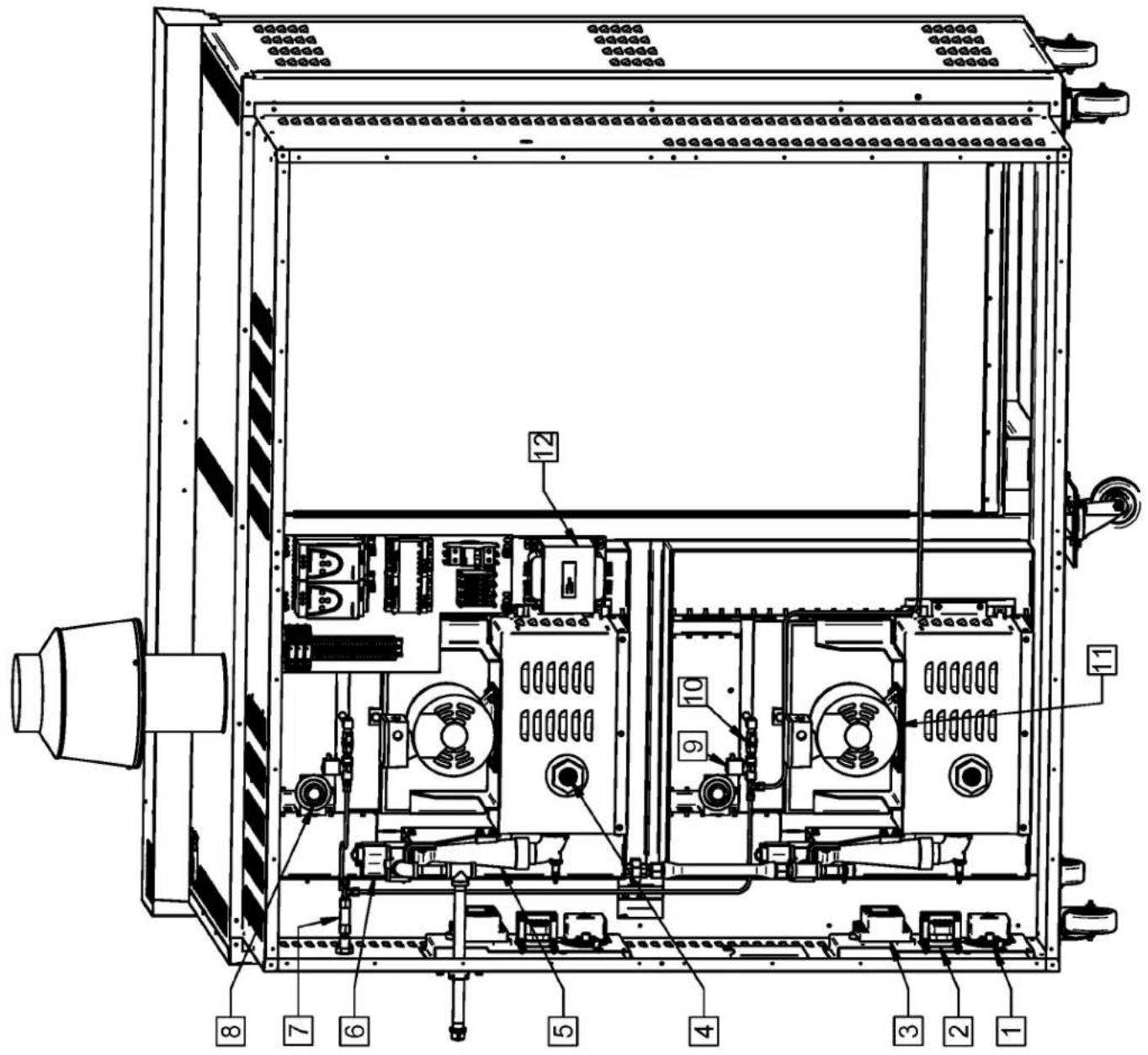
Technical schematic diagram of an electrical enclosure with numbered components for identification.| Item | Part Number | Description Quantity | |
| 1 | GAP300 PRESSURE SWITCH DWYER 2 | ||
| 2 | ELT705 TRANSFORMER 120/240V TO 12/24V 100VA. 2 | ||
| 3 | GAB500 ELECTRONIC CONTROL BOX FOR GAS OVEN (S87D) 2 | ||
| 4 | GAD200 FLAME DETECTION ROD 2 | ||
| AND | GAD190 | IGNITION ROD | 2 |
| 5 | GAM200 | ATMOSPHERIC MIXER | 2 |
| 6 | GAC230 | HONEYWELL GAS VALVE #VR8205A2800 | 2 |
| - | GAC241N | NATURAL GAS PRESSURE REGULATOR | 2 |
| - | GAC241P | PROPANE GAS PRESSURE REGULATOR | 2 |
| 7 | PLF100 | WATER FILTER 14 NPT | 1 |
| 8 | ELT680 | THERMOSTAT 700°F | 2 |
| AND | ELT681 | THERMOSTAT KNOB 700°F | 2 |
| 9 | ELS887 SOLENOID VALVE WITH DIN CONNECTION 110/120V 50/60HZ | 2 | |
| 10 | ELV590 | NEEDLE VALVE | 2 |
| 11 | ELM820ML | MOTOR 3 PH. .75 HP. 6 1/4 INCHES SHAFT. | 2 |
| 12 | ELT726 | TRANSFO 240-480 > 120-240 1KVA 60Hz OPEN | 1 |
| Item | Num. Pièce | Description | Quantité |
| 1 | GAP300 | INTERRUPTEUR DE PRESSION DWYER | 2 |
| 2 | ELT705 | TRANSFORMATEUR 120/240V À 12/24V 100VA. | 2 |
| 3 | GAB500 | BOÎTE DE CONTRÔLE ÉLEC. FOUR AU GAZ (S87D) | 2 |
| 4 | GAD200 | ÉLECTRODE DE DÉTECTEUR DE FLAMME | 2 |
| ET | GAD190 | ÉLECTRODE D'ALLUMAGE | 2 |
| 5 GAM200 | MÉLANGEUR ATMOSPHÉRIQUE | 2 | |
| 6 GAC230 | VALVE À GAZ HONEYWELL #VR8205A2800 | 2 | |
| - | GAC241N | RÉGULATEUR DE PRESSION POUR GAZ NATUREL | 2 |
| - | GAC241P | RÉGULATEUR DE PRESSION POUR GAZ PROPANE | 2 |
| 7 | PLF100 | FILTRE À EAU 1⁄4'' NPT | 1 |
| 8 | ELT680 | THERMOSTAT 700°F | 2 |
| ET | ELT681 | BOUTON DE THERMOSTAT 700°F | 2 |
| 9 | ELS887 | VALVE À SOLENOÏDE AVEC CONNECTION DIN 110/120V 50/60HZ | 2 |
| 10 | ELV590 | VALVE À POINTEAU | 2 |
| 11 | ELM820ML | MOTEUR 3 PH. .75 HP ARBRE 6 1/4 POUCES. 2 | |
| 12 | ELT726 | TRANSFO 240-480 > 120-240 1KVA 60Hz OUVERT 1 | |
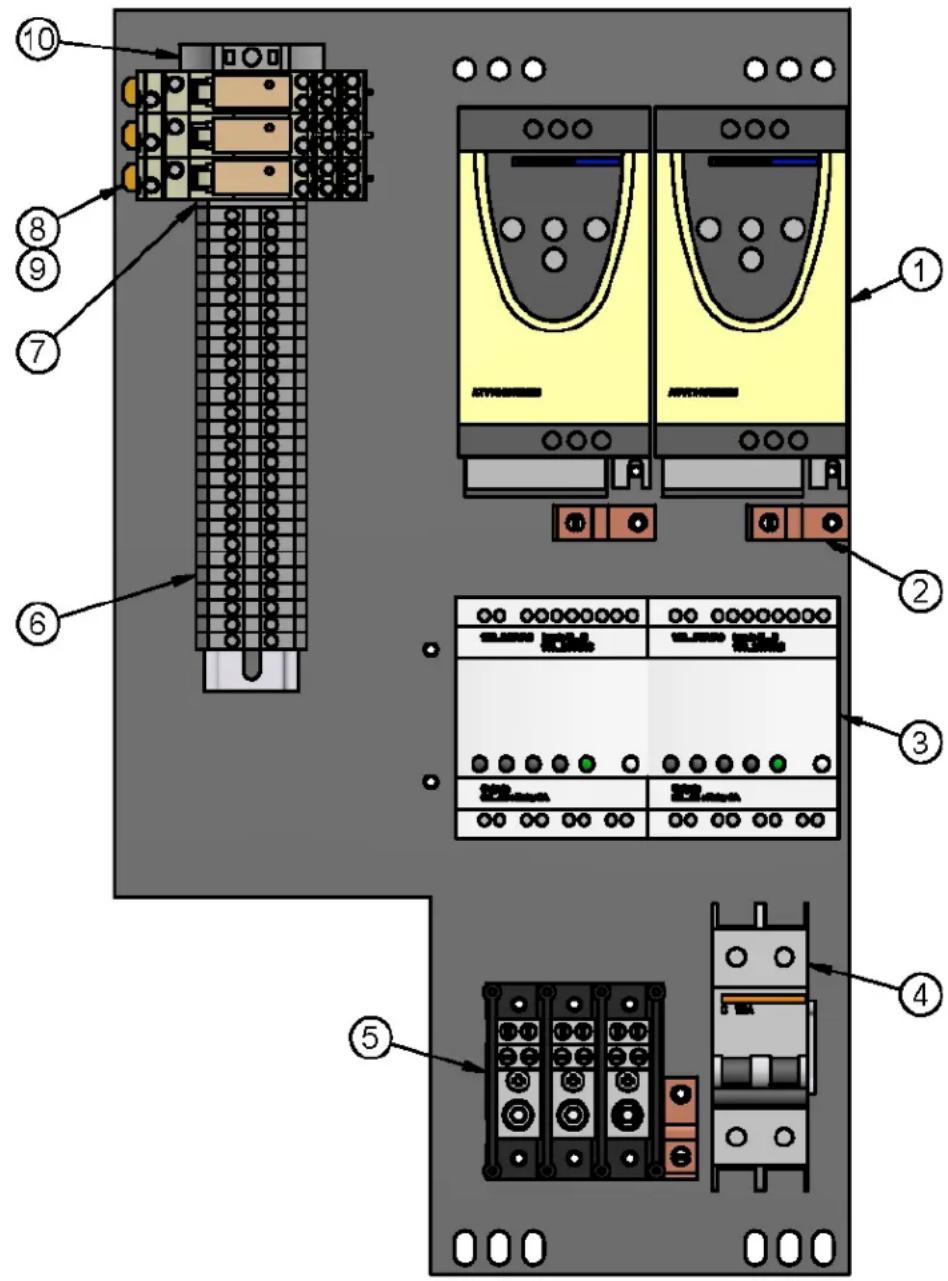
PAN. CONT. DOUBLE GAZ 120/208-240V 1&3PH, AVEC ATV & ZELIO CONTROL PAN. DOUBLE GAS 120/208-240V 1&3PH, WITH ATV & ZELIO
C-1 C-1
text_image
Technical diagram of an electronic control panel with numbered components for identification and assembly reference.| N° | CODE | DESCRIPTION FRANÇAISE | ENGLISH DESCRIPTION | QTY |
| 1 | FEV001 | VARIATEUR DE VITESSE 240 V | INVERTER 240 V | 2 |
| 2 | ELL050 | TERMINAL DE MISE À LA TERRE 70A | 70A GROUND LUG | 3 |
| 3 | ELM716 | AUTOMATE PROG. ZELIO 8 ENTRÉES/ 8 SORTIES | PROG. AUTOMAT ZELIO 8 IN/8 OUT | 2 |
| 4 | ELB083 | DISJONCTEUR 2P 15A | BREAKER 2P 15A | 1 |
| 5 | ELB072 | BORNIER 3P 175A | TERMINAL BLOCK 3P 175A | 1 |
| 6 | ELB073 | BLOC TERMINAL 30A | TERMINAL BLOCK 30A | 27 |
| 7 | ELB073B | BARRIERE ISOLANTE | INSULATING BARRIER | 1 |
| 8 | ELC629 | BASE POUR RELAIS ELC628 | BASE PLATE FOR RELAY ELC628 | 3 |
| 9 | ELC628 | RELAIS 5A 120VAC DOUBLE CONTACT | RELAY 5A 120VAC DOUBLE CONTACT | 3 |
| 10 | ELB073A | ATTACHE ÉLECTRIQUE | ELECTRIC ATTACH | 1 |
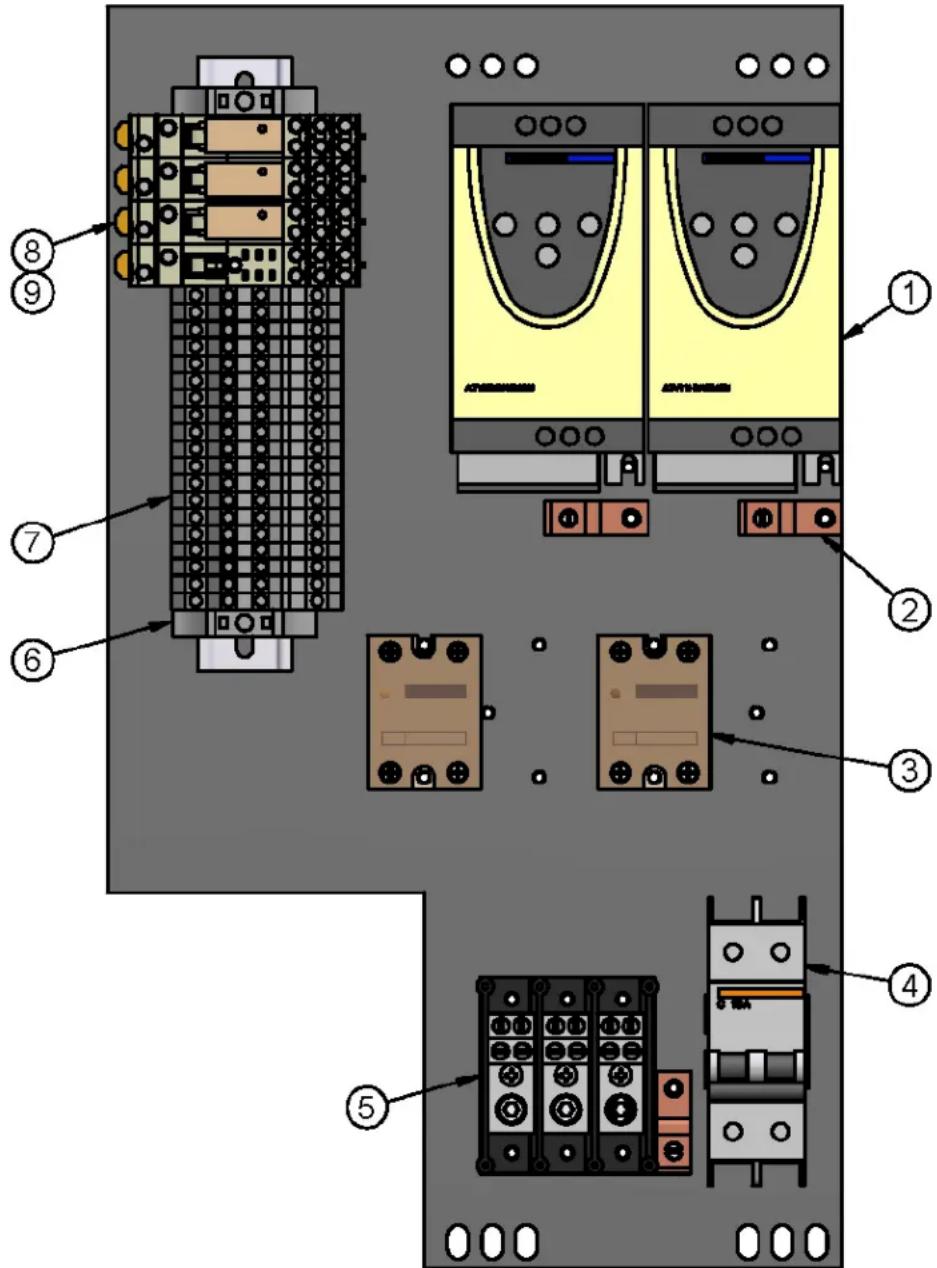
PAN. CONT. DOUBLE GAZ 120/208-240V 1&3PH, AVEC ATV CONT. PAN. DOUBLE GAS 120/208-240V 1&3PH, WITH ATV
C-2
text_image
Diagram of an electronic device rear panel with numbered components and labeled connectors| N° | CODE | DESCRIPTION FRANÇAISE | ENGLISH DESCRIPTION | QTY |
| 1 | FEV001 | VARIATEUR DE VITESSE 240 V | INVERTER 240 V | 2 |
| 2 | ELL050 | TERMINAL DE MISE À LA TERRE 70A | 70A GROUND LUG | 3 |
| 3 | ELC800 | RELAIS STATIQUE POUR CONTRÔLE WATLOW | SOLID STATE RELAY FOR WATLOW CONTROL | 2 |
| 4 | ELB083 | DISJONCTEUR 2P 15A | BREAKER 2P 15A | 1 |
| 5 | ELB072 | BORNIER 3P 175A | TERMINAL BLOCK 3P 175A | 1 |
| 6 | ELB073A | ATTACHE ÉLECTRIQUE | ELECTRIC ATTACH | 1 |
| 7 | ELB077 | BLOC TERMINAL SUPERPOSÉ 30A | STACK TERMINAL BLOCK 30A | 19 |
| 8 | ELC629 | BASE POUR RELAIS ELC628 | BASE PLATE FOR RELAY ELC628 | 4 |
| 9 | ELC628 | RELAIS 5A 120VAC DOUBLE CONTACT | RELAY 5A 120VAC DOUBLE CONTACT | 3 |
I:\Dessins\PANNEAU\ELP859.dft

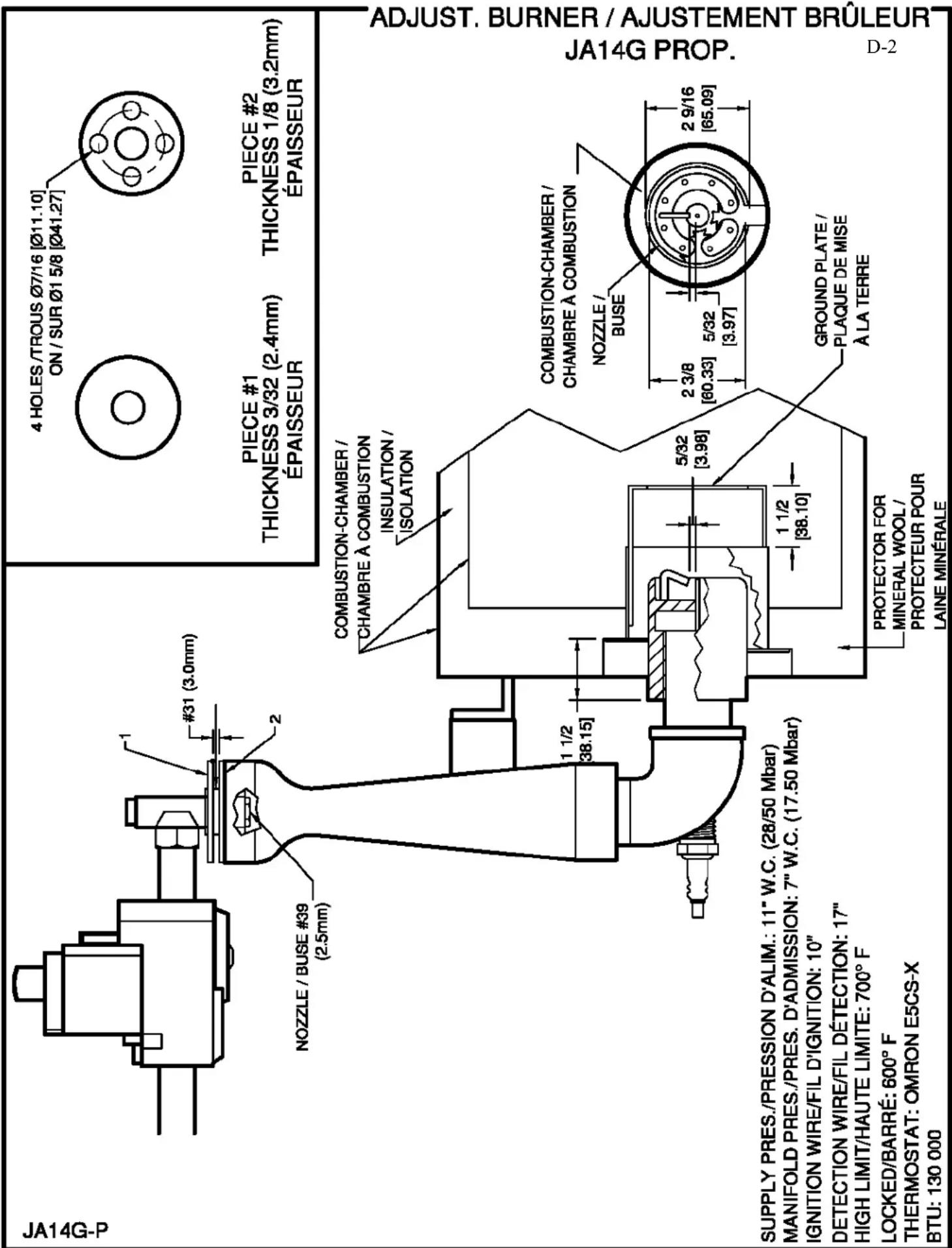
PIECE #1
THICKNESS 3/32 (2.4mm) THICKNESS 1/8 (3.2mm) ÉPAISSEUR ÉPAISSEUR
PROTECTOR FOR MINERAL WOOL /
PROTECTOR FOR MINERAL WOOL/
PROTECTEUR POUR
PROTECTEUR POUR
LAINE MINÉRALE
SUPPLY PRES./PRESSION D'ALIM.: 11" W.C. (28/50 Mbar) MANIFOLD PRES./PRES. D'ADMISSION: 7" W.C. (17.50 Mbar) IGNITION WIRE/FIL D'IGNITION: 10"
SUPPLY PRES./PRESSION D'ALIM.: 11" W.C. (28/50 Mbar)
MANIFOLD PRES./PRES. D'ADMISSION: 7" W.C. (17.50 Mbar)
IGNITION WIRE/FIL D'IGNITION: 10"
DETECTION WIRE/FIL DÉTECTION: 17"
HIGH LIMIT/HAUTE LIMITE: 700^ F
LOCKED/BARRÉ: 600° F
THERMOSTAT, CHRON 5700 Y
THERMOSTAT: OMRON E5CS-X
BTU: 130 000
LIMITED WARRANTY
(Continental United States Of America And Canada Only)
Doyon Equipment Inc. guarantees to the original purchaser only that its product are free of defects in material and workmanship, under normal use.
This warranty does not cover any light bulbs, thermostat calibration or defects due to or resulting from handling, abuse, misuse, nor shall it extend to any unit from which the serial number has been removed or altered, or modifications made by unauthorised service personnel or damage by flood, fire or other acts of God. Nor will this warranty apply as regards to the immersion element damaged by hard water.
The extent of the manufacturer's obligation under this warranty shall be limited to the replacement or repair of defective parts within the warranty period. The decision of the acceptance of the warranty will be made by Doyon Equipment service department, which decision will be final.
The purchaser is responsible for having the equipment properly installed, operated under normal conditions with proper supervision and to perform periodic preventive maintenance.
If any parts are proven defective during the period of one year from date of purchase, Doyon Equipment Inc. hereby guarantees to replace, without charge, F.O.B. Linière, Quebec, Canada, such part or parts.
Doyon Equipment Inc will pay the reasonable labour charges in connection with the replacement parts occurring within one year from purchase date. Travel over 50 miles, holiday or overtime charges are not covered. After one year from purchase date, all labour and transportation charges in connection with replacement parts will be the purchaser's responsibility.
Doyon Equipment Inc. does hereby exclude and shall not be liable to purchaser for any consequential or incidental damages including, but not limited to, damages to property, damages for loss of use, loss of time, loss of profits or income, resulting from any breach or warranty.
In no case, shall this warranty apply outside Canada and continental United States unless the purchaser has a written agreement from Doyon Equipment Inc.