PCFR 1242 H - Deep fryer PROFICOOK - Free user manual and instructions
Find the device manual for free PCFR 1242 H PROFICOOK in PDF.



| Brand | ProfiCook |
| Model | PCFR 1242 H |
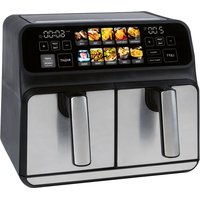
| Product type | Dual hot air fryer |
| Dimensions (approx.) | Approx. 36 x 28 x 36 cm |
| Net weight | Approx. 7.7 kg |
| Power supply | 220-240 V~, 50/60 Hz |
| Power consumption | 2 × 1200 W (total 2400 W) |
| Protection class | I |
| Container capacity | Not specified (do not exceed MAX mark) |
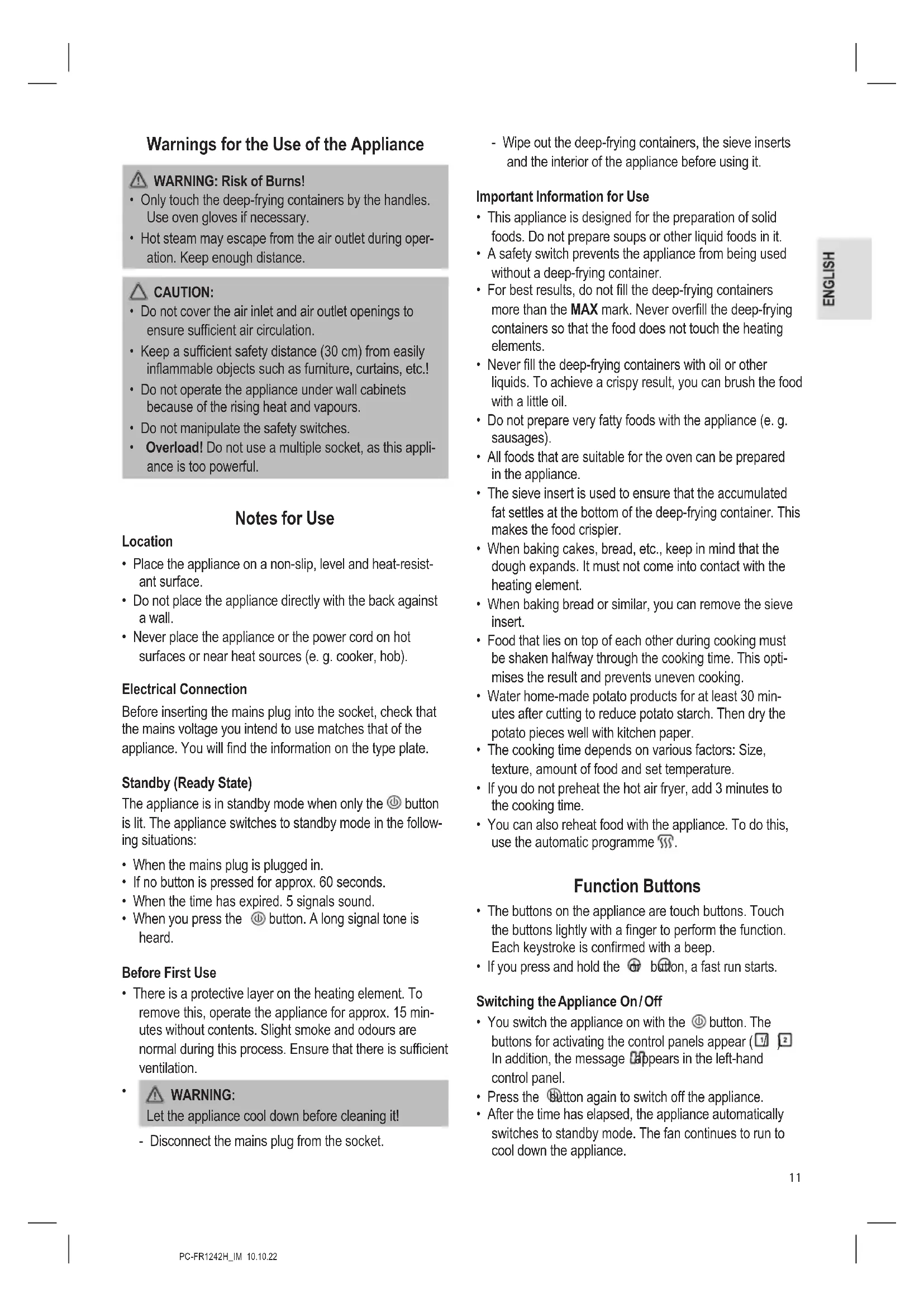
| Temperature range | 80 °C to 200 °C |
| Timer | 1 to 60 minutes |
| Automatic programs | 11 programs (fries, cutlet, shrimp, cake, chicken thighs, steak, fish, pizza, bacon, reheating, defrosting) |
| Special functions | Synchronized adjustment (SYNC BASKETS), synchronized stop (SYNC FINISH), single or combined operation, preheating |
| Control type | Touch panel with touch buttons |
| Safety | Safety switches for containers, automatic stop at end of cooking, overheating protection, non-slip and heat-resistant surface, insulated handles |
| Material | Non-stick coating on containers and sieves |
| Care and cleaning | Clean after cooling; containers and sieves washable with warm water and dish soap; do not immerse the appliance; use a damp cloth for the exterior and interior |
| Included accessories | 2 frying containers, 2 sieve inserts |
| Spare parts and repairability | Not specified; contact customer service |
| Warranty | Not specified; keep the warranty certificate and receipt |
Frequently Asked Questions - PCFR 1242 H PROFICOOK
User questions about PCFR 1242 H PROFICOOK
0 question about this device. Answer the ones you know or ask your own.
Ask a new question about this device
Download the instructions for your Deep fryer in PDF format for free! Find your manual PCFR 1242 H - PROFICOOK and take your electronic device back in hand. On this page are published all the documents necessary for the use of your device. PCFR 1242 H by PROFICOOK.
USER MANUAL PCFR 1242 H PROFICOOK
text_image
Technical diagram of a toaster oven with numbered parts for identification and assembly reference.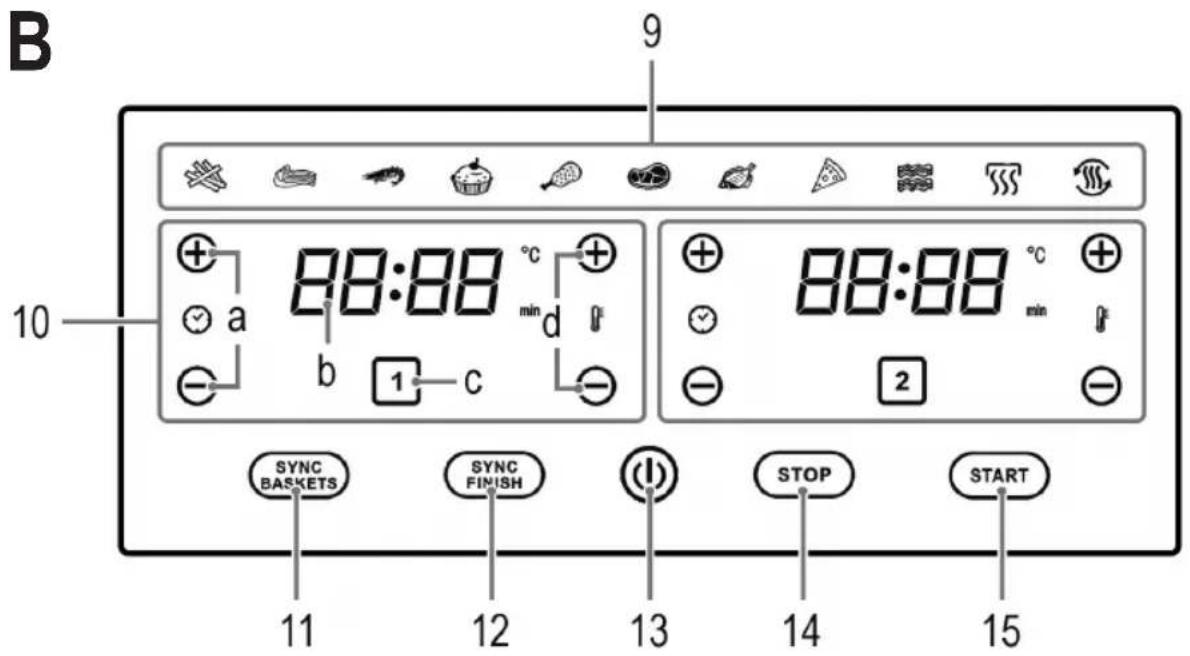
text_image
B 9 10 88:88 °C + a b 1 c SYNC BASKETS SYNC FINISH STOP START 11 12 13 14 15WICHTIG:
Be sure to read the separately enclosed safety instructions first.
Instruction Manual
Thank you for choosing our product. We hope you will enjoy using the appliance.
Read the instruction manual and the separately enclosed safety instructions very carefully before using this appliance. Keep these documents, including the warranty certificate, receipt and, if possible, the box with the inner packaging in a safe place. If you pass the appliance on to a third party, always include all the relevant documents.
Symbols in this Instruction Manual
Important information for your safety is specially marked. It is essential to comply with these instructions in order to avoid accidents and prevent damage to the appliance:

WARNING:
This warns you of dangers to your health and indicates possible injury risks.

CAUTION:
This refers to possible hazards to the appliance or other objects.
Content
Overview of the Components....3
Unpacking the Appliance....10
Scope of Delivery....10
Overview of the Components....10
Figure A....10
Figure B....10
Warnings for the Use of the Appliance ....11
Notes for Use....11
Location....11
Electrical Connection 11
Standby (Ready State)....11
Before First Use 11
Important Information for Use 11
Function Buttons 11
Switching the Appliance On/Off 11
Selecting Single or Combination Operation ....12
Setting the Temperature and Cooking Time....12
Starting/Interrupting the Cooking Process....12
Synchronised Setting (SYNC BASKETS) 12
Synchronised Shutdown (SYNC FINISH) 12
Automatic Programmes 12
Using the Appliance 12
Interrupting Operation 13
Ending Operation 13
Cleaning....13
Storage....13
Troubleshooting....14
Technical Data....14
Disposal....14
Meaning of the "Dustbin" Symbol 14
Unpacking the Appliance
-
Remove the appliance from its packaging.
-
Remove all packaging material, such as foils, filling material, cable ties and cardboard packaging.
-
Check the scope of delivery for completeness.
-
If the contents of the packaging are incomplete or if damage can be detected, do not operate the appliance. Return it to the dealer immediately.
Scope of Delivery
1 × Double hot air deep fryer
2× Sieve insert
2× Frying container
Overview of the Components
Figure A
1 Air outlet openings
2 Air inlet openings
3 Control panel
4 Sieve insert
5 Silicone knobs
6 Deep-frying container handle
7 Deep-frying container
8 Carrying handle
Figure B
9 Buttons for the automatic programmes
10 Control panels for the deep fryers
(Deep fryer 1 (left) / Deep fryer 2 (right))
a ⊕ and ⊕ buttons (extend / shorten cooking time)
b Display
c ☐ button (activate control panel)
d and buttons (increase / decrease temperature)
11 SYNC BASKETS button (synchronised setting)
12 SYNC FINISH button (synchronised shutdown)
13 ⏻ button (switch on / off)
14 STOP button (interrupt cooking process)
15 START button (start cooking)
Warnings for the Use of the Appliance

WARNING: Risk of Burns!
- Only touch the deep-frying containers by the handles. Use oven gloves if necessary.
- Hot steam may escape from the air outlet during operation. Keep enough distance.

CAUTION:
- Do not cover the air inlet and air outlet openings to ensure sufficient air circulation.
- Keep a sufficient safety distance (30 cm) from easily inflammable objects such as furniture, curtains, etc.!
- Do not operate the appliance under wall cabinets because of the rising heat and vapours.
- Do not manipulate the safety switches.
• Overload! Do not use a multiple socket, as this appliance is too powerful.
Notes for Use
Location
- Place the appliance on a non-slip, level and heat-resistant surface.
- Do not place the appliance directly with the back against a wall.
- Never place the appliance or the power cord on hot surfaces or near heat sources (e. g. cooker, hob).
Electrical Connection
Before inserting the mains plug into the socket, check that the mains voltage you intend to use matches that of the appliance. You will find the information on the type plate.
Standby (Ready State)
The appliance is in standby mode when only the ⏻ button is lit. The appliance switches to standby mode in the following situations:
- When the mains plug is plugged in.
- If no button is pressed for approx. 60 seconds.
- When the time has expired. 5 signals sound.
- When you press the ⏻ button. A long signal tone is heard.
Before First Use
- There is a protective layer on the heating element. To remove this, operate the appliance for approx. 15 minutes without contents. Slight smoke and odours are normal during this process. Ensure that there is sufficient ventilation.
•

WARNING:
Let the appliance cool down before cleaning it!
- Disconnect the mains plug from the socket.
- Wipe out the deep-frying containers, the sieve inserts and the interior of the appliance before using it.
Important Information for Use
- This appliance is designed for the preparation of solid foods. Do not prepare soups or other liquid foods in it.
- A safety switch prevents the appliance from being used without a deep-frying container.
- For best results, do not fill the deep-frying containers more than the MAX mark. Never overfill the deep-frying containers so that the food does not touch the heating elements.
- Never fill the deep-frying containers with oil or other liquids. To achieve a crispy result, you can brush the food with a little oil.
- Do not prepare very fatty foods with the appliance (e. g. sausages).
- All foods that are suitable for the oven can be prepared in the appliance.
- The sieve insert is used to ensure that the accumulated fat settles at the bottom of the deep-frying container. This makes the food crispier.
- When baking cakes, bread, etc., keep in mind that the dough expands. It must not come into contact with the heating element.
- When baking bread or similar, you can remove the sieve insert.
- Food that lies on top of each other during cooking must be shaken halfway through the cooking time. This optimises the result and prevents uneven cooking.
- Water home-made potato products for at least 30 minutes after cutting to reduce potato starch. Then dry the potato pieces well with kitchen paper.
- The cooking time depends on various factors: Size, texture, amount of food and set temperature.
- If you do not preheat the hot air fryer, add 3 minutes to the cooking time.
- You can also reheat food with the appliance. To do this, use the automatic programme 🎨.
Function Buttons
- The buttons on the appliance are touch buttons. Touch the buttons lightly with a finger to perform the function. Each keystroke is confirmed with a beep.
- If you press and hold the ☑ button, a fast run starts.
Switching the Appliance On/Off
- You switch the appliance on with the ⏻ button. The buttons for activating the control panels appear (1/2) In addition, the message appears in the left-hand control panel.
- Press the button again to switch off the appliance.
- After the time has elapsed, the appliance automatically switches to standby mode. The fan continues to run to cool down the appliance.
Selecting Single or Combination Operation
After you have switched on the appliance, the buttons for activating the control panels appear.
- If you want to use the left fryer, activate it with the button. The control panel for the left-hand fryer appears.
- If you want to use the right-hand fryer, activate it with the 2 button. The control panel for the right-hand fryer appears.
- To operate both fryers at the same time, press both the button and the button.
Setting the Temperature and Cooking Time
There are two ⊕ and ⨱ buttons on each control panel side of the appliance.
- With the ⊕ or Ⓑ buttons above and below the symbol you set the temperature (80 °C - 200 °C).
- Use the ⊕ or ⏻ buttons above and below the symbol ⚙ to set the cooking time (1 – 60 minutes).
- The display alternates between the temperature and the cooking time.
Starting / Interrupting the Cooking Process
- Start the cooking process with the START button.
- You can interrupt the cooking process with the but ton. (See chapter "Using the Appliance" "Interrupting Operation")
Synchronised Setting (SYNC BASKETS)
The SYNC BASKETS button allows you to set both sides simultaneously with the same settings. It appears only after you have activated both control panels.
• After you have pressed the SYNC SASKETS button, you can set the same temperature and cooking time on both control panels.
- Start the selected automatic programme with the button.
Synchronised Shutdown (SYNC FINISH)
The SYNC FINISH button allows you to prepare two different foods with different cooking times at the same time.
- After pressing the ETRC FINISH button, set the desired automatic programme, temperature and cooking time on both sides.
- Start the programme with the button. The control panel with the shorter cooking time displays Hold. This programme does not start until the longer cooking time has reached the shorter cooking time.
Automatic Programmes
Select an automatic programme by pressing the symbol for that programme.
The following temperatures in degrees Celsius (°C) and times in minutes (min) are preset for the programmes:
| Symbol | Programme °C min | ||
| French fries | 200 | 30 | |
| Cutlet | 200 | 15 | |
| Prawns | 200 | 20 | |
| Cake | 180 | 25 | |
| Chicken legs | 200 | 30 | |
| Steak | 200 | 20 | |
| Fish | 170 | 25 | |
| Pizza | 180 | 15 | |
| Bacon | 200 | 12 | |
| Reheat | 150 | 20 | |
| Defrosting | 50 | 15 |
- The preset temperatures and cooking times are only guidelines. The cooking time and temperature may be longer and higher or shorter and lower depending on the size and weight.
• Also observe the information on the food packaging. - You can also adjust the preset temperature and cooking time of the automatic programmes.
Using the Appliance
- Pull the deep-frying containers out of the appliance by the handles.
- If necessary, place the sieve inserts with the silicone knobs in the deep-frying containers. Push the sieve inserts all the way down.
- Push the deep-frying containers back into the appliance. They must lock into place.
- Plug the appliance into a properly installed earthed socket. A beep sounds and all the symbols light up briefly. The button lights up.
- Press the ⏻ button to switch on the appliance.
- Select one fryer the single operation or both fryers the combined operation. The appliance is preset to automatic programme ✗, temperature 200 °C and 30 minutes.
- We recommend preheating the appliance for approx. 3 minutes. To do this, set the required temperature and cooking time to 3 minutes.
-
Press the button to start the cooking process.
-
After the time has elapsed, 5 signals sound and the appliance switches to standby mode.
- Pull the deep-frying containers out of the appliance by the handle. Place them on a heat-resistant surface.
- Fill the deep-frying containers with the desired food.
- Push the deep-frying containers back into the appliance.
- Switch the appliance on again with the @button.
- Activate the control panel of the deep-fryer, which contains the deep-frying container with the food.
- Select an automatic programme or set the cooking time and temperature manually.
- Press the button to start the cooking process.
- If necessary, shake the food halfway through the cooking time. To do this, pull out the deep-frying container by the handle. Then push the deep-frying container back into the appliance.
Interrupting Operation
- Operation is interrupted when you press the STOP button. If you want to resume operation, press the START button.
- Operation is also interrupted when you pull out the deep-frying container. The n symbol flashes next to the temperature. Put the deep-frying container back in to resume operation. The n symbol goes out.
- The appliance restarts at the interrupted point. However, if you unplug the appliance, your current settings will be lost. The appliance displays the default setting again when you have plugged in the mains plug and pressed the ⏻ button.
Ending Operation
When the cooking time has elapsed, the appliance automatically switches to standby mode. 5 signals sound.
- Unplug the mains plug from the socket.
- Remove the deep-frying containers from the appliance by the handles.
- Put the food in a heat-resistant bowl.
- Push the deep-frying containers back into the appliance to cool.
Cleaning

WARNING:
- Always switch off the appliance and unplug it from the mains before cleaning. Wait until the appliance, the deep-frying containers and the sieve inserts have cooled down.
- Do not immerse the appliance in water! It could cause an electric shock or fire.

CAUTION: Non-stick Coating
- Do not use a wire brush or other abrasive objects.
- Do not use harsh or abrasive cleaners.
- You can clean the deep-frying containers and sieve inserts in warm rinse water with a little hand dishwashing liquid.
- Clean the inside and outside of the appliance with a slightly damp, not wet cloth.
- Also remove any food / grease residues on and next to the heating coils with a slightly damp cloth. Do not switch the appliance on again until the heating coils are completely dry!
Storage
- Clean the appliance as described. Allow the accessories to dry completely.
- We recommend storing the appliance in its original packaging if you do not intend to use it for a longer period of time.
• Always store the appliance out of the reach of children in a well-ventilated and dry place.
Troubleshooting
If a problem occurs, it is often only due to something minor. Before contacting our service department, please observe the following instructions:
| Problem Possible Cause | Remedy | |
| The appliance is not working. | The appliance has no power supply. Check | the power socket with another appliance. |
| Insert the mains plug correctly. | ||
| Check the house fuse. | ||
| The appliance is not switched on. Only the ⏻ button is visible in the control panel. | Press the ⏻ button to switch on the appliance. The buttons for activating the control panels appear (1) 2 in addition, is displayed in the left control panel. | |
| You have not started the cooking process. | Press the START button to start the cooking process. | |
| One or both deep-frying containers are not inserted correctly. Safety switches prevent operation with deep-frying containers that are not inserted correctly. | Insert the deep-frying containers correctly. They must audibly click into place. | |
| The food is not fully cooked. | Deep-frying container is overfilled. Reduce | the amount of food. Smaller quantities are cooked more evenly. |
| The temperature is set too low. Set a higher temperature. | ||
| The cooking time is set too short. Set a longer time. | ||
| The food is cooked unevenly. | If food is on top of each other, there is not enough air circulation. | The food must be shaken halfway through the cooking time. |
| The food is not crispy. You have used food that is only suitable for a conventional deep fryer. | Use oven-ready food or spread it with a little oil. | |
| Smoke is coming out of the appliance. | You are preparing very fatty food. | Smoke may develop due to splashes of fat inside the appliance. Make sure there is sufficient ventilation. |
| Deep-frying container overfilled. | Reduce the amount of food. | |
| There is still food / fat residue from previous use in the deep-frying containers or on the heating coils. | Clean the appliance after each use as described in the chapter “Cleaning”. | |
Technical Data
Model: PC-FR 1242 H
Power supply: 220-240 V\~, 50/60 Hz
Power consumption: 2×1200 W
Protection class: I
Net weight: .... approx. 7.7 kg
The right to make technical and design modifications in the course of continuous product development remains reserved.
This appliance has been tested according to all applicable, current CE directives and built according to the latest safety regulations.
Disposal
Meaning of the "Dustbin" Symbol
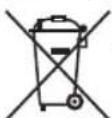
Protect our environment: do not dispose of electrical equipment in the domestic waste.
Please return any electrical equipment that you will no longer use to the collection points provided for their disposal.
This helps avoid the potential effects of incorrect disposal on the environment and human health.
This will contribute to the recycling and other forms of re-utilisation of electrical and electronic equipment.
Information concerning where the equipment can be disposed of can be obtained from your local authority. Your dealer and contractual partner is also obliged to take back the old appliance free of charge.
BELANGRIJK:
LET OP: Anti-aanbaklaag
CTC Clatronic Sp. z o.o
Ul. Brzeska 1
45-960 Opole
Usuwanie
m = 311