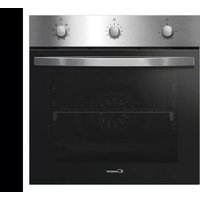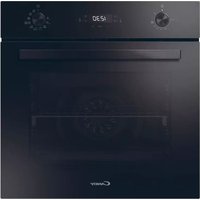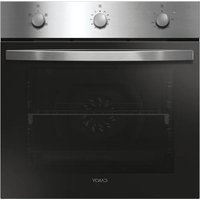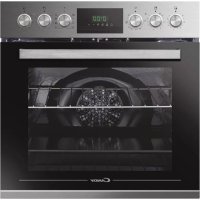
PCHT14CXCUTCEF - Built-in oven CANDY - Free user manual and instructions
Find the device manual for free PCHT14CXCUTCEF CANDY in PDF.


| Product type | Built-in oven |
| Brand | Candy |
| Model | PCHT14CXCUTCEF |
| Power supply | 220-240 V~, 50/60 Hz, single-phase or three-phase depending on configuration |
| Approximate dimensions (H x W x D) | 595 x 595 x 560 mm |
| Approximate weight | 35 kg |
| Approximate capacity | 70 L |
| Energy class | A (according to EN 50304 standard) |
| Number of cooking functions | 8 |
| Cooking types | Natural convection, Forced convection, Grill, Turbo grill, Pizza, Defrosting, Circulated heat, Bottom + top heat |
| Aquactiva function (steam cleaning) | Yes |
| Controls | Rotary knobs and electronic programmer with timer |
| Interior lighting | Bulb resistant to 300 °C |
| Rack with stop system | Yes, for safety and stability |
| Grill and Turbo grill | Yes, preheating recommended |
| Pizza function | Yes, for wood-fired type cooking |
| Defrosting | Yes, at constant 40°C |
| Included accessories | Simple grid, dish rack, drip tray, pizza set, flat grill, handle |
| Cleaning | Manual cleaning and Aquactiva function (steam) |
| Maintenance | Clean with soapy water, avoid abrasive products |
| Safety | Automatic shut-off, mechanical grid locking, overheating protection |
| Installation | Built-in, requires a heat-resistant cabinet |
Frequently Asked Questions - PCHT14CXCUTCEF CANDY
User questions about PCHT14CXCUTCEF CANDY
0 question about this device. Answer the ones you know or ask your own.
Ask a new question about this device
Download the instructions for your Built-in oven in PDF format for free! Find your manual PCHT14CXCUTCEF - CANDY and take your electronic device back in hand. On this page are published all the documents necessary for the use of your device. PCHT14CXCUTCEF by CANDY.
USER MANUAL PCHT14CXCUTCEF CANDY
BUILT-IN OVEN AND HOB
USER'S MANUAL
GB
natural_image
Line drawing of a stovetop appliance and its open oven (no text or symbols)CONTENTS
GB
Safety Instructions....4
- General Warnings....6
1.1 Declarati on Of Compli ance....6
1.2 Safety H i nts....6
1.3 Installati on....6
1.4 Fitting The Oven Into The Kitchen Unit....6
1.5 Important 6
1.6 Connecting To The Power Supply....6
-
Introduction on Of Product....7
-
Oven Equipment 7
-
Useful Ti ps....8
4.1 Shelf Safety System 8
4.2 Gri Ili ng....8
4.3 Cooki ng Ti me....8
4.4 Cleaning And Maintenance....8
4.5 Aquacti va Functi on....8
4.6 Servi ce Centre....8
- Preparati on For Installati on And.Use....8
5.1 Choosing A Place For The Oven....8
5.2 Oven And Hob Installati on....9
5.2.1.Installati on Steps....9
5.2.2. Fi xìng the vi trocerami c.hob....9
5.2.3.Fi xing the oven....9
5.2.4. Warning....9
5.3 Wiring And Safety Of The Built-in Combined Oven....10
5.4 Vi trocerami c Hob Wi thout Control Knob "P.V.S"....10
6.1 Control Panels 11
6.2 Use Of The Electronic Programmer....12
6.3 Setti ng The Correct Ti me....12
6.4 Using The Cooktop Burners....13
6.5 Using The Oven....13
6.6 Functions....14
- Cleani ng And Mai ntenance....15
7.1 General 15
7.2 Cleaning The Oven....15
7.3 Cleaning The Solid Hotplate Hob......15
7.4 Cleani ng The Vi trocerami c Hob....15
8.2 Informati on Related To Transport....15
SOMMAIRE
FR
1.3 Installazi one....54
4.4 Puli zi a E Manutenzi one....56
4.5 Funzi one Aquacti va....56
- Puli zi a E Manutenzi one....63
7.1 Consi derazi oni Generali....63
7.2 Puli zi a Del Forno....63
7.4 Manutenzi one....63
- During cooking, moisture may condense inside the oven cavity or on the glass of the door. This is a normal condition. To reduce this effect, wait 10-15 minutes after turning on the power before putting food inside the oven. In any case, the condensation disappears when the oven reaches the cooking temperature.
- Cook the vegetables in a container with a lid instead of an open tray.
- Avoid leaving food inside the oven after cooking for more than 15/20 minutes.
- WARNING: the appliance and accessible parts become hot during use. Be careful not to touch any hot parts.
- WARNING: the accessible parts can become hot when the grill is in use. Children should be kept at a safe distance.
- WARNING: ensure that the appliance is switched off before replacing the bulb, to avoid the possibility of electric shocks.
- WARNING: in order to avoid any danger caused by the accidental resetting of the thermal interruption device, the appliance should not be powered by an external switching device, such as a timer, or be connected to a circuit that is regularly switched on and off.
- Children under 8 should be kept at a safe distance from the appliance if not continuously supervised.
• Children should not play with the appliance.
- The appliance can be used by those aged 8 or over and by those with limited physical, sensorial or mental capacities, without experience or knowledge of the product, only if supervised or provided with instruction as to the operation of the appliance, in a safe way with awareness of the possible risks.
- Cleaning and maintenance should not be carried out by unsupervised children.
- Do not use rough or abrasive materials or sharp metal scrapers to clean the oven door glasses, as they can scratch the surface and cause the glass to shatter.
- The oven must be switched off before removing the removable parts. After cleaning, reassemble them according the instructions.
- Only use the meat probe recommended for this oven.
- Do not use a steam cleaner for cleaning operations.
- Connect a plug to the supply cable that is able to bear the voltage, current and load indicated on the tag and having the earth contact. The socket must be suitable for the load indicated on the tag and must have ground contact connected and in operation. The earth conductor is yellow-green in colour. This operation should be carried out by a suitably qualified professional. In case of incompatibility between the socket and the appliance plug, ask a qualified electrician to substitute the socket with another suitable type. The plug and the socket must be conformed to the current norms of the installation country. Connection to the power source can also be made by placing an omnipolar breaker between the appliance and the power source that can bear the maximum connected load and that is in line with current legislation. The yellow-green earth cable should not be interrupted by the breaker. The socket or omnipolar breaker used for the connection should be easily accessible when the appliance is installed.
- The disconnection may be achieved by having the plug accessible or by incorporating a switch in the fixed wiring in accordance with the wiring rules.
- If the power cable is damaged, it should be substituted with a cable or special bundle available from the manufacturer or by contacting the customer service department. The type of power cable must be H05V2V2-F. This operation should be carried out by a suitably qualified professional. The earth conductor (yellow-green) must be approximately 10 mm longer than the other conductors. For any repairs, refer only to the Customer Care Department and request the use of original spare parts.
- Failure to comply with the above can compromise the safety of the appliance and invalidate the guarantee.
- Any excess of spilled material should be removed before cleaning.
- A long power supply failure during an occurring cooking phase may cause a malfunction of the monitor. In this case contact customer service.
- The appliance must not be installed behind a decorative door in order to avoid overheating.
- When you place the shelf inside, make sure that the stop is directed upwards and in the back of the cavity. The shelf must be inserted completely into the cavity.
- WARNING: Do not line the oven walls with aluminium foil or single-use protection available from stores. Aluminium foil or any other protection, in direct contact with the hot enamel, risk melting and deteriorating the enamel of the insides.
- WARNING: Never remove the oven door seal.
- CAUTION: Do not refill the cavity bottom with water during cooking or when the oven is hot.
- No additional operation/setting is required in order to operate the appliance at the rated frequencies.
1. GENERAL WARNINGS
Thank you for choosing one of our products. To get the most out of your oven we recommend that you:
- Read the notes in this manual carefully: they contain important instructions on how to install, use and service this oven safely.
- Keep this booklet in a safe place for easy, future reference.
When the oven is first switched on it may give out acrid smelling fumes. This is because the bonding agent for insulating panels around the oven has been heated up for the first time. This is a completely normal, if it does occur you merely have to wait for the fumes to clear before putting the food into the oven. An oven by its very nature becomes very hot. Especially the glass of the oven door.
1.1 DECLARATION OF COMPLIANCE
The parts of this appliance that may come into contact with foodstuffs comply with the provisions of EEC Directive 89/109.
By placing the CE mark on this product, we are confirming compliance to all relevant European safety, health and environmental requirements which are applicable in legislation for this product.
When you have unpacked the oven, make sure that it has not been damaged in any way. If you have any doubts at all, do not use it: contact a professionally qualified person. Keep packing materials such as plastic bags, polystyrene, or nails out of the reach of children because they are dangerous for children.
1.2 SAFETY HINTS
•The oven must be used only for the purpose for which it was designed: it must only be used for cooking food. Any other use, e.g. as a form of heating, is an improper use of the oven and is therefore dangerous.
•The manufacturers cannot be held responsible for any damage caused by improper, incorrect or unreasonable use. When using any electrical appliance you must follow a few basic rules.
- Do not pull on the power cable to remove the plug from the socket.
- Do not touch the oven with wet or damp hands or feet.
- Do not use the oven unless you are wearing something on your feet.
- It is not generally a good idea to use adapters, multiple sockets for several plugs and cable extensions.
- If the oven breaks down or develops a fault switch it off at the mains and do not touch it.
- If the cable is at all damaged it must be replaced promptly.
When replacing the cable, follow these instructions. Remove the power cable and replace it with one of the H05RRF, H05VV-F, H05V2V2-F type. The cable must be able to bear the electrical current required by the oven. Cable replacement must be carried out by properly qualified technicians. The earthing cable (yellow-green) must be 10 mm longer than the power cable.
Use only an approved service centre for repairs and ensure that only original parts are used. If the above instructions are not adhered to the manufacturers cannot guarantee the safety of the oven.
1.3 INSTALLATION
Installation is the customer's responsibility. The manufacturers have no obligation to carry this out. If the assistance of the manufacturer is required to rectify faults arising from incorrect installation, this assistance is not covered by the guarantee.
The installation instructions for professionally qualified personal must be followed. Incorrect installation may cause harm or injury to people, animals or belongings. The manufacturer cannot be held responsible for such harm or injury.
1.4 FITTING THE OVEN INTO THE KITCHEN UNIT
Fit the oven into the space provided in the kitchen unit; it may be fitted underneath a work top or into an upright cupboard. Fix the oven in position by screwing into place.(Figure 11).
To locate the fixing holes, open the oven door and look inside. To allow adequate ventilation, the measurements and distances indicated in the diagram on last page must be adhered to when fixing the oven.
Note: For ovens that are combined with a hob unit the instructions contained in the manual for the hob unit must be followed.
1.5 IMPORTANT
If the oven is to work properly, the kitchen housing must be suitable. The panels of the kitchen unit that are next to the oven must be made of a heat resistant material. Plastics or glues that cannot withstand such temperatures will melt and deform the unit. Once the oven has been lodged inside the unit, the electrical parts must be completely insulated. This is a legal safety requirement. All guards must be firmly fixed into place so that it is impossible to remove them without using special tools.
Remove the back of the kitchen unit to ensure an adequate current of air circulates around the oven. The hob must have a rear gap of at least 45 mm.
1.6 CONNECTING TO THE POWER SUPPLY
Plug into the power supply. Ensure first that there is a third contact that acts as earthing for the oven. The oven must be properly earthed.
If the model of oven is not fitted with a plug, fit a standard plug to the power cable. It must be able to bear the power supply indicated on the specifications plate. The earthing cable is yellowgreen. The plug must be fitted by a properly qualified person. If the socket and the plug are incompatible the socket must be changed by a properly qualified person. A properly qualified person must also ensure that the power cables can carry the current required to operate the oven.
An ON/OFF switch may also be connected to the power supply. The connections must take account of the current supplied and must comply with current legal requirements. The yellow-green earthing cable must not be governed by the ON/OFF switch. The socket or the ON/OFF switch used for connecting to the power supply must be easily accessible when the oven has been installed.
Important: During installation, position the power cable in such a way that it will not be subjected to temperatures of above 50^ C at any point.
The oven complies with safety standards set by the regulatory bodies. The oven is safe to use only if it has been adequately earthed in compliance with current legal requirements on wiring safety. You must ensure that the oven has been adequately earthed.
The manufacturers cannot be held responsible for any harm or injury to persons, animals or belongings caused by failure to properly earth the oven.
The cabling and wiring system must be able to bear the maximum electric power required by the oven. This is indicated on the specifications plate. If you are in any doubt at all, use the services of a professionally qualified person.
2. INTRODUCTION OF PRODUCT
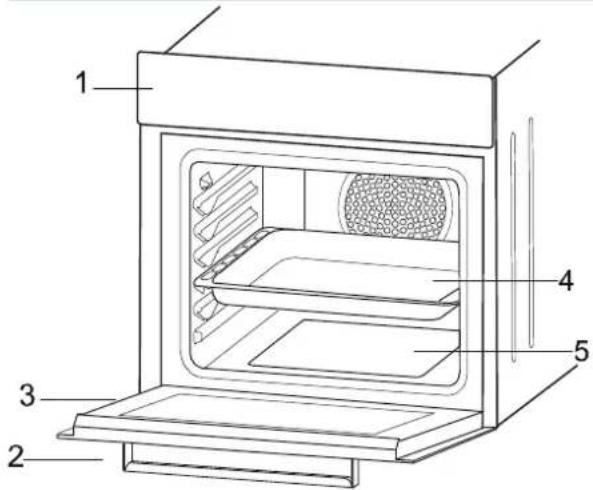
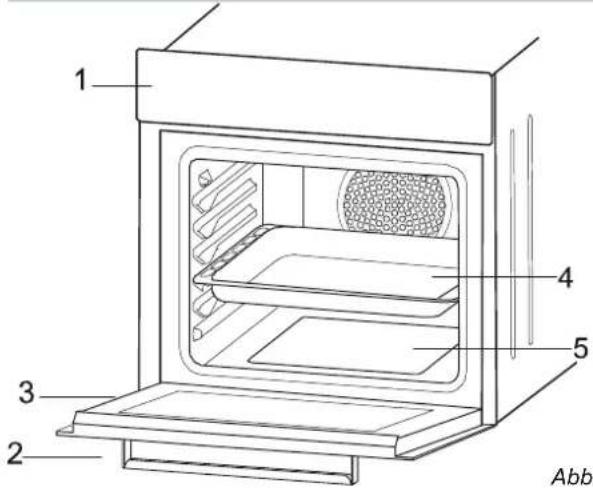
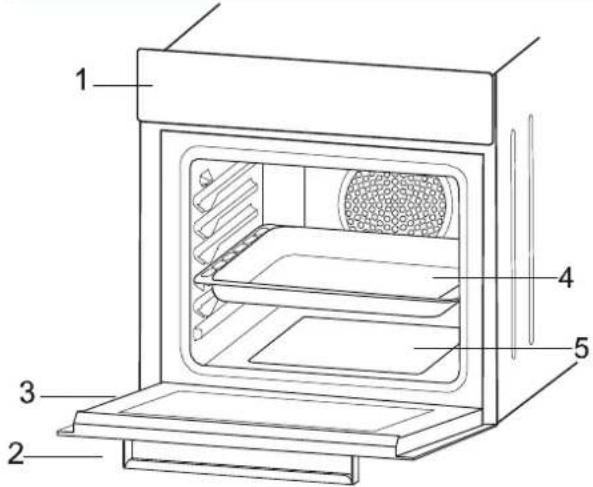
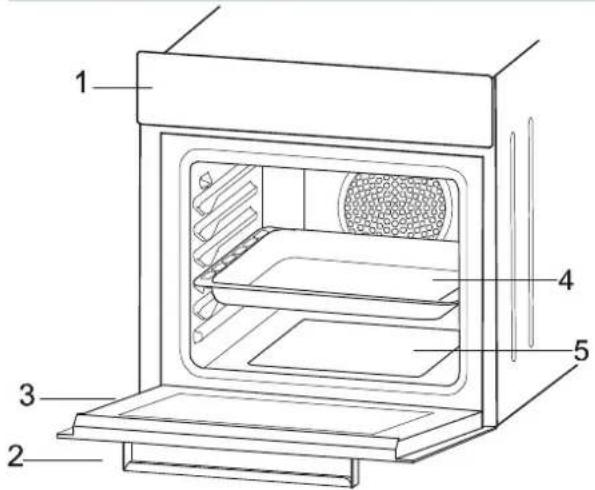
MAIN PARTS
- Control Panel
- Oven Door Handle
- Oven Door
- Tray
- Lower Heating Element
- Upper Heating Element
- Grid
- Racks
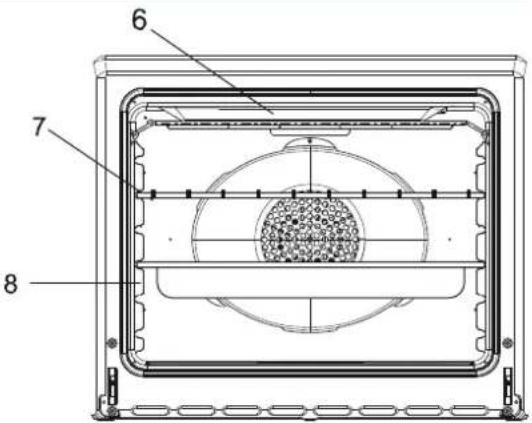
Figure 2
Figure 1
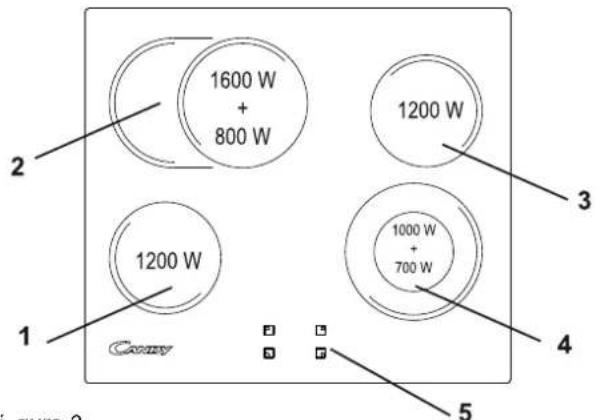
VITROCERAMIC HOB: CUTC64EXDFF/CUTC64EXDNF
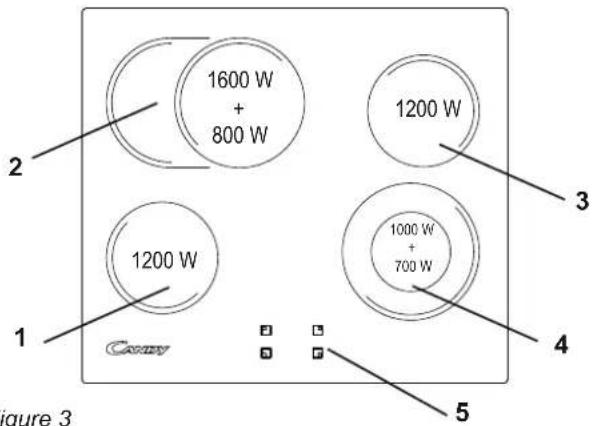
Figure 3
MAIN PARTS
- ∅ 155 Radiant Zone (1200W)
- ∅ 180 Radiant Zone (1600W+800W)
- ∅ 155 Radiant Zone (1200W)
- ∅ 190 Radiant Zone (1000W+700W)
- Vitroceramic Surface
- Lower Casing
3. OVEN EQUIPMENT (according to the model)
It is necessary to do an initial cleaning of the equipment before the first use of each of them. Wash them with a sponge. Rinse and dry off.
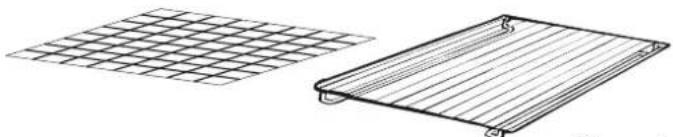
The simple shelf can take moulds and dishes.
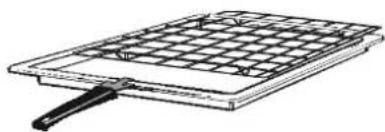
The tray holder shelf is especially good for grilling things. Use it with the drip tray.
The special profile of the shelves means they stay horizontal even when pulled right out. There is no risk of a dish sliding or spilling.
natural_image
Two wire mesh panels, one grid-patterned and one rectangular, with no text or symbolsFigure 4
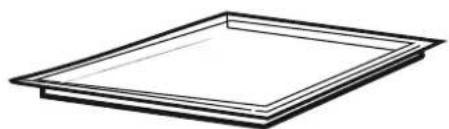
The drip tray catches the juices from grilled foods. It is only used with the Grill, Rotisserie, or Fan Assisted Grill; remove it from the oven for other cooking methods.
Never use the drip tray as a roasting tray as this creates smoke and fat will spatter your oven making it dirty.
natural_image
Simple line drawing of a rectangular frame with no text or symbolsFigure 5
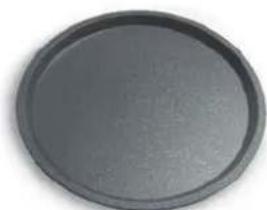
The pizza set is designed for pizza cooking. In order to obtain the best results the set must be used together with Pizza function.
natural_image
Circular dark gray object with smooth surface and no visible text or symbolsFigure 6
The tray holder
The tray holder shelf is ideal for grilling. Use it in conjunction with the drip tray. A handle is included to assist in moving the both accessories safely. Do no leave the handle inside the oven.
natural_image
Line drawing of a gridded metal plate with a handle, no text or symbols presentFigure 7
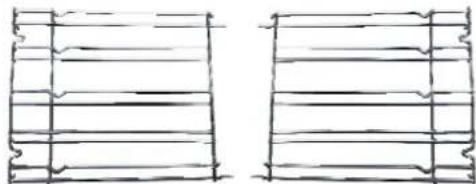
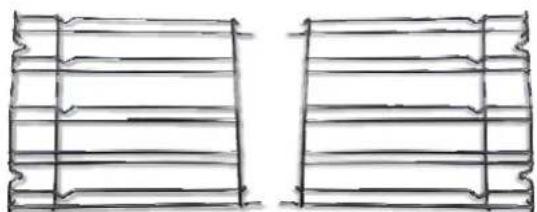
Lateral wire grids
Lateral wire grid if included.
natural_image
Two hand-drawn sketch-style panels with horizontal lines and scalloped edges, no text or symbols present4. USEFUL TIPS
4.1 SHELF SAFETY SYSTEM
natural_image
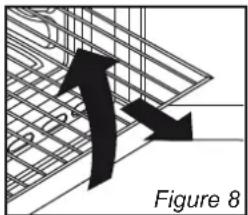
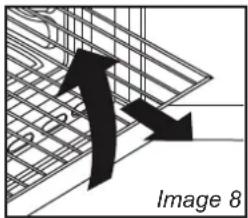
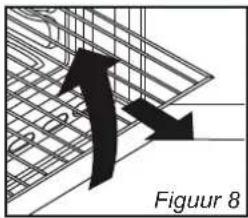
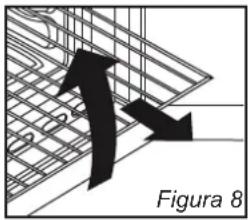
Diagram showing two black arrows pointing downward on a grid-like structure, labeled 'Figure 8' (no text or symbols on the diagram itself)The oven features a new shelf safety system.
This allows you to pull out the oven shelves when inspecting the food without danger of food spillages or shelves falling accidentally out of the oven.
To remove the shelves pull out and lift.
4.2 GRILLING
Grilling makes it possible to give food a rich brown colour quickly. For browning we recommend that you insert the grill onto the fourth level, depending on the proportions of the food (see fig. page 12).
Almost all food can be cooked under the grill except for very lean game and meat rolls.
Meat and fish that are going to be grilled should first be lightly doused with oil.
4.3 COOKING TIME
For recommended cooking times and temperatures the first time you use the oven, refer to the tables on page 12. You may then wish to vary these times and settings in the light of your own experience.
4.4 CLEANING AND MAINTENANCE
Clean the stainless steel and enamelled surfaces with warm, soapy water or with suitable brand products. On no account use abrasive powders that may damage surfaces and ruin the oven's appearance. It is very important to clean the oven each time that it is used. Melted fat is deposited on the sides of the oven during cooking. The next time the oven is used this fat could cause unpleasant odours and might even jeopardise the success of the cooking. Use hot water and detergent to clean; rinse out thoroughly.
To make this chore unnecessary all models can be lined with catalytic self-cleaning panels: these are supplied as an optional extra (see the section SELF-CLEANING OVEN WITH CATALYTIC LINING).
Use detergents and abrasive metal pads like «brillo pads» for the stainless steel grills.
The glass surfaces as the top, oven door and warming compartment door must be cleaned when they are cold. Damage that occurs to them because this rule was not adhered to are not covered by the guarantee.
To replace the interior light:
- switch off the mains power supply and unscrew bulb. Replace with an identical bulb that can withstand very high temperatures.
4.5 AQUACTIVA FUNCTION
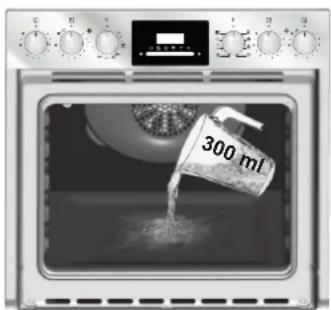
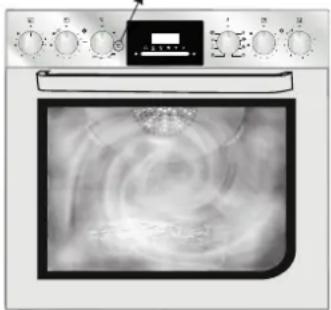
The Aquactiva procedure uses steam to help remove remaining fat and food particles from the oven.
- Pour 300 ml of water into the Aquactiva container at the bottom of the oven.
- Set the oven function to Static ( √ ) or Bottom ( √ ) heater
- Set the temperature to the Aquactiva icon
- Allow the program to operate for 30 minutes.
- After 30 minutes switch off the program and allow the oven to cool down.
- When the appliance is cool, clean the inner surfaces of the oven with a cloth.
Warning: Make sure that the appliance is cool before you touch it. Care must be taken with all hot surfaces as there is a risk of burns. Use distilled or drinkable water.
natural_image
Front view of a kitchen oven with digital display showing internal swirl patterns (no visible text or symbols)4.6 SERVICE CENTRE
Before calling the Service Centre
If the oven is not working, we recommend that:
you check that the oven is properly plugged into the power supply.
If the cause of the fault cannot be detected:
disconnect the oven from the mains, do not touch the oven and call the after sales service.
Before calling the Service Centre remember to make a note of the serial number on the specifications plate.
The oven is supplied with a guarantee certificate that ensures that it will be repaired free of charge by the Service Centre
5. PREPARATION FOR INSTALLATION AND USE
Manufactured with best quality parts and materials, this modern, functional and practical oven will meet your needs in all respects. Make sure to read this manual to obtain successful results and not to experience any problems in the future. The information given below contain rules that are necessary for correct positioning and service operations. They should be read without fail especially by the technician who will install the appliance.
5.1 CHOOSING A PLACE FOR THE OVEN / HOB
There are several points to pay attention to when choosing a place for your oven. Make sure to take into account our recommendations below in order to prevent any problems and dangerous situations, which might occur later!
- When choosing a place for the oven / hob, attention should be paid that there are no flammable or combustible materials in the close vicinity, such as curtains, oilcloth etc., Which quickly catch fire.
- Required changes to wall cabinets and exhaust fans above the built-in combined product as well as minimum height from the oven board are show in Figure 9.
Accordingly, the exhaust fan should be at a minimum height of 65 cm from the worktop. If there is no exhaust fan the height should not be less than 70 cm.
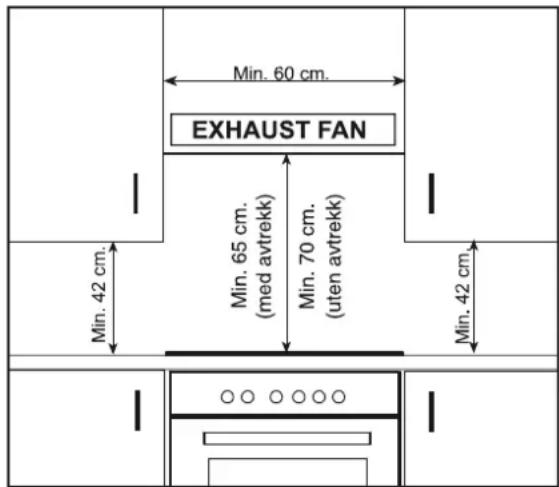
Figure 9
5.2 OVEN and HOB INSTALLATION
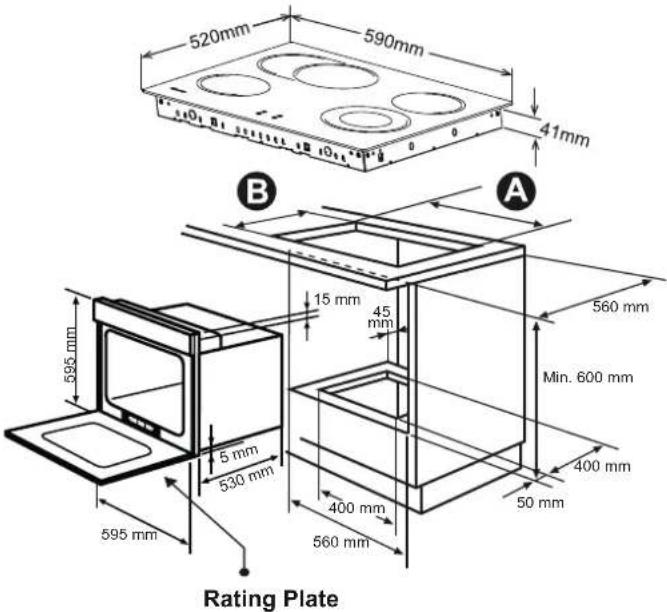
Figure 10 - Regular Installation of Oven
5.2.1. Installation Steps
-
Place the hob into the opening on worktop. The size of opening is given in Figure 10. Fordetails, see the headings either Fixing the vitroceramic hob.
-
Connect the hob to the oven using the plug given on the hob.
The socket for plug is placed on the rear panel of oven.
-
Connect the oven to the electrical supply.
-
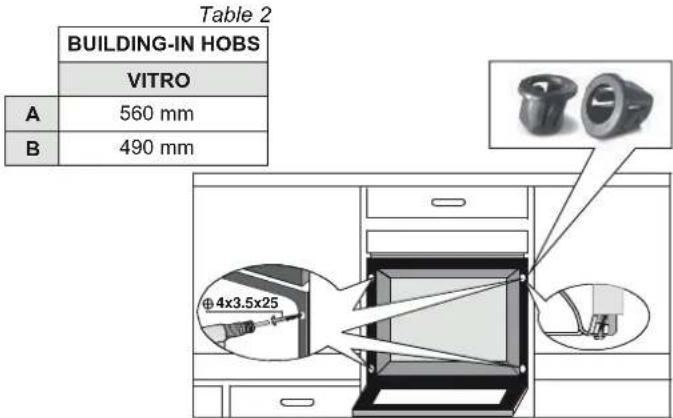
Place the oven into its built-in niche. Either placement in Figure10 is applicable depending on the size of cabinet opening. For details, see the heading Fixing the oven.
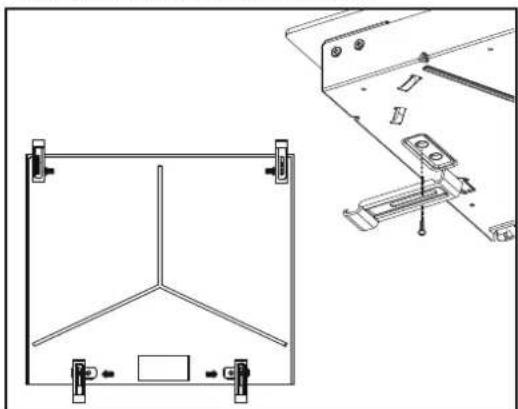
5.2.2. Fixing the vitroceramic hob
Normal Fixing:
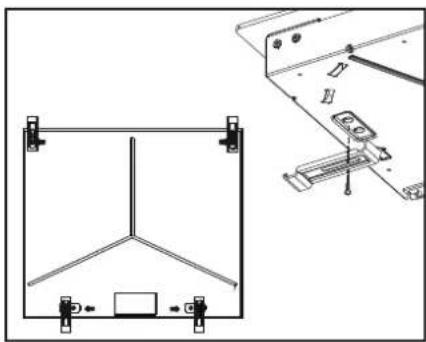
- Get the fixing clips from accessory bag and screw them into the position shown on bottom box. (Do not tighten the screws to block clips, they should move freely)
- Insert the hob in center position of cut out.
- Turn the clips and tighten them fully.
natural_image
Technical line drawing of a mechanical frame assembly with mounting brackets and a separate view showing internal components (no text or symbols)Figure 11
5.2.3. Fixing the oven
Fit the oven into the space provided in the kitchen unit; it may be fitted underneath a work top or into an upright cupboard. Fix the oven in position by screwing into place, using the two fixing holes in the frame. To locate the fixing holes, open the oven door and look inside.
The dimensions and material of the cabinet in which the oven will be installed must be correct and resistant to increases in temperature. In a correct installation, contact with electrical or insulated parts must be prevented. Insulating parts need to be fitted in a way to ensure that they cannot be removed by using any kind of tool. Installing the appliance in the close vicinity of a refrigerator or a deep-freezer is not recommended. Otherwise, the performance of the above-mentioned appliances will be negatively affected due to emanating heat.
5.2.4. Warning
Warning regarding the installation of built-in oven without cooling fan. Prior inserting the oven, it is necessary to remove the rear kitchen element panel in the area of the oven opening. Equally, the front part of the element must have an opening.
- When a cooktop burner knob is brought to another position than the "0" position, the operation light will be on.
- Use only pots which fit the burner diameter.
- Before placing the pot on the burner, be sure that its bottom is not wet.
- Never operate a cooktop burner while empty. Pot temperature may be high when the appliance is in use. Therefore, it is recommended that you keep children and pets away from the hob both during and after operation.
- In case you notice any crack on the ceramic glass, it must be immediately switched off and replaced by the Authorised Service.
- After use (in order to ensure its continuously effective operation and long service life), hotplates need to be thoroughly cleaned using appropriate cleaning materials. In order to prevent any formation of rust and preserve their initial appearance, it is recommended to clean the hotplates rubbing them with a piece of cloth that is slightly damped by pil. Never use steam cleaners.
- In order to prevent waste of energy, the pots to be used should not be smaller or larger than the burner surfaces.
• Take the necessary measures so that small children will not come close to the burner surface in any way, as it will be hot in operating position. - Due to the flammable nature of hot oil, operations such as frying should be performed with the container lids closed.
- Do not cut anything, bread etc., on the glass. Do not use pots with aluminium bottoms. Avoid placing too heavy materials on your hob.
- Do not place materials such as plastic, aluminium on the ceramic glass surface. If for any reason there should be a plastic or aluminium material melted on it, clean it up with a spatula immediately.
- Do not wipe the ceramic surface with materials such as dish cloth or sponge. Residues of detergents may lead to fire as well as cause the glass colour to fade.
5.3 WIRING AND SAFETY OF THE BUILT-IN COMBINED OVEN
- Before making the connection, make sure that the installation is protected by a suitable fuse, see table, and that it is fitted with wires of a large enough section to supply the appliance normally.
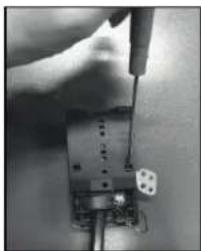
- Turn over the oven / hob, glass side against the work top, taking care to protect the glass.
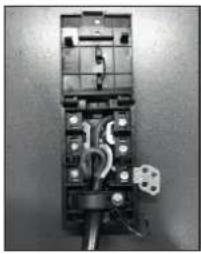
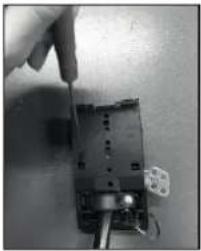
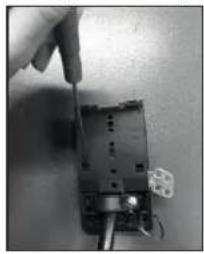
- Open the cover in the following sequence;
natural_image
Close-up of a hand holding a small electronic device with wires and components (no visible text or symbols)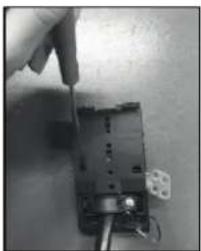
natural_image
Close-up of a hand using a screwdriver to adjust or install an electronic component (no visible text or symbols)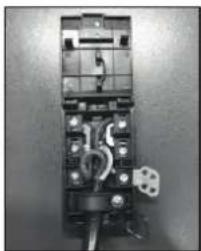
natural_image
Interior view of an electrical fuse box with visible wiring and socket (no text or symbols)Figure 12 Figure 13 Figure 14
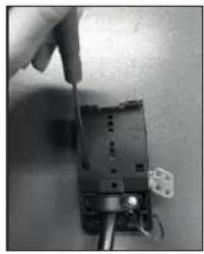
- Unscrew the cable clamp "1",
• Find the two tabs located on the sides, - Put the blade of a flat screw-driver in front of each tab "2" e "3", push in and press,
- Remove the cover.
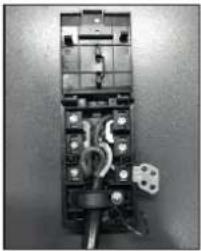
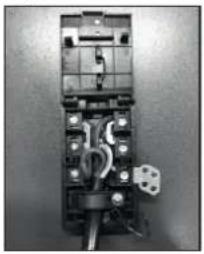
To release the power supplying cord.
- Remove the screws retaining the terminal block which contains
the shunt bars and the conductors of the supply cord, - Pull out the supply cord.
-Operations to be carried out to make a mew connection: -Choose the power supply cable in accordance with the recommendations in the table.
-Pass the power supply cable in to the clamp. -Strip the end of each conductor of the supply cord on a 10 mm length, by taking in account the requested length of the cord for the connection to the terminal block.
-According to the installation and with the help of shunt bars which you should have recovered in the first operation, fix the conductor as shown on the chart.
-Fix the cover.
-Screw the cable clamp.
Note: make sure the terminal board screws are tight.
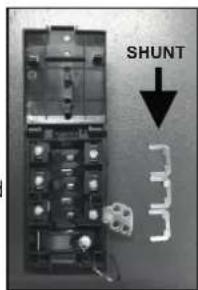
Figure 15
| LAY OUT"1-3-5" | LAY OUT"2-4" | |
| MONOPHASE or TWO PHASES 220-240 V~ | ||
| CableHO5V2V2F | 3 × 4 mm^2 | 3 × 4 mm^2 |
| THREE PHASES 220-240 V3~ | ||
| CableHO5V2V2F | 4 × 1,5 mm^2 | 4 × 1,5 mm^2 |
| THREE PHASES 380-415 V2N~ | ||
| CableHO5V2V2F | 4 × 1,5 mm^2 | 4 × 1,5 mm^2 |
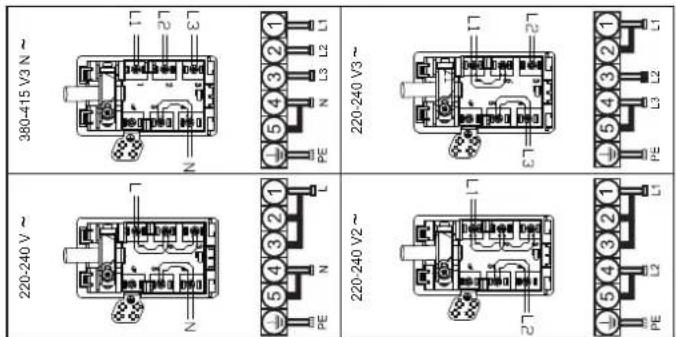
N = Neutral PE = EarthL1 / Figure 3e=Phase
5.4 VITROCERAMIC HOB WITHOUT CONTROL KNOB
Connection to the electrical circuit on glass ceramic hob shall be made only via the oven.
To proceed with the connection, it is necessary to joint male connectors ① and ② of the hob with the "female" connectors ③ of the oven or of the control panel.
INSTALLATION WITH OVEN
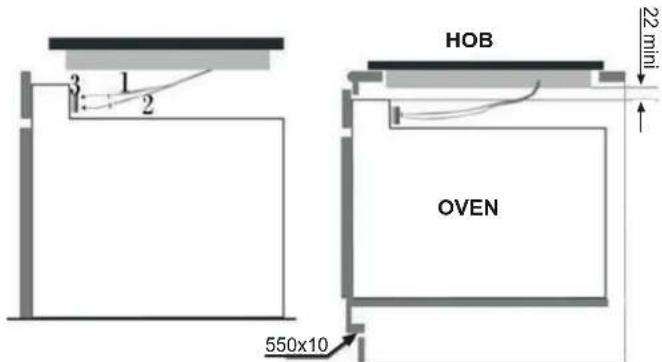
Figure 17
Built-in oven "apertures": Refer to the instruction booklet concerned.
This connection can be made before or after the oven is screwed into place.
6. USING THE OVEN / HOB
6.1 CONTROL PANELS
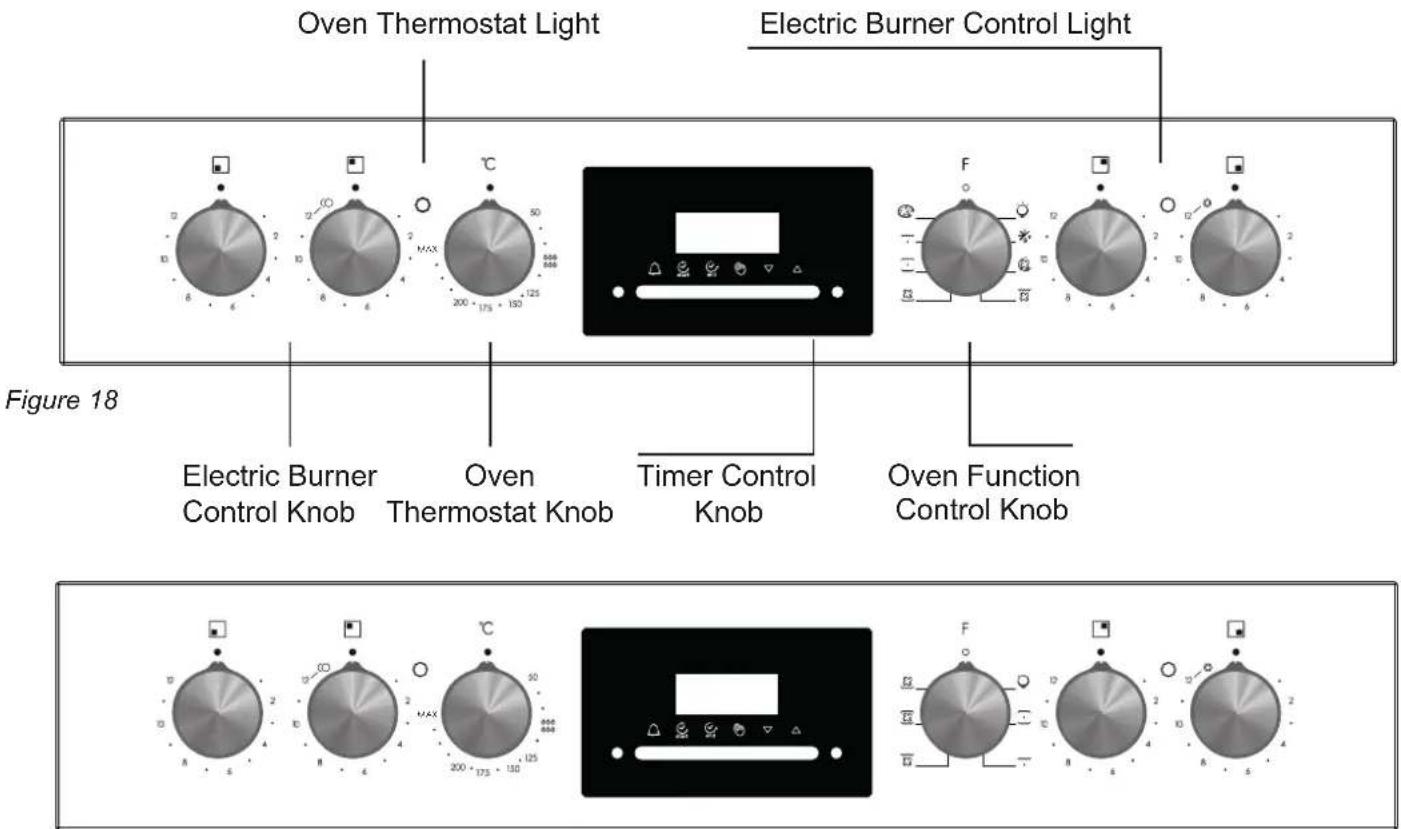
Figure 19
| FUNCTION | HOW TO ACTIVATE IT | HOW TO SWITCH IT OFF | WHAT IT DOES | WHAT IT IS FOR |
| MINUTE MINDER | Press and hold the buttonPress the buttons▼or▲to set the required timeRelease all the buttons | When the set time as elapsed an audible alarm is activated (this alarm will stop on its own, however it can be stopped immediately by pressing the button) | Sounds an alarm at the end of the set time.To check how long is left to run press the button | Allows to use the oven as alarm clock (could be activated either with operating the oven or with out operating the oven) |
| MANUAL FUNCTION | Press the buttonSet the cooking function with the oven function selector | Turn the oven function selector to position O. | Enables you to operate the oven. | For cooking the desired recipes |
| COOKING TIME | Press and hold the TIMER buttonPress the buttons▼or▲to set the lenght of coo-king requiredRelease all buttonsSet the cooking function with the oven function selector | When the time is elapsed the oven will switch off automatically. Should you wish to stop cooking earlier either turn the function selector to 0, or set time to 0:00 (TIMER and▼▲buttons) | It allows to preset the cooking time required for the recipe chosenTo check how long is left to run press the TIMER button.To alter/change the preset time press TIMER and▼▲buttons | At the end of the cooking set time, the oven will switch off automatically and an audible alarm will ring. |
| END OF COOKING | Press and hold the END buttonPress the buttons▼▲to set the time at which you wish the oven to switch offRelease the buttonsSet the cooking function with the oven function selector | At the time set, the oven will switch off. To switch off manually, turn the oven function selector to position O. | Enables you to set the end of cooking timeTo check the preset time press the END buttonTo modify the preset time press buttons END +▼▲ | This function is typically used with “cooking time” function. For example if the dish has to be cooked for 45 minutes and needs to be ready by 12:30, simply select the required function, set the cooking time to 45 minutes and the end of cooking time to 12:30.Cooking will start automatically at 11:45 (12:30 minus 45 mins) and will continue until the pre-set end-of-cooking-time, when the oven will switch itself off automatically.WARNING.If the END of cooking is selected without setting the length of cooking time, the oven will start cooking immediately and it will stop at the END of cooking time set. |
6.3 SETTING THE CORRECT TIME
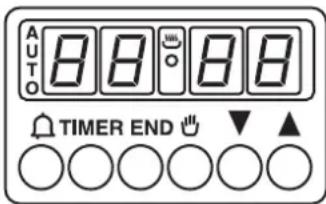
WARNING : the first operation to carry out after the oven has been installed or following the interruption of power supply (this is recognizable the display pulsating and showing 0:00) is setting the correct time. This is achieved as follows.
- Press and hold the TIMER and END buttons (△ and TIMER on some models)
- Set time with ▼▲ buttons
- Release all buttons
ATTENTION the oven only operates if set on manual function 🎨 or preset time.
N.B.: on some models the symbols are replaced by + and - .
6.4 USING THE COOKTOP BURNERS
The hob part of the product is controlled via the on the control panel (Figure 20).
Stage "0" means off position. The remaining 12 stages indicate the following types of use:
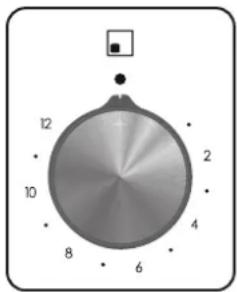
Figure 20
- Locate the sign corresponding to the cooking zone that you need.
- Turn the control knob to the required cooking setting.
Initially we recommend that the heat zone be set at the highest position until such times as the contents of the saucepan have reached the required temperature, the heat can then be reduced to the required cooking setting.
• The residual heat indicator light is illuminated when the hob surface temperature reaches 60 degrees or
above. It will remain on even if the hob is will only go out when the hob surface has cooled
- To switch off the hob, turn the knob to "0".
Warning : The extra large highlight zone, will depending upon the dimensions of the cookware and/or the quantity of food being cooked provide even higher levels of performance.
* The oval heating zone consists of two heating areas, a circular area with a complementary oval shaped section.
Turn the control knob from 1 to 12 to regulate the circular area. To operate the oval section, simply turn the control knob to position 12 and then select a position from 1 to 12.
* The heating area consists of two concentric zones.
The inner circle is activated when the knob is turned to any of the positions from 1 to 12. The outer ring will only be activated when the control is turned beyond 12 up to a power of 1700 W.
| Position | Some Tips | ||
| 1 | 1-2 | Very Low | To keep a dish hot, melt butter and chocolate... |
| 2 | 3-4 | Low | Slow cooking, sauces, stews, rice pudding poached eggs... |
| 3 | 5-6 | Moderate | Beans, frozen foods, fruit, boiling water... |
| 4 | 7-8 | Medium | Steamed apples, fresh vegetables, pasta, crepes, fish... |
| 5 | 9-10 | High | More intense cooking, omelettes, steaks... |
| 6 | 11-12 | Very High | Steaks,chops, frying... |
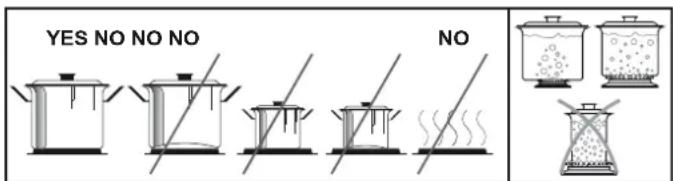
Figure 21
Resistance of the vitroceramic glass to heat and extreme changes of temperature is very high. A redness will be noticed on the heated surface with time. When any heating unit is run, you may hear a weak sound; this is normal and it has to do with the technical structure of the system.
It does not pose any problems in terms of quality. In case sharpedged pots should rub against or roughly placed on the vitroceramic glass, the sur face may become damaged. It is recommended that you pay attention to this.
ENERGY SAVING TIPS:
- To obtain the best efficiency of your hob, please place the pan in the centre of the cooking zone.
- Using a lid will reduce cooking times and save energy by retaining the heat.
- Minimise the amount of liquid or fat to reduce cooking times.
- Start cooking on a high setting and reduce the setting when the food has heated through.
- Use pans whose diameter is as large as the graphic of the zone selected.
6.5 USING THE OVEN
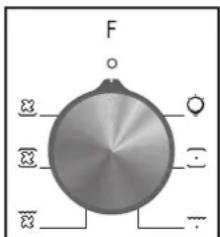
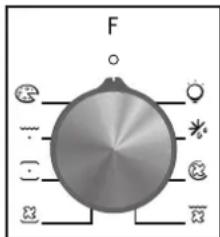
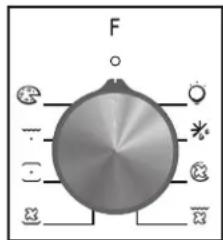
First, you need to adjust the oven function (Figure 22 and 23) and then set the oven temperature to desired value (Figure 24). Otherwise, the oven will not operate.
When the temperature inside your oven reaches the value you set, the thermostat will cut the circuit and the thermostat light will go off. When the temperature falls below the set value, the thermostat will again be turned on and the thermostat light will be on.
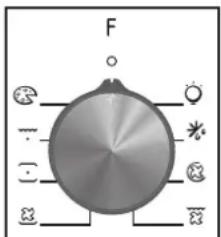
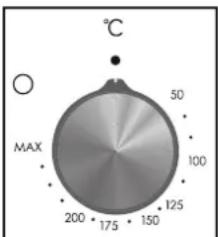
radar
| Angle (°) | Value | |-----------|-------| | 0 | 0 | | 45 | 50 | | 90 | 100 | | 135 | 125 | | 180 | 150 | | 225 | 175 | | 270 | 200 | The chart displays a single data point for 'MAX' at 200 degrees. The angle values are marked as 'MAX' and 'MAX' respectively. The 'C' label is positioned above the axis.Figure 22 Figure 23 Figure 24
Table 3
| Symbol | EXPLANATION | Energy Class according to CENELEC EN 50304 |
| [344A] | Light | — |
 | The oven light, red warning light and the fan will be turned on. Performs the function of defrosting the frozen foods. | — |
 | Air that has been heated is blown by the fan onto the different levels. It is ideal for cooking different types of food at the same time (e.g. meat and fish) without mixing tastes and smells. It cooks very gently and is ideal for sponge cakes, pastries, etc. | — |
 | The oven's thermostat and warning light and the lower and upper heating elements will be switched on. | B (convection) for FCO 607 X FCO 827 XL |
| [TX2Y] | The oven's thermostat and warning light, the fan and the turbo heater will be switch on. | B (forced air) only for FCO 607 X FCO 827 XL |
 | The oven's thermostat and warning light, the upper heating element, the grill heater, the fun function will be switched on. | — |
 | This function is ideal for delicate dishes (pies-souffle). | — |
 | This function with hot air circulated in the oven ensure perfect result for dishes such as pizza or focaccia. | — |
* Tested in accordance with the CENELEC EN 60350-1 used for definition of energy class.
ENERGY SAVING TIPS:
- Where possible, avoid pre-heating the oven and always try to fill it.
- Open the oven door as infrequently as possible, because heat from the cavity disperses every time it is opened.
- For a significant energy saving, switch off the oven between 5 and 10 minutes before the planned end of the cooking time, and use the residual heat that the oven continues to generate.
- Keep the seals clean and in order, to avoid any heat dispersal outside of the cavity.
- If you have an electric contract with an hourly tariff, the "delayed cooking" programme makes energy saving more simple, moving the cooking process to start at the reduced tariff time slot.
6.6 FUNCTIONS
Availability of the functions explained below vary depending on the product model.
Lamp

Turns on the oven light.
Defrost Function

When the dial is set to this position. The fan circulates air at room temperature around the, frozen food so that it defrosts in a few minutes without the protein content of the food changed or altered.
Fan Cooking Function

Both top and bottom elements are used with the fan circulating the air inside the oven. We recommend you use this method for poultry, pastries, fish and vegetables. Heat penetrates into the food better and both the cooking and preheating times are reduced. You can cook different foods at the same time with or without the same preparation in one or more positions. This cooking method gives even heat distribution and the smells are not mixed. Allow about ten minutes extra when cooking foods at the same time.
Lower-Upper Heating Element Function (Static Cooking):

In this type of cooking which is described as the traditional method, the heat emanating evenly from the lower and upper resistors into the oven ensures even cooking of the lower and upper side of the food that you are cooking. Adjust the thermostat knob of your oven to a temperature recommended on the cooking table for the cooking operation you will perform. A preheating of the oven for about 10 minutes is recommended. Leave the food to cook, which is placed in a suitable container, for the recommended duration. This position is a preferred function in making cakes, sponge cakes, pastry, baked pasta, lasagne, pizza.
After the cooking/baking, turn off the oven function control knob and the thermostat. Take the cooked/baked food out of the oven, place it on a safe place and ensure that the oven completely cools off by keeping the oven door open. As the oven will be hot, stay away from the oven and keep your children away as well.
Fan and the Lower - Upper Heating Element Function (Static Cooking With Fan)

This is the position where the air coming from the lower and upper heating elements is circulated into the oven by the fan. Adjust the thermostat knob of your oven to a temperature recommended on the cooking table for the cooking operation you will perform. Turn the oven so it will point to the symbol of this function, adjust the oven timer to the recommended time for the cooking and preheat the oven for about 10 minutes. The food placed in a suitable container is put into the oven and the operation is started. This position is a position where usually very good results are obtained in baking pastry. All parts of the foods will be cooked evenly in this position.
Suitable for cooking with one tray.
After the cooking/baking, turn off the oven function control knob and the temperature setting. Take the cooked/baked food out of the oven, place it on a safe place and ensure that the oven completely cools off by keeping the oven door open. As the oven will be hot, stay away from the oven and keep your children away.
Grill Function

This function is used for grills, roast chicken and roast on skewer. For grills; put the foods on the grid, and on the highest
rack. After placing the oven tray on the third . Rack, you can start the grill operation. The tray placed on the thrid rack will ensure that the oil dropping from the foods will be collected.
When grilling, the oven door must be closed and the oven temperature should be adjusted to 190^ C.
Turn your oven's thermostat knob so it will point to this temperature value. After a preheating period of 5 minutes, put your foods into the oven.
After the cooking, turn off the oven function control knob and the thermostat.
Take the cooked/baked food out of the oven, place it on a safe place and ensure that the oven completely cools off by keeping the oven door open. As the oven will be hot, stay away from the oven and keep your children away.
Grill and Fan Function

At this function; ensuring complete frying by working the fan, grill and upper heating element perform the n.
For grills; put the foods on the grid, and place the grid on the highest rack. After placing the oven tray on the third rack, you can start the grill operation. The tray placed on the third rack will ensure that the oil dropping from the foods will be collected.
When grilling, the oven door must be closed and the oven temperature should be adjusted to 190^ C.
Turn your oven's thermostat knob so it will point to this temperature value. After a preheating period of 5 minutes, put your foods into the oven.
After the cooking, turn off the oven function control knob and the thermostat knob.
Take the cooked/baked food out of the oven, place it on a safe place and ensure that the oven completely cools off by keeping the oven door open. As the oven will be hot, stay away from the oven and keep your children away.
Pizza

With this function hot air circulated in the oven to ensure perfect result for dishes such as pizza or cake.
Table 4
| DISHES | LOWER - UPPER | LOWER-UPPER FAN GRILL | |||||||
| Thermostat pos. (°C). | Rack pos. | Cooing period (dk) | Thermostat pos. (°C). | Rack pos. | Cooing period (dk) | Thermostat pos. (°C). | Rack pos. | Cooing period (dk) | |
| Layered pastry | 170 - 190 | 2-3 | 35 - 45 | 170 - 190 | 2-3 | 25 - 35 | |||
| Cake | 170 - 190 | 2-3 | 30 - 40 | 150 - 190 | 2-3-4 | 25 - 35 | |||
| Cookie | 170 - 190 | 2-3 | 30 - 40 | 150 - 190 | 2-3-4 | 25 - 35 | |||
| Grilled meatballs | 200 | 5 | 10 - 15 | ||||||
| Watery food | 175 -200 | 3 | 40 - 50 | 175 -200 | 3 | 40 - 50 | |||
| Chicken | 200 | 2-3 | 45 - 60 | 200 | 2-3 | 45 - 60 | 200 | 50 - 60 | |
| Chop | 200 | 4-5 | 15 - 25 | ||||||
| Beefstake | 200 | 5 | 15 - 25 | ||||||
| Two-tray cake | |||||||||
| Two-tray pastry | |||||||||
7. CLEANING AND MAINTENANCE
7.1 GENERAL
Before starting to clean your oven, be sure that all control knobs are off and your appliance is cooled off. Unplug the appliance. Do not use cleaning materials containing particles that might scratch the enamelled and painted parts of your oven. Use cream cleaners or liquid cleaners, which do not contain particles. As they might harm the surfaces, do not use caustic creams, abrasive cleaning powders, rough wire wool or hard tools. In the event the excess liquids spilling over your oven should burn, it may cause a damage to the enamel. Immediately clean up the spilt liquids.
7.2 CLEANING THE OVEN
Make sure to unplug the oven before starting to clean it. You will obtain best results if you clean the oven interior while the oven is slightly warm. Wipe your oven with a soft piece of cloth dampened with soap water after each use. Then wipe it again, this time with a wetted cloth, and wipe it dry. A complete cleaning may be necessary from time to time, using a liquid cleaning material. Do not clean using dry and powder type cleaners. For products with catalytic enamel frames, the rear and side walls of the inner frame do not require cleaning. However; depending on usage, it is recommended that you replace them after a certain period of time.
7.3 CLEANING THE VITROCERAMIC HOB
. Before carrying out any maintenance work on the hob, allow it to cool down.
. Only products, (creams and scrapers) specifically designed for aglass ceramic surfaces should be used. They are obtainable from hardware stores.
. Avoid spillages, as anything which falls on to the hob surface will quickly burn and will make cleaning more difficult.
. It is advisable to keep away from the hob all substances which are liable to melt, such as plastic items, sugar, or sugar-based products.
.MAINTENANCE:
- Place a few drops of the specialised cleaning product on the hob surface.
- Rub any stubborn stains with a soft cloth or with slightly damp kitchen paper.
- Wipe with a soft cloth or dry kitchen paper until the surface is clean.
If there are still some stubborn stains:
- Place a few more drops of specialised cleaning fluid on the surface.
- Scrape with a scraper, holding it at an angle of 30^ to the hob, until the stains disappear.
- Wipe with a soft cloth or dry kitchen paper until the surface is clean.
- Repeat the operation if necessary.
A FEW HINTS:
Frequent cleaning leaves a protective layer which is essential to prevent scratches and wear. Make sure that the surface is clean before using the hob again. To remove marks left by water, use a few drops of white vinegar or lemon juice. Then wipe with absorbent paper and a few drops of specialised cleaning fluid.
The glass ceramic surface will withstand scraping from flat-bottomed cooking vessels, however, it is always better to lift them when moving them from one zone to another.
NB:
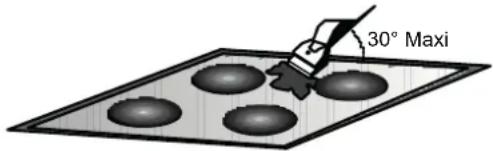
Do not use a sponge which is too wet.
Never use a knife or a screwdriver.
A scraper with a razor blade will not damage the surface, as long as it is kept at an angle of 30^ .
Never leave a scraper with a razor blade within the reach of children.
Never use abrasive products or scouring powders.
. The metal surround : to safely clean the metal surround wash with soap and water, rinse, then dry with a soft cloth.
Any change in the colour of the glass-ceramic surface does not affect its operation or the stability of the surface. Such discolorations are mostly a result of burnt food residues or use of cookware made of materials such as aluminium or copper; these stains are difficult to remove.
7.4 MAINTENANCE
Replacing the Oven Light Bulb
It is recommended that you leave this operation to the Authorised Service.
Unplug the oven first and make sure that it is cold. After removing the lid infront of the light, take the bulbout. Insert the new bulb resistant to 300^ C, which you will find at Authorised Services, into the place of the bulb you have removed. Then fit the light protecting lid back into its place. After that, your oven will be ready for use.
8. SERVICE AND TRANSPORTATION
8.1 REQUIREMENTS BEFORE CONTACTING TO SERVICE
If the oven does not operate ;
The oven may be plugged off, there has been a black out.
If the oven does not heat ;
The temperature may be not adjusted with oven's temperature control switch.
If the oven light does not operate does not light;
The electricity should be controlled.
It should be controlled whether the ulb is defective.
Cooking (If lower-upper part does not cook equally);
Control the shelf locations, cooking period and temperature values according to the manual. In case of the product doesn't work properly and malfunctioning causes cannot be found, switch off the product. Please do not tamper with it and call the Technical Service.
It is important to communicate to Authorized Technical Service the product model and it's serial number that can be found on the rating label.
8.2 INFORMATION RELATED TO TRANSPORT
If you need any transport ;
Keep the original packaging of product and carry it with its original packaging when needed.
Follow the transport signs on the packaging.
If the original packaging is not available;
Take measure for the external surfaces (glass and painted surfaces) of oven and hob against possible blows.
2. IHR NEUES HAUSHALTSGERÄT
HAUPTKOMPONENTEN
natural_image
Two 3D grid-patterned panels with mounting holes, one flat and one rectangular, labeled 'Abbildung 4' (no text or symbols on panels)natural_image
Simple line drawing of a rectangular frame with no text or symbols, labeled 'Abbildung 5' on the right side.natural_image
Circular dark gray object with smooth surface, no visible text or symbolsAbbildung 6
natural_image
Line drawing of a waffle with a handle, no text or symbols presentAbbildung 7
natural_image
Two identical hand-drawn architectural or structural line drawings with grid-like elements, no text or symbols present.natural_image
Two open oven setups: one with a water being poured into liquid, the other showing a grayscale thermal or chemical simulation view (no text or symbols)natural_image
Technical line drawing of a mechanical bracket assembly with mounting fasteners (no text or symbols)Abbildung 11
5.2.3. Ofen fixieren
natural_image
Close-up of a hand using a tool to adjust or install electronic components (no visible text or symbols)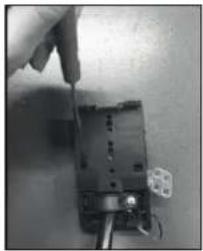
natural_image
Close-up of a hand using a screwdriver to adjust or install an electronic component (no visible text or symbols)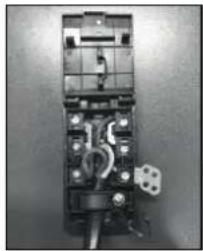
natural_image
Interior view of an electrical switchgear box with visible wiring and components (no text or symbols)Abbildung 12
Abbildung 19
6.2 GEBRAUCH DES ELEKTRONISCHEN PROGRAMMIERERS
Abbildung 22
radar
| Angle (°) | Value | |-----------|-------| | 0 | 50 | | 30 | 100 | | 60 | 125 | | 90 | 150 | | 120 | 175 | | 150 | 200 | The chart displays a single data point for MAX at 200 degrees. The angle values are marked as 'MAX'.Abbildung 24
Tabelle 3
1.4 MISE EN PLACE DU FOUR DANS SON MEUBLE
2. INTRODUCTION DU PRODUIT
PIÈCES PRINCIPALES
natural_image
Two wire mesh panels, one grid-patterned and one rectangular, with no text or symbolsImage 4
natural_image
Simple line drawing of a rectangular frame with no text or symbolsImage 5
natural_image
Circular dark gray object with a smooth, flat surface (no text or symbols visible)Image 6
natural_image
Line drawing of a flat-coated grating or pan with a handle, no text or symbols presentImage 7
Grille fil latéral si inclus.
natural_image
Two identical hand-drawn grid-like structures with horizontal lines, no text or symbols present4. CONSIGNES UTILES
4.1 GRILLES DU FOUR, NOUVEAU SYSTÈME D'ARRÊT
natural_image
Abstract diagram with intersecting arrows and grid lines, no readable text or symbols- Get the fixing clips from accessory bag and screw them into the posi ti on shown on bottom box. (Do not ti ghten the screws to block clips, they should move freely)
- Insert the hob i n center posi ti on of cut out.
- Turn the cli ps and ti ghten them fully.
natural_image
Technical line drawing of a mechanical bracket assembly with mounting fasteners (no text or symbols)Image 11
5.2.3 Fixation du four
natural_image
Close-up of a hand using a screwdriver to adjust or install a small electronic component (no visible text or symbols)Image 12
natural_image
Close-up of a hand using a screwdriver to adjust or install an electronic component (no visible text or symbols)Image 13
natural_image
Interior view of an electrical fuse box with visible circuit breakers and wiring (no text or symbols)Image 14
N = Neutre
PE = TerreL1 / L2 / L3 = Phase
Image 16
5.4 TABLE DE CUISSON VITROCÉRAMIQUE SANS BOUTON DE COMMANDE
INSTALLATION AVEC FOUR
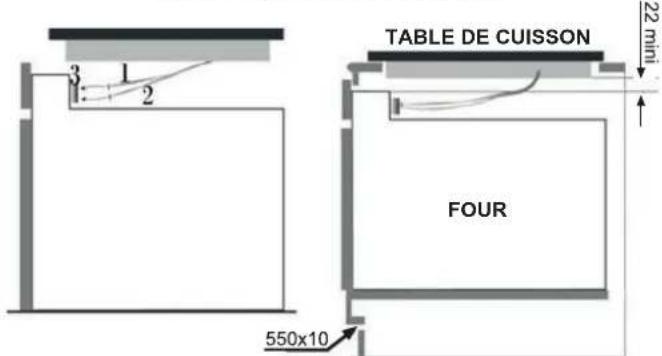
Image 22
radar
| Angle (°C) | Value | |---|---| | 0 | 50 | | 45 | 100 | | 90 | 125 | | 135 | 150 | | 180 | 175 | | 225 | 200 | The chart displays a single data point at MAX = 200, with values increasing radially outward from the center. The label 'MAX' is also present in the lower-left corner.Image 24
Tableau 3
Convecti on naturelle

8.2 INFORMATIONS RELATIVES AU TRANSPORT
2. INLEIDING PRODUCT
HOOFDONDERDELEN
natural_image
Two wire mesh panels, one flat and one rectangular, with no text or symbols visible.Fi guur 4
natural_image
Simple line drawing of a rectangular frame or tray (no text or symbols)Fi guur 5
natural_image
Circular dark gray object with a smooth, textured surface (no text or symbols visible)Fi guur 6
natural_image
Line drawing of a rectangular grid-patterned object with a handle, resembling a food or kitchen appliance (no text or symbols)Fi guur 7
natural_image
Two hand-drawn sketch-style panels showing horizontal lines with wavy edges, no text or symbols present4. NUTTIGE TIPS
4.1 VEILIGHEIDSSYSTEEM VOOR DE ROOSTERS
Before calling the Service Centre
If the oven is not working, we recommend that:
you check that the oven is properly plugged into the power supply.
If the cause of the fault cannot be detected:
disconnect the oven from the mains, do not touch the oven and call the after sales service.
Before calling the Service Centre remember to make a note of the serial number on the specifications plate.
The oven is supplied with a guarantee certificate that ensures that it will be repaired free of charge by the Service Centre
5. VOORBEREIDING OP INSTALLATIE EN GEBRUIK
natural_image
Diagram showing mechanical components with a magnified inset of two circular features (no text or symbols)natural_image
Technical line drawing of a mechanical frame assembly with mounting brackets and a separate view showing internal components (no text or symbols)Fi guur 11
5.2.3 De oven bevestigen
natural_image
Close-up of a hand using a tool to adjust or install a component, with no visible text or symbols.Figuur 12
natural_image
Close-up of a hand using a screwdriver to adjust or install electronic components on a circuit board (no visible text or symbols)Figuur 13
natural_image
Close-up of an electrical circuit breaker with wires and components (no visible text or symbols)Figuur 14
- schroef kabelklem "1"los;
Fi guur 19
6.2 ELEKTRISCHE PROGRAMMA'S GEBRUIKEN
Fi guur 21
PARTI PRINCIPALI
Fi gura 2
Fi gura 1
PIANO DI COTTURA IN VETROCERAMICA: CUTC64EXDFF/CUTC64EXDNF
Fi gura 3
PARTI PRINCIPALI
- Zona radi ante ∅ 155 (1200 W)
- Zona radi ante ∅ 180 (1600 W+800 W)
- Zona radi ante ∅ 155 (1200 W)
- Zona radi ante ∅ 190 (1000 W +700 W)
- Superfi ci e i n vetrocerami ca
- Alloggi amento i nferi ore
natural_image
Two wire mesh panels, one grid-patterned and one rectangular, with no text or symbolsFi gura 4
natural_image
Simple line drawing of a rectangular frame or tray (no text or symbols)Fi gura 5
natural_image
Circular dark gray object with a smooth, curved edge, resembling a baked or baked dish (no text or symbols visible)Fi gura 6
Il portavassoi
natural_image
Line drawing of a griddle or pan with a handle, no text or symbols presentFi gura 7
natural_image
Two identical hand-drawn grid-like structures with horizontal lines and rounded ends, no text or symbols present.4. SUGGERIMENTI UTILI
4.1 SISTEMA DI SICUREZZA DEI RIPIANI
natural_image
Diagram showing a black arrow pointing upward over a grid-like structure, labeled 'Figura 8' (no text or symbols on the diagram itself)natural_image
Front view of a vintage kitchen oven with digital scale and control knobs (no visible text or symbols)4.6 CENTRO DI ASSISTENZA
natural_image
Technical line drawing of a mechanical bracket assembly with mounting fasteners (no text or symbols)Figura 11
natural_image
Close-up of a hand using a screwdriver to adjust or install electronic components (no visible text or symbols)Figura 12
natural_image
Close-up of a hand using a screwdriver to adjust or install an electrical component (no visible text or symbols)Figura 13
natural_image
Interior view of an electrical fuse box with visible wiring and components (no text or symbols)Figura 14
Fi gura 19
6.2 USO DEL PROGRAMMATORE ELETTRONICO
This appliance is marked according to the European directive 2012/19/EU on Waste Electrical and Electronic Equipment (WEEE). WEEE contains both polluting substances (which can cause negative consequences for the environment) and basic components (which can be reused).
It is important to have WEEE subjected to specific treatments, in order to remove and dispose properly all pollutants, and recover and recycle all materials. Individuals can play an important role in ensuring that WEEE does not become an environmental issue; it is essential to follow some basic rules:
- WEEE shall not be treated as household waste.
- WEEE shall be handed over to the relevant collection points managed by the municipality or by registered companies. In many countries, for large WEEE, home collection could be present.
- When you buy a new appliance, the old one may be returned to the retailer who has to collect it free of charge on a one-to-one basis, as long as the equipment is of
equi valent type and has the same functi ons as the suppl i ed equi pment.
ENERGY SAVING AND RESPECTING THE ENVIRONMENT
Where possible, avoid pre-heating the oven and always try to fill it. Open the oven door as infrequently as possible, because heat from the cavity disperses every time it is opened. For a significant energy saving, switch off the oven between 5 and 10 minutes before the planned end of the cooking time, and use the residual heat that the oven continues to generate. Keep the seals clean and in order, to avoid any heat dispersal outside of the cavity. If you have an electric contract with an hourly tariff, the "delayed cooking" programme makes energy saving more simple, moving the cooking process to start at the reduced tariff time slot.
DE


The manufacturer will not be responsible for any inaccuracy resulting from printing or transcript errors contained in this brochure. We reserve the right to carry out modifications to products as required, including the interests of consumption, without prejudice to the characteristics relating to safety or function.