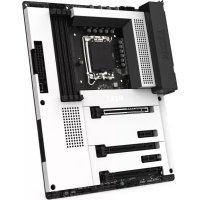
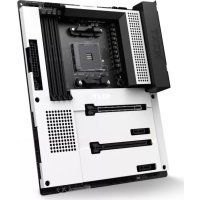
N7 Z790 - Motherboard NZXT - Free user manual and instructions
Find the device manual for free N7 Z790 NZXT in PDF.


| Product Type | Motherboard |
| Brand | NZXT |
| Model | N7 Z790 |
| Socket | LGA 1700 |
| Chipset | Intel Z790 |
| Compatible processors | Intel Core 12th and 13th gen (i9/i7/i5/i3) |
| Memory | 4 x DDR5 DIMM, max 128 GB, up to 6000+ MHz (OC) |
| PCIe Slots | 1x PCIe 5.0 x16, 2x PCIe 4.0 x16 (×4), 2x PCIe 3.0 x1 |
| SATA Storage | 4 x SATA 6 Gb/s |
| M.2 Storage | 3 x M.2: 1x PCIe 4.0 ×4, 2x PCIe 3.0 ×4 |
| Audio | Realtek ALC1220, 7.1-channel |
| LAN Network | Realtek RTL8125BG 2.5 GbE |
| Wi-Fi | Wi-Fi 6E dual-band (2.4/5/6 GHz) |
| Bluetooth | Version 5.2 |
| Rear USB Ports | 1x USB-C 3.2 Gen 2×2, 2x USB 3.2 Gen 2, 3x USB 3.2 Gen 1, 2x USB 2.0 |
| RGB Connectors | 4x NZXT RGB, 2x 5V ARGB |
| Form Factor | ATX |
| Dimensions | 305 x 244 mm |
| Weight | Approximately 1.5 kg |
| Power Requirement | ATX 24-pin + 8+4-pin CPU |
| Operating System | Windows 11/10 64-bit |
| Software | NZXT CAM (free) |
| Maintenance | Clean with a soft, dry cloth |
| Safety | Use an antistatic wrist strap and disconnect the power before handling |
| Included Parts | SATA cables, M.2 screws, M.2 standoff, Wi-Fi antenna |
Frequently Asked Questions - N7 Z790 NZXT
User questions about N7 Z790 NZXT
0 question about this device. Answer the ones you know or ask your own.
Ask a new question about this device
Download the instructions for your Motherboard in PDF format for free! Find your manual N7 Z790 - NZXT and take your electronic device back in hand. On this page are published all the documents necessary for the use of your device. N7 Z790 by NZXT.
USER MANUAL N7 Z790 NZXT
N7 Z790
INTEL Z790 ATX MOTHERBOARD
NZXT CAM
TABLE OF CONTENTS
VERSION 4.3, 2023/04/19
SAFETY PRECAUTION 01
PACKAGE CONTENTS 02
SPECIFICATIONS 03
COVERS 13
PORTS OVERVIEW 14
REAR I/O 20
CPU SOCKET 22
DIMM SLOTS 25
PCI EXPRESS EXPANSION SLOTS....27
SATA CONNECTORS 31
M.2 SLOTS FOR STORAGE 33
M.2 SLOT FOR WIRELESS CONNECTIVITY 35
ANTENNA 36
POWER CONNECTORS 37
USB CONNECTORS 38
FRONT PANEL AUDIO CONNECTOR 39
FRONT PANEL CONNECTOR 40
FAN CONNECTORS 41
NZXT RGB CONNECTORS 42
5V ADDRESSABLE RGB CONNECTOR 44
BUTTONS AND POST LEDS 46
CMOS BATTERY 49
DOWNLOADING NZXT CAM 50
NZXT GLOBAL WARRANTY POLICY 51
REGULATORY NOTICES 54
Follow these safety precautions when installing the motherboard:
- It is recommended to wear a grounding strap attached to a grounded device to avoid damage from static electricity.
- Discharge static electricity by touching the metal case of a safely grounded object before working on the motherboard.
- Leave components in the static-proof bags.
- Always remove the AC power by unplugging the power cord from the power outlet before installing or removing the motherboard or other hardware components.
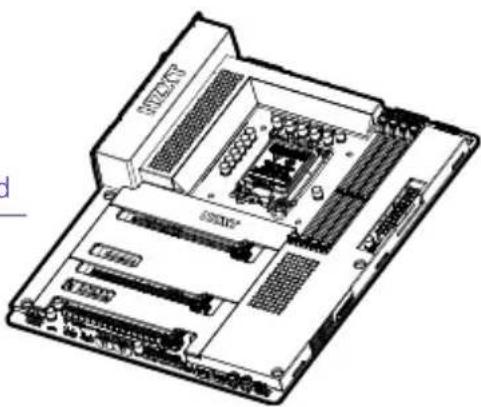
A N7 Z790 Motherboard
×1
natural_image
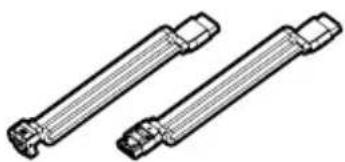
Technical line drawing of a computer motherboard with RAM slots and ventilation grilles (no text or labels)B SATA Cables
90^× 2 , 180^× 2
natural_image
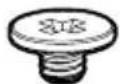
Technical line drawing of two mechanical shafts with flanges (no text or symbols)C M.2 Screws
×3
D M.2 standoff
×1


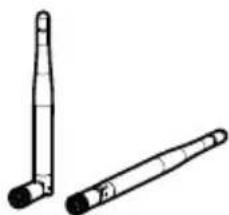
E Wireless Antenna
×2
natural_image
Two cylindrical mechanical components with pointed tips, shown from different angles (no text or symbols)A. Placa base N7 Z790 B. Cables SATA C. Tornillos M.2 D. Separador M.2 E. Antena inalámbrica
4 x DIMM slots, Max. 128GB, Dual-channel DDR5 Memory Technology
• Supports DDR5 Non-ECC, Un-buffered Memory up to 6000+ (OC)*
- Supports Extreme Memory Profile (XMP) and EXTended Profiles for Overclocking (EXPO) memory modules
* Please refer to Memory QVL on NZXT's website (www.nzxt.com) for more information
Expansion Slots
CPU
- 1 x PCIe 5.0 ×16 slot (PCIEX16_1), supports ×16 mode*
Chipset
- 2 x PCIe 4.0 ×16 slots (PCIEX16_2 and PCIEX16_3), support ×4 mode*
- 2 x PCIe 3.0 ×1 slots (PCIEX16_1 and PCIEX16_2)*
- 1 x M.2 Socket (Key E), supports Type 2230 Wi-Fi/BT PCIe Wi-Fi module and Intel CNVio/CNVio2
* Supports NVMe SSD as boot disks
Integrated Graphics
Integrated Graphics Processor- Intel® UHD Graphics Support*
- Intel® Xe Graphics Architecture (Gen 12)
- 1 x HDMI 2.1 TMDS 1 x HDMI 2.1 TMDS Compatible, supports HDCP 2.3 and max. resolution up to 4K 60Hz
* Supported only with GPU integrated processors
Storage
CPU
- 1 x M.2_1 Type 2242/2260/2280 (PCIe 4.0 ×4 mode)*
Chipset
- 1 x M.2_2 Type 2242/2260/2280/22110 (PCIe 4.0 ×4 mode)*
- 1 x M.2_3 Type 2242/2260/2280 (PCIe 4.0 ×4 & SATA 6Gb/s mode)*
• 4 x SATA 6Gb/s ports
- Support RAID 0/1/10 for SATA storage devices
- Support RAID 0/1/10 for M.2 NVMe storage devices
* Supports NVMe SSD as boot disks
LAN Realtek® RTL8125BG 2.5G LAN
Audio
Realtek® ALC1220 Codec
- Impedance sensing for rear out port
Bluetooth Bluetooth V5.2
Wireless
Dual Band Wireless Wi-Fi 6E
• Supports IEEE 802.11 a/b/g/n/ac/ax
- Support Dual Band 2x2 with extended 6GHz band support*
• Supports MU-MIMO
* Wi-Fi 6E (6GHz band) will be supported by Microsoft® Windows® 11 and availability may vary by country and region. A 6GHz compatible router is required for 6E functionality.
Rear I/O
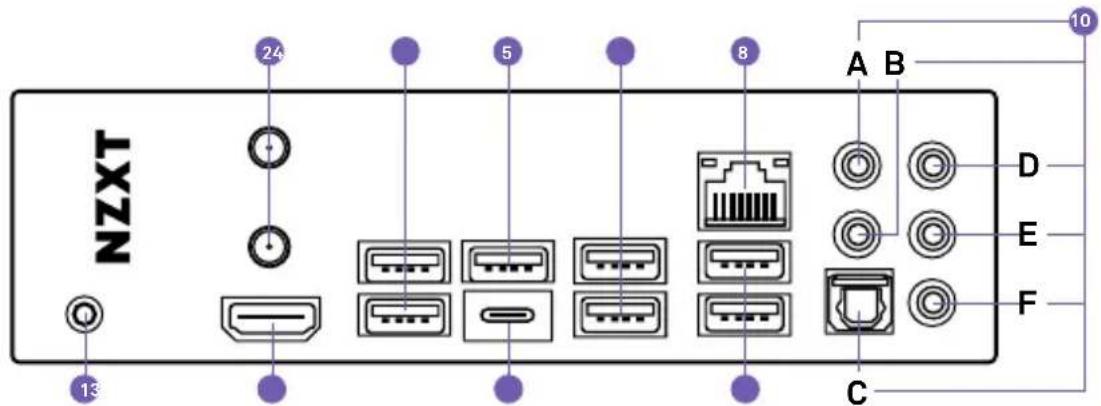
• 2 x Wireless antenna SMA connectors
- 1 x HDMI™ port
- 2 x USB 2.0 ports
• 1 x USB 3.2 Gen 2x2 Type-C port
• 2 x USB 3.2 Gen 2 ports
• 3 x USB 3.2 Gen 1 ports
- 1 x Clear CMOS button
- 1 x LAN (RJ45) port
- 5 x Audio jacks
• 1 x Optical S/PDIF Out port
Internal I/O
• 1 x 24-pin ATX power connector
- 1 x 8+4-pin ATX 12V power connector
- 1 x 4-pin CPU_FAN connector (Up to 24W per channel)
- 1 x 4-pin AIO_PUMP connector (Up to 24W per channel)
- 5 x 4-pin SYS_FAN connectors (Up to 24W per channel)
• 4 x NZXT RGB LED connectors
- 2 x 5V Addressable RGB LED connector
- 2 x USB 2.0 header (Up to 4 USB 2.0 ports)
- 1 x USB 3.2 Gen 1 header (Up to 2 USB 3.2 Gen 1 ports)
- 1 x USB 3.2 Gen 2x2 front panel header (For USB Type C)
• 1 x Front panel audio connector
- 1 x Power button
- 1 x Reset button
- 4 x POST LEDs
Operating System Microsoft® Windows® 11/10 (64-bit)
Form Factor ATX
System Requirements
- NZXT CAM software requires Microsoft Windows® 11/10 operating system.
- NZXT CAM is free to download and use; some features require a valid email address, acceptance of our current Terms of Service, and an active internet connection.

SPECIFICATIONS
ESPECIFICACIONES
CARACTÉRISTIQUES
SPEZIFIKATIONEN
ESPECIFICAÇÕES
사양
スペック
技术规格
產品規格
CPU y tomas
- 1 x M.2_2, type 2242/2260/2280/22110 (mode PCIe 4.0 ×4)*
- 1 x M.2_3 type 2242/2260/2280 (mode PCIe 4.0 ×4 et SATA 6 Go/s)*
• 4 x ports SATA 6 Gbit/s
The all-metal N7 cover pieces can be removed by hand. They are latched onto the motherboard through multiple points. When installing and removing, please pay close attention to these points and apply an even force to prevent damage.
The all-metal N7 cover pieces can be removed by hand. They are latched onto the motherboard through multiple points. When installing and removing, please pay close attention to these points and apply an even force to prevent damage.
A. Center and Subwoofer
B. Rear Surround
C. Optical SPDIF Out port
D. Line-in
E. Front Left and Right
F. Microphone
-
Botón de vaciado de CMOS
-
Antena inalámbrica
-
Puerto HDMI
-
USB 2.0
-
USB 3.2 Gen 1
-
USB 3.2 Gen 2x2 Type-C
-
USB 3.2 Gen 1
-
Puerto LAN RJ45
-
USB 3.2 Gen 2
-
Puertos de audio
B. Surround traseiro
natural_image
Technical diagram of a mechanical or electrical component with mounting holes and internal structure (no text or symbols)1.2.3.
natural_image
Diagram of a mechanical component with a purple arrow indicating a specific section (no text or symbols present)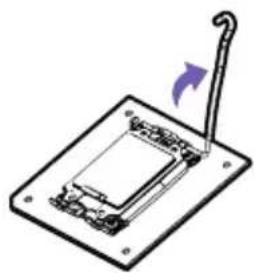
natural_image
Diagram of a mechanical device with a lever and base plate, no text or symbols present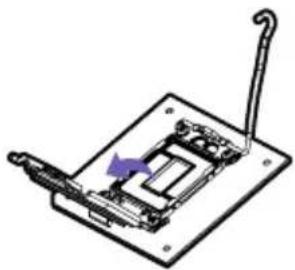
natural_image
Mechanical assembly diagram showing a clamping mechanism with a purple arrow indicating direction (no text or symbols)4.6.7.8.
natural_image
Technical line drawing of a mechanical assembly with no visible text or symbols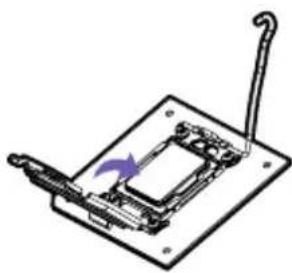
natural_image
Technical line drawing of a mechanical component with a purple arrow indicating rotation (no text or symbols)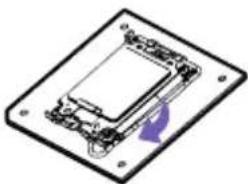
natural_image
Isometric view of a rectangular electronic component with mounting holes and internal structure (no text or symbols)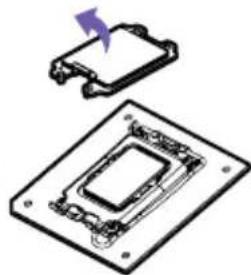
natural_image
Diagram of a microchip with a highlighted component and arrow indicating direction (no text or symbols)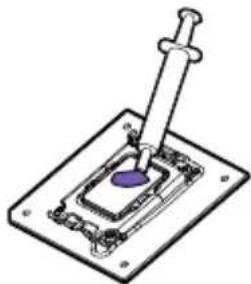
natural_image
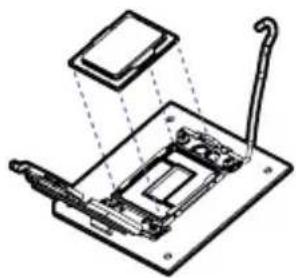
Diagram of a mechanical assembly with a central rod inserted into a substrate, no text or symbols presentThe surface of the LGA 1700 CPU has two notches and a golden triangle to assist in correctly lining up the CPU for placement within the socket. La superficie de la CPU LGA 1700 tiene cuatro muescas y un triángulo dorado para ayudar a alinear la CPU correctamente al colocarla en el zócalo. Le processeur LGA 1700 comporte quatre encoches et un triangle doré pour aider à le positionner correctement dans son socket.
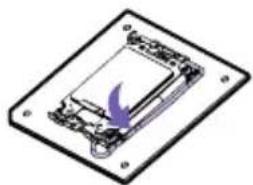
- Push down on the retention arm and outwards to release.
- Flip open the latch and place the CPU making sure the triangle and the notches on the CPU matches the corner as indicated.
- Close the latch and push down on the retention arm to lock it into place.
- The plastic protective cap will automatically become loosen.
- Apply thermal paste as needed and install your CPU cooler.

NOTE
• Always unplug the power cord from the power outlet before installing or removing the CPU.
- Please retain the CPU protective cap after installing the CPU.
- Confirm that the CPU heatsink has been mounted properly before booting.
- Whenever the CPU is not installed, always protect the CPU socket pins by covering the socket with the plastic protective cap.
- Please refer to the CPU cooler manufacturer's instructions to install your cooler.
INSTALACIÓN
natural_image
Top-down schematic of a computer motherboard showing CPU socket, RAM slots, and memory racks (no text or labels)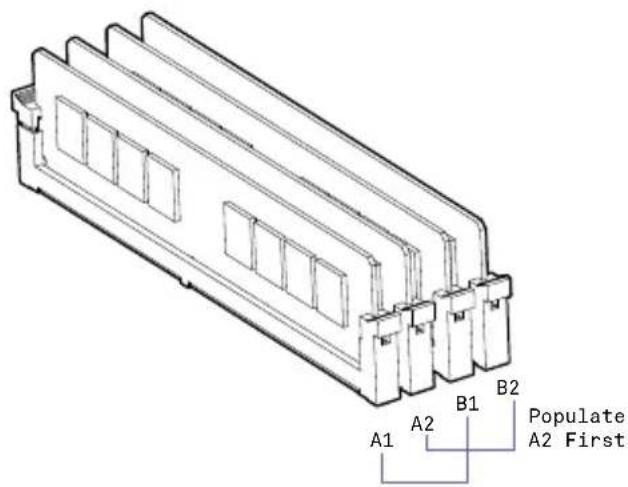
natural_image
Technical line drawing of a mechanical component with two downward arrows indicating rotation or movement (no text or symbols)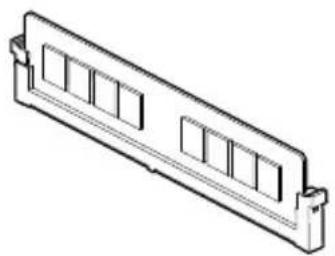
natural_image
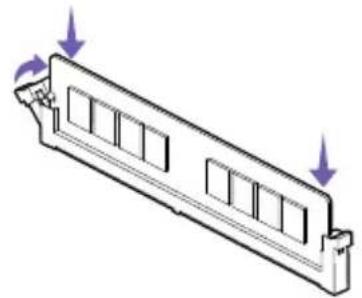
Isometric line drawing of a rectangular electronic component with multiple slots and a mounting bracket (no text or symbols)The DIMM slots are located here. Please see the diagram for recommended memory configuration.
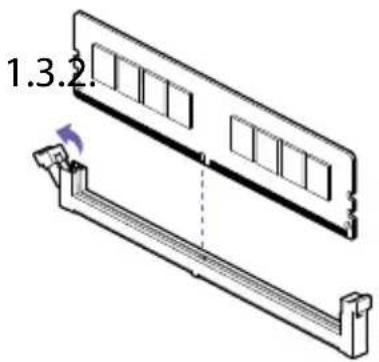
- Push the release lever as indicated.
- Match the memory with the middle notch and align into the DIMM slots.
- Push the memory into the DIMM slot firmly until the lever has been locked automatically.
NOTE
- Insert memory modules in the A2 slot first.
INSTALACIÓN
natural_image
Top-down schematic of a computer motherboard showing CPU socket, RAM slots, and drive bays (no text or labels)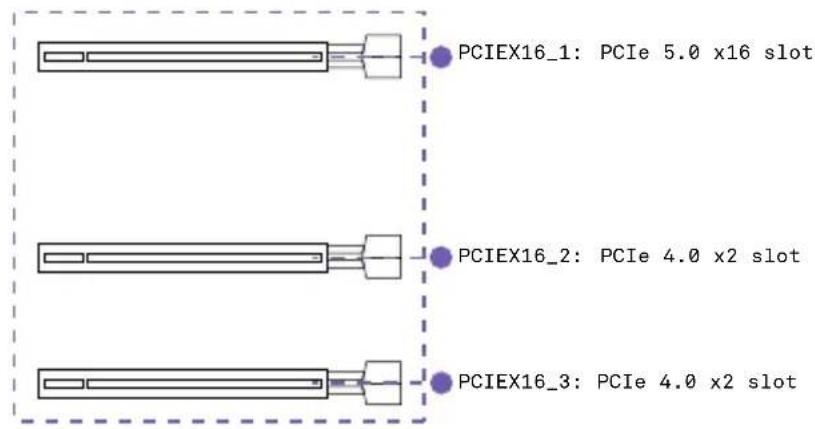
See the diagram below for the list of slots. Please install graphics cards using the PCIEX16_1 first then the PCIEX16_2.
- For power supply recommendations for multi-GPU configurations, please refer to the user guide of your graphics card to make sure you meet all the system requirements.
- To install multiple graphics cards:
- Turn off your computer and disconnect the power cord, install two graphics cards into the PCIEX16_1 and PCIEX16_2 slots.
- Connect all PCIe power connectors of the graphics cards.
- Reconnect the power cord, power up the computer and install the drivers and software included in your graphics card package.
NOTE
- For a single PCIe x16, please use PCIEX16_1.
- When adding or removing expansion cards, always turn off the power supply and unplug the power supply power cable from the power outlet. Read the expansion card's documentation to check for any necessary additional hardware or software changes.
natural_image
Top-down schematic of a computer motherboard showing CPU socket, RAM slots, and memory layout (no text or labels)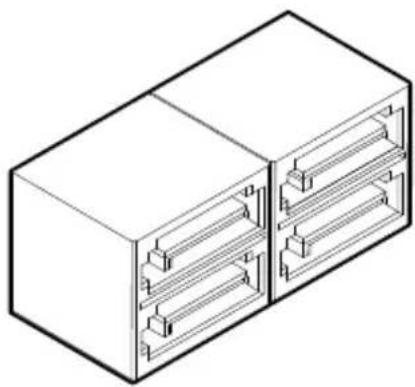
natural_image
Isometric line drawing of a rectangular electronic device with internal channels (no text or symbols)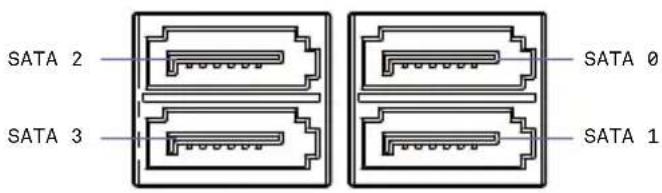
These connectors are SATA 6Gb/s interface ports. Each connector can connect to one SATA device. No ports utilize the same bandwidth with any M.2.
- Please do not fold the SATA cable at a 90-degree angle. Data loss may result during transmission otherwise.
- SATA cables have identical plugs on either side of the cable. However, it is recommended that the flat connector be connected to the motherboard for space saving purposes.

NOTA
There are three M.2 slots on the N7 motherboard. You will need to remove the steel cover pieces prior to installation. The topmost slot includes a heat spreader. Please follow the instructions below to install your M.2 drive.
natural_image
Top-down schematic of a computer motherboard showing CPU socket, RAM slots, and memory compartments (no text or labels)INSTALLATION
- Remove the M.2 slot cover.
- Confirm the standoff is at the required position and if necessary, move the standoff.
- Insert your M.2 drive into the M.2 slot at an angle.
- Secure the M.2 drive using the M.2 screw onto the standoff and tighten.

NOTE
• Supports NVMe SSD as boot disks
INSTALACIÓN
A Key E M.2 slot supporting PCIe is located at the center of the motherboard. This slot is prepopulated with a wireless card and two antenna cables route the wireless signals to the rear I/O.
natural_image
Top-down schematic of a computer motherboard showing CPU socket, RAM slots, and memory drive (no text or labels)ANTENNA
ANTENA
ANTENNE
ANTENNE
ANTENA
안테나
アンテナ
天线
天線
Wireless antennas are included to boost the wireless and Bluetooth signals.
Installation: Attach the antenna onto the rear I/O by securing them directly to the SMA ports labelled "Wi-Fi".
These connectors connect to an ATX power supply.
natural_image
Top-down schematic of a computer motherboard showing CPU socket, RAM slots, and memory card (no text or labels)Note: Make sure that all the power cables are securely connected to a proper ATX power supply to ensure stable operation of the motherboard.
These connectors allow you to connect to the front panel USB ports or devices requiring internal USB ports.
natural_image
Top-down schematic of a computer motherboard showing CPU socket, RAM slots, and memory drive (no text or labels)
FRONT PANEL AUDIO CONNECTOR
CONECTOR DE AUDIO DEL PANEL FRONTAL CONNECTEUR AUDIO POUR PANNEAU AVANT AUDIOANSCHLUSS AN DER VORDERSEITE CONECTOR DE ÁUDIO DO PAINEL FRONTAL
This connector connects to the front panel audio on the case.
natural_image
Top-down schematic of a computer motherboard showing CPU socket, RAM slots, and drive bays (no text or labels)
FRONT PANEL CONNECTOR
CONECTOR DEL PANEL FRONTAL
CONNECTEUR PANNEAU AVANT
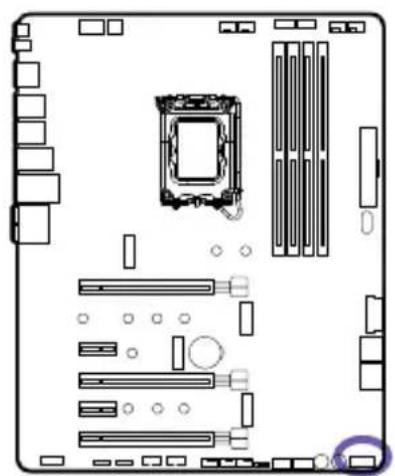
These connectors connect to the switches and indicator LEDs on the case.
natural_image
Top-down schematic of a computer motherboard showing CPU socket, RAM slots, and memory layout (no text or labels)Important: Please check the polarity of the pins to ensure your LEDs work properly.
Note: CAM is required to control the fans within Windows.
natural_image
Top-down schematic of a computer motherboard showing CPU socket, RAM slots, and drive bays (no text or labels)NZXT RGB CONNECTORS
CONECTORES RGB DE NZXT CONNECTEURS RGB DE NZXT LÜFTERANSCHLÜSSE NZXT RGB-ANSCHLÜSSE
There are four NZXT RGB headers located on the motherboard. The NZXT RGB ports are compatible with NZXT lighting accessories. Each channel supports up to 40 LEDs and up to 6 accessories.
natural_image
Top-down schematic of a computer motherboard showing CPU socket, RAM slots, and memory drive (no text or labels)
NOTE
- CAM is required to control the lighting within Windows.
- Before installing or removing your lighting accessories, please power off your system and unplug the power cord from the power supply.

NOTA
Two 5V Addressable RGB headers are located on the motherboard. These ports support WS2812B addressable RGB LED strip (5V/Data/GND), with a maximum power rating of 3A (5V) and supports up to 40 LEDs.
natural_image
Top-down schematic of a computer motherboard showing CPU socket, RAM slots, and memory drive (no text or labels)
NOTE
- Never install RGB LED cables in the wrong orientation to prevent damage to the motherboard and lighting accessories.
• CAM is required to control the lighting within Windows. - Before installing or removing your lighting accessories, please power off your system and unplug the power cord from the power supply.

NOTA
Power and Reset Button
natural_image
Two identical 3D-rendered button-like objects with no text or symbols, one labeled 'RESET' (no additional text or symbols)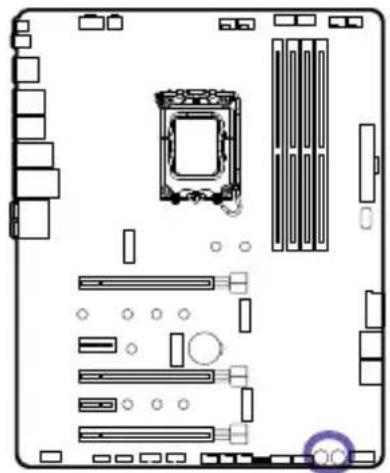
natural_image
Top-down schematic of a computer motherboard showing CPU socket, RAM slots, and drive bays (no text or labels)The power and reset button allow you to power on and reset the motherboard without connecting to a switch which is useful when testing.
The Clear CMOS button located on the rear I/O can be used to revert BIOS settings to default. To clear CMOS, turn off the power and remove the AC power to the power supply. Allow 30 seconds to ensure no standby power exists. Press and hold the Clear CMOS button for 3 seconds.
natural_image
Top-down schematic of a computer motherboard showing CPU socket, RAM slots, and memory drive (no text or labels)Post LEDs diagnoses the computer when users power on their system. It will light up to indicate whether the CPU, memory, VGA or storage is dysfunctional. The lights go off if the four mentioned above are functioning normally.
natural_image
Technical diagram of a computer motherboard showing internal components and a close-up view of the internal structure (no text or symbols present)In the event that your BIOS settings can no longer be saved, it is likely the motherboard CMOS battery (CR2032) no longer holds a charge. You can access the battery and replace it by removing the metal cover.
Download and install NZXT CAM from nzxt.com/camapp.
Descargue e instale NZXT CAM en nzxt.com/camapp.
This NZXT Global Warranty Policy governs the sale of products by NZXT to you.

I. WARRANTY LENGTH
New NZXT Product Warranty Length
Motherboard 3 Years
Any replacement product will be covered under warranty for the remainder of the warranty period or thirty days, whichever is longer. Proof of purchase is required for warranty service.
II. WHO IS PROTECTED
The Warranty covers only NZXT products purchased by the original consumer.
III. WHAT IS AND IS NOT COVERED
Please note that our warranty is not an unconditional guarantee. If the product, in NZXT's reasonable opinion, malfunctions within the warranty period, NZXT will provide you at its sole discretion with a repaired or replacement product, either new or refurbished, with a similar function that is equal or greater in value depending on supply. Our warranty does not cover the following:
- any product or serial number/warranty sticker modification applied without permission from NZXT;
- any damage that is not a manufacturing defect;
- damage, deterioration or malfunction resulting from: accident, abuse, misuse, neglect, fire, water, lightning, or other acts of nature, unauthorized product modification or failure to follow instructions included with the product;
- improper installation, unauthorized alterations or modifications, or repair or attempted repair by anyone not authorized by NZXT;
- shipping or transport damage (claims must be made with the carrier);
• normal wear and tear.
NZXT does not warrant that this product will meet your requirements. It is your responsibility to determine the suitability of this product for your purpose. For NZXT Store orders, we cover two way return shipping for all exchanges and returns. For all other authorized dealers, NZXT Support does not cover return shipping and only covers one way shipping from NZXT back to the end user for exchanges. Two way expedited shipping is provided for all PSUs covered under the Less Than Three program, indiscriminate of purchase location, provided the location is an approved NZXT reseller.
IV. EXCLUSION OF DAMAGES (DISCLAIMER)
NZXT's sole obligation and liability under this warranty is limited to the repair or replacement of a defective product with either a new or refurbished product with a similar function that is equal or greater in value at our option. NZXT shall not, in any event, be liable for any incidental or consequential damage, including but not limited to damages resulting from interruption of service and loss of data, business, or for liability in tort relating to this product or resulting from its use or possession.
V. LIMITATIONS OF IMPLIED WARRANTIES
There are no other warranties, expressed or implied, including but not limited to those of merchantability or fitness for a particular purpose. The duration of implied warranties is limited to the warranty length specified in Paragraph I.
VI. TO OBTAIN TECHNICAL SUPPORT
If you have already referenced your product owner's manual and still need help, you may contact us by phone at +1 (800) 228-9395, by email at service@nzxt.com, or visit the NZXT Support site at nzxt.com/customer-support.
VII. HOW TO OBTAIN A WARRANTY SERVICE FROM NZXT
To receive a warranty service for your product when purchased directly from NZXT, you must submit a request via the NZXT Support site outlining the problem. If a technician deems the product defective or requiring testing, you will be required to provide a copy of your proof of purchase, which will enable you to submit a Return Merchandise Authorization "RMA" request.
Once approved, you'll receive an RMA number, upon which you will be asked to ship the defective item back to NZXT with the RMA number clearly marked or labelled on the package. NZXT recommends that appropriate measures are taken to safeguard the product from damage during shipping.
VIII. APPLICABLE LAW AND ADDITIONAL LEGAL RIGHTS FOR CONSUMERS
This warranty gives you specific legal rights. These conditions are governed and construed in accordance with the laws of California (with exception of its conflict of law provisions), and the application of the United Nations Convention of Contracts for the International Sale of Goods is expressly excluded. The non-exclusive jurisdiction of the courts of California is agreed, which means that you may bring a claim to enforce your consumer protection rights in connection with this Global Warranty in the country which you have your habitual residence where you may have additional rights. These rights may vary.
For original consumers who are covered by consumer protection laws or regulations in their country, state, or province of purchase or, if different, their country, state, or province of residence, the benefits conferred by this warranty are in addition to all rights and remedies conveyed by such consumer protection laws and regulations. To the extent that liability under such consumer laws can be limited, NZXT's liability is limited, and its sole option, to repair or replacement, either new or refurbished, with a similar function that is equal or greater in value depending on supply.
In the United Kingdom:
• For NZXT products sold to customers in the UK, during the expected lifespan of your product your legal rights entitle you to the following:
Up to 30 days: if your goods are faulty, then you can get an immediate refund.
Up to six months: if your goods can't be repaired or replaced, then you're entitled to a full refund, in most cases.
Up to six years: if your goods do not last a reasonable length of time you may be entitled to some money back.
- If the person seeking to rely on the guarantee is not the original consumer, the NZXT Warranty will cover the product in relation to that person provided that they are able to provide proof of the transfer of the benefit of the guarantee from the original consumer.
- The implied warranties under the Consumer Rights Act 2015 says that your goods must be as described, fit for all purposes for which such goods are usually supplied, and of satisfactory quality.
In the EU:
- If you are a consumer and have your habitual residence in the EU, you additionally enjoy the protection afforded to you by provisions that cannot be derogated from by agreement by virtue of the law where you have your habitual residence.
IX. WARRANTY SERVICE FROM RESELLERS
In the event that a warranty service is sought, you must provide proof of purchase (store receipt or invoice) in order to receive the service and if deemed necessary, repair or replacement product.
In North America:
Within the first 60 days after purchase, please return your product (or for power supplies installed within our enclosures, just the failed power supply) to your dealer or reseller for a replacement. If the product is still within warranty and you can no longer return it to your dealer, please contact NZXT Customer Support (see above) for assistance and instructions. NZXT will not accept returns without prior approval and an RMA number.
In Europe:
Within the first year after purchase, please return your product (or for power supplies installed within our enclosures, just the failed power supply) to your dealer or reseller for a replacement. If the product is still within warranty and you can no longer return it to your dealer, please contact NZXT Customer Support (see above) for assistance and instructions. NZXT will not accept returns without prior approval.

In Australasia:

Within the first two years after purchase, please return your product (or for power supplies installed within our enclosures, just the failed power supply) to your dealer or reseller for a replacement. If the product is still within warranty and you can no longer return it to your dealer, please contact NZXT Customer Support (see above) for assistance and instructions. NZXT will not accept returns without prior approval.
The cost of shipping will be borne at the first instance by you; however, if the purchased item is defective, NZXT will reimburse reasonable postage or transportation of costs.
Outside North America, Europe, and Australasia:
If your product needs to be returned within the warranty period, please contact the retailer or distributor from whom you purchased the product.
X. NZXT.COM STORE RETURNS/EXCHANGE POLICY
Eligible products under this NZXT Warranty qualify for a full refund or exchange only with an authorized RMA number and if the item is returned to the NZXT.com store inventory within 30 days of purchase. Returns are not allowed beyond 30 days of the purchase date. The NZXT.com Store reserves the right to deny any return or exchange. Refunds will be credited to the original method of payment. To initiate a return, simply submit a request via NZXT support site.
Visit nzxt.com/warranty and support.nzxt.com for information on warranty coverage and service.
Visite el sitio Web nzxt.com/warranty y support.nzxt.com para obtener información sobre la cobertura y el servicio de la garantía.
Visitez nzxt.com/warranty et support.nzxt.com pour les informations de la couverture de la garantie et du service.
Informationen zu Geltungsbereich und Service der Garantie finden Sie unter support.nzxt.com und nzxt.com/warranty.
Visitare il sito nzxt.com/warranty e support.nzxt.com per informazioni sulla copertura e sul servizio della garanzia.
Visite nzxt.com/warranty e support.nzxt.com para obter informações sobre a cobertura da garantia e assistência.
제품 보증 범위와 서비스 정보를 확인하시려면 nzxt.com/warranty 또는 support.nzxt.com을 방문해 주시기 바랍니다.
保証範囲およびサービスに関する情報については、support.nzxt.com と nzxt.com/warranty にアクセスしてください。
请造访 nzxt.com/warranty 和 support.nzxt.com 了解保修范围和服务的信息。
請訪問 nzxt.com/warranty 和 support.nzxt.com 了解產品保固範圍和更多服務訊息。
NZXT, Inc. | 15736 E. Valley Blvd, City of Industry, CA 91744, USA
NZXT UK Ltd. | First Floor 5 Fleet Place London EC4M 7RD, GB United Kingdom
+1 (800) 228-9395 / service@nzxt.com / nzxt.com
REGULATORY NOTICES






R-R-ZXT-N7Z79XT


FCC Compliance Statement
This equipment has been tested and found to comply with the limits for a Class B digital device, pursuant to Part 15 of the FCC Rules. These limits are designed to provide reasonable protection against harmful interference in a residential installation. This equipment generates, uses, and can radiate radio frequency energy and, if not installed and used in accordance with the instructions, may cause harmful interference to radio communications. However, there is no guarantee that interference will not occur in a particular installation. If this equipment does cause harmful interference to radio or television reception, which can be determined by turning the equipment off and on, the user is encouraged to try to correct the interference by one or more of the following measures:
• Reorient or relocate the receiving antenna
- Increase the separation between the equipment and the receiver
- Connect the equipment onto an outlet on a circuit different from that to which the receiver is connected
- Consult the dealer or an experienced radio/TV technician for help
Shielded interconnect cables and a shielded AC power cable must be employed with this equipment to ensure compliance with the pertinent RF emission limits governing this device. Changes or modifications not expressly approved by the system's manufacturer could void the user's authority to operate the equipment.
Declaration of Conformity
I. This device complies with part 15 of the FCC rules. Operation is subject to the following conditions:
• This device may not cause harmful interference
- This device must accept any interference received, including interference that may cause undesired operation
II. The device complies with the requirements set out in the Council Directives relevant Union harmonization legislation:
• EMC Directive 2014/30/EU
• LVD Directive 2014/35/EU
• RoHS Directive 2011/65/EU & (EU) 2015/863
• Turkish EEE Directive
III. The object of the declaration described above is in conformity with the relevant UK harmonisation legislation:
• Electromagnetic Compatibility Regulations 2016
• Electrical Equipment (Safety) Regulations 2016
• The Restriction of the Use of Certain Hazardous Substances in Electrical and Electronic Equipment Regulations 2012
IV. Canadian Department of Communications
V. Korean Certification Mark
Includes a KCC (Korean Communications Commission) certification number: KCC-R-R-ZXT-N7Z79XT.
WEEE (WASTE ELECTRICAL AND ELECTRONIC EQUIPMENT) STATEMENT

To protect the global environment and as an environmentalist, NZXT must remind you that...
Under the European (“EU”) Directive on Waste Electrical and Electronic Equipment, Directive 2012/19/EU, effective February 14, 2014, products of “electrical and electronic equipment” cannot be discarded as municipal wastes, and manufacturers of covered electronics must take back such products at the end of their useful life. NZXT will comply with the product take back requirements at the end-of-life of NZXT products that are sold within the EU. You can return these products to local collection points.
Batteries, battery packs, and accumulators should not be disposed of as unsorted household waste. Please use the public collection system to return, recycle, or treat them in compliance with the local regulations.

Taiwan
For better environmental protection, waste batteries should be collected separately for recycling or special disposal.

California, USA
The button cell battery may contain perchlorate material and requires special handling when recycled or disposed of in California. For further information please visit: http://www.dtsc.ca.gov/hazardouswaste/perchlorate.
CAUTION(!)
There is a risk of explosion, if battery is incorrectly replaced. Replace with the same or equivalent type recommended by the manufacturer.
REACH STATEMENT
EU REACH SVHC Disclosure on Candidate List REACH (Registration, Evaluation, Authorization and Restriction of Chemicals, EC 1907/2006) is the European Union's (EU) chemical substances regulatory framework. REACH requires NZXT Corporation to provide customers with sufficient information on Substances of Very High Concern (SVHC) contained in products in concentration above 0.1% weight by weight (w/w) to allow safe use of the product.
ROHS STATEMENT
This product is compliant to implemented RoHS (Restriction of Hazardous Substances) type regulations worldwide, including but not limited to China, India, Japan, Korea and European Union.
限用物质及元素列表/限用物質及元素清單


If you have any questions or problems with the NZXT product you purchased, please don't hesitate to contact us using our support system. service@nzxt.com support.nzxt.com
Please include a detailed explanation of your problem and your proof of purchase. For comments and suggestions, you can e-mail our design team, designer@nzxt.com.
Lastly we would like to thank you for your support by purchasing this product. For more information about NZXT, please visit us online. NZXT Website: NZXT.com
SOPORTE Y SERVICIO
NZXT, Inc. | 15736 E. Valley Blvd, City of Industry, CA 91744, USA
NZXT UK Ltd. | First Floor 5 Fleet Place London EC4M 7RD, GB United Kingdom
+1 (800) 228-9395 / service@nzxt.com / nzxt.com

- TABLE OF CONTENTS
- Follow these safety precautions when installing the motherboard:
- Expansion Slots
- CPU
- Chipset
- Integrated Graphics
- Storage
- Audio
- Bluetooth Bluetooth V5.2
- Wireless
- Rear I/O
- Internal I/O
- System Requirements
- SPECIFICATIONS
- CPU y tomas
- NOTE
- INSTALACIÓN
- NOTA
- INSTALLATION
- ANTENNA
- FRONT PANEL AUDIO CONNECTOR
- FRONT PANEL CONNECTOR
- NZXT RGB CONNECTORS
- WARRANTY LENGTH
- New NZXT Product Warranty Length
- WHO IS PROTECTED
- WHAT IS AND IS NOT COVERED
- EXCLUSION OF DAMAGES (DISCLAIMER)
- LIMITATIONS OF IMPLIED WARRANTIES
- TO OBTAIN TECHNICAL SUPPORT
- HOW TO OBTAIN A WARRANTY SERVICE FROM NZXT
- APPLICABLE LAW AND ADDITIONAL LEGAL RIGHTS FOR CONSUMERS
- In the United Kingdom:
- In the EU:
- WARRANTY SERVICE FROM RESELLERS
- In North America:
- In Europe:
- In Australasia:
- Outside North America, Europe, and Australasia:
- NZXT.COM STORE RETURNS/EXCHANGE POLICY
- REGULATORY NOTICES
- FCC Compliance Statement
- Declaration of Conformity
- Canadian Department of Communications
- Korean Certification Mark
- WEEE (WASTE ELECTRICAL AND ELECTRONIC EQUIPMENT) STATEMENT
- Taiwan
- California, USA
- CAUTION(!)
- REACH STATEMENT
- ROHS STATEMENT
- 限用物质及元素列表/限用物質及元素清單
- SOPORTE Y SERVICIO
Brand : NZXT
Model : N7 Z790
Category : Motherboard