SB042LED - Soundbar LENCO - Free user manual and instructions
Find the device manual for free SB042LED LENCO in PDF.



| Product type | Bluetooth soundbar with LED lighting |
| Brand | LENCO |
| Model | SB042LED |
| Length | 86 cm |
| Power supply | 100-240 V~, 50/60 Hz (15 V, 2 A power adapter) |
| Maximum power | 40 W |
| Bluetooth | Version 5.0 |
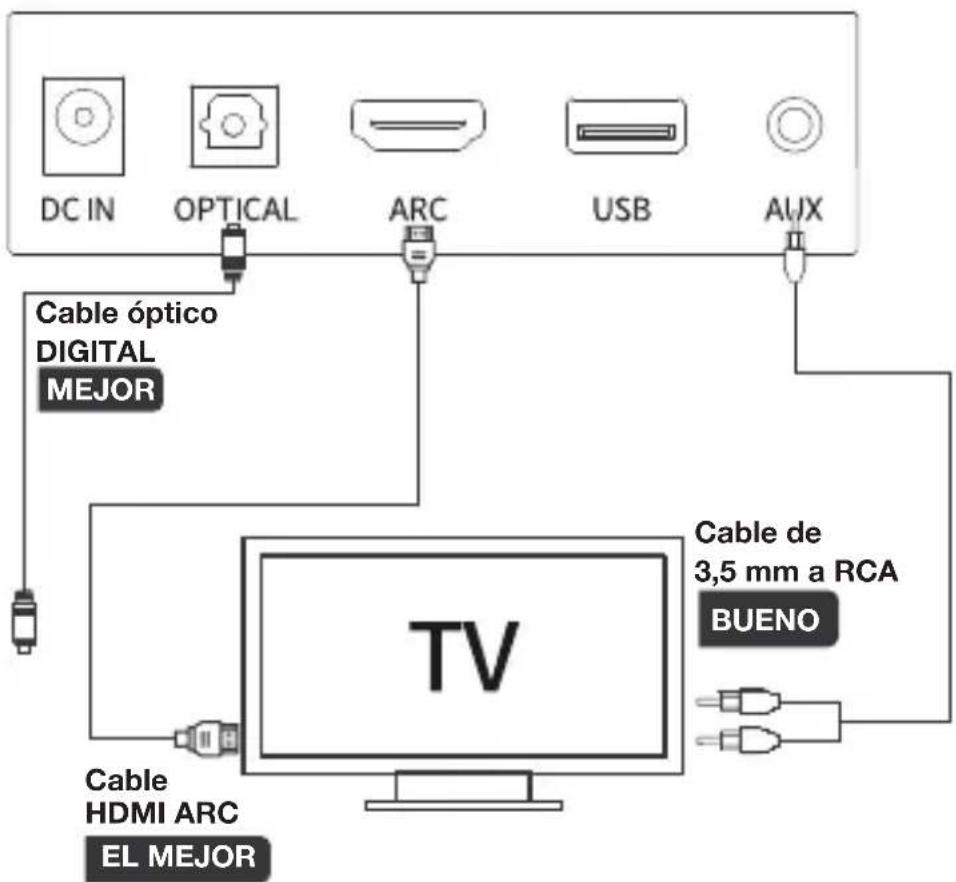
| Audio inputs | HDMI ARC, Optical, USB, Auxiliary (3.5 mm to RCA jack) |
| Supported USB formats | MP3, WAV, WMA, APE, FLAC (FAT32, max 64 GB) |
| LED lighting | 8 modes: breathing, circulating, white, red, violet, blue, light blue, green |
| Frequency response | 140 Hz – 15 kHz |
| Impedance | 4 Ω |
| Remote control | Yes (AAA batteries not included) |
| Wall mounting | Possible (screws included) |
| Operating temperature | 0 °C to 35 °C |
| Maintenance | Soft, dry cloth; no solvent |
| Included accessories | Power adapter, 3.5 mm to RCA cable, wall mounting screws, remote control, user manual |
Frequently Asked Questions - SB042LED LENCO
User questions about SB042LED LENCO
0 question about this device. Answer the ones you know or ask your own.
Ask a new question about this device
Download the instructions for your Soundbar in PDF format for free! Find your manual SB042LED - LENCO and take your electronic device back in hand. On this page are published all the documents necessary for the use of your device. SB042LED by LENCO.
USER MANUAL SB042LED LENCO
natural_image
Line drawing of a cylindrical mechanical component with rounded ends and a central slot (no text or symbols)User Manual-86cm Bluetooth soundbar with HDMI (ARC) and LED lighting
Usage of controls or adjustments or performance of procedures other than those specified herein may result in hazardous radiation exposure.
KEEP THESE INSTRUCTIONS IN MIND:
- Do not cover or block any ventilation openings. When placing the device on a shelf, leave 5 cm (2") free space around the whole device.
- Install in accordance with the supplied user manual.
- Keep the device away from heat sources such as radiators, heaters, stoves, candles and other heat-generating products or naked flame. The device can only be used in moderate climates. Extremely cold or warm environments should be avoided. Working temperature between 0^ and 35^ C.
- Avoid using the device near strong magnetic fields.
- Electrostatic discharge can disturb normal usage of this device. If so, simply reset and restart the device following the instruction manual. During file transmission, please handle with care and operate in a static-free environment.
- Warning! Never insert an object into the product through the vents or openings. High voltage flows through the product and inserting an object can cause electric shock and/or short circuit internal parts. For the same reason, do not spill water or liquid on the product.
- Do not use in wet or moist areas such as bathrooms, steamy kitchens or near swimming pools.
- The device shall not be exposed to dripping or splashing and make sure that no objects filled with liquids, such as vases, are placed on or near the apparatus.
- Do not use this device when condensation may occur. When the unit is used in a warm wet room with damp, water droplets or condensation may occur inside the unit and the unit may not function properly; let the unit stand in power OFF for 1 or 2 hours before turning on the power: the unit should be dry before getting any power.
- Although this device is manufactured with the utmost care and checked several times before leaving the factory, it is still possible that problems may occur, as with all electrical appliances. If you notice smoke, an excessive build-up of heat or any other unexpected phenomena, you should disconnect the plug from the main power socket immediately.
- This device must operate on a power source as specified on the specification label.
If you are not sure of the type of power supply used in your home, consult your dealer or local power company. - Keep away from animals. Some animals enjoy biting on power cords.
- To clean the device, use a soft dry cloth. Do not use solvents or petrol based fluids.
To remove severe stains, you may use a damp cloth with dilute detergent. -
The supplier is not responsible for damage or lost data caused by malfunction, misuse, modification of the device or battery replacement.
-
Do not interrupt the connection when the device is formatting or transferring files. Otherwise, data may be corrupted or lost.
-
If the unit has USB playback function, the USB memory stick should be plugged into the unit directly. Don't use an USB extension cable because it can cause interference resulting in failing of data.
-
The rating label has been marked on the bottom or back panel of the device.
-
This device is not intended for use by people (including children) with physical, sensory or mental disabilities, or a lack of experience and knowledge, unless they're under supervision or have received instructions about the correct use of the device by the person who is responsible for their safety.
-
This product is intended for non professional use only and not for commercial or industrial use.
-
Make sure the unit is adjusted to a stable position. Damage caused by using this product in an unstable position vibrations or shocks or by failure to follow any other warning or precaution contained within this user manual will not be covered by warranty.
-
Never remove the casing of this device.
-
Never place this device on other electrical equipment.
-
Do not allow children access to plastic bags.
-
Only use attachments/accessories specified by the manufacturer.
-
Refer all servicing to qualified service personnel. Servicing is required when the device has been damaged in any way, such as the power supply cord or the plug, when liquid has been spilled or objects have fallen into the device, when the device has been exposed to rain or moisture, does not operate normally, or has been dropped.
-
Long exposure to loud sounds from personal music players may lead to temporary or permanent hearing loss.
-
If the product is delivered with power cable or AC power adaptor:
- If any trouble occur, disconnect the AC power cord and refer servicing to qualified personnel.
- Don't step on or pinch the power adaptor. Be very careful, particularly near the plugs and the cable's exit point. Do not place heavy items on the power adaptor, which may damage it. Keep the entire device out of children's reach! When playing with the power cable, they can seriously injure themselves.
● Unplug this device during lightning storms or when unused for a long period.
- The socket outlet must be installed near the equipment and must be easily accessible.
- Do not overload ac outlets or extension cords. Overloading can cause fire or electric shock.
● Devices with class 1 construction should be connected to a main socket outlet with a protective earthed connection.
● Devices with class 2 construction do not require a earthed connection.
● Always hold the plug when pulling it out of the main supply socket.
Do not pull the power cord. This can cause a short circuit.
- Do not use a damaged power cord or plug or a loose outlet.
Doing so may result in fire or electric shock.
- If the product contains or is delivered with a remote control containing coin/cell batteries:
Warning:
- “Do not ingest battery, Chemical Burn Hazard” or equivalent working.
● [The remote control supplied with] This product contains a coin/button cell battery.
If the battery is swallowed, it can cause severe internal burns in just 2 hours and can lead to death.
- Keep new and used batteries away from children.
- If the battery compartment does not close securely, stop using the product and keep it away from children.
-
If you think batteries might have been swallowed or placed inside any part of the body, seek immediate medical attention.
-
Caution about the use of Batteries:
● Danger of explosion if battery is incorrectly replaced. Replace only with the same or equivalent type.
- Battery cannot be subjected to high or low extreme temperatures, low air pressure at high altitude during use, storage or transportation.
- Replacement of a battery with an incorrect type that can result in an explosion or the leakage of flammable liquid or gas.
- Disposal of a battery into fire or a hot oven, or mechanically crushing or cutting of a battery, that can result in an explosion.
- Leaving a battery in an extremely high temperature surrounding environment that can result in an explosion or that leakage of flammable liquid or gas.
- A battery subjected to extremely low air pressure that may result in an explosion or the leakage of flammable liquid or gas.
- Attention should be drawn to the environmental aspects of battery disposal.
INSTALLATION
- Unpack all parts and remove protective material.
- Do not connect the unit to the mains before checking the mains voltage and before all other connections have been made.
1 Welcome
Thank you for choosing this product.
Each of our products have been carefully designed to be great at what they do and this one is no exception. We hope you enjoy your new LED Bluetooth Soundbar.
2 Your BLUETOOTH SOUNDBAR
2.1 In The Box
Carefully remove your BLUETOOTH SOUNDBAR from the packaging.
Inside the box you will find:
• LED Bluetooth Soundbar
- Remote Control
- Multiple plug adaptor (both EU and UK plug)
- Instruction Manual
• 3.5mm To RCA Cable
- Wall mounting bolts
If any of these items are missing, contact customer support.

Mains Power
Your BLUETOOTH SOUNDBAR requires a mains supply of 100-240V \~, 50/60Hz.
Please ensure that your mains supply is compatible before use.
Disconnect the Adaptor from the mains when not in use.
Position of Bluetooth Soundbar
Place on a flat, stable surface that is not subject to vibrations.
Avoid the following locations:
- Where it is exposed to direct sunlight
- Where it is close to heat radiating sources
- Where the humidity is high and ventilation is poor
- Where it is dusty
2.2 Front View

SPEAKERS

natural_image
Technical line drawing of a rectangular electronic device with two circular ports and labeled points A (no text or symbols on the device itself)2.3 Top View
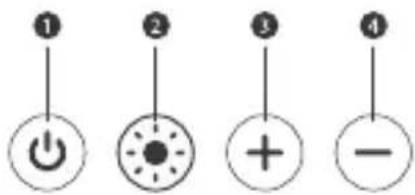
text_image
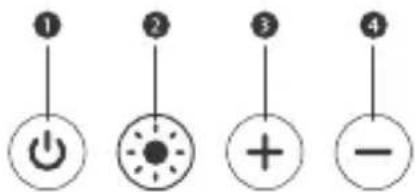
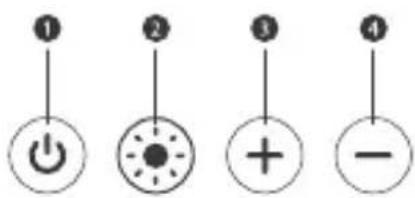
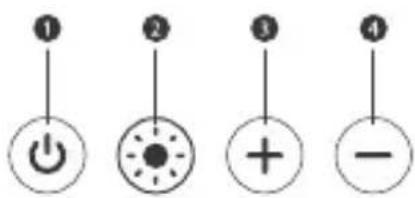
Diagram showing four labeled circular icons with symbols: power, dot, plus, and minus, each marked with numbered circles.1: Press to turn on, press and hold to turn off. When powered on, press to switch modes.
2: Press and hold to switch the LED lights on/off, press to switch between the below modes. Light Mode: 1. breathing 2. circulate 3. white 4. red 5. purple 6. blue 7. Light blue 8. green
3+ : Volume+.
4- : Volume-.
2.4 Back View

text_image
5 6 7 8 9 DCIN OPTICAL ARC USB AUX5 DC IN: Connect power adaptor here
6 OPTICAL IN: Connect to the compatible devices via an optical cable (cable not provided)
7 HDMI(ARC): Connect to the compatible devices via a HDMI cable (cable not provided)
USB IN: Connect a USB flash drive for playing MP3/WAV/WMA/APE/FLAC files (FAT32 format and 64GB max)
9 AUX IN: Connect to the compatible devices via the 3.5mm-RCA stereo jack cable (cable provided)
2.5 Remote Control
●: Press to power on, press and hold to power off.
MODE: Mode switching
3 : Mute/Unmute
④ +: Volume Up
Previous Track
Next Track
7 Play/Pause
- : Volume Down
EQ: Sound effect switching
⑩ RESET: Restore factory settings (keep pressed)
1 BT: Choose Bluetooth mode
12: Lower LED brightness
13: Increase LED brightness
14: Keep pressed to switch On/Off, press to cycle through lighting modes
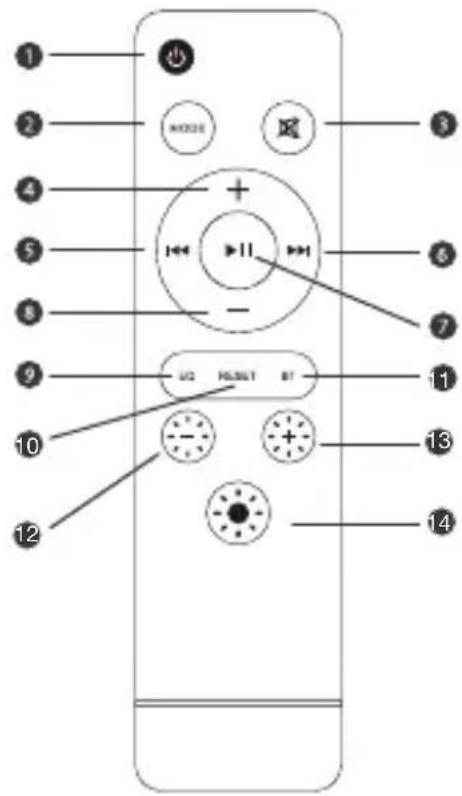
text_image
1 2 3 4 5 6 7 8 9 10 11 12 USB ⏰SET BT 13 14Battery installation
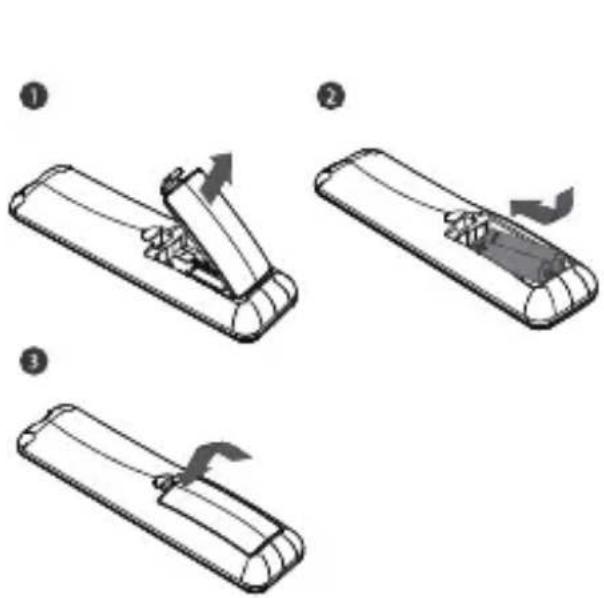
text_image
Diagram showing three-step assembly steps of a remote control device, labeled ①, ②, and ③.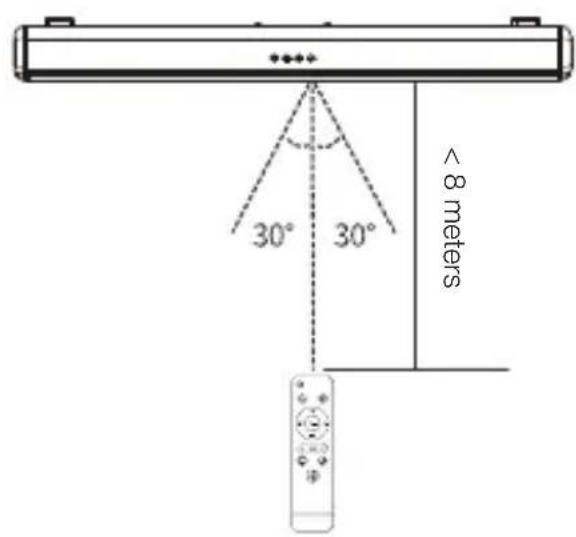
text_image
30° 30° < 8 metersUse remote control
The working range of remote is +/-30° in both Vertical and Horizontal Direction.
3 MODE
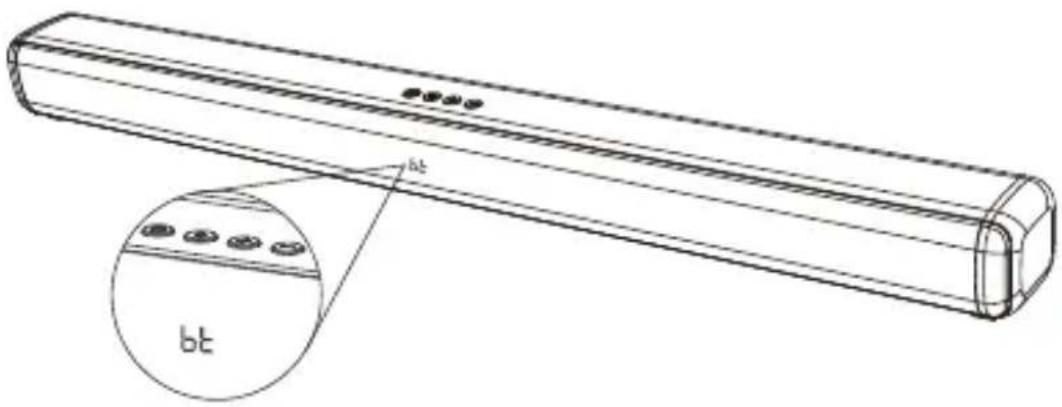
natural_image
Technical line drawing of a cylindrical electronic device with a close-up inset showing internal components (no text or symbols)| ARC | HDMI(ARC)mode Bluetooth mode | ||
| USB | USB media mode Auxiliary input mode | ||
| OPT | Optical mode | ||
PLACEMENT
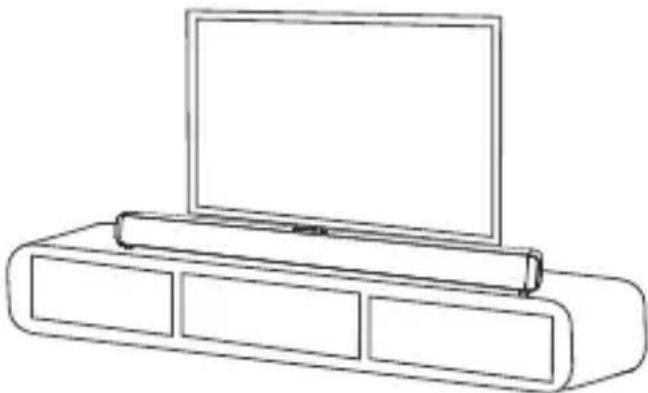
A. Table Placement
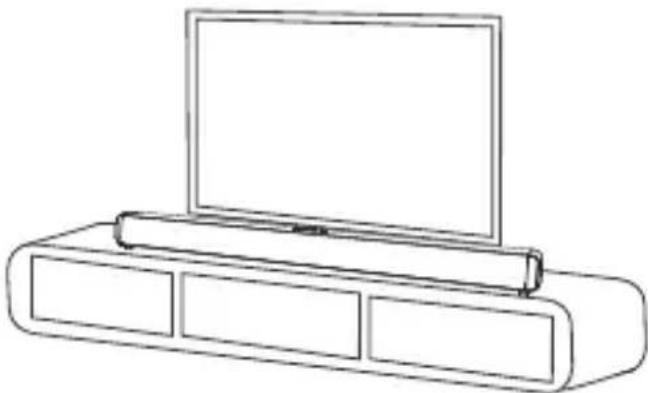
natural_image
Line drawing of a flat-screen TV set with three panels and a monitor on top (no text or symbols)Placement
Table placement
Place the soundbar on a solid surface.
4 Wall Mounted
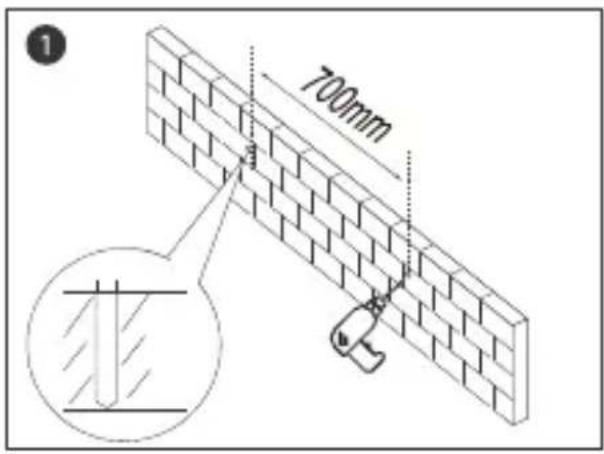
text_image
700mm 1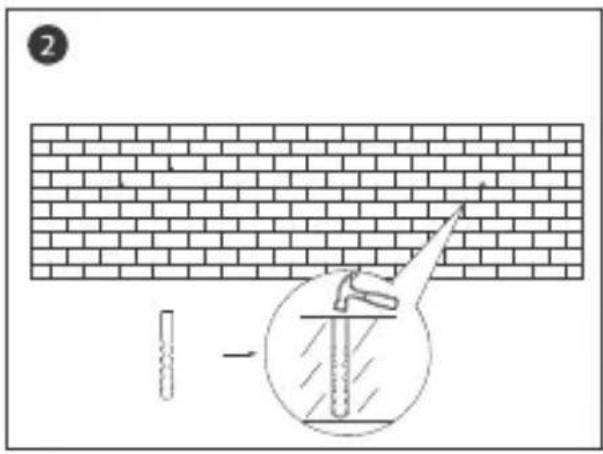
text_image
Diagram illustrating brick wall construction with a pipe and a magnified inset showing a valve inside a well.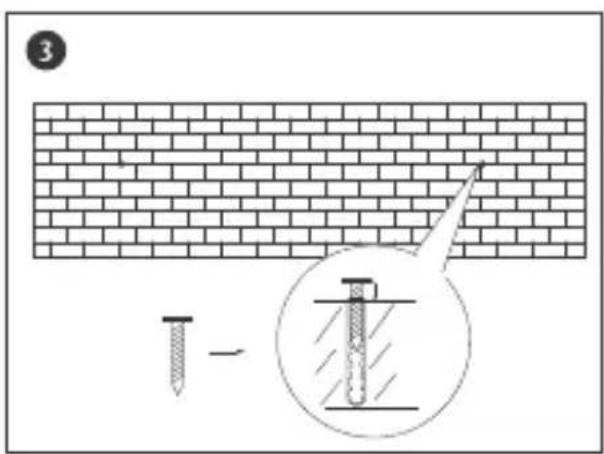
text_image
3 -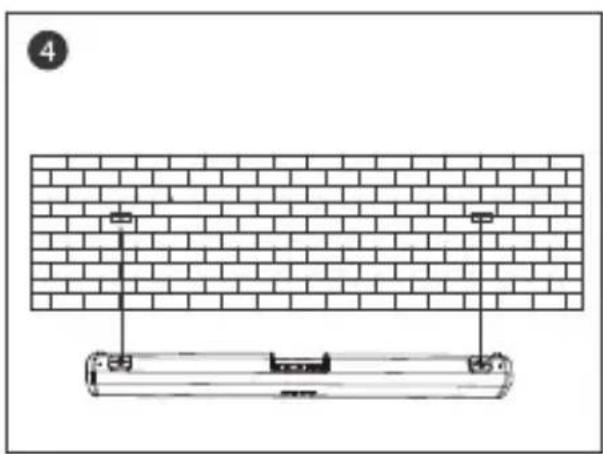
natural_image
Diagram of a brick wall and a mechanical component with mounting holes, no text or symbols present5 USING YOUR SOUNDBAR
A. Power Connection
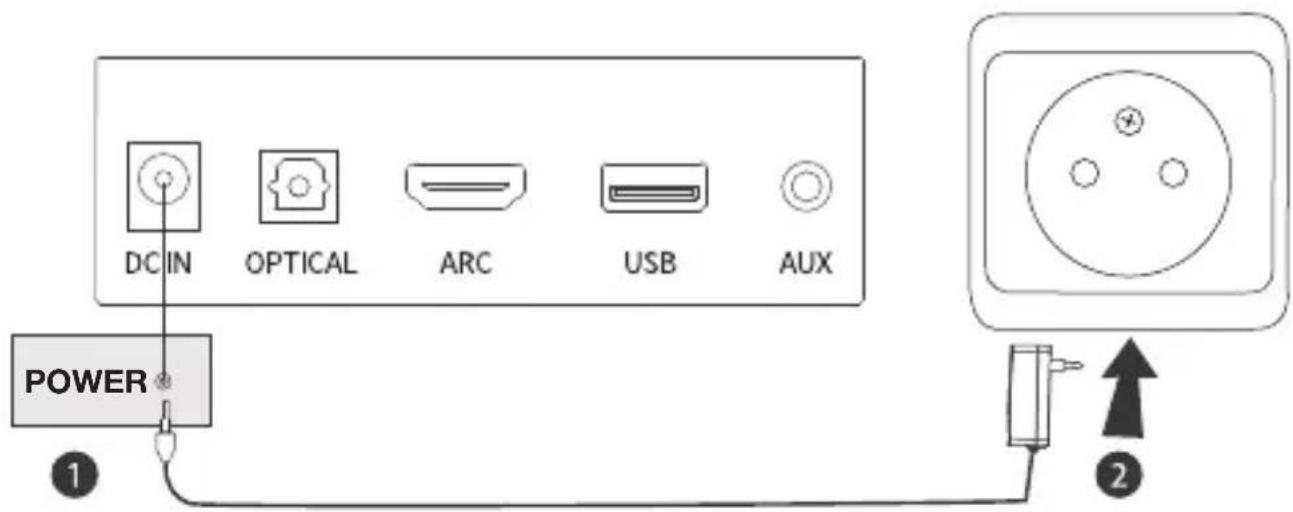
text_image
DC IN OPTICAL ARC USB AUX POWER 1 2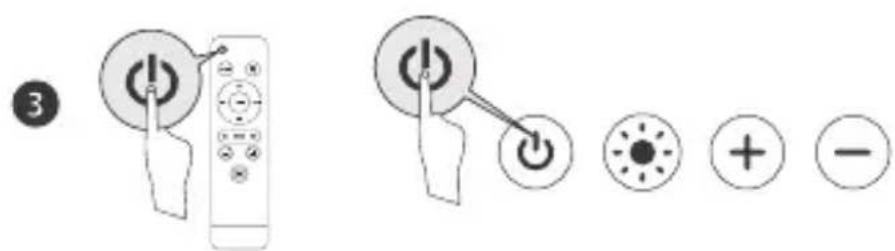
text_image
Diagram showing remote control buttons and function icons with labels like 'OK', 'Cancel', and directional indicatorsB. Connect to TV
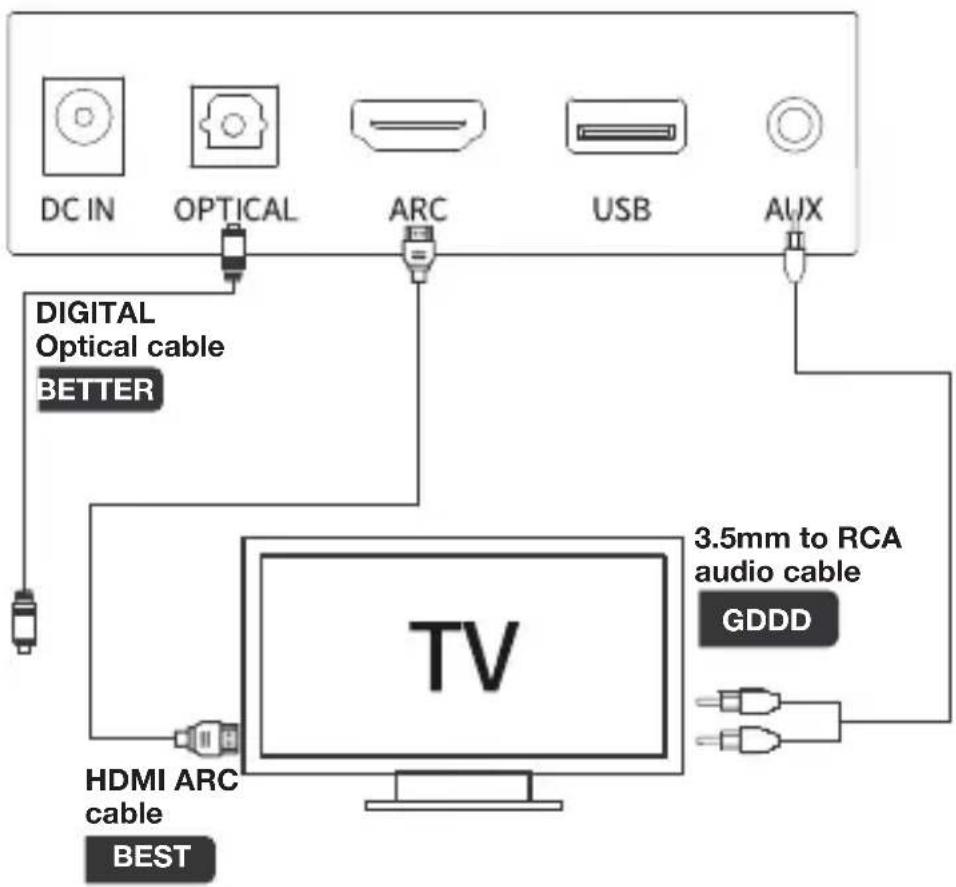
text_image
DC IN OPTICAL ARC USB AUX DIGITAL Optical cable BETTER TV 3.5mm to RCA audio cable GDDD HDMI ARC cable BESTUse the supplied remote control or the Soundbar On/Off button to choose input.
Note:
- Prior to usage, check whether your TV has HDMI ARC, Optical and Aux Output.
- Prior to using HDMI ARC connection, please ensure your TV supports HDMI ARC and HDMI Cable is not lower than HDMI 1.4.
- If there is no sound in optical mode turn on your TV PCM setting.
- 32 is the maximum volume of the soundbar.
C. Connect to Other Devices
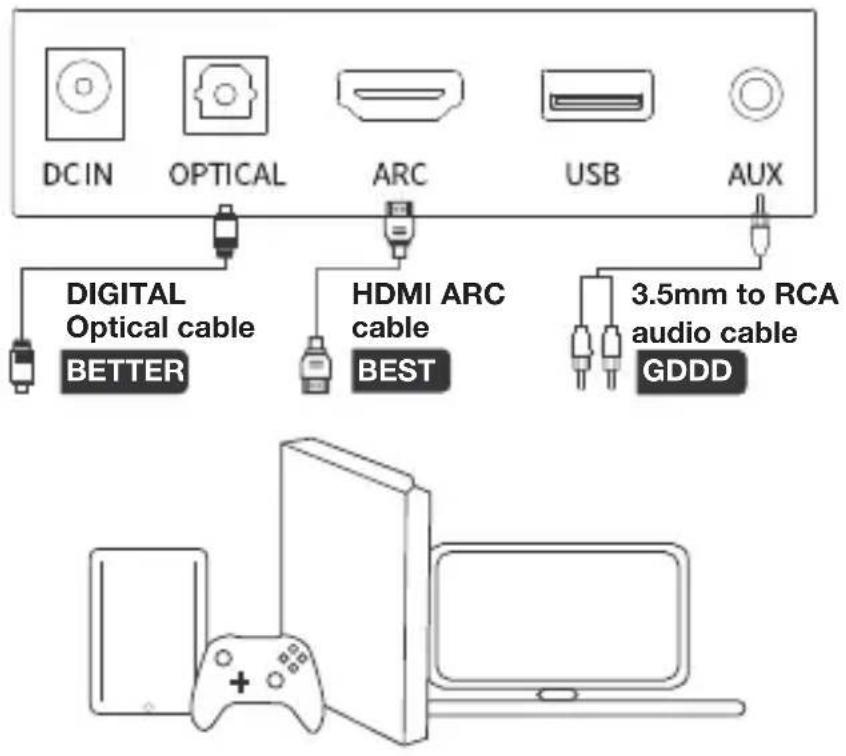
text_image
DCIN OPTICAL ARC USB AUX DIGITAL Optical cable BETTER HDMI ARC cable BEST 3.5mm to RCA audio cable GDDDIf your device only has one 3.5mm output you will need to use a 3.5mm audio cable (not supplied).
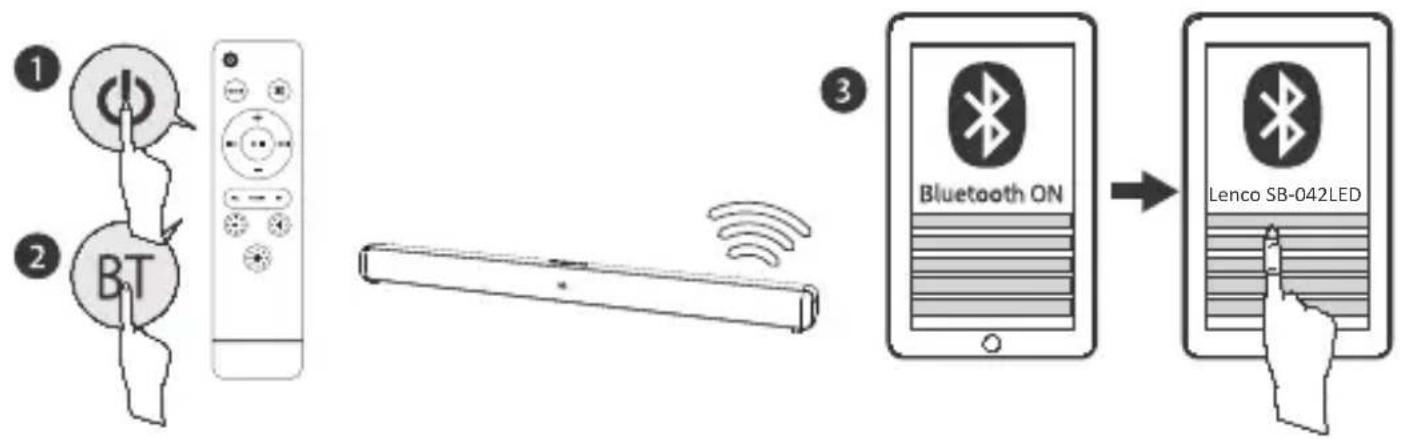
D. Connect to Bluetooth Device
flowchart
graph LR
    A["1: Remote Control"] --> B["2: Remote Controller"]
    B --> C["3: Bluetooth On Device"]
    C --> D["4: Lenco SB-042LED Display"]
- Press the BT button and select BT mode or press button on your remote control to switch to Bluetooth mode. The BT light will flash and you will hear 'Bluetooth Mode, Pairing'.
- Pair your Bluetooth device and select "Lenco SB-042LED". When successfully paired, you will hear 'Connected', and the BT bight will stay lit. If your device requests a password, enter "0000".
- The Soundbar will reconnect to the last paired device when switched on.
6 Troubleshooting
| Problem What to do | |
| Soundbar does not respond (no power). Check | the mains power cable and make sure it is plugged into a suitable power outlet.Check that the mains power supply is switched on. Connect the power to a different power outlet. |
| No sound. Check the Soundbar volume control | is not at minimum.Check that the Soundbar is not set to MUTE.If you are connecting to the Soundbar using a headphones port on your external audio device then check the volume is turned up on that device. |
| The Remote Control does not work. Replace the | batteries.Make sure there are no obstacles obscuring the Soundbar. |
| No sound in Bluetooth mode. Check that the | Soundbar is Paired with a Bluetooth device. If prompted enter the code ‘0000’. |
7 Technical Specification
| Model Number Lenco SB-042LED | |
| Lenco SB-042LED 15V 2A | |
| Power Source of Remote Control 2 x AAA size batteries (not supplied) | |
| Max. speaker output 40W | |
| Speaker impedance 4Ω | |
| Bluetooth Specification V5.0 | |
| Frequency response 140Hz—15KHz | |
| information about the AC adaptor Value and and | precision |
| Manufacturers name or trade mark, commercial registration and address | Manufacturers name: DONGGUAN LIYANG ELECTRICAL TECHNOLOGY CO., LTD. Address: Zone A, 2F, Building D, Chuangfu Industrial Zone Dakan Village, Huangjiang Town 523750 Dongguan City, Guangdong |
| Model Identifier LY030SPS-150200V | |
| Input voltage 100-240~V | |
| Input AC frequency 50-60Hz | |
| Output voltage DC15V | |
| Output current 2A | |
| Output Power 40W | |
| Average active efficiency ≥86.95% | |
| Efficiency at low load (10%) ≥80% | |
| No load Power consumption ≤0.1W | |
1. Guarantee
Lenco offers service and warranty in accordance to European law, which means that in case of repairs (both during and after the warranty period) you should contact your local dealer.
Important note: It is not possible to send products that need repairs to Lenco directly.
Important note: If this unit is opened or accessed by a non-official service center in any way, the warranty expires.
This device is not suitable for professional use. In case of professional use, all warranty obligations of the manufacturer will be voided.
2. Disclaimer
Updates to Firmware and/or hardware components are made regularly. Therefore some of the instruction, specifications and pictures in this documentation may differ slightly from your particular situation.
All items described in this guide for illustration purposes only and may not apply to particular situation.
No legal right or entitlements may be obtained from the description made in this manual.
3. Disposal of the Old Device
natural_image
Symbol of a trash bin with crossed lines indicating no waste or restriction, and a solid black rectangle below (no text or labels)This symbol indicates that the relevant electrical product or battery should not be disposed of as general household waste in Europe. To ensure the correct waste treatment of the product and battery, please dispose them in accordance to any applicable local laws of requirement for disposal of electrical equipment or batteries. In so doing, you will help to conserve natural resources and improve standards of environmental protection in treatment and disposal of electrical waste (Waste Electrical and Electronic Equipment Directive).
4. CE Marking
Hereby, Commaxx B.V. Wiebachstraat 37, 6466 NG Kerkrade, The Netherlands, declares that this product is in compliance with the essential EU directive requirements.
The declaration of conformity may be consulted via techdoc@commaxxgroup.com

5. Service
For more information and helpdesk support, please visit www.lenco.com Commaxx B.V. Wiebachstraat 37, 6466 NG Kerkrade, The Netherlands.
OPGELET:
natural_image
Technical line drawing of a rectangular electronic device with two circular ports and labeled points A (no text or symbols on the device itself)2.3 Bovenaanzicht
text_image
① ② ③ ④text_image
Diagram showing three-step assembly steps of a remote control device, labeled ① to ③ with directional arrows indicating movement.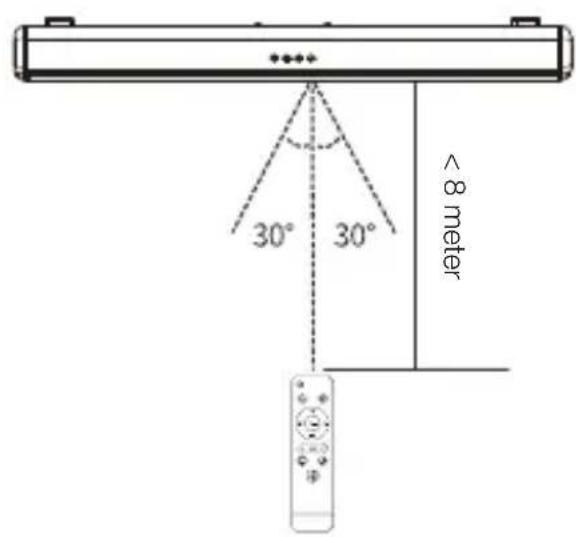
text_image
30° 30° < 8 meternatural_image
Technical line drawing of a cylindrical electronic device with a close-up inset showing internal components (no text or symbols)| ARC | HDMI(ARC)-modus Bluetooth-modus | |
| USB | USB-mediamodus Aux-ingangsmodus | |
| OPT | Optische modus | |
PLAATSING
A. Tafelplaatsing
natural_image
Line drawing of a flat-screen TV set with three panels and a monitor on top (no text or symbols)Plaatsing
Tafelplaatsing
natural_image
Diagram of a brick wall and a cylindrical object with mounting holes, no text or symbols present5 UW SOUNDBAR GEBRUIKEN
text_image
DC IN OPTICAL ARC USB AUX VOEDING 1 2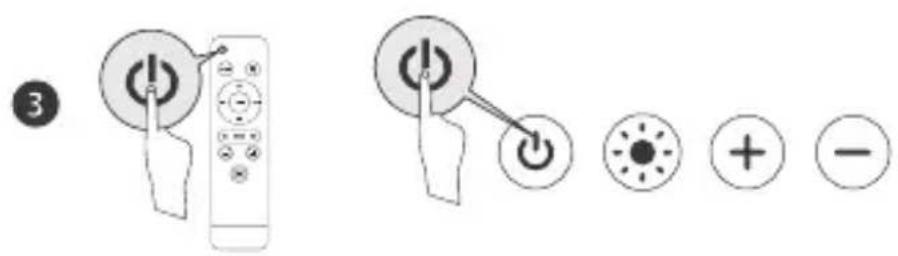
text_image
Diagram showing remote control buttons and function icons with labels like 'OK', 'Cancel', and directional indicatorsB. Verbinden met TV
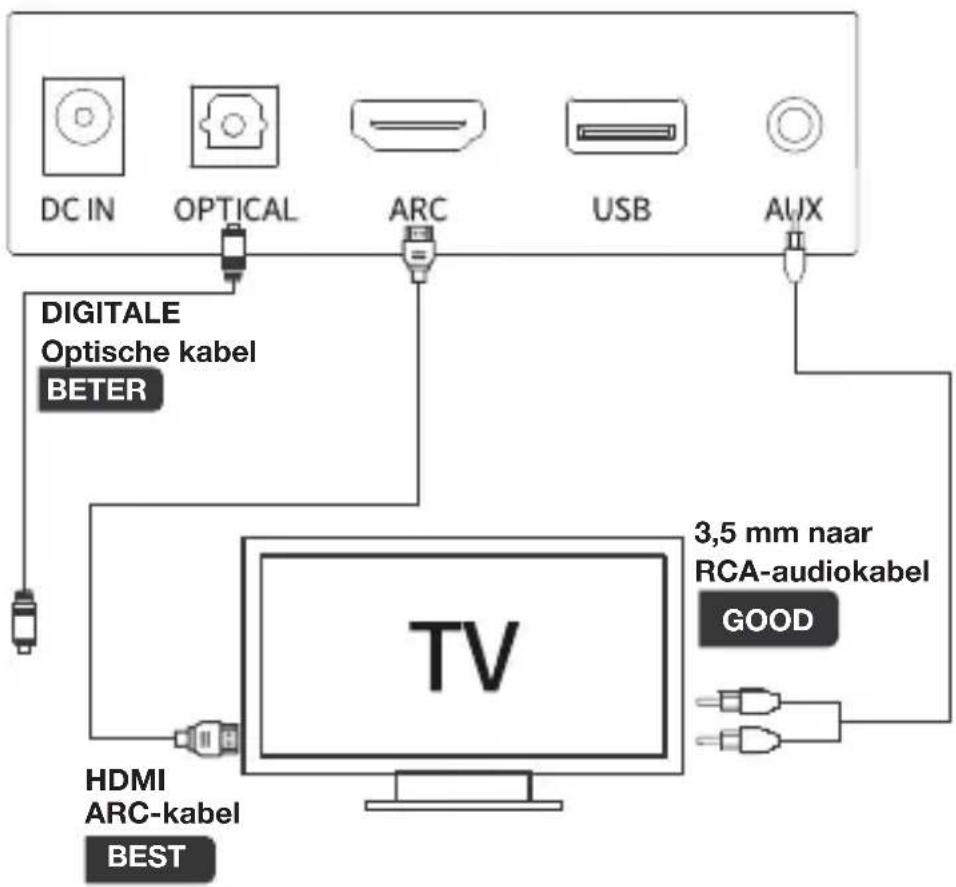
text_image
DC IN OPTICAL ARC USB AUX DIGITALE Optische kabel BETER TV 3,5 mm naar RCA-audiokabel GOOD HDMI ARC-kabel BESTnatural_image
Symbol of a trash bin with crossed lines indicating no waste or discharge (no text or labels)natural_image
Technical line drawing of a rectangular electronic device with two circular ports and labeled points A (no text or symbols on the device itself)text_image
Diagram showing three-step assembly steps of a remote control device, labeled ①, ②, and ③.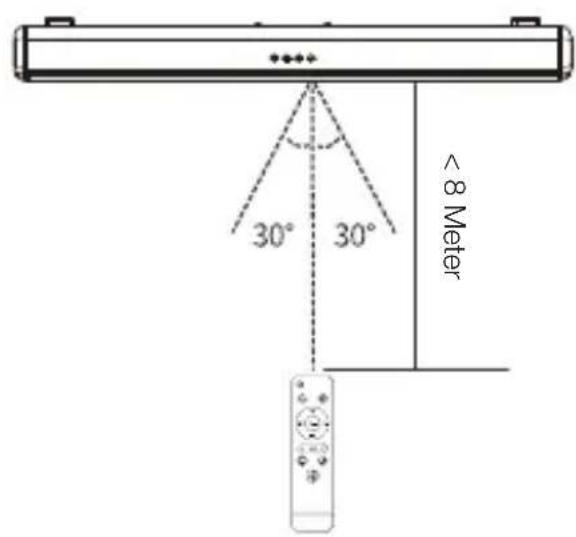
text_image
30° 30° < 8 Meternatural_image
Technical line drawing of a cylindrical electronic device with a close-up inset showing internal components (no text or symbols)natural_image
Line drawing of a flat-screen TV set with three panels and a monitor on top (no text or symbols)Aufstellen
text_image
Diagram illustrating a nail penetration technique with magnified view of the test tube and nail anchor.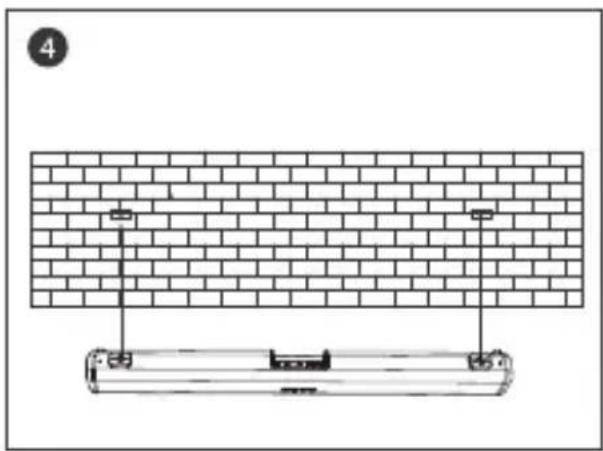
natural_image
Diagram of a brick wall and a cylindrical object with mounting holes, no text or symbols present5 VERWENDUNG IHRER SOUNDBAR
A. Stromanschluss
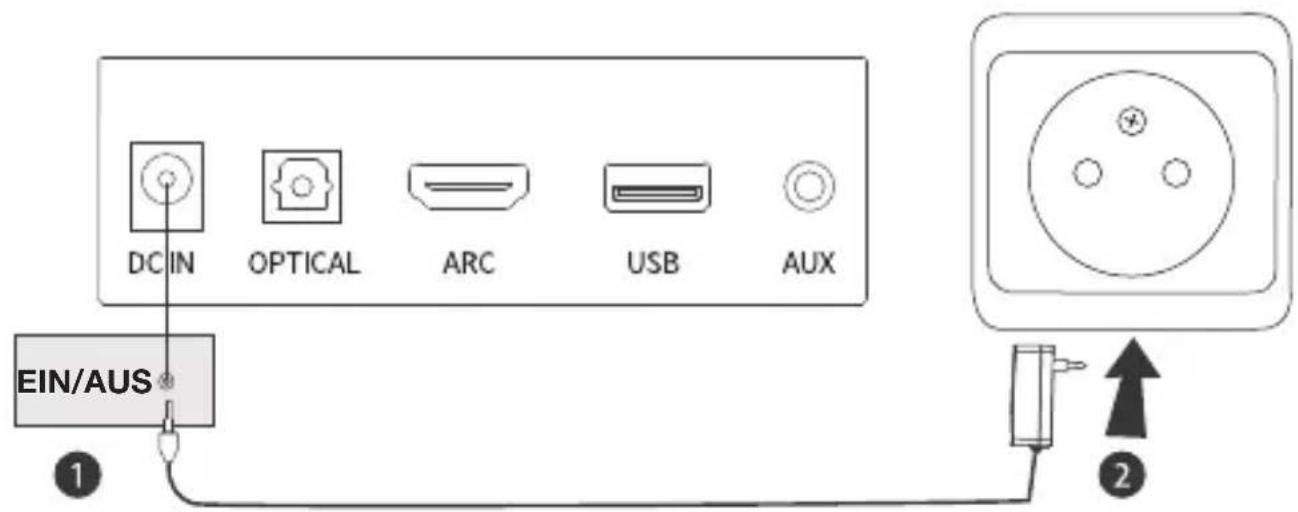
text_image
DC IN OPTICAL ARC USB AUX EIN/AUS 1 2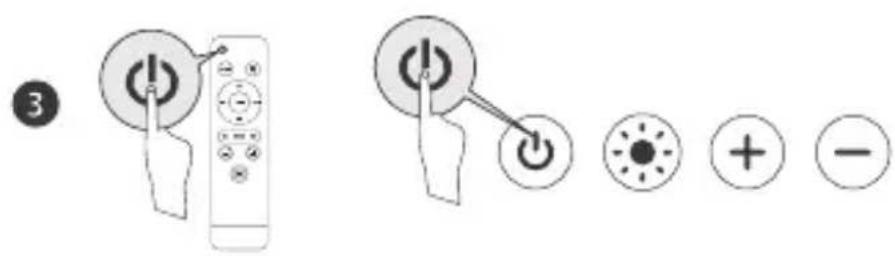
text_image
Diagram showing remote control buttons and function icons with labels like 'OK', 'Cancel', and radio buttonsflowchart
graph LR
    A["1: Remote Control"] --> B["2: Remote Control with BT"]
    B --> C["3: Bluetooth ON"]
    C --> D["Lenco SB-042LED"]
natural_image
Symbol of a trash bin with crossed lines indicating no waste or discharge (no text or labels)natural_image
Technical line drawing of a rectangular electronic device with two circular ports and labeled points A (no text or symbols on the device itself)2.3 Vue de dessus
text_image
Four labeled icons: power button, light bulb, plus sign, and minus sign, arranged vertically with numbered labels.text_image
DCIN OPTICAL ARC USB AUXtext_image
Diagram illustrating three-step assembly steps of a battery or cable device, labeled ①, ②, and ③.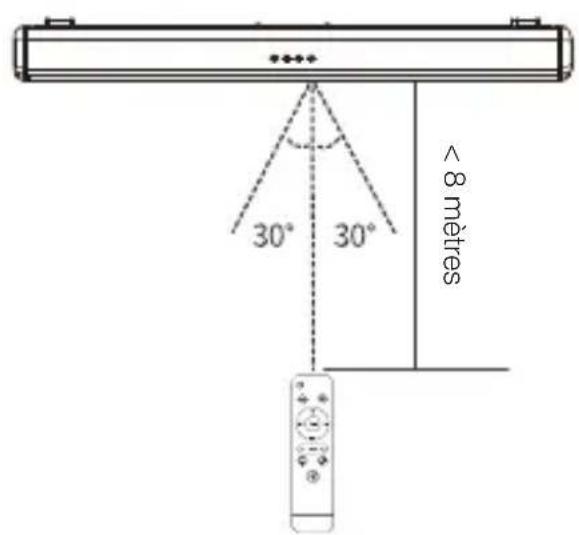
text_image
30° 30° < 8 mètresnatural_image
Technical line drawing of a cylindrical electronic component with a magnified inset showing internal components (no text or symbols)natural_image
Line drawing of a flat-screen TV set with three panels and a monitor on top (no text or symbols)Placement
text_image
Diagram illustrating a nail penetration technique with magnified view of the test tube and nail anchor.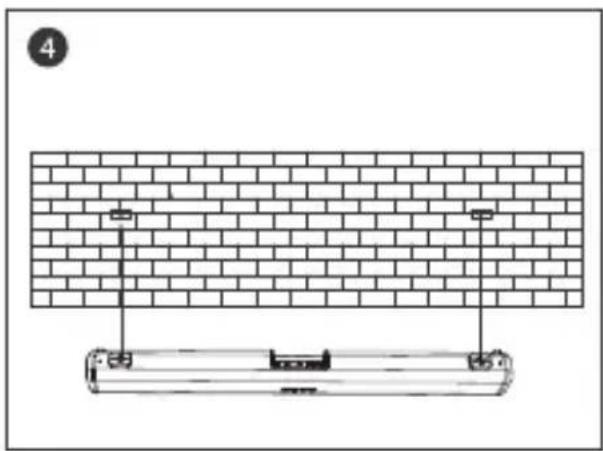
natural_image
Diagram of a brick wall and a cylindrical object with mounting holes, no text or symbols present5 UTILISATION DE VOTRE BARRE DE SON
text_image
Diagram showing remote control buttons and function icons with labels like 'OK', 'Cancel', and directional indicatorsflowchart
graph LR
    A["1: Remote Control"] --> B["2: Remote Control with BT icon"]
    B --> C["3: Bluetooth ON Interface"]
    C --> D["Lenco SB-042LED Interface"]
natural_image
Simple line drawing of a trash bin with crossed x and y axes, no text or symbols presentnatural_image
Technical line drawing of a rectangular electronic device with two circular ports and labeled points A (no text or symbols on the device itself)2.3 Vista superior
text_image
Diagram showing four labeled icons: power, current, plus, and minus symbols with corresponding circular icons.text_image
DCIN OPTICAL ARC USB AUXtext_image
Diagram showing three-step assembly steps of a remote control device, labeled ① to ③ with directional arrows indicating movement.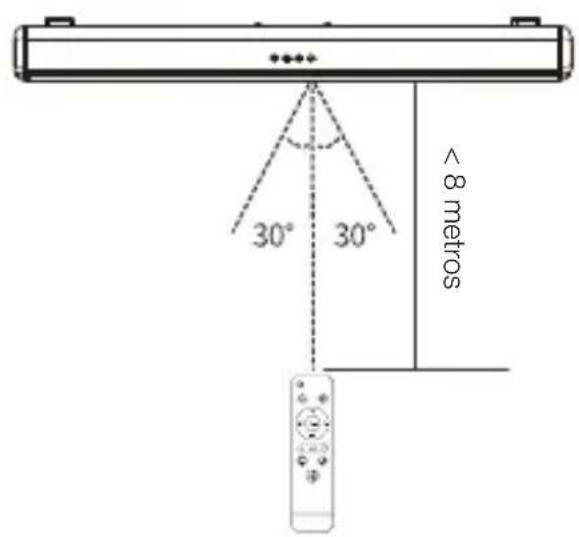
text_image
30° 30° < 8 metrosnatural_image
Technical line drawing of a cylindrical electronic component with a close-up inset showing internal components (no text or symbols)natural_image
Line drawing of a flat-screen TV set with three panels and a monitor on top (no text or symbols)Colocación
natural_image
Diagram of a brick wall and a cylindrical object with mounting holes, no text or symbols present5 USO DE LA BARRA DE SONIDO
text_image
Diagram showing remote control buttons and function icons with labels like 'OK', 'Cancel', and radio buttonsB. Conexión a la TV