TFN214473.11 - Air purifier Emerio - Free user manual and instructions
Find the device manual for free TFN214473.11 Emerio in PDF.



| Product type | 2-in-1 air purifier and tower fan |
| Brand | Emerio |
| Model | TFN214473.11 |
| Power supply | Adapter 100-240 V~ 50/60 Hz, 1.5 A max, output 24 V DC, 1.5 A, 36 W; fan 24 V DC, 35 W, 1.5 A |
| Max. emitted power (Wi-Fi) | 20 dBm |
| Wi-Fi frequency bands | 2400 – 2483.5 MHz |
| Max. airflow | 10.47 m³/min |
| Power consumption (service) | 28.3 W |
| Service value | 0.37 (m³/min)/W |
| Standby power consumption | 0.6 W |
| Sound power level | 56.0 dB(A) |
| Max. air speed | 3.8 m/s |
| Main functions | Negative ionization, UV-C sterilization, oscillation, 9 fan speeds, timer 1 to 8 h, remote control, Wi-Fi connectivity (Smart Life app) |
| Filter type | Replaceable air purifier filter |
| Filter replacement indicator | After 720 hours of operation |
| Safety | Do not immerse; do not look at UV-C lamp; use by children aged 8 and above under supervision; UV sterilization automatic shut-off after 1 hour |
| Maintenance | Clean with a damp cloth; brush air inlet and outlet grilles; replace filter periodically |
| Spare parts | Replacement filter, remote control (CR2025 battery not included), power adapter |
| Warranty | 2 years |
| Manufacturer | Emerio Switzerland AG, Oberneuhofstrasse 1, 6340 Baar, Switzerland |
| Included accessories | Remote control, adapter |
| Wi-Fi compatibility | 2.4 GHz network only (5 GHz not supported) |
| Recommended use | On a flat surface, indoors, away from curtains and heat sources |
Frequently Asked Questions - TFN214473.11 Emerio
User questions about TFN214473.11 Emerio
0 question about this device. Answer the ones you know or ask your own.
Ask a new question about this device
Download the instructions for your Air purifier in PDF format for free! Find your manual TFN214473.11 - Emerio and take your electronic device back in hand. On this page are published all the documents necessary for the use of your device. TFN214473.11 by Emerio.
USER MANUAL TFN214473.11 Emerio
2-in-1 Air purifier and tower fan (EN)
Instruction manual – English ...... - 2 -
Before use make sure to read all of the below instructions in order to avoid injury or damage, and to get the best results from the appliance. Make sure to keep this manual in a safe place. If you give or transfer this appliance to someone else make sure to also include this manual.
In case of damage caused by user failing to follow the instructions in this manual the warranty will be void. The manufacturer/importer accepts no liability for damages caused by failure to follow the manual, a negligent use or use not in accordance with the requirements of this manual.
- This appliance can be used by children aged from 8 years and above and persons with reduced physical, sensory or mental capabilities or lack of experience and knowledge if they have been given supervision or instruction concerning use of the appliance in a safe way and understand the hazards involved.
- Children shall not play with the appliance.
- Cleaning and user maintenance shall not be made by children without supervision.
- The appliance is only to be used with the power supply unit provided with the appliance.
- Before inserting the plug into the mains socket, please check that the voltage and frequency comply with the specifications on the rating label.
- Please use a separate outlet according to the current / voltage of the fan. Do not use a multi-purpose socket for simultaneous use with other electrical devices.
- Disconnect the mains plug from the socket when the appliance is not in use and before cleaning.
- Ensure that the mains cable is not hung over sharp edges and keep it away from hot objects and open flames.
- Do not immerse the appliance or the mains plug in water or other liquids. There is danger to life due to electric shock!
-
To remove the plug from the plug socket, pull the plug. Do not pull the power cord.
-
Do not plug or unplug the appliance from the electrical outlet with a wet hand.
- Never attempt to open the housing of the appliance, or to repair the appliance yourself. This could cause electric shock.
- Never leave the appliance unattended during use.
- This appliance is not designed for commercial use.
- Do not use the appliance for other than intended use.
- Do not wind the cord around the appliance and do not bend it.
- Do not place any objects on the air inlet or outlet. Make sure that the ventilation openings are free of dust, lint, hair and other obstacles that could impair the air flow.
- The fan should be set up dry on a horizontal platform and should not be near heat sources, corrosive air and moisture. The fan should be kept a distance of 150 mm around to ensure good air circulation.
- Do not use the fan outdoors or on a wet surface.
- Do not immerse the fan, power cord, or plug in water or other liquids to avoid danger. The use of an extension cord is not recommended unless it has been tested by a qualified person.
- Please do not use an air cleaner or similar product right next to the fan.
- Do not use any cleaning agents or lubricants for this fan and pull out the power plug before cleaning, transporting and servicing the device.
- WARNING — This appliance contains a UV-C emitter. Do not stare at the light source.
- Unintended use of the appliance or damage to the housing may result in the escape of dangerous UV-C radiation. UV-C radiation may, even in little doses, cause harm to the eyes and skin.
- WARNING: the UV-C emitter installed inside product is not allowed to replacement by the user. If the UV-C emitter is damaged, it must be replaced by the manufacturer, its service agent or similarly qualified persons in order to avoid a hazard.
PARTS DESCRIPTION

- Air outlet
- Air duct
- Top cover of the air purifier filter
- Air inlet
- Touch screen button / digital display
- Base
- Air duct
- Top cover of the air purifier filter
- Air inlet
- Main body
- Power connection
- Adapter
Digital display
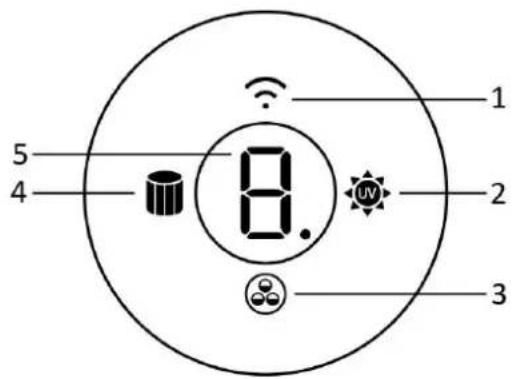
- Wi-Fi connection
- UV indicator
- Negative ions function
- Filter indicator
- Speed / timer display
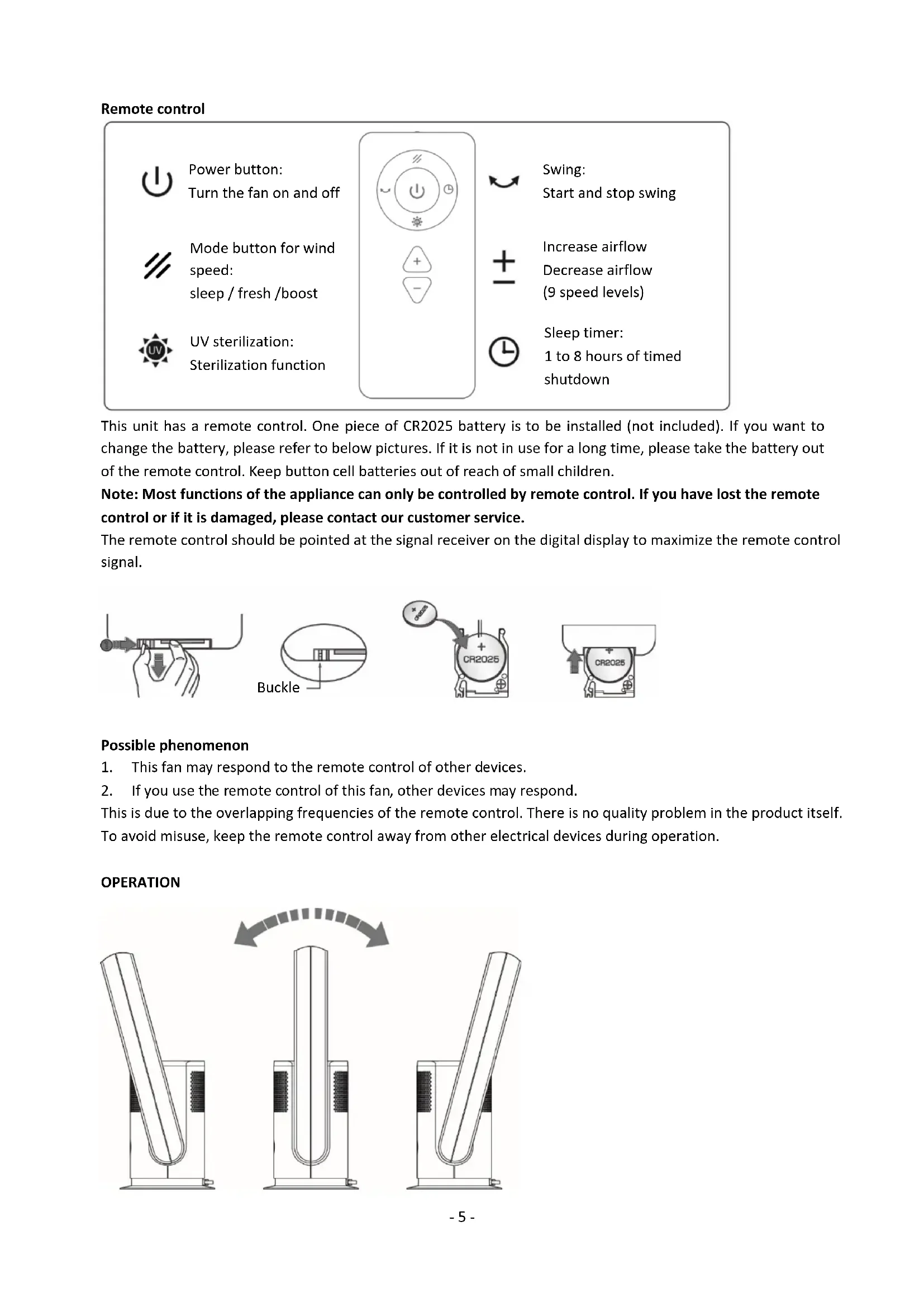
Remote control

Power button: Turn the fan on and off

Mode button for wind speed: sleep / fresh / boost

UV sterilization: Sterilization function


Swing: Start and stop swing

Increase airflow Decrease airflow (9 speed levels)

Sleep timer: 1 to 8 hours of timed shutdown
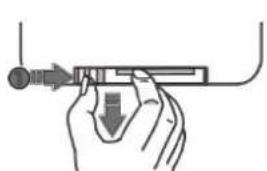
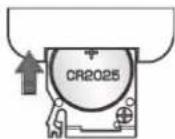
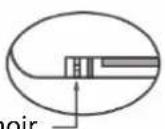
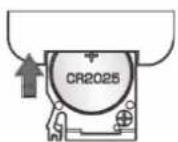
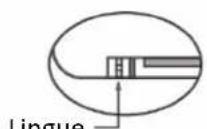
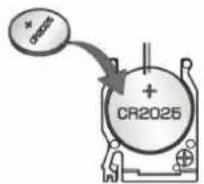
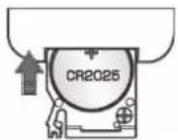
This unit has a remote control. One piece of CR2025 battery is to be installed (not included). If you want to change the battery, please refer to below pictures. If it is not in use for a long time, please take the battery out of the remote control. Keep button cell batteries out of reach of small children.
Note: Most functions of the appliance can only be controlled by remote control. If you have lost the remote control or if it is damaged, please contact our customer service.
The remote control should be pointed at the signal receiver on the digital display to maximize the remote control signal.


Possible phenomenon
- This fan may respond to the remote control of other devices.
- If you use the remote control of this fan, other devices may respond.
This is due to the overlapping frequencies of the remote control. There is no quality problem in the product itself. To avoid misuse, keep the remote control away from other electrical devices during operation.
OPERATION

- Before use, hold the fan body with one hand and the other hand to set the wind outlet 15° before and after.
- Connect the adapter into the power connection of the fan first and then insert the adapter into a suitable power outlet. The digital display lights up and the fan goes into standby mode.
- To switch on and off:
Press the touch screen button (the digital display) the buzzer will beep once and the fan will start. Press and hold the touch screen button for 2 seconds the buzzer will beep twice and the fan will stop running after you release your hand.
- To set the air volume:
When the fan is operating press the touch screen button to adjust the air volume from 1 to 9.
- To set the oscillation function:
When the fan is operating press and hold the touch screen button for 1 second. The buzzer will beep once and the fan will start oscillating. Press and hold the touch screen button for 1 second again. The buzzer will beep once and the fan will stop oscillating.
Note: This appliance is equipped with the negative ions function. Once the appliance starts working, the negative ions function is activated automatically, emitting negative ions to purify the indoor air. The indicator

ll show on the digital display.
To use the remote control:

Press the power button to turn on/off the appliance.

Press the mode button to choose your desired wind speed: sleep mode / fresh mode / boost mode: the digital display will show "L" / "-" / "H" and the wind speed will become minimum / adjust among speed 3-4-5 / become maximum. You can exit the mode by pressing the button "+/-".

Press the UV sterilization button to turn on the UV sterilization function. The UV indicator will be on. The UV lamp inside the appliance will effectively kill bacteria/virus in the air. Press the button again to turn the function off. This function will automatically shut down after 1 hour.

Press the oscillation button to turn on the oscillation function. Press this button again to stop oscillating.

Press the "+" button to increase the air volume. Press the "-" button to decrease the air volume. There are 9-speed settings.

Press the timer button to set the working time from 1 to 8 hours. A small “·” will flash on the digital display to indicate the timer is under setting/operation.
Note:
- The digital display will extinguish in approx. 20 seconds with no operations. If you want to do further operations, firstly press any button (except for the power button) on the remote control or press the touch screen button on the fan body to turn on the digital display and then press your desired buttons to choose your desired functions.
- After the timer is set, the digital display will turn back to show the speed level and extinguish later. If you want to check the remaining time, turn on the digital display first and then press the timer button once on the remote control, the remaining time (by hour) will be shown on the digital display.
LOCATION
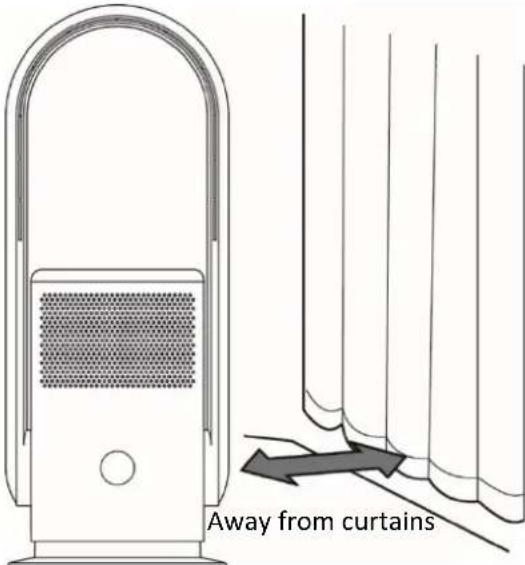
■ Please use the fan on a flat platform. Do not place the fan in an unstable place, such as an inclined or soft surface, to avoid damage or malfunctions caused by the fan tipping over.
■ Avoid blocking the air inlet when using. Stay away from the curtains to avoid objects blocking the air inlet and the fan not working.
■ Do not place any objects within 30 cm of the air outlet, otherwise the blower effect will be impaired.
FILTER REPLACEMENT
This appliance is equipped with an air cleaning filter. Before using the appliance, the filter should be installed in it so that the air can be cleaned. Installation and replacement method of the air cleaning filter are as follows.

Turn the top cover of the filter counter clockwise to unlock and remove the filter.
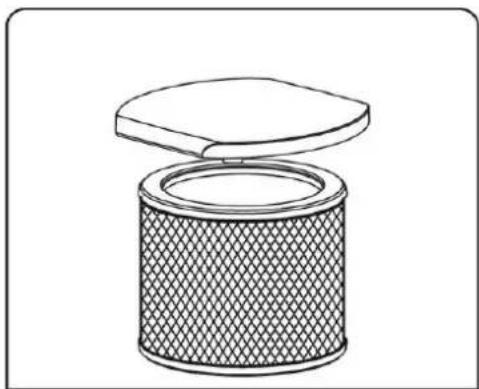
Disconnect the old filter from the top cover. Pull it out directly.

Attach the new filter to the top cover. Make sure they are connected firmly.
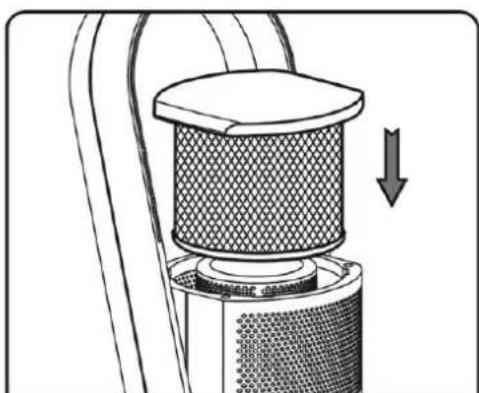
After assembling, put it back into the main body and turn it clockwise to secure it.
The fan has a memory function. After a total of 720 hours of operation, the filter indicator will be on. After replacing the filter, long press the power button on the remote control for 5 seconds. When a beep sound is heard, the indicator will be off and the operating time is converted again.
Wi-Fi CONNECTION GUIDE (The guide for the APP may not be updated regularly due to software version upgrade or other reasons. This instruction is used as a guide only. Below mobile phone interface uses English version in iOS as an example.):
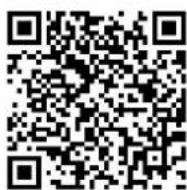
- Search "Smart Life – Smart Living" in App Store (for iOS) or Google play (for Android), or directly scan the QR code below, to download the application "Smart Life".
-
Sign up or log in to your account on the APP. Tap the "+" at right top or button "Add Device" to add your device.
-
Find "Small Home Appliances" and tap the icon "FAN (Wi-Fi)".
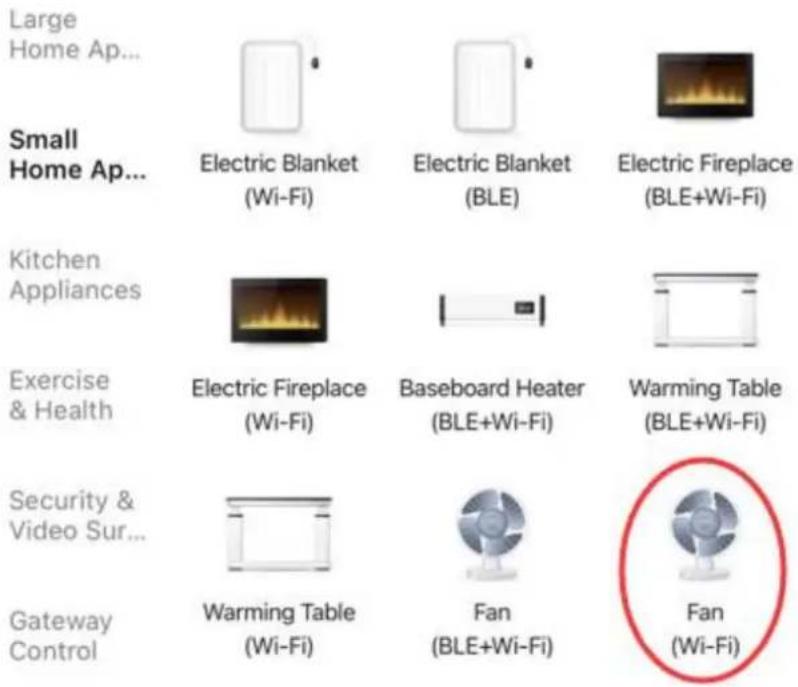
You will get the prompt that asks you to use the 2.4 GHz Wi-Fi network. Note that the 5 GHz Wi-Fi is not supported by this application. Enter your Wi-Fi password and connect to the Wi-Fi. You will get Fig.1.
There are two ways to do the net pairing. Press and hold the power button for 5 seconds, the digital display will show "F" blinking quickly (way 1). Continue to press and hold the power button for another 5 seconds, the digital display will show "F" blinking slowly (way 2). Continue to press and hold the power button for the last 5 seconds, the digital display turns to show "0" and the pairing is cancelled.
It is recommended to use way 1; if failed please use way 2.
Way 1:
1) Press and hold the power button for 5 seconds until the digital display shows "F" and "F" flashes quickly.
2) Tap "Next" on Fig.1. You will get Fig.2 that asks you to check the status of the indicator light. Tap "Blink Quickly".
3) Wait until you get Fig.4 and then tap "Done" at the top right corner.
4) Now you can operate your device in the control interface. Tap buttons to set your appliance.
Way 2:
1) Press and hold the power button for 5 seconds until the digital display shows "F" and "F" flashes quickly. Continue to press and hold the power button for another 5 seconds until the "F" flashes slowly.
2) Tap "Next" in Fig.1. You will get Fig.2 that asks you to check the status of the indicator light. Tap "Blink Slowly". Continue to tap "Go to Connect" in Fig.3 to connect your mobile phone to the device's hotspot "SmartLife-XXXX". After the hotspot has been connected, go back to the App.
3) Wait until you get Fig.4 and then tap "Done" at the top right corner.
4) Now you can operate your device in the control interface. Tap buttons to set your appliance.
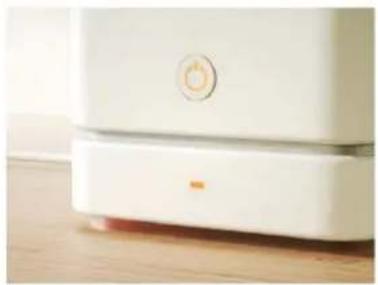
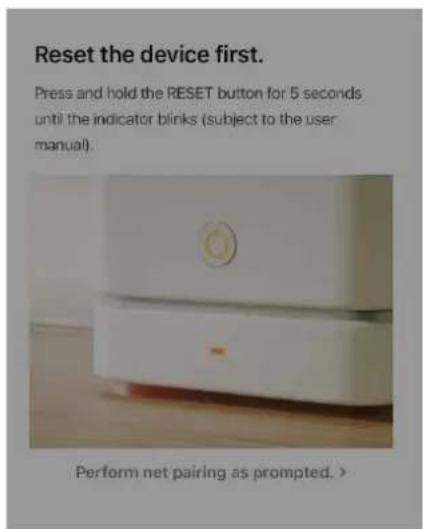
Reset the device first.
Press and hold the RESET button for 5 seconds until the indicator blinks (subject to the user manual).
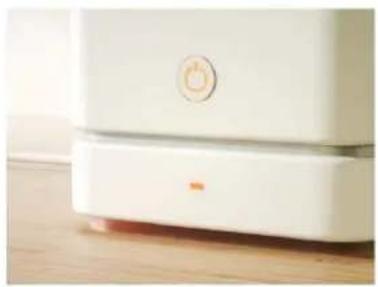
Perform net pairing as prompted.

Cancel
Connect your mobile phone to the device's hotspot
- Connect the phone to the hotspot shown below.
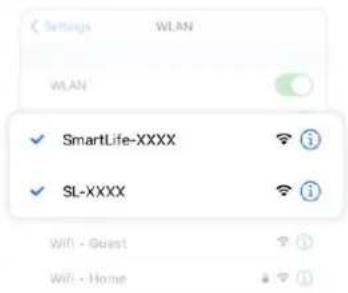
- Go back to the app and continue to add devices.
Local Network AccessDevice might not be able to be connected if the access if not enabled.

Fig. 1
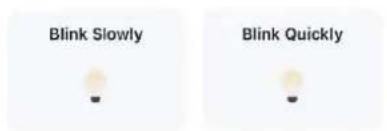
Fig.2

Fig.3
Done
Added.

Air Purifier Bladeless Fan
Device added successfully
Fig.4
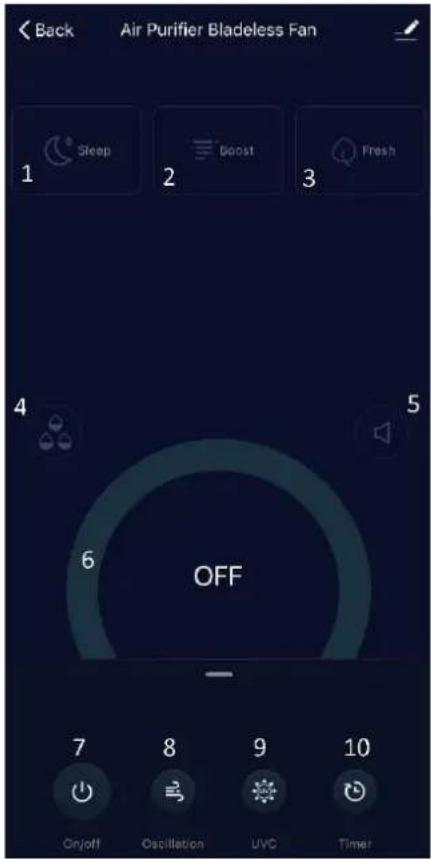
Control interface

- Sleep mode
- Boost mode
- Fresh mode
- Negative ions function
- Mute button
- Wind speed level
- On/off button
- Oscillation button
- UV sterilization button
- Timer button
CLEANING AND MAINTENANCE
- Before servicing the fan and after each occasion of use, switch off the appliance and unplug the mains cable from the socket.
- Never immerse the appliance in water (danger of short-circuit). To clean the appliance, only wipe it down with a damp cloth and dry it carefully. Always take out the mains plug first.
- Take care that excessive dust does not build up in the air-intake and air-outlet grille, and clean it occasionally using a dry brush or vacuum cleaner.
TECHNICAL DATA
Adapter input: 100-240V\~ 50/60Hz, 1.5A Max
Adapter output: 24.0V DC, 1.5A, 36.0W
Fan: 24V DC, 35W, 1.5A
Max. transmitting power: 20 dBm
Frequency range: 2400 - 2483.5 MHz
GUARANTEE AND CUSTOMER SERVICE
Before delivery our devices are subjected to rigorous quality control. If, despite all care, damage has occurred during production or transportation, please return the device to your dealer. In addition to statutory legal rights, the purchaser has an option to claim under the terms of the following guarantee:
For the purchased device we provide 2 years guarantee, commencing from the day of sale. If you have a defective product, you can directly go back to the point of purchase.
Defects which arise due to improper handling of the device and malfunctions due to interventions and repairs by third parties or the fitting of non-original parts are not covered by this guarantee. Always keep your receipt, without the receipt you can't claim any form of warranty. Damage caused by not following the instruction manual, will lead to a void of warranty, if this results in consequential damages then we will not be liable. Neither can we hold responsible for material damage or personal injury caused by improper use if the instruction manual is not properly executed. Damage to accessories does not mean free replacement of the whole appliance. In such case please contact our service department. Broken glass or breakage of plastic parts is always subject to a charge. Defects to consumables or parts subjected to wearing, as well as cleaning, maintenance, replacement of said parts or shipping and transportation costs to and from any place of repair are not covered by the warranty and are to be paid.
ENVIRONMENT FRIENDLY DISPOSAL

Recycling – European Directive 2012/19/EU
This marking indicates that this product should not be disposed with other household wastes. To prevent possible harm to the environment or human health from uncontrolled waste disposal, recycle it responsibly to promote the sustainable reuse of material resources. To return your used device,
please use the return and collection systems or contact the retailer where the product was purchased. They can take this product for environmentally safe recycling.


BATTERY MUST BE RECYCLED OR DISPOSED OF PROPERLY. DO NOT OPEN. DO NOT DISPOSE
OR IN FIRE OR SHORT CIRCUIT.
Emerio Switzerland AG
Oberneuhofstrasse 1
6340 Baar
Switzerland
ERP information (EN)
Supplier: Emerio Switzerland AG
Oberneuhofstrasse 1
6340 Baar
Switzerland
Declare that the product detailed below:
Information requirements
| Information to identify the TFN-214473.11 to which the information relates to [2-in-1 Air purifier and tower fan] | |||
| Description | Symbol | Value | Unit |
| Maximum fan flow rate | F | 10,47 | m3/min |
| Fan power input | P | 28,3 | W |
| Service value | SV | 0,37 | (m3/min)/W |
| Standby power consumption | PSB | 0,6 | W |
| Fan sound power level | LWA | 56,0 | dB(A) |
| Maximum air velocity | c | 3,8 | meters/sec |
| Measurement standard for service value | IEC 60879:2019 – Comfort fans and regulators for household and similar purposes – Methods for measuring performance | ||
| Contact details for obtaining more information | Emerio Switzerland AGOberneuhofstrasse 16340 BaarSwitzerland | ||
Satisfies the requirement of the Council Directives:
COMMISSION REGULATION (EU) No 206/2012 of 6 March 2012 and Amending COMMISSION REGULATION (EU) 2016/2282 implementing Directive 2009/125/EC of the European Parliament and of the Council with regard to ecodesign requirements for air conditioners and comfort fans
Regarding information for consumers on how to install, use and maintain the product, WEEE information, please check the instruction manual provided with packaging.
SICHERHEITSHINWEISE
Reset the device first.
Press and hold the RESET button for 5 seconds until the indicator blinks (subject to the user manual).
Perform net pairing as prompted. >
Cancel
Connect your mobile phone to the device's hotspot
- Connect the phone to the hotspot shown below.

- Go back to the app and continue to add devices.
Local Network Access Device might not be able to be connected if the access if not enabled.

Abb. 1
Check the status of the indicator light:

Abb. 3

Added.

Air Purifier Bladeless Fan
Device added successfully
Abb. 4
Steuerschnittstelle
Emerio Switzerland AG
Oberneuhofstrasse 1
6340 Baar
Switzerland
Lieferant: Emerio Switzerland AG
Oberneuhofstrasse 1
6340 Baar
Switzerland

Oscillation :
Fermoir

Phénomène possible
Device added successfully
Emerio Switzerland AG
Oberneuhofstrasse 1
6340 Baar
Switzerland
Informations ERP (FR)

Lingue
Reset the device first.
Press and hold the RESET button for 5 seconds until the indicator blinks (subject to the user manual).

Perform net pairing as prompted. >

Cancel
Connect your mobile phone to the device's hotspot
- Connect the phone to the hotspot shown below.

- Go back to the app and continue to add devices.
Local Network Access Device might not be able to be connected if the access if not enabled.

Fig. 1
Fig. 2
Fig. 3
Check the status of the indicator light:


Added.

Air Purifier Bladeless Fan
Device added successfully
Uscita adattatore: 24,0 V CC, 1,5 A, 36,0 W
Emerio Switzerland AG
Oberneuhofstrasse 1
6340 Baar
Switzerland
- REMOTE CONTROL
- POSSIBLE PHENOMENON
- OPERATION
- TO USE THE REMOTE CONTROL
- NOTE
- FILTER REPLACEMENT
- WAY 1
- WAY 2
- CONNECT YOUR MOBILE PHONE TO THE DEVICE'S HOTSPOT
- ADDED
- CLEANING AND MAINTENANCE
- TECHNICAL DATA
- GUARANTEE AND CUSTOMER SERVICE
- ENVIRONMENT FRIENDLY DISPOSAL
- OR IN FIRE OR SHORT CIRCUIT
- ERP INFORMATION (EN)
- SICHERHEITSHINWEISE
- RESET THE DEVICE FIRST
- CHECK THE STATUS OF THE INDICATOR LIGHT
- STEUERSCHNITTSTELLE
- PHÉNOMÈNE POSSIBLE
- INFORMATIONS ERP (FR)
Brand : Emerio
Model : TFN214473.11
Category : Air purifier