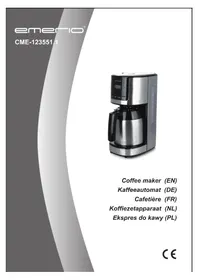
CME123551.1 - Coffee machine Emerio - Free user manual and instructions
Find the device manual for free CME123551.1 Emerio in PDF.



| Product type | Drip coffee maker |
| Brand | Emerio |
| Model | CME123551.1 |
| Water tank capacity | 1.5 L (approx. 12 cups) |
| Power | 900 W |
| Power supply | 220-240 V ~ 50-60 Hz |
| Delay brew function | Yes, programmable up to 24 hours in advance |
| Auto shut-off | Yes, after brewing is complete |
| Anti-drip system | Yes, allows removing the carafe temporarily without drips |
| Carafe | Thermal carafe with safety lid |
| Filter | Reusable mesh filter included |
| Display | LCD with clock and programming |
| Materials | Plastic and stainless steel (carafe) |
| Maintenance | Clean surfaces with a damp cloth; descaling recommended every 3-4 months |
| Warranty | 2 years |
| Country of origin | China (general indication) |
Frequently Asked Questions - CME123551.1 Emerio
User questions about CME123551.1 Emerio
0 question about this device. Answer the ones you know or ask your own.
Ask a new question about this device
Download the instructions for your Coffee machine in PDF format for free! Find your manual CME123551.1 - Emerio and take your electronic device back in hand. On this page are published all the documents necessary for the use of your device. CME123551.1 by Emerio.
USER MANUAL CME123551.1 Emerio
Coffee maker (EN)
Kaffeeautomat (DE)
Cafetière (FR)
Before use make sure to read all of the below instructions in order to avoid injury or damage, and to get the best results from the appliance. Make sure to keep this manual in a safe place. If you give or transfer this appliance to someone else make sure to also include this manual.
In case of damage caused by user failing to follow the instructions in this manual the warranty will be void. The manufacturer/importer accepts no liability for damages caused by failure to follow the manual, a negligent use or use not in accordance with the requirements of this manual.
- This appliance can be used by children aged from 8 years and above if they have been given supervision or instruction concerning use of the appliance in a safe way and if they understand the hazards involved.
- Cleaning and user maintenance shall not be made by children unless they are older than 8 and supervised.
- Keep the appliance and its cord out of reach of children aged less than 8 years.
- Appliances can be used by persons with reduced physical, sensory or mental capabilities or lack of experience and knowledge if they have been given supervision or instruction concerning use of the appliance in a safe way and understand the hazards involved.
- Children shall not play with the appliance.
- If the supply cord is damaged, it must be replaced by the manufacturer, its service agent or similarly qualified persons in order to avoid a hazard.
- This appliance is intended to be used in household and similar applications such as: staff kitchen areas in shops, offices and other working environments; farm houses;
by clients in hotels, motels and other residential type environment; bed and breakfast type environments.
-
Regarding the instructions for cleaning the surfaces which come in contact with food, please refer to the paragraph “CLEANING AND MAINTENANCE” of the manual.
-
Warning: Avoid spillage on the connector.
-
There is a potential risk of injuries from misuse.
-
The heating element surface is subject to residual heat after use.
-
Before inserting the plug into the mains socket, please check that the voltage and frequency comply with the specifications on the rating label.
-
Always plug the appliance into an earthed plug socket.
-
If an extension cord is used it must be suited to the power consumption of the appliance, otherwise overheating of the extension cord and/or plug may occur. There is a potential risk of injuries from tripping over the extension cord. Be careful to avoid dangerous situations.
-
Disconnect the mains plug from the socket when the appliance is not in use and before cleaning.
-
Ensure that the mains cable is not hung over sharp edges and keep it away from hot objects and open flames.
-
Do not immerse the appliance or the mains plug in water or other liquids. There is danger to life due to electric shock!
-
To remove the plug from the plug socket, pull the plug. Do not pull the power cord.
-
Do not touch the appliance if it falls into water. Remove the plug from its socket, turn off the appliance and send it to an authorized service center for repair.
-
Do not plug or unplug the appliance from the electrical outlet with a wet hand.
-
Never attempt to open the housing of the appliance, or
to repair the appliance yourself. This could cause electric shock.
-
Never leave the appliance unattended during use.
-
This appliance is not designed for commercial use.
-
Do not use the appliance for other than intended use.
-
Do not wind the cord around the appliance and do not bend it.
-
Fill the reservoir with water only – not with any other liquids.
-
If you want to make coffee several times consecutively, always switch off the device for about 3 minutes before operating again.
-
Use the appliance on a flat, dry and heat resistance surface.
PARTS DESCRIPTION
- Lid of reservoir
- Tray
- Control Panel (see below)
- Reservoir with water level indication
- Thermos jug
- Brewing chamber
- Filter basket
- Reusable mesh filter
- Lid of thermos jug
- Anti-drip function
- Release lever of thermos jug
CONTROL PANEL
A. ON/OFF button
B. Program setting button
C. Minute setting button
D. Hour setting button
E. LCD display
F. Delayed-brew indicator light
G. Working indicator light


OPERATION
Before first-time use:
- Before using this device for the first time please carefully rinse all detachable components with warm water.
- Fill the reservoir with cold water to the maximum water level indication.
• Afterwards brew water twice without coffee powder.
Use of the thermos jug
- To open the lid of the thermos jug, put fingers at the rim of the lid (hollowed parts) and rotate the lid anticlockwise to make the triangle logo “ ▼ ” pointing at the logo “ ☐ ”. To close the lid, just place back
the lid and rotate it clockwise until the triangle logo “ ▼ ” pointing at the logo “ 🔊 ”.
- The lid of the thermos jug has a safety feature that only when the release lever is pressed down, the coffee can be poured out from the jug.
• The thermos jug can keep the coffee warm during a period of time.
To percolate coffee:
- Fill the reservoir with cold water.
- Open the lid of the reservoir and fill it to the desired water level indication. The maximum capacity is 1.5L (approximate 12 cups).
-
Place the reusable mesh filter into the filter basket and place the filter basket into the brewing chamber. Use the measuring spoon to add the amount of coffee powder appropriate to the amount of cups you want to brew. Close the lid of the reservoir.
-
Now place the thermos jug on the tray of the appliance.
- Plug the power cord into an appropriate outlet. The LCD will display the default time "AM 12:00" and the colon in the middle will flash. You can press hour setting button and minute setting button to set the current time. Each press changes one hour/minute. The time cycle is 12 hours.
- Start brewing coffee by pressing the ON/OFF button once. The working indicator light will illuminate then. The lid of the thermos jug needs to be closed in order to unlock the drip stop function.
- When brewing finished, 3 buzzer sounds are sent out and the unit will be automatically shut off. You can manually press the ON/OFF button again to switch on the appliance.
Note: The appliance is designed with an Anti-drip function. You can temporarily remove the thermos jug and pour out coffee during brewing cycle without coffee dripping from the appliance within 30 seconds.
DELAYED BREW FUNCTION
If you do not want the coffee maker to start operation immediately, for example now it is 8:10 am, you hope that the coffee maker will automatically start at 1:10 pm, first follow steps 1 to 5 of above section, and then you can set the delayed brew function as follows:
- Press the program setting button once, the default time and the delayed-brew indicator light will flash for several seconds.
- Press the hour/minute setting buttons continuously to set the delayed start time, which is 1:10 pm.
- Press the program setting button once again. The LCD switches back to the current time, and the flashing delayed-brew indicator light turns off.
- Long press the program setting button for about 4 seconds to initiate the delayed brew. The delayed-brew indicator light illuminates still. The LCD will show back the current time.
Note:
- After the delayed brew is set, you may cancel the delayed brew by pressing program setting button once, or pressing the ON/OFF button once to start brewing immediately.
- If you need to change the delayed start time midway, you have to press program setting button first to exit from the delayed brew function and then press the program setting button again to reset the time.
Descaling:
- Regularly descale the coffee maker. The intervals of descaling depend on the water hardness and frequency of operation. In case of average water hardness we suggest descaling every 3 or 4 months. Please use a commercially available decalcification agent.
- Fill 400 ml of water into the reservoir and add the necessary amount of decalcification agent in accordance with the dosing instructions.
- Let the decalcification agent sink in the coffee maker for about one hour. Switch on the unit after one hour and let the water pass through. After that you should brew water several times and rinse all detachable components, in order to clean off any residue.
CLEANING AND MAINTENANCE
- Before cleaning remove the mains plug and let the device cool down.
- Never immerse the device in water. Please use a slightly damp cloth to clean the surfaces.
- Avoid using acrid or scrubbing cleaning agents.
- Keep the coffee maker in a dry place out of reach from children when cooled off and cleaned.
- Do not wrap the cord around the device.
TECHNICAL DATA
Operating voltage: 220-240V \~ 50-60Hz
Power: 900W
GUARANTEE AND CUSTOMER SERVICE
Before delivery our devices are subjected to rigorous quality control. If, despite all care, damage has occurred during production or transportation, please return the device to your dealer. In addition to statutory legal rights, the purchaser has an option to claim under the terms of the following guarantee:
For the purchased device we provide 2 years guarantee, commencing from the day of sale. If you have a defective product, you can directly go back to the point of purchase.
Defects which arise due to improper handling of the device and malfunctions due to interventions and repairs by third parties or the fitting of non-original parts are not covered by this guarantee. Always keep your receipt, without the receipt you can't claim any form of warranty. Damage caused by not following the instruction manual, will lead to a void of warranty, if this results in consequential damages then we will not be liable. Neither can we hold responsible for material damage or personal injury caused by improper use if the instruction manual is not properly executed. Damage to accessories does not mean free replacement of the whole appliance. In such case please contact our service department. Broken glass or breakage of plastic parts is always subject to a charge. Defects to consumables or parts subjected to wearing, as well as cleaning, maintenance or the replacement of said parts are not covered by the warranty and are to be paid.
ENVIRONMENT FRIENDLY DISPOSAL

Recycling – European Directive 2012/19/EU
This marking indicates that this product should not be disposed with other household wastes. To prevent possible harm to the environment or human health from uncontrolled waste disposal, recycle it responsibly to promote the sustainable reuse of material resources. To return your used device, please use the return and collection systems or contact the retailer where the product was
purchased. They can take this product for environmental safe recycling.
Manufactured by: Emerio B.V.
Zomervaart 1A, 2033 DA Haarlem, The Netherlands
SICHERHEITSHINWEISE
BEDIENUNG
FONCTIONNEMENT
BEDIENING
OBSŁUGA
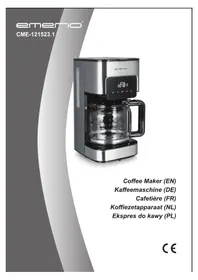
- PARTS DESCRIPTION
- CONTROL PANEL
- OPERATION
- BEFORE FIRST-TIME USE
- USE OF THE THERMOS JUG
- TO PERCOLATE COFFEE
- DELAYED BREW FUNCTION
- NOTE
- DESCALING
- CLEANING AND MAINTENANCE
- TECHNICAL DATA
- GUARANTEE AND CUSTOMER SERVICE
- ENVIRONMENT FRIENDLY DISPOSAL
- SICHERHEITSHINWEISE
- BEDIENUNG
- FONCTIONNEMENT
- BEDIENING
- OBSŁUGA
Brand : Emerio
Model : CME123551.1
Category : Coffee machine