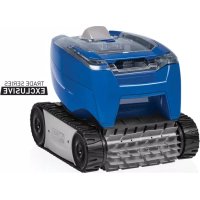
7240 - Swimming Pool POLARIS - Free user manual and instructions
Find the device manual for free 7240 POLARIS in PDF.



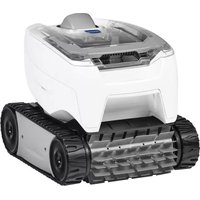
| Product type | Automatic pool cleaner robot |
| Brand | Polaris |
| Model | 7240 |
| Dimensions (L x W x H) | 37 x 29 x 30 cm |
| Weight | 7 kg |
| Power supply (control unit) | 100-240 V AC, 50-60 Hz |
| Power supply (output) | 30 V DC |
| Power consumption | 100 W max |
| Cable length (above ground) | 14 m |
| Cable length (in ground) | 16.4 m |
| Cycle time (above ground) | 2 hours |
| Cycle time (in ground) | 2.5 hours |
| Filtration type | General purpose filter basket |
| Double insulation | Yes |
| Electrical safety | GFCI outlet required, automatic shut-off out of water |
| Minimum distance from water (USA) | 1.5 m |
| Minimum distance from water (Canada) | 3 m |
| Maintenance after each use | Clean the filter basket |
| Brush replacement | Every 2 years or when wear indicator is reached |
| Spare parts available | Brushes, tracks, filter basket, floating cable |
Frequently Asked Questions - 7240 POLARIS
User questions about 7240 POLARIS
0 question about this device. Answer the ones you know or ask your own.
Ask a new question about this device
Download the instructions for your Swimming Pool in PDF format for free! Find your manual 7240 - POLARIS and take your electronic device back in hand. On this page are published all the documents necessary for the use of your device. 7240 by POLARIS.
USER MANUAL 7240 POLARIS
natural_image
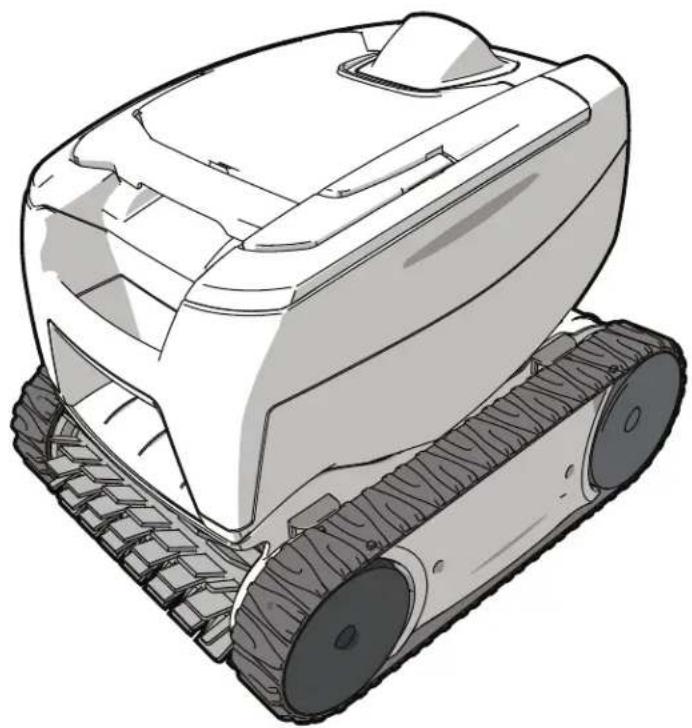
Line drawing of a tracked robotic vehicle with visible tracks and wheels (no text or symbols)TYPE EP37--
Owner's Manual
ENGLISH | FRANÇAIS | ESPAÑOL
FCC Statement
This device complies with Part 15 of the FCC Rules and IC licence-exempt RSS standard. Operation is subject to the following two conditions: (1) this device may not cause harmful interference, and (2) this device must accept any interference received, including interference that may cause undesired operation.
NOTE: This equipment has been tested and found to comply with the limits for a Class B digital device, pursuant to part 15 of the FCC Rules. These limits are designed to provide reasonable protection against harmful interference in a residential installation. This equipment generates, uses and can radiate radio frequency energy and, if not installed and used in accordance with the instruction, may cause harmful interference to radio communications. However, there is no guarantee that interference will not occur in a particular installation. If this equipment does cause harmful interference to radio or television reception which can be determined by turning the equipment off and on, the user is encouraged to try to correct interference by one or more of the following measures:
- Reorient or relocate the receiving antenna.
- Increase the separation between the equipment and receiver.
- Connect the equipment into an outlet on circuit different from that to which the receiver is connected.
- Consult the dealer or an experienced radio/TV technician for help.
CAUTION
Any changes or modifications not expressly approved by the part responsible for compliance could void the user's authority to operate the equipment.
NOTE: This device complies with FCC and IC RF radiation exposure limits set forth for general population. This device must be installed to provide a separation distance of at least 20cm from all persons and must not be co-located or operating in conjunction with any other antenna or transmitter.
Under Industry Canada regulations, this radio transmitter may only operate using an antenna of a type and maximum (or lesser) gain approved for the transmitter by Industry Canada. To reduce potential radio interference to other users, the antenna type and its gain should be so chosen that the equivalent isotropically radiated power (e.i.r.p.) is not more than that necessary for successful communication.
WARNING
FOR YOUR SAFETY - For anything other than the routine cleaning and maintenance described in this manual, this product must be serviced by a contractor who is licensed and qualified in pool equipment by the jurisdiction in which the product will be installed where such state or local requirements exist. In the event no such state or local requirement exists, the maintainer must be a professional with sufficient experience in pool equipment installation and maintenance so that all of the instructions in this manual can be followed exactly. Improper installation and/or operation will void the warranty.
THANK YOU FOR PURCHASING THIS POLARIS CLEANER.
YOUR POLARIS ROBOTIC CLEANER HAS BEEN DESIGNED AND MANUFACTURED TO BE EASILY INSTALLED AND TO PROVIDE LOW MAINTENANCE OPERATION. PRIOR TO INSTALLING YOUR NEW POLARIS CLEANER, PLEASE DO THE FOLLOWING:
1) Complete and return the warranty card.
2) Record your purchase information on the spaces provided below.
3) Attach your invoice (or a copy) to this page.
Taking these steps will help ensure prompt warranty service, should it be required. If service is required, please contact your original dealer. If the original dealer does not perform warranty service, please visit www.polarispool.com to locate an independent service company near you. If you are unable to locate a service company, please call our Technical Support department at 1-800-822-7933.
RECORD YOUR POLARIS CLEANER DATA HERE:
Date of Purchase____Purchased From____ Serial Number:____ City____ State/Province____ Zip/Postal Code____ (located on robot- head)
Table of Contents
1 Important Safety Instructions .... 4
2 Cleaner Specifications.... 5
General Specifications.... 5
3 Assembly 6
Contents 6
Connect to a Power Source....6
4 General Cleaner Operation......8
Install and Submerge the Cleaner....9
Start / Stop Cleaning 10
Remove from the Pool....11
Clean the Filter Canister....12
Store the Cleaner When Not in Use 14
5 Maintenance 14
Cord Tangling 14
Replacing Wear Parts....17
Replacing the Track.... 18
Spare Parts.... 19
6 Troubleshooting....20
Using the Information LED 20
General Troubleshooting 21
1 Important Safety Instructions
Congratulations on purchasing this Polaris Robotic Cleaner. Please read through the entire manual before installing your new robotic pool cleaner. Your cleaner must be installed and operated as specified.
WARNING
Failure to comply with the following warnings can result in permanent injury, electrocution or death.
PREVENT ELECTRICAL SHOCK
To reduce risk of electrical shock:
- Connect unit to receptacle protected by a ground fault circuit interrupter (GFCI). Such a GFCI receptacle should be provided by a qualified installer and should be tested on a routine basis. To test the GFCI, push the test button. The GFCI should interrupt power. Push the reset button. Power should be restored. If the GFCI fails to operate in this manner, the GFCI is defective. If the GFCI interrupts power to the pump without the test button being pushed, a ground current is flowing, indicating the possibility of an electric shock. Do not use this product. Disconnect the cleaner and have the problem corrected by a qualified service representative before using.
- Per the United States National Electrical Code® (NEC®), keep the control unit at least five (5) feet from the edge of the (pool/spa) water. In Canada, the Canadian Electrical Code (CEC) requires a minimum distance of 3m (10 ft.) to be maintained between the pool edge and the control unit. Never submerge the control unit.
- Do not enter pool while the Polaris cleaner is in water.
- Do not bury cord. Locate cord so as to prevent it from being damaged by lawn mowers, hedge trimmers and other equipment.
- To reduce the risk of electrical shock, do not use the Polaris robotic cleaner or control unit if the cord is worn or damaged. Contact Zodiac Pool Systems LLC Technical Support immediately for proper servicing and replacement of the damaged cord.
- Double insulation—For continued protection against possible electric shock, use only identical replacement parts when servicing. Do not attempt repair of the Polaris robotic cleaner, control unit, power cord, or floating cable.
• NEVER OPEN CONTROL UNIT. - DO NOT USE AN EXTENSION CORD TO CONNECT THE UNIT TO ELECTRIC SUPPLY; PROVIDE A PROPERLY LOCATED GFCI RECEPTACLE. THE CONTROL UNIT SHOULD BE PLUGGED INTO THE GFCI RECEPTACLE BOX.
PREVENT CHILD INJURY AND DROWNING
• To reduce the risk of injury, do not permit children to operate this product.
- Do not let anyone, especially small children, sit, step, lean, or climb on any equipment installed as part of your pool's operational system.
CAUTION
Failure to comply with the following warnings could cause damage to pool equipment or personal injury.
- The Polaris cleaner must be installed and operated as specified.
- This product is intended for use with permanently-installed pools. Do not use with storable pools. A permanently-installed pool is constructed in or on the ground or in a building such that it cannot be readily disassembled for storage. A storable pool is constructed so that it is capable of being readily disassembled for storage and reassembled to its original integrity.
- Clean the filter canister in the Polaris cleaner after each use.
- Do not use the product in your pool if the water temperature is above 95^ F (35° C) or below 55^ F (13° C).
USE OF THE POLARIS ROBOTIC CLEANER IN A VINYL LINER POOL
- Certain vinyl liner patterns are particularly susceptible to rapid surface wear of pattern removal caused by objects coming into contact with the vinyl surface, including pool brushes, pool toys, floats, fountains, chlorine dispensers, and automatic pool cleaners. Some vinyl liner patterns can be seriously scratched or abraded simply by rubbing the surface with a pool brush. Ink from the pattern can also rub off during the installation process or when it comes into contact with objects in the pool. Zodiac Pool Systems LLC is not responsible for, and the Limited Warranty does not cover, pattern removal, abrasion or markings on vinyl liners.
2 Cleaner Specifications
General Specifications
The general specifications for the cleaner are as follows:
| Control box supply voltage | 100-240 VAC, 50-60 Hz |
| Cleaner Supply voltage | 30 V DC |
| Installed load | 100 W max |
| Cable length | Above-Ground - 45ft (14m)In-Ground - 54ft (16.4m) |
| Cleaner size (WxDxH) | 14.5 x 11.4 x 11.8 in. (37 x 29 x 30 cm) |
| Weight of Cleaner | 15.4 lbs. (7 kg) |
| Filtration | All-purpose filter canister |
| Cycle lengths | 2 hours for Above-Ground pool cycle2.5 hours for In-Ground pool cycle |
The cleaner is a double-insulated product. A double-insulated electrical appliance is one which has been designed in such a way that it does not require a safety connection to ground. The basic requirement for double-insulation is that no single failure can result in dangerous voltage becoming exposed so that it might cause an electric shock and that this is achieved without relying on an earthed (grounded) metal casing. This is achieved by having two (2) layers of insulating material surrounding live parts or by using reinforced insulation. Therefore, devices having double-insulated construction, such as this cleaner, do not use a grounded (three-prong) cord/plug.
3 Assembly
Contents
The packaging should contain the following items:
- Robotic cleaner and floating cable
- Control unit
- Control unit base
To protect the control unit from possible damage (which could lead to injury or property damage), always secure the control unit to the control unit base during operation and storage.
• Caddy (select models)
When unpacking the cleaner and its components:
- Check to make sure each component is in the box.
- Check cleaner and components for damage during transport.
- If there are any missing parts or damage, contact Technical Support at 1-800-822-7933.
Connect to a Power Source
WARNING
Failure to comply with the following warnings can result in permanent injury, electrocution or drowning.
PREVENT ELECTRICAL SHOCK
- U.S.: Per NEC® requirements, keep the control unit at least five (5) ft. (1.5 m) from the edge of the pool. CANADA: Per CEC requirements, keep the control unit at least three (3) m (10 ft.) from the edge of the pool.
- Only connect the control unit to a receptacle protected by a ground fault circuit interrupter (GFCI). Contact a certified electrician if you cannot verify that the receptacle is protected by a GFCI.
- Do not use an extension cord to connect the control unit.
- Do not allow anyone to swim while the cleaner is in the pool.
-
The control unit is water-resistant, not waterproof. In order to prevent electrocution, never submerge the control unit or leave exposed to inclement weather.
-
Seat the control unit firmly in the control unit base (Figure 1).
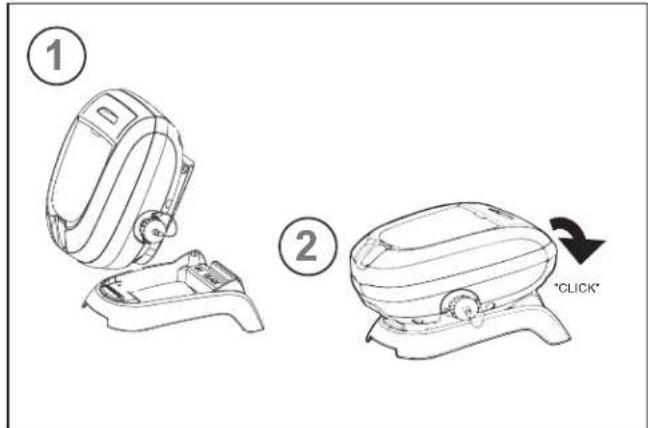
Figure 1. Connect Control Unit Base
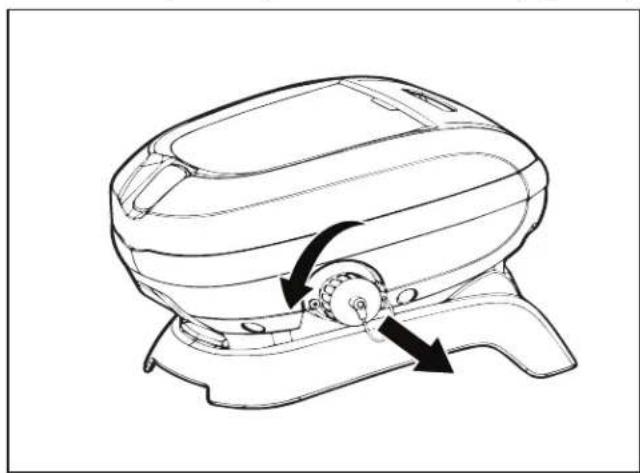
- Unscrew the protective cap for the floating cable from the side of the control unit by turning counter-clockwise (Figure 2).
natural_image
Line drawing of a mechanical device with two arrows indicating rotational or movement directions (no text or symbols)Figure 2. Remove Protective Cap
- Align the notch in the floating cable connector with the key in the control unit, engage then turn clockwise to tighten (Figure 3).
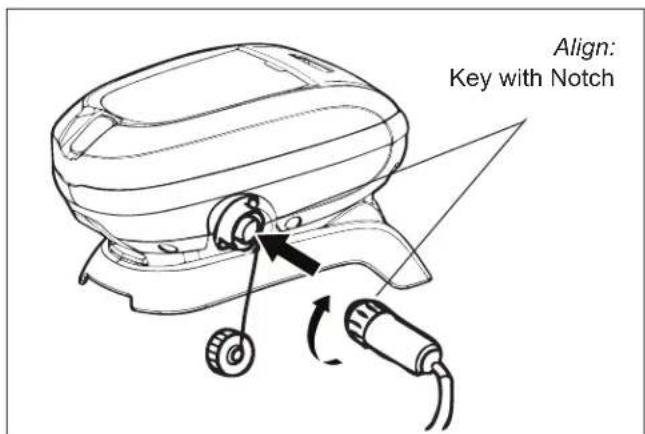
Figure 3. Connect Floating Cable
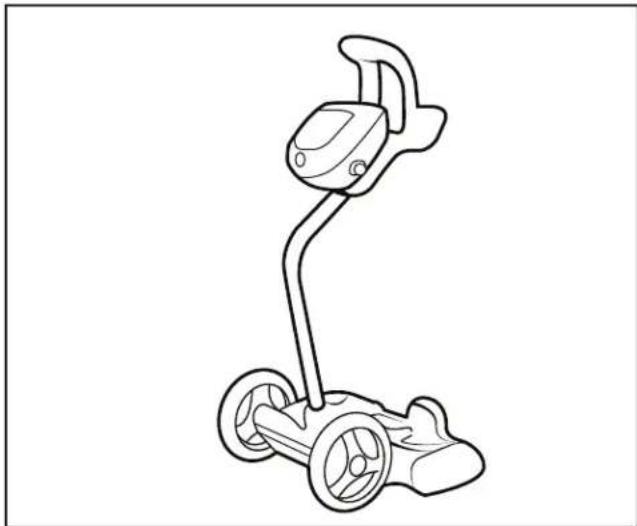
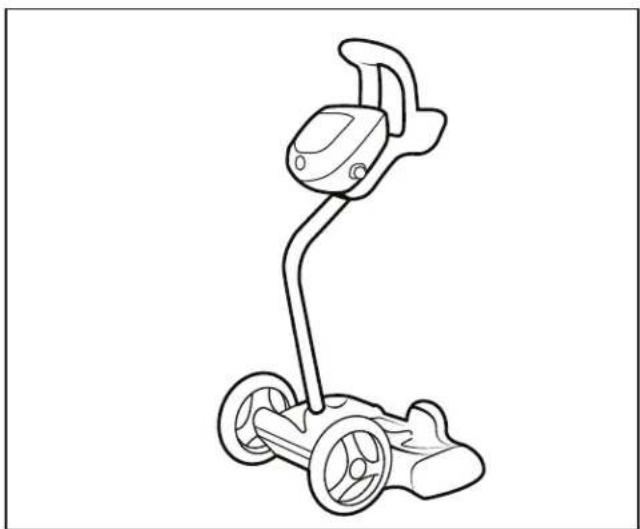
- For products with caddy included, see separate caddy assembly sheet.
natural_image
Line drawing of a four-wheeled electric scooter with wheels and head (no text or symbols)Figure 4. Caddy (Optional)
- Plug the control unit directly into a GFCI outlet. DO NOT use an extension cord.
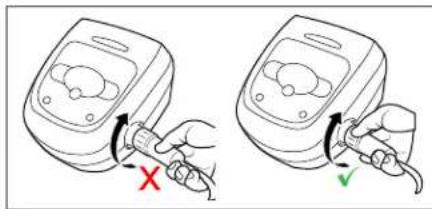
NOTE: To avoid damaging the power cable, do not try to twist the entire cable housing (see below).
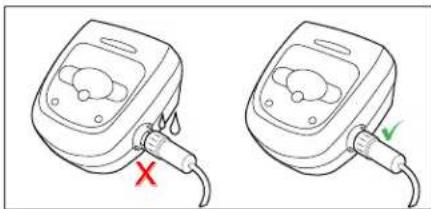
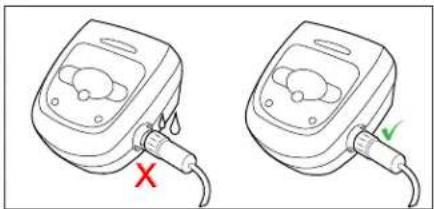
NOTE: To avoid exposing the power cable connector pins to water, be sure the connector is screwed in all the way and there is no gap. (see below).
4 General Cleaner Operation
CAUTION
To prevent damage to the cleaner, be sure to adhere to the following guidelines:
- Remove the cleaner from the pool after the cleaning cycle is completed.
- Store cleaner out of direct sunlight or inclement weather.
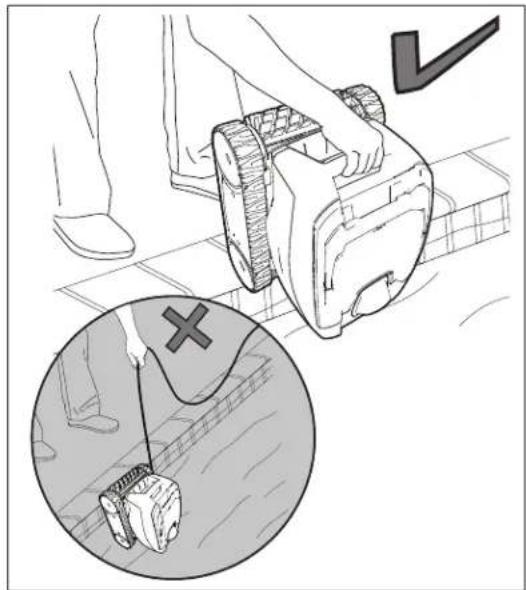
- Never lift the cleaner out of the pool by the floating cable.
• Take additional care when lifting the cleaner out of the pool. It becomes heavier when filled with water.
• Always remove the cleaner from pool before super chlorinating or adding acid. - Do not handle cleaner while it is in operation.
IMPORTANT
• Always make sure the cleaner head is fully submerged before you begin operation.
- Clean the filter canister after each cleaning cycle.
- Do not leave your cleaner in the pool on a permanent basis.
- At the end of each cycle, remove the cleaner from the pool.
- Start at the cleaner head and untangle any coils in the cable before storing the cleaner.
The Polaris robotic cleaner includes a safety feature that automatically stops the cleaner if it is powered on but not submerged in water. For pools equipped with a beach area, this safety feature is programmed to drive the cleaner in reverse and back into the pool when the impeller is out of the water.
Install and Submerge the Cleaner
-
With the control box plugged into a GFCI outlet, spread the floating cable across the pool deck until you reach the middle of the pool length.
-
Submerge cleaner vertically (1) and hold it under the surface, moving gently from side to side (2) until the bubbles stop to remove any air trapped inside (Figure 5).
-
When the bubbles stop, allow the cleaner to sink to the bottom of the pool.
-
Verify the cleaner is sitting on the bottom of the pool. Remove additional air if the cleaner is still floating.
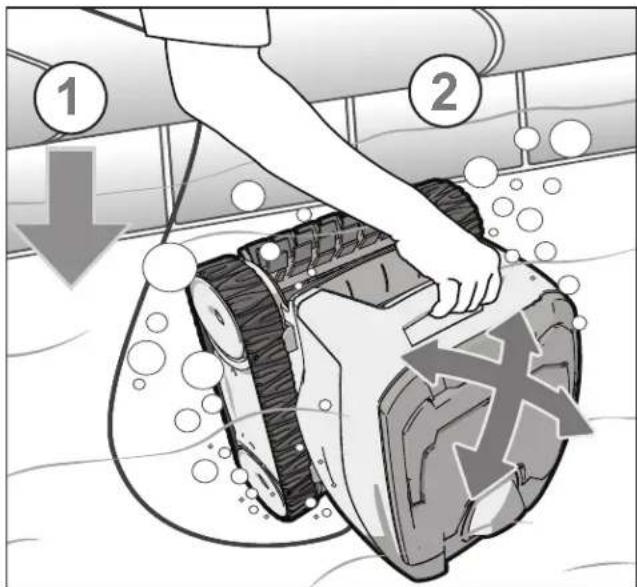
Figure 5. Submerge and Remove Trapped Air
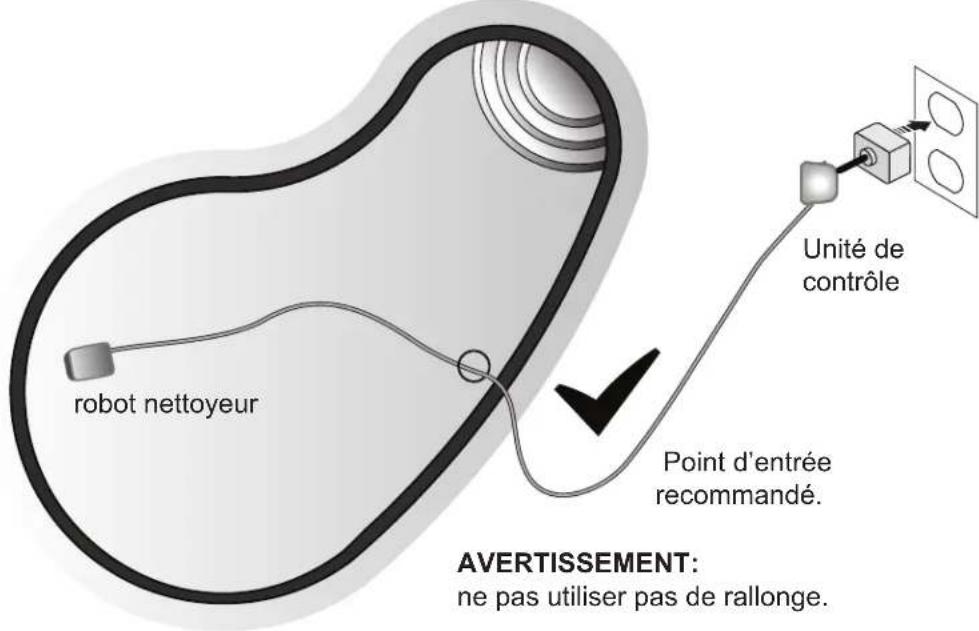
NOTE: For optimal patterning and reduced tangling, the floating cable should enter the water at the recommended entry point (see Figure 6).
Figure 6. Pool Entry Point for Optimal Patterning
Start / Stop Cleaning
Press Start/Stop button to begin or interrupt cleaner operation (Figure 7).
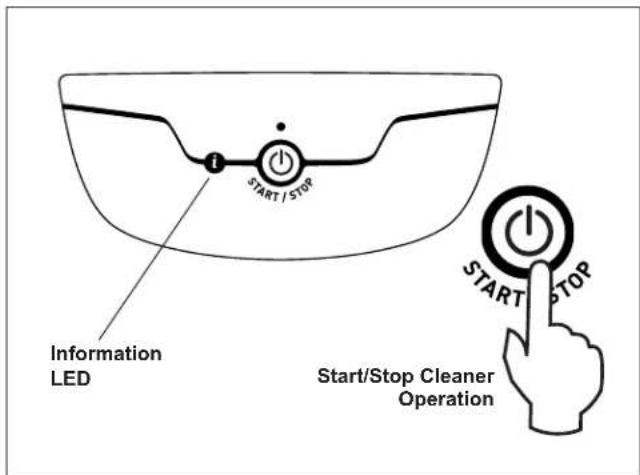
Figure 7. Cleaner Control Unit
Remove from the Pool
-
Gently pull the floating cable to bring the cleaner within arm's reach.
-
Use the handle to lift the cleaner from the water (Figure 8). Never lift the cleaner out of the pool by the floating cable.
-
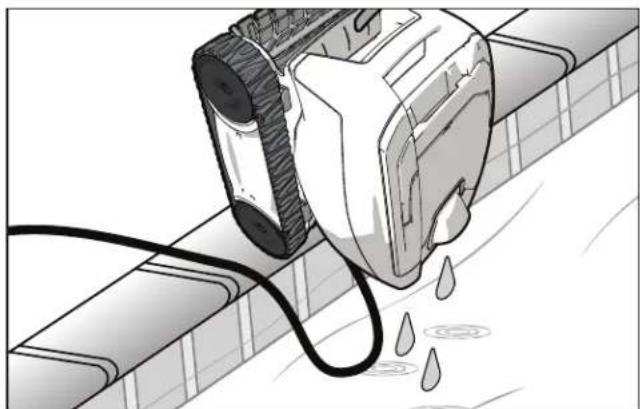
Hold the cleaner vertically over the pool surface to drain water before removing (Figure 9).
natural_image
Illustration of a person using a robotic device on a tiled floor, with an inset showing a hand holding a device and a cross symbol (no text or labels)Figure 8. Lift Cleaner From Pool with Handle
natural_image
Illustration of a mechanical device emitting liquid into a pipe, with no visible text or symbolsFigure 9. Drain Water from the Cleaner
Clean the Filter Canister
Empty the canister as soon as the cycle ends.
WARNING
To avoid electric shock and other hazards which could result in permanent injury or death, disconnect (unplug) the cleaner from the power source before performing any cleaning and maintenance.
- Unplug power to the cleaner at the control unit. Unplug the control unit from the power source.
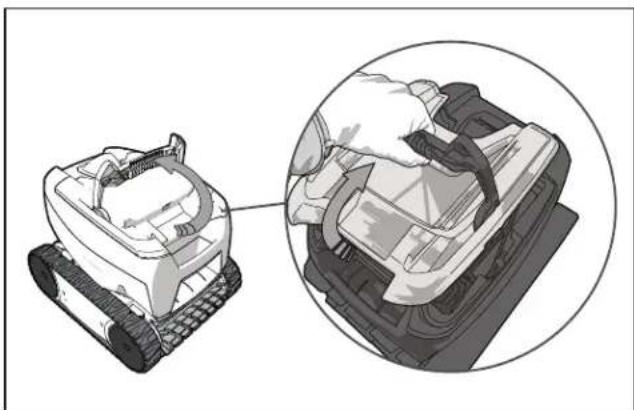
- Pull up to release the filter canister handle (Figure 10).
natural_image
Illustration of a tracked robot with a close-up inset showing mechanical components (no text or symbols)Figure 10. Release Filter Canister Handle
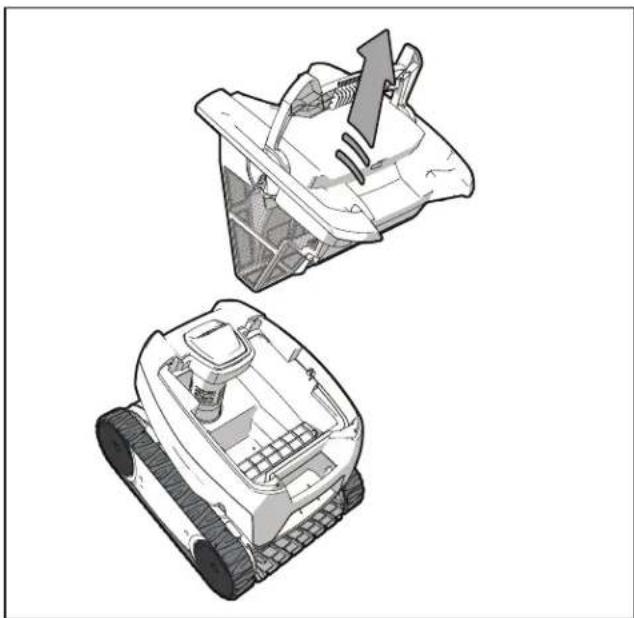
- Grasp the handle and lift up to remove the filter canister (Figure 11).
natural_image
Two technical illustrations of a robotic vehicle with visible internal components and a directional arrow indicating motion (no text or symbols)Figure 11. Remove the Filter Canister
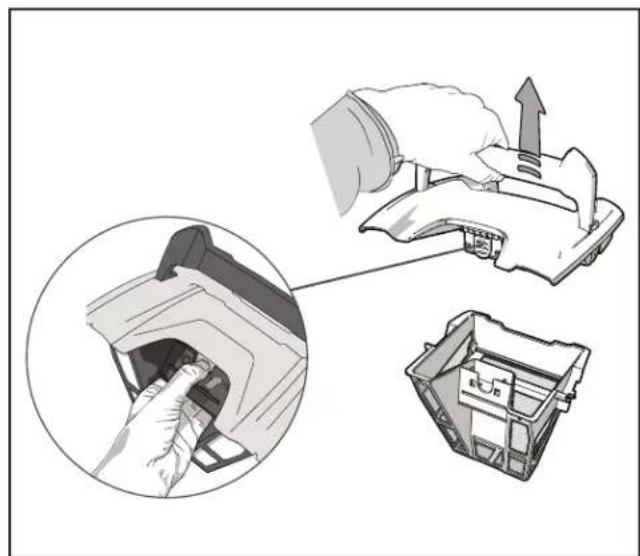
- Press the interior latch and remove the filter canister lid (Figure 12).
natural_image
Diagram showing a hand inserting a component into a plastic housing, with an inset close-up of the component being inserted (no text or symbols present)Figure 12. Remove Filter Canister Lid
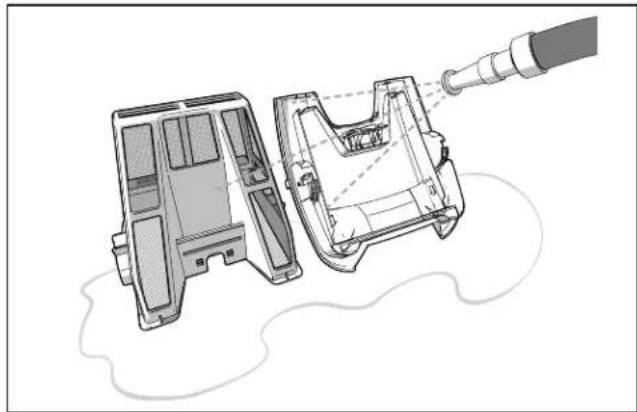
- Using a hose with clean water, rinse the filter canister and lid to remove all debris (Figure 13).
natural_image
Technical illustration of a mechanical component with internal structure and fluid flow, no text or symbols presentFigure 13. Rinse the Filter Canister
-
Replace lid on the canister and then replace canister back into the cleaner body.
-
Plug the power cord back into the control unit and store the cleaner out of direct sunlight for next use.
Store the Cleaner When Not in Use
The cleaner must be cleaned regularly using slightly soapy clean water. Do not use solvents such as trichlorethylene or its equivalent. Rinse the cleaner generously using clean water. Do not let your cleaner dry in direct sunlight near the pool.
- Disconnect cleaner from the power source.
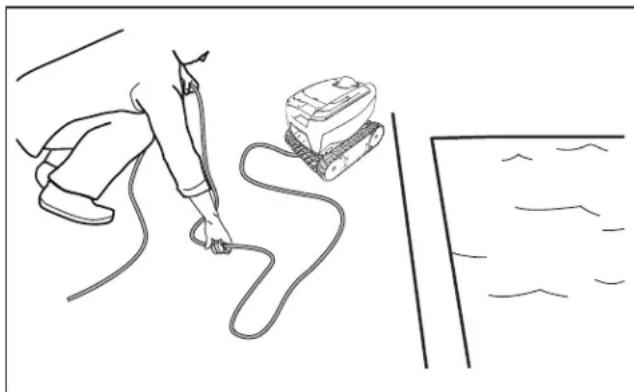
- Starting at the cleaner head, remove all coils and tangles from the floating cable (Figure 14). Lay the cable in the sun to loosen any tangling memory.
- Disconnect the cable from the control unit. Replace the protective cap on the control unit.
natural_image
Line drawing of a person using a handheld device to interact with a wall-mounted device (no text or symbols present)Figure 14. Untangle the Floating Cable
- Loosely coil the floating cable starting at the cleaner and moving toward the connection point at control unit.
5 Maintenance
WARNING
To avoid electric shock and other hazards which could result in permanent injury or death, disconnect (unplug) the cleaner from the power source before performing any cleaning and maintenance.
Cord Tangling
For optimal patterning and reduced tangling, the floating cable should enter the water near the middle of the pool length (see Figure 15). Spread all of the floating cable carefully in the pool, ensuring there are no kinks or coils.
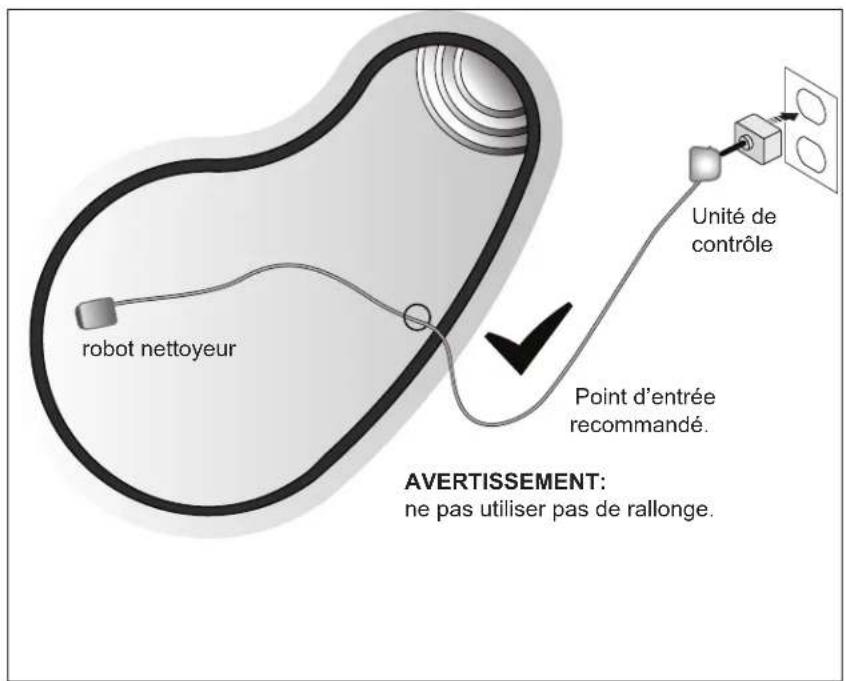
Figure 15. Optimal Entry Point in Pool
IMPORTANT
Cleaner power cable may become tangled if correct procedure is not followed after each cleaning cycle.
If tangling occurs, follow these steps:
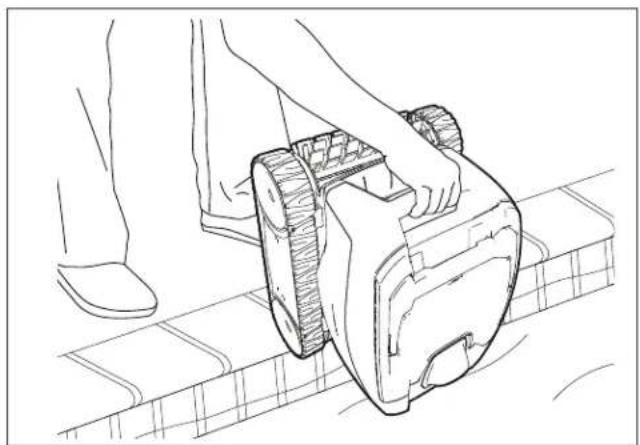
- Gently pull the floating cable to bring the cleaner within arm's reach. When the cleaner is within arm's reach, use the handle to remove from the water (Figure 16). Never lift the cleaner out of the pool by the floating cable.
natural_image
Line drawing of a person using a robotic device on a tiled floor (no text or symbols)Figure 16. Lift Cleaner From Pool with Handle
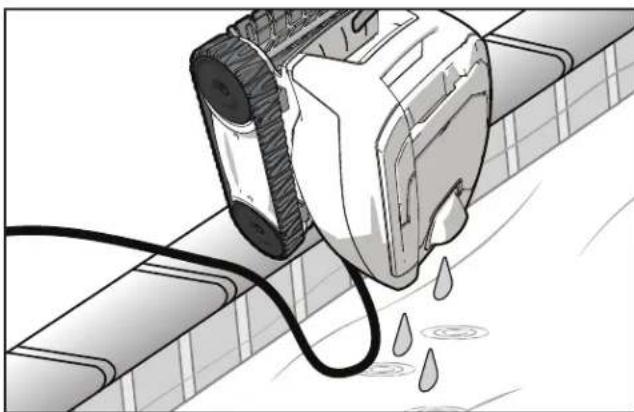
- Hold the cleaner vertically to drain (Figure 17).
natural_image
Illustration of a mechanical device emitting liquid into a pipe, with no visible text or symbols.Figure 17. Hold Vertically to Drain Water
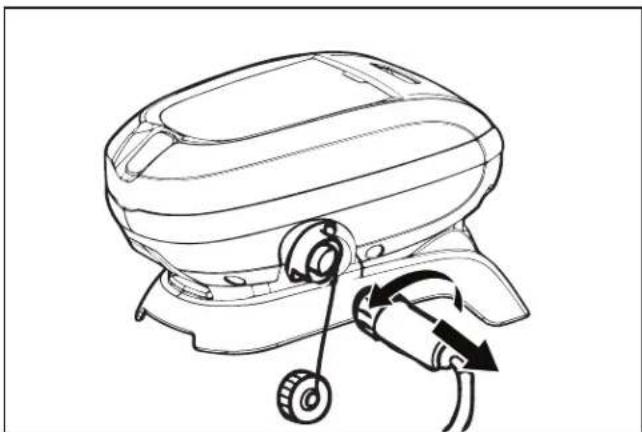
- Unplug power to the cleaner at the control unit (Figure 18).
natural_image
Line drawing of a mechanical device with a scroll wheel and directional arrows indicating motion (no text or symbols)Figure 18. Unplug the Floating Cable
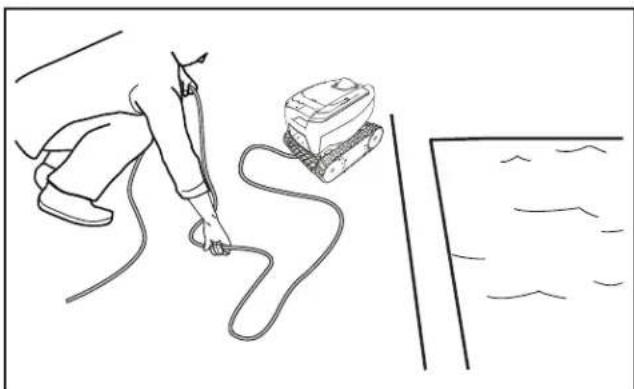
- Remove the cleaner from the pool and untangle all kinks and coils in the floating cable at the cleaner head. Lay the cable in the sun to loosen any tangling memory (Figure 19).
natural_image
Line drawing of a person using a handheld device to interact with a curved line, no text or symbols presentFigure 19. Lay Cable in the Sun
Replacing Wear Parts
Replacing Brushes
The cleaner is fitted with a brush in front. There are "wear" indicators (Figure 20) on the brush. To maintain cleaner performance at its best, replace the brush as soon as the wear indicator has been reached. Zodiac recommends that you replace the brushes every two (2) years.
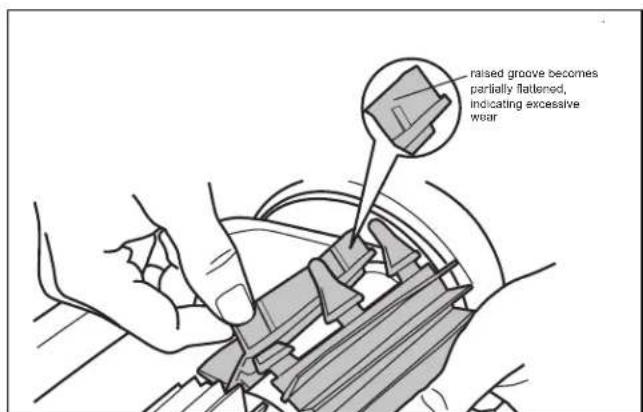
Figure 20. Worn Brush Indicator
To maintain cleaner performance at its best you need to replace the brush as soon as one of the wear indicators is reached (even if the blade wear is not even). It is recommended that you replace the brush when the rubber is worn down to the top of the wear indicator (or every two years, whichever comes first).
To replace a worn brush:
-
Separate the edges of the brush, undo the tabs, and remove the worn brush.
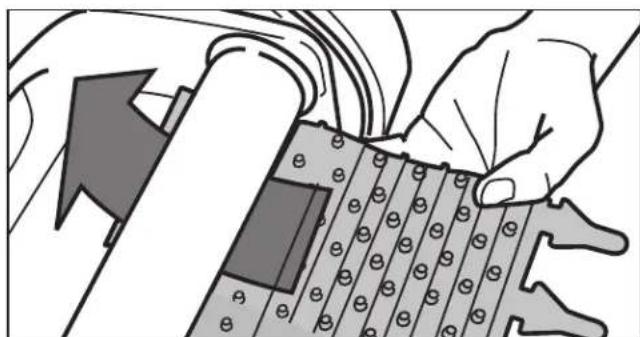
-
Position the new brush underneath the roller with the spikes facing downwards (Figure 21).
natural_image
Illustration of hands assembling a mechanical component with bolt holes (no text or symbols visible)Figure 21. Position the New Brush on Roller
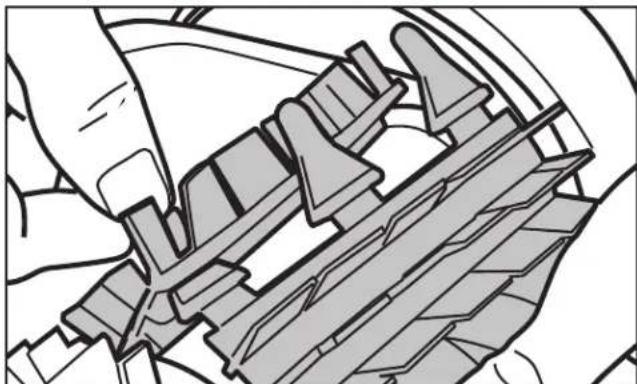
- Thread each tab into the slot provided and gently feed it through until the heel comes out at the other side of the slot (Figure 22).
natural_image
Technical illustration of a mechanical assembly with hands and gears (no text or symbols)Figure 22. Pull Tabs Through Each Slot
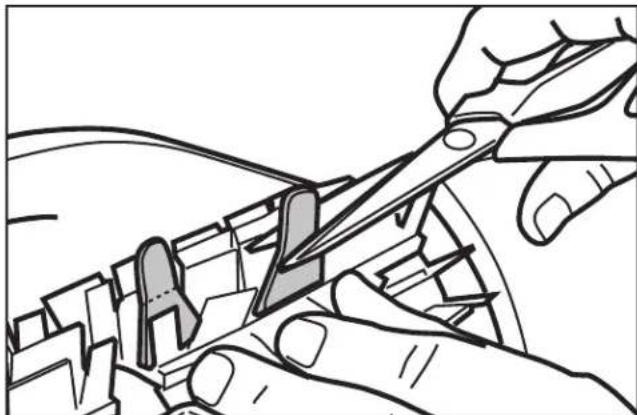
- Use scissors to cut the tabs so they are no higher than the spikes (Figure 23).
natural_image
Line drawing of hands using scissors to cut a mechanical component (no text or symbols)Figure 23. Cut Tabs
Replacing the Track
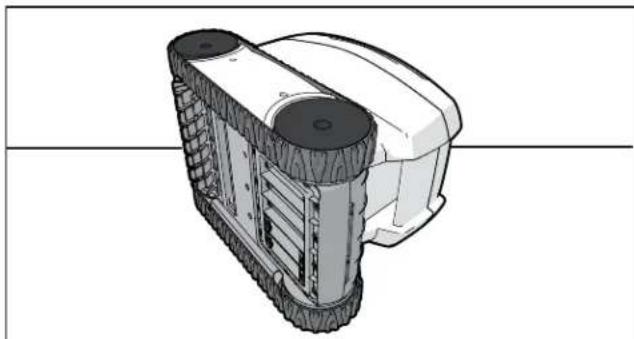
- Stand the cleaner on its side (Figure 24).
natural_image
3D technical illustration of a wheeled vehicle with visible wheels and side panels (no text or symbols)Figure 24. Stand Cleaner on its Side
-
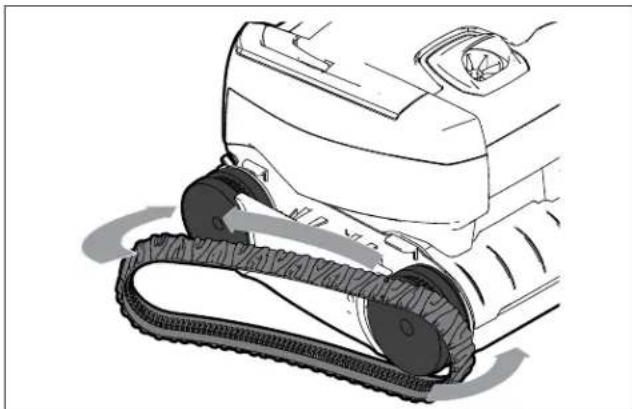
Starting at one of the wheels, pull on the inside of the track to separate the tire lip from the wheel. Remove the track from the cleaner.
-
To install a new track, place the inside rib of the track into the groove in the first wheel. (See Figure 25).
-
Stretch the track around the second wheel (see Figure 25). Push and position the rib of the track so that the track is seated properly in the groove of the wheel.
-
Verify the rib of the track is positioned properly within the groove of each of the wheels. If necessary, turn the wheels gently to seat track.
natural_image
Line drawing of a robotic vacuum cleaner with mesh track (no text or symbols)Figure 25. Stretch Track Around Wheels
Spare Parts
The complete spare parts list and exploded view is available on the Polaris website.
• USA: www.polarispool.com.
• Canada: www.polarispool.ca
Contact your local maintenance provider to perform diagnostic tests or repairs not shown in general maintenance.
6 Troubleshooting
Using the Information LED
The information LED ⓘ on the control unit flashes in a specific sequence to indicate one of three possible cleaner malfunctions.
| LED Flashing Solution | |
| 1 FlashLED flashes once with one second interval. | Unplug the floating cable from the control unit and reconnect.If the problem persists, contact your local retailer to request a diagnostic review or call Technical Support. |
| 2 FlashesLED flashes twice with one second interval | Turn cleaner wheels to ensure they are not jammed.Check brushes for debris.Start a new cleaning cycle.If the problem persists, contact your local retailer to request a diagnostic review or call Technical Support. |
| 3 FlashesLED flashes three times with one second interval | Clean the filter canister.Check the pump axis for debris.Check propeller for debris.Start a new cleaning cycle.If the problem persists, contact your local retailer to request a diagnostic review or call Technical Support. |
General Troubleshooting
The following list provides some helpful hints for troubleshooting common challenges when using the cleaner.
| Problem Cause Solution | ||
| The Information LED flashes just after start (either pressing Power or Cycle button for less than 20 seconds). | Floating cable may not be plugged into the control unit correctly. | Unplug floating cable from the control unit and reconnect. |
| Cleaner may not be fully submerged. | Remove cleaner from the pool and re-submerge, see Install and Submerge the Cleaner. | |
| Propellor may be jammed and not turning correctly. | Clean the filter canister, see Cleaning the Filter Canister. | |
| Wheels may be jammed and not turning correctly. | Turn the tracks then disconnect the control unit and wait at least 20 seconds before reconnecting. If the product persists, contact your local retailer to request a diagnostic review or call Technical Support. | |
| The Information LED flashes during the cleaning cycle. | Cleaner may be sucking air (lights will appear after 60 seconds air intake) | Remove cleaner from the pool and re-submerge, see Submerging the Cleaner. |
| The cleaner does not stay firmly on the pool bottom. | There is air in the cleaner. Remove cleaner from the pool and re-submerge, see Submerging the Cleaner. | |
| The filter canister is full or dirty. Clean the filter canister, see Cleaning the Filter Canister. | ||
| The cleaner does not or no longer climbs the pool walls. | The filter canister is full or dirty. Clean the filter canister, see Cleaning the Filter Canister. | |
| Walls of pool are slippery. Although the water seems clear, microscopic algae, invisible to the human eye, may be present in the pool. As a result the pool sides become slippery and prevent the cleaner from climbing. Check tracks for wear and replace as necessary. | Do a shock chlorination treatment to reduce the pH levels in the pool. DO NOT leave the cleaner in the pool during this treatment. | |
| On startup the cleaner does not move. | No power supply to the cleaner. Check that the outlet to which the control unit is connected is receiving electricity. | |
| Unit is turned OFF. Press Start/Stop again. If the problem persist, contact your local retailer to request a diagnostic review or call Technical Support. | ||
| Cable is tangling in the pool Cable is not spread evenly in the water. | Verify the floating cable enters the water near the middle of the pool length, see Cord Tangling. Spread all of the floating cable carefully in the pool, ensuring there are no kinks or coils. | |
| The cleaner is not cleaning effectively. | The brushes have become smooth or the "wear" indicator shows. | Replace the brushes following the procedure in Replacing the Brushes. |
| Filter canister is full or dirty. Clean the filter canister following the procedure in Cleaning the Filter Canister. | ||
| Floating cable is excessively coiled or kinked. | Make sure the floating cable is spread out over the pool. Ensure the cable is not too tightly wrapped or coiled when storing. If the problem persists, lay the cable straight in the sun to relax it and remove kinks. Follow the procedure in Cord Tangling to avoid and correct tangled cord. | |
| Tire track is coming off the wheels Verify track is properly inserted in the wheel groove. If problem persists, replace the tire track, see Replacing the Track. | ||
NOTES
NOTES
Zodiac Pool Systems LLC
2882 Whiptail Loop # 100, Carlsbad, CA 92010
1.800.822.7933 | Polaris.Pool.com
Zodiac Pool Systems Canada, Inc.
2-3365 Mainway, Burlington, ON L7M 1A6 Canada
1.88.647.4004 | PolarisPool.ca

Polaris®
natural_image
Line drawing of a tracked robotic vehicle with visible tracks and wheels (no text or symbols)TYPE EP37--
Owner's Manual
FRANÇAIS
natural_image
Line drawing of a mechanical device with two arrows indicating rotational or movement directions (no text or symbols)Figure 3. Connector un câble flottant
natural_image
Line drawing of a four-wheeled electric scooter with a mounted sensor (no text or symbols)Figure 4. Caddie (facultatif)
natural_image
Illustration of a person using a robotic device on a tiled floor, with an inset showing a hand holding a device (no text or symbols present)natural_image
Illustration of a mechanical device emitting liquid into a pipe, with no visible text or symbols.natural_image
Illustration of a tracked robot with a close-up view showing the engine compartment (no text or symbols present)natural_image
Two technical illustrations of a robotic vehicle showing internal components and a downward arrow indicating motion (no text or symbols present)natural_image
Diagram showing a hand inserting a component into a plastic housing, with an inset close-up of the component being inserted (no text or symbols present)natural_image
Technical illustration of a mechanical component with internal structure and spray nozzle (no text or symbols)natural_image
Line drawing of a person using a handheld device to interact with a wall-mounted device (no text or symbols present)natural_image
Line drawing of a person using a robotic lawn press on a tiled floor (no text or symbols)natural_image
Illustration of a mechanical device emitting liquid droplets into a pipe (no text or symbols)natural_image
Line drawing of a mechanical device with a scroll wheel and directional arrows indicating motion (no text or symbols)natural_image
Line drawing of a person using a handheld tool to test a test tube on a surface (no text or symbols)natural_image
Illustration of hands assembling a mechanical component with bolt holes (no text or symbols visible)natural_image
Technical illustration of a mechanical assembly with hands operating a component (no text or symbols visible)natural_image
Illustration of hands using scissors to cut a mechanical component (no text or symbols visible)natural_image
Technical line drawing of a wheeled robotic vehicle (no text or symbols)natural_image
Line drawing of a robotic vacuum cleaner with mesh track and wheels (no text or symbols)Zodiac Pool Systems LLC
2882 Whiptail Loop # 100, Carlsbad, CA 92010
1.800.822.7933 | Polaris.Pool.com
Zodiac Pool Systems Canada, Inc.
2-3365 Mainway, Burlington, ON L7M 1A6 Canada
1.88.647.4004 | PolarisPool.ca
natural_image
Line drawing of a tracked robotic vehicle with visible tracks and wheels (no text or symbols)TYPE EP37--
Manual del usuario
ESPAÑOL
natural_image
Line drawing of a mechanical device with a rotating knob and directional arrows indicating motion (no text or symbols)Figure 2. Retire la tapa protectora
Figure 3. Conecte el cable flotante
- For products with caddy included, see separate caddy assembly sheet.
natural_image
Line drawing of a four-wheeled electric scooter with wheels and head (no text or symbols)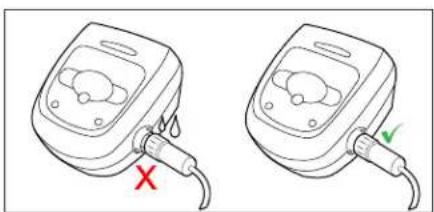
Figure 5. Sumerja y elimine el aire atrapado
natural_image
Illustration of a person using a robotic device on a tiled floor, with an inset showing a hand holding a small robot and a cross symbol (no text or labels)natural_image
Illustration of a mechanical device emitting liquid into a pipe, with no visible text or symbolsnatural_image
Illustration of a tracked military vehicle with a close-up inset showing its internal components (no text or symbols)Figure 10. Libere la manija del cartucho del filtro
natural_image
Two technical illustrations of a tracked robot with visible internal components and a directional arrow indicating motion (no text or symbols)natural_image
Illustration showing a hand inserting a component into a plastic housing, with an inset close-up of the component being inserted (no text or symbols present)natural_image
Technical illustration of a mechanical component with internal structure and spray nozzle (no text or symbols)natural_image
Line drawing of a hand using a pen to draw a wire, with an electronic device nearby (no text or symbols)natural_image
Line drawing of a person using a manual lawn saw on a construction site (no text or symbols)natural_image
Illustration of a mechanical device emitting liquid droplets onto a tiled surface (no text or symbols)natural_image
Line drawing of a mechanical device with a knob and cable, no text or symbols presentnatural_image
Line drawing of a person using a handheld device to interact with a curved line, no text or symbols presentnatural_image
Illustration of hands installing or adjusting a mechanical component with a grid pattern (no text or symbols visible)natural_image
Mechanical assembly diagram showing hands assembling a component (no text or symbols visible)natural_image
Line drawing of hands using scissors to cut or adjust a mechanical component (no text or symbols)natural_image
3D technical illustration of a tracked robotic vehicle (no text or symbols visible)natural_image
Line drawing of a robotic vacuum cleaner with mesh track (no text or symbols)Zodiac Pool Systems LLC
2882 Whiptail Loop # 100, Carlsbad, CA 92010
1.800.822.7933 | Polaris.Pool.com
Zodiac Pool Systems Canada, Inc.
2-3365 Mainway, Burlington, ON L7M 1A6 Canada
1.88.647.4004 | PolarisPool.ca

- Owner's Manual
- FCC Statement
- CAUTION
- WARNING
- Table of Contents
- Important Safety Instructions
- PREVENT ELECTRICAL SHOCK
- PREVENT CHILD INJURY AND DROWNING
- USE OF THE POLARIS ROBOTIC CLEANER IN A VINYL LINER POOL
- Cleaner Specifications
- General Specifications
- Assembly
- Contents
- Connect to a Power Source
- General Cleaner Operation
- IMPORTANT
- Install and Submerge the Cleaner
- Start / Stop Cleaning
- Remove from the Pool
- Clean the Filter Canister
- Store the Cleaner When Not in Use
- Maintenance
- Cord Tangling
- Replacing Wear Parts
- Replacing Brushes
- Replacing the Track
- Spare Parts
- Troubleshooting
- Using the Information LED
- General Troubleshooting
- NOTES
- Polaris®
- Manual del usuario
Brand : POLARIS
Model : 7240
Category : Swimming Pool