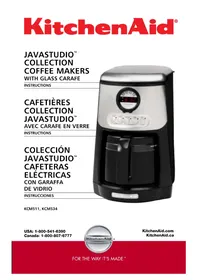
KCM534 - Coffee machine KITCHENAID - Free user manual and instructions
Find the device manual for free KCM534 KITCHENAID in PDF.



| Product Type | Drip Coffee Maker |
| Brand | KitchenAid |
| Model | KCM534 |
| Capacity | 12 cups (125 ml per cup) |
| Power Supply | 120 V ~ 60 Hz, 1100 W |
| Plug Type | 3-prong grounded plug |
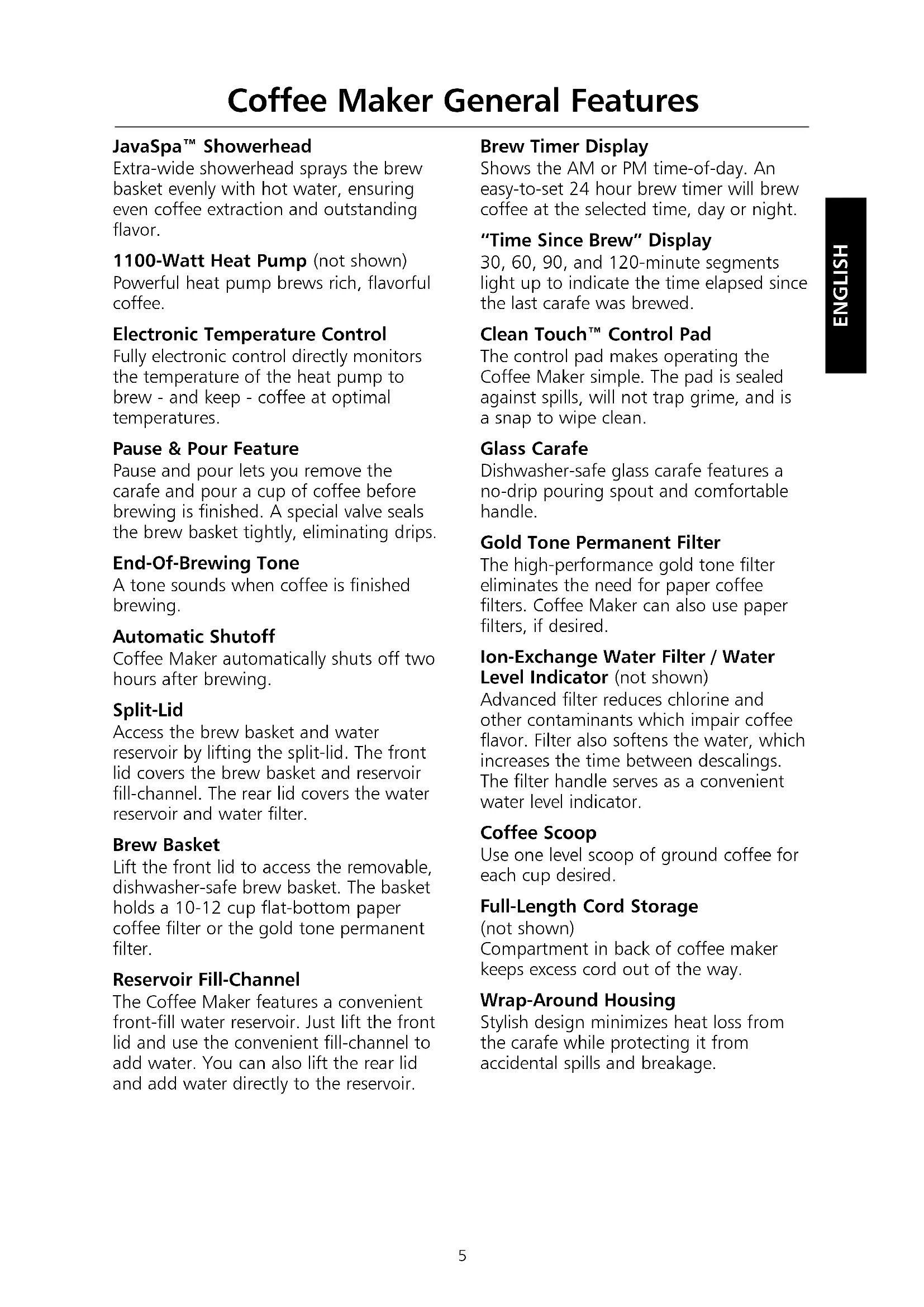
| Housing Material | Stainless steel and plastic |
| Main Features | Programmable 24-hour timer, pause and serve, auto shutoff 2h, 1-4 cup cycle, elapsed time display |
| Heating System | 1100 W heat pump with electronic temperature control |
| Compatible Filter Types | 10-12 cup flat bottom paper filter or gold-tone permanent filter |
| Water Filter | Ion exchange filter (recommended, replace every 3 months) |
| Clean indicator | Yes (lights up at end of cycle if descaling needed) |
| Care and Cleaning | Basket and carafe are dishwasher safe; descale with vinegar or descaling agent |
| Safety | 2-hour auto shutoff, pause and pour function with anti-drip valve, grounded plug |
| Spare Parts and Repairability | Filter basket, glass carafe, gold-tone permanent filter, water filter available |
| General Information | Limited 1-year warranty; KitchenAid customer service at 1-800-541-6390 (United States) |
Frequently Asked Questions - KCM534 KITCHENAID
User questions about KCM534 KITCHENAID
0 question about this device. Answer the ones you know or ask your own.
Ask a new question about this device
Download the instructions for your Coffee machine in PDF format for free! Find your manual KCM534 - KITCHENAID and take your electronic device back in hand. On this page are published all the documents necessary for the use of your device. KCM534 by KITCHENAID.
USER MANUAL KCM534 KITCHENAID
KitchenAid.com KitchenAid.ca
Proof of Purchase & Product Registration
Always keep a copy of the sales receipt showing the date of purchase of your Coffee Maker. Proof of purchase will assure you of in-warranty service.
Before you use your Coffee Maker, please fill out and mail your product registration card packed with the unit. This card will
enable us to contact you in the unlikely event of a product safety notification and assist us in complying with the provisions of the Consumer Product Safety Act. This card does not verify your warranty.
Please complete the following for your personal records:
Model Number
Serial Number
Date Purchased
Store Name and Location
Proof of Purchase & Product Registration Inside Front Cover
Coffee Maker Safety. 2
Important Safeguards 2
Electrical Requirements 3
FEATURES AND OPERATION
Coffee Maker General Features 4
Display and Control Pad Features 6
Preparing Your Coffee Maker for Use 7
Pre-Use Cleaning 7
Installing the Ion-Exchange Water Filter. 7
To Set the Time-of-Day Clock. 7
Operating Your Coffee Maker 8
Brewing Coffee 8
The Pause and Pour Feature 9
Using the Automatic Brew Timer 10
The Cleaning Needed Indicator 10
Coffee Brewing Suggestions: Advice for Great Taste 11
CARE AND CLEANING
Cleaning the Coffee Maker 12
12
Troubleshooting 13
WARRANTY AND SERVICE INFORMATION
KitchenAid® Coffee Maker Warranty. 14
Hassle-Free Replacement Warranty - 50 United States and District of Columbia .........15
Hassle-Free Replacement Warranty - Canada 15
How to Arrange for Warranty Service in Puerto Rico 15
How to Arrange for Service after the Warranty Expires - All Locations 16
How to Arrange for Service Outside these Locations 16
How to Order Accessories and Replacement Parts 16
Coffee Maker Safety
Your safety and the safety of others are very important.
We have provided many important safety messages in this manual and on your appliance. Always read and obey all safety messages.

This is the safety alert symbol.
This symbol alerts you to potential hazards that can kill or hurt you and others.
All safety messages will follow the safety alert symbol and either the word "DANGER" or "WARNING." These words mean:
DANGER
You can be killed or seriously injured if you don't immediately follow instructions.
WARNING
You can be killed or seriously injured if you don't follow instructions.
All safety messages will tell you what the potential hazard is, tell you how to reduce the chance of injury, and tell you what can happen if the instructions are not followed.
IMPORTANT SAFEGUARDS
When using electrical appliances, basic safety precautions should always be followed, including the following:
- Read all instructions.
- Do not touch hot surfaces. Use handles or knobs.
- To protect against electrical shock, do not immerse cord, plugs, or Coffee Maker in water or other liquid.
- Close supervision is necessary when any appliance is used by or near children.
- Unplug Coffee Maker from outlet before cleaning. Allow to cool before putting on or taking off parts, and before cleaning the appliance.
- Do not operate any appliance with a damaged cord or plug, or after the appliance malfunctions or has been damaged in any manner. Return appliance to the nearest Authorized Service Facility for examination, repair, or adjustment.
- The use of accessories not recommended by the appliance manufacturer may result in fire, shock or injury to persons.
- Do not use outdoors.
- Do not let cord hang over edge of table or counter, or touch hot surfaces.
- Do not place on or near a hot gas or electric burner, or in a heated oven.
-
Do not use appliance for other than its intended use.
-
Do not use appliance without lid properly placed on container (carafe).
- The container (carafe) is designed for use with this appliance. It must never be used on a range top.
- Do not set a hot container (carafe) on a wet or cold surface.
- Do not use a cracked container or a container (carafe) having a loose or weakened handle.
- Do not clean container with cleaners, steel wool pads, or other abrasive material.
- This product is designed for household use only.
SAVE THESE INSTRUCTIONS
Electrical Requirements
Volts: 120 V.A.C. only. Hertz: 60 Hz
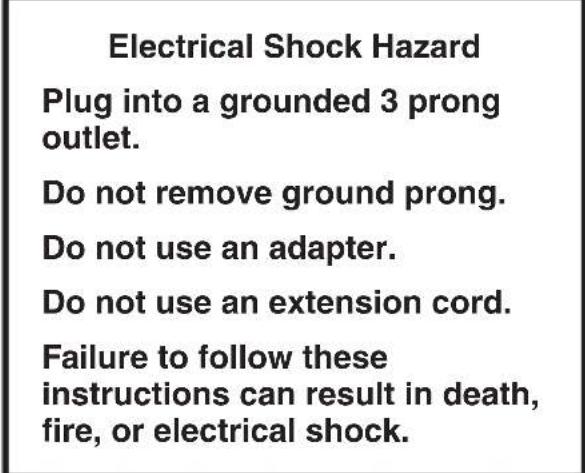
WARNING

Electrical Shock Hazard
Plug into a grounded 3 prong outlet.
Do not remove ground prong.
Do not use an adapter.
Do not use an extension cord.
Failure to follow these instructions can result in death, fire, or electrical shock.
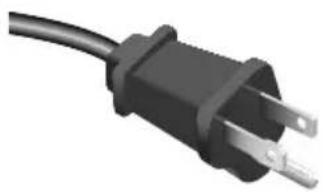
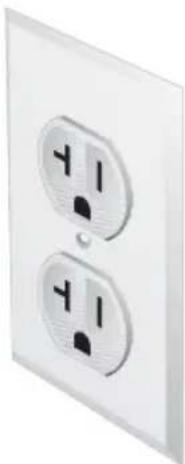
NOTE: Your Coffee Maker has a 3 prong grounded plug. To reduce the risk of electrical shock, this plug will fit in an outlet only one way. If the plug does not fit in the outlet, contact a qualified electrician. Do not modify the plug in any way.
Do not use an extension cord. If the power supply cord is too short, have a qualified electrician or serviceman install an outlet near the appliance.
Coffee Maker General Features

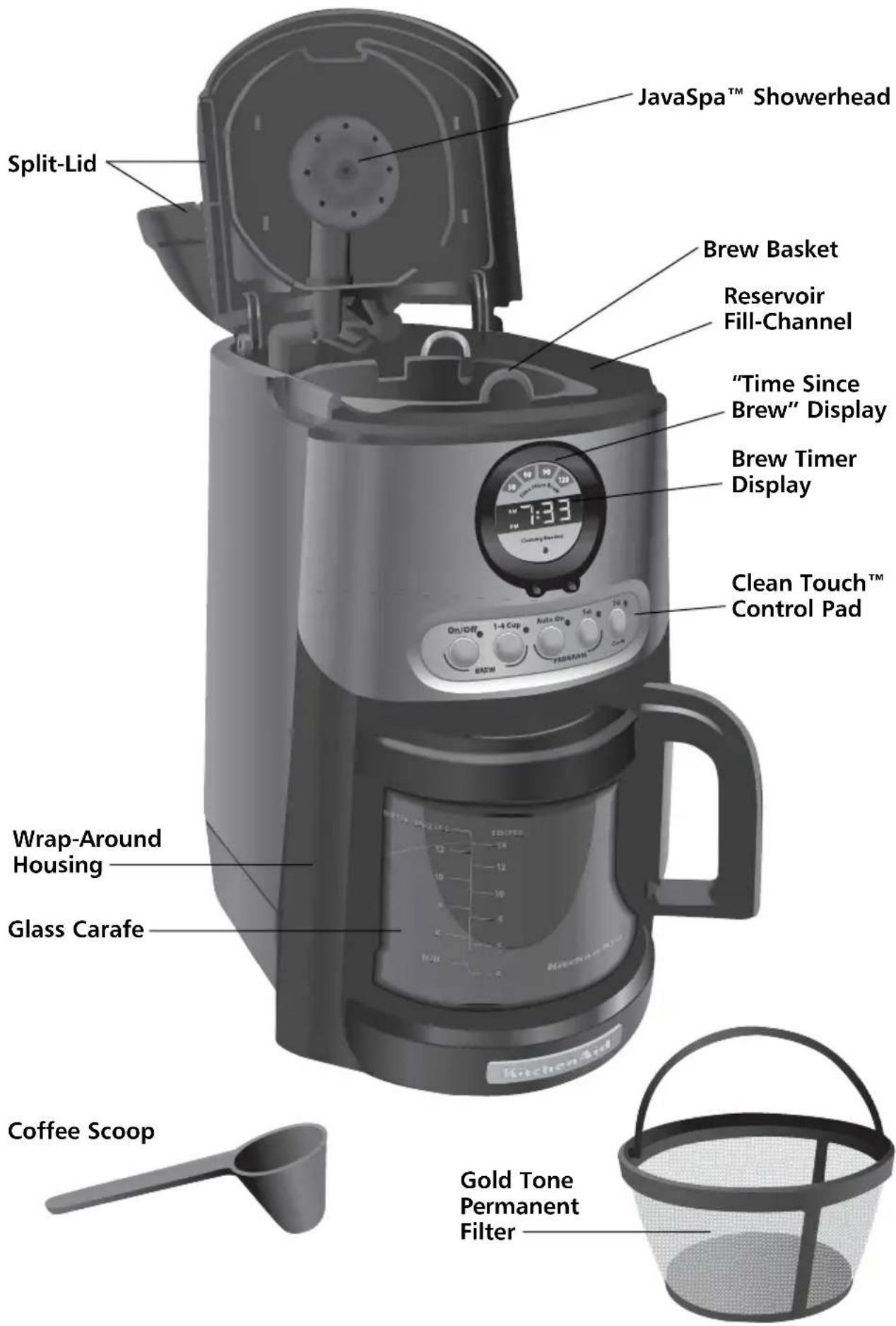
Coffee Maker General Features
JavaSpa™ Showerhead
Extra-wide showerhead sprays the brew basket evenly with hot water, ensuring even coffee extraction and outstanding flavor.
1100-Watt Heat Pump (not shown)
Powerful heat pump brews rich,flavorful coffee.
Electronic Temperature Control
Fully electronic control directly monitors the temperature of the heat pump to brew - and keep - coffee at optimal temperatures.
Pause & Pour Feature
Pause and pour lets you remove the carafe and pour a cup of coffee before brewing is finished. A special valve seals the brew basket tightly, eliminating drips.
End-Of-Brewing Tone
A tone sounds when coffee is finished.
brewing.
Automatic Shutoff
Coffee Maker automatically shuts off two hours after brewing.
Split-Lid
Access the brew basket and water reservoir by lifting the split-lid. The front lid covers the brew basket and reservoir fill-channel. The rear lid covers the water reservoir and water filter.
Brew Basket
Lift the front lid to access the removable, dishwasher-safe brew basket. The basket holds a 10-12 cup flat-bottom paper coffee filter or the gold tone permanent filter.
Reservoir Fill-Channel
The Coffee Maker features a convenient front-fill water reservoir. Just lift the front lid and use the convenient fill-channel to add water. You can also lift the rear lid and add water directly to the reservoir.
Brew Timer Display
Shows the AM or PM time-of-day. An easy-to-set 24 hour brew timer will brew coffee at the selected time, day or night.
"Time Since Brew" Display
30, 60, 90, and 120-minute segments light up to indicate the time elapsed since the last carafe was brewed.
Clean Touch™ Control Pad
The control pad makes operating the Coffee Maker simple. The pad is sealed against spills, will not trap grime, and is a snap to wipe clean.
Glass Carafe
Dishwasher-safe glass carafe features a no-drip pouring spout and comfortable handle.
Gold Tone Permanent Filter
The high-performance gold tone filter eliminates the need for paper coffee filters. Coffee Maker can also use paper filters, if desired.
Ion-Exchange Water Filter / Water Level Indicator (not shown)
Advanced filter reduces chlorine and other contaminants which impair coffee flavor. Filter also softens the water, which increases the time between descalings. The filter handle serves as a convenient water level indicator.
Coffee Scoop
Use one level scoop of ground coffee for each cup desired.
Full-Length Cord Storage
(not shown)
Compartment in back of coffee maker keeps excess cord out of the way.
Wrap-Around Housing
Stylish design minimizes heat loss from the carafe while protecting it from accidental spills and breakage.
Display and Control Pad Features
HSITDN3
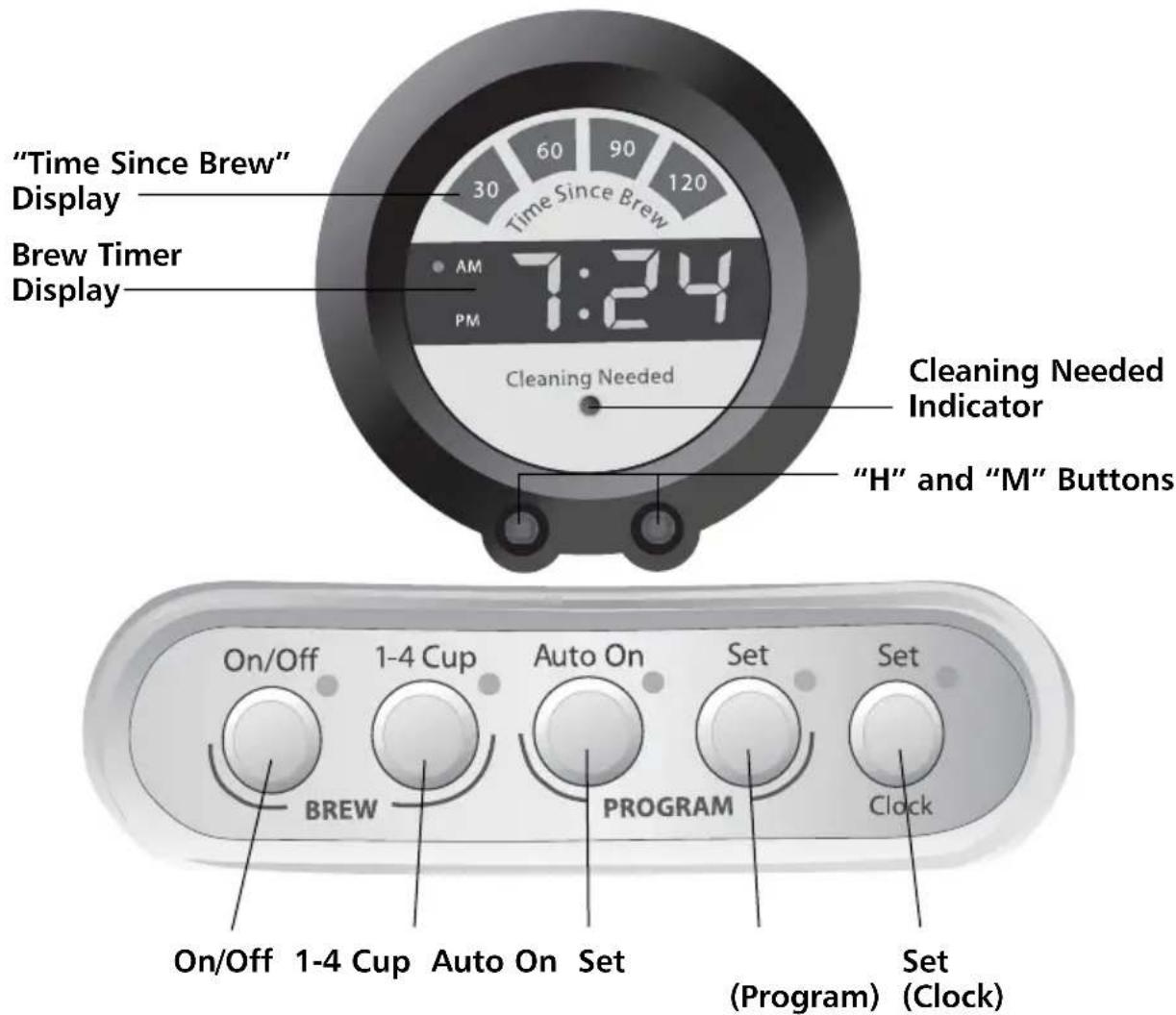
DISPLAY FEATURES:
Brew Timer Display
Shows the time-of-day. Small lights indicate whether the time is AM or PM.
"Time Since Brew" Display
Display shows the time elapsed since the completion of the brewing cycle. The "30" segment will light immediately after brewing. Every 30 minutes, a new segment will light.
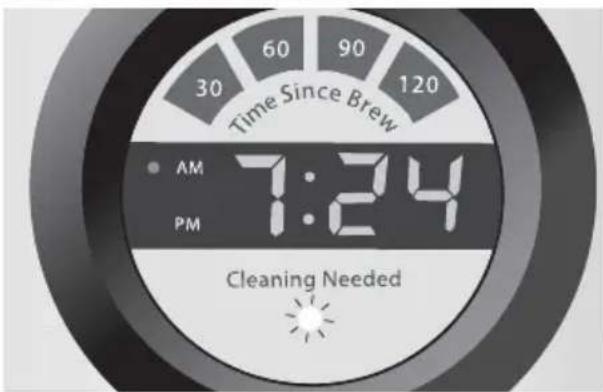
Cleaning Needed Indicator
The indicator will light after brewing if the Coffee Maker requires descaling.
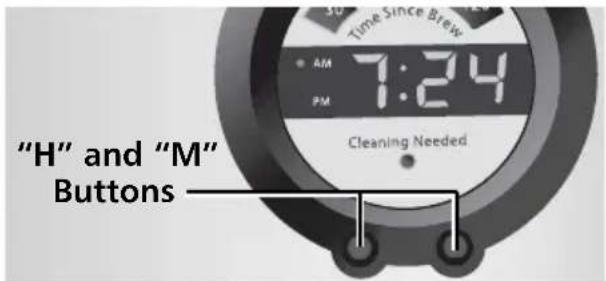
"H" and "M" Buttons
Use the "H" (hour) and "M" (minute) buttons to program the brew timer or set the time-of-day clock.
CONTROL PAD FEATURES:
On/Off
Press to turn the Coffee Maker on or off.
1-4 Cup
This special cycle ensures optimum flavor when brewing small pots of coffee. An indicator light shows when the 1 to 4 cup brew cycle is activated.
Auto On
Press to turn the automatic brew timer on or off.
Set (Program)
Press to program an automatic brew time.
Set (Clock)
Press to set the time-of-day clock.
Preparing Your Coffee Maker for Use
Pre-Use Cleaning
Wash the brew basket, gold tone permanent filter, and carafe in hot, soapy water, then rinse with clean water and dry. Do not use abrasive cleansers or scouring pads.
Installing the Ion-Exchange Water Filter
Use of the ion-exchange water filter is strongly recommended. The filter softens the water while reducing chlorine and other contaminants which impair coffee flavor. The handle of the filter also serves as a water level indicator. Use of the water filter is optional: the Coffee Maker will operate normally without it.
The water filter is for use only with municipally treated tap water or well water that is regularly tested for contaminants.
- The filter consists of a long handle with a filter cartridge at the end.
- Place the filter cartridge in a separate container filled with fresh, cool water. The cartridge should remain submerged in the water for 10 minutes. Rinse the filter under running tap water for 5 seconds after soaking.
- Lift the rear portion of the split-lid using the tabs on either side of the lid.
- Place the filter cartridge in the circular well at the bottom of the water reservoir, aligning the tab on the cartridge with the notch in the well. The water level markings on the filter handle will face forward. Push the cartridge slightly to make sure it fits snugly.
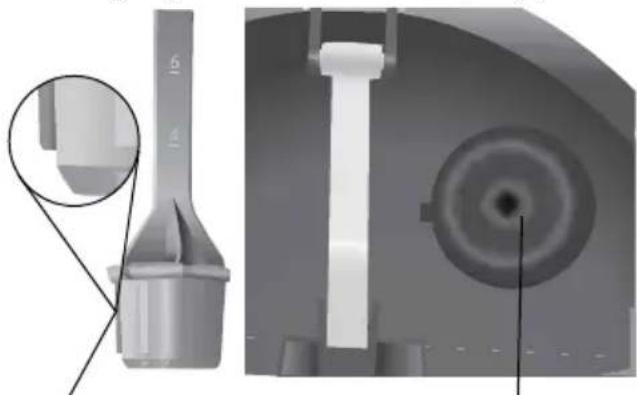
TabNotch & Filter Well
- Every time you install a new filter, run the Coffee Maker through a complete brewing cycle without coffee. Use a full carafe of clean, cool water.
- Replace the filter every three months under normal use. Replace it more often under heavy use or hard-water conditions.
To Set the Time-of-Day Clock

- Plug into a grounded 3 prong outlet.
- When the Coffee Maker is first plugged in or when power is restored after an interruption, the brew timer display will initially show 12:00 am.
- Press the Set (Clock) Button. The brew timer display and Set (Clock) indicator will begin to flash.
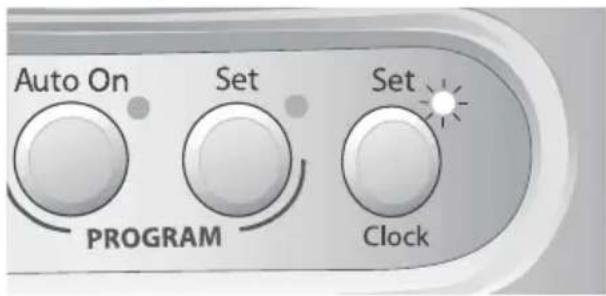
Preparing Your Coffee Maker for Use
- Press the "H" (hour) and "M" (minute) Buttons below the brew timer display to set the hour and minutes. If a "H" or "M" Button is pressed and held, the digits will scroll rapidly. The AM and PM indicator lights on the brew timer display will change when the hour digits roll past "12". Make sure the hour set is correct with respect to AM or PM.
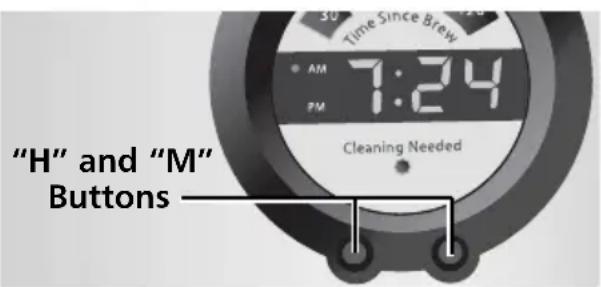
- Press the Set (Clock) Button to exit the clock-setting mode. The digits on the brew timer display will stop flashing and the Set (Clock) indicator will go out. The Coffee Maker will automatically record the displayed time and exit clock-setting mode if no buttons are pressed for 10 seconds.
Operating Your Coffee Maker
BREWING COFFEE
NOTE: Brew one pot of fresh, cool water and discard before brewing the first pot of coffee. (First time use only).
- Fill a carafe with enough fresh, cool water to make the desired amount of coffee. A graduated scale on the side of the glass carafe helps measure the amount of water required. The right side of the scale ("coffee") is a measurement of carafe volume in 414 ounce (125~mL) cups. The left side of the scale ("water") indicates the amount of water needed to produce a given number of cups.
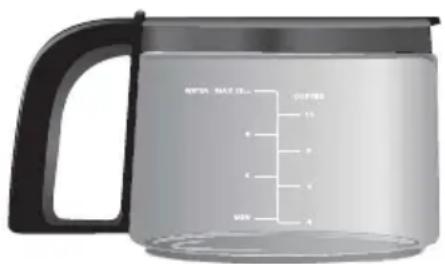
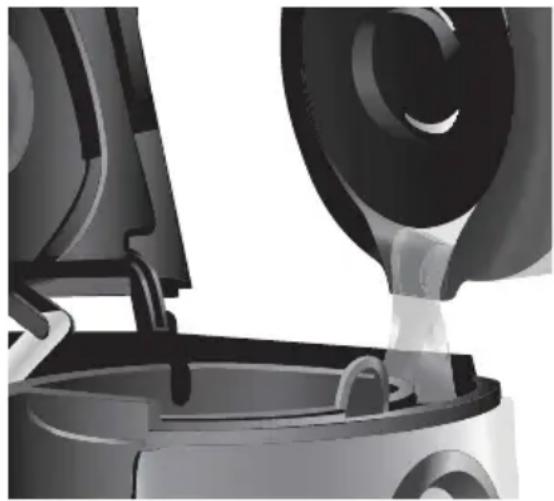
-
After filling the reservoir, place the carafe on the Coffee Maker's carafet tray. Make sure the lid is secure and in the locked position, and the bottom of the carafe is fully seated on the tray - if the carafe isn't seated, the pause and pour feature may engage and may cause water and coffee to overflow the brew basket.
-
Lift the front lid and fill the water reservoir with fresh cool water using the reservoir fill-channel to the right of the brew basket. Water can also be poured directly into the reservoir at the back of the Coffee Maker.
Operating Your Coffee Maker
- Remove the brew basket from the top of the Coffee Maker by grasping the finger loop on the front of the basket.
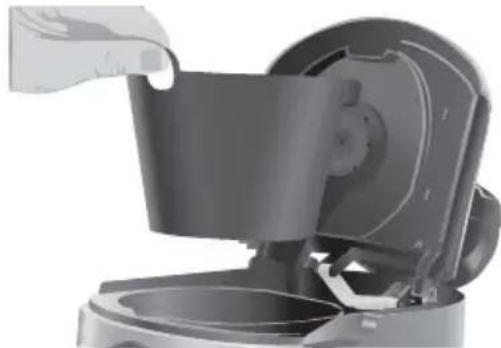
- Insert a 10-12 cup flat-bottom paper filter or the gold tone permanent filter into the brew basket. Do not use both types of filters at the same time. Using both filters might cause water and coffee to overflow the brew basket.
- Using the included scoop, fill the filter with one level scoop of ground coffee for each cup desired. Use a medium grind appropriate for automatic drip coffee makers: too fine a grind will produce bitterness and may clog the coffee filter.
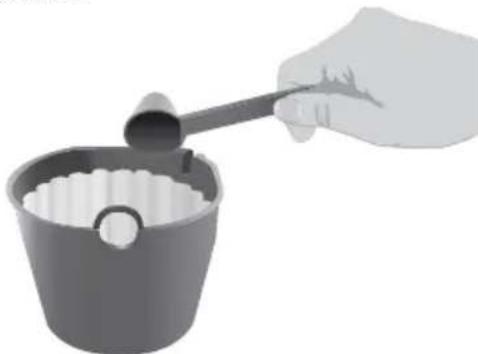
NOTE: Always place the filter and coffee into the removable brew basket. Do not operate the Coffee Maker without the brew basket in place.
- Shake the brew basket slightly to even out the bed of coffee. Place the basket into the Coffee Maker, push it down to seat it securely. Be sure the front lid is fully closed before brewing.
- Press the On/Off Button to begin brewing coffee. If you are only brewing 1 to 4 cups of coffee, press the 1-4 Cup Button immediately after pressing the On/Off Button. The 1 to 4 cup brew cycle heats small quantities of water thoroughly, ensuring optimum flavor with small pots of coffee.
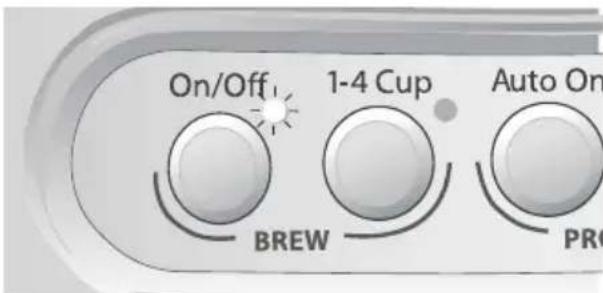
NOTE: Lifting the front lid while coffee is brewing will interrupt the brew process and impair flavor.
- The Coffee Maker will sound the end-of-brewing tone when brewing is complete.
- The "Time Since Brew" display indicates the time elapsed since the completion of the brewing cycle.
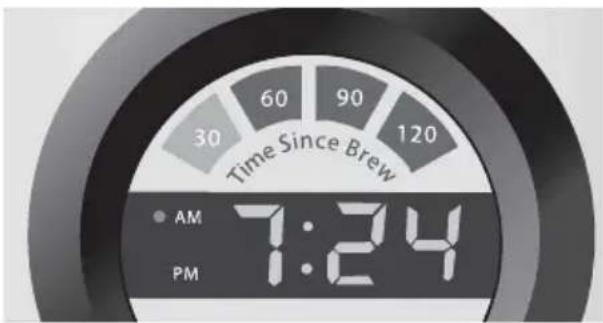
- At the end of 2 hours, the Coffee Maker will automatically shut off. To turn off the Coffee Maker manually, press the On/Off button. The outside of the carafe may be warm to the touch after brewing. Use discretion when placing the carafe on unprotected surfaces immediately after brewing.
- Repeat steps 1-8 to brew additional carafes of coffee. Always turn off the Coffee Maker and allow it to cool for five minutes before starting the next brew cycle.
THE PAUSE AND POUR FEATURE
The pause and pour feature enables you to remove the carafe from the Coffee Maker and pour a cup of coffee before brewing is finished. When the carafe is removed, a special valve stops the flow of coffee from the brew basket. Brewing, however, does not stop. If the carafe is not placed back on the Carafe Tray within 25 seconds, water and coffee will overflow the brew basket.
Operating Your Coffee Maker
USING THE AUTOMATIC BREW TIMER
The Coffee Maker can be programmed to brew coffee at a preset time, making it easy to wake up to fresh coffee every morning. To program and activate the automatic brew timer:
- Press the Set (Program) Button. The brew timer display and Set (Program) indicator will begin to flash. The brew timer display will show the last brew time set.
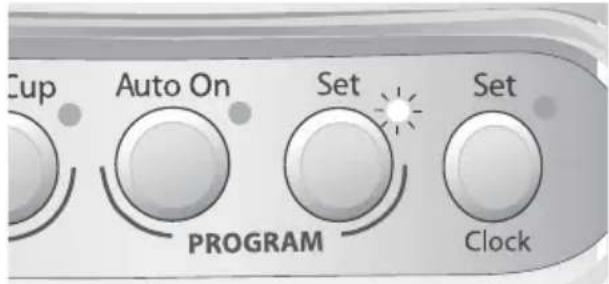
- Press the "H" (hour) and "M" (minute) Buttons below the brew timer display to set the hour and minutes. If a "H" or "M" Button is pressed and held, the digits will scroll rapidly. The AM and PM indicator lights on the brew timer display will change when the hour digits roll past "12". Make sure the desired brew time is correct with respect to AM or PM.
-
After setting the brew time, press the Set (Program) Button to exit the program-setting mode. The Coffee Maker will automatically record the displayed brew time and exit the program-setting mode if no buttons are pressed for 10 seconds.
-
Fill the Coffee Maker with coffee and fresh water, then activate the automatic brew timer by pressing the Auto On Button. The programmed brew time will appear briefly on the brew timer display before it returns to the time-of-day, and the Auto On indicator will illuminate.
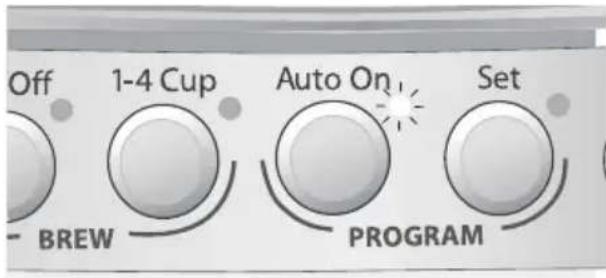
- The Coffee Maker will begin brewing at the programmed time.
- Each time you want the Coffee Maker to brew at the programmed time, activate the automatic brew timer by pressing the Auto On Button. The Coffee Maker will always default to the last brew time set.
NOTE: To cancel automatic brewing, deactivate the brew timer by pressing the Auto On Button. When deactivated, the Auto On indicator light will go out. If program time has not been set prior to pressing Auto On button, the coffee maker will enter program set mode (see "Using the Automatic Brew Timer" on page 10).
THE CLEANING NEEDED INDICATOR
Calcium deposits ("scale") from water will build up in the Coffee Maker heat pump over time and impair brewing efficiency and coffee quality. When the Coffee Maker detects a build-up of scale, the cleaning needed indicator will light after a brewing cycle is complete. Once this occurs, descending should be done as soon as possible to preserve the performance and life of your Coffee Maker. Please see page 12 for descending steps.
Coffee Brewing Suggestions: Advice for Great Taste
Fresh Coffee Beans
Truly great coffee can only come from fresh coffee beans. To preserve the freshness of your coffee beans, keep the beans in an opaque, air-tight container and store them in a cool, dry place. Refrigeration is not recommended, as condensation tends to form on the beans whenever the container is opened. Freezing can help preserve beans stored for an extended period, but it will also impair the flavor.
The Right Grind
The best cup of coffee comes from coffee beans that are properly ground just before brewing. Grinders like the KitchenAid® Blade Coffee Grinding, PRO LINE® Series Burr Coffee Mill, or the KitchenAid® Model A-9® Coffee Mill offer excellent results. When grinding, be sure to grind your coffee to a medium grind level – the appropriate grind for automatic drip coffee makers.
The Proper Amount of Ground Coffee
A good starting point is one scoop of coffee for every cup of brew water marked on the carafe or the water filter guide. Finer grinds usually require less coffee, but may also produce bitterness and clog the filter.
For weaker coffee, brew using the suggested ratio of coffee grounds and water, then dilute with hot water. This maximizes flavor and minimizes bitterness.
Brew Water Purity
For better tasting coffee, use the ion-exchange water filter that comes with your Coffee Maker. It reduces contaminants, softens the water, and enhances flavor. Be sure to replace the filter promptly every three months.
Where local water is extremely poor, you may wish to use bottled water. Do not use distilled water or mineral water since they can damage your Coffee Maker.
Coffee Maker Cleanliness
Since the coffee oils that build up on the brew basket and carafe can go stale and impair the flavor of the brewed coffee, it's important that these two items are cleaned daily in order to make the best-tasting coffee.
Care and Cleaning
Cleaning the Coffee Maker
- Remove the brew basket and carafe from the Coffee Maker.
- Wash the brew basket and gold tone permanent filter in hot, soapy water and rinse with hot water. Do not use abrasive cleansers or scouring pads. These parts can also be washed in the upper rack of a dishwasher.
- Unplug the Coffee Maker and wipe the housing with a warm, soapy cloth. Then wipe clean with a damp cloth and dry with a soft cloth. Do not use abrasive cleansers or scouring pads.
Dscaling the Coffee Maker
The Coffee Maker can be descaled using a packaged descending agent or vinegar. Always mix the descending solution using cool water.
- When using a descending agent, follow the directions on the package for the recommended amounts of descending agent and water to use.
- When using vinegar, fill the carafe with a solution consisting of 12 vinegar and 12 water.
Descending Steps:
- Before descending, always remove the water filter (see "Installing the Ion-Exchange Water Filter" on page 7) and make sure the brew basket contains no coffee or coffee filters.
- Run the Coffee Maker through a complete brewing cycle using a full carafe of the descending solution.
- If the cleaning needed indicator lights after the brewing cycle is complete, repeat Step 2 using fresh descaling solution. Keep repeating Step 2 until the cleaning needed indicator no longer lights after brewing.
- Rinse the Coffee Maker by running it through two brewing cycles using a full carafe of fresh, cool water each time.
- Wash the brew basket in hot, soapy water and rinse with hot water. This part can also be washed in the upper rack of the dishwasher.
- Reinstall or replace the water filter. Replace the filter every three months under normal usage, or more often with heavy use.
- If the brew timer display is not illuminated:
Check to see if the Coffee Maker is plugged into a grounded 3 prong outlet. If it is, check the fuse or circuit breaker on the electrical circuit the Coffee Maker is connected to and make sure the circuit is closed.
- If only a portion of the water added to the Coffee Maker actually brews:
The Coffee Maker requires immediate.
descaling.Please refer to the descaling
instructions on the previous page.
- If "Err4" appears on the brew timer display:
- A button may be jammed. Unplug the Coffee Maker and press each button several times.
WARNING

Electrical Shock Hazard
Plug into a grounded 3 prong outlet.
Do not remove ground prong.
Do not use an adapter.
Do not use an extension cord.
Failure to follow these instructions can result in death, fire, or electrical shock.
- If "Err1", "Err2", or "Err3" appear on the brew timer display:
Press the On/Off Button to reset the Coffee Maker. (If the Coffee Maker has been stored or used in a cool environment, warm the Coffee Maker to normal room temperature before doing this.) If the error codes reappear, there is a problem with the Coffee Maker electronics.
If the problem cannot be fixed with the steps above, please refer to the Warranty and Service section beginning on the following page.
- Plug the Coffee Maker into a grounded 3 prong outlet.
- If "Err4" appears again on the display, repeat this procedure.
KitchenAid® Coffee Maker Warranty
| Length of Warranty: | KitchenAid Will Pay For: | KitchenAid Will Not Pay For: |
| 50 United States, the District of Columbia, Canada, and Puerto Rico: One-year limited warranty from date of purchase. | 50 United States, the District of Columbia and Canada: Hassle-free replacement of your Coffee Maker. See the following page for details on how to arrange for replacement. OR In Puerto Rico: The replacement parts and repair labor costs to correct defects in materials and workmanship. Service must be provided by an Authorized KitchenAid Service Center. To arrange for service, follow the instructions on page 15. | A. Repairs when Coffee Maker is used in other than normal single family home use. B. Damage resulting from accident, alteration, misuse or abuse or use with products not approved by KitchenAid. C. Replacement parts or repair labor costs for Coffee Maker when operated outside the country of purchase. |
DISCLAIMER OF IMPLIED WARRANTY; LIMITATION OF REMEDIES IMPLIED WARRANTYES, INCLUDING TO THE EXTENT APPLICABLE WARRANTYES OF MERCHANTABILITY OR FITNESS FOR A PARTICULAR PURPOSE, ARE EXCLUDING TO THE EXTENT LEGALLY PERMISSIBLE. ANY IMPLIED WARRANTYES THAT MAY BE IMPOSED BY LAW ARE LIMITED TO ONE YEAR, OR THE SHORTEST PERIOD ALLOWED BY LAW. SOME STATES AND PROVINCES DO NOT ALLOW LIMITATIONS OR EXCLUSIONS ON HOW LONG AN IMPLIED WARRANTY OF MERCHANTABILITY OR FITNESS LASTS, SO THE ABOVE LIMITATIONS OR EXCLUSIONS MAY NOT APPLY TO YOU.
IF THIS PRODUCT FAILS TO WORK AS WARRANTED, CUSTOMER'S SOLE AND EXCLUSIVE REMEDY SHALL BE REPAIR OR REPLACEMENT ACCORDING TO THE TERMS OF THIS LIMITED WARRANTY. KITCHENAID AND KITCHENAID CANADA DO NOT ASSUME ANY RESPONSIBILITY FOR INCIDENTAL OR CONSEQUENTIAL DAMAGES. This warranty gives you specific legal rights and you may also have other rights which vary from state to state or province to province.
Hassle-Free Replacement Warranty - 50 United States and District of Columbia
We're so confident the quality of our products meets the exacting standards of KitchenAid that, if your Coffee Maker should fail within the first year of ownership, KitchenAid will arrange to deliver an identical or comparable replacement to your door free of charge and arrange to have your original Coffee Maker returned to us. Your replacement unit will also be covered by our one year limited warranty. Please follow these instructions to receive this quality service.
If your KitchenAid® Coffee Maker should fail within the first year of ownership, simply call our toll-free Customer Satisfaction Center at 1-800-541-6390 Monday through Friday, 8 a.m. to 8 p.m. (Eastern Time), or Saturday, 10 a.m. to 5 p.m. Give the consultant your complete shipping address. (No P.O. Box numbers, please.)
When you receive your replacement Coffee Maker, use the carton and packing materials to pack up your original Coffee Maker. In the carton, include your name and address on a sheet of paper along with a copy of the proof of purchase (register receipt, credit card slip, etc.).
Hassle-Free Replacement Warranty – Canada
We're so confident the quality of our products meets the exacting standards of the KitchenAid brand that, if your Coffee Maker should fail within the first year of ownership, KitchenAid Canada will replace your Coffee Maker with an identical or comparable replacement. Your replacement unit will also be covered by our one year limited warranty. Please follow these instructions to receive this quality service.
If your KitchenAid® Coffee Maker should fail within the first year of ownership, take the Coffee Maker or ship collect to an Authorized KitchenAid Canada Service Centre. In the carton include your name and complete shipping address along with a copy of the proof of purchase (register receipt, credit card slip, etc.). Your replacement Coffee Maker will be returned prepaid and insured. If you are unable to obtain satisfactory service in this manner call our toll-free Customer Interaction Centre at 1-800-807-6777. Or write to us at:
Customer Interaction Centre
KitchenAid Canada
1901 Minnesota Court
Mississauga, ON L5N 3A7
How to Arrange for Warranty Service in Puerto Rico
Your KitchenAid® Coffee Maker is covered by a one-year limited warranty from the date of purchase. KitchenAid will pay for replacement parts and labor costs to correct defects in materials and workmanship. Service must be provided by an Authorized KitchenAid Service Center.
Take the Coffee Maker or ship prepaid and insured to an Authorized KitchenAid Service Center. Your repaired Coffee Maker will be returned prepaid and insured. If you are unable to obtain satisfactory service in this manner, call toll-free 1-800-541-6390 to learn the location of a Service Center near you.
How to Arrange for Service after the Warranty Expires – All Locations
Before calling for service, please review the Troubleshooting section on page 13.
For service information in the 50 United States, District of Columbia, and Puerto Rico,
call toll-free 1-800-541-6390.
Or write to:
Customer Satisfaction Center
KitchenAid Portable Appliances
P.O.Box 218
St. Joseph, MI 49085-0218
Or contact an Authorized Service Center near you.
For service information in Canada, call toll-free 1-800-807-6777.
Or write to:
Customer Interaction Centre
KitchenAid Canada
1901 Minnesota Court
Mississauga, ON L5N 3A7
How to Arrange for Service Outside these Locations
Consult your local KitchenAid dealer or the store where you purchased the Coffee Maker for information on how to obtain service.
For service information in Mexico,
call toll-free
01-800-024-17-17
(JV Distribuciones)
Or
01-800-902-31-00
(Industrias Birtman)
How to Order Accessories and Replacement Parts
To order accessories or replacement parts for your Coffee Maker in the 50 United States, District of Columbia, and Puerto Rico,
call toll-free 1-800-541-6390 Monday through Friday, 8 a.m. to 8 p.m. (Eastern Time), or Saturday, 10 a.m. to 5 p.m.
Or write to:
Customer Satisfaction Center
KitchenAid Portable Appliances
P.O.Box 218
St. Joseph, MI 49085-0218
To order accessories or replacement parts for your Coffee Maker in Canada,
call toll-free 1-800-807-6777.
Or write to:
Customer Interaction Centre
KitchenAid Canada
1901 Minnesota Court
Mississauga, ON L5N 3A7
To order accessories or replacement parts for your Coffee Maker in Mexico,
call toll-free
01-800-024-17-17
(JV Distribuciones)
Or
01-800-902-31-00
(Industrias Birtman)
Table des matieres
INTRODUCTION
Customer Satisfaction Center
KitchenAid Portable Appliances
P.O.Box 218
St. Joseph, MI 49085-0218
Customer Interaction Centre
KitchenAid Canada
1901 Minnesota Court
Mississauga, ON L5N 3A7
Customer Satisfaction Center
KitchenAid Portable Appliances
P.O.Box 218
St. Joseph, MI 49085-0218
Customer Interaction Centre
KitchenAid Canada
1901 Minnesota Court
Mississauga, ON L5N 3A7
Customer Interaction Centre KitchenAid Canada
1901 Minnesota Court
Mississauga, ON L5N 3A7
Customer Satisfaction Center
KitchenAid Portable Appliances
P.O.Box 218
St. Joseph, MI 49085-0218
Customer Interaction Centre
KitchenAid Canada
1901 Minnesota Court
Mississauga, ON L5N 3A7
Customer Satisfaction Center
KitchenAid Portable Appliances
P.O.Box 218
St. Joseph, MI 49085-0218
Customer Interaction Centre
KitchenAid Canada
1901 Minnesota Court
Mississauga, ON L5N 3A7

- Proof of Purchase & Product Registration
- FEATURES AND OPERATION
- CARE AND CLEANING
- WARRANTY AND SERVICE INFORMATION
- Coffee Maker Safety
- Your safety and the safety of others are very important.
- DANGER
- WARNING
- IMPORTANT SAFEGUARDS
- SAVE THESE INSTRUCTIONS
- Electrical Requirements
- Coffee Maker General Features
- JavaSpa™ Showerhead
- 1100-Watt Heat Pump (not shown)
- Electronic Temperature Control
- Pause & Pour Feature
- End-Of-Brewing Tone
- Automatic Shutoff
- Split-Lid
- Brew Basket
- Reservoir Fill-Channel
- Brew Timer Display
- "Time Since Brew" Display
- Clean Touch™ Control Pad
- Glass Carafe
- Gold Tone Permanent Filter
- Ion-Exchange Water Filter / Water Level Indicator (not shown)
- Coffee Scoop
- Full-Length Cord Storage
- Wrap-Around Housing
- Display and Control Pad Features
- HSITDN3
- DISPLAY FEATURES:
- Cleaning Needed Indicator
- "H" and "M" Buttons
- CONTROL PAD FEATURES:
- On/Off
- 1-4 Cup
- Auto On
- Set (Program)
- Set (Clock)
- Preparing Your Coffee Maker for Use
- Pre-Use Cleaning
- Installing the Ion-Exchange Water Filter
- To Set the Time-of-Day Clock
- Operating Your Coffee Maker
- BREWING COFFEE
- THE PAUSE AND POUR FEATURE
- USING THE AUTOMATIC BREW TIMER
- THE CLEANING NEEDED INDICATOR
- Coffee Brewing Suggestions: Advice for Great Taste
- Fresh Coffee Beans
- The Right Grind
- The Proper Amount of Ground Coffee
- Brew Water Purity
- Coffee Maker Cleanliness
- Cleaning the Coffee Maker
- Dscaling the Coffee Maker
- Descending Steps:
- - If the brew timer display is not illuminated:
- - If only a portion of the water added to the Coffee Maker actually brews:
- - If "Err4" appears on the brew timer display:
- Electrical Shock Hazard
- - If "Err1", "Err2", or "Err3" appear on the brew timer display:
- KitchenAid® Coffee Maker Warranty
- Hassle-Free Replacement Warranty - 50 United States and District of Columbia
- Hassle-Free Replacement Warranty – Canada
- How to Arrange for Warranty Service in Puerto Rico
- How to Arrange for Service after the Warranty Expires – All Locations
- How to Arrange for Service Outside these Locations
- How to Order Accessories and Replacement Parts
- Table des matieres
- INTRODUCTION
Brand : KITCHENAID
Model : KCM534
Category : Coffee machine