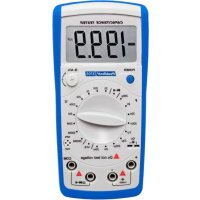
3705 - Multimeter PeakTech - Free user manual and instructions
Find the device manual for free 3705 PeakTech in PDF.



| Product Type | Digital Multimeter |
| Brand | PeakTech |
| Model | 3705 |
| Display | LCD 21 mm, 3½ digits, max 1999 counts |
| Basic Accuracy | ±0.5% (capacitance), ±0.8% (resistance), ±1% (high resistance) |
| Capacitance Range | 200 pF to 20 mF |
| Resistance Range | 20 Ω to 2000 MΩ |
| Diode Test | Yes, open circuit voltage 2.8 V |
| Continuity Test | Yes, audible signal if resistance < 120 Ω |
| Transistor Test | Yes, hFE measurement (0-1000) for NPN/PNP |
| Power Supply | 9 V battery (NEDA 1604) |
| Dimensions | 172 x 83 x 38 mm |
| Weight | Approx. 310 g |
| Operating Temperature | 0 °C to 40 °C, RH < 70 % |
| Storage Temperature | -20 °C to 50 °C, max RH 75 % |
| Overload Protection | Fuse 0.315 A / 250 V |
| Safety | Overvoltage category II, pollution degree 2 |
| Standards | CE (2014/30/EU, 2011/65/EU) |
| Included Accessories | Test leads, battery, user manual |
| Cleaning | Damp cloth, mild detergent (avoid liquid penetration) |
| Maintenance | Battery replacement (9 V) and fuse replacement (0.315 A/250 V) |
| Calibration | Recommended after 1 year |
Frequently Asked Questions - 3705 PeakTech
User questions about 3705 PeakTech
0 question about this device. Answer the ones you know or ask your own.
Ask a new question about this device
Download the instructions for your Multimeter in PDF format for free! Find your manual 3705 - PeakTech and take your electronic device back in hand. On this page are published all the documents necessary for the use of your device. 3705 by PeakTech.
USER MANUAL 3705 PeakTech
natural_image
Line drawing of a toy car interior with no visible text or symbolschemical
Three identical chemical reaction diagrams showing oxygen and hydrogen species with cross-sectional viewsThis product complies with the requirements of the following directives of the European Union for CE conformity: 2014/30/EU (electromagnetic compatibility), 2011/65/EU (RoHS).
Overvoltage category II; pollution degree 2.
To ensure safe operation of the equipment and eliminate the danger of serious injury due to short-circuits (arcing), the following safety precautions must be observed.
Damages resulting from failure to observe these safety precautions are exempt from any legal claims whatever.
* Do not exceed the maximum permissible input ratings (danger of serious injury and/or destruction of the equipment).
* Replace a defective fuse only with a fuse of the original rating. Never short-circuit fuse or fuse holding.
* Disconnect test leads or probe from the measuring circuit before switching modes or functions.
* Check test leads and probes for faulty insulation or bare wires before connection to the equipment.
* To avoid electric shock, do not operate this product in wet or damp conditions. Conduct measuring works only in dry clothing and rubber shoes, i. e. on isolating mats.
* Never touch the tips of the test leads or probe.
* Comply with the warning labels and other info on the equipment.
* Always start with the highest measuring range when measuring unknown values.
* Do not subject the equipment to direct sunlight or extreme temperatures, humidity or dampness.
* Do not subject the equipment to shocks or strong vibrations.
* Do not operate the equipment near strong magnetic fields (motors, transformers etc.).
* Keep hot soldering irons or guns away from the equipment.
* Allow the equipment to stabilize at room temperature before taking up measurement (important for exact measurements).
* Do not input values over the maximum range of each measurement to avoid damages of the meter.
* Replace the battery as soon as the battery indicator “BAT” appears. With a low battery, the meter might produce false reading that can lead to electric shock and personal injury.
* Fetch out the battery when the meter will not be used for long period.
* Periodically wipe the cabinet with a damp cloth and mid detergent. Do not use abrasives or solvents.
* The meter is suitable for indoor use only
* Do not operate the meter before the cabinet has been closed and screwed safely as terminal can carry voltage.
* Do not store the meter in a place of explosive, inflammable substances.
* Do not modify the equipment in any way
* Opening the equipment and service – and repair work must only be performed by qualified service personnel
* -Measuring instruments don't belong to children hands.-
Cleaning the cabinet
Clean only with a damp, soft cloth and a commercially available mild household cleanser. Ensure that no water gets inside the equipment to prevent possible shorts and damage to the equipment.
2. Specifications
| Display | 31⁄2 digit 21 mm liquid crystal (LCD) with an maximum reading of 1999 |
| Polarity | automatic, positive implied, negative polarity indication |
| Overrange | "1" is displayed |
| Zero | automatic |
| Low Battery Indication | the battery-symbol is displayed when the battery voltage drops below the operating level |
| Measurement Rate | 2,5 times per second, nominal |
| Accuracy | stated accuracy at 23°C ± 5°C < 75% relative humidity |
| Power | 9-Volt-battery, NEDA 1604 |
| Operating Environment | 0°C to 40°C at < 70% relative humidity |
| Storage Temperature | -20°C to + 50°C at max. 75% relative humidity (battery must be removed from meter) |
| Dimensions (HxWxD) | 172 mm x 83 mm x 38 mm |
| Weight | approx. 310 g |
| Accessories | Test leads, battery, operation manual |
3. Measuring Functions
3.1. Capacitance
| Range | Resolution | Accuracy | testing frequency |
| 200 pF | 0,1 pF | ± 0,5% rdg. + 10 dgt. | 800 Hz |
| 2 nF | 1 pF | ||
| 20 nF | 10 pF | ||
| 200 nF | 100 pF | ||
| 2 μF | 1 nF | ||
| 20 μF | 10 nF | 80 Hz | |
| 200 μF | 100 nF | 8 Hz | |
| 2 mF | 1 μF | ± 2,0% rdg. + 2dgt. | |
| 20 mF | 10 μF |
* Overload protection: 0,315A / 250V fuse
* If the meter can not adjust to zero, you could se the tested values minus the open circuit value to get the correct measurement values.
3.2. Resistance
| Range | Resolution | Accuracy | Overload Protection |
| 20 Ω | 0,01 Ω | ± 1,0% rdg. + 5dgt. | 250V_rms |
| 200 Ω | 0,1 Ω | ± 0,8% rdg. + 3dgt. | |
| 2 kΩ | 1 Ω | ± 0,8% rdg. +1dgt. | |
| 20 kΩ | 10 Ω | ||
| 200 kΩ | 100 Ω | ||
| 2 MΩ | 1 kΩ | ||
| 20 MΩ | 10 kΩ | ± 1,0% rdg + 2dgt. | |
| 200 MΩ | 100 kΩ | ± 5.0% rdg. + 10dgt. | |
| 2000 MΩ | 1 MΩ | Reference only |
* When you short the test leads in the 200 Ω range, your meter displays a small value (no more than 0.3 Ω). This value is due to your meter's and test leads internal resistance. Make a note of this value and subtract it from small resistance measurements for better accuracy.
3.3 Continuity and Diodes
| Function | Range | Resolution | Overload Protection |
| Diode | 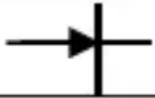 | 1mV | 250V_rms |
| Continuity | ·)))) | 1 Ω |
Remarks:
Continuity: Audible continuity threshold: Less than
120 Ω
3.4 Transistor-Test
| Range | Resolution | Test condition | Overload protection |
| hFE | 1β | V_CE = 2,8V I_bo = 10μA | 250V_rms |
Remarks:
Display read approx. hFE (0-1000) or transistor under test (all types)
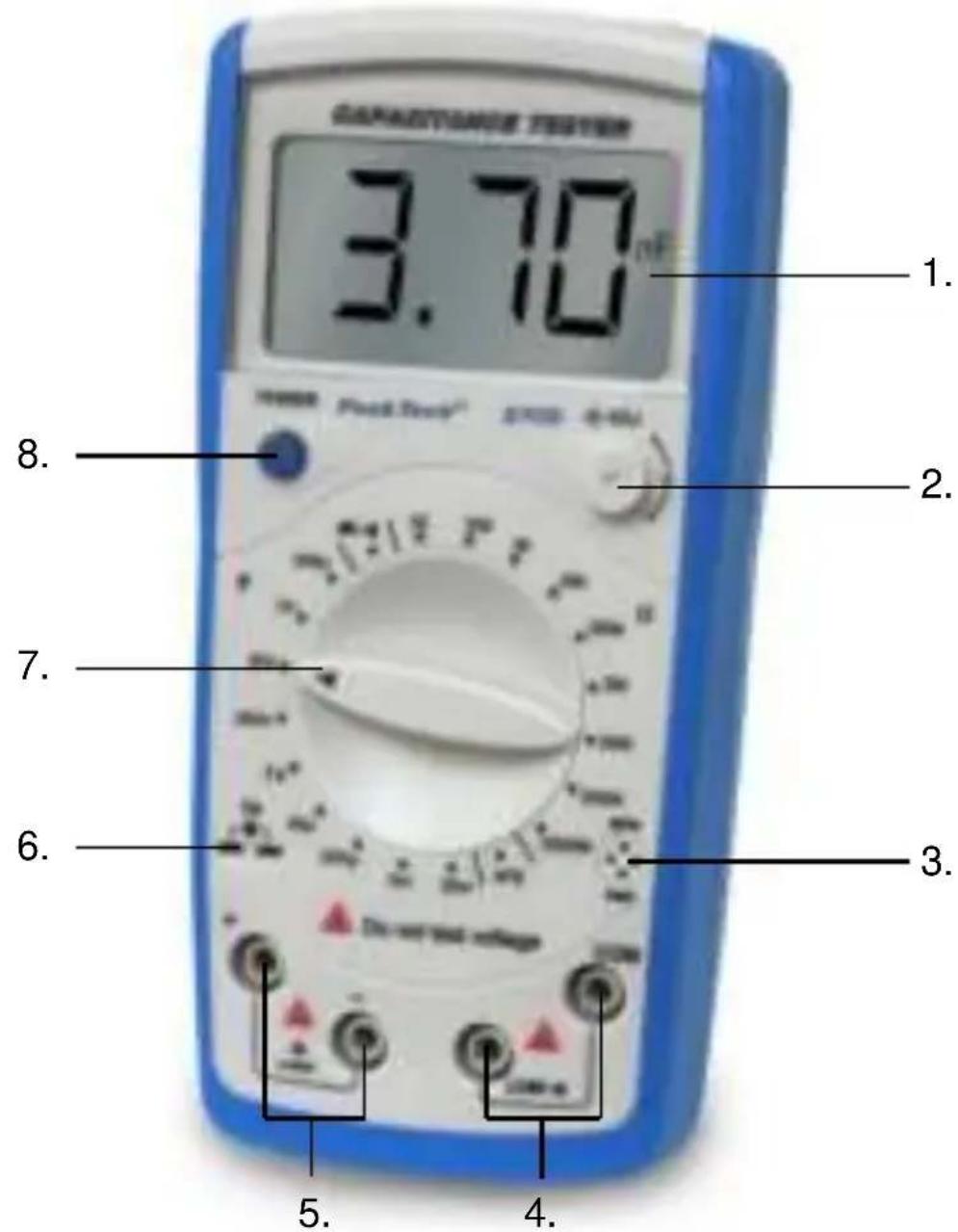
4. Front View
text_image
CANADOTOMATE TESTER 3.70 nF 1. 2. 8. 7. 6. 3. 5. 4.- LCD Display
- Capacitance Zero Adjustment Switch
- Transistor Jack
- Resistance, Diode and Continuity Buzzer Input Terminal
- Capacitance Input Terminal
- Small Value Capacitance Jack
- Rotary Switch
- Power Button
4.1 Display Symbol
text_image
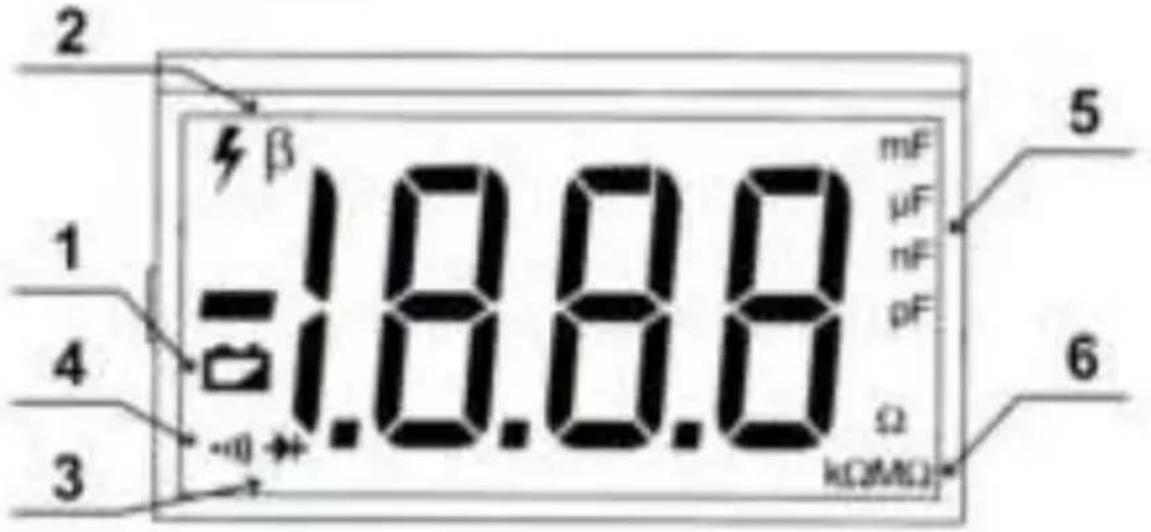
2 1 4 3 β -18.80 mF μF nF pF Ω kΩ/Ω 5 6| Symbol | Meaning | |
| 1 |  | The battery is lowWARNING!To avoid false readings, which could lead to possible electric shock or personal injury, replace the battery as soon as the battery indicator appears. |
| 2 | β | Transistor Test |
| 3 | 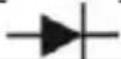 | Test of Diode |
| 4 | ·))) | The continuity buzzer is on. |
| 5 | pF, nF, F, mF | Farad. The unit of capacitancepF: Picofarad 1 × 10^-12 or0,000000000001 FaradnF: Nanofarad 1 × 10^-9 or0,000000001 FaradμF: Microfarad 1 × 10^-6 or0,000001 FaradmF: Millifarad 1 × 10^-3 or 0,001 Farad |
| 6 | Ω, kΩ, MΩ | Ω: Ohm. The unit of resistancekΩ: kilo-Ohm 1 × 10^3 or 1000 ΩMΩ: Mega-Ohm 1 × 10^6 or 1000000 Ω |
5. Operation
5.1. General instructions
However, electrical noise or intense electromagnetic fields in the equipment may disturb the measurement circuit. Measuring instruments will also respond to unwanted signals that may be present within the measurement circuit. Users should exercise care and take appropriate precautions to avoid misleading results when making measurements in the presence of electronic interference.
5.2. Capacitance
WARNING ! Discharge capacitor before trying to measure it!
- Set the Function/Range switch to the desired range
- Insert the test leads directly into the socket or test leads socket CX.
- Read the capacitance directly from the display
Note
In lower range subtract residual offset reading from the result with test leads opening.
WARNING!
Never apply an external voltage to socket damage to the meter may result.
5.3. Resistance
WARNING!
Never apply an external voltage to the sockets damage to the meters may result.
- Set the Function/Range switch to the desired range
- Insert the red test lead into Ω (▶|·))) socket and the black test lead into COM-socket.
- Read the resistance directly from the display
Note
* The resistance in the test leads can diminish accuracy on the lowest (200 Ω) range. The error is usually 0.1 to 0.2 Ω for a standard pair of test leads. To determine the error, short the test leads together and then use the (REL) Relative mode to automatically subtract the lead resistance from resistance measurements.
* For high resistance measurement (>1MΩ), it is normal taking several seconds to obtain a stable reading.
5.4. Diode Test
WARNING!
To avoid damages to the Meter or to the devices under test, disconnect circuit power and discharge all the high-voltage, capacitors before measuring diodes and continuity.
Testing Diodes
Use the diode test to check diodes, transistors, and other semiconductor devices. The diode test sends a current through the semiconductor junction. And then measures the voltage drop across the junction. A good silicon junction drops between 0,5 V and 0,8 V.
To test a diode out of a circuit, connect the Meter as follows:
- Insert the red test clip into the Ω → ○))) terminal and the black test clip into the COM terminal.
- Set the rotary switch to o)))
- For forward voltage drop readings on any semiconductor component, place the red test clip on the component's anode and place the black test clip on the component's cathode.
The display shows the diode forward voltage drop's nearest value.
Note:
* In a circuit, a good diode should still produce a forward voltage drop reading of 0,5 V to 0,8 V; however, the reverse voltage drop reading can vary depending on the resistance of other pathways between the probe tips.
* Connect the test clips to the proper terminals as said above to avoid error display. The LCD will display “1” indicating open-circuit for wrong connection. The unit of diode is Volt (V), displaying the positive-connection voltage-drop value.
* When diode measurement has been completed disconnect the connection between the testing clips and the circuit under test and remove the testing clips and the circuit under test and remove the testing clips away from the input terminals of the Meter.
5.5. Testing for Continuity
To test for continuity, connect the Meter as below:
- Insert the red test clip into the Ω → 。))) terminal and the black test clip into the COM terminal.
- Set the rotary switch to o)))
- Connect the test clips across with the object being measured.
- The beeper comes on continuously when the test resistance <20 .
- The Meter displays the value of the test resistance.
Note:
* The LCD displays "1" indicating the circuit being tested is open.
* When continuity test has been completed, disconnect the connection between the testing clips and the circuit under test and remove the testing clips away from the input terminals of the Meter.
5.6. Transistor hFE Measurement
To measure transistor, set up the Meter as follows:
- Check that the transistor is PNP or NPN type.
- Insert the transistor to be measured to the corresponding Transistor Jack.
- The Meter displays the tested transistor's nearest value.
Note:
* When transistor measurement has been completed, disconnect the connection between the testing clips and the circuit under test and remove the testing clips away from the input terminals of the Meter.
6. Maintenance of the unit
WARNING!
Remove all the test leads before changing battery.
6.1. Battery Replacement
WARNING!
To avoid false readings, which could lead to possible electric shock or personal injury, replace the battery as soon as the battery indicator “-+” “appears.
To replace the battery:
- Turn the Meter power off and remove all connections from the terminals.
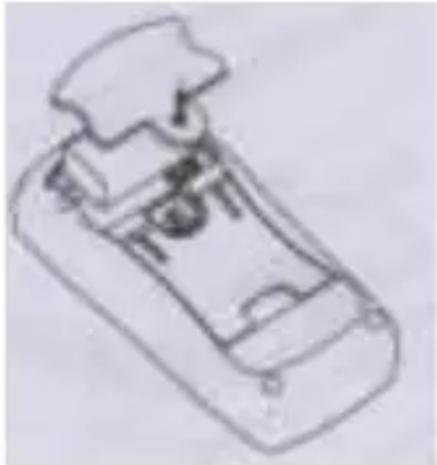
- Remove the screw from the battery compartment, and separate the battery compartment from the case bottom.
- Remove the battery from the battery compartment.
- Replace the battery with a new 9V battery (NEDA 1604, 6F22 or 006P)
- Rejoin the case bottom and battery compartment, and reinstall the screw.
natural_image
Simple line drawing of a toy car with no text or symbolsBatteries, which are used up dispose duly. Used up batteries are hazardous and must be given in the for this being supposed collective container.
6.2. Notification about the Battery Regulation
The delivery of many devices includes batteries, which for example serve to operate the remote control. There also could be batteries or accumulators built into the device itself. In connection with the sale of these batteries or accumulators, we are obliged under the Battery Regulations to notify our customers of the following:
Please dispose of old batteries at a council collection point or return them to a local shop at no cost. The disposal in domestic refuse is strictly forbidden according to the Battery Regulations. You can return used batteries obtained from us at no charge at the address on the last side in this manual or by posting with sufficient stamps.
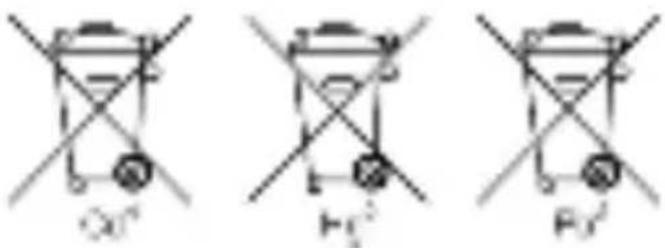
Contaminated batteries shall be marked with a symbol consisting of a crossed-out refuse bin and the chemical symbol (Cd, Hg or Pb) of the heavy metal which is responsible for the classification as pollutant:
text_image
O0' H1' F0'- "Cd" means cadmium.
- "Hg" means mercury.
- "Pb" stands for lead.
6.3. Replacing the Fuse
WARNING!
To avoid electrical shock or arc blast, or personal injury or damage to the Meter, use specified fuses ONLY in accordance with the following procedure.
To replace the Meter's fuse:
- Turn the Meter power off and remove all connections from the terminals.
- Remove the screw from the battery compartment, and separate the battery compartment from the case bottom.
- Remove the screws from the case bottom, and separate the case top from the case bottom.
- Remove the fuse by gently prying one end loose, then take out the fuse from its bracket.
- Install ONLY replacement fuses with the identical type and specification as follows and make sure the fuse is fixed firmly in the bracket. Fuse 1: 0.315 A, 250 V, fast type fuse, ∅ 5 x 20 mm
- Rejoin the battery compartment and the case top, and reinstall the screw.
- Rejoin the case bottom and case top, and reinstall the screws.
All rights, also for translation, reprinting and copy of this manual or parts are reserved. Reproductions of all kinds (photocopy, microfilm or other) only by written permission of the publisher.
This manual is according the latest technical knowing. Technical changings which are in the interest of progress, reserved.
We herewith confirm that the units are calibrated by the factory according to the specifications as per the technical specifications.
We recommend to calibrate the unit again, after 1 year.
© PeakTech®
| Plage | Résolution | Conditions essai | Protection surcharge |
| hFE | 1β | V_CE = 2,8V I_bo = 10μA | 250V_eff |