QuikServe 76026 - Oven WestBend - Free user manual and instructions
Find the device manual for free QuikServe 76026 WestBend in PDF.


| Specification | Value |
|---|---|
| Product Type | Countertop Oven |
| Brand | WestBend |
| Model | QuikServe 76026 |
| Power Supply | 120 V AC, 60 Hz |
| Cooking Modes | Pizza, Toast, Snack, Bake, Warm |
| Heating Element Selection | Top, Bottom, Top and Bottom |
| Timer | Programmable up to 99 minutes (estimated) |
| Turntable | Yes, automatic rotation for even cooking |
| Auto Shut-off | Audible alarm when cooking is complete, shuts off after cycle |
| Included Accessories | Baking pan, drip tray |
| Cleaning | Pan and drip tray dishwasher safe |
| Exterior Care | Wipe with a damp cloth, do not use abrasive cleaners |
| Safety | Polarized plug, do not immerse, hot surfaces |
| Warranty | 1 year limited |
| Country of Use | USA and Canada only |
Frequently Asked Questions - QuikServe 76026 WestBend
User questions about QuikServe 76026 WestBend
0 question about this device. Answer the ones you know or ask your own.
Ask a new question about this device
Download the instructions for your Oven in PDF format for free! Find your manual QuikServe 76026 - WestBend and take your electronic device back in hand. On this page are published all the documents necessary for the use of your device. QuikServe 76026 by WestBend.
USER MANUAL QuikServe 76026 WestBend
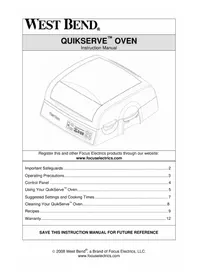
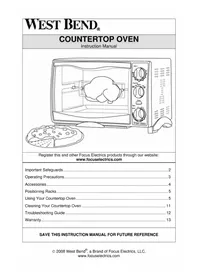
| WEST BEND® QUIKSERVE™ OVEN Instruction Manual |
| Register this and other Focus Electronics products through our website: www.focuselectronics.com |
| Important Safeguards......2 Operating Precautions......3 Control Panel......4 Using Your QuikServe™ Oven......5 Suggested Settings and Cooking Times......7 Cleaning Your QuikServe™ Oven......8 Recipes......9 Warranty......12 |
| SAVE THIS INSTRUCTION MANUAL FOR FUTURE REFERENCE |

CAUTION
To prevent personal injury or property damage, read and follow all instructions and warnings.
When using electrical appliances, basic safety precautions should always be followed including the following:
- Read all instructions, including these important safeguards and the care and use instructions in this manual.
- Do not touch hot surfaces. Use handles or knobs.
- To protect against electric shock, do not immerse cord, plugs, or other electric parts in water or other liquids.
- Close supervision is necessary when this appliance is used by or near children.
- Unplug from outlet when not in use and before cleaning. Allow to cool before putting on or taking off parts.
- Do not operate this appliance with a damaged cord or plug, after the appliance malfunctions or if the appliance is dropped or damaged in any manner. If you experience any problems with your appliance, unplug it immediately from the electrical outlet. For service information see warranty page.
- The use of accessory attachments not recommended by Focus Electronics may cause injuries.
- Do not use this appliance outdoors.
- Do not let cord hang over the edge of a table or counter, or touch hot surfaces.
- Do not place on or near a hot gas or electrical burner or in a heated oven.
- Extreme caution must be used when moving an appliance containing hot oil or other hot liquids.
- To disconnect, turn all controls to "OFF", then remove plug from wall outlet.
- Do not use appliance for other than intended use.
- This appliance has a polarized plug (one blade is wider than the other). To reduce the risk of electric shock, this plug is intended to fit into a polarized outlet only one way. If the plug does not fit fully into the outlet, reverse the plug. If it still does not fit, contact a qualified electrician. Do not attempt to modify the plug in any way.
- Use extreme caution when removing the trays or disposing of hot grease.
- Do not clean with metal scouring pads. Pieces can break off of the pad and touch electrical parts, creating a risk of electrical shock.
-
Oversize foods or metal utensils must not be inserted in this appliance as they may create a fire or risk of electric shock.
-
A fire may occur if the appliance is covered or touching flammable material including curtains, draperies, walls and the like, when in operation. Do not store any item on top of appliance when in operation.
- Extreme caution should be exercised when using containers constructed of other than metal or glass. Do not store any materials, other than manufacturers recommended accessories in this oven when not in use.
- Do not place any of the following materials in the oven: plastic, paper or cardboard.
- Do not cover racks, trays or any parts of the oven with aluminum foil, as overheating will occur.
- Always turn control to "OFF" and unplug the appliance from outlet when not in use and before cleaning.
- For household use only.

CAUTION
To prevent personal injury or property damage, read and follow all instructions and warnings.
OPERATING PRECAUTIONS
- This device is not intended to heat oil or other liquids.
- Do not use sharp utensils to clean oven door glass as scratching may weaken it and cause shattering.
- Do not touch heating elements as serious burns may result.
- Set cooking containers, pans, and trays on a hot pad, trivet or other heat protective surface. Do not set directly on the counter, table or other surface.
- Failure to clean after each use may result in fire hazard.
- Be extremely cautious of steam as you lift the cover.
- Unplug oven and close door if fire is observed.
- A short power-supply cord is provided to reduce risks resulting from becoming entangled in or tripping over a longer cord.
- Longer, detachable power-supply cords or extension cords are available and may be used if care is exercised in their use. While use of an extension cord is not recommended, if you must use one, the marked electrical rating of the detachable power-supply cord or extension cord should be at least as great as the electrical rating of the appliance. If the appliance is of the grounded type, the extension cord should be a grounding-type 3-wire cord. The cord should be arranged so that it will not hang over the counter top or tabletop where it can be pulled by children or tripped over.
- Do not attempt to repair this product yourself.
SAVE THESE INSTRUCTIONS
CONTROL PANEL
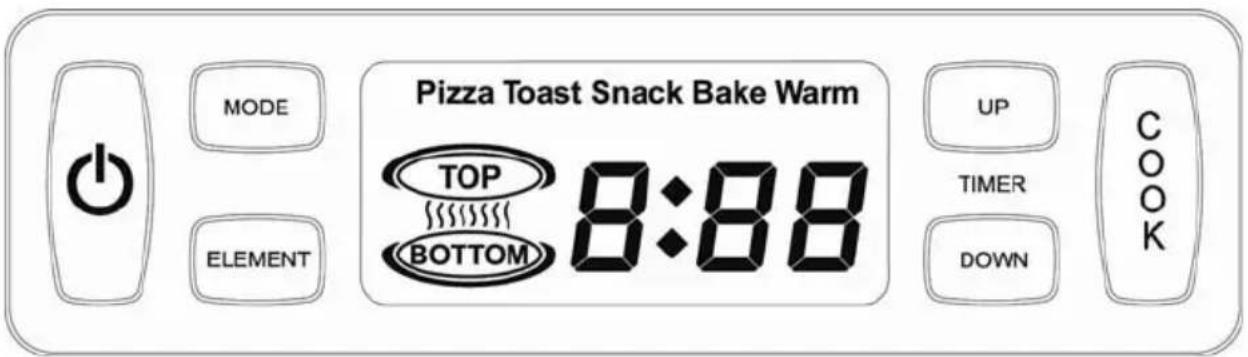
MODE
LEMENT
UP
TIMER
DOWN
COOK
Power button. Turns the oven on and off.
Selects the desired cooking mode; Pizza, Toast, Snack, Bake, or Warm
Selects an individual heating element setting for optimum browning; Top, Bottom,Top and Bottom.Note: Element selection is not available with all cooking modes.
Programs the cooking time.
Confirms the selected settings and begins the cooking process.
Before first use: Remove any stickers or labels from heating surfaces. Make sure the oven is free from any paper or objects not intended for use in the oven. Clean the interior, baking tray and other accessories as described in the "Cleaning Your QuikServe Oven" section of this manual.
- A small amount of smoke and/or odor may occur upon heating due to the release of manufacturing oils – this is normal.
- Some minor expansion/contraction sounds may occur during heating and cooling – this is normal.
The QuikServe™ Oven does not require preheating for most foods. For suggested cooking times, refer to the cooking guide in this booklet rather than the food-packaging recommendations. Most foods will cook faster in the QuikServe™ Oven than in a conventional oven
- Place the QuikServe ^TM Oven on a dry, level, heat-resistant surface, away from any edge.
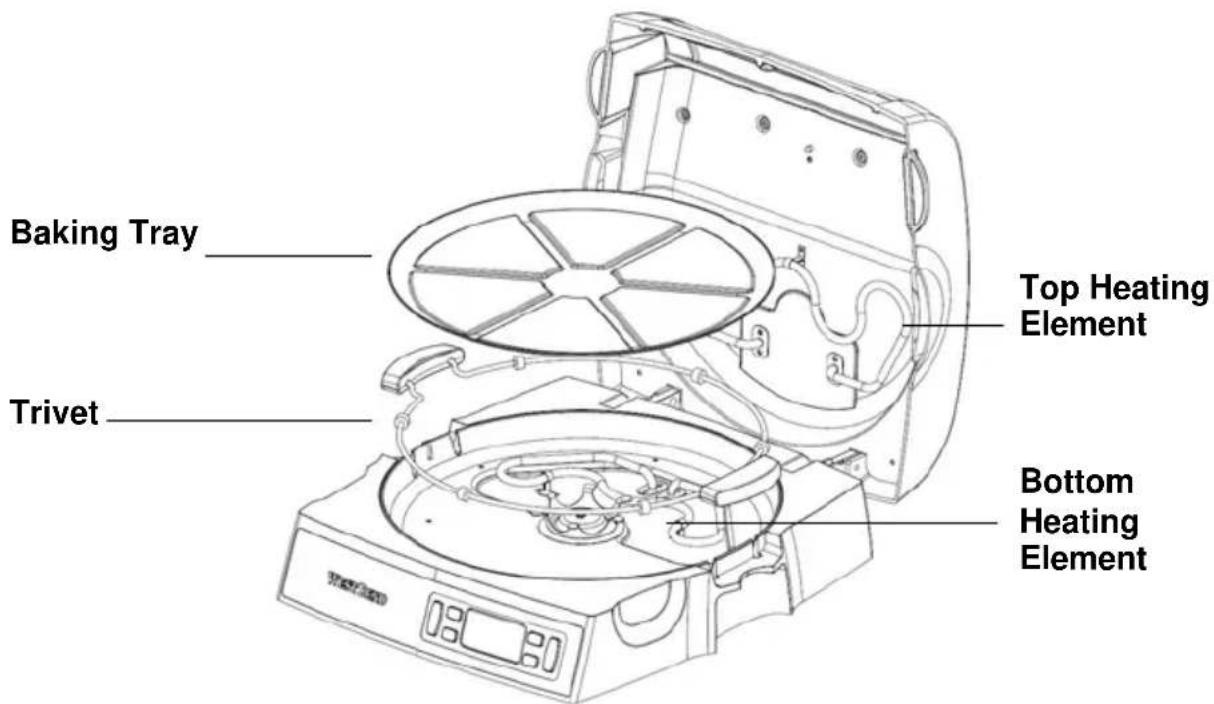
- Open the cover and position the trivet with handles in to the oven. Note: The trivet should always be in position in the oven while cooking.
- Place the baking tray in to the oven, aligning the recessed area in the center of the baking tray over the rotating drive in the center of the base. Do NOT operate the oven without the baking tray properly positioned on the rotating drive.
-
If cooking prepackaged food, remove all packaging. Place food on to the baking tray, centering and spacing evenly for best results. The QuikServe™ Oven does not require preheating for most foods. CAUTION: Do not cover baking tray or any parts of the oven with aluminum foil, as overheating will occur.
-
Close the cover. Plug the cord into a 120 volt, AC electric outlet ONLY. Note: The QuikServe Oven can not be programmed or operated with the cover in the open position.
- Press the "POWER" button. Press the "MODE" button repeatedly to scroll to the desired cooking mode. Some modes will allow individual heating element settings for optimum browning. If desired, press the "ELEMENT" button to customize for your individual tastes.
- Press the "UP/DOWN TIMER" button to set the desired cook time. For suggested cooking times, refer to the cooking guide in this booklet rather than the food-packaging recommendations. Most foods will cook faster in the QuikServe Oven than in a conventional oven. CAUTION: DO NOT BLOCK OR INSERT ANY OBJECT INTO THE VENTING HOLES AS YOU MAY CAUSE HARM TO YOURSELF OR THE APPLIANCE.
- Press "COOK" to confirm the settings and begin the cooking process.
Note: If the tray does not rotate, press the "POWER" button, unplug from the electrical outlet and allow the appliance to cool completely. Using care not to touch the heating elements, check to be sure the baking tray is positioned correctly onto the rotating drive in the bottom of the base, food is centered on the baking tray and does not extend beyond the baking tray area.
- An alert will sound when the cooking time has elapsed. The baking tray will continue to rotate to help evenly warm food. Press the "POWER" button to turn the oven off, open the cover and check the contents. If additional cooking time is needed, close the cover, and follow steps 6 - 8 again. Monitor the browning progress through the viewing window. If necessary, the cover can be opened to check the cooking results. When the cover is opened, the baking tray will stop rotating. However, the heating elements will remain hot and foods will continue to cook. The cover should not be left open for extended periods of time. If the selected time has not elapsed, the baking tray will begin rotating again when the cover is closed.
- When the food is cooked as desired, press the "POWER" button to turn the appliance off. Unplug the oven from the electrical outlet. Using hot pads or oven mitts open the cover. Using a non-metal spatula or utensil, carefully remove the food from the baking tray and place on to a serving tray, cooling rack or cutting board. The handles on the trivet can be used to move the entire baking tray to a heat resistant area. DO NOT CUT PIZZA OR OTHER FOODS ON THE BAKING TRAY AS SCRATCHING MAY OCCUR.
- Unplug the cord from the electrical outlet and clean after each use as directed in the "CLEANING YOUR QUIKSERVE™ OVEN" section of this manual.
CAUTION: NEVER TOUCH THE HEATING ELEMENTS DURING OR AFTER COOKING AS SERIOUS BURNS MAY RESULT. LET THE OVEN COOL COMPLETELY BEFORE CLEANING.
SUGGESTED SETTINGS AND COOKING TIMES
| FOOD | MODE | ELEMENT SELECTION | APPROXIMATE COOK TIME IN MINUTES |
| Pizza -9-12 inch | |||
| Frozen, regular crust Pizza Top/Bottom 10-12 | |||
| Frozen, regular crust, extra toppings | Pizza | Top/Bottom | 12-15 |
| Frozen, self rising Pizza Bottom 20-25 | |||
| Frozen, stuffed crust Pizza Bottom 15-17 | |||
| Fresh/Deli | Pizza | Top/Bottom | 9-1 |
| Other Foods | |||
| Precooked Chicken nuggets, frozen | Snack | Top/Bottom | 10-12 |
| Pizza Rolls Snack | Top/Bottom | 7-9 | |
| Fish Sticks, frozen Snack Top/Bottom 6 | |||
| Buffalo Wings | Snack | Top/Bottom | 10 |
| Hash Brown Potatoes, patties | Snack | Top/Bottom | 10 |
| Garlic Bread, frozen slices | Toast | Top/Bottom | 5-7 |
| Cookies | Bake | Top/Bottom | 12 |
| All foods | Warm | Top/Bottom | 10 |
Note: Cooking times and settings are suggestions only. You may find that your personal taste requires longer or different settings. Experiment with the QuikServe™ Oven until you are satisfied with the results.
COOKING TIPS
- Some foods such as self rising pizzas, pies, quiches, and pastry based foods are prone to rising during baking or cooking. Monitor these closely to prevent them from contacting the upper heating element.
- Suggested cooking times and heating element selections are to be used as a guide only. Experiment with cooking times and element selections for best results.
The QuikServe Oven will not operate unless a time is displayed.
The QuikServe oven can not be programmed or operated with the cover open. - Some snack foods require turning for even and thorough heating. Use the handles provided on the trivet to remove the baking tray. Turn the food and replace the trivet and baking tray in to the oven. Continue heating.
- Pre-packaged frozen foods will require some amount of experimentation to achieve the correct cooking times and heating element combinations.
CLEANING YOUR QUIKSERVE™ OVEN
CAUTION: Before cleaning any part of the oven, always press the "POWER" button to turn the oven off, unplug the cord from the electrical outlet and allow the oven to cool completely.
- The baking tray and trivet are immersible and can be washed in warm, soapy water, rinsed and dried thoroughly or in an automatic dishwasher. Note: Do not use any metal or abrasive scouring pads or cleaners, or soak the baking tray for more than one hour as damage to the finish may occur.
- Wipe the exterior of the oven and glass viewing window with a soft, damp cloth and dry. Note: Do not use any type of scouring pad or cleaner on the exterior surfaces or the glass viewing window as scratching will occur. If glass is scratched, it can weaken and shatter.
- Wipe the interior of the oven with a damp cloth, wipe clean and dry. Be careful when wiping around the heating elements to prevent damage. Note: Do not use any metal or abrasive scouring pads, cleaners or oven cleaner on the inside of the oven, as damage will occur.
CAUTION: Never immerse the QuikServe ^TM Oven or cord in water or any other liquids.
- Do not remove any components from the appliance except the trivet and baking tray.
- With extended use, some natural discoloration on the interior of the appliance will occur.
RECIPES
Note: The QuikServe™ Oven can not be programmed or operated with the cover open.
| Easy Quiche | |
| 2 tbs. Butter | |
| 1/2 cup Onion, minced | |
| 1 cup Chopped ham | |
| 1-9 inch pie crust, unbaked | |
| 3 | Eggs |
| 1/2 tsp. Salt | |
| 1/4 tsp. Black pepper | |
| 3/4 cup Italian cheese blend | |
| Blend all of the ingredients together in a small bowl and set aside. Place the unbaked pie crust into a pie pan, if not already in one. Center the pie pan on the baking tray and place in the oven. Close the cover. Turn the oven on, select the "BAKE" function, use both oven elements and set the timer for 5 minutes. Press "COOK" to confirm the settings and begin the cooking process. When the 5 minutes has elapsed, open the cover, remove the pie crust and pour the egg mixture into the prepared pie crust. Place the pie crust back in to the oven and close the cover. Turn the oven on, select the "BAKE" function, and set the timer for approximately 23 minutes. Press "COOK" to confirm the settings and begin the cooking process. | |
| Herb Focaccias | |
| 1 can Pillsbury Grands buttermilk biscuits, 8 big biscuits | |
| 8 tsp. Olive oil | |
| 4 Garlic cloves, finely chopped | |
| 8 tbs. Basil leaves, fresh or dried | |
| 8 tbs. Fresh parmesan cheese | |
| Place four biscuits on to the baking tray, evenly spaced. Press or roll each biscuit to approximately 4 inches round. Brush the tops of the biscuits with the olive oil. Sprinkle with garlic, basil, and parmesan cheese. Place the baking tray in the oven and close the cover. Turn the oven on, select the “BAKE” function, and set the timer for 9 minutes or until the edges are golden brown. Press “COOK” to confirm the settings and begin the cooking process. | |
| Chicken Alfredo Pizza | |
| 1 pkg. Pillsbury quick pizza crust | |
| ½ cup Alfredo sauce | |
| ½ cup Pre-cooked chicken breast, chopped | |
| 3 tbs. Onion, chopped | |
| 3 tbs. Green pepper, chopped | |
| 3 tbs. Artichoke, chopped | |
| ¼ tsp. Garlic salt | |
| ½ cup Pizza cheese, shredded | |
| Dash | Black pepper |
| Place one pizza crust on to the baking tray and press into place. Prick the crust in several places to eliminate any air pockets. Place the baking tray in the oven and close the cover. Turn the oven on, select the “PIZZA” function, set the timer for 3 minutes, and press “COOK” to confirm the settings and begin the cooking process. Open the cover and remove the baking tray and pizza crust from the oven. Spread the Alfredo sauce on the crust and top with the chicken, onion, peppers, and artichoke. Sprinkle with seasonings and shredded cheese. Place the baking tray back in to the oven, close the cover and cook for an additional 8 to 10 minutes or until the cheese is bubbling and the crust is golden brown. | |
| Mexican Tortilla Appetizers | |
| 6-6" | Flour tortillas |
| 16 oz. Refried beans | |
| 1/2 cup Taco sauce | |
| 1/2 cup Green pepper, chopped | |
| 1/2 cup Red pepper, chopped | |
| 1/2 cup Green onion, chopped | |
| 2 cups Mexican blend cheese | |
| Place three tortillas onto the baking tray. Place the baking tray in the oven and close the cover. Turn the oven on, select the "SNACK" function, and set the timer for 3 minutes. Press "COOK" to confirm the settings and begin the cooking process. When the alert sounds, open the cover and remove the baking tray and tortillas. Spread refried beans evenly on each tortilla. Spread 1 tbs. of taco sauce over the beans. Top with bell peppers and green onions. Sprinkle with cheese. Place the baking tray back in to the oven and bake for an additional 4 to 5 minutes or until the cheese is melted. Cut into wedges. | |
| Mini Rueben Appetizers | |
| Loaf, rye cocktail bread | |
| Sauerkraut, drained | |
| Sliced dried corned beef, shredded | |
| Thousand Island dressing | |
| Shredded Swiss cheese | |
| Spread one side of each slice of rye bread with approximately 1 tbs. of Thousand Island dressing. Top each slice with the desired amount of dried corned beef, sauerkraut, and Swiss cheese. Place the Rueben's onto the baking tray and place in the oven. Close the cover. Turn the oven on, select the “SNACK” function and use both oven elements. Set the timer for 6 minutes and press “COOK” to confirm the settings and begin the cooking process. | |
| Chocolate Chip Cookies | |
| 1 cup Softened butter | |
| 3/4 cup Granulated sugar | |
| 3/4 cup Packed brown sugar | |
| 1 tsp. Vanilla extract | |
| 2 | Large Eggs |
| 2 1/4 cups All-purpose flour | |
| 1 tsp. Baking soda | |
| 1 tsp. Salt | |
| 2 cups Semi-sweet chocolate chips | |
| 1 cup Chopped walnuts | |
| Cream the butter, granulated sugar, brown sugar, and vanilla extract in a large mixing bowl until all ingredients are creamy. Add one egg at a time, beating well after each addition. Gradually beat in flour, baking soda, and salt. Stir in chocolate chips and nuts. Remove the baking tray from the oven, close the cover, turn the oven on, select the "BAKE" function, set the timer for 3 minutes and press "COOK" to preheat the oven. Drop the cookie dough by a rounded teaspoon onto the un-greased baking tray. Open the cover and place the baking tray back into the oven. Turn the oven on, select the "BAKE" function, and set the timer for 7 to 8 minutes and press "COOK" to confirm the settings and begin the cooking process. Cool on a baking tray for 2 minutes. | |
PRODUCT WARRANTY
Appliance 1 Year Limited Warranty
Focus Electronics, LLC ("Focus Electronics") warrants this appliance from failures in the material and workmanship for one (1) year from the date of original purchase with proof of purchase, provided the appliance is operated and maintained in conformity with the provided Instruction Manual. Any failed part of the appliance will be repaired or replaced without charge at Focus Electronics' discretion. This warranty applies to indoor household use only.
This warranty does not cover any damage, including discoloration, to any non-stick surface of the appliance. This warranty is null and void, as determined solely by Focus Electronics if the appliance is damaged through accident, misuse, abuse, negligence, scratching, or if the appliance is altered in any way.
THIS WARRANTY IS IN LIEU OF ALL IMPLIED WARRANTYES, INCLUDING WARRANTYES OF MERCHANTABILITY, FITNESS FOR A PARTICULAR PURPOSE, PERFORMANCE, OR OTHERWISE, WHICH ARE HEREBY EXCUSED. IN NO EVENT SHALL FOCUS ELECTRICS BE LIABLE FOR ANY DAMAGES, WHETHER DIRECT, INDIRECT, INCIDENTAL, FORSEEABLE, CONSEQUENTIAL, OR SPECIAL, ARISING OUT OF OR IN CONNECTION WITH THIS APPLIANCE.
If you think the appliance has failed or requires service within its warranty period, please contact the Focus Electronics Customer Service Department at (866) 290-1851, or e-mail us at service@focuselectronics.com. A receipt proving the original purchase date will be required for all warranty claims, hand written receipts are not accepted. You may also be required to return the appliance for inspection and evaluation. Return shipping costs are not refundable. Focus Electronics is not responsible for returns lost in transit.
Valid only in USA and Canada
REPLACEMENT PARTS
Replacement parts, if available, may be ordered directly from Focus Electronics, LLC several ways. Order online at www.Focuselectrics.com, e-mail service@focuselectrics.com, over the phone by calling (866)290-1851, or by writing to:
Focus Electronics, LLC
Attn: Customer Service
P.O.Box 2780
West Bend, WI 53095
To order with a check or money order, please first contact Customer Service for an order total. Mail your payment along with a letter stating the model or catalog number of your appliance, which can be found on the bottom or back of the unit, a description of the part or parts you are ordering, and the quantity you would like. Your check should be made payable to Focus Electronics, LLC.
Your state/province's sales tax and a shipping fee will be added to your total charge. Please allow two weeks for processing and delivery.
This manual contains important and helpful information regarding the safe use and care of your new Focus Electronics product. For future reference, attach dated sales receipt for warranty proof of purchase and record the following information:
Date purchased or received as gift:
Where purchased and price, if known:
Item number and Date Code (shown bottom/back of product):
| WEST BEND® FOUR QUIKSERVE™ Mode d'emploi |
| Précautions Importantes 2 Précautions d'Utilisation 3 iPanneau de Commande 4 Utilisation de Notre Four QuikServe 5 Réglages et Temps de Cuisson Suggérés 7 Nettoyage de Notre Four QuikServe 8 Recettes 9 Garantie 12 |
| CONSERVEZ CE MANUEL D'INSTRUCTIONS POUR RÉFÉRENCE FUTURE |
PRECAUTIONS IMPORTANTES

MISE EN GARDE
Focus Electronics, LLC
Attn: Customer Service
P.O.Box 2780
West Bend, WI 53095
Alternatively, you can use the following method to determine the value of a given voltage. This method is based on the following formula:
Focus Electrics, LLC
Attn: Customer Service
P.O.Box 2780
West Bend, WI 53095
- CAUTION
- To prevent personal injury or property damage, read and follow all instructions and warnings.
- OPERATING PRECAUTIONS
- SAVE THESE INSTRUCTIONS
- CONTROL PANEL
- LEMENT
- SUGGESTED SETTINGS AND COOKING TIMES
- COOKING TIPS
- CLEANING YOUR QUIKSERVE™ OVEN
- RECIPES
- PRODUCT WARRANTY
- Appliance 1 Year Limited Warranty
- REPLACEMENT PARTS
- PRECAUTIONS IMPORTANTES
- MISE EN GARDE
Brand : WestBend
Model : QuikServe 76026
Category : Oven