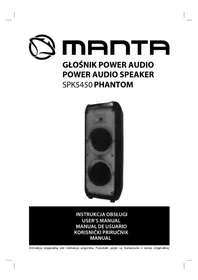
SPK5450 - Karaoke system Manta - Free user manual and instructions
Find the device manual for free SPK5450 Manta in PDF.


| Product type | Karaoke system |
| Brand | Manta |
| Model | SPK5450 |
| Power supply | 110-240 V, 50/60 Hz (mains input) and DC 12 V (charge input) |
| Battery | Built-in rechargeable, battery life up to 10 h, charging time about 8 h |
| Main functions | Bluetooth, TWS, X-BASS, FM radio, USB/SD, AUX-IN, 2 microphone inputs, guitar input, voice recording, microphone priority, equalizer, echo/delay adjustment, treble/bass |
| Lighting | RGB LED with multiple modes |
| Display | Digital screen |
| Connectors | USB, SD/MMC, 3.5 mm audio input, guitar input, 2 microphone inputs (6.35 mm jack) |
| Included accessories | Remote control, power cord, user manual |
| Care and cleaning | Clean with a soft, dry cloth. Avoid moisture and abrasive products. |
| Safety | Do not expose to water or moisture. Do not open the device. Use only the supplied adapter. |
| Spare parts and repairability | Contact Manta customer service for any spare parts or repairs. |
| General information | Manual available in multiple languages. Weight and dimensions not specified. |
Frequently Asked Questions - SPK5450 Manta
User questions about SPK5450 Manta
0 question about this device. Answer the ones you know or ask your own.
Ask a new question about this device
Download the instructions for your Karaoke system in PDF format for free! Find your manual SPK5450 - Manta and take your electronic device back in hand. On this page are published all the documents necessary for the use of your device. SPK5450 by Manta.
USER MANUAL SPK5450 Manta
natural_image
Abstract black-and-white circular logo design with interlocking curved shapes (no text or symbols)MANTA
GŁOŚNIK POWER AUDIO
POWER AUDIO SPEAKER
SPK5450 PHANTOM
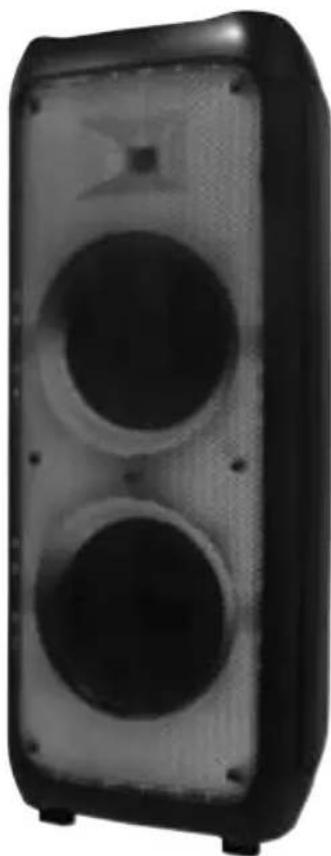
natural_image
Black and white photo of a speaker with two circular buttons (no visible text or symbols)INSTRUKCJA OBSŁUGI
USER'S MANUAL
MANUAL DE USUARIO
KORISNIČKI PRIRUČNIK
MANUAL
ŚRODKI BEZPIECZEŃSTWA

UWAGA!
NIE OTWIERAĆ. RYZYKO PORAŻENIA PRĄDEM
natural_image
Warning symbol of a lightning bolt inside a triangle (no text or numbers)UWAGA: ABY WYNIKNAĆ RYZYKA PORAŻENIA PRĄDEM. NIE ZDEJMOWAĆ ODBUDOWY.
NIE ZAWIERA ELEMENTÓW OBSŁUGIWANYCH PRZEZ UŻYTKOWNIKA. NAPRAWY ZLECAJ TYLKO WYKWALIFIKOWANEMU PERSONELOWI.
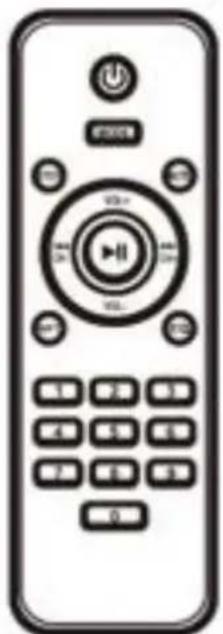
natural_image
Front view of a remote control with buttons and a central play button (no text or symbols visible)Pilot:
ATTENTION! Before using the device for the first time, please read this manual carefully and keep it for future reference.
- Read all warnings carefully.
- Do not use the device near water.
- Do not cover the device's ventilation openings. Installation should be carried out in accordance with the manufacturer's instructions.
- The device power supply must correspond to that stated on the Rating Label.
- Do not place the device near any heat sources such as radiators, heaters, stoves, or other devices (including amplifiers) that produce heat.
- Make sure the power cord is not kinked or pinched; this especially applies to the connection points to the plug and to the outlet of the device.
- Do not use liquid detergents or caustic agents to clean the devices - clean the device with a soft cloth. Before cleaning, disconnect the device from the power supply.
- Do not place heavy objects on the device, otherwise it may be damaged.
- Disconnect the device if there is a lightning storm or if it will not be used for an extended period of time.
- All servicing should be performed by qualified service technicians. Service is required in the event of any damage to the appliance, for example if: the power cord or plug are damaged; Liquid has spilled or an object has fallen into the device; the device has been exposed to rain or moisture; the device is malfunctioning or has been dropped.
- Do not touch the power cord or plug with wet hands when connecting or disconnecting the power cord.
- Damaged power cord presents a high risk of electric shock or fire; never use a damaged cord.
SPK5450 PHANTOM-EN
To use the device properly, please read the user manual carefully first. The content of the manual is subject to change without notice. The company is not responsible for typographical errors in the content of the manual or for situations not included in it.
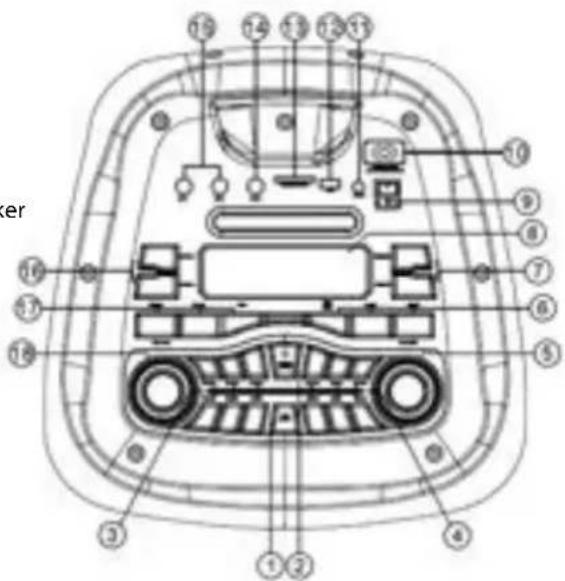
Functions:
- LED LIGHT - ON/OFF switch
- POWER - ON/OFF switch, reset
- M.TREBLE+/- Microphone treble adjust
M.BASS+/- Microphone bass adjust
ECHO+/- Microphone echo adjust - DELAY+/- Adjust delay time between the Source and speaker BASS+/- Bass adjust TREBLE+/- Treble adjust
- VOLUME - Master volume adjust
-
SCAN/TWS/PLAY – Play/Pause/TWS/FM Station automatic search PREV: Previous song NEXT: Next song
-
X-BASS+/- X-BASS adjust
-
Display screen
-
DC 12V INPUT - Charging input DC 12V
-
POWER INPUT - Charging input 110-240V, 50-60Hz
-
AUDIO - input 3,5mm Jack
-
USB - USB input for playing MP3 music
-
SD/MMC/CARD - SD/MMC card slot for playing MP3 music
-
GT.IN - Guitar input Jack
-
MIC1, MIC2 - Microphone input Jack
-
GT.VOL+/- Guitar voice adjust
-
MODE – Mode select M.PRI – Microphone priority ON/OFF switch REC – Recording
-
MIC. VOL - Microphone volume adjust
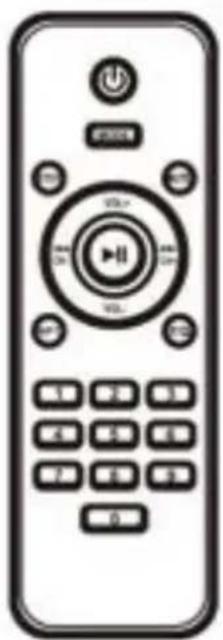
natural_image
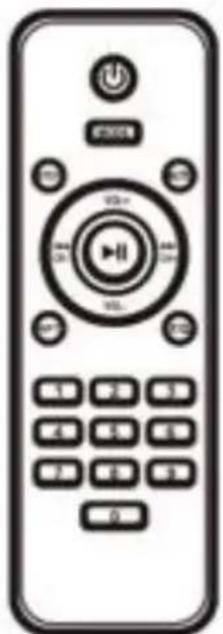
Front view of a remote control with buttons and a central play button (no text or symbols visible)Remote control:
- Stanby
MODE - Mode select (USB/SD/LINE/BLUETOOTH/FM) - Previous song / Previous FM station
▶II - Play/Pause / FM Station automatic search
▶▶I - Next song / Next FM station
RPT - Repeat song
STOP - Stop of playing music
VOL- - Volume Up
VOL+ - Volume Down
MUTE - Mute
EQ - Equalizer
0-9 - Numeric keyboard
SPK5450 PHANTOM-EN
Power On/Off:
Switch Power button to/off turn the speaker on/off on top panel of speaker.
Bluetooth:
- Turn on the speaker and select Bluetooth mode.
- Press the MODE button on the speaker or remote control, repeatedly until 'BLUE' flashes on the display.
- On the Bluetooth compatible device, search for the speaker named "SPK5450" and select it to connect.
- When the device is connected, "BLUE" on the display will stop flashing and you will hear a beep sound. Your device will be \ displayed as connected "SPK5450".
TWS Function:
-
Place the two SPK5450 speakers turned on next to each other in Bluetooth mode.
-
When both speakers are in Bluetooth mode, press and hold the TWS button for 3 seconds. Then you will hear a beep and the display will show "BT / BTST". The next time you turn on both speakers next to each other in Bluetooth mode, they will automatically connect in TWS mode..
X-BASS function:
The loudspeaker has an X-BASS function that will amplify low sounds.
NOTE: For the master audio volume to be level 0, the X-BASS level must also be level 0. The X-BASS control buttons are located on the top panel of the speaker.
FM Radio:
- Turn on the speaker and select radio mode.
- Press the SCAN / TWS / PLAY button to store FM stations in auto scan mode.
- Press PREV or NEXT to select the previous or next FM station.
USB /SD mode:
- Insert the SD card into the slot marked SD / MMC / CARD on the top panel of the speaker, or a USB drive in the slot marked USB to automatically play mp3 files.
- Press and release the SCAN / TWS / PLAY button to pause or play music.
- While playing music, press PREV or NEXT to play the previous or next track.
• Maximum allowable capacity of an SD memory card is 256 GB or less
Important: To avoid damaging the USB / SD device, do not remove it while playing music from it.
AUX-IN mode:
- Use an audio cable to connect external Audio devices to the AUDIO input on the top panel of the speaker.
- Press the MODE button to enter LINE mode.
- Turn on the external device and start playback.
- In AUX mode, all functions can be controlled by external device.
LED light:
Press the LED LIGHT button to turn on / off or change the RGB backlight mode. Or long press the button to turn off the backlight.
Recording vocals:
- Insert a USB drive or SD card into the slot on the top panel of the speaker.
- Connect the wired microphone to the MIC jack or wireless MIC.
- Then press the REC button to start recording and press again to play the recording.
- The speaker records vocals without background music.
Microphone priority function:
While the microphone is connected, press the M.PRI button to enable the Microphone Priority Function. The volume of the music will be lowered and the vocal voice will be more audible. To disable this function, press the M.PRI button again.
SPK5450 PHANTOM-EN
Ładowanie głośnika:
- Insert the supplied power cord into the charging socket on the top panel of the speaker, then connect to an AC 110-220V 50/60 Hz power source.
- It takes approximately 8 hours to fully charge the battery. Charging begins automatically when the power cord is connected.
- While charging, the battery icon on the display will flash. It will stop when the speaker is fully charged.
- The internal battery will be charged even when the device is turned off but connected to the AC 110-220 V 50/60 Hz power supply.
- Low battery may interfere with sound or not play at all, so always charge the battery on time
- To prolong battery life, recharge it immediately after discharging. If the device is not used for a long time, the battery will gradually discharge. It is recommended that you fully charge the battery at least once every 30 days.
- Turn off the device after use to prolong battery life.
- The maximum battery life is 10 hours. Playing time on battery power may vary depending on mode, the volume level, music style, and weather conditions.
SPK5450 PHANTOM-ES
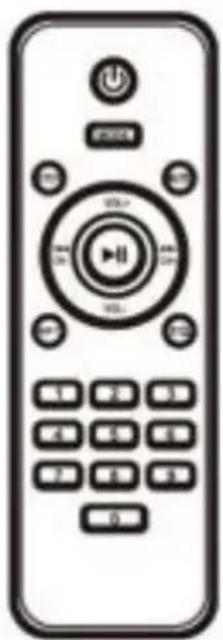
natural_image
Front view of a remote control with buttons and a central play button (no text or symbols visible)Control remoto:
natural_image
Front view of a remote control with buttons and a central play button (no text or symbols visible)SPK5450 PHANTOM-SI
Vklop / Izklop:
- Insert the SD card into the slot marked SD / MMC / CARD on the top panel of the speaker, or a USB drive in the slot marked
- USB to automatically play mp3 files.
- Press and release the SCAN /TWS / PLAY button to pause or play music.
- While playing music, press PREV or NEXT to play the previous or next track.
• Maximum allowable capacity of an SD memory card is 256 GB or less
Important: To avoid damaging the USB / SD device, do not remove it while playing music from it.
AUX-IN način:
natural_image
Front view of a remote control with buttons and a central play button (no text or symbols visible)| Power output | P.M.P.O 30000W / 300W (RMS) woofer 10 × 2 |
| Playback | MP3/WAV |
| Bluetooth | TWS, S.0 |
| Connectivity | USB/SD/MMC/MIC/AUX/Guitar |
| Functions | X-Bass TWS (True Wireless Stereo) FM Radio Disco LED Flame light effects Microphone priority Recording Equalizer |
| Frequency response | 40Hz~15KHz |
| Sensitivity | 83dB±3dB |
| Weight | 19 kg |
| Dimensions | 400 x 380 x 920 mm |
| Power supply | 110-240V, 50/60Hz / DC 12V Built-in battery 12A Working time in battery mode 10h |
| Set contains | Remote control, wireless microphone, manual, warranty card, power cord |
SI
| Moč | P.M.P.O 30000W / 300W (RMS)woofer 10" x 2 |
| Format predvajanja | MP3/WAV |
| Bluetooth | TWS, 5.0 |
| Priključki | USB/SD/MMC/MIC/AUX/Guitar |
| Dodatna funkcija | X-BassTWS (True Wireless Stereo)Radio FMDisco LED FLAME luckeFunkcija prioriteta MikrofonSnemanjeEqualizer |
| Frekvenčni razpon | 40Hz~15KHz |
| Občutljivost | 93dB+3dB |
| Teža | 19 kg |
| Dimenzije | 400 x 380 x 920 mm |
| Napajanje | 110-240V, 50/60Hz / DC 12VVgrajena baterija 12AČas delovanja na baterijo: do 10 ur |
| V kompletu | Daljinski upravljalnik, brežični mikrofon, priročnik,garancijski list, napajalni kabel |
IT
natural_image
Abstract black-and-white circular logo design with interlocking curves (no text or symbols)MANTA
since 1998
INFOLINIA SERWISOWA
from Monday to Friday, 9:00-17:00
The manufacturer reserves the right to make changes to product specifications without notice.



Made in P.R.C.
FOR MANTA EUROPE

MANTA S.A. hereby declares that appliance SPK5450 is compliant with Directives RED 2014/53/EU, ROHS 2011/65/EU. The full text of the EU declaration of conformity is available at the following internet address: www.manta.com.pl
- MANTA
- GŁOŚNIK POWER AUDIO
- POWER AUDIO SPEAKER
- SPK5450 PHANTOM
- ŚRODKI BEZPIECZEŃSTWA
- UWAGA!
- Pilot:
- SPK5450 PHANTOM-EN
- Functions:
- Remote control:
- Power On/Off:
- Bluetooth:
- TWS Function:
- X-BASS function:
- FM Radio:
- USB /SD mode:
- AUX-IN mode:
- LED light:
- Recording vocals:
- Microphone priority function:
- Ładowanie głośnika:
- SPK5450 PHANTOM-ES
- Control remoto:
- SPK5450 PHANTOM-SI
- Vklop / Izklop:
- AUX-IN način:
Brand : Manta
Model : SPK5450
Category : Karaoke system