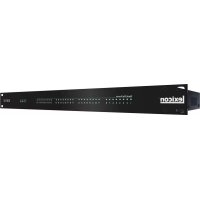
BOB32 - Professional audio equipment LEXICON - Free user manual and instructions
Find the device manual for free BOB32 LEXICON in PDF.


User questions about BOB32 LEXICON
0 question about this device. Answer the ones you know or ask your own.
Ask a new question about this device
Download the instructions for your Professional audio equipment in PDF format for free! Find your manual BOB32 - LEXICON and take your electronic device back in hand. On this page are published all the documents necessary for the use of your device. BOB32 by LEXICON.
USER MANUAL BOB32 LEXICON
32 Channel Digital to Analog Breakout Box

IMPORTANT SAFETY INSTRUCTIONS

ATTENTION: RISQUE DE CHOC ELECTRIQUE - NE PAS OUVRIR
WARNING: TO REDUCE THE RISK OF FIRE OR ELECTRIC SHOCK DO NOT EXPOSE THIS EQUIPMENT TO RAIN OR MOISTURE
ATTENTION: POUR RÉDUIRE LE RISQUE D'INCENDIE OU D'ELECTROCUTION N'EXPOSEZ PAS CET APPAREIL À LA PLUÉ OU L'HUMIDITE
The symbols shown above are internationally accepted symbols that warn of potential hazards with electrical products. The lightning flash with arrowpoint in an equilateral triangle means that there are dangerous voltages present within the unit. The exclamation point in an equilateral triangle indicates that it is necessary for the user to refer to the owner's manual.
These symbols warn that there are no user serviceable parts inside the unit. Do not open the unit. Do not attempt to service the unit yourself. Refer all servicing to qualified personnel. Opening the chassis for any reason will void the manufacturer's warranty. Do not get the unit wet. If liquid is spilled on the unit, shut it off immediately and take it to a dealer for service. Disconnect the unit during storms to prevent damage.
The following is indicative of low altitude use; do not use this product above 2000m.

U.K. MAINS PLUG WARNING
A molded mains plug that has been cut off from the cord is unsafe.
Discard the mains plug at a suitable disposal facility.
Do not use the mains plug without the fuse cover in place. Replacement
fuse covers can be obtained from your local retailer. Replacement fuses
are 13 amps and MUST be ASTA approved to BS1362.

If you want to dispose this product, do not mix with general household waste. There is a separate collection system for used electronic products in accordance with legislation that requires proper treatment, recovery and recycling.
Private households in the 25 member states of the EU, in Switzerland and Norway may return their used electronic products free of charge to designated collection facilities or to a retailer (if you purchase a similar new one). For Countries not mentioned above, please contact your local authorities for a correct method of disposal. By doing so you will ensure that your disposed product undergoes the necessary treatment, recovery and recycling and thus prevent potential negative effects on the environment and human health.
WARNING FOR YOUR PROTECTION READ THE FOLLOWING:
READ THESE INSTRUCTIONS.
KEEP THESE INSTRUCTIONS.
HEED ALL WARNINGS.
FOLLOW ALL INSTRUCTIONS.
DO NOT USE THIS APPARATUS NEAR WATER.
CLEAN ONLY WITH A DRY CLOTH.
FOR INDOOR USE ONLY.
DO NOT BLOCK ANY OF THE VENTILATION OPENINGS. INSTALL IN ACCORDANCE WITH THE MANUFACTURER'S INSTRUCTIONS.
DO NOT INSTALL NEAR ANY HEAT SOURCES SUCH AS RADIATORS, HEAT REGISTERS, STOVES, OR OTHER APPARATUS (INCLUDING AMPLIFIERS) THAT PRODUCE HEAT.
ONLY USE ATTACHMENTS/ACCESSORIES SPECIFIED BY THE MANUFACTURER. UNPLUG THIS APPARATUS DURING LIGHTNING STORMS OR WHEN UNUSED FOR LONG PERIODS OF TIME.
Do not defeat the safety purpose of the polarized or grounding-type plug. A polarized plug has two blades with one wider than the other. A grounding type plug has two blades and a third grounding prong. The wide blade or third prong are provided for your safety. If the provided plug does not fit your outlet, consult an electrician for replacement of the obsolete outlet.
Protect the power cord from being walked on or pinched particularly at plugs, convenience receptacles, and the point where they exit from the apparatus.
Use only with the cart stand, tripod bracket, or table specified by the manufacture, or sold with the apparatus. When a cart is used, use caution when moving the cart/apparatus combination to avoid injury from tip-over.

Refer all servicing to qualified service personnel. Servicing is required when the apparatus has been damaged in any way, such as power-supply cord or plug is damaged, liquid has been spilled or objects have fallen into the apparatus, the apparatus has been exposed to rain or moisture, does not operate normally, or has been dropped.
POWER ON/OFF SWITCH: The Power switch used in this piece of equipment DOES NOT break the connection from the mains.
MAINS DISCONNECT: The plug shall remain readily operable. For rack-mount or installation where plug is not accessible, an all-pole mains switch with a contact separation of at least 3mm in each pole shall be incorporated into the electrical installation of the rack or building.
If connected to 240V supply, a suitable CSA/UL certified power card shall be used for this supply.
This Equipment is intended for rack mount use only.
IMPORTANT SAFETY INSTRUCTIONS
ELECTROMAGNETIC COMPATIBILITY
This device complies with part 15 of the FCC Rules and the Product Specifications noted on the Declaration of Conformity. Operation is subject to the following two conditions:
- this device may not cause harmful interference, and
- this device must accept any interference received, including interference that may cause undesired operation.
Operation of this unit within significant electromagnetic fields should be avoided.
- use only shielded interconnecting cables.
SAFETY INSTRUCTIONS
NOTICE FOR CUSTOMERS IF YOUR UNIT IS EQUIPPED WITH A POWER CORD.
WARNING: THIS APPLIANCE SHALL BE CONNECTED TO A MAINS SOCKET OUTLET WITH A PROTECTIVE EARTHING CONNECTION.
THE CORES IN THE MAINS LEAD ARE COLORED IN ACCORDANCE WITH THE FOLLOWING CODE:
AS COLOURS OF THE CORES IN THE MAINS LEAD OF THIS APPLIANCE MAY NOT CORRESPOND WITH THE COLORED MARKINGS IDENTIFYING THE TERMINALS IN YOUR PLUG, PROCEED AS FOLLOWS:
- THE CORE WHICH IS COLORED GREEN AND YELLOW MUST BE CONNECTED TO THE TERMINAL IN THE PLUG MARKED WITH THE LETTER E, OR WITH THE EARTH SYMBOL. OR COLORED GREEN OR GREEN AND YELLOW.
- THE CORE WHICH IS COLORED BLUE MUST BE CONNECTED TO THE TERMINAL MARKED N OR COLORED BLACK.
- THE CORE WHICH IS COLORED BROWN MUST BE CONNECTED TO THE TERMINAL MARKED L OR COLORED RED.
THIS EQUIPMENT MAY REQUIRE THE USE OF A DIFFERENT LINE CORD, ATTACHMENT PLUG, OR BOTH, DEPENDING ON THE AVAILABLE POWER SOURCE AT INSTALLATION. IF THE ATTACHMENT PLUG NEEDS TO BE CHANGED, REFER SERVICING TO QUALIFIED SERVICE PERSONNEL WHO SHOULD REFER TO THE TABLE BELOW. THE GREEN/YELLOW WIRE SHALL BE CONNECTED DIRECTLY TO THE UNITS CHASSIS.
| CONDUCTOR | WIRE COLOR | ||
| Normal | Alt | ||
| L | LIVE | BROWN | BLACK |
| N | NEUTRAL | BLUE | WHITE |
| E | EARTH GND | GREEN/YEL | GREEN |
WARNING: IF THE GROUND IS DEFEATED, CERTAIN FAULT CONDITIONS IN THE UNIT OR IN THE SYSTEM TO WHICH IT IS CONNECTED CAN RESULT IN FULL LINE VOLTAGE BETWEEN CHASSIS AND EARTH GROUND. SEVERE INJURY OR DEATH CAN THEN RESULT IF THE CHASSIS AND EARTH GROUND ARE TOUCHED SIMULTANEOUSLY.
WARNING:
- APPARATET MA TILKOPLES JORDET STIKKONTAKT.
- APPARATEN SKALL ANSLUTAS TILL JORDAT UTTAG.
LAITE ON LIETTAVSAUJAKOSKETTIMILLAVARUSTETTUIN PISTORASIAAN.
DECLARATION OF CONFORMITY
Manufacturer's Name: Lexicon Professional
Manufacturer's Address: 10653 South River Front Parkway
Suite 300
South Jordan, Utah 84095, USA
Declaresthattheproduct:
Product name: BOB-32
Note: Product name may be suffixed by the EU.
Product option: None
conforms to the following Product Specifications:
Safety: IEC 60065-01+Amd 2
EMC: EN 55022:2010
EN 55024:2010
FCC Part 15
Supplementary Information:
The product herewith complies with the requirements of the:
Low Voltage Directive 2006/95/EC
EMC Directive 2004/108/EC
RoHS Directive 2011/65/EC
WEEE Directive 2002/96/EC
With regard to Directive 2005/32/EC and EC Regulation 1275/2008
of 17 December 2008, this product is designed, produced, and classified as Professional Audio Equipment and thus is exempt from this Directive.
Rex C. Reed
Director, Engineering
Signal Processing
10653 South River Front Parkway
Suite 300
South Jordan, Utah 84095, USA
Date: May 15, 2015
European Contact: Your local Lexicon Professional Sales and Service Office or
Harman Signal Processing
10653 South River Front Parkway
Suite 300
South Jordan, Utah 84095, USA
Ph: (801) 566-8800
Fax: (801) 568-7583
CONSIGNES DE SECURITÉ IMPORTANTES


ATTENTION:
RISQUE DE CHOC ELECTRIQUE
NE PAS OUVRIR
WARNING: TO REDUCE THE RISK OF FIRE OR ELECTRIC SHOCK DO NOT EXPOSE THIS EQUIPMENT TO RAIN OR MOISTURE
ATTENTION: POUR RÉDUIRE LE RISQUE D'INCENDIE OU D'ELECTROCUTION N'EXPOSEZ PAS CET APPAREIL À LA PLUIE OU L'HUMIDITE
Adresse du fabricant: 10653 South River Front Parkway
Suite 300
South Jordan, Utah 84095, ETATS-UNIS
Directive 2004/108/CE
Directive RoHS 2002/95/CE
Directive DEEE 2002/96/CE
10653 South River Front Parkway
Suite 300
South Jordan, Utah 84095, ETATS-UNIS
Date: 20 juin 2014
Harman Signal Processing
10653 South River Front Parkway
Suite 300
South Jordan, Utah 84095, ETATS-UNIS
The Lexicon BOB-32 breakout box converts up to 32 channels of the BLU link digital audio bus to analog audio. This device is ideal for use with Lexicon's QuantumLogic™ Immersion processor (QLI-32).
Lexicon's BOB-32 is easily configured by DIP switches located on the rear of the device. The BOB-32 can be configured to select one of the eight blocks of 32 consecutive channels of the BLU link audio bus.
Signal present and power status are clearly displayed by the front panel LED indicators.
Features
32 analog audio outputs
4 DB-25F connectors
- DIP switches for channel range selection
- 256 channels at 48k sampling rate or 128 channels at 96k sampling rate
- Clear front panel LED indication
- 1 rack space chassis

Back Panel View
DIP Switches
Adjust the red DIP switches to select the group of channels required using the table below.
| BLU link OFF RAMP | |||||
| SW1 SW2 | SW3 Binary Value | Selected Bank | Selected Channels | ||
| OFF OFF | OFF 0 1 1-32 | ||||
| OFF OFF | ON 1 2 33-64 | ||||
| OFF OFF | OFF 2 3 65-96 | ||||
| OFF OFF | ON 3 4 97-128 | ||||
| ON OFF | OFF 4 5 129-160 | ||||
| ON OFF | ON 5 6 161-192 | ||||
| ON ON OFF | OFF 6 7 193-224 | ||||
| ON ON ON | ON 7 8 225-256 | ||||
Output Connector Pinout
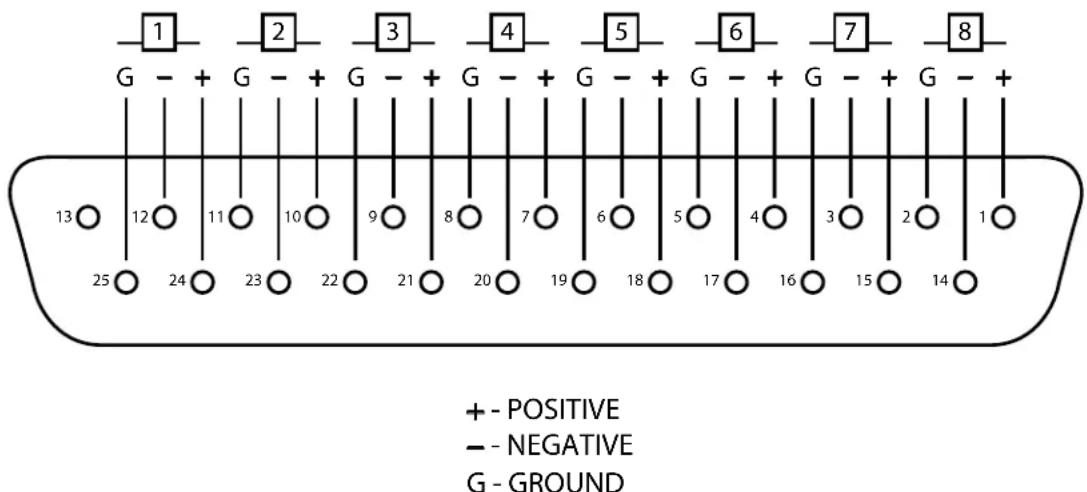
Pinout for channels 1-8 shown. Remaining connectors to be similar with the appropriate offset derived by adding 8, 16, or 24 to the channel number shown.

byHARMAN
10653 South River Front Parkway, Suite 300 Questions or comments?
South Jordan, UT 84095, USA Email us at: customer@lexiconpro.com
Phone: (801) 566-8800 or visit us online at www.lexiconpro.com