
RKSM7990DP - Mixer KITCHENAID - Free user manual and instructions
Find the device manual for free RKSM7990DP KITCHENAID in PDF.


| Brand | KitchenAid |
| Model | RKSM7990DP |
| Product Type | Stand mixer |
| Bowl Capacity | 7 quarts (6.6 liters) |
| Bowl Material | Stainless steel |
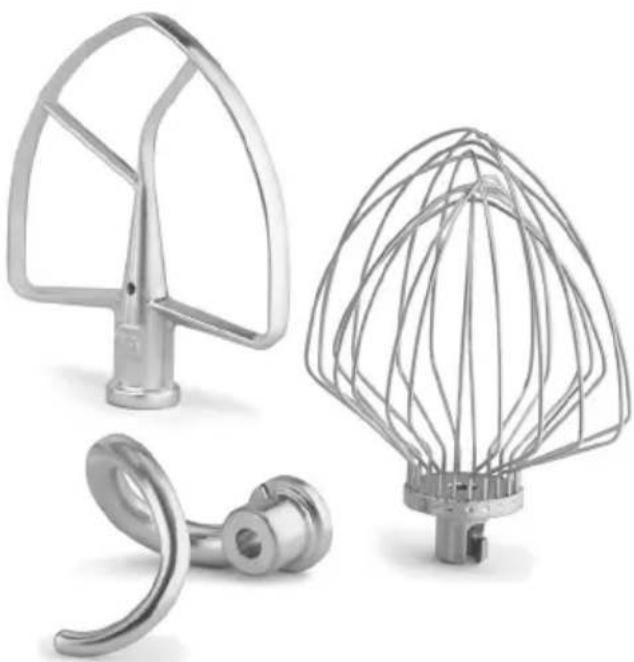
| Included Accessories | Stainless steel flat beater, stainless steel dough hook, 11-wire stainless steel elliptical whip |
| Number of Speeds | 10 speeds with Soft Start™ function |
| Power Supply | 120 V, 60 Hz, 1.3 HP (model KSM7990) |
| Plug Type | 3-prong grounded |
| Safety Feature | Automatic shutoff in case of overload, motor auto-reset protection |
| Bowl Lift Device | Bowl lift handle |
| Beater Height Adjustment | Accessible adjustment screw to adjust clearance between beater and bowl |
| Cleaning Bowl and Accessories | Dishwasher safe or hand wash with warm soapy water |
| Cleaning the Body | Wipe with a clean damp cloth, never immerse |
| Warranty | 2-year total satisfaction (free replacement) |
| Customer Service | 1-800-584-4315 (United States and Puerto Rico) |
| Replacement Parts | Available by calling 1-800-584-4315 |
Frequently Asked Questions - RKSM7990DP KITCHENAID
User questions about RKSM7990DP KITCHENAID
0 question about this device. Answer the ones you know or ask your own.
Ask a new question about this device
Download the instructions for your Mixer in PDF format for free! Find your manual RKSM7990DP - KITCHENAID and take your electronic device back in hand. On this page are published all the documents necessary for the use of your device. RKSM7990DP by KITCHENAID.
USER MANUAL RKSM7990DP KITCHENAID
natural_image
White kitchen stand mixer with brand name 'KitchenAid' and control knob (no visible text or symbols beyond branding)
1-800-584-4315
Details inside
natural_image
Three metallic kitchen components: a curved fan, a wire mesh head, and a curved hook (no text or symbols visible)
2 Year Hassle Free Warranty

We're so confident the quality of our products meets the exacting standards of KitchenAid that, if your Stand Mixer should fail within
the first two years of ownership, KitchenAid will arrange to deliver an identical or comparable replacement to your door free of charge and arrange to have your “failed” Stand Mixer returned to us. Your replacement unit will also be covered by our two year full warranty. Please follow these instructions to receive this quality service.
If you reside in the 50 United States or Puerto Rico and your KitchenAid® Stand Mixer should fail within the first two years of ownership, simply call our toll-free Customer Satisfaction Center at 1-800-584-4315, 8 a.m. to 8 p.m., Monday through Friday Eastern Time. Give the consultant your complete shipping address.
When you receive your replacement Stand Mixer, use the carton and packing materials to pack-up your “failed” Stand Mixer. In the carton, include your name, address, and phone number on a sheet of paper along with a copy of the proof of purchase (register receipt, credit card charge slip, etc.).
For a detailed explanation of warranty terms and conditions, including how to arrange for service outside the United States, see “Warranty” Section.
Proof of Purchase & Product Registration
Always keep a copy of the sales receipt showing the date of purchase of your Stand Mixer. Proof of purchase will assure you of in-warranty service.
Before you use your Stand Mixer, please fill out and mail your product registration card packed with the unit. This card will enable us to contact you in the unlikely
event of a product safety notification and assist us in complying with the provisions of the Consumer Product Safety Act. This card does not verify your warranty.
Please complete the following for your personal records:
Model Number ____
Serial Number ____
Date Purchased ____
Store Name ____
Table of Contents
2 Year Hassle Free Warranty....Inside Front Cover
Proof of Purchase & Product Registration Card ....... Inside Front Cover
Stand Mixer Safety....4
Warranty....5
For the 50 United States, District of Columbia, and Puerto Rico .... 5
Arranging for Service After the Warranty Expires....6
Arranging for Service Outside the 50 United States and Puerto Rico....6
Ordering Accessories and Replacement Parts....6
Electrical Requirements....7
Troubleshooting Problems....7
Stand Mixer Features....8
Assembling Your Bowl Lift Stand Mixer 9
Using Your KitchenAid® Attachments 10
Mixing Time....10
Mixer Use....10
Speed Control Guide - 10 Speed Stand Mixers.... 11
Beater To Bowl Clearance....12
Mixing Tips....13
Basic White Bread....14
Care And Cleaning....15
Stand Mixer Safety
Your safety and the safety of others are very important.
We have provided many important safety messages in this manual and on your appliance. Always read and obey all safety messages.

This is the safety alert symbol.
This symbol alerts you to potential hazards that can kill or hurt you and others.
All safety messages will follow the safety alert symbol and either the word "DANGER" or "WARNING." These words mean:
! DANGER
You can be killed or seriously injured if you don't immediately follow instructions.
WARNING
You can be killed or seriously injured if you don't follow instructions.
All safety messages will tell you what the potential hazard is, tell you how to reduce the chance of injury, and tell you what can happen if the instructions are not followed.
IMPORTANT SAFEGUARDS
When using electrical appliances, basic safety precautions should always be followed, including the following:
I. Read all instructions.
2. To protect against risk of electrical shock, do not put Stand Mixer in water or other liquid.
3. Close supervision is necessary when any appliance is used by or near children.
4. Unplug Stand Mixer from outlet when not in use, before putting on or taking off parts and before cleaning.
5. Avoid contacting moving parts. Keep hands, hair, clothing, as well as spatulas and other utensils away from beater during operation to reduce the risk of injury to persons and/or damage to the Stand Mixer.
6. Do not operate Stand Mixer with a damaged cord or plug or after the Stand Mixer malfunctions, or is dropped or damaged in any manner. Call the KitchenAid ^® Customer Satisfaction Center at 1-800-584-4315 for more information.
7. The use of attachments not recommended or sold by KitchenAid ^® may cause fire, electrical shock or injury.
8. Do not use the Stand Mixer outdoors.
9. Do not let the cord hang over edge of table or counter.
10. Remove flat beater, wire whip or dough hook from Stand Mixer before washing.
SAVE THESE INSTRUCTIONS
KitchenAid® Stand Mixer Warranty for the 50 United States, District of Columbia, and Puerto Rico
This warranty extends to the purchaser and any succeeding owner for Stand Mixers operated in the 50 United States, District of Columbia, and Puerto Rico.
| Length of Warranty: | KitchenAid Will Pay For Your Choice of: | KitchenAid Will Not Pay For: |
| Two Year Full Warranty from date of purchase. |  Hassle-Free Replacement of your stand mixer. See inside front cover for details on how to arrange for service, or call the Customer Satisfaction Center toll-free at 1-800-584-4315.ORThe replacement parts and repair labor costs to correct defects in materials and workmanship. Hassle-Free Replacement of your stand mixer. See inside front cover for details on how to arrange for service, or call the Customer Satisfaction Center toll-free at 1-800-584-4315.ORThe replacement parts and repair labor costs to correct defects in materials and workmanship. | A. Damage resulting from accident, alteration, misuse or abuse.B. Replacement parts or repair labor costs for Stand Mixers operated outside the 50 United States, District of Columbia, and Puerto Rico. |
KITCHENAID DOES NOT ASSUME ANY RESPONSIBILITY FOR INCIDENTAL OR CONSEQUENTIAL DAMAGES. Some states do not allow the exclusion or
limitation of incidental or consequential damages, so this exclusion may not apply to you. This warranty gives you specific legal rights and you may also have other rights which vary from state to state.
For service information, call toll-free 1-800-584-4315 or write to:
Customer Satisfaction Center, KitchenAid Portable Appliances, P.O. Box 218, St. Joseph, MI 49085-0218.
Arranging for Service Outside the 50 United States and Puerto Rico
Consult your local KitchenAid® dealer or the store where you purchased the stand
mixer for information on how to obtain service.
Ordering Accessories and Replacement Parts
To order accessories or replacement parts for your Stand Mixer, call toll-free 1-800-584-4315 or write to:
Customer Satisfaction Center, KitchenAid Portable Appliances, P.O. Box 218, St. Joseph, MI 49085-0218.
Electrical Requirements
Volts: 120 A.C. only. Hertz: 60
The power rating for your Stand Mixer is printed on the trim brand or on the serial plate.
Model KSM7990 Only:
Volts 120
Horsepower 1.3
Hertz 60
Do not use an extension cord. If the power supply cord is too short, have a qualified electrician or serviceman install an outlet near the appliance.
WARNING

Electrical Shock Hazard
Plug into a grounded 3 prong outlet.
Do not remove ground prong.
Do not use an adapter.
Do not use an extension cord.
Failure to follow these instructions can result in death, fire, or electrical shock.
Troubleshooting Problems
Please read the following before calling your service center.
I. The Stand Mixer may warm up during use. Under heavy loads with extended mixing time periods, you may not be able to comfortably touch the top of the Stand Mixer. This is normal.
2. The Stand Mixer may emit a pungent odor, especially when new. This is common with electric motors.
3. If the flat beater hits the bowl, stop the Stand Mixer. See "Beater to Bowl Clearance".
If your Stand Mixer should malfunction or fail to operate, please check the following:
- Is the Stand Mixer plugged in?
- Is the fuse in the circuit to the Stand Mixer in working order? If you have a circuit breaker box, be sure the circuit is closed.
- Turn the Stand Mixer off for 10-15 seconds, then turn it back on. If the mixer still does not start, allow it to cool for 30 minutes before turning it back on.
If the problem is not due to one of the above items, see the KitchenAid®
Warranty. Do not return the Stand Mixer to the retailer, as they do not provide service.
WARNING

Electrical Shock Hazard
Plug into a grounded 3 prong outlet.
Do not remove ground prong.
Do not use an adapter.
Do not use an extension cord.
Failure to follow these instructions can result in death, fire, or electrical shock.
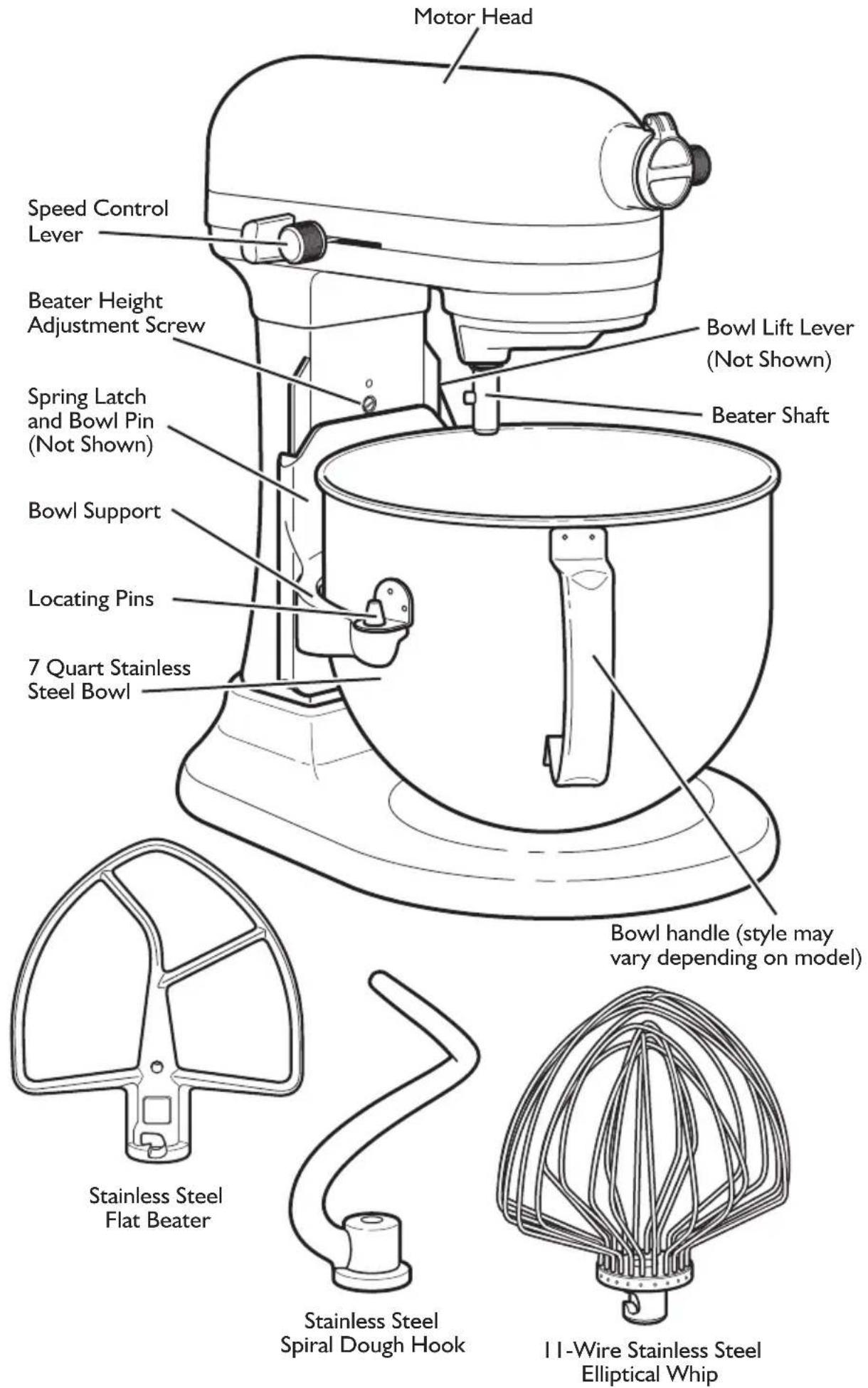
To Attach Bowl
I. Turn speed control to OFF.
2. Unplug Stand Mixer or disconnect power.
3. Place bowl lift lever in down position.
4. Fit bowl supports over locating pins.
5. Press down on back of bowl until bowl pin snaps into spring latch.
6. Raise bowl before mixing.
7. Plug into a grounded 3 prong outlet or reconnect power.
To Remove Bowl
I. Turn speed control to OFF.
2. Unplug Stand Mixer or disconnect power.
3. Place bowl lift lever in down position
4. Remove flat beater, wire whip, or dough hook.
5. Grasp bowl handle and lift straight up and off locating pins.
To Raise Bowl
natural_image
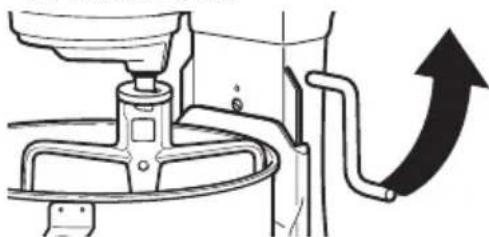
Mechanical diagram showing a valve assembly with a curved arrow indicating upward motion (no text or symbols present)I. Rotate lever to straight-up position.
2. Bowl must always be in raised, locked position when mixing.
To Lower Bowl
I. Rotate lever back and down.
To Attach Flat Beater, Wire Whip, or Dough Hook
I. Turn speed control to OFF.
2. Unplug Stand Mixer or disconnect power.
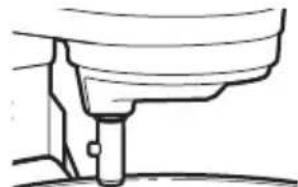
- Slip flat beater on beater shaft and press upward as far as possible.
natural_image
Pure mechanical diagram showing a lever and shaft assembly without any text or symbols-
Turn beater to right, hooking beater over the pin on shaft.
-
Plug into a grounded 3 prong outlet or reconnect power.
To Remove Flat Beater, Wire Whip, or Dough Hook
I. Turn speed control to OFF.
2. Unplug Stand Mixer or disconnect power.
3. Press beater upward as far as possible and turn left.
4. Pull beater from beater shaft.
5. Plug into a grounded 3 prong outlet or reconnect power.
Commercial Stand Mixer SPEED Control and Lever Guard
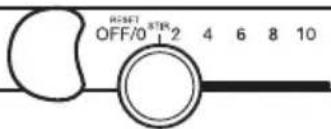
The Soft Start™ feature minimizes splash-out by starting the mixer slowly before increasing to the selected speed. To further reduce the potential for splash-out, always begin mixing using the STIR speed, then gradually move to higher speeds as needed. See "Speed Control Guide".
Auto-Reset Motor Protection
If the Stand Mixer stops due to overload, slide the speed control lever to OFF. After a few minutes, the stand mixer will automatically reset. Slide the Speed Control Lever to the desired speed and continue mixing. If the Stand Mixer does not restart, see “Troubleshooting Problems”.
Flat Beater for normal to heavy mixtures:
cakes biscuits
creamed frostings quick breads
candies meat loaf
cookies mashed potatoes
pie pastry
Wire Whip for mixtures that need air incorporated:
eggs sponge cakes
egg whites angel food cakes
heavy cream mayonnaise
boiled frostings some candies
Dough Hook for mixing and kneading yeast doughs:
breads coffee cakes
rolls buns
Mixing Time
Your KitchenAid ^® Stand Mixer will mix faster and more thoroughly than most other electric stand mixers. Therefore, the mixing time in most recipes must
be adjusted to avoid overbeating. With cakes, for example, beating time may be half as long as with other stand mixers.
Mixer Use
WARNING
Injury Hazard
Unplug mixer before touching beaters.
Failure to do so can result in broken bones, cuts, or bruises.
The Stand Mixer may warm up during use. Under heavy loads with extended mixing time, you may not be able to comfortably touch the top of the Stand Mixer. This is normal.
If the Stand Mixer becomes overloaded, it will automatically shut off to prevent damage. See “Auto-Reset Motor Protection”.
NOTE: Do not scrape bowl while Stand Mixer is operating.
The bowl and beater are designed to provide thorough mixing without frequent scraping. Scraping the bowl once or twice during mixing is usually sufficient. Turn Stand Mixer off before scraping.
Speed Control Guide – 10 Speed Stand Mixers
All speeds feature Soft Start ^™ operation, which minimizes splash-out and flour puff. The mixer will start slowly before increasing to the selected speed.
Number of Speed
Speed
Stir STIR For slow stirring, combining, mashing, starting all mixing procedures. Use to add flour and dry ingredients to batter, and add liquids to dry ingredients. Do not use STIR speed to mix or knead yeast doughs.
2 SLOW MIXING For slow mixing, mashing, faster stirring. Use to mix and knead yeast doughs, heavy batters and candies; start mashing potatoes or other vegetables; cut shortening into flour; mix thin or splashy batters.
4 MIXING, For mixing semi-heavy batters, such as BEATING cookies. Use to combine sugar and shortening and to add sugar to egg whites for meringues. Medium speed for cake mixes.
6 BEATING, For medium-fast beating (creaming) or CREAMING whipping. Use to finish mixing cake, doughnut, and other batters. High speed for cake mixes.
8 FAST BEATING, For whipping cream, egg whites, and WHIPPING boiled frostings.
10 FAST WHIPPING For whipping small amounts of cream, egg whites or for final whipping of mashed potatoes.
NOTE: Use speed 2 to mix or knead yeast dough or fondants. Use of any other speed with heavy doughs may cause mixer to stop rotating to limit mixer damage. This is normal operation. If this occurs, turn the speed selector to off, and then turn back on to a lower speed.
Beater to Bowl Clearance
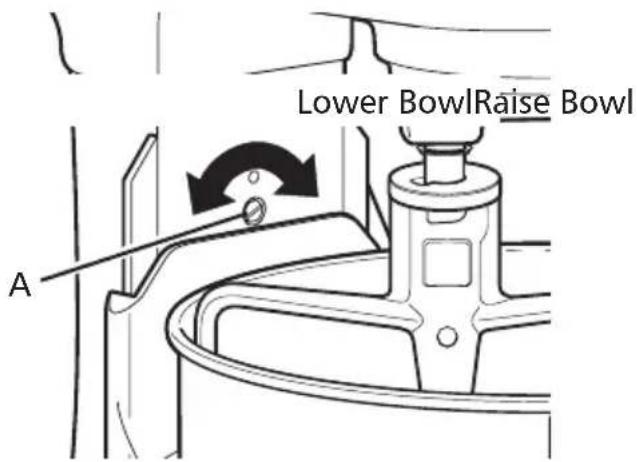
Your Stand Mixer is adjusted at the factory so the flat beater just clears the bottom of the bowl. If, for any reason, the flat beater hits the bottom of the bowl or is too far away from the bowl, you can correct the clearance easily.
I. Unplug Stand Mixer or disconnect power.
2. Place bowl lift lever in down position.
3. Attach flat beater.
4. Adjust so flat beater just clears bottom surface of bowl when in lifted position by turning screw (A) counterclockwise to raise the bowl and clockwise to lower the bowl. Just a slight turn is all that is required: the screw will not rotate more than 1/4 turn (90 degrees) in either direction. (The full range of adjustment is 1/2 turn, or 180 degrees.)
5. Place bowl lift lever in up position to check clearance.
6. Repeat steps 4 and 5 if necessary.
NOTE: When properly adjusted, the flat beater will not strike on the bottom or side of the bowl. If the flat beater or the wire whip is so close that it strikes the bottom of the bowl, the beater or whip may wear.
Mixing Tips
Using Your Recipes with the Mixer
There are a number of methods that can be used for making cake with your KitchenAid® Stand Mixer.
For example, the “quick mix” method (sometimes referred to as the “dump” method) is ideal for simple cakes, such as yellow cake and white cake. This method calls for combining dry ingredients with most or all liquid ingredients in one step.
More elaborate cakes, such as a torte, should be prepared using the traditional cake mixing method. With this method, sugar and the shortening, butter, or margarine are thoroughly mixed (creamed) before other ingredients are added. For all cakes, mixing times may change because your KitchenAid® Stand Mixer works more quickly than other mixers. In general, mixing a cake with the KitchenAid® Stand Mixer will take about half the time called for in most cake recipes.
To help determine the ideal mixing time, observe the batter or dough and mix only until it has the desired appearance described in your recipe, such as “smooth and creamy.”
To select the best mixing speeds, see "Speed Control Guide".
Adding Ingredients
Always add ingredients as close to side of bowl as possible, not directly into moving beater.
NOTE: If ingredients in very bottom of bowl are not thoroughly mixed, then the beater is not far enough into the bowl. See “Beater to Bowl Clearance”.
Cake Mixes
When preparing packaged cake mixes, use Speed 2 for low speed, Speed 4 for medium speed, and Speed 6 for high speed. For best results, mix for the time stated on the package directions.
Adding Nuts, Raisins, or Candied Fruits
In general, solid materials should be folded in the last few seconds of mixing on Stir Speed. The batter should be thick enough to prevent the fruit or nuts from sinking to the bottom of the pan during baking. Sticky fruits should be dusted with flour for better distribution in the batter.
Liquid Mixtures
Mixtures containing large amounts of liquid ingredients should be mixed at lower speeds to avoid splashing. Increase speed only after mixture has thickened.
1/2 cup (120 mL) low-fat milk
3 tbs (45 mL) sugar
2 tsp (10 mL) salt
3 tbs (45 mL) butter or margarine
2 packages active dry yeast
1-1/2 cups (355 mL) warm water (105°F to 115°F) [40°C to 46°C]
5-6 cups (1.2 to 1.5 L) all-purpose flour
Place milk, sugar, salt, and butter in small saucepan. Heat over low heat until butter melts and sugar dissolves. Cool to lukewarm.
Dissolve yeast in warm water in warmed mixer bowl. Add lukewarm milk mixture and 4 l/2 cups (1 L) flour. Attach bowl and dough hook to mixer. Turn to Speed 2 and mix about 1 minute.
Continuing on Speed 2, add remaining flour, 1/2 cup (120 mL) at a time, and mix about 1-1/2 minutes, or until dough starts to clean sides of bowl. Knead on Speed 2 about 2 minutes longer, or until dough is smooth and elastic. Dough will be slightly sticky to the touch.
Place dough in greased bowl, turning to grease top. Cover. Let rise in warm place, free from draft, about 1 hour, or until doubled in bulk.
Punch dough down and divide in half. Shape each half into a loaf, and place in greased 8-1/2 x 4-1/2 x 2-1/2" (21.25 x 11.25 x 6.25 cm) baking pans. Cover. Let rise in warm place, free from draft, about 1 hour, or until doubled in bulk.
Bake at 400^ F ( 200^ C) for 30 minutes, or until golden brown. Remove from pans immediately and cool on wire racks.
Yield: 32 servings (16 slices per loaf).
Per serving: About 95 cal, 3 g protein, 18 g carb, 1 g fat, 0 mg chol, 148 mg sodium.
Care and Cleaning
- Unplug the Stand Mixer before cleaning or disconnect power.
- Stainless steel bowl, flat beater, wire whip, and spiral dough hook may be washed in an automatic dishwasher. Or, clean them thoroughly in hot sudsy water and rinse completely before drying. Do not store beaters on shaft.
- The bowl is dishwasher-safe. It can also be hand-washed in hot sudsy water, rinsed thoroughly, and dried.
- Wipe the Stand Mixer with a clean damp cloth. Do not use abrasive cleansers or scouring pads and do not immerse the Stand Mixer in water.
- Wipe the beater shaft frequently, removing any residue that may accumulate.
To remove the Bowl Support for cleaning
I. Unplug Stand Mixer or disconnect power.
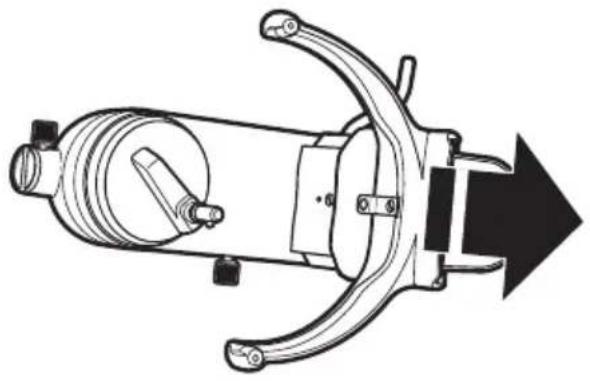
2. Remove the Stand Mixer base by removing the 3 screws located on the bottom of the mixer. Remove the vent screen and the mixer base.

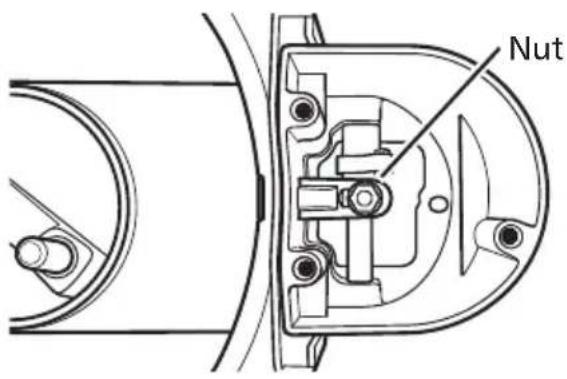
- Remove the nut from the lifter rod located inside the column, then remove the washer and spring.
NOTE: Note the order that they were assembled (the washer goes between the spring and nut), for reassembly.
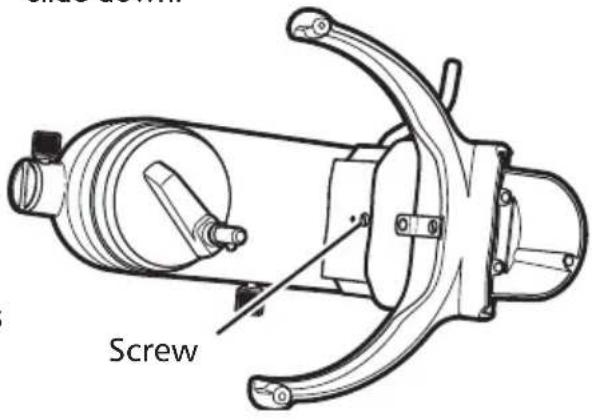
- Loosen the screw holding the bowl clip to the front of the bowl support – it is not necessary to remove the screw all of the way. This allows the bowl support to slide down.
Care and Cleaning (cont.)
- Slide the bowl support down so that the tabs on the back of the bowl support line up with the slots in the column. Remove the bowl support by passing the tabs through the slots.
natural_image
Technical line drawing of a mechanical device with no visible text or symbols-
Clean the bowl support and column with the mild detergent and a wash cloth. Do not use abrasive cleansers or scouring pads.
-
To reassemble, reverse steps I through 6.
Planetary Cleaning Instructions
I. Unplug the Stand Mixer or disconnect the power.
2. Remove the retaining ring with retaining ring pliers, slide the ring and the washer down the shaft.
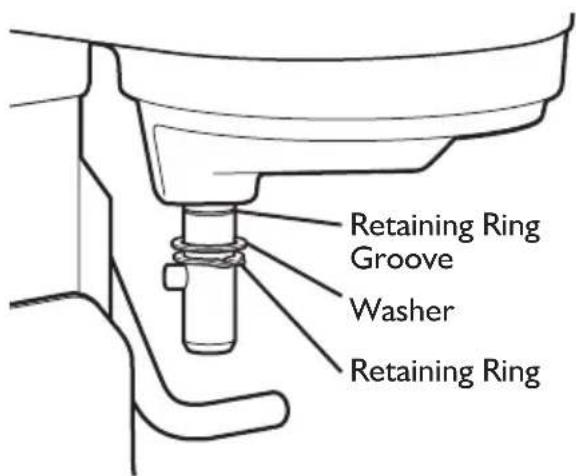
- Clean the shaft, retaining ring, and washer with a mild detergent and wash cloth. Do not use abrasive cleaners or scouring pads. Do not immerse the stand mixer in water.
- To reassemble, reverse steps I through 4, making sure retaining ring is fully seated into groove.
Flat Beater Cleaning Instructions
I. To clean the drain hole in the flat beater, use a small round brush, toothpick, or skewer to run through the hole.
Customer Satisfaction Center, KitchenAid Portable Appliances P.O. Box 218 St. Joseph, MI 49085-0218.
Customer Satisfaction Center, KitchenAid Portable Appliances, P.O. Box 218, St. Joseph, MI 49085-0218.
natural_image
Mechanical assembly diagram showing a lever and pipe connection (no text or symbols)natural_image
Simple line drawing of a mechanical component or assembly (no text or symbols)natural_image
Technical line drawing of a mechanical component with no visible text or symbolsnatural_image
Technical line drawing of a mechanical device with no visible text or symbolsCustomer Satisfaction Center, KitchenAid Portable Appliances, P.O. Box 218, St. Joseph, MI 49085-0218.
Customer Satisfaction Center, KitchenAid Portable Appliances, P.O. Box 218, St. Joseph, MI 49085-0218.
natural_image
Mechanical diagram showing a valve assembly with a curved arrow indicating upward motion (no text or symbols present)natural_image
Simple line drawing of a mechanical component or tool (no text or symbols)natural_image
Technical line drawing of a mechanical device with no visible text or symbols

- Year Hassle Free Warranty
- Proof of Purchase & Product Registration
- Table of Contents
- Stand Mixer Safety
- Your safety and the safety of others are very important.
- ! DANGER
- WARNING
- IMPORTANT SAFEGUARDS
- When using electrical appliances, basic safety precautions should always be followed, including the following:
- SAVE THESE INSTRUCTIONS
- KitchenAid® Stand Mixer Warranty for the 50 United States, District of Columbia, and Puerto Rico
- KITCHENAID DOES NOT ASSUME ANY RESPONSIBILITY FOR INCIDENTAL OR CONSEQUENTIAL DAMAGES. Some states do not allow the exclusion or
- Arranging for Service Outside the 50 United States and Puerto Rico
- Ordering Accessories and Replacement Parts
- Electrical Requirements
- Model KSM7990 Only:
- Troubleshooting Problems
- Please read the following before calling your service center.
- If your Stand Mixer should malfunction or fail to operate, please check the following:
- Electrical Shock Hazard
- To Attach Bowl
- To Remove Bowl
- To Raise Bowl
- To Lower Bowl
- To Attach Flat Beater, Wire Whip, or Dough Hook
- To Remove Flat Beater, Wire Whip, or Dough Hook
- Commercial Stand Mixer SPEED Control and Lever Guard
- Auto-Reset Motor Protection
- Mixing Time
- Mixer Use
- Speed Control Guide – 10 Speed Stand Mixers
- Number of Speed
- Beater to Bowl Clearance
- Mixing Tips
- Using Your Recipes with the Mixer
- Adding Ingredients
- Cake Mixes
- Adding Nuts, Raisins, or Candied Fruits
- Liquid Mixtures
- Care and Cleaning
- To remove the Bowl Support for cleaning
- Care and Cleaning (cont.)
- Planetary Cleaning Instructions
- Flat Beater Cleaning Instructions
Brand : KITCHENAID
Model : RKSM7990DP
Category : Mixer