EasyManual
MAP 130K1 - Scale Kern - Free user manual and instructions
Find the device manual for free MAP 130K1 Kern in PDF.



User questions about MAP 130K1 Kern
0 question about this device. Answer the ones you know or ask your own.
Ask a new question about this device
Download the instructions for your Scale in PDF format for free! Find your manual MAP 130K1 - Kern and take your electronic device back in hand. On this page are published all the documents necessary for the use of your device. MAP 130K1 by Kern.
USER MANUAL MAP 130K1 Kern
Further language versions you will find online under www.kern-sohn.com/manuals
Capacity 80 kg (blue) 40 kg (green) 20 kg (red) 10 kg (yellow)
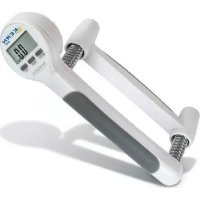
KERN MAP 130K1 Capacity 130 kg (white) 80 kg (blue) 40 kg (green)
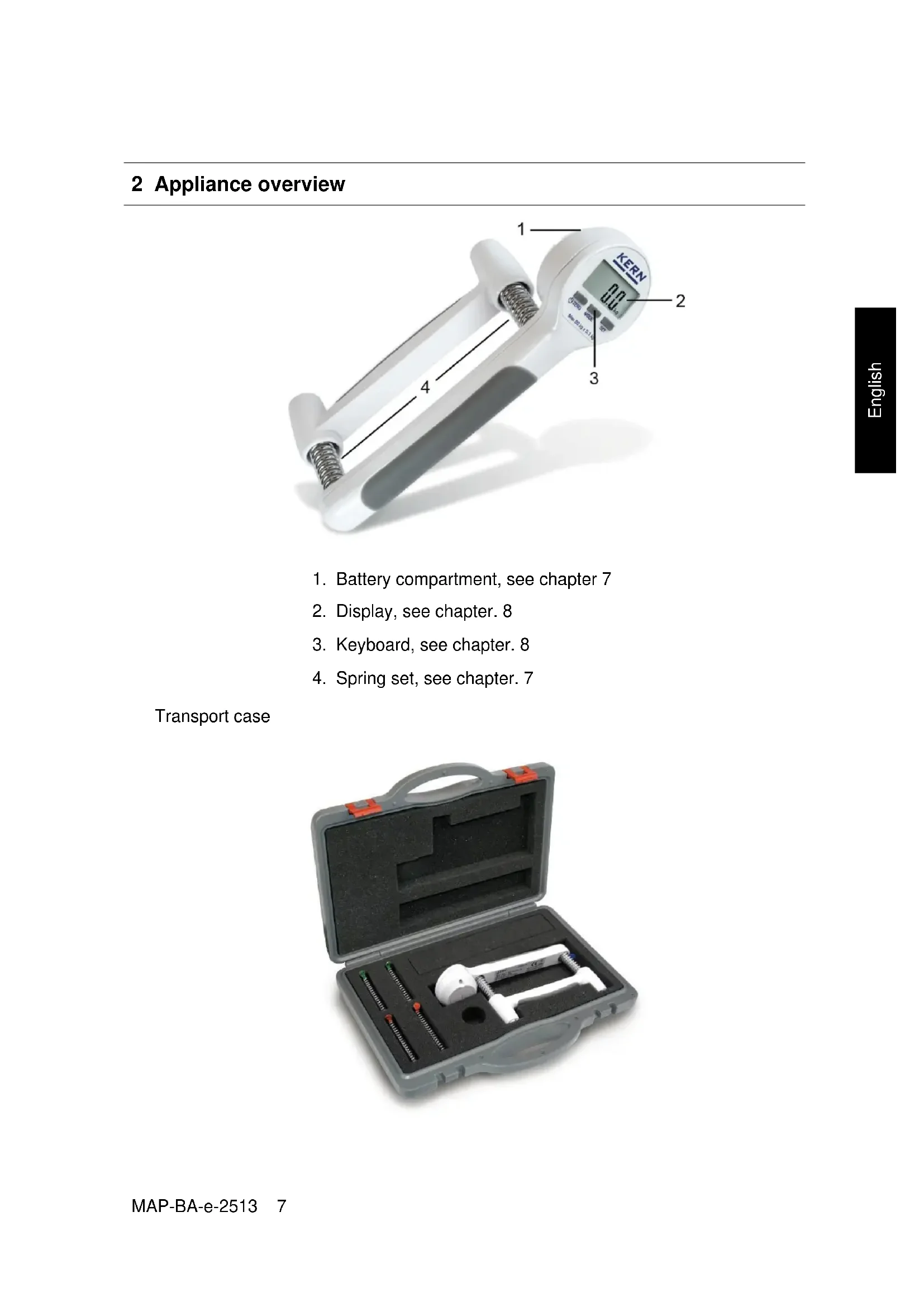
1. Battery compartment, see chapter 7
2. Display, see chapter. 8
3. Keyboard, see chapter. 8
4. Spring set, see chapter. 7
Transport case8 MAP-BA-e-2513 English
Intended use This device allows medical staff to test a patient’s fitness sta- tus and to carry out controlled training during the rehabilitation process. The appliance should be checked for correct condition prior to each utilisation by a person familiar with proper operation of the balance.
Non-intended use Changes to the unit's design are not permitted. This may lead to incorrect measuring results, safety-related faults and de- struction of the unit. The unit may only be operated in accordance with the de- scribed default settings. Other areas of use must be released by KERN in writing.
Warranty Warranty claims shall be voided in case
- Our conditions in the operation manual are ignored
- The appliance is used outside the described uses
- The appliance is modified or opened
- Mechanical damage and damage caused by media, liquids
- Natural wear and tear
- Non-intended use or electric installation
- The measuring system is overloaded
- Dropping the balance Test device control As a precautionary measure during quality control, the metro- logical features of the device have to be tested on a regular basis. The responsible user must define a suitable interval as well as type and scope of this test. For further information please go to KERN-Homepage (HYPERLINK http://www.kern- sohn.com under www.kern-sohn.com).MAP-BA-e-2513 9 English
Carefully read this operation manual before setup and com- missioning, even if you are already familiar with KERN bal- ances. Versions in other languages are non-binding translations. The only binding version is the original document in German. Staff training The medical staff must apply and follow the operating instruc- tions for proper use and care of the product.
5 Transportation & Storage
Testing upon acceptance When receiving the appliance, please check packaging imme- diately, and the appliance itself when unpacking for possible visible damage. Packing Keep all parts of the original packaging in case you need to re- turn the appliance. Only use original packaging for returning.10 MAP-BA-e-2513 English
6 Removing packaging and initial start-up
Place of application The unit is designed to achieve reliable measuring results un- der normal conditions of use. Required conditions for place of operation:
- Prevent extreme heat and temperature fluctuations
- Protect the appliance against high humidity, vapors and dust;
- Do not expose the device to extreme dampness for longer periods of time. Non-permitted condensation (condensation of air humidity on the appliance) may occur if a cold appli- ance is taken to a considerably warmer environment. If present, acclimatise device.
- Avoid contact with water. If electro-magnetic fields or static charge occur, or if the power supply is unstable major deviations on the display (incorrect weighing results) are possible. In that case, the location must be changed. Scope of supply
- Device, see chapter. 3
- Operating instructions
How to replace a spring set
1. Press device until the two screws [1] become visible.
3. Remove grip first, followed by springs.
5. Reassemble device in reverse order.
[1] [1]12 MAP-BA-e-2513 English
Install two additional washers only in the 130 kg-spring set. (s. fig.)MAP-BA-e-2513 13 English
1. Open battery cover, as shown on illustration.
3. Reinsert the battery cover.
To save battery power, the device auto-disconnects automati- cally after 60 seconds have passed without a change of display. If the batteries are run down soon, "LO" appears in the display. Replace battery. If the balance is not used for a longer time, take out the ‘ batteries and store them separately. Leaking battery liquid could damage the balance.14 MAP-BA-e-2513 English
wrongMAP-BA-e-2513 17 English
5. Weighing unit "lb"
6. Weighing unit "kg"
Mode Select operating mode
Set Confirm display In real mode: Switch unit from kg to lb18 MAP-BA-e-2513 English
Turn on/off Zeroing Switch on the device by pressing the /zero key. Zero display appears. If the device does not exactly show zero, unload the device and press the /zero key. To switch off, keep /zero key pressed for approx. 3 sec- onds.
During power-up the device will return to the mode or unit (kg/lb) it had been in before it was switched off.MAP-BA-e-2513 19 English
The device is in real mode at delivery. Use the mode key to switch over the device to the following operating modes.
Shows current strength.
Counts number of gripping actions exceeding a previously set strength limit.
Calculates the average strength derived from two hand grips
Shows max strength of hand grip.20 MAP-BA-e-2513 English
Relieve Press Release
In real mode it is possible to switch from “kg” to “lb” by pressing the set key – and vice versa.
During power-up the device will return to the mode or unit it had been in before it was switched off.MAP-BA-e-2513 21 English
Switch on the device by pressing the /zero key. Press mode key repeatedly until the count display ap- pears.
2. How to define the strength limit
The currently set strength limit is displayed.
To change, press the mode key repeatedly until the de- sired strength limit is displayed. Ensure that the capacity of the spring is not exceeded (e. g. strength limit for 20 kg spring set < 20 kg).
Confirm by pressing the set key; count display appears.22 MAP-BA-e-2513 English
3. Counting gripping actions
Press, and release device as often as possible. Each gripping action is acknowledged by an audio sound.
The number of gripping actions carried out will be shown on screen.
4. Start further counting
Press the /Zero button, the zero display disappears. Count gripping actions as described under item 3.MAP-BA-e-2513 23 English
Switch on the device by pressing the /zero key. Press mode key repeatedly until avg. display appears.
2. Determine average strength from two hand grips
Carry out first gripping action
Strength of first hand grip will be shown. Carry out second gripping action.
Strength of second hand grip will be shown.24 MAP-BA-e-2513 English
Press the set key; average strength derived from the two hand grips will be calculated and displayed flashing.
3. Start further measurements
To return to measuring mode, press the set key.
Press the /Zero button, the zero display disappears. Carry out further measurements as described under item 2.MAP-BA-e-2513 25 English
Switch on the device by pressing the /zero key. Press the mode key repeatedly until max display appears.
Example: Example: A gripping action achieves a strength of 50 kg. Now you are able to determine whether follow-up measurements also reach 50 kg = 100% or for example only 31% = 15.5 kg (ad- justable range 1-100 %)
The strength of the first hand grip will be displayed and can be stored by pressing the set key.
The display shows the currently set percentage value.26 MAP-BA-e-2513 English
To change, press the mode key repeatedly until the desired per- centage appears. Use the Set key to confirm.
If a new gripping action shows a strength of less than for in- stance < 31 % (< 15.5 kg), the previous max value will be re- tained. If a new gripping action shows a strength greater than for in- stance > 31 % (> 15.5 kg), the new max value will be dis- played. The previous max value will be overwritten with the new value.MAP-BA-e-2513 27 English
8 Service, maintenance, disposal
Cleaning Please do not use aggressive detergents (solvents etc.). Apply soapy water to moist cloth or use household detergent. Pre- vent fluid from penetrating into device. Finish by polishing with dry soft cloth. Remove dirt immediately.
Service, maintenance The appliance may only be opened by trained service techni- cians who are authorized by KERN.
Disposal Disposal of packaging and appliance must be carried out by operator according to valid national or regional law of the loca- tion where the appliance is used.
Capacity of batteries exhausted. For replacing of batteries, see chapter. 7
Underload, set to zero by pressing /zero key
Overload, release device
Preload error, put minor stress on device during power-up