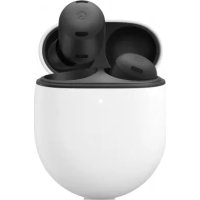
Pixel Buds Pro - Earphones GOOGLE - Free user manual and instructions
Find the device manual for free Pixel Buds Pro GOOGLE in PDF.


| Product Type | In-ear wireless earbuds |
| Brand | |
| Model | Pixel Buds Pro |
| Earbud dimensions (approx.) | 22.1 x 24.0 x 23.3 mm |
| Case dimensions (approx.) | 63 x 47 x 25 mm |
| Earbud weight (approx.) | 6.2 g each |
| Case weight (approx.) | 62 g |
| Battery life (with ANC off) | Up to 11 hours |
| Battery life (with ANC on) | Up to 7 hours |
| Case charging | USB-C or Qi-certified wireless charging |
| Active noise cancellation | Yes, with adaptive control |
| Water and sweat resistance | IPX4 (earbuds) |
| Connectivity | Bluetooth 5.0 |
| Touch controls | Play, pause, tracks, calls, voice assistant |
| Voice assistant | Built-in Google Assistant |
| Compatibility | Android 6.0 or later, iOS via Bluetooth |
| Earbud tips | Sizes S, M, L included |
| Care and cleaning | Wipe with a soft, dry cloth; do not use liquids |
| Safety | Avoid exposure to excessive heat; do not insert deeply |
| Spare parts and repairability | Earbud tips available; repair via Google support |
Frequently Asked Questions - Pixel Buds Pro GOOGLE
User questions about Pixel Buds Pro GOOGLE
0 question about this device. Answer the ones you know or ask your own.
Ask a new question about this device
Download the instructions for your Earphones in PDF format for free! Find your manual Pixel Buds Pro - GOOGLE and take your electronic device back in hand. On this page are published all the documents necessary for the use of your device. Pixel Buds Pro by GOOGLE.
USER MANUAL Pixel Buds Pro GOOGLE
text_image
Diagram showing wireless earbuds and a smartphone with Bluetooth status and finger cursor interfacenatural_image
Illustration of a small ear with a button labeled 'G' and a blue arrow pointing to the ear area (no text or symbols beyond labels)
natural_image
Illustration of a small ear with a circular device and blue sound waves (no text or symbols)text_image
Diagram showing wireless earbuds and a smartphone with Bluetooth status and finger cursor interfacenatural_image
Illustration of a small ear with a device and arrow indicating direction (no text or symbols)
natural_image
Illustration of a small ear with a circular device and blue earband (no text or symbols)natural_image
Hand cursor clicking a circular button labeled 'G' with a blue dot at the tip (no other text or symbols)Appuyer une fois
text_image
Diagram showing wireless earbuds and a smartphone with a hand interacting with a finger, alongside its wireless logo.natural_image
Illustration of a small ear with a button and arrow indicating ear area (no text or symbols)
natural_image
Illustration of a small ear with a circular device and blue sound waves (no text or symbols)natural_image
Hand cursor clicking a circular button labeled 'G' with a blue pushpin (no text or symbols beyond the icon)Tocco
text_image
Diagram showing wireless earbuds and a smartphone with Bluetooth status and finger cursor interfacenatural_image
Illustration of a small ear with a button labeled 'G' and a blue arrow pointing to the ear area (no text or symbols beyond labels)
natural_image
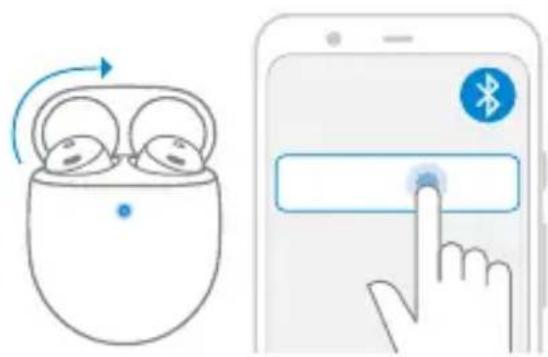
Illustration of a small ear with a transparent plastic cap and blue earband (no text or symbols)- Open the earbuds case and keep the earbuds inside.
- Make sure that your phone is unlocked and Bluetooth® is on.
- Tap the Google Pixel Buds Pro pairing notification and follow the on-screen steps.
Pairing button
- Open the earbuds case and keep the earbuds inside.
- Go to Bluetooth settings on your device and make sure that Bluetooth is on.
- Press and hold the pairing button until the light starts pulsing (\~3 seconds).
- Tap Pixel Buds Pro > Connect.
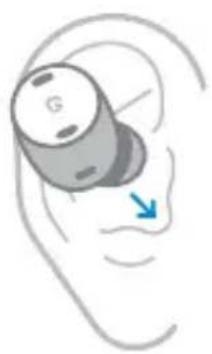
Find the best fit
natural_image
Illustration of a small ear with a button labeled 'G' and a blue arrow pointing to the ear area (no text or symbols beyond labels)
natural_image
Illustration of a small ear with a circular device and blue earband (no text or symbols)- Place each bud so that they feel snug and sealed.
- Too loose? Size up to a larger eartip. Too tight? Size down. Each ear may need a different size.
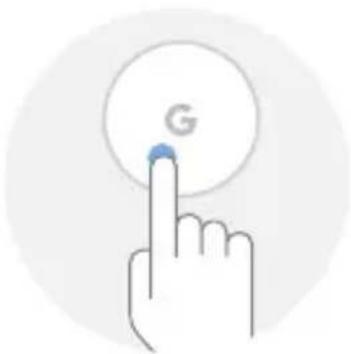
Touch controls
Gestures can be used on either earbud.
natural_image
Hand icon with a blue cursor clicking a circular button labeled 'G' (no text or symbols beyond the icon)Tap
Play/Pause Answer call
Double-tap
Next track End/Reject call

Triple-tap
Previous track

Touch and hold
Active noise control or Google Assistant*
*Requires an Android 6.0+ device
Koble til
Google Pixel og Android 6.0+
text_image
Diagram showing wireless earbuds and a smartphone with Bluetooth status and finger cursor interfacenatural_image
Illustration of a small ear with a button labeled 'G' and a blue arrow pointing to the ear area (no text or symbols beyond labels)
natural_image
Illustration of a small ear with a circular device and blue sound waves (no text or symbols)text_image
Diagram showing wireless earbuds and a smartphone with Bluetooth status and finger cursor interfacenatural_image
Illustration of a small ear with a button labeled 'G' and a blue arrow pointing to the ear area (no text or symbols beyond labels)
natural_image
Illustration of a small ear with a circular device and blue sound waves (no text or symbols)text_image
Diagram showing wireless earbuds and a smartphone with Bluetooth status and finger cursor interfacenatural_image
Illustration of a small ear with a button labeled 'G' and a blue arrow pointing to the ear area (no text or symbols beyond labels)
natural_image
Illustration of a small ear with a circular device and blue sound waves (no text or symbols)text_image
Diagram showing wireless earbuds and a smartphone with Bluetooth status and finger cursor interfacenatural_image
Illustration of a small ear with a device and arrow indicating ear area (no text or symbols)
natural_image
Illustration of a small ear with a circular device and blue sound waves (no text or symbols)For more info, visit
Google, the G logo, Pixel, Android and related logos and marks are trademarks of Google LLC. Bluetooth® is a registered trademark owned by Bluetooth SIG, Inc.