PIXEL 4 - Smartphone GOOGLE - Free user manual and instructions
Find the device manual for free PIXEL 4 GOOGLE in PDF.


| Product Type | Smartphone |
| Brand | |
| Model | Pixel 4 |
| Dimensions | 147.1 x 68.8 x 8.2 mm |
| Weight | 162 g |
| Display | 5.7 inches, OLED, resolution 1080 x 2280 pixels |
| Operating System | Android 10 |
| Processor | Qualcomm Snapdragon 855 |
| RAM | 6 GB |
| Internal Storage | 64 GB or 128 GB |
| Battery | 2800 mAh, fast charging 18W |
| Rear Camera | 12.2 MP, dual sensor |
| Front Camera | 8 MP |
| Connectivity | Wi-Fi 802.11ac, Bluetooth 5.0, NFC, USB-C |
| Security | Fingerprint reader, facial recognition |
| Sensors | Accelerometer, gyroscope, proximity, light, compass |
| Battery Life | Up to 10 hours of mixed usage |
| Wireless Charging | Yes |
| Durability | IP68 (water and dust resistant) |
| Care and Cleaning | Clean with a soft, dry cloth. Do not use abrasive products. |
| Safety | Avoid extreme temperatures. Use a certified charger. |
| Spare Parts and Repairability | Battery, display, USB-C connector repairable by a professional. |
Frequently Asked Questions - PIXEL 4 GOOGLE
User questions about PIXEL 4 GOOGLE
0 question about this device. Answer the ones you know or ask your own.
Ask a new question about this device
Download the instructions for your Smartphone in PDF format for free! Find your manual PIXEL 4 - GOOGLE and take your electronic device back in hand. On this page are published all the documents necessary for the use of your device. PIXEL 4 by GOOGLE.
USER MANUAL PIXEL 4 GOOGLE
How to factory reset GOOGL Pixel 4 XL? How to wipe all data in GOOGLE Pixel 4 XL? How to bypass screen lock in GOOGLE Pixel 4 XL? How to restore defaults in GOOGLE Pixel 4 XL?
The following tutorial shows all method of master reset GOOGL Pixel 4 XL. Check out how to accomplish hard reset by hardware keys and Android 10 settings. As a result your GOOGLE Pixel 4 XL will be as new and your Qualcomm Snapdragon 855 core will run faster.
First method:
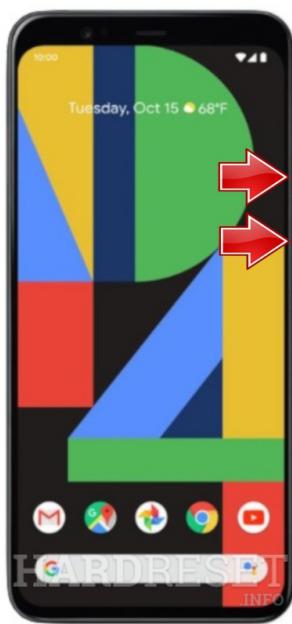
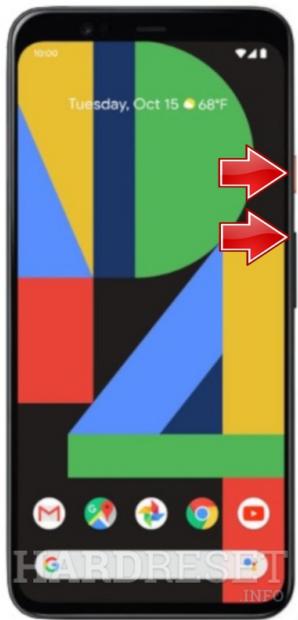
- At first push Volume Up and Power buttons for a couple of seconds when the phone is on.
- If the GOOGL e logo appears let go of all keys.
- When the Android Robot shows up hold down the Power key and press Volume Up.
- Now select wipe data/factory reset by using Volume buttons to scroll down and the Power key to accept it.
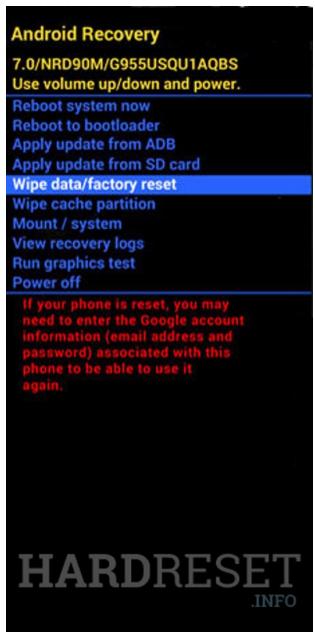
- Then choose yes from the menu and press the Power button.
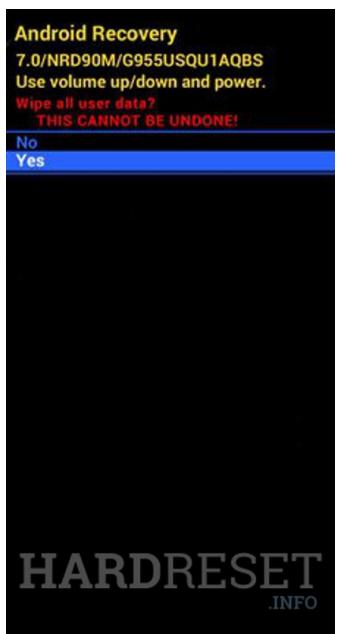
- At the end select reboot system now by using the Power key.
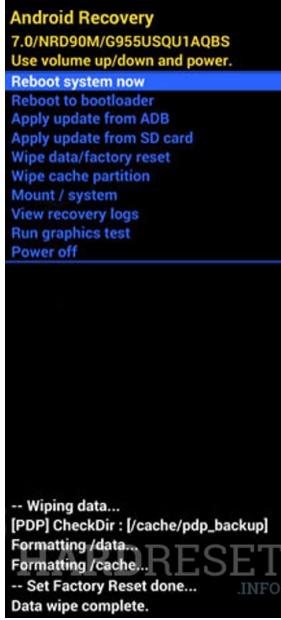
- Well done! The hard reset operation will be finished for a few moments.