PIXEL 4 - Smartphone GOOGLE - Notice d'utilisation et mode d'emploi gratuit
Retrouvez gratuitement la notice de l'appareil PIXEL 4 GOOGLE au format PDF.


| Type de produit | Smartphone |
| Marque | |
| Modèle | Pixel 4 |
| Dimensions | 147,1 x 68,8 x 8,2 mm |
| Poids | 162 g |
| Écran | 5,7 pouces, OLED, résolution 1080 x 2280 pixels |
| Système d'exploitation | Android 10 |
| Processeur | Qualcomm Snapdragon 855 |
| Mémoire RAM | 6 Go |
| Stockage interne | 64 Go ou 128 Go |
| Batterie | 2800 mAh, charge rapide 18W |
| Appareil photo arrière | 12,2 MP, double capteur |
| Appareil photo avant | 8 MP |
| Connectivité | Wi-Fi 802.11ac, Bluetooth 5.0, NFC, USB-C |
| Sécurité | Lecteur d'empreintes, reconnaissance faciale |
| Capteurs | Accéléromètre, gyroscope, proximité, luminosité, boussole |
| Autonomie | Jusqu'à 10 heures d'utilisation mixte |
| Recharge sans fil | Oui |
| Résistance | IP68 (résistant à l'eau et à la poussière) |
| Entretien et nettoyage | Nettoyer avec un chiffon doux et sec. Ne pas utiliser de produits abrasifs. |
| Sécurité | Éviter les températures extrêmes. Utiliser un chargeur certifié. |
| Pièces détachées et réparabilité | Batterie, écran, connecteur USB-C réparables par un professionnel. |
FOIRE AUX QUESTIONS - PIXEL 4 GOOGLE
Questions des utilisateurs sur PIXEL 4 GOOGLE
0 question sur cet appareil. Repondez a celles que vous connaissez ou posez la votre.
Poser une nouvelle question sur cet appareil
Téléchargez la notice de votre Smartphone au format PDF gratuitement ! Retrouvez votre notice PIXEL 4 - GOOGLE et reprennez votre appareil électronique en main. Sur cette page sont publiés tous les documents nécessaires à l'utilisation de votre appareil PIXEL 4 de la marque GOOGLE.
MODE D'EMPLOI PIXEL 4 GOOGLE
Hard Reset GOOGLE Pixel 4 XL
How to factory reset GOOGL Pixel 4 XL? How to wipe all data in GOOGLE Pixel 4 XL? How to bypass screen lock in GOOGLE Pixel 4 XL? How to restore defaults in GOOGLE Pixel 4 XL?
The following tutorial shows all method of master reset GOOGL Pixel 4 XL. Check out how to accomplish hard reset by hardware keys and Android 10 settings. As a result your GOOGLE Pixel 4 XL will be as new and your Qualcomm Snapdragon 855 core will run faster.
First method:
- At first push Volume Up and Power buttons for a couple of seconds when the phone is on.
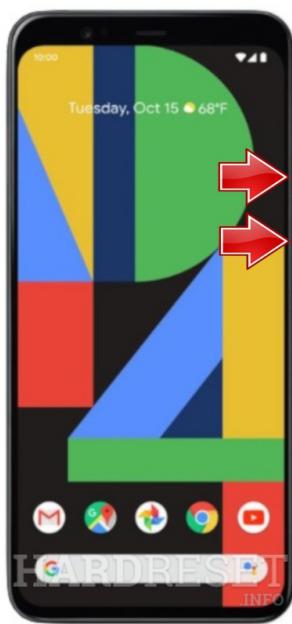
- If the GOOGL e logo appears let go of all keys.
- When the Android Robot shows up hold down the Power key and press Volume Up.
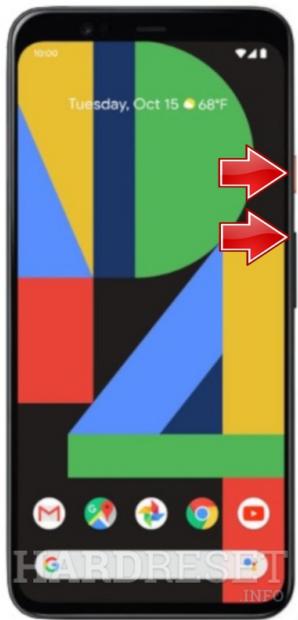
- Now select wipe data/factory reset by using Volume buttons to scroll down and the Power key to accept it.
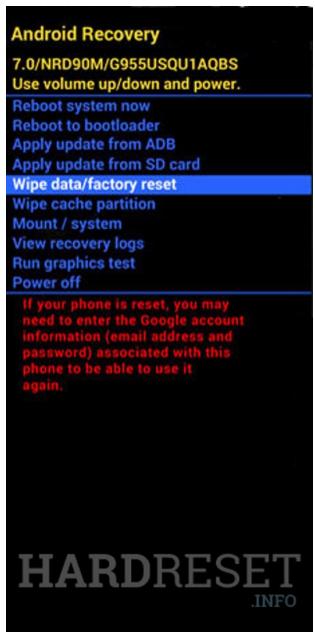
- Then choose yes from the menu and press the Power button.

- At the end select reboot system now by using the Power key.
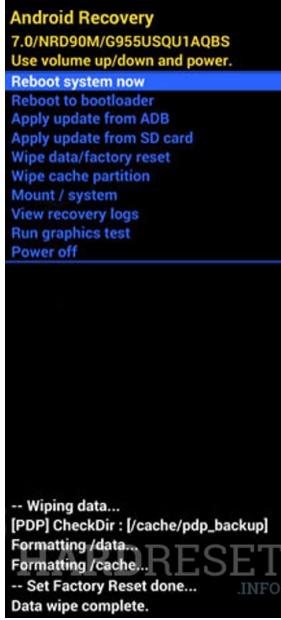
- Well done! The hard reset operation will be finished for a few moments.