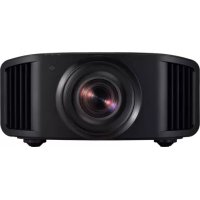
DLA25LTD - Projector JVC - Free user manual and instructions
Find the device manual for free DLA25LTD JVC in PDF.


| Brand | JVC |
| Model | DLA25LTD |
| Product type | D-ILA laser source projector |
| Display technology | D-ILA (Direct Drive Image Light Amplifier) |
| Native resolution | 3840 x 2160 pixels (4K) |
| Light source | Laser (LD block) |
| Throw ratio (16:9) | 1.4:1 to 2.8:1 |
| Screen size (diagonal) | 60 to 300 inches (17:9) |
| Vertical lens shift | Up to ±100% (motorized) |
| Horizontal lens shift | Up to ±43% (motorized) |
| Zoom | Motorized (2x) |
| Focus | Motorized |
| 3D functions | Yes (requires optional emitter and glasses) |
| Supported HDR formats | HDR10, HDR10+, HLG |
| HDMI inputs | 2 (HDMI 1 and 2) |
| Other connections | LAN (RJ-45), RS-232C, Trigger 12V, Service (USB), 3D Sync |
| Power consumption | 440 W (max) |
| Power supply | 100-240 V AC, 50/60 Hz |
| Dimensions (W x H x D) | 500 x 234 x 528 mm (with feet) |
| Weight | 25.4 kg |
| Noise level | ≤ 60 dB(A) (ISO 7779) |
| Operating temperature | 5°C to 35°C |
| Operating humidity | 20% to 80% |
| Maximum installation altitude | 2,000 m |
| Ceiling mount | Possible (optional mount required) |
| Maintenance | Air filter cleaning (replacement if necessary) |
| Safety | Mandatory grounding, do not look into the lens |
Frequently Asked Questions - DLA25LTD JVC
User questions about DLA25LTD JVC
0 question about this device. Answer the ones you know or ask your own.
Ask a new question about this device
Download the instructions for your Projector in PDF format for free! Find your manual DLA25LTD - JVC and take your electronic device back in hand. On this page are published all the documents necessary for the use of your device. DLA25LTD by JVC.
USER MANUAL DLA25LTD JVC
natural_image
Line drawing of a rectangular projector with a circular lens and internal grid array (no text or symbols)
- https://manual3.jvckenwood.com/projector/mobile/global/
DLA-RS4100E, DLA-RS3100E, DLA-RS2100E, DLA-RS1100E
N° de modèle
N° de série
IMPORTANT INFORMATIONS
AVERTISSEMENT:
POUR ÉVITER TOUT RISQUE D'INCENDIE OU D'ÉLÉCTROCUTION, N'EXPOSEZ PAS CET APPAREIL À LA PLUIE OU À L'HUMIDITÉ.
AVERTISSEMENT:
CET APPAREIL DOIT ETRE MIS A LA TERRE.
ATTENTION:
PORTABLE CART WARNING (symbol provided by RETAC)

S3126A
natural_image
Line drawing of a plug with three pins and a wire (no text or symbols)Pour le Royaume-Uni
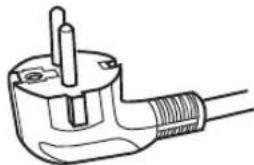
natural_image
Line drawing of a plug with a screw and terminal socket (no text or symbols)KENWOOD Corporation:
REPLACEMENT DU FUSIBLE:
Information for Users on Disposal of Old Equipment and Batteries


Products

Battery
[European Union only]
These symbols indicate that equipment with these symbols should not be disposed of as general household waste. If you want to dispose of the product or battery, please consider the collection systems or facilities for appropriate recycling.
Notice: The sign Pb below the symbol for batteries indicates that this battery contains lead.
FRANÇAIS
CLASS 1 LASER PRODUCT
PRODUIT LASER DE CLASSE 1
PRODUCTO LÁSER DE CLASE 1
LASERPRODUKT DER KLASSE 1
PRODOTTO LASER DI CLASSE 1
KLASSE 1 LASERPRODUCT
LASER CAUTION LABEL
ÉTIQUETTE DE MISE EN GARDE POUR LE LASER
CLASS 1 LASER PRODUCT
LASER PRODUCT KLASSE 1
PRODUIT LASER DE CLASSE 1
PRODUCTO LÁSER DE CLASE 1
PRODOTTO LASER DI CLASSE 1
LASERPRODUKT DER KLASSE 1
ЛАЗЕРНАЯ АППАРАТУРА КЛАССА 1
IEC60825-1:2014
CLASS 1 LASER PRODUCT
LASER PRODUCT KLASSE 1
PRODUIT LASER DE CLASSE 1
EN50689:2021
CONSUMER LASER PRODUCT
LASERPRODUCT VOOR CONSUMENTEN
PRODUIT LASER GRAND PUBLIC
PRODUCTO LÁSER DE CLASE 1
PRODOTTO LASER DI CLASSE 1
LASERPRODUKT DER KLASSE 1
ЛАЗЕРНАЯ АППАРАТУРА КЛАССА 1
PRODUCTO LÁSER PARA CONSUMO
PRODOTTO LASER DI CONSUMO
CONSUMER-LASERPRODUKT
This product complies with EN60825-1:2014+A11:2021.
This product complies with EN50689:2021
This product is designed to project images on a wall or screen.
Do not look into the lens while in use.
Use of controls or adjustments or performance of procedures other than those specified herein may result in hazardous laser radiation exposure.
Location information of the labels
natural_image
Technical line drawing of a rectangular device with internal components and a diagonal line indicating alignment (no text or symbols)LASER CAUTION LABEL
ÉTIQUETTE DE MISE EN GARDE POUR LE LASER
Light source specifications
Beam divergence angle from lens of this unit
DLA-NZ8 series, DLA-N7 series
$$ \alpha = 3 3. 5 ^ {\circ ( 1)} - 6 2. 7 ^ {\circ ( 2)} $$
*1:Tele/Télé/Tele/Tele/Teleobiettivo/Tele/Tele
*2:Wide/Large/Amplio/Weit/Grandangolo/Широкий/Breed
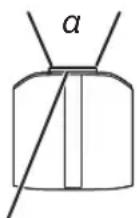
Laser emission port Port d'émission laser Puerto de emisión láser Laseraustrittsöffnung Porta emissione laser Port lazererного излучения Laseremissie-poort
LASER ENERGY LABEL
ÉTIQUETTE D'ÉNERGIE LASER
ETIQUETA ENERGÉTICA DEL LÁSER
LASERENERGIE-WARNSCHILD
ETICHETTA ENERGETICA LASER
WARNING: LASER ENERGY - EXPOSURE NEAR APERTURE MAY CAUSE BURNS
AVERTISSEMENT : ÉNERGIE LASER - L'EXPOSITION À PROXIMITÉ DE L'OUVERTURE PEUT ENTRAÎNER DES BRÛLURES
Location information of the labels
IMPORTANT INFORMATIONS
PORTABLE CART WARNING (symbol provided by RETAC)

S3126A
natural_image
Line drawing of a plug with three pins and a wire (no text or symbols)Pour le Royaume-Uni
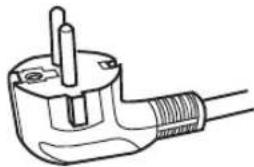
natural_image
Line drawing of a plug with a screw and terminal socket (no text or symbols)KENWOOD Corporation:
REPLACEMENT DU FUSIBLE:
Information for Users on Disposal of Old Equipment and Batteries


Products

Battery
[European Union only]
These symbols indicate that equipment with these symbols should not be disposed of as general household waste. If you want to dispose of the product or battery, please consider the collection systems or facilities for appropriate recycling.
Notice: The sign Pb below the symbol for batteries indicates that this battery contains lead.
FRANÇAIS
Software License Agreement 122
Important Notice concerning the Software ..... 124
Index 125
natural_image
Line drawings of various household appliances including a remote control, batteries, and cordages (no text or symbols)① Objectif
natural_image
Technical line drawing of a device rear panel with four circular components and connecting lines, no text or symbols present.⑤ Pieds
natural_image
Technical line drawing of a rectangular device with mounting feet and a labeled component (no text or symbols present)NZ9 NZ8 NZ7 RS4100 RS3100 RS2100
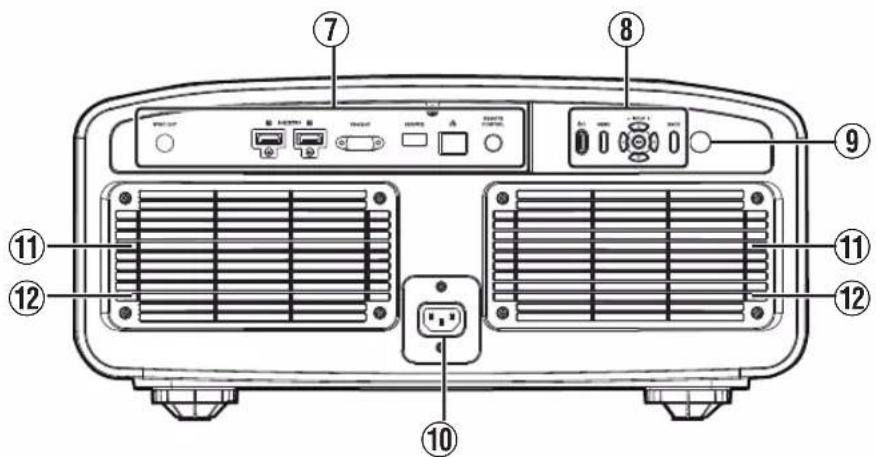
⑦ Bornes d'entrée
⑦ Bornes d'entrée
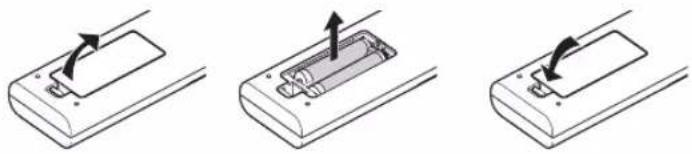
Retrait des piles
natural_image
Three-step diagram showing a battery casing with an arrow indicating rotation, no text or symbols presentnatural_image
Diagram showing a projector mounted on a stand with a large screen, no text or symbols presentnatural_image
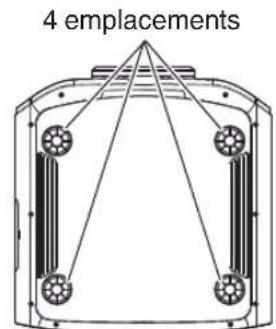
Technical line drawing of a mechanical component with four circular components and diagonal lines (no text or symbols)natural_image
Diagram showing light rays projecting onto a rectangular device (no text or symbols present)natural_image
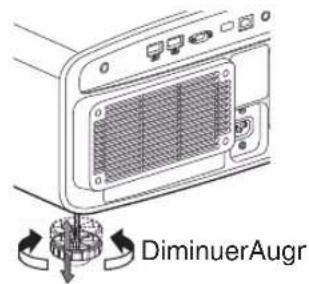
Line drawing of a device rear panel with a button and screw base (no text or symbols)Pieds
natural_image
Diagram showing light rays projecting onto a surface with three rectangular objects (no text or symbols)Position verticale
natural_image
Diagram of light ray paths through a lens system with two rectangular objects on the right side (no text or symbols)* Image 16:9
natural_image
Line drawing of a projector with a circular button, showing internal components and an arrow indicating direction (no text or symbols)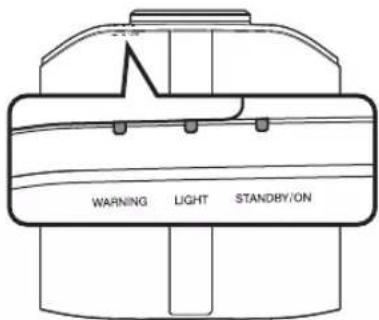
Télécommande
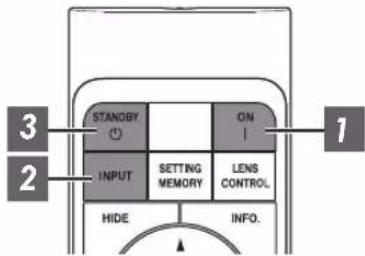
flowchart
graph TD
    A["3"] --> B["STANDBY"]
    C["2"] --> D["INPUT"]
    E["1"] --> F["ON"]
    G["1"] --> H["SENS CONTROL"]
    I["2"] --> J["HIDE"]
    K["4"] --> L["INFO."]
Cet appareil
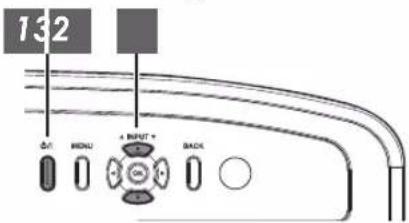
REMARQUE
natural_image
Simple gray 3D arrow pointing diagonally upward to the right, no text or symbols presentFrame Adapt HDR (Dynamic Tone Mapping)
→ "Réglage Frame Adapt HDR" (P. 48)
Theater Optimizer
natural_image
Group of business professionals walking down a modern glass-lit office hallway (no visible text or signage)
natural_image
Group of business professionals walking down a modern glass-lit office building (no visible text or signage)natural_image
Simple black arrow pointing diagonally upward to the right inside a rectangular frame (no text or symbols)natural_image
Simple black arrow pointing diagonally upward to the right inside a rectangular frame (no text or symbols)natural_image
Simple black arrow pointing diagonally upward to the right inside a gray rectangular border (no text or symbols)natural_image
Simple black arrow pointing diagonally upward to the right inside a rectangular frame (no text or symbols)natural_image
Interior view of a subway station platform with multiple tracks and overhead lighting (no visible text or signage)
natural_image
Interior view of a train station platform with multiple tracks and service counters (no visible text or signage)natural_image
Close-up of a colorful traditional Chinese dragon mask with exaggerated facial features (no text or symbols visible)

natural_image
Colorful painted dragon head with exaggerated facial features, no visible text or symbolsClear Motion Drive (C.M.D.)
▶Theater Optimizer P. 72
▶Niveau HDR ...... P. 72
▶MPC Niveau P. 73
▶MPC/e-shift NZ9 NZ8 NZ7 RS4100 RS3100 RS2100, MPC Niveau NP5 RS1100 P. 74
→ 8K e-shift NZ9 NZ8 NZ7 RS4100 RS3100 RS2100 P. 74
→ Mode Graphique ...... P. 74
→ Netteté Accentuée ...... P. 74
→ NR P. 74
→ BNR P. 74
→ MNR ...... P. 74
→ "Utilisation de "Theater Optimizer" (P. 49)
natural_image
Newborn baby wearing a knitted blanket, resting on a fluffy white surface (no text or symbols visible)Marche

natural_image
Newborn baby sleeping with a knitted hat, surrounded by clouds (no text or symbols visible)"Haut" / "Bas" / "Gauche" / "Droite"
https://www.jvc.com/global/projector/screen

REMARQUE
natural_image
Diagram of a device with a curved arrow pointing to a rectangular panel or connector (no text or symbols present)natural_image
Technical line drawing of an electronic device showing internal components and a close-up view (no text or symbols)natural_image
Diagram showing a device with an internal connector and cable, no text or symbols presentnatural_image
Diagram showing a device with an internal connector and a separate housing component (no text or symbols)natural_image
Technical line drawing of a device rear panel showing internal components and a close-up view (no text or symbols)natural_image
Diagram of a device with an arrow pointing to a rectangular component (no text or symbols present)natural_image
Diagram showing a cable being inserted into a connector with a dashed line indicating the insertion direction (no text or symbols present)REMARQUE
natural_image
Diagram showing a device being processed into a grid-patterned housing, with no visible text or symbols.natural_image
Abstract color gradient background with a white play button icon (no text or symbols)FILMMAKER MODE™
NZ9 NZ8 NZ7 RS4100 RS3100 RS2100
Software License Agreement
The software embedded in the Product (hereinafter the “Licensed Software”) provided by JVCKENWOOD Corporation (hereinafter the “Licensor”) is copyrighted to or sublicensable by the Licensor, and this Agreement provides for the terms and conditions which Users shall follow in order to use the Licensed Software. The User shall use the Licensed Software by agreeing with the terms of this Software License Agreement. This Agreement shall be deemed completed at the time the User (hereinafter the “User”) initially used the Product in which the “Licensed Software” is embedded.
The Licensed Software may include the software which has been licensed to the Licensor directly or indirectly from any third party. In such case, some third parties require the Users to follow their conditions for use separately from this Software License Agreement. Such software shall not be subject to this Agreement, and the Users are urged to read the “Important Notice concerning the Software”P. 124” to be provided separately.
Article 1 General Provision
The Licensor shall grant to the User a non-exclusive and non-transferable (other than the exceptional case referred to in Article 3, Paragraph 1) licensed to use the Licensed Software within the country of the User (the country where the User bought the Product (hereinafter the “Country”)).
Article 2 License
- The license granted under this Agreement shall be the right to use the Licensed Software in the Product.
- The User shall not duplicate, copy, modify, add, translate or otherwise alter, or lease the Licensed Software and any related documents, whether in whole or in part.
- The use of the Licensed Software shall be limited to personal purpose, and the Licensed Software shall not be distributed, licensed or sub-licensed whether it is for commercial purpose or not.
- The User shall use the Licensed Software according to the directions described in the operation manual or help file, and is prohibited to use or duplicate any data in a manner violating the Copyright Law or any other laws and regulations by applying whole or a part of the Licensed Software.
Article 3 Conditions for Grant of License
-
When the User transfers the Product, it may also transfer the license to use the Licensed Software embedded in the Product (including any related materials, updates and upgrades) on condition that no original, copies or related materials continue in the possession of the User, and that the User shall cause the transferee to comply with this Software License Agreement.
-
The User shall not carry out reverse engineering, disassembling, decompiling or any other code analysis works in connection with the Licensed Software.
Article 4 Right pertaining to the Licensed Software
- Any and all copyrights and other rights pertaining to the Licensed Software and related documents shall belong to the Licensor or the original holder of the right who granted to the Licensor the license or sublicense for the Licensed Software (hereinafter the "Original Rightholder"), and the User shall not be entitled to any right other than the license granted hereunder, in respect of the Licensed Software and any related documents.
- The User shall, whenever the User uses the Licensed Software, comply with any laws relating to the copyright and other intellectual property rights.
Article 5 Indemnification of Licensor
- Neither the Licensor nor the Original Rightholder shall be liable for any damage incurred by the User or any third party due to the exercise of the license granted to the User under this Agreement, unless otherwise restricted by law.
- The Licensor will offer no guarantee for the merchantability, convertibility and consistency with certain objective of the Licensed Software.
Article 6 Liability to Third Party
If any dispute has arisen with any third party due to an infringement upon a copyright, patent or any other intellectual property right that was caused by the User's use of the Licensed Software, the User shall settle such dispute at the User's own cost and hold the Licensor and the Original Rightholder harmless from any inconvenience it may cause.
Article 7 Confidentiality
The User shall keep the confidentiality of such portion of the Licensed Software, related documents thereof or any other information to be granted under this Agreement, as well as the conditions of this Agreement as has not yet entered the public domain, and shall not disclose or divulge the same to any third party without approval of the Licensor.
Article 8 Termination
In case the User falls under any of the events described in the following items, the Licensor may immediately terminate this Agreement or claim that the User compensates for the damage incurred by the Licensor due to such event:
(1) when the User violated any provision of this Agreement; or
(2) when a petition has been filed against the User for an attachment, provisional attachment, provisional disposition or any other compulsory execution.
Article 9 Destruction of the Licensed Software
If this Agreement is terminated pursuant to the provision of Article 8, the User shall destroy the Licensed Software, any related documents and copies thereof within two (2) weeks from such date of termination.
Article 10 Export Restriction
- The User shall understand that the Licensed Software shall be subject to the export restrictions adopted by the country of User and any other countries.
- The User shall agree that the software will be subject to any and all applicable international and domestic laws including the export control regulation of the country of User and any other countries, and any restrictions concerning the end-users, the use by end-users and importing countries to be provided by the country of User and any other countries, and any other governmental authorities.
- If the User is an agency of the United States of America (the “Government”), the User acknowledge Licensor’s representation that the Licensed Software is a “Commercial Item” as defined in Federal Acquisition Regulation (FAR) part 2.101(g) consisting unpublished “Commercial Computer Software” as those items are used at FAR part 12.212 and is only license the User with the same use right Licensor grants all commercial end users pursuant to the terms of this Agreement.
Article 11 Miscellaneous
- In the event any part of this Agreement is invalidated by operation of law, the residual provisions shall continue in force.
- Matters not stipulated in this Agreement or any ambiguity or question raised in the construction of this Agreement shall be provided or settled upon good-faith consultation between the Licensor and the User.
- The Licensor and the User hereby agree that this Agreement is governed by the laws of Japan, and any dispute arising from, and relating to the rights and obligations under, this Agreement shall be submitted to the exclusive jurisdiction of the Tokyo District Court for its first instance.
Important Notice concerning the Software
Software License Attached to the Product :
The Software embedded in the Product is composed of several independent software components, and in each of such individual components (hereinafter the “Licensed Software”), a copyright of either JVCKENWOOD Corporation (hereinafter “JKC”) or a third party subsists.
The Product uses the software component designated in the End-User License Agreement that was executed between JKC and a third party (hereinafter “EULA”).
The Licensed Software covers those corresponding to free software, and, as a condition of distribution of the software component in executable format which is based on the license granted under the GNU General Public License or Lesser General Public License (hereinafter "GPL/LGPL"), it requires an availability of the source code for the relevant component.
Please refer to the following URL concerning the distribution of the source code;
https://www3.jvckenwood.com/english/download/gpl/index.html
Please note that we are unable to answer any inquiry relating to the contents, etc. of the source code. In addition, the Licensed Software includes the software developed or created independently by JKC and there exists an ownership of JKC in such software and any accompanying documents, which is protected by the Copyright Law, any international treaties and other applicable laws. As to matters concerning the handling by JKC of the software components, please refer to the “Software License Agreement” attached hereto. Please note that any software component licensed under “EULA” which is not subject to “GPL/LGPL,” and those developed or created independently by JKC shall not be subject to the requirement for provision of the source code. The software component distributed under “GPL/LGPL” shall be licensed to users without charge, and, therefore, no warranty is given for such software component, either express or implied, within the scope of the applicable laws and regulations. Unless otherwise permitted by applicable laws and regulations or agreed in written form, none of the owners of the copyright or persons entitled to alter or redistribute the software component under the said license shall have any liability for any type of damage or loss resulting from the use of or inability to use such software component. For further details of the conditions of use of such software component or matters required to be complied with, please refer to the relevant “GPL/LGPL”.
Users are urged to read the details for the relevant license carefully before using the software component covered by "GPL/LGPL" and embedded in the Product. Since the terms and conditions of individual licenses are provided by parties other than JKC, the original English version will be displayed by the Product menu screen.
① Turn on the power of the projector.
② Press the [MENU] button.
③ Select [Fonction]→[Licence].
Index
A Accessoires....20
Accessoires en option....20
Adresse IP 88
Adresse MAC 88
Affichage 86
Clear Motion Drive....61
Clear Motion Drive 61,74
Client DHCP 88
MPC/e-shift NZ9 NZ8 NZ7 RS4100 RS3100 RS2100
74
Theater Optimizer 72
Traitement HDR 71
Trapèze 86
Trigger 87