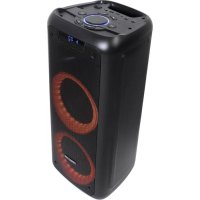
PARTYDUO - Speaker FoneStar - Free user manual and instructions
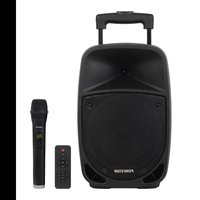
Find the device manual for free PARTYDUO FoneStar in PDF.


| Product type | Portable wireless speaker |
| Brand | FoneStar |
| Model | PARTYDUO |
| Power | 100 W |
| Speakers | 2 woofer 6 1/2" and 1 tweeter 2" |
| Inputs | 2 microphones (6.3 mm jack), 1 stereo auxiliary (3.5 mm jack), USB port, microSD port |
| Power supply | 9 V DC, 2 A (adapter included); Li-ion battery 7.4 V, 3.6 Ah |
| Battery life | Up to 6 hours (at 50% volume) |
| Charging time | Approximately 8 hours |
| FM radio | Digital FM tuner with automatic search and memory |
| Functions | Karaoke, independent mic/music control, echo, preset equalizations (Pop, Rock, Jazz, Classic, Flat), LED light effects, DUO function (synchronization of two speakers) |
| Remote control | Yes (LR03-AAA batteries included) |
| Dimensions | 242 x 595 x 250 mm |
| Included accessories | Power adapter, remote control, batteries for remote control |
| Maintenance and cleaning | Clean with a soft, dry cloth. Avoid moisture and liquids. |
| Safety | Do not expose to water. Use only the supplied adapter. Do not open the device. |
Frequently Asked Questions - PARTYDUO FoneStar
User questions about PARTYDUO FoneStar
0 question about this device. Answer the ones you know or ask your own.
Ask a new question about this device
Download the instructions for your Speaker in PDF format for free! Find your manual PARTYDUO - FoneStar and take your electronic device back in hand. On this page are published all the documents necessary for the use of your device. PARTYDUO by FoneStar.
USER MANUAL PARTYDUO FoneStar
natural_image
Black and teal portable electronic device with two circular cutouts, next to a remote control (no visible text or symbols)INSTRUCTION MANUAL/MANUAL DE USUARIO/MODE D'EMPLOI/MANUAL DE INSTRUÇÕES
FONESTAR
DESCRIPTION
- Wireless portable speaker with 2 x 6 1/2" woofers and 1 x 2" tweeter for high power and sound quality.
- USB/microSD player and FM digital tuner, all playback formats in one device.
- Two microphone inputs with independent echo and volume control.
- Its auxiliary input increases playback possibilities, allowing any other audio device to be connected.
- Double LED ring with light effects to the rhythm of the music.
- Its long-lasting rechargeable battery makes it very versatile and adaptable to a multitude of uses.
- Includes remote control for remote control.
CONTROLS AND FUNCTIONS
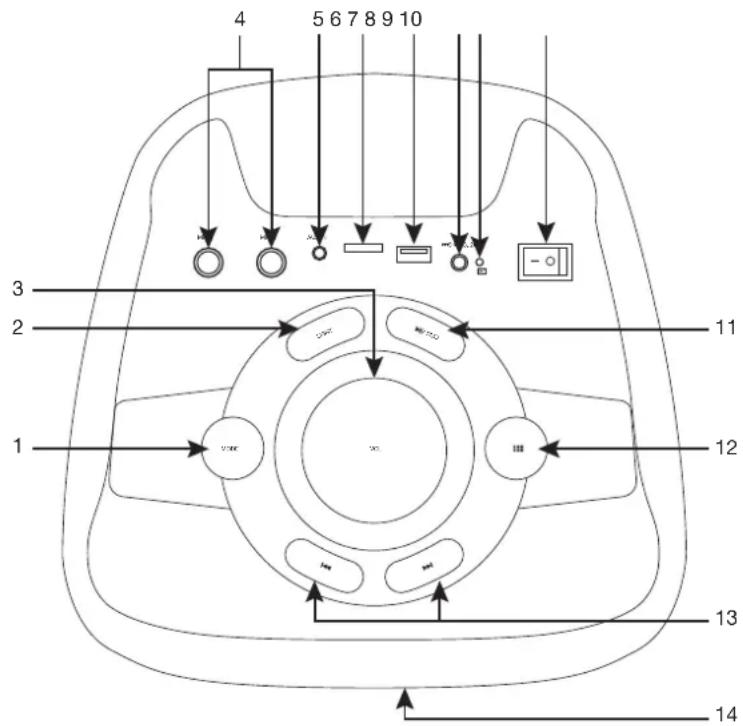
1.- MODE: audio source selection button.
2.- LIGHT: Button for controlling the light effects. Short presses of this button change the colour of the effects and long presses change the type of effect or deactivate it.
3.- VOL: general volume control.
4.- MIC 1/MIC 2: microphone inputs, 6.3 mm jack plug.
5.- AUX IN: stereo auxiliary input, 3.5 mm jack connector.
6.- Port for microSD card connection.
7.- Connection port for USB devices.
8.- Power input for connection of the supplied power adapter.
9.- Battery charge status indicator light. When connected to the power supply via the mains adapter, this LED lights up red during the battery charging process and green when it is complete and the battery is charged.
10.- Speaker on/off switch.
11.- ▶II/DUO: short presses of this button: in player mode, pauses/resumes playback; in radio mode, starts automatic search and storage of FM stations. A long press of this button activates the DUO function.
12.- ■: this button allows access to the advanced options, modify the value of these settings with the volume control:
- t - TREBLE: reinforcement/attenuation of high frequencies.
-
b - BASS: reinforcement/attenuation of low frequencies.
-
cu: volume control of the microphone inputs.
- ec: control of the echo effect applied to the microphone inputs.
13.- ◀◀/▶: short presses of these buttons: in player mode, skip to the previous/next track; in radio mode, skip to the previous/next station recorded in memory. And long presses of these buttons, in player mode, fast reverse/fast forward the audio track.
14.- Battery charge status indicator. The three blocks indicate 100%, 40% and 10% battery respectively, when the battery has 5% or less charge the indicator flashes and the speaker emits an audible signal.
REMOTE CONTROL
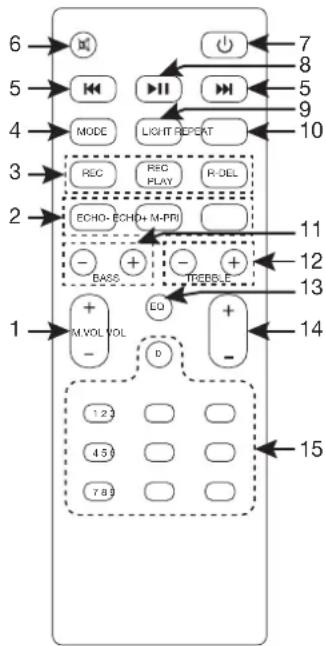
1.- M. VOL: volume control of the microphone inputs.
2.- Microphone functions:
- ECHO-/ECHO+: control of the echo effect applied to the microphone inputs.
- M-PRI: activates/deactivates the priority of the microphone inputs.
3.- Recording functions:
- REC: starts microphone recording.
- REC PLAY: play the recorded tracks.
- R-DEL: delete currently playing recording track.
4.- MODE: audio source selection button.
5.- Short presses of these buttons: in player mode, skip to the previous/next track; in radio mode, skip to the previous/next station recorded in memory. And long presses of these buttons, in player mode, fast reverse/fast forward the audio track.
6.- ☒: activates/deactivates the mute mode.
7.- ⏻: speaker on/standby.
8.- ▶II: short presses of this button: in player mode, pauses/resumes playback; in radio mode, starts automatic search and storage of FM stations (it is recommended to connect a cable to AUX IN to improve reception). A long press on this button activates the DUO function.
9.- LIGHT: button for controlling the lighting effects. Short presses of this button change the colour of the effects and long presses change the type of effect or deactivate it.
10.- REPEAT: repeat mode selection, microSD and USB modes only.
11.- BASS: reinforcement/attenuation of low frequencies.
12.- TREBLE: reinforcement/attenuation of high frequencies.
13.- EQ: selection of preset EQ settings (Pop, Rock, Jazz, Classical and Flat).
14.- VOL: general volume control.
15.- 0-9: direct track selection, only in microSD and USB modes.
CONNECTION - INSTRUCTIONS FOR USE
DUO FUNCTION
Allows the same audio to be shared on 2 speakers simultaneously in all modes.
- On the main speaker, select the desired playback mode.
- Turn on the secondary speaker and make a long press on the button. This speaker will show SLAU flashing on its display.
- It will automatically connect to the main speaker and start playing music. On the display SLAU will remain fixed.
NOTA: Full control is only available on the main speaker. From the secondary speaker you can control the
▶, □ ▶ and volume functions for player modes, and volume only in auxiliary and FM radio modes.
- Connect the microphones and adjust the volume and echo effect.
- Connect a recording unit to the microSD or USB ports and activate the desired mode on the equipment except for the microSD or USB which is where the recording will be made.
- Press the REC button on the remote control to start the recording and the ▶■ button to end.
CONNECTION
- If you are going to use the loudspeaker with a battery, first check that the battery is charged.
- Connect the audio source (AUX IN, microSD, USB).
- Turn on the loudspeaker from the switch on the top panel.
- Adjust the volume and make the necessary equalisations to achieve the best sound.
IMPORTANT: If you are not going to use the speaker for an extended period of time, make sure that you turn off the speaker from the top panel switch. The button on the remote control activates the StandBy mode in which the speaker will continue to consume some battery power.
TECHNICAL SPECIFICATIONS
| PARTY-DUO | |
| FEATURES Wireless portable speaker.USB/microSD player and FM radio.Karaoke function, independent control of music and microphones.Echo function and equalisations.Double LED ring with selectable light effects.Up to 6 hours of autonomy.Remote control. | |
| POWER 100 W | |
| LOUDSPEAKERS 2 x 6 | 12 " woofer1 x 2" tweeter |
| INPUTS 2 mics, 6.3 mm | jack1 stereo aux, 3.5 mm jack |
| POWER SUPPLY 9 V DC | C, 2 A with included adapterLi-ion battery 7.4 V, 3.6 AhAutonomy with rechargeable battery: 6 h*.Battery charging time: 8 h*Autonomy at 50% volume. Depending on the type of music and volume, autonomy may be reduced.Remote control: 2 LR03-AAA batteries |
| DIMENSIONS 242 x 595 | x 250 mm depth |
| ACCESSORIES Batteries included | |
SIMPLIFIED EU DECLARATION OF CONFORMITY
FONESTAR SISTEMAS S.A. hereby declares that the speaker PARTY-DUO complies with the Directive 2014/53/EU. The complete text of the EU Declaration of Conformity is available at the following internet address: fonestar.com/PARTY-DUO